




© 2018 HashiCorp
An infrastructure as code approach to safely
provision any cloud, infrastructure, or service.
Multi cloud.
Hybrid cloud.
Any infrastructure.
Anywhere.
1
Copyright © 2018 HashiCorp ⁄ 2
Arslan Saeed
Senior Solutions Engineer
HashiCorp
Kristin Laemmert
Software Engineer
HashiCorp
Twitter: @mildwonkey
Our Presenters
Today
© 2018 HashiCorp
Terraform 0.12:
HCL Enhancements &
Remote Plan & Apply
3
Copyright © 2018 HashiCorp ⁄
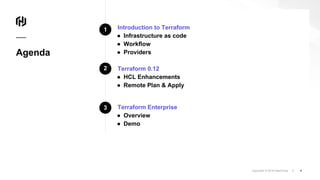
Introduction to Terraform
● Infrastructure as code
● Workflow
● Providers
Terraform 0.12
● HCL Enhancements
● Remote Plan & Apply
Terraform Enterprise
● Overview
● Demo
4
Agenda
1
2
3
© 2018 HashiCorp
Introduction to
Terraform
5
© 2018 HashiCorp
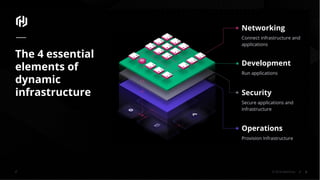
Networking
Connect infrastructure and
applications
Development
Run applications
Security
Secure applications and
infrastructure
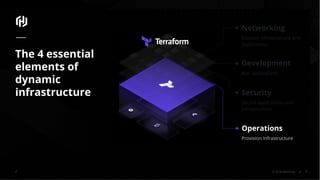
Operations
Provision Infrastructure
The 4 essential
elements of
dynamic
infrastructure
6
© 2018 HashiCorp
Networking
Connect infrastructure and
applications
Development
Run applications
Security
Secure applications and
infrastructure
Operations
Provision Infrastructure
The 4 essential
elements of
dynamic
infrastructure
7
© 2018 HashiCorp
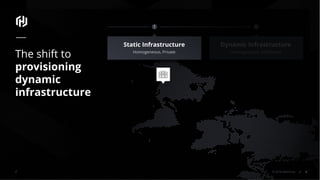
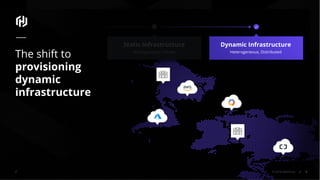
Static Infrastructure
Homogeneous, Private
The shift to
provisioning
dynamic
infrastructure
Dynamic Infrastructure
Heterogeneous, Distributed
8
© 2018 HashiCorp
Static Infrastructure
Homogeneous, Private
The shift to
provisioning
dynamic
infrastructure
Dynamic Infrastructure
Heterogeneous, Distributed
9
© 2018 HashiCorp
The shift to
provisioning
dynamic
infrastructure
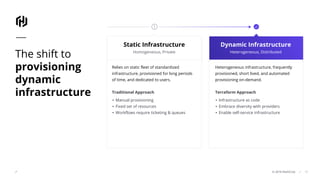
Dynamic Infrastructure
Heterogeneous, Distributed
Relies on static fleet of standardized
infrastructure, provisioned for long periods
of time, and dedicated to users.
Traditional Approach
▪ Manual provisioning
▪ Fixed set of resources
▪ Workflows require ticketing & queues
Heterogeneous infrastructure, frequently
provisioned, short lived, and automated
provisioning on-demand.
Terraform Approach
▪ Infrastructure as code
▪ Embrace diversity with providers
▪ Enable self-service infrastructure
Static Infrastructure
Homogeneous, Private
10
Copyright © 2018 HashiCorp ⁄
Terraform
Principles
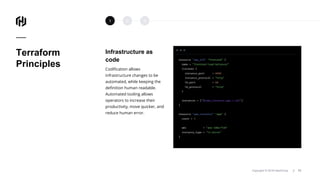
Infrastructure as
code
Codification allows
infrastructure changes to be
automated, while keeping the
definition human readable.
Automated tooling allows
operators to increase their
productivity, move quicker, and
reduce human error.
11Copyright © 2018 HashiCorp ⁄
1 2 3
Copyright © 2018 HashiCorp ⁄
Terraform
Principles
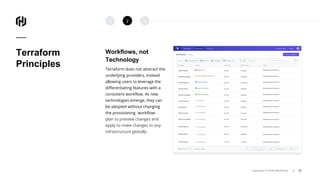
Workflows, not
Technology
Terraform does not abstract the
underlying providers, instead
allowing users to leverage the
differentiating features with a
consistent workflow. As new
technologies emerge, they can
be adopted without changing
the provisioning workflow:
plan to preview changes and
apply to make changes to any
infrastructure globally.
12Copyright © 2018 HashiCorp ⁄
1 2 3
Copyright © 2018 HashiCorp ⁄
Terraform
Principles
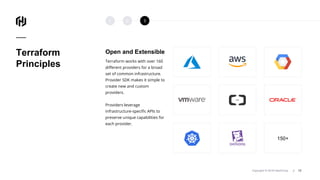
Open and Extensible
Terraform works with over 160
different providers for a broad
set of common infrastructure.
Provider SDK makes it simple to
create new and custom
providers.
Providers leverage
infrastructure-specific APIs to
preserve unique capabilities for
each provider.
13Copyright © 2018 HashiCorp ⁄
1 2 3
150+
© 2018 HashiCorp
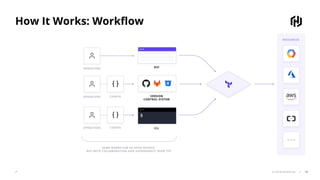
How It Works: Workflow
14
Copyright © 2018 HashiCorp ⁄
Terraform
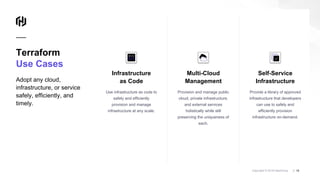
Use Cases
Adopt any cloud,
infrastructure, or service
safely, efficiently, and
timely.
15Copyright © 2018 HashiCorp ⁄
Multi-Cloud
Management
Provision and manage public
cloud, private infrastructure,
and external services
holistically while still
preserving the uniqueness of
each.
Self-Service
Infrastructure
Provide a library of approved
infrastructure that developers
can use to safely and
efficiently provision
infrastructure on-demand.
Infrastructure
as Code
Use infrastructure as code to
safely and efficiently
provision and manage
infrastructure at any scale.
© 2018 HashiCorp
Terraform 0.12
16
Copyright © 2018 HashiCorp ⁄
HCL Enhancements
Introduction to HCL
17
© 2018 HashiCorp
Terraform
Configuration
Language:
Terraform 0.11
18
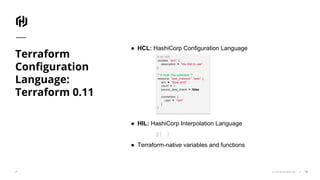
● HCL: HashiCorp Configuration Language
● HIL: HashiCorp Interpolation Language
${ }
● Terraform-native variables and functions
# An AMI
variable "ami" {
description = "the AMI to use"
}
/* A multi line comment. */
resource "aws_instance" "web" {
ami = "${var.ami}"
count = 2
source_dest_check = false
connection {
user = "root"
}
}
© 2018 HashiCorp
Terraform
Configuration
Language:
Terraform 0.12
19
Enhanced HCL
● Merges HCL and HIL
● Introduces a robust type system
● Addresses large list of enhancements and feature
requests
© 2018 HashiCorp
Terraform 0.12:
Configuration
Language
Enhancements
20
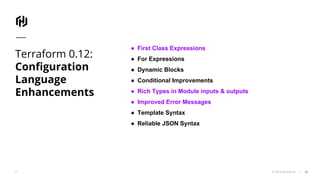
● First Class Expressions
● For Expressions
● Dynamic Blocks
● Conditional Improvements
● Rich Types in Module inputs & outputs
● Improved Error Messages
● Template Syntax
● Reliable JSON Syntax
© 2018 HashiCorp
HCL Enhancements Deep Dive
21
Copyright © 2018 HashiCorp ⁄
HCL Enhancements
First Class Expressions
22
© 2018 HashiCorp
Terraform 0.12:
First-Class
Expressions
23
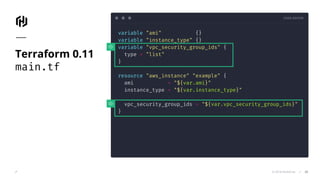
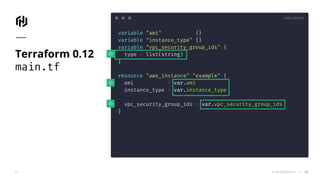
● Operations and variables can be used outside
of string interpolation
○ Buh-bye “${ }”
● Lists and maps can be used directly with
expressions
○ Less list(""), more []
CODE EDITOR
© 2018 HashiCorp
variable "ami" {}
variable "instance_type" {}
variable "vpc_security_group_ids" {
type = "list"
}
resource "aws_instance" "example" {
ami = "${var.ami}"
instance_type = "${var.instance_type}"
vpc_security_group_ids = "${var.vpc_security_group_ids}"
}
Terraform 0.11
main.tf
24
CODE EDITOR
© 2018 HashiCorp
variable "ami" {}
variable "instance_type" {}
variable "vpc_security_group_ids" {
type = list(string)
}
resource "aws_instance" "example" {
ami = var.ami
instance_type = var.instance_type
vpc_security_group_ids = var.vpc_security_group_ids
}
Terraform 0.12
main.tf
25
CODE EDITOR
© 2018 HashiCorp
variable "ami" {}
variable "instance_type" {}
variable "vpc_security_group_ids" {
type = "string"
default = ""
}
resource "aws_instance" "example" {
ami = "${var.ami}"
instance_type = "${var.instance_type}"
vpc_security_group_ids =
"${var.vpc_security_group_id != "" ?
[var.vpc_security_group_id] : list("") }"
}
Terraform 0.11
main.tf
26
CODE EDITOR
© 2018 HashiCorp
variable "ami" {}
variable "instance_type" {}
variable "vpc_security_group_ids" {
type = string
default = ""
}
resource "aws_instance" "example" {
ami = var.ami
instance_type = var.instance_type
vpc_security_group_ids =
var.vpc_security_group_id != "" ?
[var.vpc_security_group_id] : []
}
Terraform 0.12
main.tf
27
© 2018 HashiCorp
Terraform 0.12
Rich Value Types
28
Copyright © 2018 HashiCorp ⁄
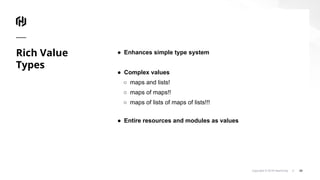
Rich Value
Types
● Enhances simple type system
● Complex values
○ maps and lists!
○ maps of maps!!
○ maps of lists of maps of lists!!!
● Entire resources and modules as values
29
TERMINAL
© 2018 HashiCorp
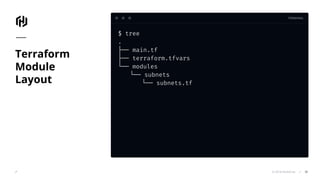
$ tree
.
├── main.tf
├── terraform.tfvars
└── modules
└── subnets
└── subnets.tf
Terraform
Module
Layout
30
CODE EDITOR
© 2018 HashiCorp
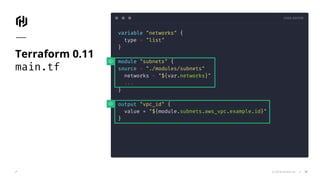
variable "networks" {
type = "list"
}
module "subnets" {
source = "./modules/subnets"
networks = "${var.networks}"
...
}
output "vpc_id" {
value = "${module.subnets.aws_vpc.example.id}"
}
Terraform 0.11
main.tf
31
CODE EDITOR
© 2018 HashiCorp
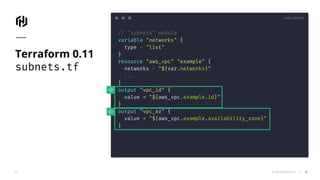
// "subnets" module
variable "networks" {
type = "list"
}
resource "aws_vpc" "example" {
networks = "${var.networks}"
...
}
output "vpc_id" {
value = "${aws_vpc.example.id}"
}
output "vpc_az" {
value = "${aws_vpc.example.availability_zone}"
}
Terraform 0.11
subnets.tf
32
CODE EDITOR
© 2018 HashiCorp
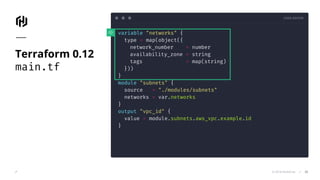
variable "networks" {
type = map(object({
network_number = number
availability_zone = string
tags = map(string)
}))
}
module "subnets" {
source = "./modules/subnets"
networks = var.networks
}
output "vpc_id" {
value = module.subnets.aws_vpc.example.id
}
Terraform 0.12
main.tf
33
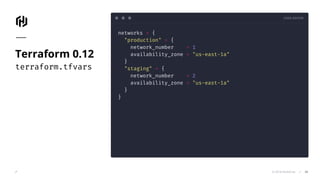
CODE EDITOR
© 2018 HashiCorp
networks = {
"production" = {
network_number = 1
availability_zone = "us-east-1a"
}
"staging" = {
network_number = 2
availability_zone = "us-east-1a"
}
}
Terraform 0.12
terraform.tfvars
34
CODE EDITOR
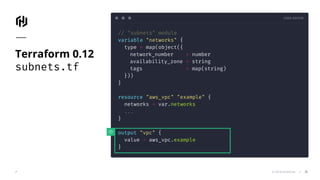
© 2018 HashiCorp
// "subnets" module
variable "networks" {
type = map(object({
network_number = number
availability_zone = string
tags = map(string)
}))
}
resource "aws_vpc" "example" {
networks = var.networks
...
}
output "vpc" {
value = aws_vpc.example
}
Terraform 0.12
subnets.tf
35
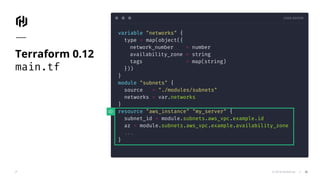
CODE EDITOR
© 2018 HashiCorp
variable "networks" {
type = map(object({
network_number = number
availability_zone = string
tags = map(string)
}))
}
module "subnets" {
source = "./modules/subnets"
networks = var.networks
}
resource "aws_instance" "my_server" {
subnet_id = module.subnets.aws_vpc.example.id
az = module.subnets.aws_vpc.example.availability_zone
...
}
Terraform 0.12
main.tf
36
© 2018 HashiCorp
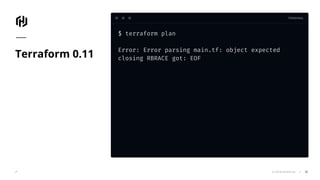
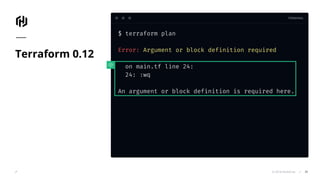
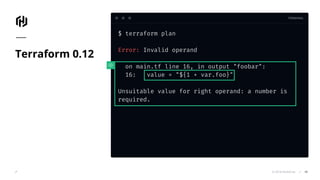
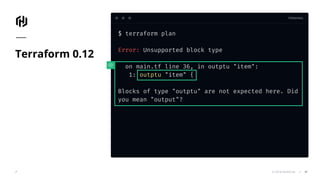
Terraform 0.12
Improved Error Messages
37
TERMINAL
© 2018 HashiCorp
$ terraform plan
Error: Error parsing main.tf: object expected
closing RBRACE got: EOFTerraform 0.11
38
TERMINAL
© 2018 HashiCorp
$ terraform plan
Error: Argument or block definition required
on main.tf line 24:
24: :wq
An argument or block definition is required here.
Terraform 0.12
39
TERMINAL
© 2018 HashiCorp
$ terraform plan
Error: Invalid operand
on main.tf line 16, in output "foobar":
16: value = "${1 + var.foo}"
Unsuitable value for right operand: a number is
required.
Terraform 0.12
40
TERMINAL
© 2018 HashiCorp
$ terraform plan
Error: Unsupported block type
on main.tf line 36, in outptu "item":
1: outptu "item" {
Blocks of type "outptu" are not expected here. Did
you mean "output"?
Terraform 0.12
41
Copyright © 2018 HashiCorp ⁄
More about
Terraform
0.12
Please read our Terraform 0.12 Blog for more
information.
https://www.hashicorp.com/blog/terraform-0-1-2-preview
42
© 2018 HashiCorp
Terraform 0.12
Upgrade Path
43
Copyright © 2018 HashiCorp ⁄
Upgrade Please read our Terraform 0.12 Upgrade Guide:
https://www.terraform.io/upgrade-guides/0-12.html
44
© 2018 HashiCorp
Remote
Plan & Apply
45
⁄Copyright © 2018 HashiCorp 46
Remote: Plan & Apply
Overview
© 2018 HashiCorp
Remote Plan
and Apply
47
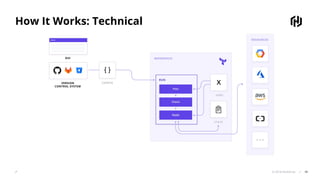
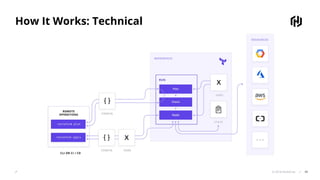
● Ability to utilize Terraform functions ie ‘plan’ and
‘apply’ back-ended and executed by Terraform
Enterprise remotely
● Centralized within Terraform Enterprise
● View of change history
● Ability to integrate policy controls and checks
© 2018 HashiCorp
How It Works: Technical
48
© 2018 HashiCorp
How It Works: Technical
49
© 2018 HashiCorp
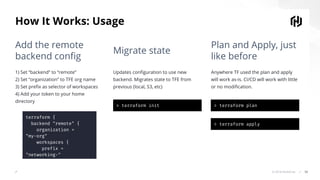
How It Works: Usage
50
terraform {
backend "remote" {
organization =
"my-org"
workspaces {
prefix =
"networking-"
}
}
}
> terraform init > terraform plan
> terraform apply
Add the remote
backend config
Migrate state
Plan and Apply, just
like before
1) Set “backend” to “remote”
2) Set “organization” to TFE org name
3) Set prefix as selector of workspaces
4) Add your token to your home
directory
Updates configuration to use new
backend. Migrates state to TFE from
previous (local, S3, etc)
Anywhere TF used the plan and apply
will work as-is. CI/CD will work with little
or no modification.
⁄Copyright © 2018 HashiCorp 51
Remote: Plan & Apply
Terraform Enterprise
Copyright © 2018 HashiCorp
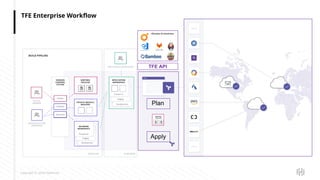
TFE Enterprise Workflow
Plan
Apply
TFE API
© 2018 HashiCorp 53
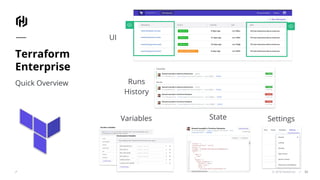
Terraform
Enterprise
Quick Overview
UI
Runs
History
Variables State Settings
⁄Copyright © 2018 HashiCorp 54
Remote: Plan & Apply
Demo
© 2018 HashiCorp
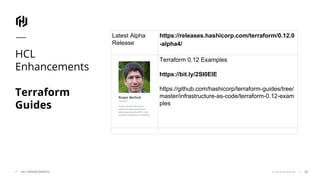
HCL
Enhancements
Terraform
Guides
55HCL ENHANCEMENTS
Latest Alpha
Release
https://releases.hashicorp.com/terraform/0.12.0
-alpha4/
Terraform 0.12 Examples
https://bit.ly/2SI0ElE
https://github.com/hashicorp/terraform-guides/tree/
master/infrastructure-as-code/terraform-0.12-exam
ples
Copyright © 2018 HashiCorp ⁄ 56
Ultricies Tellus.
Nullam quis risus eget urna mollis
ornare vel eu leo.
Resources
© 2018 HashiCorp
Q & A
57
www.hashicorp.com
hello@hashicorp.com
Thank you
58
Copyright © 2017 HashiCorp 59
How it works
First Class Expressions
With 0.12, expressions are a native part of the
language and can be used directly.
Read more
Easier to Read/Write/learn
Rich Types in Module Inputs and Outputs
Terraform 0.12 allows arbitrarily complex lists and
maps for any inputs and outputs, including with
modules and resources. Read More
Reliable JSON Syntax
Terraform 0.12 HCL configuration has an exact 1:1
mapping to and from JSON, improved error
messages, and support for comments. Read More
Template Syntax
The new template syntax supports loops and
conditionals directly in a Terraform configuration.
Read More
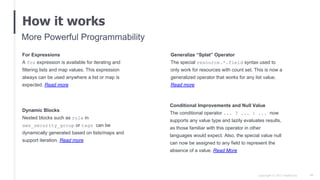
Copyright © 2017 HashiCorp 60
How it works
For Expressions
A for expression is available for iterating and
filtering lists and map values. This expression
always can be used anywhere a list or map is
expected. Read more
Generalize “Splat” Operator
The special resource.*.field syntax used to
only work for resources with count set. This is now a
generalized operator that works for any list value.
Read more
More Powerful Programmability
Conditional Improvements and Null Value
The conditional operator ... ? ... : ... now
supports any value type and lazily evaluates results,
as those familiar with this operator in other
languages would expect. Also, the special value null
can now be assigned to any field to represent the
absence of a value. Read More
Dynamic Blocks
Nested blocks such as rule in
aws_security_group or tags can be
dynamically generated based on lists/maps and
support iteration. Read more

Terraform 0.12 Deep Dive: HCL 2.0 for Infrastructure as Code, Remote Plan & Apply

  • 1.
    © 2018 HashiCorp Aninfrastructure as code approach to safely provision any cloud, infrastructure, or service. Multi cloud. Hybrid cloud. Any infrastructure. Anywhere. 1
  • 2.
    Copyright © 2018HashiCorp ⁄ 2 Arslan Saeed Senior Solutions Engineer HashiCorp Kristin Laemmert Software Engineer HashiCorp Twitter: @mildwonkey Our Presenters Today
  • 3.
    © 2018 HashiCorp Terraform0.12: HCL Enhancements & Remote Plan & Apply 3
  • 4.
    Copyright © 2018HashiCorp ⁄ Introduction to Terraform ● Infrastructure as code ● Workflow ● Providers Terraform 0.12 ● HCL Enhancements ● Remote Plan & Apply Terraform Enterprise ● Overview ● Demo 4 Agenda 1 2 3
  • 5.
  • 6.
    © 2018 HashiCorp Networking Connectinfrastructure and applications Development Run applications Security Secure applications and infrastructure Operations Provision Infrastructure The 4 essential elements of dynamic infrastructure 6
  • 7.
    © 2018 HashiCorp Networking Connectinfrastructure and applications Development Run applications Security Secure applications and infrastructure Operations Provision Infrastructure The 4 essential elements of dynamic infrastructure 7
  • 8.
    © 2018 HashiCorp StaticInfrastructure Homogeneous, Private The shift to provisioning dynamic infrastructure Dynamic Infrastructure Heterogeneous, Distributed 8
  • 9.
    © 2018 HashiCorp StaticInfrastructure Homogeneous, Private The shift to provisioning dynamic infrastructure Dynamic Infrastructure Heterogeneous, Distributed 9
  • 10.
    © 2018 HashiCorp Theshift to provisioning dynamic infrastructure Dynamic Infrastructure Heterogeneous, Distributed Relies on static fleet of standardized infrastructure, provisioned for long periods of time, and dedicated to users. Traditional Approach ▪ Manual provisioning ▪ Fixed set of resources ▪ Workflows require ticketing & queues Heterogeneous infrastructure, frequently provisioned, short lived, and automated provisioning on-demand. Terraform Approach ▪ Infrastructure as code ▪ Embrace diversity with providers ▪ Enable self-service infrastructure Static Infrastructure Homogeneous, Private 10
  • 11.
    Copyright © 2018HashiCorp ⁄ Terraform Principles Infrastructure as code Codification allows infrastructure changes to be automated, while keeping the definition human readable. Automated tooling allows operators to increase their productivity, move quicker, and reduce human error. 11Copyright © 2018 HashiCorp ⁄ 1 2 3
  • 12.
    Copyright © 2018HashiCorp ⁄ Terraform Principles Workflows, not Technology Terraform does not abstract the underlying providers, instead allowing users to leverage the differentiating features with a consistent workflow. As new technologies emerge, they can be adopted without changing the provisioning workflow: plan to preview changes and apply to make changes to any infrastructure globally. 12Copyright © 2018 HashiCorp ⁄ 1 2 3
  • 13.
    Copyright © 2018HashiCorp ⁄ Terraform Principles Open and Extensible Terraform works with over 160 different providers for a broad set of common infrastructure. Provider SDK makes it simple to create new and custom providers. Providers leverage infrastructure-specific APIs to preserve unique capabilities for each provider. 13Copyright © 2018 HashiCorp ⁄ 1 2 3 150+
  • 14.
    © 2018 HashiCorp HowIt Works: Workflow 14
  • 15.
    Copyright © 2018HashiCorp ⁄ Terraform Use Cases Adopt any cloud, infrastructure, or service safely, efficiently, and timely. 15Copyright © 2018 HashiCorp ⁄ Multi-Cloud Management Provision and manage public cloud, private infrastructure, and external services holistically while still preserving the uniqueness of each. Self-Service Infrastructure Provide a library of approved infrastructure that developers can use to safely and efficiently provision infrastructure on-demand. Infrastructure as Code Use infrastructure as code to safely and efficiently provision and manage infrastructure at any scale.
  • 16.
  • 17.
    Copyright © 2018HashiCorp ⁄ HCL Enhancements Introduction to HCL 17
  • 18.
    © 2018 HashiCorp Terraform Configuration Language: Terraform0.11 18 ● HCL: HashiCorp Configuration Language ● HIL: HashiCorp Interpolation Language ${ } ● Terraform-native variables and functions # An AMI variable "ami" { description = "the AMI to use" } /* A multi line comment. */ resource "aws_instance" "web" { ami = "${var.ami}" count = 2 source_dest_check = false connection { user = "root" } }
  • 19.
    © 2018 HashiCorp Terraform Configuration Language: Terraform0.12 19 Enhanced HCL ● Merges HCL and HIL ● Introduces a robust type system ● Addresses large list of enhancements and feature requests
  • 20.
    © 2018 HashiCorp Terraform0.12: Configuration Language Enhancements 20 ● First Class Expressions ● For Expressions ● Dynamic Blocks ● Conditional Improvements ● Rich Types in Module inputs & outputs ● Improved Error Messages ● Template Syntax ● Reliable JSON Syntax
  • 21.
    © 2018 HashiCorp HCLEnhancements Deep Dive 21
  • 22.
    Copyright © 2018HashiCorp ⁄ HCL Enhancements First Class Expressions 22
  • 23.
    © 2018 HashiCorp Terraform0.12: First-Class Expressions 23 ● Operations and variables can be used outside of string interpolation ○ Buh-bye “${ }” ● Lists and maps can be used directly with expressions ○ Less list(""), more []
  • 24.
    CODE EDITOR © 2018HashiCorp variable "ami" {} variable "instance_type" {} variable "vpc_security_group_ids" { type = "list" } resource "aws_instance" "example" { ami = "${var.ami}" instance_type = "${var.instance_type}" vpc_security_group_ids = "${var.vpc_security_group_ids}" } Terraform 0.11 main.tf 24
  • 25.
    CODE EDITOR © 2018HashiCorp variable "ami" {} variable "instance_type" {} variable "vpc_security_group_ids" { type = list(string) } resource "aws_instance" "example" { ami = var.ami instance_type = var.instance_type vpc_security_group_ids = var.vpc_security_group_ids } Terraform 0.12 main.tf 25
  • 26.
    CODE EDITOR © 2018HashiCorp variable "ami" {} variable "instance_type" {} variable "vpc_security_group_ids" { type = "string" default = "" } resource "aws_instance" "example" { ami = "${var.ami}" instance_type = "${var.instance_type}" vpc_security_group_ids = "${var.vpc_security_group_id != "" ? [var.vpc_security_group_id] : list("") }" } Terraform 0.11 main.tf 26
  • 27.
    CODE EDITOR © 2018HashiCorp variable "ami" {} variable "instance_type" {} variable "vpc_security_group_ids" { type = string default = "" } resource "aws_instance" "example" { ami = var.ami instance_type = var.instance_type vpc_security_group_ids = var.vpc_security_group_id != "" ? [var.vpc_security_group_id] : [] } Terraform 0.12 main.tf 27
  • 28.
    © 2018 HashiCorp Terraform0.12 Rich Value Types 28
  • 29.
    Copyright © 2018HashiCorp ⁄ Rich Value Types ● Enhances simple type system ● Complex values ○ maps and lists! ○ maps of maps!! ○ maps of lists of maps of lists!!! ● Entire resources and modules as values 29
  • 30.
    TERMINAL © 2018 HashiCorp $tree . ├── main.tf ├── terraform.tfvars └── modules └── subnets └── subnets.tf Terraform Module Layout 30
  • 31.
    CODE EDITOR © 2018HashiCorp variable "networks" { type = "list" } module "subnets" { source = "./modules/subnets" networks = "${var.networks}" ... } output "vpc_id" { value = "${module.subnets.aws_vpc.example.id}" } Terraform 0.11 main.tf 31
  • 32.
    CODE EDITOR © 2018HashiCorp // "subnets" module variable "networks" { type = "list" } resource "aws_vpc" "example" { networks = "${var.networks}" ... } output "vpc_id" { value = "${aws_vpc.example.id}" } output "vpc_az" { value = "${aws_vpc.example.availability_zone}" } Terraform 0.11 subnets.tf 32
  • 33.
    CODE EDITOR © 2018HashiCorp variable "networks" { type = map(object({ network_number = number availability_zone = string tags = map(string) })) } module "subnets" { source = "./modules/subnets" networks = var.networks } output "vpc_id" { value = module.subnets.aws_vpc.example.id } Terraform 0.12 main.tf 33
  • 34.
    CODE EDITOR © 2018HashiCorp networks = { "production" = { network_number = 1 availability_zone = "us-east-1a" } "staging" = { network_number = 2 availability_zone = "us-east-1a" } } Terraform 0.12 terraform.tfvars 34
  • 35.
    CODE EDITOR © 2018HashiCorp // "subnets" module variable "networks" { type = map(object({ network_number = number availability_zone = string tags = map(string) })) } resource "aws_vpc" "example" { networks = var.networks ... } output "vpc" { value = aws_vpc.example } Terraform 0.12 subnets.tf 35
  • 36.
    CODE EDITOR © 2018HashiCorp variable "networks" { type = map(object({ network_number = number availability_zone = string tags = map(string) })) } module "subnets" { source = "./modules/subnets" networks = var.networks } resource "aws_instance" "my_server" { subnet_id = module.subnets.aws_vpc.example.id az = module.subnets.aws_vpc.example.availability_zone ... } Terraform 0.12 main.tf 36
  • 37.
    © 2018 HashiCorp Terraform0.12 Improved Error Messages 37
  • 38.
    TERMINAL © 2018 HashiCorp $terraform plan Error: Error parsing main.tf: object expected closing RBRACE got: EOFTerraform 0.11 38
  • 39.
    TERMINAL © 2018 HashiCorp $terraform plan Error: Argument or block definition required on main.tf line 24: 24: :wq An argument or block definition is required here. Terraform 0.12 39
  • 40.
    TERMINAL © 2018 HashiCorp $terraform plan Error: Invalid operand on main.tf line 16, in output "foobar": 16: value = "${1 + var.foo}" Unsuitable value for right operand: a number is required. Terraform 0.12 40
  • 41.
    TERMINAL © 2018 HashiCorp $terraform plan Error: Unsupported block type on main.tf line 36, in outptu "item": 1: outptu "item" { Blocks of type "outptu" are not expected here. Did you mean "output"? Terraform 0.12 41
  • 42.
    Copyright © 2018HashiCorp ⁄ More about Terraform 0.12 Please read our Terraform 0.12 Blog for more information. https://www.hashicorp.com/blog/terraform-0-1-2-preview 42
  • 43.
    © 2018 HashiCorp Terraform0.12 Upgrade Path 43
  • 44.
    Copyright © 2018HashiCorp ⁄ Upgrade Please read our Terraform 0.12 Upgrade Guide: https://www.terraform.io/upgrade-guides/0-12.html 44
  • 45.
  • 46.
    ⁄Copyright © 2018HashiCorp 46 Remote: Plan & Apply Overview
  • 47.
    © 2018 HashiCorp RemotePlan and Apply 47 ● Ability to utilize Terraform functions ie ‘plan’ and ‘apply’ back-ended and executed by Terraform Enterprise remotely ● Centralized within Terraform Enterprise ● View of change history ● Ability to integrate policy controls and checks
  • 48.
    © 2018 HashiCorp HowIt Works: Technical 48
  • 49.
    © 2018 HashiCorp HowIt Works: Technical 49
  • 50.
    © 2018 HashiCorp HowIt Works: Usage 50 terraform { backend "remote" { organization = "my-org" workspaces { prefix = "networking-" } } } > terraform init > terraform plan > terraform apply Add the remote backend config Migrate state Plan and Apply, just like before 1) Set “backend” to “remote” 2) Set “organization” to TFE org name 3) Set prefix as selector of workspaces 4) Add your token to your home directory Updates configuration to use new backend. Migrates state to TFE from previous (local, S3, etc) Anywhere TF used the plan and apply will work as-is. CI/CD will work with little or no modification.
  • 51.
    ⁄Copyright © 2018HashiCorp 51 Remote: Plan & Apply Terraform Enterprise
  • 52.
    Copyright © 2018HashiCorp TFE Enterprise Workflow Plan Apply TFE API
  • 53.
    © 2018 HashiCorp53 Terraform Enterprise Quick Overview UI Runs History Variables State Settings
  • 54.
    ⁄Copyright © 2018HashiCorp 54 Remote: Plan & Apply Demo
  • 55.
    © 2018 HashiCorp HCL Enhancements Terraform Guides 55HCLENHANCEMENTS Latest Alpha Release https://releases.hashicorp.com/terraform/0.12.0 -alpha4/ Terraform 0.12 Examples https://bit.ly/2SI0ElE https://github.com/hashicorp/terraform-guides/tree/ master/infrastructure-as-code/terraform-0.12-exam ples
  • 56.
    Copyright © 2018HashiCorp ⁄ 56 Ultricies Tellus. Nullam quis risus eget urna mollis ornare vel eu leo. Resources
  • 57.
  • 58.
  • 59.
    Copyright © 2017HashiCorp 59 How it works First Class Expressions With 0.12, expressions are a native part of the language and can be used directly. Read more Easier to Read/Write/learn Rich Types in Module Inputs and Outputs Terraform 0.12 allows arbitrarily complex lists and maps for any inputs and outputs, including with modules and resources. Read More Reliable JSON Syntax Terraform 0.12 HCL configuration has an exact 1:1 mapping to and from JSON, improved error messages, and support for comments. Read More Template Syntax The new template syntax supports loops and conditionals directly in a Terraform configuration. Read More
  • 60.
    Copyright © 2017HashiCorp 60 How it works For Expressions A for expression is available for iterating and filtering lists and map values. This expression always can be used anywhere a list or map is expected. Read more Generalize “Splat” Operator The special resource.*.field syntax used to only work for resources with count set. This is now a generalized operator that works for any list value. Read more More Powerful Programmability Conditional Improvements and Null Value The conditional operator ... ? ... : ... now supports any value type and lazily evaluates results, as those familiar with this operator in other languages would expect. Also, the special value null can now be assigned to any field to represent the absence of a value. Read More Dynamic Blocks Nested blocks such as rule in aws_security_group or tags can be dynamically generated based on lists/maps and support iteration. Read more