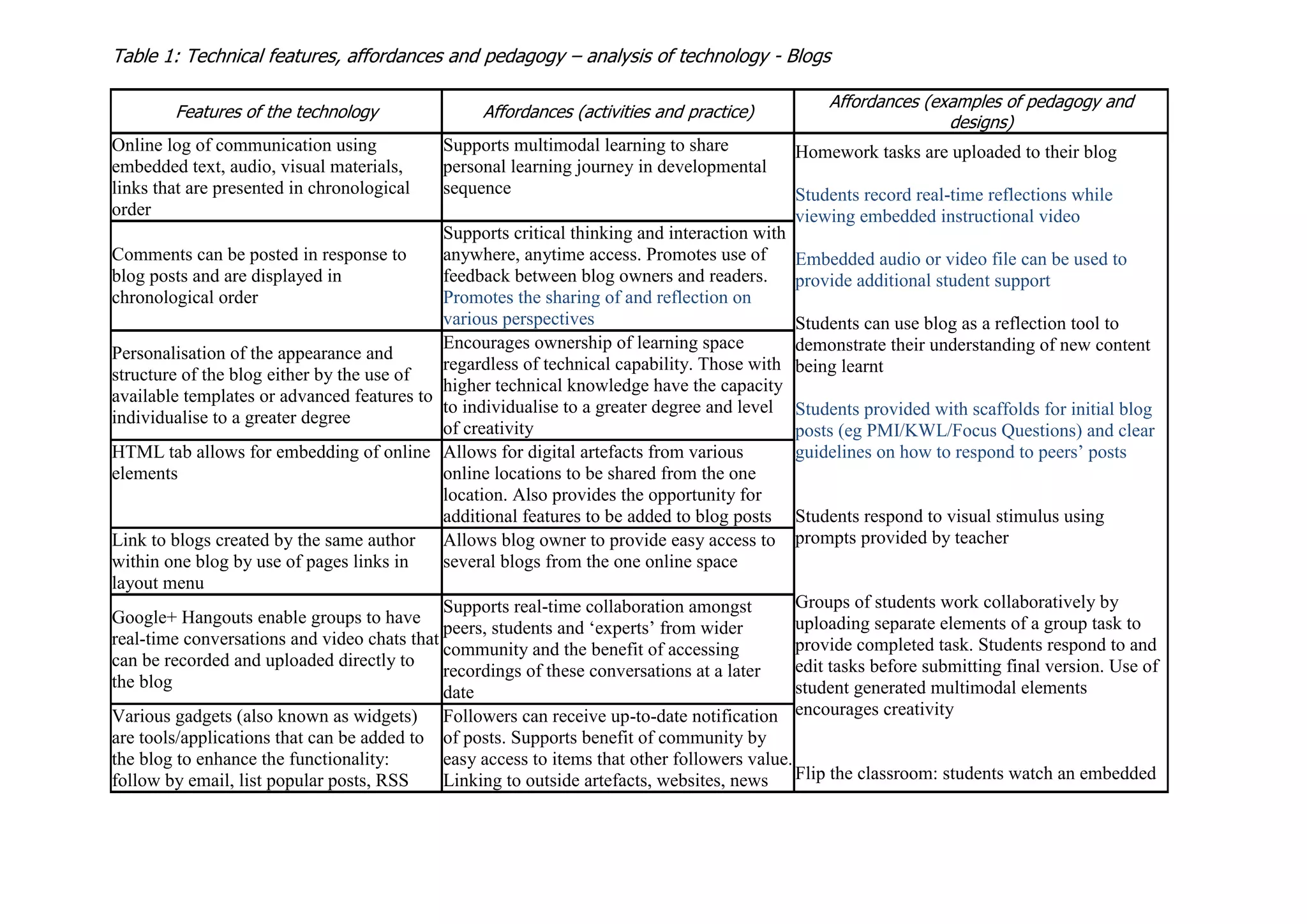
Table 1: Technical features, affordances and pedagogy – analysis of technology - Blogs
Features of the technology Affordances (activities and practice)
Affordances (examples of pedagogy and
designs)
Online log of communication using
embedded text, audio, visual materials,
links that are presented in chronological
order
Supports multimodal learning to share
personal learning journey in developmental
sequence
Homework tasks are uploaded to their blog
Students record real-time reflections while
viewing embedded instructional video
Embedded audio or video file can be used to
provide additional student support
Students can use blog as a reflection tool to
demonstrate their understanding of new content
being learnt
Students provided with scaffolds for initial blog
posts (eg PMI/KWL/Focus Questions) and clear
guidelines on how to respond to peers’ posts
Students respond to visual stimulus using
prompts provided by teacher
Groups of students work collaboratively by
uploading separate elements of a group task to
provide completed task. Students respond to and
edit tasks before submitting final version. Use of
student generated multimodal elements
encourages creativity
Flip the classroom: students watch an embedded
Comments can be posted in response to
blog posts and are displayed in
chronological order
Supports critical thinking and interaction with
anywhere, anytime access. Promotes use of
feedback between blog owners and readers.
Promotes the sharing of and reflection on
various perspectives
Personalisation of the appearance and
structure of the blog either by the use of
available templates or advanced features to
individualise to a greater degree
Encourages ownership of learning space
regardless of technical capability. Those with
higher technical knowledge have the capacity
to individualise to a greater degree and level
of creativity
HTML tab allows for embedding of online
elements
Allows for digital artefacts from various
online locations to be shared from the one
location. Also provides the opportunity for
additional features to be added to blog posts
Link to blogs created by the same author
within one blog by use of pages links in
layout menu
Allows blog owner to provide easy access to
several blogs from the one online space
Google+ Hangouts enable groups to have
real-time conversations and video chats that
can be recorded and uploaded directly to
the blog
Supports real-time collaboration amongst
peers, students and ‘experts’ from wider
community and the benefit of accessing
recordings of these conversations at a later
date
Various gadgets (also known as widgets)
are tools/applications that can be added to
the blog to enhance the functionality:
follow by email, list popular posts, RSS
Followers can receive up-to-date notification
of posts. Supports benefit of community by
easy access to items that other followers value.
Linking to outside artefacts, websites, news
Feed, link list of websites or other blog
pages
articles to expand support ideas educational video as a homework task and
respond individually in their blog to facilitate
personal understanding. These postings are then
used as the basis for group discussion in the
classroom. Students then revisit and edit their
blog posting to demonstrate their shared
knowledge
Teachers can support learners individually by
providing targeted feedback with prompts for
students to reflect
Blog settings allow security settings to be
either public or private
Level of access can be determined depending
on needs and personal preferences
Permission can be given so that additional
authors can add material to the blog
Promotes engagement of learning community
and sharing of collective knowledge

Blog affordances analysis updated

  • 1.
    Table 1: Technicalfeatures, affordances and pedagogy – analysis of technology - Blogs Features of the technology Affordances (activities and practice) Affordances (examples of pedagogy and designs) Online log of communication using embedded text, audio, visual materials, links that are presented in chronological order Supports multimodal learning to share personal learning journey in developmental sequence Homework tasks are uploaded to their blog Students record real-time reflections while viewing embedded instructional video Embedded audio or video file can be used to provide additional student support Students can use blog as a reflection tool to demonstrate their understanding of new content being learnt Students provided with scaffolds for initial blog posts (eg PMI/KWL/Focus Questions) and clear guidelines on how to respond to peers’ posts Students respond to visual stimulus using prompts provided by teacher Groups of students work collaboratively by uploading separate elements of a group task to provide completed task. Students respond to and edit tasks before submitting final version. Use of student generated multimodal elements encourages creativity Flip the classroom: students watch an embedded Comments can be posted in response to blog posts and are displayed in chronological order Supports critical thinking and interaction with anywhere, anytime access. Promotes use of feedback between blog owners and readers. Promotes the sharing of and reflection on various perspectives Personalisation of the appearance and structure of the blog either by the use of available templates or advanced features to individualise to a greater degree Encourages ownership of learning space regardless of technical capability. Those with higher technical knowledge have the capacity to individualise to a greater degree and level of creativity HTML tab allows for embedding of online elements Allows for digital artefacts from various online locations to be shared from the one location. Also provides the opportunity for additional features to be added to blog posts Link to blogs created by the same author within one blog by use of pages links in layout menu Allows blog owner to provide easy access to several blogs from the one online space Google+ Hangouts enable groups to have real-time conversations and video chats that can be recorded and uploaded directly to the blog Supports real-time collaboration amongst peers, students and ‘experts’ from wider community and the benefit of accessing recordings of these conversations at a later date Various gadgets (also known as widgets) are tools/applications that can be added to the blog to enhance the functionality: follow by email, list popular posts, RSS Followers can receive up-to-date notification of posts. Supports benefit of community by easy access to items that other followers value. Linking to outside artefacts, websites, news
  • 2.
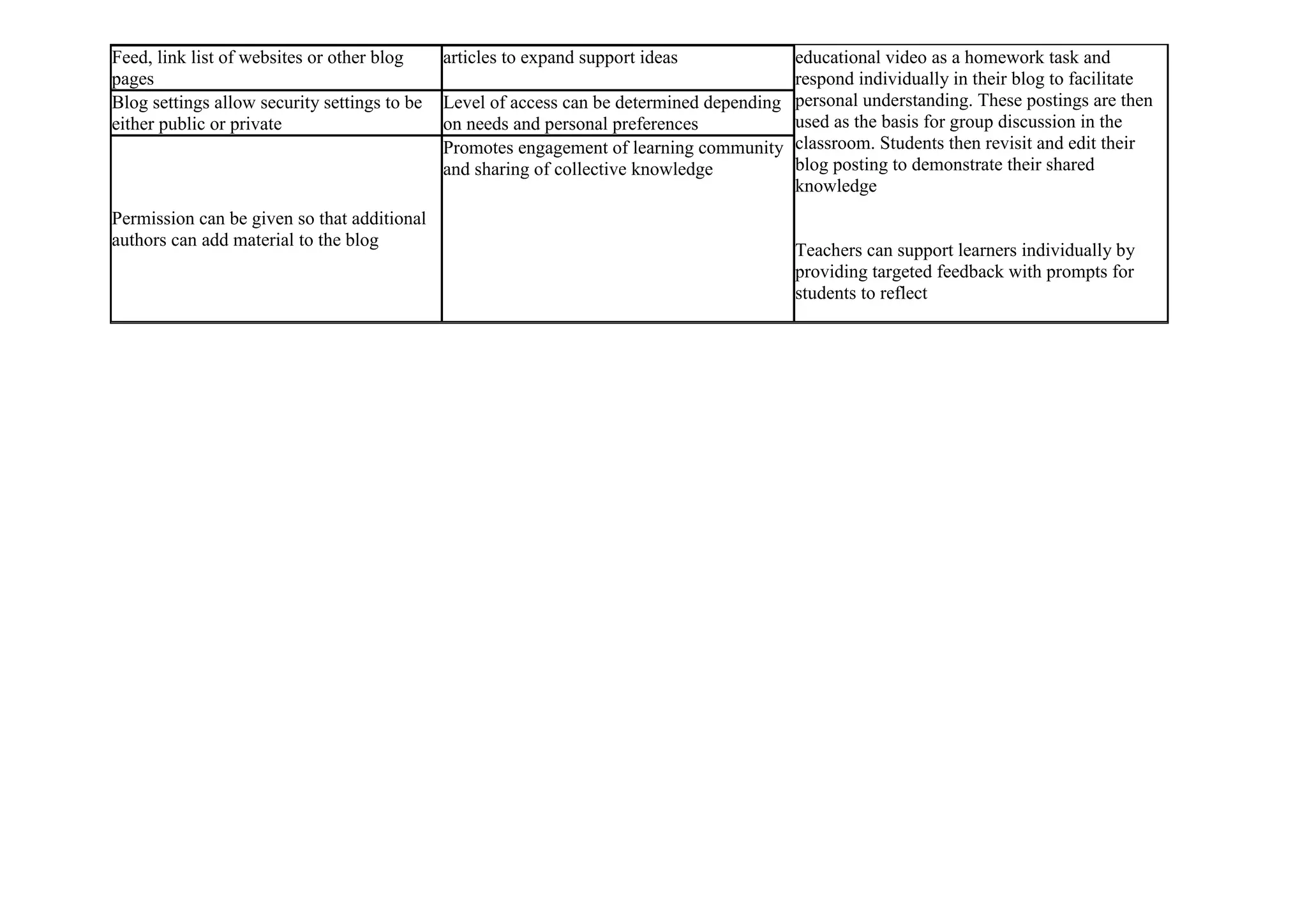
    Feed, link listof websites or other blog pages articles to expand support ideas educational video as a homework task and respond individually in their blog to facilitate personal understanding. These postings are then used as the basis for group discussion in the classroom. Students then revisit and edit their blog posting to demonstrate their shared knowledge Teachers can support learners individually by providing targeted feedback with prompts for students to reflect Blog settings allow security settings to be either public or private Level of access can be determined depending on needs and personal preferences Permission can be given so that additional authors can add material to the blog Promotes engagement of learning community and sharing of collective knowledge