BLOGS
Features of the technology Affordances (activities and practice) Affordances (examples of pedagogy and designs)
Blog posts are presented in chronological order
(with date and time of posting)
Blog authors/ readers are able to reflect on progress or
changes in learning, thinking and or skills. Supports
metacognition.
REFLECTION :
a. On content knowledge – students are asked to
post a KWL (What do I know, What do I want
to know, How will I find out ? What have I
learnt? ) at the beginning or a unit of study.
Students return to this during the unit to add
answers to their questions, new questions and
new learnings.
b. On the learning process – Students are asked to
document their thinking/ decisions as they
research or explore a topic. At the end of the
unit they are asked to read through their
postings to identify what worked well for them,
what was challenging & what would they
change.
c. On the writing process – Students use a rubric
to compare an early blog posting with a later
posting to analyse areas they have improved
and what they will work on next.
FEEDBACK and Continual Growth
Students and teachers collaboratively create a
rubric for assessing writing style & clarity.
During the unit students and teachers read
others postings and write comments related to
this rubric.
SUBSTANTIVE CONVERSATION
 The teacher asks students to respond to an
inquiry question in their blog & read and
comment on one other students posting
BEFORE an in class discussion.
Posts can be edited and updated. Posts can be saved in
draft form.
Author can schedule the time a post is published.
Allows authors to continuously improve and build upon
previous learning. Draft allows time for reflection.
Blog authors are able to hyperlink to previous posts. Allows authors to refer to draw together complex ideas
(without having to re-explain the premise) and build on
prior learning.
Blog authors are able to link to outside content
(including others blogs), online tools and social media
sites.
Supports creation of online interest/learning community
that is not necessarily limited to a formal learning
situation.
Labels can be attached to each individual posting Blog authors must summarise their post in a few words,
choosing those that are the best fit and will be useful to
their audience (or attracting an audience).
Blogs are searchable. Authors and readers are able to find relevant content
within a blog without reading posts in chronological
order.
The appearance and layout of blogs can be
personalised.
Authors apply understandings of design, visual literacy
to create an appearance and layout that suits their
content and audience. Also encouraged ownership of
the learning space.
Readers can follow a blog or subscribe via email. Allows asynchronous communication.
Supports creation of a learning community/ interest
groups, collaboration and negotiation of ideas.
HTML allows embedding of code. Images, video, sound and gadgets/widgets can be
embedded and viewed from the blog. Ensures specific
artefact is viewed without interference from extraneous
content.
Supports purposeful curation of web content- collection,
reflection and critique.
Privacy settings on blogs allow them to be viewed
publicly, kept private or shared with a specific group.
In education blogs, teachers are able to view and
approve/ delete comments before they are published.
Public blogs support access to global audiences while
private blogs support individual reflection on a personal
learning journey.
WYSIWYG editor makes blogging easy. Equal Access: Learners of all ages and technological
knowledge can create and add to a blog.
CONNECTEDNESS
 Students publish a class blog publically on the
web and invite comments from parents,
community members and other classes.
 Build online relationships with other classes
through their blogs.
 Students may invite “expert” guests to view,
comment or contribute to the class blog.
MULTIPLE MEANS OF EXPRESSION
 Students are asked to express their
understanding of a subject or topic in a blog
posting. They are given clear guidelines for the
purpose of the posting (e.g. to demonstrate
their understanding of the water cycle) but are
able to choose the mode of their presentation
i.e. written, audio, images, video or any
combination of these.
INDIVIDUAL CREATIVITY/ MOTIVATION
 Students individualise a personal blog to
express their interests and identity.
SOCIAL SUPPORT
 Students read each other’s blogs and are
encouraged to provide positive feedback via
comments and make references to each other’s
ideas in their own postings.
 Explicit guidelines are taught around how to
disagree with other’s opinions respectfully.
Blogs can be accessed and updated from any device
with an internet connection and web browser.
Mobility allows learners to post and readers to access
and comment anytime, anywhere.
Outside scheduled class timetable.
Readers are able to comment on individual posts.
Authors can respond to these using the comment
function. Asynchronous communication
Supports discussion that is centred on ideas presented
in individual posts.
Instant feedback allows the author able to elaborate or
add/change content in response comments.
Authors/readers have time to think carefully before
posting comments.
Authors are able to display links to blogs they read
(Gadget). Functionality of Gadgets are many !
Community of learners. Encourages learners to access
other’s blogs. Wide reading improves writing/creation.
Learn from postings of others.
Captioning of images Allow authors to write text that refers specifically to an
image.
Text, video, images and audio can be added to the
blog.
Supports different modes of meaning making and
expression (learning styles).
Audio (text to speech and vice versa) in particular
supports students with disabilities or learning
difficulties.
Blogs can be set up for multiple authors. Options
include individual, group or class.
Supports collaboration outside the blogging
environment.
Individuals have easy access to the work of other
authors (supports interaction by making viewing and
commenting easier).

Blogs affordances table v2

  • 1.
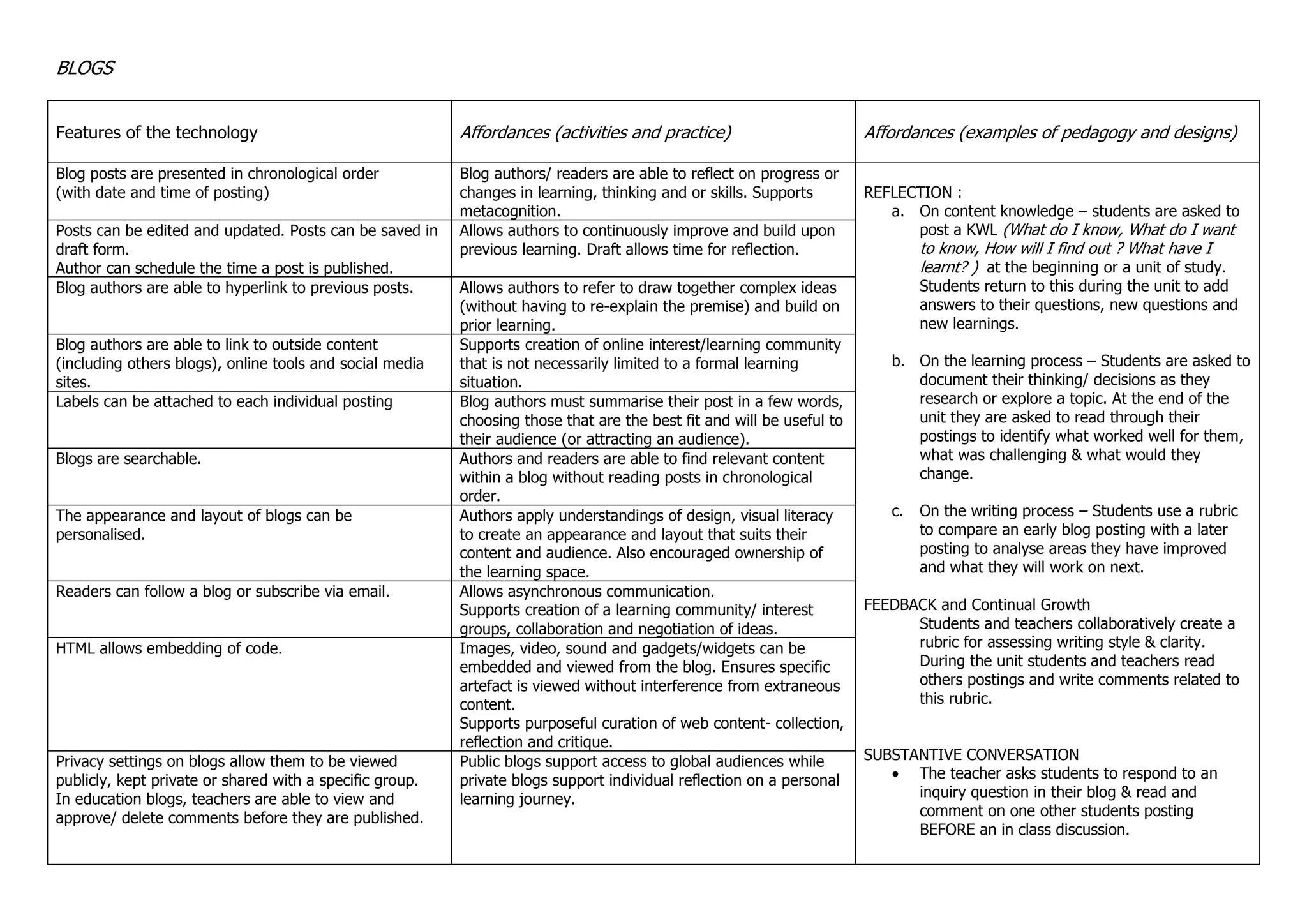
    BLOGS Features of thetechnology Affordances (activities and practice) Affordances (examples of pedagogy and designs) Blog posts are presented in chronological order (with date and time of posting) Blog authors/ readers are able to reflect on progress or changes in learning, thinking and or skills. Supports metacognition. REFLECTION : a. On content knowledge – students are asked to post a KWL (What do I know, What do I want to know, How will I find out ? What have I learnt? ) at the beginning or a unit of study. Students return to this during the unit to add answers to their questions, new questions and new learnings. b. On the learning process – Students are asked to document their thinking/ decisions as they research or explore a topic. At the end of the unit they are asked to read through their postings to identify what worked well for them, what was challenging & what would they change. c. On the writing process – Students use a rubric to compare an early blog posting with a later posting to analyse areas they have improved and what they will work on next. FEEDBACK and Continual Growth Students and teachers collaboratively create a rubric for assessing writing style & clarity. During the unit students and teachers read others postings and write comments related to this rubric. SUBSTANTIVE CONVERSATION  The teacher asks students to respond to an inquiry question in their blog & read and comment on one other students posting BEFORE an in class discussion. Posts can be edited and updated. Posts can be saved in draft form. Author can schedule the time a post is published. Allows authors to continuously improve and build upon previous learning. Draft allows time for reflection. Blog authors are able to hyperlink to previous posts. Allows authors to refer to draw together complex ideas (without having to re-explain the premise) and build on prior learning. Blog authors are able to link to outside content (including others blogs), online tools and social media sites. Supports creation of online interest/learning community that is not necessarily limited to a formal learning situation. Labels can be attached to each individual posting Blog authors must summarise their post in a few words, choosing those that are the best fit and will be useful to their audience (or attracting an audience). Blogs are searchable. Authors and readers are able to find relevant content within a blog without reading posts in chronological order. The appearance and layout of blogs can be personalised. Authors apply understandings of design, visual literacy to create an appearance and layout that suits their content and audience. Also encouraged ownership of the learning space. Readers can follow a blog or subscribe via email. Allows asynchronous communication. Supports creation of a learning community/ interest groups, collaboration and negotiation of ideas. HTML allows embedding of code. Images, video, sound and gadgets/widgets can be embedded and viewed from the blog. Ensures specific artefact is viewed without interference from extraneous content. Supports purposeful curation of web content- collection, reflection and critique. Privacy settings on blogs allow them to be viewed publicly, kept private or shared with a specific group. In education blogs, teachers are able to view and approve/ delete comments before they are published. Public blogs support access to global audiences while private blogs support individual reflection on a personal learning journey.
  • 2.
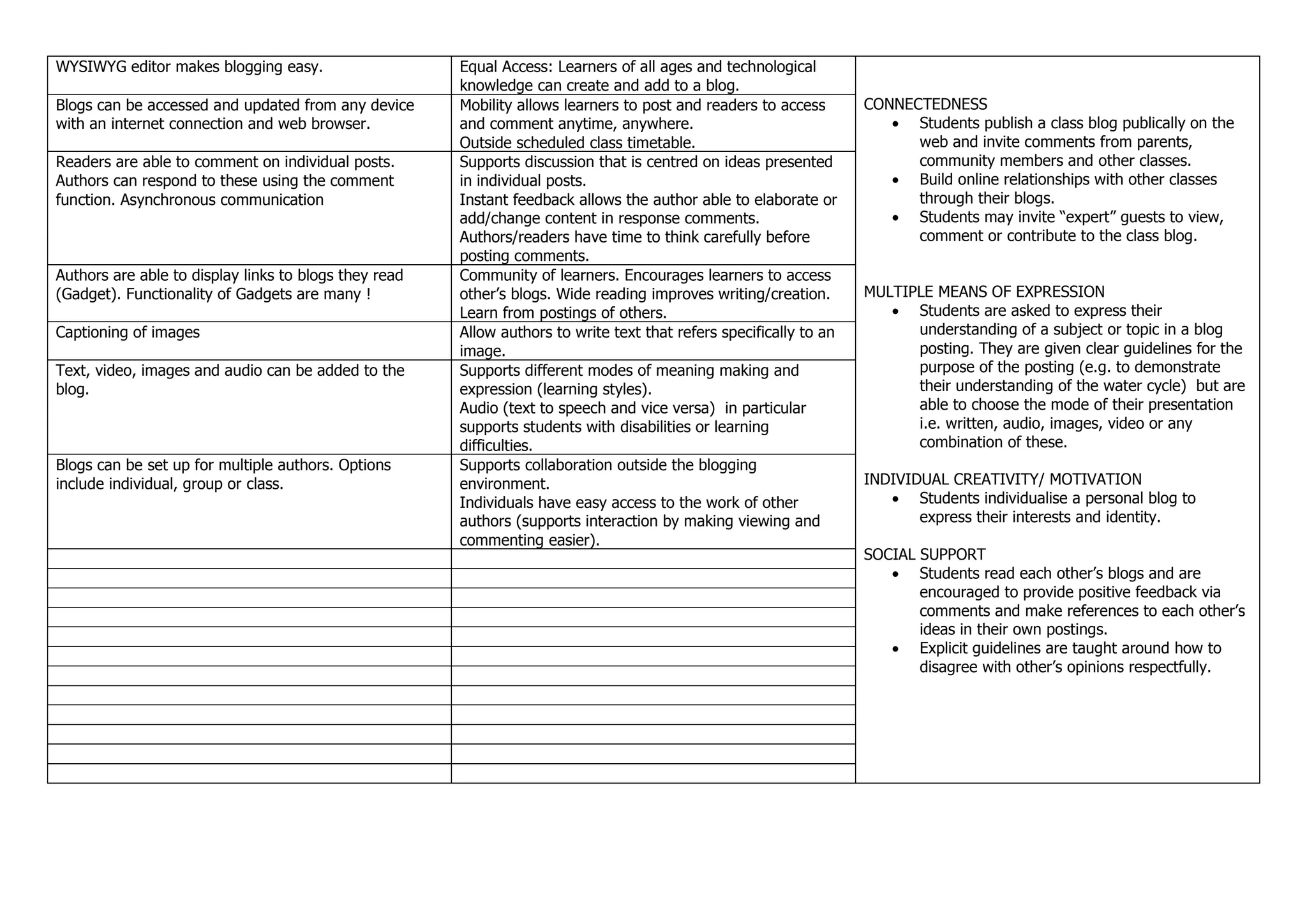
    WYSIWYG editor makesblogging easy. Equal Access: Learners of all ages and technological knowledge can create and add to a blog. CONNECTEDNESS  Students publish a class blog publically on the web and invite comments from parents, community members and other classes.  Build online relationships with other classes through their blogs.  Students may invite “expert” guests to view, comment or contribute to the class blog. MULTIPLE MEANS OF EXPRESSION  Students are asked to express their understanding of a subject or topic in a blog posting. They are given clear guidelines for the purpose of the posting (e.g. to demonstrate their understanding of the water cycle) but are able to choose the mode of their presentation i.e. written, audio, images, video or any combination of these. INDIVIDUAL CREATIVITY/ MOTIVATION  Students individualise a personal blog to express their interests and identity. SOCIAL SUPPORT  Students read each other’s blogs and are encouraged to provide positive feedback via comments and make references to each other’s ideas in their own postings.  Explicit guidelines are taught around how to disagree with other’s opinions respectfully. Blogs can be accessed and updated from any device with an internet connection and web browser. Mobility allows learners to post and readers to access and comment anytime, anywhere. Outside scheduled class timetable. Readers are able to comment on individual posts. Authors can respond to these using the comment function. Asynchronous communication Supports discussion that is centred on ideas presented in individual posts. Instant feedback allows the author able to elaborate or add/change content in response comments. Authors/readers have time to think carefully before posting comments. Authors are able to display links to blogs they read (Gadget). Functionality of Gadgets are many ! Community of learners. Encourages learners to access other’s blogs. Wide reading improves writing/creation. Learn from postings of others. Captioning of images Allow authors to write text that refers specifically to an image. Text, video, images and audio can be added to the blog. Supports different modes of meaning making and expression (learning styles). Audio (text to speech and vice versa) in particular supports students with disabilities or learning difficulties. Blogs can be set up for multiple authors. Options include individual, group or class. Supports collaboration outside the blogging environment. Individuals have easy access to the work of other authors (supports interaction by making viewing and commenting easier).