
Twitter for educators:
Create your Twitter presence!
#digilitleic
@josiefraser March 2014
This session will get you up and running with
Twitter, and will cover the basics of creating a
profile, understanding Twitter conventions, and
finding and connecting to others.
Josie Fraser March 2014
Twitter
Twitter is a microblogging service which
lets users share updates, information and
resources
Twitter in 30 Seconds
Josie Fraser March 2014
Three basic online identities
• Personal
• Professional
• Organisational
SocialTech: Personal - Professional - Organisational:
three basic online identities (2009) http://bit.ly/vcRv5
Josie Fraser March 2014
Department for Education:
Teachers’ Standards
Effective from 1 September 2012
Part Two: Personal and professional conduct
A teacher is expected to demonstrate
consistently high standards of personal and
professional conduct.
Josie Fraser March 2014
Top tips for managing your online
presence
• Don’t drink & tweet
• Check information before you share it
• Give credit where credit is due
• Think about who you connect to & promote
• RTs may not constitute an endorsement but
many people will assume they do
• Friending students, parents & carers?
Josie Fraser March 2014
Basics
• Username - think short & sweet
• Avatar
• Bio
• Location
• URL
• Custom background
• Public/private
Josie Fraser March 2014
Avatar – pre-workshop task
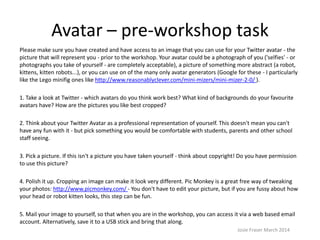
Please make sure you have created and have access to an image that you can use for your Twitter avatar - the
picture that will represent you - prior to the workshop. Your avatar could be a photograph of you ('selfies' - or
photographs you take of yourself - are completely acceptable), a picture of something more abstract (a robot,
kittens, kitten robots...), or you can use one of the many only avatar generators (Google for these - I particularly
like the Lego minifig ones like http://www.reasonablyclever.com/mini-mizers/mini-mizer-2-0/ ).
1. Take a look at Twitter - which avatars do you think work best? What kind of backgrounds do your favourite
avatars have? How are the pictures you like best cropped?
2. Think about your Twitter Avatar as a professional representation of yourself. This doesn't mean you can't
have any fun with it - but pick something you would be comfortable with students, parents and other school
staff seeing.
3. Pick a picture. If this isn't a picture you have taken yourself - think about copyright! Do you have permission
to use this picture?
4. Polish it up. Cropping an image can make it look very different. Pic Monkey is a great free way of tweaking
your photos: http://www.picmonkey.com/ - You don't have to edit your picture, but if you are fussy about how
your head or robot kitten looks, this step can be fun.
5. Mail your image to yourself, so that when you are in the workshop, you can access it via a web based email
account. Alternatively, save it to a USB stick and bring that along.
Josie Fraser March 2014
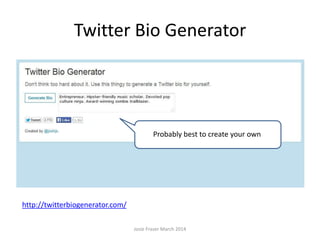
Twitter Bio Generator
Josie Fraser March 2014
http://twitterbiogenerator.com/
Probably best to create your own
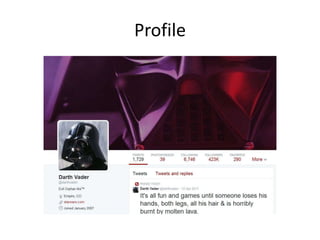
Profile
Josie Fraser March 2014
Your microbio: 160 characters
• People search – other users will look at your
bio when they are deciding if they should
follow you
• Machine search - you are searchable by your
bio in Twitter and other search engines
• Think about context – third party services you
link to your account may use your bio – i.e.
the same text maybe used on another site
Josie Fraser March 2014
Task 1: Create your microbio
Use this time to write your bio.
• Check the spelling!
• What do you do?
• What are you interested in/passionate
about/an expert on?
• Hashtags?
Josie Fraser March 2014
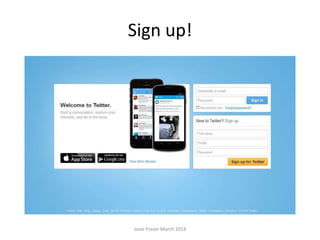
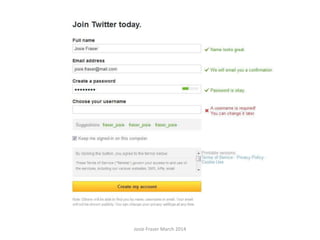
Sign up!
Josie Fraser March 2014
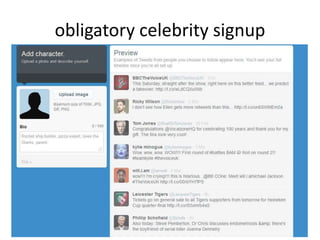
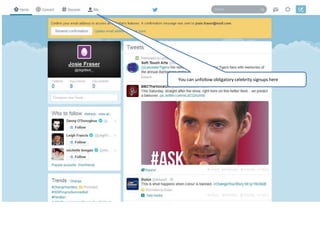
obligatory celebrity signup
Josie Fraser March 2014
You can unfollow obligatory celebrity signups here
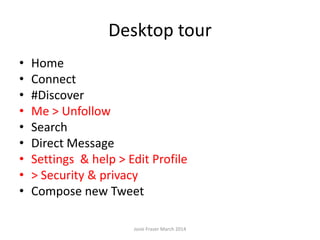
Desktop tour
• Home
• Connect
• #Discover
• Me > Unfollow
• Search
• Direct Message
• Settings & help > Edit Profile
• > Security & privacy
• Compose new Tweet
Josie Fraser March 2014
Basics
• Username
• Avatar
• Bio
• Location
• URL
• Custom background
• Public/private
Josie Fraser March 2014
Desktop tour
• Home
• Connect
• #Discover
• Me > Unfollow
• Search
• Direct Message
• Settings & help > Edit Profile
• > Security & privacy
• Compose new Tweet
Josie Fraser March 2014
Task 2 – send your first tweet
• Swap usernames with someone in the group
• Send a message, starting with @username,
and include the hashtag #digilitleic
Josie Fraser March 2014
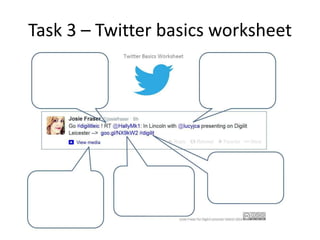
Task 3 – Twitter basics worksheet
• Work in teams of two
• Complete the sheet – the names of the six
tweet elements highlighted, and what they do
• Sheets will be swapped for marking!
Josie Fraser March 2014
Task 3 – Twitter basics worksheet
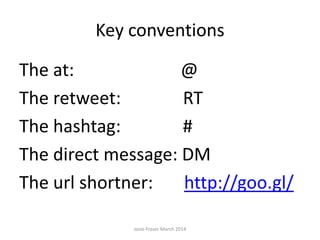
Key conventions
The at: @
The retweet: RT
The hashtag: #
The direct message: DM
The url shortner: http://goo.gl/
Josie Fraser March 2014
Follower/following
• Don’t follow too many people too quickly –
take your time
• You don’t have to follow everyone who
follows you
• You can check who doesn’t follow you back –
Google ‘check Twitter followers’ to see a range
of services
Josie Fraser March 2014
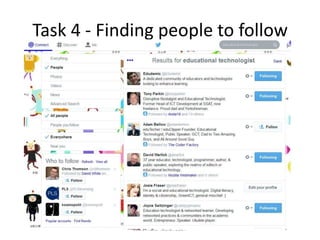
Task 4 - Finding people to follow
Josie Fraser March 2014
In this task we are going to use Twitter’s search feature as
a simple way of finding interesting people to follow.
Search by keyword – try searching for your subject area,
or for topics that are particularly interesting to you. Try
using hashtags. Find at least three people to follow.
If you have time, look at who the people you find follow.
You can do this by clicking on the ‘following’ button on
their profile.
Share a recommendation with the group.
Task 4 - Finding people to follow
Josie Fraser March 2014
Thank you!
@josiefraser

Josie Fraser - Twitter Workshop - getting started (March 2014)

  • 1.
    Twitter for educators: Createyour Twitter presence! #digilitleic @josiefraser March 2014
  • 2.
    This session willget you up and running with Twitter, and will cover the basics of creating a profile, understanding Twitter conventions, and finding and connecting to others. Josie Fraser March 2014
  • 3.
    Twitter Twitter is amicroblogging service which lets users share updates, information and resources Twitter in 30 Seconds Josie Fraser March 2014
  • 4.
    Three basic onlineidentities • Personal • Professional • Organisational SocialTech: Personal - Professional - Organisational: three basic online identities (2009) http://bit.ly/vcRv5 Josie Fraser March 2014
  • 5.
    Department for Education: Teachers’Standards Effective from 1 September 2012 Part Two: Personal and professional conduct A teacher is expected to demonstrate consistently high standards of personal and professional conduct. Josie Fraser March 2014
  • 6.
    Top tips formanaging your online presence • Don’t drink & tweet • Check information before you share it • Give credit where credit is due • Think about who you connect to & promote • RTs may not constitute an endorsement but many people will assume they do • Friending students, parents & carers? Josie Fraser March 2014
  • 7.
    Basics • Username -think short & sweet • Avatar • Bio • Location • URL • Custom background • Public/private Josie Fraser March 2014
  • 8.
    Avatar – pre-workshoptask Please make sure you have created and have access to an image that you can use for your Twitter avatar - the picture that will represent you - prior to the workshop. Your avatar could be a photograph of you ('selfies' - or photographs you take of yourself - are completely acceptable), a picture of something more abstract (a robot, kittens, kitten robots...), or you can use one of the many only avatar generators (Google for these - I particularly like the Lego minifig ones like http://www.reasonablyclever.com/mini-mizers/mini-mizer-2-0/ ). 1. Take a look at Twitter - which avatars do you think work best? What kind of backgrounds do your favourite avatars have? How are the pictures you like best cropped? 2. Think about your Twitter Avatar as a professional representation of yourself. This doesn't mean you can't have any fun with it - but pick something you would be comfortable with students, parents and other school staff seeing. 3. Pick a picture. If this isn't a picture you have taken yourself - think about copyright! Do you have permission to use this picture? 4. Polish it up. Cropping an image can make it look very different. Pic Monkey is a great free way of tweaking your photos: http://www.picmonkey.com/ - You don't have to edit your picture, but if you are fussy about how your head or robot kitten looks, this step can be fun. 5. Mail your image to yourself, so that when you are in the workshop, you can access it via a web based email account. Alternatively, save it to a USB stick and bring that along. Josie Fraser March 2014
  • 9.
    Twitter Bio Generator JosieFraser March 2014 http://twitterbiogenerator.com/ Probably best to create your own
  • 10.
  • 11.
    Your microbio: 160characters • People search – other users will look at your bio when they are deciding if they should follow you • Machine search - you are searchable by your bio in Twitter and other search engines • Think about context – third party services you link to your account may use your bio – i.e. the same text maybe used on another site Josie Fraser March 2014
  • 12.
    Task 1: Createyour microbio Use this time to write your bio. • Check the spelling! • What do you do? • What are you interested in/passionate about/an expert on? • Hashtags? Josie Fraser March 2014
  • 13.
  • 14.
  • 15.
  • 16.
    Josie Fraser March2014 You can unfollow obligatory celebrity signups here
  • 17.
    Desktop tour • Home •Connect • #Discover • Me > Unfollow • Search • Direct Message • Settings & help > Edit Profile • > Security & privacy • Compose new Tweet Josie Fraser March 2014
  • 18.
    Basics • Username • Avatar •Bio • Location • URL • Custom background • Public/private Josie Fraser March 2014
  • 19.
    Desktop tour • Home •Connect • #Discover • Me > Unfollow • Search • Direct Message • Settings & help > Edit Profile • > Security & privacy • Compose new Tweet Josie Fraser March 2014
  • 20.
    Task 2 –send your first tweet • Swap usernames with someone in the group • Send a message, starting with @username, and include the hashtag #digilitleic Josie Fraser March 2014
  • 21.
    Task 3 –Twitter basics worksheet • Work in teams of two • Complete the sheet – the names of the six tweet elements highlighted, and what they do • Sheets will be swapped for marking! Josie Fraser March 2014
  • 22.
    Task 3 –Twitter basics worksheet
  • 23.
    Key conventions The at:@ The retweet: RT The hashtag: # The direct message: DM The url shortner: http://goo.gl/ Josie Fraser March 2014
  • 24.
    Follower/following • Don’t followtoo many people too quickly – take your time • You don’t have to follow everyone who follows you • You can check who doesn’t follow you back – Google ‘check Twitter followers’ to see a range of services Josie Fraser March 2014
  • 25.
    Task 4 -Finding people to follow Josie Fraser March 2014 In this task we are going to use Twitter’s search feature as a simple way of finding interesting people to follow. Search by keyword – try searching for your subject area, or for topics that are particularly interesting to you. Try using hashtags. Find at least three people to follow. If you have time, look at who the people you find follow. You can do this by clicking on the ‘following’ button on their profile. Share a recommendation with the group.
  • 26.
    Task 4 -Finding people to follow Josie Fraser March 2014
  • 27.