Tweet! Tweet! Getting 
started on Twitter 
Presenters: 
Ingrid Thomson @ingridthomson 
Jeremiah Pietersen @Jermy_Pee 
#liasa2014 
Image: http://mashable.com/2014/03/27/billboard-twitter-real-time-music-chart/
Outline of Workshop 
• INTRODUCTIONS 
• PART 1: Twitter 101 – What is twitter, lingo, 
anatomy of a tweet, navigating Twitter 
• PART 2: Getting you started - Account Set-up 
• PART 3: Twitter 102 - Useful Tips for Tweets, 
Lists, Tools, Conference Tweeting, 
• PART 4: A Surprise!
What is Twitter? 
• Twitter is a social network which allows users to 
exchange public messages of 140 characters or less, 
known as Tweets. 
• It’s easy to tweet, via devices such as :
• Tweets can be text-based 
• Or contain multimedia such as images or videos or 
online links
So how does Twitter 
work? 
• Twitter is a conversation in a 140 characters. 
• You tweet - your tweets are seen by other Twitter users who 
follow you. 
• You see the tweets of others whom you follow. 
• 271 million active users (worldwide) are tweeting regularly 
• 9,4 million active users in South Africa * 
* SA Media Landscape 2014 Report
Reasons people say they 
can’t 
• You can’t say anything in 140 characters 
• Who wants to hear about my breakfast? 
• What a waste of time ! 
• I don’t have time to Tweet 
• I don’t know anyone who tweets, so why should 
I? 
• I tried it once, but I didn’t see the point
So what do people tweet? 
• Business news 
• Observations about life 
• Interesting things to read 
• New blog posts 
• Inspiring thoughts 
• Professional News 
• Workaday life details 
• Business issues and challenges 
• Family life details
Good reasons to Tweet 
• Personal - Professional vs Individual 
• Corporate - Branding/Commerce 
• Connecting with your peers 
• Keeping up to date - with the news, 
• Share what you are doing 
• Get real-time information and more specific information 
• Passions and hobbies 
• Interesting links – pictures, videos 
• Ask questions 
• Doesn’t mean that you would be friends with celebrities, but 
you can follow them (@TrevorNoah anyone? ) 
• Takeaways from professional learning
Your Twitter Goals? 
• For business communication (if you are tweeting as an 
organisation - to build community with your users, 
vendors etc ) 
• Build your personal brand 
• For keeping in touch with your peers or to keep an eye 
on your competitors 
• To market the organisation – reaching out tto the 
community 
• To drive traffic to your website or blog 
Any other ideas?
http://www.peterdaviespr.co.uk/wp-content/uploads/2012/02/copy-of-twitter1-500x373.jpg
Anatomy of a Tweet 
Reply: 
Click to reply to 
a tweet 
More: 
Use this to embed 
tweet in a website, 
or to report or block 
a user 
Favourite: 
Click to store tweet 
in your list of 
favourite tweets 
Retweeted by: 
appears when 
someone has 
retweeted the tweet 
User name 
User handle 
Time of tweet 
Retweet: 
Sends tweet to 
followers
Navigating Desktop 
Twitter
The Lingo 
• Not twittering, 
• HT hat-tip 
• Tweet 
• Mention 
• Reply 
• Retweet 
• Favourite 
• #hashtags 
• Follow 
• Follower 
• Trends 
• Direct Messages
#hashtags 
• https://www.youtube.com/watch?v=57dzaMaouXA
Follow or be followed 
• Follow users and organisations that will add value to 
your Twitter feed 
• Users interact on Twitter by means of following one 
another 
• Follow count does not necessarily mean you have a 
wide reach 
• Retweets expand reach and draws more followers 
• #teamfollowback
WORKSHOP 
• Set up your account 
• Sign up 
• Profile – background, bio, photo, 
URL, location 
• Settings 
• Following/Followers 
• Your First Tweet
Getting Started - 
Workshop 
• Sign up for a twitter account at http://www.twitter.com 
• Choose a Twitter handle 
• Profile settings : Upload a profile image and write a bio 
(160 characters). Profile pic needs to be in jpg, gif or 
PNG. Max size is 700KB. Dimensions 81 px by 81 px. 
• Header image: Dimensions 520 px by 260 px 
• Can customise the background of the profile page.
TWITTER 102 
http://cdn.techpp.com/wp-content/uploads/2009/08/itsop3-500x402.jpg
Do this … 
• Create an informative profile - Be easy to find 
• Tweet regularly - Observation ; a link with a comment; 
a video; Even photos or insights; Tweet someone 
• Think before you tweet 
• Learn the lingo 
• Engage with your followers/community 
• Do a Shout Out to followers who Mention You 
• Do ask advice - ask your followers questions
Some more tips 
• Only tweet about your library one time in four.... 
• Analyse your tweets 
• If something is important, tweet it four times 
• Use hashtags 
• Ask questions 
• Get retweeted and your network will grow 
• Put your Twitter handle everywhere 
• Use Bitly to shorten URLS https://bitly.com/shorten/
Don’t do this … it only 
annoys 
• #Don’t #overuse #hashtags 
• Don’t auto-tweet (too much) 
• Don’t protect your account 
• Don’t be negative or share spoilers 
• Don’t use poor grammar or spelling 
• Don’t overtweet 
• Don’t repeat yourself 
• DON’T SHOUT - WRITE YOUR TWEETS IN CAPITAL 
LETTERS
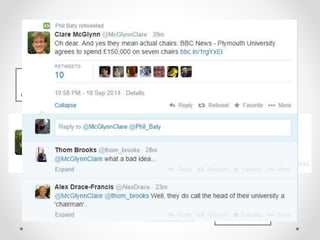
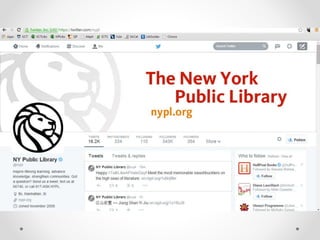
Some examples of tweets
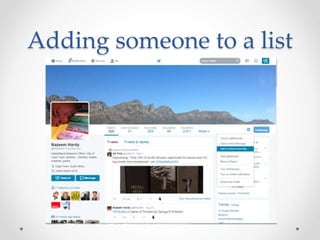
I have a little list! 
WHY? 
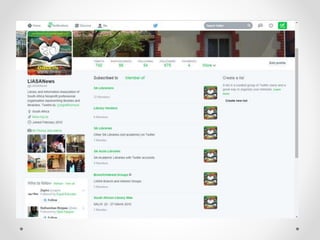
• Lists are groups of Twitter accounts 
• Curated group of Twitter users 
• Create your own or 
• Subscribe to lists created by others 
• Lists are for reading tweets only
Adding someone to a list
Our Favourite Tools 
• Hootsuite 
• Tweetdeck 
• Tweetstats 
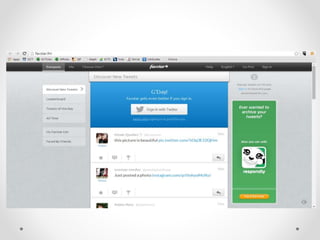
• Favstar 
• Storify
Tweetdeck
Conference Tweeting 
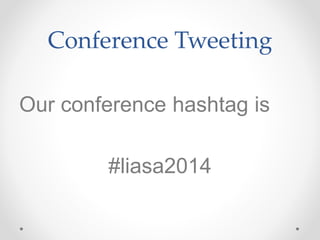
Our conference hashtag is 
#liasa2014
Reasons to Tweet from 
Conference 
• For those not able to attend. If you're the only 
person from your work attending, your 
colleagues could follow your tweets and still feel 
involved in sharing knowledge. 
• For presenters too, Twitter can provide useful 
feedback on sessions by highlighting the key 
points that attendees tweeted about. 
• Meet up with fellow Twitter users at conference – 
extending your professional network
Tips for Conference 
Tweeting 
• Three basic types of tweets during an academic 
conference: 
o Live tweeting a session / paper 
o Continuing a discussion after a session / paper 
finishes 
o Asking for / giving advice about sessions / papers 
worth attending 
Add value! If you're live tweeting, don't just report 
verbatim - add opinion or questions or counter 
examples.
Tips for Tweeting 
conference 
• Knowledge: each tweet should be a piece of knowledge; a fact, 
a joke, an opinion. 
• U - Useful: each piece of Knowledge should be useful to your 
audience, not just useful to you 
• D - Desirable: each piece of Knowledge should be desirable; it 
should have something which sets it apart from all the other 
merely "useful" tweets 
• O - Open: be open and honest about who you are and which 
organisation you represent 
• S - Shareable: your Knowledge should be shareable; things 
you'd be happy having attributed to you and which you want to 
be passed around.
Tips for Tweeting from a 
Conference 
• Learn who the presenters are + find their handles 
• Tweets need to be short, accurate and include the hashtag (need to 
have room to RT + Comment) 
• Can try to write-up pre-build tweets based on abstracts 
• Tweet with pictures 
• Tweet professionally 
• Strive for context. Sound-bites don’t help those following the 
conference from afar.
More Tips …. 
• For the purpose of archiving, please include the conference hashtag in your 
tweets. 
• Respect those who do not wish to have their presentation tweeted. 
• Cite the source of your tweets; give the speaker credit. 
• But also avoid flooding your followers with tweets; hit the high points 
• Avoid negative comments; be critical, not unconstructive. 
• Retweet relevant or useful posts. 
• Sit near the back of the room so others aren’t distracted by your 
typing/texting
And now… 
Battledecks! 
Volunteers?
Rules 
• Each contestant will present on Twitter: best practices 
• There are three sets of five slides each 
• You have 12 seconds to complete each slide
Time’s up! 
Get ready next contestant
Time’s up! 
Get ready next contestant
Time’s up!
http://padlet.com/jeremiah_ 
pieter/liasatwitter

Tweet! Tweet! Getting Started on Twitter

  • 1.
    Tweet! Tweet! Getting started on Twitter Presenters: Ingrid Thomson @ingridthomson Jeremiah Pietersen @Jermy_Pee #liasa2014 Image: http://mashable.com/2014/03/27/billboard-twitter-real-time-music-chart/
  • 2.
    Outline of Workshop • INTRODUCTIONS • PART 1: Twitter 101 – What is twitter, lingo, anatomy of a tweet, navigating Twitter • PART 2: Getting you started - Account Set-up • PART 3: Twitter 102 - Useful Tips for Tweets, Lists, Tools, Conference Tweeting, • PART 4: A Surprise!
  • 3.
    What is Twitter? • Twitter is a social network which allows users to exchange public messages of 140 characters or less, known as Tweets. • It’s easy to tweet, via devices such as :
  • 4.
    • Tweets canbe text-based • Or contain multimedia such as images or videos or online links
  • 5.
    So how doesTwitter work? • Twitter is a conversation in a 140 characters. • You tweet - your tweets are seen by other Twitter users who follow you. • You see the tweets of others whom you follow. • 271 million active users (worldwide) are tweeting regularly • 9,4 million active users in South Africa * * SA Media Landscape 2014 Report
  • 6.
    Reasons people saythey can’t • You can’t say anything in 140 characters • Who wants to hear about my breakfast? • What a waste of time ! • I don’t have time to Tweet • I don’t know anyone who tweets, so why should I? • I tried it once, but I didn’t see the point
  • 7.
    So what dopeople tweet? • Business news • Observations about life • Interesting things to read • New blog posts • Inspiring thoughts • Professional News • Workaday life details • Business issues and challenges • Family life details
  • 8.
    Good reasons toTweet • Personal - Professional vs Individual • Corporate - Branding/Commerce • Connecting with your peers • Keeping up to date - with the news, • Share what you are doing • Get real-time information and more specific information • Passions and hobbies • Interesting links – pictures, videos • Ask questions • Doesn’t mean that you would be friends with celebrities, but you can follow them (@TrevorNoah anyone? ) • Takeaways from professional learning
  • 9.
    Your Twitter Goals? • For business communication (if you are tweeting as an organisation - to build community with your users, vendors etc ) • Build your personal brand • For keeping in touch with your peers or to keep an eye on your competitors • To market the organisation – reaching out tto the community • To drive traffic to your website or blog Any other ideas?
  • 10.
  • 11.
    Anatomy of aTweet Reply: Click to reply to a tweet More: Use this to embed tweet in a website, or to report or block a user Favourite: Click to store tweet in your list of favourite tweets Retweeted by: appears when someone has retweeted the tweet User name User handle Time of tweet Retweet: Sends tweet to followers
  • 12.
  • 14.
    The Lingo •Not twittering, • HT hat-tip • Tweet • Mention • Reply • Retweet • Favourite • #hashtags • Follow • Follower • Trends • Direct Messages
  • 15.
  • 16.
    Follow or befollowed • Follow users and organisations that will add value to your Twitter feed • Users interact on Twitter by means of following one another • Follow count does not necessarily mean you have a wide reach • Retweets expand reach and draws more followers • #teamfollowback
  • 17.
    WORKSHOP • Setup your account • Sign up • Profile – background, bio, photo, URL, location • Settings • Following/Followers • Your First Tweet
  • 18.
    Getting Started - Workshop • Sign up for a twitter account at http://www.twitter.com • Choose a Twitter handle • Profile settings : Upload a profile image and write a bio (160 characters). Profile pic needs to be in jpg, gif or PNG. Max size is 700KB. Dimensions 81 px by 81 px. • Header image: Dimensions 520 px by 260 px • Can customise the background of the profile page.
  • 19.
  • 20.
    Do this … • Create an informative profile - Be easy to find • Tweet regularly - Observation ; a link with a comment; a video; Even photos or insights; Tweet someone • Think before you tweet • Learn the lingo • Engage with your followers/community • Do a Shout Out to followers who Mention You • Do ask advice - ask your followers questions
  • 21.
    Some more tips • Only tweet about your library one time in four.... • Analyse your tweets • If something is important, tweet it four times • Use hashtags • Ask questions • Get retweeted and your network will grow • Put your Twitter handle everywhere • Use Bitly to shorten URLS https://bitly.com/shorten/
  • 22.
    Don’t do this… it only annoys • #Don’t #overuse #hashtags • Don’t auto-tweet (too much) • Don’t protect your account • Don’t be negative or share spoilers • Don’t use poor grammar or spelling • Don’t overtweet • Don’t repeat yourself • DON’T SHOUT - WRITE YOUR TWEETS IN CAPITAL LETTERS
  • 23.
  • 24.
    I have alittle list! WHY? • Lists are groups of Twitter accounts • Curated group of Twitter users • Create your own or • Subscribe to lists created by others • Lists are for reading tweets only
  • 26.
  • 27.
    Our Favourite Tools • Hootsuite • Tweetdeck • Tweetstats • Favstar • Storify
  • 29.
  • 33.
    Conference Tweeting Ourconference hashtag is #liasa2014
  • 34.
    Reasons to Tweetfrom Conference • For those not able to attend. If you're the only person from your work attending, your colleagues could follow your tweets and still feel involved in sharing knowledge. • For presenters too, Twitter can provide useful feedback on sessions by highlighting the key points that attendees tweeted about. • Meet up with fellow Twitter users at conference – extending your professional network
  • 35.
    Tips for Conference Tweeting • Three basic types of tweets during an academic conference: o Live tweeting a session / paper o Continuing a discussion after a session / paper finishes o Asking for / giving advice about sessions / papers worth attending Add value! If you're live tweeting, don't just report verbatim - add opinion or questions or counter examples.
  • 36.
    Tips for Tweeting conference • Knowledge: each tweet should be a piece of knowledge; a fact, a joke, an opinion. • U - Useful: each piece of Knowledge should be useful to your audience, not just useful to you • D - Desirable: each piece of Knowledge should be desirable; it should have something which sets it apart from all the other merely "useful" tweets • O - Open: be open and honest about who you are and which organisation you represent • S - Shareable: your Knowledge should be shareable; things you'd be happy having attributed to you and which you want to be passed around.
  • 37.
    Tips for Tweetingfrom a Conference • Learn who the presenters are + find their handles • Tweets need to be short, accurate and include the hashtag (need to have room to RT + Comment) • Can try to write-up pre-build tweets based on abstracts • Tweet with pictures • Tweet professionally • Strive for context. Sound-bites don’t help those following the conference from afar.
  • 38.
    More Tips …. • For the purpose of archiving, please include the conference hashtag in your tweets. • Respect those who do not wish to have their presentation tweeted. • Cite the source of your tweets; give the speaker credit. • But also avoid flooding your followers with tweets; hit the high points • Avoid negative comments; be critical, not unconstructive. • Retweet relevant or useful posts. • Sit near the back of the room so others aren’t distracted by your typing/texting
  • 40.
  • 41.
    Rules • Eachcontestant will present on Twitter: best practices • There are three sets of five slides each • You have 12 seconds to complete each slide
  • 47.
    Time’s up! Getready next contestant
  • 53.
    Time’s up! Getready next contestant
  • 59.
  • 60.