

®
Meeting Partners
Reception Sponsor
UI/UX for Indoor/Outdoor
Seamless Navigation?
110th OGC Technical Committee Singapore
Sanghee Shin(shshin@gaia3d.com)
Seongdo Son(sdson@gaia3d.com)
Hanbyul Moon(hanbyul.moon@pxd.co.kr)
Seungyong Wi(sywi@pxd.co.kr)
Copyright © 2019 Open Geospatial Consortium
OGC
®
Agenda
• Background
• Case Studies
• Findings?
Objective: Share experiences and thoughts on integrated
indoor/outdoor navigation UI/UX.
Copyright © 2019 Open Geospatial Consortium
OGC
®
Background
Copyright © 2019 Open Geospatial Consortium
OpenIndoorMap
is a collaborative project to create a world indoor map just like the OpenStreetMap!
OGC
®
Background
Copyright © 2019 Open Geospatial Consortium
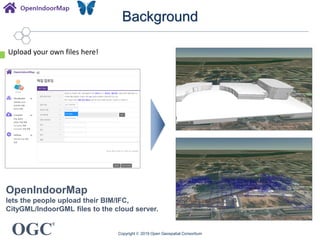
OpenIndoorMap
lets the people upload their BIM/IFC,
CityGML/IndoorGML files to the cloud server.
Upload your own files here!
OGC
®
Background
Copyright © 2019 Open Geospatial Consortium
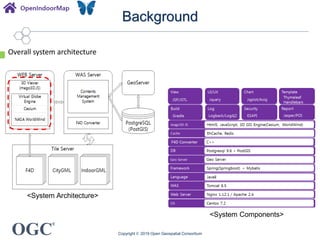
<System Architecture>
<System Components>
Overall system architecture
OGC
®
Background
Copyright © 2019 Open Geospatial Consortium
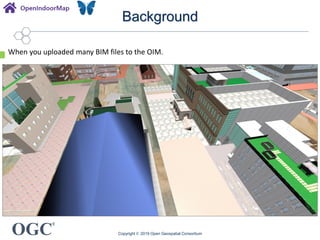
When you uploaded many BIM files to the OIM.
OGC
®
Background
Copyright © 2019 Open Geospatial Consortium
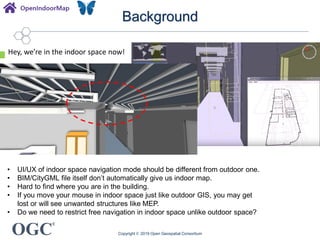
• UI/UX of indoor space navigation mode should be different from outdoor one.
• BIM/CityGML file itself don’t automatically give us indoor map.
• Hard to find where you are in the building.
• If you move your mouse in indoor space just like outdoor GIS, you may get
lost or will see unwanted structures like MEP.
• Do we need to restrict free navigation in indoor space unlike outdoor space?
Hey, we’re in the indoor space now!
OGC
®
Case Studies
Copyright © 2019 Open Geospatial Consortium
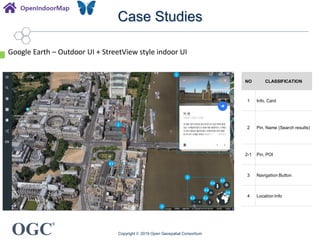
Google Earth – Outdoor UI + StreetView style indoor UI
1
2
2-1
3
3-1 3-2
3-3
3-4
3-5
3-6
4
NO CLASSIFICATION
1 Info. Card
2 Pin, Name (Search results)
2-1 Pin, POI
3 Navigation Button
4 Location Info
OGC
®
Case Studies
Copyright © 2019 Open Geospatial Consortium
Google Earth – Outdoor UI + StreetView style indoor UI
<SelectablePOI> <Tooltip>
<DynamicNavigation>
<Data LoadingIndicator>
<MoveButton>
OGC
®
Case Studies
Copyright © 2019 Open Geospatial Consortium
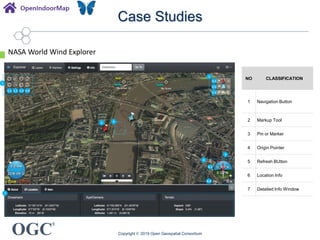
NASA World Wind Explorer
1
2
2-1
6-1
1-1 1-2 1-3 1-4
2-2
2-3
6-2
3
5
7
6
4
NO CLASSIFICATION
1 Navigation Button
2 Markup Tool
3 Pin or Marker
4 Origin Pointer
5 Refresh BUtton
6 Location Info
7 Detailed Info Window
OGC
®
Case Studies
Copyright © 2019 Open Geospatial Consortium
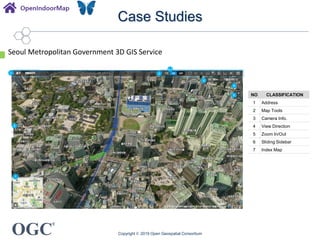
Seoul Metropolitan Government 3D GIS Service
2
2-1
3
5
7
6
4
1
NO CLASSIFICATION
1 Address
2 Map Tools
3 Camera Info.
4 View Direction
5 Zoom In/Out
6 Sliding Sidebar
7 Index Map
OGC
®
Case Studies
Copyright © 2019 Open Geospatial Consortium
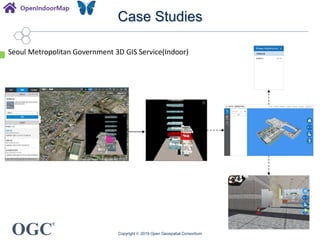
Seoul Metropolitan Government 3D GIS Service(Indoor)
OGC
®
Case Studies
Copyright © 2019 Open Geospatial Consortium
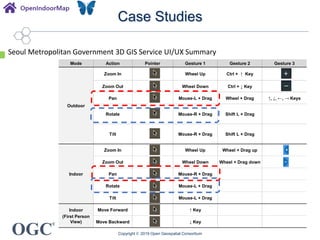
Seoul Metropolitan Government 3D GIS Service UI/UX Summary
Mode Action Pointer Gesture 1 Gesture 2 Gesture 3
Outdoor
Zoom In Wheel Up Ctrl + ↑ Key
Zoom Out Wheel Down Ctrl + ↓ Key
Pan Mouse-L + Drag Wheel + Drag ↑, ↓, ←, → Keys
Rotate Mouse-R + Drag Shift L + Drag
Tilt Mouse-R + Drag Shift L + Drag
Indoor
Zoom In Wheel Up Wheel + Drag up
Zoom Out Wheel Down Wheel + Drag down
Pan Mouse-R + Drag
Rotate Mouse-L + Drag
Tilt Mouse-L + Drag
Indoor
(First Person
View)
Move Forward ↑ Key
Move Backward ↓ Key
OGC
®
Case Studies
Copyright © 2019 Open Geospatial Consortium
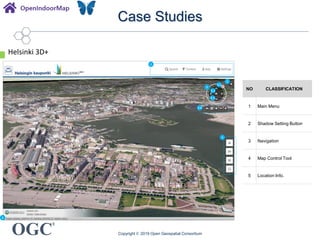
Helsinki 3D+
NO CLASSIFICATION
1 Main Menu
2 Shadow Setting Button
3 Navigation
4 Map Control Tool
5 Location Info.
1
2
4
5
3
3-4
3-1
3-2
3-3
OGC
®
Case Studies
Copyright © 2019 Open Geospatial Consortium
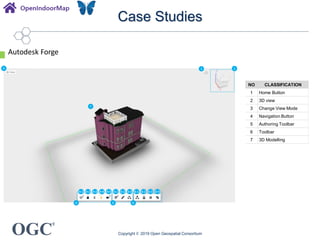
Autodesk Forge
3
4 5 6
1 2
7
4-1 4-2 4-3 4-4 4-5 5-1 5-2 5-3 6-1 6-2 6-3 6-4
NO CLASSIFICATION
1 Home Button
2 3D view
3 Change View Mode
4 Navigation Button
5 Authoring Toolbar
6 Toolbar
7 3D Modelling
OGC
®
Case Studies
Copyright © 2019 Open Geospatial Consortium
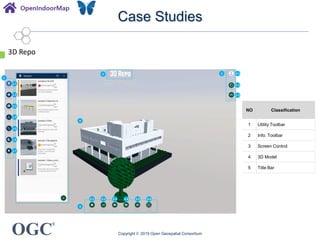
3D Repo
2 2-1
2-2
2-3
3
3-1 3-2 3-3 3-4 3-5 3-6
4
1
1-1
1-2
1-3
1-4
1-5
1-6
1-7
5
NO Classification
1 Utility Toolbar
2 Info. Toolbar
3 Screen Control
4 3D Model
5 Title Bar
OGC
®
Case Studies
Copyright © 2019 Open Geospatial Consortium
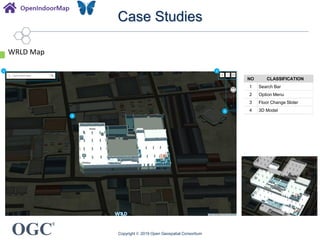
WRLD Map
1
4
2
3
NO CLASSIFICATION
1 Search Bar
2 Option Menu
3 Floor Change Slider
4 3D Model
OGC
®
Case Studies
Copyright © 2019 Open Geospatial Consortium
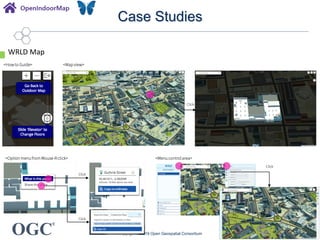
WRLD Map
<Howto Guide> <Mapview>
Click
<Option menufrom Mouse-Rclick> <Menucontrolarea>
Click
Click
Click
OGC
®
Case Studies
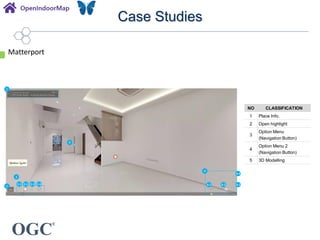
Matterport
1
5
2
3
3-1 3-2 3-3 3-4
4
4-1 4-2 4-3
4-4
NO CLASSIFICATION
1 Place Info.
2 Open highlight
3
Option Menu
(Navigation Button)
4
Option Menu 2
(Navigation Button)
5 3D Modelling
OGC
®
Findings
Copyright © 2019 Open Geospatial Consortium
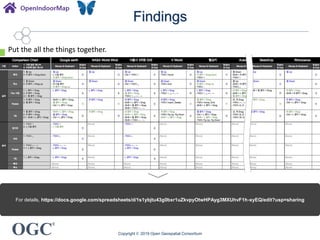
For details, https://docs.google.com/spreadsheets/d/1s1ybjtu43g0bxr1uZkvpyOtwHPAyg3MXUhvF1h-xyEQ/edit?usp=sharing
Put the all the things together.
OGC
®
Findings
Copyright © 2019 Open Geospatial Consortium
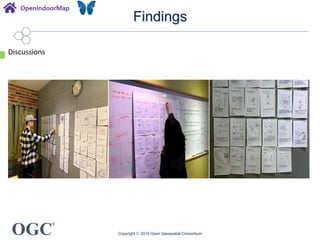
Discussions
OGC
®
Findings
Copyright © 2019 Open Geospatial Consortium
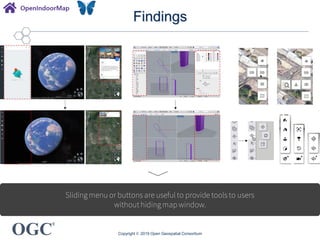
Sliding menu or buttons are useful to provide tools to users
without hiding map window.
OGC
®
Findings
Copyright © 2019 Open Geospatial Consortium
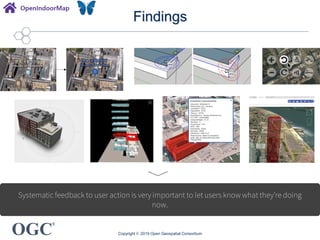
Systematic feedback to user action is very important to let users know what they’re doing
now.
OGC
®
Findings
Copyright © 2019 Open Geospatial Consortium
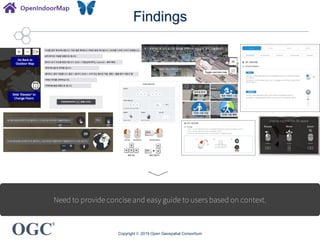
Need to provide concise and easy guide to users based on context.
OGC
®
Findings
Copyright © 2019 Open Geospatial Consortium
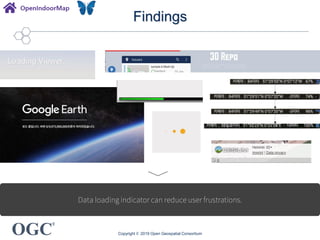
Data loading indicator can reduce user frustrations.
OGC
®
Findings
Copyright © 2019 Open Geospatial Consortium
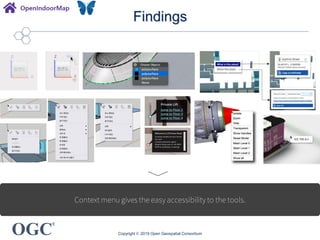
Context menu gives the easy accessibility to the tools.
OGC
®
Findings
Copyright © 2019 Open Geospatial Consortium
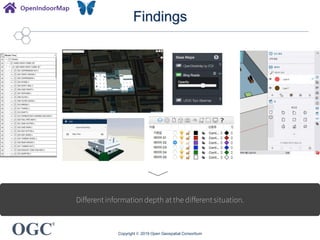
Different information depth at the different situation.
OGC
®
Findings
Copyright © 2019 Open Geospatial Consortium
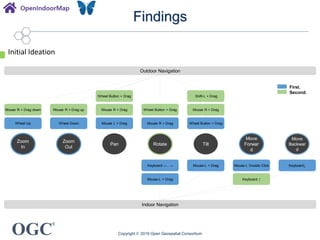
Outdoor Navigation
Indoor Navigation
Keyboard ↑Mouse-L + Drag
Zoom
In
Zoom
Out
Pan
Move
Forwar
d
Move
Backwar
d
Rotate Tilt
Wheel Button + Drag Shift-L + Drag
Mouse R + Drag down Mouse R + Drag up Mouse R + Drag Wheel Button + Drag Mouse R + Drag
Wheel Up Wheel Down Mouse L + Drag Mouse R + Drag Wheel Button + Drag
Mouse-L Double Click Keyboard↓Keyboard ←, → Mouse-L + Drag
First.
Second.
Initial Ideation
OGC
®
Next?
• Initial Ideation
• Evaluation
• Implementation
Copyright © 2019 Open Geospatial Consortium
®
Meeting Partners
Reception Sponsor
Thank you!
Sanghee Shin(shshin@gaia3d.com)
This research was supported by a grant(19NSIP-B135746-03) from National
Spatial Information Research Program (NSIP) funded by Ministry of Land,
Infrastructure and Transport of Korean government.
Copyright © 2019 Open Geospatial Consortium

UI/UX for Indoor/Outdoor Seamless Navigation?

  • 1.
    ® Meeting Partners Reception Sponsor UI/UXfor Indoor/Outdoor Seamless Navigation? 110th OGC Technical Committee Singapore Sanghee Shin(shshin@gaia3d.com) Seongdo Son(sdson@gaia3d.com) Hanbyul Moon(hanbyul.moon@pxd.co.kr) Seungyong Wi(sywi@pxd.co.kr) Copyright © 2019 Open Geospatial Consortium
  • 2.
    OGC ® Agenda • Background • CaseStudies • Findings? Objective: Share experiences and thoughts on integrated indoor/outdoor navigation UI/UX. Copyright © 2019 Open Geospatial Consortium
  • 3.
    OGC ® Background Copyright © 2019Open Geospatial Consortium OpenIndoorMap is a collaborative project to create a world indoor map just like the OpenStreetMap!
  • 4.
    OGC ® Background Copyright © 2019Open Geospatial Consortium OpenIndoorMap lets the people upload their BIM/IFC, CityGML/IndoorGML files to the cloud server. Upload your own files here!
  • 5.
    OGC ® Background Copyright © 2019Open Geospatial Consortium <System Architecture> <System Components> Overall system architecture
  • 6.
    OGC ® Background Copyright © 2019Open Geospatial Consortium When you uploaded many BIM files to the OIM.
  • 7.
    OGC ® Background Copyright © 2019Open Geospatial Consortium • UI/UX of indoor space navigation mode should be different from outdoor one. • BIM/CityGML file itself don’t automatically give us indoor map. • Hard to find where you are in the building. • If you move your mouse in indoor space just like outdoor GIS, you may get lost or will see unwanted structures like MEP. • Do we need to restrict free navigation in indoor space unlike outdoor space? Hey, we’re in the indoor space now!
  • 8.
    OGC ® Case Studies Copyright ©2019 Open Geospatial Consortium Google Earth – Outdoor UI + StreetView style indoor UI 1 2 2-1 3 3-1 3-2 3-3 3-4 3-5 3-6 4 NO CLASSIFICATION 1 Info. Card 2 Pin, Name (Search results) 2-1 Pin, POI 3 Navigation Button 4 Location Info
  • 9.
    OGC ® Case Studies Copyright ©2019 Open Geospatial Consortium Google Earth – Outdoor UI + StreetView style indoor UI <SelectablePOI> <Tooltip> <DynamicNavigation> <Data LoadingIndicator> <MoveButton>
  • 10.
    OGC ® Case Studies Copyright ©2019 Open Geospatial Consortium NASA World Wind Explorer 1 2 2-1 6-1 1-1 1-2 1-3 1-4 2-2 2-3 6-2 3 5 7 6 4 NO CLASSIFICATION 1 Navigation Button 2 Markup Tool 3 Pin or Marker 4 Origin Pointer 5 Refresh BUtton 6 Location Info 7 Detailed Info Window
  • 11.
    OGC ® Case Studies Copyright ©2019 Open Geospatial Consortium Seoul Metropolitan Government 3D GIS Service 2 2-1 3 5 7 6 4 1 NO CLASSIFICATION 1 Address 2 Map Tools 3 Camera Info. 4 View Direction 5 Zoom In/Out 6 Sliding Sidebar 7 Index Map
  • 12.
    OGC ® Case Studies Copyright ©2019 Open Geospatial Consortium Seoul Metropolitan Government 3D GIS Service(Indoor)
  • 13.
    OGC ® Case Studies Copyright ©2019 Open Geospatial Consortium Seoul Metropolitan Government 3D GIS Service UI/UX Summary Mode Action Pointer Gesture 1 Gesture 2 Gesture 3 Outdoor Zoom In Wheel Up Ctrl + ↑ Key Zoom Out Wheel Down Ctrl + ↓ Key Pan Mouse-L + Drag Wheel + Drag ↑, ↓, ←, → Keys Rotate Mouse-R + Drag Shift L + Drag Tilt Mouse-R + Drag Shift L + Drag Indoor Zoom In Wheel Up Wheel + Drag up Zoom Out Wheel Down Wheel + Drag down Pan Mouse-R + Drag Rotate Mouse-L + Drag Tilt Mouse-L + Drag Indoor (First Person View) Move Forward ↑ Key Move Backward ↓ Key
  • 14.
    OGC ® Case Studies Copyright ©2019 Open Geospatial Consortium Helsinki 3D+ NO CLASSIFICATION 1 Main Menu 2 Shadow Setting Button 3 Navigation 4 Map Control Tool 5 Location Info. 1 2 4 5 3 3-4 3-1 3-2 3-3
  • 15.
    OGC ® Case Studies Copyright ©2019 Open Geospatial Consortium Autodesk Forge 3 4 5 6 1 2 7 4-1 4-2 4-3 4-4 4-5 5-1 5-2 5-3 6-1 6-2 6-3 6-4 NO CLASSIFICATION 1 Home Button 2 3D view 3 Change View Mode 4 Navigation Button 5 Authoring Toolbar 6 Toolbar 7 3D Modelling
  • 16.
    OGC ® Case Studies Copyright ©2019 Open Geospatial Consortium 3D Repo 2 2-1 2-2 2-3 3 3-1 3-2 3-3 3-4 3-5 3-6 4 1 1-1 1-2 1-3 1-4 1-5 1-6 1-7 5 NO Classification 1 Utility Toolbar 2 Info. Toolbar 3 Screen Control 4 3D Model 5 Title Bar
  • 17.
    OGC ® Case Studies Copyright ©2019 Open Geospatial Consortium WRLD Map 1 4 2 3 NO CLASSIFICATION 1 Search Bar 2 Option Menu 3 Floor Change Slider 4 3D Model
  • 18.
    OGC ® Case Studies Copyright ©2019 Open Geospatial Consortium WRLD Map <Howto Guide> <Mapview> Click <Option menufrom Mouse-Rclick> <Menucontrolarea> Click Click Click
  • 19.
    OGC ® Case Studies Matterport 1 5 2 3 3-1 3-23-3 3-4 4 4-1 4-2 4-3 4-4 NO CLASSIFICATION 1 Place Info. 2 Open highlight 3 Option Menu (Navigation Button) 4 Option Menu 2 (Navigation Button) 5 3D Modelling
  • 20.
    OGC ® Findings Copyright © 2019Open Geospatial Consortium For details, https://docs.google.com/spreadsheets/d/1s1ybjtu43g0bxr1uZkvpyOtwHPAyg3MXUhvF1h-xyEQ/edit?usp=sharing Put the all the things together.
  • 21.
    OGC ® Findings Copyright © 2019Open Geospatial Consortium Discussions
  • 22.
    OGC ® Findings Copyright © 2019Open Geospatial Consortium Sliding menu or buttons are useful to provide tools to users without hiding map window.
  • 23.
    OGC ® Findings Copyright © 2019Open Geospatial Consortium Systematic feedback to user action is very important to let users know what they’re doing now.
  • 24.
    OGC ® Findings Copyright © 2019Open Geospatial Consortium Need to provide concise and easy guide to users based on context.
  • 25.
    OGC ® Findings Copyright © 2019Open Geospatial Consortium Data loading indicator can reduce user frustrations.
  • 26.
    OGC ® Findings Copyright © 2019Open Geospatial Consortium Context menu gives the easy accessibility to the tools.
  • 27.
    OGC ® Findings Copyright © 2019Open Geospatial Consortium Different information depth at the different situation.
  • 28.
    OGC ® Findings Copyright © 2019Open Geospatial Consortium Outdoor Navigation Indoor Navigation Keyboard ↑Mouse-L + Drag Zoom In Zoom Out Pan Move Forwar d Move Backwar d Rotate Tilt Wheel Button + Drag Shift-L + Drag Mouse R + Drag down Mouse R + Drag up Mouse R + Drag Wheel Button + Drag Mouse R + Drag Wheel Up Wheel Down Mouse L + Drag Mouse R + Drag Wheel Button + Drag Mouse-L Double Click Keyboard↓Keyboard ←, → Mouse-L + Drag First. Second. Initial Ideation
  • 29.
    OGC ® Next? • Initial Ideation •Evaluation • Implementation Copyright © 2019 Open Geospatial Consortium
  • 30.
    ® Meeting Partners Reception Sponsor Thankyou! Sanghee Shin(shshin@gaia3d.com) This research was supported by a grant(19NSIP-B135746-03) from National Spatial Information Research Program (NSIP) funded by Ministry of Land, Infrastructure and Transport of Korean government. Copyright © 2019 Open Geospatial Consortium