1 PreparedBySandeepKumar
Variant Configuration User Manual
Sandeep Kumar
2 PreparedBySandeepKumar
Contents
Purpose .............................................................................................................................................3
Scenario.............................................................................................................................................3
Configuration.....................................................................................................................................4
Create Characteristics .....................................................................................................................4
Create Class....................................................................................................................................5
Creating a configurable material......................................................................................................8
Create a Super BOM......................................................................................................................15
Create Configuration Profile..........................................................................................................18
Assign Object Dependencies to the items in the Super BOM............................................................22
Create Precondition and Selection Condition dependencies............................................................28
Super Routing...............................................................................................................................33
Configuration Test T-Code: CU50 ...................................................................................................37
Business Process...............................................................................................................................40
Sales Order...................................................................................................................................40
MRP Run......................................................................................................................................48
Creating Outbound Delivery ..........................................................................................................57
Creating Transfer Order for Delivery to pick the material ................................................................57
3 PreparedBySandeepKumar
Purpose
User manual providesthe configurationguideandapplicationof variantconfigurationinProduction
Planning.
Scenario
Scenariodemonstratesthe MTO variantconfigurationwithcharacteristicparameterentryinthe sales
order,transferof requirementsfromthe salesordertoMRP, conversionof plannedordersto
productionordersandselectionof appropriate materialsandoperationsfromthe superBOMs and
superroutingsandfinallycreatingdeliveriestothe finishedproduct.
Certainconfigurable material characteristicsanditsvaluesare displayedinthe salesorderbasedonthe
precedingcharacteristicsvalues.
4 PreparedBySandeepKumar
Configuration
Create Characteristics
Create the characteristicsforthe selectionparametersof the variantwithDataType CHARor NUMfor
calculations
5 PreparedBySandeepKumar
AssignValues
Create Class
Class Type 300 and 200
Class Type 300
Create classtype 300 forvariantentry
6 PreparedBySandeepKumar
Class Type 200
Create ClassType 200 formentioningparametersforconfigurable materials
7 PreparedBySandeepKumar
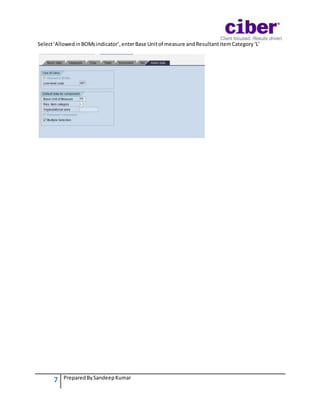
Select‘AllowedinBOMsindicator’,enterBase Unitof measure andResultantitemCategory‘L’
8 PreparedBySandeepKumar
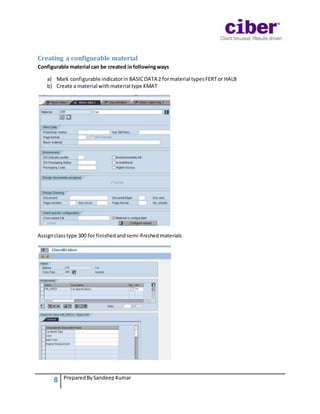
Creating a configurable material
Configurable material can be created infollowingways
a) Mark configurable indicatorin BASICDATA 2 formaterial typesFERT or HALB
b) Create a material withmaterial type KMAT
Assignclasstype 300 for finishedandsemi-finishedmaterials
9 PreparedBySandeepKumar
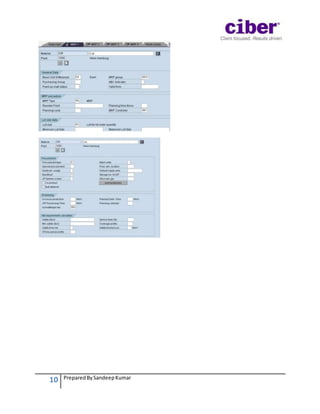
Setitemcategorygrp as ‘0002’
10 PreparedBySandeepKumar
11 PreparedBySandeepKumar
SetStrategyGroup as ‘25’ Make to Order for configurable material
SetAvailabilityCheckto‘02’Individual Requirements
SetBOM explosion/dependentrequirementsto‘1’
12 PreparedBySandeepKumar
13 PreparedBySandeepKumar
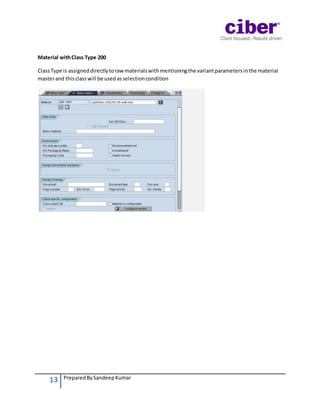
Material withClass Type 200
ClassType is assigneddirectlytorawmaterialswithmentioningthe variantparametersinthe material
masterand thisclasswill be usedasselectioncondition
14 PreparedBySandeepKumar
15 PreparedBySandeepKumar
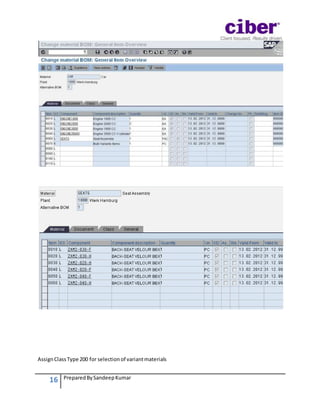
Create a Super BOM
Create a BOM withall possible materialspresentinvariantmaterials
16 PreparedBySandeepKumar
AssignClassType 200 for selectionof variantmaterials
17 PreparedBySandeepKumar
18 PreparedBySandeepKumar
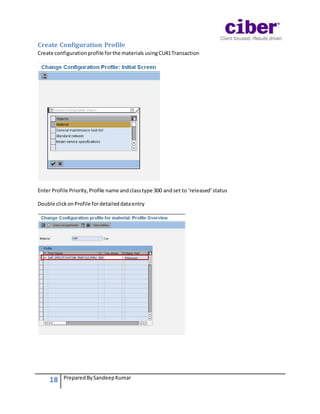
Create Configuration Profile
Create configurationprofile forthe materials usingCU41Transaction
Enter Profile Priority,Profile name andclasstype 300 andset to ‘released’status
Double clickonProfile fordetaileddataentry
19 PreparedBySandeepKumar
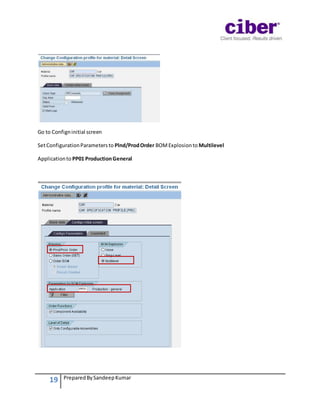
Go to Configninitial screen
SetConfigurationParametersto Plnd/ProdOrder BOMExplosionto Multilevel
Applicationto PP01 ProductionGeneral
20 PreparedBySandeepKumar
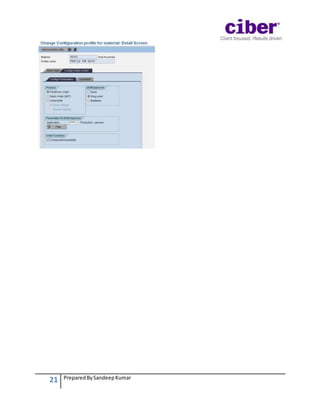
Similarlyaconfigurationprofile formaterial seatsiscreated
21 PreparedBySandeepKumar
22 PreparedBySandeepKumar
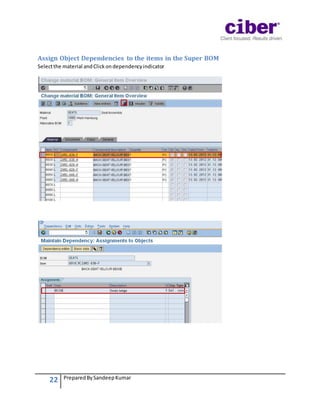
Assign Object Dependencies to the items in the Super BOM
Selectthe material andClickondependencyindicator
23 PreparedBySandeepKumar
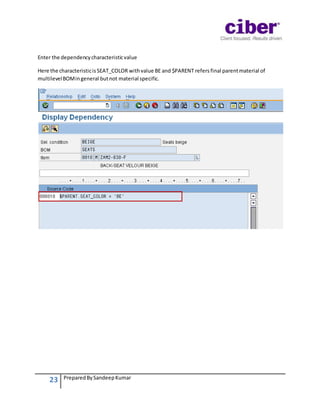
Enter the dependencycharacteristicvalue
Here the characteristicisSEAT_COLOR withvalue BE and $PARENT refers final parentmaterial of
multilevelBOMingeneral butnot material specific.
24 PreparedBySandeepKumar
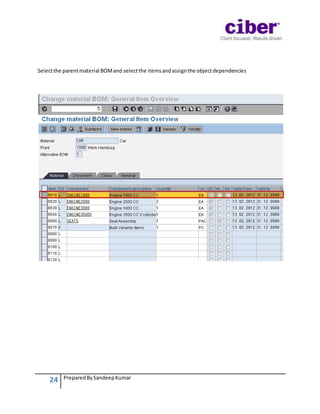
Selectthe parentmaterial BOMand selectthe itemsandassignthe objectdependencies
25 PreparedBySandeepKumar
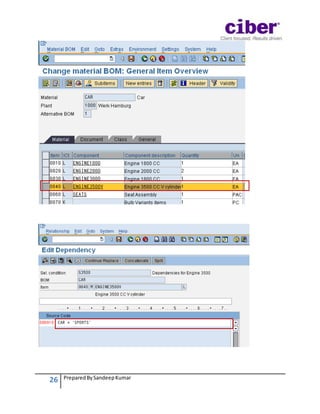
The conditionforobjectdependencyforthe engine selectionrequirestwoconditions
26 PreparedBySandeepKumar
27 PreparedBySandeepKumar
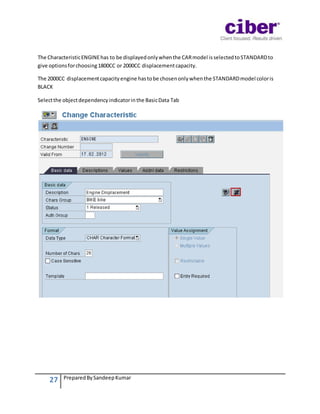
The CharacteristicENGINEhas to be displayedonlywhenthe CARmodel isselectedtoSTANDARDto
give optionsforchoosing1800CC or 2000CC displacementcapacity.
The 2000CC displacementcapacityengine hastobe chosenonlywhenthe STANDARDmodel coloris
BLACK
Selectthe objectdependencyindicatorinthe BasicData Tab
28 PreparedBySandeepKumar
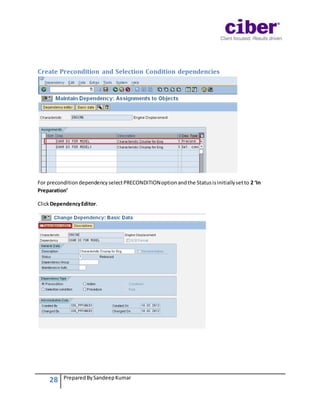
Create Precondition and Selection Condition dependencies
For preconditiondependencyselectPRECONDITIONoptionandthe Statusisinitiallysetto 2 ‘In
Preparation’
ClickDependencyEditor.
29 PreparedBySandeepKumar
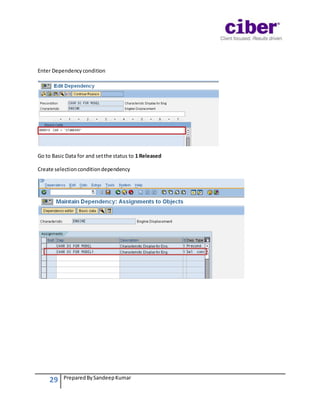
Enter Dependencycondition
Go to Basic Data for and setthe status to 1 Released
Create selectionconditiondependency
30 PreparedBySandeepKumar
Go to Basic Data and choose SelectionConditionoptionandassigndependencyvalues
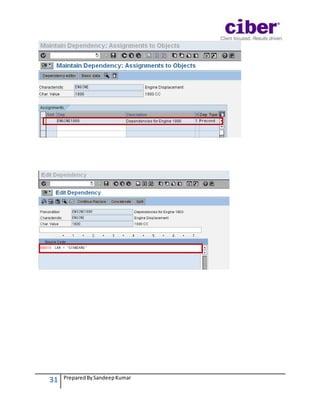
AssigningPreconditionstoENGINEcharacteristicvaluestodisplaythe valuesbasedonthe model and
colorcharacteristics
Selectavalue
MaintainPreconditiondependencyforthe characteristicvalue 1800CC
31 PreparedBySandeepKumar
32 PreparedBySandeepKumar
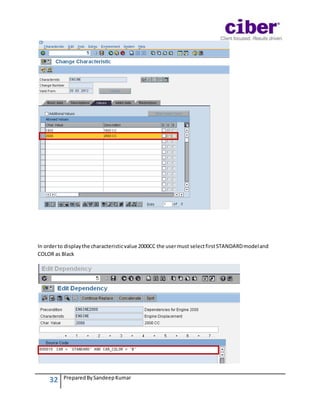
In orderto displaythe characteristicvalue 2000CC the usermust selectfirstSTANDARDmodeland
COLOR as Black
33 PreparedBySandeepKumar
Super Routing
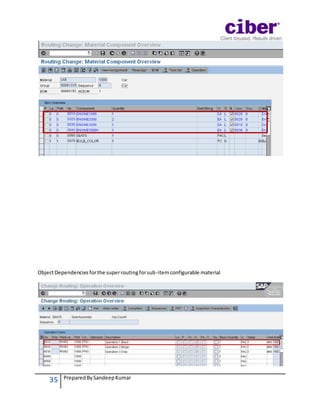
All the operationsrequiredformakingdifferentpossibleconfigurationsandobjectdependenciesfor
appropriate operationisentered
34 PreparedBySandeepKumar
35 PreparedBySandeepKumar
ObjectDependenciesforthe superroutingforsub-itemconfigurable material
36 PreparedBySandeepKumar
Assigncomponentstovariousoperations
37 PreparedBySandeepKumar
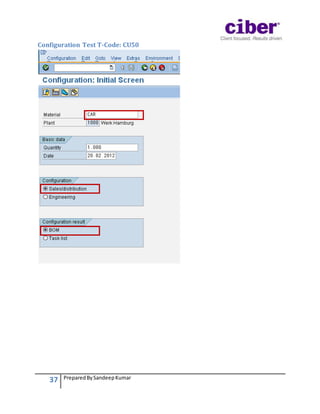
Configuration Test T-Code: CU50
38 PreparedBySandeepKumar
Enter the CharacteristicvaluesforCarand Seatsand clickon
39 PreparedBySandeepKumar
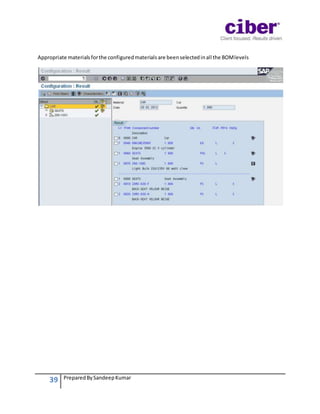
Appropriate materialsforthe configuredmaterialsare beenselectedinall the BOMlevels
40 PreparedBySandeepKumar
Business Process
Sales Order
Create standardsalesorder
Enter the itemnumberandquantitytoenterthe variantconfiguration
41 PreparedBySandeepKumar
Enter the parametersforthe CAR variant
42 PreparedBySandeepKumar
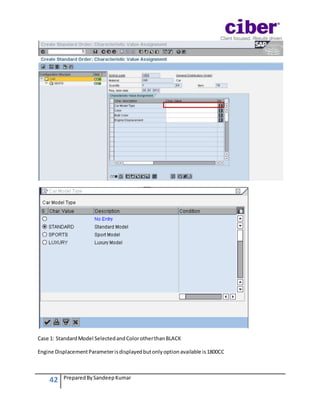
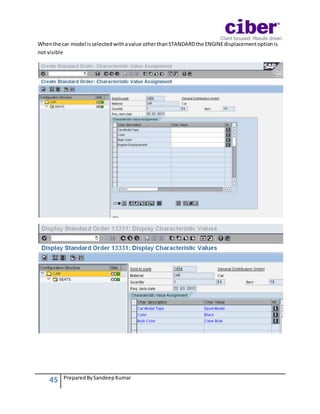
Case 1: StandardModel SelectedandColorotherthanBLACK
Engine DisplacementParameterisdisplayedbutonlyoptionavailable is1800CC
43 PreparedBySandeepKumar
Case 2:
44 PreparedBySandeepKumar
Car Model Type enteredisSTANDARDand ColorisBLACK, the engine displacementoptionshowstwo
values1800CC and 2000CC
Case 3: NonSTANDARDcar model
45 PreparedBySandeepKumar
Whenthe car model isselectedwithavalue otherthanSTANDARDthe ENGINEdisplacementoptionis
not visible
46 PreparedBySandeepKumar
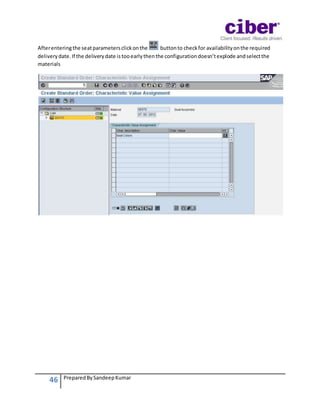
Afterenteringthe seatparametersclickonthe buttonto checkfor availabilityonthe required
deliverydate.If the deliverydate istooearlythenthe configurationdoesn’texplode andselectthe
materials
47 PreparedBySandeepKumar
48 PreparedBySandeepKumar
MRP Run
PerformSingle Item, Multi levelMRPrun
49 PreparedBySandeepKumar
50 PreparedBySandeepKumar
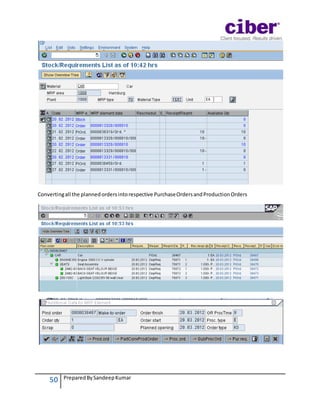
Convertingall the plannedordersintorespective PurchaseOrdersandProductionOrders
51 PreparedBySandeepKumar
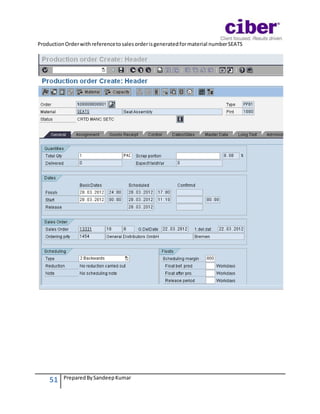
ProductionOrderwithreferencetosalesorderisgeneratedformaterial numberSEATS
52 PreparedBySandeepKumar
A VariantBOMwithseatcomponentswithcolorBIEGE isselectedandassignedtothe productionorder
Appropriate Operationfromsuperroutingisassignedtothe Productionorder
53 PreparedBySandeepKumar
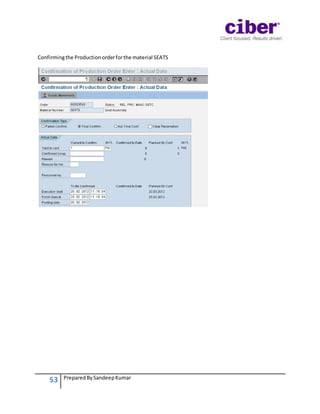
Confirmingthe Productionorderforthe material SEATS
54 PreparedBySandeepKumar
ProductionOrderforthe material CAR
ComponentsforVariantSpecificProductionOrder
55 PreparedBySandeepKumar
Variantspecificoperationforthe CARassignedtoProductionOrder
56 PreparedBySandeepKumar
Afterconfirmingall the productionordersthe Stockspecifictosalesorderisavailable fordelivery
57 PreparedBySandeepKumar
Creating Outbound Delivery
Creating Transfer Order for Delivery to pick the material
58 PreparedBySandeepKumar
PostGoods Issue forthe deliveryandsave the document
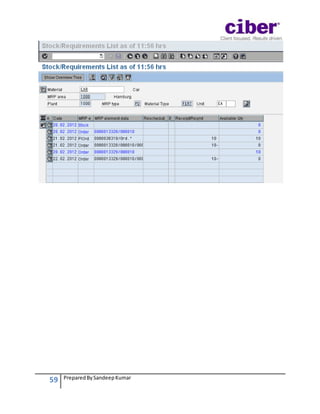
Stock RequirementsListAfterDelivery
59 PreparedBySandeepKumar

Variant Configuration in SAP PP: Beginner's Guide