SAP VARIANT CONFIGURATION TRAINING

Online | classroom| Corporate
Training | certifications | placements| support
Contact Us : +91-9052666559, +1 -6786933994
Email: info@magnifictraining.com

http://www.sapvsonlinetraining.in
Variant Configuration
What is Variant Configuration?
It is a tool which helps to simplify the complex manufacturing of
final product with more varieties and Variation of the
Input material.
e.g. Automobile manufacturing Furniture manufacturing Visit
www.sap-topjobs.com for more info
Variant Configuration..contd
Variant configuration helps
􀂾 To ensure right choice is delivered
􀂾 Easy for the sales person to select
􀂾 Communication is fast and clear
􀂾 Ensures production of right item
http://www.sapvsonlinetraining.in
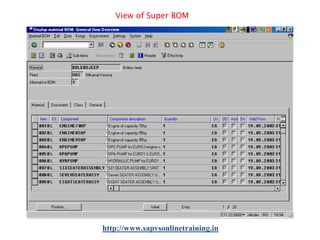
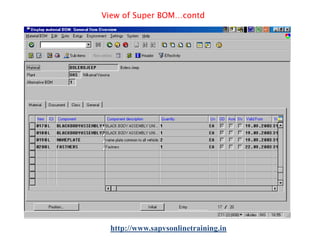
Variant Configuration-super BOM Super BOM:Containing all the components for producing all variants of
the product.
Advantage:􀂾 No need to create a separate BOM
􀂾 One configurable material to cover variants.
Configurable Material -BOM
configurable material BOM contains all the components that
are required to manufacture the material. The BOM contains
components that are only used in specific variants (variant
parts),as well as components that are used in all
variants (non-variable parts)

http://www.sapvsonlinetraining.in
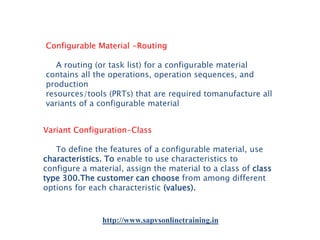
Configurable Material -Routing
A routing (or task list) for a configurable material
contains all the operations, operation sequences, and
production
resources/tools (PRTs) that are required tomanufacture all
variants of a configurable material
Variant Configuration-Class
To define the features of a configurable material, use
characteristics. To enable to use characteristics to
configure a material, assign the material to a class of class
type 300.The customer can choose from among different
options for each characteristic (values).

http://www.sapvsonlinetraining.in
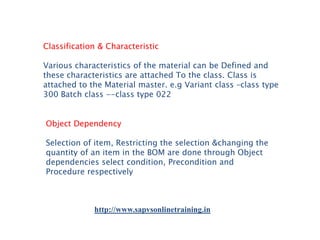
Classification & Characteristic
Various characteristics of the material can be Defined and
these characteristics are attached To the class. Class is
attached to the Material master. e.g Variant class –class type
300 Batch class --class type 022
Object Dependency
Selection of item, Restricting the selection &changing the
quantity of an item in the BOM are done through Object
dependencies select condition, Precondition and
Procedure respectively

http://www.sapvsonlinetraining.in
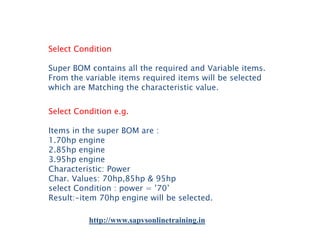
Select Condition
Super BOM contains all the required and Variable items.
From the variable items required items will be selected
which are Matching the characteristic value.
Select Condition e.g.
Items in the super BOM are :
1.70hp engine
2.85hp engine
3.95hp engine
Characteristic: Power
Char. Values: 70hp,85hp & 95hp
select Condition : power = ’70’
Result:-item 70hp engine will be selected.
http://www.sapvsonlinetraining.in
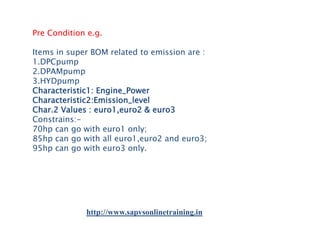
Pre Condition e.g.
Items in super BOM related to emission are :
1.DPCpump
2.DPAMpump
3.HYDpump
Characteristic1: Engine_Power
Characteristic2:Emission_level
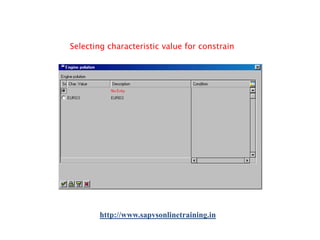
Char.2 Values : euro1,euro2 & euro3
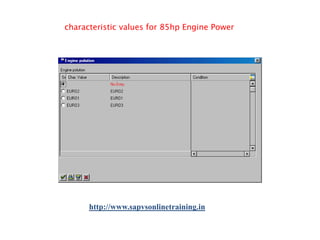
Constrains:70hp can go with euro1 only;
85hp can go with all euro1,euro2 and euro3;
95hp can go with euro3 only.

http://www.sapvsonlinetraining.in
Procedure e.g.
If there is a change in quantity depends on any Characteristic
value, then Procedure is used.
i.e Depends on number of wheel character, item
‘Fastner’ required quantity per engine may be
8 times the number of wheel.
If no of wheel is 4 then fastner qty should be 32
Per product.
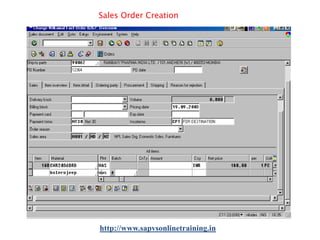
Creating Sales Order
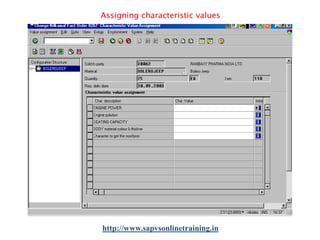
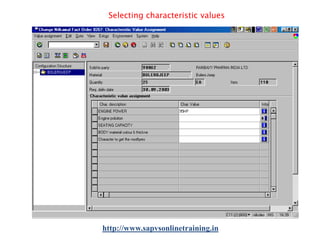
When creating a sales order & enter the configurable material
as an order item. see the configuration editor, where assign
values to the characteristics of the material. when entering
characteristic values, dependencies for the characteristics and
values are processed.
http://www.sapvsonlinetraining.in
Class item in super BOM
Another way to simplify the BOM creation Process is through
class item in the BOM
Creation of class
Characteristics are created and attached with Class of
class type 300(variant class). Class will be assigned to the
material master With characteristic values
Enter this class as a class item (K) in the BOM
Link between class,item & BOM

Link is established as class attached to the material master
and the same class is entered As class item (K) in the BOM.
http://www.sapvsonlinetraining.in
Item selection via class item
When the particular class is assigned to the Material master
and the same class is Entered as a class item in the
BOM, while Creating the sales order
Control on class and characteristics
Classes can be created through Engineering Change
Management so that the better control can be Imparted to
it. Changes to the characteristic & its effective from dates
can be triggered through Engineering change
Management.

http://www.sapvsonlinetraining.inv
Variant Configuration -Pricing
You can make the price of a variant dependent on the
characteristic values assigned (Pricing). You can use
variant conditions to define surcharges and discounts for a
variant
Variant –Pricing steps
Create condition record create a procedure where you enter
the reference from the characteristic
Assign the procedures to either the characteristic values
configure the material in the sales order The net price for
the material is displayed

http://www.sapvsonlinetraining.in
Pricing steps -process
If a value that triggers a variant condition is selected when
configuring a material in a sales order, the price of the
material displayed under Net value is automatically
increased or reduced. In addition, the Conditions pushbutton
is displayed. On pressing this pushbutton, One can see
which conditions have influenced the price.

Making variant make to stock
For variants that are required frequently, you can create
material variants, which can be produced without a sales
order and kept in stock. When you receive a sales order, you
can check whether the variant required is in stock, so that
you can deliver immediately.
http://www.sapvsonlinetraining.in
Variant matching in the SO
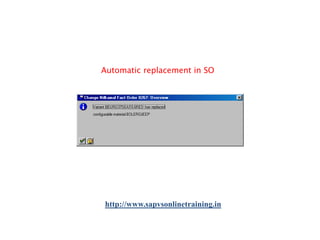
If material variants already exist for aconfigurable
material, the configurable material can be replaced in the
sales order
by a material variant. Material variants that only partly match
the configuration of the material in the sales order are
ignored
Note:-The configuration of the material must
match the material variant Exactly
Simulating configuration
configuration simulation to check configuration model.
In the configuration simulation, one can test whether it has
created the objects correctly and whether dependencies
work.
http://www.sapvsonlinetraining.in
Material Accounting
Relevant items are selected from the Super BOM
through object dependency. The selected items form
the BOM specific to SO. Items are copied to Plnd.
order, prod. order And issued against the production
order.
Example of VC
Finished Material : Bolerojeep
Raw Material :-Many items

Characters(structure options)
Engine Power
Emission Level
Seating Capacity Body
Material Thickness & colour
Number of wheels

http://www.sapvsonlinetraining.in
Character value & constraints
Engine Power –
70hp, 85hp, 95hp
Emission Level –
Euro1, Euro2, and Euro3
Matching
70hp can go with Euro1 only
80hp can go with all
95hp can go with Euro3 only
Character value
Seating Capacity –
6 ,7 and 8
Body Material Thickness & colour -0.5mmwhite;0.6mmwhite;0.7mmwhite
0.5mmred;0.6mmred;0.7mmred
0.5mmblack;0.6mmblack;0.7mmblack
No.of Wheels –4 or 5
This is to select the qty of fastner
http://www.sapvsonlinetraining.in
Sales Order Creation

http://www.sapvsonlinetraining.in
Assigning characteristic values

http://www.sapvsonlinetraining.in
Selecting characteristic values

http://www.sapvsonlinetraining.in
Selecting characteristic value for constrain

http://www.sapvsonlinetraining.in
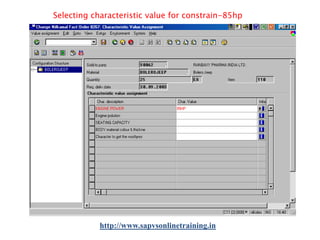
Selecting characteristic value for constrain-85hp

http://www.sapvsonlinetraining.in
characteristic values for 85hp Engine Power

http://www.sapvsonlinetraining.in
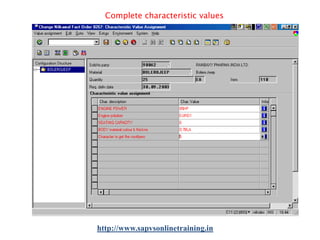
Complete characteristic values

http://www.sapvsonlinetraining.in
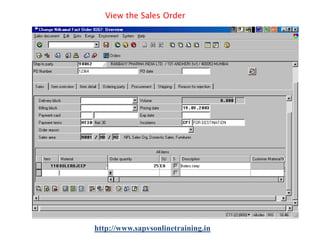
View the Sales Order

http://www.sapvsonlinetraining.in
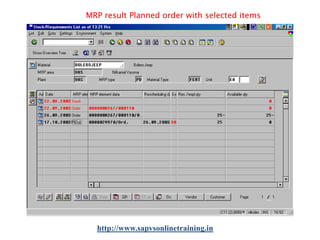
MRP result Planned order with selected items

http://www.sapvsonlinetraining.in
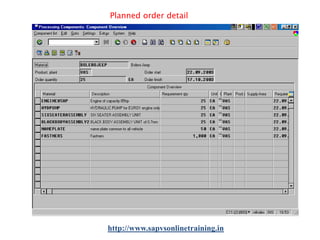
Planned order detail

http://www.sapvsonlinetraining.in
View of Super BOM

http://www.sapvsonlinetraining.in
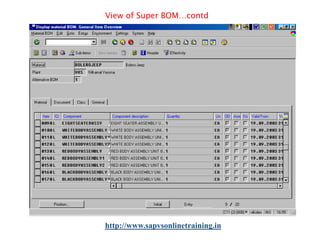
View of Super BOM…contd

http://www.sapvsonlinetraining.in
View of Super BOM…contd

http://www.sapvsonlinetraining.in
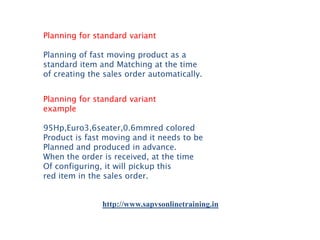
Planning for standard variant
Planning of fast moving product as a
standard item and Matching at the time
of creating the sales order automatically.
Planning for standard variant
example
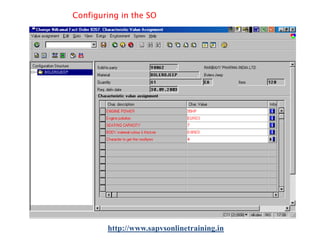
95Hp,Euro3,6seater,0.6mmred colored
Product is fast moving and it needs to be
Planned and produced in advance.
When the order is received, at the time
Of configuring, it will pickup this
red item in the sales order.

http://www.sapvsonlinetraining.in
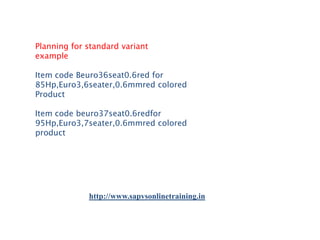
Planning for standard variant
example
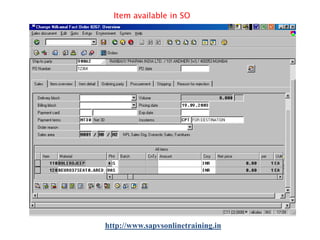
Item code Beuro36seat0.6red for
85Hp,Euro3,6seater,0.6mmred colored
Product
Item code beuro37seat0.6redfor
95Hp,Euro3,7seater,0.6mmred colored
product

http://www.sapvsonlinetraining.in
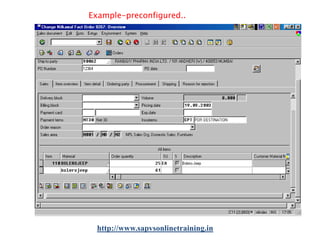
Example-preconfigured..

http://www.sapvsonlinetraining.in
Configuring in the SO

http://www.sapvsonlinetraining.in
Automatic replacement in SO

http://www.sapvsonlinetraining.in
Item available in SO

http://www.sapvsonlinetraining.in
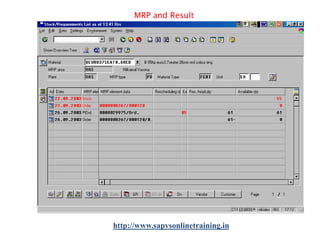
MRP and Result

http://www.sapvsonlinetraining.in
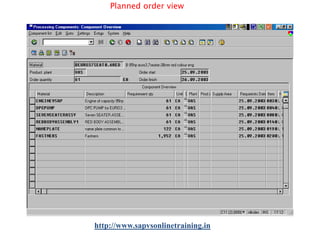
Planned order view

http://www.sapvsonlinetraining.in
Component Accounting From Planned orders components are
Copied to production order and issued.
All the items are accounted for consumption
Visit www.sap-topjobs.com for more info

http://www.sapvsonlinetraining.in

Sap vc ppt

  • 1.
    SAP VARIANT CONFIGURATIONTRAINING Online | classroom| Corporate Training | certifications | placements| support Contact Us : +91-9052666559, +1 -6786933994 Email: info@magnifictraining.com http://www.sapvsonlinetraining.in
  • 2.
    Variant Configuration What isVariant Configuration? It is a tool which helps to simplify the complex manufacturing of final product with more varieties and Variation of the Input material. e.g. Automobile manufacturing Furniture manufacturing Visit www.sap-topjobs.com for more info Variant Configuration..contd Variant configuration helps 􀂾 To ensure right choice is delivered 􀂾 Easy for the sales person to select 􀂾 Communication is fast and clear 􀂾 Ensures production of right item http://www.sapvsonlinetraining.in
  • 3.
    Variant Configuration-super BOMSuper BOM:Containing all the components for producing all variants of the product. Advantage:􀂾 No need to create a separate BOM 􀂾 One configurable material to cover variants. Configurable Material -BOM configurable material BOM contains all the components that are required to manufacture the material. The BOM contains components that are only used in specific variants (variant parts),as well as components that are used in all variants (non-variable parts) http://www.sapvsonlinetraining.in
  • 4.
    Configurable Material -Routing Arouting (or task list) for a configurable material contains all the operations, operation sequences, and production resources/tools (PRTs) that are required tomanufacture all variants of a configurable material Variant Configuration-Class To define the features of a configurable material, use characteristics. To enable to use characteristics to configure a material, assign the material to a class of class type 300.The customer can choose from among different options for each characteristic (values). http://www.sapvsonlinetraining.in
  • 5.
    Classification & Characteristic Variouscharacteristics of the material can be Defined and these characteristics are attached To the class. Class is attached to the Material master. e.g Variant class –class type 300 Batch class --class type 022 Object Dependency Selection of item, Restricting the selection &changing the quantity of an item in the BOM are done through Object dependencies select condition, Precondition and Procedure respectively http://www.sapvsonlinetraining.in
  • 6.
    Select Condition Super BOMcontains all the required and Variable items. From the variable items required items will be selected which are Matching the characteristic value. Select Condition e.g. Items in the super BOM are : 1.70hp engine 2.85hp engine 3.95hp engine Characteristic: Power Char. Values: 70hp,85hp & 95hp select Condition : power = ’70’ Result:-item 70hp engine will be selected. http://www.sapvsonlinetraining.in
  • 7.
    Pre Condition e.g. Itemsin super BOM related to emission are : 1.DPCpump 2.DPAMpump 3.HYDpump Characteristic1: Engine_Power Characteristic2:Emission_level Char.2 Values : euro1,euro2 & euro3 Constrains:70hp can go with euro1 only; 85hp can go with all euro1,euro2 and euro3; 95hp can go with euro3 only. http://www.sapvsonlinetraining.in
  • 8.
    Procedure e.g. If thereis a change in quantity depends on any Characteristic value, then Procedure is used. i.e Depends on number of wheel character, item ‘Fastner’ required quantity per engine may be 8 times the number of wheel. If no of wheel is 4 then fastner qty should be 32 Per product. Creating Sales Order When creating a sales order & enter the configurable material as an order item. see the configuration editor, where assign values to the characteristics of the material. when entering characteristic values, dependencies for the characteristics and values are processed. http://www.sapvsonlinetraining.in
  • 9.
    Class item insuper BOM Another way to simplify the BOM creation Process is through class item in the BOM Creation of class Characteristics are created and attached with Class of class type 300(variant class). Class will be assigned to the material master With characteristic values Enter this class as a class item (K) in the BOM Link between class,item & BOM Link is established as class attached to the material master and the same class is entered As class item (K) in the BOM. http://www.sapvsonlinetraining.in
  • 10.
    Item selection viaclass item When the particular class is assigned to the Material master and the same class is Entered as a class item in the BOM, while Creating the sales order Control on class and characteristics Classes can be created through Engineering Change Management so that the better control can be Imparted to it. Changes to the characteristic & its effective from dates can be triggered through Engineering change Management. http://www.sapvsonlinetraining.inv
  • 11.
    Variant Configuration -Pricing Youcan make the price of a variant dependent on the characteristic values assigned (Pricing). You can use variant conditions to define surcharges and discounts for a variant Variant –Pricing steps Create condition record create a procedure where you enter the reference from the characteristic Assign the procedures to either the characteristic values configure the material in the sales order The net price for the material is displayed http://www.sapvsonlinetraining.in
  • 12.
    Pricing steps -process Ifa value that triggers a variant condition is selected when configuring a material in a sales order, the price of the material displayed under Net value is automatically increased or reduced. In addition, the Conditions pushbutton is displayed. On pressing this pushbutton, One can see which conditions have influenced the price. Making variant make to stock For variants that are required frequently, you can create material variants, which can be produced without a sales order and kept in stock. When you receive a sales order, you can check whether the variant required is in stock, so that you can deliver immediately. http://www.sapvsonlinetraining.in
  • 13.
    Variant matching inthe SO If material variants already exist for aconfigurable material, the configurable material can be replaced in the sales order by a material variant. Material variants that only partly match the configuration of the material in the sales order are ignored Note:-The configuration of the material must match the material variant Exactly Simulating configuration configuration simulation to check configuration model. In the configuration simulation, one can test whether it has created the objects correctly and whether dependencies work. http://www.sapvsonlinetraining.in
  • 14.
    Material Accounting Relevant itemsare selected from the Super BOM through object dependency. The selected items form the BOM specific to SO. Items are copied to Plnd. order, prod. order And issued against the production order. Example of VC Finished Material : Bolerojeep Raw Material :-Many items Characters(structure options) Engine Power Emission Level Seating Capacity Body Material Thickness & colour Number of wheels http://www.sapvsonlinetraining.in
  • 15.
    Character value &constraints Engine Power – 70hp, 85hp, 95hp Emission Level – Euro1, Euro2, and Euro3 Matching 70hp can go with Euro1 only 80hp can go with all 95hp can go with Euro3 only Character value Seating Capacity – 6 ,7 and 8 Body Material Thickness & colour -0.5mmwhite;0.6mmwhite;0.7mmwhite 0.5mmred;0.6mmred;0.7mmred 0.5mmblack;0.6mmblack;0.7mmblack No.of Wheels –4 or 5 This is to select the qty of fastner http://www.sapvsonlinetraining.in
  • 16.
  • 17.
  • 18.
  • 19.
    Selecting characteristic valuefor constrain http://www.sapvsonlinetraining.in
  • 20.
    Selecting characteristic valuefor constrain-85hp http://www.sapvsonlinetraining.in
  • 21.
    characteristic values for85hp Engine Power http://www.sapvsonlinetraining.in
  • 22.
  • 23.
    View the SalesOrder http://www.sapvsonlinetraining.in
  • 24.
    MRP result Plannedorder with selected items http://www.sapvsonlinetraining.in
  • 25.
  • 26.
    View of SuperBOM http://www.sapvsonlinetraining.in
  • 27.
    View of SuperBOM…contd http://www.sapvsonlinetraining.in
  • 28.
    View of SuperBOM…contd http://www.sapvsonlinetraining.in
  • 29.
    Planning for standardvariant Planning of fast moving product as a standard item and Matching at the time of creating the sales order automatically. Planning for standard variant example 95Hp,Euro3,6seater,0.6mmred colored Product is fast moving and it needs to be Planned and produced in advance. When the order is received, at the time Of configuring, it will pickup this red item in the sales order. http://www.sapvsonlinetraining.in
  • 30.
    Planning for standardvariant example Item code Beuro36seat0.6red for 85Hp,Euro3,6seater,0.6mmred colored Product Item code beuro37seat0.6redfor 95Hp,Euro3,7seater,0.6mmred colored product http://www.sapvsonlinetraining.in
  • 31.
  • 32.
    Configuring in theSO http://www.sapvsonlinetraining.in
  • 33.
    Automatic replacement inSO http://www.sapvsonlinetraining.in
  • 34.
    Item available inSO http://www.sapvsonlinetraining.in
  • 35.
  • 36.
  • 37.
    Component Accounting FromPlanned orders components are Copied to production order and issued. All the items are accounted for consumption Visit www.sap-topjobs.com for more info http://www.sapvsonlinetraining.in