FROM TECHNIQUE
TO DETECTION
Rapid prototyping of
ATT&CK-based analytics
Paul Ewing @_paulewing
Ross Wolf @rw_access
ATT&CK Detections?
Will be powerful
Will enable hunters
Will transform your SOC
ATT&CK Detections?
Will not be as easy as described
Will not always lead to analytics
Will not be a silver bullet
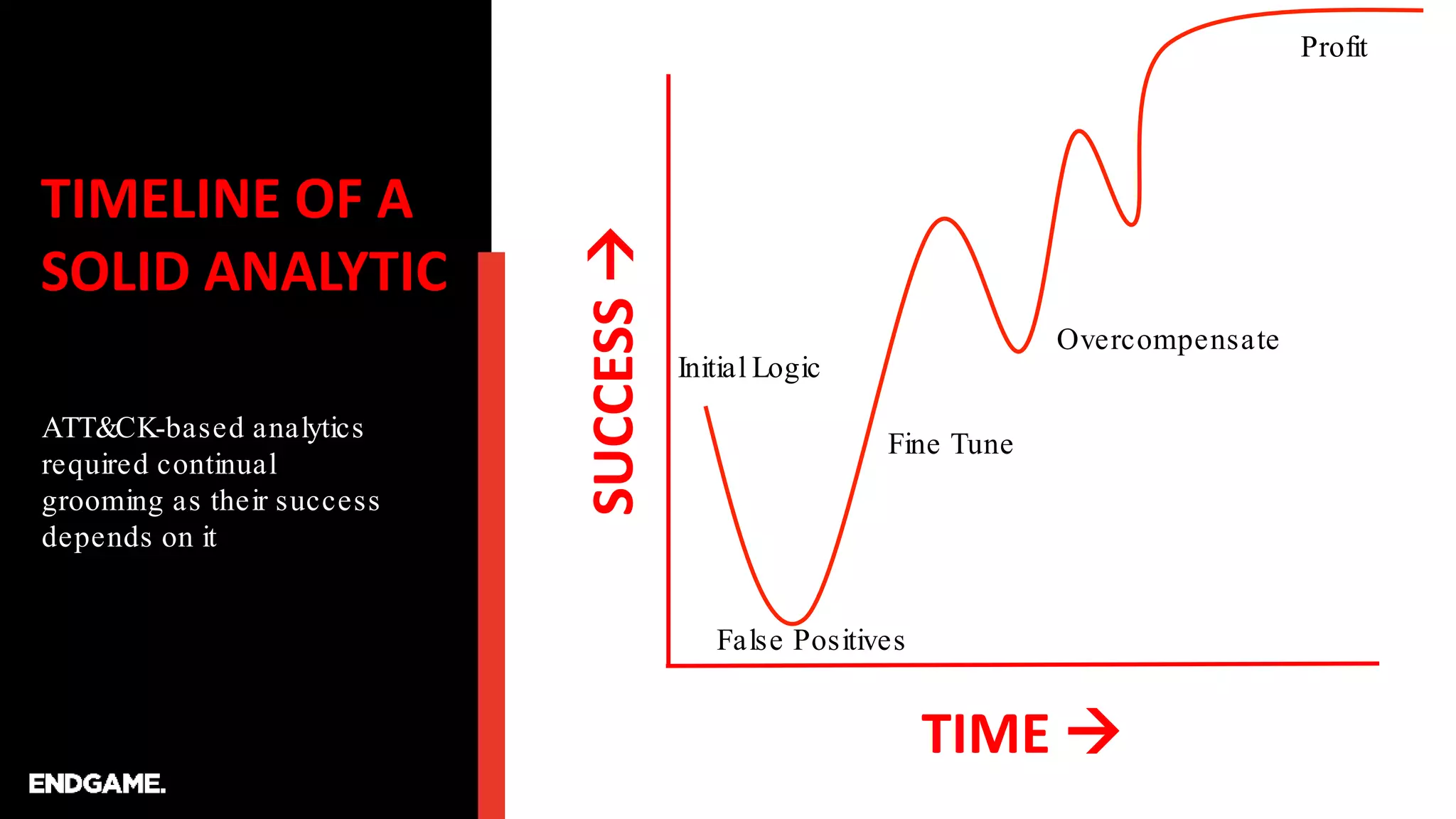
TIMELINE OF A
SOLID ANALYTIC
ATT&CK-based analytics
required continual
grooming as their success
depends on it
TIME 
SUCCESS
Initial Logic
False Positives
Fine Tune
Overcompensate
Profit
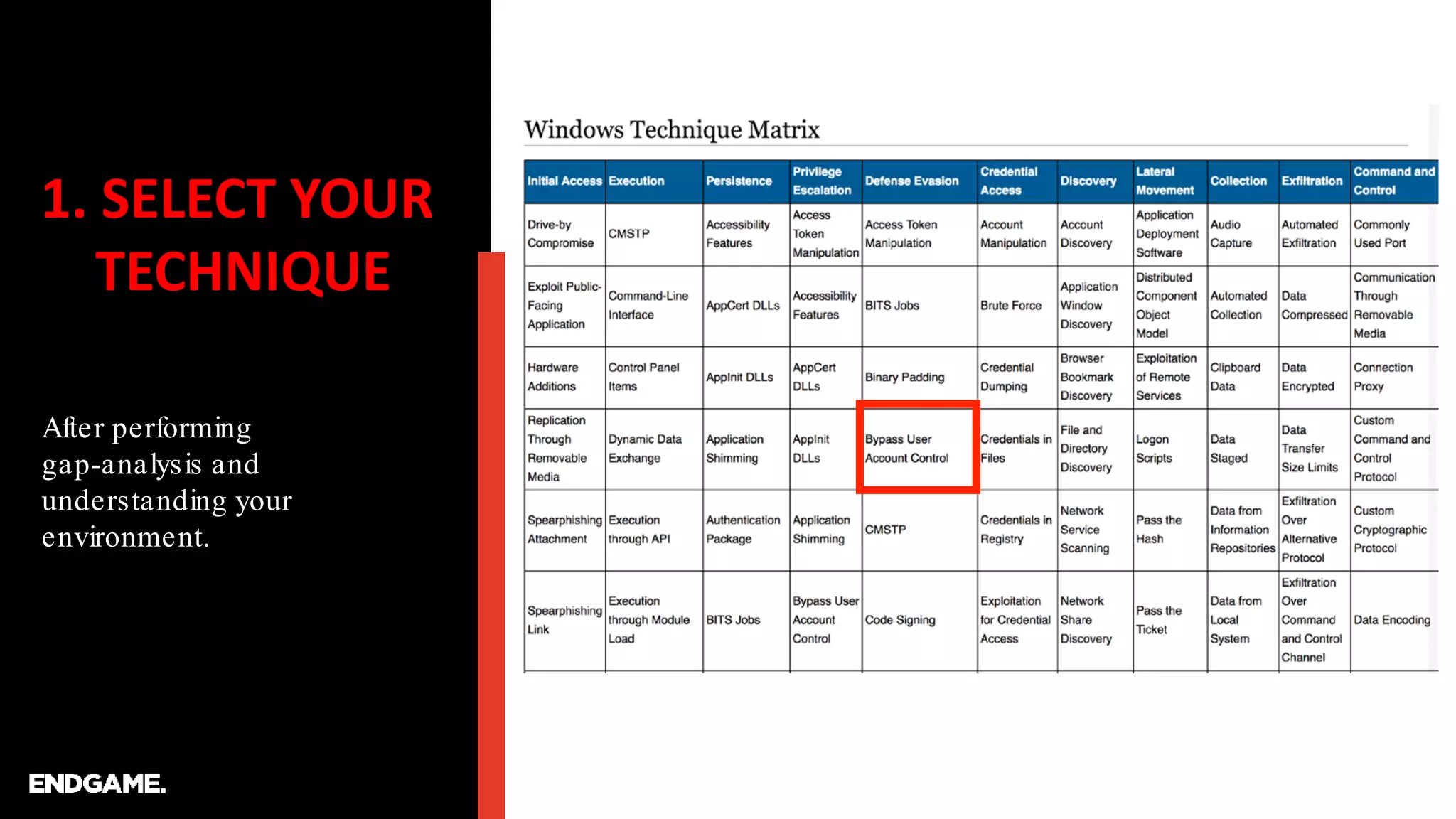
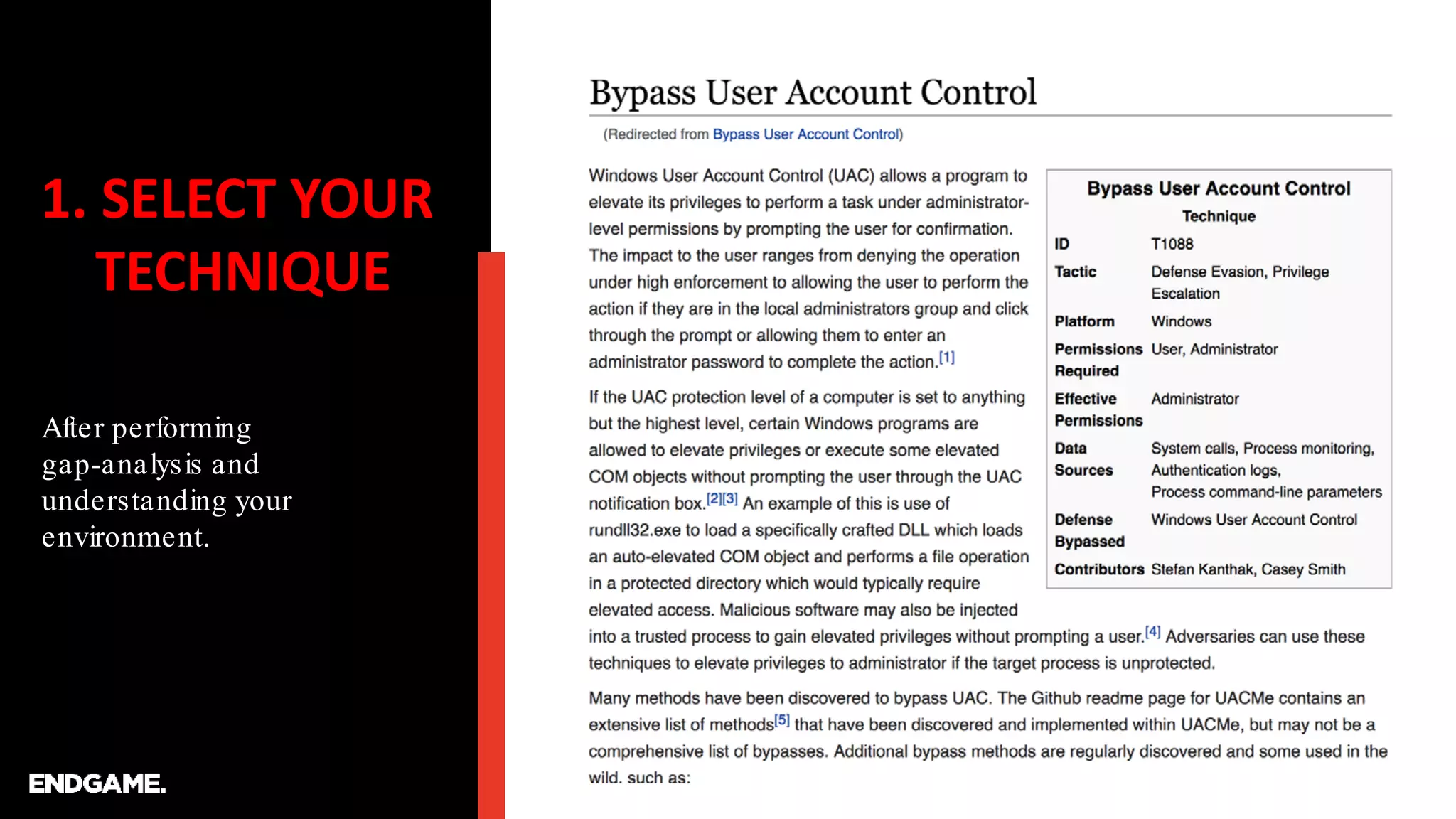
1. SELECT YOUR
TECHNIQUE
After performing
gap-analysis and
understanding your
environment.
1. SELECT YOUR
TECHNIQUE
After performing
gap-analysis and
understanding your
environment.
2. DETONATE
Find scripts or commands
that perform the technique.
…after you detonate…be sure to leave yourself some breadcrumbs…
Microsoft Windows [Version 10.0.17134.345]
(c) 2018 Microsoft Corporation. All rights reserved.
C:UsersRoss>
C:UsersRoss>reg add hkcuEnvironment /v windir /d "cmd /K reg delete
hkcuEnvironment /v windir /f && REM "
The operation completed successfully.
C:UsersRoss>schtasks /Run /TN MicrosoftWindowsDiskCleanupSilentCleanup /I
SUCCESS: Attempted to run the scheduled task
"MicrosoftWindowsDiskCleanupSilentCleanup".
C:UsersRoss>
The operation completed successfully.
C:WINDOWSsystem32>cmd /c echo FINDMEFINDME
FINDMEFINDME
C:WINDOWSsystem32>
https://tyranidslair.blogspot.com/2017/05/exploiting-environment-variables-in.html
3. PREP
ANALYSIS
First let’s create some PS
functions to help us gather
and parse Sysmon logs.
function Get-EventProps {
[cmdletbinding()]
Param (
[parameter(ValueFromPipeline)]
$event
)
Process {
$eventXml = [xml]$event.ToXML()
$eventKeys = $eventXml.Event.EventData.Data
$Properties = @{}
For ($i=0; $i -lt $eventKeys.Count; $i++) {
$Properties[$eventKeys[$i].Name] = $eventKeys[$i].'#text'
}
[pscustomobject]$Properties
}
}
function Get-LatestLogs {
Get-WinEvent -filterhashtable @{logname="Microsoft-Windows-
Sysmon/Operational"} -MaxEvents 1000 | Get-EventProps
}
function Get-LatestProcesses {
Get-WinEvent -filterhashtable @{logname="Microsoft-Windows-
Sysmon/Operational";id=1} -MaxEvents 1000 | Get-EventProps
}
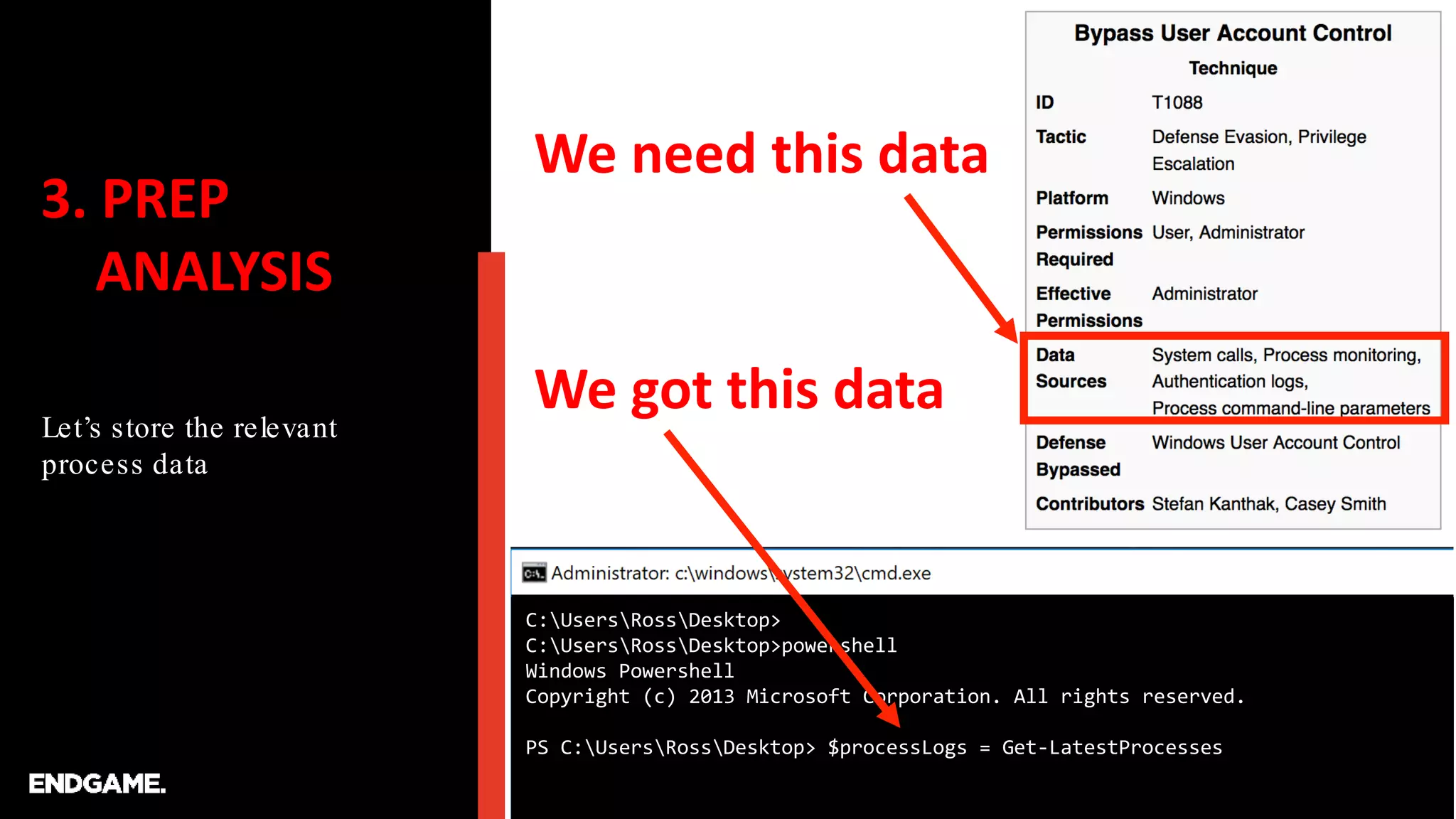
3. PREP
ANALYSIS
Let’s store the relevant
process data
C:UsersRossDesktop>
C:UsersRossDesktop>powershell
Windows Powershell
Copyright (c) 2013 Microsoft Corporation. All rights reserved.
PS C:UsersRossDesktop> $processLogs = Get-LatestProcesses
We need this data
We got this data
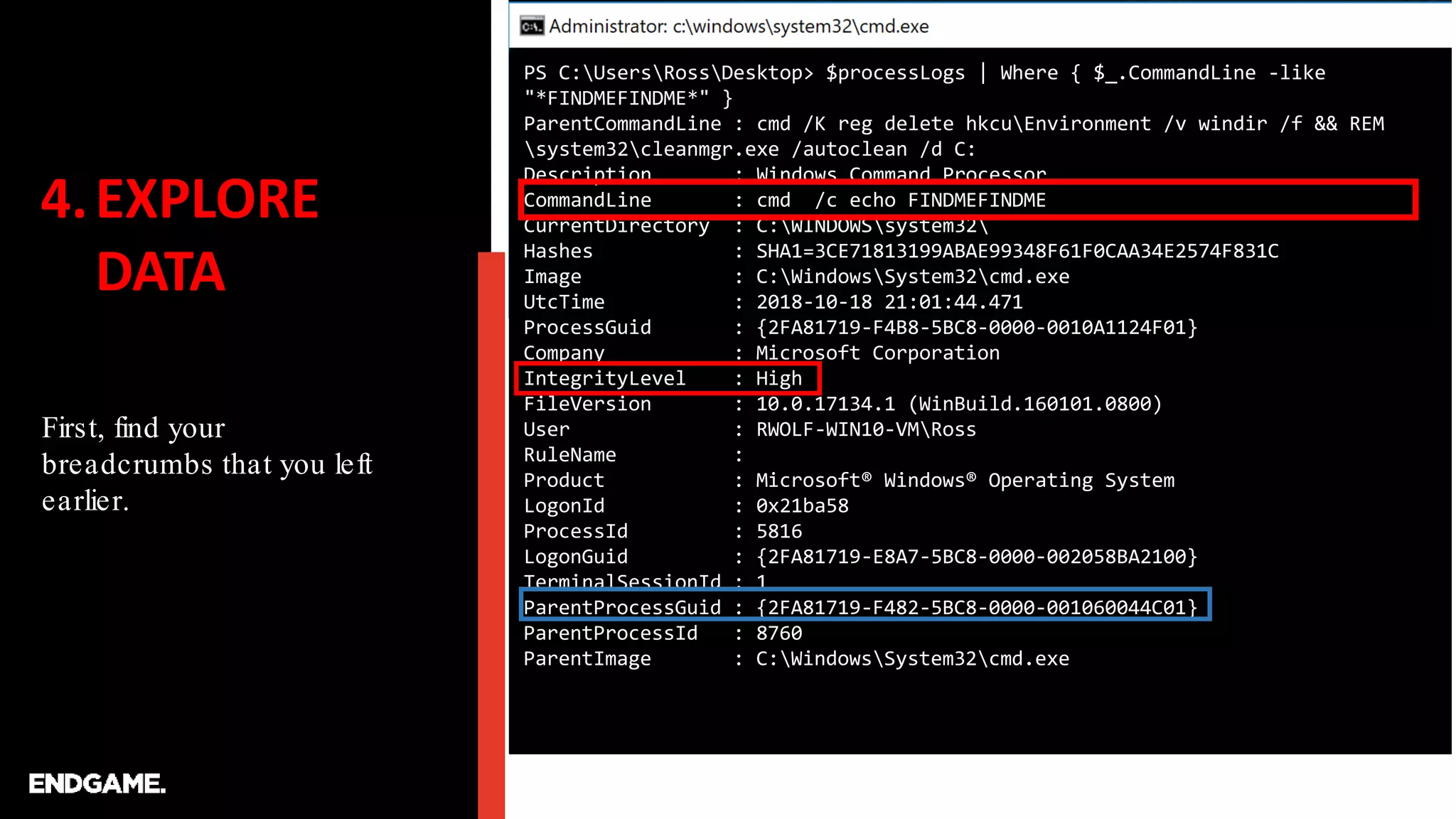
4.EXPLORE
DATA
First, find your
breadcrumbs that you left
earlier.
PS C:UsersRossDesktop> $processLogs | Where { $_.CommandLine -like
"*FINDMEFINDME*" }
ParentCommandLine : cmd /K reg delete hkcuEnvironment /v windir /f && REM
system32cleanmgr.exe /autoclean /d C:
Description : Windows Command Processor
CommandLine : cmd /c echo FINDMEFINDME
CurrentDirectory : C:WINDOWSsystem32
Hashes : SHA1=3CE71813199ABAE99348F61F0CAA34E2574F831C
Image : C:WindowsSystem32cmd.exe
UtcTime : 2018-10-18 21:01:44.471
ProcessGuid : {2FA81719-F4B8-5BC8-0000-0010A1124F01}
Company : Microsoft Corporation
IntegrityLevel : High
FileVersion : 10.0.17134.1 (WinBuild.160101.0800)
User : RWOLF-WIN10-VMRoss
RuleName :
Product : Microsoft® Windows® Operating System
LogonId : 0x21ba58
ProcessId : 5816
LogonGuid : {2FA81719-E8A7-5BC8-0000-002058BA2100}
TerminalSessionId : 1
ParentProcessGuid : {2FA81719-F482-5BC8-0000-001060044C01}
ParentProcessId : 8760
ParentImage : C:WindowsSystem32cmd.exe
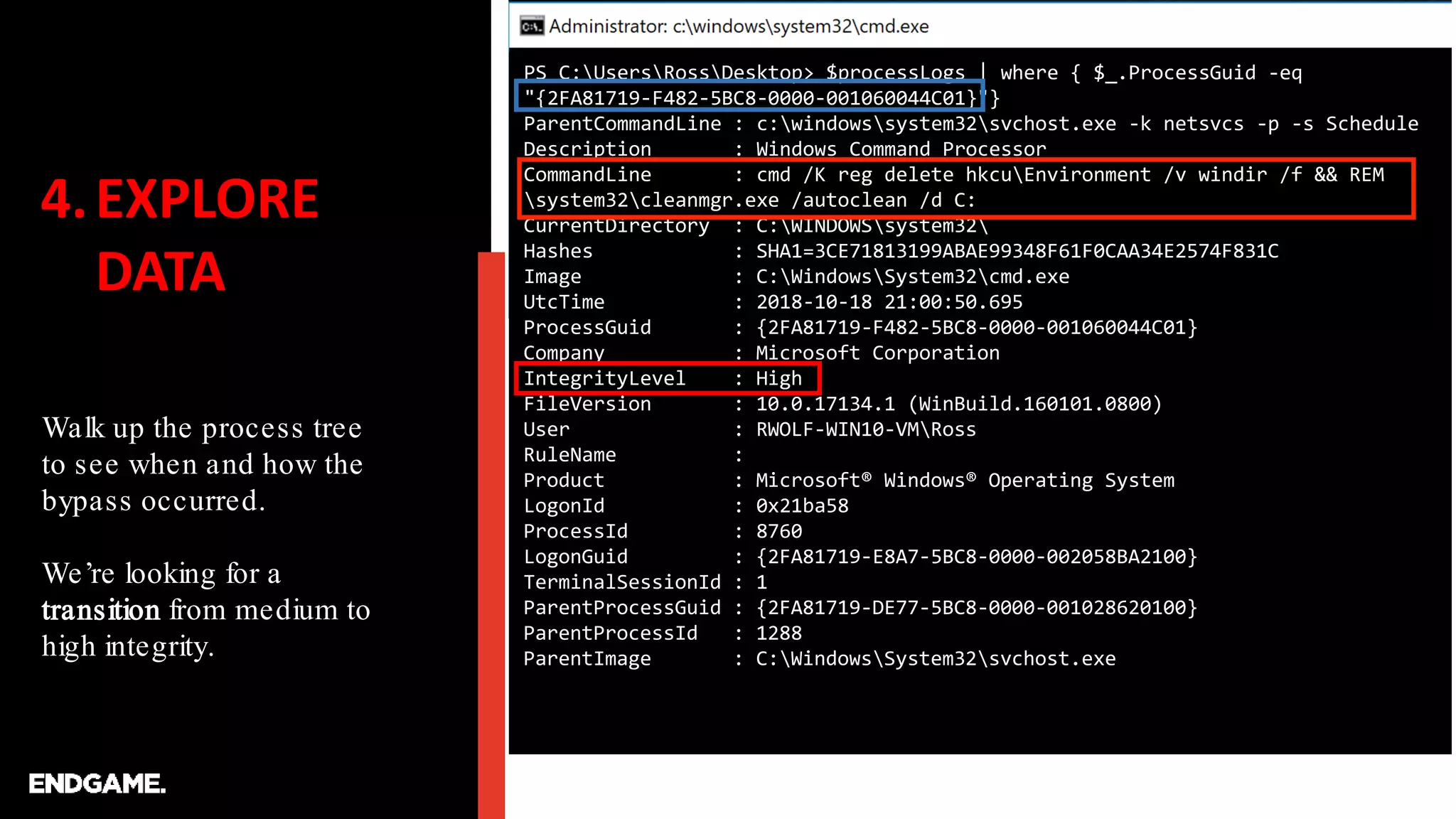
4.EXPLORE
DATA
Walk up the process tree
to see when and how the
bypass occurred.
We’re looking for a
transition from medium to
high integrity.
PS C:UsersRossDesktop> $processLogs | where { $_.ProcessGuid -eq
"{2FA81719-F482-5BC8-0000-001060044C01}"}
ParentCommandLine : c:windowssystem32svchost.exe -k netsvcs -p -s Schedule
Description : Windows Command Processor
CommandLine : cmd /K reg delete hkcuEnvironment /v windir /f && REM
system32cleanmgr.exe /autoclean /d C:
CurrentDirectory : C:WINDOWSsystem32
Hashes : SHA1=3CE71813199ABAE99348F61F0CAA34E2574F831C
Image : C:WindowsSystem32cmd.exe
UtcTime : 2018-10-18 21:00:50.695
ProcessGuid : {2FA81719-F482-5BC8-0000-001060044C01}
Company : Microsoft Corporation
IntegrityLevel : High
FileVersion : 10.0.17134.1 (WinBuild.160101.0800)
User : RWOLF-WIN10-VMRoss
RuleName :
Product : Microsoft® Windows® Operating System
LogonId : 0x21ba58
ProcessId : 8760
LogonGuid : {2FA81719-E8A7-5BC8-0000-002058BA2100}
TerminalSessionId : 1
ParentProcessGuid : {2FA81719-DE77-5BC8-0000-001028620100}
ParentProcessId : 1288
ParentImage : C:WindowsSystem32svchost.exe
4.EXPLORE
DATA
Keep walking up the tree
until things look normal
again. We found the
Schedule service running
as normal.
PS C:UsersRossDesktop> $processLogs | where { $_.ProcessGuid -eq
"{2FA81719-DE77-5BC8-0000-001028620100}"}
ParentCommandLine : C:WINDOWSsystem32services.exe
Description : Host Process for Windows Services
CommandLine : c:windowssystem32svchost.exe -k netsvcs -p -s Schedule
CurrentDirectory : C:WINDOWSsystem32
Hashes : SHA1=660B76B6FB802417D513ADC967C5CAF77FC2BAC6
Image : C:WindowsSystem32svchost.exe
UtcTime : 2018-10-18 19:26:47.110
ProcessGuid : {2FA81719-DE77-5BC8-0000-001028620100}
Company : Microsoft Corporation
IntegrityLevel : System
FileVersion : 10.0.17134.1 (WinBuild.160101.0800)
User : NT AUTHORITYSYSTEM
RuleName :
Product : Microsoft® Windows® Operating System
LogonId : 0x3e7
ProcessId : 1288
LogonGuid : {2FA81719-DE75-5BC8-0000-0020E7030000}
TerminalSessionId : 0
ParentProcessGuid : {2FA81719-DE75-5BC8-0000-0010C6AC0000}
ParentProcessId : 632
ParentImage : C:WindowsSystem32services.exe
4.EXPLORE
DATA
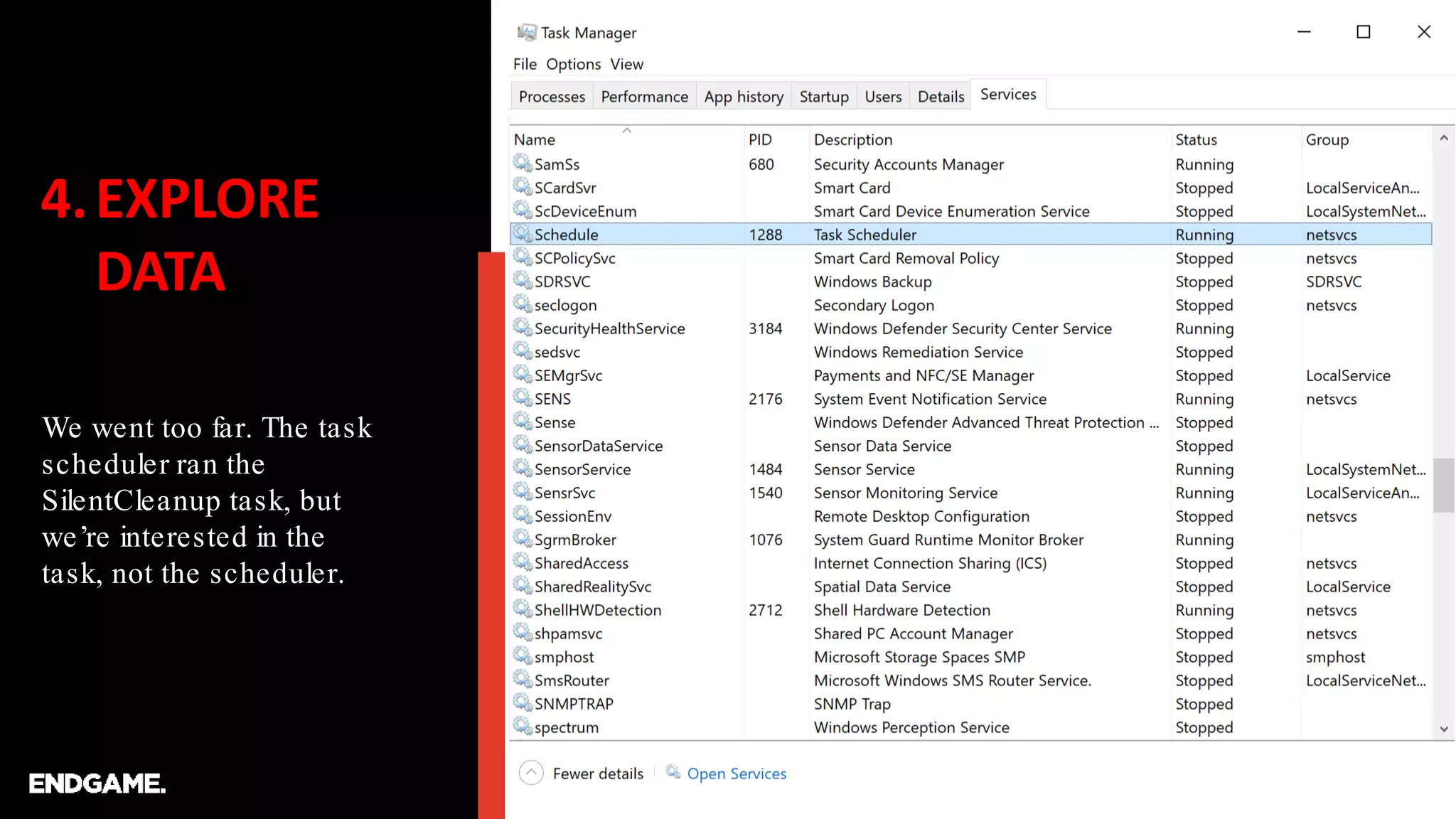
We went too far. The task
scheduler ran the
SilentCleanup task, but
we’re interested in the
task, not the scheduler.
4.EXPLORE
DATA
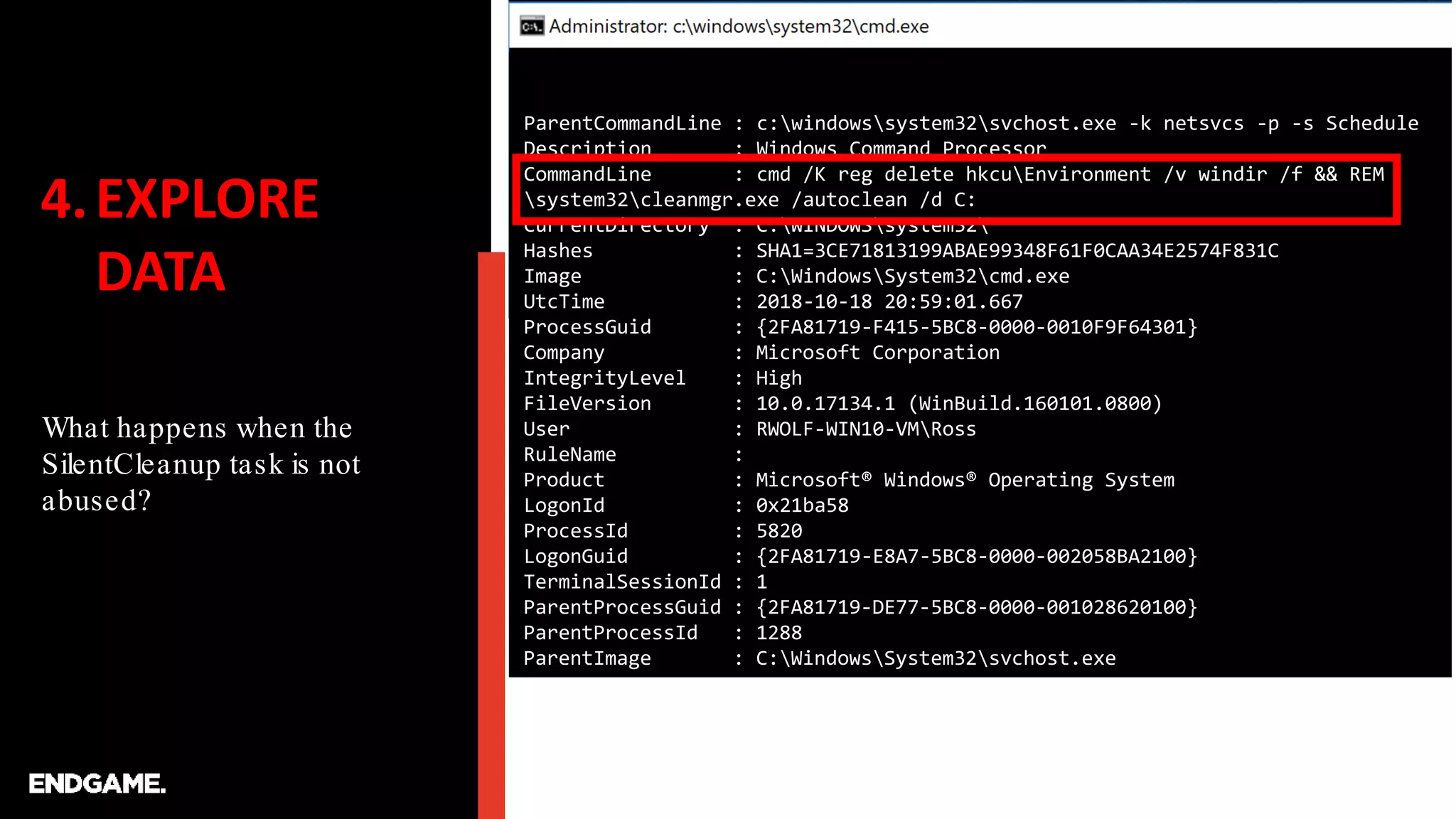
What happens when the
SilentCleanup task is not
abused?
PS C:UsersRossDesktop> $processLogs | where { $_.CommandLine -like
"*cleanmgr.exe /autoclean*" }
ParentCommandLine : c:windowssystem32svchost.exe -k netsvcs -p -s Schedule
Description : Windows Command Processor
CommandLine : cmd /K reg delete hkcuEnvironment /v windir /f && REM
system32cleanmgr.exe /autoclean /d C:
CurrentDirectory : C:WINDOWSsystem32
Hashes : SHA1=3CE71813199ABAE99348F61F0CAA34E2574F831C
Image : C:WindowsSystem32cmd.exe
UtcTime : 2018-10-18 21:00:50.695
ProcessGuid : {2FA81719-F482-5BC8-0000-001060044C01}
Company : Microsoft Corporation
IntegrityLevel : High
FileVersion : 10.0.17134.1 (WinBuild.160101.0800)
User : RWOLF-WIN10-VMRoss
RuleName :
Product : Microsoft® Windows® Operating System
LogonId : 0x21ba58
ProcessId : 8760
LogonGuid : {2FA81719-E8A7-5BC8-0000-002058BA2100}
TerminalSessionId : 1
ParentProcessGuid : {2FA81719-DE77-5BC8-0000-001028620100}
ParentProcessId : 1288
ParentImage : C:WindowsSystem32svchost.exe
4.EXPLORE
DATA
What happens when the
SilentCleanup task is not
abused?
ParentCommandLine : c:windowssystem32svchost.exe -k netsvcs -p -s Schedule
Description : Windows Command Processor
CommandLine : cmd /K reg delete hkcuEnvironment /v windir /f && REM
system32cleanmgr.exe /autoclean /d C:
CurrentDirectory : C:WINDOWSsystem32
Hashes : SHA1=3CE71813199ABAE99348F61F0CAA34E2574F831C
Image : C:WindowsSystem32cmd.exe
UtcTime : 2018-10-18 20:59:01.667
ProcessGuid : {2FA81719-F415-5BC8-0000-0010F9F64301}
Company : Microsoft Corporation
IntegrityLevel : High
FileVersion : 10.0.17134.1 (WinBuild.160101.0800)
User : RWOLF-WIN10-VMRoss
RuleName :
Product : Microsoft® Windows® Operating System
LogonId : 0x21ba58
ProcessId : 5820
LogonGuid : {2FA81719-E8A7-5BC8-0000-002058BA2100}
TerminalSessionId : 1
ParentProcessGuid : {2FA81719-DE77-5BC8-0000-001028620100}
ParentProcessId : 1288
ParentImage : C:WindowsSystem32svchost.exe
4.EXPLORE
DATA
What happens when the
SilentCleanup task is not
abused?
ParentCommandLine : c:windowssystem32svchost.exe -k netsvcs -p -s Schedule
Description : Disk Space Cleanup Manager for Windows
CommandLine : C:WINDOWSsystem32cleanmgr.exe /autoclean /d C:
CurrentDirectory : C:WINDOWSsystem32
Hashes : SHA1=2EB39003998F0E518AD937DB120B87E81D5A5893
Image : C:WindowsSystem32cleanmgr.exe
UtcTime : 2018-10-18 20:58:07.183
ProcessGuid : {2FA81719-F3DF-5BC8-0000-001024A93F01}
Company : Microsoft Corporation
IntegrityLevel : High
FileVersion : 10.0.17134.1 (WinBuild.160101.0800)
User : RWOLF-WIN10-VMRoss
RuleName :
Product : Microsoft® Windows® Operating System
LogonId : 0x21ba58
ProcessId : 2828
LogonGuid : {2FA81719-E8A7-5BC8-0000-002058BA2100}
TerminalSessionId : 1
ParentProcessGuid : {2FA81719-DE77-5BC8-0000-001028620100}
ParentProcessId : 1288
ParentImage : C:WindowsSystem32svchost.exe
4.EXPLORE
DATA
What happens when the
SilentCleanup task is not
abused?
ParentCommandLine : c:windowssystem32svchost.exe -k netsvcs -p -s Schedule
Description : Disk Space Cleanup Manager for Windows
CommandLine : C:WINDOWSsystem32cleanmgr.exe /autoclean /d C:
CurrentDirectory : C:WINDOWSsystem32
Hashes : SHA1=2EB39003998F0E518AD937DB120B87E81D5A5893
Image : C:WindowsSystem32cleanmgr.exe
UtcTime : 2018-10-18 20:54:13.619
ProcessGuid : {2FA81719-F2F5-5BC8-0000-001036452E01}
Company : Microsoft Corporation
IntegrityLevel : High
FileVersion : 10.0.17134.1 (WinBuild.160101.0800)
User : RWOLF-WIN10-VMRoss
RuleName :
Product : Microsoft® Windows® Operating System
LogonId : 0x21ba58
ProcessId : 4864
LogonGuid : {2FA81719-E8A7-5BC8-0000-002058BA2100}
TerminalSessionId : 1
ParentProcessGuid : {2FA81719-DE77-5BC8-0000-001028620100}
ParentProcessId : 1288
ParentImage : C:WindowsSystem32svchost.exe
5. PROTOTYPE
ANALYTIC
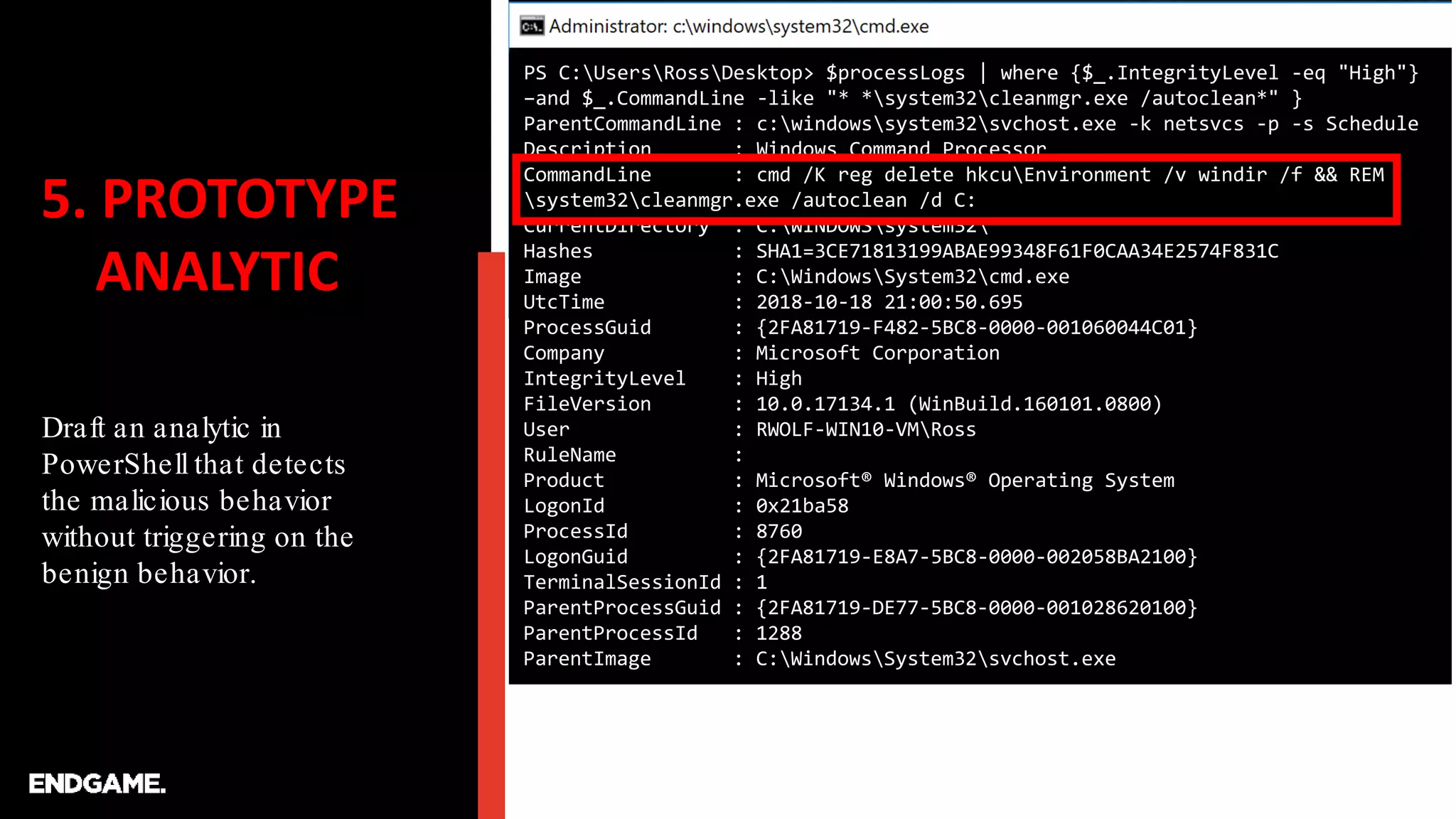
Draft an analytic in
PowerShell that detects
the malicious behavior
without triggering on the
benign behavior.
PS C:UsersRossDesktop> $processLogs | where {$_.IntegrityLevel -eq "High"}
–and $_.CommandLine -like "* *system32cleanmgr.exe /autoclean*" }
ParentCommandLine : c:windowssystem32svchost.exe -k netsvcs -p -s Schedule
Description : Windows Command Processor
CommandLine : cmd /K reg delete hkcuEnvironment /v windir /f && REM
system32cleanmgr.exe /autoclean /d C:
CurrentDirectory : C:WINDOWSsystem32
Hashes : SHA1=3CE71813199ABAE99348F61F0CAA34E2574F831C
Image : C:WindowsSystem32cmd.exe
UtcTime : 2018-10-18 21:00:50.695
ProcessGuid : {2FA81719-F482-5BC8-0000-001060044C01}
Company : Microsoft Corporation
IntegrityLevel : High
FileVersion : 10.0.17134.1 (WinBuild.160101.0800)
User : RWOLF-WIN10-VMRoss
RuleName :
Product : Microsoft® Windows® Operating System
LogonId : 0x21ba58
ProcessId : 8760
LogonGuid : {2FA81719-E8A7-5BC8-0000-002058BA2100}
TerminalSessionId : 1
ParentProcessGuid : {2FA81719-DE77-5BC8-0000-001028620100}
ParentProcessId : 1288
ParentImage : C:WindowsSystem32svchost.exe
5. PROTOTYPE
ANALYTIC
Draft an analytic in
PowerShell.
ParentCommandLine : c:windowssystem32svchost.exe -k netsvcs -p -s Schedule
Description : Windows Command Processor
CommandLine : cmd /K reg delete hkcuEnvironment /v windir /f && REM
system32cleanmgr.exe /autoclean /d C:
CurrentDirectory : C:WINDOWSsystem32
Hashes : SHA1=3CE71813199ABAE99348F61F0CAA34E2574F831C
Image : C:WindowsSystem32cmd.exe
UtcTime : 2018-10-18 20:59:01.667
ProcessGuid : {2FA81719-F415-5BC8-0000-0010F9F64301}
Company : Microsoft Corporation
IntegrityLevel : High
FileVersion : 10.0.17134.1 (WinBuild.160101.0800)
User : RWOLF-WIN10-VMRoss
RuleName :
Product : Microsoft® Windows® Operating System
LogonId : 0x21ba58
ProcessId : 5820
LogonGuid : {2FA81719-E8A7-5BC8-0000-002058BA2100}
TerminalSessionId : 1
ParentProcessGuid : {2FA81719-DE77-5BC8-0000-001028620100}
ParentProcessId : 1288
ParentImage : C:WindowsSystem32svchost.exe
6. GO LIVE
Rule looks good!
Let’s write an EQL query.
process where
command_line == "* *system32cleanmgr.exe /autoclean*"
https://www.endgame.com/blog/technical-blog/introducing-event-query-language
6. GO LIVE
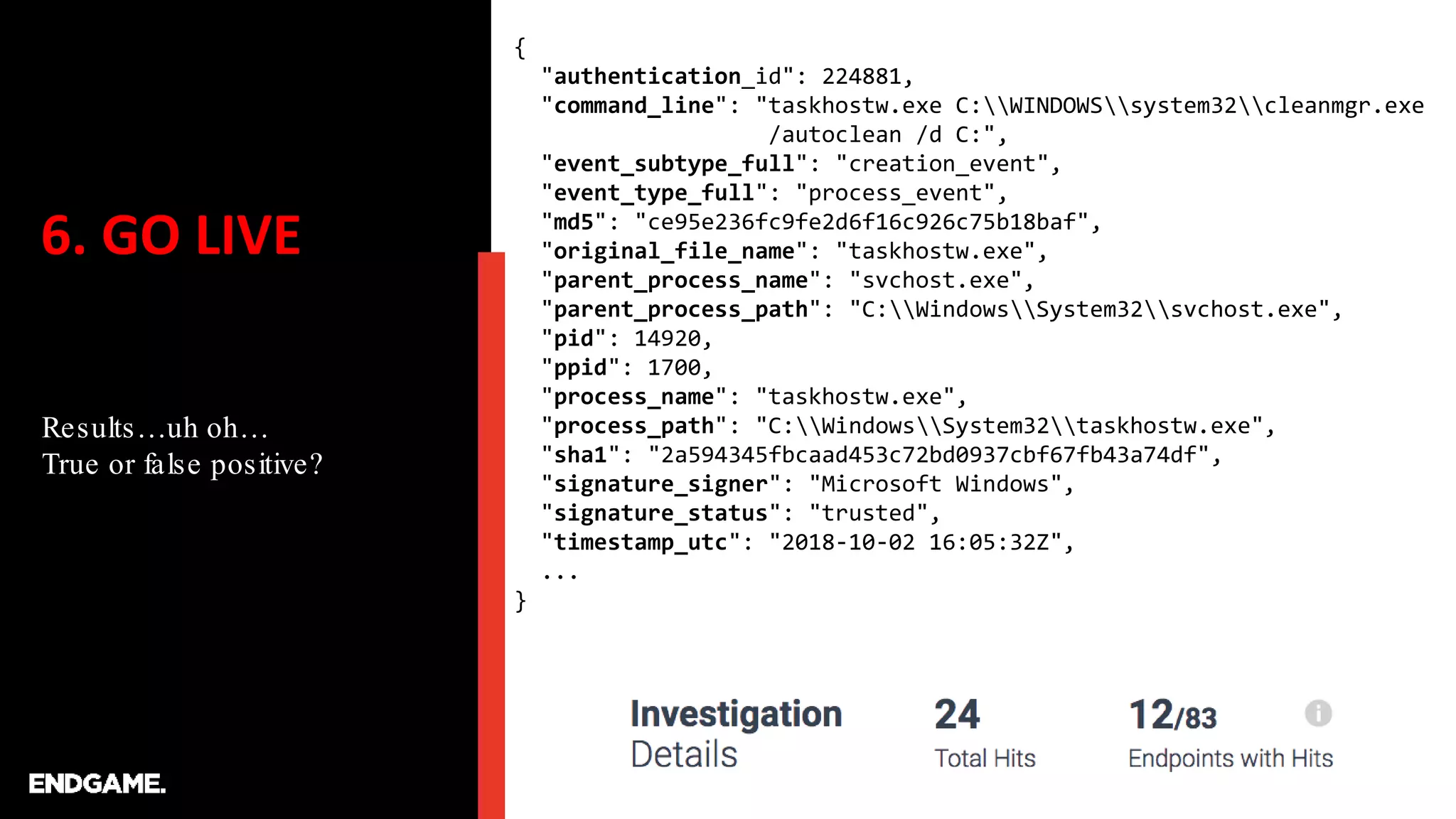
Results…uh oh…
True or false positive?
{
"authentication_id": 224881,
"command_line": "taskhostw.exe C:WINDOWSsystem32cleanmgr.exe
/autoclean /d C:",
"event_subtype_full": "creation_event",
"event_type_full": "process_event",
"md5": "ce95e236fc9fe2d6f16c926c75b18baf",
"original_file_name": "taskhostw.exe",
"parent_process_name": "svchost.exe",
"parent_process_path": "C:WindowsSystem32svchost.exe",
"pid": 14920,
"ppid": 1700,
"process_name": "taskhostw.exe",
"process_path": "C:WindowsSystem32taskhostw.exe",
"sha1": "2a594345fbcaad453c72bd0937cbf67fb43a74df",
"signature_signer": "Microsoft Windows",
"signature_status": "trusted",
"timestamp_utc": "2018-10-02 16:05:32Z",
...
}
6. GO LIVE
Oh, this is just another
benign instance of the
Windows task scheduler
on a different OS.
{
"authentication_id": 224881,
"command_line": "taskhostw.exe C:WINDOWSsystem32cleanmgr.exe
/autoclean /d C:",
"event_subtype_full": "creation_event",
"event_type_full": "process_event",
"md5": "ce95e236fc9fe2d6f16c926c75b18baf",
"original_file_name": "taskhostw.exe",
"parent_process_name": "svchost.exe",
"parent_process_path": "C:WindowsSystem32svchost.exe",
"pid": 14920,
"ppid": 1700,
"process_name": "taskhostw.exe",
"process_path": "C:WindowsSystem32taskhostw.exe",
"sha1": "2a594345fbcaad453c72bd0937cbf67fb43a74df",
"signature_signer": "Microsoft Windows",
"signature_status": "trusted",
"timestamp_utc": "2018-10-02 16:05:32Z",
...
}
7. FINE TUNING
Filter results, unique
results, or specifically
account for false positives
in your environment
process where
command_line == "* *system32cleanmgr.exe /autoclean*”
and process_path != "C:WindowsSystem32taskhostw.exe"
CONCLUSION
Seems easy enough?
But FPs are everywhere.
Always calibrate to the
software and configurations
in your environment
1. Stealthy PowerShell, this module is common huh?
image_load where process_name != "powershell.exe" and
image_name == "System.Management.Automation.ni.dll"
2. Emails, Links, Child Browser Process?
process where
parent_process_name == "outlook.exe" and
process_name in ("wscript.exe", "cmd.exe",
"powershell.exe", ...)
3. MSHTA Network Connections, never happens?
sequence by unique_pid
[process where process_name == "mshta.exe"]
[network where event_subtype_full == "*connection_attempt_event"]
4. Unusual Lateral Movement via SMB, shouldn’t FP?
network where destination_port == 445 and pid != 4
| unique process_path
Thank You.

MITRE ATT&CKcon 2018: From Technique to Detection, Paul Ewing and Ross Wolf, Endgame

  • 1.
    FROM TECHNIQUE TO DETECTION Rapidprototyping of ATT&CK-based analytics Paul Ewing @_paulewing Ross Wolf @rw_access
  • 2.
    ATT&CK Detections? Will bepowerful Will enable hunters Will transform your SOC
  • 3.
    ATT&CK Detections? Will notbe as easy as described Will not always lead to analytics Will not be a silver bullet
  • 4.
    TIMELINE OF A SOLIDANALYTIC ATT&CK-based analytics required continual grooming as their success depends on it TIME  SUCCESS Initial Logic False Positives Fine Tune Overcompensate Profit
  • 5.
    1. SELECT YOUR TECHNIQUE Afterperforming gap-analysis and understanding your environment.
  • 6.
    1. SELECT YOUR TECHNIQUE Afterperforming gap-analysis and understanding your environment.
  • 7.
    2. DETONATE Find scriptsor commands that perform the technique. …after you detonate…be sure to leave yourself some breadcrumbs… Microsoft Windows [Version 10.0.17134.345] (c) 2018 Microsoft Corporation. All rights reserved. C:UsersRoss> C:UsersRoss>reg add hkcuEnvironment /v windir /d "cmd /K reg delete hkcuEnvironment /v windir /f && REM " The operation completed successfully. C:UsersRoss>schtasks /Run /TN MicrosoftWindowsDiskCleanupSilentCleanup /I SUCCESS: Attempted to run the scheduled task "MicrosoftWindowsDiskCleanupSilentCleanup". C:UsersRoss> The operation completed successfully. C:WINDOWSsystem32>cmd /c echo FINDMEFINDME FINDMEFINDME C:WINDOWSsystem32> https://tyranidslair.blogspot.com/2017/05/exploiting-environment-variables-in.html
  • 8.
    3. PREP ANALYSIS First let’screate some PS functions to help us gather and parse Sysmon logs. function Get-EventProps { [cmdletbinding()] Param ( [parameter(ValueFromPipeline)] $event ) Process { $eventXml = [xml]$event.ToXML() $eventKeys = $eventXml.Event.EventData.Data $Properties = @{} For ($i=0; $i -lt $eventKeys.Count; $i++) { $Properties[$eventKeys[$i].Name] = $eventKeys[$i].'#text' } [pscustomobject]$Properties } } function Get-LatestLogs { Get-WinEvent -filterhashtable @{logname="Microsoft-Windows- Sysmon/Operational"} -MaxEvents 1000 | Get-EventProps } function Get-LatestProcesses { Get-WinEvent -filterhashtable @{logname="Microsoft-Windows- Sysmon/Operational";id=1} -MaxEvents 1000 | Get-EventProps }
  • 9.
    3. PREP ANALYSIS Let’s storethe relevant process data C:UsersRossDesktop> C:UsersRossDesktop>powershell Windows Powershell Copyright (c) 2013 Microsoft Corporation. All rights reserved. PS C:UsersRossDesktop> $processLogs = Get-LatestProcesses We need this data We got this data
  • 10.
    4.EXPLORE DATA First, find your breadcrumbsthat you left earlier. PS C:UsersRossDesktop> $processLogs | Where { $_.CommandLine -like "*FINDMEFINDME*" } ParentCommandLine : cmd /K reg delete hkcuEnvironment /v windir /f && REM system32cleanmgr.exe /autoclean /d C: Description : Windows Command Processor CommandLine : cmd /c echo FINDMEFINDME CurrentDirectory : C:WINDOWSsystem32 Hashes : SHA1=3CE71813199ABAE99348F61F0CAA34E2574F831C Image : C:WindowsSystem32cmd.exe UtcTime : 2018-10-18 21:01:44.471 ProcessGuid : {2FA81719-F4B8-5BC8-0000-0010A1124F01} Company : Microsoft Corporation IntegrityLevel : High FileVersion : 10.0.17134.1 (WinBuild.160101.0800) User : RWOLF-WIN10-VMRoss RuleName : Product : Microsoft® Windows® Operating System LogonId : 0x21ba58 ProcessId : 5816 LogonGuid : {2FA81719-E8A7-5BC8-0000-002058BA2100} TerminalSessionId : 1 ParentProcessGuid : {2FA81719-F482-5BC8-0000-001060044C01} ParentProcessId : 8760 ParentImage : C:WindowsSystem32cmd.exe
  • 11.
    4.EXPLORE DATA Walk up theprocess tree to see when and how the bypass occurred. We’re looking for a transition from medium to high integrity. PS C:UsersRossDesktop> $processLogs | where { $_.ProcessGuid -eq "{2FA81719-F482-5BC8-0000-001060044C01}"} ParentCommandLine : c:windowssystem32svchost.exe -k netsvcs -p -s Schedule Description : Windows Command Processor CommandLine : cmd /K reg delete hkcuEnvironment /v windir /f && REM system32cleanmgr.exe /autoclean /d C: CurrentDirectory : C:WINDOWSsystem32 Hashes : SHA1=3CE71813199ABAE99348F61F0CAA34E2574F831C Image : C:WindowsSystem32cmd.exe UtcTime : 2018-10-18 21:00:50.695 ProcessGuid : {2FA81719-F482-5BC8-0000-001060044C01} Company : Microsoft Corporation IntegrityLevel : High FileVersion : 10.0.17134.1 (WinBuild.160101.0800) User : RWOLF-WIN10-VMRoss RuleName : Product : Microsoft® Windows® Operating System LogonId : 0x21ba58 ProcessId : 8760 LogonGuid : {2FA81719-E8A7-5BC8-0000-002058BA2100} TerminalSessionId : 1 ParentProcessGuid : {2FA81719-DE77-5BC8-0000-001028620100} ParentProcessId : 1288 ParentImage : C:WindowsSystem32svchost.exe
  • 12.
    4.EXPLORE DATA Keep walking upthe tree until things look normal again. We found the Schedule service running as normal. PS C:UsersRossDesktop> $processLogs | where { $_.ProcessGuid -eq "{2FA81719-DE77-5BC8-0000-001028620100}"} ParentCommandLine : C:WINDOWSsystem32services.exe Description : Host Process for Windows Services CommandLine : c:windowssystem32svchost.exe -k netsvcs -p -s Schedule CurrentDirectory : C:WINDOWSsystem32 Hashes : SHA1=660B76B6FB802417D513ADC967C5CAF77FC2BAC6 Image : C:WindowsSystem32svchost.exe UtcTime : 2018-10-18 19:26:47.110 ProcessGuid : {2FA81719-DE77-5BC8-0000-001028620100} Company : Microsoft Corporation IntegrityLevel : System FileVersion : 10.0.17134.1 (WinBuild.160101.0800) User : NT AUTHORITYSYSTEM RuleName : Product : Microsoft® Windows® Operating System LogonId : 0x3e7 ProcessId : 1288 LogonGuid : {2FA81719-DE75-5BC8-0000-0020E7030000} TerminalSessionId : 0 ParentProcessGuid : {2FA81719-DE75-5BC8-0000-0010C6AC0000} ParentProcessId : 632 ParentImage : C:WindowsSystem32services.exe
  • 13.
    4.EXPLORE DATA We went toofar. The task scheduler ran the SilentCleanup task, but we’re interested in the task, not the scheduler.
  • 14.
    4.EXPLORE DATA What happens whenthe SilentCleanup task is not abused? PS C:UsersRossDesktop> $processLogs | where { $_.CommandLine -like "*cleanmgr.exe /autoclean*" } ParentCommandLine : c:windowssystem32svchost.exe -k netsvcs -p -s Schedule Description : Windows Command Processor CommandLine : cmd /K reg delete hkcuEnvironment /v windir /f && REM system32cleanmgr.exe /autoclean /d C: CurrentDirectory : C:WINDOWSsystem32 Hashes : SHA1=3CE71813199ABAE99348F61F0CAA34E2574F831C Image : C:WindowsSystem32cmd.exe UtcTime : 2018-10-18 21:00:50.695 ProcessGuid : {2FA81719-F482-5BC8-0000-001060044C01} Company : Microsoft Corporation IntegrityLevel : High FileVersion : 10.0.17134.1 (WinBuild.160101.0800) User : RWOLF-WIN10-VMRoss RuleName : Product : Microsoft® Windows® Operating System LogonId : 0x21ba58 ProcessId : 8760 LogonGuid : {2FA81719-E8A7-5BC8-0000-002058BA2100} TerminalSessionId : 1 ParentProcessGuid : {2FA81719-DE77-5BC8-0000-001028620100} ParentProcessId : 1288 ParentImage : C:WindowsSystem32svchost.exe
  • 15.
    4.EXPLORE DATA What happens whenthe SilentCleanup task is not abused? ParentCommandLine : c:windowssystem32svchost.exe -k netsvcs -p -s Schedule Description : Windows Command Processor CommandLine : cmd /K reg delete hkcuEnvironment /v windir /f && REM system32cleanmgr.exe /autoclean /d C: CurrentDirectory : C:WINDOWSsystem32 Hashes : SHA1=3CE71813199ABAE99348F61F0CAA34E2574F831C Image : C:WindowsSystem32cmd.exe UtcTime : 2018-10-18 20:59:01.667 ProcessGuid : {2FA81719-F415-5BC8-0000-0010F9F64301} Company : Microsoft Corporation IntegrityLevel : High FileVersion : 10.0.17134.1 (WinBuild.160101.0800) User : RWOLF-WIN10-VMRoss RuleName : Product : Microsoft® Windows® Operating System LogonId : 0x21ba58 ProcessId : 5820 LogonGuid : {2FA81719-E8A7-5BC8-0000-002058BA2100} TerminalSessionId : 1 ParentProcessGuid : {2FA81719-DE77-5BC8-0000-001028620100} ParentProcessId : 1288 ParentImage : C:WindowsSystem32svchost.exe
  • 16.
    4.EXPLORE DATA What happens whenthe SilentCleanup task is not abused? ParentCommandLine : c:windowssystem32svchost.exe -k netsvcs -p -s Schedule Description : Disk Space Cleanup Manager for Windows CommandLine : C:WINDOWSsystem32cleanmgr.exe /autoclean /d C: CurrentDirectory : C:WINDOWSsystem32 Hashes : SHA1=2EB39003998F0E518AD937DB120B87E81D5A5893 Image : C:WindowsSystem32cleanmgr.exe UtcTime : 2018-10-18 20:58:07.183 ProcessGuid : {2FA81719-F3DF-5BC8-0000-001024A93F01} Company : Microsoft Corporation IntegrityLevel : High FileVersion : 10.0.17134.1 (WinBuild.160101.0800) User : RWOLF-WIN10-VMRoss RuleName : Product : Microsoft® Windows® Operating System LogonId : 0x21ba58 ProcessId : 2828 LogonGuid : {2FA81719-E8A7-5BC8-0000-002058BA2100} TerminalSessionId : 1 ParentProcessGuid : {2FA81719-DE77-5BC8-0000-001028620100} ParentProcessId : 1288 ParentImage : C:WindowsSystem32svchost.exe
  • 17.
    4.EXPLORE DATA What happens whenthe SilentCleanup task is not abused? ParentCommandLine : c:windowssystem32svchost.exe -k netsvcs -p -s Schedule Description : Disk Space Cleanup Manager for Windows CommandLine : C:WINDOWSsystem32cleanmgr.exe /autoclean /d C: CurrentDirectory : C:WINDOWSsystem32 Hashes : SHA1=2EB39003998F0E518AD937DB120B87E81D5A5893 Image : C:WindowsSystem32cleanmgr.exe UtcTime : 2018-10-18 20:54:13.619 ProcessGuid : {2FA81719-F2F5-5BC8-0000-001036452E01} Company : Microsoft Corporation IntegrityLevel : High FileVersion : 10.0.17134.1 (WinBuild.160101.0800) User : RWOLF-WIN10-VMRoss RuleName : Product : Microsoft® Windows® Operating System LogonId : 0x21ba58 ProcessId : 4864 LogonGuid : {2FA81719-E8A7-5BC8-0000-002058BA2100} TerminalSessionId : 1 ParentProcessGuid : {2FA81719-DE77-5BC8-0000-001028620100} ParentProcessId : 1288 ParentImage : C:WindowsSystem32svchost.exe
  • 18.
    5. PROTOTYPE ANALYTIC Draft ananalytic in PowerShell that detects the malicious behavior without triggering on the benign behavior. PS C:UsersRossDesktop> $processLogs | where {$_.IntegrityLevel -eq "High"} –and $_.CommandLine -like "* *system32cleanmgr.exe /autoclean*" } ParentCommandLine : c:windowssystem32svchost.exe -k netsvcs -p -s Schedule Description : Windows Command Processor CommandLine : cmd /K reg delete hkcuEnvironment /v windir /f && REM system32cleanmgr.exe /autoclean /d C: CurrentDirectory : C:WINDOWSsystem32 Hashes : SHA1=3CE71813199ABAE99348F61F0CAA34E2574F831C Image : C:WindowsSystem32cmd.exe UtcTime : 2018-10-18 21:00:50.695 ProcessGuid : {2FA81719-F482-5BC8-0000-001060044C01} Company : Microsoft Corporation IntegrityLevel : High FileVersion : 10.0.17134.1 (WinBuild.160101.0800) User : RWOLF-WIN10-VMRoss RuleName : Product : Microsoft® Windows® Operating System LogonId : 0x21ba58 ProcessId : 8760 LogonGuid : {2FA81719-E8A7-5BC8-0000-002058BA2100} TerminalSessionId : 1 ParentProcessGuid : {2FA81719-DE77-5BC8-0000-001028620100} ParentProcessId : 1288 ParentImage : C:WindowsSystem32svchost.exe
  • 19.
    5. PROTOTYPE ANALYTIC Draft ananalytic in PowerShell. ParentCommandLine : c:windowssystem32svchost.exe -k netsvcs -p -s Schedule Description : Windows Command Processor CommandLine : cmd /K reg delete hkcuEnvironment /v windir /f && REM system32cleanmgr.exe /autoclean /d C: CurrentDirectory : C:WINDOWSsystem32 Hashes : SHA1=3CE71813199ABAE99348F61F0CAA34E2574F831C Image : C:WindowsSystem32cmd.exe UtcTime : 2018-10-18 20:59:01.667 ProcessGuid : {2FA81719-F415-5BC8-0000-0010F9F64301} Company : Microsoft Corporation IntegrityLevel : High FileVersion : 10.0.17134.1 (WinBuild.160101.0800) User : RWOLF-WIN10-VMRoss RuleName : Product : Microsoft® Windows® Operating System LogonId : 0x21ba58 ProcessId : 5820 LogonGuid : {2FA81719-E8A7-5BC8-0000-002058BA2100} TerminalSessionId : 1 ParentProcessGuid : {2FA81719-DE77-5BC8-0000-001028620100} ParentProcessId : 1288 ParentImage : C:WindowsSystem32svchost.exe
  • 20.
    6. GO LIVE Rulelooks good! Let’s write an EQL query. process where command_line == "* *system32cleanmgr.exe /autoclean*" https://www.endgame.com/blog/technical-blog/introducing-event-query-language
  • 21.
    6. GO LIVE Results…uhoh… True or false positive? { "authentication_id": 224881, "command_line": "taskhostw.exe C:WINDOWSsystem32cleanmgr.exe /autoclean /d C:", "event_subtype_full": "creation_event", "event_type_full": "process_event", "md5": "ce95e236fc9fe2d6f16c926c75b18baf", "original_file_name": "taskhostw.exe", "parent_process_name": "svchost.exe", "parent_process_path": "C:WindowsSystem32svchost.exe", "pid": 14920, "ppid": 1700, "process_name": "taskhostw.exe", "process_path": "C:WindowsSystem32taskhostw.exe", "sha1": "2a594345fbcaad453c72bd0937cbf67fb43a74df", "signature_signer": "Microsoft Windows", "signature_status": "trusted", "timestamp_utc": "2018-10-02 16:05:32Z", ... }
  • 22.
    6. GO LIVE Oh,this is just another benign instance of the Windows task scheduler on a different OS. { "authentication_id": 224881, "command_line": "taskhostw.exe C:WINDOWSsystem32cleanmgr.exe /autoclean /d C:", "event_subtype_full": "creation_event", "event_type_full": "process_event", "md5": "ce95e236fc9fe2d6f16c926c75b18baf", "original_file_name": "taskhostw.exe", "parent_process_name": "svchost.exe", "parent_process_path": "C:WindowsSystem32svchost.exe", "pid": 14920, "ppid": 1700, "process_name": "taskhostw.exe", "process_path": "C:WindowsSystem32taskhostw.exe", "sha1": "2a594345fbcaad453c72bd0937cbf67fb43a74df", "signature_signer": "Microsoft Windows", "signature_status": "trusted", "timestamp_utc": "2018-10-02 16:05:32Z", ... }
  • 23.
    7. FINE TUNING Filterresults, unique results, or specifically account for false positives in your environment process where command_line == "* *system32cleanmgr.exe /autoclean*” and process_path != "C:WindowsSystem32taskhostw.exe"
  • 24.
    CONCLUSION Seems easy enough? ButFPs are everywhere. Always calibrate to the software and configurations in your environment 1. Stealthy PowerShell, this module is common huh? image_load where process_name != "powershell.exe" and image_name == "System.Management.Automation.ni.dll" 2. Emails, Links, Child Browser Process? process where parent_process_name == "outlook.exe" and process_name in ("wscript.exe", "cmd.exe", "powershell.exe", ...) 3. MSHTA Network Connections, never happens? sequence by unique_pid [process where process_name == "mshta.exe"] [network where event_subtype_full == "*connection_attempt_event"] 4. Unusual Lateral Movement via SMB, shouldn’t FP? network where destination_port == 445 and pid != 4 | unique process_path
  • 25.