Catching Fileless Attacks
Balaji R
Lead Info Sec Analyst
Netsurion
Agenda
 Definition and Difference
 Behavior
 Evidences
 How to catch?
Definition and Difference
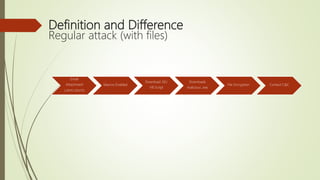
Regular attack (with files)
Email
Attachment
(.xlsm/.docm)
Macros Enabled
Download JSE/
VB Script
Downloads
malicious .exe
File Encryption Contact C&C
Definition and Difference
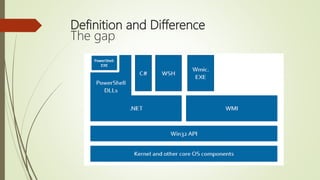
The gap
Definition and Difference
Fileless attack
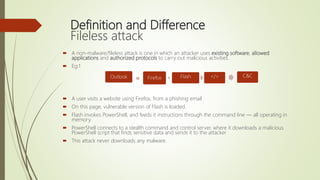
Outlook Firefox Flash </> C&C
 A non-malware/fileless attack is one in which an attacker uses existing software, allowed
applications and authorized protocols to carry out malicious activities.
 Eg:1
 A user visits a website using Firefox, from a phishing email
 On this page, vulnerable version of Flash is loaded.
 Flash invokes PowerShell, and feeds it instructions through the command line — all operating in
memory.
 PowerShell connects to a stealth command and control server, where it downloads a malicious
PowerShell script that finds sensitive data and sends it to the attacker
 This attack never downloads any malware.
Definition and Difference
Fileless attack
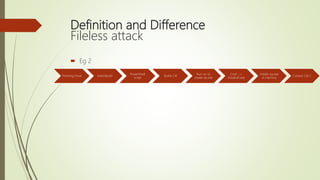
 Eg 2
Phishing Email xlsM/docM
PowerShell
script
Builds C#
Run csc to
create np.exe
Cmd _->
installutil.exe
Installs np.exe
in memory
Contact C& C
Possible behaviors and evidences
 Weird child process starting up.
 Legit .dll loads from unusual parent
 Eg. System.management.automation.dll or wbmemdisp.dll, PowerShell should not be
loaded by word or excel or Jpeg.
 Weird user accounts
 Other powerful Windows process loads by unusual parent.
Cmd.exe
Wmic.exe
Rdp.exe
Csc.exe
Powershell.exe
Cscript.exe
Wscript.exe
 Network Connections. Word connecting to port 80
 Strange DNS Queries
Possible behaviors and evidences
 iexplore.exe || chrome.exe || Firefox.exe || outlook.exe calling powershell or wmi
 Word.exe || Excel.exe|| ppt.exe|| calling powershell or WMI or connecting on port 80
 (word.exe||excel.exe||mshta.exe||rundll32.exe||java.exe)&&powershell.exe
 Event ID 3221
 (ExecutionPolicy||Bypass||DownloadFile||DownloadString||Webclient)&&powershell.ex
e
 Event ID:3221
Demo
How to catch it using ET
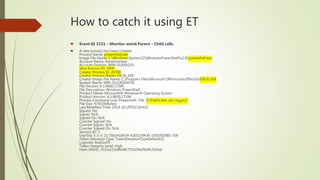
 Event ID 3221 – Monitor weird Parent – Child calls.
 A new process has been created.
Process Name: powershell.exe
Image File Name: C:WindowsSystem32WindowsPowerShellv1.0powershell.exe
Account Name: Administrator
Account Domain: WIN-5UXXX235
New Process ID: 2808
Creator Process ID: 20700
Creator Process Name: EXCEL.EXE
Creator Image File Name: C:Program FilesMicrosoft OfficerootOffice16EXCEL.EXE
System Name: WIN-5UJ2KEEAF5A
File Version: 6.3.9600.17396
File Description: Windows PowerShell
Product Name: Microsoft® Windows® Operating System
Product Version: 6.3.9600.17396
Process Command Line: Powershell -File "E:Pathclear_sec_log.ps1"
File Size: 478720(Bytes)
Last Modified Time: 2014-10-29T02:16:41Z
Signed: No
Signer: N/A
Signed On: N/A
Counter Signed: No
Counter Signer: N/A
Counter Signed On: N/A
Session ID: 3
UserSid: S-1-5-21-3561416639-4205259430-1550782985-500
Token Elevation Type: TokenElevationTypeDefault(1)
LogonId: 0xa01a59
Token Integrity Level: High
Hash (MD5): c031e215b8b08c752bf362f6d4c5d3ad
How to catch it using ET
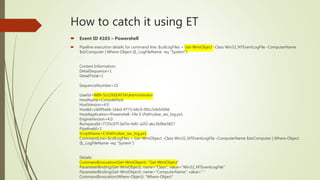
 Event ID 4103 – Powershell
 Pipeline execution details for command line: $colLogFiles = Get-WmiObject -Class Win32_NTEventLogFile -ComputerName
$strComputer | Where-Object {$_.LogFileName -eq ''System''}
.
Context Information:
DetailSequence=1
DetailTotal=1
SequenceNumber=15
UserId=WIN-5UJ2KEEAF5AAdministrator
HostName=ConsoleHost
HostVersion=4.0
HostId=cb095a66-1bbd-4773-b6c9-091c5de5430d
HostApplication=Powershell -File E:Pathclear_sec_log.ps1
EngineVersion=4.0
RunspaceId=7725c07f-bd7e-4dfc-a2f2-abc3b9be3817
PipelineId=1
ScriptName=E:Pathclear_sec_log.ps1
CommandLine=$colLogFiles = Get-WmiObject -Class Win32_NTEventLogFile -ComputerName $strComputer | Where-Object
{$_.LogFileName -eq ''System''}
Details:
CommandInvocation(Get-WmiObject): "Get-WmiObject"
ParameterBinding(Get-WmiObject): name="Class"; value="Win32_NTEventLogFile"
ParameterBinding(Get-WmiObject): name="ComputerName"; value="."
CommandInvocation(Where-Object): "Where-Object"
References
 https://www.fireeye.com/content/dam/fireeye-www/global/en/current-
threats/pdfs/wp-windows-management-instrumentation.pdf
 https://static1.squarespace.com/static/552092d5e4b0661088167e5c/t/5760096ecf
80a129e0b17634/1465911664070/Windows+PowerShell+Logging+Cheat+Sheet+
ver+June+2016+v2.pdf
 https://www.carbonblack.com/2017/02/10/non-malware-fileless-attack/
Thank you
Questions?!

Catching fileless attacks

  • 1.
    Catching Fileless Attacks BalajiR Lead Info Sec Analyst Netsurion
  • 2.
    Agenda  Definition andDifference  Behavior  Evidences  How to catch?
  • 3.
    Definition and Difference Regularattack (with files) Email Attachment (.xlsm/.docm) Macros Enabled Download JSE/ VB Script Downloads malicious .exe File Encryption Contact C&C
  • 4.
  • 6.
    Definition and Difference Filelessattack Outlook Firefox Flash </> C&C  A non-malware/fileless attack is one in which an attacker uses existing software, allowed applications and authorized protocols to carry out malicious activities.  Eg:1  A user visits a website using Firefox, from a phishing email  On this page, vulnerable version of Flash is loaded.  Flash invokes PowerShell, and feeds it instructions through the command line — all operating in memory.  PowerShell connects to a stealth command and control server, where it downloads a malicious PowerShell script that finds sensitive data and sends it to the attacker  This attack never downloads any malware.
  • 7.
    Definition and Difference Filelessattack  Eg 2 Phishing Email xlsM/docM PowerShell script Builds C# Run csc to create np.exe Cmd _-> installutil.exe Installs np.exe in memory Contact C& C
  • 8.
    Possible behaviors andevidences  Weird child process starting up.  Legit .dll loads from unusual parent  Eg. System.management.automation.dll or wbmemdisp.dll, PowerShell should not be loaded by word or excel or Jpeg.  Weird user accounts  Other powerful Windows process loads by unusual parent. Cmd.exe Wmic.exe Rdp.exe Csc.exe Powershell.exe Cscript.exe Wscript.exe  Network Connections. Word connecting to port 80  Strange DNS Queries
  • 9.
    Possible behaviors andevidences  iexplore.exe || chrome.exe || Firefox.exe || outlook.exe calling powershell or wmi  Word.exe || Excel.exe|| ppt.exe|| calling powershell or WMI or connecting on port 80  (word.exe||excel.exe||mshta.exe||rundll32.exe||java.exe)&&powershell.exe  Event ID 3221  (ExecutionPolicy||Bypass||DownloadFile||DownloadString||Webclient)&&powershell.ex e  Event ID:3221
  • 10.
  • 11.
    How to catchit using ET  Event ID 3221 – Monitor weird Parent – Child calls.  A new process has been created. Process Name: powershell.exe Image File Name: C:WindowsSystem32WindowsPowerShellv1.0powershell.exe Account Name: Administrator Account Domain: WIN-5UXXX235 New Process ID: 2808 Creator Process ID: 20700 Creator Process Name: EXCEL.EXE Creator Image File Name: C:Program FilesMicrosoft OfficerootOffice16EXCEL.EXE System Name: WIN-5UJ2KEEAF5A File Version: 6.3.9600.17396 File Description: Windows PowerShell Product Name: Microsoft® Windows® Operating System Product Version: 6.3.9600.17396 Process Command Line: Powershell -File "E:Pathclear_sec_log.ps1" File Size: 478720(Bytes) Last Modified Time: 2014-10-29T02:16:41Z Signed: No Signer: N/A Signed On: N/A Counter Signed: No Counter Signer: N/A Counter Signed On: N/A Session ID: 3 UserSid: S-1-5-21-3561416639-4205259430-1550782985-500 Token Elevation Type: TokenElevationTypeDefault(1) LogonId: 0xa01a59 Token Integrity Level: High Hash (MD5): c031e215b8b08c752bf362f6d4c5d3ad
  • 12.
    How to catchit using ET  Event ID 4103 – Powershell  Pipeline execution details for command line: $colLogFiles = Get-WmiObject -Class Win32_NTEventLogFile -ComputerName $strComputer | Where-Object {$_.LogFileName -eq ''System''} . Context Information: DetailSequence=1 DetailTotal=1 SequenceNumber=15 UserId=WIN-5UJ2KEEAF5AAdministrator HostName=ConsoleHost HostVersion=4.0 HostId=cb095a66-1bbd-4773-b6c9-091c5de5430d HostApplication=Powershell -File E:Pathclear_sec_log.ps1 EngineVersion=4.0 RunspaceId=7725c07f-bd7e-4dfc-a2f2-abc3b9be3817 PipelineId=1 ScriptName=E:Pathclear_sec_log.ps1 CommandLine=$colLogFiles = Get-WmiObject -Class Win32_NTEventLogFile -ComputerName $strComputer | Where-Object {$_.LogFileName -eq ''System''} Details: CommandInvocation(Get-WmiObject): "Get-WmiObject" ParameterBinding(Get-WmiObject): name="Class"; value="Win32_NTEventLogFile" ParameterBinding(Get-WmiObject): name="ComputerName"; value="." CommandInvocation(Where-Object): "Where-Object"
  • 13.
  • 14.