Rapid
Solr Schema
Development
Alexandre Rafalovitch (@arafalov)
Apache Solr Committer
Montreal Solr/ML meetup May 2018
Phone directory - content
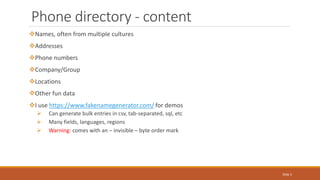
Names, often from multiple cultures
Addresses
Phone numbers
Company/Group
Locations
Other fun data
I use https://www.fakenamegenerator.com/ for demos
 Can generate bulk entries in csv, tab-separated, sql, etc
 Many fields, languages, regions
 Warning: comes with an – invisible – byte order mark
Slide 2
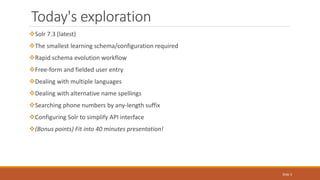
Today's exploration
Solr 7.3 (latest)
The smallest learning schema/configuration required
Rapid schema evolution workflow
Free-form and fielded user entry
Dealing with multiple languages
Dealing with alternative name spellings
Searching phone numbers by any-length suffix
Configuring Solr to simplify API interface
(Bonus points) Fit into 40 minutes presentation!
Slide 3
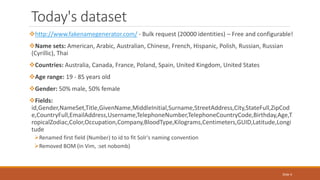
Today's dataset
http://www.fakenamegenerator.com/ - Bulk request (20000 identities) – Free and configurable!
Name sets: American, Arabic, Australian, Chinese, French, Hispanic, Polish, Russian, Russian
(Cyrillic), Thai
Countries: Australia, Canada, France, Poland, Spain, United Kingdom, United States
Age range: 19 - 85 years old
Gender: 50% male, 50% female
Fields:
id,Gender,NameSet,Title,GivenName,MiddleInitial,Surname,StreetAddress,City,StateFull,ZipCod
e,CountryFull,EmailAddress,Username,TelephoneNumber,TelephoneCountryCode,Birthday,Age,T
ropicalZodiac,Color,Occupation,Company,BloodType,Kilograms,Centimeters,GUID,Latitude,Longi
tude
Renamed first field (Number) to id to fit Solr's naming convention
Removed BOM (in Vim, :set nobomb)
Slide 4
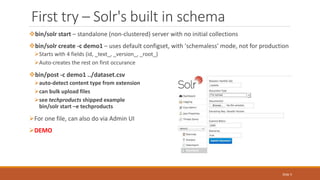
First try – Solr's built in schema
bin/solr start – standalone (non-clustered) server with no initial collections
bin/solr create -c demo1 – uses default configset, with 'schemaless' mode, not for production
Starts with 4 fields (id, _text_, _version_, _root_)
Auto-creates the rest on first occurance
bin/post -c demo1 ../dataset.csv
auto-detect content type from extension
can bulk upload files
see techproducts shipped example
bin/solr start –e techproducts
For one file, can also do via Admin UI
DEMO
Slide 5
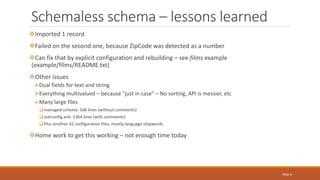
Schemaless schema – lessons learned
Imported 1 record
Failed on the second one, because ZipCode was detected as a number
Can fix that by explicit configuration and rebuilding – see films example
(example/films/README.txt)
Other issues
Dual fields for text and string
Everything multivalued – because "just in case" – No sorting, API is messier, etc
Many large files
managed-schema: 546 lines (without comments)
solrconfig.xml: 1364 lines (with comments)
Plus another 42 configuration files, mostly language stopwords
Home work to get this working – not enough time today
Slide 6
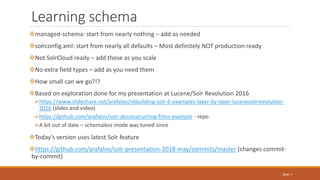
Learning schema
managed-schema: start from nearly nothing – add as needed
solrconfig.xml: start from nearly all defaults – Most definitely NOT production ready
Not SolrCloud ready – add those as you scale
No extra field types – add as you need them
How small can we go?!?
Based on exploration done for my presentation at Lucene/Solr Revolution 2016
https://www.slideshare.net/arafalov/rebuilding-solr-6-examples-layer-by-layer-lucenesolrrevolution-
2016 (slides and video)
https://github.com/arafalov/solr-deconstructing-films-example - repo
A bit out of date – schemaless mode was tuned since
Today's version uses latest Solr feature
https://github.com/arafalov/solr-presentation-2018-may/commits/master (changes commit-
by-commit)
Slide 7
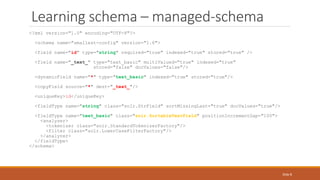
Learning schema – managed-schema
<?xml version="1.0" encoding="UTF-8"?>
<schema name="smallest-config" version="1.6">
<field name="id" type="string" required="true" indexed="true" stored="true" />
<field name="_text_" type="text_basic" multiValued="true" indexed="true"
stored="false" docValues="false"/>
<dynamicField name="*" type="text_basic" indexed="true" stored="true"/>
<copyField source="*" dest="_text_"/>
<uniqueKey>id</uniqueKey>
<fieldType name="string" class="solr.StrField" sortMissingLast="true" docValues="true"/>
<fieldType name="text_basic" class="solr.SortableTextField" positionIncrementGap="100">
<analyzer>
<tokenizer class="solr.StandardTokenizerFactory"/>
<filter class="solr.LowerCaseFilterFactory"/>
</analyzer>
</fieldType>
</schema>
Slide 8
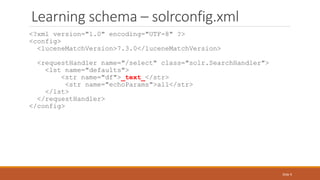
Learning schema – solrconfig.xml
<?xml version="1.0" encoding="UTF-8" ?>
<config>
<luceneMatchVersion>7.3.0</luceneMatchVersion>
<requestHandler name="/select" class="solr.SearchHandler">
<lst name="defaults">
<str name="df">_text_</str>
<str name="echoParams">all</str>
</lst>
</requestHandler>
</config>
Slide 9
2 files, 33 lines combined, including blanks – but Will It Blend Search?
bin/solr create -c tinydir -d ../configs/smallest/ - provide custom config files to the collection
bin/post -c tinydir ../dataset.csv – Remember the BOM and renaming column Number->id
Does it search?
General search?
Case-insensitive search?
Range search: Centimeters:[* TO 99]
Fielded search?
Facet?
Sort?
Are ids preserved?
Are individual fields easy to work with (fl, etc)?
DEMO
Learning schema – create and index
Slide 10
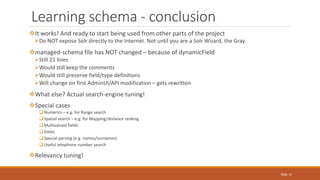
It works! And ready to start being used from other parts of the project
Do NOT expose Solr directly to the Internet. Not until you are a Solr Wizard, the Gray.
managed-schema file has NOT changed – because of dynamicField
Still 21 lines
Would still keep the comments
Would still preserve field/type definitions
Will change on first AdminUI/API modification – gets rewritten
What else? Actual search-engine tuning!
Special cases
Numerics – e.g. for Range search
Spatial search – e.g. for Mapping/distance ranking
Multivalued fields
Dates
Special parsing (e.g. names/surnames)
Useful telephone number search
Relevancy tuning!
Learning schema - conclusion
Slide 11
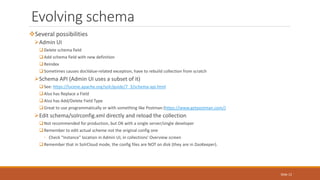
Several possibilities
Admin UI
Delete schema field
Add schema field with new definition
Reindex
Sometimes causes docValue-related exception, have to rebuild collection from scratch
Schema API (Admin UI uses a subset of it)
See: https://lucene.apache.org/solr/guide/7_3/schema-api.html
Also has Replace a Field
Also has Add/Delete Field Type
Great to use programmatically or with something like Postman (https://www.getpostman.com/)
Edit schema/solrconfig.xml directly and reload the collection
Not recommended for production, but OK with a single server/single developer
Remember to edit actual scheme not the original config one
◦ Check "Instance" location in Admin UI, in collections' Overview screen
Remember that in SolrCloud mode, the config files are NOT on disk (they are in ZooKeeper).
Evolving schema
Slide 12
Numeric fields
 Age – int
 Centimeters (height?) – int
 Kilograms – float
Copy missing field types (pint, pfloat) from solr-7.3.0/server/solr/configsets/_default/conf/managed-schema
Map numeric fields explicitly
Delete content due to radical storage needs change
 bin/post -c tinydir -format solr -d "<delete><query>*:*</query></delete>"
Reload the core in Admin UI's Core Admin (menu is different in SolrCloud mode)
Index again
 bin/post -c tinydir ../dataset.csv
New queries
 facet=true&facet.range=Age&facet.range.start=0&facet.range.end=200&facet.range.gap=10
 Centimeters:[* TO 99] (again)
DEMO
Evolving schema – add numeric fields
Slide 13
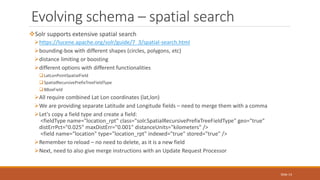
Solr supports extensive spatial search
https://lucene.apache.org/solr/guide/7_3/spatial-search.html
bounding-box with different shapes (circles, polygons, etc)
distance limiting or boosting
different options with different functionalities
LatLonPointSpatialField
SpatialRecursivePrefixTreeFieldType
BBoxField
All require combined Lat Lon coordinates (lat,lon)
We are providing separate Latitude and Longitude fields – need to merge them with a comma
Let's copy a field type and create a field:
<fieldType name="location_rpt" class="solr.SpatialRecursivePrefixTreeFieldType" geo="true"
distErrPct="0.025" maxDistErr="0.001" distanceUnits="kilometers" />
<field name="location" type="location_rpt" indexed="true" stored="true" />
Remember to reload – no need to delete, as it is a new field
Next, need to also give merge instructions with an Update Request Processor
Evolving schema – spatial search
Slide 14
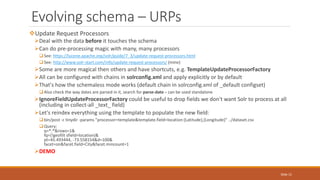
Update Request Processors
Deal with the data before it touches the schema
Can do pre-processing magic with many, many processors
See: https://lucene.apache.org/solr/guide/7_3/update-request-processors.html
See: http://www.solr-start.com/info/update-request-processors/ (mine)
Some are more magical then others and have shortcuts, e.g. TemplateUpdateProcessorFactory
All can be configured with chains in solrconfig.xml and apply explicitly or by default
That's how the schemaless mode works (default chain in solrconfig.xml of _default configset)
Also check the way dates are parsed in it, search for parse-date – can be used standalone
IgnoreFieldUpdateProcessorFactory could be useful to drop fields we don't want Solr to process at all
(including in collect-all _text_ field)
Let's reindex everything using the template to populate the new field:
bin/post -c tinydir -params "processor=template&template.field=location:{Latitude},{Longitude}" ../dataset.csv
Query:
q=*:*&rows=1&
fq={!geofilt sfield=location}&
pt=45.493444, -73.558154&d=100&
facet=on&facet.field=City&facet.mincount=1
DEMO
Evolving schema – URPs
Slide 15
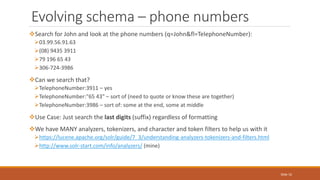
Search for John and look at the phone numbers (q=John&fl=TelephoneNumber):
03.99.56.91.63
(08) 9435 3911
79 196 65 43
306-724-3986
Can we search that?
TelephoneNumber:3911 – yes
TelephoneNumber:"65 43" – sort of (need to quote or know these are together)
TelephoneNumber:3986 – sort of: some at the end, some at middle
Use Case: Just search the last digits (suffix) regardless of formatting
We have MANY analyzers, tokenizers, and character and token filters to help us with it
https://lucene.apache.org/solr/guide/7_3/understanding-analyzers-tokenizers-and-filters.html
http://www.solr-start.com/info/analyzers/ (mine)
Evolving schema – phone numbers
Slide 16
Let's define a super-custom field type:
<fieldType name="phone" class="solr.TextField">
<analyzer type="index">
<tokenizer class="solr.KeywordTokenizerFactory" />
<filter class="solr.PatternReplaceFilterFactory" pattern="([^0-9])"
replacement="" replace="all"/>
<filter class="solr.ReverseStringFilterFactory"/>
<filter class="solr.EdgeNGramFilterFactory" minGramSize="3" maxGramSize="30"/>
</analyzer>
<analyzer type="query">
<tokenizer class="solr.KeywordTokenizerFactory" />
<filter class="solr.PatternReplaceFilterFactory" pattern="([^0-9])"
replacement="" replace="all"/>
<filter class="solr.ReverseStringFilterFactory"/>
</analyzer>
</fieldType>
Notice
Asymmetric analyzers
Reversing the string to make it end-digits starts digit (make sure that's symmetric!)
Edge n-grams (3-30 character substrings) - makes the index larger, but the search very fast
Evolving schema – digits-only type
Slide 17
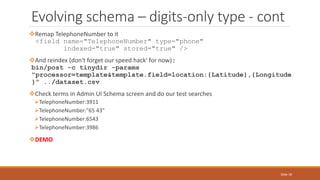
Remap TelephoneNumber to it
<field name="TelephoneNumber" type="phone"
indexed="true" stored="true" />
And reindex (don't forget our speed hack' for now):
bin/post -c tinydir -params
"processor=template&template.field=location:{Latitude},{Longitude
}" ../dataset.csv
Check terms in Admin UI Schema screen and do our test searches
TelephoneNumber:3911
TelephoneNumber:"65 43"
TelephoneNumber:6543
TelephoneNumber:3986
DEMO
Evolving schema – digits-only type - cont
Slide 18
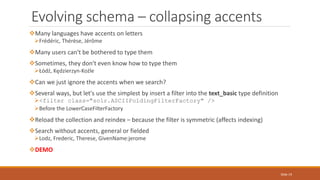
Many languages have accents on letters
Frédéric, Thérèse, Jérôme
Many users can't be bothered to type them
Sometimes, they don't even know how to type them
Łódź, Kędzierzyn-Koźle
Can we just ignore the accents when we search?
Several ways, but let's use the simplest by insert a filter into the text_basic type definition
<filter class="solr.ASCIIFoldingFilterFactory" />
Before the LowerCaseFilterFactory
Reload the collection and reindex – because the filter is symmetric (affects indexing)
Search without accents, general or fielded
Lodz, Frederic, Therese, GivenName:jerome
DEMO
Evolving schema – collapsing accents
Slide 19
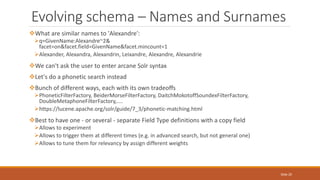
What are similar names to 'Alexandre':
q=GivenName:Alexandre~2&
facet=on&facet.field=GivenName&facet.mincount=1
Alexander, Alexandra, Alexandrin, Leixandre, Alexandre, Alexandrie
We can't ask the user to enter arcane Solr syntax
Let's do a phonetic search instead
Bunch of different ways, each with its own tradeoffs
PhoneticFilterFactory, BeiderMorseFilterFactory, DaitchMokotoffSoundexFilterFactory,
DoubleMetaphoneFilterFactory,....
https://lucene.apache.org/solr/guide/7_3/phonetic-matching.html
Best to have one - or several - separate Field Type definitions with a copy field
Allows to experiment
Allows to trigger them at different times (e.g. in advanced search, but not general one)
Allows to tune them for relevancy by assign different weights
Evolving schema – Names and Surnames
Slide 20
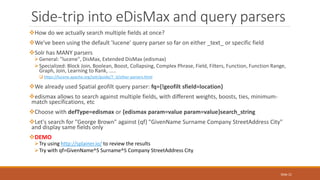
How do we actually search multiple fields at once?
We've been using the default 'lucene' query parser so far on either _text_ or specific field
Solr has MANY parsers
General: "lucene", DisMax, Extended DisMax (edismax)
Specialized: Block Join, Boolean, Boost, Collapsing, Complex Phrase, Field, Filters, Function, Function Range,
Graph, Join, Learning to Rank, .....
 https://lucene.apache.org/solr/guide/7_3/other-parsers.html
We already used Spatial geofilt query parser: fq={!geofilt sfield=location}
edismax allows to search against multiple fields, with different weights, boosts, ties, minimum-
match specifications, etc
Choose with defType=edismax or {edismax param=value param=value}search_string
Let's search for "George Brown" against (qf) "GivenName Surname Company StreetAddress City"
and display same fields only
DEMO
Try using http://splainer.io/ to review the results
Try with qf=GivenName^5 Surname^5 Company StreetAddress City
Side-trip into eDisMax and query parsers
Slide 21
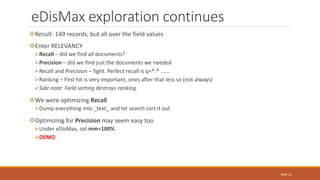
Result: 149 records, but all over the field values
Enter RELEVANCY
Recall – did we find all documents?
Precision – did we find just the documents we needed
Recall and Precision – fight. Perfect recall is q=*:* ......
Ranking – First hit is very important, ones after that less so (not always)
Side note: Field sorting destroys ranking.
We were optimizing Recall
Dump everything into _text_ and let search sort it out
Optimizing for Precision may seem easy too
Under eDisMax, set mm=100%
DEMO
eDisMax exploration continues
Slide 22
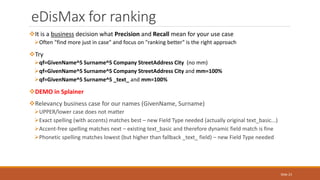
It is a business decision what Precision and Recall mean for your use case
Often "find more just in case" and focus on "ranking better" is the right approach
Try
qf=GivenName^5 Surname^5 Company StreetAddress City (no mm)
qf=GivenName^5 Surname^5 Company StreetAddress City and mm=100%
qf=GivenName^5 Surname^5 _text_ and mm=100%
DEMO in Splainer
Relevancy business case for our names (GivenName, Surname)
UPPER/lower case does not matter
Exact spelling (with accents) matches best – new Field Type needed (actually original text_basic...)
Accent-free spelling matches next – existing text_basic and therefore dynamic field match is fine
Phonetic spelling matches lowest (but higher than fallback _text_ field) – new Field Type needed
eDisMax for ranking
Slide 23
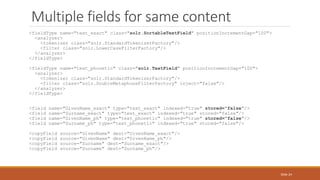
<fieldType name="text_exact" class="solr.SortableTextField" positionIncrementGap="100">
<analyzer>
<tokenizer class="solr.StandardTokenizerFactory"/>
<filter class="solr.LowerCaseFilterFactory"/>
</analyzer>
</fieldType>
<fieldType name="text_phonetic" class="solr.TextField" positionIncrementGap="100">
<analyzer>
<tokenizer class="solr.StandardTokenizerFactory"/>
<filter class="solr.DoubleMetaphoneFilterFactory" inject="false"/>
</analyzer>
</fieldType>
<field name="GivenName_exact" type="text_exact" indexed="true" stored="false"/>
<field name="Surname_exact" type="text_exact" indexed="true" stored="false"/>
<field name="GivenName_ph" type="text_phonetic" indexed="true" stored="false"/>
<field name="Surname_ph" type="text_phonetic" indexed="true" stored="false"/>
<copyField source="GivenName" dest="GivenName_exact"/>
<copyField source="GivenName" dest="GivenName_ph"/>
<copyField source="Surname" dest="Surname_exact"/>
<copyField source="Surname" dest="Surname_ph"/>
Multiple fields for same content
Slide 24
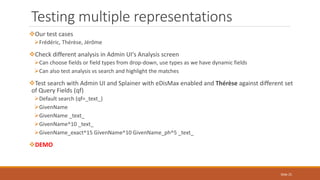
Our test cases
Frédéric, Thérèse, Jérôme
Check different analysis in Admin UI's Analysis screen
Can choose fields or field types from drop-down, use types as we have dynamic fields
Can also test analysis vs search and highlight the matches
Test search with Admin UI and Splainer with eDisMax enabled and Thérèse against different set
of Query Fields (qf)
Default search (qf=_text_)
GivenName
GivenName _text_
GivenName^10 _text_
GivenName_exact^15 GivenName^10 GivenName_ph^5 _text_
DEMO
Testing multiple representations
Slide 25
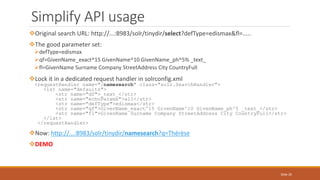
Original search URL: http://...:8983/solr/tinydir/select?defType=edismax&fl=.....
The good parameter set:
defType=edismax
qf=GivenName_exact^15 GivenName^10 GivenName_ph^5% _text_
fl=GivenName Surname Company StreetAddress City CountryFull
Lock it in a dedicated request handler in solrconfig.xml
<requestHandler name="/namesearch" class="solr.SearchHandler">
<lst name="defaults">
<str name="df">_text_</str>
<str name="echoParams">all</str>
<str name="defType">edismax</str>
<str name="qf">GivenName_exact^15 GivenName^10 GivenName_ph^5 _text_</str>
<str name="fl">GivenName Surname Company StreetAddress City CountryFull</str>
</lst>
</requestHandler>
Now: http://...:8983/solr/tinydir/namesearch?q=Thérèse
DEMO
Simplify API usage
Slide 26
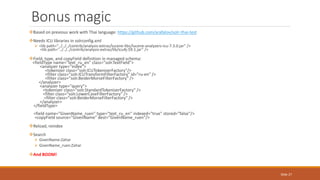
Based on previous work with Thai language: https://github.com/arafalov/solr-thai-test
Needs ICU libraries in solrconfig.xml
 <lib path="../../../contrib/analysis-extras/lucene-libs/lucene-analyzers-icu-7.3.0.jar" />
<lib path="../../../contrib/analysis-extras/lib/icu4j-59.1.jar" />
Field, type, and copyField definition in managed-schema:
<fieldType name="text_ru_en" class="solr.TextField">
<analyzer type="index">
<tokenizer class="solr.ICUTokenizerFactory"/>
<filter class="solr.ICUTransformFilterFactory" id="ru-en" />
<filter class="solr.BeiderMorseFilterFactory" />
</analyzer>
<analyzer type="query">
<tokenizer class="solr.StandardTokenizerFactory" />
<filter class="solr.LowerCaseFilterFactory" />
<filter class="solr.BeiderMorseFilterFactory" />
</analyzer>
</fieldType>
<field name="GivenName_ruen" type="text_ru_en" indexed="true" stored="false"/>
<copyField source="GivenName" dest="GivenName_ruen"/>
Reload, reindex
Search
 GivenName:Zahar
 GivenName_ruen:Zahar
And BOOM!
Bonus magic
Slide 27
Rapid
Solr Schema
Development
Alexandre Rafalovitch (@arafalov)
Apache Solr Committer
Montreal Solr/ML meetup May 2018

Rapid Solr Schema Development (Phone directory)

  • 1.
    Rapid Solr Schema Development Alexandre Rafalovitch(@arafalov) Apache Solr Committer Montreal Solr/ML meetup May 2018
  • 2.
    Phone directory -content Names, often from multiple cultures Addresses Phone numbers Company/Group Locations Other fun data I use https://www.fakenamegenerator.com/ for demos  Can generate bulk entries in csv, tab-separated, sql, etc  Many fields, languages, regions  Warning: comes with an – invisible – byte order mark Slide 2
  • 3.
    Today's exploration Solr 7.3(latest) The smallest learning schema/configuration required Rapid schema evolution workflow Free-form and fielded user entry Dealing with multiple languages Dealing with alternative name spellings Searching phone numbers by any-length suffix Configuring Solr to simplify API interface (Bonus points) Fit into 40 minutes presentation! Slide 3
  • 4.
    Today's dataset http://www.fakenamegenerator.com/ -Bulk request (20000 identities) – Free and configurable! Name sets: American, Arabic, Australian, Chinese, French, Hispanic, Polish, Russian, Russian (Cyrillic), Thai Countries: Australia, Canada, France, Poland, Spain, United Kingdom, United States Age range: 19 - 85 years old Gender: 50% male, 50% female Fields: id,Gender,NameSet,Title,GivenName,MiddleInitial,Surname,StreetAddress,City,StateFull,ZipCod e,CountryFull,EmailAddress,Username,TelephoneNumber,TelephoneCountryCode,Birthday,Age,T ropicalZodiac,Color,Occupation,Company,BloodType,Kilograms,Centimeters,GUID,Latitude,Longi tude Renamed first field (Number) to id to fit Solr's naming convention Removed BOM (in Vim, :set nobomb) Slide 4
  • 5.
    First try –Solr's built in schema bin/solr start – standalone (non-clustered) server with no initial collections bin/solr create -c demo1 – uses default configset, with 'schemaless' mode, not for production Starts with 4 fields (id, _text_, _version_, _root_) Auto-creates the rest on first occurance bin/post -c demo1 ../dataset.csv auto-detect content type from extension can bulk upload files see techproducts shipped example bin/solr start –e techproducts For one file, can also do via Admin UI DEMO Slide 5
  • 6.
    Schemaless schema –lessons learned Imported 1 record Failed on the second one, because ZipCode was detected as a number Can fix that by explicit configuration and rebuilding – see films example (example/films/README.txt) Other issues Dual fields for text and string Everything multivalued – because "just in case" – No sorting, API is messier, etc Many large files managed-schema: 546 lines (without comments) solrconfig.xml: 1364 lines (with comments) Plus another 42 configuration files, mostly language stopwords Home work to get this working – not enough time today Slide 6
  • 7.
    Learning schema managed-schema: startfrom nearly nothing – add as needed solrconfig.xml: start from nearly all defaults – Most definitely NOT production ready Not SolrCloud ready – add those as you scale No extra field types – add as you need them How small can we go?!? Based on exploration done for my presentation at Lucene/Solr Revolution 2016 https://www.slideshare.net/arafalov/rebuilding-solr-6-examples-layer-by-layer-lucenesolrrevolution- 2016 (slides and video) https://github.com/arafalov/solr-deconstructing-films-example - repo A bit out of date – schemaless mode was tuned since Today's version uses latest Solr feature https://github.com/arafalov/solr-presentation-2018-may/commits/master (changes commit- by-commit) Slide 7
  • 8.
    Learning schema –managed-schema <?xml version="1.0" encoding="UTF-8"?> <schema name="smallest-config" version="1.6"> <field name="id" type="string" required="true" indexed="true" stored="true" /> <field name="_text_" type="text_basic" multiValued="true" indexed="true" stored="false" docValues="false"/> <dynamicField name="*" type="text_basic" indexed="true" stored="true"/> <copyField source="*" dest="_text_"/> <uniqueKey>id</uniqueKey> <fieldType name="string" class="solr.StrField" sortMissingLast="true" docValues="true"/> <fieldType name="text_basic" class="solr.SortableTextField" positionIncrementGap="100"> <analyzer> <tokenizer class="solr.StandardTokenizerFactory"/> <filter class="solr.LowerCaseFilterFactory"/> </analyzer> </fieldType> </schema> Slide 8
  • 9.
    Learning schema –solrconfig.xml <?xml version="1.0" encoding="UTF-8" ?> <config> <luceneMatchVersion>7.3.0</luceneMatchVersion> <requestHandler name="/select" class="solr.SearchHandler"> <lst name="defaults"> <str name="df">_text_</str> <str name="echoParams">all</str> </lst> </requestHandler> </config> Slide 9
  • 10.
    2 files, 33lines combined, including blanks – but Will It Blend Search? bin/solr create -c tinydir -d ../configs/smallest/ - provide custom config files to the collection bin/post -c tinydir ../dataset.csv – Remember the BOM and renaming column Number->id Does it search? General search? Case-insensitive search? Range search: Centimeters:[* TO 99] Fielded search? Facet? Sort? Are ids preserved? Are individual fields easy to work with (fl, etc)? DEMO Learning schema – create and index Slide 10
  • 11.
    It works! Andready to start being used from other parts of the project Do NOT expose Solr directly to the Internet. Not until you are a Solr Wizard, the Gray. managed-schema file has NOT changed – because of dynamicField Still 21 lines Would still keep the comments Would still preserve field/type definitions Will change on first AdminUI/API modification – gets rewritten What else? Actual search-engine tuning! Special cases Numerics – e.g. for Range search Spatial search – e.g. for Mapping/distance ranking Multivalued fields Dates Special parsing (e.g. names/surnames) Useful telephone number search Relevancy tuning! Learning schema - conclusion Slide 11
  • 12.
    Several possibilities Admin UI Deleteschema field Add schema field with new definition Reindex Sometimes causes docValue-related exception, have to rebuild collection from scratch Schema API (Admin UI uses a subset of it) See: https://lucene.apache.org/solr/guide/7_3/schema-api.html Also has Replace a Field Also has Add/Delete Field Type Great to use programmatically or with something like Postman (https://www.getpostman.com/) Edit schema/solrconfig.xml directly and reload the collection Not recommended for production, but OK with a single server/single developer Remember to edit actual scheme not the original config one ◦ Check "Instance" location in Admin UI, in collections' Overview screen Remember that in SolrCloud mode, the config files are NOT on disk (they are in ZooKeeper). Evolving schema Slide 12
  • 13.
    Numeric fields  Age– int  Centimeters (height?) – int  Kilograms – float Copy missing field types (pint, pfloat) from solr-7.3.0/server/solr/configsets/_default/conf/managed-schema Map numeric fields explicitly Delete content due to radical storage needs change  bin/post -c tinydir -format solr -d "<delete><query>*:*</query></delete>" Reload the core in Admin UI's Core Admin (menu is different in SolrCloud mode) Index again  bin/post -c tinydir ../dataset.csv New queries  facet=true&facet.range=Age&facet.range.start=0&facet.range.end=200&facet.range.gap=10  Centimeters:[* TO 99] (again) DEMO Evolving schema – add numeric fields Slide 13
  • 14.
    Solr supports extensivespatial search https://lucene.apache.org/solr/guide/7_3/spatial-search.html bounding-box with different shapes (circles, polygons, etc) distance limiting or boosting different options with different functionalities LatLonPointSpatialField SpatialRecursivePrefixTreeFieldType BBoxField All require combined Lat Lon coordinates (lat,lon) We are providing separate Latitude and Longitude fields – need to merge them with a comma Let's copy a field type and create a field: <fieldType name="location_rpt" class="solr.SpatialRecursivePrefixTreeFieldType" geo="true" distErrPct="0.025" maxDistErr="0.001" distanceUnits="kilometers" /> <field name="location" type="location_rpt" indexed="true" stored="true" /> Remember to reload – no need to delete, as it is a new field Next, need to also give merge instructions with an Update Request Processor Evolving schema – spatial search Slide 14
  • 15.
    Update Request Processors Dealwith the data before it touches the schema Can do pre-processing magic with many, many processors See: https://lucene.apache.org/solr/guide/7_3/update-request-processors.html See: http://www.solr-start.com/info/update-request-processors/ (mine) Some are more magical then others and have shortcuts, e.g. TemplateUpdateProcessorFactory All can be configured with chains in solrconfig.xml and apply explicitly or by default That's how the schemaless mode works (default chain in solrconfig.xml of _default configset) Also check the way dates are parsed in it, search for parse-date – can be used standalone IgnoreFieldUpdateProcessorFactory could be useful to drop fields we don't want Solr to process at all (including in collect-all _text_ field) Let's reindex everything using the template to populate the new field: bin/post -c tinydir -params "processor=template&template.field=location:{Latitude},{Longitude}" ../dataset.csv Query: q=*:*&rows=1& fq={!geofilt sfield=location}& pt=45.493444, -73.558154&d=100& facet=on&facet.field=City&facet.mincount=1 DEMO Evolving schema – URPs Slide 15
  • 16.
    Search for Johnand look at the phone numbers (q=John&fl=TelephoneNumber): 03.99.56.91.63 (08) 9435 3911 79 196 65 43 306-724-3986 Can we search that? TelephoneNumber:3911 – yes TelephoneNumber:"65 43" – sort of (need to quote or know these are together) TelephoneNumber:3986 – sort of: some at the end, some at middle Use Case: Just search the last digits (suffix) regardless of formatting We have MANY analyzers, tokenizers, and character and token filters to help us with it https://lucene.apache.org/solr/guide/7_3/understanding-analyzers-tokenizers-and-filters.html http://www.solr-start.com/info/analyzers/ (mine) Evolving schema – phone numbers Slide 16
  • 17.
    Let's define asuper-custom field type: <fieldType name="phone" class="solr.TextField"> <analyzer type="index"> <tokenizer class="solr.KeywordTokenizerFactory" /> <filter class="solr.PatternReplaceFilterFactory" pattern="([^0-9])" replacement="" replace="all"/> <filter class="solr.ReverseStringFilterFactory"/> <filter class="solr.EdgeNGramFilterFactory" minGramSize="3" maxGramSize="30"/> </analyzer> <analyzer type="query"> <tokenizer class="solr.KeywordTokenizerFactory" /> <filter class="solr.PatternReplaceFilterFactory" pattern="([^0-9])" replacement="" replace="all"/> <filter class="solr.ReverseStringFilterFactory"/> </analyzer> </fieldType> Notice Asymmetric analyzers Reversing the string to make it end-digits starts digit (make sure that's symmetric!) Edge n-grams (3-30 character substrings) - makes the index larger, but the search very fast Evolving schema – digits-only type Slide 17
  • 18.
    Remap TelephoneNumber toit <field name="TelephoneNumber" type="phone" indexed="true" stored="true" /> And reindex (don't forget our speed hack' for now): bin/post -c tinydir -params "processor=template&template.field=location:{Latitude},{Longitude }" ../dataset.csv Check terms in Admin UI Schema screen and do our test searches TelephoneNumber:3911 TelephoneNumber:"65 43" TelephoneNumber:6543 TelephoneNumber:3986 DEMO Evolving schema – digits-only type - cont Slide 18
  • 19.
    Many languages haveaccents on letters Frédéric, Thérèse, Jérôme Many users can't be bothered to type them Sometimes, they don't even know how to type them Łódź, Kędzierzyn-Koźle Can we just ignore the accents when we search? Several ways, but let's use the simplest by insert a filter into the text_basic type definition <filter class="solr.ASCIIFoldingFilterFactory" /> Before the LowerCaseFilterFactory Reload the collection and reindex – because the filter is symmetric (affects indexing) Search without accents, general or fielded Lodz, Frederic, Therese, GivenName:jerome DEMO Evolving schema – collapsing accents Slide 19
  • 20.
    What are similarnames to 'Alexandre': q=GivenName:Alexandre~2& facet=on&facet.field=GivenName&facet.mincount=1 Alexander, Alexandra, Alexandrin, Leixandre, Alexandre, Alexandrie We can't ask the user to enter arcane Solr syntax Let's do a phonetic search instead Bunch of different ways, each with its own tradeoffs PhoneticFilterFactory, BeiderMorseFilterFactory, DaitchMokotoffSoundexFilterFactory, DoubleMetaphoneFilterFactory,.... https://lucene.apache.org/solr/guide/7_3/phonetic-matching.html Best to have one - or several - separate Field Type definitions with a copy field Allows to experiment Allows to trigger them at different times (e.g. in advanced search, but not general one) Allows to tune them for relevancy by assign different weights Evolving schema – Names and Surnames Slide 20
  • 21.
    How do weactually search multiple fields at once? We've been using the default 'lucene' query parser so far on either _text_ or specific field Solr has MANY parsers General: "lucene", DisMax, Extended DisMax (edismax) Specialized: Block Join, Boolean, Boost, Collapsing, Complex Phrase, Field, Filters, Function, Function Range, Graph, Join, Learning to Rank, .....  https://lucene.apache.org/solr/guide/7_3/other-parsers.html We already used Spatial geofilt query parser: fq={!geofilt sfield=location} edismax allows to search against multiple fields, with different weights, boosts, ties, minimum- match specifications, etc Choose with defType=edismax or {edismax param=value param=value}search_string Let's search for "George Brown" against (qf) "GivenName Surname Company StreetAddress City" and display same fields only DEMO Try using http://splainer.io/ to review the results Try with qf=GivenName^5 Surname^5 Company StreetAddress City Side-trip into eDisMax and query parsers Slide 21
  • 22.
    Result: 149 records,but all over the field values Enter RELEVANCY Recall – did we find all documents? Precision – did we find just the documents we needed Recall and Precision – fight. Perfect recall is q=*:* ...... Ranking – First hit is very important, ones after that less so (not always) Side note: Field sorting destroys ranking. We were optimizing Recall Dump everything into _text_ and let search sort it out Optimizing for Precision may seem easy too Under eDisMax, set mm=100% DEMO eDisMax exploration continues Slide 22
  • 23.
    It is abusiness decision what Precision and Recall mean for your use case Often "find more just in case" and focus on "ranking better" is the right approach Try qf=GivenName^5 Surname^5 Company StreetAddress City (no mm) qf=GivenName^5 Surname^5 Company StreetAddress City and mm=100% qf=GivenName^5 Surname^5 _text_ and mm=100% DEMO in Splainer Relevancy business case for our names (GivenName, Surname) UPPER/lower case does not matter Exact spelling (with accents) matches best – new Field Type needed (actually original text_basic...) Accent-free spelling matches next – existing text_basic and therefore dynamic field match is fine Phonetic spelling matches lowest (but higher than fallback _text_ field) – new Field Type needed eDisMax for ranking Slide 23
  • 24.
    <fieldType name="text_exact" class="solr.SortableTextField"positionIncrementGap="100"> <analyzer> <tokenizer class="solr.StandardTokenizerFactory"/> <filter class="solr.LowerCaseFilterFactory"/> </analyzer> </fieldType> <fieldType name="text_phonetic" class="solr.TextField" positionIncrementGap="100"> <analyzer> <tokenizer class="solr.StandardTokenizerFactory"/> <filter class="solr.DoubleMetaphoneFilterFactory" inject="false"/> </analyzer> </fieldType> <field name="GivenName_exact" type="text_exact" indexed="true" stored="false"/> <field name="Surname_exact" type="text_exact" indexed="true" stored="false"/> <field name="GivenName_ph" type="text_phonetic" indexed="true" stored="false"/> <field name="Surname_ph" type="text_phonetic" indexed="true" stored="false"/> <copyField source="GivenName" dest="GivenName_exact"/> <copyField source="GivenName" dest="GivenName_ph"/> <copyField source="Surname" dest="Surname_exact"/> <copyField source="Surname" dest="Surname_ph"/> Multiple fields for same content Slide 24
  • 25.
    Our test cases Frédéric,Thérèse, Jérôme Check different analysis in Admin UI's Analysis screen Can choose fields or field types from drop-down, use types as we have dynamic fields Can also test analysis vs search and highlight the matches Test search with Admin UI and Splainer with eDisMax enabled and Thérèse against different set of Query Fields (qf) Default search (qf=_text_) GivenName GivenName _text_ GivenName^10 _text_ GivenName_exact^15 GivenName^10 GivenName_ph^5 _text_ DEMO Testing multiple representations Slide 25
  • 26.
    Original search URL:http://...:8983/solr/tinydir/select?defType=edismax&fl=..... The good parameter set: defType=edismax qf=GivenName_exact^15 GivenName^10 GivenName_ph^5% _text_ fl=GivenName Surname Company StreetAddress City CountryFull Lock it in a dedicated request handler in solrconfig.xml <requestHandler name="/namesearch" class="solr.SearchHandler"> <lst name="defaults"> <str name="df">_text_</str> <str name="echoParams">all</str> <str name="defType">edismax</str> <str name="qf">GivenName_exact^15 GivenName^10 GivenName_ph^5 _text_</str> <str name="fl">GivenName Surname Company StreetAddress City CountryFull</str> </lst> </requestHandler> Now: http://...:8983/solr/tinydir/namesearch?q=Thérèse DEMO Simplify API usage Slide 26
  • 27.
    Based on previouswork with Thai language: https://github.com/arafalov/solr-thai-test Needs ICU libraries in solrconfig.xml  <lib path="../../../contrib/analysis-extras/lucene-libs/lucene-analyzers-icu-7.3.0.jar" /> <lib path="../../../contrib/analysis-extras/lib/icu4j-59.1.jar" /> Field, type, and copyField definition in managed-schema: <fieldType name="text_ru_en" class="solr.TextField"> <analyzer type="index"> <tokenizer class="solr.ICUTokenizerFactory"/> <filter class="solr.ICUTransformFilterFactory" id="ru-en" /> <filter class="solr.BeiderMorseFilterFactory" /> </analyzer> <analyzer type="query"> <tokenizer class="solr.StandardTokenizerFactory" /> <filter class="solr.LowerCaseFilterFactory" /> <filter class="solr.BeiderMorseFilterFactory" /> </analyzer> </fieldType> <field name="GivenName_ruen" type="text_ru_en" indexed="true" stored="false"/> <copyField source="GivenName" dest="GivenName_ruen"/> Reload, reindex Search  GivenName:Zahar  GivenName_ruen:Zahar And BOOM! Bonus magic Slide 27
  • 28.
    Rapid Solr Schema Development Alexandre Rafalovitch(@arafalov) Apache Solr Committer Montreal Solr/ML meetup May 2018

Editor's Notes

  • #14 Line 205-206 facet=true&facet.range=Age&facet.range.start=0&facet.range.end=200&facet.range.gap=10
  • #16 http://localhost:8983/solr/tinydir/select?rows=1&d=100&facet.field=City&facet=on&fq={!geofilt%20sfield=location}&pt=45.493444,%20-73.558154&q=*:*&facet.mincount=1
  • #19 TelephoneNumber:3911 – yes TelephoneNumber:"65 43" – sort of (need to quote or know these are together) TelephoneNumber:3986
  • #20 Frédéric, Thérèse, Jérôme Łódź, Kędzierzyn-Koźle
  • #27 Thérèse