Sultan Qaboos University
              College of Education
      Department of Instructional & Learning
                  Technologies


Web Conferencing
  Done by:- Amina Al-Manwari (86495)
            Sara Al-Qassmi (86416)
Outline

 Definition of web conferencing.
 Objectives of using web conferencing in DE.
 Features and limitations web conferencing.
 Uses web conferencing in DE.
 Concerns of using web conferencing in DE.
 Example of web conferencing.
 Case study about using web conferencing in DE.
Definition of Web conferencing

 Web conferencing is used to conduct live
 meetings or presentations over the Internet. In a
 web conference, each participant sits at his or her
 own computer and is connected to other
 participants via the internet. This can be either a
 downloaded application on each of the attendees
 computers or a web-based application where the
 attendees will simply enter a URL (website address)
 to enter the conference.
Objectives of using web conferencing in DE

 Provide real time communication with the instructors.
 Enhance communication and collaboration among
 students.
 Using different way for delivery the content(
 text, audio, pictures and video)
 Finding a common time for class discussions with all students.
 Contacting with huge number of students by this technology.
 Support students’ understanding of the content.
 encourage students to engage with learning and support peer
 activities
Features of Web Conferencing

 allows real-time point-to-point communications as
 well as multicast communications from one sender
 to many receivers.
 It offers information of text-based messages, voice
 and video chat to be shared simultaneously, across
 geographically dispersed locations.
 cost saving.
Features of Web Conferencing

 Slide show presentations - where images are
  presented to the audience and markup tools and a
  remote mouse pointer are used to engage the
  audience while the presenter discusses slide content.
 Live or Streaming video - where full motion
  webcam, digital video camera or multi-media files
  are pushed to the audience.
Features of Web Conferencing

 VoIP (Real time audio communication through the
  computer via use of headphones and speakers)
 Web tours - where URLs, data from
  forms, cookies, scripts and session data can be
  pushed to other participants enabling them to be
  pushed though web based logons, clicks, etc. This
  type of feature works well when demonstrating
  websites where users themselves can also
  participate.
Features of Web Conferencing

 Meeting Recording - where presentation activity is
  recorded on the client side or server side for later
  viewing and/or distribution.
 Whiteboard with annotation (allowing the
  presenter and/or attendees to highlight or mark
  items on the slide presentation. Or, simply make
  notes on a blank whiteboard.)
 Text Chat- For live question and answer sessions,
  limited to the people connected to the meeting. Text
  chat may be public (echoed to all participants) or
  private (between 2 participants).
Features of Web Conferencing

 Polls and surveys (allows the presenter to conduct
  questions with multiple choice answers directed to
  the audience)
 Screen sharing/desktop sharing/application
  sharing (where participants can view anything the
  presenter currently has shown on their screen.
  Some screen sharing applications allow for remote
  desktop control, allowing participants to
  manipulate the presenters screen, although this is
  not widely used.)
Limitation of Web Conferencing

o Security Breaches
There's always some kind of security risk to communication carried
out online. In addition to the threat of hackers, you'll also have
limited control over people who may overhear the conference.

o Technical Difficulties
Most online web conference hosting services are all-encompassing
and require that attendees have a computer, Internet connection and
login information. You'll also need to utilize the planning and
invitation stages to ensure that attendees have everything they may
need to fully participate, such as microphones, Cameras, social
media accounts or any other applications.
Limitation of Web Conferencing

o time differences because in DE we have many
  students from different regions or countries so the
  instructor have to find proper time for all students
  or record the meeting for some students.
o focus on the technology rather than the dialogue.
Uses of Web conferencing in DE

 Most of distance institution are using web
  conferencing to live interaction between instructor
  and students for explaining the content, discussing
  and asking questions.
 Exchange knowledge and experience with other
  students.
 Sharing the presentation and computer screens for
  more understanding of the content.
 facilitate synchronous communication by using
  text, audio and/or video.
Uses of Web conferencing in DE

 The real-time desktop-sharing features of web
  conferencing allow the students to meet and work
  collaboratively over the Internet .
 Using web conferencing to Record meetings (Both
  the audio and video portions of a web conference
  can be recorded, archived and replayed later).
 Providing quicker and clearer feedback when
  discussing questions and concerns.
Users concerns about using Web Conferencing

 Teachers from University of Southern Queensland
  (USQ)concern about focus of web conferencing as
  technology rather than as pedagogical aspects.
 Another USQ teachers said that teachers new to the tool
  would require further support, and the fourth asked for
  more one-on-one support.
 Some USQ teachers who experienced difficulties with
  equipment (e.g., an ineffective headset)
  decided not to use web conferencing with their students
because they thought they could not rely on the
Technology.
Users concerns about using Web Conferencing

 Concern about time allocations for preparation and
  facilitation, as well as staff and student training to
  become proficient in the use of the tools.
 Several USQ academic staff identified that it is
  often impossible to find mutually agreeable time
  slots that accommodate all students and that this
  needs to be factored in from the outset and for
  equity reasons, alternatives must be made
  available.
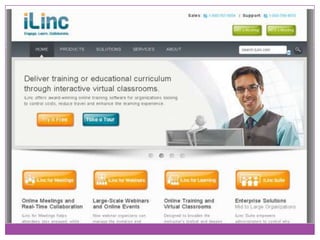
Example of Web Conferencing

                        (Ilinc)
- Features of Ilinc
 Produce webinars and online events that keep your audience
  engaged.
iLinc delivers unique capabilities that make hosting and attending
online events a more streamlined experience from start to finish.
 Deliver training or educational curriculum through interactive
  virtual classrooms.
iLinc offers award-winning online training software for
organizations looking
to control costs, reduce travel and enhance the learning
experience.
Adobe Connect
 Enable effective and secure collaboration, training,
  and online events that maximize your
  organization's efficiency.
 The complete solution for rapid training and mobile
  learning, enabling rapid deployment of training
  accessible from anywhere, anytime, on virtually
  any device.
Example of Web Conferencing

 Digital meetings that go beyond screen
 sharing, enabling far more effective collaboration
 and communication with colleagues, partners, and
 customers - anytime, anywhere, on virtually any
 device.
Case study

 research title
(Using Synchronous Web Conferencing to Enhance
Situated Distance Learner Experience in Built
Environment Context)
 Researcher name
(Niraj Thurairajah)
Summary of the case study

 the problem statement of this research is to explore the
effect of Using Synchronous Web Conferencing to Enhance
Situated Distance Learner Experience in Built Environment
Context. The research instrument was a survey of 12
graduate distance learning courses with in the UK built
environment higher education institutes. The focus of the
survey is on student experiences of studying with the
support     of   online   web     conferencing   software,
ElluminateLive! Findings indicate that distance learning
study is overwhelmingly enhanced by the use of
synchronous conferencing. Equally, however, students
derive significant benefit from being able to access
recordings of synchronous sessions.

Review DE technology

  • 1.
    Sultan Qaboos University College of Education Department of Instructional & Learning Technologies Web Conferencing Done by:- Amina Al-Manwari (86495) Sara Al-Qassmi (86416)
  • 2.
    Outline  Definition ofweb conferencing.  Objectives of using web conferencing in DE.  Features and limitations web conferencing.  Uses web conferencing in DE.  Concerns of using web conferencing in DE.  Example of web conferencing.  Case study about using web conferencing in DE.
  • 3.
    Definition of Webconferencing  Web conferencing is used to conduct live meetings or presentations over the Internet. In a web conference, each participant sits at his or her own computer and is connected to other participants via the internet. This can be either a downloaded application on each of the attendees computers or a web-based application where the attendees will simply enter a URL (website address) to enter the conference.
  • 4.
    Objectives of usingweb conferencing in DE  Provide real time communication with the instructors.  Enhance communication and collaboration among students.  Using different way for delivery the content( text, audio, pictures and video)  Finding a common time for class discussions with all students.  Contacting with huge number of students by this technology.  Support students’ understanding of the content.  encourage students to engage with learning and support peer activities
  • 5.
    Features of WebConferencing  allows real-time point-to-point communications as well as multicast communications from one sender to many receivers.  It offers information of text-based messages, voice and video chat to be shared simultaneously, across geographically dispersed locations.  cost saving.
  • 6.
    Features of WebConferencing  Slide show presentations - where images are presented to the audience and markup tools and a remote mouse pointer are used to engage the audience while the presenter discusses slide content.  Live or Streaming video - where full motion webcam, digital video camera or multi-media files are pushed to the audience.
  • 7.
    Features of WebConferencing  VoIP (Real time audio communication through the computer via use of headphones and speakers)  Web tours - where URLs, data from forms, cookies, scripts and session data can be pushed to other participants enabling them to be pushed though web based logons, clicks, etc. This type of feature works well when demonstrating websites where users themselves can also participate.
  • 8.
    Features of WebConferencing  Meeting Recording - where presentation activity is recorded on the client side or server side for later viewing and/or distribution.  Whiteboard with annotation (allowing the presenter and/or attendees to highlight or mark items on the slide presentation. Or, simply make notes on a blank whiteboard.)  Text Chat- For live question and answer sessions, limited to the people connected to the meeting. Text chat may be public (echoed to all participants) or private (between 2 participants).
  • 9.
    Features of WebConferencing  Polls and surveys (allows the presenter to conduct questions with multiple choice answers directed to the audience)  Screen sharing/desktop sharing/application sharing (where participants can view anything the presenter currently has shown on their screen. Some screen sharing applications allow for remote desktop control, allowing participants to manipulate the presenters screen, although this is not widely used.)
  • 10.
    Limitation of WebConferencing o Security Breaches There's always some kind of security risk to communication carried out online. In addition to the threat of hackers, you'll also have limited control over people who may overhear the conference. o Technical Difficulties Most online web conference hosting services are all-encompassing and require that attendees have a computer, Internet connection and login information. You'll also need to utilize the planning and invitation stages to ensure that attendees have everything they may need to fully participate, such as microphones, Cameras, social media accounts or any other applications.
  • 11.
    Limitation of WebConferencing o time differences because in DE we have many students from different regions or countries so the instructor have to find proper time for all students or record the meeting for some students. o focus on the technology rather than the dialogue.
  • 12.
    Uses of Webconferencing in DE  Most of distance institution are using web conferencing to live interaction between instructor and students for explaining the content, discussing and asking questions.  Exchange knowledge and experience with other students.  Sharing the presentation and computer screens for more understanding of the content.  facilitate synchronous communication by using text, audio and/or video.
  • 13.
    Uses of Webconferencing in DE  The real-time desktop-sharing features of web conferencing allow the students to meet and work collaboratively over the Internet .  Using web conferencing to Record meetings (Both the audio and video portions of a web conference can be recorded, archived and replayed later).  Providing quicker and clearer feedback when discussing questions and concerns.
  • 14.
    Users concerns aboutusing Web Conferencing  Teachers from University of Southern Queensland (USQ)concern about focus of web conferencing as technology rather than as pedagogical aspects.  Another USQ teachers said that teachers new to the tool would require further support, and the fourth asked for more one-on-one support.  Some USQ teachers who experienced difficulties with equipment (e.g., an ineffective headset) decided not to use web conferencing with their students because they thought they could not rely on the Technology.
  • 15.
    Users concerns aboutusing Web Conferencing  Concern about time allocations for preparation and facilitation, as well as staff and student training to become proficient in the use of the tools.  Several USQ academic staff identified that it is often impossible to find mutually agreeable time slots that accommodate all students and that this needs to be factored in from the outset and for equity reasons, alternatives must be made available.
  • 16.
    Example of WebConferencing (Ilinc) - Features of Ilinc  Produce webinars and online events that keep your audience engaged. iLinc delivers unique capabilities that make hosting and attending online events a more streamlined experience from start to finish.  Deliver training or educational curriculum through interactive virtual classrooms. iLinc offers award-winning online training software for organizations looking to control costs, reduce travel and enhance the learning experience.
  • 19.
    Adobe Connect  Enableeffective and secure collaboration, training, and online events that maximize your organization's efficiency.  The complete solution for rapid training and mobile learning, enabling rapid deployment of training accessible from anywhere, anytime, on virtually any device.
  • 20.
    Example of WebConferencing  Digital meetings that go beyond screen sharing, enabling far more effective collaboration and communication with colleagues, partners, and customers - anytime, anywhere, on virtually any device.
  • 23.
    Case study  researchtitle (Using Synchronous Web Conferencing to Enhance Situated Distance Learner Experience in Built Environment Context)  Researcher name (Niraj Thurairajah)
  • 24.
    Summary of thecase study the problem statement of this research is to explore the effect of Using Synchronous Web Conferencing to Enhance Situated Distance Learner Experience in Built Environment Context. The research instrument was a survey of 12 graduate distance learning courses with in the UK built environment higher education institutes. The focus of the survey is on student experiences of studying with the support of online web conferencing software, ElluminateLive! Findings indicate that distance learning study is overwhelmingly enhanced by the use of synchronous conferencing. Equally, however, students derive significant benefit from being able to access recordings of synchronous sessions.