Storage IO Control: Concepts, Configuration and Best
Practices to Tame Different Storage Architectures
Sachin Manpathak, VMware
Mustafa Uysal, VMware
Sunil Muralidhar, VMware
VSVC5364
#VSVC5364
2
Disclaimer
 This session may contain product features that are
currently under development.
 This session/overview of the new technology represents
no commitment from VMware to deliver these features in
any generally available product.
 Features are subject to change, and must not be included in
contracts, purchase orders, or sales agreements of any kind.
 Technical feasibility and market demand will affect final delivery.
 Pricing and packaging for any new technologies or features
discussed or presented have not been determined.
3
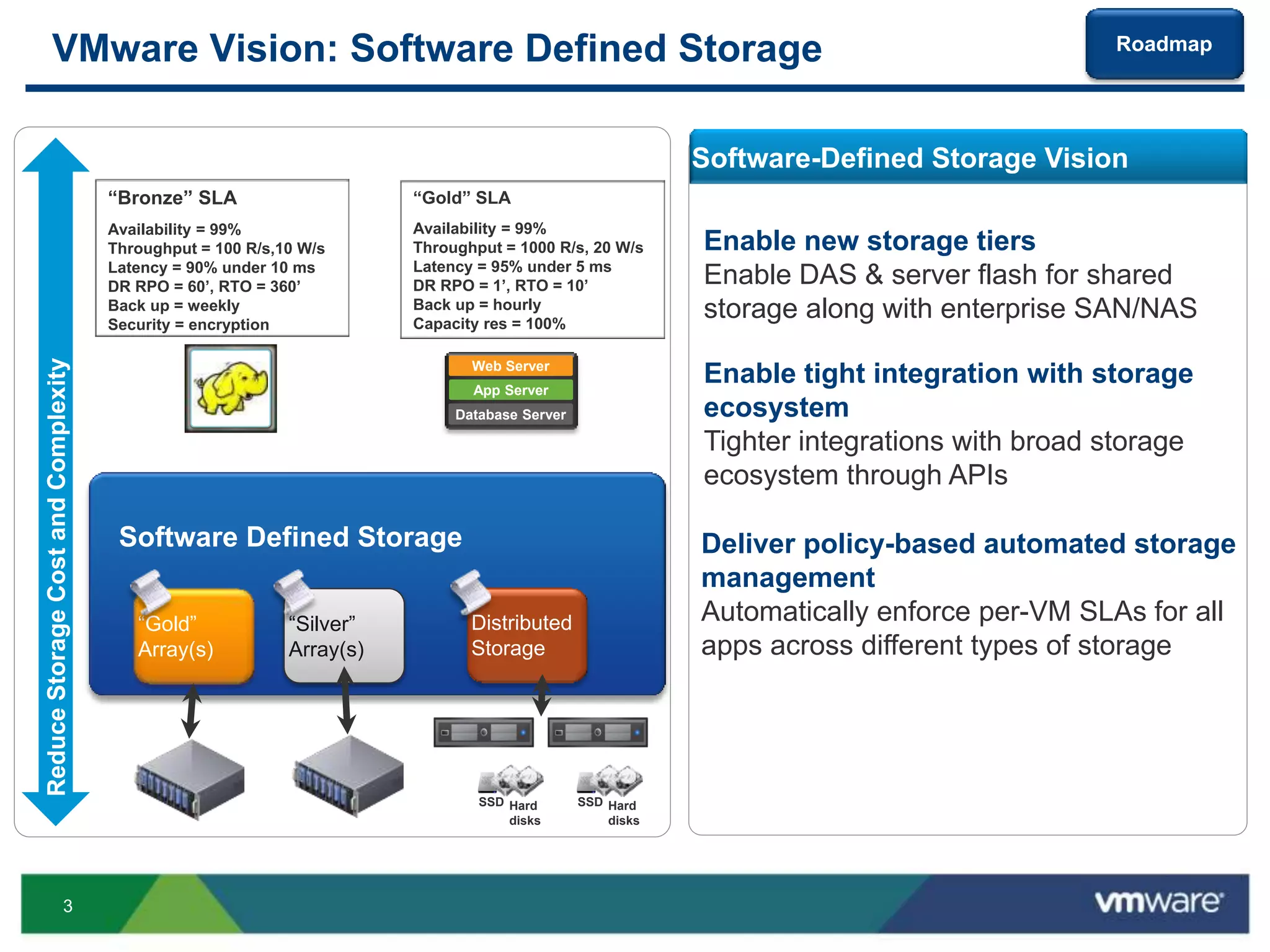
VMware Vision: Software Defined Storage
Software Defined Storage
Software-Defined Storage Vision
Enable new storage tiers
Enable DAS & server flash for shared
storage along with enterprise SAN/NAS
Enable tight integration with storage
ecosystem
Tighter integrations with broad storage
ecosystem through APIs
Deliver policy-based automated storage
management
Automatically enforce per-VM SLAs for all
apps across different types of storage
“Gold”
Array(s)
“Silver”
Array(s)
Distributed
Storage
Hard
disks
SSD Hard
disks
SSD
Availability = 99.99%
DR RTO = 1
“Gold” SLA
Availability = 99%
Throughput = 1000 R/s, 20 W/s
Latency = 95% under 5 ms
DR RPO = 1’, RTO = 10’
Back up = hourly
Capacity res = 100%
Web Server
Database Server
Availability =
99.99%
DR RTO = 1 hour
Max Laten
“Bronze” SLA
Availability = 99%
Throughput = 100 R/s,10 W/s
Latency = 90% under 10 ms
DR RPO = 60’, RTO = 360’
Back up = weekly
Security = encryption
ReduceStorageCostandComplexity
App Server
Roadmap
4
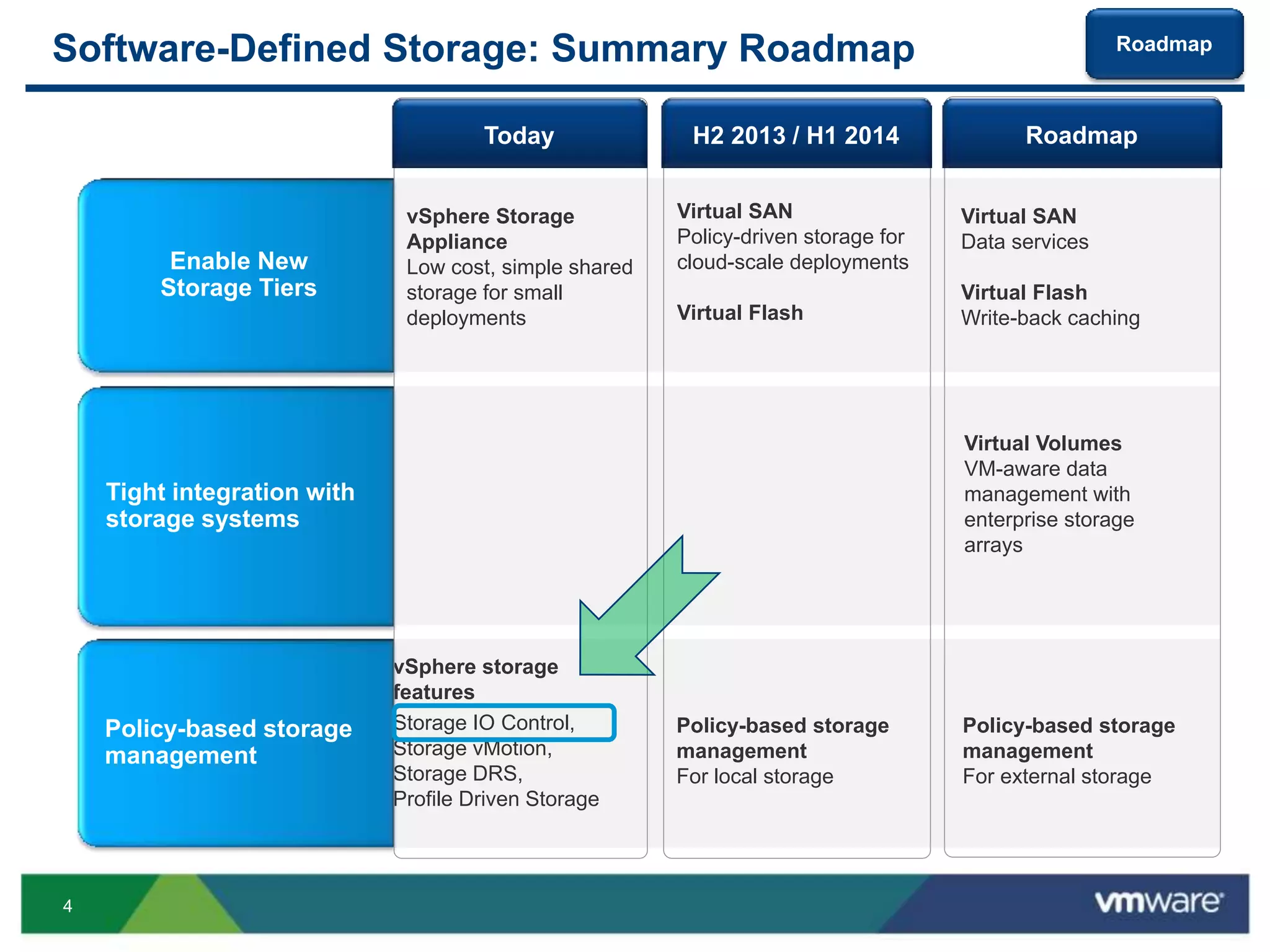
Software-Defined Storage: Summary Roadmap
vSphere storage
features
Storage IO Control,
Storage vMotion,
Storage DRS,
Profile Driven Storage
Enable New
Storage Tiers
Policy-based storage
management
Virtual Volumes
VM-aware data
management with
enterprise storage
arrays
Tight integration with
storage systems
Policy-based storage
management
For local storage
vSphere Storage
Appliance
Low cost, simple shared
storage for small
deployments
Virtual SAN
Policy-driven storage for
cloud-scale deployments
Virtual Flash
Virtual SAN
Data services
Virtual Flash
Write-back caching
Policy-based storage
management
For external storage
H2 2013 / H1 2014 RoadmapToday
Roadmap
5
Outline
 Storage IO Control (SIOC) Overview
 Deployment Scenarios
 Improvements in vSphere 5.1 and 5.5
 Preview from SIOC Labs
Survey: http://bit.ly/siocsdrs
6
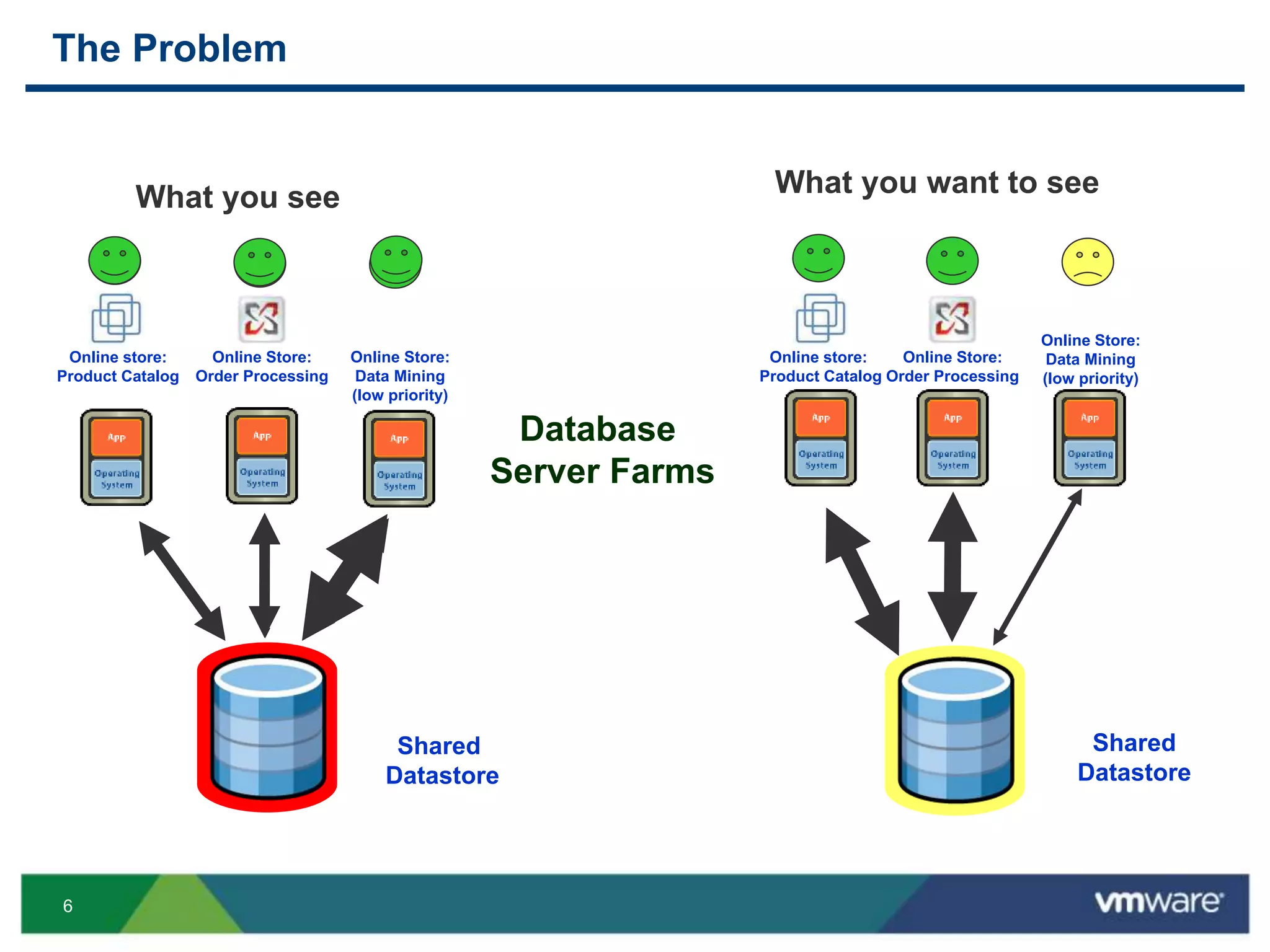
The Problem
What you see
Database
Server Farms
Online store:
Product Catalog
Online Store:
Data Mining
(low priority)
Shared
Datastore
Online Store:
Order Processing
What you want to see
Shared
Datastore
Online store:
Product Catalog
Online Store:
Data Mining
(low priority)
Online Store:
Order Processing
7
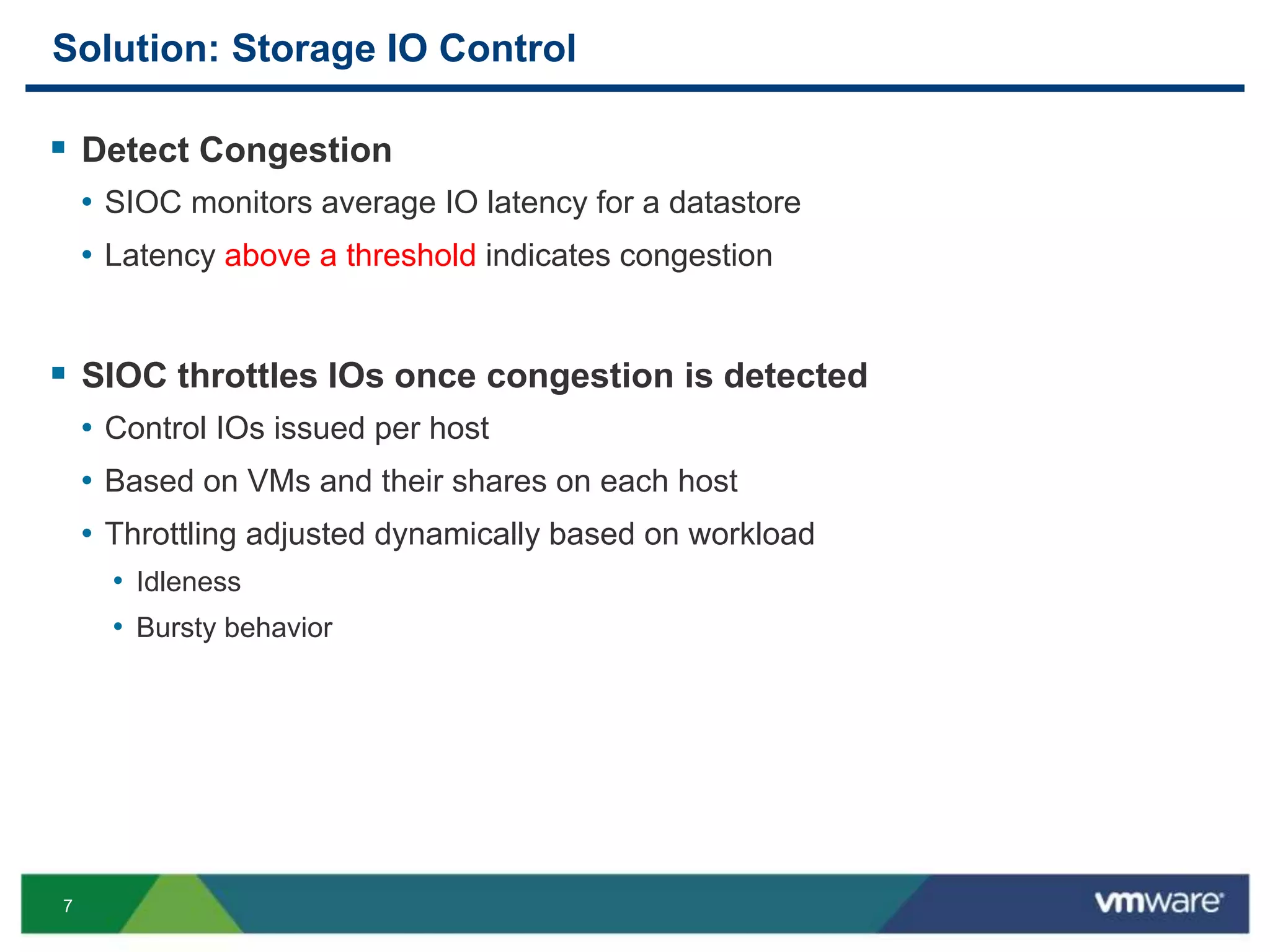
Solution: Storage IO Control
 Detect Congestion
• SIOC monitors average IO latency for a datastore
• Latency above a threshold indicates congestion
 SIOC throttles IOs once congestion is detected
• Control IOs issued per host
• Based on VMs and their shares on each host
• Throttling adjusted dynamically based on workload
• Idleness
• Bursty behavior
8
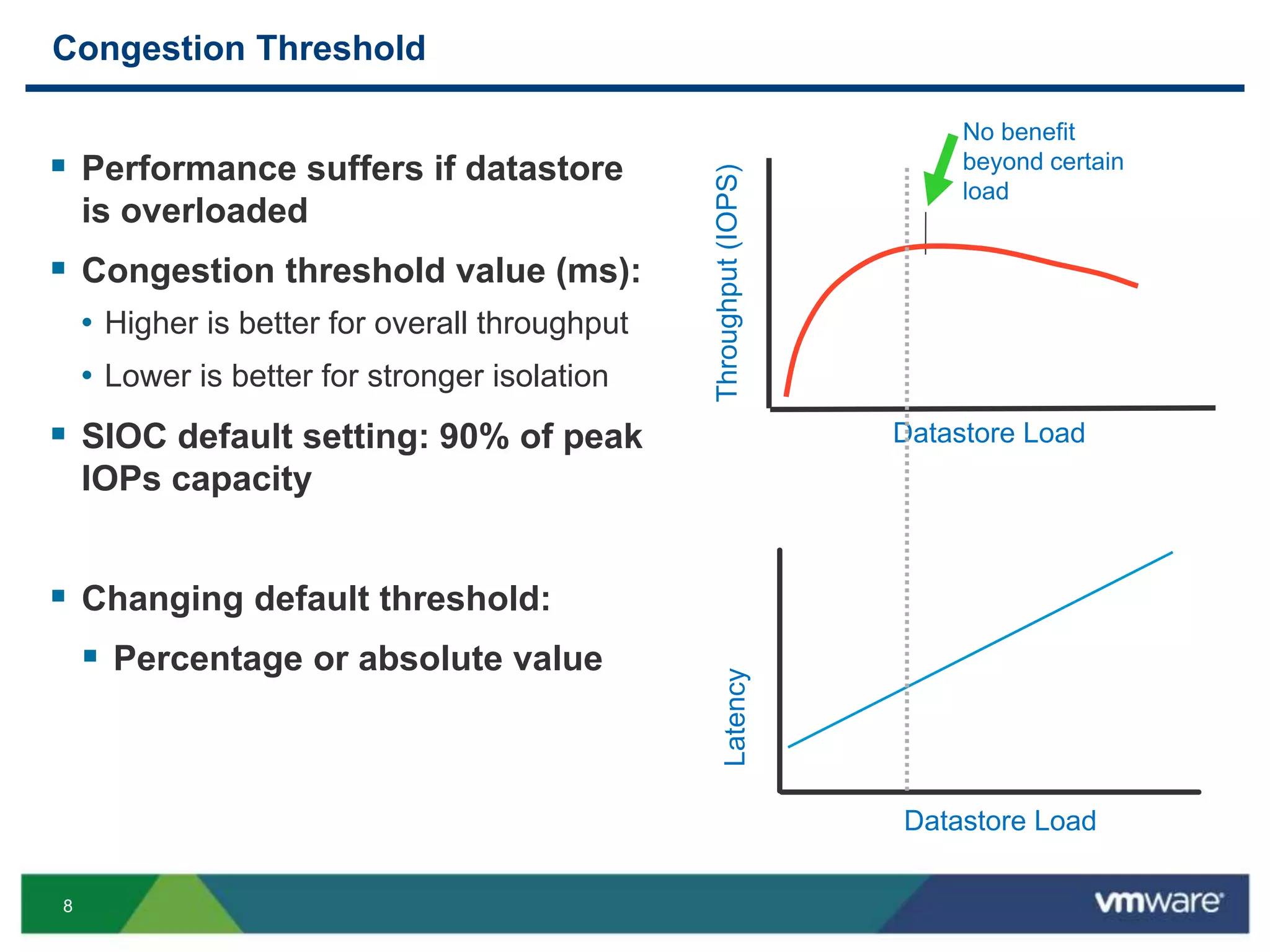
Congestion Threshold
 Performance suffers if datastore
is overloaded
 Congestion threshold value (ms):
• Higher is better for overall throughput
• Lower is better for stronger isolation
 SIOC default setting: 90% of peak
IOPs capacity
 Changing default threshold:
 Percentage or absolute value
Throughput(IOPS)
Datastore Load
No benefit
beyond certain
load
Latency
Datastore Load
9
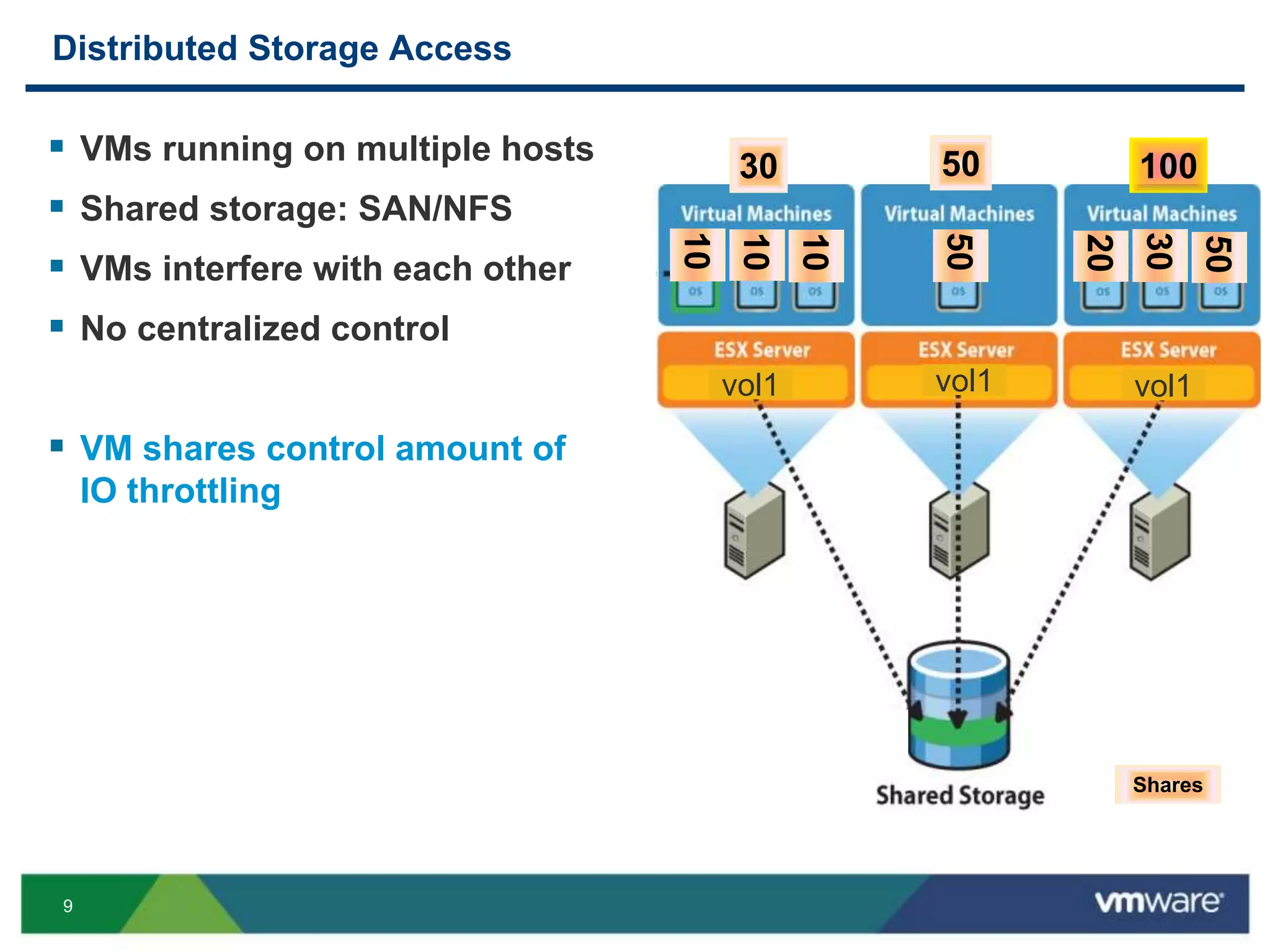
Distributed Storage Access
10
10
10
50
20
30
50
1005030
Shares
vol1 vol1 vol1
 VMs running on multiple hosts
 Shared storage: SAN/NFS
 VMs interfere with each other
 No centralized control
 VM shares control amount of
IO throttling
10
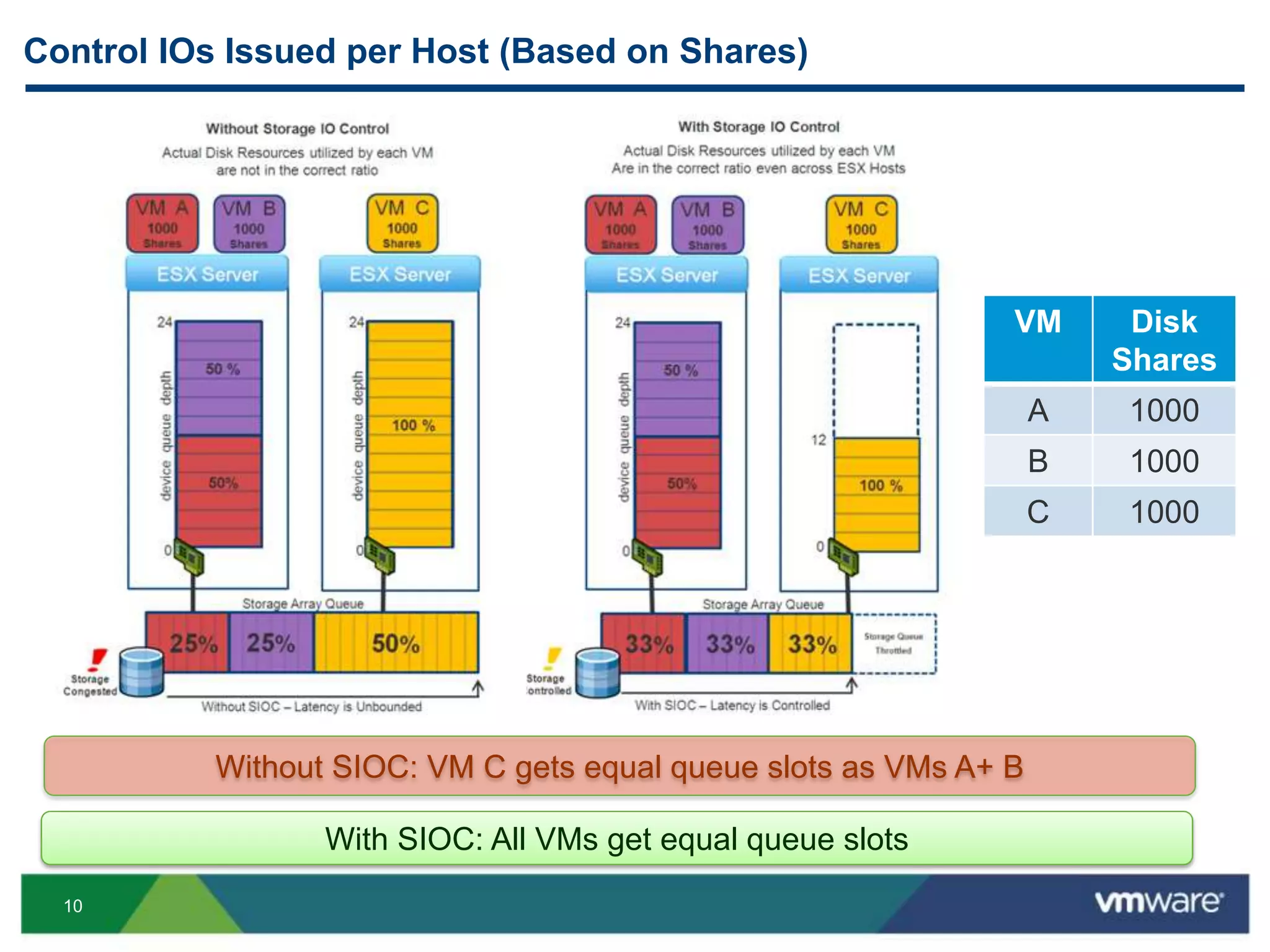
Control IOs Issued per Host (Based on Shares)
With SIOC: All VMs get equal queue slots
Without SIOC: VM C gets equal queue slots as VMs A+ B
VM Disk
Shares
A 1000
B 1000
C 1000
11
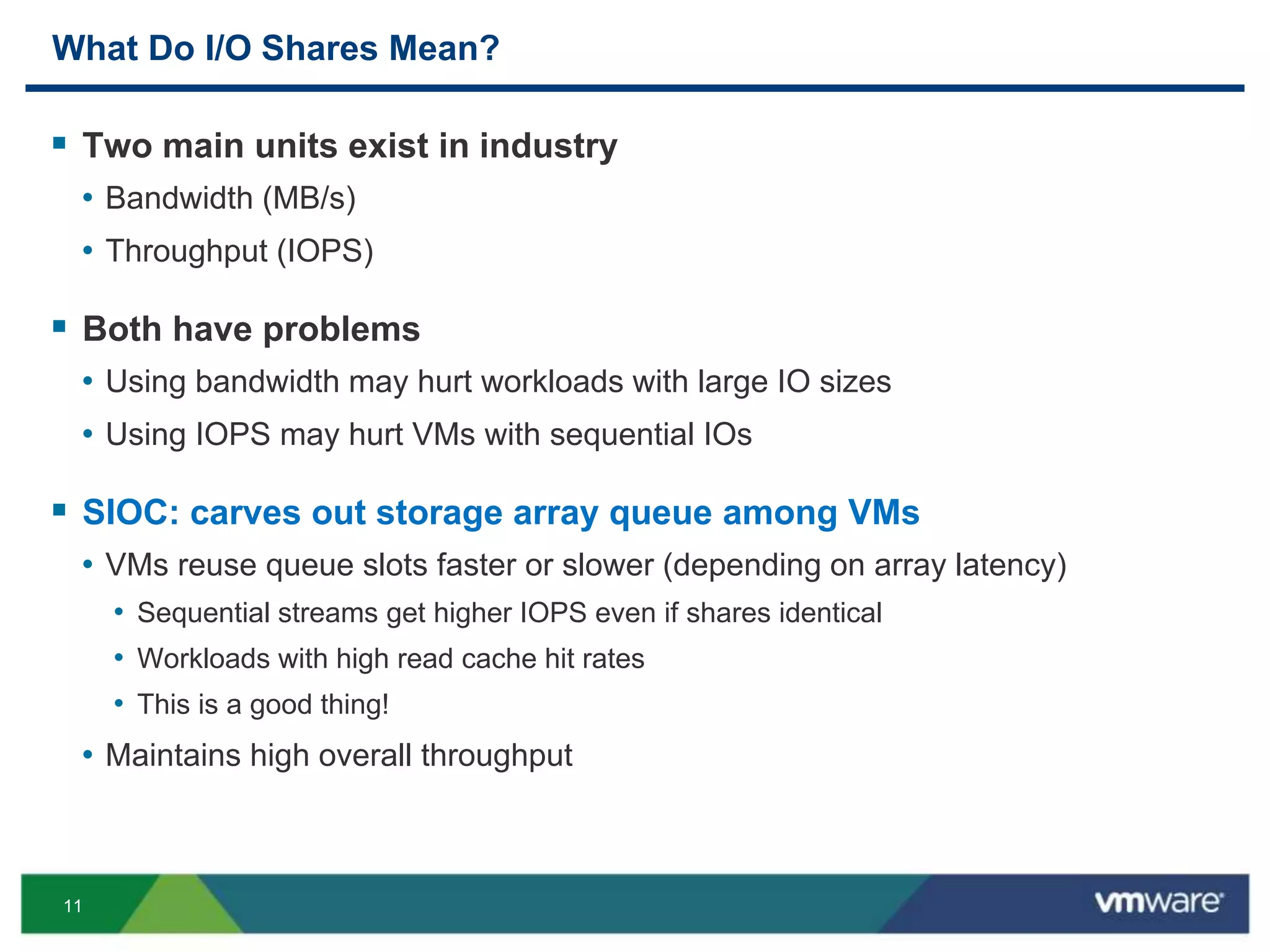
What Do I/O Shares Mean?
 Two main units exist in industry
• Bandwidth (MB/s)
• Throughput (IOPS)
 Both have problems
• Using bandwidth may hurt workloads with large IO sizes
• Using IOPS may hurt VMs with sequential IOs
 SIOC: carves out storage array queue among VMs
• VMs reuse queue slots faster or slower (depending on array latency)
• Sequential streams get higher IOPS even if shares identical
• Workloads with high read cache hit rates
• This is a good thing!
• Maintains high overall throughput
12
Configuring Storage IO Control
2 simple steps:
1. Enable Storage I/O Control on a datastore
2. Set virtual disk controls for VMs
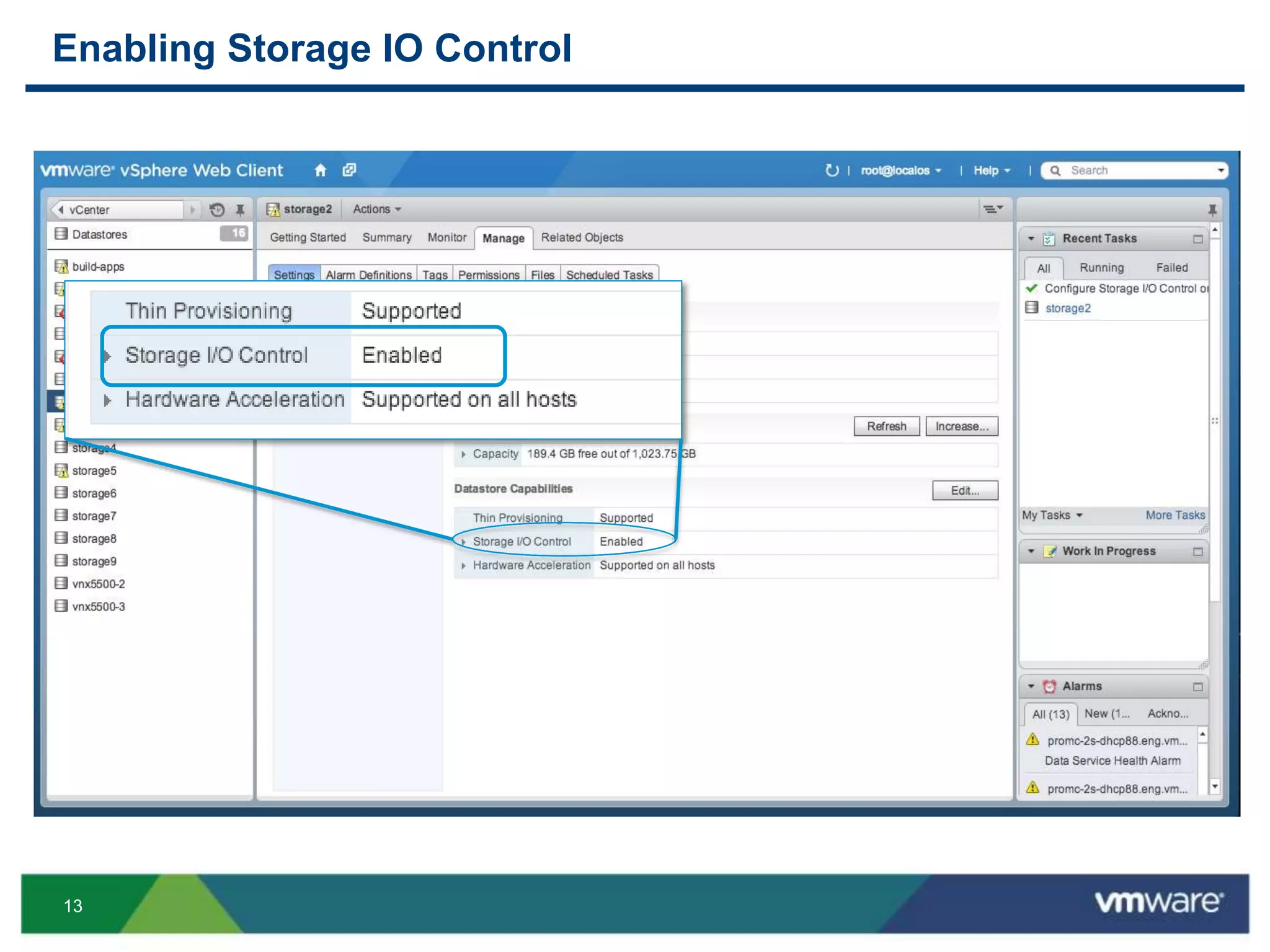
13
Enabling Storage IO Control
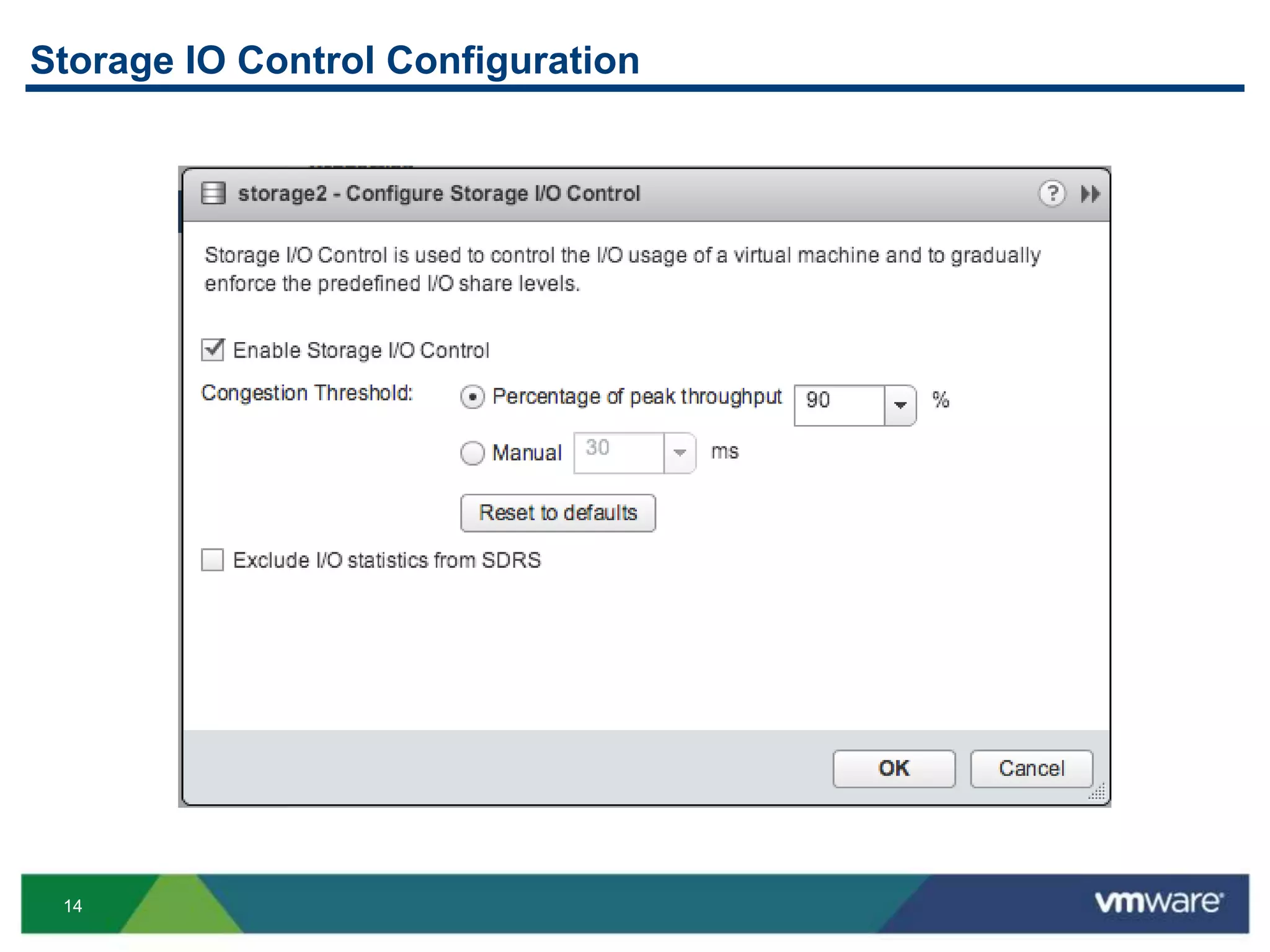
14
Storage IO Control Configuration
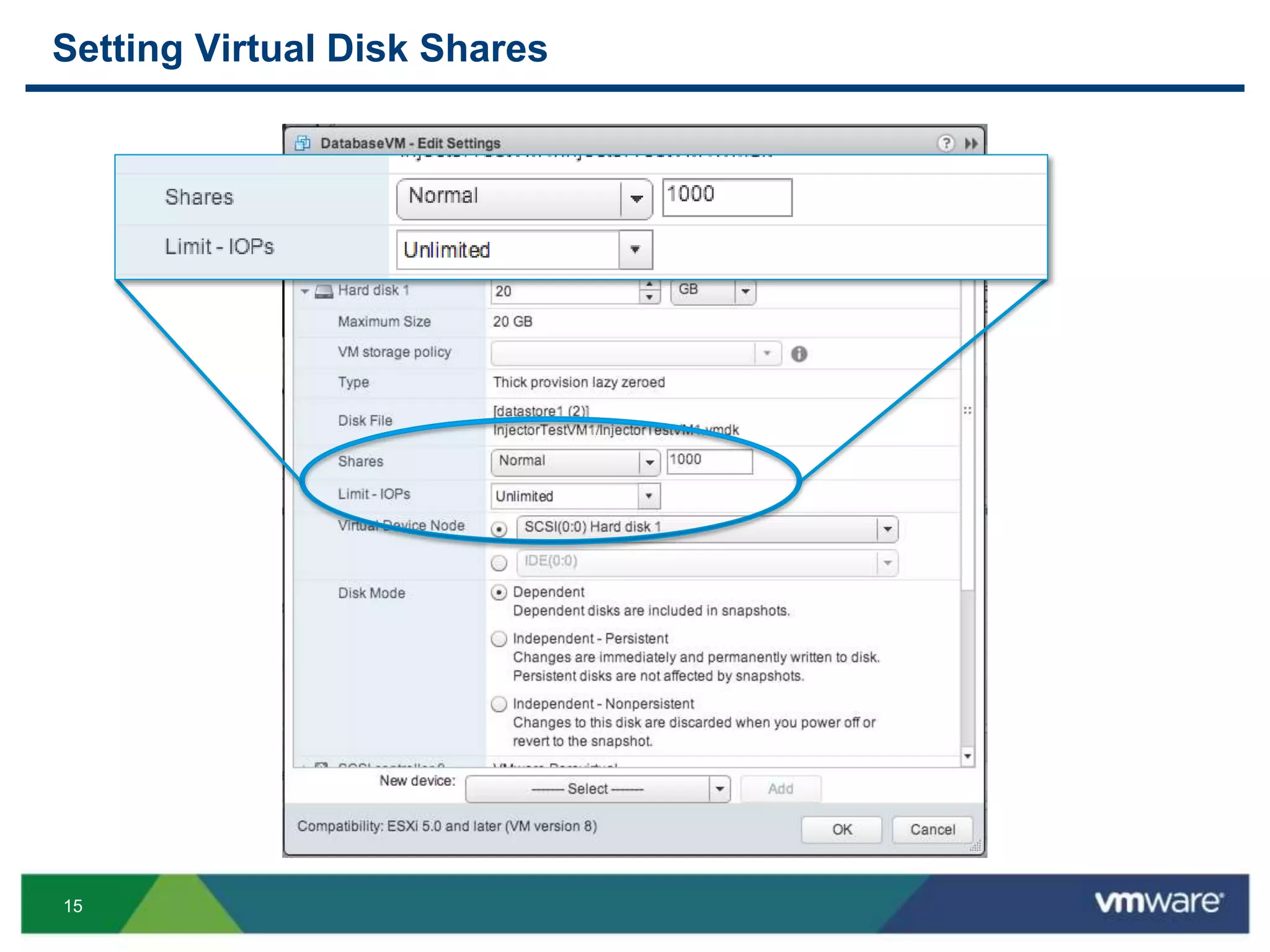
15
Setting Virtual Disk Shares
16
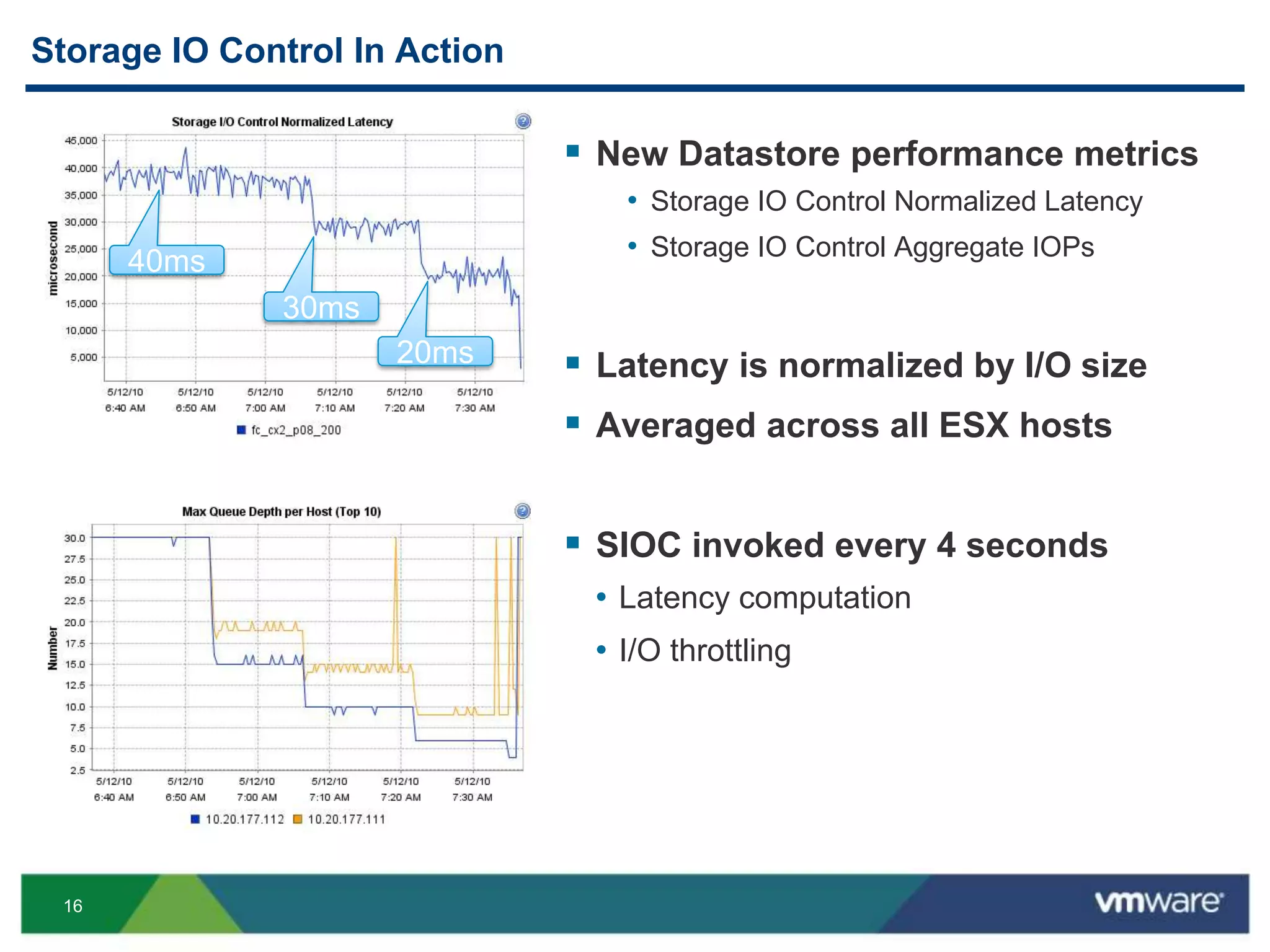
Storage IO Control In Action
 New Datastore performance metrics
• Storage IO Control Normalized Latency
• Storage IO Control Aggregate IOPs
 Latency is normalized by I/O size
 Averaged across all ESX hosts
 SIOC invoked every 4 seconds
• Latency computation
• I/O throttling
40ms
30ms
20ms
17
Outline
 Storage IO Control (SIOC) Overview
 Deployment Scenarios
 Improvements in vSphere 5.1 and 5.5
 Preview from SIOC Labs
18
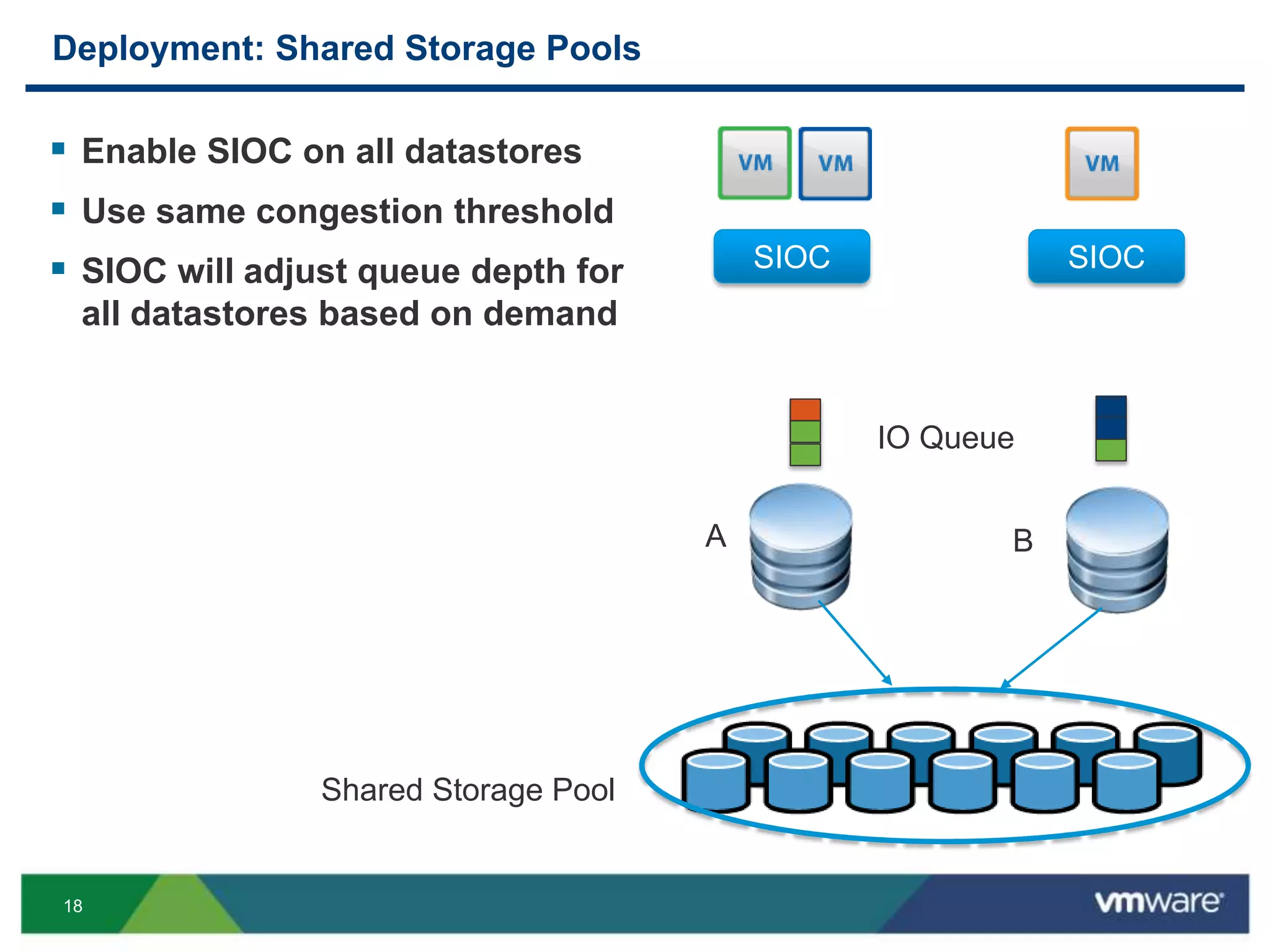
Deployment: Shared Storage Pools
 Enable SIOC on all datastores
 Use same congestion threshold
 SIOC will adjust queue depth for
all datastores based on demand
SIOC SIOC
BA
Shared Storage Pool
IO Queue
19
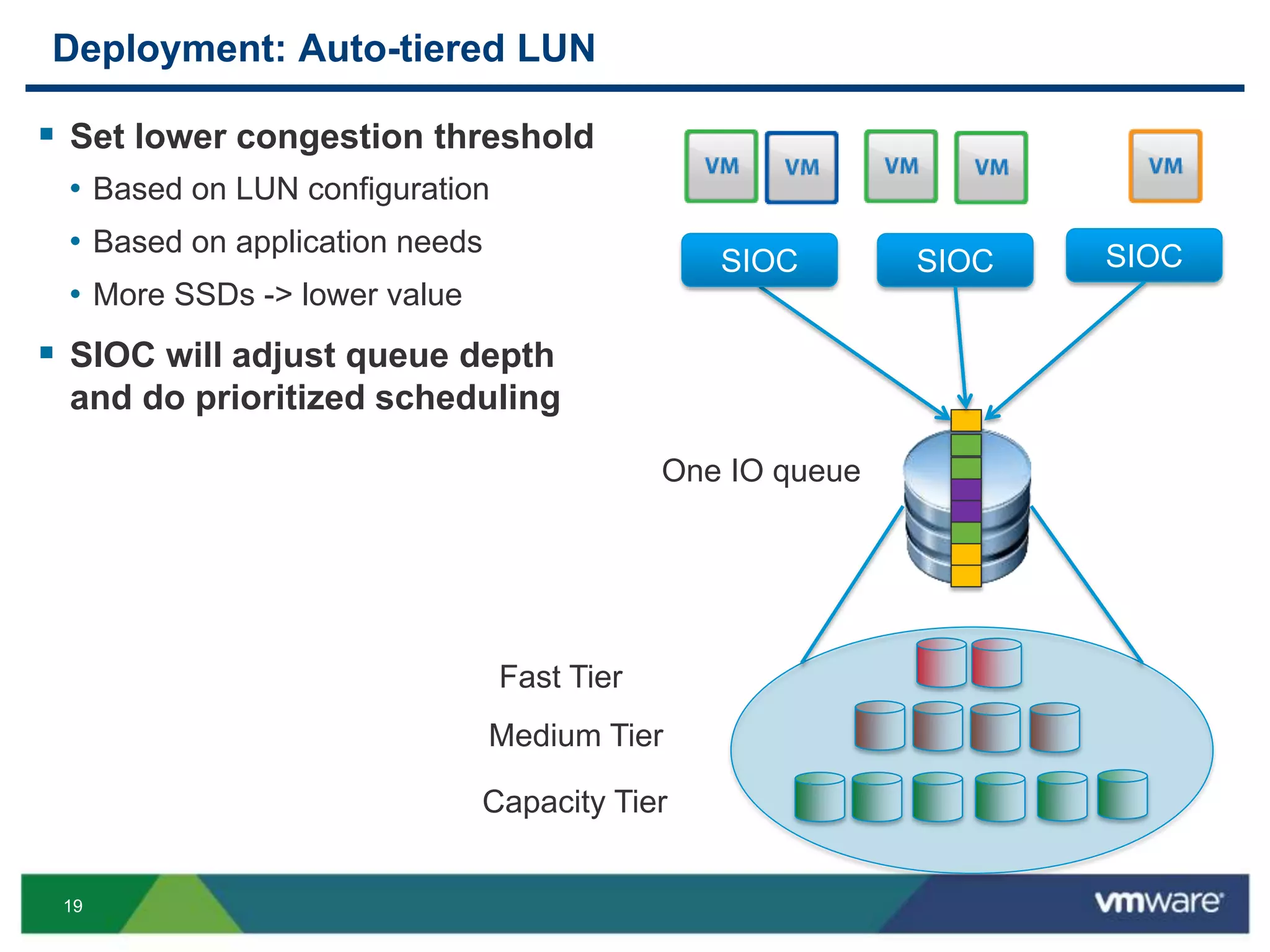
Deployment: Auto-tiered LUN
 Set lower congestion threshold
• Based on LUN configuration
• Based on application needs
• More SSDs -> lower value
 SIOC will adjust queue depth
and do prioritized scheduling
Capacity Tier
Fast Tier
Medium Tier
One IO queue
SIOCSIOCSIOC
20
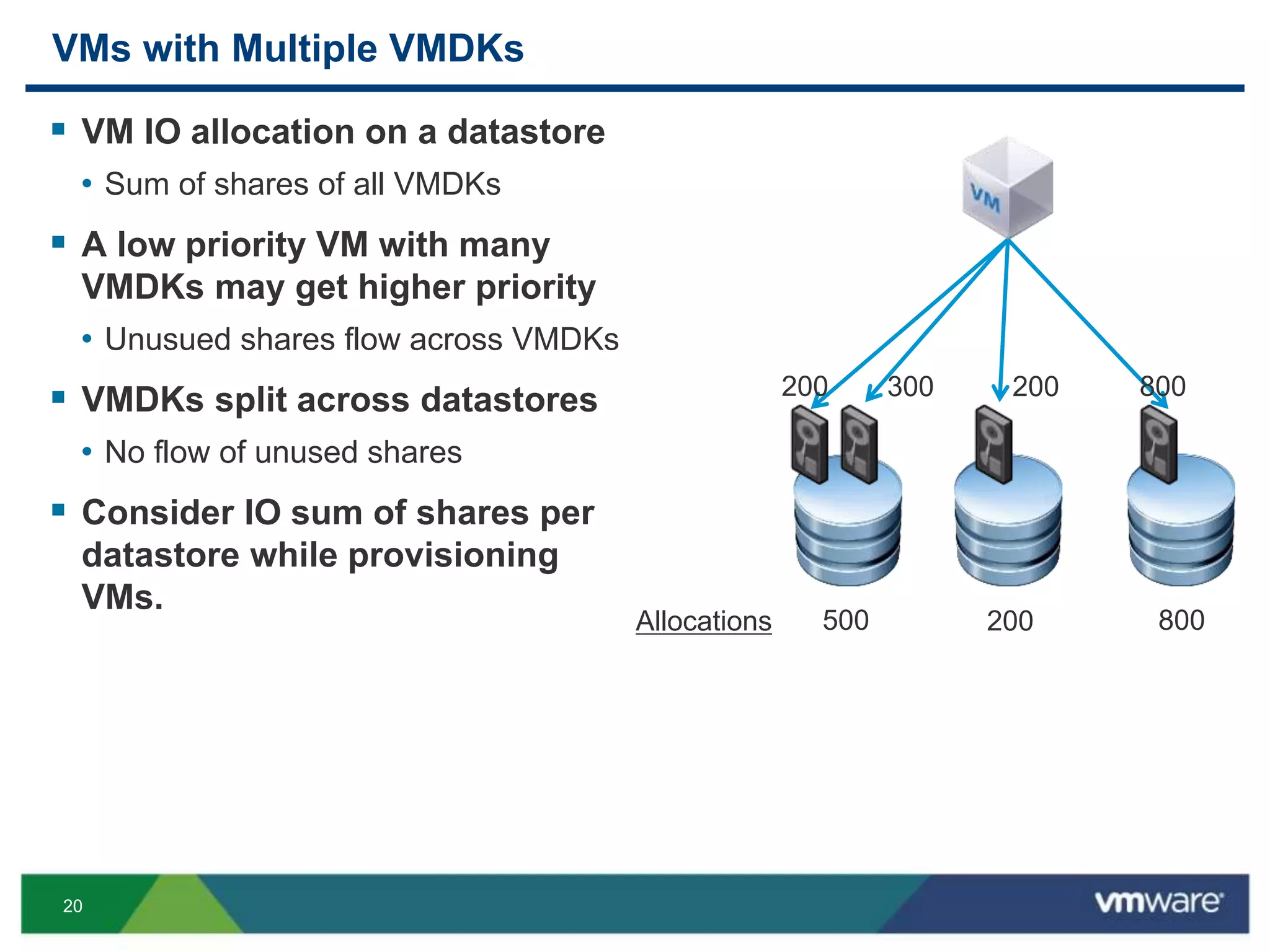
VMs with Multiple VMDKs
 VM IO allocation on a datastore
• Sum of shares of all VMDKs
 A low priority VM with many
VMDKs may get higher priority
• Unusued shares flow across VMDKs
 VMDKs split across datastores
• No flow of unused shares
 Consider IO sum of shares per
datastore while provisioning
VMs.
800300 200200
500 200 800Allocations
21
Best Practices
 Avoid mixing vSphere LUNs and non-vSphere LUNs on the same
physical storage
• SIOC will detect this and raise an alarm
 Configure host IO queue size with highest allowed value
• Maximum flexibility for SIOC throttling
 Keep congestion threshold conservative
• Will improve overall utilization
• Set lower if latency is more important than throughput
22
VM Snapshots and Storage vMotion IOs
 VM snapshot and Storage vMotion IO charged to VM
 SIOC throttles all IOs from a VM
• IOs from Storage vMotion activity does not affect important VMs
• Storage array is not overwhelmed with IO activity burst
 SIOC’s distributed IO allocation consistent with ESXi host scheduler
• ESXi host scheduler does not differentiate Storage vMotion IOs
23
NFS Only: Shared File Permissions
 SIOC uses shared files for its distributed computation.
• Needed to compute entitled host queue size across hosts
 Likely causes
• Improper implementation of NFS storage in vSphere: no root squash
 Best practices
• Always use recommended security setting on NFS datastores
24
Outline
 Storage IO Control (SIOC) Overview
 Deployment Scenarios
 Improvements in vSphere 5.1 and 5.5
 Preview from SIOC Labs
25
Improvements in 5.1 and 5.5 releases
 Automatic congestion threshold
• Can use % of peak capacity to determine congestion threshold
 Lesser disk IO
• Reduction in SIOC IOs when LUN is idle
 Improved stats reporting
• SIOC based storage statistics available by default in vSphere 5.5
 Full interop with storage workflows and conditions in vSphere 5.5
• Unmount, Destroy, APD (all paths down) and PDL (permanent data loss)
• Fixed in 5.1: “Unable to delete datastore with SIOC enabled”
26
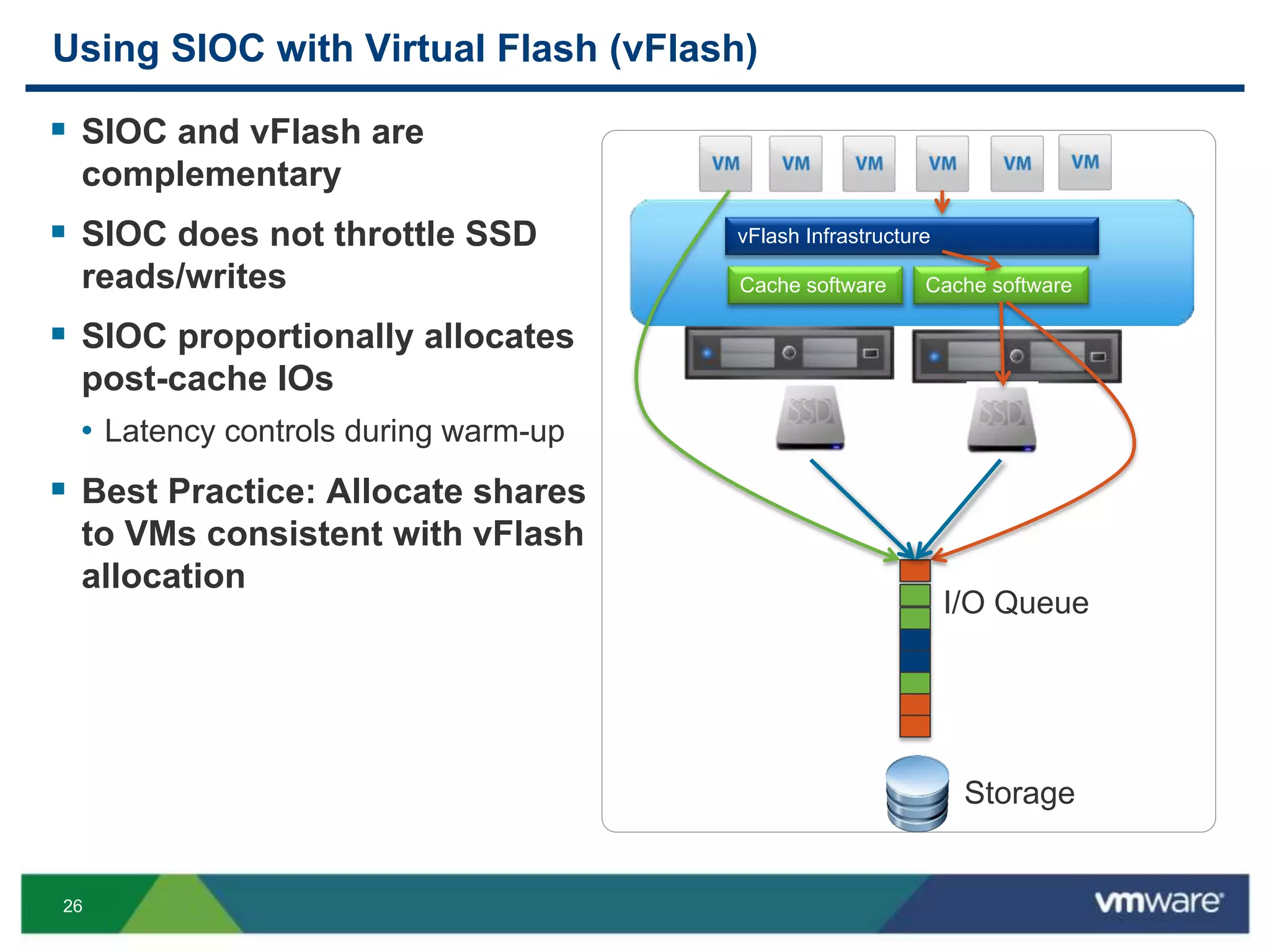
Using SIOC with Virtual Flash (vFlash)
 SIOC and vFlash are
complementary
 SIOC does not throttle SSD
reads/writes
 SIOC proportionally allocates
post-cache IOs
• Latency controls during warm-up
 Best Practice: Allocate shares
to VMs consistent with vFlash
allocation
vFlash Infrastructure
Cache software Cache software
I/O Queue
Storage
27
Outline
 Storage IO Control (SIOC) Overview
 Deployment Scenarios
 Improvements in vSphere 5.1 and 5.5
 Preview from SIOC Labs
28
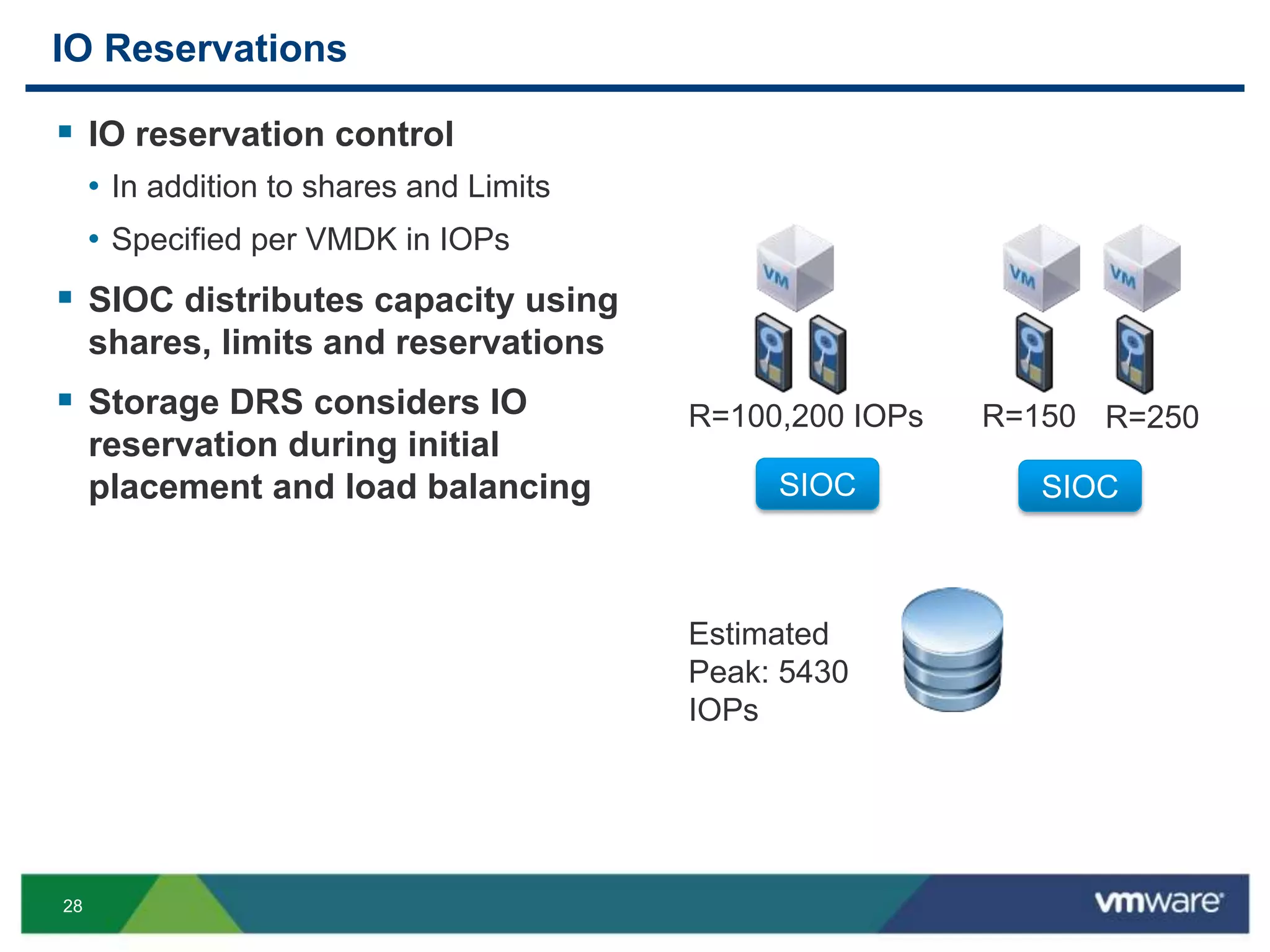
IO Reservations
 IO reservation control
• In addition to shares and Limits
• Specified per VMDK in IOPs
 SIOC distributes capacity using
shares, limits and reservations
 Storage DRS considers IO
reservation during initial
placement and load balancing SIOC SIOC
R=100,200 IOPs R=150 R=250
Estimated
Peak: 5430
IOPs
29
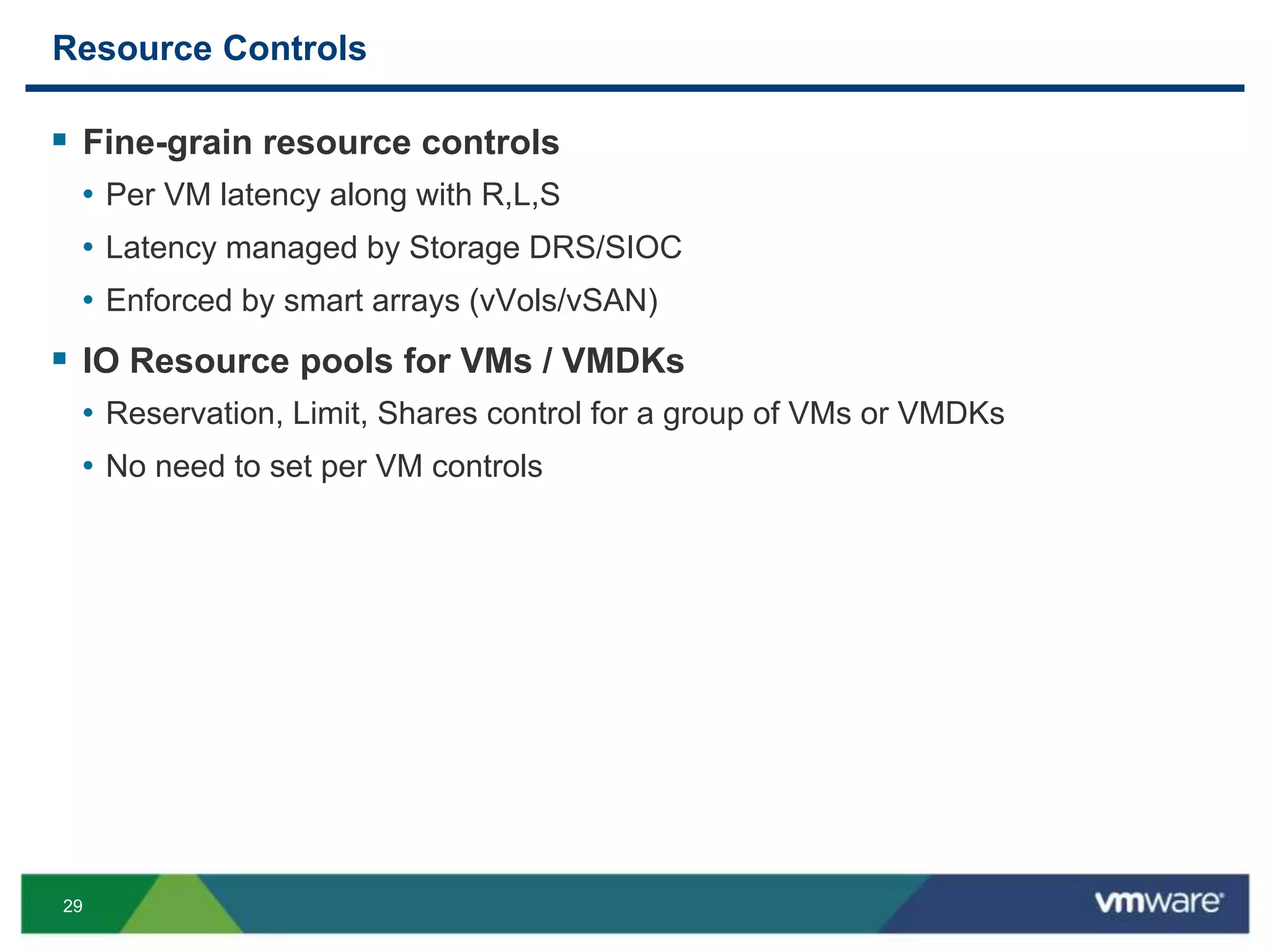
Resource Controls
 Fine-grain resource controls
• Per VM latency along with R,L,S
• Latency managed by Storage DRS/SIOC
• Enforced by smart arrays (vVols/vSAN)
 IO Resource pools for VMs / VMDKs
• Reservation, Limit, Shares control for a group of VMs or VMDKs
• No need to set per VM controls
30
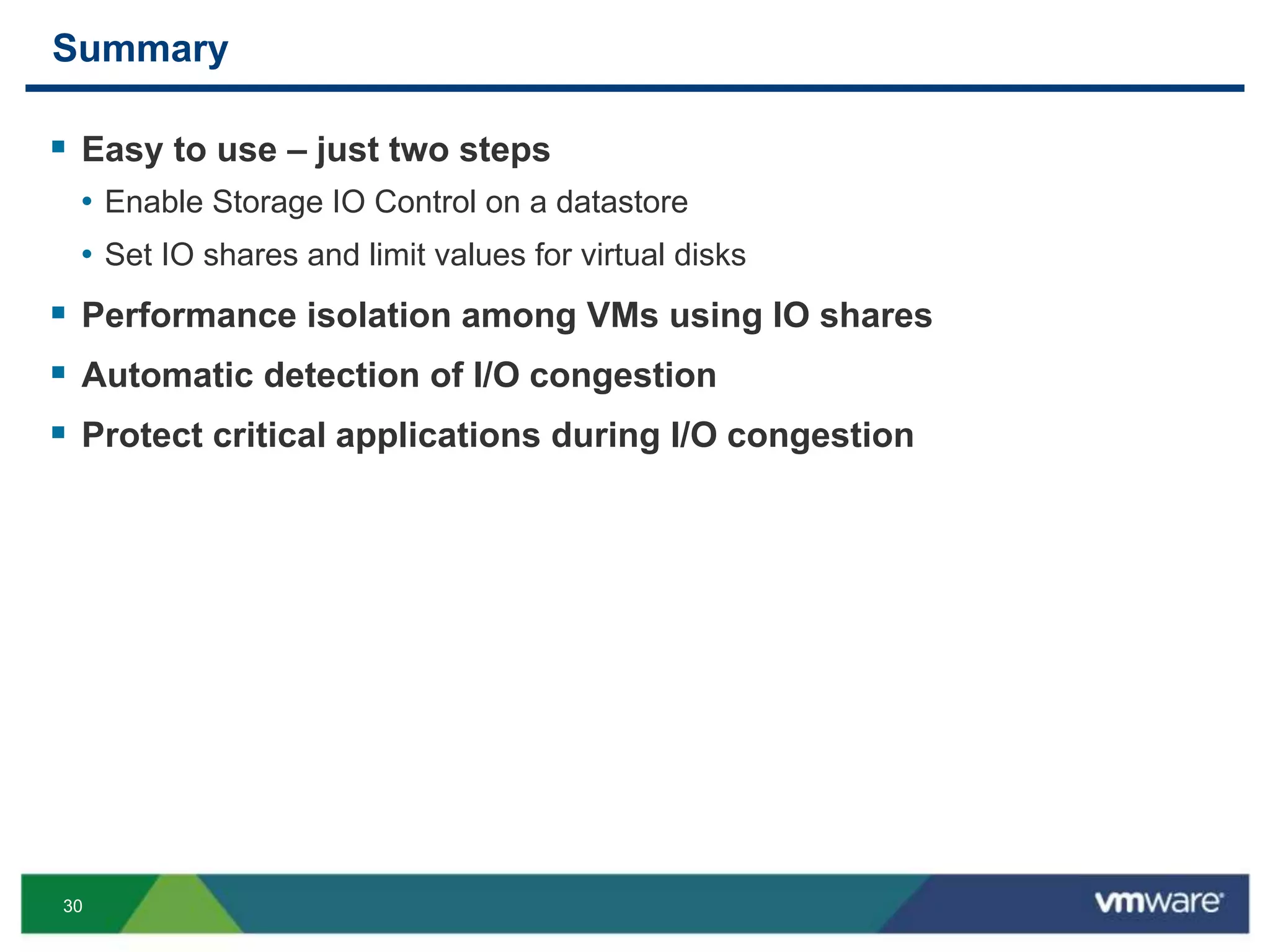
Summary
 Easy to use – just two steps
• Enable Storage IO Control on a datastore
• Set IO shares and limit values for virtual disks
 Performance isolation among VMs using IO shares
 Automatic detection of I/O congestion
 Protect critical applications during I/O congestion
THANK YOU
http://bit.ly/siocsdrs
Storage IO Control: Concepts, Configuration and Best
Practices to Tame Different Storage Architectures
Sachin Manpathak, VMware
VSVC5364
#VSVC5364
34
Thanks!
Sachin Manpathak (smanpathak@vmware.com)
Mustafa Uysal (muysal@vmware.com)
Sunil Muralidhar (muralidhars@vmware.com)
http://bit.ly/siocsdrs

VMworld 2013: Storage IO Control: Concepts, Configuration and Best Practices to Tame Different Storage Architectures

  • 1.
    Storage IO Control:Concepts, Configuration and Best Practices to Tame Different Storage Architectures Sachin Manpathak, VMware Mustafa Uysal, VMware Sunil Muralidhar, VMware VSVC5364 #VSVC5364
  • 2.
    2 Disclaimer  This sessionmay contain product features that are currently under development.  This session/overview of the new technology represents no commitment from VMware to deliver these features in any generally available product.  Features are subject to change, and must not be included in contracts, purchase orders, or sales agreements of any kind.  Technical feasibility and market demand will affect final delivery.  Pricing and packaging for any new technologies or features discussed or presented have not been determined.
  • 3.
    3 VMware Vision: SoftwareDefined Storage Software Defined Storage Software-Defined Storage Vision Enable new storage tiers Enable DAS & server flash for shared storage along with enterprise SAN/NAS Enable tight integration with storage ecosystem Tighter integrations with broad storage ecosystem through APIs Deliver policy-based automated storage management Automatically enforce per-VM SLAs for all apps across different types of storage “Gold” Array(s) “Silver” Array(s) Distributed Storage Hard disks SSD Hard disks SSD Availability = 99.99% DR RTO = 1 “Gold” SLA Availability = 99% Throughput = 1000 R/s, 20 W/s Latency = 95% under 5 ms DR RPO = 1’, RTO = 10’ Back up = hourly Capacity res = 100% Web Server Database Server Availability = 99.99% DR RTO = 1 hour Max Laten “Bronze” SLA Availability = 99% Throughput = 100 R/s,10 W/s Latency = 90% under 10 ms DR RPO = 60’, RTO = 360’ Back up = weekly Security = encryption ReduceStorageCostandComplexity App Server Roadmap
  • 4.
    4 Software-Defined Storage: SummaryRoadmap vSphere storage features Storage IO Control, Storage vMotion, Storage DRS, Profile Driven Storage Enable New Storage Tiers Policy-based storage management Virtual Volumes VM-aware data management with enterprise storage arrays Tight integration with storage systems Policy-based storage management For local storage vSphere Storage Appliance Low cost, simple shared storage for small deployments Virtual SAN Policy-driven storage for cloud-scale deployments Virtual Flash Virtual SAN Data services Virtual Flash Write-back caching Policy-based storage management For external storage H2 2013 / H1 2014 RoadmapToday Roadmap
  • 5.
    5 Outline  Storage IOControl (SIOC) Overview  Deployment Scenarios  Improvements in vSphere 5.1 and 5.5  Preview from SIOC Labs Survey: http://bit.ly/siocsdrs
  • 6.
    6 The Problem What yousee Database Server Farms Online store: Product Catalog Online Store: Data Mining (low priority) Shared Datastore Online Store: Order Processing What you want to see Shared Datastore Online store: Product Catalog Online Store: Data Mining (low priority) Online Store: Order Processing
  • 7.
    7 Solution: Storage IOControl  Detect Congestion • SIOC monitors average IO latency for a datastore • Latency above a threshold indicates congestion  SIOC throttles IOs once congestion is detected • Control IOs issued per host • Based on VMs and their shares on each host • Throttling adjusted dynamically based on workload • Idleness • Bursty behavior
  • 8.
    8 Congestion Threshold  Performancesuffers if datastore is overloaded  Congestion threshold value (ms): • Higher is better for overall throughput • Lower is better for stronger isolation  SIOC default setting: 90% of peak IOPs capacity  Changing default threshold:  Percentage or absolute value Throughput(IOPS) Datastore Load No benefit beyond certain load Latency Datastore Load
  • 9.
    9 Distributed Storage Access 10 10 10 50 20 30 50 1005030 Shares vol1vol1 vol1  VMs running on multiple hosts  Shared storage: SAN/NFS  VMs interfere with each other  No centralized control  VM shares control amount of IO throttling
  • 10.
    10 Control IOs Issuedper Host (Based on Shares) With SIOC: All VMs get equal queue slots Without SIOC: VM C gets equal queue slots as VMs A+ B VM Disk Shares A 1000 B 1000 C 1000
  • 11.
    11 What Do I/OShares Mean?  Two main units exist in industry • Bandwidth (MB/s) • Throughput (IOPS)  Both have problems • Using bandwidth may hurt workloads with large IO sizes • Using IOPS may hurt VMs with sequential IOs  SIOC: carves out storage array queue among VMs • VMs reuse queue slots faster or slower (depending on array latency) • Sequential streams get higher IOPS even if shares identical • Workloads with high read cache hit rates • This is a good thing! • Maintains high overall throughput
  • 12.
    12 Configuring Storage IOControl 2 simple steps: 1. Enable Storage I/O Control on a datastore 2. Set virtual disk controls for VMs
  • 13.
  • 14.
    14 Storage IO ControlConfiguration
  • 15.
  • 16.
    16 Storage IO ControlIn Action  New Datastore performance metrics • Storage IO Control Normalized Latency • Storage IO Control Aggregate IOPs  Latency is normalized by I/O size  Averaged across all ESX hosts  SIOC invoked every 4 seconds • Latency computation • I/O throttling 40ms 30ms 20ms
  • 17.
    17 Outline  Storage IOControl (SIOC) Overview  Deployment Scenarios  Improvements in vSphere 5.1 and 5.5  Preview from SIOC Labs
  • 18.
    18 Deployment: Shared StoragePools  Enable SIOC on all datastores  Use same congestion threshold  SIOC will adjust queue depth for all datastores based on demand SIOC SIOC BA Shared Storage Pool IO Queue
  • 19.
    19 Deployment: Auto-tiered LUN Set lower congestion threshold • Based on LUN configuration • Based on application needs • More SSDs -> lower value  SIOC will adjust queue depth and do prioritized scheduling Capacity Tier Fast Tier Medium Tier One IO queue SIOCSIOCSIOC
  • 20.
    20 VMs with MultipleVMDKs  VM IO allocation on a datastore • Sum of shares of all VMDKs  A low priority VM with many VMDKs may get higher priority • Unusued shares flow across VMDKs  VMDKs split across datastores • No flow of unused shares  Consider IO sum of shares per datastore while provisioning VMs. 800300 200200 500 200 800Allocations
  • 21.
    21 Best Practices  Avoidmixing vSphere LUNs and non-vSphere LUNs on the same physical storage • SIOC will detect this and raise an alarm  Configure host IO queue size with highest allowed value • Maximum flexibility for SIOC throttling  Keep congestion threshold conservative • Will improve overall utilization • Set lower if latency is more important than throughput
  • 22.
    22 VM Snapshots andStorage vMotion IOs  VM snapshot and Storage vMotion IO charged to VM  SIOC throttles all IOs from a VM • IOs from Storage vMotion activity does not affect important VMs • Storage array is not overwhelmed with IO activity burst  SIOC’s distributed IO allocation consistent with ESXi host scheduler • ESXi host scheduler does not differentiate Storage vMotion IOs
  • 23.
    23 NFS Only: SharedFile Permissions  SIOC uses shared files for its distributed computation. • Needed to compute entitled host queue size across hosts  Likely causes • Improper implementation of NFS storage in vSphere: no root squash  Best practices • Always use recommended security setting on NFS datastores
  • 24.
    24 Outline  Storage IOControl (SIOC) Overview  Deployment Scenarios  Improvements in vSphere 5.1 and 5.5  Preview from SIOC Labs
  • 25.
    25 Improvements in 5.1and 5.5 releases  Automatic congestion threshold • Can use % of peak capacity to determine congestion threshold  Lesser disk IO • Reduction in SIOC IOs when LUN is idle  Improved stats reporting • SIOC based storage statistics available by default in vSphere 5.5  Full interop with storage workflows and conditions in vSphere 5.5 • Unmount, Destroy, APD (all paths down) and PDL (permanent data loss) • Fixed in 5.1: “Unable to delete datastore with SIOC enabled”
  • 26.
    26 Using SIOC withVirtual Flash (vFlash)  SIOC and vFlash are complementary  SIOC does not throttle SSD reads/writes  SIOC proportionally allocates post-cache IOs • Latency controls during warm-up  Best Practice: Allocate shares to VMs consistent with vFlash allocation vFlash Infrastructure Cache software Cache software I/O Queue Storage
  • 27.
    27 Outline  Storage IOControl (SIOC) Overview  Deployment Scenarios  Improvements in vSphere 5.1 and 5.5  Preview from SIOC Labs
  • 28.
    28 IO Reservations  IOreservation control • In addition to shares and Limits • Specified per VMDK in IOPs  SIOC distributes capacity using shares, limits and reservations  Storage DRS considers IO reservation during initial placement and load balancing SIOC SIOC R=100,200 IOPs R=150 R=250 Estimated Peak: 5430 IOPs
  • 29.
    29 Resource Controls  Fine-grainresource controls • Per VM latency along with R,L,S • Latency managed by Storage DRS/SIOC • Enforced by smart arrays (vVols/vSAN)  IO Resource pools for VMs / VMDKs • Reservation, Limit, Shares control for a group of VMs or VMDKs • No need to set per VM controls
  • 30.
    30 Summary  Easy touse – just two steps • Enable Storage IO Control on a datastore • Set IO shares and limit values for virtual disks  Performance isolation among VMs using IO shares  Automatic detection of I/O congestion  Protect critical applications during I/O congestion
  • 31.
  • 33.
    Storage IO Control:Concepts, Configuration and Best Practices to Tame Different Storage Architectures Sachin Manpathak, VMware VSVC5364 #VSVC5364
  • 34.
    34 Thanks! Sachin Manpathak (smanpathak@vmware.com) MustafaUysal (muysal@vmware.com) Sunil Muralidhar (muralidhars@vmware.com) http://bit.ly/siocsdrs