Virtual SAN
Virtual SAN Overview
• Virtual SAN is built right into the ESXi hypervisor.
• No virtual appliance or agents to install or setup.
• RAIN (Redundant Array of Independent Nodes) Architecture
• Essentially RAID-5 by default with server nodes.
• Easy Setup and Configuration
• Configuration can be setup in mins without agents or additional
software.
• Uses storage profiles on a per VM/VMDK level
• Can be managed at a VMDK level. 2
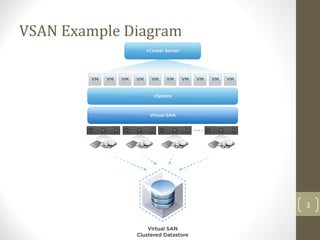
VSAN Example Diagram
3
Host Requirements
• Minimum of 3x ESXi 5.5 hosts required
• Maximum of 32 ESXi hosts
• NOT all hosts have to have storage to contribute to the VSAN
cluster.
• Additional Virtual SAN License Required (Not included in Ent.+)
• Two Licensing Tiers with or without Data Protection
4
Network Requirements
• Needs a dedicated Layer-2 network
• VLAN logical isolation should work
• Multicast must be enabled (IGMP Snooping)
• Requires additional dedicated 10Gbps links
5
Storage Requirements
• Typical SAS or SATA RAID or non-RAID HBA or controller
• What is the total needed capacity of the datastore?
• Specifically Virtual Machine Files (VMDK, SWAP, Snapshots, etc…)
6
Storage Constraints
• Disk Groups:
• 1x SSD and 1x disk minimum per disk group
• 1x SSD and 7x disks maximum per disk group
• No More than 5 disk groups per host
• SSD Devices:
• Does NOT contribute to the usable capacity of the clustered
datastore
• Only used for the READ caching and WRITE buffering
• By default, 70% is allocated for READ caching, 30% for WRITE
buffering
• Magnetic/Spinning Disks:
• Contributes to the usable capacity of the clustered datastore
7
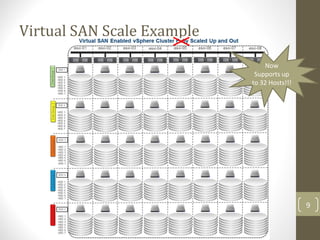
How Virtual SAN Scales
• Storage Capacity:
• Add more disks to the disk group (Scale Up) – Minimal
• Add more disk groups (Scale Up) – Moderate
• Add more hosts to the cluster (Scale Out) – Optimal
• Storage Performance:
• Add more disks to the disk group (Scale Up) – Minimal
• Add more disk groups (Scale Up) – Moderate
• Add more hosts to the cluster (Scale Out) – Optimal
8
Virtual SAN Scale Example
9
Now
Supports up
to 32 Hosts!!!
Virtual SAN Limitations
• Virtual disks must be < 2-512b TB in size
• Does not support Fault Tolerance, DPM, or SIOC
• Datastore heartbeats are disabled on VSAN datastores
• Disks that participate in the VSAN storage are fully allocated for only
VSAN
• 100 VMs per Host or 3200 VMs (or 2048 for HA protected) per
cluster
• Hosts with 512GB+ RAM require ESXi to be installed on a magnetic
disk
10
Virtual SAN Best Practices
• Uses typical HBA/disk controller (do NOT use RAID, setup in pass-
through)
• Multiple 10Gbps network connectivity for failover (redundancy)
• The use of jumbo frames on the Virtual SAN network
• SSD to disks ratio of a minimum of 1:10 or greater
• To increase performance add more disk groups
• Install ESXi on a USB/SD device and use the ESXi Dump Collector
service
• Uniform HW configs help avoid variations in perf and reduces
complexities
• Use 4x hosts minimum to allow proper protection during
maintenance
11
Virtual SAN Node Costs
Hardware:
Dell R920 Host - $120,000
•4x Intel Xeon E7-8891 v2 Processor 3.2GHz
•1TB of RAM (32x LRDIMM 1600 MT/s Low Volt Quad Rank)
•2x FusionIO ioDrive2 3TB MLC PCIe
•2x Intel X520 DP 10Gbps NICs
•1x Intel Ethernet I350 QP 1Gb Network
Software:
•VMware ESXi 5.5 Enterprise Plus - $4,000
•VMware Virtual SAN license w/Data Protection - $12,000
Approx. $136,000 /each node*(assuming network gear is already provided) 12
Virtual SAN References
• Virtual SAN: Scaling Storage Capacity
• Virtual SAN: Design and Sizing Guide
• Virtual SAN: Sizing Tool
• Virtual SAN: FusionIO Reference Architecture - FusionIO
• Virtual SAN: Duncan Epping’s Virtual SAN Links
• Virtual SAN: VMware Feature Walkthrough
• vSphere 5.5 Documentation: Working with Virtual SAN
• VMworld 2013: Session STO5391 - VMware Virtual SAN (VSAN)
13

VMware Virtual SAN slideshow

  • 1.
  • 2.
    Virtual SAN Overview •Virtual SAN is built right into the ESXi hypervisor. • No virtual appliance or agents to install or setup. • RAIN (Redundant Array of Independent Nodes) Architecture • Essentially RAID-5 by default with server nodes. • Easy Setup and Configuration • Configuration can be setup in mins without agents or additional software. • Uses storage profiles on a per VM/VMDK level • Can be managed at a VMDK level. 2
  • 3.
  • 4.
    Host Requirements • Minimumof 3x ESXi 5.5 hosts required • Maximum of 32 ESXi hosts • NOT all hosts have to have storage to contribute to the VSAN cluster. • Additional Virtual SAN License Required (Not included in Ent.+) • Two Licensing Tiers with or without Data Protection 4
  • 5.
    Network Requirements • Needsa dedicated Layer-2 network • VLAN logical isolation should work • Multicast must be enabled (IGMP Snooping) • Requires additional dedicated 10Gbps links 5
  • 6.
    Storage Requirements • TypicalSAS or SATA RAID or non-RAID HBA or controller • What is the total needed capacity of the datastore? • Specifically Virtual Machine Files (VMDK, SWAP, Snapshots, etc…) 6
  • 7.
    Storage Constraints • DiskGroups: • 1x SSD and 1x disk minimum per disk group • 1x SSD and 7x disks maximum per disk group • No More than 5 disk groups per host • SSD Devices: • Does NOT contribute to the usable capacity of the clustered datastore • Only used for the READ caching and WRITE buffering • By default, 70% is allocated for READ caching, 30% for WRITE buffering • Magnetic/Spinning Disks: • Contributes to the usable capacity of the clustered datastore 7
  • 8.
    How Virtual SANScales • Storage Capacity: • Add more disks to the disk group (Scale Up) – Minimal • Add more disk groups (Scale Up) – Moderate • Add more hosts to the cluster (Scale Out) – Optimal • Storage Performance: • Add more disks to the disk group (Scale Up) – Minimal • Add more disk groups (Scale Up) – Moderate • Add more hosts to the cluster (Scale Out) – Optimal 8
  • 9.
    Virtual SAN ScaleExample 9 Now Supports up to 32 Hosts!!!
  • 10.
    Virtual SAN Limitations •Virtual disks must be < 2-512b TB in size • Does not support Fault Tolerance, DPM, or SIOC • Datastore heartbeats are disabled on VSAN datastores • Disks that participate in the VSAN storage are fully allocated for only VSAN • 100 VMs per Host or 3200 VMs (or 2048 for HA protected) per cluster • Hosts with 512GB+ RAM require ESXi to be installed on a magnetic disk 10
  • 11.
    Virtual SAN BestPractices • Uses typical HBA/disk controller (do NOT use RAID, setup in pass- through) • Multiple 10Gbps network connectivity for failover (redundancy) • The use of jumbo frames on the Virtual SAN network • SSD to disks ratio of a minimum of 1:10 or greater • To increase performance add more disk groups • Install ESXi on a USB/SD device and use the ESXi Dump Collector service • Uniform HW configs help avoid variations in perf and reduces complexities • Use 4x hosts minimum to allow proper protection during maintenance 11
  • 12.
    Virtual SAN NodeCosts Hardware: Dell R920 Host - $120,000 •4x Intel Xeon E7-8891 v2 Processor 3.2GHz •1TB of RAM (32x LRDIMM 1600 MT/s Low Volt Quad Rank) •2x FusionIO ioDrive2 3TB MLC PCIe •2x Intel X520 DP 10Gbps NICs •1x Intel Ethernet I350 QP 1Gb Network Software: •VMware ESXi 5.5 Enterprise Plus - $4,000 •VMware Virtual SAN license w/Data Protection - $12,000 Approx. $136,000 /each node*(assuming network gear is already provided) 12
  • 13.
    Virtual SAN References •Virtual SAN: Scaling Storage Capacity • Virtual SAN: Design and Sizing Guide • Virtual SAN: Sizing Tool • Virtual SAN: FusionIO Reference Architecture - FusionIO • Virtual SAN: Duncan Epping’s Virtual SAN Links • Virtual SAN: VMware Feature Walkthrough • vSphere 5.5 Documentation: Working with Virtual SAN • VMworld 2013: Session STO5391 - VMware Virtual SAN (VSAN) 13