Practical Steps to a Successful
PROFIBUS Project
Slides by Dr. Xiu Ji - MMU
Presentation today by Richard Needham – Hi-Port Controls
Outline of this presentation

Presentation objective
Introduction to PROFIBUS and associated benefits
Connection options and rules
Other cabling issues : grounding and interference
Design Considerations
Implementation issues
Essential training

Practical steps to a successful project, The PROFIBUS Group Seminars, Dr Xiu Ji

Slide 2
Introduction to PROFIBUS
Fieldbus is widely used in many automation systems.
PROFIBUS solutions for Factory Automation (FA) and
Process Automation (PA)
Applications also involving drives, instruments, servos,
robotics, functional safety, redundancy, and explosive
environments etc.
Extensive diagnostic functions available to operators and
maintenance engineers
Diagnostic tools available for engineering, commissioning,
maintenance, and fault finding
Excellent support from PROFIBUS International, regional
events and competence and training centres.

Practical steps to a successful project, The PROFIBUS Group Seminars, Dr Xiu Ji

Slide 3
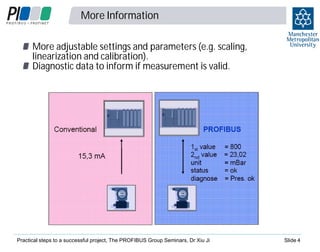
More Information
More adjustable settings and parameters (e.g. scaling,
linearization and calibration).
Diagnostic data to inform if measurement is valid.

Practical steps to a successful project, The PROFIBUS Group Seminars, Dr Xiu Ji

Slide 4
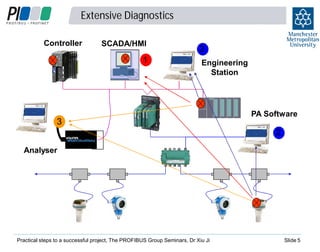
Extensive Diagnostics
Controller

SCADA/HMI

1

2
Engineering
Station

3

PA Software

2
Analyser

Practical steps to a successful project, The PROFIBUS Group Seminars, Dr Xiu Ji

Slide 5
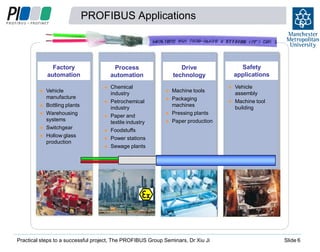
PROFIBUS Applications

Factory
automation

Process
automation

Vehicle
manufacture
Bottling plants
Warehousing
systems
Switchgear
Hollow glass
production

Chemical
industry
Petrochemical
industry
Paper and
textile industry
Foodstuffs
Power stations
Sewage plants

Drive
technology
Machine tools
Packaging
machines
Pressing plants
Paper production

Practical steps to a successful project, The PROFIBUS Group Seminars, Dr Xiu Ji

6

Safety
applications
Vehicle
assembly
Machine tool
building

Slide 6
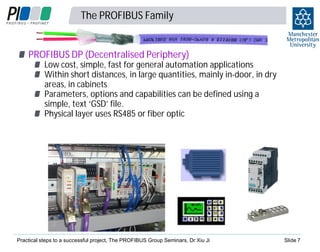
The PROFIBUS Family
PROFIBUS DP (Decentralised Periphery)

Low cost, simple, fast for general automation applications
Within short distances, in large quantities, mainly in-door, in dry
areas, in cabinets
Parameters, options and capabilities can be defined using a
simple, text ‘GSD’ file.
Physical layer uses RS485 or fiber optic

Practical steps to a successful project, The PROFIBUS Group Seminars, Dr Xiu Ji

Slide 7
The PROFIBUS Family

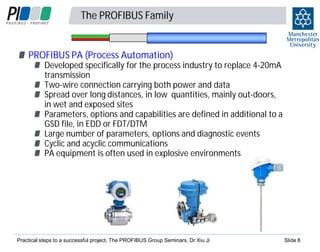
PROFIBUS PA (Process Automation)

Developed specifically for the process industry to replace 4-20mA
transmission
Two-wire connection carrying both power and data
Spread over long distances, in low quantities, mainly out-doors,
in wet and exposed sites
Parameters, options and capabilities are defined in additional to a
GSD file, in EDD or FDT/DTM
Large number of parameters, options and diagnostic events
Cyclic and acyclic communications
PA equipment is often used in explosive environments

Practical steps to a successful project, The PROFIBUS Group Seminars, Dr Xiu Ji

Slide 8
Transmission Technologies
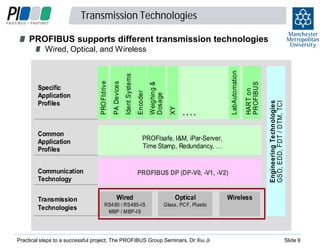
PROFIBUS supports different transmission technologies

HART on
PROFIBUS

LabAutomation

XY

Weighing &
Dosage

PROFIsafe, I&M, iPar-Server,
Time Stamp, Redundancy, …

Communication
Technology
Transmission
Technologies

....

PROFIBUS DP (DP-V0, -V1, -V2)

Wired

Optical

RS4 85 / RS485-IS
MBP / M BP-IS

Engineering Technologies
GS D, EDD, FDT / DTM, TCI

Common
Application
Profiles

Encoder

Ident Systems

PA Devices

Specific
Application
Profiles

PRO FIdrive

Wired, Optical, and Wireless

Glass, PC F, Plastic

Practical steps to a successful project, The PROFIBUS Group Seminars, Dr Xiu Ji

Wireless

Slide 9
Connection technologies

1
0

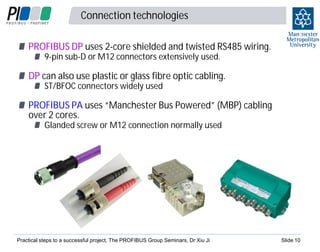
PROFIBUS DP uses 2-core shielded and twisted RS485 wiring.
9-pin sub-D or M12 connectors extensively used.

DP can also use plastic or glass fibre optic cabling.
ST/BFOC connectors widely used

PROFIBUS PA uses “Manchester Bus Powered” (MBP) cabling
over 2 cores.
Glanded screw or M12 connection normally used

Practical steps to a successful project, The PROFIBUS Group Seminars, Dr Xiu Ji

Slide 10
Optical transmission
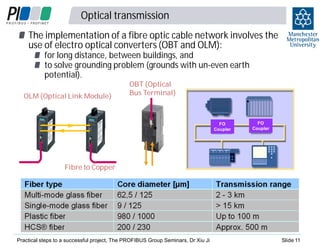
The implementation of a fibre optic cable network involves the
use of electro optical converters (OBT and OLM):
for long distance, between buildings, and
to solve grounding problem (grounds with un-even earth
potential).

OLM (Optical Link Module)

OBT (Optical
Bus Terminal)

FO
Coupler

FO
Coupler

Fibre to Copper

Practical steps to a successful project, The PROFIBUS Group Seminars, Dr Xiu Ji

Slide 11
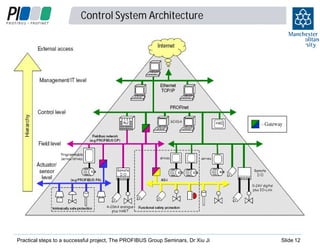
Control System Architecture

Practical steps to a successful project, The PROFIBUS Group Seminars, Dr Xiu Ji

Slide 12
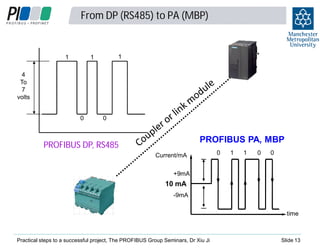
From DP (RS485) to PA (MBP)

1

1

1

4
To
7
volts
0

0

PROFIBUS PA, MBP

PROFIBUS DP, RS485
Current/mA

0

1

1

0

0

+9mA

10 mA
-9mA
time

Practical steps to a successful project, The PROFIBUS Group Seminars, Dr Xiu Ji

Slide 13
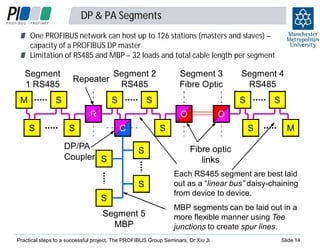
DP & PA Segments
One PROFIBUS network can host up to 126 stations (masters and slaves) –
capacity of a PROFIBUS DP master
Limitation of RS485 and MBP – 32 loads and total cable length per segment

Segment
1 RS485
M

Repeater

S

Segment 2
RS485
S

Segment 3
Fibre Optic

S

S

R
S

O

S

C

DP/PA
Coupler S

S

O

S
S

Segment 4
RS485

S

M

Fibre optic
links

S

Each RS485 segment are best laid
out as a “linear bus” daisy-chaining
from device to device.

Segment 5
MBP

MBP segments can be laid out in a
more flexible manner using Tee
junctions to create spur lines.

S

Practical steps to a successful project, The PROFIBUS Group Seminars, Dr Xiu Ji

Slide 14
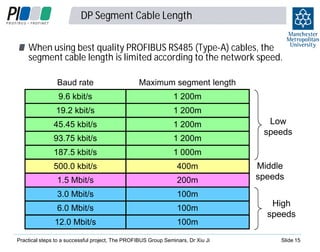
DP Segment Cable Length
When using best quality PROFIBUS RS485 (Type-A) cables, the
segment cable length is limited according to the network speed.
Baud rate

Maximum segment length

9.6 kbit/s

1 200m

19.2 kbit/s

1 200m

45.45 kbit/s

1 200m

93.75 kbit/s

1 200m

187.5 kbit/s

1 000m

500.0 kbit/s

400m

1.5 Mbit/s

200m

3.0 Mbit/s

100m

6.0 Mbit/s

100m

12.0 Mbit/s

100m

Practical steps to a successful project, The PROFIBUS Group Seminars, Dr Xiu Ji

Low
speeds

Middle
speeds
High
speeds
Slide 15
PA Segment Cable Length
PA baud rate is fixed at 31.25 kbit/s.
The maximum segment cable length is 1900 meters for nonintrinsically safe applications, and….
1000 meters for intrinsically safe applications

Practical steps to a successful project, The PROFIBUS Group Seminars, Dr Xiu Ji

Slide 16
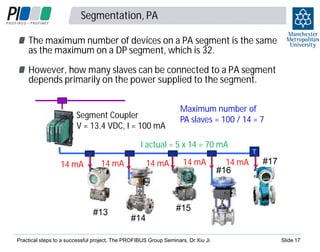
Segmentation, PA
The maximum number of devices on a PA segment is the same
as the maximum on a DP segment, which is 32.
However, how many slaves can be connected to a PA segment
depends primarily on the power supplied to the segment.
Segment Coupler
V = 13.4 VDC, I = 100 mA

Maximum number of
PA slaves = 100 / 14 = 7

I actual = 5 x 14 = 70 mA
14 mA

14 mA

14 mA

#13

14 mA

14 mA
#16

T

#17

#15
#14

Practical steps to a successful project, The PROFIBUS Group Seminars, Dr Xiu Ji

Slide 17
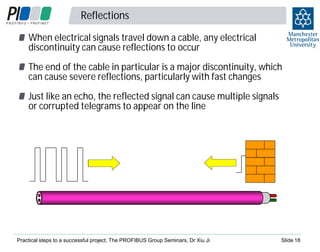
Reflections
When electrical signals travel down a cable, any electrical
discontinuity can cause reflections to occur
The end of the cable in particular is a major discontinuity, which
can cause severe reflections, particularly with fast changes
Just like an echo, the reflected signal can cause multiple signals
or corrupted telegrams to appear on the line

Practical steps to a successful project, The PROFIBUS Group Seminars, Dr Xiu Ji

Slide 18
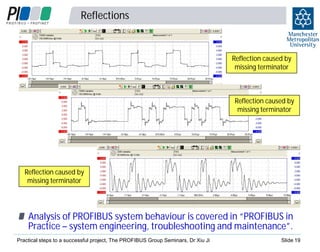
Reflections

Reflection caused by
missing terminator

Reflection caused by
missing terminator

Reflection caused by
missing terminator

Analysis of PROFIBUS system behaviour is covered in “PROFIBUS in
Practice – system engineering, troubleshooting and maintenance”.
Practical steps to a successful project, The PROFIBUS Group Seminars, Dr Xiu Ji

Slide 19
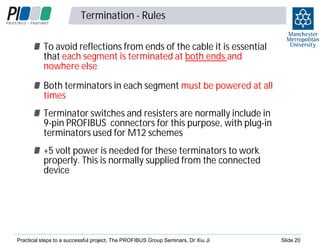
Termination - Rules
To avoid reflections from ends of the cable it is essential
that each segment is terminated at both ends and
nowhere else
Both terminators in each segment must be powered at all
times
Terminator switches and resisters are normally include in
9-pin PROFIBUS connectors for this purpose, with plug-in
terminators used for M12 schemes
+5 volt power is needed for these terminators to work
properly. This is normally supplied from the connected
device

Practical steps to a successful project, The PROFIBUS Group Seminars, Dr Xiu Ji

Slide 20
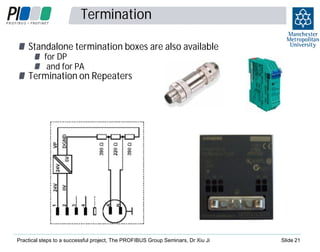
Termination
Standalone termination boxes are also available
for DP
and for PA

Termination on Repeaters

Practical steps to a successful project, The PROFIBUS Group Seminars, Dr Xiu Ji

Slide 21
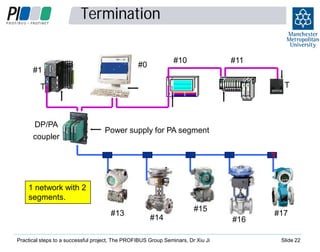
Termination
#10

#0

#1

#11
T

T

DP/PA
coupler

Power supply for PA segment
T
T

1 network with 2
segments.
#13

#15
#14

Practical steps to a successful project, The PROFIBUS Group Seminars, Dr Xiu Ji

#16

#17

Slide 22
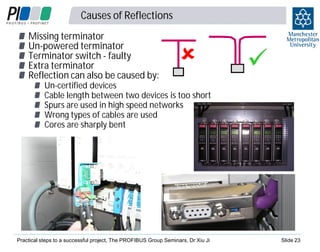
Causes of Reflections
Missing terminator
Un-powered terminator
Terminator switch - faulty
Extra terminator
Reflection can also be caused by:

Un-certified devices
Cable length between two devices is too short
Spurs are used in high speed networks
Wrong types of cables are used
Cores are sharply bent

Practical steps to a successful project, The PROFIBUS Group Seminars, Dr Xiu Ji

Slide 23
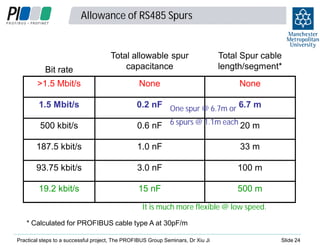
Allowance of RS485 Spurs

Bit rate

Total allowable spur
capacitance

Total Spur cable
length/segment*

>1.5 Mbit/s

None

None

1.5 Mbit/s

0.2 nF One spur @ 6.7m or 6.7 m

500 kbit/s

0.6 nF 6 spurs @ 1.1m each 20 m

187.5 kbit/s

1.0 nF

33 m

93.75 kbit/s

3.0 nF

100 m

19.2 kbit/s

15 nF

500 m

It is much more flexible @ low speed.
* Calculated for PROFIBUS cable type A at 30pF/m
Practical steps to a successful project, The PROFIBUS Group Seminars, Dr Xiu Ji

Slide 24
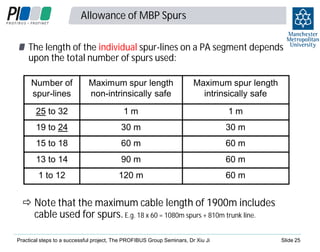
Allowance of MBP Spurs
The length of the individual spur-lines on a PA segment depends
upon the total number of spurs used:
Number of
spur-lines

Maximum spur length
non-intrinsically safe

Maximum spur length
intrinsically safe

25 to 32

1m

1m

19 to 24

30 m

30 m

15 to 18

60 m

60 m

13 to 14

90 m

60 m

1 to 12

120 m

60 m

Note that the maximum cable length of 1900m includes
cable used for spurs. E.g. 18 x 60 = 1080m spurs + 810m trunk line.
Practical steps to a successful project, The PROFIBUS Group Seminars, Dr Xiu Ji

Slide 25
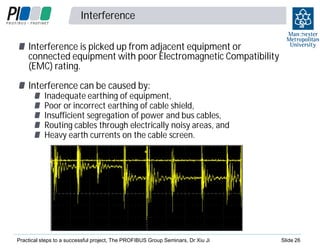
Interference

2
6

Interference is picked up from adjacent equipment or
connected equipment with poor Electromagnetic Compatibility
(EMC) rating.
Interference can be caused by:

Inadequate earthing of equipment,
Poor or incorrect earthing of cable shield,
Insufficient segregation of power and bus cables,
Routing cables through electrically noisy areas, and
Heavy earth currents on the cable screen.

Practical steps to a successful project, The PROFIBUS Group Seminars, Dr Xiu Ji

Slide 26
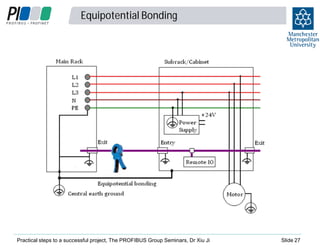
Equipotential Bonding

Practical steps to a successful project, The PROFIBUS Group Seminars, Dr Xiu Ji

Slide 27
Installation: Shielding and Grounding
intern

2
8

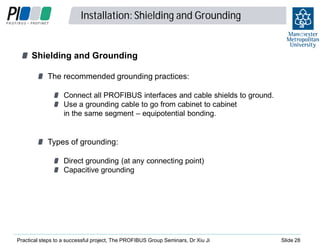
Shielding and Grounding
The recommended grounding practices:
Connect all PROFIBUS interfaces and cable shields to ground.
Use a grounding cable to go from cabinet to cabinet
in the same segment – equipotential bonding.

Types of grounding:
Direct grounding (at any connecting point)
Capacitive grounding

Practical steps to a successful project, The PROFIBUS Group Seminars, Dr Xiu Ji

Slide 28
Equipotential Bonding at a Device
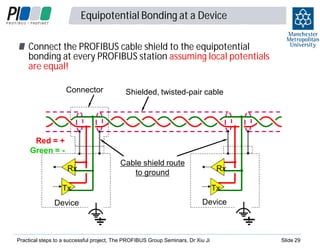
Connect the PROFIBUS cable shield to the equipotential
bonding at every PROFIBUS station assuming local potentials
are equal!
Connector

Shielded, twisted-pair cable

Red = +
Green = Rx

Cable shield route
to ground

Rx

Tx

Tx

Device

Device

Practical steps to a successful project, The PROFIBUS Group Seminars, Dr Xiu Ji

Slide 29
Connector wiring problems
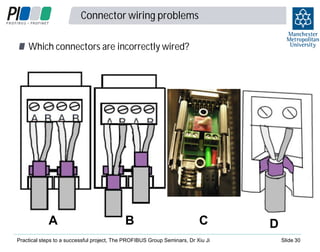
Which connectors are incorrectly wired?

A

B

C

Practical steps to a successful project, The PROFIBUS Group Seminars, Dr Xiu Ji

D
Slide 30
Cable Segregation
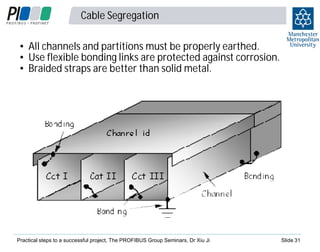
• All channels and partitions must be properly earthed.
• Use flexible bonding links are protected against corrosion.
• Braided straps are better than solid metal.

Practical steps to a successful project, The PROFIBUS Group Seminars, Dr Xiu Ji

Slide 31
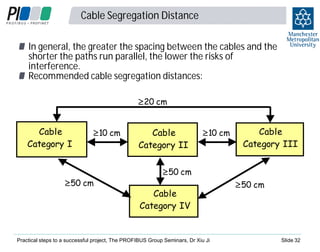
Cable Segregation Distance
In general, the greater the spacing between the cables and the
shorter the paths run parallel, the lower the risks of
interference.
Recommended cable segregation distances:
20 cm

Cable
Category I

50 cm

10 cm

Cable
Category II

10 cm

Cable
Category III

50 cm

Cable
Category IV

Practical steps to a successful project, The PROFIBUS Group Seminars, Dr Xiu Ji

50 cm

Slide 32
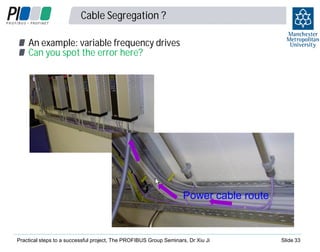
Cable Segregation ?
An example: variable frequency drives
Can you spot the error here?

Power cable route

Practical steps to a successful project, The PROFIBUS Group Seminars, Dr Xiu Ji

Slide 33
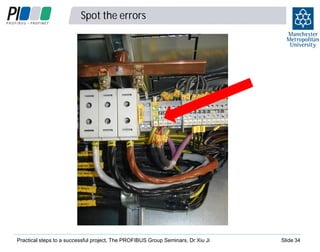
Spot the errors

Practical steps to a successful project, The PROFIBUS Group Seminars, Dr Xiu Ji

Slide 34
Spot the errors

Practical steps to a successful project, The PROFIBUS Group Seminars, Dr Xiu Ji

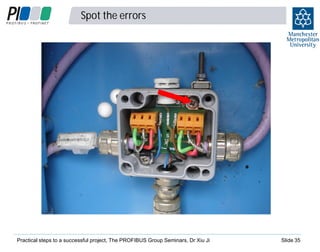
Slide 35
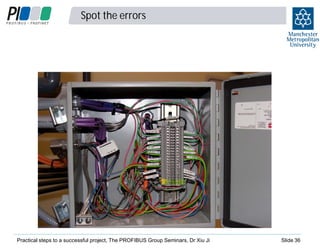
Spot the errors

Practical steps to a successful project, The PROFIBUS Group Seminars, Dr Xiu Ji

Slide 36
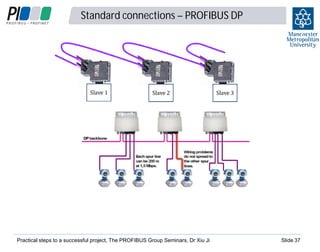
Standard connections – PROFIBUS DP

Practical steps to a successful project, The PROFIBUS Group Seminars, Dr Xiu Ji

3
7

Slide 37
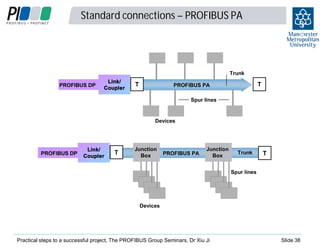
Standard connections – PROFIBUS PA

3
8

Trunk
PROFIBUS DP

Link/
Coupler

T

T

PROFIBUS PA
Spur lines

Devices

PROFIBUS DP

Link/
Coupler

T

Junction
Box

PROFIBUS PA

Junction
Box

Trunk

T

Spur lines

Devices

Practical steps to a successful project, The PROFIBUS Group Seminars, Dr Xiu Ji

Slide 38
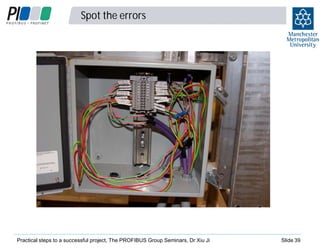
Spot the errors

Practical steps to a successful project, The PROFIBUS Group Seminars, Dr Xiu Ji

Slide 39
Design considerations - details

Limitations of segment loads and total cable length
Standalone terminations for DP, redundant power supply to
terminators
Network drawings – node addresses, mark of termination
position, cable routes, cable length between connectors and
junction boxes, trunk cable and drop cable length
Piggyback connectors – spare connection into EVERY segment
for voltage measurements and troubleshooting

Practical steps to a successful project, The PROFIBUS Group Seminars, Dr Xiu Ji

Slide 40
Design considerations - architecture

4
1

Which network to use – PROFIBUS, PROFINET, DP, PA, AS-i?
Designation of safe and hazardous areas
Production and functional safety systems
Cable routes – fibres, copper cables, earthing systems,
equipotential bonding cable in place?
Cabinet or field assembly
Connection of devices via remote IO or integrated fieldbus?
Use of redundancy at difference levels
Network and device access for engineering, monitoring and
maintenance

Practical steps to a successful project, The PROFIBUS Group Seminars, Dr Xiu Ji

Slide 41
Installation Checklists

4
2

Checklist to determine network topology and obtain the
network drawing
Checklist for PROFIBUS DP (RS485) Grounding
Checklist for PROFIBUS PA (MBP) Grounding
Checklist for PROFIBUS DP (RS485) Cabling
All above are included in “PROFIBUS in Practice – installing
PROFIBUS devices and cables” as templates for a Factory
Acceptance Test document.

Practical steps to a successful project, The PROFIBUS Group Seminars, Dr Xiu Ji

Slide 42
Practical steps to a successful PROFIBUS project

4
3

The very first step to a successful project should be

Training
PROFIBUS training courses are available for:
Installers,
System Designers,
Commissioning Engineers, and
Maintenance staff.

Many industry sectors specify that their staff, contractors and
sub contractors must be appropriately trained.
Competence Centre - Manchester Metropolitan University
Training Centre – Verwer Training and Consultancy

Practical steps to a successful project, The PROFIBUS Group Seminars, Dr Xiu Ji

Slide 43
Certified PROFIBUS Installer Training

4
4

This training is widely accepted as the minimum standard of
training for anyone who is working in PROFIBUS systems at a
technical level.
Available as a one-day training course in house or on-site.
It teaches the basic principles of PROFIBUS and covers the basic
layout, installation and testing of DP and PA networks.
It is also essential basic training for system designers,
maintenance and all engineering staff.
Background details are covered in the series of “PROFIBUS in
Practice”, the orange and blue textbook.
Extra days can be added to extend the training for maintenance,
design and engineering staff.

Practical steps to a successful project, The PROFIBUS Group Seminars, Dr Xiu Ji

Slide 44
PROFIBUS System Design Training

4
5

Good overall design, with good documentation and clear
specifications of required wiring, installation, testing,
commissioning and final setting-to-work practices are
recommended. Production of final ‘as installed’ drawings are
also recommended (to assist with subsequent maintenance)
Designer training will allow companies to ensure that their
designers are aware of the common design pitfalls and able to
produce systems that are cost effective, efficient and
maintainable.
Designer course at MMU is 3 days covering installation,
maintenance, and design.

Practical steps to a successful project, The PROFIBUS Group Seminars, Dr Xiu Ji

Slide 45
Summary: Steps to a successfully project

4
6

1. Design staff should be trained before the design starts.
2. Everyone involved in the project at a technical level is trained to
an adequate level, at the least to the designer or installer level
3. Make sure that designers are fully aware of the methods for
diagnosing and locating faults, before start of design
4. Ensure that health checking and performance monitoring
facilities are incorporated into the network
5. Follow the extensive guidance that is available from PI and from
competency and training centres, for example, incorporating
the checklists in to your installation acceptance tests

Practical steps to a successful project, The PROFIBUS Group Seminars, Dr Xiu Ji

Slide 46

Practical steps to a successful PROFIBUS project - Richard Needham and Xiu Ji

  • 1.
    Practical Steps toa Successful PROFIBUS Project Slides by Dr. Xiu Ji - MMU Presentation today by Richard Needham – Hi-Port Controls
  • 2.
    Outline of thispresentation Presentation objective Introduction to PROFIBUS and associated benefits Connection options and rules Other cabling issues : grounding and interference Design Considerations Implementation issues Essential training Practical steps to a successful project, The PROFIBUS Group Seminars, Dr Xiu Ji Slide 2
  • 3.
    Introduction to PROFIBUS Fieldbusis widely used in many automation systems. PROFIBUS solutions for Factory Automation (FA) and Process Automation (PA) Applications also involving drives, instruments, servos, robotics, functional safety, redundancy, and explosive environments etc. Extensive diagnostic functions available to operators and maintenance engineers Diagnostic tools available for engineering, commissioning, maintenance, and fault finding Excellent support from PROFIBUS International, regional events and competence and training centres. Practical steps to a successful project, The PROFIBUS Group Seminars, Dr Xiu Ji Slide 3
  • 4.
    More Information More adjustablesettings and parameters (e.g. scaling, linearization and calibration). Diagnostic data to inform if measurement is valid. Practical steps to a successful project, The PROFIBUS Group Seminars, Dr Xiu Ji Slide 4
  • 5.
    Extensive Diagnostics Controller SCADA/HMI 1 2 Engineering Station 3 PA Software 2 Analyser Practicalsteps to a successful project, The PROFIBUS Group Seminars, Dr Xiu Ji Slide 5
  • 6.
    PROFIBUS Applications Factory automation Process automation Vehicle manufacture Bottling plants Warehousing systems Switchgear Hollowglass production Chemical industry Petrochemical industry Paper and textile industry Foodstuffs Power stations Sewage plants Drive technology Machine tools Packaging machines Pressing plants Paper production Practical steps to a successful project, The PROFIBUS Group Seminars, Dr Xiu Ji 6 Safety applications Vehicle assembly Machine tool building Slide 6
  • 7.
    The PROFIBUS Family PROFIBUSDP (Decentralised Periphery) Low cost, simple, fast for general automation applications Within short distances, in large quantities, mainly in-door, in dry areas, in cabinets Parameters, options and capabilities can be defined using a simple, text ‘GSD’ file. Physical layer uses RS485 or fiber optic Practical steps to a successful project, The PROFIBUS Group Seminars, Dr Xiu Ji Slide 7
  • 8.
    The PROFIBUS Family PROFIBUSPA (Process Automation) Developed specifically for the process industry to replace 4-20mA transmission Two-wire connection carrying both power and data Spread over long distances, in low quantities, mainly out-doors, in wet and exposed sites Parameters, options and capabilities are defined in additional to a GSD file, in EDD or FDT/DTM Large number of parameters, options and diagnostic events Cyclic and acyclic communications PA equipment is often used in explosive environments Practical steps to a successful project, The PROFIBUS Group Seminars, Dr Xiu Ji Slide 8
  • 9.
    Transmission Technologies PROFIBUS supportsdifferent transmission technologies HART on PROFIBUS LabAutomation XY Weighing & Dosage PROFIsafe, I&M, iPar-Server, Time Stamp, Redundancy, … Communication Technology Transmission Technologies .... PROFIBUS DP (DP-V0, -V1, -V2) Wired Optical RS4 85 / RS485-IS MBP / M BP-IS Engineering Technologies GS D, EDD, FDT / DTM, TCI Common Application Profiles Encoder Ident Systems PA Devices Specific Application Profiles PRO FIdrive Wired, Optical, and Wireless Glass, PC F, Plastic Practical steps to a successful project, The PROFIBUS Group Seminars, Dr Xiu Ji Wireless Slide 9
  • 10.
    Connection technologies 1 0 PROFIBUS DPuses 2-core shielded and twisted RS485 wiring. 9-pin sub-D or M12 connectors extensively used. DP can also use plastic or glass fibre optic cabling. ST/BFOC connectors widely used PROFIBUS PA uses “Manchester Bus Powered” (MBP) cabling over 2 cores. Glanded screw or M12 connection normally used Practical steps to a successful project, The PROFIBUS Group Seminars, Dr Xiu Ji Slide 10
  • 11.
    Optical transmission The implementationof a fibre optic cable network involves the use of electro optical converters (OBT and OLM): for long distance, between buildings, and to solve grounding problem (grounds with un-even earth potential). OLM (Optical Link Module) OBT (Optical Bus Terminal) FO Coupler FO Coupler Fibre to Copper Practical steps to a successful project, The PROFIBUS Group Seminars, Dr Xiu Ji Slide 11
  • 12.
    Control System Architecture Practicalsteps to a successful project, The PROFIBUS Group Seminars, Dr Xiu Ji Slide 12
  • 13.
    From DP (RS485)to PA (MBP) 1 1 1 4 To 7 volts 0 0 PROFIBUS PA, MBP PROFIBUS DP, RS485 Current/mA 0 1 1 0 0 +9mA 10 mA -9mA time Practical steps to a successful project, The PROFIBUS Group Seminars, Dr Xiu Ji Slide 13
  • 14.
    DP & PASegments One PROFIBUS network can host up to 126 stations (masters and slaves) – capacity of a PROFIBUS DP master Limitation of RS485 and MBP – 32 loads and total cable length per segment Segment 1 RS485 M Repeater S Segment 2 RS485 S Segment 3 Fibre Optic S S R S O S C DP/PA Coupler S S O S S Segment 4 RS485 S M Fibre optic links S Each RS485 segment are best laid out as a “linear bus” daisy-chaining from device to device. Segment 5 MBP MBP segments can be laid out in a more flexible manner using Tee junctions to create spur lines. S Practical steps to a successful project, The PROFIBUS Group Seminars, Dr Xiu Ji Slide 14
  • 15.
    DP Segment CableLength When using best quality PROFIBUS RS485 (Type-A) cables, the segment cable length is limited according to the network speed. Baud rate Maximum segment length 9.6 kbit/s 1 200m 19.2 kbit/s 1 200m 45.45 kbit/s 1 200m 93.75 kbit/s 1 200m 187.5 kbit/s 1 000m 500.0 kbit/s 400m 1.5 Mbit/s 200m 3.0 Mbit/s 100m 6.0 Mbit/s 100m 12.0 Mbit/s 100m Practical steps to a successful project, The PROFIBUS Group Seminars, Dr Xiu Ji Low speeds Middle speeds High speeds Slide 15
  • 16.
    PA Segment CableLength PA baud rate is fixed at 31.25 kbit/s. The maximum segment cable length is 1900 meters for nonintrinsically safe applications, and…. 1000 meters for intrinsically safe applications Practical steps to a successful project, The PROFIBUS Group Seminars, Dr Xiu Ji Slide 16
  • 17.
    Segmentation, PA The maximumnumber of devices on a PA segment is the same as the maximum on a DP segment, which is 32. However, how many slaves can be connected to a PA segment depends primarily on the power supplied to the segment. Segment Coupler V = 13.4 VDC, I = 100 mA Maximum number of PA slaves = 100 / 14 = 7 I actual = 5 x 14 = 70 mA 14 mA 14 mA 14 mA #13 14 mA 14 mA #16 T #17 #15 #14 Practical steps to a successful project, The PROFIBUS Group Seminars, Dr Xiu Ji Slide 17
  • 18.
    Reflections When electrical signalstravel down a cable, any electrical discontinuity can cause reflections to occur The end of the cable in particular is a major discontinuity, which can cause severe reflections, particularly with fast changes Just like an echo, the reflected signal can cause multiple signals or corrupted telegrams to appear on the line Practical steps to a successful project, The PROFIBUS Group Seminars, Dr Xiu Ji Slide 18
  • 19.
    Reflections Reflection caused by missingterminator Reflection caused by missing terminator Reflection caused by missing terminator Analysis of PROFIBUS system behaviour is covered in “PROFIBUS in Practice – system engineering, troubleshooting and maintenance”. Practical steps to a successful project, The PROFIBUS Group Seminars, Dr Xiu Ji Slide 19
  • 20.
    Termination - Rules Toavoid reflections from ends of the cable it is essential that each segment is terminated at both ends and nowhere else Both terminators in each segment must be powered at all times Terminator switches and resisters are normally include in 9-pin PROFIBUS connectors for this purpose, with plug-in terminators used for M12 schemes +5 volt power is needed for these terminators to work properly. This is normally supplied from the connected device Practical steps to a successful project, The PROFIBUS Group Seminars, Dr Xiu Ji Slide 20
  • 21.
    Termination Standalone termination boxesare also available for DP and for PA Termination on Repeaters Practical steps to a successful project, The PROFIBUS Group Seminars, Dr Xiu Ji Slide 21
  • 22.
    Termination #10 #0 #1 #11 T T DP/PA coupler Power supply forPA segment T T 1 network with 2 segments. #13 #15 #14 Practical steps to a successful project, The PROFIBUS Group Seminars, Dr Xiu Ji #16 #17 Slide 22
  • 23.
    Causes of Reflections Missingterminator Un-powered terminator Terminator switch - faulty Extra terminator Reflection can also be caused by: Un-certified devices Cable length between two devices is too short Spurs are used in high speed networks Wrong types of cables are used Cores are sharply bent Practical steps to a successful project, The PROFIBUS Group Seminars, Dr Xiu Ji Slide 23
  • 24.
    Allowance of RS485Spurs Bit rate Total allowable spur capacitance Total Spur cable length/segment* >1.5 Mbit/s None None 1.5 Mbit/s 0.2 nF One spur @ 6.7m or 6.7 m 500 kbit/s 0.6 nF 6 spurs @ 1.1m each 20 m 187.5 kbit/s 1.0 nF 33 m 93.75 kbit/s 3.0 nF 100 m 19.2 kbit/s 15 nF 500 m It is much more flexible @ low speed. * Calculated for PROFIBUS cable type A at 30pF/m Practical steps to a successful project, The PROFIBUS Group Seminars, Dr Xiu Ji Slide 24
  • 25.
    Allowance of MBPSpurs The length of the individual spur-lines on a PA segment depends upon the total number of spurs used: Number of spur-lines Maximum spur length non-intrinsically safe Maximum spur length intrinsically safe 25 to 32 1m 1m 19 to 24 30 m 30 m 15 to 18 60 m 60 m 13 to 14 90 m 60 m 1 to 12 120 m 60 m Note that the maximum cable length of 1900m includes cable used for spurs. E.g. 18 x 60 = 1080m spurs + 810m trunk line. Practical steps to a successful project, The PROFIBUS Group Seminars, Dr Xiu Ji Slide 25
  • 26.
    Interference 2 6 Interference is pickedup from adjacent equipment or connected equipment with poor Electromagnetic Compatibility (EMC) rating. Interference can be caused by: Inadequate earthing of equipment, Poor or incorrect earthing of cable shield, Insufficient segregation of power and bus cables, Routing cables through electrically noisy areas, and Heavy earth currents on the cable screen. Practical steps to a successful project, The PROFIBUS Group Seminars, Dr Xiu Ji Slide 26
  • 27.
    Equipotential Bonding Practical stepsto a successful project, The PROFIBUS Group Seminars, Dr Xiu Ji Slide 27
  • 28.
    Installation: Shielding andGrounding intern 2 8 Shielding and Grounding The recommended grounding practices: Connect all PROFIBUS interfaces and cable shields to ground. Use a grounding cable to go from cabinet to cabinet in the same segment – equipotential bonding. Types of grounding: Direct grounding (at any connecting point) Capacitive grounding Practical steps to a successful project, The PROFIBUS Group Seminars, Dr Xiu Ji Slide 28
  • 29.
    Equipotential Bonding ata Device Connect the PROFIBUS cable shield to the equipotential bonding at every PROFIBUS station assuming local potentials are equal! Connector Shielded, twisted-pair cable Red = + Green = Rx Cable shield route to ground Rx Tx Tx Device Device Practical steps to a successful project, The PROFIBUS Group Seminars, Dr Xiu Ji Slide 29
  • 30.
    Connector wiring problems Whichconnectors are incorrectly wired? A B C Practical steps to a successful project, The PROFIBUS Group Seminars, Dr Xiu Ji D Slide 30
  • 31.
    Cable Segregation • Allchannels and partitions must be properly earthed. • Use flexible bonding links are protected against corrosion. • Braided straps are better than solid metal. Practical steps to a successful project, The PROFIBUS Group Seminars, Dr Xiu Ji Slide 31
  • 32.
    Cable Segregation Distance Ingeneral, the greater the spacing between the cables and the shorter the paths run parallel, the lower the risks of interference. Recommended cable segregation distances: 20 cm Cable Category I 50 cm 10 cm Cable Category II 10 cm Cable Category III 50 cm Cable Category IV Practical steps to a successful project, The PROFIBUS Group Seminars, Dr Xiu Ji 50 cm Slide 32
  • 33.
    Cable Segregation ? Anexample: variable frequency drives Can you spot the error here? Power cable route Practical steps to a successful project, The PROFIBUS Group Seminars, Dr Xiu Ji Slide 33
  • 34.
    Spot the errors Practicalsteps to a successful project, The PROFIBUS Group Seminars, Dr Xiu Ji Slide 34
  • 35.
    Spot the errors Practicalsteps to a successful project, The PROFIBUS Group Seminars, Dr Xiu Ji Slide 35
  • 36.
    Spot the errors Practicalsteps to a successful project, The PROFIBUS Group Seminars, Dr Xiu Ji Slide 36
  • 37.
    Standard connections –PROFIBUS DP Practical steps to a successful project, The PROFIBUS Group Seminars, Dr Xiu Ji 3 7 Slide 37
  • 38.
    Standard connections –PROFIBUS PA 3 8 Trunk PROFIBUS DP Link/ Coupler T T PROFIBUS PA Spur lines Devices PROFIBUS DP Link/ Coupler T Junction Box PROFIBUS PA Junction Box Trunk T Spur lines Devices Practical steps to a successful project, The PROFIBUS Group Seminars, Dr Xiu Ji Slide 38
  • 39.
    Spot the errors Practicalsteps to a successful project, The PROFIBUS Group Seminars, Dr Xiu Ji Slide 39
  • 40.
    Design considerations -details Limitations of segment loads and total cable length Standalone terminations for DP, redundant power supply to terminators Network drawings – node addresses, mark of termination position, cable routes, cable length between connectors and junction boxes, trunk cable and drop cable length Piggyback connectors – spare connection into EVERY segment for voltage measurements and troubleshooting Practical steps to a successful project, The PROFIBUS Group Seminars, Dr Xiu Ji Slide 40
  • 41.
    Design considerations -architecture 4 1 Which network to use – PROFIBUS, PROFINET, DP, PA, AS-i? Designation of safe and hazardous areas Production and functional safety systems Cable routes – fibres, copper cables, earthing systems, equipotential bonding cable in place? Cabinet or field assembly Connection of devices via remote IO or integrated fieldbus? Use of redundancy at difference levels Network and device access for engineering, monitoring and maintenance Practical steps to a successful project, The PROFIBUS Group Seminars, Dr Xiu Ji Slide 41
  • 42.
    Installation Checklists 4 2 Checklist todetermine network topology and obtain the network drawing Checklist for PROFIBUS DP (RS485) Grounding Checklist for PROFIBUS PA (MBP) Grounding Checklist for PROFIBUS DP (RS485) Cabling All above are included in “PROFIBUS in Practice – installing PROFIBUS devices and cables” as templates for a Factory Acceptance Test document. Practical steps to a successful project, The PROFIBUS Group Seminars, Dr Xiu Ji Slide 42
  • 43.
    Practical steps toa successful PROFIBUS project 4 3 The very first step to a successful project should be Training PROFIBUS training courses are available for: Installers, System Designers, Commissioning Engineers, and Maintenance staff. Many industry sectors specify that their staff, contractors and sub contractors must be appropriately trained. Competence Centre - Manchester Metropolitan University Training Centre – Verwer Training and Consultancy Practical steps to a successful project, The PROFIBUS Group Seminars, Dr Xiu Ji Slide 43
  • 44.
    Certified PROFIBUS InstallerTraining 4 4 This training is widely accepted as the minimum standard of training for anyone who is working in PROFIBUS systems at a technical level. Available as a one-day training course in house or on-site. It teaches the basic principles of PROFIBUS and covers the basic layout, installation and testing of DP and PA networks. It is also essential basic training for system designers, maintenance and all engineering staff. Background details are covered in the series of “PROFIBUS in Practice”, the orange and blue textbook. Extra days can be added to extend the training for maintenance, design and engineering staff. Practical steps to a successful project, The PROFIBUS Group Seminars, Dr Xiu Ji Slide 44
  • 45.
    PROFIBUS System DesignTraining 4 5 Good overall design, with good documentation and clear specifications of required wiring, installation, testing, commissioning and final setting-to-work practices are recommended. Production of final ‘as installed’ drawings are also recommended (to assist with subsequent maintenance) Designer training will allow companies to ensure that their designers are aware of the common design pitfalls and able to produce systems that are cost effective, efficient and maintainable. Designer course at MMU is 3 days covering installation, maintenance, and design. Practical steps to a successful project, The PROFIBUS Group Seminars, Dr Xiu Ji Slide 45
  • 46.
    Summary: Steps toa successfully project 4 6 1. Design staff should be trained before the design starts. 2. Everyone involved in the project at a technical level is trained to an adequate level, at the least to the designer or installer level 3. Make sure that designers are fully aware of the methods for diagnosing and locating faults, before start of design 4. Ensure that health checking and performance monitoring facilities are incorporated into the network 5. Follow the extensive guidance that is available from PI and from competency and training centres, for example, incorporating the checklists in to your installation acceptance tests Practical steps to a successful project, The PROFIBUS Group Seminars, Dr Xiu Ji Slide 46