WELCOM
E
Minor PROJECT
ON
EVENT
MANAGEMENET
SYSTEM
OBJECTIVE OF PROJECT
 Our aim is to make a user friendly application that can let
a user to plan a decoration for an event.
 He can select the event and according to the event the
appropriate decoration can be made.
 Choice of decoration can be made from the list of panel.
 Client will also find out the cost for particular decoration
and virtual representation of that particular decoration.
 The project will help Clients to decorate for an event and
the cost required for particular decoration. No need to visit
decorators.
INTRODUCTIO
N
What
is
Event
Management?
The Aim of Event Management
Project Details
 Event Management system manages all the events.
 System very efficiently store, maintain and retrieve data from its
database and can be use for further analysis(data mining & OLAP).
Time saving activity .
At Minimum Cost.
Propose
Manual hours that need to spend in record keeping and generating reports
is no longer required. it generate automatically
The data in a centralized way which is available to all the event
managers.
Easy to manage data in database.
user can register for any event from anywhere.
Event manager can update or modify records of user any time.
 Automatically mail to particular user.
Scope
This application includes the IT fields.
 Secure Administrative panel.
 Normal users are the participants.
 They have to register for the events.
 Users will have following functions:
Easy communication with the manager
 Event time
 Get instant message about any change Updates easily
Feasibility Study
Product : Dream Maker is an event management system. By using this system various users can login for
different events. It eases registration process so it’s a user friendly product.
Operational Feasibility : Operation of the proposed system depend on its various users. These various
user-type mentioned below.
(1)Admin
(2)Manager
(3)Normal User (Participants)/
Admin will make managers for different events. And allocate Login ID. Thereafter Normal User enters
their details and also select events.
Then manager will check user entries and will allot registration id for authentication purpose. Manager
can also change date, time of the events. Here manager responsible to check team size, details. And
manager is responsible to restrict unauthorized people or wrong entries.
After these all process Admin will check all detais of user, work of manager. Admin can make any changes
at any stage.
 Economic feasibility :
As no papers required so it reduce cost. It would be
beneficial because only one time development efforts
required. All people are aware of technologies so no
special skills required to run the system.
System Requirement Study
1) Hardware Requirements
1) The Hardware Requirements are:
 RAM: 512 MB
 Processor: Pentium - IV onwards
 HDD Space: 2 GB or more
2) Software Requirements
2) The Software requirements are:
 Operating System – Windows
 Internet Browser (Mozilla Firefox/Google Chrome/IE 7-
8)
 Netbean 8.1 , notepad
 MySQL 5.6.17
Technology Use
Programming language: JAVA 1.8.0
Hardware interface: 4GB RAM, WINDOWS 8
 Database: MySQL Server 5.6.17
 Tools: Netbeans 8.1, notepad
3) Functional RequirementsR1 : Registration
Description : To enter into this App, user has to register himself first. Requirements of
registration are first name, last name, user name, email-id, password, confirm password etc.
Input : User Details
Output : Filled Registration Details.
Processing : User details are checked with database. Password constraint is checked as per
validation.
R2 : User Login
Description : The System provides facility to login into the system.
Input : Enter username and password
Output : User Profile page
Processing : The system will check the input of user and if valid then login is done. Otherwise
user will be asked to re-enter the username and password.
Description : The user can select the event and also select payment method.
Input : Main event , Sub event, Enrollment number, Add team member .
Output : Event selected Successfully ,also see all detail and delete also .
Processing : The system will add selected data into database.
R4 : Forgot Password
Description : The user can send reset link to the mail id to reset password.
Input : Email id
Output : Reset link send to Email id.
Processing : By reset link we can easily change the password and update store in database .
R3 : Select the event
Description : The Admin can add manager ,main event ,sub-event also.
Input : main event, sub-event, manager.
Output : Add successfully in database.
Processing : The system will add selected data into database.
R6 : Manager panel
Description :The manager can add volunteer ,main event and sub-event also .
Input :Main event, sub-event
Output : Add successfully in database .
Processing : The system will add selected data into database.
R5 : Admin panel
R8 : Logout
Description : The system provides the facility to logout
Input : Select logout option
Output : Logout from the system
Processing : User will logout
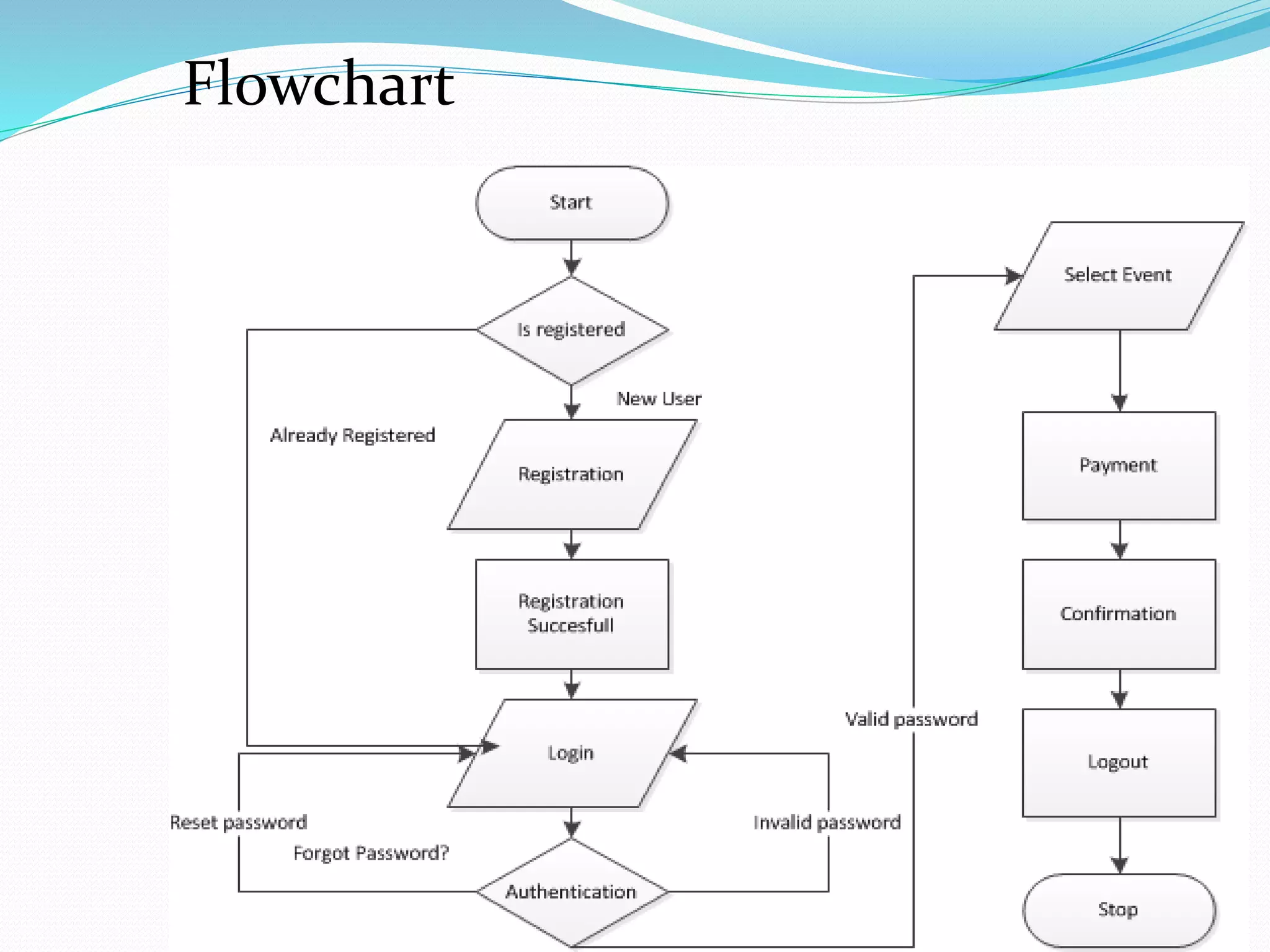
Flowchart
Dream Maker
(Event
Management
System)
Client
Event
Request
User
Manager
database
Event Detail
LogIn/Registration
Access
Grant
Event Grant
Data
alteration
Data
view
Admin
Class Diagram
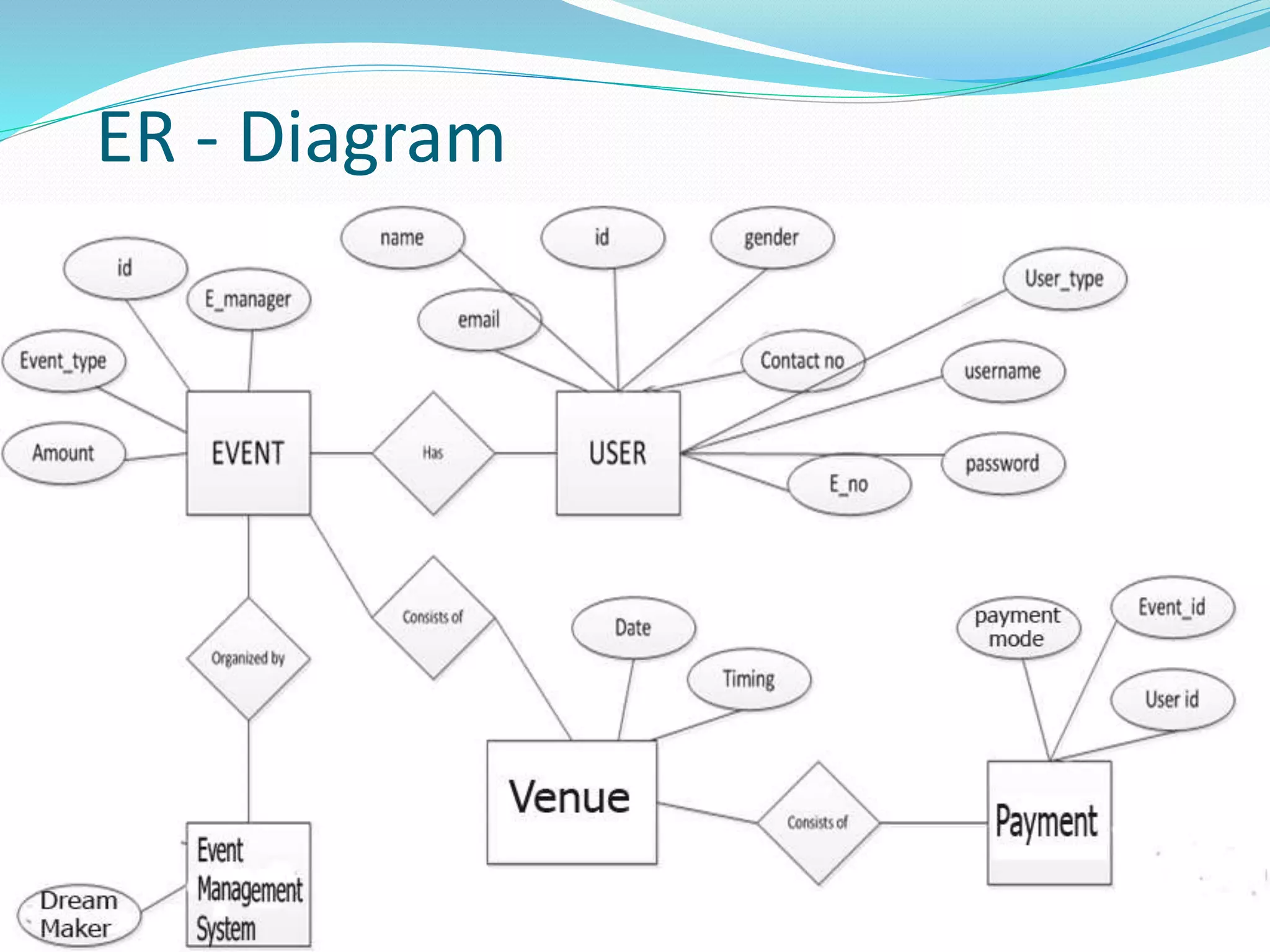
ER - Diagram
Modules
1.Registration – Participants can register online for any event.
2. Event – Event manager can generate event by this module. They can
edit, delete the information of any generated event.
3. Notification – Participants can get notification about event timing,
place or any updates.
4. User Module – User can register for event. Can easily check event
details times and can contact event manager easily.
5. Volunteer Module – Volunteer can view the details of his/her event
participants. Volunteer has to update the winner of his/her event in the
system.
6. Admin Module – DBA has all the rights. He can add, edit, delete any
information in the system. He can add new event, event manager,
Volunteer as well as update them.
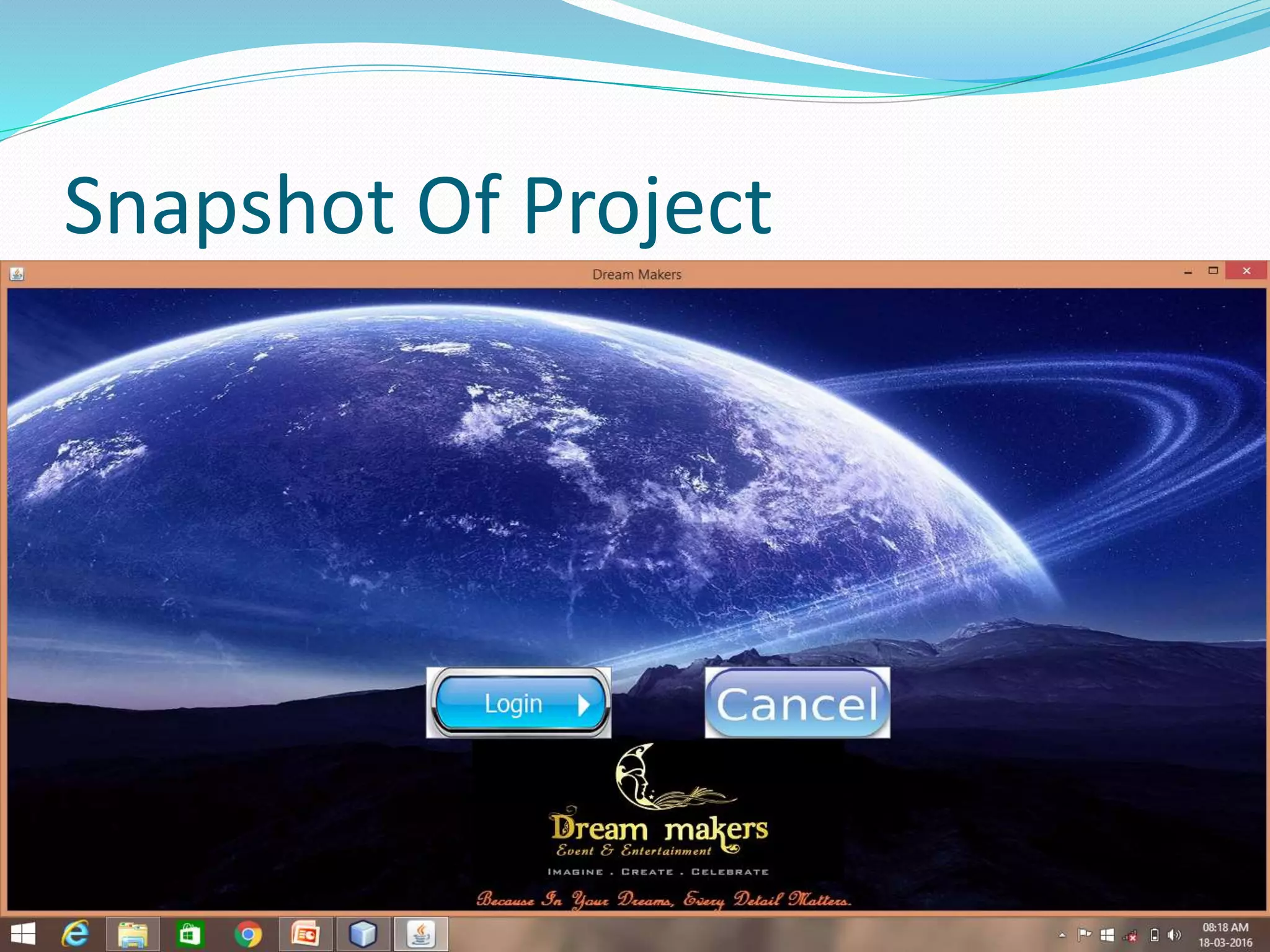
Snapshot Of Project
Snapshot Of Project
Snapshot Of Project
Snapshot Of Project
Biblography
 www.javatpoint.com
 www.stackoverflow.com
 www.google.com
 www.youtube.com
Thank You

Event managementsystem

  • 1.
  • 2.
  • 3.
    OBJECTIVE OF PROJECT Our aim is to make a user friendly application that can let a user to plan a decoration for an event.  He can select the event and according to the event the appropriate decoration can be made.  Choice of decoration can be made from the list of panel.  Client will also find out the cost for particular decoration and virtual representation of that particular decoration.  The project will help Clients to decorate for an event and the cost required for particular decoration. No need to visit decorators.
  • 4.
  • 5.
  • 7.
    The Aim ofEvent Management
  • 8.
    Project Details  EventManagement system manages all the events.  System very efficiently store, maintain and retrieve data from its database and can be use for further analysis(data mining & OLAP). Time saving activity . At Minimum Cost.
  • 9.
    Propose Manual hours thatneed to spend in record keeping and generating reports is no longer required. it generate automatically The data in a centralized way which is available to all the event managers. Easy to manage data in database. user can register for any event from anywhere. Event manager can update or modify records of user any time.  Automatically mail to particular user.
  • 10.
    Scope This application includesthe IT fields.  Secure Administrative panel.  Normal users are the participants.  They have to register for the events.  Users will have following functions: Easy communication with the manager  Event time  Get instant message about any change Updates easily
  • 11.
    Feasibility Study Product :Dream Maker is an event management system. By using this system various users can login for different events. It eases registration process so it’s a user friendly product. Operational Feasibility : Operation of the proposed system depend on its various users. These various user-type mentioned below. (1)Admin (2)Manager (3)Normal User (Participants)/ Admin will make managers for different events. And allocate Login ID. Thereafter Normal User enters their details and also select events. Then manager will check user entries and will allot registration id for authentication purpose. Manager can also change date, time of the events. Here manager responsible to check team size, details. And manager is responsible to restrict unauthorized people or wrong entries. After these all process Admin will check all detais of user, work of manager. Admin can make any changes at any stage.
  • 12.
     Economic feasibility: As no papers required so it reduce cost. It would be beneficial because only one time development efforts required. All people are aware of technologies so no special skills required to run the system.
  • 13.
    System Requirement Study 1)Hardware Requirements 1) The Hardware Requirements are:  RAM: 512 MB  Processor: Pentium - IV onwards  HDD Space: 2 GB or more 2) Software Requirements 2) The Software requirements are:  Operating System – Windows  Internet Browser (Mozilla Firefox/Google Chrome/IE 7- 8)  Netbean 8.1 , notepad  MySQL 5.6.17
  • 14.
    Technology Use Programming language:JAVA 1.8.0 Hardware interface: 4GB RAM, WINDOWS 8  Database: MySQL Server 5.6.17  Tools: Netbeans 8.1, notepad
  • 15.
    3) Functional RequirementsR1: Registration Description : To enter into this App, user has to register himself first. Requirements of registration are first name, last name, user name, email-id, password, confirm password etc. Input : User Details Output : Filled Registration Details. Processing : User details are checked with database. Password constraint is checked as per validation. R2 : User Login Description : The System provides facility to login into the system. Input : Enter username and password Output : User Profile page Processing : The system will check the input of user and if valid then login is done. Otherwise user will be asked to re-enter the username and password.
  • 16.
    Description : Theuser can select the event and also select payment method. Input : Main event , Sub event, Enrollment number, Add team member . Output : Event selected Successfully ,also see all detail and delete also . Processing : The system will add selected data into database. R4 : Forgot Password Description : The user can send reset link to the mail id to reset password. Input : Email id Output : Reset link send to Email id. Processing : By reset link we can easily change the password and update store in database . R3 : Select the event
  • 17.
    Description : TheAdmin can add manager ,main event ,sub-event also. Input : main event, sub-event, manager. Output : Add successfully in database. Processing : The system will add selected data into database. R6 : Manager panel Description :The manager can add volunteer ,main event and sub-event also . Input :Main event, sub-event Output : Add successfully in database . Processing : The system will add selected data into database. R5 : Admin panel
  • 18.
    R8 : Logout Description: The system provides the facility to logout Input : Select logout option Output : Logout from the system Processing : User will logout
  • 19.
  • 21.
  • 23.
  • 24.
  • 25.
    Modules 1.Registration – Participantscan register online for any event. 2. Event – Event manager can generate event by this module. They can edit, delete the information of any generated event. 3. Notification – Participants can get notification about event timing, place or any updates. 4. User Module – User can register for event. Can easily check event details times and can contact event manager easily. 5. Volunteer Module – Volunteer can view the details of his/her event participants. Volunteer has to update the winner of his/her event in the system. 6. Admin Module – DBA has all the rights. He can add, edit, delete any information in the system. He can add new event, event manager, Volunteer as well as update them.
  • 26.
  • 27.
  • 28.
  • 29.
  • 30.
  • 31.