


Men & Mice Webinar Trilogy
Rethinking Name Resolution
in Local Networks
Local Name Resolution in Unix Networks
Local Name Resolution in
Windows Networks
• Multicast DNS (mDNS) was pioneered in Apple’s MacOS X
system, and is now available on all systems from Cupertino.
• The focus of this webinar will be to take a deeper look into
this local name-resolution system and the implementations
for other Unix systems like Linux and FreeBSD. Linux’s new
über-Daemon “systemd” supports both mDNS and the
Windows LLMNR (Link-Local-Multicast-Name-Resolution).
We will also show how well a Systemd-Linux behaves in
heterogenous networks running both Windows and
macOS.
2
mDNS
Multicast DNS
Multicast DNS
• Multicast DNS is defined in RFC
6762 (February 2013)
• Together with "DNS-Based
Service Discovery", RFC 6763, it
is the base of Apple's Bonjour
services
• Multicast DNS is implemented in
• All Apple systems since MacOS
X 10.2, including iPad, iPhone
and Apple TV devices
• Linux with either Avahi or
mDNSResponder
• FreeBSD, NetBSD, DragonFly
and OpenBSD
• Solaris
• Android since version 4.1 Jelly
Bean
• Windows 10 has limited build-in
support
• Windows 7 and 8 with Apple
Bonjour Add-On Software
4
Multicast DNS
• Multicast DNS website

http://www.multicastdns.org/
• Multicast DNS listens on Port 5353
• IPv4 Address: 224.0.0.251
• IPv6 Address: ff02::fb
5
Multicast DNS
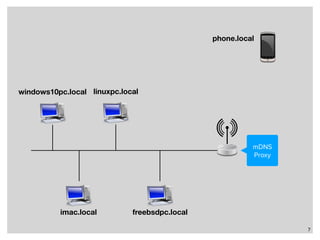
• By design, mDNS is confined to a single subnet
• mDNS queries can be bridged to other subnets with the help of an mDNS-Proxy
• Discovery Proxy for Multicast DNS-Based Service Discovery

https://tools.ietf.org/html/draft-ietf-dnssd-hybrid
• Multicast DNS Discovery Relay

https://tools.ietf.org/html/draft-sctl-dnssd-mdns-relay
• Discovery daemon (discd)

https://dnsdisco.com/
• mDNS DNS-SD hybrid-proxy

https://github.com/sbyx/ohybridproxy/
• mdns-repeater

https://bitbucket.org/geekman/mdns-repeater/
6
7
imac.local
windows10pc.local linuxpc.local
freebsdpc.local
mDNS
Proxy
phone.local
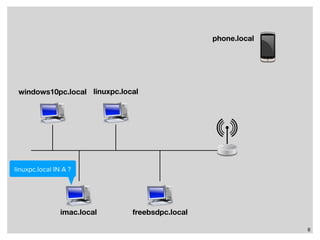
8
imac.local
windows10pc.local linuxpc.local
freebsdpc.local
linuxpc.local IN A ?
phone.local
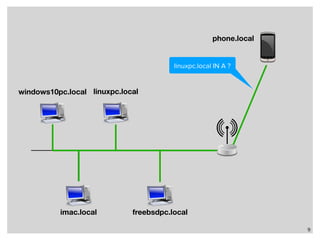
9
imac.local
windows10pc.local linuxpc.local
freebsdpc.local
linuxpc.local IN A ?
phone.local
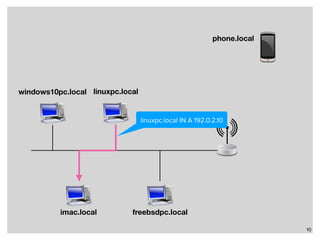
10
imac.local
windows10pc.local linuxpc.local
freebsdpc.local
linuxpc.local IN A 192.0.2.10
phone.local
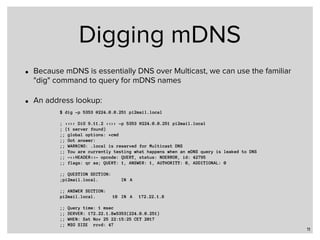
Digging mDNS
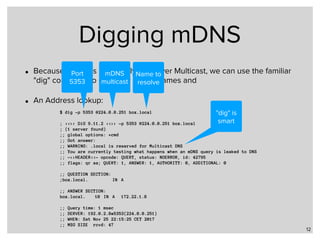
• Because mDNS is essentially DNS over Multicast, we can use the familiar
"dig" command to query for mDNS names
• An address lookup:
11
$ dig -p 5353 @224.0.0.251 pi2mail.local
; <<>> DiG 9.11.2 <<>> -p 5353 @224.0.0.251 pi2mail.local
; (1 server found)
;; global options: +cmd
;; Got answer:
;; WARNING: .local is reserved for Multicast DNS
;; You are currently testing what happens when an mDNS query is leaked to DNS
;; ->>HEADER<<- opcode: QUERY, status: NOERROR, id: 42795
;; flags: qr aa; QUERY: 1, ANSWER: 1, AUTHORITY: 0, ADDITIONAL: 0
;; QUESTION SECTION:
;pi2mail.local. IN A
;; ANSWER SECTION:
pi2mail.local. 10 IN A 172.22.1.8
;; Query time: 1 msec
;; SERVER: 172.22.1.8#5353(224.0.0.251)
;; WHEN: Sat Nov 25 22:15:25 CET 2017
;; MSG SIZE rcvd: 47
Digging mDNS
• Because mDNS is essentially DNS over Multicast, we can use the familiar
"dig" command to query for mDNS names and
• An Address lookup:
12
$ dig -p 5353 @224.0.0.251 box.local
; <<>> DiG 9.11.2 <<>> -p 5353 @224.0.0.251 box.local
; (1 server found)
;; global options: +cmd
;; Got answer:
;; WARNING: .local is reserved for Multicast DNS
;; You are currently testing what happens when an mDNS query is leaked to DNS
;; ->>HEADER<<- opcode: QUERY, status: NOERROR, id: 42795
;; flags: qr aa; QUERY: 1, ANSWER: 1, AUTHORITY: 0, ADDITIONAL: 0
;; QUESTION SECTION:
;box.local. IN A
;; ANSWER SECTION:
box.local. 10 IN A 172.22.1.8
;; Query time: 1 msec
;; SERVER: 192.0.2.8#5353(224.0.0.251)
;; WHEN: Sat Nov 25 22:15:25 CET 2017
;; MSG SIZE rcvd: 47
Port
5353
mDNS
multicast
Name to
resolve
"dig" is
smart
Digging mDNS
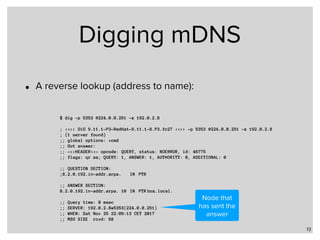
• A reverse lookup (address to name):
13
$ dig -p 5353 @224.0.0.251 -x 192.0.2.8
; <<>> DiG 9.11.1-P3-RedHat-9.11.1-8.P3.fc27 <<>> -p 5353 @224.0.0.251 -x 192.0.2.8
; (1 server found)
;; global options: +cmd
;; Got answer:
;; ->>HEADER<<- opcode: QUERY, status: NOERROR, id: 46775
;; flags: qr aa; QUERY: 1, ANSWER: 1, AUTHORITY: 0, ADDITIONAL: 0
;; QUESTION SECTION:
;8.2.0.192.in-addr.arpa. IN PTR
;; ANSWER SECTION:
8.2.0.192.in-addr.arpa. 10 IN PTR box.local.
;; Query time: 0 msec
;; SERVER: 192.0.2.8#5353(224.0.0.251)
;; WHEN: Sat Nov 25 22:09:13 CET 2017
;; MSG SIZE rcvd: 68
Node that
has sent the
answer
Digging mDNS
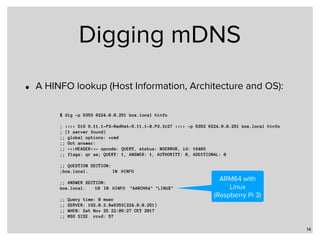
• A HINFO lookup (Host Information, Architecture and OS):
14
$ dig -p 5353 @224.0.0.251 box.local hinfo
; <<>> DiG 9.11.1-P3-RedHat-9.11.1-8.P3.fc27 <<>> -p 5353 @224.0.0.251 box.local hinfo
; (1 server found)
;; global options: +cmd
;; Got answer:
;; ->>HEADER<<- opcode: QUERY, status: NOERROR, id: 16403
;; flags: qr aa; QUERY: 1, ANSWER: 1, AUTHORITY: 0, ADDITIONAL: 0
;; QUESTION SECTION:
;box.local. IN HINFO
;; ANSWER SECTION:
box.local. 10 IN HINFO "AARCH64" "LINUX"
;; Query time: 0 msec
;; SERVER: 192.0.2.8#5353(224.0.0.251)
;; WHEN: Sat Nov 25 22:09:27 CET 2017
;; MSG SIZE rcvd: 57
ARM64 with
Linux
(Raspberry Pi 3)
Apple Bonjour
mDNS implementation for macOS and iOS
Apple Bonjour
• Introduced in MacOS X 10.2 (2002) with the name of
"Rendezvous", later renamed to "Bonjour"
• Bonjour implements MulticastDNS (mDNS) together with
DNS Service Discovery (DNS-SD)
• In this webinar, we will focus on mDNS
• mDNS is used on macOS, iOS in many applications: iTunes,
iChat, iPhoto, Safari, Terminal …
16
Apple Bonjour
• As one would expect, Bonjour mDNS is installed and
enabled by default on all Apple systems
• And it works usually without issues
17
Apple Bonjour
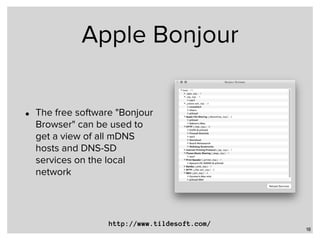
• The free software "Bonjour
Browser" can be used to
get a view of all mDNS
hosts and DNS-SD
services on the local
network
18
http://www.tildesoft.com/
Apple Bonjour
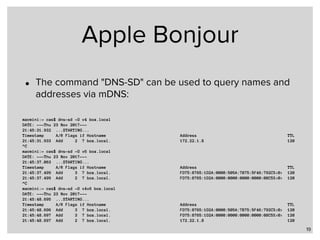
• The command "DNS-SD" can be used to query names and
addresses via mDNS:
19
macmini:~ cas$ dns-sd -G v4 box.local
DATE: ---Thu 23 Nov 2017---
21:45:31.932 ...STARTING...
Timestamp A/R Flags if Hostname Address TTL
21:45:31.933 Add 2 7 box.local. 172.22.1.8 120
^C
macmini:~ cas$ dns-sd -G v6 box.local
DATE: ---Thu 23 Nov 2017---
21:45:37.063 ...STARTING...
Timestamp A/R Flags if Hostname Address TTL
21:45:37.499 Add 3 7 box.local. FD75:8765:1D2A:0000:505A:7B75:5F46:792C%<0> 120
21:45:37.499 Add 2 7 box.local. FD75:8765:1D2A:0000:0000:0000:0000:08C5%<0> 120
^C
macmini:~ cas$ dns-sd -G v4v6 box.local
DATE: ---Thu 23 Nov 2017---
21:45:48.695 ...STARTING...
Timestamp A/R Flags if Hostname Address TTL
21:45:48.696 Add 3 7 box.local. FD75:8765:1D2A:0000:505A:7B75:5F46:792C%<0> 120
21:45:48.697 Add 3 7 box.local. FD75:8765:1D2A:0000:0000:0000:0000:08C5%<0> 120
21:45:48.697 Add 2 7 box.local. 172.22.1.8 120
Apple Bonjour
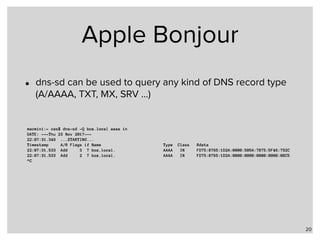
• dns-sd can be used to query any kind of DNS record type
(A/AAAA, TXT, MX, SRV …)
20
macmini:~ cas$ dns-sd -Q box.local aaaa in
DATE: ---Thu 23 Nov 2017---
22:07:31.349 ...STARTING...
Timestamp A/R Flags if Name Type Class Rdata
22:07:31.533 Add 3 7 box.local. AAAA IN FD75:8765:1D2A:0000:505A:7B75:5F46:792C
22:07:31.533 Add 2 7 box.local. AAAA IN FD75:8765:1D2A:0000:0000:0000:0000:08C5
^C
Apple Bonjour
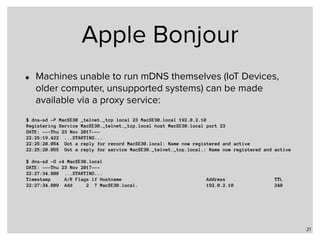
• Machines unable to run mDNS themselves (IoT Devices,
older computer, unsupported systems) can be made
available via a proxy service:
21
$ dns-sd -P MacSE30 _telnet._tcp local 23 MacSE30.local 192.0.2.10
Registering Service MacSE30._telnet._tcp.local host MacSE30.local port 23
DATE: ---Thu 23 Nov 2017---
22:25:19.422 ...STARTING...
22:25:20.054 Got a reply for record MacSE30.local: Name now registered and active
22:25:20.055 Got a reply for service MacSE30._telnet._tcp.local.: Name now registered and active
$ dns-sd -G v4 MacSE30.local
DATE: ---Thu 23 Nov 2017---
22:27:34.808 ...STARTING...
Timestamp A/R Flags if Hostname Address TTL
22:27:34.809 Add 2 7 MacSE30.local. 192.0.2.10 240
Demo
Avahi
Free Software 

mDNS implementation for Unix and Linux
Avahi
• Avahi is an mDNS and DNS-SD subsystem developed by Lennart
Poettering and Trent Lloyd for Linux
• Licensed under LGPL
• The most feature-rich mDNS implementation
• Also ported to FreeBSD, NetBSD, MacOS X, Solaris/Illumnos
• Started 2004, because the mDNSResponder license at that time was
incompatible with the GPL used for many Linux software
• Homepage: 

http://avahi.org/
24
Avahi
• The Avahi-System is installed and enabled on many
popular Linux Desktop distributions
• Ubuntu, Fedora, Linux-Mint, Debian …
• And is available for installation for almost all other Linux
systems
25
Avahi
26
[server]

host-name=box

use-ipv4=yes

use-ipv6=yes

enable-dbus=yes

ratelimit-interval-usec=1000000

ratelimit-burst=1000
[wide-area]

enable-wide-area=yes
[publish]

publish-hinfo=yes

publish-workstation=yes

publish-dns-servers=192.0.2.53 192.0.2.153
• Example configuration file for avahi-daemon in 

/etc/avahi/avahi-daemon.conf
Name to be
published
Publish HINFO-
Record and
Workstation
Service
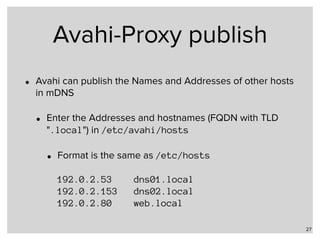
Avahi-Proxy publish
• Avahi can publish the Names and Addresses of other hosts
in mDNS
• Enter the Addresses and hostnames (FQDN with TLD
".local") in /etc/avahi/hosts
• Format is the same as /etc/hosts


192.0.2.53 dns01.local

192.0.2.153 dns02.local

192.0.2.80 web.local
27
Demo
mDNSResponder
Apple Open Source 

mDNS implementation for Unix and Linux
mDNSResponder
• Apple provides an open source reference implementation for
mDNS and DNS-SD, the mDNSResponder
• This mDNSResponder is based on the macOS
mDNSResponder service
• Source code

https://opensource.apple.com/source/mDNSResponder
• The code contains mDNSResponder for macOS, MacOS 9,
Windows, VxWorks and Posix (generic Unix)
• This code has been ported to Linux, xBSD and Solaris/Illumnos
30
mDNSResponder
• mDNSResponder has fewer features than Avahi and is
somewhat harder to configure
• Blog post "Sharing Files with macOS from FreeBSD with
SMB and mDNS Service Discovery" by Curtis McEnroe:

https://cmcenroe.me/2017/01/08/freebsd-macos-file-sharing.html
31
OpenMDNS
mDNS from the OpenDNS world
OpenMDNS
• OpenMDNS is an ISC licensed MDNS/DNS-SD
implementation for OpenBSD
• It is more lean than Avahi or mDNSResponder
• Configuration via mdnsctl commandline tool
• Website

http://www.haesbaert.org/openmdns/
33
Demo
Systemd
LLMNR and mDNS for modern Linux Systems
Systemd
• Systemd is a (relatively) new system management software for modern
Linux systems. It is Linux-only. This webinar covers Version 234, older
versions have less functionality.
• Systemd offers services such as
• System startup (Init)
• Container Management (systemd-nspawn)
• Logging (Journald)
• Network-Configuration (systemd-networkd)
• Name-Resolution (systemd-resolved)
36
Systemd-resolved
• The process "systemd-resolved" offers an integrated name
resolver for the Linux system
• DNS including DNSSEC validation
• LLMNR (Windows Link-Local-Multicast-Name-Resolution)
• mDNS (Apple style Bonjour MulticastDNS)
• Synthesised local names such as "gateway." for the local
network gateway ("_gateway." with Version 235+)
37
Systemd-resolved
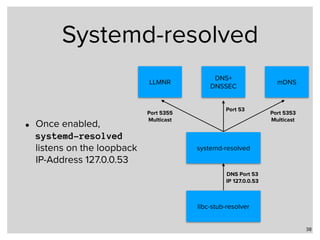
• Once enabled,
systemd-resolved
listens on the loopback
IP-Address 127.0.0.53
38
libc-stub-resolver
systemd-resolved
DNS Port 53
IP 127.0.0.53
LLMNR
DNS+

DNSSEC
mDNS
Port 53
Port 5353
Multicast
Port 5355
Multicast
systemd-resolved
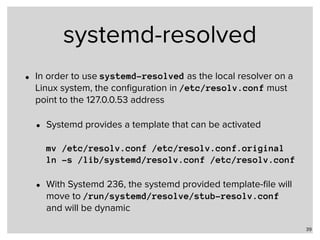
• In order to use systemd-resolved as the local resolver on a
Linux system, the configuration in /etc/resolv.conf must
point to the 127.0.0.53 address
• Systemd provides a template that can be activated


mv /etc/resolv.conf /etc/resolv.conf.original

ln -s /lib/systemd/resolv.conf /etc/resolv.conf
• With Systemd 236, the systemd provided template-file will
move to /run/systemd/resolve/stub-resolv.conf
and will be dynamic
39
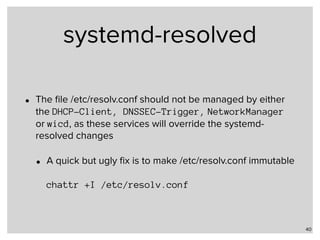
systemd-resolved
• The file /etc/resolv.conf should not be managed by either
the DHCP-Client, DNSSEC-Trigger, NetworkManager
or wicd, as these services will override the systemd-
resolved changes
• A quick but ugly fix is to make /etc/resolv.conf immutable


chattr +I /etc/resolv.conf
40
Resolved configuration
• systemd-resolved is configured via a configuration file in 

/etc/systemd/resolved.conf:
41
[Resolve]
DNSStubListener=udp
FallbackDNS=172.22.1.1 172.42.1.105
Domains=example.com home.example.de
MulticastDNS=yes
LLMNR=yes
DNSSEC=yes
Cache=yes
Enables systemd-resolved to
listen on 127.0.0.53
Resolved configuration
• systemd-resolved is configured via a configuration file in 

/etc/systemd/resolved.conf:
42
[Resolve]
DNSStubListener=udp
FallbackDNS=9.9.9.9
Domains=example.com home.example.de
MulticastDNS=yes
LLMNR=yes
DNSSEC=yes
Cache=yes
If no DNS resolver are
received via DHCP or IPv6-
RDNSD, use these
If no Fallback-DNS
servers are
configured, the
Google-Public-DNS-
Servers are used
Resolved configuration
• systemd-resolved is configured via a configuration file in 

/etc/systemd/resolved.conf:
43
[Resolve]
DNSStubListener=udp
FallbackDNS=9.9.9.9
Domains=example.com home.example.de
MulticastDNS=yes
LLMNR=yes
DNSSEC=yes
Cache=yes
"Search" domains for single
label names in queries
Resolved configuration
• systemd-resolved is configured via a configuration file in 

/etc/systemd/resolved.conf:
44
[Resolve]
DNSStubListener=udp
FallbackDNS=9.9.9.9
Domains=example.com home.example.de
MulticastDNS=yes
LLMNR=yes
DNSSEC=yes
Cache=yes
Enable mDNS resolution and
publication
Resolved configuration
• systemd-resolved is configured via a configuration file in 

/etc/systemd/resolved.conf:
45
[Resolve]
DNSStubListener=udp
FallbackDNS=9.9.9.9
Domains=example.com home.example.de
MulticastDNS=yes
LLMNR=yes
DNSSEC=yes
Cache=yes
Enable LLMNR resolution and
publication
Resolved configuration
• systemd-resolved is configured via a configuration file in 

/etc/systemd/resolved.conf:
46
[Resolve]
DNSStubListener=udp
FallbackDNS=9.9.9.9
Domains=example.com home.example.de
MulticastDNS=yes
LLMNR=yes
DNSSEC=yes
Cache=yes
Validate DNSSEC signatures
against the trust-anchor
Resolved configuration
• systemd-resolved is configured via a configuration file in 

/etc/systemd/resolved.conf:
47
[Resolve]
DNSStubListener=udp
FallbackDNS=9.9.9.9
Domains=example.com home.example.de
MulticastDNS=yes
LLMNR=yes
DNSSEC=yes
Cache=yes
Enable a local DNS/mDNS/
LLMNR cache
systemd-resolved
48
[user@box]~% sudo systemctl status systemd-resolved
● systemd-resolved.service - Network Name Resolution
Loaded: loaded (/usr/lib/systemd/system/systemd-resolved.service; enabled; vendor preset: disable
Active: active (running) since Thu 2017-11-23 11:59:24 CET; 9s ago
Docs: man:systemd-resolved.service(8)
https://www.freedesktop.org/wiki/Software/systemd/resolved
https://www.freedesktop.org/wiki/Software/systemd/writing-network-configuration-managers
https://www.freedesktop.org/wiki/Software/systemd/writing-resolver-clients
Main PID: 7017 (systemd-resolve)
Status: "Processing requests..."
Tasks: 1 (limit: 4915)
CGroup: /system.slice/systemd-resolved.service
└─7017 /usr/lib/systemd/systemd-resolved
Nov 23 11:59:24 csmobile4.home.strotmann.de systemd[1]: Starting Network Name Resolution...
Nov 23 11:59:24 csmobile4.home.strotmann.de systemd-resolved[7017]: Positive Trust Anchors:
Nov 23 11:59:24 csmobile4.home.strotmann.de systemd-resolved[7017]: . IN DS 19036 8 2 49aac11d7b6f64
Nov 23 11:59:24 csmobile4.home.strotmann.de systemd-resolved[7017]: . IN DS 20326 8 2 e06d44b80b8f1d
Nov 23 11:59:24 csmobile4.home.strotmann.de systemd-resolved[7017]: Negative trust anchors: 10.in-ad…
Nov 23 11:59:24 csmobile4.home.strotmann.de systemd-resolved[7017]: Using system hostname 'box.example.com'
Nov 23 11:59:24 csmobile4.home.strotmann.de systemd[1]: Started Network Name Resolution.
systemd-resolve
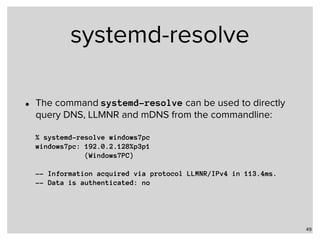
• The command systemd-resolve can be used to directly
query DNS, LLMNR and mDNS from the commandline:


% systemd-resolve windows7pc

windows7pc: 192.0.2.128%p3p1

(Windows7PC)


-- Information acquired via protocol LLMNR/IPv4 in 113.4ms.

-- Data is authenticated: no
49
systemd-resolve
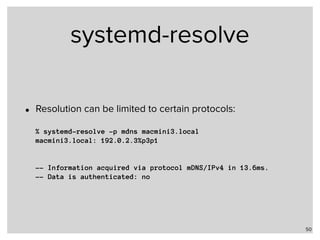
• Resolution can be limited to certain protocols:


% systemd-resolve -p mdns macmini3.local

macmini3.local: 192.0.2.3%p3p1


-- Information acquired via protocol mDNS/IPv4 in 13.6ms.

-- Data is authenticated: no
50
systemd-resolve
• Status of the systemd-resolver:


% systemd-resolve —status

Global

DNS Servers: 172.42.1.105

DNSSEC NTA: 10.in-addr.arpa

16.172.in-addr.arpa

[…]

168.192.in-addr.arpa 

31.172.in-addr.arpa

corp

d.f.ip6.arpa

home

internal

intranet

lan

local

private

test


Link 2 (eno1)

Current Scopes: DNS LLMNR/IPv4 LLMNR/IPv6

LLMNR setting: yes

MulticastDNS setting: no

DNSSEC setting: yes

DNSSEC supported: yes

DNS Servers: 192.0.2.1

192.0.2.53

fd75:8765:1d2a::1

DNS Domain: home.example.com
51
systemd-resolve
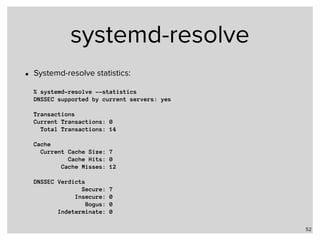
• Systemd-resolve statistics:


% systemd-resolve --statistics

DNSSEC supported by current servers: yes


Transactions

Current Transactions: 0

Total Transactions: 14


Cache

Current Cache Size: 7

Cache Hits: 0

Cache Misses: 12


DNSSEC Verdicts

Secure: 7

Insecure: 0

Bogus: 0

Indeterminate: 0
52
Demo
Windows 10 and
Bonjour for Windows
mDNS in the Windows world
mDNS in Windows 10
• Windows 10 (1709) has some limited support for mDNS and
DNS-Service-Discovery:
• Windows uses mDNS and DNS-SD to find nearby printer
• In "Developer-Mode", with "Device-Discovery" enabled, a
Windows 10 machine will respond to mDNS queries for
its own name
• However it is not possible to use mDNS as a general
name resolution protocol
55
Bonjour for Windows
• Apple offers Bonjour as an extension for Windows 7/8 and
10
• Bonjour is part of Apple Software products for Windows
• iTunes for Windows
• Quicktime for Windows
• Bonjour Print Services for Windows
56
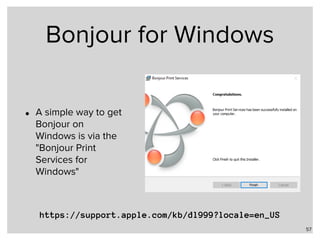
Bonjour for Windows
• A simple way to get
Bonjour on
Windows is via the
"Bonjour Print
Services for
Windows"
57
https://support.apple.com/kb/dl999?locale=en_US
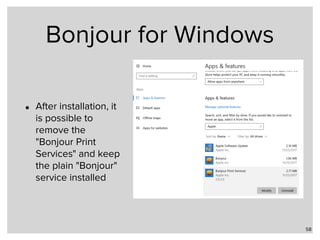
Bonjour for Windows
• After installation, it
is possible to
remove the
"Bonjour Print
Services" and keep
the plain "Bonjour"
service installed
58
Conclusion
• From all local name resolution protocols shown in this
webinar series, mDNS is the most universal available
• It is an IETF standard
• The Home Networking Control Protocol (RFC 7788) does
support and use mDNS
59
Next
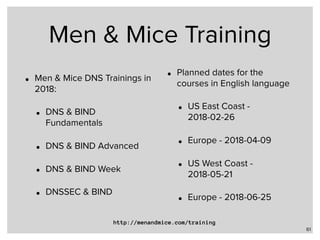
Men & Mice Training
• Men & Mice DNS Trainings in
2018:
• DNS & BIND
Fundamentals
• DNS & BIND Advanced
• DNS & BIND Week
• DNSSEC & BIND
• Planned dates for the
courses in English language
• US East Coast -
2018-02-26
• Europe - 2018-04-09
• US West Coast -
2018-05-21
• Europe - 2018-06-25
61
http://menandmice.com/training
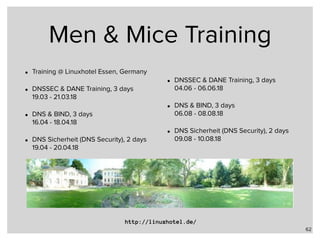
Men & Mice Training
• Training @ Linuxhotel Essen, Germany
• DNSSEC & DANE Training, 3 days

19.03 - 21.03.18
• DNS & BIND, 3 days 

16.04 - 18.04.18
• DNS Sicherheit (DNS Security), 2 days

19.04 - 20.04.18
• DNSSEC & DANE Training, 3 days

04.06 - 06.06.18
• DNS & BIND, 3 days

06.08 - 08.08.18
• DNS Sicherheit (DNS Security), 2 days

09.08 - 10.08.18
62
http://linuxhotel.de/
Fini - Q & A

Part 3 - Local Name Resolution in Linux, FreeBSD and macOS/iOS

  • 1.
    Men & MiceWebinar Trilogy Rethinking Name Resolution in Local Networks Local Name Resolution in Unix Networks
  • 2.
    Local Name Resolutionin Windows Networks • Multicast DNS (mDNS) was pioneered in Apple’s MacOS X system, and is now available on all systems from Cupertino. • The focus of this webinar will be to take a deeper look into this local name-resolution system and the implementations for other Unix systems like Linux and FreeBSD. Linux’s new über-Daemon “systemd” supports both mDNS and the Windows LLMNR (Link-Local-Multicast-Name-Resolution). We will also show how well a Systemd-Linux behaves in heterogenous networks running both Windows and macOS. 2
  • 3.
  • 4.
    Multicast DNS • MulticastDNS is defined in RFC 6762 (February 2013) • Together with "DNS-Based Service Discovery", RFC 6763, it is the base of Apple's Bonjour services • Multicast DNS is implemented in • All Apple systems since MacOS X 10.2, including iPad, iPhone and Apple TV devices • Linux with either Avahi or mDNSResponder • FreeBSD, NetBSD, DragonFly and OpenBSD • Solaris • Android since version 4.1 Jelly Bean • Windows 10 has limited build-in support • Windows 7 and 8 with Apple Bonjour Add-On Software 4
  • 5.
    Multicast DNS • MulticastDNS website
 http://www.multicastdns.org/ • Multicast DNS listens on Port 5353 • IPv4 Address: 224.0.0.251 • IPv6 Address: ff02::fb 5
  • 6.
    Multicast DNS • Bydesign, mDNS is confined to a single subnet • mDNS queries can be bridged to other subnets with the help of an mDNS-Proxy • Discovery Proxy for Multicast DNS-Based Service Discovery
 https://tools.ietf.org/html/draft-ietf-dnssd-hybrid • Multicast DNS Discovery Relay
 https://tools.ietf.org/html/draft-sctl-dnssd-mdns-relay • Discovery daemon (discd)
 https://dnsdisco.com/ • mDNS DNS-SD hybrid-proxy
 https://github.com/sbyx/ohybridproxy/ • mdns-repeater
 https://bitbucket.org/geekman/mdns-repeater/ 6
  • 7.
  • 8.
  • 9.
  • 10.
  • 11.
    Digging mDNS • BecausemDNS is essentially DNS over Multicast, we can use the familiar "dig" command to query for mDNS names • An address lookup: 11 $ dig -p 5353 @224.0.0.251 pi2mail.local ; <<>> DiG 9.11.2 <<>> -p 5353 @224.0.0.251 pi2mail.local ; (1 server found) ;; global options: +cmd ;; Got answer: ;; WARNING: .local is reserved for Multicast DNS ;; You are currently testing what happens when an mDNS query is leaked to DNS ;; ->>HEADER<<- opcode: QUERY, status: NOERROR, id: 42795 ;; flags: qr aa; QUERY: 1, ANSWER: 1, AUTHORITY: 0, ADDITIONAL: 0 ;; QUESTION SECTION: ;pi2mail.local. IN A ;; ANSWER SECTION: pi2mail.local. 10 IN A 172.22.1.8 ;; Query time: 1 msec ;; SERVER: 172.22.1.8#5353(224.0.0.251) ;; WHEN: Sat Nov 25 22:15:25 CET 2017 ;; MSG SIZE rcvd: 47
  • 12.
    Digging mDNS • BecausemDNS is essentially DNS over Multicast, we can use the familiar "dig" command to query for mDNS names and • An Address lookup: 12 $ dig -p 5353 @224.0.0.251 box.local ; <<>> DiG 9.11.2 <<>> -p 5353 @224.0.0.251 box.local ; (1 server found) ;; global options: +cmd ;; Got answer: ;; WARNING: .local is reserved for Multicast DNS ;; You are currently testing what happens when an mDNS query is leaked to DNS ;; ->>HEADER<<- opcode: QUERY, status: NOERROR, id: 42795 ;; flags: qr aa; QUERY: 1, ANSWER: 1, AUTHORITY: 0, ADDITIONAL: 0 ;; QUESTION SECTION: ;box.local. IN A ;; ANSWER SECTION: box.local. 10 IN A 172.22.1.8 ;; Query time: 1 msec ;; SERVER: 192.0.2.8#5353(224.0.0.251) ;; WHEN: Sat Nov 25 22:15:25 CET 2017 ;; MSG SIZE rcvd: 47 Port 5353 mDNS multicast Name to resolve "dig" is smart
  • 13.
    Digging mDNS • Areverse lookup (address to name): 13 $ dig -p 5353 @224.0.0.251 -x 192.0.2.8 ; <<>> DiG 9.11.1-P3-RedHat-9.11.1-8.P3.fc27 <<>> -p 5353 @224.0.0.251 -x 192.0.2.8 ; (1 server found) ;; global options: +cmd ;; Got answer: ;; ->>HEADER<<- opcode: QUERY, status: NOERROR, id: 46775 ;; flags: qr aa; QUERY: 1, ANSWER: 1, AUTHORITY: 0, ADDITIONAL: 0 ;; QUESTION SECTION: ;8.2.0.192.in-addr.arpa. IN PTR ;; ANSWER SECTION: 8.2.0.192.in-addr.arpa. 10 IN PTR box.local. ;; Query time: 0 msec ;; SERVER: 192.0.2.8#5353(224.0.0.251) ;; WHEN: Sat Nov 25 22:09:13 CET 2017 ;; MSG SIZE rcvd: 68 Node that has sent the answer
  • 14.
    Digging mDNS • AHINFO lookup (Host Information, Architecture and OS): 14 $ dig -p 5353 @224.0.0.251 box.local hinfo ; <<>> DiG 9.11.1-P3-RedHat-9.11.1-8.P3.fc27 <<>> -p 5353 @224.0.0.251 box.local hinfo ; (1 server found) ;; global options: +cmd ;; Got answer: ;; ->>HEADER<<- opcode: QUERY, status: NOERROR, id: 16403 ;; flags: qr aa; QUERY: 1, ANSWER: 1, AUTHORITY: 0, ADDITIONAL: 0 ;; QUESTION SECTION: ;box.local. IN HINFO ;; ANSWER SECTION: box.local. 10 IN HINFO "AARCH64" "LINUX" ;; Query time: 0 msec ;; SERVER: 192.0.2.8#5353(224.0.0.251) ;; WHEN: Sat Nov 25 22:09:27 CET 2017 ;; MSG SIZE rcvd: 57 ARM64 with Linux (Raspberry Pi 3)
  • 15.
  • 16.
    Apple Bonjour • Introducedin MacOS X 10.2 (2002) with the name of "Rendezvous", later renamed to "Bonjour" • Bonjour implements MulticastDNS (mDNS) together with DNS Service Discovery (DNS-SD) • In this webinar, we will focus on mDNS • mDNS is used on macOS, iOS in many applications: iTunes, iChat, iPhoto, Safari, Terminal … 16
  • 17.
    Apple Bonjour • Asone would expect, Bonjour mDNS is installed and enabled by default on all Apple systems • And it works usually without issues 17
  • 18.
    Apple Bonjour • Thefree software "Bonjour Browser" can be used to get a view of all mDNS hosts and DNS-SD services on the local network 18 http://www.tildesoft.com/
  • 19.
    Apple Bonjour • Thecommand "DNS-SD" can be used to query names and addresses via mDNS: 19 macmini:~ cas$ dns-sd -G v4 box.local DATE: ---Thu 23 Nov 2017--- 21:45:31.932 ...STARTING... Timestamp A/R Flags if Hostname Address TTL 21:45:31.933 Add 2 7 box.local. 172.22.1.8 120 ^C macmini:~ cas$ dns-sd -G v6 box.local DATE: ---Thu 23 Nov 2017--- 21:45:37.063 ...STARTING... Timestamp A/R Flags if Hostname Address TTL 21:45:37.499 Add 3 7 box.local. FD75:8765:1D2A:0000:505A:7B75:5F46:792C%<0> 120 21:45:37.499 Add 2 7 box.local. FD75:8765:1D2A:0000:0000:0000:0000:08C5%<0> 120 ^C macmini:~ cas$ dns-sd -G v4v6 box.local DATE: ---Thu 23 Nov 2017--- 21:45:48.695 ...STARTING... Timestamp A/R Flags if Hostname Address TTL 21:45:48.696 Add 3 7 box.local. FD75:8765:1D2A:0000:505A:7B75:5F46:792C%<0> 120 21:45:48.697 Add 3 7 box.local. FD75:8765:1D2A:0000:0000:0000:0000:08C5%<0> 120 21:45:48.697 Add 2 7 box.local. 172.22.1.8 120
  • 20.
    Apple Bonjour • dns-sdcan be used to query any kind of DNS record type (A/AAAA, TXT, MX, SRV …) 20 macmini:~ cas$ dns-sd -Q box.local aaaa in DATE: ---Thu 23 Nov 2017--- 22:07:31.349 ...STARTING... Timestamp A/R Flags if Name Type Class Rdata 22:07:31.533 Add 3 7 box.local. AAAA IN FD75:8765:1D2A:0000:505A:7B75:5F46:792C 22:07:31.533 Add 2 7 box.local. AAAA IN FD75:8765:1D2A:0000:0000:0000:0000:08C5 ^C
  • 21.
    Apple Bonjour • Machinesunable to run mDNS themselves (IoT Devices, older computer, unsupported systems) can be made available via a proxy service: 21 $ dns-sd -P MacSE30 _telnet._tcp local 23 MacSE30.local 192.0.2.10 Registering Service MacSE30._telnet._tcp.local host MacSE30.local port 23 DATE: ---Thu 23 Nov 2017--- 22:25:19.422 ...STARTING... 22:25:20.054 Got a reply for record MacSE30.local: Name now registered and active 22:25:20.055 Got a reply for service MacSE30._telnet._tcp.local.: Name now registered and active $ dns-sd -G v4 MacSE30.local DATE: ---Thu 23 Nov 2017--- 22:27:34.808 ...STARTING... Timestamp A/R Flags if Hostname Address TTL 22:27:34.809 Add 2 7 MacSE30.local. 192.0.2.10 240
  • 22.
  • 23.
    Avahi Free Software 
 mDNSimplementation for Unix and Linux
  • 24.
    Avahi • Avahi isan mDNS and DNS-SD subsystem developed by Lennart Poettering and Trent Lloyd for Linux • Licensed under LGPL • The most feature-rich mDNS implementation • Also ported to FreeBSD, NetBSD, MacOS X, Solaris/Illumnos • Started 2004, because the mDNSResponder license at that time was incompatible with the GPL used for many Linux software • Homepage: 
 http://avahi.org/ 24
  • 25.
    Avahi • The Avahi-Systemis installed and enabled on many popular Linux Desktop distributions • Ubuntu, Fedora, Linux-Mint, Debian … • And is available for installation for almost all other Linux systems 25
  • 26.
  • 27.
    Avahi-Proxy publish • Avahican publish the Names and Addresses of other hosts in mDNS • Enter the Addresses and hostnames (FQDN with TLD ".local") in /etc/avahi/hosts • Format is the same as /etc/hosts
 
 192.0.2.53 dns01.local
 192.0.2.153 dns02.local
 192.0.2.80 web.local 27
  • 28.
  • 29.
    mDNSResponder Apple Open Source
 mDNS implementation for Unix and Linux
  • 30.
    mDNSResponder • Apple providesan open source reference implementation for mDNS and DNS-SD, the mDNSResponder • This mDNSResponder is based on the macOS mDNSResponder service • Source code
 https://opensource.apple.com/source/mDNSResponder • The code contains mDNSResponder for macOS, MacOS 9, Windows, VxWorks and Posix (generic Unix) • This code has been ported to Linux, xBSD and Solaris/Illumnos 30
  • 31.
    mDNSResponder • mDNSResponder hasfewer features than Avahi and is somewhat harder to configure • Blog post "Sharing Files with macOS from FreeBSD with SMB and mDNS Service Discovery" by Curtis McEnroe:
 https://cmcenroe.me/2017/01/08/freebsd-macos-file-sharing.html 31
  • 32.
  • 33.
    OpenMDNS • OpenMDNS isan ISC licensed MDNS/DNS-SD implementation for OpenBSD • It is more lean than Avahi or mDNSResponder • Configuration via mdnsctl commandline tool • Website
 http://www.haesbaert.org/openmdns/ 33
  • 34.
  • 35.
    Systemd LLMNR and mDNSfor modern Linux Systems
  • 36.
    Systemd • Systemd isa (relatively) new system management software for modern Linux systems. It is Linux-only. This webinar covers Version 234, older versions have less functionality. • Systemd offers services such as • System startup (Init) • Container Management (systemd-nspawn) • Logging (Journald) • Network-Configuration (systemd-networkd) • Name-Resolution (systemd-resolved) 36
  • 37.
    Systemd-resolved • The process"systemd-resolved" offers an integrated name resolver for the Linux system • DNS including DNSSEC validation • LLMNR (Windows Link-Local-Multicast-Name-Resolution) • mDNS (Apple style Bonjour MulticastDNS) • Synthesised local names such as "gateway." for the local network gateway ("_gateway." with Version 235+) 37
  • 38.
    Systemd-resolved • Once enabled, systemd-resolved listenson the loopback IP-Address 127.0.0.53 38 libc-stub-resolver systemd-resolved DNS Port 53 IP 127.0.0.53 LLMNR DNS+
 DNSSEC mDNS Port 53 Port 5353 Multicast Port 5355 Multicast
  • 39.
    systemd-resolved • In orderto use systemd-resolved as the local resolver on a Linux system, the configuration in /etc/resolv.conf must point to the 127.0.0.53 address • Systemd provides a template that can be activated
 
 mv /etc/resolv.conf /etc/resolv.conf.original
 ln -s /lib/systemd/resolv.conf /etc/resolv.conf • With Systemd 236, the systemd provided template-file will move to /run/systemd/resolve/stub-resolv.conf and will be dynamic 39
  • 40.
    systemd-resolved • The file/etc/resolv.conf should not be managed by either the DHCP-Client, DNSSEC-Trigger, NetworkManager or wicd, as these services will override the systemd- resolved changes • A quick but ugly fix is to make /etc/resolv.conf immutable
 
 chattr +I /etc/resolv.conf 40
  • 41.
    Resolved configuration • systemd-resolvedis configured via a configuration file in 
 /etc/systemd/resolved.conf: 41 [Resolve] DNSStubListener=udp FallbackDNS=172.22.1.1 172.42.1.105 Domains=example.com home.example.de MulticastDNS=yes LLMNR=yes DNSSEC=yes Cache=yes Enables systemd-resolved to listen on 127.0.0.53
  • 42.
    Resolved configuration • systemd-resolvedis configured via a configuration file in 
 /etc/systemd/resolved.conf: 42 [Resolve] DNSStubListener=udp FallbackDNS=9.9.9.9 Domains=example.com home.example.de MulticastDNS=yes LLMNR=yes DNSSEC=yes Cache=yes If no DNS resolver are received via DHCP or IPv6- RDNSD, use these If no Fallback-DNS servers are configured, the Google-Public-DNS- Servers are used
  • 43.
    Resolved configuration • systemd-resolvedis configured via a configuration file in 
 /etc/systemd/resolved.conf: 43 [Resolve] DNSStubListener=udp FallbackDNS=9.9.9.9 Domains=example.com home.example.de MulticastDNS=yes LLMNR=yes DNSSEC=yes Cache=yes "Search" domains for single label names in queries
  • 44.
    Resolved configuration • systemd-resolvedis configured via a configuration file in 
 /etc/systemd/resolved.conf: 44 [Resolve] DNSStubListener=udp FallbackDNS=9.9.9.9 Domains=example.com home.example.de MulticastDNS=yes LLMNR=yes DNSSEC=yes Cache=yes Enable mDNS resolution and publication
  • 45.
    Resolved configuration • systemd-resolvedis configured via a configuration file in 
 /etc/systemd/resolved.conf: 45 [Resolve] DNSStubListener=udp FallbackDNS=9.9.9.9 Domains=example.com home.example.de MulticastDNS=yes LLMNR=yes DNSSEC=yes Cache=yes Enable LLMNR resolution and publication
  • 46.
    Resolved configuration • systemd-resolvedis configured via a configuration file in 
 /etc/systemd/resolved.conf: 46 [Resolve] DNSStubListener=udp FallbackDNS=9.9.9.9 Domains=example.com home.example.de MulticastDNS=yes LLMNR=yes DNSSEC=yes Cache=yes Validate DNSSEC signatures against the trust-anchor
  • 47.
    Resolved configuration • systemd-resolvedis configured via a configuration file in 
 /etc/systemd/resolved.conf: 47 [Resolve] DNSStubListener=udp FallbackDNS=9.9.9.9 Domains=example.com home.example.de MulticastDNS=yes LLMNR=yes DNSSEC=yes Cache=yes Enable a local DNS/mDNS/ LLMNR cache
  • 48.
    systemd-resolved 48 [user@box]~% sudo systemctlstatus systemd-resolved ● systemd-resolved.service - Network Name Resolution Loaded: loaded (/usr/lib/systemd/system/systemd-resolved.service; enabled; vendor preset: disable Active: active (running) since Thu 2017-11-23 11:59:24 CET; 9s ago Docs: man:systemd-resolved.service(8) https://www.freedesktop.org/wiki/Software/systemd/resolved https://www.freedesktop.org/wiki/Software/systemd/writing-network-configuration-managers https://www.freedesktop.org/wiki/Software/systemd/writing-resolver-clients Main PID: 7017 (systemd-resolve) Status: "Processing requests..." Tasks: 1 (limit: 4915) CGroup: /system.slice/systemd-resolved.service └─7017 /usr/lib/systemd/systemd-resolved Nov 23 11:59:24 csmobile4.home.strotmann.de systemd[1]: Starting Network Name Resolution... Nov 23 11:59:24 csmobile4.home.strotmann.de systemd-resolved[7017]: Positive Trust Anchors: Nov 23 11:59:24 csmobile4.home.strotmann.de systemd-resolved[7017]: . IN DS 19036 8 2 49aac11d7b6f64 Nov 23 11:59:24 csmobile4.home.strotmann.de systemd-resolved[7017]: . IN DS 20326 8 2 e06d44b80b8f1d Nov 23 11:59:24 csmobile4.home.strotmann.de systemd-resolved[7017]: Negative trust anchors: 10.in-ad… Nov 23 11:59:24 csmobile4.home.strotmann.de systemd-resolved[7017]: Using system hostname 'box.example.com' Nov 23 11:59:24 csmobile4.home.strotmann.de systemd[1]: Started Network Name Resolution.
  • 49.
    systemd-resolve • The commandsystemd-resolve can be used to directly query DNS, LLMNR and mDNS from the commandline:
 
 % systemd-resolve windows7pc
 windows7pc: 192.0.2.128%p3p1
 (Windows7PC)
 
 -- Information acquired via protocol LLMNR/IPv4 in 113.4ms.
 -- Data is authenticated: no 49
  • 50.
    systemd-resolve • Resolution canbe limited to certain protocols:
 
 % systemd-resolve -p mdns macmini3.local
 macmini3.local: 192.0.2.3%p3p1
 
 
 -- Information acquired via protocol mDNS/IPv4 in 13.6ms.
 -- Data is authenticated: no 50
  • 51.
    systemd-resolve • Status ofthe systemd-resolver:
 
 % systemd-resolve —status
 Global
 DNS Servers: 172.42.1.105
 DNSSEC NTA: 10.in-addr.arpa
 16.172.in-addr.arpa
 […]
 168.192.in-addr.arpa 
 31.172.in-addr.arpa
 corp
 d.f.ip6.arpa
 home
 internal
 intranet
 lan
 local
 private
 test
 
 Link 2 (eno1)
 Current Scopes: DNS LLMNR/IPv4 LLMNR/IPv6
 LLMNR setting: yes
 MulticastDNS setting: no
 DNSSEC setting: yes
 DNSSEC supported: yes
 DNS Servers: 192.0.2.1
 192.0.2.53
 fd75:8765:1d2a::1
 DNS Domain: home.example.com 51
  • 52.
    systemd-resolve • Systemd-resolve statistics:
 
 %systemd-resolve --statistics
 DNSSEC supported by current servers: yes
 
 Transactions
 Current Transactions: 0
 Total Transactions: 14
 
 Cache
 Current Cache Size: 7
 Cache Hits: 0
 Cache Misses: 12
 
 DNSSEC Verdicts
 Secure: 7
 Insecure: 0
 Bogus: 0
 Indeterminate: 0 52
  • 53.
  • 54.
    Windows 10 and Bonjourfor Windows mDNS in the Windows world
  • 55.
    mDNS in Windows10 • Windows 10 (1709) has some limited support for mDNS and DNS-Service-Discovery: • Windows uses mDNS and DNS-SD to find nearby printer • In "Developer-Mode", with "Device-Discovery" enabled, a Windows 10 machine will respond to mDNS queries for its own name • However it is not possible to use mDNS as a general name resolution protocol 55
  • 56.
    Bonjour for Windows •Apple offers Bonjour as an extension for Windows 7/8 and 10 • Bonjour is part of Apple Software products for Windows • iTunes for Windows • Quicktime for Windows • Bonjour Print Services for Windows 56
  • 57.
    Bonjour for Windows •A simple way to get Bonjour on Windows is via the "Bonjour Print Services for Windows" 57 https://support.apple.com/kb/dl999?locale=en_US
  • 58.
    Bonjour for Windows •After installation, it is possible to remove the "Bonjour Print Services" and keep the plain "Bonjour" service installed 58
  • 59.
    Conclusion • From alllocal name resolution protocols shown in this webinar series, mDNS is the most universal available • It is an IETF standard • The Home Networking Control Protocol (RFC 7788) does support and use mDNS 59
  • 60.
  • 61.
    Men & MiceTraining • Men & Mice DNS Trainings in 2018: • DNS & BIND Fundamentals • DNS & BIND Advanced • DNS & BIND Week • DNSSEC & BIND • Planned dates for the courses in English language • US East Coast - 2018-02-26 • Europe - 2018-04-09 • US West Coast - 2018-05-21 • Europe - 2018-06-25 61 http://menandmice.com/training
  • 62.
    Men & MiceTraining • Training @ Linuxhotel Essen, Germany • DNSSEC & DANE Training, 3 days
 19.03 - 21.03.18 • DNS & BIND, 3 days 
 16.04 - 18.04.18 • DNS Sicherheit (DNS Security), 2 days
 19.04 - 20.04.18 • DNSSEC & DANE Training, 3 days
 04.06 - 06.06.18 • DNS & BIND, 3 days
 06.08 - 08.08.18 • DNS Sicherheit (DNS Security), 2 days
 09.08 - 10.08.18 62 http://linuxhotel.de/
  • 63.