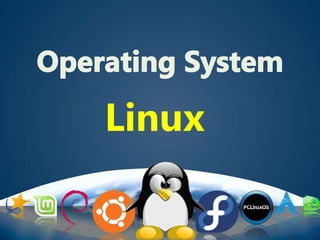
Linux
Introduction to Linux OS
An open-source operating
system modelled on UNIX.
Mostly Base on Command line interface
Performance
&
Utilities
The Bootloader
The kernel
Daemons
The Shell
Desktop Environment
Graphical Server
Applications
Linux pieces
Ubuntu Linux
Linux Mint
Arch Linux
Deepin
Fedora
Debian
Knnopix
Scientific Linux
Chrome OS
openSUSE
The most popular Linux distributions are:
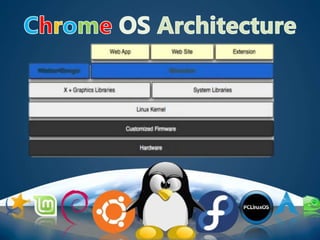
• Chrome OS is an operating
system designed by Google that is based
on the Linux Kernel and uses the Google
Chrome web browser as its principal user
interface.
Kernel
Kernel is the core part of Linux. It is
responsible for all major activities of this operating
system.
It consists of various modules and it interacts
directly with the underlying hardware.
e.g virtual memory and processes
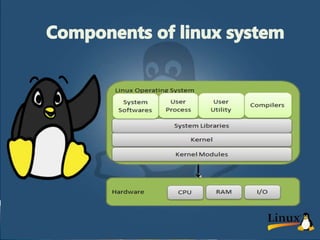
• System Library
System libraries are special functions or
programs using which application programs
or system utilities accesses Kernel's features.
These libraries implement most of the
functionalities of the operating system.
• System utilities.
These programs are responsible to do
specialized, individual level tasks.
. Some system utilities may be invoked
just once to initialize and configure some
aspect of the system;
• Basic Features of Linux
Portable −
Portability means software can works on
different types of hardware in same way.
Linux kernel and application programs
supports their installation on any kind of
hardware platform.
• Open Source
• Linux source code is freely available and it
is community based development project.
Multiple teams work in collaboration to
enhance the capability of Linux operating
system and it is continuously evolving.
Multiprogramming
• Linux is a multiprogramming system means
multiple applications can run at same time.
Hierarchical File System
• Linux provides a standard file structure in
which system files/ user files are arranged.
Shell
• Linux provides a special interpreter program which
can be used to execute commands of the operating
system. It can be used to do various types of
operations, call application programs. etc.
Security
• Linux provides user security using authentication
features like password protection/ controlled
access to specific files/ encryption of data.
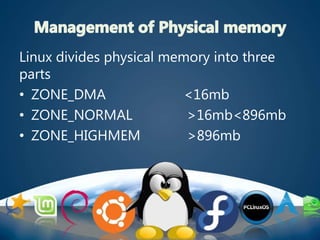
Linux divides physical memory into three
parts
• ZONE_DMA <16mb
• ZONE_NORMAL >16mb<896mb
• ZONE_HIGHMEM >896mb
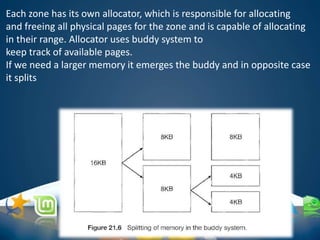
Each zone has its own allocator, which is responsible for allocating
and freeing all physical pages for the zone and is capable of allocating
in their range. Allocator uses buddy system to
keep track of available pages.
If we need a larger memory it emerges the buddy and in opposite case
it splits
• Kernel operations runs in normal zone and
it is the most critical zone. Each Physical
frame is represented by a struct frame.
And all the structs kept in the memory
map array .
• Advantages
– Fast and simple compared to general dynamic memory allocation
– Avoid external fragmentation by keeping free physical pages
contiguous
• Disadvantages
–Internal fragmentation
• Allocation of block of k pages when
k != 2^n
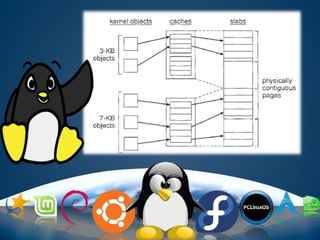
• A slab is used for allocating memory for
kernel data
• structures and is made up of one or more
physically contiguous pages.
• A cache consists of one or more slabs.
• There is a single cache for each unique
kernel data structure
• For objects smaller than a page
• Implemented on top of page allocator
• Each memory region is called a cache
• Two types of slab allocator
– Fixed-size slab allocator: cache contains objects of same size
• for frequently allocated objects
– General-purpose slab allocator: caches contain objects of size 2^n
• for less frequently allocated objects
• For allocation of object with size k, round to nearest 2^n
• Advantages
– Reduce internal fragmentation: many objects in
one page
– Fast: no need to allocate and free page frames
• Allocation: no search of objects with the right size for
fixed-size allocator; simple search for general-purpose
allocator
• Free: no merge with adjacent free blocks
• Disadvantages
–Memory overhead for bookkeeping
–Internal fragmentation for general-
purpose slab allocator
Linux operating system

Linux operating system

  • 1.
  • 2.
    Introduction to LinuxOS An open-source operating system modelled on UNIX. Mostly Base on Command line interface
  • 3.
  • 4.
    The Bootloader The kernel Daemons TheShell Desktop Environment Graphical Server Applications Linux pieces
  • 5.
    Ubuntu Linux Linux Mint ArchLinux Deepin Fedora Debian Knnopix Scientific Linux Chrome OS openSUSE The most popular Linux distributions are:
  • 6.
    • Chrome OSis an operating system designed by Google that is based on the Linux Kernel and uses the Google Chrome web browser as its principal user interface.
  • 9.
    Kernel Kernel is thecore part of Linux. It is responsible for all major activities of this operating system. It consists of various modules and it interacts directly with the underlying hardware. e.g virtual memory and processes
  • 10.
    • System Library Systemlibraries are special functions or programs using which application programs or system utilities accesses Kernel's features. These libraries implement most of the functionalities of the operating system.
  • 11.
    • System utilities. Theseprograms are responsible to do specialized, individual level tasks. . Some system utilities may be invoked just once to initialize and configure some aspect of the system;
  • 12.
    • Basic Featuresof Linux Portable − Portability means software can works on different types of hardware in same way. Linux kernel and application programs supports their installation on any kind of hardware platform.
  • 13.
    • Open Source •Linux source code is freely available and it is community based development project. Multiple teams work in collaboration to enhance the capability of Linux operating system and it is continuously evolving.
  • 15.
    Multiprogramming • Linux isa multiprogramming system means multiple applications can run at same time. Hierarchical File System • Linux provides a standard file structure in which system files/ user files are arranged.
  • 16.
    Shell • Linux providesa special interpreter program which can be used to execute commands of the operating system. It can be used to do various types of operations, call application programs. etc. Security • Linux provides user security using authentication features like password protection/ controlled access to specific files/ encryption of data.
  • 17.
    Linux divides physicalmemory into three parts • ZONE_DMA <16mb • ZONE_NORMAL >16mb<896mb • ZONE_HIGHMEM >896mb
  • 18.
    Each zone hasits own allocator, which is responsible for allocating and freeing all physical pages for the zone and is capable of allocating in their range. Allocator uses buddy system to keep track of available pages. If we need a larger memory it emerges the buddy and in opposite case it splits
  • 19.
    • Kernel operationsruns in normal zone and it is the most critical zone. Each Physical frame is represented by a struct frame. And all the structs kept in the memory map array .
  • 20.
    • Advantages – Fastand simple compared to general dynamic memory allocation – Avoid external fragmentation by keeping free physical pages contiguous
  • 21.
    • Disadvantages –Internal fragmentation •Allocation of block of k pages when k != 2^n
  • 22.
    • A slabis used for allocating memory for kernel data • structures and is made up of one or more physically contiguous pages. • A cache consists of one or more slabs. • There is a single cache for each unique kernel data structure
  • 23.
    • For objectssmaller than a page • Implemented on top of page allocator • Each memory region is called a cache • Two types of slab allocator – Fixed-size slab allocator: cache contains objects of same size • for frequently allocated objects – General-purpose slab allocator: caches contain objects of size 2^n • for less frequently allocated objects • For allocation of object with size k, round to nearest 2^n
  • 24.
    • Advantages – Reduceinternal fragmentation: many objects in one page – Fast: no need to allocate and free page frames • Allocation: no search of objects with the right size for fixed-size allocator; simple search for general-purpose allocator • Free: no merge with adjacent free blocks
  • 25.
    • Disadvantages –Memory overheadfor bookkeeping –Internal fragmentation for general- purpose slab allocator