OPENNTF WEBINARS
Water Cooler Talks: A Look into a Developer's Workbench
AGENDA
• Welcome – Graham Acres
• Howard Greenberg
• Jesse Gallagher
• Serdar Basegmez
• Questions – Graham Acres
ASKING QUESTIONS
• First Question – Will this be recorded?
• Yes, view on YouTube!!!
• https://www.youtube.com/user/OpenNTF
• Use the Questions Pane in GoToWebinar
• We will get to your questions at the end of
the webinar
• The speakers will respond to your questions
verbally
• (not in the Questions pane)
• Please keep all questions related to the
topics that our speakers are discussing!!!
• Unrelated Question => post at:
• http://openntf.slack.com/
THANKS TO THE OPENNTF SPONSORS
• HCL made a significant contribution to help our
organization
• Funds these webinars!
• Contests like Hackathons
• Running the organization
• Prominic donates all IT related services
• Cloud Hosting for OpenNTF
• Infrastructure management for HCL Domino and Atlassian
Servers
• System Administration for day-to-day operation
THIS IS OUR COMMUNITY
• Join us and get involved!
• We are all volunteers
• No effort is too small
• If your idea is bigger than you can do on your own, we
can connect you to a team to work on it
• Test or help or modify an existing project
• Write guides or documentation
• Add reviews on projects / stars on Snippets
HOWARD GREENBERG
• Consultant
• Notes client
• Domino and XPages apps
• Java
• Use the following tools:
• Domino Designer
• SourceTree – client app to manage the process
• BitBucket – repository
• Swiper – makes this process bearable
BITBUCKET – GIT VERSION CONTROL
• Free for up to five users
• Includes JIRA – issue tracking software
• Paid Account
• $3 per user per month
• Private or public repositories
• Source code is stored in cloud
• Safe from ransomware
• Version tracking
• Branching – supports master, development, maintenance
• Optional – you can use just a local (disk) storage or setup your
own BitBucket Server
SOURCETREE
• Local GIT client
• GIT is the version control system used by BitBucket
• Can be command line
• SourceTree provides a nice GUI
• Free
• Don’t have to learn the GIT command line syntax
ADVANTAGES
• Version Control
• Easy to rollback to other versions
• Safe code storage
• Simplifies branching
• Production
• Development
• Testing
• Insert bug fixes
• Does NOT do merging (there are tools for that if
needed)
WAYS TO USE…
• In Designer there are two instances of the design
• An NSF that can replicate, copy, etc.
• Make design changes to the NSF
• This is in your Notes Data directory
• The NSF is “synched” with another Eclipse project
• Called the “On-Disk” project
• This project is what is under source control
• There is a directory on your disk that is monitored by
GIT/SourceTree
CHANGES GO BOTH WAYS
• Changes go from NSF to the On-Disk Project
• Then these changes are “committed” and “pushed” to
BitBucket
• Changes can also be pulled to the local storage (On-
Disk project) and then to the NSF
• The local NSF (you want to use a local nsf) can then
replicate with a server based NSF for testing
• Or, use the template process to move the changes to a
test/production nsf
• NOTE: Only Design elements are stored in BitBucket,
never any data!
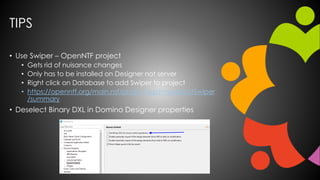
TIPS
• Use Swiper – OpenNTF project
• Gets rid of nuisance changes
• Only has to be installed on Designer not server
• Right click on Database to add Swiper to project
• https://openntf.org/main.nsf/project.xsp?r=project/Swiper
/summary
• Deselect Binary DXL in Domino Designer properties
DEMO
Jesse Gallagher
@Gidgerby - http://frostillic.us
MY TOOLCHAIN
• macOS + Notes installation
• Eclipse
• Plug-in Development Environment
• Wild Web Developer
• XPages SDK
• Maven
• Plus Tycho, when working with Domino
• Open Liberty for JEE apps and XPages dev
• VS Code (sometimes)
• IntelliJ IDEA (for mobile apps)
• Windows + Designer via RDP
• Jenkins
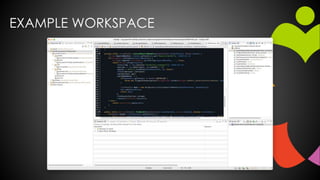
EXAMPLE WORKSPACE
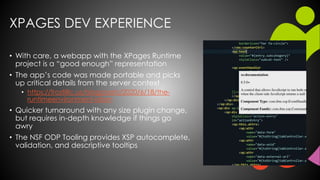
XPAGES DEV EXPERIENCE
• With care, a webapp with the XPages Runtime
project is a “good enough” representation
• The app’s code was made portable and picks
up critical details from the server context
• https://frostillic.us/blog/posts/2020/6/18/the-
runtimeenvironment-idiom
• Quicker turnaround with any size plugin change,
but requires in-depth knowledge if things go
awry
• The NSF ODP Tooling provides XSP autocomplete,
validation, and descriptive tooltips
PLUGIN DEV EXPERIENCE
• When working with OSGi plugins for Domino, I use the
XPages SDK to run the plugins from my Mac Eclipse
workspace
• When pairing with XPages-side Java code, I often add
the built update site on the Mac to Designer’s Target
Platform
• This can make Designer even more unstable if you’re
referencing a network drive
• I’m trying to need to do this less over time
CI/CD PIPELINE
• Jenkins server with a Domino runtime available
• It builds each branch (one at a time, to avoid
runtime collisions)
• Tycho runs a suite of compile-time tests for the
backend code
• Generates a ZIP of the OSGi plugins, NTFs, and
instructions and makes it available alongside a
recent commit list
• Also deploys the .war variants to Open Liberty
instances on Domino for immediate access and
user testing
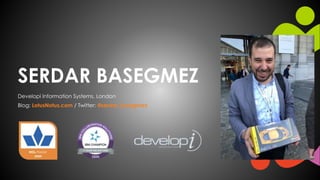
SERDAR BASEGMEZ
Developi Information Systems, London
Blog: LotusNotus.com / Twitter: @serdar_basegmez
TODAY’S SPECIAL ON MY WORKBENCH
• RESTful API for Domino databases
• Visit speakerdeck.com/sbasegmez
• Designing JAX-RS services for Domino applications
• OSGi plugins based on Apache Wink servlets.
• Sample applications:
• Node.js front-end, accessing Domino data
• Customer-facing interfaces (PHP Website, native
mobile applications, etc.) interacting internal
systems
DEVELOPMENT ENVIRONMENT
Using… for…
Eclipse IDE on Mac [Neon] OSGi plugin development
OpenNTF XPages SDK Plugin Help to configure Eclipse PDE for Domino environment
HCL Domino Designer on Windows NSF design, sandboxing and testbed
HCL Domino Server 10.x / 11.x on CentOS Development, testing, staging and deployment
Paw, Postman, Node.js scripts Testing (functional, scalability, performance, etc.)
Stoplight Studio, Ulysses Documentation
SourceTree + Bitbucket/Github Source Control
OpenNTF Domino API Plugin Civilised way to use Java for Domino
OpenNTF XLogback Plugin Logging
DEVELOPMENT ENVIRONMENT
Using… for…
Eclipse IDE on Mac [Neon] OSGi plugin development
OpenNTF XPages SDK Plugin Help to configure Eclipse PDE for Domino environment
HCL Domino Designer on Windows NSF design, sandboxing and testbed
HCL Domino Server 10.x / 11.x on CentOS Development, testing, staging and deployment
Paw, Node.js scripts Testing (functional, scalability, performance, etc.)
Stoplight Studio, Ulysses Documentation
SourceTree + Bitbucket/Github Source Control
OpenNTF Domino API Plugin Civilised way to use Java for Domino
OpenNTF XLogback Plugin Logging
Today’s focus
THE ART OF ECLIPSE CONFIGURATION…
• Using Eclipse vs Domino Designer
• Better version, better tooling, more integrated
• Configuring Eclipse to develop for Domino can be tricky!
• This is the key step for efficient development.
• I found my way among many possibilities
THE ART OF ECLIPSE CONFIGURATION…
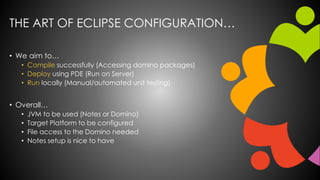
• We aim to…
• Compile successfully (Accessing domino packages)
• Deploy using PDE (Run on Server)
• Run locally (Manual/automated unit testing)
• Overall…
• JVM to be used (Notes or Domino)
• Target Platform to be configured
• File access to the Domino needed
• Notes setup is nice to have
THE ART OF ECLIPSE CONFIGURATION…
• Target Platform is the key…
• “The target platform specifies the set of bundles
used to compile and build against within the
Eclipse PDE (plugin development environment).”
(Eclipse Wiki)
• Java API for Domino is also needed [Notes.jar]
• Build a plugin or add it to the JRE
• Pain in the neck!
Compiling Successfully
THE ART OF ECLIPSE CONFIGURATION…
• XPages SDK will configure the Domino OSGi platform
to deploy your plugins directly into Domino Server.
Domino ServerEclipse IDE
Selected Projects
[Eclipse Workspace]
Target Platform
[Eclipse Settings]
XPages SDK
Temporary Configuration
for the Domino OSGi
[pde.launch.ini]
Deploy using PDE
Points
THE ART OF ECLIPSE CONFIGURATION…
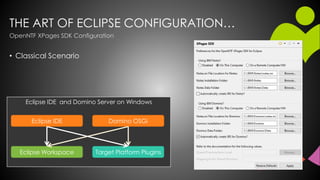
• Classical Scenario
Eclipse IDE and Domino Server on Windows
Target Platform PluginsEclipse Workspace
Domino OSGiEclipse IDE
OpenNTF XPages SDK Configuration
THE ART OF ECLIPSE CONFIGURATION…
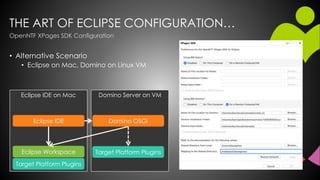
• Alternative Scenario
• Eclipse on Mac, Domino on Linux VM
Domino Server on VMEclipse IDE on Mac
OpenNTF XPages SDK Configuration
Target Platform PluginsEclipse Workspace
Domino OSGiEclipse IDE
Target Platform Plugins
THE ART OF ECLIPSE CONFIGURATION…
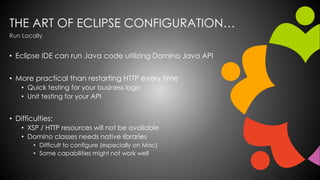
• Eclipse IDE can run Java code utilizing Domino Java API
• More practical than restarting HTTP every time
• Quick testing for your business logic
• Unit testing for your API
• Difficulties:
• XSP / HTTP resources will not be available
• Domino classes needs native libraries
• Difficult to configure (especially on Mac)
• Some capabilities might not work well
Run Locally
THE ART OF ECLIPSE CONFIGURATION…
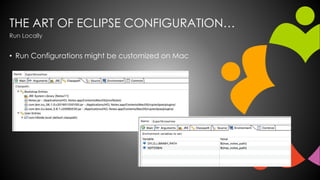
• Run Configurations might be customized on Mac
Run Locally
THE ART OF ECLIPSE CONFIGURATION…
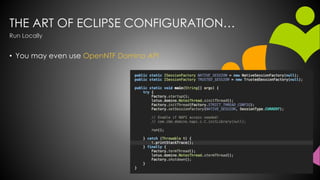
• You may even use OpenNTF Domino API
Run Locally
PRODUCTION AND DEPLOYMENT
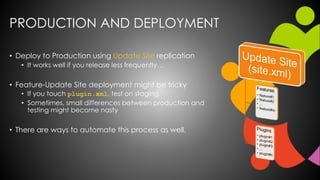
• Deploy to Production using Update Site replication
• It works well if you release less frequently…
• Feature-Update Site deployment might be tricky
• If you touch plugin.xml, test on staging.
• Sometimes, small differences between production and
testing might become nasty
• There are ways to automate this process as well.
FURTHER ENHANCEMENTS
• Maven / p2 repositories
• Automated build, CI/CD pipelines
• Headless Designer
• Docker Runtime
CHALLENGES
• Using Eclipse on Mac is a challenge!
• Notes for Mac is “different”
• Obviously, no Designer / Domino on Mac
• Even EOL differences needs to be considered
• Domino Upgrades
• Target platform needs to be updated on upgrades
• If you use custom target platform, that’d be an issue
• Document your setup on every step…
NEXT WEBINAR
• September 17, 2020
• John Curtis from HCL will discuss Domino Query
Language
• Signup at https://openntf.org/webinars
QUESTIONS?
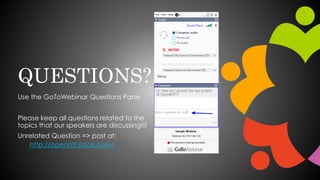
Use the GoToWebinar Questions Pane
Please keep all questions related to the
topics that our speakers are discussing!!!
Unrelated Question => post at:
http://openntf.slack.com/

August Webinar - Water Cooler Talks: A Look into a Developer's Workbench

  • 1.
    OPENNTF WEBINARS Water CoolerTalks: A Look into a Developer's Workbench
  • 2.
    AGENDA • Welcome –Graham Acres • Howard Greenberg • Jesse Gallagher • Serdar Basegmez • Questions – Graham Acres
  • 3.
    ASKING QUESTIONS • FirstQuestion – Will this be recorded? • Yes, view on YouTube!!! • https://www.youtube.com/user/OpenNTF • Use the Questions Pane in GoToWebinar • We will get to your questions at the end of the webinar • The speakers will respond to your questions verbally • (not in the Questions pane) • Please keep all questions related to the topics that our speakers are discussing!!! • Unrelated Question => post at: • http://openntf.slack.com/
  • 4.
    THANKS TO THEOPENNTF SPONSORS • HCL made a significant contribution to help our organization • Funds these webinars! • Contests like Hackathons • Running the organization • Prominic donates all IT related services • Cloud Hosting for OpenNTF • Infrastructure management for HCL Domino and Atlassian Servers • System Administration for day-to-day operation
  • 5.
    THIS IS OURCOMMUNITY • Join us and get involved! • We are all volunteers • No effort is too small • If your idea is bigger than you can do on your own, we can connect you to a team to work on it • Test or help or modify an existing project • Write guides or documentation • Add reviews on projects / stars on Snippets
  • 6.
    HOWARD GREENBERG • Consultant •Notes client • Domino and XPages apps • Java • Use the following tools: • Domino Designer • SourceTree – client app to manage the process • BitBucket – repository • Swiper – makes this process bearable
  • 7.
    BITBUCKET – GITVERSION CONTROL • Free for up to five users • Includes JIRA – issue tracking software • Paid Account • $3 per user per month • Private or public repositories • Source code is stored in cloud • Safe from ransomware • Version tracking • Branching – supports master, development, maintenance • Optional – you can use just a local (disk) storage or setup your own BitBucket Server
  • 8.
    SOURCETREE • Local GITclient • GIT is the version control system used by BitBucket • Can be command line • SourceTree provides a nice GUI • Free • Don’t have to learn the GIT command line syntax
  • 9.
    ADVANTAGES • Version Control •Easy to rollback to other versions • Safe code storage • Simplifies branching • Production • Development • Testing • Insert bug fixes • Does NOT do merging (there are tools for that if needed)
  • 10.
    WAYS TO USE… •In Designer there are two instances of the design • An NSF that can replicate, copy, etc. • Make design changes to the NSF • This is in your Notes Data directory • The NSF is “synched” with another Eclipse project • Called the “On-Disk” project • This project is what is under source control • There is a directory on your disk that is monitored by GIT/SourceTree
  • 11.
    CHANGES GO BOTHWAYS • Changes go from NSF to the On-Disk Project • Then these changes are “committed” and “pushed” to BitBucket • Changes can also be pulled to the local storage (On- Disk project) and then to the NSF • The local NSF (you want to use a local nsf) can then replicate with a server based NSF for testing • Or, use the template process to move the changes to a test/production nsf • NOTE: Only Design elements are stored in BitBucket, never any data!
  • 12.
    TIPS • Use Swiper– OpenNTF project • Gets rid of nuisance changes • Only has to be installed on Designer not server • Right click on Database to add Swiper to project • https://openntf.org/main.nsf/project.xsp?r=project/Swiper /summary • Deselect Binary DXL in Domino Designer properties
  • 13.
  • 14.
    Jesse Gallagher @Gidgerby -http://frostillic.us
  • 15.
    MY TOOLCHAIN • macOS+ Notes installation • Eclipse • Plug-in Development Environment • Wild Web Developer • XPages SDK • Maven • Plus Tycho, when working with Domino • Open Liberty for JEE apps and XPages dev • VS Code (sometimes) • IntelliJ IDEA (for mobile apps) • Windows + Designer via RDP • Jenkins
  • 16.
  • 17.
    XPAGES DEV EXPERIENCE •With care, a webapp with the XPages Runtime project is a “good enough” representation • The app’s code was made portable and picks up critical details from the server context • https://frostillic.us/blog/posts/2020/6/18/the- runtimeenvironment-idiom • Quicker turnaround with any size plugin change, but requires in-depth knowledge if things go awry • The NSF ODP Tooling provides XSP autocomplete, validation, and descriptive tooltips
  • 18.
    PLUGIN DEV EXPERIENCE •When working with OSGi plugins for Domino, I use the XPages SDK to run the plugins from my Mac Eclipse workspace • When pairing with XPages-side Java code, I often add the built update site on the Mac to Designer’s Target Platform • This can make Designer even more unstable if you’re referencing a network drive • I’m trying to need to do this less over time
  • 19.
    CI/CD PIPELINE • Jenkinsserver with a Domino runtime available • It builds each branch (one at a time, to avoid runtime collisions) • Tycho runs a suite of compile-time tests for the backend code • Generates a ZIP of the OSGi plugins, NTFs, and instructions and makes it available alongside a recent commit list • Also deploys the .war variants to Open Liberty instances on Domino for immediate access and user testing
  • 20.
    SERDAR BASEGMEZ Developi InformationSystems, London Blog: LotusNotus.com / Twitter: @serdar_basegmez
  • 21.
    TODAY’S SPECIAL ONMY WORKBENCH • RESTful API for Domino databases • Visit speakerdeck.com/sbasegmez • Designing JAX-RS services for Domino applications • OSGi plugins based on Apache Wink servlets. • Sample applications: • Node.js front-end, accessing Domino data • Customer-facing interfaces (PHP Website, native mobile applications, etc.) interacting internal systems
  • 22.
    DEVELOPMENT ENVIRONMENT Using… for… EclipseIDE on Mac [Neon] OSGi plugin development OpenNTF XPages SDK Plugin Help to configure Eclipse PDE for Domino environment HCL Domino Designer on Windows NSF design, sandboxing and testbed HCL Domino Server 10.x / 11.x on CentOS Development, testing, staging and deployment Paw, Postman, Node.js scripts Testing (functional, scalability, performance, etc.) Stoplight Studio, Ulysses Documentation SourceTree + Bitbucket/Github Source Control OpenNTF Domino API Plugin Civilised way to use Java for Domino OpenNTF XLogback Plugin Logging
  • 23.
    DEVELOPMENT ENVIRONMENT Using… for… EclipseIDE on Mac [Neon] OSGi plugin development OpenNTF XPages SDK Plugin Help to configure Eclipse PDE for Domino environment HCL Domino Designer on Windows NSF design, sandboxing and testbed HCL Domino Server 10.x / 11.x on CentOS Development, testing, staging and deployment Paw, Node.js scripts Testing (functional, scalability, performance, etc.) Stoplight Studio, Ulysses Documentation SourceTree + Bitbucket/Github Source Control OpenNTF Domino API Plugin Civilised way to use Java for Domino OpenNTF XLogback Plugin Logging Today’s focus
  • 24.
    THE ART OFECLIPSE CONFIGURATION… • Using Eclipse vs Domino Designer • Better version, better tooling, more integrated • Configuring Eclipse to develop for Domino can be tricky! • This is the key step for efficient development. • I found my way among many possibilities
  • 25.
    THE ART OFECLIPSE CONFIGURATION… • We aim to… • Compile successfully (Accessing domino packages) • Deploy using PDE (Run on Server) • Run locally (Manual/automated unit testing) • Overall… • JVM to be used (Notes or Domino) • Target Platform to be configured • File access to the Domino needed • Notes setup is nice to have
  • 26.
    THE ART OFECLIPSE CONFIGURATION… • Target Platform is the key… • “The target platform specifies the set of bundles used to compile and build against within the Eclipse PDE (plugin development environment).” (Eclipse Wiki) • Java API for Domino is also needed [Notes.jar] • Build a plugin or add it to the JRE • Pain in the neck! Compiling Successfully
  • 27.
    THE ART OFECLIPSE CONFIGURATION… • XPages SDK will configure the Domino OSGi platform to deploy your plugins directly into Domino Server. Domino ServerEclipse IDE Selected Projects [Eclipse Workspace] Target Platform [Eclipse Settings] XPages SDK Temporary Configuration for the Domino OSGi [pde.launch.ini] Deploy using PDE Points
  • 28.
    THE ART OFECLIPSE CONFIGURATION… • Classical Scenario Eclipse IDE and Domino Server on Windows Target Platform PluginsEclipse Workspace Domino OSGiEclipse IDE OpenNTF XPages SDK Configuration
  • 29.
    THE ART OFECLIPSE CONFIGURATION… • Alternative Scenario • Eclipse on Mac, Domino on Linux VM Domino Server on VMEclipse IDE on Mac OpenNTF XPages SDK Configuration Target Platform PluginsEclipse Workspace Domino OSGiEclipse IDE Target Platform Plugins
  • 30.
    THE ART OFECLIPSE CONFIGURATION… • Eclipse IDE can run Java code utilizing Domino Java API • More practical than restarting HTTP every time • Quick testing for your business logic • Unit testing for your API • Difficulties: • XSP / HTTP resources will not be available • Domino classes needs native libraries • Difficult to configure (especially on Mac) • Some capabilities might not work well Run Locally
  • 31.
    THE ART OFECLIPSE CONFIGURATION… • Run Configurations might be customized on Mac Run Locally
  • 32.
    THE ART OFECLIPSE CONFIGURATION… • You may even use OpenNTF Domino API Run Locally
  • 33.
    PRODUCTION AND DEPLOYMENT •Deploy to Production using Update Site replication • It works well if you release less frequently… • Feature-Update Site deployment might be tricky • If you touch plugin.xml, test on staging. • Sometimes, small differences between production and testing might become nasty • There are ways to automate this process as well.
  • 34.
    FURTHER ENHANCEMENTS • Maven/ p2 repositories • Automated build, CI/CD pipelines • Headless Designer • Docker Runtime
  • 35.
    CHALLENGES • Using Eclipseon Mac is a challenge! • Notes for Mac is “different” • Obviously, no Designer / Domino on Mac • Even EOL differences needs to be considered • Domino Upgrades • Target platform needs to be updated on upgrades • If you use custom target platform, that’d be an issue • Document your setup on every step…
  • 36.
    NEXT WEBINAR • September17, 2020 • John Curtis from HCL will discuss Domino Query Language • Signup at https://openntf.org/webinars
  • 37.
    QUESTIONS? Use the GoToWebinarQuestions Pane Please keep all questions related to the topics that our speakers are discussing!!! Unrelated Question => post at: http://openntf.slack.com/