Version Control for
Notes developers


                Martin Jinoch
#shameless-plug


  blog: http://jinoch.cz
  twitter: @mjinoch
  email: martin@jinoch.cz
Agenda
What is version control and why you should
use it, ...
Development work-flow with Git and git-flow
How to use Git in Designer
Other tools you can integrate into your
development process
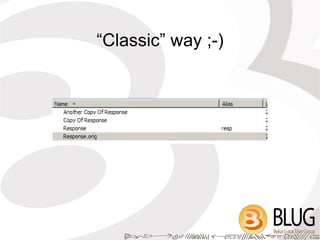
“Classic” way ;-)
“Classic” way
no easy way to get back to previous state
unless we are keeping
→ backup versions of design elements
→ or backup copies of the whole template
we don't know what the last change was
→ we should maintain a separate change-
log
There must be a better way
Version control systems
→ client/server
CVS, SVN (Subversion), ...
→ distributed
Git, Bazaar, Mercurial, ...
Which one to use? Any. But please, DO use
them. (And don't use CVS)
http://gitvsmercurial.com
Basic operations
commit
  → save current state to VCS
diff
  → show the differences between commits (versions)
revert
  → undo (any) commit.
branch
  → make a new “copy” of the whole app
merge
  → apply changes from one branch to another
  branch
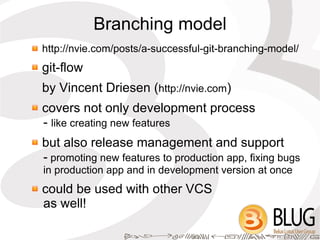
Branching model
http://nvie.com/posts/a-successful-git-branching-model/
git-flow
by Vincent Driesen (http://nvie.com)
covers not only development process
- like creating new features
but also release management and support
- promoting new features to production app, fixing bugs
in production app and in development version at once
could be used with other VCS
as well!
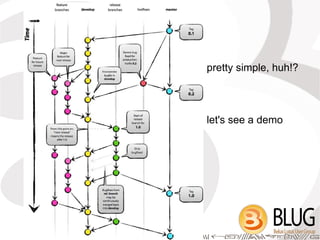
pretty simple, huh!?


let's see a demo
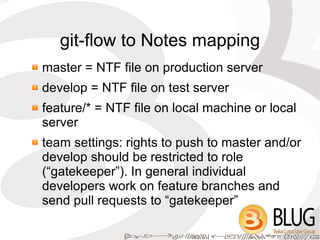
git-flow to Notes mapping
master = NTF file on production server
develop = NTF file on test server
feature/* = NTF file on local machine or local
server
team settings: rights to push to master and/or
develop should be restricted to role
(“gatekeeper”). In general individual
developers work on feature branches and
send pull requests to “gatekeeper”
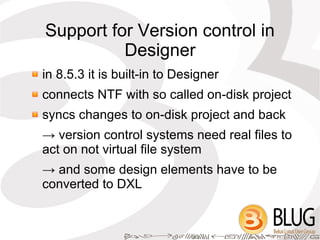
Support for Version control in
          Designer
in 8.5.3 it is built-in to Designer
connects NTF with so called on-disk project
syncs changes to on-disk project and back
→ version control systems need real files to
act on not virtual file system
→ and some design elements have to be
converted to DXL
Configuring DDE for version
           control
Designer runs on top of Eclipse 3.4 (2008)
install VCS plugin from OpenNTF.org
→ EGit for Domino Designer (by Nathan T. Freeman)
   based on current EGit for Eclipse 3.6 and higher

→ Subversion UpdateSite for Domino Designer

Mercurial - http://cbes.javaforge.com/update and
choose 1.6.0 version of MercurialEclipse plugin and
1.4.3 version of Mercurial Binaries
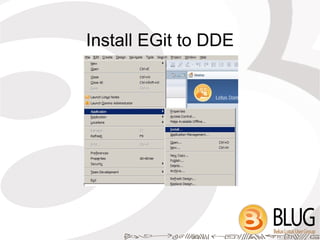
Install EGit to DDE
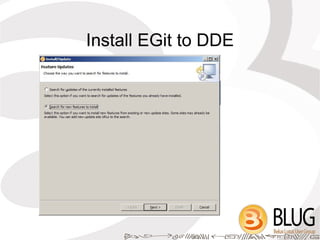
Install EGit to DDE
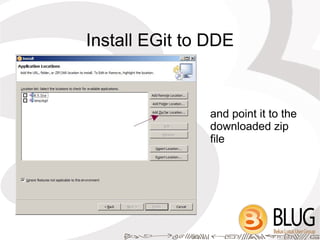
Install EGit to DDE


               and point it to the
               downloaded zip
               file
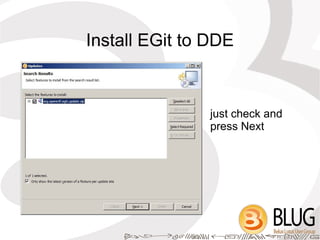
Install EGit to DDE


               just check and
               press Next
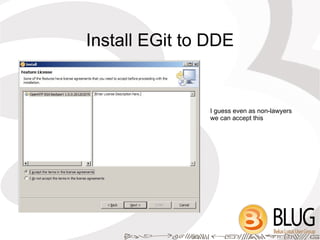
Install EGit to DDE


               I guess even as non-lawyers
               we can accept this
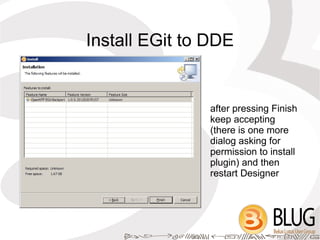
Install EGit to DDE


               after pressing Finish
               keep accepting
               (there is one more
               dialog asking for
               permission to install
               plugin) and then
               restart Designer
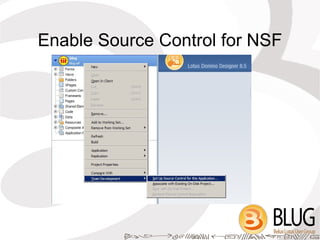
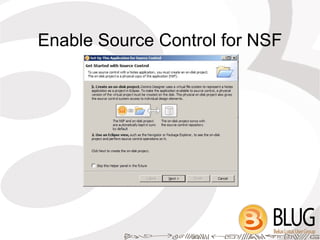
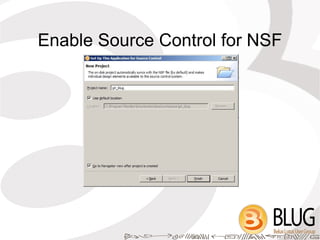
Enable Source Control for NSF
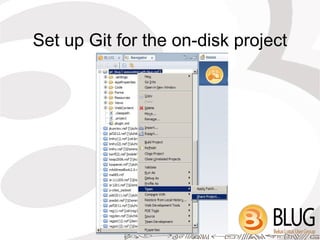
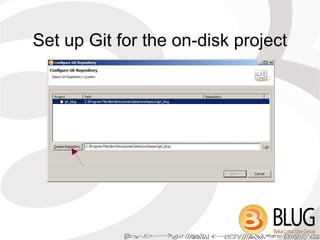
Set up Git for the on-disk project
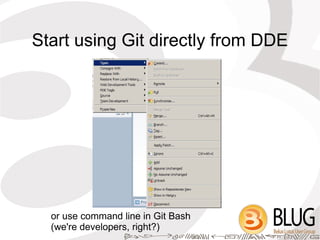
Start using Git directly from DDE


  or use command line in Git Bash
  (we're developers, right?)
Redmine
●   project management tool, bug tracker, ...
●   connects to repository to link commits to
    issues (commit message “fixes #1”
    automatically closes issue with id 1) and
    for time tracking (@1h30m)
●   will probably be used for projects on
    OpenNTF.org as well as Git and Mercurial
    repositories
Questions?


●   more about Git
    http://think-like-a-git.net
    great book http://progit.org
Resources
●   Subversion - http://subversion.apache.org/
●   Git – http://git-scm.com/, Git for Windows -
    http://code.google.com/p/msysgit/ and follow link “Git for Windows”
●   Mercurial – http://mercurial.selenic.com/
●   Bazaar – http://bazaar.canonical.com/
●   EGit for Domino Designer –
    http://www.openntf.org/internal/home.nsf/project.xsp?
    action=openDocument&name=EGit%20for%20IBM%20Domino
    %20Designer
●   Subversion UpdateSite for Domino Designer –
    http://www.openntf.org/internal/home.nsf/project.xsp?
    action=openDocument&name=Subversion%20UpdateSite%20for
    %20Domino%20Designer
●   branching model -
    http://nvie.com/posts/a-successful-git-branching-model/
●   git-flow – https://github.com/nvie/gitflow
●   Redmine – http://www.redmine.org
Thank you!

BLUG 2012 Version Control for Notes Developers

  • 1.
    Version Control for Notesdevelopers Martin Jinoch
  • 2.
    #shameless-plug blog:http://jinoch.cz twitter: @mjinoch email: martin@jinoch.cz
  • 3.
    Agenda What is versioncontrol and why you should use it, ... Development work-flow with Git and git-flow How to use Git in Designer Other tools you can integrate into your development process
  • 4.
  • 5.
    “Classic” way no easyway to get back to previous state unless we are keeping → backup versions of design elements → or backup copies of the whole template we don't know what the last change was → we should maintain a separate change- log
  • 6.
    There must bea better way Version control systems → client/server CVS, SVN (Subversion), ... → distributed Git, Bazaar, Mercurial, ... Which one to use? Any. But please, DO use them. (And don't use CVS) http://gitvsmercurial.com
  • 7.
    Basic operations commit → save current state to VCS diff → show the differences between commits (versions) revert → undo (any) commit. branch → make a new “copy” of the whole app merge → apply changes from one branch to another branch
  • 8.
    Branching model http://nvie.com/posts/a-successful-git-branching-model/ git-flow by VincentDriesen (http://nvie.com) covers not only development process - like creating new features but also release management and support - promoting new features to production app, fixing bugs in production app and in development version at once could be used with other VCS as well!
  • 9.
  • 10.
    git-flow to Notesmapping master = NTF file on production server develop = NTF file on test server feature/* = NTF file on local machine or local server team settings: rights to push to master and/or develop should be restricted to role (“gatekeeper”). In general individual developers work on feature branches and send pull requests to “gatekeeper”
  • 11.
    Support for Versioncontrol in Designer in 8.5.3 it is built-in to Designer connects NTF with so called on-disk project syncs changes to on-disk project and back → version control systems need real files to act on not virtual file system → and some design elements have to be converted to DXL
  • 12.
    Configuring DDE forversion control Designer runs on top of Eclipse 3.4 (2008) install VCS plugin from OpenNTF.org → EGit for Domino Designer (by Nathan T. Freeman) based on current EGit for Eclipse 3.6 and higher → Subversion UpdateSite for Domino Designer Mercurial - http://cbes.javaforge.com/update and choose 1.6.0 version of MercurialEclipse plugin and 1.4.3 version of Mercurial Binaries
  • 13.
  • 14.
  • 15.
    Install EGit toDDE and point it to the downloaded zip file
  • 16.
    Install EGit toDDE just check and press Next
  • 17.
    Install EGit toDDE I guess even as non-lawyers we can accept this
  • 18.
    Install EGit toDDE after pressing Finish keep accepting (there is one more dialog asking for permission to install plugin) and then restart Designer
  • 19.
  • 20.
  • 21.
  • 22.
    Set up Gitfor the on-disk project
  • 23.
    Set up Gitfor the on-disk project
  • 24.
    Start using Gitdirectly from DDE or use command line in Git Bash (we're developers, right?)
  • 25.
    Redmine ● project management tool, bug tracker, ... ● connects to repository to link commits to issues (commit message “fixes #1” automatically closes issue with id 1) and for time tracking (@1h30m) ● will probably be used for projects on OpenNTF.org as well as Git and Mercurial repositories
  • 26.
    Questions? ● more about Git http://think-like-a-git.net great book http://progit.org
  • 27.
    Resources ● Subversion - http://subversion.apache.org/ ● Git – http://git-scm.com/, Git for Windows - http://code.google.com/p/msysgit/ and follow link “Git for Windows” ● Mercurial – http://mercurial.selenic.com/ ● Bazaar – http://bazaar.canonical.com/ ● EGit for Domino Designer – http://www.openntf.org/internal/home.nsf/project.xsp? action=openDocument&name=EGit%20for%20IBM%20Domino %20Designer ● Subversion UpdateSite for Domino Designer – http://www.openntf.org/internal/home.nsf/project.xsp? action=openDocument&name=Subversion%20UpdateSite%20for %20Domino%20Designer ● branching model - http://nvie.com/posts/a-successful-git-branching-model/ ● git-flow – https://github.com/nvie/gitflow ● Redmine – http://www.redmine.org
  • 28.