Applied Spatial Data Analysis using R Thomas Jagger Department of Geography Florida State University Denver R User Group Meeting October 19, 2010 TexPoint fonts used in EMF.  Read the TexPoint manual before you delete this box.:  A A A A with special thanks to  Roger Bivand:  http://www.asdar-book.org
Topics Spatial objects in the “sp” Package Points, Lines, Polygons, Pixels and Grids The S4 Framework  Classes, slots, methods, inheritance How to create, convert, explore and manipulate “sp” spatial objects.  Example: Analyzing tornado data using  the R “sp” package.
Sources of Information Spatial data: http://cran.r-project.org/web/views/Spatial.html http://r-spatial.sourceforge.net/   vignette("sp") Rnews:  http://cran.r-project.org/doc/Rnews/Rnews_2005-2.pdf Applied Spatial Data Analysis with R http://spatial-analyst.net  wiki  Plotting  http://r-spatial.sourceforge.net/gallery/ Figures for ASDAR  Tornado data from the Storm Prediction Center (SPC) Slides on Spatial Data Courtesy of Roger Bivand  http://spatial-analyst.net/Rosgeo/sites/default/files/plasencia_monday_R.pdf
Object Framework  To begin with, all contributed packages for handling spatial data in R had different representations of the data.  This made it difficult to exchange data both within R between packages, and between R and external file formats and applications. The result has been an attempt to develop shared classes to represent spatial data in R, allowing some shared methods and many-to-one, one-to-many conversions. Roger Bivand and his collaborators chose to use new-style classes to represent spatial data and they are confident that this choice was justified.
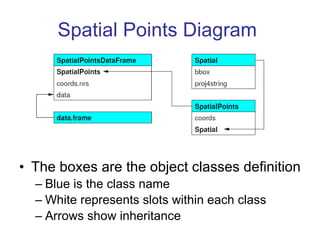
Spatial Points The most basic spatial data object is a point, which may have 2 or 3 dimensions Consists of a single coordinate, or a set of such coordinates. To define a  SpatialPoints  object; coordinates should be of mode double and will be promoted if not already. The points in a  SpatialPoints  object may be associated with a row of attributes to create a  SpatialPointsDataFrame  object The coordinates and attributes may, but do not have to be keyed to each other using ID value. Objects can be manipulated as a data frame though they appear as GIS objects i.e. features with attributes. Spatial objects rarely created from scratch, rather they are  created by promoting another object such as a data frame into a  SpatialPointsDataFrame  object.
Spatial Points Diagram  The boxes are the object classes definition Blue is the class name White represents slots within each class Arrows show inheritance
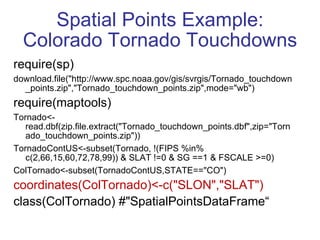
Spatial Points Example: Colorado Tornado Touchdowns require(sp) download.file(&quot;http://www.spc.noaa.gov/gis/svrgis/Tornado_touchdown_points.zip&quot;,&quot;Tornado_touchdown_points.zip&quot;,mode=&quot;wb&quot;) require(maptools) Tornado<-read.dbf(zip.file.extract(&quot;Tornado_touchdown_points.dbf&quot;,zip=&quot;Tornado_touchdown_points.zip&quot;)) TornadoContUS<-subset(Tornado, !(FIPS %in% c(2,66,15,60,72,78,99)) & SLAT !=0 & SG ==1 & FSCALE >=0) ColTornado<-subset(TornadoContUS,STATE==&quot;CO&quot;) coordinates(ColTornado)<-c(&quot;SLON&quot;,&quot;SLAT&quot;) class(ColTornado) #&quot;SpatialPointsDataFrame“
str(ColTornado) Formal class 'SpatialPointsDataFrame' [package &quot;sp&quot;] with 5 slots ..@ data  :'data.frame': 1762 obs. of  25 variables: ..@ coords.nrs : int [1:2] 16 15  ; data columns ..@ coords  : num [1:1762, 1:2] -103 -102 -102 -102 -104 ...  ;coordinates longitude, lattitude .. ..- attr(*, &quot;dimnames&quot;)=List of 2  ;column names ..@ bbox  : num [1:2, 1:2] -109 37 -102 41 .. ..- attr(*, &quot;dimnames&quot;)=List of 2  ..@ proj4string:Formal class 'CRS' [package &quot;sp&quot;] with 1 slots  ;projection string (we will assign one later)
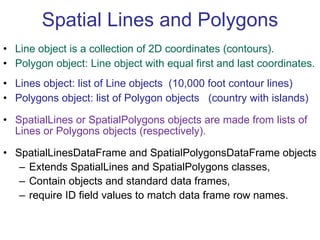
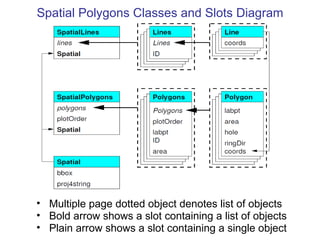
Spatial Lines and Polygons Line object is a collection of 2D coordinates (contours). Polygon object: Line object with equal first and last coordinates. Lines object: list of Line objects  (10,000 foot contour lines) Polygons object: list of Polygon objects  (country with islands) SpatialLines or SpatialPolygons objects are made from lists of Lines or Polygons objects (respectively). SpatialLinesDataFrame and SpatialPolygonsDataFrame objects  Extends SpatialLines and SpatialPolygons classes, Contain objects and standard data frames, require ID field values to match data frame row names.
Multiple page dotted object denotes list of objects Bold arrow shows a slot containing a list of objects Plain arrow shows a slot containing a single object Spatial Polygons Classes and Slots Diagram
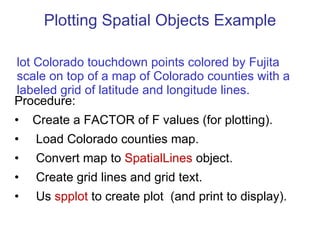
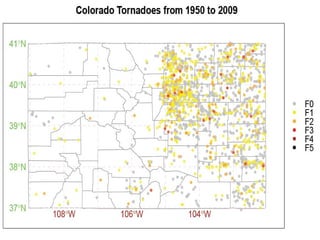
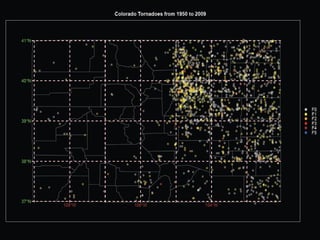
Plotting Spatial Objects Example Procedure:  Create a FACTOR of F values (for plotting). Load Colorado counties map. Convert map to  SpatialLines  object. Create grid lines and grid text. Us  spplot  to create plot  (and print to display).  Plot Colorado touchdown points colored by Fujita scale on top of a map of Colorado counties with a labeled grid of latitude and longitude lines.
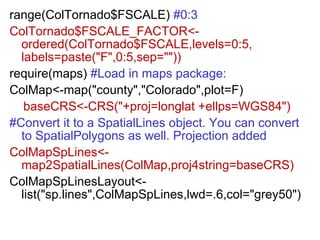
range(ColTornado$FSCALE)   #0:3 ColTornado$FSCALE_FACTOR<-ordered(ColTornado$FSCALE,levels=0:5, labels=paste(&quot;F&quot;,0:5,sep=&quot;&quot;))  require(maps)  #Load in maps package: ColMap<-map(&quot;county&quot;,&quot;Colorado&quot;,plot=F)  baseCRS<-CRS(&quot;+proj=longlat +ellps=WGS84&quot;) #Convert it to a SpatialLines object. You can convert to SpatialPolygons as well. Projection added ColMapSpLines<- map2SpatialLines(ColMap,proj4string=baseCRS) ColMapSpLinesLayout<- list(&quot;sp.lines&quot;,ColMapSpLines,lwd=.6,col=&quot;grey50&quot;)
#Create grid lines and grid text along with  plot layouts latlonlines<-gridlines(ColMapSpLines,easts= -110:-101 ) latlonlinesLayout<-list(&quot;sp.lines&quot;,latlonlines,lty=2,col=&quot;pink&quot;) latlontext<-gridat(latlonlines) #Split for better use of positioning latlontextE<-latlontext[latlontext$pos==1,] latlontextN<-latlontext[latlontext$pos==2,] latlontextLayoutE<-list(&quot;sp.text&quot;,coordinates(latlontextE), parse(text=as.character(latlontextE$labels)),offset=latlontextE$offset[1]/2,pos=1,col=&quot;brown&quot;)  latlontextLayoutN<-list(&quot;sp.text&quot;,coordinates(latlontextN), parse(text=as.character(latlontextN$labels)),offset=latlontextN$offset[1]/2,pos=2,col=&quot;green&quot;)
spLayout<-list(ColMapSpLinesLayout, latlonlinesLayout, latlontextLayoutE, latlontextLayoutN) spplot(ColTornado[&quot;FSCALE_FACTOR&quot;],  pch=20, alpha=.8, key.space=&quot;right”, xlim=c(-109.8,101.5), ylim=c(36.5,41.5), col.regions= c(&quot;grey&quot;,&quot;yellow&quot;,&quot;orange&quot;,&quot;red&quot;,&quot;brown&quot;, &quot;black&quot;),  main=&quot;Colorado Tornadoes from 1950 to 2009&quot;, sp.layout=spLayout) The spplot function  plots one color for each FSCAL_FACTOR level. uses trellis graphics from lattice package. adds layers in sp.layout in order. uses alpha for transparency. (density plot)
 
 
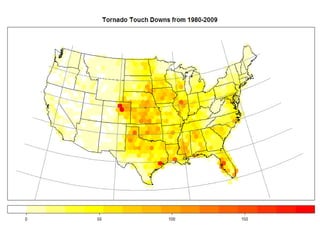
Counting Storms Example The goal of this example is to count storms in hexagons of uniform area covering the United States from 1980-2009. The example demonstrates how to: Convert spatial objects from one CRS to another. Generate a hexagonal lattice as a Spatial Polygon. Use of  overlay()  to count touchdown points within each polygon. Use  spplot()  to plot the analysis.
Counting Storms Procedure Select 1980-2009 subset of  tornado touchdowns. Create a Lambert CRS and project  “SLAT”,”SLON”  coordinates onto new CRS. Create  SpatialPointsDataFrame  of touchdowns. Create equal area  SpatialPolygons  hexagon tiling. Overlay spatial points onto hexagon tiling. Use  overlay()  to return an integer vector identifying the location of the polygon containing each point.  Count touchdown points within each hexagon. Import US map and convert to Lambert CRS. Create gridlines and project onto Lambert CRS. Plot counts on US map with gridlines using  spplot .
require(rgdal)  #rgdal code in  green projInfo()[55,]  # lcc Lambert Conformal Conic lambertCRS<- &quot; +proj=lcc +lat_1=60 +lat_2=30 +lon_0=-100&quot; #Spacing (and lack of) intentional in CRS string. #project() uses matrix with longitude latitude cols. #CRS string cannot contain reference ellipsoid.  res=project( cbind(Tornado2$SLON,Tornado2$SLAT ), lambertCRS) Tornado2$x=res[,1]; Tornado2$y=res[,2] #Make copy, convert to  SpatialPointsDataFrame US_sp=Tornado2 coordinates(US_sp)=~x+y
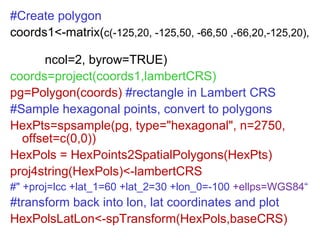
#Create polygon coords1<-matrix( c(-125,20, -125,50, -66,50 ,-66,20,-125,20),  ncol=2, byrow=TRUE) coords=project(coords1,lambertCRS) pg=Polygon(coords)  #rectangle in Lambert CRS #Sample hexagonal points, convert to polygons HexPts=spsample(pg, type=&quot;hexagonal&quot;, n=2750, offset=c(0,0))  HexPols = HexPoints2SpatialPolygons(HexPts) proj4string(HexPols)<-lambertCRS  #&quot; +proj=lcc +lat_1=60 +lat_2=30 +lon_0=-100  +ellps=WGS84 “ #transform back into lon, lat coordinates and plot HexPolsLatLon<-spTransform(HexPols,baseCRS)
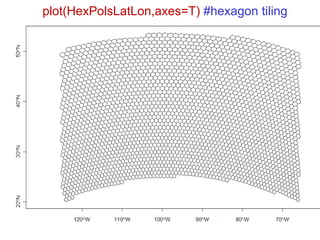
plot(HexPolsLatLon,axes=T)  #hexagon tiling
#overlay locations, returns hexagon location locations=overlay(US_sp,HexPols) #Use of table function to count points in hexagon counttable<-as.data.frame ( table( factor(locations, levels=1: length(HexPols@polygons) ) ) , row.names=   sapply(HexPols@polygons, function(x)  [email_address] ) ) [,&quot;Freq&quot;,drop=F] colnames(counttable)<-&quot;counts“ HexPolsDf = SpatialPolygonsDataFrame( HexPols, counttable, match.ID = TRUE)
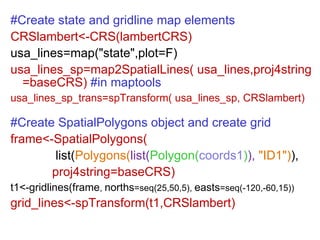
#Create state and gridline map elements CRSlambert<-CRS(lambertCRS) usa_lines=map(&quot;state&quot;,plot=F) usa_lines_sp=map2SpatialLines( usa_lines,proj4string=baseCRS)   #in maptools usa_lines_sp_trans=spTransform( usa_lines_sp, CRSlambert) #Create SpatialPolygons object and create grid  frame<-SpatialPolygons(   list( Polygons( list( Polygon( coords1 ) ),   &quot;ID1&quot;) ), proj4string=baseCRS) t1<-gridlines(frame ,  norths =seq(25,50,5),  easts =seq(-120,-60,15)) grid_lines<-spTransform(t1,CRSlambert)
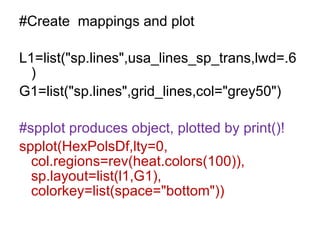
#Create  mappings and plot L1=list(&quot;sp.lines&quot;,usa_lines_sp_trans,lwd=.6) G1=list(&quot;sp.lines&quot;,grid_lines,col=&quot;grey50&quot;) #spplot produces object, plotted by print()! spplot(HexPolsDf,lty=0, col.regions=rev(heat.colors(100)), sp.layout=list(l1,G1), colorkey=list(space=&quot;bottom&quot;))
 
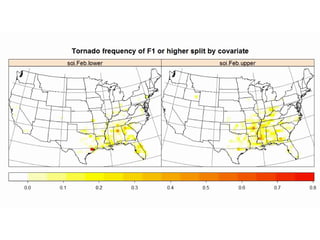
Monthly Tornado Counts and Global Climate Covariates Is there any relationship between climate covariates and monthly tornado counts for a given hexagon. Covariates: monthly NAO, SST, SSN, and SOI? Our initial investigation will divide monthly tornado counts by the  lower and upper terciles (thirds) of the same month for each covariate.  This generates 2*4*12 observations to be plotted two at a time.  48 plots each with 2 subplots. The 48 plots are combined into a movie using QuickTime Pro, and converted to SWF using Fs
Monthly Covariate Procedure Download covariates and unstack by month and year. Generate monthly quantiles (terciles) for the covariates. Merge covariates with climate data. Create  SpatialPointsDataFrame   (SPDF) from merged dataset. Overlay SPDF onto hexagon  SpatialPolygons  tiling. Add hexagon id as “hex” column to SPDF.  Split SPDF by Hexagon id and remove empty hexagons from hexagon tiling (i.e. id  not in  SPDF@data[“hex”])  For each covariate and each month, table the tornado touchdown points in the given month by the terciles of the given covariate observed in that month. Create  SpatialPolygonsDataFrame  from result. Plot each figure as PNG and combine into movie.
#Download Covariates and create Quantiles #Climate Covariates from 1861-2009 source(&quot;data/climateCovariates.R&quot;) #   Green  colored functions from: source(&quot;funs/tsupport.R&quot;) startend<-1950:2009  #tornado  years covariates<- make.cov.unstacked (climateCovariates, se=startend,cov=c(&quot;soi&quot;,&quot;nao&quot;,&quot;sst&quot;,&quot;sun&quot;)) monthlyquantiles<- as.array.list ( lapply( split(covariates[,-(1:2)], covariates$Month), function(x) out<- apply(x,2,quantile,probs=c(1/4,1/3,1/2,2/3,3/4) ) ) , name=&quot;Month&quot; )
TornadoClimate<-merge(TornadoContUS, covariates, by.x=c(&quot;YEAR&quot;,&quot;MONTH&quot;), by.y=c(&quot;Year&quot;,&quot;Month&quot;)) projcords=project( as.matrix(TornadoClimate[c(&quot;SLON&quot;,&quot;SLAT&quot;)]),  lambertCRS)  #As before TC<-TornadoClimate TC$x<-projcords[,1];TC$y<-projcords[,2] coordinates(TC)=~x+y hexagonNumber<-overlay(TC,HexPols) TC$Hex<-hexagonNumber
#Split Hexagons (Will order by hex number) TCsplit <-split(TC@data,TC$Hex)  names( TCsplit )<-sapply(HexPols@polygons, function(x) x@ID)[as.numeric(names( TCsplit ))]  #Remove empty tiles from hexagon tiling. (V10.1 R) HexPolsMissing<-HexPols[names(TCsplit),] #Create Yearly Frequency yearspersplit <- count.storms (x=covariates,cut=3,col.name=&quot;Month&quot;, quantiles = monthlyquantiles,Year%in%startend)  splitcounts<-data.frame(t(sapply( TCsplit , function(x)  count.storms ( x,cut=3, FSCALE>=1 & YEAR %in% startend ,  quantiles = monthlyquantiles ) )  / yearspersplit ) ) #Create SpatialPolygonsDataFrame  splitcountsSPDF<-SpatialPolygonsDataFrame(HexPolsMissing,splitcounts)
#Create Images dir.create(&quot;./monthlyclimatepng&quot;) png(file=&quot;./monthlyclimatepng/plot%03d.png&quot;, width=1080, height=600, bg=&quot;white&quot;,res=120) for(i in 1:48)  #4 covariates 12 months { #Plot lower and upper thirds in each plot print( spplot(splitcountsSPDF[, c(3*i-2,3*i) ], lty=0, col.regions=rev(heat.colors(100))[1:90], sp.layout=list(l1,G1),  as.table=T ,  main=&quot;Tornado frequency of F1 or higher split by covariate&quot;, colorkey=list(space=&quot;bottom&quot;)) ) } dev.off()
 
Final Thoughts This is an introduction to the “sp” package as it relates to our initial work using a tornado data set. We did not get to discuss GridTopology a base class for SpatialGrid a rectangular array class and SpatialPixels a sparse array class  Source code and presentation available: spexample.zip and sp.ppt from  https://public.me.com/thjagger Examples tested on R V10.1 on 32 bit Vista Unzip into dir, start R in dir\spexample source(“tornado.r”,echo=T)  #Creates all figures, x11()

R Spatial Analysis using SP

  • 1.
    Applied Spatial DataAnalysis using R Thomas Jagger Department of Geography Florida State University Denver R User Group Meeting October 19, 2010 TexPoint fonts used in EMF. Read the TexPoint manual before you delete this box.: A A A A with special thanks to Roger Bivand: http://www.asdar-book.org
  • 2.
    Topics Spatial objectsin the “sp” Package Points, Lines, Polygons, Pixels and Grids The S4 Framework Classes, slots, methods, inheritance How to create, convert, explore and manipulate “sp” spatial objects. Example: Analyzing tornado data using the R “sp” package.
  • 3.
    Sources of InformationSpatial data: http://cran.r-project.org/web/views/Spatial.html http://r-spatial.sourceforge.net/ vignette(&quot;sp&quot;) Rnews: http://cran.r-project.org/doc/Rnews/Rnews_2005-2.pdf Applied Spatial Data Analysis with R http://spatial-analyst.net wiki Plotting http://r-spatial.sourceforge.net/gallery/ Figures for ASDAR Tornado data from the Storm Prediction Center (SPC) Slides on Spatial Data Courtesy of Roger Bivand http://spatial-analyst.net/Rosgeo/sites/default/files/plasencia_monday_R.pdf
  • 4.
    Object Framework To begin with, all contributed packages for handling spatial data in R had different representations of the data. This made it difficult to exchange data both within R between packages, and between R and external file formats and applications. The result has been an attempt to develop shared classes to represent spatial data in R, allowing some shared methods and many-to-one, one-to-many conversions. Roger Bivand and his collaborators chose to use new-style classes to represent spatial data and they are confident that this choice was justified.
  • 5.
    Spatial Points Themost basic spatial data object is a point, which may have 2 or 3 dimensions Consists of a single coordinate, or a set of such coordinates. To define a SpatialPoints object; coordinates should be of mode double and will be promoted if not already. The points in a SpatialPoints object may be associated with a row of attributes to create a SpatialPointsDataFrame object The coordinates and attributes may, but do not have to be keyed to each other using ID value. Objects can be manipulated as a data frame though they appear as GIS objects i.e. features with attributes. Spatial objects rarely created from scratch, rather they are created by promoting another object such as a data frame into a SpatialPointsDataFrame object.
  • 6.
    Spatial Points Diagram The boxes are the object classes definition Blue is the class name White represents slots within each class Arrows show inheritance
  • 7.
    Spatial Points Example:Colorado Tornado Touchdowns require(sp) download.file(&quot;http://www.spc.noaa.gov/gis/svrgis/Tornado_touchdown_points.zip&quot;,&quot;Tornado_touchdown_points.zip&quot;,mode=&quot;wb&quot;) require(maptools) Tornado<-read.dbf(zip.file.extract(&quot;Tornado_touchdown_points.dbf&quot;,zip=&quot;Tornado_touchdown_points.zip&quot;)) TornadoContUS<-subset(Tornado, !(FIPS %in% c(2,66,15,60,72,78,99)) & SLAT !=0 & SG ==1 & FSCALE >=0) ColTornado<-subset(TornadoContUS,STATE==&quot;CO&quot;) coordinates(ColTornado)<-c(&quot;SLON&quot;,&quot;SLAT&quot;) class(ColTornado) #&quot;SpatialPointsDataFrame“
  • 8.
    str(ColTornado) Formal class'SpatialPointsDataFrame' [package &quot;sp&quot;] with 5 slots ..@ data :'data.frame': 1762 obs. of 25 variables: ..@ coords.nrs : int [1:2] 16 15 ; data columns ..@ coords : num [1:1762, 1:2] -103 -102 -102 -102 -104 ... ;coordinates longitude, lattitude .. ..- attr(*, &quot;dimnames&quot;)=List of 2 ;column names ..@ bbox : num [1:2, 1:2] -109 37 -102 41 .. ..- attr(*, &quot;dimnames&quot;)=List of 2 ..@ proj4string:Formal class 'CRS' [package &quot;sp&quot;] with 1 slots ;projection string (we will assign one later)
  • 9.
    Spatial Lines andPolygons Line object is a collection of 2D coordinates (contours). Polygon object: Line object with equal first and last coordinates. Lines object: list of Line objects (10,000 foot contour lines) Polygons object: list of Polygon objects (country with islands) SpatialLines or SpatialPolygons objects are made from lists of Lines or Polygons objects (respectively). SpatialLinesDataFrame and SpatialPolygonsDataFrame objects Extends SpatialLines and SpatialPolygons classes, Contain objects and standard data frames, require ID field values to match data frame row names.
  • 10.
    Multiple page dottedobject denotes list of objects Bold arrow shows a slot containing a list of objects Plain arrow shows a slot containing a single object Spatial Polygons Classes and Slots Diagram
  • 11.
    Plotting Spatial ObjectsExample Procedure: Create a FACTOR of F values (for plotting). Load Colorado counties map. Convert map to SpatialLines object. Create grid lines and grid text. Us spplot to create plot (and print to display). Plot Colorado touchdown points colored by Fujita scale on top of a map of Colorado counties with a labeled grid of latitude and longitude lines.
  • 12.
    range(ColTornado$FSCALE) #0:3 ColTornado$FSCALE_FACTOR<-ordered(ColTornado$FSCALE,levels=0:5, labels=paste(&quot;F&quot;,0:5,sep=&quot;&quot;)) require(maps) #Load in maps package: ColMap<-map(&quot;county&quot;,&quot;Colorado&quot;,plot=F) baseCRS<-CRS(&quot;+proj=longlat +ellps=WGS84&quot;) #Convert it to a SpatialLines object. You can convert to SpatialPolygons as well. Projection added ColMapSpLines<- map2SpatialLines(ColMap,proj4string=baseCRS) ColMapSpLinesLayout<- list(&quot;sp.lines&quot;,ColMapSpLines,lwd=.6,col=&quot;grey50&quot;)
  • 13.
    #Create grid linesand grid text along with plot layouts latlonlines<-gridlines(ColMapSpLines,easts= -110:-101 ) latlonlinesLayout<-list(&quot;sp.lines&quot;,latlonlines,lty=2,col=&quot;pink&quot;) latlontext<-gridat(latlonlines) #Split for better use of positioning latlontextE<-latlontext[latlontext$pos==1,] latlontextN<-latlontext[latlontext$pos==2,] latlontextLayoutE<-list(&quot;sp.text&quot;,coordinates(latlontextE), parse(text=as.character(latlontextE$labels)),offset=latlontextE$offset[1]/2,pos=1,col=&quot;brown&quot;) latlontextLayoutN<-list(&quot;sp.text&quot;,coordinates(latlontextN), parse(text=as.character(latlontextN$labels)),offset=latlontextN$offset[1]/2,pos=2,col=&quot;green&quot;)
  • 14.
    spLayout<-list(ColMapSpLinesLayout, latlonlinesLayout, latlontextLayoutE,latlontextLayoutN) spplot(ColTornado[&quot;FSCALE_FACTOR&quot;], pch=20, alpha=.8, key.space=&quot;right”, xlim=c(-109.8,101.5), ylim=c(36.5,41.5), col.regions= c(&quot;grey&quot;,&quot;yellow&quot;,&quot;orange&quot;,&quot;red&quot;,&quot;brown&quot;, &quot;black&quot;), main=&quot;Colorado Tornadoes from 1950 to 2009&quot;, sp.layout=spLayout) The spplot function plots one color for each FSCAL_FACTOR level. uses trellis graphics from lattice package. adds layers in sp.layout in order. uses alpha for transparency. (density plot)
  • 15.
  • 16.
  • 17.
    Counting Storms ExampleThe goal of this example is to count storms in hexagons of uniform area covering the United States from 1980-2009. The example demonstrates how to: Convert spatial objects from one CRS to another. Generate a hexagonal lattice as a Spatial Polygon. Use of overlay() to count touchdown points within each polygon. Use spplot() to plot the analysis.
  • 18.
    Counting Storms ProcedureSelect 1980-2009 subset of tornado touchdowns. Create a Lambert CRS and project “SLAT”,”SLON” coordinates onto new CRS. Create SpatialPointsDataFrame of touchdowns. Create equal area SpatialPolygons hexagon tiling. Overlay spatial points onto hexagon tiling. Use overlay() to return an integer vector identifying the location of the polygon containing each point. Count touchdown points within each hexagon. Import US map and convert to Lambert CRS. Create gridlines and project onto Lambert CRS. Plot counts on US map with gridlines using spplot .
  • 19.
    require(rgdal) #rgdalcode in green projInfo()[55,] # lcc Lambert Conformal Conic lambertCRS<- &quot; +proj=lcc +lat_1=60 +lat_2=30 +lon_0=-100&quot; #Spacing (and lack of) intentional in CRS string. #project() uses matrix with longitude latitude cols. #CRS string cannot contain reference ellipsoid. res=project( cbind(Tornado2$SLON,Tornado2$SLAT ), lambertCRS) Tornado2$x=res[,1]; Tornado2$y=res[,2] #Make copy, convert to SpatialPointsDataFrame US_sp=Tornado2 coordinates(US_sp)=~x+y
  • 20.
    #Create polygon coords1<-matrix(c(-125,20, -125,50, -66,50 ,-66,20,-125,20), ncol=2, byrow=TRUE) coords=project(coords1,lambertCRS) pg=Polygon(coords) #rectangle in Lambert CRS #Sample hexagonal points, convert to polygons HexPts=spsample(pg, type=&quot;hexagonal&quot;, n=2750, offset=c(0,0)) HexPols = HexPoints2SpatialPolygons(HexPts) proj4string(HexPols)<-lambertCRS #&quot; +proj=lcc +lat_1=60 +lat_2=30 +lon_0=-100 +ellps=WGS84 “ #transform back into lon, lat coordinates and plot HexPolsLatLon<-spTransform(HexPols,baseCRS)
  • 21.
  • 22.
    #overlay locations, returnshexagon location locations=overlay(US_sp,HexPols) #Use of table function to count points in hexagon counttable<-as.data.frame ( table( factor(locations, levels=1: length(HexPols@polygons) ) ) , row.names= sapply(HexPols@polygons, function(x) [email_address] ) ) [,&quot;Freq&quot;,drop=F] colnames(counttable)<-&quot;counts“ HexPolsDf = SpatialPolygonsDataFrame( HexPols, counttable, match.ID = TRUE)
  • 23.
    #Create state andgridline map elements CRSlambert<-CRS(lambertCRS) usa_lines=map(&quot;state&quot;,plot=F) usa_lines_sp=map2SpatialLines( usa_lines,proj4string=baseCRS) #in maptools usa_lines_sp_trans=spTransform( usa_lines_sp, CRSlambert) #Create SpatialPolygons object and create grid frame<-SpatialPolygons( list( Polygons( list( Polygon( coords1 ) ), &quot;ID1&quot;) ), proj4string=baseCRS) t1<-gridlines(frame , norths =seq(25,50,5), easts =seq(-120,-60,15)) grid_lines<-spTransform(t1,CRSlambert)
  • 24.
    #Create mappingsand plot L1=list(&quot;sp.lines&quot;,usa_lines_sp_trans,lwd=.6) G1=list(&quot;sp.lines&quot;,grid_lines,col=&quot;grey50&quot;) #spplot produces object, plotted by print()! spplot(HexPolsDf,lty=0, col.regions=rev(heat.colors(100)), sp.layout=list(l1,G1), colorkey=list(space=&quot;bottom&quot;))
  • 25.
  • 26.
    Monthly Tornado Countsand Global Climate Covariates Is there any relationship between climate covariates and monthly tornado counts for a given hexagon. Covariates: monthly NAO, SST, SSN, and SOI? Our initial investigation will divide monthly tornado counts by the lower and upper terciles (thirds) of the same month for each covariate. This generates 2*4*12 observations to be plotted two at a time. 48 plots each with 2 subplots. The 48 plots are combined into a movie using QuickTime Pro, and converted to SWF using Fs
  • 27.
    Monthly Covariate ProcedureDownload covariates and unstack by month and year. Generate monthly quantiles (terciles) for the covariates. Merge covariates with climate data. Create SpatialPointsDataFrame (SPDF) from merged dataset. Overlay SPDF onto hexagon SpatialPolygons tiling. Add hexagon id as “hex” column to SPDF. Split SPDF by Hexagon id and remove empty hexagons from hexagon tiling (i.e. id not in SPDF@data[“hex”]) For each covariate and each month, table the tornado touchdown points in the given month by the terciles of the given covariate observed in that month. Create SpatialPolygonsDataFrame from result. Plot each figure as PNG and combine into movie.
  • 28.
    #Download Covariates andcreate Quantiles #Climate Covariates from 1861-2009 source(&quot;data/climateCovariates.R&quot;) # Green colored functions from: source(&quot;funs/tsupport.R&quot;) startend<-1950:2009 #tornado years covariates<- make.cov.unstacked (climateCovariates, se=startend,cov=c(&quot;soi&quot;,&quot;nao&quot;,&quot;sst&quot;,&quot;sun&quot;)) monthlyquantiles<- as.array.list ( lapply( split(covariates[,-(1:2)], covariates$Month), function(x) out<- apply(x,2,quantile,probs=c(1/4,1/3,1/2,2/3,3/4) ) ) , name=&quot;Month&quot; )
  • 29.
    TornadoClimate<-merge(TornadoContUS, covariates, by.x=c(&quot;YEAR&quot;,&quot;MONTH&quot;),by.y=c(&quot;Year&quot;,&quot;Month&quot;)) projcords=project( as.matrix(TornadoClimate[c(&quot;SLON&quot;,&quot;SLAT&quot;)]), lambertCRS) #As before TC<-TornadoClimate TC$x<-projcords[,1];TC$y<-projcords[,2] coordinates(TC)=~x+y hexagonNumber<-overlay(TC,HexPols) TC$Hex<-hexagonNumber
  • 30.
    #Split Hexagons (Willorder by hex number) TCsplit <-split(TC@data,TC$Hex) names( TCsplit )<-sapply(HexPols@polygons, function(x) x@ID)[as.numeric(names( TCsplit ))] #Remove empty tiles from hexagon tiling. (V10.1 R) HexPolsMissing<-HexPols[names(TCsplit),] #Create Yearly Frequency yearspersplit <- count.storms (x=covariates,cut=3,col.name=&quot;Month&quot;, quantiles = monthlyquantiles,Year%in%startend) splitcounts<-data.frame(t(sapply( TCsplit , function(x) count.storms ( x,cut=3, FSCALE>=1 & YEAR %in% startend , quantiles = monthlyquantiles ) ) / yearspersplit ) ) #Create SpatialPolygonsDataFrame splitcountsSPDF<-SpatialPolygonsDataFrame(HexPolsMissing,splitcounts)
  • 31.
    #Create Images dir.create(&quot;./monthlyclimatepng&quot;)png(file=&quot;./monthlyclimatepng/plot%03d.png&quot;, width=1080, height=600, bg=&quot;white&quot;,res=120) for(i in 1:48) #4 covariates 12 months { #Plot lower and upper thirds in each plot print( spplot(splitcountsSPDF[, c(3*i-2,3*i) ], lty=0, col.regions=rev(heat.colors(100))[1:90], sp.layout=list(l1,G1), as.table=T , main=&quot;Tornado frequency of F1 or higher split by covariate&quot;, colorkey=list(space=&quot;bottom&quot;)) ) } dev.off()
  • 32.
  • 33.
    Final Thoughts Thisis an introduction to the “sp” package as it relates to our initial work using a tornado data set. We did not get to discuss GridTopology a base class for SpatialGrid a rectangular array class and SpatialPixels a sparse array class Source code and presentation available: spexample.zip and sp.ppt from https://public.me.com/thjagger Examples tested on R V10.1 on 32 bit Vista Unzip into dir, start R in dir\spexample source(“tornado.r”,echo=T) #Creates all figures, x11()

Editor's Notes

  • #2 We discuss Climate signals in damage losses for North Atlantic Hurricanes along the Gulf and East coast of the US. (This excludes Hawaii in this model).