PostfixBasicSetupHowto - Community Ubuntu Documentation                                         https://help.ubuntu.com/community/PostfixBasicSetupHowto


                     Login to Edit

               Ubuntu Documentation > Community Documentation > PostfixBasicSetupHowto

               PostfixBasicSetupHowto
               Introduction                                                                   Conteúdos

                                                                                                1. Introduction
               This document will teach you how to set up a basic Postfix mail server           2. Setup Overview
               with IMAP and POP3 services. It does not included advanced topics such           3. Anatomy of Postfix
               as integrating virus-checking and spam-filtering, which are dealt with in               1. Components
               PostfixVirtualMailBoxClamSmtpHowto and                                                  2. Receiving Mail
               PostfixCompleteVirtualMailSystemHowto.                                           4. Install Postfix
                                                                                                5. Test your default setup
                                                                                                6. Setting Postfix Support for Maildir-style
               Setup Overview                                                                      Mailboxes
                                                                                                7. Installing courier IMAP and POP3
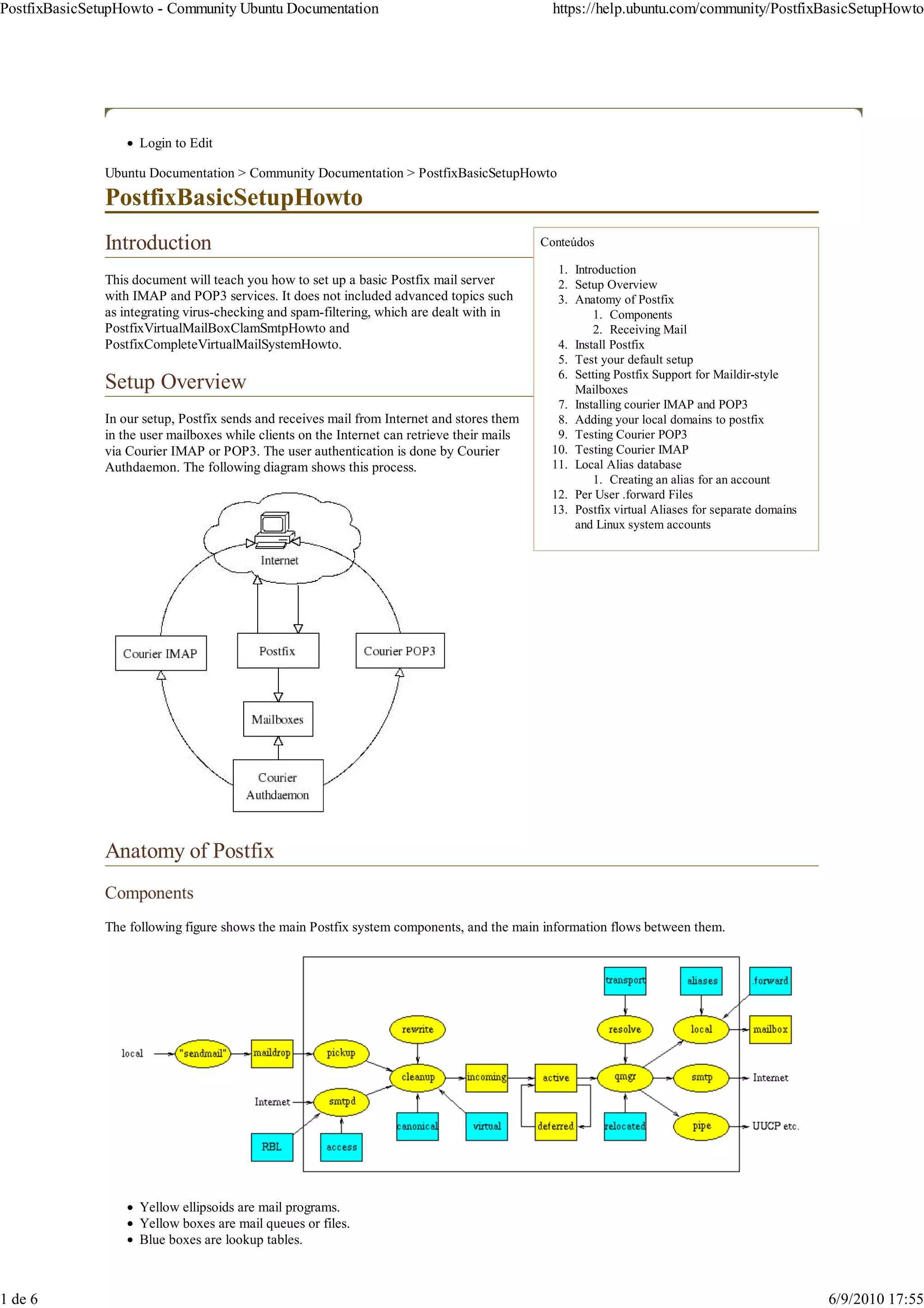
               In our setup, Postfix sends and receives mail from Internet and stores them      8. Adding your local domains to postfix
               in the user mailboxes while clients on the Internet can retrieve their mails     9. Testing Courier POP3
               via Courier IMAP or POP3. The user authentication is done by Courier            10. Testing Courier IMAP
               Authdaemon. The following diagram shows this process.                           11. Local Alias database
                                                                                                       1. Creating an alias for an account
                                                                                               12. Per User .forward Files
                                                                                               13. Postfix virtual Aliases for separate domains
                                                                                                   and Linux system accounts


               Anatomy of Postfix
               Components
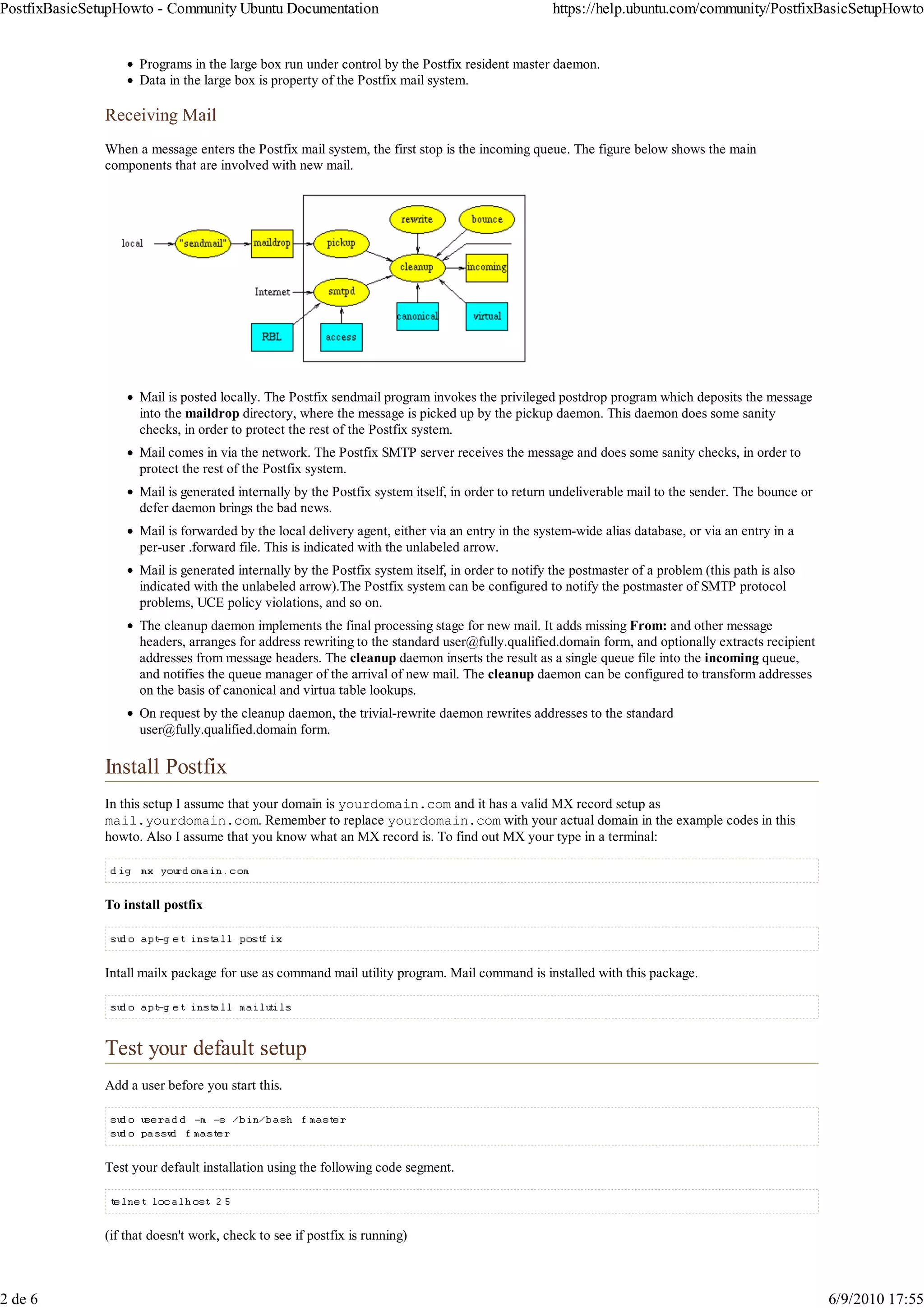
               The following figure shows the main Postfix system components, and the main information flows between them.


                     Yellow ellipsoids are mail programs.
                     Yellow boxes are mail queues or files.
                     Blue boxes are lookup tables.


1 de 6                                                                                                                                            6/9/2010 17:55
PostfixBasicSetupHowto - Community Ubuntu Documentation                                            https://help.ubuntu.com/community/PostfixBasicSetupHowto


                     Programs in the large box run under control by the Postfix resident master daemon.
                     Data in the large box is property of the Postfix mail system.

               Receiving Mail
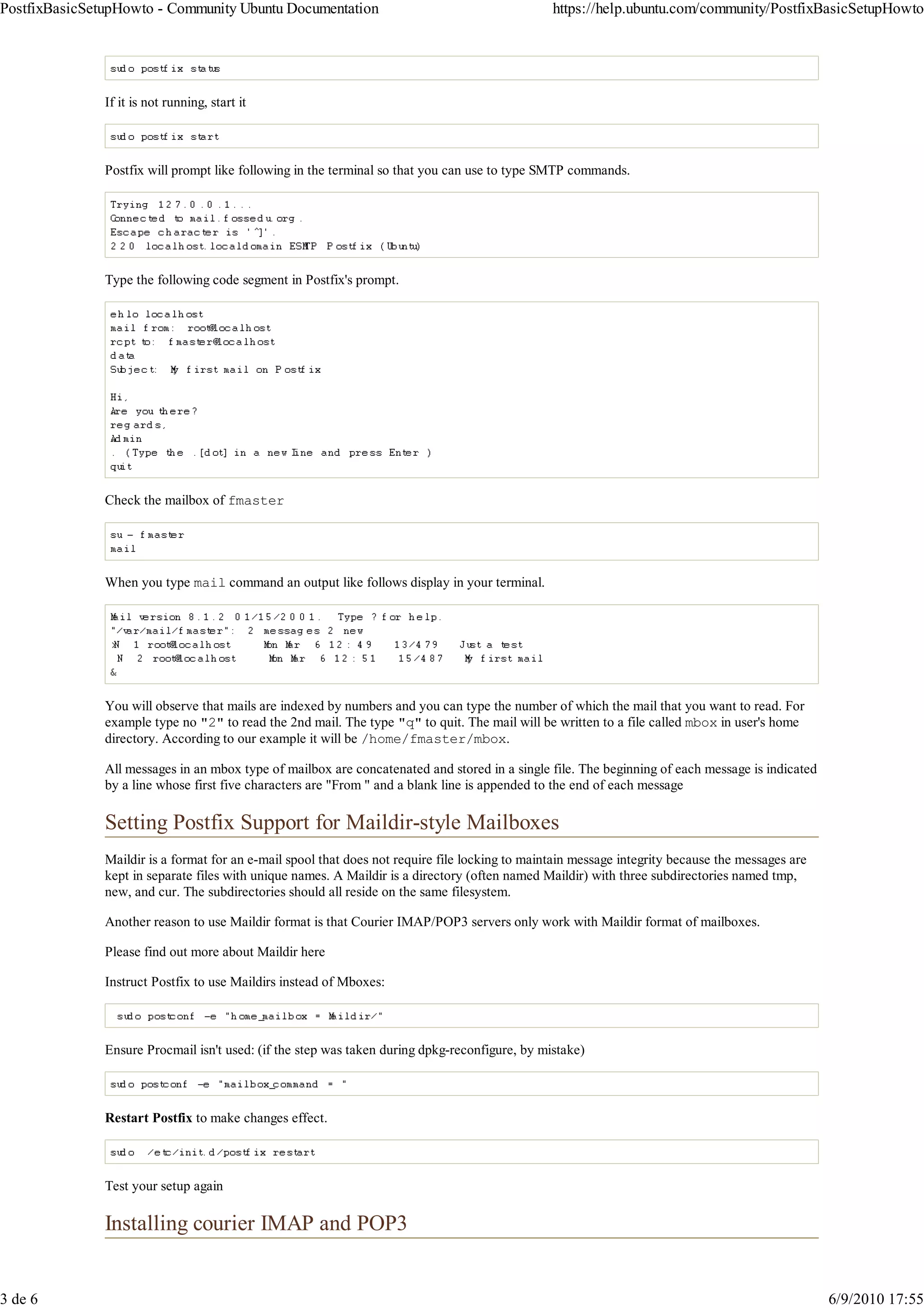
               When a message enters the Postfix mail system, the first stop is the incoming queue. The figure below shows the main
               components that are involved with new mail.


                     Mail is posted locally. The Postfix sendmail program invokes the privileged postdrop program which deposits the message
                     into the maildrop directory, where the message is picked up by the pickup daemon. This daemon does some sanity
                     checks, in order to protect the rest of the Postfix system.
                     Mail comes in via the network. The Postfix SMTP server receives the message and does some sanity checks, in order to
                     protect the rest of the Postfix system.
                     Mail is generated internally by the Postfix system itself, in order to return undeliverable mail to the sender. The bounce or
                     defer daemon brings the bad news.
                     Mail is forwarded by the local delivery agent, either via an entry in the system-wide alias database, or via an entry in a
                     per-user .forward file. This is indicated with the unlabeled arrow.
                     Mail is generated internally by the Postfix system itself, in order to notify the postmaster of a problem (this path is also
                     indicated with the unlabeled arrow).The Postfix system can be configured to notify the postmaster of SMTP protocol
                     problems, UCE policy violations, and so on.
                     The cleanup daemon implements the final processing stage for new mail. It adds missing From: and other message
                     headers, arranges for address rewriting to the standard user@fully.qualified.domain form, and optionally extracts recipient
                     addresses from message headers. The cleanup daemon inserts the result as a single queue file into the incoming queue,
                     and notifies the queue manager of the arrival of new mail. The cleanup daemon can be configured to transform addresses
                     on the basis of canonical and virtua table lookups.
                     On request by the cleanup daemon, the trivial-rewrite daemon rewrites addresses to the standard
                     user@fully.qualified.domain form.

               Install Postfix
               In this setup I assume that your domain is yourdomain.com and it has a valid MX record setup as
               mail.yourdomain.com. Remember to replace yourdomain.com with your actual domain in the example codes in this
               howto. Also I assume that you know what an MX record is. To find out MX your type in a terminal:


               To install postfix


               Intall mailx package for use as command mail utility program. Mail command is installed with this package.


               Test your default setup
               Add a user before you start this.


               Test your default installation using the following code segment.


               (if that doesn't work, check to see if postfix is running)


2 de 6                                                                                                                                               6/9/2010 17:55
PostfixBasicSetupHowto - Community Ubuntu Documentation                                          https://help.ubuntu.com/community/PostfixBasicSetupHowto


               If it is not running, start it


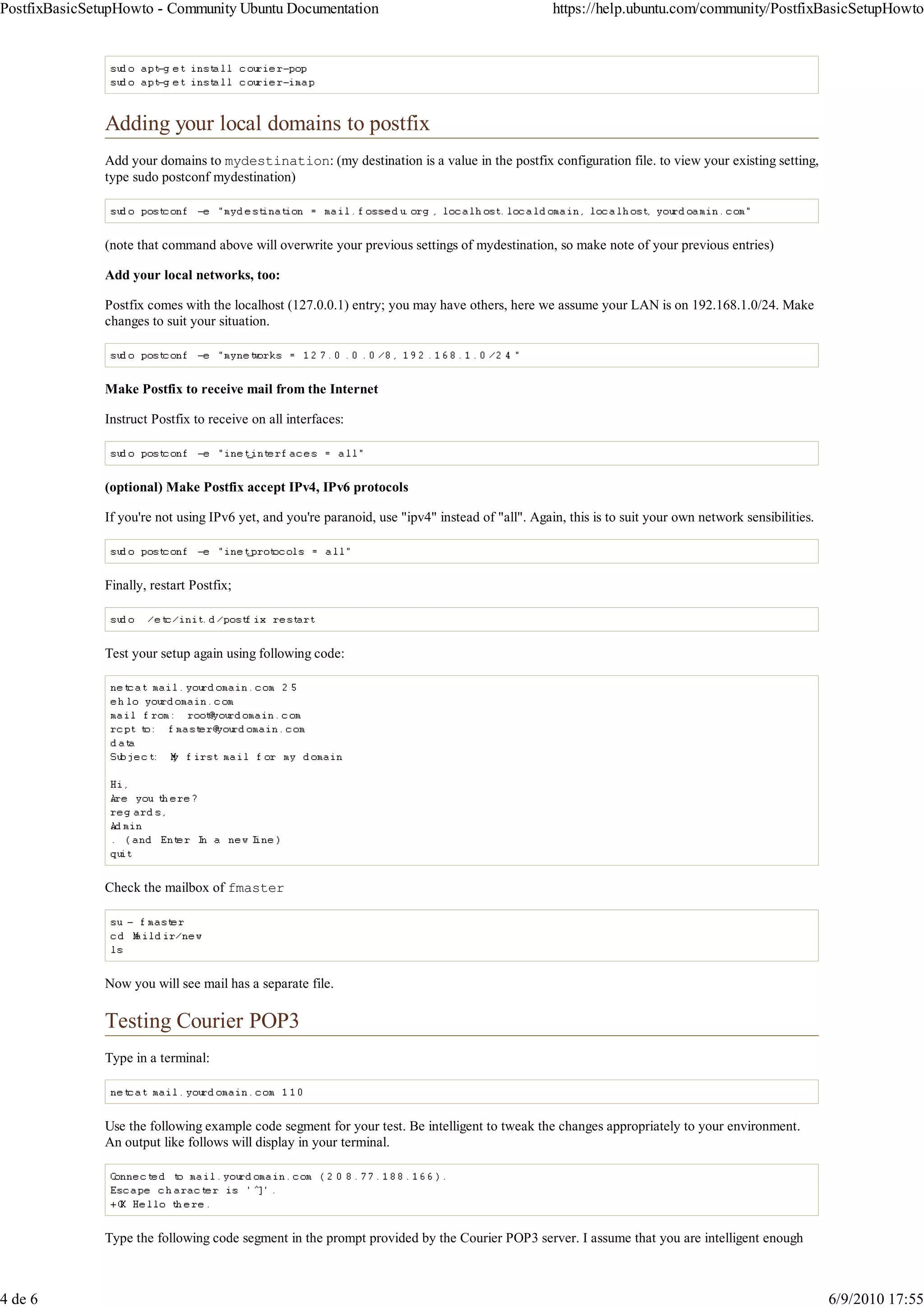
               Postfix will prompt like following in the terminal so that you can use to type SMTP commands.


               Type the following code segment in Postfix's prompt.


               Check the mailbox of fmaster


               When you type mail command an output like follows display in your terminal.


               You will observe that mails are indexed by numbers and you can type the number of which the mail that you want to read. For
               example type no "2" to read the 2nd mail. The type "q" to quit. The mail will be written to a file called mbox in user's home
               directory. According to our example it will be /home/fmaster/mbox.

               All messages in an mbox type of mailbox are concatenated and stored in a single file. The beginning of each message is indicated
               by a line whose first five characters are "From " and a blank line is appended to the end of each message

               Setting Postfix Support for Maildir-style Mailboxes
               Maildir is a format for an e-mail spool that does not require file locking to maintain message integrity because the messages are
               kept in separate files with unique names. A Maildir is a directory (often named Maildir) with three subdirectories named tmp,
               new, and cur. The subdirectories should all reside on the same filesystem.

               Another reason to use Maildir format is that Courier IMAP/POP3 servers only work with Maildir format of mailboxes.

               Please find out more about Maildir here

               Instruct Postfix to use Maildirs instead of Mboxes:


               Ensure Procmail isn't used: (if the step was taken during dpkg-reconfigure, by mistake)


               Restart Postfix to make changes effect.


               Test your setup again

               Installing courier IMAP and POP3


3 de 6                                                                                                                                             6/9/2010 17:55
PostfixBasicSetupHowto - Community Ubuntu Documentation                                            https://help.ubuntu.com/community/PostfixBasicSetupHowto


               Adding your local domains to postfix
               Add your domains to mydestination: (my destination is a value in the postfix configuration file. to view your existing setting,
               type sudo postconf mydestination)


               (note that command above will overwrite your previous settings of mydestination, so make note of your previous entries)

               Add your local networks, too:

               Postfix comes with the localhost (127.0.0.1) entry; you may have others, here we assume your LAN is on 192.168.1.0/24. Make
               changes to suit your situation.


               Make Postfix to receive mail from the Internet

               Instruct Postfix to receive on all interfaces:


               (optional) Make Postfix accept IPv4, IPv6 protocols

               If you're not using IPv6 yet, and you're paranoid, use "ipv4" instead of "all". Again, this is to suit your own network sensibilities.


               Finally, restart Postfix;


               Test your setup again using following code:


               Check the mailbox of fmaster


               Now you will see mail has a separate file.

               Testing Courier POP3
               Type in a terminal:


               Use the following example code segment for your test. Be intelligent to tweak the changes appropriately to your environment.
               An output like follows will display in your terminal.


               Type the following code segment in the prompt provided by the Courier POP3 server. I assume that you are intelligent enough


4 de 6                                                                                                                                                  6/9/2010 17:55
PostfixBasicSetupHowto - Community Ubuntu Documentation                                          https://help.ubuntu.com/community/PostfixBasicSetupHowto


               not to type the lines which starts from +OK


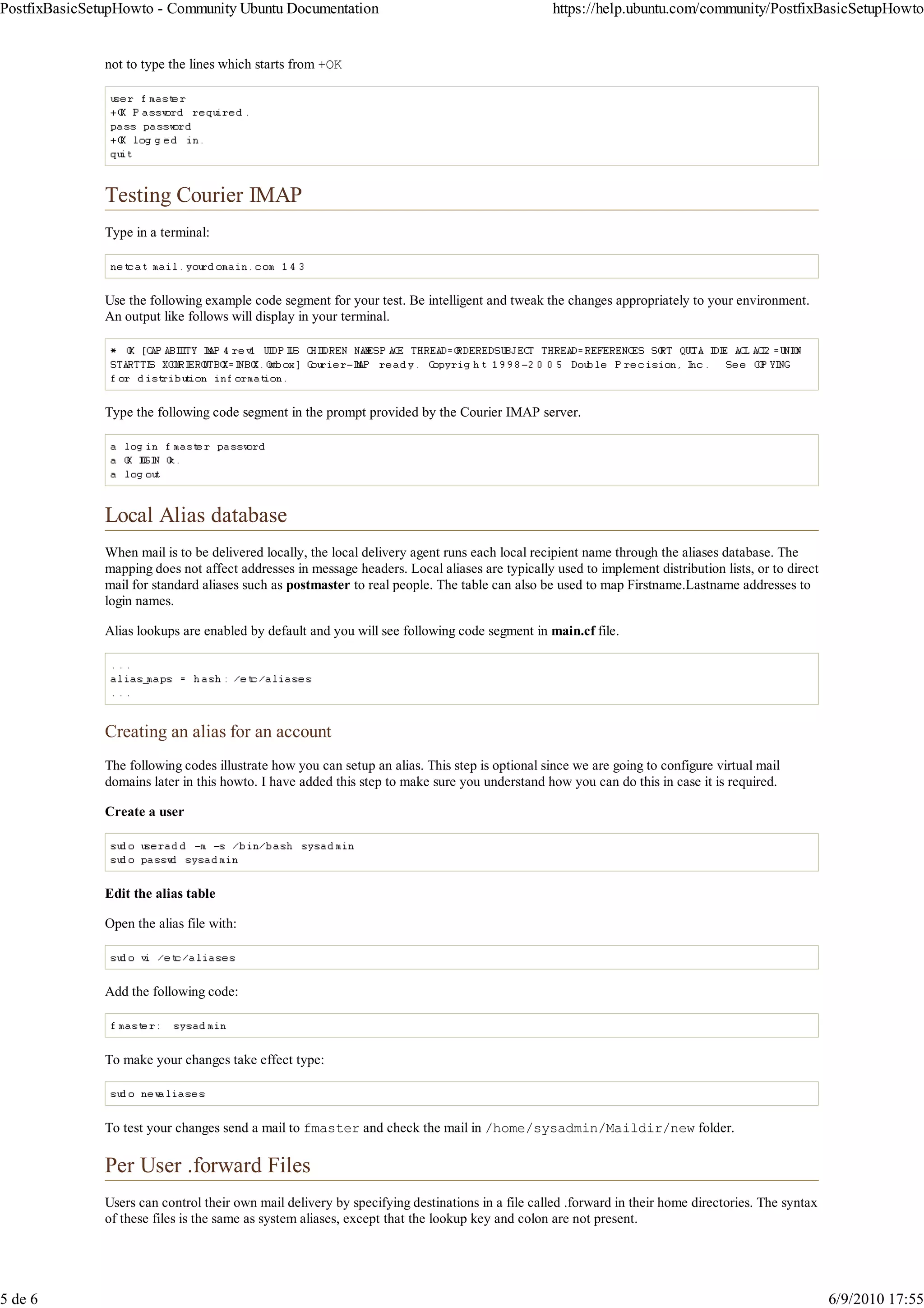
               Testing Courier IMAP
               Type in a terminal:


               Use the following example code segment for your test. Be intelligent and tweak the changes appropriately to your environment.
               An output like follows will display in your terminal.


               Type the following code segment in the prompt provided by the Courier IMAP server.


               Local Alias database
               When mail is to be delivered locally, the local delivery agent runs each local recipient name through the aliases database. The
               mapping does not affect addresses in message headers. Local aliases are typically used to implement distribution lists, or to direct
               mail for standard aliases such as postmaster to real people. The table can also be used to map Firstname.Lastname addresses to
               login names.

               Alias lookups are enabled by default and you will see following code segment in main.cf file.


               Creating an alias for an account
               The following codes illustrate how you can setup an alias. This step is optional since we are going to configure virtual mail
               domains later in this howto. I have added this step to make sure you understand how you can do this in case it is required.

               Create a user


               Edit the alias table

               Open the alias file with:


               Add the following code:


               To make your changes take effect type:


               To test your changes send a mail to fmaster and check the mail in /home/sysadmin/Maildir/new folder.

               Per User .forward Files
               Users can control their own mail delivery by specifying destinations in a file called .forward in their home directories. The syntax
               of these files is the same as system aliases, except that the lookup key and colon are not present.


5 de 6                                                                                                                                                6/9/2010 17:55
PostfixBasicSetupHowto - Community Ubuntu Documentation                                                  https://help.ubuntu.com/community/PostfixBasicSetupHowto


               I will illustrate an example here:

               Assume that you need to forward all the mails which come to the sysadmin account to an another account. Enter the following
               commands:


               Then open the .forward file


               Add the following code:


               Remember to use email address which exists in this exercise.

               Now send a mail to sysadmin and mail should come to fossedu@example.com

               Postfix virtual Aliases for separate domains and Linux system accounts
               With this approach, every hosted domain can have its own info etc. email address. However, it still uses Linux system accounts
               for local mailbox deliveries.

               With virtual alias domains, each hosted address is aliased to a local UNIX system account or to a remote address. The example
               below shows how to use this mechanism for the fossedu.org and linuxelabs.com domains.

               Inside the main.cf file, we tell it how to handle these virtual domains:


               Edit the /etc/postfix/virtual file:

               Add two Linux system accounts


               Set passwords for the above users.


               Add the following code segment:


               To create a Map Database type :


               postmap is utility program that will convert /etc/postfix/virtual to /etc/postfix/virtual.db in Berkley DB
               format, so that Postfix can access the data faster.

               Restart Postfix to make changes take effect:


               Send mails to both info@fossedu.org and info@linuxelabs.com and those mails should come to mailboxes of sigiri and kala
               respectively.

               PostfixBasicSetupHowto (editada pela última vez em 2010-06-28 19:27:50 por https://login.launchpad.net/+id/X3EKRDY @
               204-249-70-85.netsync.net[204.249.70.85]:Fap Fap the fapper)

                     Page History


6 de 6                                                                                                                                            6/9/2010 17:55

Postfix, Imap e Pop3

  • 1.
    PostfixBasicSetupHowto - CommunityUbuntu Documentation https://help.ubuntu.com/community/PostfixBasicSetupHowto Login to Edit Ubuntu Documentation > Community Documentation > PostfixBasicSetupHowto PostfixBasicSetupHowto Introduction Conteúdos 1. Introduction This document will teach you how to set up a basic Postfix mail server 2. Setup Overview with IMAP and POP3 services. It does not included advanced topics such 3. Anatomy of Postfix as integrating virus-checking and spam-filtering, which are dealt with in 1. Components PostfixVirtualMailBoxClamSmtpHowto and 2. Receiving Mail PostfixCompleteVirtualMailSystemHowto. 4. Install Postfix 5. Test your default setup 6. Setting Postfix Support for Maildir-style Setup Overview Mailboxes 7. Installing courier IMAP and POP3 In our setup, Postfix sends and receives mail from Internet and stores them 8. Adding your local domains to postfix in the user mailboxes while clients on the Internet can retrieve their mails 9. Testing Courier POP3 via Courier IMAP or POP3. The user authentication is done by Courier 10. Testing Courier IMAP Authdaemon. The following diagram shows this process. 11. Local Alias database 1. Creating an alias for an account 12. Per User .forward Files 13. Postfix virtual Aliases for separate domains and Linux system accounts Anatomy of Postfix Components The following figure shows the main Postfix system components, and the main information flows between them. Yellow ellipsoids are mail programs. Yellow boxes are mail queues or files. Blue boxes are lookup tables. 1 de 6 6/9/2010 17:55
  • 2.
    PostfixBasicSetupHowto - CommunityUbuntu Documentation https://help.ubuntu.com/community/PostfixBasicSetupHowto Programs in the large box run under control by the Postfix resident master daemon. Data in the large box is property of the Postfix mail system. Receiving Mail When a message enters the Postfix mail system, the first stop is the incoming queue. The figure below shows the main components that are involved with new mail. Mail is posted locally. The Postfix sendmail program invokes the privileged postdrop program which deposits the message into the maildrop directory, where the message is picked up by the pickup daemon. This daemon does some sanity checks, in order to protect the rest of the Postfix system. Mail comes in via the network. The Postfix SMTP server receives the message and does some sanity checks, in order to protect the rest of the Postfix system. Mail is generated internally by the Postfix system itself, in order to return undeliverable mail to the sender. The bounce or defer daemon brings the bad news. Mail is forwarded by the local delivery agent, either via an entry in the system-wide alias database, or via an entry in a per-user .forward file. This is indicated with the unlabeled arrow. Mail is generated internally by the Postfix system itself, in order to notify the postmaster of a problem (this path is also indicated with the unlabeled arrow).The Postfix system can be configured to notify the postmaster of SMTP protocol problems, UCE policy violations, and so on. The cleanup daemon implements the final processing stage for new mail. It adds missing From: and other message headers, arranges for address rewriting to the standard user@fully.qualified.domain form, and optionally extracts recipient addresses from message headers. The cleanup daemon inserts the result as a single queue file into the incoming queue, and notifies the queue manager of the arrival of new mail. The cleanup daemon can be configured to transform addresses on the basis of canonical and virtua table lookups. On request by the cleanup daemon, the trivial-rewrite daemon rewrites addresses to the standard user@fully.qualified.domain form. Install Postfix In this setup I assume that your domain is yourdomain.com and it has a valid MX record setup as mail.yourdomain.com. Remember to replace yourdomain.com with your actual domain in the example codes in this howto. Also I assume that you know what an MX record is. To find out MX your type in a terminal: To install postfix Intall mailx package for use as command mail utility program. Mail command is installed with this package. Test your default setup Add a user before you start this. Test your default installation using the following code segment. (if that doesn't work, check to see if postfix is running) 2 de 6 6/9/2010 17:55
  • 3.
    PostfixBasicSetupHowto - CommunityUbuntu Documentation https://help.ubuntu.com/community/PostfixBasicSetupHowto If it is not running, start it Postfix will prompt like following in the terminal so that you can use to type SMTP commands. Type the following code segment in Postfix's prompt. Check the mailbox of fmaster When you type mail command an output like follows display in your terminal. You will observe that mails are indexed by numbers and you can type the number of which the mail that you want to read. For example type no "2" to read the 2nd mail. The type "q" to quit. The mail will be written to a file called mbox in user's home directory. According to our example it will be /home/fmaster/mbox. All messages in an mbox type of mailbox are concatenated and stored in a single file. The beginning of each message is indicated by a line whose first five characters are "From " and a blank line is appended to the end of each message Setting Postfix Support for Maildir-style Mailboxes Maildir is a format for an e-mail spool that does not require file locking to maintain message integrity because the messages are kept in separate files with unique names. A Maildir is a directory (often named Maildir) with three subdirectories named tmp, new, and cur. The subdirectories should all reside on the same filesystem. Another reason to use Maildir format is that Courier IMAP/POP3 servers only work with Maildir format of mailboxes. Please find out more about Maildir here Instruct Postfix to use Maildirs instead of Mboxes: Ensure Procmail isn't used: (if the step was taken during dpkg-reconfigure, by mistake) Restart Postfix to make changes effect. Test your setup again Installing courier IMAP and POP3 3 de 6 6/9/2010 17:55
  • 4.
    PostfixBasicSetupHowto - CommunityUbuntu Documentation https://help.ubuntu.com/community/PostfixBasicSetupHowto Adding your local domains to postfix Add your domains to mydestination: (my destination is a value in the postfix configuration file. to view your existing setting, type sudo postconf mydestination) (note that command above will overwrite your previous settings of mydestination, so make note of your previous entries) Add your local networks, too: Postfix comes with the localhost (127.0.0.1) entry; you may have others, here we assume your LAN is on 192.168.1.0/24. Make changes to suit your situation. Make Postfix to receive mail from the Internet Instruct Postfix to receive on all interfaces: (optional) Make Postfix accept IPv4, IPv6 protocols If you're not using IPv6 yet, and you're paranoid, use "ipv4" instead of "all". Again, this is to suit your own network sensibilities. Finally, restart Postfix; Test your setup again using following code: Check the mailbox of fmaster Now you will see mail has a separate file. Testing Courier POP3 Type in a terminal: Use the following example code segment for your test. Be intelligent to tweak the changes appropriately to your environment. An output like follows will display in your terminal. Type the following code segment in the prompt provided by the Courier POP3 server. I assume that you are intelligent enough 4 de 6 6/9/2010 17:55
  • 5.
    PostfixBasicSetupHowto - CommunityUbuntu Documentation https://help.ubuntu.com/community/PostfixBasicSetupHowto not to type the lines which starts from +OK Testing Courier IMAP Type in a terminal: Use the following example code segment for your test. Be intelligent and tweak the changes appropriately to your environment. An output like follows will display in your terminal. Type the following code segment in the prompt provided by the Courier IMAP server. Local Alias database When mail is to be delivered locally, the local delivery agent runs each local recipient name through the aliases database. The mapping does not affect addresses in message headers. Local aliases are typically used to implement distribution lists, or to direct mail for standard aliases such as postmaster to real people. The table can also be used to map Firstname.Lastname addresses to login names. Alias lookups are enabled by default and you will see following code segment in main.cf file. Creating an alias for an account The following codes illustrate how you can setup an alias. This step is optional since we are going to configure virtual mail domains later in this howto. I have added this step to make sure you understand how you can do this in case it is required. Create a user Edit the alias table Open the alias file with: Add the following code: To make your changes take effect type: To test your changes send a mail to fmaster and check the mail in /home/sysadmin/Maildir/new folder. Per User .forward Files Users can control their own mail delivery by specifying destinations in a file called .forward in their home directories. The syntax of these files is the same as system aliases, except that the lookup key and colon are not present. 5 de 6 6/9/2010 17:55
  • 6.
    PostfixBasicSetupHowto - CommunityUbuntu Documentation https://help.ubuntu.com/community/PostfixBasicSetupHowto I will illustrate an example here: Assume that you need to forward all the mails which come to the sysadmin account to an another account. Enter the following commands: Then open the .forward file Add the following code: Remember to use email address which exists in this exercise. Now send a mail to sysadmin and mail should come to fossedu@example.com Postfix virtual Aliases for separate domains and Linux system accounts With this approach, every hosted domain can have its own info etc. email address. However, it still uses Linux system accounts for local mailbox deliveries. With virtual alias domains, each hosted address is aliased to a local UNIX system account or to a remote address. The example below shows how to use this mechanism for the fossedu.org and linuxelabs.com domains. Inside the main.cf file, we tell it how to handle these virtual domains: Edit the /etc/postfix/virtual file: Add two Linux system accounts Set passwords for the above users. Add the following code segment: To create a Map Database type : postmap is utility program that will convert /etc/postfix/virtual to /etc/postfix/virtual.db in Berkley DB format, so that Postfix can access the data faster. Restart Postfix to make changes take effect: Send mails to both info@fossedu.org and info@linuxelabs.com and those mails should come to mailboxes of sigiri and kala respectively. PostfixBasicSetupHowto (editada pela última vez em 2010-06-28 19:27:50 por https://login.launchpad.net/+id/X3EKRDY @ 204-249-70-85.netsync.net[204.249.70.85]:Fap Fap the fapper) Page History 6 de 6 6/9/2010 17:55