Understanding AzMan in Hyper-VLai YoongSengMVP : Virtual Machine  www.ms4u.infoTechnical Consultant, Redynamics
AgendaWho is AzMan?How AzMan Works?Configure AzManWhy use AzMan?AuditingTroubleshooting
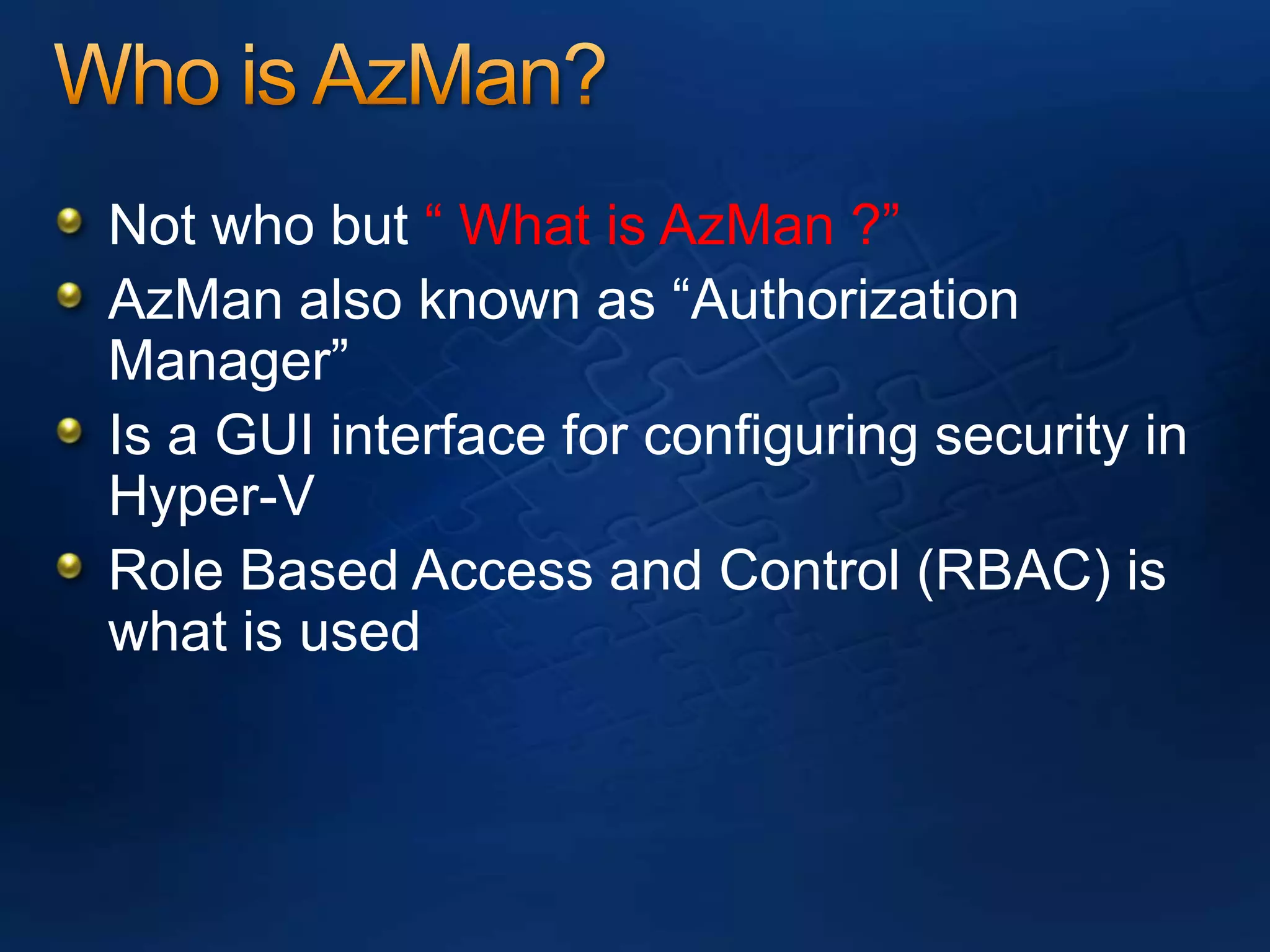
Who is AzMan?Not who but “ What is AzMan ?”AzMan also known as “Authorization Manager”Is a GUI interface for configuring security in Hyper-VRole Based Access and Control (RBAC) is what is used
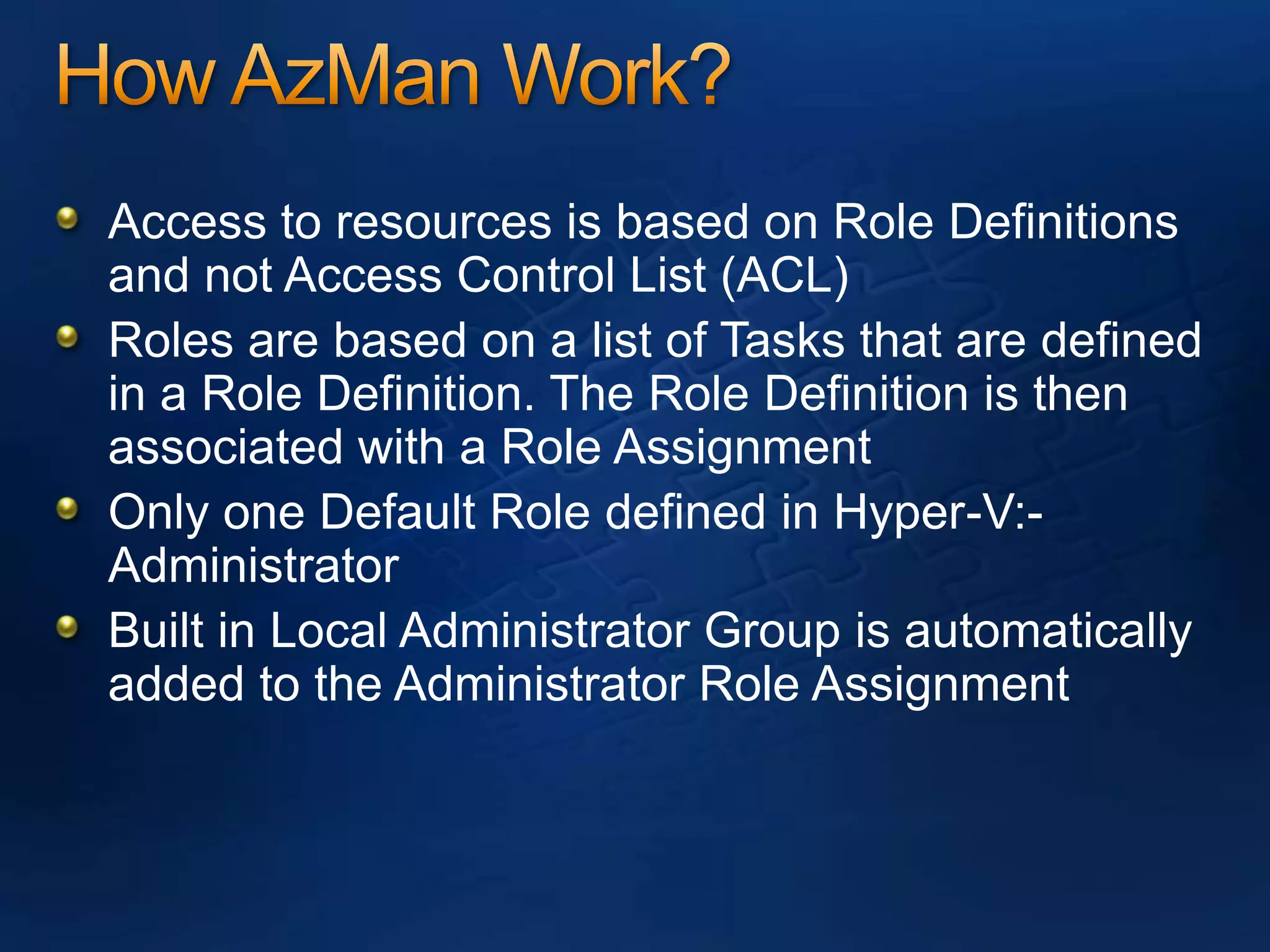
How AzMan Work?Access to resources is based on Role Definitions and not Access Control List (ACL)Roles are based on a list of Tasks that are defined in a Role Definition. The Role Definition is then associated with a Role AssignmentOnly one Default Role defined in Hyper-V:- AdministratorBuilt in Local Administrator Group is automatically added to the Administrator Role Assignment
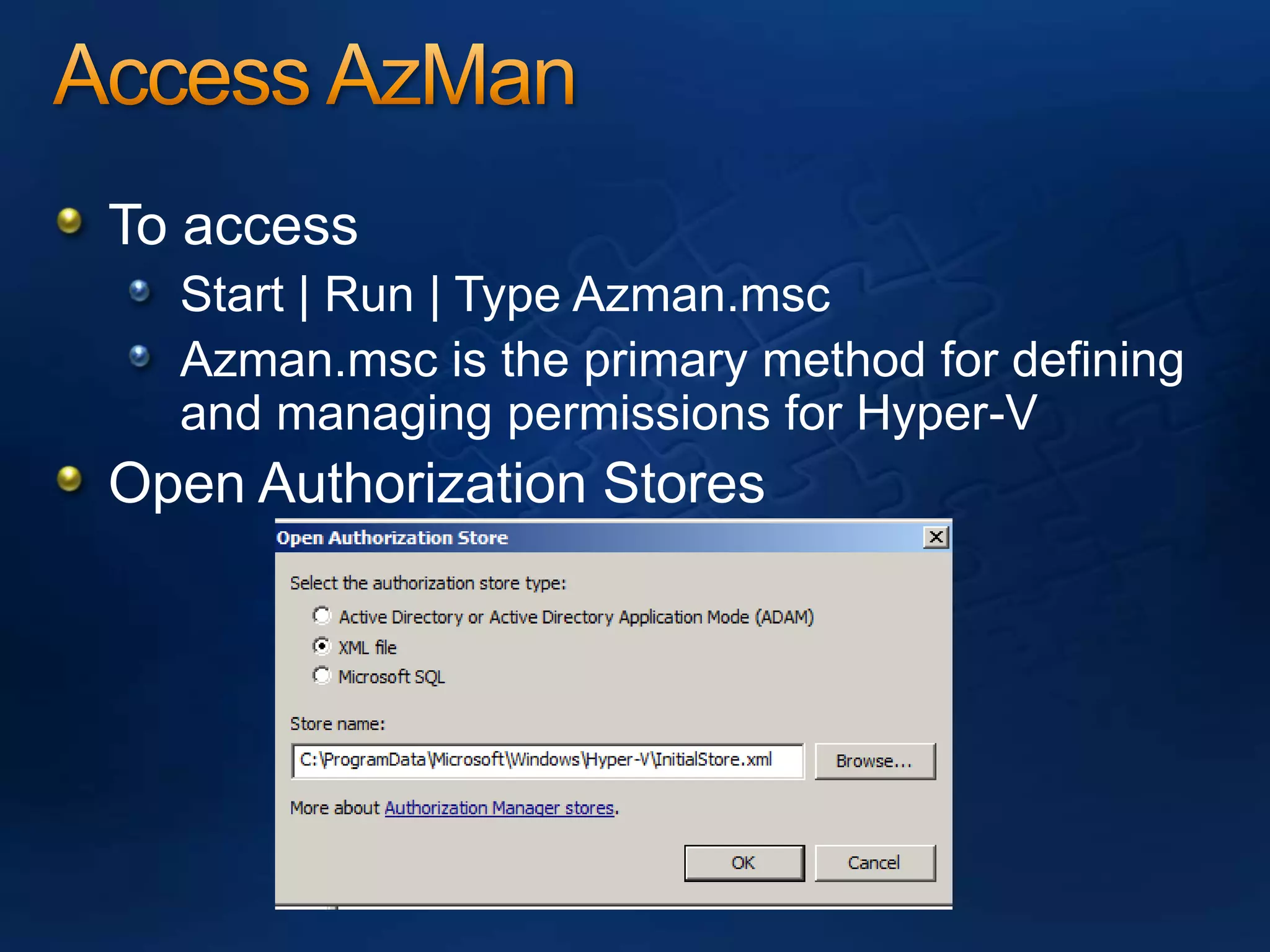
Access AzManTo accessStart | Run | Type Azman.mscAzman.msc is the primary method for defining and managing permissions for Hyper-VOpen Authorization Stores
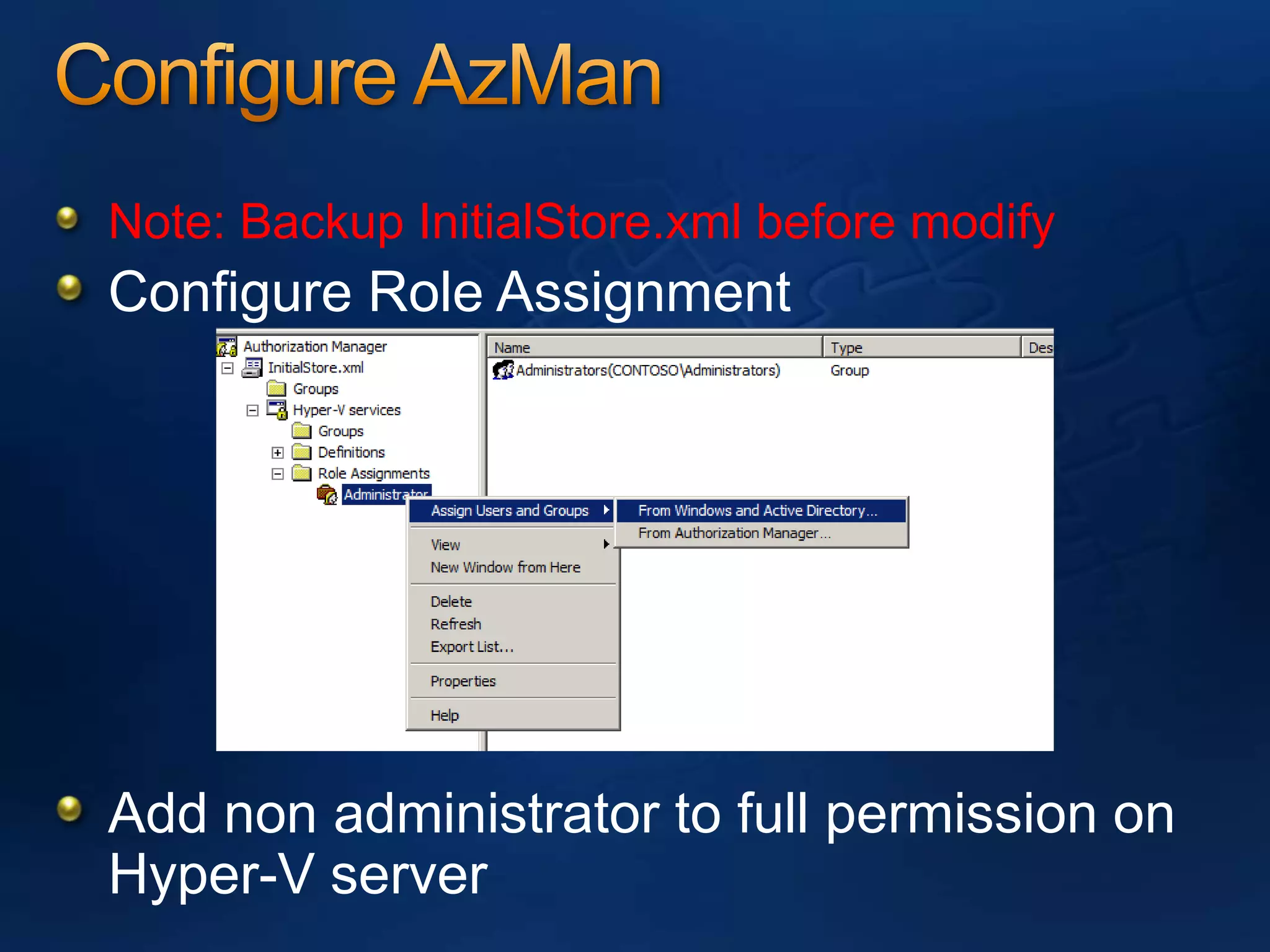
Configure AzManNote: Backup InitialStore.xml before modifyConfigure Role AssignmentAdd non administrator to full permission on Hyper-V server
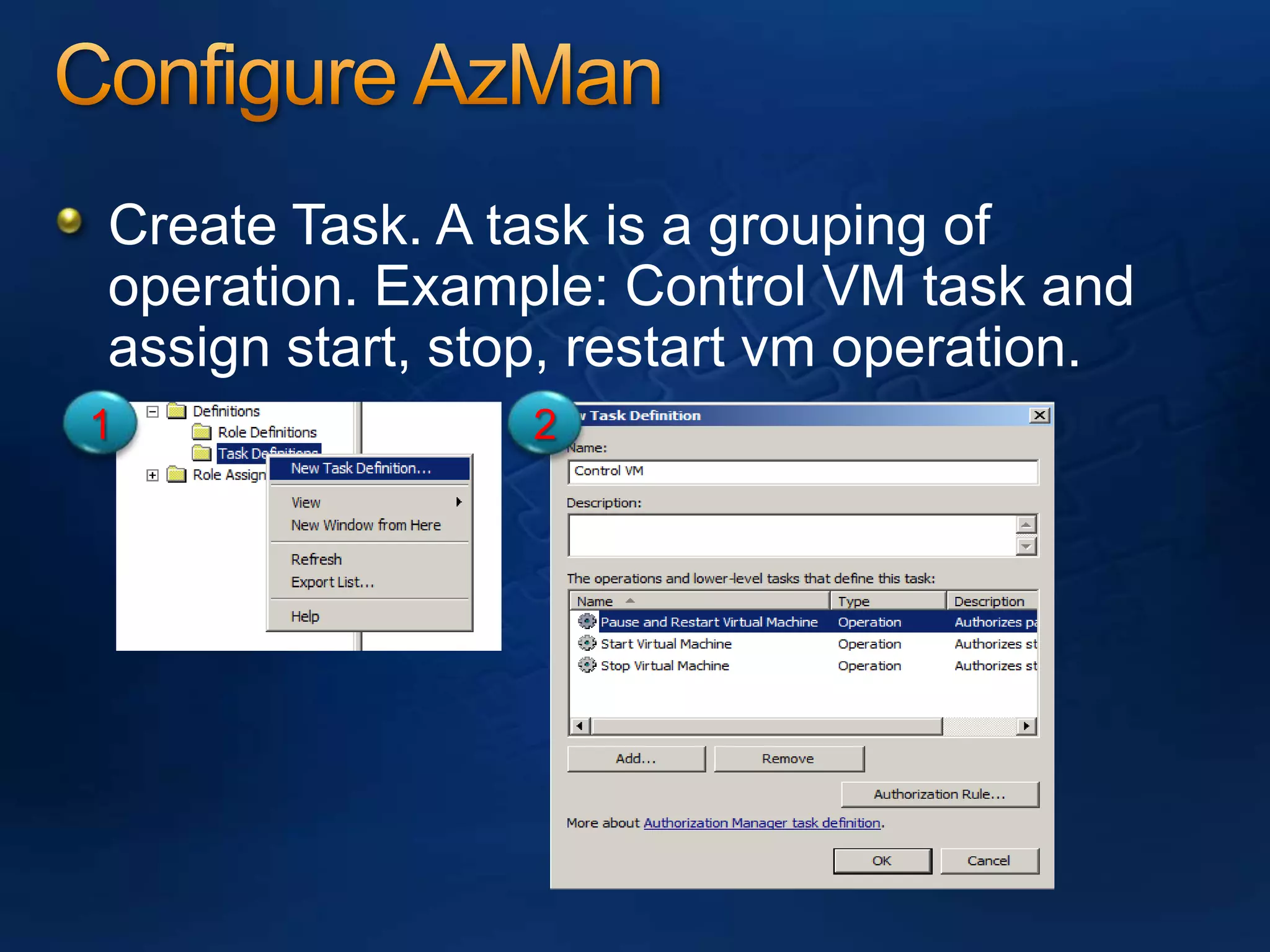
Configure AzManCreate Task. A task is a grouping of operation. Example: Control VM task and assign start, stop, restart vm operation. 12
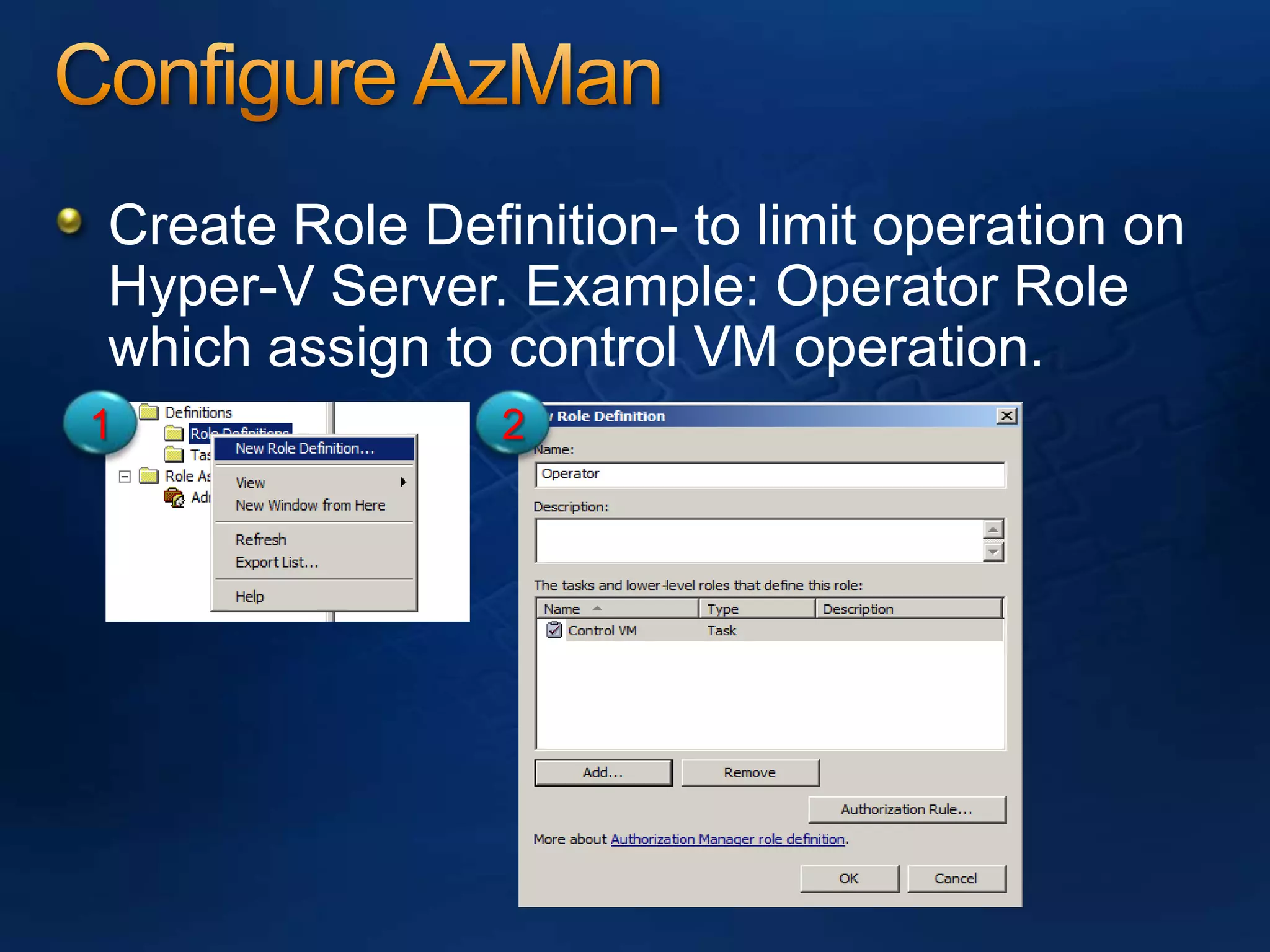
Configure AzManCreate Role Definition- to limit operation on Hyper-V Server. Example: Operator Role which assign to control VM operation.12
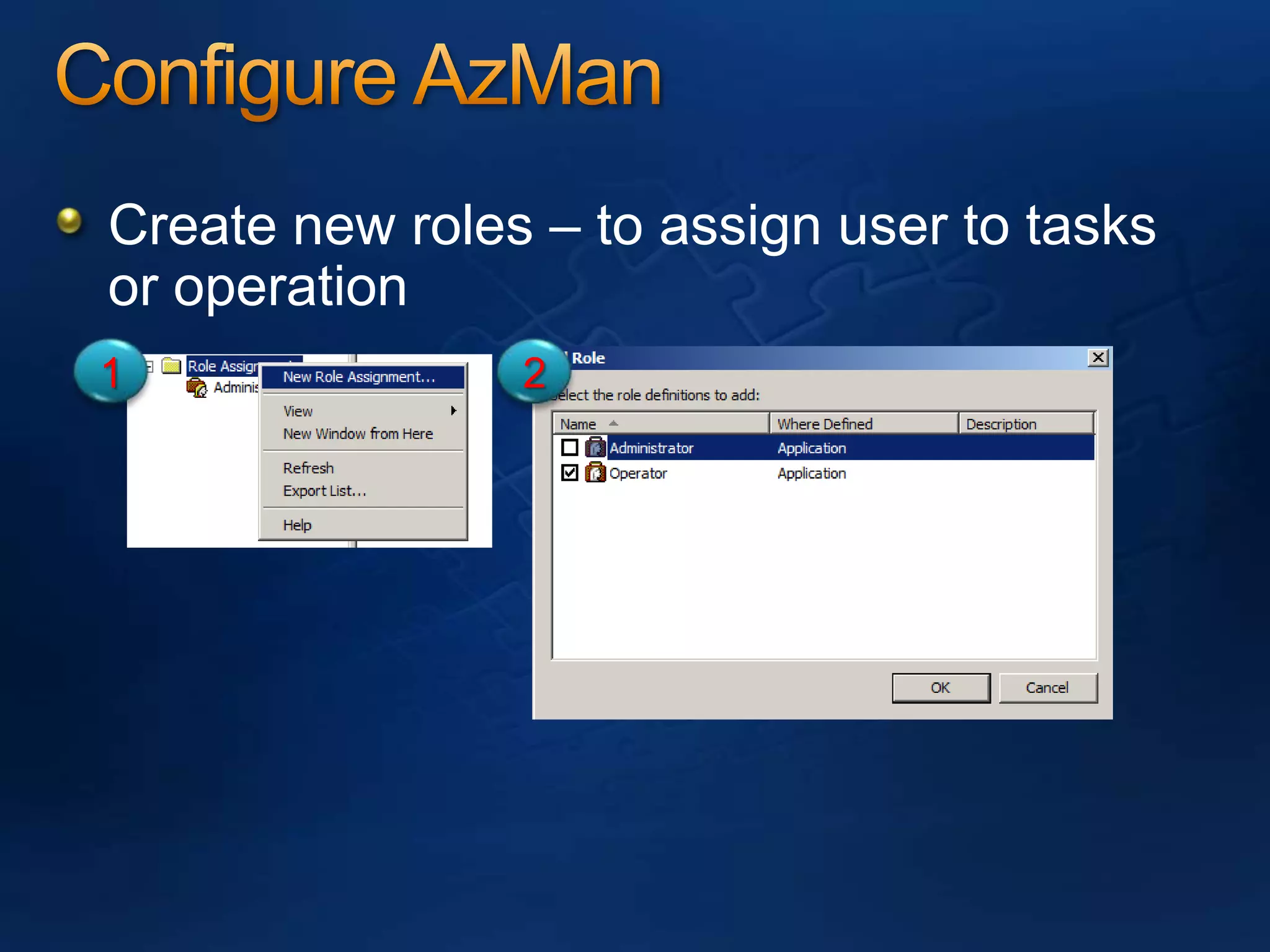
Configure AzManCreate new roles – to assign user to tasks or operation12
Configure AzMandemo
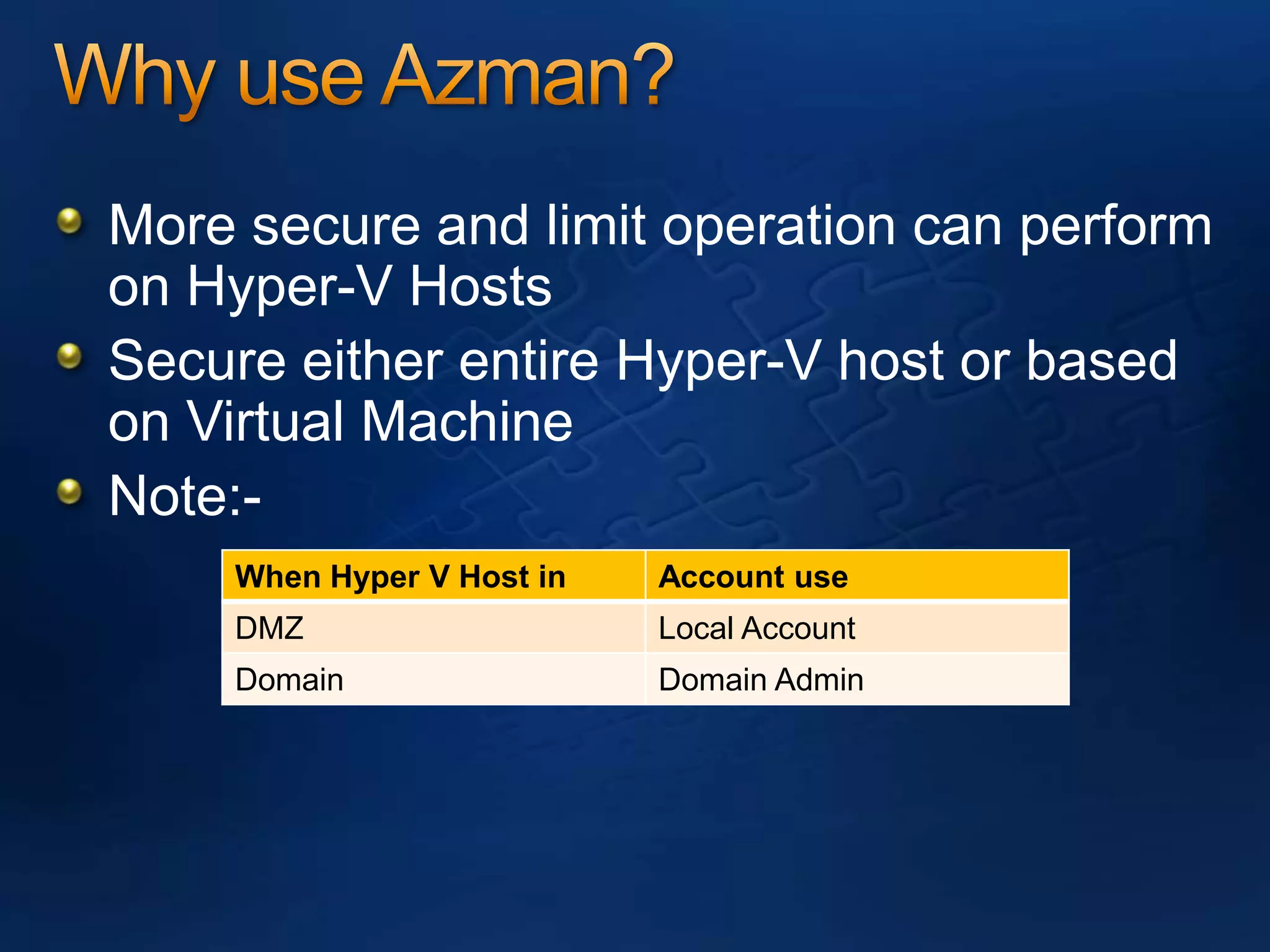
Why use Azman?More secure and limit operation can perform on Hyper-V HostsSecure either entire Hyper-V host or based on Virtual MachineNote:-
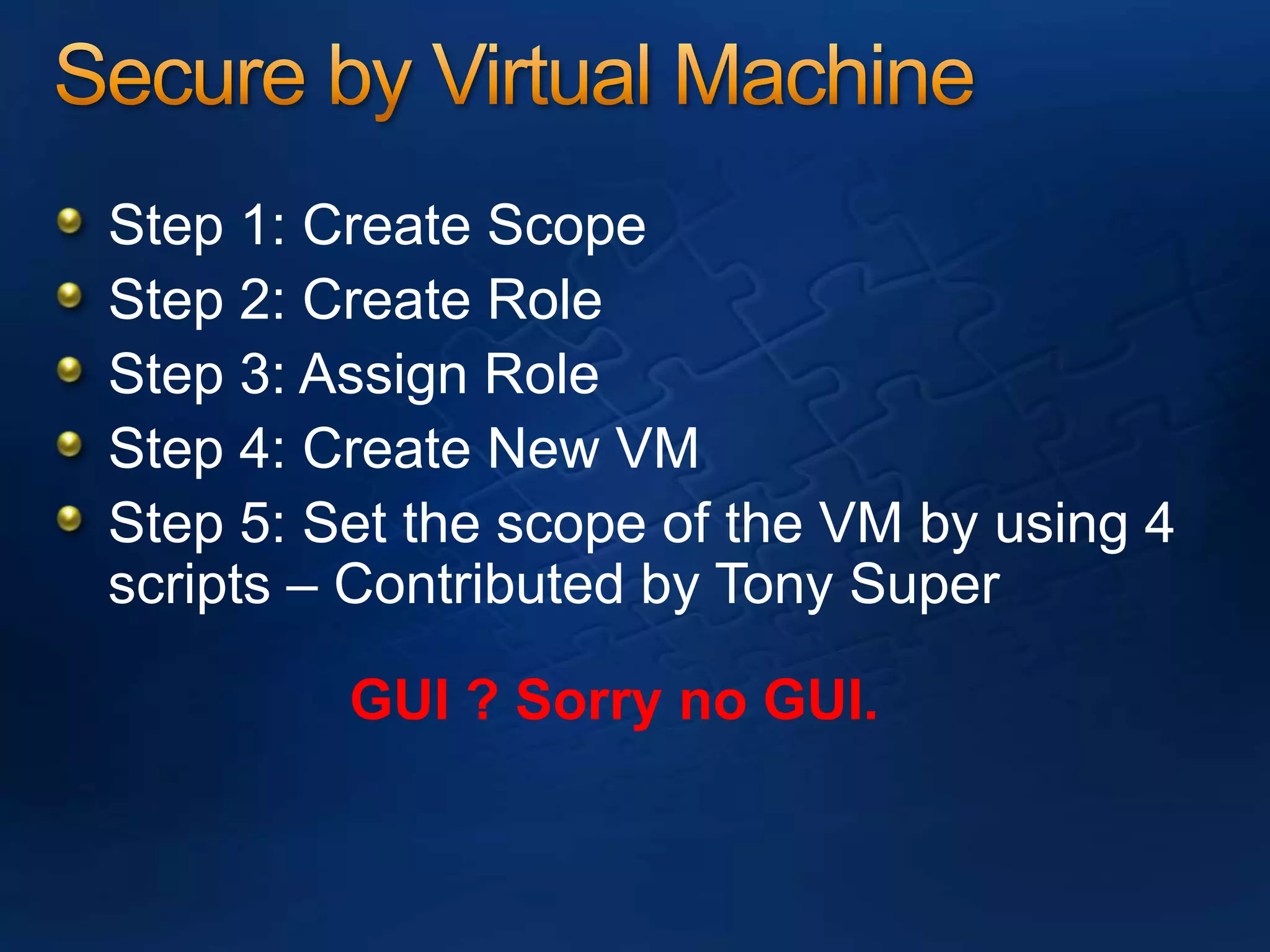
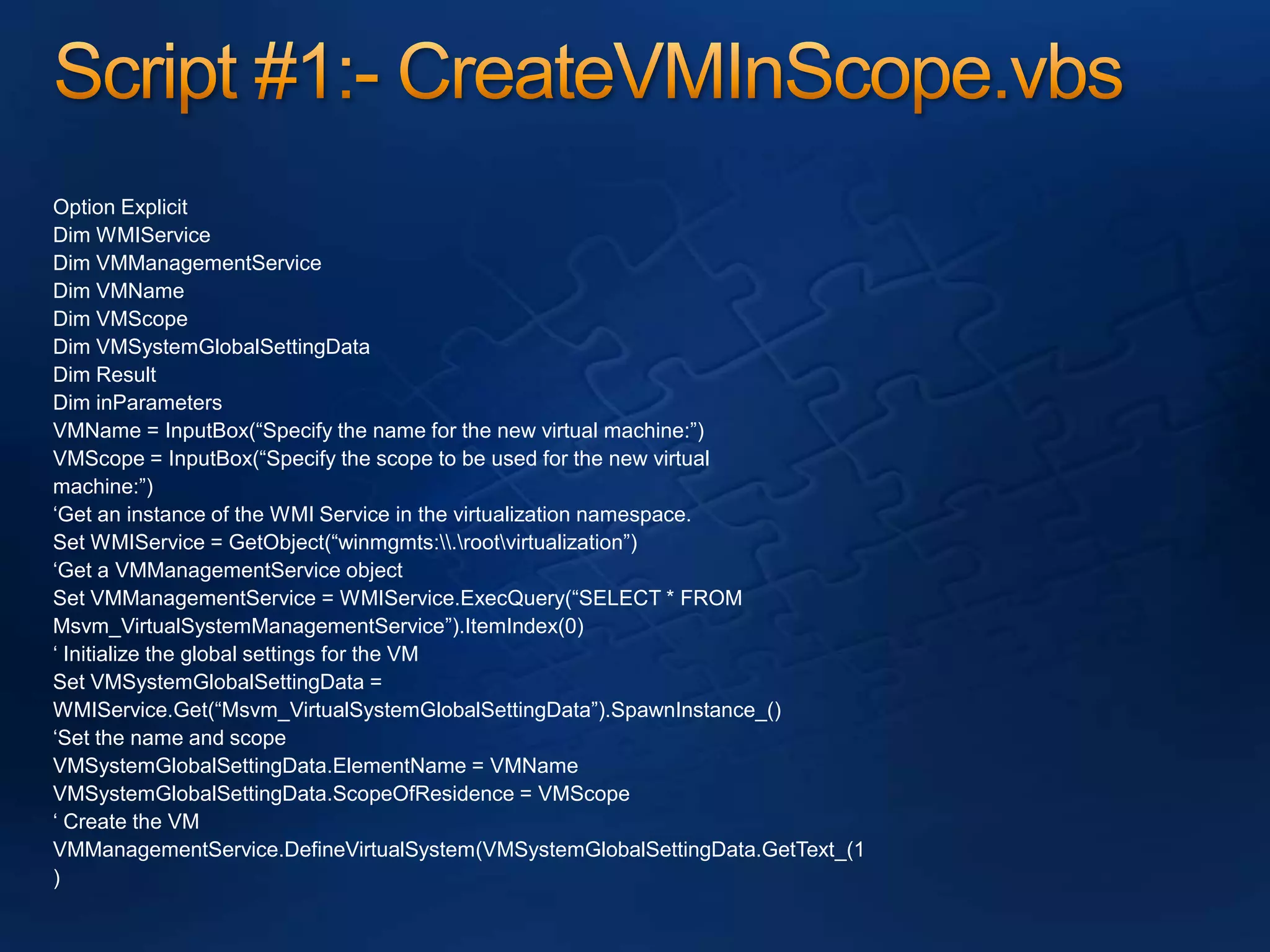
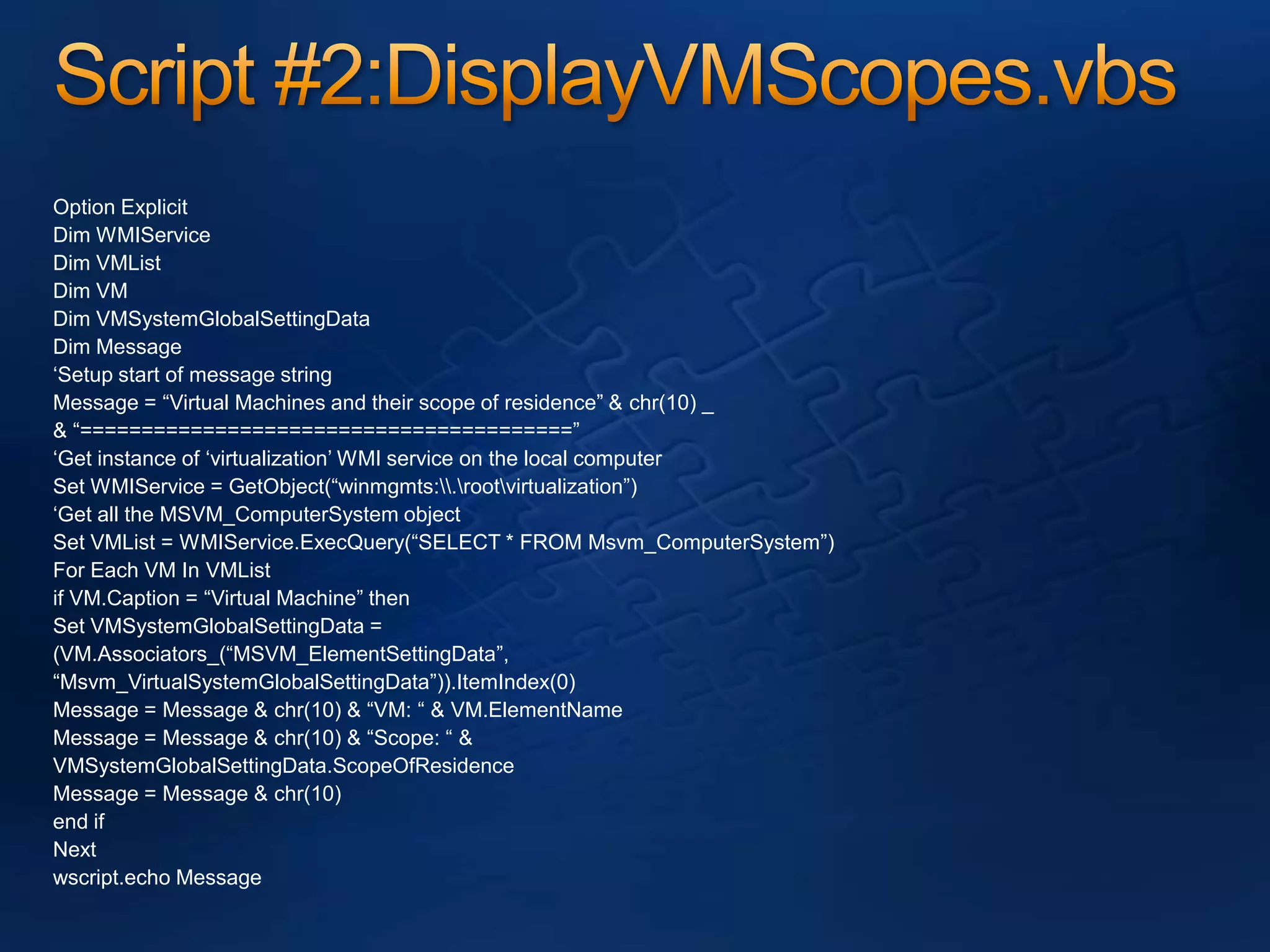
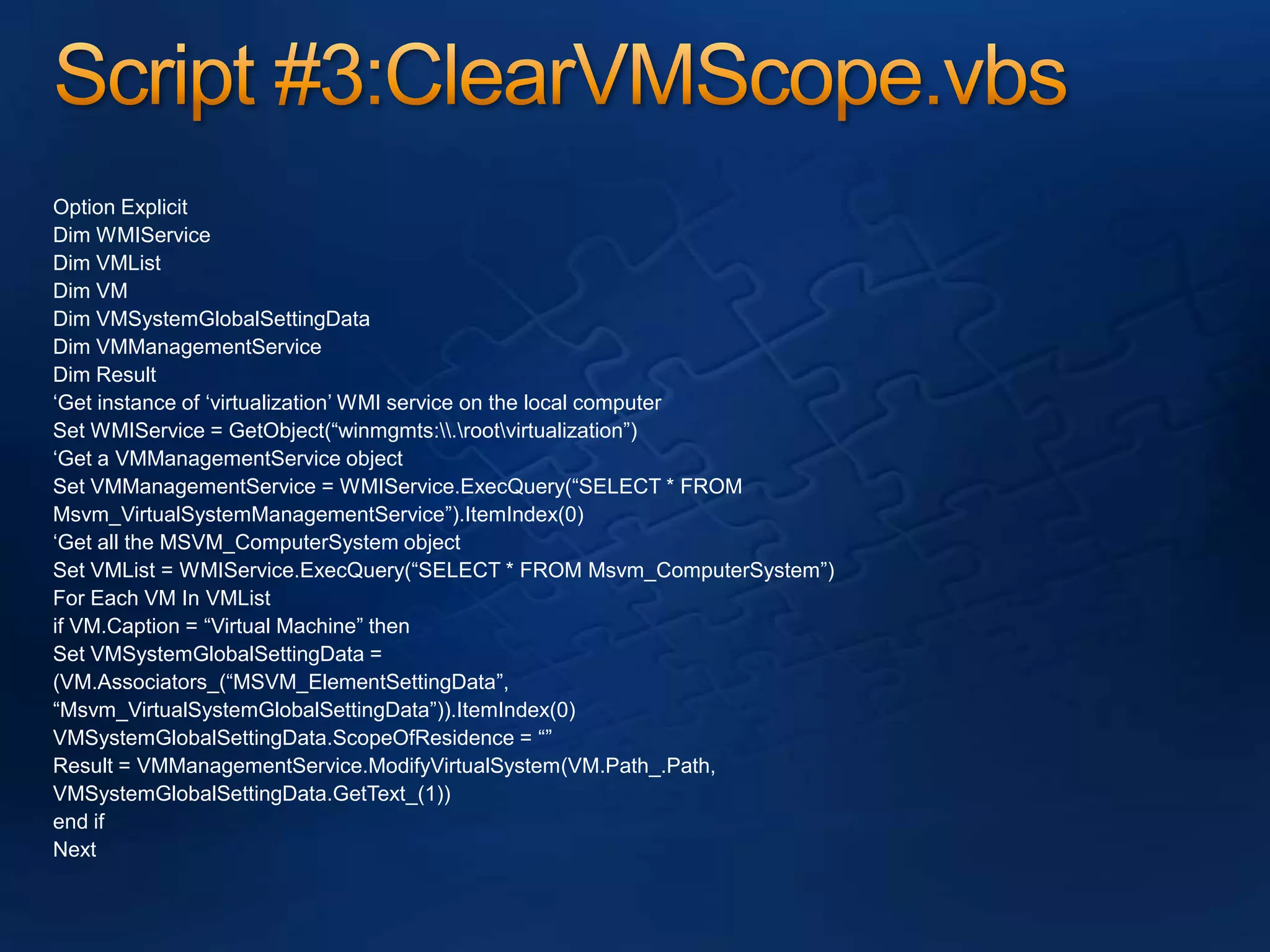
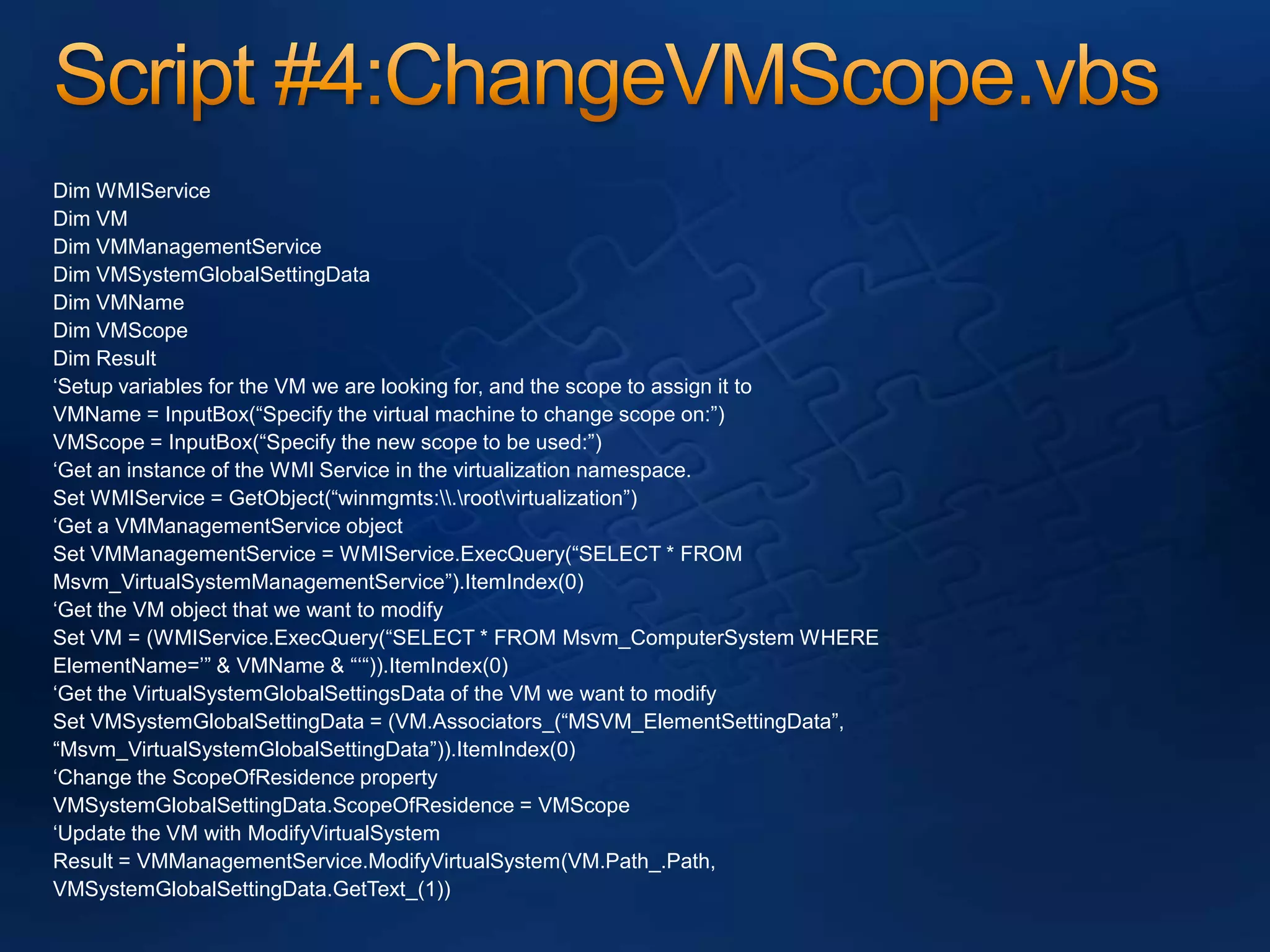
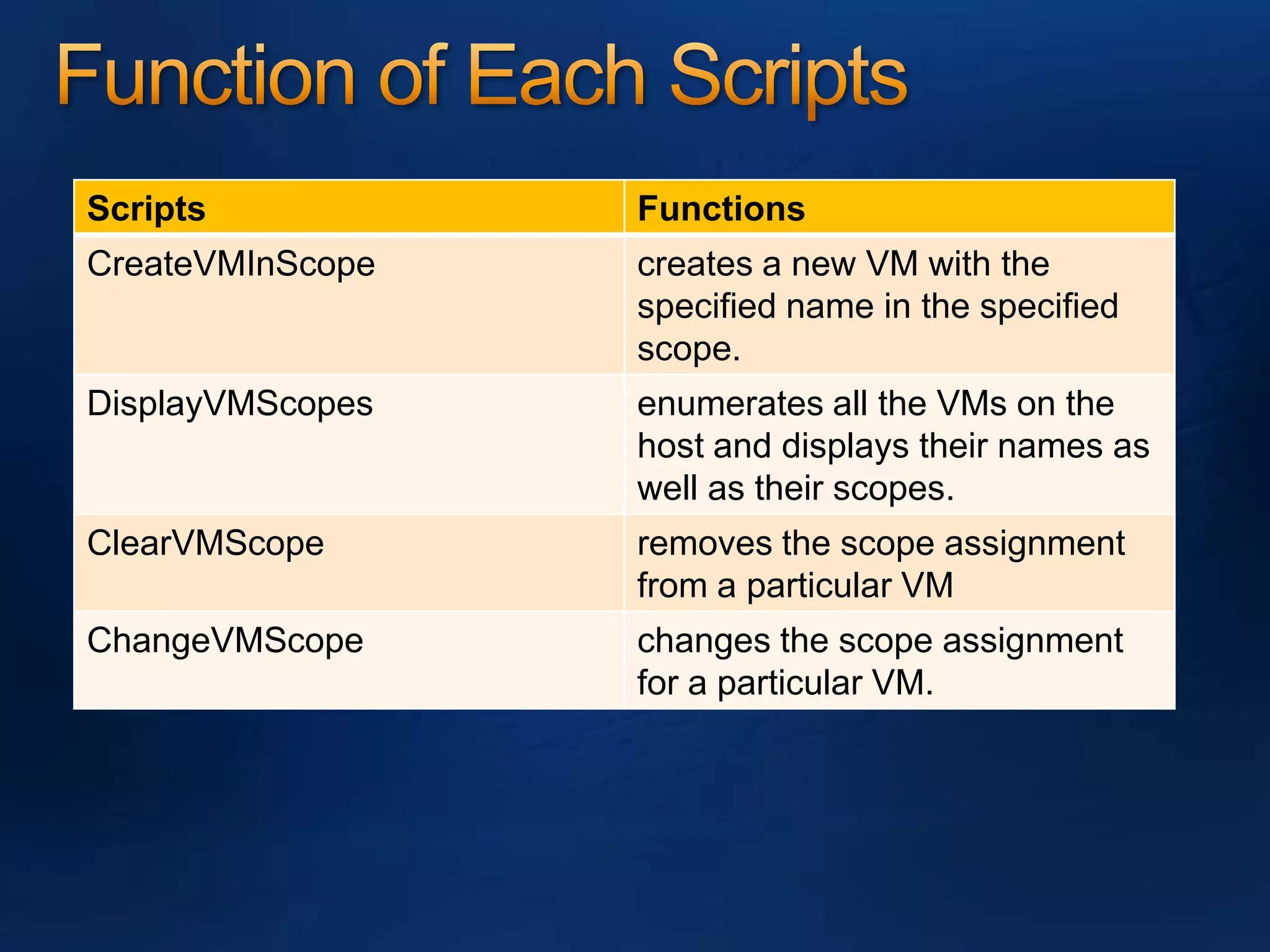
Secure by Virtual MachineStep 1: Create ScopeStep 2: Create Role Step 3: Assign RoleStep 4: Create New VMStep 5: Set the scope of the VM by using 4 scripts – Contributed by Tony SuperGUI ? Sorry no GUI.
Script #1:- CreateVMInScope.vbsOption ExplicitDim WMIServiceDim VMManagementServiceDim VMNameDim VMScopeDim VMSystemGlobalSettingDataDim ResultDim inParametersVMName = InputBox(“Specify the name for the new virtual machine:”)VMScope = InputBox(“Specify the scope to be used for the new virtualmachine:”)‘Get an instance of the WMI Service in the virtualization namespace.Set WMIService = GetObject(“winmgmts:\\.\root\virtualization”)‘Get a VMManagementService objectSet VMManagementService = WMIService.ExecQuery(“SELECT * FROMMsvm_VirtualSystemManagementService”).ItemIndex(0)‘ Initialize the global settings for the VMSet VMSystemGlobalSettingData =WMIService.Get(“Msvm_VirtualSystemGlobalSettingData”).SpawnInstance_()‘Set the name and scopeVMSystemGlobalSettingData.ElementName = VMNameVMSystemGlobalSettingData.ScopeOfResidence = VMScope‘ Create the VMVMManagementService.DefineVirtualSystem(VMSystemGlobalSettingData.GetText_(1)
Script #2:DisplayVMScopes.vbsOption ExplicitDim WMIServiceDim VMListDim VMDim VMSystemGlobalSettingDataDim Message‘Setup start of message stringMessage = “Virtual Machines and their scope of residence” & chr(10) _& “========================================”‘Get instance of ‘virtualization’ WMI service on the local computerSet WMIService = GetObject(“winmgmts:\\.\root\virtualization”)‘Get all the MSVM_ComputerSystem objectSet VMList = WMIService.ExecQuery(“SELECT * FROM Msvm_ComputerSystem”)For Each VM In VMListif VM.Caption = “Virtual Machine” thenSet VMSystemGlobalSettingData =(VM.Associators_(“MSVM_ElementSettingData”,“Msvm_VirtualSystemGlobalSettingData”)).ItemIndex(0)Message = Message & chr(10) & “VM: “ & VM.ElementNameMessage = Message & chr(10) & “Scope: “ &VMSystemGlobalSettingData.ScopeOfResidenceMessage = Message & chr(10)end ifNextwscript.echo Message
Script #3:ClearVMScope.vbsOption ExplicitDim WMIServiceDim VMListDim VMDim VMSystemGlobalSettingDataDim VMManagementServiceDim Result‘Get instance of ‘virtualization’ WMI service on the local computerSet WMIService = GetObject(“winmgmts:\\.\root\virtualization”)‘Get a VMManagementService objectSet VMManagementService = WMIService.ExecQuery(“SELECT * FROMMsvm_VirtualSystemManagementService”).ItemIndex(0)‘Get all the MSVM_ComputerSystem objectSet VMList = WMIService.ExecQuery(“SELECT * FROM Msvm_ComputerSystem”)For Each VM In VMListif VM.Caption = “Virtual Machine” thenSet VMSystemGlobalSettingData =(VM.Associators_(“MSVM_ElementSettingData”,“Msvm_VirtualSystemGlobalSettingData”)).ItemIndex(0)VMSystemGlobalSettingData.ScopeOfResidence = “”Result = VMManagementService.ModifyVirtualSystem(VM.Path_.Path,VMSystemGlobalSettingData.GetText_(1))end ifNext
Script #4:ChangeVMScope.vbsDim WMIServiceDim VMDim VMManagementServiceDim VMSystemGlobalSettingDataDim VMNameDim VMScopeDim Result‘Setup variables for the VM we are looking for, and the scope to assign it toVMName = InputBox(“Specify the virtual machine to change scope on:”)VMScope = InputBox(“Specify the new scope to be used:”)‘Get an instance of the WMI Service in the virtualization namespace.Set WMIService = GetObject(“winmgmts:\\.\root\virtualization”)‘Get a VMManagementService objectSet VMManagementService = WMIService.ExecQuery(“SELECT * FROMMsvm_VirtualSystemManagementService”).ItemIndex(0)‘Get the VM object that we want to modifySet VM = (WMIService.ExecQuery(“SELECT * FROM Msvm_ComputerSystem WHEREElementName=’” & VMName & “‘“)).ItemIndex(0)‘Get the VirtualSystemGlobalSettingsData of the VM we want to modifySet VMSystemGlobalSettingData = (VM.Associators_(“MSVM_ElementSettingData”,“Msvm_VirtualSystemGlobalSettingData”)).ItemIndex(0)‘Change the ScopeOfResidence propertyVMSystemGlobalSettingData.ScopeOfResidence = VMScope‘Update the VM with ModifyVirtualSystemResult = VMManagementService.ModifyVirtualSystem(VM.Path_.Path,VMSystemGlobalSettingData.GetText_(1))
Function of Each Scripts
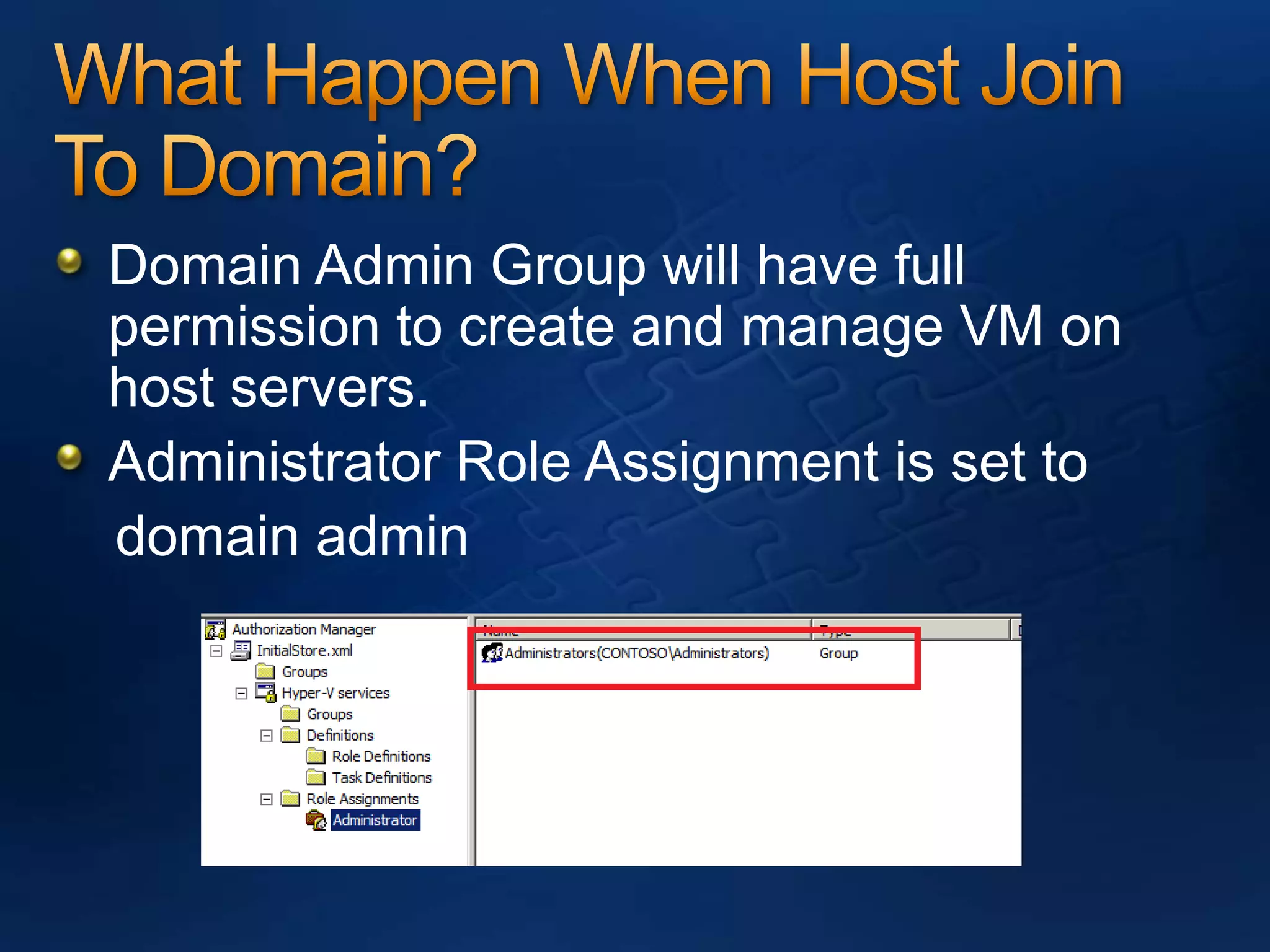
What Happen When Host Join To Domain?Domain Admin Group will have full permission to create and manage VM on host servers.Administrator Role Assignment is set to   domain admin
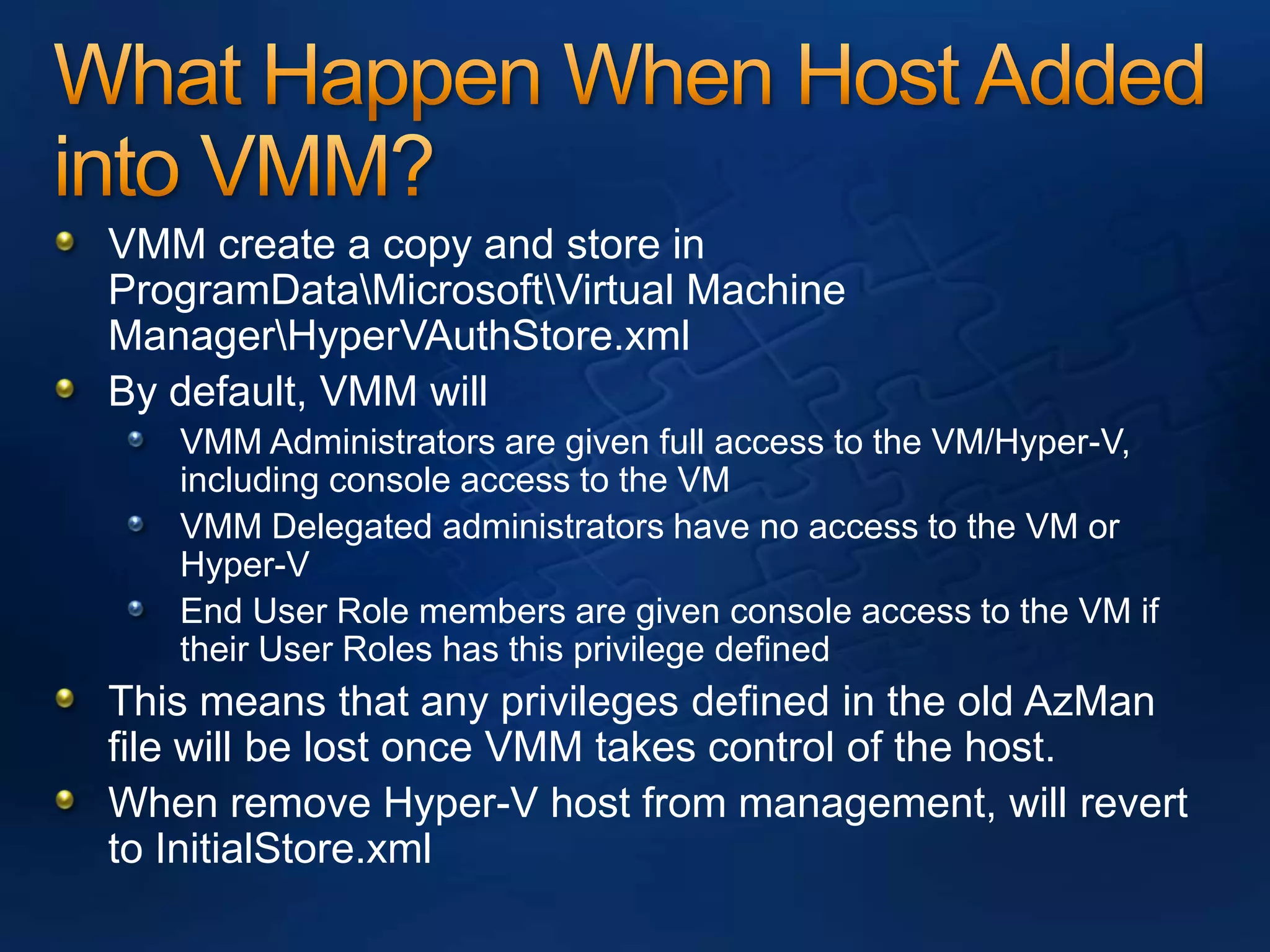
What Happen When Host Added into VMM? VMM create a copy and store in ProgramData\Microsoft\Virtual Machine Manager\HyperVAuthStore.xmlBy default, VMM will VMM Administrators are given full access to the VM/Hyper-V, including console access to the VMVMM Delegated administrators have no access to the VM or Hyper-VEnd User Role members are given console access to the VM if their User Roles has this privilege definedThis means that any privileges defined in the old AzManfile will be lost once VMM takes control of the host.When remove Hyper-V host from management, will revert to InitialStore.xml
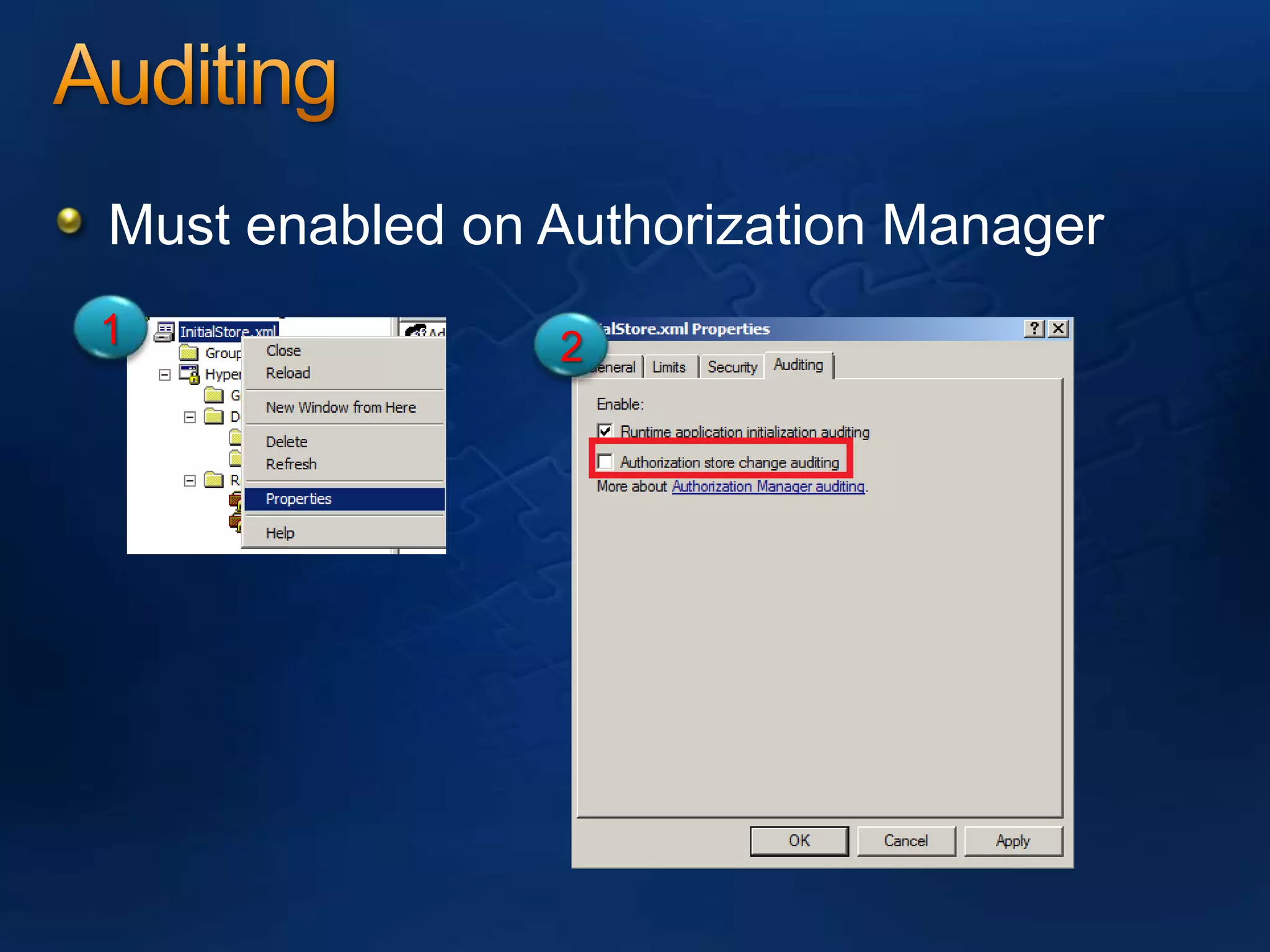
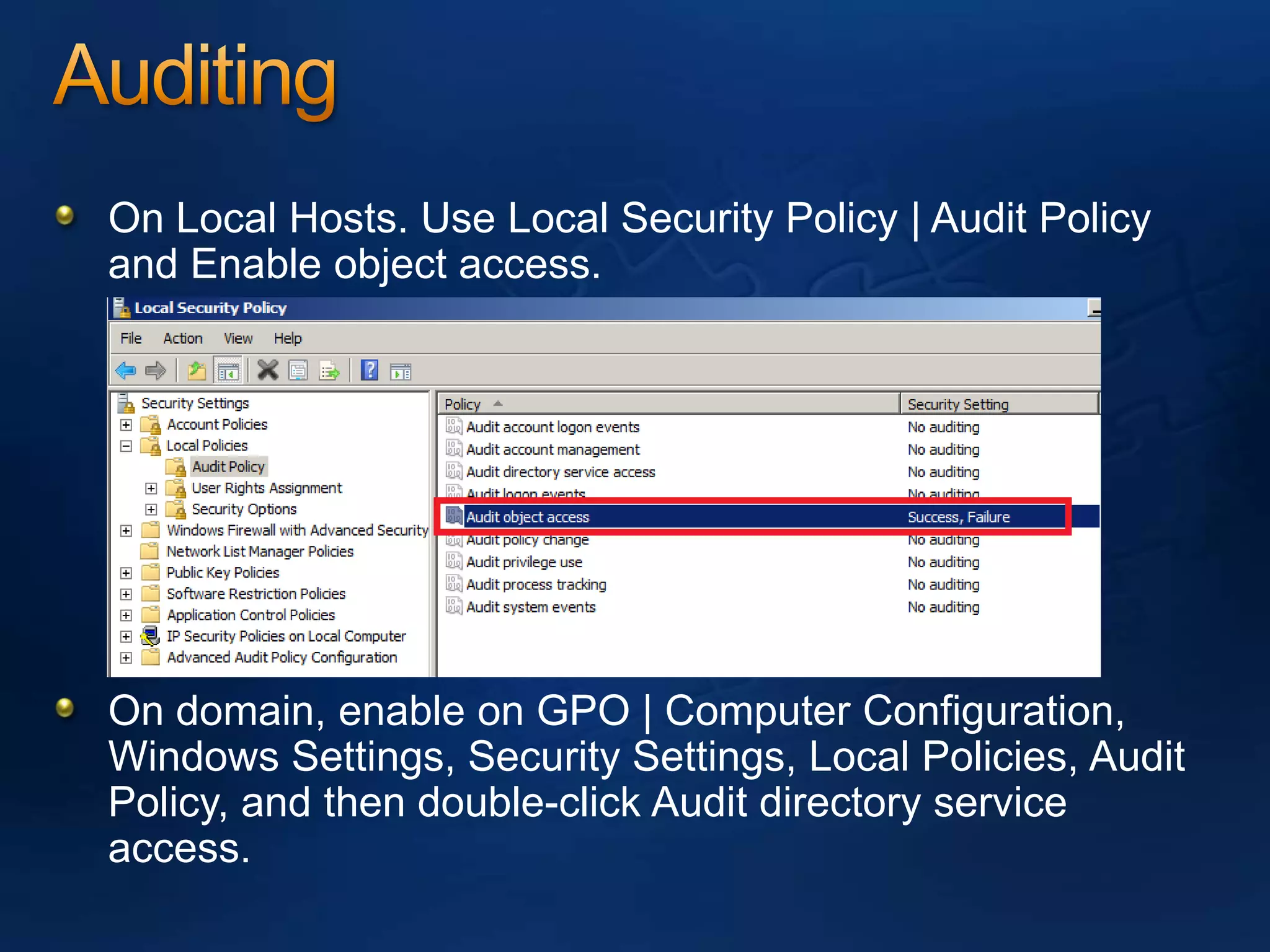
AuditingMust enabled on Authorization Manager12
AuditingOn Local Hosts. Use Local Security Policy | Audit Policy and Enable object access.On domain, enable on GPO | Computer Configuration, Windows Settings, Security Settings, Local Policies, Audit Policy, and then double-click Audit directory service access.
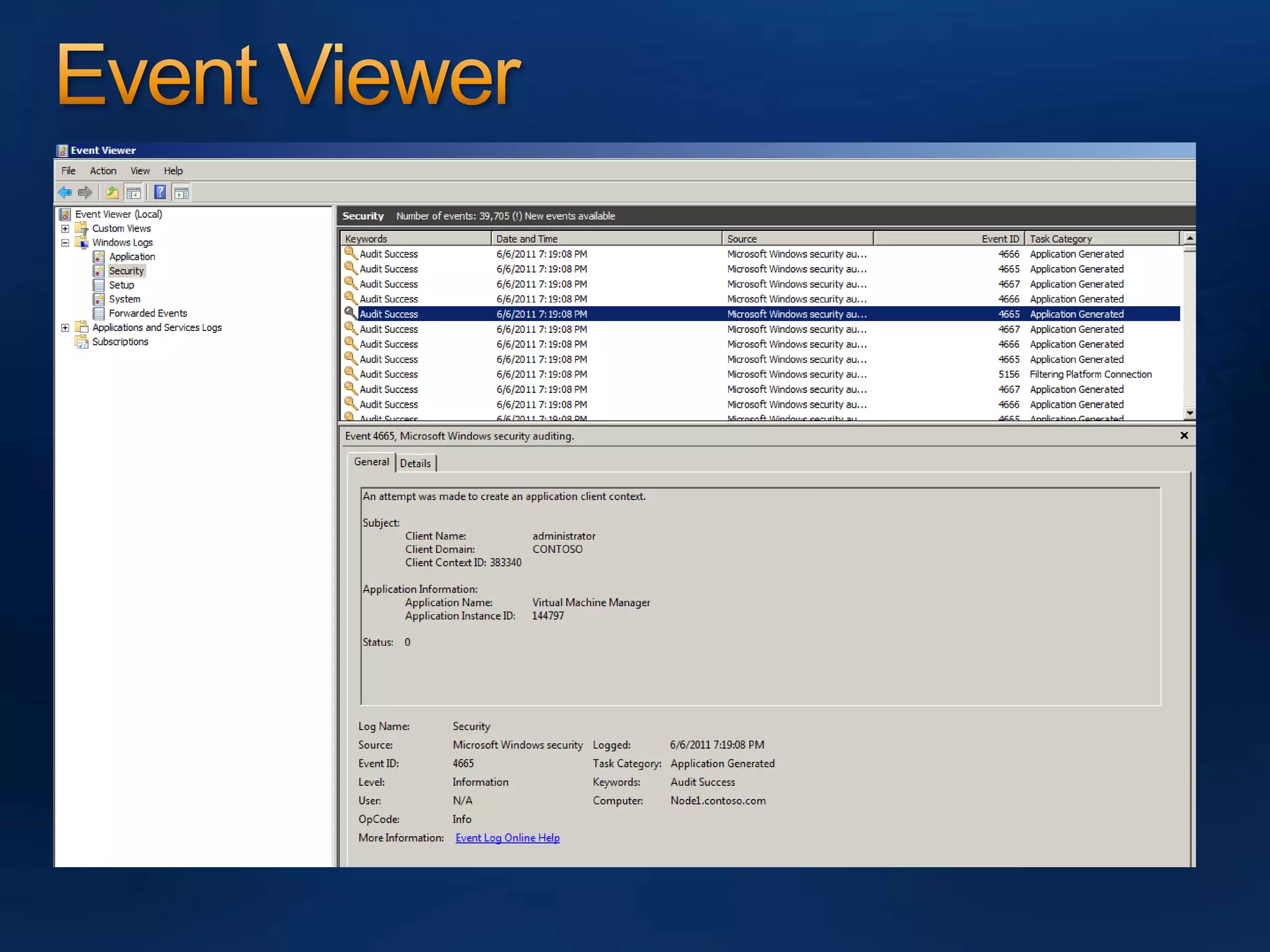
Troubleshooting AzManRefer to Event Viewer.Open Windows Log | SecurityOpen Applications and Services Log | Microsoft | WindowsHyper-V-VMMSHyper-V-WorkersMore information:- http://technet.microsoft.com/en-us/library/dd581761(WS.10).aspx
Event Viewer
SummaryAzMan is a Role Based Access and Control
Security in Hyper-VQuestions & AnswersPost – MVUG page @ FacebookResourcesUnderstand more about AzManhttp://technet.microsoft.com/en-us/library/cc726036(WS.10).aspxhttp://blogs.technet.com/b/m2/archive/2009/01/12/azman-permissions-for-vmm-managed-hyper-v-hosts.aspxhttp://blogs.technet.com/b/jhoward/archive/2009/08/31/explaining-the-hyper-v-authorization-model-part-one.aspxhttp://blogs.technet.com/b/jhoward/archive/2009/09/02/explaining-the-hyper-v-authorization-model-part-two.aspxhttp://blogs.technet.com/b/jhoward/archive/2009/09/09/explaining-the-hyper-v-authorization-model-part-three.aspxhttp://blogs.technet.com/b/jhoward/archive/2009/09/18/explaining-the-hyper-v-authorization-model-part-four.aspxMVUG (Malaysia Virtualization User Group) – Join us !http://www.facebook.com/group.php?gid=216237734803   @ Search “MVUG” in Facebook Lai’s Blog –Virtualization & System Center related, etchttp://www.ms4u.info
Understanding AzMan In Hyper-V

Understanding AzMan In Hyper-V

  • 1.
    Understanding AzMan inHyper-VLai YoongSengMVP : Virtual Machine www.ms4u.infoTechnical Consultant, Redynamics
  • 2.
    AgendaWho is AzMan?HowAzMan Works?Configure AzManWhy use AzMan?AuditingTroubleshooting
  • 3.
    Who is AzMan?Notwho but “ What is AzMan ?”AzMan also known as “Authorization Manager”Is a GUI interface for configuring security in Hyper-VRole Based Access and Control (RBAC) is what is used
  • 4.
    How AzMan Work?Accessto resources is based on Role Definitions and not Access Control List (ACL)Roles are based on a list of Tasks that are defined in a Role Definition. The Role Definition is then associated with a Role AssignmentOnly one Default Role defined in Hyper-V:- AdministratorBuilt in Local Administrator Group is automatically added to the Administrator Role Assignment
  • 5.
    Access AzManTo accessStart| Run | Type Azman.mscAzman.msc is the primary method for defining and managing permissions for Hyper-VOpen Authorization Stores
  • 6.
    Configure AzManNote: BackupInitialStore.xml before modifyConfigure Role AssignmentAdd non administrator to full permission on Hyper-V server
  • 7.
    Configure AzManCreate Task.A task is a grouping of operation. Example: Control VM task and assign start, stop, restart vm operation. 12
  • 8.
    Configure AzManCreate RoleDefinition- to limit operation on Hyper-V Server. Example: Operator Role which assign to control VM operation.12
  • 9.
    Configure AzManCreate newroles – to assign user to tasks or operation12
  • 10.
  • 11.
    Why use Azman?Moresecure and limit operation can perform on Hyper-V HostsSecure either entire Hyper-V host or based on Virtual MachineNote:-
  • 12.
    Secure by VirtualMachineStep 1: Create ScopeStep 2: Create Role Step 3: Assign RoleStep 4: Create New VMStep 5: Set the scope of the VM by using 4 scripts – Contributed by Tony SuperGUI ? Sorry no GUI.
  • 13.
    Script #1:- CreateVMInScope.vbsOptionExplicitDim WMIServiceDim VMManagementServiceDim VMNameDim VMScopeDim VMSystemGlobalSettingDataDim ResultDim inParametersVMName = InputBox(“Specify the name for the new virtual machine:”)VMScope = InputBox(“Specify the scope to be used for the new virtualmachine:”)‘Get an instance of the WMI Service in the virtualization namespace.Set WMIService = GetObject(“winmgmts:\\.\root\virtualization”)‘Get a VMManagementService objectSet VMManagementService = WMIService.ExecQuery(“SELECT * FROMMsvm_VirtualSystemManagementService”).ItemIndex(0)‘ Initialize the global settings for the VMSet VMSystemGlobalSettingData =WMIService.Get(“Msvm_VirtualSystemGlobalSettingData”).SpawnInstance_()‘Set the name and scopeVMSystemGlobalSettingData.ElementName = VMNameVMSystemGlobalSettingData.ScopeOfResidence = VMScope‘ Create the VMVMManagementService.DefineVirtualSystem(VMSystemGlobalSettingData.GetText_(1)
  • 14.
    Script #2:DisplayVMScopes.vbsOption ExplicitDimWMIServiceDim VMListDim VMDim VMSystemGlobalSettingDataDim Message‘Setup start of message stringMessage = “Virtual Machines and their scope of residence” & chr(10) _& “========================================”‘Get instance of ‘virtualization’ WMI service on the local computerSet WMIService = GetObject(“winmgmts:\\.\root\virtualization”)‘Get all the MSVM_ComputerSystem objectSet VMList = WMIService.ExecQuery(“SELECT * FROM Msvm_ComputerSystem”)For Each VM In VMListif VM.Caption = “Virtual Machine” thenSet VMSystemGlobalSettingData =(VM.Associators_(“MSVM_ElementSettingData”,“Msvm_VirtualSystemGlobalSettingData”)).ItemIndex(0)Message = Message & chr(10) & “VM: “ & VM.ElementNameMessage = Message & chr(10) & “Scope: “ &VMSystemGlobalSettingData.ScopeOfResidenceMessage = Message & chr(10)end ifNextwscript.echo Message
  • 15.
    Script #3:ClearVMScope.vbsOption ExplicitDimWMIServiceDim VMListDim VMDim VMSystemGlobalSettingDataDim VMManagementServiceDim Result‘Get instance of ‘virtualization’ WMI service on the local computerSet WMIService = GetObject(“winmgmts:\\.\root\virtualization”)‘Get a VMManagementService objectSet VMManagementService = WMIService.ExecQuery(“SELECT * FROMMsvm_VirtualSystemManagementService”).ItemIndex(0)‘Get all the MSVM_ComputerSystem objectSet VMList = WMIService.ExecQuery(“SELECT * FROM Msvm_ComputerSystem”)For Each VM In VMListif VM.Caption = “Virtual Machine” thenSet VMSystemGlobalSettingData =(VM.Associators_(“MSVM_ElementSettingData”,“Msvm_VirtualSystemGlobalSettingData”)).ItemIndex(0)VMSystemGlobalSettingData.ScopeOfResidence = “”Result = VMManagementService.ModifyVirtualSystem(VM.Path_.Path,VMSystemGlobalSettingData.GetText_(1))end ifNext
  • 16.
    Script #4:ChangeVMScope.vbsDim WMIServiceDimVMDim VMManagementServiceDim VMSystemGlobalSettingDataDim VMNameDim VMScopeDim Result‘Setup variables for the VM we are looking for, and the scope to assign it toVMName = InputBox(“Specify the virtual machine to change scope on:”)VMScope = InputBox(“Specify the new scope to be used:”)‘Get an instance of the WMI Service in the virtualization namespace.Set WMIService = GetObject(“winmgmts:\\.\root\virtualization”)‘Get a VMManagementService objectSet VMManagementService = WMIService.ExecQuery(“SELECT * FROMMsvm_VirtualSystemManagementService”).ItemIndex(0)‘Get the VM object that we want to modifySet VM = (WMIService.ExecQuery(“SELECT * FROM Msvm_ComputerSystem WHEREElementName=’” & VMName & “‘“)).ItemIndex(0)‘Get the VirtualSystemGlobalSettingsData of the VM we want to modifySet VMSystemGlobalSettingData = (VM.Associators_(“MSVM_ElementSettingData”,“Msvm_VirtualSystemGlobalSettingData”)).ItemIndex(0)‘Change the ScopeOfResidence propertyVMSystemGlobalSettingData.ScopeOfResidence = VMScope‘Update the VM with ModifyVirtualSystemResult = VMManagementService.ModifyVirtualSystem(VM.Path_.Path,VMSystemGlobalSettingData.GetText_(1))
  • 17.
  • 18.
    What Happen WhenHost Join To Domain?Domain Admin Group will have full permission to create and manage VM on host servers.Administrator Role Assignment is set to domain admin
  • 19.
    What Happen WhenHost Added into VMM? VMM create a copy and store in ProgramData\Microsoft\Virtual Machine Manager\HyperVAuthStore.xmlBy default, VMM will VMM Administrators are given full access to the VM/Hyper-V, including console access to the VMVMM Delegated administrators have no access to the VM or Hyper-VEnd User Role members are given console access to the VM if their User Roles has this privilege definedThis means that any privileges defined in the old AzManfile will be lost once VMM takes control of the host.When remove Hyper-V host from management, will revert to InitialStore.xml
  • 20.
    AuditingMust enabled onAuthorization Manager12
  • 21.
    AuditingOn Local Hosts.Use Local Security Policy | Audit Policy and Enable object access.On domain, enable on GPO | Computer Configuration, Windows Settings, Security Settings, Local Policies, Audit Policy, and then double-click Audit directory service access.
  • 22.
    Troubleshooting AzManRefer toEvent Viewer.Open Windows Log | SecurityOpen Applications and Services Log | Microsoft | WindowsHyper-V-VMMSHyper-V-WorkersMore information:- http://technet.microsoft.com/en-us/library/dd581761(WS.10).aspx
  • 23.
  • 24.
    SummaryAzMan is aRole Based Access and Control
  • 25.
    Security in Hyper-VQuestions& AnswersPost – MVUG page @ FacebookResourcesUnderstand more about AzManhttp://technet.microsoft.com/en-us/library/cc726036(WS.10).aspxhttp://blogs.technet.com/b/m2/archive/2009/01/12/azman-permissions-for-vmm-managed-hyper-v-hosts.aspxhttp://blogs.technet.com/b/jhoward/archive/2009/08/31/explaining-the-hyper-v-authorization-model-part-one.aspxhttp://blogs.technet.com/b/jhoward/archive/2009/09/02/explaining-the-hyper-v-authorization-model-part-two.aspxhttp://blogs.technet.com/b/jhoward/archive/2009/09/09/explaining-the-hyper-v-authorization-model-part-three.aspxhttp://blogs.technet.com/b/jhoward/archive/2009/09/18/explaining-the-hyper-v-authorization-model-part-four.aspxMVUG (Malaysia Virtualization User Group) – Join us !http://www.facebook.com/group.php?gid=216237734803 @ Search “MVUG” in Facebook Lai’s Blog –Virtualization & System Center related, etchttp://www.ms4u.info