Virtualization Tour:System Center Virtual Machine Manager
System center Virtual machine manager
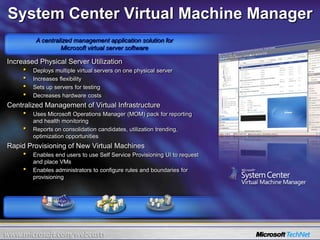
VMVMVMVMVMVMVMVMVMVMVMVMVMVMVMVMVMVMVMVMVMVMVMVMSystem Center Virtual Machine ManagerA centralized management application solution forMicrosoft virtual server softwareIncreased Physical Server Utilization Deploys multiple virtual servers on one physical server
Increases flexibility
Sets up servers for testing
Decreases hardware costsCentralized Management of Virtual InfrastructureUses Microsoft Operations Manager (MOM) pack for reporting and health monitoring
Reports on consolidation candidates, utilization trending, optimization opportunities Rapid Provisioning of New Virtual Machines Enables end users to use Self Service Provisioning UI to request and place VMs
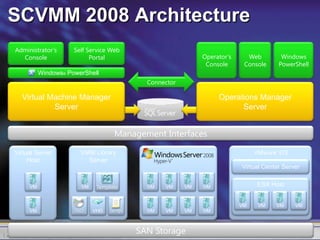
Enables administrators to configure rules and boundaries for provisioningSelf Service Web PortalAdministrator’s ConsoleOperator’s ConsoleWeb ConsoleWindows PowerShellWindows® PowerShellConnectorVirtual Machine Manager ServerOperations Manager ServerManagement InterfacesVirtual Server HostVMM Library ServerVMware VI3Virtual Center ServerTemplateESX HostVMVMVMVMVMVMISOScriptVHDVMVMVMVMVMVMVMVMVMSAN StorageSCVMM 2008 Architecture
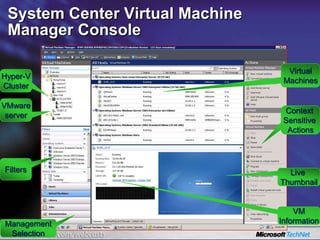
System Center Virtual Machine Manager ConsoleVirtualMachinesHyper-VClusterVMwareserverContext Sensitive ActionsFiltersLive ThumbnailVMInformationManagementSelection
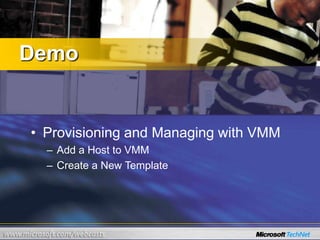
DemoProvisioning and Managing with VMMAdd a Host to VMMCreate a New Template
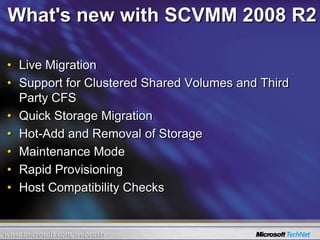
What's new with SCVMM 2008 R2Live MigrationSupport for Clustered Shared Volumes and Third Party CFSQuick Storage MigrationHot-Add and Removal of StorageMaintenance ModeRapid ProvisioningHost Compatibility Checks
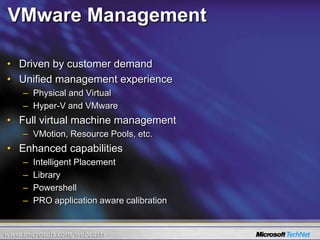
VMware ManagementDriven by customer demand Unified management experiencePhysical and VirtualHyper-V and VMwareFull virtual machine management VMotion, Resource Pools, etc.Enhanced capabilitiesIntelligent PlacementLibraryPowershellPRO application aware calibration
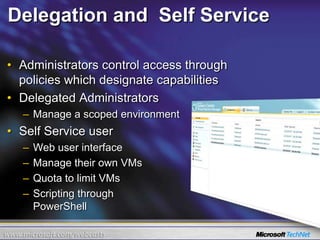
Delegation and  Self ServiceAdministrators control access through policies which designate capabilitiesDelegated Administrators Manage a scoped environmentSelf Service userWeb user interface Manage their own VMsQuota to limit VMsScripting through PowerShell
DemoSelf-ServiceConfigure Self-Service UserReview Web Interface
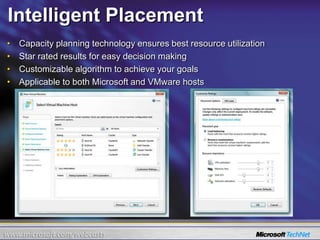
Intelligent PlacementCapacity planning technology ensures best resource utilizationStar rated results for easy decision makingCustomizable algorithm to achieve your goalsApplicable to both Microsoft and VMware hosts

4 Scvmm

  • 1.
    Virtualization Tour:System CenterVirtual Machine Manager
  • 2.
    System center Virtualmachine manager
  • 3.
    VMVMVMVMVMVMVMVMVMVMVMVMVMVMVMVMVMVMVMVMVMVMVMVMSystem Center VirtualMachine ManagerA centralized management application solution forMicrosoft virtual server softwareIncreased Physical Server Utilization Deploys multiple virtual servers on one physical server
  • 4.
  • 5.
    Sets up serversfor testing
  • 6.
    Decreases hardware costsCentralizedManagement of Virtual InfrastructureUses Microsoft Operations Manager (MOM) pack for reporting and health monitoring
  • 7.
    Reports on consolidationcandidates, utilization trending, optimization opportunities Rapid Provisioning of New Virtual Machines Enables end users to use Self Service Provisioning UI to request and place VMs
  • 8.
    Enables administrators toconfigure rules and boundaries for provisioningSelf Service Web PortalAdministrator’s ConsoleOperator’s ConsoleWeb ConsoleWindows PowerShellWindows® PowerShellConnectorVirtual Machine Manager ServerOperations Manager ServerManagement InterfacesVirtual Server HostVMM Library ServerVMware VI3Virtual Center ServerTemplateESX HostVMVMVMVMVMVMISOScriptVHDVMVMVMVMVMVMVMVMVMSAN StorageSCVMM 2008 Architecture
  • 9.
    System Center VirtualMachine Manager ConsoleVirtualMachinesHyper-VClusterVMwareserverContext Sensitive ActionsFiltersLive ThumbnailVMInformationManagementSelection
  • 10.
    DemoProvisioning and Managingwith VMMAdd a Host to VMMCreate a New Template
  • 11.
    What's new withSCVMM 2008 R2Live MigrationSupport for Clustered Shared Volumes and Third Party CFSQuick Storage MigrationHot-Add and Removal of StorageMaintenance ModeRapid ProvisioningHost Compatibility Checks
  • 12.
    VMware ManagementDriven bycustomer demand Unified management experiencePhysical and VirtualHyper-V and VMwareFull virtual machine management VMotion, Resource Pools, etc.Enhanced capabilitiesIntelligent PlacementLibraryPowershellPRO application aware calibration
  • 13.
    Delegation and Self ServiceAdministrators control access through policies which designate capabilitiesDelegated Administrators Manage a scoped environmentSelf Service userWeb user interface Manage their own VMsQuota to limit VMsScripting through PowerShell
  • 14.
  • 15.
    Intelligent PlacementCapacity planningtechnology ensures best resource utilizationStar rated results for easy decision makingCustomizable algorithm to achieve your goalsApplicable to both Microsoft and VMware hosts