A.JayaLakshmi
1. Definition of PIA
2. Structure of PIA
3. Database Server
4. Application Server
5. Application Server Process
6. Database Connectivity
7. Web Server
8. Web Browser
9. Benefits using PIA
 PeopleSoft Internet Architecture, introduced with
 People-Tools 8, is completely focused on the internet
 to provide powerful new functionality for internet-
 based access and integration.

 PeopleSoft Internet Architecture is a server
 centric, component architecture that enables secure
 end user access to PeopleSoft applications.
 Any Web enabled device can access People soft.
 Servers can be one or more machines.
 No code written on the client.
 Provides dynamic hyperlinks, like any web page.
 PeopleSoft Internet Architecture is really an
 architecture without a client.
Database Server
 The database server contains database engine and
  PeopleSoft Application Database which includes all
  the application's object definitions, system tables, and
  application tables data.
 The PeopleSoft database is the repository for all
  information managed by your PeopleSoft application.
  Both application data and PeopleSoft metadata are
  stored and maintained in the database.
Application Servers

 The application server is the core of PeopleSoft Pure
 Internet Architecture. It runs business logic and
 issues SQL to the database server.
PeopleSoft Server Processes
 Server processes invoke services to perform
  application logic and issue SQL to the RDBMS. Each
  application server process, such as
  PSAPPSRV, PSQCKSRV, PSQRYSRV, PSSAMSRV….
  establishes and maintains their own connections to
  the database.

PSAPPSRV
 This process performs functional requests, such as
  building and loading components (which were known
  as panel groups in previous releases).
Database Connectivity

 Application servers require database connectivity
  software installed locally to maintain the SQL
  connection with the RDBMS.
 You must install the required connectivity software
  and associated utilities for your RDBMS.
PeopleSoft Process Scheduler and the Application
 Server

 PeopleSoft uses PSADMIN to configure and
  administer both the application server and PeopleSoft
  Process Scheduler server.
 The PeopleSoft Process Scheduler setup procedure in
  PSADMIN provides a menu-driven interface to
  configure PeopleSoft Process Scheduler parameters
  and administer the Process Scheduler server agent.
Web Server

 A Java-enabled web server is required to support
 browser transaction requests and PeopleSoft
 application messaging technology.
BEA Jolt

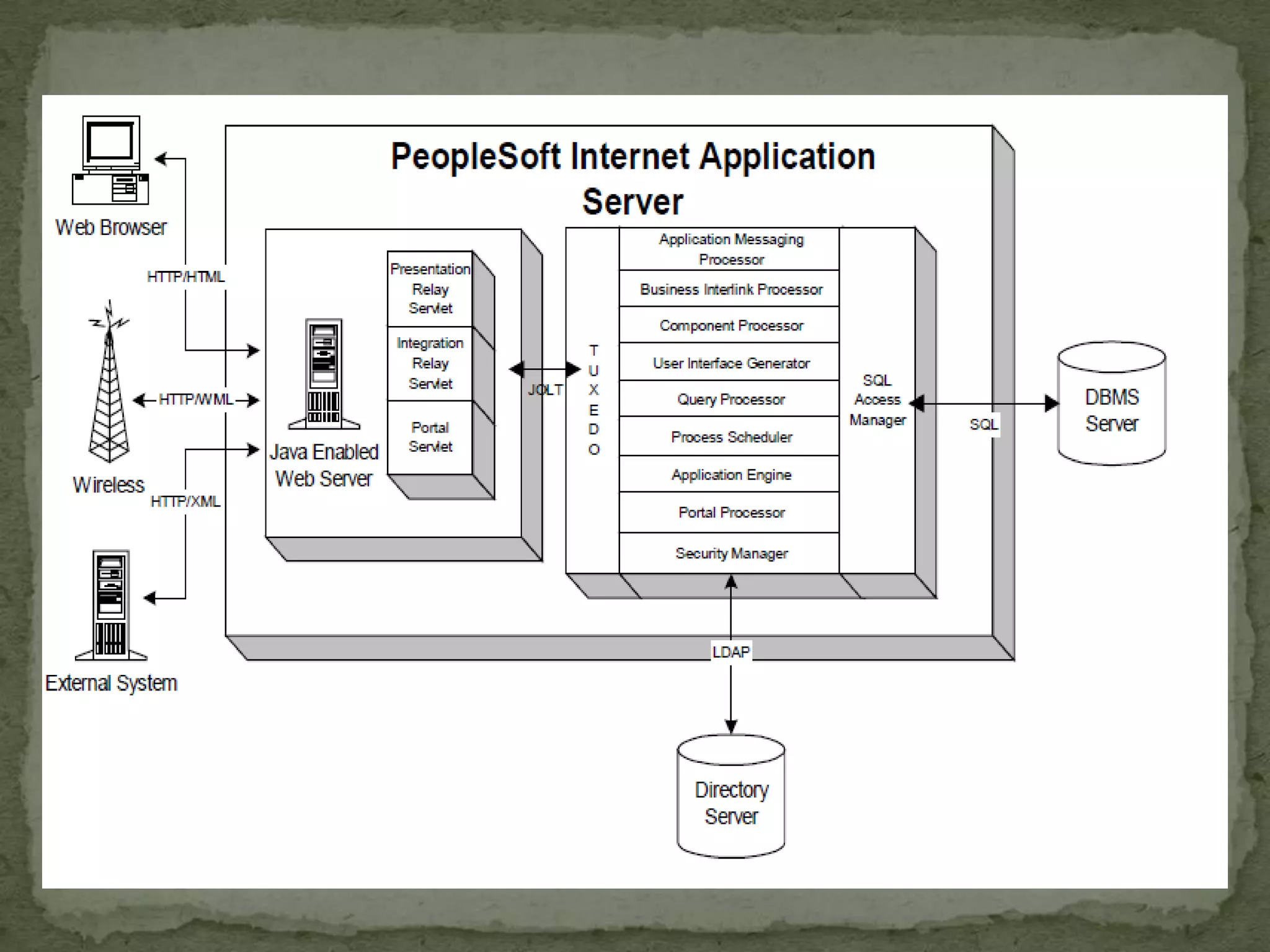
 The PeopleSoft servlets on the web server transmit
  requests and data through a connection to BEA
  Jolt, which runs on the application server.
 BEA Jolt extends BEA Tuxedo capabilities to the
  communication layer between the web-based
  environment and the C++ environments.
Web Browser

 The web browser is the primary means by which users
  and administrators access PeopleSoft applications and
  administrative tools.
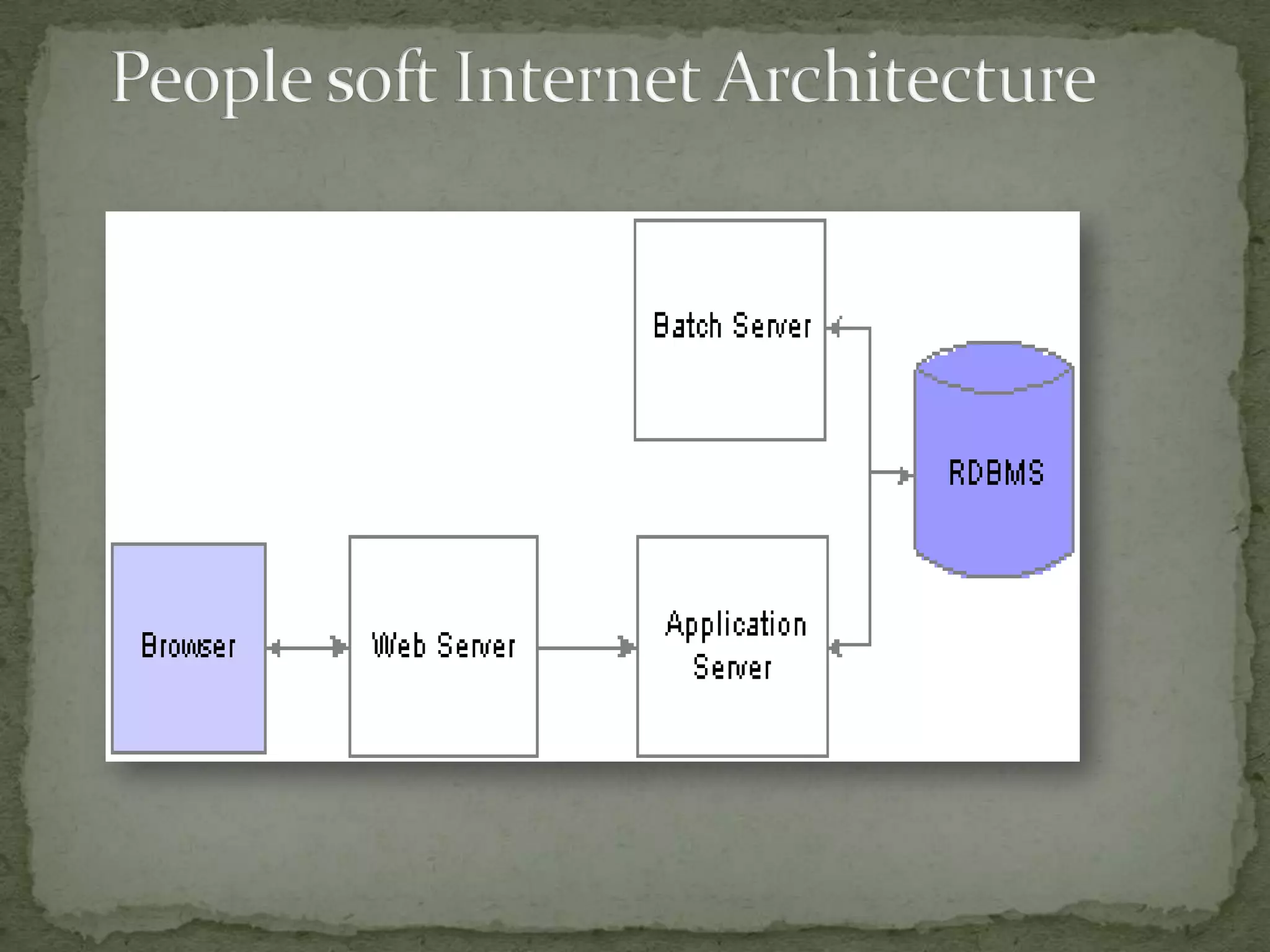
 A web browser uses the HTTP protocol. The browser
  sends a request to the web server, which forwards the
  request to the application server. A servlet installed on
  the web server facilities all browser connections.
Configuration Options

 You can configure your environment to support either
 a physical or a logical application server configuration.
 Developers (those creating the PeopleSoft pages) and
 Administrator(those maintaining the system)
    Do not need Internet access
    Use more powerful machines
    Use a Two-Tier connection
    End Users use Three-tier connection
 Easy Access
 Platform Independence
 Look and feel
 Low Bandwidth access
 Maintenance /Deployment cost effective
 Dynamic HTML page Generation
Presentation2
Presentation2

Presentation2

  • 1.
  • 2.
    1. Definition ofPIA 2. Structure of PIA 3. Database Server 4. Application Server 5. Application Server Process 6. Database Connectivity 7. Web Server 8. Web Browser 9. Benefits using PIA
  • 3.
     PeopleSoft InternetArchitecture, introduced with People-Tools 8, is completely focused on the internet to provide powerful new functionality for internet- based access and integration.  PeopleSoft Internet Architecture is a server centric, component architecture that enables secure end user access to PeopleSoft applications.
  • 4.
     Any Webenabled device can access People soft.  Servers can be one or more machines.  No code written on the client.  Provides dynamic hyperlinks, like any web page.  PeopleSoft Internet Architecture is really an architecture without a client.
  • 7.
    Database Server  Thedatabase server contains database engine and PeopleSoft Application Database which includes all the application's object definitions, system tables, and application tables data.  The PeopleSoft database is the repository for all information managed by your PeopleSoft application. Both application data and PeopleSoft metadata are stored and maintained in the database.
  • 8.
    Application Servers  Theapplication server is the core of PeopleSoft Pure Internet Architecture. It runs business logic and issues SQL to the database server.
  • 9.
    PeopleSoft Server Processes Server processes invoke services to perform application logic and issue SQL to the RDBMS. Each application server process, such as PSAPPSRV, PSQCKSRV, PSQRYSRV, PSSAMSRV…. establishes and maintains their own connections to the database. PSAPPSRV  This process performs functional requests, such as building and loading components (which were known as panel groups in previous releases).
  • 10.
    Database Connectivity  Applicationservers require database connectivity software installed locally to maintain the SQL connection with the RDBMS.  You must install the required connectivity software and associated utilities for your RDBMS.
  • 11.
    PeopleSoft Process Schedulerand the Application Server  PeopleSoft uses PSADMIN to configure and administer both the application server and PeopleSoft Process Scheduler server.  The PeopleSoft Process Scheduler setup procedure in PSADMIN provides a menu-driven interface to configure PeopleSoft Process Scheduler parameters and administer the Process Scheduler server agent.
  • 12.
    Web Server  AJava-enabled web server is required to support browser transaction requests and PeopleSoft application messaging technology.
  • 13.
    BEA Jolt  ThePeopleSoft servlets on the web server transmit requests and data through a connection to BEA Jolt, which runs on the application server.  BEA Jolt extends BEA Tuxedo capabilities to the communication layer between the web-based environment and the C++ environments.
  • 14.
    Web Browser  Theweb browser is the primary means by which users and administrators access PeopleSoft applications and administrative tools.  A web browser uses the HTTP protocol. The browser sends a request to the web server, which forwards the request to the application server. A servlet installed on the web server facilities all browser connections.
  • 15.
    Configuration Options  Youcan configure your environment to support either a physical or a logical application server configuration.
  • 16.
     Developers (thosecreating the PeopleSoft pages) and Administrator(those maintaining the system) Do not need Internet access Use more powerful machines Use a Two-Tier connection End Users use Three-tier connection
  • 17.
     Easy Access Platform Independence  Look and feel  Low Bandwidth access  Maintenance /Deployment cost effective  Dynamic HTML page Generation