PeopleSoft Base Benefits


                   By
                Raju Pvk
Agenda
 Base Benefits Overview
 Base Benefits Business Process
    Building Blocks In Base Benefits
    Introduction to Vendor, Benefit Plan, Benefit Plan Type, Benefit
     Program
    Types of Benefit Plans
 Implementing Base Benefits & Employee Enrollment
 Base Benefits Table Information
Base Benefits Overview

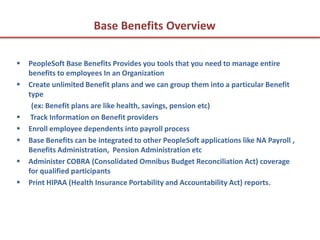
   PeopleSoft Base Benefits Provides you tools that you need to manage entire
    benefits to employees In an Organization
   Create unlimited Benefit plans and we can group them into a particular Benefit
    type
     (ex: Benefit plans are like health, savings, pension etc)
    Track Information on Benefit providers
   Enroll employee dependents into payroll process
   Base Benefits can be integrated to other PeopleSoft applications like NA Payroll ,
    Benefits Administration, Pension Administration etc
   Administer COBRA (Consolidated Omnibus Budget Reconciliation Act) coverage
    for qualified participants
   Print HIPAA (Health Insurance Portability and Accountability Act) reports.
Base Benefits Business Process

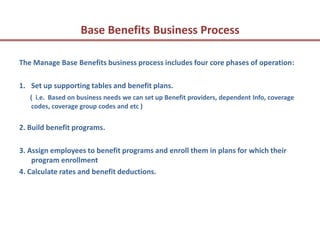
The Manage Base Benefits business process includes four core phases of operation:

1. Set up supporting tables and benefit plans.
   ( i.e. Based on business needs we can set up Benefit providers, dependent Info, coverage
   codes, coverage group codes and etc )


2. Build benefit programs.

3. Assign employees to benefit programs and enroll them in plans for which their
    program enrollment
4. Calculate rates and benefit deductions.
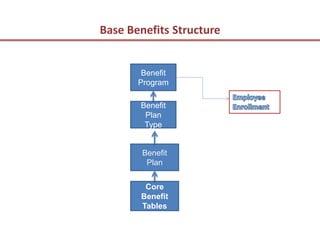
Base Benefits Structure


        Benefit
       Program

       Benefit
        Plan
        Type


        Benefit
         Plan


        Core
       Benefit
       Tables
Complete Core Tables Information

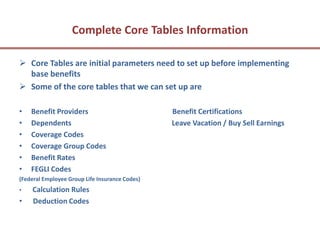
 Core Tables are initial parameters need to set up before implementing
  base benefits
 Some of the core tables that we can set up are

•   Benefit Providers                           Benefit Certifications
•   Dependents                                  Leave Vacation / Buy Sell Earnings
•   Coverage Codes
•   Coverage Group Codes
•   Benefit Rates
•   FEGLI Codes
(Federal Employee Group Life Insurance Codes)
•   Calculation Rules
•   Deduction Codes
Benefit Provider Information

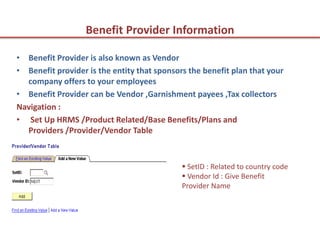
• Benefit Provider is also known as Vendor
• Benefit provider is the entity that sponsors the benefit plan that your
  company offers to your employees
• Benefit Provider can be Vendor ,Garnishment payees ,Tax collectors
Navigation :
• Set Up HRMS /Product Related/Base Benefits/Plans and
  Providers /Provider/Vendor Table


                                              SetID : Related to country code
                                              Vendor Id : Give Benefit
                                             Provider Name
Vendor Implementation
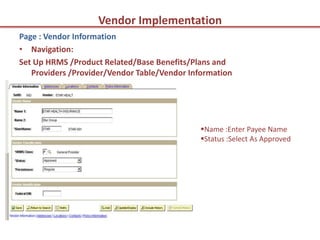
Page : Vendor Information
• Navigation:
Set Up HRMS /Product Related/Base Benefits/Plans and
   Providers /Provider/Vendor Table/Vendor Information


                                             Name :Enter Payee Name
                                             Status :Select As Approved
Vendor Implementation Continues
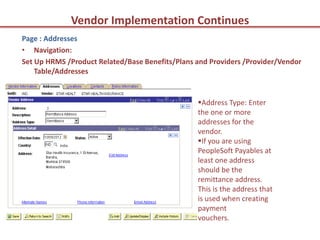
Page : Addresses
• Navigation:
Set Up HRMS /Product Related/Base Benefits/Plans and Providers /Provider/Vendor
    Table/Addresses


                                                 Address Type: Enter
                                                 the one or more
                                                 addresses for the
                                                 vendor.
                                                 If you are using
                                                 PeopleSoft Payables at
                                                 least one address
                                                 should be the
                                                 remittance address.
                                                 This is the address that
                                                 is used when creating
                                                 payment
                                                 vouchers.
Vendor Implementation Continues
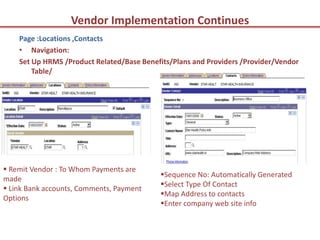
    Page :Locations ,Contacts
    • Navigation:
    Set Up HRMS /Product Related/Base Benefits/Plans and Providers /Provider/Vendor
        Table/


 Remit Vendor : To Whom Payments are
                                           Sequence No: Automatically Generated
made
                                           Select Type Of Contact
 Link Bank accounts, Comments, Payment
                                           Map Address to contacts
Options
                                           Enter company web site info
Vendor Implementation Continues
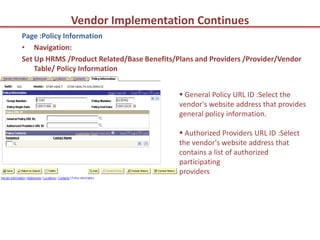
Page :Policy Information
• Navigation:
Set Up HRMS /Product Related/Base Benefits/Plans and Providers /Provider/Vendor
    Table/ Policy Information


                                             General Policy URL ID :Select the
                                            vendor's website address that provides
                                            general policy information.

                                             Authorized Providers URL ID :Select
                                            the vendor's website address that
                                            contains a list of authorized
                                            participating
                                            providers
Benefit Plans

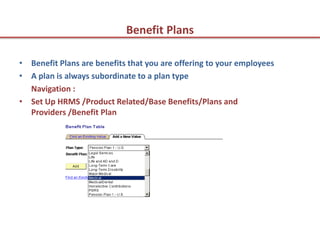
• Benefit Plans are benefits that you are offering to your employees
• A plan is always subordinate to a plan type
  Navigation :
• Set Up HRMS /Product Related/Base Benefits/Plans and
  Providers /Benefit Plan
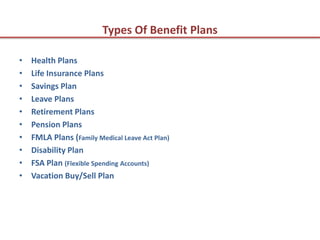
Types Of Benefit Plans

•   Health Plans
•   Life Insurance Plans
•   Savings Plan
•   Leave Plans
•   Retirement Plans
•   Pension Plans
•   FMLA Plans (Family Medical Leave Act Plan)
•   Disability Plan
•   FSA Plan (Flexible Spending Accounts)
•   Vacation Buy/Sell Plan
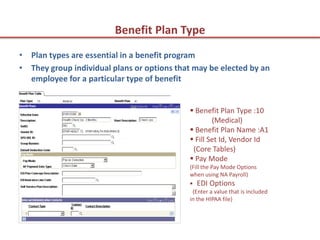
Benefit Plan Type
• Plan types are essential in a benefit program
• They group individual plans or options that may be elected by an
  employee for a particular type of benefit


                                             Benefit Plan Type :10
                                                    (Medical)
                                             Benefit Plan Name :A1
                                             Fill Set Id, Vendor Id
                                             (Core Tables)
                                             Pay Mode
                                            (Fill the Pay Mode Options
                                            when using NA Payroll)
                                             EDI Options
                                             (Enter a value that is included
                                            in the HIPAA file)
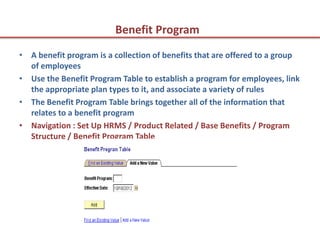
Benefit Program
• A benefit program is a collection of benefits that are offered to a group
  of employees
• Use the Benefit Program Table to establish a program for employees, link
  the appropriate plan types to it, and associate a variety of rules
• The Benefit Program Table brings together all of the information that
  relates to a benefit program
• Navigation : Set Up HRMS / Product Related / Base Benefits / Program
  Structure / Benefit Program Table
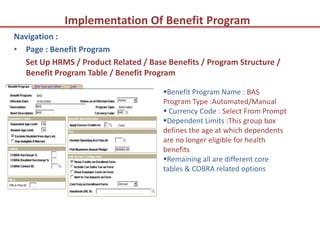
Implementation Of Benefit Program
Navigation :
• Page : Benefit Program
  Set Up HRMS / Product Related / Base Benefits / Program Structure /
  Benefit Program Table / Benefit Program

                                      Benefit Program Name : BAS
                                      Program Type :Automated/Manual
                                       Currency Code : Select From Prompt
                                      Dependent Limits :This group box
                                      defines the age at which dependents
                                      are no longer eligible for health
                                      benefits
                                      Remaining all are different core
                                      tables & COBRA related options
Implementation Of Benefit Program Continues
Navigation:
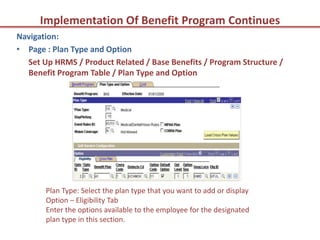
• Page : Plan Type and Option
  Set Up HRMS / Product Related / Base Benefits / Program Structure /
  Benefit Program Table / Plan Type and Option


       Plan Type: Select the plan type that you want to add or display
       Option – Eligibility Tab
       Enter the options available to the employee for the designated
       plan type in this section.
Implementation Of Benefit Program Continues
Navigation:
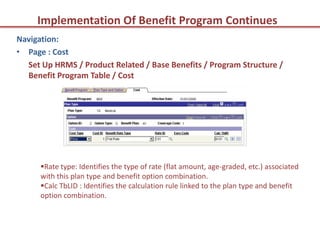
• Page : Cost
  Set Up HRMS / Product Related / Base Benefits / Program Structure /
  Benefit Program Table / Cost


      Rate type: Identifies the type of rate (flat amount, age-graded, etc.) associated
      with this plan type and benefit option combination.
      Calc TbLID : Identifies the calculation rule linked to the plan type and benefit
      option combination.
Enrollment
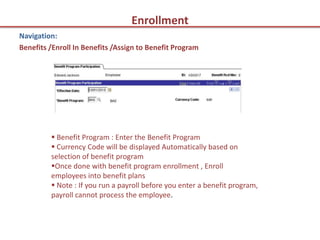
Navigation:
Benefits /Enroll In Benefits /Assign to Benefit Program


          Benefit Program : Enter the Benefit Program
          Currency Code will be displayed Automatically based on
         selection of benefit program
         Once done with benefit program enrollment , Enroll
         employees into benefit plans
          Note : If you run a payroll before you enter a benefit program,
         payroll cannot process the employee.
Enrollment Summary
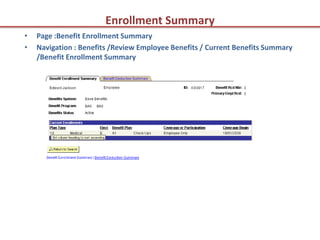
•   Page :Benefit Enrollment Summary
•   Navigation : Benefits /Review Employee Benefits / Current Benefits Summary
    /Benefit Enrollment Summary
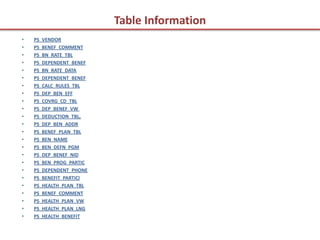
Table Information
•   PS_VENDOR
•   PS_BENEF_COMMENT
•   PS_BN_RATE_TBL
•   PS_DEPENDENT_BENEF
•   PS_BN_RATE_DATA
•   PS_DEPENDENT_BENEF
•   PS_CALC_RULES_TBL
•   PS_DEP_BEN_EFF
•   PS_COVRG_CD_TBL
•   PS_DEP_BENEF_VW
•   PS_DEDUCTION_TBL,
•   PS_DEP_BEN_ADDR
•   PS_BENEF_PLAN_TBL
•   PS_BEN_NAME
•   PS_BEN_DEFN_PGM
•   PS_DEP_BENEF_NID
•   PS_BEN_PROG_PARTIC
•   PS_DEPENDENT_PHONE
•   PS_BENEFIT_PARTICl
•   PS_HEALTH_PLAN_TBL
•   PS_BENEF_COMMENT
•   PS_HEALTH_PLAN_VW
•   PS_HEALTH_PLAN_LNG
•   PS_HEALTH_BENEFIT
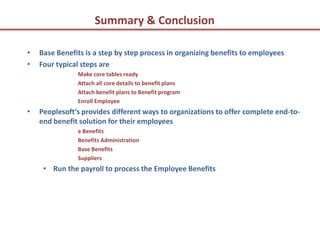
Summary & Conclusion

•   Base Benefits is a step by step process in organizing benefits to employees
•   Four typical steps are
               Make core tables ready
               Attach all core details to benefit plans
               Attach benefit plans to Benefit program
               Enroll Employee
•   Peoplesoft’s provides different ways to organizations to offer complete end-to-
    end benefit solution for their employees
               e Benefits
               Benefits Administration
               Base Benefits
               Suppliers
     • Run the payroll to process the Employee Benefits
Thank You


            P. V. KRISHNAM RAJU


            WWW.ENVYTEE.COM

People soft base benefits

  • 1.
  • 2.
    Agenda  Base BenefitsOverview  Base Benefits Business Process  Building Blocks In Base Benefits  Introduction to Vendor, Benefit Plan, Benefit Plan Type, Benefit Program  Types of Benefit Plans  Implementing Base Benefits & Employee Enrollment  Base Benefits Table Information
  • 3.
    Base Benefits Overview  PeopleSoft Base Benefits Provides you tools that you need to manage entire benefits to employees In an Organization  Create unlimited Benefit plans and we can group them into a particular Benefit type (ex: Benefit plans are like health, savings, pension etc)  Track Information on Benefit providers  Enroll employee dependents into payroll process  Base Benefits can be integrated to other PeopleSoft applications like NA Payroll , Benefits Administration, Pension Administration etc  Administer COBRA (Consolidated Omnibus Budget Reconciliation Act) coverage for qualified participants  Print HIPAA (Health Insurance Portability and Accountability Act) reports.
  • 4.
    Base Benefits BusinessProcess The Manage Base Benefits business process includes four core phases of operation: 1. Set up supporting tables and benefit plans. ( i.e. Based on business needs we can set up Benefit providers, dependent Info, coverage codes, coverage group codes and etc ) 2. Build benefit programs. 3. Assign employees to benefit programs and enroll them in plans for which their program enrollment 4. Calculate rates and benefit deductions.
  • 5.
    Base Benefits Structure Benefit Program Benefit Plan Type Benefit Plan Core Benefit Tables
  • 6.
    Complete Core TablesInformation  Core Tables are initial parameters need to set up before implementing base benefits  Some of the core tables that we can set up are • Benefit Providers Benefit Certifications • Dependents Leave Vacation / Buy Sell Earnings • Coverage Codes • Coverage Group Codes • Benefit Rates • FEGLI Codes (Federal Employee Group Life Insurance Codes) • Calculation Rules • Deduction Codes
  • 7.
    Benefit Provider Information •Benefit Provider is also known as Vendor • Benefit provider is the entity that sponsors the benefit plan that your company offers to your employees • Benefit Provider can be Vendor ,Garnishment payees ,Tax collectors Navigation : • Set Up HRMS /Product Related/Base Benefits/Plans and Providers /Provider/Vendor Table  SetID : Related to country code  Vendor Id : Give Benefit Provider Name
  • 8.
    Vendor Implementation Page :Vendor Information • Navigation: Set Up HRMS /Product Related/Base Benefits/Plans and Providers /Provider/Vendor Table/Vendor Information Name :Enter Payee Name Status :Select As Approved
  • 9.
    Vendor Implementation Continues Page: Addresses • Navigation: Set Up HRMS /Product Related/Base Benefits/Plans and Providers /Provider/Vendor Table/Addresses Address Type: Enter the one or more addresses for the vendor. If you are using PeopleSoft Payables at least one address should be the remittance address. This is the address that is used when creating payment vouchers.
  • 10.
    Vendor Implementation Continues Page :Locations ,Contacts • Navigation: Set Up HRMS /Product Related/Base Benefits/Plans and Providers /Provider/Vendor Table/  Remit Vendor : To Whom Payments are Sequence No: Automatically Generated made Select Type Of Contact  Link Bank accounts, Comments, Payment Map Address to contacts Options Enter company web site info
  • 11.
    Vendor Implementation Continues Page:Policy Information • Navigation: Set Up HRMS /Product Related/Base Benefits/Plans and Providers /Provider/Vendor Table/ Policy Information  General Policy URL ID :Select the vendor's website address that provides general policy information.  Authorized Providers URL ID :Select the vendor's website address that contains a list of authorized participating providers
  • 12.
    Benefit Plans • BenefitPlans are benefits that you are offering to your employees • A plan is always subordinate to a plan type Navigation : • Set Up HRMS /Product Related/Base Benefits/Plans and Providers /Benefit Plan
  • 13.
    Types Of BenefitPlans • Health Plans • Life Insurance Plans • Savings Plan • Leave Plans • Retirement Plans • Pension Plans • FMLA Plans (Family Medical Leave Act Plan) • Disability Plan • FSA Plan (Flexible Spending Accounts) • Vacation Buy/Sell Plan
  • 14.
    Benefit Plan Type •Plan types are essential in a benefit program • They group individual plans or options that may be elected by an employee for a particular type of benefit  Benefit Plan Type :10 (Medical)  Benefit Plan Name :A1  Fill Set Id, Vendor Id (Core Tables)  Pay Mode (Fill the Pay Mode Options when using NA Payroll)  EDI Options (Enter a value that is included in the HIPAA file)
  • 15.
    Benefit Program • Abenefit program is a collection of benefits that are offered to a group of employees • Use the Benefit Program Table to establish a program for employees, link the appropriate plan types to it, and associate a variety of rules • The Benefit Program Table brings together all of the information that relates to a benefit program • Navigation : Set Up HRMS / Product Related / Base Benefits / Program Structure / Benefit Program Table
  • 16.
    Implementation Of BenefitProgram Navigation : • Page : Benefit Program Set Up HRMS / Product Related / Base Benefits / Program Structure / Benefit Program Table / Benefit Program Benefit Program Name : BAS Program Type :Automated/Manual  Currency Code : Select From Prompt Dependent Limits :This group box defines the age at which dependents are no longer eligible for health benefits Remaining all are different core tables & COBRA related options
  • 17.
    Implementation Of BenefitProgram Continues Navigation: • Page : Plan Type and Option Set Up HRMS / Product Related / Base Benefits / Program Structure / Benefit Program Table / Plan Type and Option Plan Type: Select the plan type that you want to add or display Option – Eligibility Tab Enter the options available to the employee for the designated plan type in this section.
  • 18.
    Implementation Of BenefitProgram Continues Navigation: • Page : Cost Set Up HRMS / Product Related / Base Benefits / Program Structure / Benefit Program Table / Cost Rate type: Identifies the type of rate (flat amount, age-graded, etc.) associated with this plan type and benefit option combination. Calc TbLID : Identifies the calculation rule linked to the plan type and benefit option combination.
  • 19.
    Enrollment Navigation: Benefits /Enroll InBenefits /Assign to Benefit Program  Benefit Program : Enter the Benefit Program  Currency Code will be displayed Automatically based on selection of benefit program Once done with benefit program enrollment , Enroll employees into benefit plans  Note : If you run a payroll before you enter a benefit program, payroll cannot process the employee.
  • 20.
    Enrollment Summary • Page :Benefit Enrollment Summary • Navigation : Benefits /Review Employee Benefits / Current Benefits Summary /Benefit Enrollment Summary
  • 21.
    Table Information • PS_VENDOR • PS_BENEF_COMMENT • PS_BN_RATE_TBL • PS_DEPENDENT_BENEF • PS_BN_RATE_DATA • PS_DEPENDENT_BENEF • PS_CALC_RULES_TBL • PS_DEP_BEN_EFF • PS_COVRG_CD_TBL • PS_DEP_BENEF_VW • PS_DEDUCTION_TBL, • PS_DEP_BEN_ADDR • PS_BENEF_PLAN_TBL • PS_BEN_NAME • PS_BEN_DEFN_PGM • PS_DEP_BENEF_NID • PS_BEN_PROG_PARTIC • PS_DEPENDENT_PHONE • PS_BENEFIT_PARTICl • PS_HEALTH_PLAN_TBL • PS_BENEF_COMMENT • PS_HEALTH_PLAN_VW • PS_HEALTH_PLAN_LNG • PS_HEALTH_BENEFIT
  • 22.
    Summary & Conclusion • Base Benefits is a step by step process in organizing benefits to employees • Four typical steps are Make core tables ready Attach all core details to benefit plans Attach benefit plans to Benefit program Enroll Employee • Peoplesoft’s provides different ways to organizations to offer complete end-to- end benefit solution for their employees e Benefits Benefits Administration Base Benefits Suppliers • Run the payroll to process the Employee Benefits
  • 23.
    Thank You P. V. KRISHNAM RAJU WWW.ENVYTEE.COM