Overview Personal Home Page E-Business Login Launching Professional Interface Concurrent Requests Workflow Troubleshooting
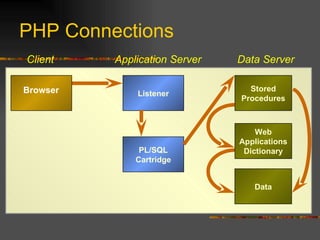
PHP Connections Application Server Data Server Web Applications Dictionary Listener Data Stored Procedures Browser PL/SQL Cartridge Client
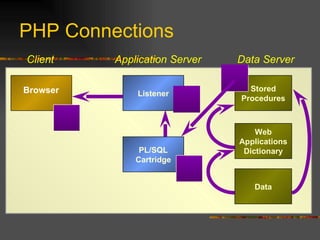
Application Server Data Server Web Applications Dictionary Listener Data Stored Procedures Browser PL/SQL Cartridge Client PHP Connections
Overview Personal Home Page E-Business Login Launching Professional Interface Concurrent Requests Workflow LDAP  Troubleshooting
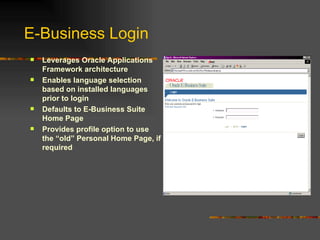
E-Business Login Leverages Oracle Applications Framework architecture Enables language selection based on installed languages prior to login Defaults to E-Business Suite Home Page Provides profile option to use the “old” Personal Home Page, if required
E-Business Login Requires no additional setup Allows “Old” PHP to be seen by setting the value of the “Self Service Personal Home Page Mode” profile to “Personal Home Page” Defaults the SSO Login screen for installations with the stand alone 11.5.9 SSO patch Implementation & Support
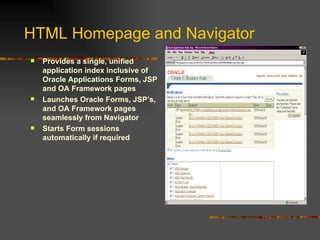
HTML Homepage and Navigator Provides a single, unified application index inclusive of Oracle Applications Forms, JSP and OA Framework pages Launches Oracle Forms, JSP’s, and OA Framework pages seamlessly from Navigator Starts Form sessions automatically if required
HTML Homepage and Navigator Enables users navigating through different forms/ responsibilities to reuse the same Forms session instead of opening multiple sessions Retains one Forms session open on your PC at any given time for a given database Removes initial SOCKET_LISTENER_PORT Profile (defaulted to 6945) dependency through the application of Patch # 2924292  Implementation & Support
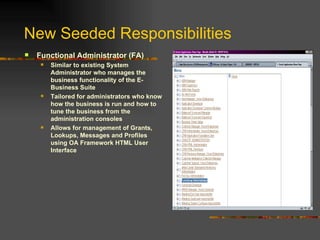
New Seeded Responsibilities Functional Administrator (FA) Similar to existing System Administrator who manages the business functionality of the E-Business Suite Tailored for administrators who know how the business is run and how to tune the business from the administration consoles Allows for management of Grants, Lookups, Messages and Profiles using OA Framework HTML User Interface
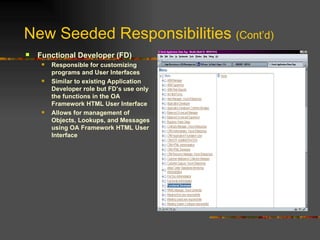
New Seeded Responsibilities  (Cont’d) Functional Developer (FD) Responsible for customizing programs and User Interfaces Similar to existing Application Developer role but FD’s use only the functions in the OA Framework HTML User Interface Allows for management of Objects, Lookups, and Messages using OA Framework HTML User Interface
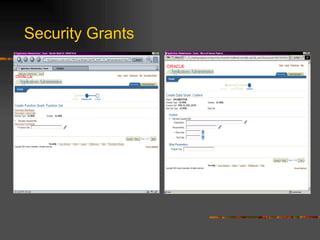
Security Grants Provides a new model of security that “grants” permissions to users independent of the Navigation Menu structure. Extends Oracle Application’s native security policies to accommodate customer specific security requirements
Security Grants Features two models: Data Security Grants which determine what “Actions” (Permission Sets) can be performed by “Whom”, (User, Group, Responsibilities) on which “Objects” Function Security Grants which determine what “Actions” (Functions) can be performed by “Whom”, (User, Group, Etc.)  Note: Function Security Grants represent actions that can be performed on the system in general.
Security Grants
Security Grants Details Freely define Function Security Grants  There are limits to the definition of Data Security Grants given the limited uptake of this new feature (e.g. Projects, Oracle Sales Online, Tasks) Data Security Grants are the future and teams will be required to uptake in future releases Secures specific instances of data not menus Implementation & Support
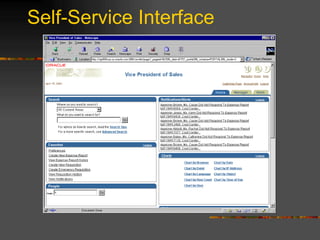
Self-Service Interface
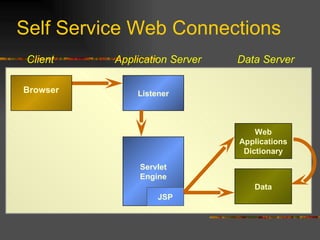
Launching Self-Service When a user clicks on a self-service responsibility, it sends a request to Apache.  Apache in turn either passes the request to mod_plsql or the Jserv (external process). If using Jserv (as most pages do anymore), Jserv executes the JSP.  If the JSP needs connectivity to the database, it makes a thin client connection to the DB.
Launching Self-Service (cont) Jserv is controlled by files in the following location:  $IAS_TOP/Apache/Jserv/etc/ jserv.conf jserv.properties zone.properties
Launching Self-Service (cont) From the jserv.properties file, the Jserv knows where to get the DBC file.  This is typically $FND_TOP/secure The DBC file contains all the information on how to connect to the DB, as well as other configuration details (connection pooling, etc.)
Launching Self-Service (cont) As long as Jserv is functioning correctly, a page will be built and sent back to Apache, who passes it on to the browser. Note:  Some Jserv sessions are stateful, others are released as soon as data is fed to Apache.
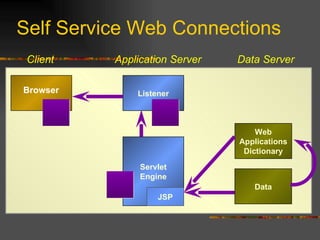
Self Service Web Connections Servlet Engine Application Server Data Server Web Applications Dictionary Listener Data JSP Browser Client
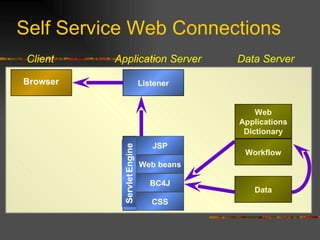
Self Service Web Connections Application Server Data Server Web Applications Dictionary Listener Data Browser Client Workflow Servlet  Engine JSP JSP Servlet   Engine CSS BC4J Web beans
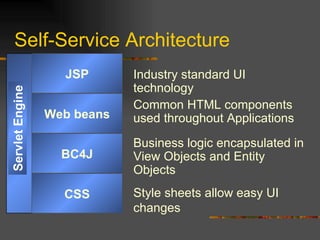
Self-Service Architecture Industry standard UI technology Common HTML components used throughout Applications Business logic encapsulated in View Objects and Entity Objects Style sheets allow easy UI changes JSP Servlet   Engine Web beans BC4J CSS
Overview Personal Home Page E-Business Login Launching Professional Interface Concurrent Requests Workflow LDAP  Troubleshooting
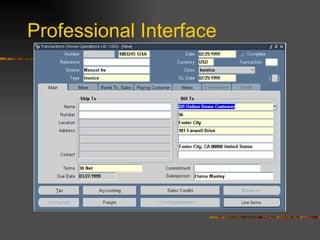
Professional Interface
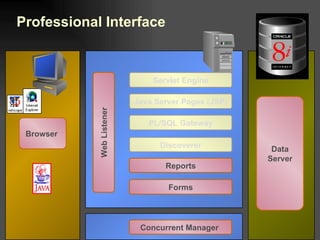
Professional Interface Data Server  Java Server Pages (JSP) Forms Reports Discoverer Concurrent Manager  Browser  PL/SQL Gateway Servlet Engine Web Listener
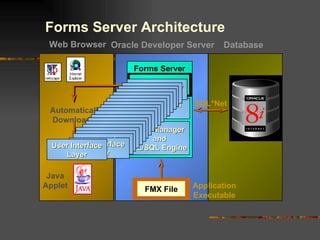
Application Logic Forms Server Data Manager and PL/SQL Engine Application Executable User Interface Layer SQL*Net Web Browser Database User Interface Layer User Interface Layer User Interface Layer Oracle Developer Server User Interface Layer User Interface Layer User Interface Layer User Interface Layer User Interface Layer User Interface Layer User Interface Layer User Interface Layer User Interface Layer User Interface Layer User Interface Layer User Interface Layer User Interface Layer User Interface Layer User Interface Layer User Interface Layer User Interface Layer FMX File Java Applet Forms Server Architecture Automatically Downloaded
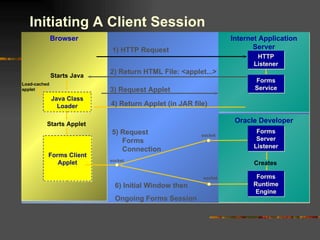
Oracle Developer Browser Internet Application Server Forms Service HTTP Listener Forms Server Listener Initiating A Client Session 1) HTTP Request 2) Return HTML File: <applet...> Starts Java   Java Class Loader 3) Request Applet Load-cached applet 4) Return Applet (in JAR file) Starts Applet Forms Client Applet socket socket 5)  Request Forms Connection Forms Runtime Engine Creates socket 6) Initial Window then  Ongoing Forms Session
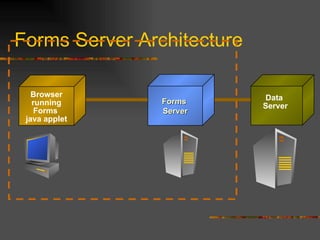
Forms Server Architecture Data  Server Forms  Server Browser running Forms  java applet
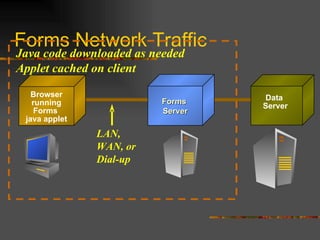
Forms Network Traffic Java code downloaded as needed Applet cached on client  Browser running Forms  java applet Data  Server Forms  Server LAN, WAN, or Dial-up
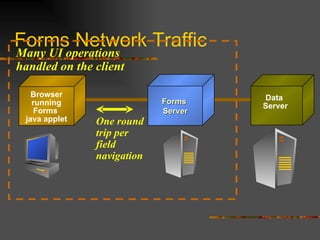
Forms Network Traffic Browser running Forms  java applet Data  Server Forms  Server Many UI operations  handled on the client One round trip per field navigation
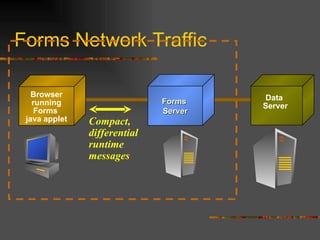
Forms Network Traffic Browser running Forms  java applet Data  Server Forms  Server Compact, differential  runtime  messages
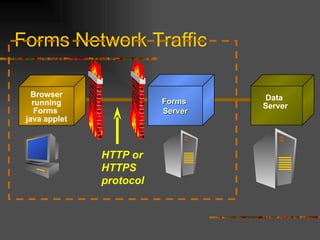
Forms Network Traffic Data  Server Forms  Server Browser running Forms  java applet HTTP or HTTPS  protocol
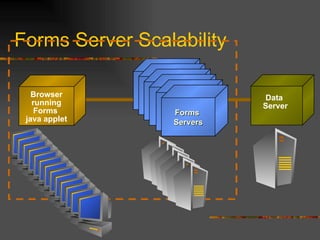
Forms Server Scalability Data  Server Forms  Server Forms  Server Forms  Server Forms  Server Forms  Server Forms  Servers Browser running Forms  java applet
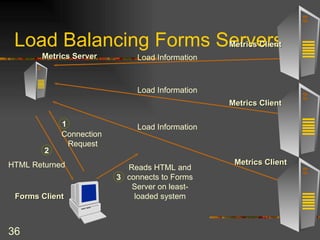
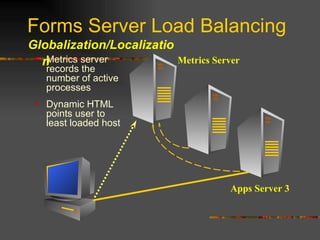
Load Balancing Forms Servers Metrics Server Metrics Client Forms Client Load Information Load Information Load Information Metrics Client Metrics Client 1 Connection  Request 2 HTML Returned 3 Reads HTML and connects to Forms Server on least-loaded system
Forms Server Load Balancing Globalization/Localization Metrics server records the number of active processes Dynamic HTML points user to least loaded host Metrics Server Apps Server 3
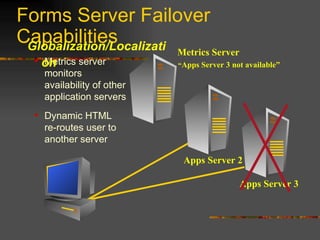
Forms Server Failover Capabilities Globalization/Localization Apps Server 3 “ Apps Server 3 not available” Metrics server monitors availability of other application servers Dynamic HTML re-routes user to another server Metrics Server Apps Server 2
Launching Help If the user selects the “copy file” option Jinit spawns a new web browser window. Browser contacts Apache to run a PL/SQL procedure.  This procedure builds a webpage that consists of 3 frames Search Navigator Search Results
Overview Personal Home Page E-Business Login Launching Professional Interface Concurrent Requests Workflow Troubleshooting
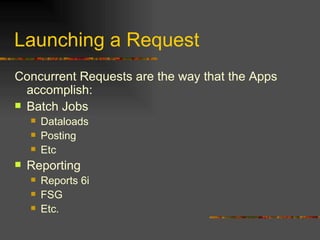
Launching a Request Concurrent Requests are the way that the Apps accomplish: Batch Jobs Dataloads Posting Etc Reporting Reports 6i FSG Etc.
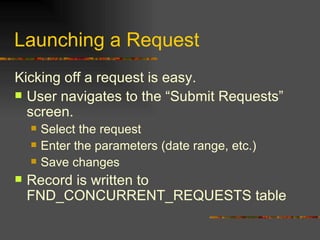
Launching a Request Kicking off a request is easy. User navigates to the “Submit Requests” screen. Select the request Enter the parameters (date range, etc.) Save changes Record is written to FND_CONCURRENT_REQUESTS table
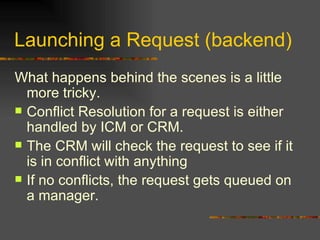
Launching a Request (backend) What happens behind the scenes is a little more tricky. Conflict Resolution for a request is either handled by ICM or CRM.  The CRM will check the request to see if it is in conflict with anything If no conflicts, the request gets queued on a manager.
Launching a Request (backend) If the request gets queued on a manager The manager loads the files that are needed to run that request.  Requests can be: Host commands Reports runtime SQL files SQL*Loader files Etc.
Viewing Request Output When the request completes, a user can view the output in their professional interface The user clicks on the “View Output” button and the report output is displayed on the screen. In addition, the user can select “copy file” and the file is downloaded to the browser in form of a txt file.
Viewing Request Output (backend) When a user clicks “View Output” Jinit sends the request to the Forms Server. Forms Server instantiates a connection to the FNDFS listener FNDFS listener is a standard database listener. ($TNS_ADMIN/$ORACLE_SID) The Listener spawns an FNDFS process
Viewing Request Output (backend) FNDFS reads the file, and sends it back through a network pipe. FNDFS is somewhat interactive, as it paginates the output, and can deliver a partial file or a complete report.
Viewing Request Output (backend) If the user selects the “copy file” option Jinit spawns a new web browser window. Browser contacts Apache to run the FNDWRR.exe CGI. FNDWRR.exe works as a pass-through to FNDFS As soon as the file is delivered, FNDFS goes away, and FNDWRR.exe loses authentication.
TCF Connections TCF stands for Thin Client Framework Apps has a service called the TCF socket server.  This process is used for UI components to connect to server components. Apps uses this framework for server processes that are not forms server related, but still have a server component.
TCF Connections (cont)  TCF connections are started by the jinitiator initializing an applet that is not forms server related. This applet in turn communicates with the TCF socket server.  The TCF server initializes whatever java processes are needed to fulfill the request. Since the TCF is Java based, it’s configuration is in the $FND_TOP/secure/ dbc file. TCF can run http/https and socket.  The difference between TCF and Forms is that TCF always runs as a standalone process.
Overview Personal Home Page E-Business Login Launching Professional Interface Concurrent Requests Workflow Troubleshooting
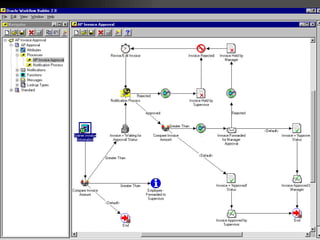
Workflow Workflow is a generic service that can be triggered by nearly anything occurring in the apps.  Workflow processes can be run by calling the workflow APIs directly or through the concurrent manager job “Workflow Background Process”  This job is scheduled as per business needs
Workflow (continued) Workflow response processing Workflow Notification Mailer Started through OAM Processes messages that come via MAIL protocol Keeps track of Processed, Unprocessed, and Discarded messages. Runs as a Concurrent Manager service.
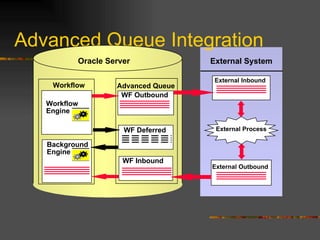
Workflow (continued) Business Event System Run through Advanced Queues Uses Savepoints, so not appropriate for triggers Workflow background engine picks up the queued message and processes Workflow tables must be cleaned daily as the volume can grow quite large
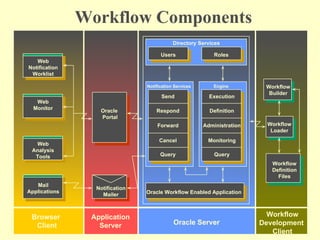
Workflow Components Roles Users Directory Services Notification Services Send Respond Forward Cancel Query Oracle Workflow Enabled Application Oracle Server Engine Execution Definition Administration Monitoring Query Workflow Builder Workflow Loader Workflow Definition Files Workflow Development  Client Oracle  Portal Notification Mailer Application Server Web Notification Worklist Web Monitor Web Analysis Tools Browser  Client Mail Applications
 
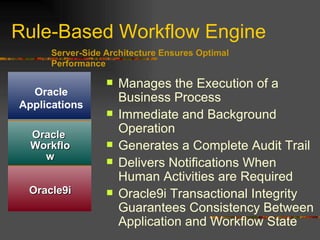
Rule-Based Workflow Engine Manages the Execution of a Business Process Immediate and Background Operation Generates a Complete Audit Trail Delivers Notifications When Human Activities are Required Oracle9i Transactional Integrity Guarantees Consistency Between Application and Workflow State Server-Side Architecture Ensures Optimal Performance o7 Oracle  Workflow Oracle9i Oracle Applications
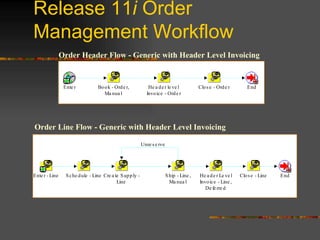
Release 11 i  Order Management Workflow Order Header Flow - Generic with Header Level Invoicing Order Line Flow - Generic with Header Level Invoicing
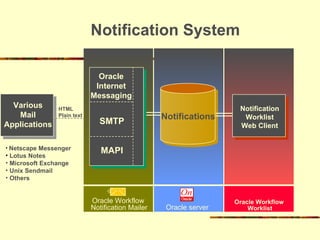
Notification System Notifications Oracle server Notification Worklist Web Client Oracle Workflow  Worklist Oracle Internet Messaging SMTP MAPI Oracle Workflow  Notification Mailer Various Mail Applications Netscape Messenger Lotus Notes Microsoft Exchange Unix Sendmail Others HTML Plain text
Participating in a Workflow Receiving Notifications from a Workflow Most E-mail Systems Pagers Phones Web Notifications Faxes or Printers
Electronic Notifications Sending Notifications to a Workflow Individuals/Groups/Positions Multiple mechanisms Web Any E-Mail System Pagers/Phones
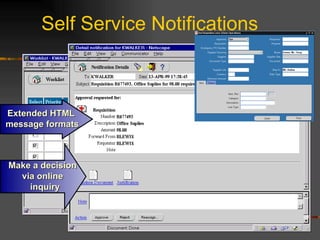
Self Service Notifications Extended HTML  message formats Make a decision  via online  inquiry
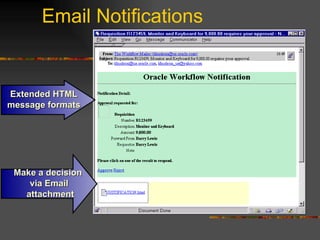
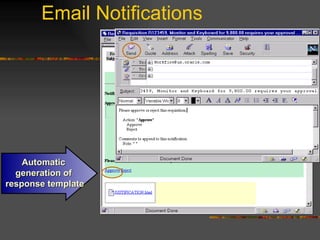
Email Notifications Extended HTML message formats Make a decision  via Email  attachment
Email Notifications Automatic  generation of  response template
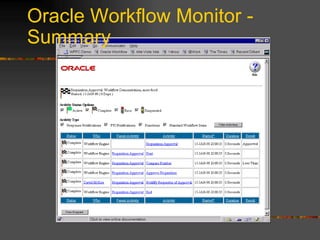
Oracle Workflow Monitor Graphically Monitor and Administer Workflow Transactions.  Java Applet Runs in a standard Web Browser View and Analyze Transaction History Retry or Skip any Activity Rewind and Rerun any Process Available to End Users and Administrators Summary of Key Activities Decision Makers in the Process Current Process Owners
Oracle Workflow Monitor - Summary
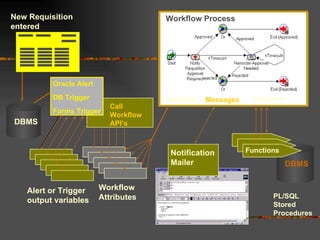
Call Workflow API’s New Requisition entered Alert or Trigger output variables Workflow Attributes Functions PL/SQL Stored  Procedures Workflow   Process Attributes Functions Notification Mailer Messages DBMS DBMS Oracle Alert DB Trigger Forms Trigger
Advanced Queue Integration Workflow  Workflow Engine Background Engine Advanced Queue WF Outbound WF Inbound WF Deferred Oracle Server External Inbound External Outbound External Process External System
Overview Personal Home Page E-Business Login Launching Professional Interface Concurrent Requests Workflow Troubleshooting
 

Dh2 Apps Training Part2

  • 1.
  • 2.
    Overview Personal HomePage E-Business Login Launching Professional Interface Concurrent Requests Workflow Troubleshooting
  • 3.
    PHP Connections ApplicationServer Data Server Web Applications Dictionary Listener Data Stored Procedures Browser PL/SQL Cartridge Client
  • 4.
    Application Server DataServer Web Applications Dictionary Listener Data Stored Procedures Browser PL/SQL Cartridge Client PHP Connections
  • 5.
    Overview Personal HomePage E-Business Login Launching Professional Interface Concurrent Requests Workflow LDAP Troubleshooting
  • 6.
    E-Business Login LeveragesOracle Applications Framework architecture Enables language selection based on installed languages prior to login Defaults to E-Business Suite Home Page Provides profile option to use the “old” Personal Home Page, if required
  • 7.
    E-Business Login Requiresno additional setup Allows “Old” PHP to be seen by setting the value of the “Self Service Personal Home Page Mode” profile to “Personal Home Page” Defaults the SSO Login screen for installations with the stand alone 11.5.9 SSO patch Implementation & Support
  • 8.
    HTML Homepage andNavigator Provides a single, unified application index inclusive of Oracle Applications Forms, JSP and OA Framework pages Launches Oracle Forms, JSP’s, and OA Framework pages seamlessly from Navigator Starts Form sessions automatically if required
  • 9.
    HTML Homepage andNavigator Enables users navigating through different forms/ responsibilities to reuse the same Forms session instead of opening multiple sessions Retains one Forms session open on your PC at any given time for a given database Removes initial SOCKET_LISTENER_PORT Profile (defaulted to 6945) dependency through the application of Patch # 2924292 Implementation & Support
  • 10.
    New Seeded ResponsibilitiesFunctional Administrator (FA) Similar to existing System Administrator who manages the business functionality of the E-Business Suite Tailored for administrators who know how the business is run and how to tune the business from the administration consoles Allows for management of Grants, Lookups, Messages and Profiles using OA Framework HTML User Interface
  • 11.
    New Seeded Responsibilities (Cont’d) Functional Developer (FD) Responsible for customizing programs and User Interfaces Similar to existing Application Developer role but FD’s use only the functions in the OA Framework HTML User Interface Allows for management of Objects, Lookups, and Messages using OA Framework HTML User Interface
  • 12.
    Security Grants Providesa new model of security that “grants” permissions to users independent of the Navigation Menu structure. Extends Oracle Application’s native security policies to accommodate customer specific security requirements
  • 13.
    Security Grants Featurestwo models: Data Security Grants which determine what “Actions” (Permission Sets) can be performed by “Whom”, (User, Group, Responsibilities) on which “Objects” Function Security Grants which determine what “Actions” (Functions) can be performed by “Whom”, (User, Group, Etc.) Note: Function Security Grants represent actions that can be performed on the system in general.
  • 14.
  • 15.
    Security Grants DetailsFreely define Function Security Grants There are limits to the definition of Data Security Grants given the limited uptake of this new feature (e.g. Projects, Oracle Sales Online, Tasks) Data Security Grants are the future and teams will be required to uptake in future releases Secures specific instances of data not menus Implementation & Support
  • 16.
  • 17.
    Launching Self-Service Whena user clicks on a self-service responsibility, it sends a request to Apache. Apache in turn either passes the request to mod_plsql or the Jserv (external process). If using Jserv (as most pages do anymore), Jserv executes the JSP. If the JSP needs connectivity to the database, it makes a thin client connection to the DB.
  • 18.
    Launching Self-Service (cont)Jserv is controlled by files in the following location: $IAS_TOP/Apache/Jserv/etc/ jserv.conf jserv.properties zone.properties
  • 19.
    Launching Self-Service (cont)From the jserv.properties file, the Jserv knows where to get the DBC file. This is typically $FND_TOP/secure The DBC file contains all the information on how to connect to the DB, as well as other configuration details (connection pooling, etc.)
  • 20.
    Launching Self-Service (cont)As long as Jserv is functioning correctly, a page will be built and sent back to Apache, who passes it on to the browser. Note: Some Jserv sessions are stateful, others are released as soon as data is fed to Apache.
  • 21.
    Self Service WebConnections Servlet Engine Application Server Data Server Web Applications Dictionary Listener Data JSP Browser Client
  • 22.
    Self Service WebConnections Servlet Engine Application Server Data Server Web Applications Dictionary Listener Data JSP Browser Client
  • 23.
    Self Service WebConnections Application Server Data Server Web Applications Dictionary Listener Data Browser Client Workflow Servlet Engine JSP JSP Servlet Engine CSS BC4J Web beans
  • 24.
    Self-Service Architecture Industrystandard UI technology Common HTML components used throughout Applications Business logic encapsulated in View Objects and Entity Objects Style sheets allow easy UI changes JSP Servlet Engine Web beans BC4J CSS
  • 25.
    Overview Personal HomePage E-Business Login Launching Professional Interface Concurrent Requests Workflow LDAP Troubleshooting
  • 26.
  • 27.
    Professional Interface DataServer Java Server Pages (JSP) Forms Reports Discoverer Concurrent Manager Browser PL/SQL Gateway Servlet Engine Web Listener
  • 28.
    Application Logic FormsServer Data Manager and PL/SQL Engine Application Executable User Interface Layer SQL*Net Web Browser Database User Interface Layer User Interface Layer User Interface Layer Oracle Developer Server User Interface Layer User Interface Layer User Interface Layer User Interface Layer User Interface Layer User Interface Layer User Interface Layer User Interface Layer User Interface Layer User Interface Layer User Interface Layer User Interface Layer User Interface Layer User Interface Layer User Interface Layer User Interface Layer User Interface Layer FMX File Java Applet Forms Server Architecture Automatically Downloaded
  • 29.
    Oracle Developer BrowserInternet Application Server Forms Service HTTP Listener Forms Server Listener Initiating A Client Session 1) HTTP Request 2) Return HTML File: <applet...> Starts Java Java Class Loader 3) Request Applet Load-cached applet 4) Return Applet (in JAR file) Starts Applet Forms Client Applet socket socket 5) Request Forms Connection Forms Runtime Engine Creates socket 6) Initial Window then Ongoing Forms Session
  • 30.
    Forms Server ArchitectureData Server Forms Server Browser running Forms java applet
  • 31.
    Forms Network TrafficJava code downloaded as needed Applet cached on client Browser running Forms java applet Data Server Forms Server LAN, WAN, or Dial-up
  • 32.
    Forms Network TrafficBrowser running Forms java applet Data Server Forms Server Many UI operations handled on the client One round trip per field navigation
  • 33.
    Forms Network TrafficBrowser running Forms java applet Data Server Forms Server Compact, differential runtime messages
  • 34.
    Forms Network TrafficData Server Forms Server Browser running Forms java applet HTTP or HTTPS protocol
  • 35.
    Forms Server ScalabilityData Server Forms Server Forms Server Forms Server Forms Server Forms Server Forms Servers Browser running Forms java applet
  • 36.
    Load Balancing FormsServers Metrics Server Metrics Client Forms Client Load Information Load Information Load Information Metrics Client Metrics Client 1 Connection Request 2 HTML Returned 3 Reads HTML and connects to Forms Server on least-loaded system
  • 37.
    Forms Server LoadBalancing Globalization/Localization Metrics server records the number of active processes Dynamic HTML points user to least loaded host Metrics Server Apps Server 3
  • 38.
    Forms Server FailoverCapabilities Globalization/Localization Apps Server 3 “ Apps Server 3 not available” Metrics server monitors availability of other application servers Dynamic HTML re-routes user to another server Metrics Server Apps Server 2
  • 39.
    Launching Help Ifthe user selects the “copy file” option Jinit spawns a new web browser window. Browser contacts Apache to run a PL/SQL procedure. This procedure builds a webpage that consists of 3 frames Search Navigator Search Results
  • 40.
    Overview Personal HomePage E-Business Login Launching Professional Interface Concurrent Requests Workflow Troubleshooting
  • 41.
    Launching a RequestConcurrent Requests are the way that the Apps accomplish: Batch Jobs Dataloads Posting Etc Reporting Reports 6i FSG Etc.
  • 42.
    Launching a RequestKicking off a request is easy. User navigates to the “Submit Requests” screen. Select the request Enter the parameters (date range, etc.) Save changes Record is written to FND_CONCURRENT_REQUESTS table
  • 43.
    Launching a Request(backend) What happens behind the scenes is a little more tricky. Conflict Resolution for a request is either handled by ICM or CRM. The CRM will check the request to see if it is in conflict with anything If no conflicts, the request gets queued on a manager.
  • 44.
    Launching a Request(backend) If the request gets queued on a manager The manager loads the files that are needed to run that request. Requests can be: Host commands Reports runtime SQL files SQL*Loader files Etc.
  • 45.
    Viewing Request OutputWhen the request completes, a user can view the output in their professional interface The user clicks on the “View Output” button and the report output is displayed on the screen. In addition, the user can select “copy file” and the file is downloaded to the browser in form of a txt file.
  • 46.
    Viewing Request Output(backend) When a user clicks “View Output” Jinit sends the request to the Forms Server. Forms Server instantiates a connection to the FNDFS listener FNDFS listener is a standard database listener. ($TNS_ADMIN/$ORACLE_SID) The Listener spawns an FNDFS process
  • 47.
    Viewing Request Output(backend) FNDFS reads the file, and sends it back through a network pipe. FNDFS is somewhat interactive, as it paginates the output, and can deliver a partial file or a complete report.
  • 48.
    Viewing Request Output(backend) If the user selects the “copy file” option Jinit spawns a new web browser window. Browser contacts Apache to run the FNDWRR.exe CGI. FNDWRR.exe works as a pass-through to FNDFS As soon as the file is delivered, FNDFS goes away, and FNDWRR.exe loses authentication.
  • 49.
    TCF Connections TCFstands for Thin Client Framework Apps has a service called the TCF socket server. This process is used for UI components to connect to server components. Apps uses this framework for server processes that are not forms server related, but still have a server component.
  • 50.
    TCF Connections (cont) TCF connections are started by the jinitiator initializing an applet that is not forms server related. This applet in turn communicates with the TCF socket server. The TCF server initializes whatever java processes are needed to fulfill the request. Since the TCF is Java based, it’s configuration is in the $FND_TOP/secure/ dbc file. TCF can run http/https and socket. The difference between TCF and Forms is that TCF always runs as a standalone process.
  • 51.
    Overview Personal HomePage E-Business Login Launching Professional Interface Concurrent Requests Workflow Troubleshooting
  • 52.
    Workflow Workflow isa generic service that can be triggered by nearly anything occurring in the apps. Workflow processes can be run by calling the workflow APIs directly or through the concurrent manager job “Workflow Background Process” This job is scheduled as per business needs
  • 53.
    Workflow (continued) Workflowresponse processing Workflow Notification Mailer Started through OAM Processes messages that come via MAIL protocol Keeps track of Processed, Unprocessed, and Discarded messages. Runs as a Concurrent Manager service.
  • 54.
    Workflow (continued) BusinessEvent System Run through Advanced Queues Uses Savepoints, so not appropriate for triggers Workflow background engine picks up the queued message and processes Workflow tables must be cleaned daily as the volume can grow quite large
  • 55.
    Workflow Components RolesUsers Directory Services Notification Services Send Respond Forward Cancel Query Oracle Workflow Enabled Application Oracle Server Engine Execution Definition Administration Monitoring Query Workflow Builder Workflow Loader Workflow Definition Files Workflow Development Client Oracle Portal Notification Mailer Application Server Web Notification Worklist Web Monitor Web Analysis Tools Browser Client Mail Applications
  • 56.
  • 57.
    Rule-Based Workflow EngineManages the Execution of a Business Process Immediate and Background Operation Generates a Complete Audit Trail Delivers Notifications When Human Activities are Required Oracle9i Transactional Integrity Guarantees Consistency Between Application and Workflow State Server-Side Architecture Ensures Optimal Performance o7 Oracle Workflow Oracle9i Oracle Applications
  • 58.
    Release 11 i Order Management Workflow Order Header Flow - Generic with Header Level Invoicing Order Line Flow - Generic with Header Level Invoicing
  • 59.
    Notification System NotificationsOracle server Notification Worklist Web Client Oracle Workflow Worklist Oracle Internet Messaging SMTP MAPI Oracle Workflow Notification Mailer Various Mail Applications Netscape Messenger Lotus Notes Microsoft Exchange Unix Sendmail Others HTML Plain text
  • 60.
    Participating in aWorkflow Receiving Notifications from a Workflow Most E-mail Systems Pagers Phones Web Notifications Faxes or Printers
  • 61.
    Electronic Notifications SendingNotifications to a Workflow Individuals/Groups/Positions Multiple mechanisms Web Any E-Mail System Pagers/Phones
  • 62.
    Self Service NotificationsExtended HTML message formats Make a decision via online inquiry
  • 63.
    Email Notifications ExtendedHTML message formats Make a decision via Email attachment
  • 64.
    Email Notifications Automatic generation of response template
  • 65.
    Oracle Workflow MonitorGraphically Monitor and Administer Workflow Transactions. Java Applet Runs in a standard Web Browser View and Analyze Transaction History Retry or Skip any Activity Rewind and Rerun any Process Available to End Users and Administrators Summary of Key Activities Decision Makers in the Process Current Process Owners
  • 66.
  • 67.
    Call Workflow API’sNew Requisition entered Alert or Trigger output variables Workflow Attributes Functions PL/SQL Stored Procedures Workflow Process Attributes Functions Notification Mailer Messages DBMS DBMS Oracle Alert DB Trigger Forms Trigger
  • 68.
    Advanced Queue IntegrationWorkflow Workflow Engine Background Engine Advanced Queue WF Outbound WF Inbound WF Deferred Oracle Server External Inbound External Outbound External Process External System
  • 69.
    Overview Personal HomePage E-Business Login Launching Professional Interface Concurrent Requests Workflow Troubleshooting
  • 70.