R12 Architectural Changes
Agenda


1.   Client Tier
2.   Differences Between 11i and R12
Client Tier


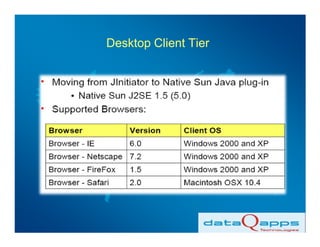
• Jinitiator has been replaced by Sun JRE
• Minimum Version Required is 1.5.0_13
• oaj2se.exe is the Executable present in
$OA_HTML:
  /oracle/fin1visr12/fin1viscomn/webapps/oacore/html
Desktop Client Tier
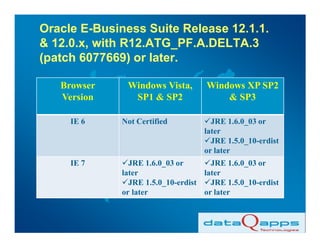
Oracle E-Business Suite Release 12.1.1.
& 12.0.x, with R12.ATG_PF.A.DELTA.3
(patch 6077669) or later.

   Browser     Windows Vista,        Windows XP SP2
   Version      SP1 & SP2                & SP3

     IE 6     Not Certified           JRE 1.6.0_03 or
                                    later
                                      JRE 1.5.0_10-erdist
                                    or later
     IE 7       JRE 1.6.0_03 or       JRE 1.6.0_03 or
              later                 later
                JRE 1.5.0_10-erdist   JRE 1.5.0_10-erdist
              or later              or later
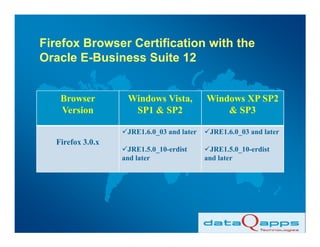
Firefox Browser Certification with the
Oracle E-Business Suite 12


   Browser         Windows Vista,          Windows XP SP2
   Version          SP1 & SP2                  & SP3

                   JRE1.6.0_03 and later    JRE1.6.0_03 and later
  Firefox 3.0.x
                    JRE1.5.0_10-erdist       JRE1.5.0_10-erdist
                  and later                and later
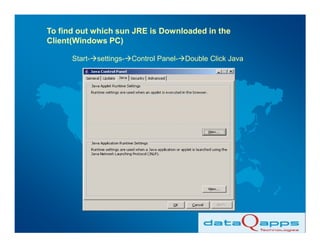
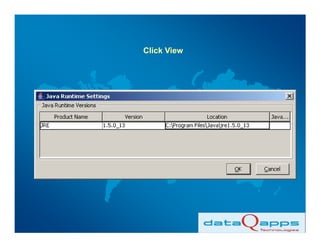
To find out which sun JRE is Downloaded in the
Client(Windows PC)

      Start- settings- Control Panel- Double Click Java
Click View
The Executable which gets Downloaded for Sun
JRE:
       (Below Screenshot from linux server
       where R12 is Installed)
[applvis@lnx777 10.1.3]$ cd $OA_HTML
[applvis@lnx777 html]$ pwd
/oracle/fin1visr12/fin1viscomn/webapps/oacore/html
[applvis@lnx777 html]$ ls -alrt *exe
-rw-r--r-- 1 applvis dba 77455123 Oct 22 2007 setup_PS.exe
-rw-r--r-- 1 applvis dba 71746804 Oct 22 2007 setup_SNO.exe
-rw-r--r-- 1 applvis dba 16688520 Jan 16 2008 oaj2se.exe
-rw-r--r-- 1 applvis dba 27431909 Jan 21 2008 setup_SNO_patch.exe
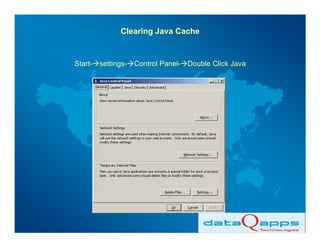
Clearing Java Cache


Start- settings- Control Panel- Double Click Java
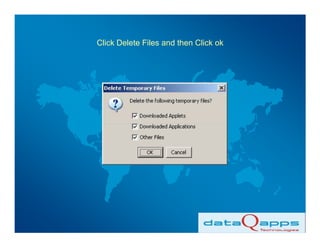
Click Delete Files and then Click ok
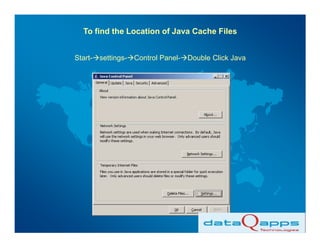
To find the Location of Java Cache Files


Start- settings- Control Panel- Double Click Java
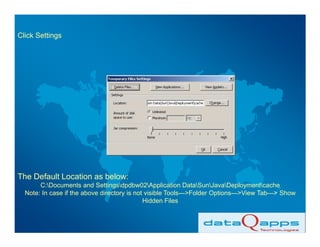
Click Settings


The Default Location as below:
       C:Documents and Settingsdpdbw02Application DataSunJavaDeploymentcache
  Note: In case if the above directory is not visible Tools--->Folder Options--->View Tab---> Show
                                             Hidden Files
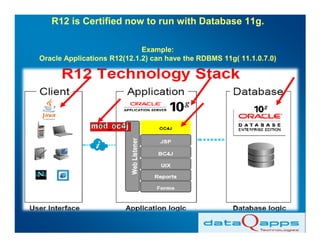
R12 is Certified now to run with Database 11g.

                             Example:
Oracle Applications R12(12.1.2) can have the RDBMS 11g( 11.1.0.7.0)
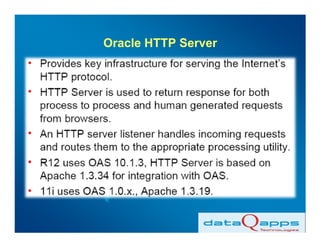
Oracle HTTP Server
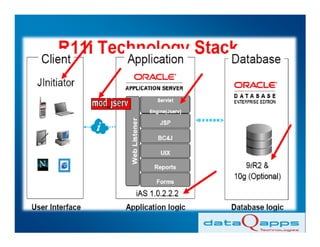
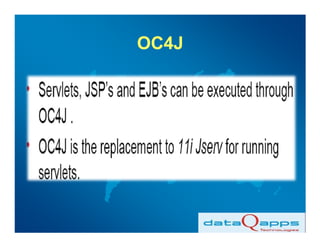
OC4J
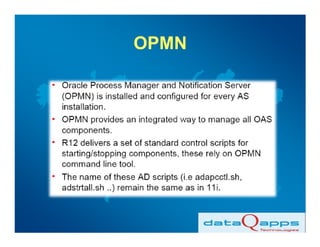
OPMN
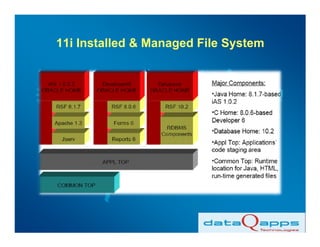
11i Installed & Managed File System
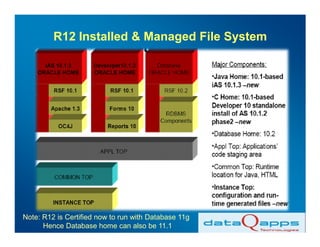
R12 Installed & Managed File System


Note: R12 is Certified now to run with Database 11g
      Hence Database home can also be 11.1
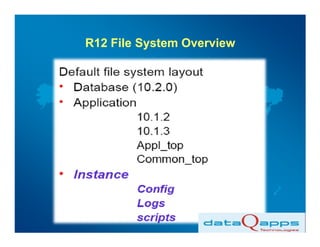
R12 File System Overview
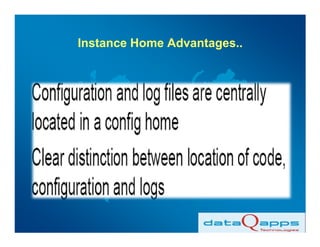
Instance Home Advantages..
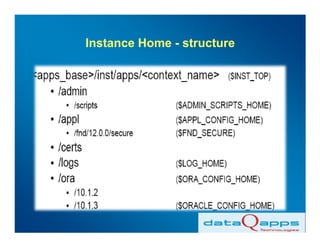
Instance Home - structure
John K Neethimanickam

Managing Director,
dataQapps Technologies,
Bangalore,
India.
Phone : +91 98452 95920
Email id : john.neethimanickam@dataqapps.com
           neethimanickam_jk@yahoo.co.in

Web    : www.dataqapps.com
Thank You

R12 architectural changes

  • 1.
  • 2.
    Agenda 1. Client Tier 2. Differences Between 11i and R12
  • 3.
    Client Tier • Jinitiatorhas been replaced by Sun JRE • Minimum Version Required is 1.5.0_13 • oaj2se.exe is the Executable present in $OA_HTML: /oracle/fin1visr12/fin1viscomn/webapps/oacore/html
  • 4.
  • 5.
    Oracle E-Business SuiteRelease 12.1.1. & 12.0.x, with R12.ATG_PF.A.DELTA.3 (patch 6077669) or later. Browser Windows Vista, Windows XP SP2 Version SP1 & SP2 & SP3 IE 6 Not Certified JRE 1.6.0_03 or later JRE 1.5.0_10-erdist or later IE 7 JRE 1.6.0_03 or JRE 1.6.0_03 or later later JRE 1.5.0_10-erdist JRE 1.5.0_10-erdist or later or later
  • 6.
    Firefox Browser Certificationwith the Oracle E-Business Suite 12 Browser Windows Vista, Windows XP SP2 Version SP1 & SP2 & SP3 JRE1.6.0_03 and later JRE1.6.0_03 and later Firefox 3.0.x JRE1.5.0_10-erdist JRE1.5.0_10-erdist and later and later
  • 7.
    To find outwhich sun JRE is Downloaded in the Client(Windows PC) Start- settings- Control Panel- Double Click Java
  • 8.
  • 9.
    The Executable whichgets Downloaded for Sun JRE: (Below Screenshot from linux server where R12 is Installed) [applvis@lnx777 10.1.3]$ cd $OA_HTML [applvis@lnx777 html]$ pwd /oracle/fin1visr12/fin1viscomn/webapps/oacore/html [applvis@lnx777 html]$ ls -alrt *exe -rw-r--r-- 1 applvis dba 77455123 Oct 22 2007 setup_PS.exe -rw-r--r-- 1 applvis dba 71746804 Oct 22 2007 setup_SNO.exe -rw-r--r-- 1 applvis dba 16688520 Jan 16 2008 oaj2se.exe -rw-r--r-- 1 applvis dba 27431909 Jan 21 2008 setup_SNO_patch.exe
  • 10.
    Clearing Java Cache Start-settings- Control Panel- Double Click Java
  • 11.
    Click Delete Filesand then Click ok
  • 12.
    To find theLocation of Java Cache Files Start- settings- Control Panel- Double Click Java
  • 13.
    Click Settings The DefaultLocation as below: C:Documents and Settingsdpdbw02Application DataSunJavaDeploymentcache Note: In case if the above directory is not visible Tools--->Folder Options--->View Tab---> Show Hidden Files
  • 15.
    R12 is Certifiednow to run with Database 11g. Example: Oracle Applications R12(12.1.2) can have the RDBMS 11g( 11.1.0.7.0)
  • 16.
  • 17.
  • 18.
  • 19.
    11i Installed &Managed File System
  • 20.
    R12 Installed &Managed File System Note: R12 is Certified now to run with Database 11g Hence Database home can also be 11.1
  • 21.
  • 22.
  • 23.
    Instance Home -structure
  • 24.
    John K Neethimanickam ManagingDirector, dataQapps Technologies, Bangalore, India. Phone : +91 98452 95920 Email id : john.neethimanickam@dataqapps.com neethimanickam_jk@yahoo.co.in Web : www.dataqapps.com
  • 25.