IP Multicasting
SCS 3004 - Networking Technologies
Overview
• Introduction
• Multicast Applications
• Unicast, Broadcast and Multicast
• Multicast Addressing
• Multicast Address Mapping
• IGMP
• IGMP Packet Format
• IGMP Message Types
Introduction to IP Multicast
• Why multicast?
• When sending same data to multiple receivers
• Better bandwidth utilization
• Lesser host/router processing
• Receivers’ addresses unknown
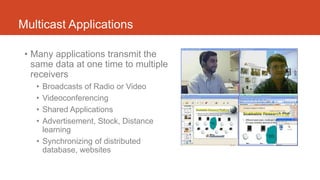
Multicast Applications
• Many applications transmit the
same data at one time to multiple
receivers
• Broadcasts of Radio or Video
• Videoconferencing
• Shared Applications
• Advertisement, Stock, Distance
learning
• Synchronizing of distributed
database, websites
Unicast, Broadcast and Multicast
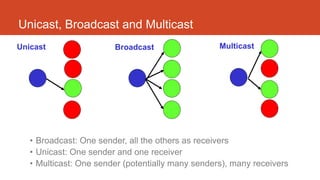
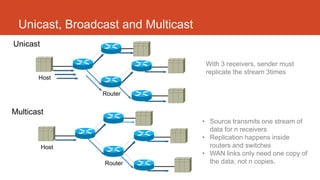
• Broadcast: One sender, all the others as receivers
• Unicast: One sender and one receiver
• Multicast: One sender (potentially many senders), many receivers
Unicast Broadcast Multicast
Unicast, Broadcast and Multicast
Host
Router
Unicast
Host
Router
Multicast
With 3 receivers, sender must
replicate the stream 3times
• Source transmits one stream of
data for n receivers
• Replication happens inside
routers and switches
• WAN links only need one copy of
the data, not n copies.
Multicast Addressing
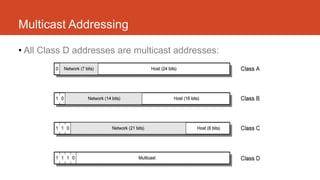
• All Class D addresses are multicast addresses:
Multicast Addressing
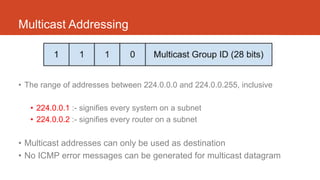
• The range of addresses between 224.0.0.0 and 224.0.0.255, inclusive
• 224.0.0.1 :- signifies every system on a subnet
• 224.0.0.2 :- signifies every router on a subnet
• Multicast addresses can only be used as destination
• No ICMP error messages can be generated for multicast datagram
Multicast Address Mapping
Internet Group Management Protocol - IGMP
• How hosts tell routers about group membership
• Routers solicit group membership from directly
connected hosts
• RFC 1112 specifies first version of IGMP
• IGMP v2 and IGMP v3 enhancements
• Supported on UNIX systems, PCs, and MACs
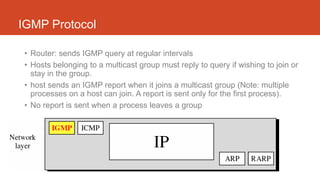
IGMP Protocol
• Router: sends IGMP query at regular intervals
• Hosts belonging to a multicast group must reply to query if wishing to join or
stay in the group.
• host sends an IGMP report when it joins a multicast group (Note: multiple
processes on a host can join. A report is sent only for the first process).
• No report is sent when a process leaves a group
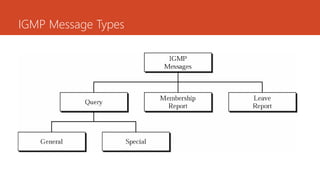
IGMP Message Types
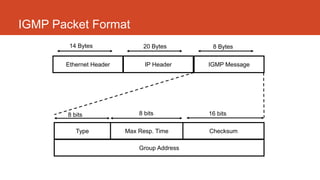
IGMP Packet Format
Ethernet Header IP Header IGMP Message
14 Bytes 20 Bytes 8 Bytes
Type Max Resp. Time Checksum
Group Address
8 bits 8 bits 16 bits
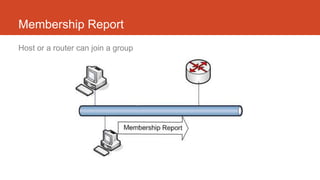
Membership Report
Host or a router can join a group
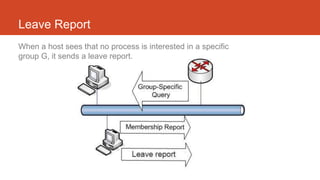
Leave Report
When a host sees that no process is interested in a specific
group G, it sends a leave report.
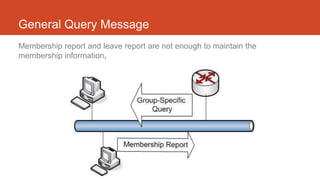
General Query Message
Membership report and leave report are not enough to maintain the
membership information.
Reference
• [1] YouTube. “Lecture - 32 IP Multicasting”. Youtube.com. [Online]. Available
https://www.youtube.com/watch?v=TApIo_BiX6U [Accessed: 3 Aug2014].
• [2] YouTube. “Cisco Live 2014: IP Multicast Concepts, Design and Troubleshooting
(Melbourne)”. Youtube.com. [Online]. Available https://www.youtube.com/watch?v=l9RJdrdjDU8
[Accessed: 3 Aug2014].
• [3] Overview of IP Multicast
http://www.cisco.com/en/US/tech/tk828/technologies_white_paper09186a0080092942.shtml
• [4] What is IP Multicasting? Concept of IP Multicast Address Explained
http://www.thegeekstuff.com/2013/05/ip-multicasting/
• [5] IP MULTICASTING
http://www.dcs.gla.ac.uk/~lewis/networkpages/m05s08multicast.htm

IP Multicasting

  • 1.
    IP Multicasting SCS 3004- Networking Technologies
  • 2.
    Overview • Introduction • MulticastApplications • Unicast, Broadcast and Multicast • Multicast Addressing • Multicast Address Mapping • IGMP • IGMP Packet Format • IGMP Message Types
  • 3.
    Introduction to IPMulticast • Why multicast? • When sending same data to multiple receivers • Better bandwidth utilization • Lesser host/router processing • Receivers’ addresses unknown
  • 4.
    Multicast Applications • Manyapplications transmit the same data at one time to multiple receivers • Broadcasts of Radio or Video • Videoconferencing • Shared Applications • Advertisement, Stock, Distance learning • Synchronizing of distributed database, websites
  • 5.
    Unicast, Broadcast andMulticast • Broadcast: One sender, all the others as receivers • Unicast: One sender and one receiver • Multicast: One sender (potentially many senders), many receivers Unicast Broadcast Multicast
  • 6.
    Unicast, Broadcast andMulticast Host Router Unicast Host Router Multicast With 3 receivers, sender must replicate the stream 3times • Source transmits one stream of data for n receivers • Replication happens inside routers and switches • WAN links only need one copy of the data, not n copies.
  • 7.
    Multicast Addressing • AllClass D addresses are multicast addresses:
  • 8.
    Multicast Addressing • Therange of addresses between 224.0.0.0 and 224.0.0.255, inclusive • 224.0.0.1 :- signifies every system on a subnet • 224.0.0.2 :- signifies every router on a subnet • Multicast addresses can only be used as destination • No ICMP error messages can be generated for multicast datagram
  • 9.
  • 10.
    Internet Group ManagementProtocol - IGMP • How hosts tell routers about group membership • Routers solicit group membership from directly connected hosts • RFC 1112 specifies first version of IGMP • IGMP v2 and IGMP v3 enhancements • Supported on UNIX systems, PCs, and MACs
  • 11.
    IGMP Protocol • Router:sends IGMP query at regular intervals • Hosts belonging to a multicast group must reply to query if wishing to join or stay in the group. • host sends an IGMP report when it joins a multicast group (Note: multiple processes on a host can join. A report is sent only for the first process). • No report is sent when a process leaves a group
  • 12.
  • 13.
    IGMP Packet Format EthernetHeader IP Header IGMP Message 14 Bytes 20 Bytes 8 Bytes Type Max Resp. Time Checksum Group Address 8 bits 8 bits 16 bits
  • 14.
    Membership Report Host ora router can join a group
  • 15.
    Leave Report When ahost sees that no process is interested in a specific group G, it sends a leave report.
  • 16.
    General Query Message Membershipreport and leave report are not enough to maintain the membership information.
  • 17.
    Reference • [1] YouTube.“Lecture - 32 IP Multicasting”. Youtube.com. [Online]. Available https://www.youtube.com/watch?v=TApIo_BiX6U [Accessed: 3 Aug2014]. • [2] YouTube. “Cisco Live 2014: IP Multicast Concepts, Design and Troubleshooting (Melbourne)”. Youtube.com. [Online]. Available https://www.youtube.com/watch?v=l9RJdrdjDU8 [Accessed: 3 Aug2014]. • [3] Overview of IP Multicast http://www.cisco.com/en/US/tech/tk828/technologies_white_paper09186a0080092942.shtml • [4] What is IP Multicasting? Concept of IP Multicast Address Explained http://www.thegeekstuff.com/2013/05/ip-multicasting/ • [5] IP MULTICASTING http://www.dcs.gla.ac.uk/~lewis/networkpages/m05s08multicast.htm

Editor's Notes

  • #4 IP multi-casting is a communication mechanism in which data is communicated from server to a set of clients who are interested in receiving that data. Any client can dynamically enter or leave the communication.
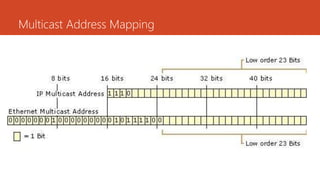
  • #10 The first byte of a multicast ethernet address should be 01. This means that the ethernet addresses 01:00:5e:00:00:00 to 01:00:5e:7f:ff:ff are reserved as multicast ethernet addresses. The lower order 23 bits of a multicast mac address should correspond to IP multicast group ID (see figure above). More precisely, this means that lower order 23 bits of multicast IP address should be same as lower order 23 bits of ethernet address
  • #14 This is a IGMPv2 packet format. And IGMPv3 is the current version
  • #15 A host maintains a list of processes that have membership in a group When a process wants to join a new group, it sends its request to the host The host then adds the name of the process and the name of the requested group to its list, and sends the membership report to the router. The report is send twice (in case the first report get lost or damaged)
  • #16 When a host sees that no process is interested in a specific group G, it sends a leave report. If router receives a leave report it won’t purge the list if there are still other hosts interested in that group. For that purpose the router sends a special query message with a specified response time for the group in question to see if there is anyone interested in that group. If there is no response a membership report, it purges the list.
  • #17 Membership report and leave report are not enough to maintain the membership information. Example: a host that is a member of a group can shut down and the m/c router would never receive the leave report. Therefore the m/c router monitors the hosts and routers in LAN by periodically sending (by default every 125 sec) general query message. Hosts/routers respond by membership report if there is still interest in groups