DBMS LABORATORY [ 18CSL58 ]
Prof. A. Syed Mustafa, HKBKCE. Page 1 of 1 DS Lab Programs
DBMS LABORATORY [ 18CSL58 ]
DEPARTMENT OF INFORMATION
SCIENCE AND ENGINEERING
--------------------
HKBK COLLEGE OF ENGINEERING
Bengaluru - 560045
by:
Dr. Syed Mustafa A
18CSL58-DBMS Lab, ISE,HKBKCE. Dr. Syed Mustafa Page 1
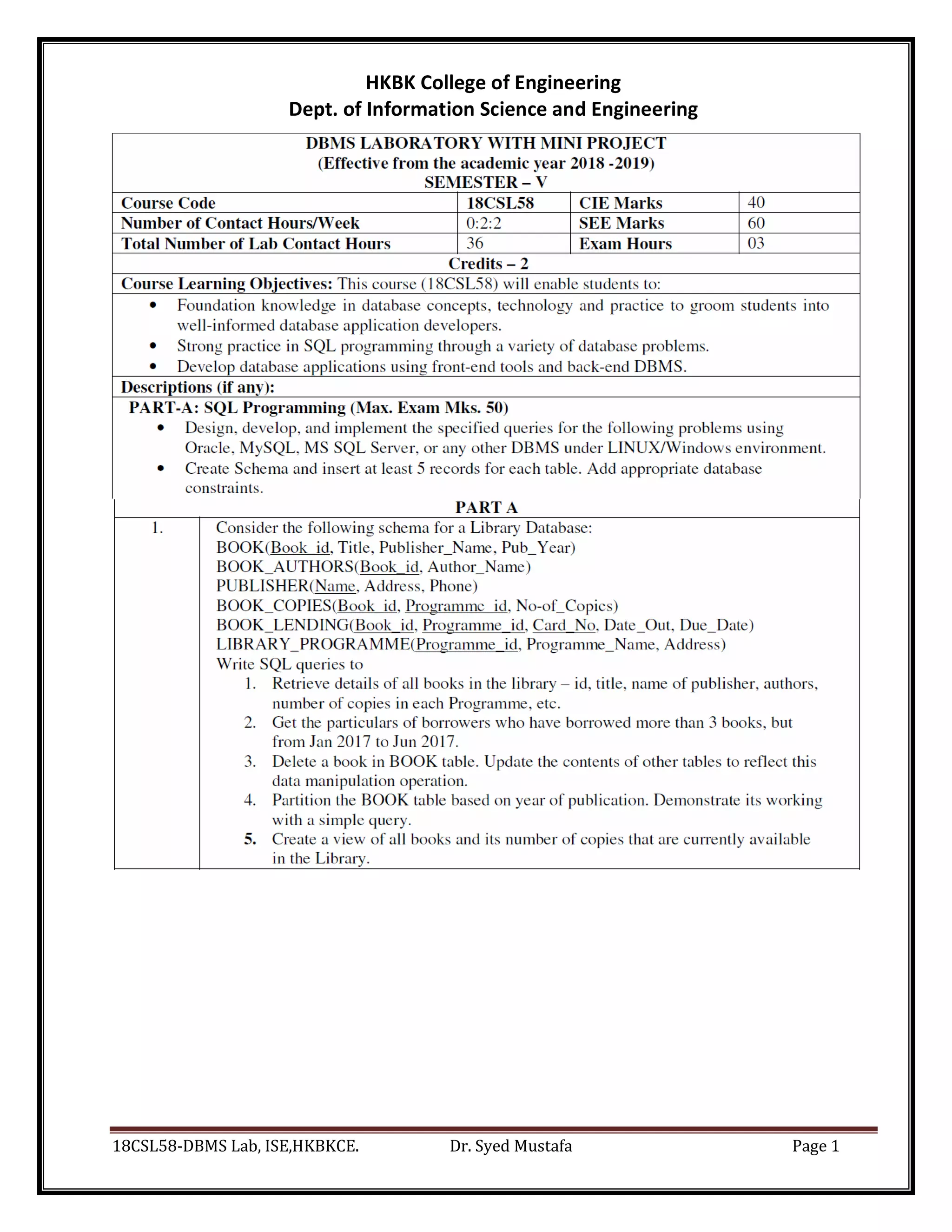
HKBK College of Engineering
Dept. of Information Science and Engineering
18CSL58-DBMS Lab, ISE,HKBKCE. Dr. Syed Mustafa Page 2
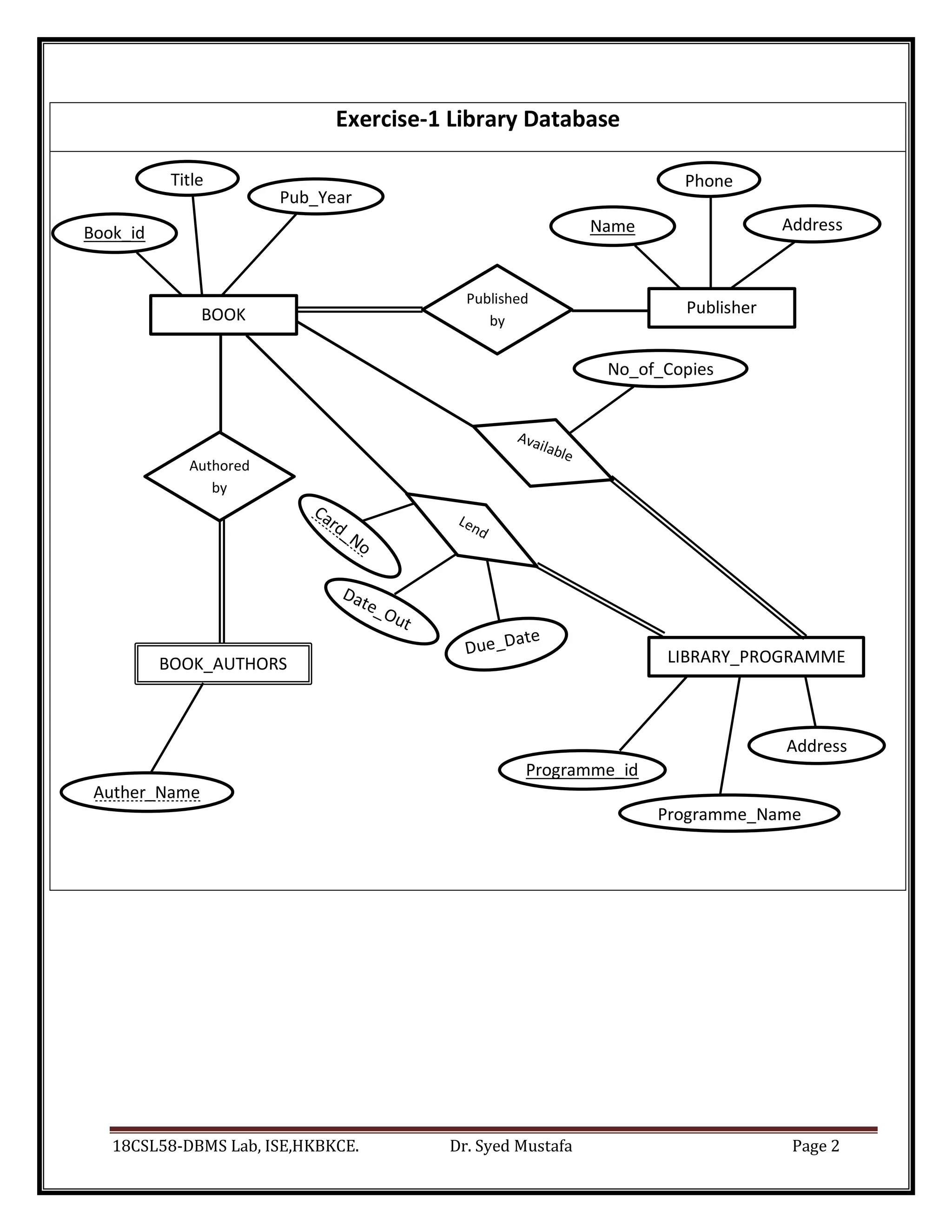
Book_id
No_of_Copies
Name Address
Auther_Name
me
Programme_id
Programme_Name
e
Address
Exercise-1 Library Database
Pub_Year
BOOK_AUTHORS
BOOK
Title
Publisher
Phone
LIBRARY_PROGRAMME
Published
by
Authored
by
18CSL58-DBMS Lab, ISE,HKBKCE. Dr. Syed Mustafa Page 3
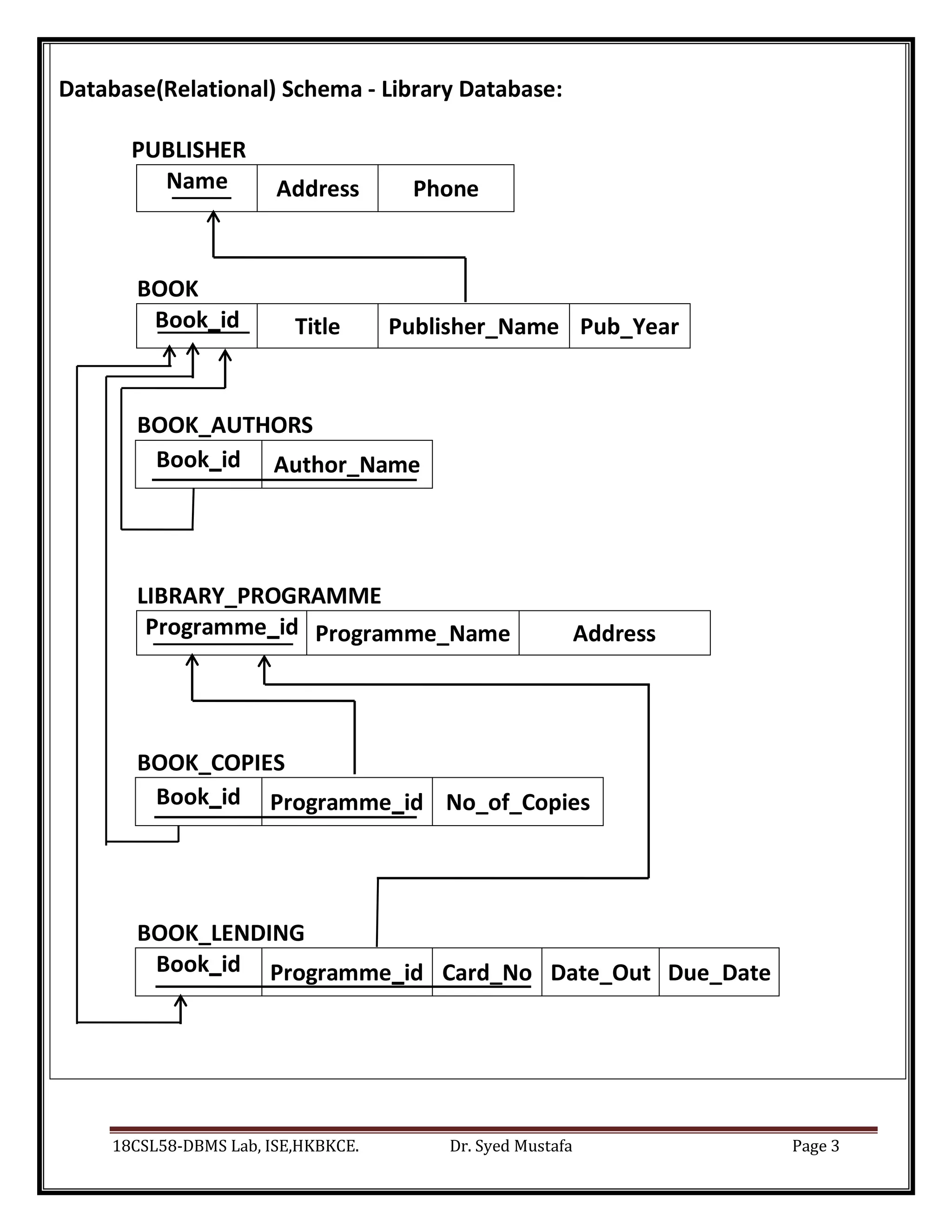
Database(Relational) Schema - Library Database:
PUBLISHER
Name Address Phone
BOOK
Book_id Title Publisher_Name Pub_Year
BOOK_AUTHORS
Book_id Author_Name
LIBRARY_PROGRAMME
Programme_id Programme_Name Address
BOOK_COPIES
Book_id Programme_id No_of_Copies
BOOK_LENDING
Book_id Programme_id Card_No Date_Out Due_Date
18CSL58-DBMS Lab, ISE,HKBKCE. Dr. Syed Mustafa Page 4
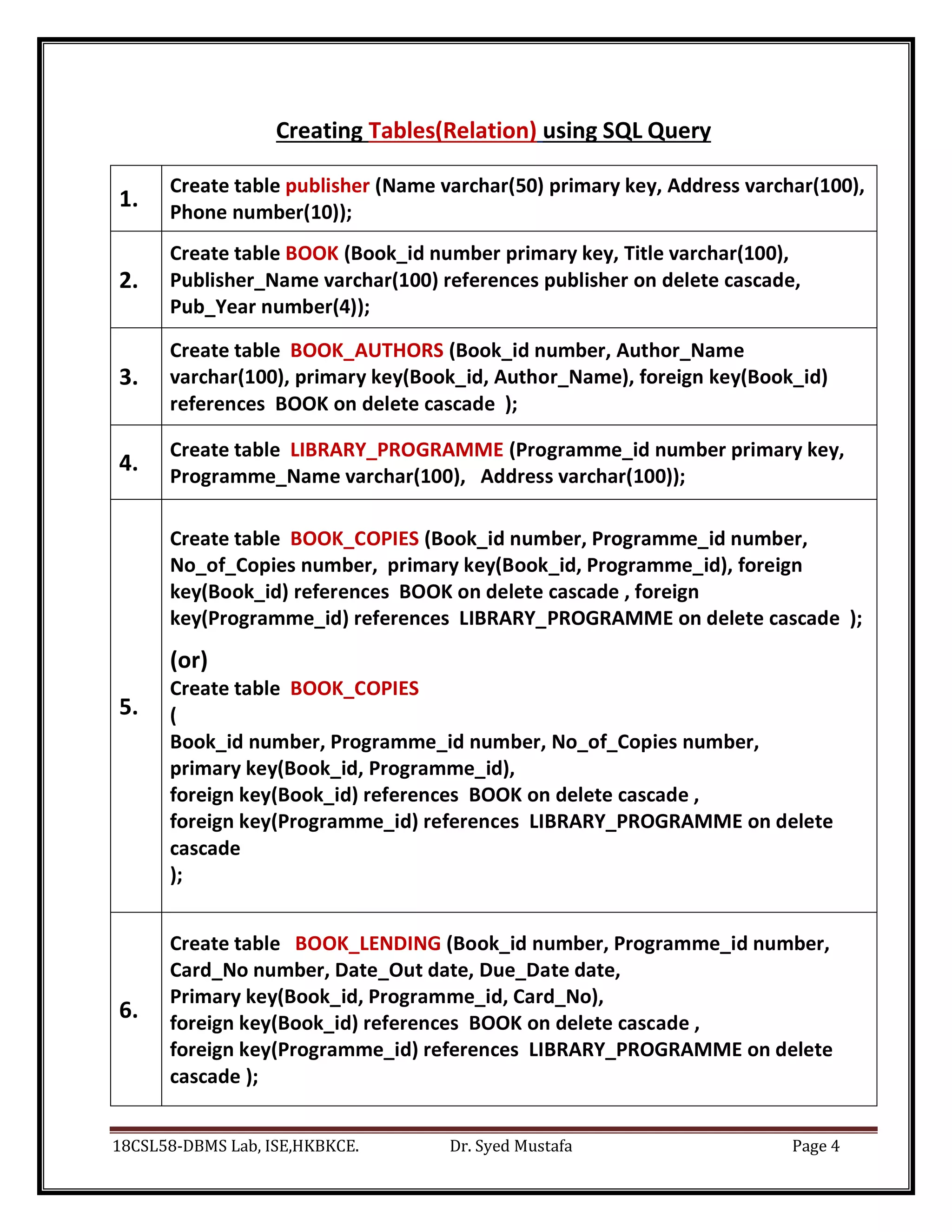
Creating Tables(Relation) using SQL Query
1.
Create table publisher (Name varchar(50) primary key, Address varchar(100),
Phone number(10));
2.
Create table BOOK (Book_id number primary key, Title varchar(100),
Publisher_Name varchar(100) references publisher on delete cascade,
Pub_Year number(4));
3.
Create table BOOK_AUTHORS (Book_id number, Author_Name
varchar(100), primary key(Book_id, Author_Name), foreign key(Book_id)
references BOOK on delete cascade );
4.
Create table LIBRARY_PROGRAMME (Programme_id number primary key,
Programme_Name varchar(100), Address varchar(100));
5.
Create table BOOK_COPIES (Book_id number, Programme_id number,
No_of_Copies number, primary key(Book_id, Programme_id), foreign
key(Book_id) references BOOK on delete cascade , foreign
key(Programme_id) references LIBRARY_PROGRAMME on delete cascade );
(or)
Create table BOOK_COPIES
(
Book_id number, Programme_id number, No_of_Copies number,
primary key(Book_id, Programme_id),
foreign key(Book_id) references BOOK on delete cascade ,
foreign key(Programme_id) references LIBRARY_PROGRAMME on delete
cascade
);
6.
Create table BOOK_LENDING (Book_id number, Programme_id number,
Card_No number, Date_Out date, Due_Date date,
Primary key(Book_id, Programme_id, Card_No),
foreign key(Book_id) references BOOK on delete cascade ,
foreign key(Programme_id) references LIBRARY_PROGRAMME on delete
cascade );
18CSL58-DBMS Lab, ISE,HKBKCE. Dr. Syed Mustafa Page 5
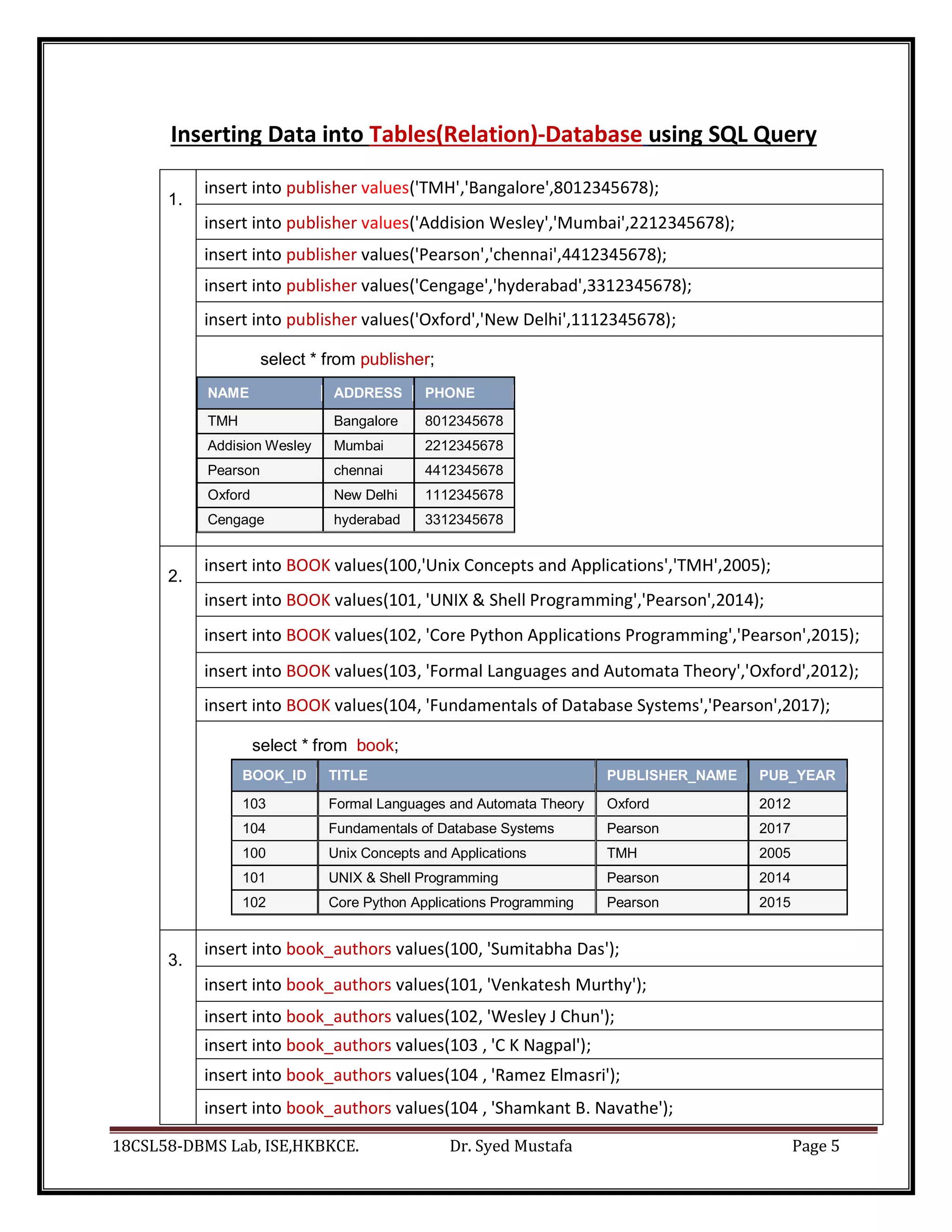
Inserting Data into Tables(Relation)-Database using SQL Query
1.
insert into publisher values('TMH','Bangalore',8012345678);
insert into publisher values('Addision Wesley','Mumbai',2212345678);
insert into publisher values('Pearson','chennai',4412345678);
insert into publisher values('Cengage','hyderabad',3312345678);
insert into publisher values('Oxford','New Delhi',1112345678);
select * from publisher;
NAME ADDRESS PHONE
TMH Bangalore 8012345678
Addision Wesley Mumbai 2212345678
Pearson chennai 4412345678
Oxford New Delhi 1112345678
Cengage hyderabad 3312345678
2.
insert into BOOK values(100,'Unix Concepts and Applications','TMH',2005);
insert into BOOK values(101, 'UNIX & Shell Programming','Pearson',2014);
insert into BOOK values(102, 'Core Python Applications Programming','Pearson',2015);
insert into BOOK values(103, 'Formal Languages and Automata Theory','Oxford',2012);
insert into BOOK values(104, 'Fundamentals of Database Systems','Pearson',2017);
select * from book;
BOOK_ID TITLE PUBLISHER_NAME PUB_YEAR
103 Formal Languages and Automata Theory Oxford 2012
104 Fundamentals of Database Systems Pearson 2017
100 Unix Concepts and Applications TMH 2005
101 UNIX & Shell Programming Pearson 2014
102 Core Python Applications Programming Pearson 2015
3.
insert into book_authors values(100, 'Sumitabha Das');
insert into book_authors values(101, 'Venkatesh Murthy');
insert into book_authors values(102, 'Wesley J Chun');
insert into book_authors values(103 , 'C K Nagpal');
insert into book_authors values(104 , 'Ramez Elmasri');
insert into book_authors values(104 , 'Shamkant B. Navathe');
18CSL58-DBMS Lab, ISE,HKBKCE. Dr. Syed Mustafa Page 6
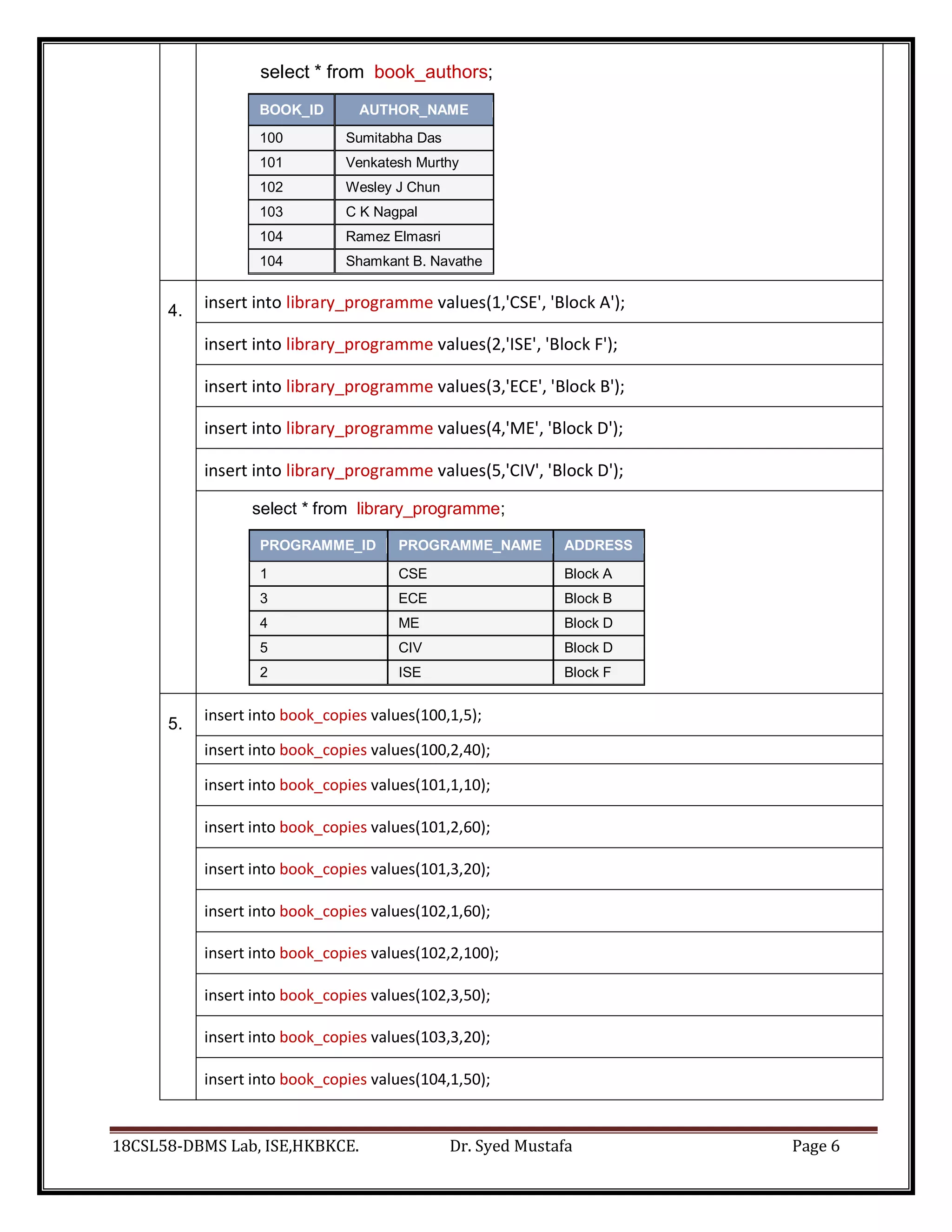
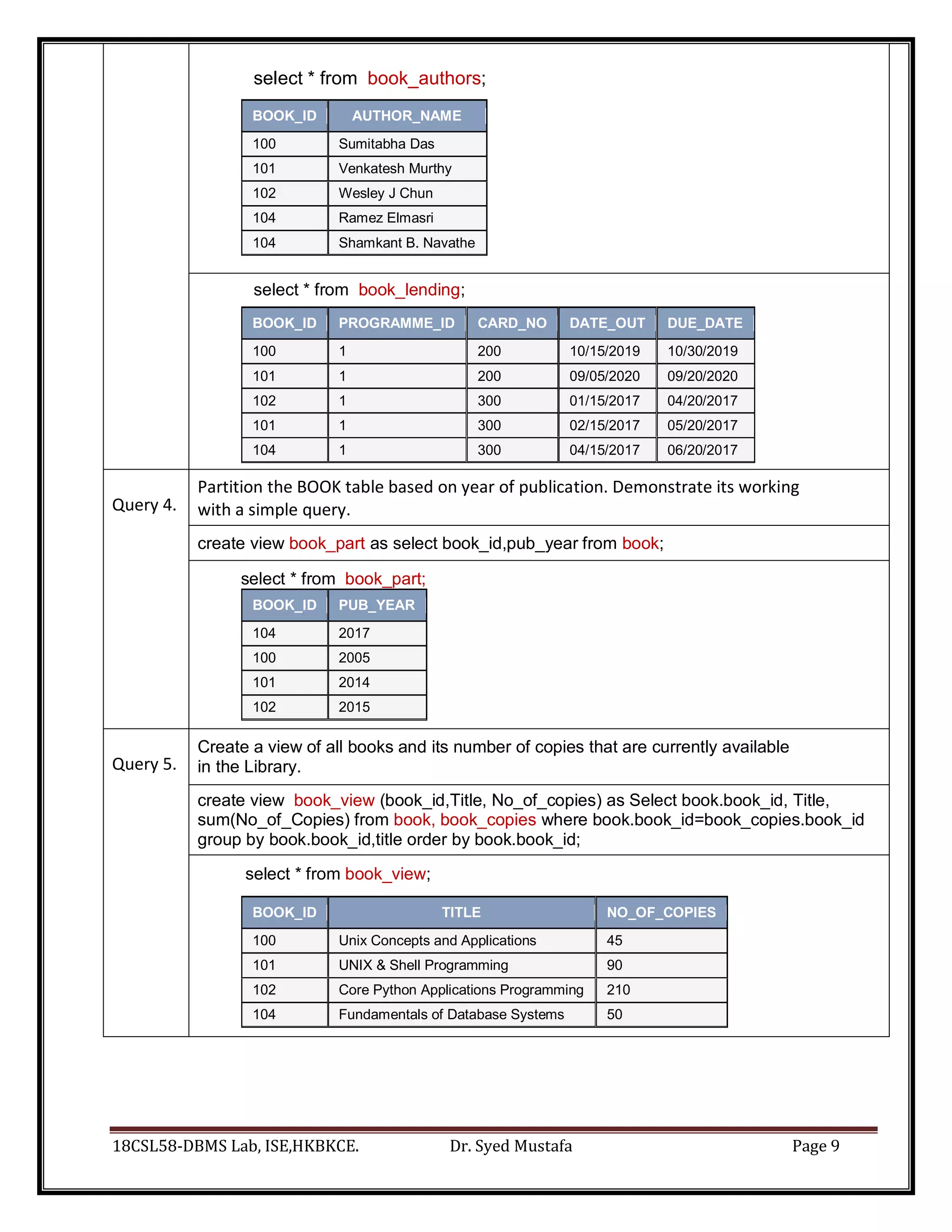
select * from book_authors;
BOOK_ID AUTHOR_NAME
100 Sumitabha Das
101 Venkatesh Murthy
102 Wesley J Chun
103 C K Nagpal
104 Ramez Elmasri
104 Shamkant B. Navathe
4. insert into library_programme values(1,'CSE', 'Block A');
insert into library_programme values(2,'ISE', 'Block F');
insert into library_programme values(3,'ECE', 'Block B');
insert into library_programme values(4,'ME', 'Block D');
insert into library_programme values(5,'CIV', 'Block D');
select * from library_programme;
PROGRAMME_ID PROGRAMME_NAME ADDRESS
1 CSE Block A
3 ECE Block B
4 ME Block D
5 CIV Block D
2 ISE Block F
5.
insert into book_copies values(100,1,5);
insert into book_copies values(100,2,40);
insert into book_copies values(101,1,10);
insert into book_copies values(101,2,60);
insert into book_copies values(101,3,20);
insert into book_copies values(102,1,60);
insert into book_copies values(102,2,100);
insert into book_copies values(102,3,50);
insert into book_copies values(103,3,20);
insert into book_copies values(104,1,50);
18CSL58-DBMS Lab, ISE,HKBKCE. Dr. Syed Mustafa Page 7
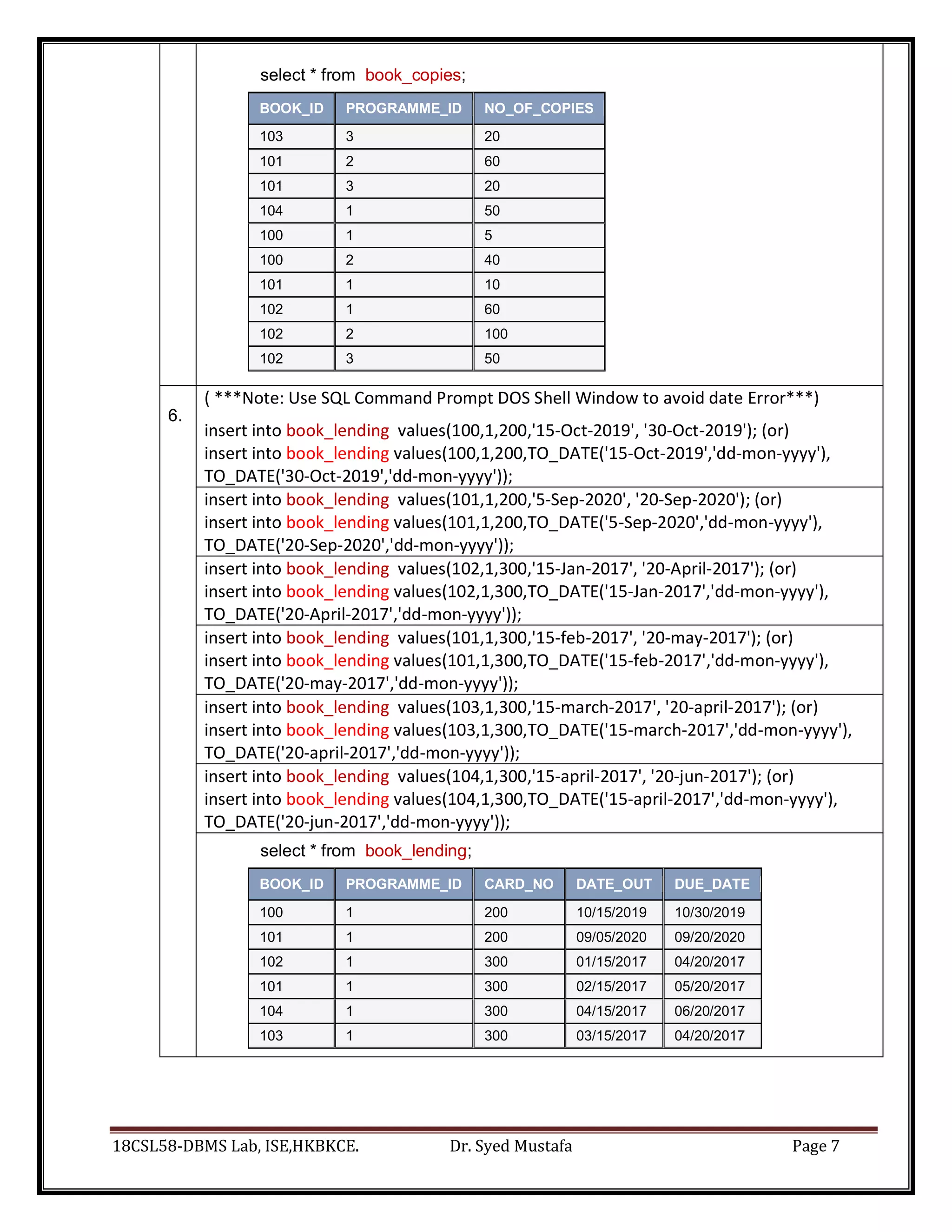
select * from book_copies;
BOOK_ID PROGRAMME_ID NO_OF_COPIES
103 3 20
101 2 60
101 3 20
104 1 50
100 1 5
100 2 40
101 1 10
102 1 60
102 2 100
102 3 50
6.
( ***Note: Use SQL Command Prompt DOS Shell Window to avoid date Error***)
insert into book_lending values(100,1,200,'15-Oct-2019', '30-Oct-2019'); (or)
insert into book_lending values(100,1,200,TO_DATE('15-Oct-2019','dd-mon-yyyy'),
TO_DATE('30-Oct-2019','dd-mon-yyyy'));
insert into book_lending values(101,1,200,'5-Sep-2020', '20-Sep-2020'); (or)
insert into book_lending values(101,1,200,TO_DATE('5-Sep-2020','dd-mon-yyyy'),
TO_DATE('20-Sep-2020','dd-mon-yyyy'));
insert into book_lending values(102,1,300,'15-Jan-2017', '20-April-2017'); (or)
insert into book_lending values(102,1,300,TO_DATE('15-Jan-2017','dd-mon-yyyy'),
TO_DATE('20-April-2017','dd-mon-yyyy'));
insert into book_lending values(101,1,300,'15-feb-2017', '20-may-2017'); (or)
insert into book_lending values(101,1,300,TO_DATE('15-feb-2017','dd-mon-yyyy'),
TO_DATE('20-may-2017','dd-mon-yyyy'));
insert into book_lending values(103,1,300,'15-march-2017', '20-april-2017'); (or)
insert into book_lending values(103,1,300,TO_DATE('15-march-2017','dd-mon-yyyy'),
TO_DATE('20-april-2017','dd-mon-yyyy'));
insert into book_lending values(104,1,300,'15-april-2017', '20-jun-2017'); (or)
insert into book_lending values(104,1,300,TO_DATE('15-april-2017','dd-mon-yyyy'),
TO_DATE('20-jun-2017','dd-mon-yyyy'));
select * from book_lending;
BOOK_ID PROGRAMME_ID CARD_NO DATE_OUT DUE_DATE
100 1 200 10/15/2019 10/30/2019
101 1 200 09/05/2020 09/20/2020
102 1 300 01/15/2017 04/20/2017
101 1 300 02/15/2017 05/20/2017
104 1 300 04/15/2017 06/20/2017
103 1 300 03/15/2017 04/20/2017
18CSL58-DBMS Lab, ISE,HKBKCE. Dr. Syed Mustafa Page 8
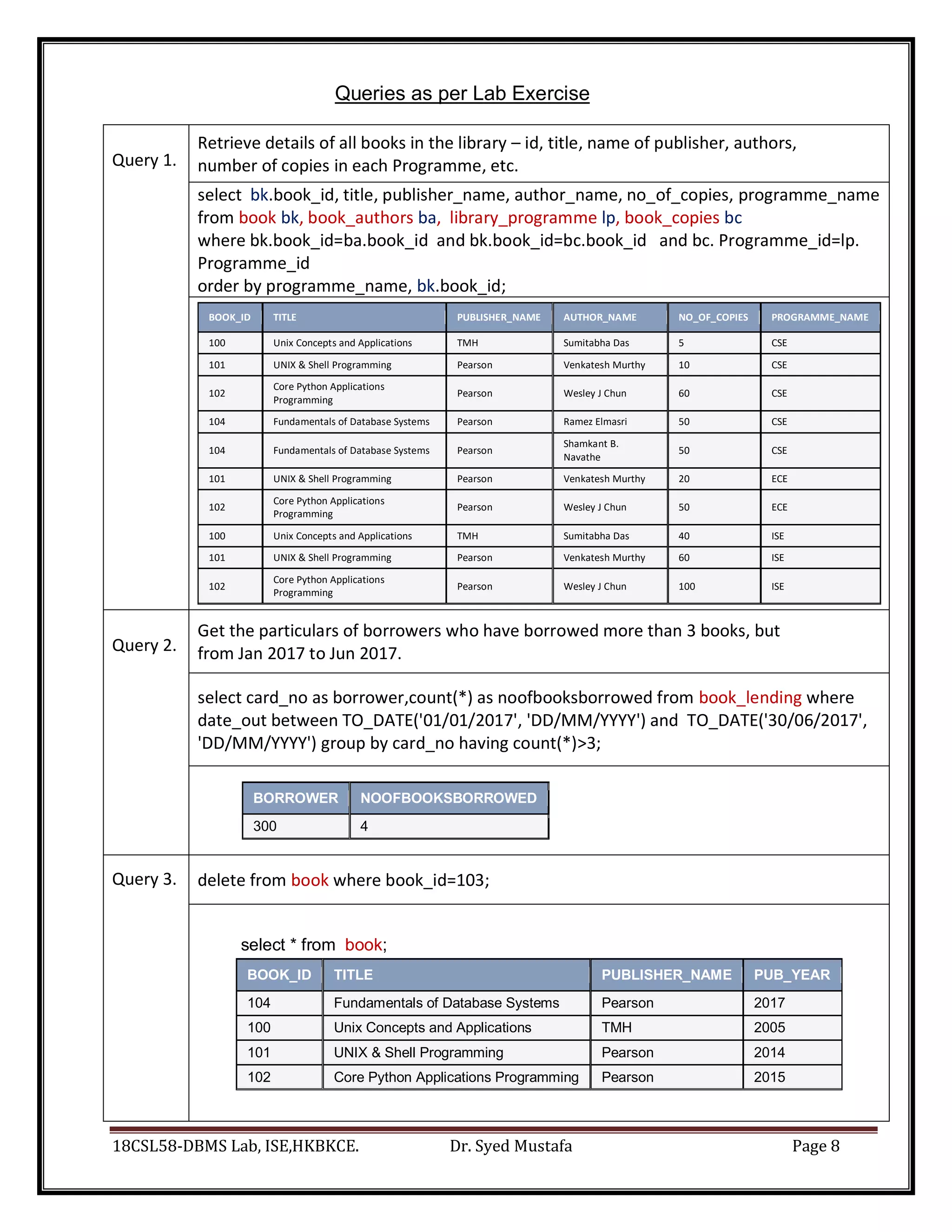
Queries as per Lab Exercise
Query 1.
Retrieve details of all books in the library – id, title, name of publisher, authors,
number of copies in each Programme, etc.
select bk.book_id, title, publisher_name, author_name, no_of_copies, programme_name
from book bk, book_authors ba, library_programme lp, book_copies bc
where bk.book_id=ba.book_id and bk.book_id=bc.book_id and bc. Programme_id=lp.
Programme_id
order by programme_name, bk.book_id;
BOOK_ID TITLE PUBLISHER_NAME AUTHOR_NAME NO_OF_COPIES PROGRAMME_NAME
100 Unix Concepts and Applications TMH Sumitabha Das 5 CSE
101 UNIX & Shell Programming Pearson Venkatesh Murthy 10 CSE
102
Core Python Applications
Programming
Pearson Wesley J Chun 60 CSE
104 Fundamentals of Database Systems Pearson Ramez Elmasri 50 CSE
104 Fundamentals of Database Systems Pearson
Shamkant B.
Navathe
50 CSE
101 UNIX & Shell Programming Pearson Venkatesh Murthy 20 ECE
102
Core Python Applications
Programming
Pearson Wesley J Chun 50 ECE
100 Unix Concepts and Applications TMH Sumitabha Das 40 ISE
101 UNIX & Shell Programming Pearson Venkatesh Murthy 60 ISE
102
Core Python Applications
Programming
Pearson Wesley J Chun 100 ISE
Query 2.
Get the particulars of borrowers who have borrowed more than 3 books, but
from Jan 2017 to Jun 2017.
select card_no as borrower,count(*) as noofbooksborrowed from book_lending where
date_out between TO_DATE('01/01/2017', 'DD/MM/YYYY') and TO_DATE('30/06/2017',
'DD/MM/YYYY') group by card_no having count(*)>3;
BORROWER NOOFBOOKSBORROWED
300 4
Query 3. delete from book where book_id=103;
select * from book;
BOOK_ID TITLE PUBLISHER_NAME PUB_YEAR
104 Fundamentals of Database Systems Pearson 2017
100 Unix Concepts and Applications TMH 2005
101 UNIX & Shell Programming Pearson 2014
102 Core Python Applications Programming Pearson 2015
18CSL58-DBMS Lab, ISE,HKBKCE. Dr. Syed Mustafa Page 9
select * from book_authors;
BOOK_ID AUTHOR_NAME
100 Sumitabha Das
101 Venkatesh Murthy
102 Wesley J Chun
104 Ramez Elmasri
104 Shamkant B. Navathe
select * from book_lending;
BOOK_ID PROGRAMME_ID CARD_NO DATE_OUT DUE_DATE
100 1 200 10/15/2019 10/30/2019
101 1 200 09/05/2020 09/20/2020
102 1 300 01/15/2017 04/20/2017
101 1 300 02/15/2017 05/20/2017
104 1 300 04/15/2017 06/20/2017
Query 4.
Partition the BOOK table based on year of publication. Demonstrate its working
with a simple query.
create view book_part as select book_id,pub_year from book;
select * from book_part;
BOOK_ID PUB_YEAR
104 2017
100 2005
101 2014
102 2015
Query 5.
Create a view of all books and its number of copies that are currently available
in the Library.
create view book_view (book_id,Title, No_of_copies) as Select book.book_id, Title,
sum(No_of_Copies) from book, book_copies where book.book_id=book_copies.book_id
group by book.book_id,title order by book.book_id;
select * from book_view;
BOOK_ID TITLE NO_OF_COPIES
100 Unix Concepts and Applications 45
101 UNIX & Shell Programming 90
102 Core Python Applications Programming 210
104 Fundamentals of Database Systems 50
18CSL58-DBMS Lab, ISE,HKBKCE. Dr. Syed Mustafa Page 10
HKBK College of Engineering
Dept. of Information Science and Engineering
18CSL58-DBMS Lab, ISE,HKBKCE. Dr. Syed Mustafa Page 11
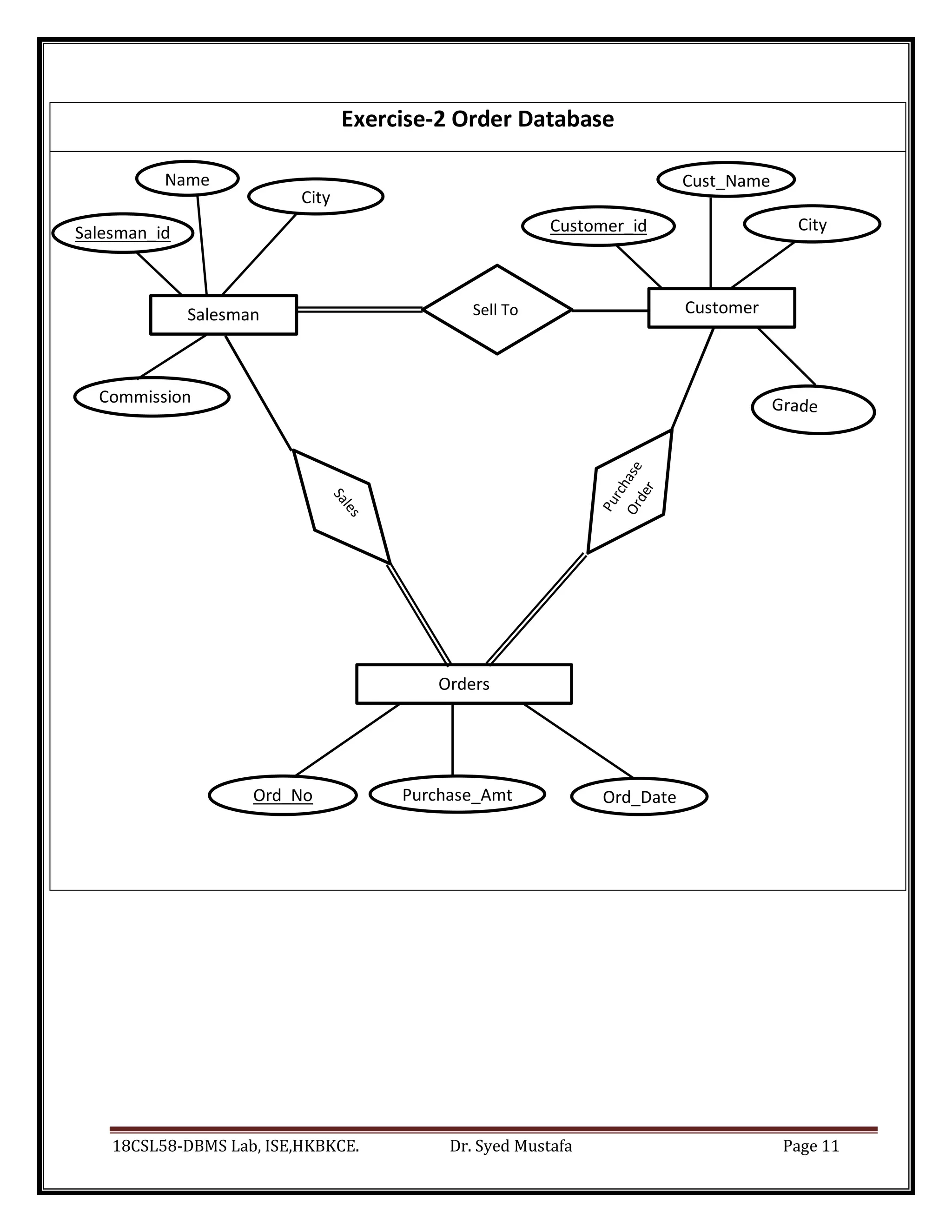
Ord_No Purchase_Amt Ord_Date
Salesman_id Customer_id City
Commission
Exercise-2 Order Database
Salesman
Name
City
Customer
Cust_Name
Orders
Sell To
18CSL58-DBMS Lab, ISE,HKBKCE. Dr. Syed Mustafa Page 12
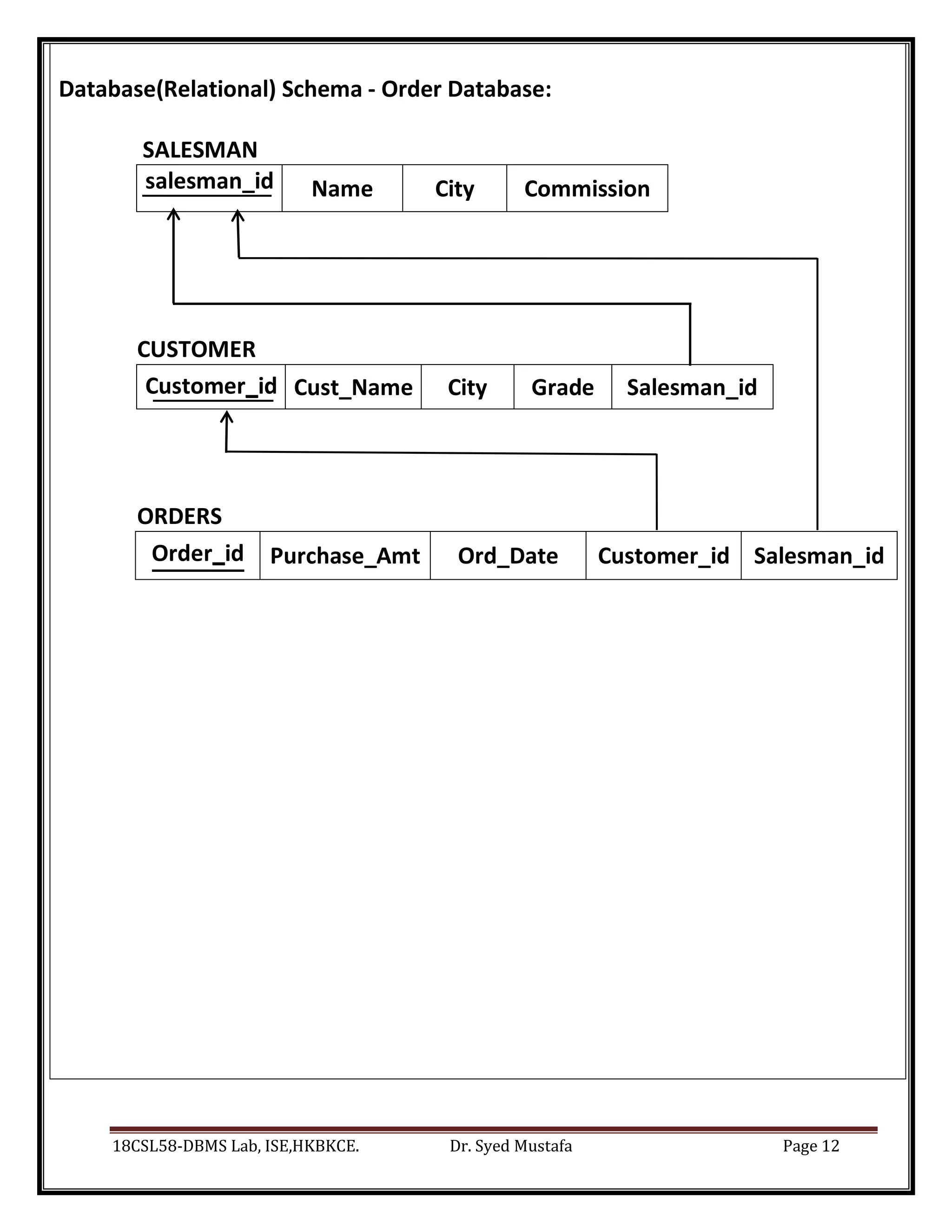
Database(Relational) Schema - Order Database:
SALESMAN
salesman_id Name City Commission
CUSTOMER
Customer_id Cust_Name City Grade Salesman_id
ORDERS
Order_id Purchase_Amt Ord_Date Customer_id Salesman_id
18CSL58-DBMS Lab, ISE,HKBKCE. Dr. Syed Mustafa Page 13
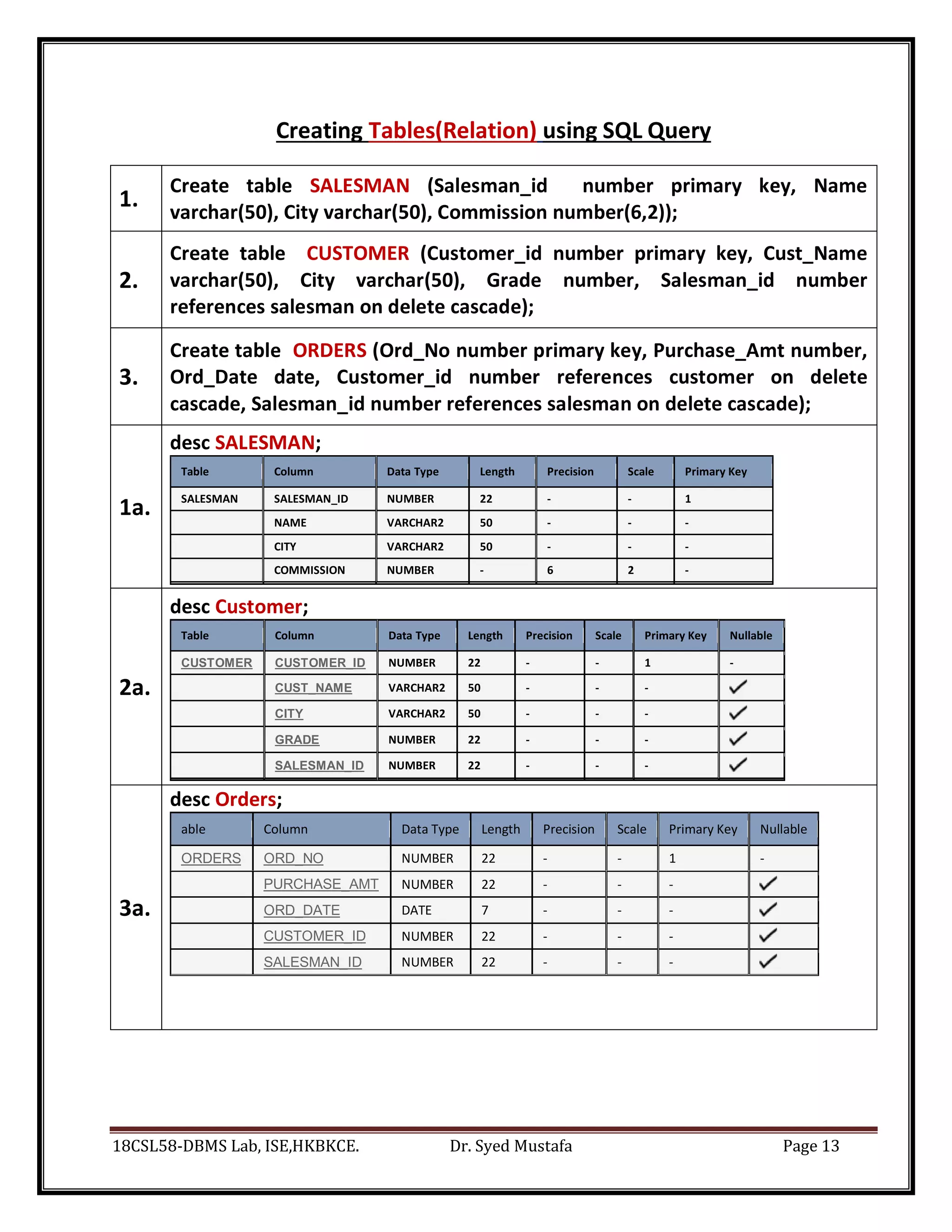
Creating Tables(Relation) using SQL Query
1.
Create table SALESMAN (Salesman_id number primary key, Name
varchar(50), City varchar(50), Commission number(6,2));
2.
Create table CUSTOMER (Customer_id number primary key, Cust_Name
varchar(50), City varchar(50), Grade number, Salesman_id number
references salesman on delete cascade);
3.
Create table ORDERS (Ord_No number primary key, Purchase_Amt number,
Ord_Date date, Customer_id number references customer on delete
cascade, Salesman_id number references salesman on delete cascade);
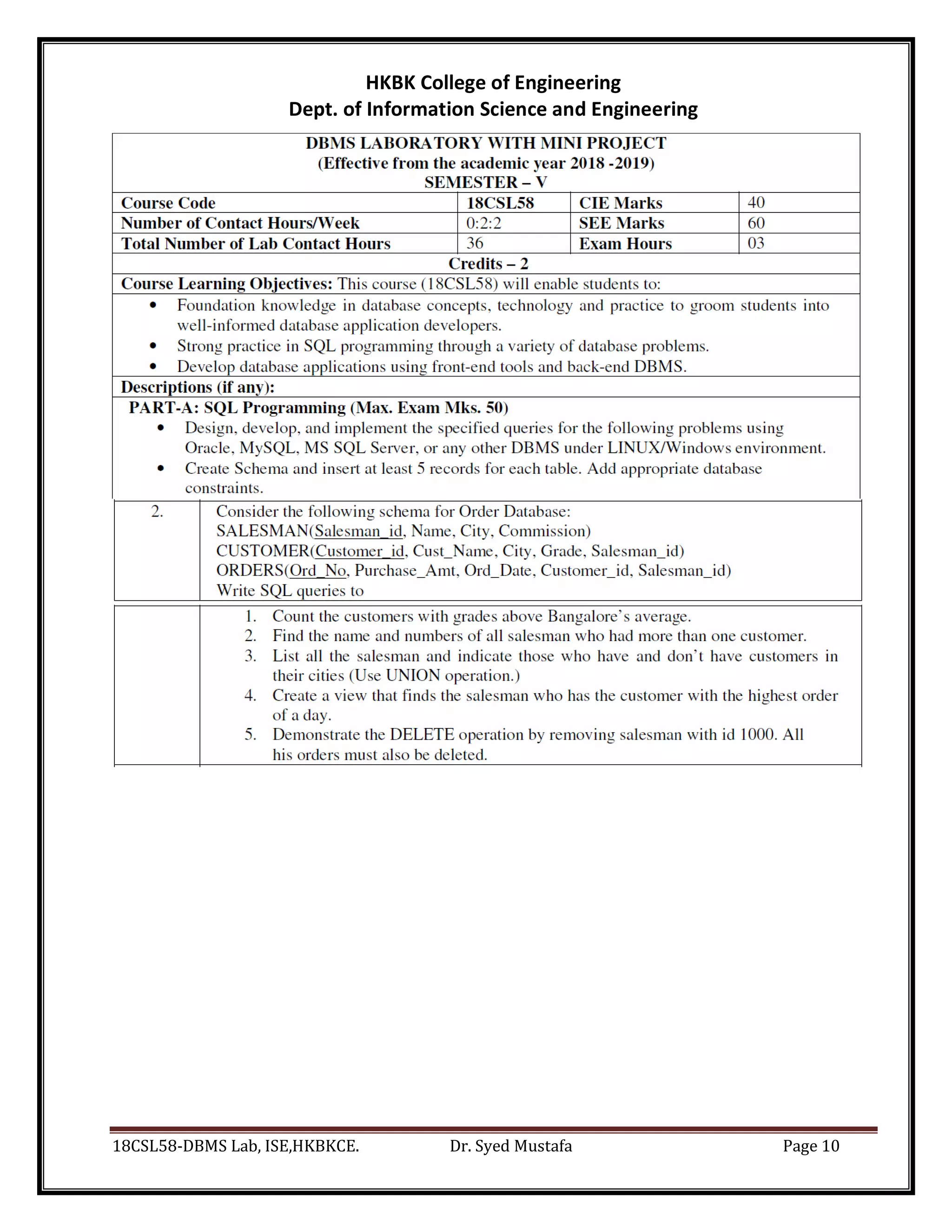
1a.
desc SALESMAN;
Table Column Data Type Length Precision Scale Primary Key
SALESMAN SALESMAN_ID NUMBER 22 - - 1
NAME VARCHAR2 50 - - -
CITY VARCHAR2 50 - - -
COMMISSION NUMBER - 6 2 -
2a.
desc Customer;
Table Column Data Type Length Precision Scale Primary Key Nullable
CUSTOMER CUSTOMER_ID NUMBER 22 - - 1 -
CUST_NAME VARCHAR2 50 - - -
CITY VARCHAR2 50 - - -
GRADE NUMBER 22 - - -
SALESMAN_ID NUMBER 22 - - -
3a.
desc Orders;
able Column Data Type Length Precision Scale Primary Key Nullable
ORDERS ORD_NO NUMBER 22 - - 1 -
PURCHASE_AMT NUMBER 22 - - -
ORD_DATE DATE 7 - - -
CUSTOMER_ID NUMBER 22 - - -
SALESMAN_ID NUMBER 22 - - -
18CSL58-DBMS Lab, ISE,HKBKCE. Dr. Syed Mustafa Page 14
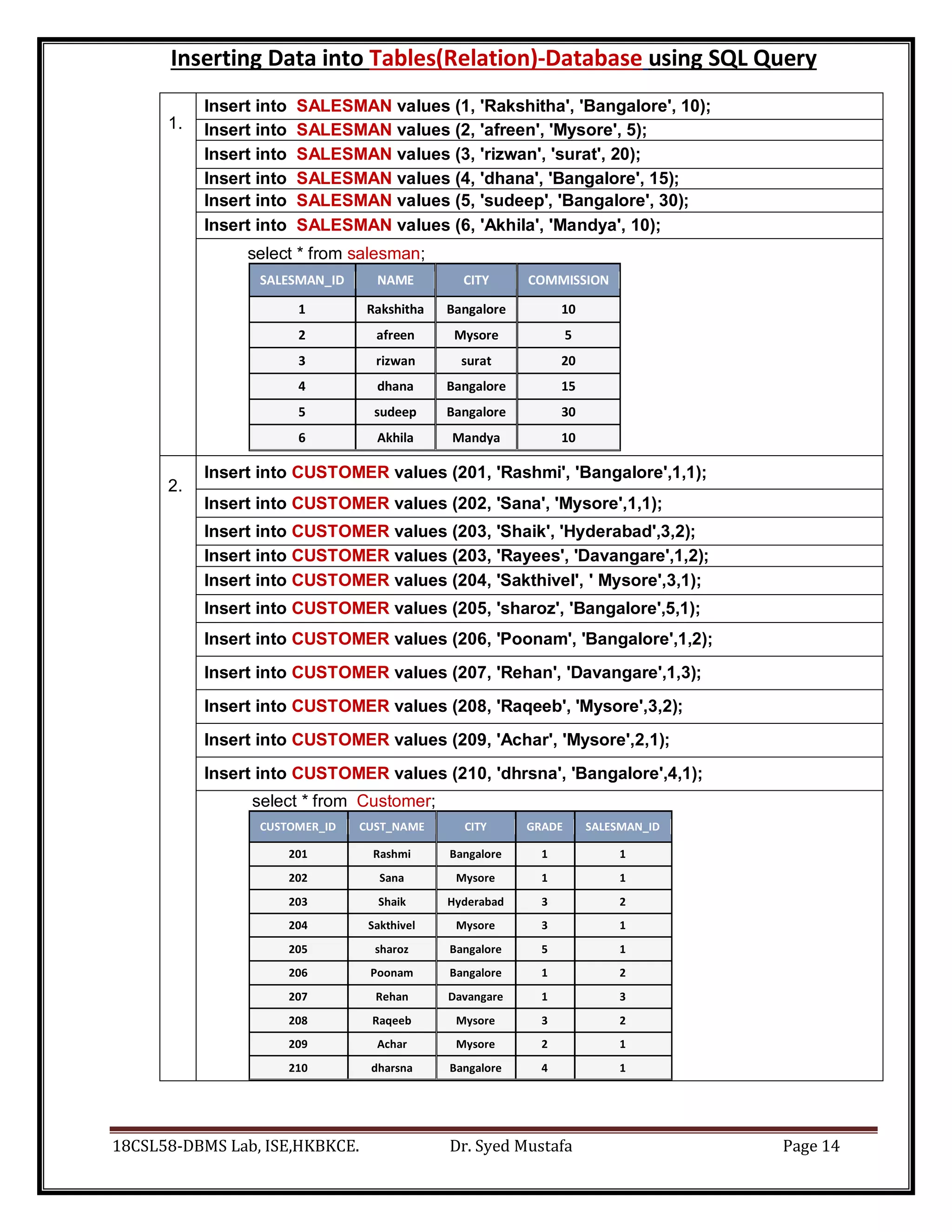
Inserting Data into Tables(Relation)-Database using SQL Query
1.
Insert into SALESMAN values (1, 'Rakshitha', 'Bangalore', 10);
Insert into SALESMAN values (2, 'afreen', 'Mysore', 5);
Insert into SALESMAN values (3, 'rizwan', 'surat', 20);
Insert into SALESMAN values (4, 'dhana', 'Bangalore', 15);
Insert into SALESMAN values (5, 'sudeep', 'Bangalore', 30);
Insert into SALESMAN values (6, 'Akhila', 'Mandya', 10);
select * from salesman;
SALESMAN_ID NAME CITY COMMISSION
1 Rakshitha Bangalore 10
2 afreen Mysore 5
3 rizwan surat 20
4 dhana Bangalore 15
5 sudeep Bangalore 30
6 Akhila Mandya 10
2.
Insert into CUSTOMER values (201, 'Rashmi', 'Bangalore',1,1);
Insert into CUSTOMER values (202, 'Sana', 'Mysore',1,1);
Insert into CUSTOMER values (203, 'Shaik', 'Hyderabad',3,2);
Insert into CUSTOMER values (203, 'Rayees', 'Davangare',1,2);
Insert into CUSTOMER values (204, 'Sakthivel', ' Mysore',3,1);
Insert into CUSTOMER values (205, 'sharoz', 'Bangalore',5,1);
Insert into CUSTOMER values (206, 'Poonam', 'Bangalore',1,2);
Insert into CUSTOMER values (207, 'Rehan', 'Davangare',1,3);
Insert into CUSTOMER values (208, 'Raqeeb', 'Mysore',3,2);
Insert into CUSTOMER values (209, 'Achar', 'Mysore',2,1);
Insert into CUSTOMER values (210, 'dhrsna', 'Bangalore',4,1);
select * from Customer;
CUSTOMER_ID CUST_NAME CITY GRADE SALESMAN_ID
201 Rashmi Bangalore 1 1
202 Sana Mysore 1 1
203 Shaik Hyderabad 3 2
204 Sakthivel Mysore 3 1
205 sharoz Bangalore 5 1
206 Poonam Bangalore 1 2
207 Rehan Davangare 1 3
208 Raqeeb Mysore 3 2
209 Achar Mysore 2 1
210 dharsna Bangalore 4 1
18CSL58-DBMS Lab, ISE,HKBKCE. Dr. Syed Mustafa Page 15
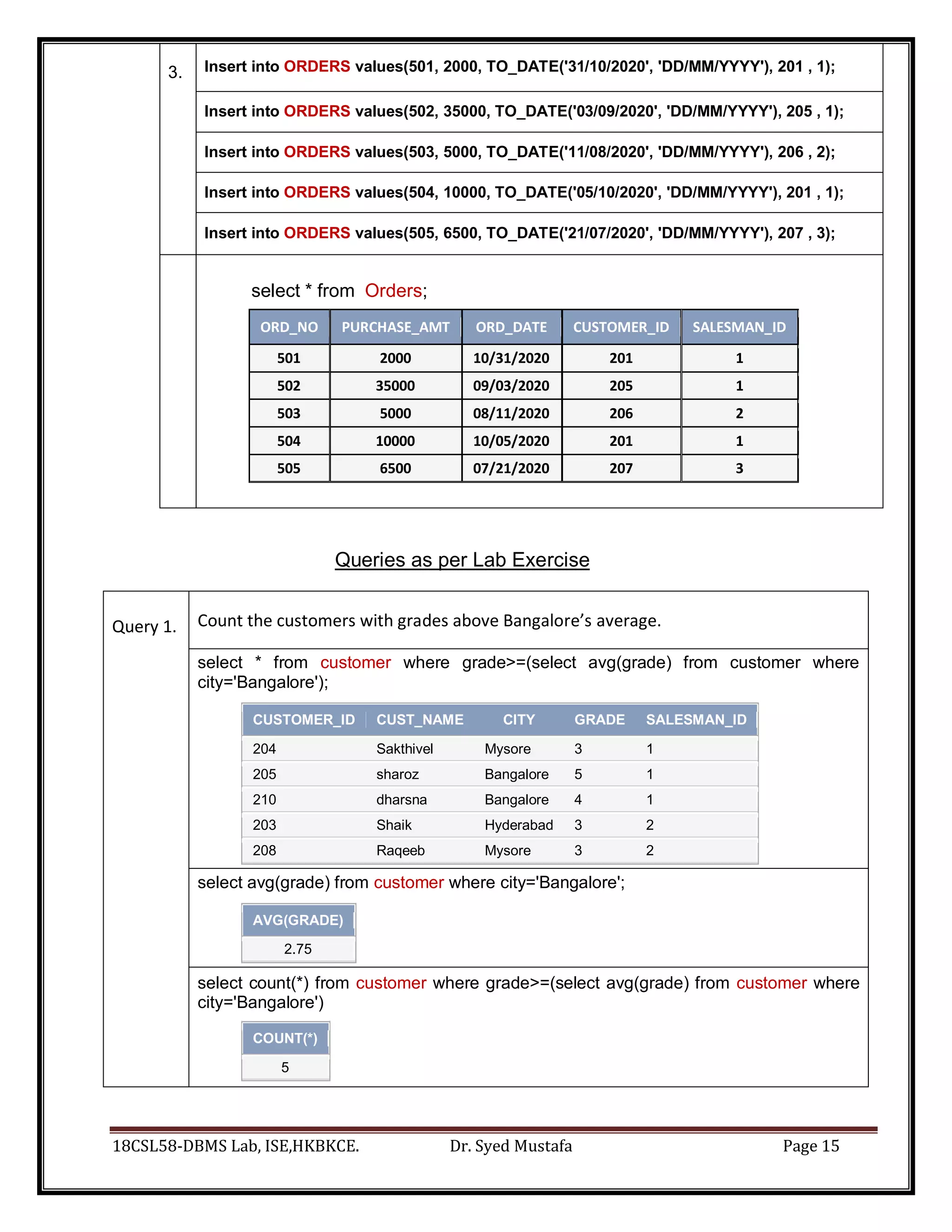
3. Insert into ORDERS values(501, 2000, TO_DATE('31/10/2020', 'DD/MM/YYYY'), 201 , 1);
Insert into ORDERS values(502, 35000, TO_DATE('03/09/2020', 'DD/MM/YYYY'), 205 , 1);
Insert into ORDERS values(503, 5000, TO_DATE('11/08/2020', 'DD/MM/YYYY'), 206 , 2);
Insert into ORDERS values(504, 10000, TO_DATE('05/10/2020', 'DD/MM/YYYY'), 201 , 1);
Insert into ORDERS values(505, 6500, TO_DATE('21/07/2020', 'DD/MM/YYYY'), 207 , 3);
select * from Orders;
ORD_NO PURCHASE_AMT ORD_DATE CUSTOMER_ID SALESMAN_ID
501 2000 10/31/2020 201 1
502 35000 09/03/2020 205 1
503 5000 08/11/2020 206 2
504 10000 10/05/2020 201 1
505 6500 07/21/2020 207 3
Queries as per Lab Exercise
Query 1. Count the customers with grades above Bangalore’s average.
select * from customer where grade>=(select avg(grade) from customer where
city='Bangalore');
CUSTOMER_ID CUST_NAME CITY GRADE SALESMAN_ID
204 Sakthivel Mysore 3 1
205 sharoz Bangalore 5 1
210 dharsna Bangalore 4 1
203 Shaik Hyderabad 3 2
208 Raqeeb Mysore 3 2
select avg(grade) from customer where city='Bangalore';
AVG(GRADE)
2.75
select count(*) from customer where grade>=(select avg(grade) from customer where
city='Bangalore')
COUNT(*)
5
18CSL58-DBMS Lab, ISE,HKBKCE. Dr. Syed Mustafa Page 16
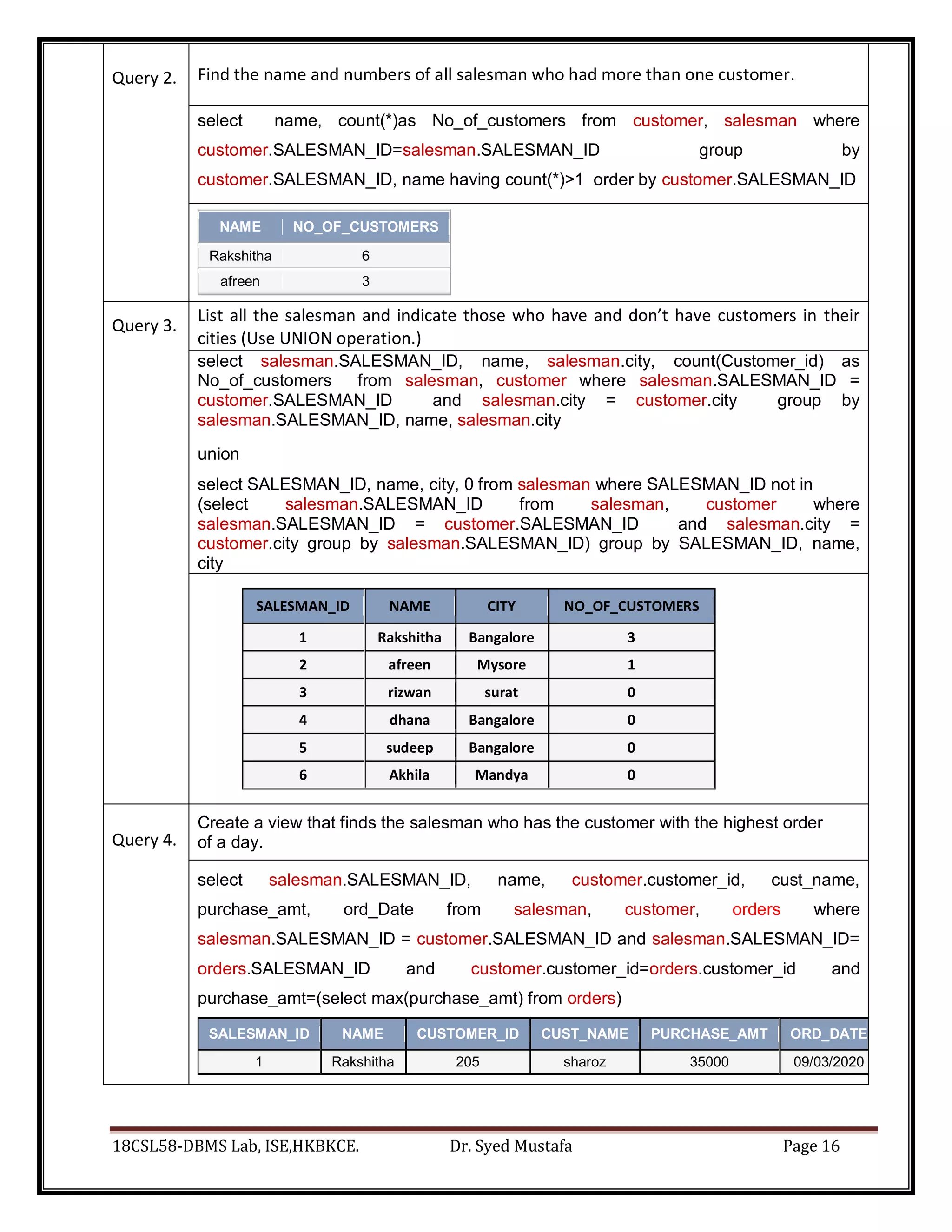
Query 2. Find the name and numbers of all salesman who had more than one customer.
select name, count(*)as No_of_customers from customer, salesman where
customer.SALESMAN_ID=salesman.SALESMAN_ID group by
customer.SALESMAN_ID, name having count(*)>1 order by customer.SALESMAN_ID
NAME NO_OF_CUSTOMERS
Rakshitha 6
afreen 3
Query 3.
List all the salesman and indicate those who have and don’t have customers in their
cities (Use UNION operation.)
select salesman.SALESMAN_ID, name, salesman.city, count(Customer_id) as
No_of_customers from salesman, customer where salesman.SALESMAN_ID =
customer.SALESMAN_ID and salesman.city = customer.city group by
salesman.SALESMAN_ID, name, salesman.city
union
select SALESMAN_ID, name, city, 0 from salesman where SALESMAN_ID not in
(select salesman.SALESMAN_ID from salesman, customer where
salesman.SALESMAN_ID = customer.SALESMAN_ID and salesman.city =
customer.city group by salesman.SALESMAN_ID) group by SALESMAN_ID, name,
city
SALESMAN_ID NAME CITY NO_OF_CUSTOMERS
1 Rakshitha Bangalore 3
2 afreen Mysore 1
3 rizwan surat 0
4 dhana Bangalore 0
5 sudeep Bangalore 0
6 Akhila Mandya 0
Query 4.
Create a view that finds the salesman who has the customer with the highest order
of a day.
select salesman.SALESMAN_ID, name, customer.customer_id, cust_name,
purchase_amt, ord_Date from salesman, customer, orders where
salesman.SALESMAN_ID = customer.SALESMAN_ID and salesman.SALESMAN_ID=
orders.SALESMAN_ID and customer.customer_id=orders.customer_id and
purchase_amt=(select max(purchase_amt) from orders)
SALESMAN_ID NAME CUSTOMER_ID CUST_NAME PURCHASE_AMT ORD_DATE
1 Rakshitha 205 sharoz 35000 09/03/2020
18CSL58-DBMS Lab, ISE,HKBKCE. Dr. Syed Mustafa Page 17
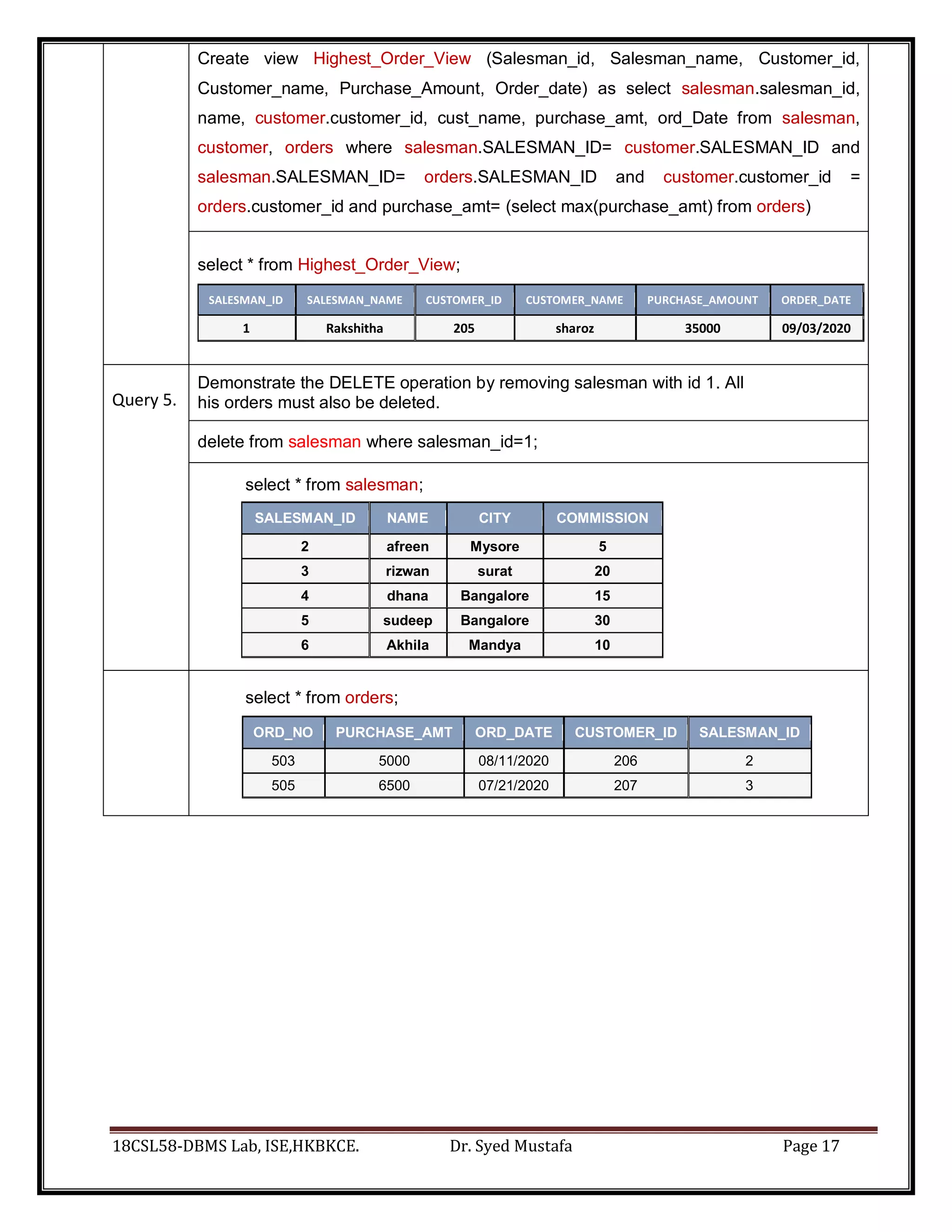
Create view Highest_Order_View (Salesman_id, Salesman_name, Customer_id,
Customer_name, Purchase_Amount, Order_date) as select salesman.salesman_id,
name, customer.customer_id, cust_name, purchase_amt, ord_Date from salesman,
customer, orders where salesman.SALESMAN_ID= customer.SALESMAN_ID and
salesman.SALESMAN_ID= orders.SALESMAN_ID and customer.customer_id =
orders.customer_id and purchase_amt= (select max(purchase_amt) from orders)
select * from Highest_Order_View;
SALESMAN_ID SALESMAN_NAME CUSTOMER_ID CUSTOMER_NAME PURCHASE_AMOUNT ORDER_DATE
1 Rakshitha 205 sharoz 35000 09/03/2020
Query 5.
Demonstrate the DELETE operation by removing salesman with id 1. All
his orders must also be deleted.
delete from salesman where salesman_id=1;
select * from salesman;
SALESMAN_ID NAME CITY COMMISSION
2 afreen Mysore 5
3 rizwan surat 20
4 dhana Bangalore 15
5 sudeep Bangalore 30
6 Akhila Mandya 10
select * from orders;
ORD_NO PURCHASE_AMT ORD_DATE CUSTOMER_ID SALESMAN_ID
503 5000 08/11/2020 206 2
505 6500 07/21/2020 207 3
18CSL58-DBMS Lab, ISE,HKBKCE. Dr. Syed Mustafa Page 18
HKBK College of Engineering
Dept. of Information Science and Engineering
18CSL58-DBMS Lab, ISE,HKBKCE. Dr. Syed Mustafa Page 19
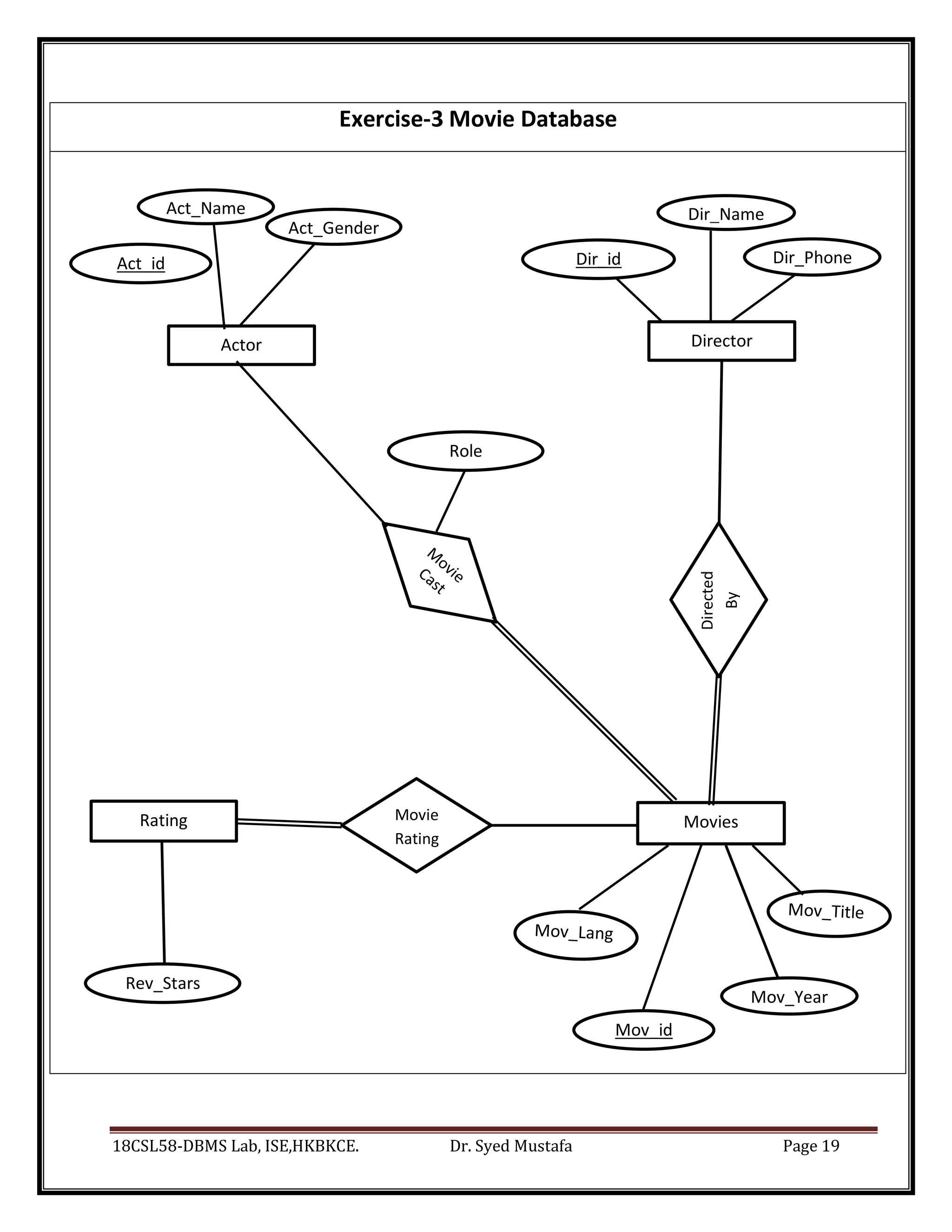
Act_id Dir_id Dir_Phone
Rev_Stars
re
Mov_Year
Role
Mov_id
Exercise-3 Movie Database
Actor
Act_Name
Act_Gender
Director
Dir_Name
Movie
Rating
Directed
By
Movies
Rating
18CSL58-DBMS Lab, ISE,HKBKCE. Dr. Syed Mustafa Page 20
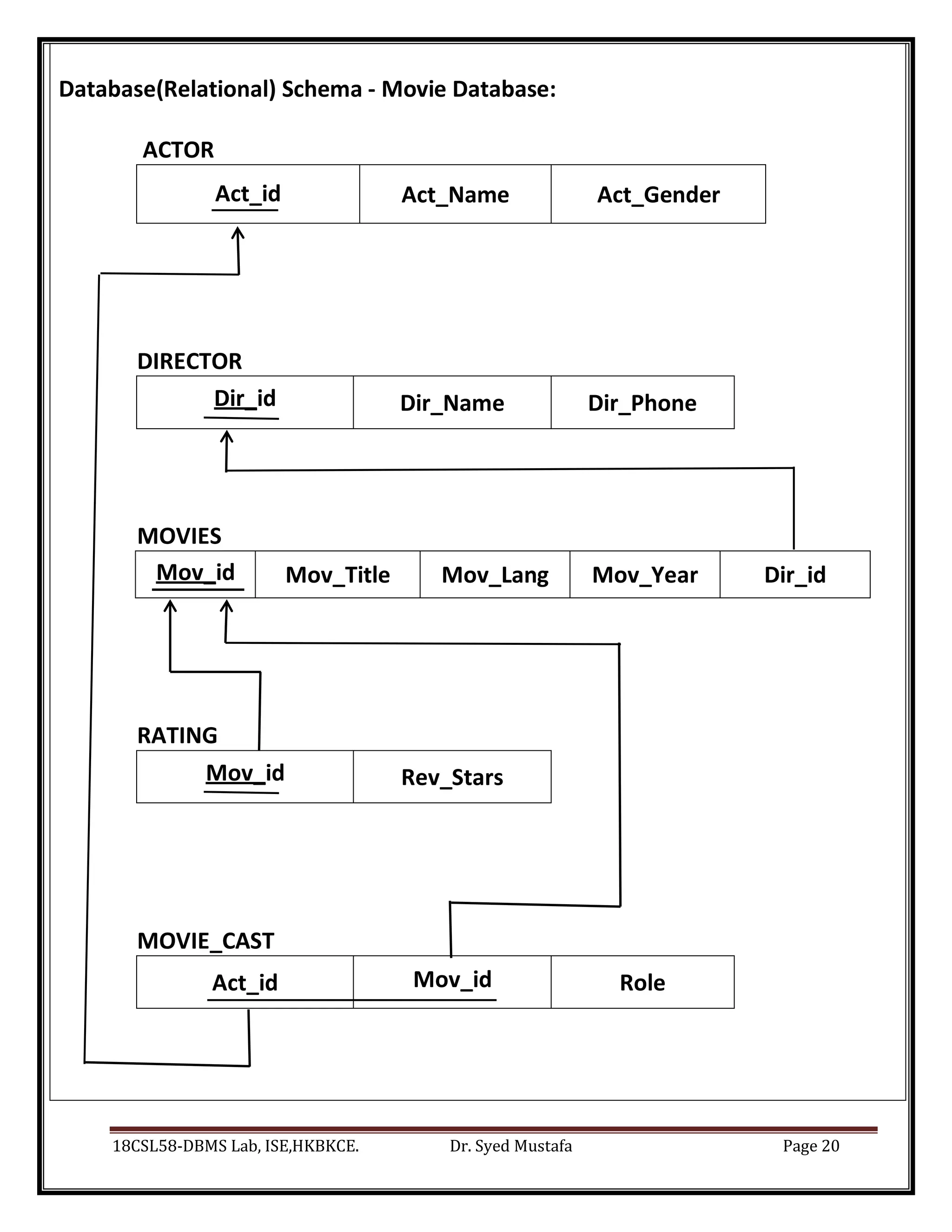
Database(Relational) Schema - Movie Database:
ACTOR
Act_id Act_Name Act_Gender
DIRECTOR
Dir_id Dir_Name Dir_Phone
MOVIES
Mov_id Mov_Title Mov_Lang Mov_Year Dir_id
RATING
Mov_id Rev_Stars
MOVIE_CAST
Act_id Mov_id Role
18CSL58-DBMS Lab, ISE,HKBKCE. Dr. Syed Mustafa Page 21
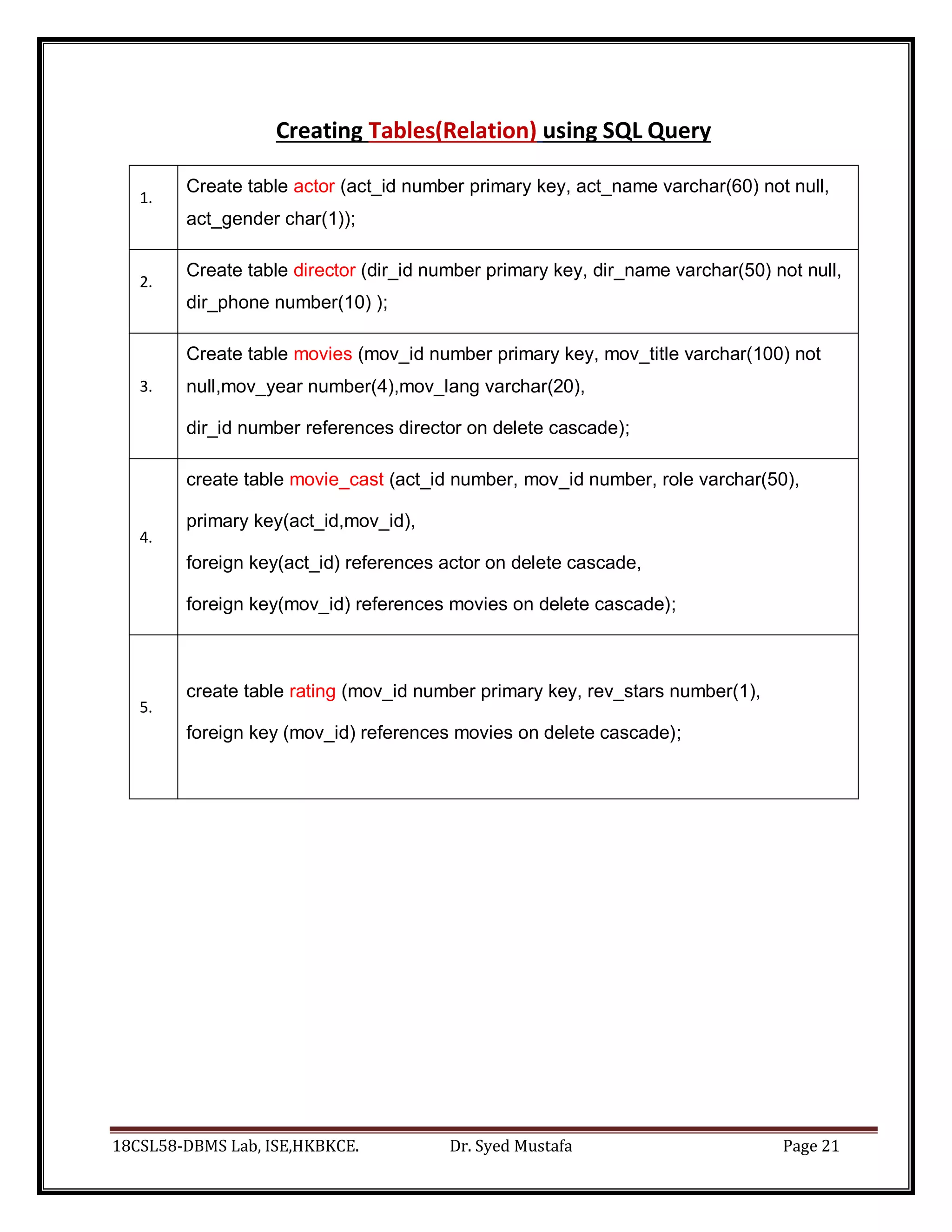
Creating Tables(Relation) using SQL Query
1.
Create table actor (act_id number primary key, act_name varchar(60) not null,
act_gender char(1));
2.
Create table director (dir_id number primary key, dir_name varchar(50) not null,
dir_phone number(10) );
3.
Create table movies (mov_id number primary key, mov_title varchar(100) not
null,mov_year number(4),mov_lang varchar(20),
dir_id number references director on delete cascade);
4.
create table movie_cast (act_id number, mov_id number, role varchar(50),
primary key(act_id,mov_id),
foreign key(act_id) references actor on delete cascade,
foreign key(mov_id) references movies on delete cascade);
5.
create table rating (mov_id number primary key, rev_stars number(1),
foreign key (mov_id) references movies on delete cascade);
18CSL58-DBMS Lab, ISE,HKBKCE. Dr. Syed Mustafa Page 22
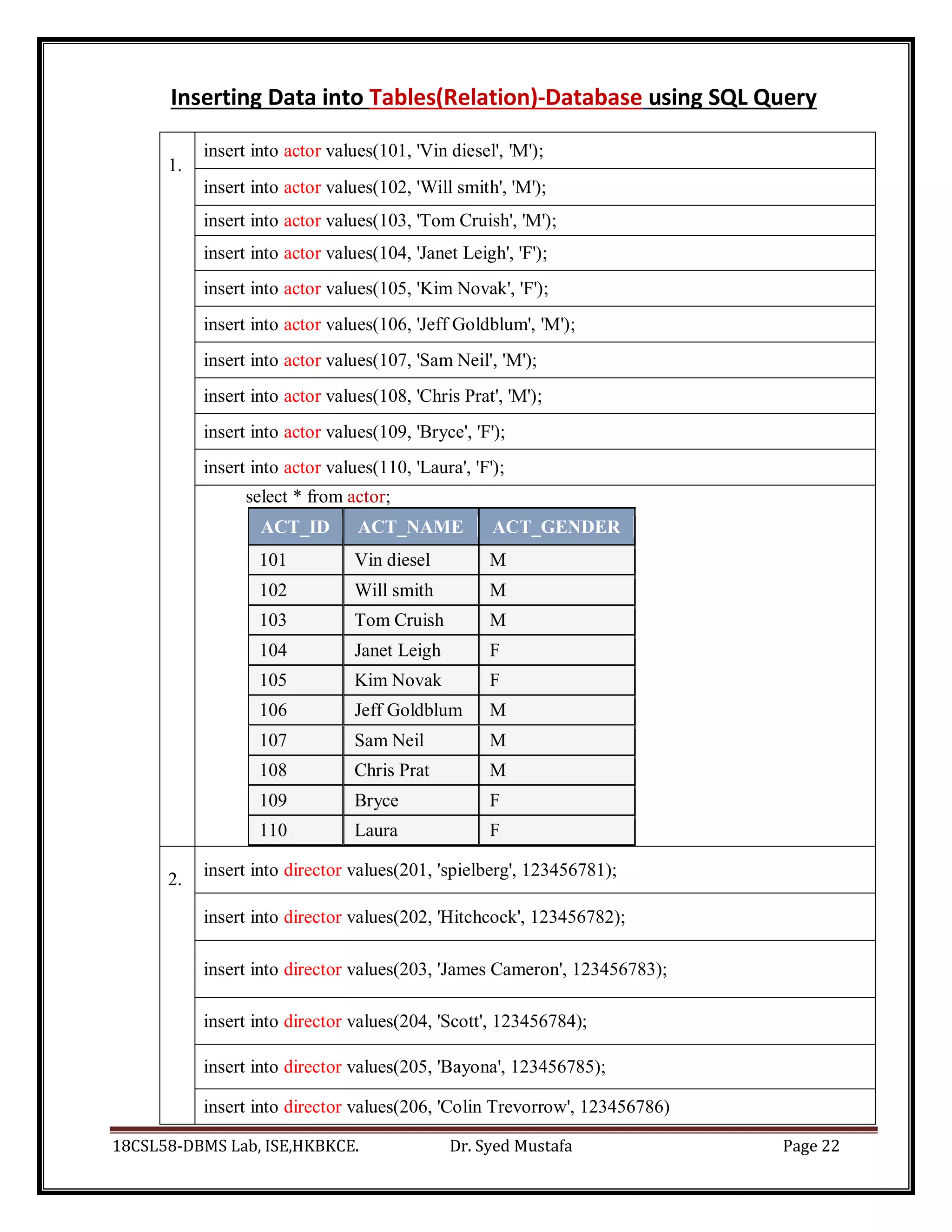
Inserting Data into Tables(Relation)-Database using SQL Query
1.
insert into actor values(101, 'Vin diesel', 'M');
insert into actor values(102, 'Will smith', 'M');
insert into actor values(103, 'Tom Cruish', 'M');
insert into actor values(104, 'Janet Leigh', 'F');
insert into actor values(105, 'Kim Novak', 'F');
insert into actor values(106, 'Jeff Goldblum', 'M');
insert into actor values(107, 'Sam Neil', 'M');
insert into actor values(108, 'Chris Prat', 'M');
insert into actor values(109, 'Bryce', 'F');
insert into actor values(110, 'Laura', 'F');
select * from actor;
ACT_ID ACT_NAME ACT_GENDER
101 Vin diesel M
102 Will smith M
103 Tom Cruish M
104 Janet Leigh F
105 Kim Novak F
106 Jeff Goldblum M
107 Sam Neil M
108 Chris Prat M
109 Bryce F
110 Laura F
2.
insert into director values(201, 'spielberg', 123456781);
insert into director values(202, 'Hitchcock', 123456782);
insert into director values(203, 'James Cameron', 123456783);
insert into director values(204, 'Scott', 123456784);
insert into director values(205, 'Bayona', 123456785);
insert into director values(206, 'Colin Trevorrow', 123456786)
18CSL58-DBMS Lab, ISE,HKBKCE. Dr. Syed Mustafa Page 23
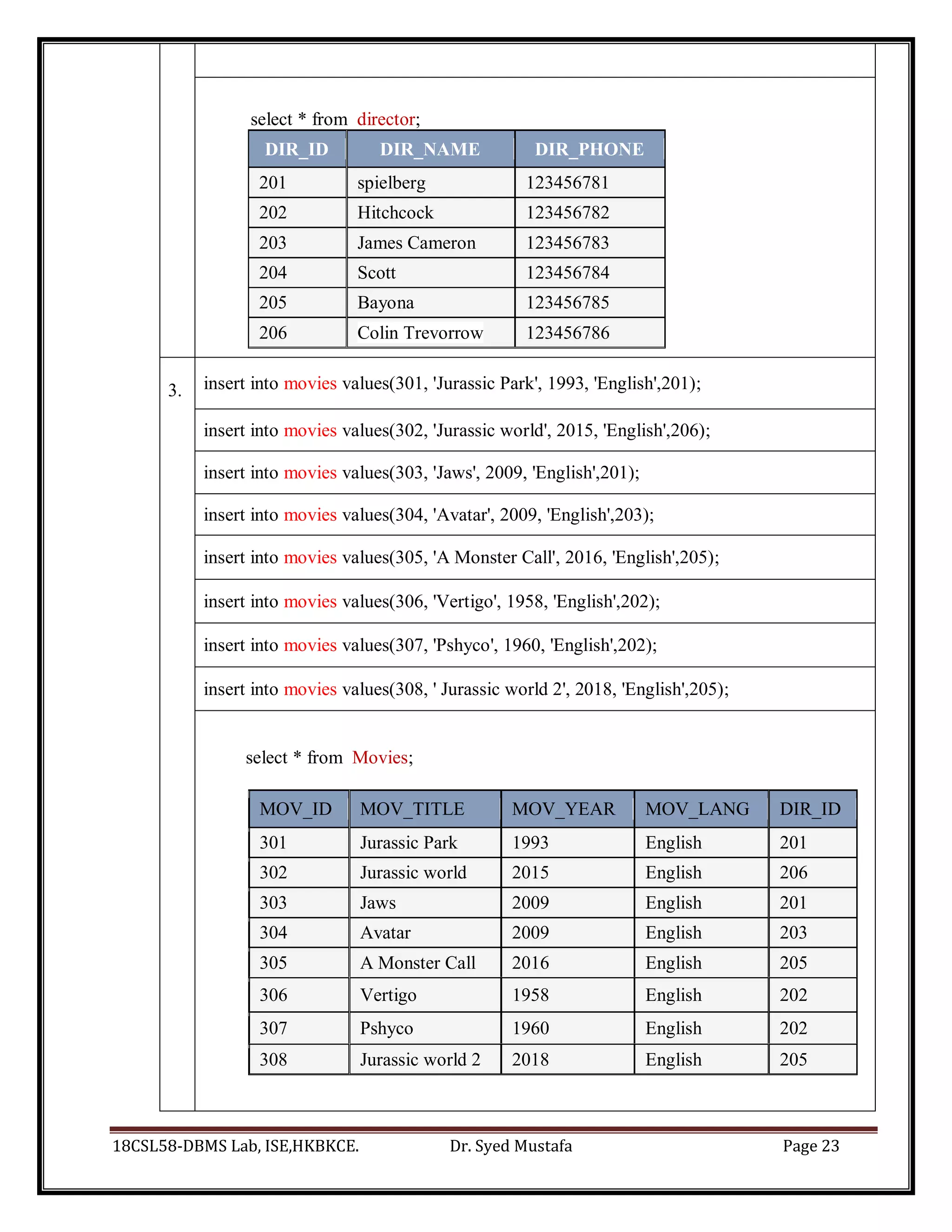
select * from director;
DIR_ID DIR_NAME DIR_PHONE
201 spielberg 123456781
202 Hitchcock 123456782
203 James Cameron 123456783
204 Scott 123456784
205 Bayona 123456785
206 Colin Trevorrow 123456786
3. insert into movies values(301, 'Jurassic Park', 1993, 'English',201);
insert into movies values(302, 'Jurassic world', 2015, 'English',206);
insert into movies values(303, 'Jaws', 2009, 'English',201);
insert into movies values(304, 'Avatar', 2009, 'English',203);
insert into movies values(305, 'A Monster Call', 2016, 'English',205);
insert into movies values(306, 'Vertigo', 1958, 'English',202);
insert into movies values(307, 'Pshyco', 1960, 'English',202);
insert into movies values(308, ' Jurassic world 2', 2018, 'English',205);
select * from Movies;
MOV_ID MOV_TITLE MOV_YEAR MOV_LANG DIR_ID
301 Jurassic Park 1993 English 201
302 Jurassic world 2015 English 206
303 Jaws 2009 English 201
304 Avatar 2009 English 203
305 A Monster Call 2016 English 205
306 Vertigo 1958 English 202
307 Pshyco 1960 English 202
308 Jurassic world 2 2018 English 205
18CSL58-DBMS Lab, ISE,HKBKCE. Dr. Syed Mustafa Page 24
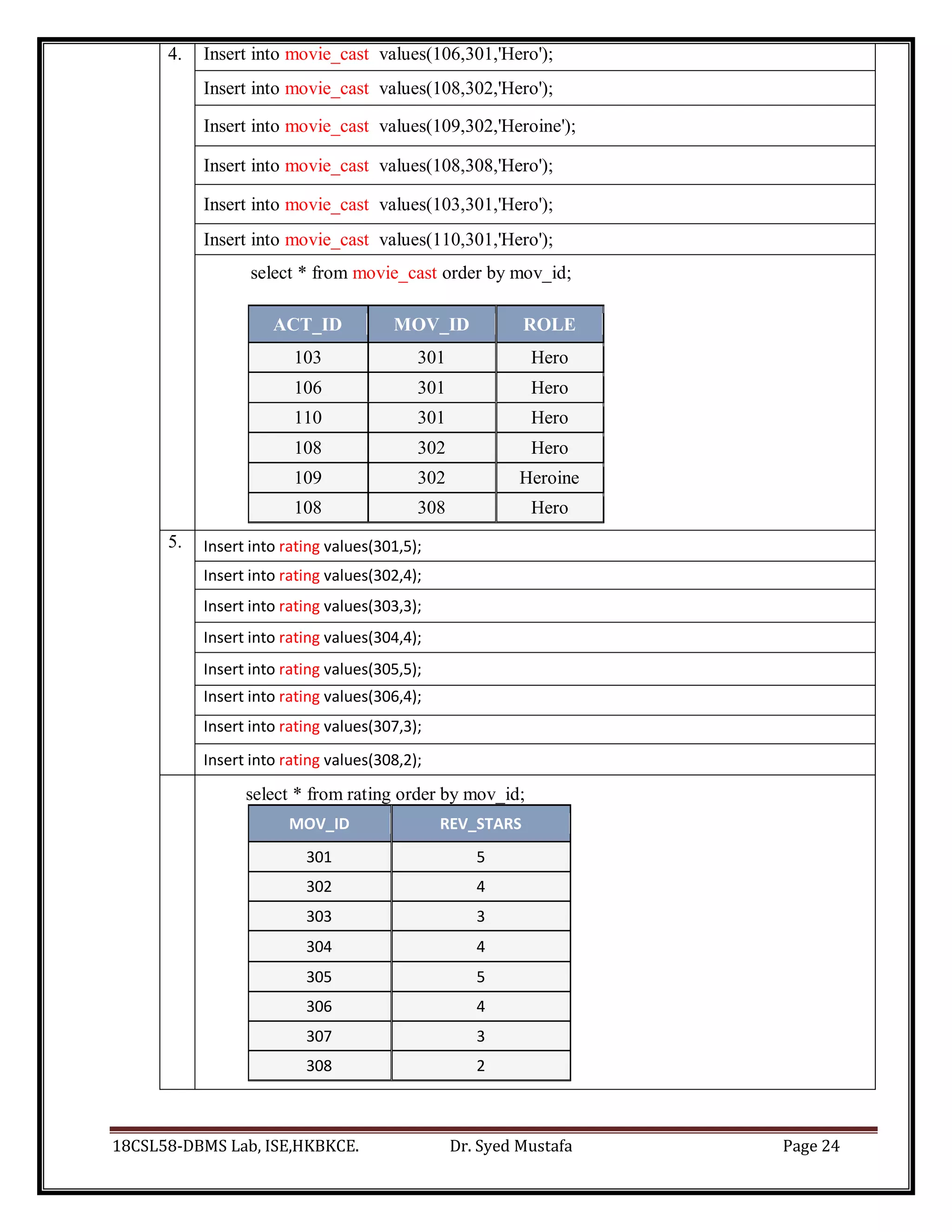
4. Insert into movie_cast values(106,301,'Hero');
Insert into movie_cast values(108,302,'Hero');
Insert into movie_cast values(109,302,'Heroine');
Insert into movie_cast values(108,308,'Hero');
Insert into movie_cast values(103,301,'Hero');
Insert into movie_cast values(110,301,'Hero');
select * from movie_cast order by mov_id;
ACT_ID MOV_ID ROLE
103 301 Hero
106 301 Hero
110 301 Hero
108 302 Hero
109 302 Heroine
108 308 Hero
5. Insert into rating values(301,5);
Insert into rating values(302,4);
Insert into rating values(303,3);
Insert into rating values(304,4);
Insert into rating values(305,5);
Insert into rating values(306,4);
Insert into rating values(307,3);
Insert into rating values(308,2);
select * from rating order by mov_id;
MOV_ID REV_STARS
301 5
302 4
303 3
304 4
305 5
306 4
307 3
308 2
18CSL58-DBMS Lab, ISE,HKBKCE. Dr. Syed Mustafa Page 25
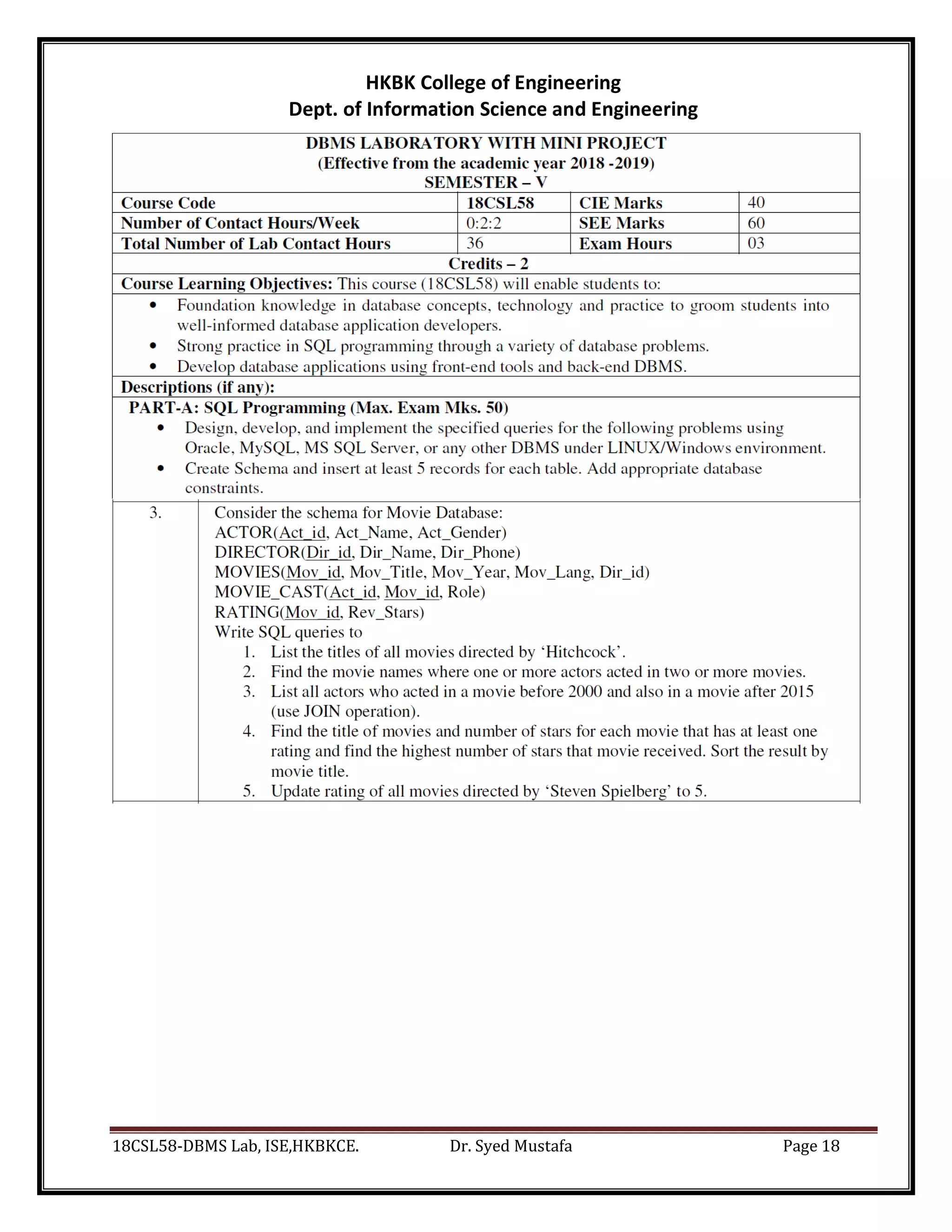
Queries as per Lab Exercise
Query 1.
List the titles of all movies directed by ‘Hitchcock’.
Select mov_title from movies ,director where movies.dir_id=director.dir_id and
dir_name='Hitchcock'
Select mov_title from movies where dir_id=(select dir_id from director where
dir_name='Hitchcock')
Select mov_title from movies where dir_id in (select dir_id from director where
dir_name='Hitchcock')
MOV_TITLE
Vertigo
Pshyco
Query 2.
Find the movie names where one or more actors acted in two or more movies
select mov_title from (movies natural join movie_cast) where act_id in (select act_id
from ((movies natural join movie_cast) natural join actor ) group by act_id having
count(*)>1)
MOV_TITLE
Jurassic world
Jurassic world 2
Query 3. List all actors who acted in a movie before 2000 and also in a movie after 2015
(use JOIN operation).
select act_name from (( movies join movie_cast on movies.mov_id =
movie_cast.mov_id ) join actor on movie_cast.act_id=actor.act_id ) where mov_year <
2000 or mov_year > 2015
select act_name from (( movies natural join movie_cast ) natural join actor ) where
mov_year < 2000 or mov_year > 2015
ACT_NAME
Tom Cruish
Chris Prat
Laura
Jeff Goldblum
18CSL58-DBMS Lab, ISE,HKBKCE. Dr. Syed Mustafa Page 26
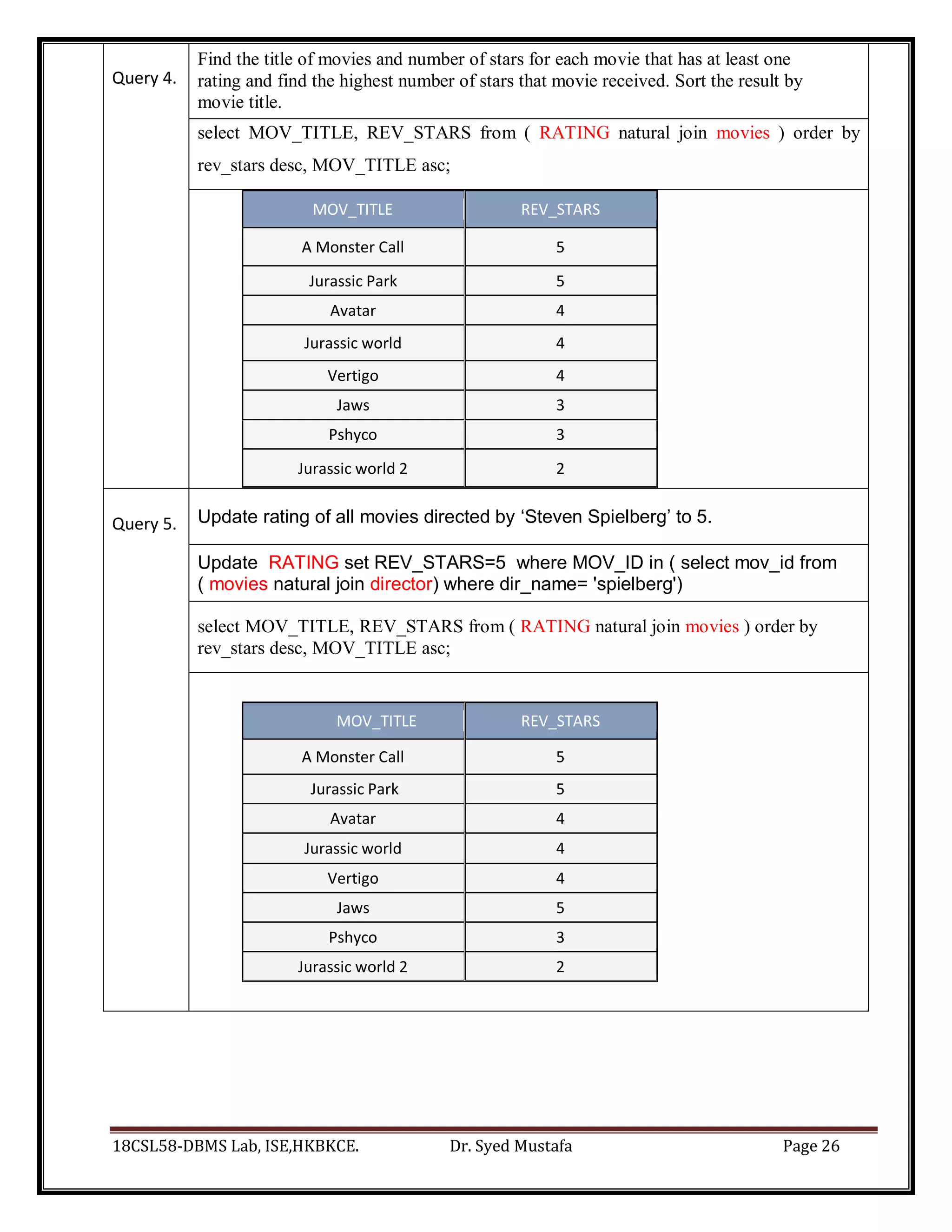
Query 4.
Find the title of movies and number of stars for each movie that has at least one
rating and find the highest number of stars that movie received. Sort the result by
movie title.
select MOV_TITLE, REV_STARS from ( RATING natural join movies ) order by
rev_stars desc, MOV_TITLE asc;
MOV_TITLE REV_STARS
A Monster Call 5
Jurassic Park 5
Avatar 4
Jurassic world 4
Vertigo 4
Jaws 3
Pshyco 3
Jurassic world 2 2
Query 5. Update rating of all movies directed by ‘Steven Spielberg’ to 5.
Update RATING set REV_STARS=5 where MOV_ID in ( select mov_id from
( movies natural join director) where dir_name= 'spielberg')
select MOV_TITLE, REV_STARS from ( RATING natural join movies ) order by
rev_stars desc, MOV_TITLE asc;
MOV_TITLE REV_STARS
A Monster Call 5
Jurassic Park 5
Avatar 4
Jurassic world 4
Vertigo 4
Jaws 5
Pshyco 3
Jurassic world 2 2
18CSL58-DBMS Lab, ISE,HKBKCE. Dr. Syed Mustafa Page 27
HKBK College of Engineering
Dept. of Information Science and Engineering
18CSL58-DBMS Lab, ISE,HKBKCE. Dr. Syed Mustafa Page 28
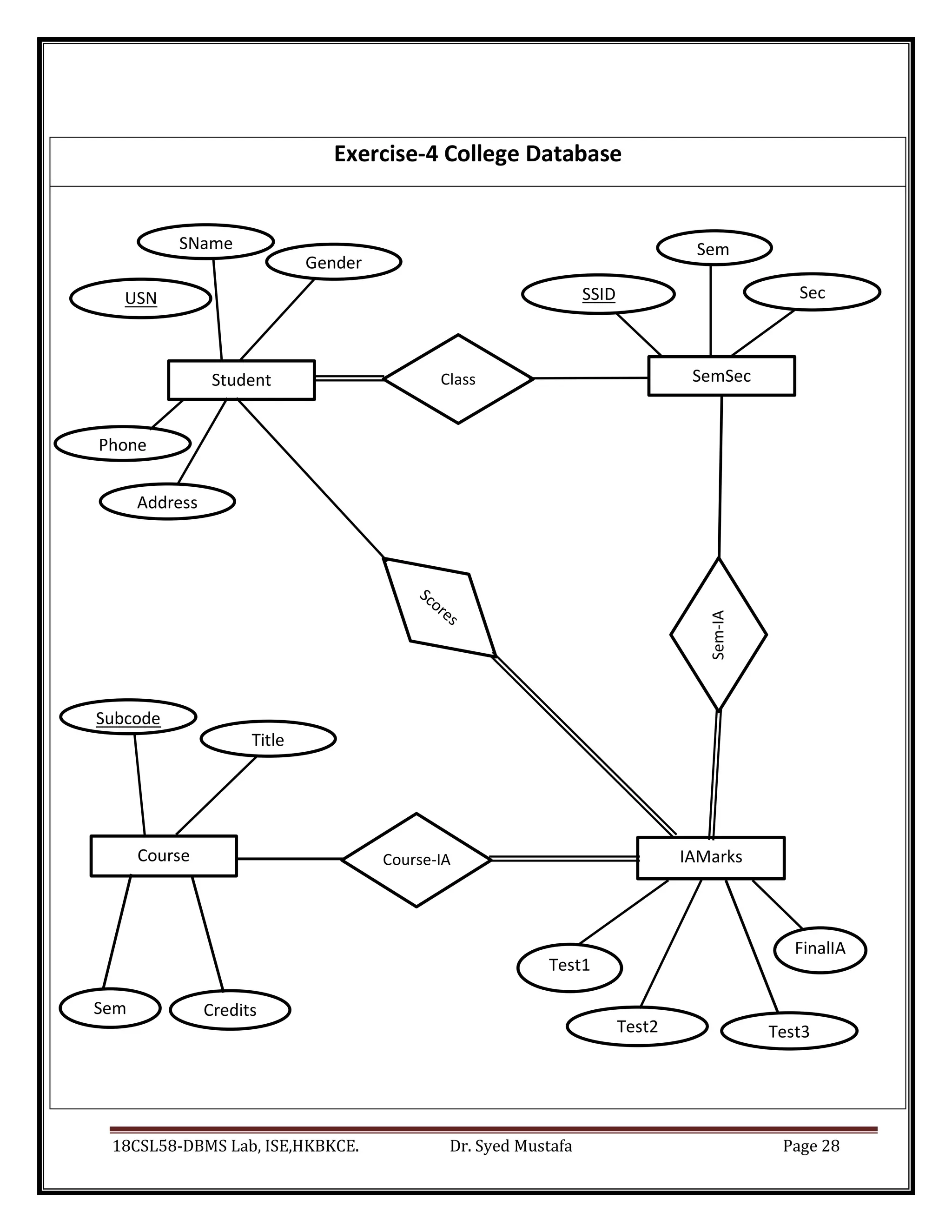
USN SSID Sec
Sem
re
FinalIA
Test3
Test1
Test2
Credits
re
Exercise-4 College Database
Student
SName
Gender
SemSec
Sem
Course-IA
Sem-IA
IAMarks
Course
Phone
Address
Subcode
Title
Class
18CSL58-DBMS Lab, ISE,HKBKCE. Dr. Syed Mustafa Page 29
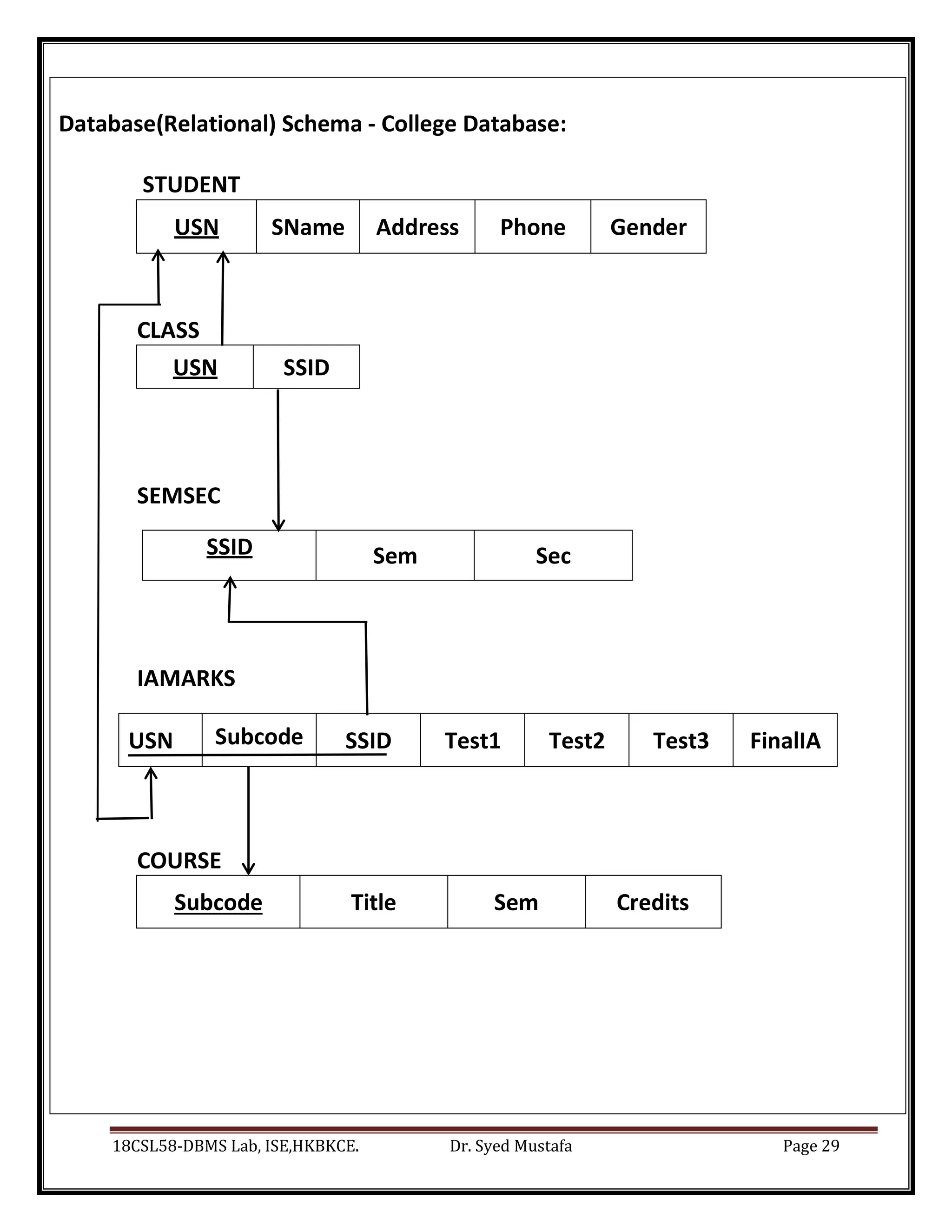
Database(Relational) Schema - College Database:
STUDENT
USN SName Address Phone Gender
CLASS
USN SSID
SEMSEC
SSID Sem Sec
IAMARKS
USN Subcode SSID Test1 Test2 Test3 FinalIA
COURSE
Subcode Title Sem Credits
18CSL58-DBMS Lab, ISE,HKBKCE. Dr. Syed Mustafa Page 30
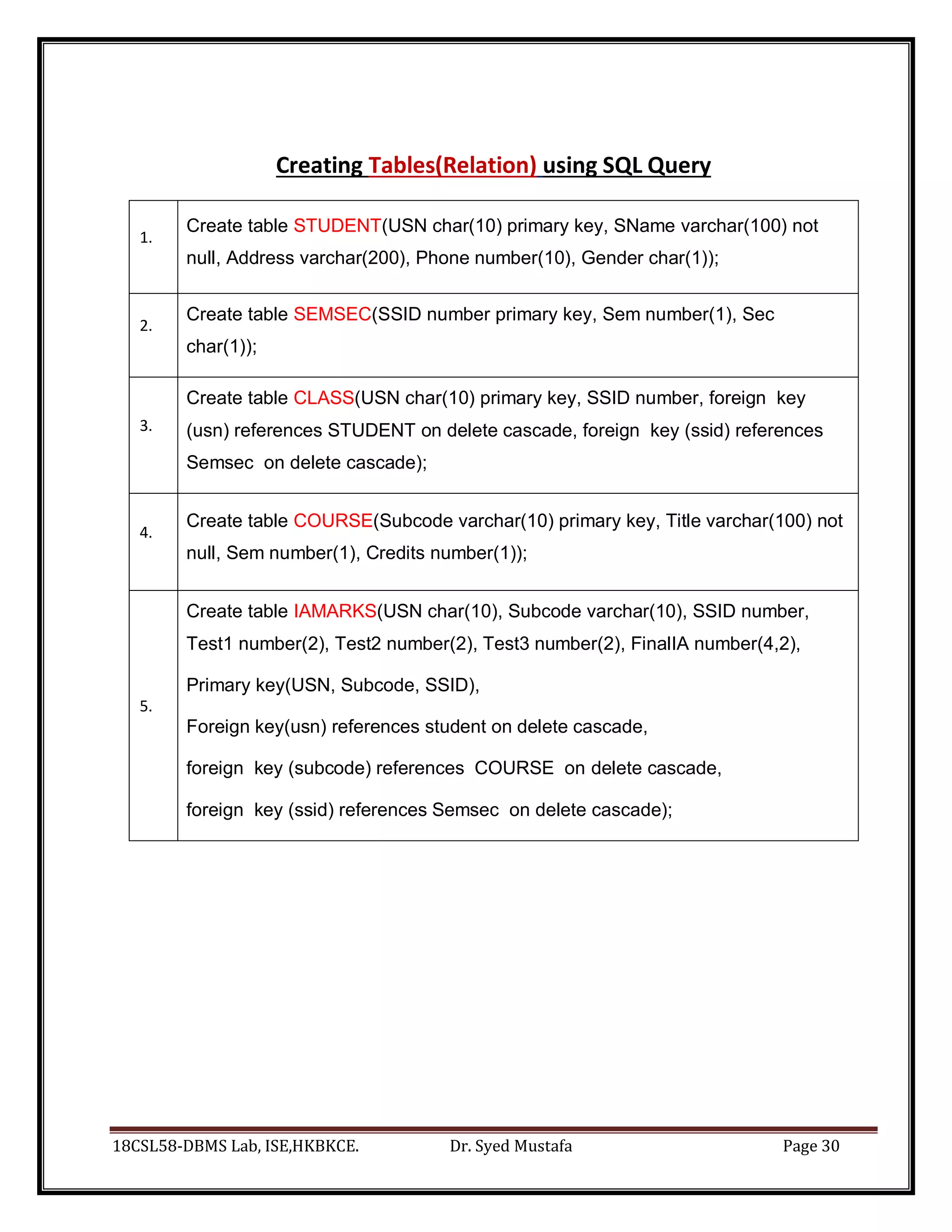
Creating Tables(Relation) using SQL Query
1.
Create table STUDENT(USN char(10) primary key, SName varchar(100) not
null, Address varchar(200), Phone number(10), Gender char(1));
2.
Create table SEMSEC(SSID number primary key, Sem number(1), Sec
char(1));
3.
Create table CLASS(USN char(10) primary key, SSID number, foreign key
(usn) references STUDENT on delete cascade, foreign key (ssid) references
Semsec on delete cascade);
4.
Create table COURSE(Subcode varchar(10) primary key, Title varchar(100) not
null, Sem number(1), Credits number(1));
5.
Create table IAMARKS(USN char(10), Subcode varchar(10), SSID number,
Test1 number(2), Test2 number(2), Test3 number(2), FinalIA number(4,2),
Primary key(USN, Subcode, SSID),
Foreign key(usn) references student on delete cascade,
foreign key (subcode) references COURSE on delete cascade,
foreign key (ssid) references Semsec on delete cascade);
18CSL58-DBMS Lab, ISE,HKBKCE. Dr. Syed Mustafa Page 31
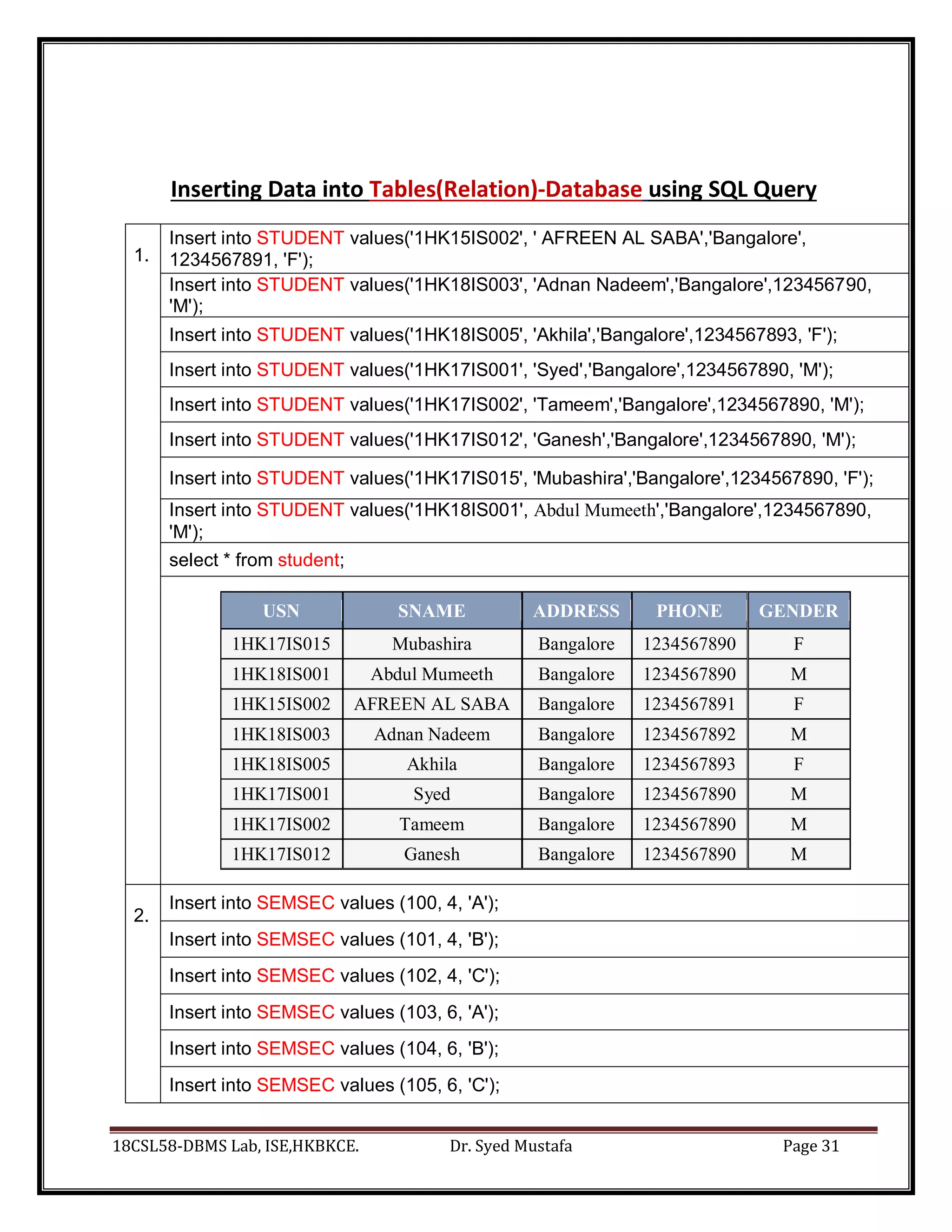
Inserting Data into Tables(Relation)-Database using SQL Query
1.
Insert into STUDENT values('1HK15IS002', ' AFREEN AL SABA','Bangalore',
1234567891, 'F');
Insert into STUDENT values('1HK18IS003', 'Adnan Nadeem','Bangalore',123456790,
'M');
Insert into STUDENT values('1HK18IS005', 'Akhila','Bangalore',1234567893, 'F');
Insert into STUDENT values('1HK17IS001', 'Syed','Bangalore',1234567890, 'M');
Insert into STUDENT values('1HK17IS002', 'Tameem','Bangalore',1234567890, 'M');
Insert into STUDENT values('1HK17IS012', 'Ganesh','Bangalore',1234567890, 'M');
Insert into STUDENT values('1HK17IS015', 'Mubashira','Bangalore',1234567890, 'F');
Insert into STUDENT values('1HK18IS001', Abdul Mumeeth','Bangalore',1234567890,
'M');
select * from student;
USN SNAME ADDRESS PHONE GENDER
1HK17IS015 Mubashira Bangalore 1234567890 F
1HK18IS001 Abdul Mumeeth Bangalore 1234567890 M
1HK15IS002 AFREEN AL SABA Bangalore 1234567891 F
1HK18IS003 Adnan Nadeem Bangalore 1234567892 M
1HK18IS005 Akhila Bangalore 1234567893 F
1HK17IS001 Syed Bangalore 1234567890 M
1HK17IS002 Tameem Bangalore 1234567890 M
1HK17IS012 Ganesh Bangalore 1234567890 M
2.
Insert into SEMSEC values (100, 4, 'A');
Insert into SEMSEC values (101, 4, 'B');
Insert into SEMSEC values (102, 4, 'C');
Insert into SEMSEC values (103, 6, 'A');
Insert into SEMSEC values (104, 6, 'B');
Insert into SEMSEC values (105, 6, 'C');
18CSL58-DBMS Lab, ISE,HKBKCE. Dr. Syed Mustafa Page 32
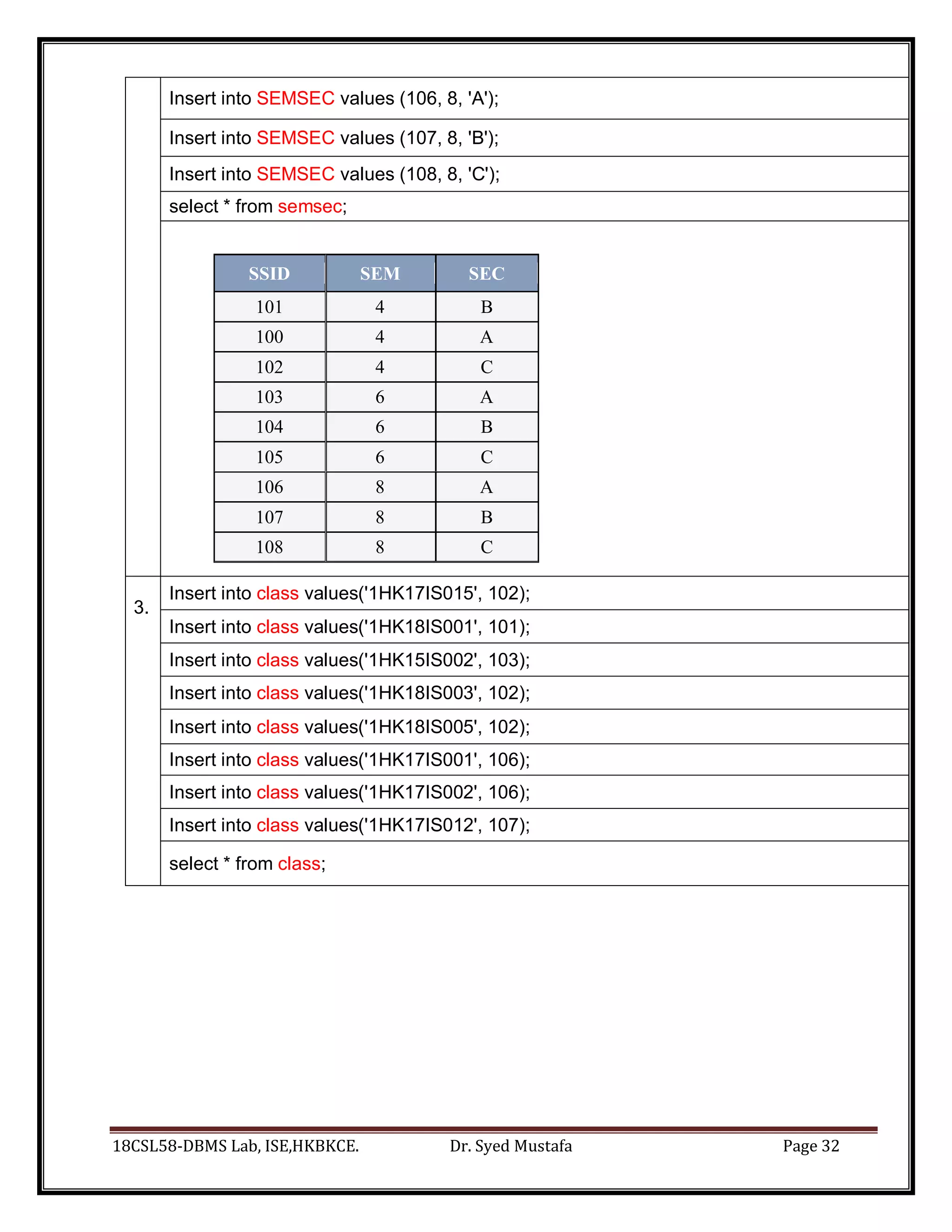
Insert into SEMSEC values (106, 8, 'A');
Insert into SEMSEC values (107, 8, 'B');
Insert into SEMSEC values (108, 8, 'C');
select * from semsec;
SSID SEM SEC
101 4 B
100 4 A
102 4 C
103 6 A
104 6 B
105 6 C
106 8 A
107 8 B
108 8 C
3.
Insert into class values('1HK17IS015', 102);
Insert into class values('1HK18IS001', 101);
Insert into class values('1HK15IS002', 103);
Insert into class values('1HK18IS003', 102);
Insert into class values('1HK18IS005', 102);
Insert into class values('1HK17IS001', 106);
Insert into class values('1HK17IS002', 106);
Insert into class values('1HK17IS012', 107);
select * from class;
18CSL58-DBMS Lab, ISE,HKBKCE. Dr. Syed Mustafa Page 33
USN SSID
1HK17IS015 102
1HK18IS001 101
1HK15IS002 103
1HK18IS003 102
1HK18IS005 102
1HK17IS001 106
1HK17IS002 106
1HK17IS012 107
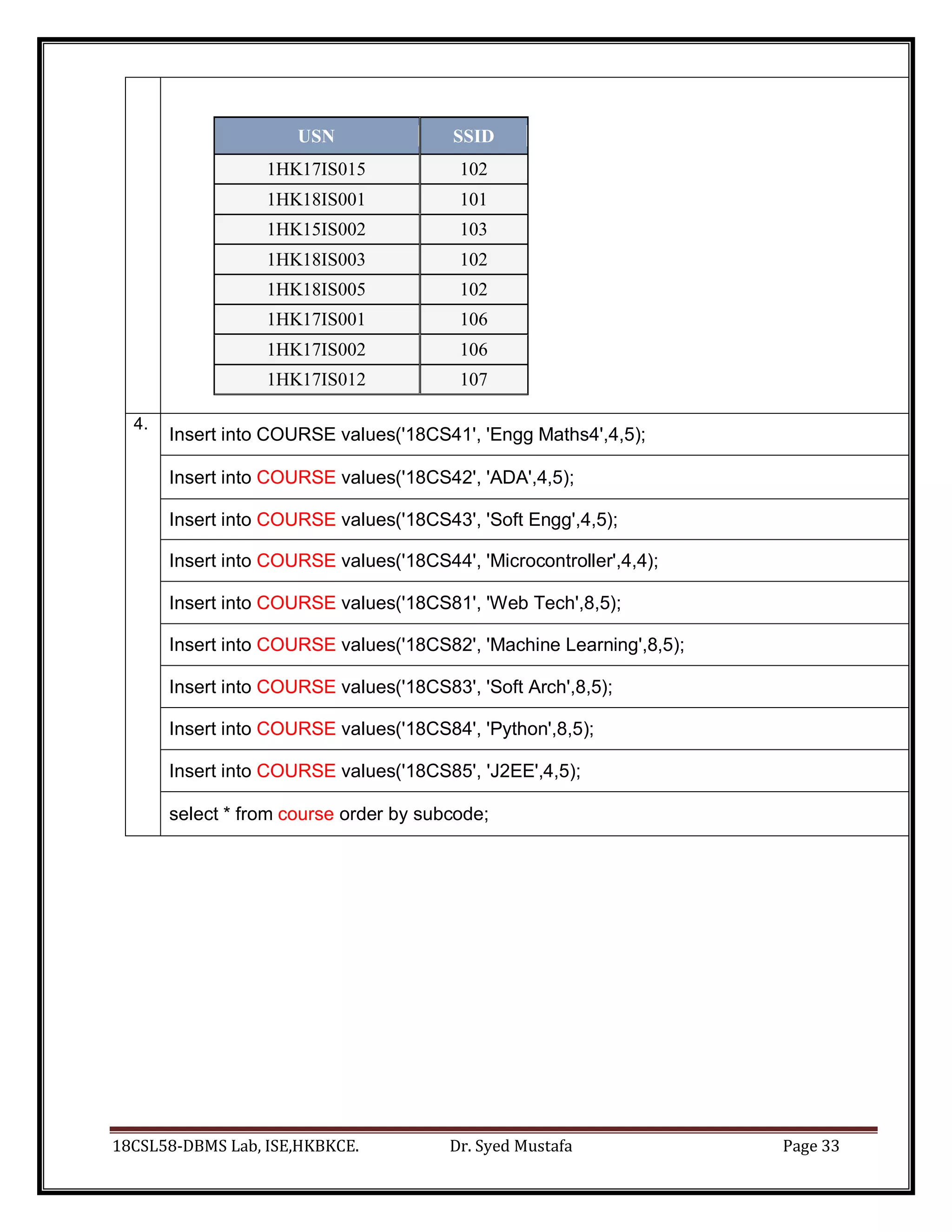
4.
Insert into COURSE values('18CS41', 'Engg Maths4',4,5);
Insert into COURSE values('18CS42', 'ADA',4,5);
Insert into COURSE values('18CS43', 'Soft Engg',4,5);
Insert into COURSE values('18CS44', 'Microcontroller',4,4);
Insert into COURSE values('18CS81', 'Web Tech',8,5);
Insert into COURSE values('18CS82', 'Machine Learning',8,5);
Insert into COURSE values('18CS83', 'Soft Arch',8,5);
Insert into COURSE values('18CS84', 'Python',8,5);
Insert into COURSE values('18CS85', 'J2EE',4,5);
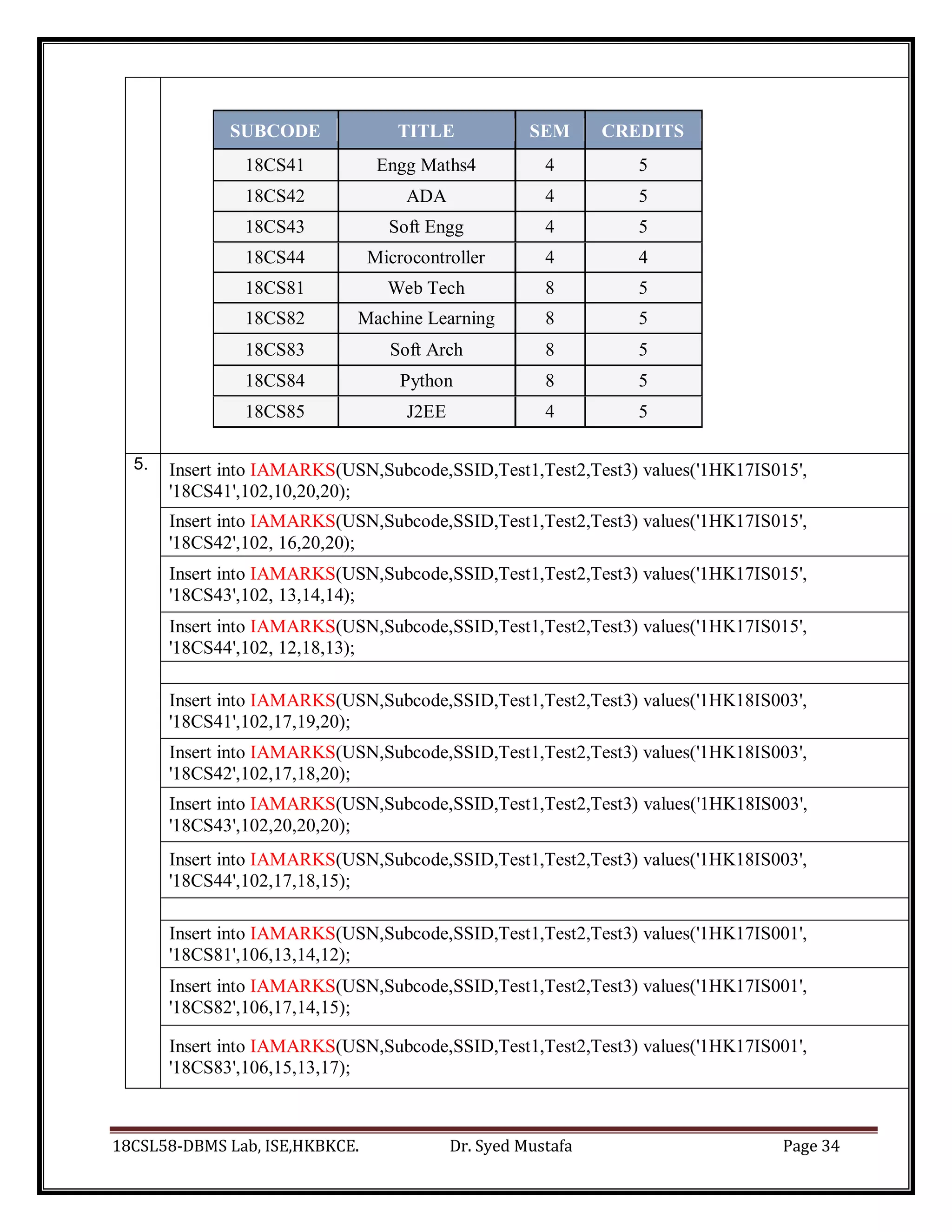
select * from course order by subcode;
18CSL58-DBMS Lab, ISE,HKBKCE. Dr. Syed Mustafa Page 34
SUBCODE TITLE SEM CREDITS
18CS41 Engg Maths4 4 5
18CS42 ADA 4 5
18CS43 Soft Engg 4 5
18CS44 Microcontroller 4 4
18CS81 Web Tech 8 5
18CS82 Machine Learning 8 5
18CS83 Soft Arch 8 5
18CS84 Python 8 5
18CS85 J2EE 4 5
5. Insert into IAMARKS(USN,Subcode,SSID,Test1,Test2,Test3) values('1HK17IS015',
'18CS41',102,10,20,20);
Insert into IAMARKS(USN,Subcode,SSID,Test1,Test2,Test3) values('1HK17IS015',
'18CS42',102, 16,20,20);
Insert into IAMARKS(USN,Subcode,SSID,Test1,Test2,Test3) values('1HK17IS015',
'18CS43',102, 13,14,14);
Insert into IAMARKS(USN,Subcode,SSID,Test1,Test2,Test3) values('1HK17IS015',
'18CS44',102, 12,18,13);
Insert into IAMARKS(USN,Subcode,SSID,Test1,Test2,Test3) values('1HK18IS003',
'18CS41',102,17,19,20);
Insert into IAMARKS(USN,Subcode,SSID,Test1,Test2,Test3) values('1HK18IS003',
'18CS42',102,17,18,20);
Insert into IAMARKS(USN,Subcode,SSID,Test1,Test2,Test3) values('1HK18IS003',
'18CS43',102,20,20,20);
Insert into IAMARKS(USN,Subcode,SSID,Test1,Test2,Test3) values('1HK18IS003',
'18CS44',102,17,18,15);
Insert into IAMARKS(USN,Subcode,SSID,Test1,Test2,Test3) values('1HK17IS001',
'18CS81',106,13,14,12);
Insert into IAMARKS(USN,Subcode,SSID,Test1,Test2,Test3) values('1HK17IS001',
'18CS82',106,17,14,15);
Insert into IAMARKS(USN,Subcode,SSID,Test1,Test2,Test3) values('1HK17IS001',
'18CS83',106,15,13,17);
18CSL58-DBMS Lab, ISE,HKBKCE. Dr. Syed Mustafa Page 35
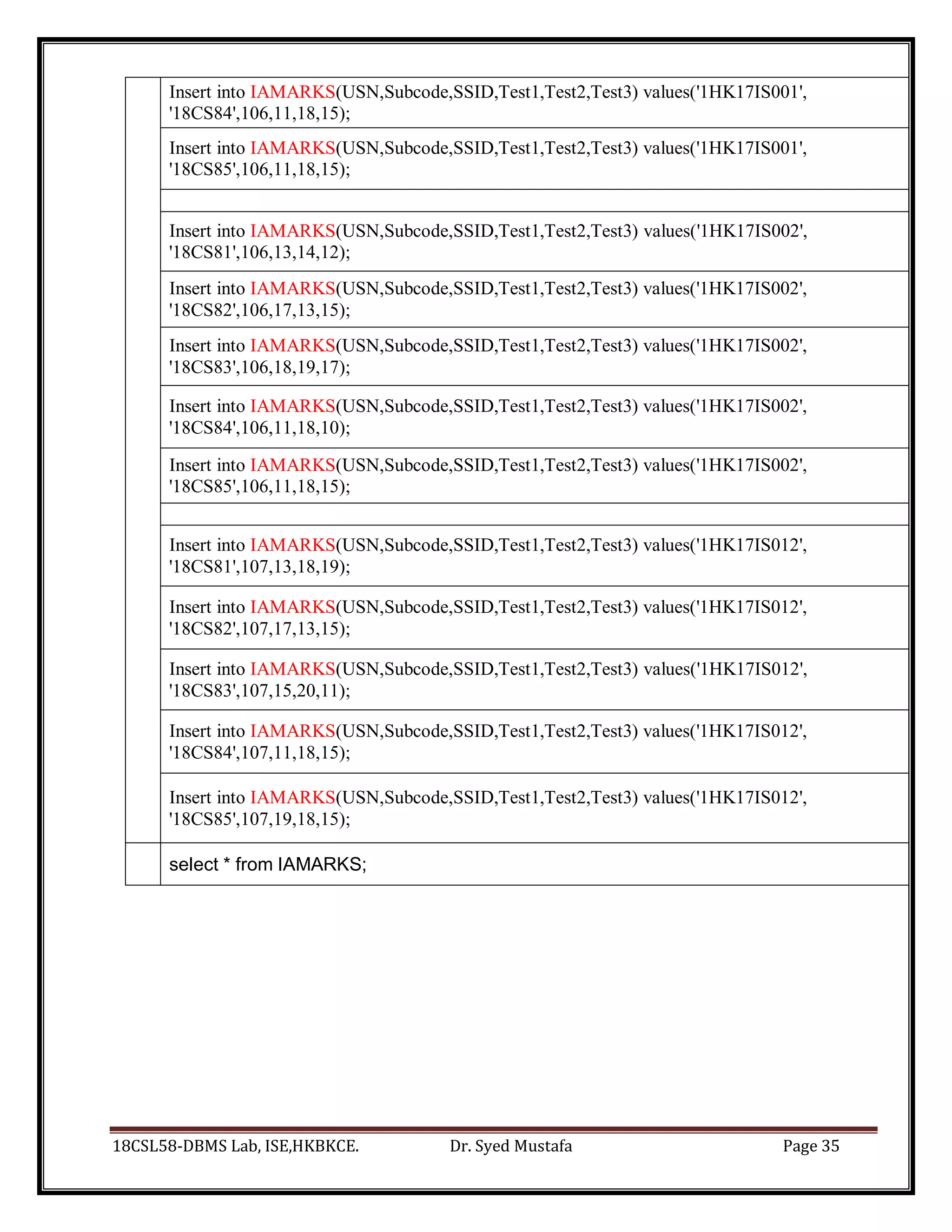
Insert into IAMARKS(USN,Subcode,SSID,Test1,Test2,Test3) values('1HK17IS001',
'18CS84',106,11,18,15);
Insert into IAMARKS(USN,Subcode,SSID,Test1,Test2,Test3) values('1HK17IS001',
'18CS85',106,11,18,15);
Insert into IAMARKS(USN,Subcode,SSID,Test1,Test2,Test3) values('1HK17IS002',
'18CS81',106,13,14,12);
Insert into IAMARKS(USN,Subcode,SSID,Test1,Test2,Test3) values('1HK17IS002',
'18CS82',106,17,13,15);
Insert into IAMARKS(USN,Subcode,SSID,Test1,Test2,Test3) values('1HK17IS002',
'18CS83',106,18,19,17);
Insert into IAMARKS(USN,Subcode,SSID,Test1,Test2,Test3) values('1HK17IS002',
'18CS84',106,11,18,10);
Insert into IAMARKS(USN,Subcode,SSID,Test1,Test2,Test3) values('1HK17IS002',
'18CS85',106,11,18,15);
Insert into IAMARKS(USN,Subcode,SSID,Test1,Test2,Test3) values('1HK17IS012',
'18CS81',107,13,18,19);
Insert into IAMARKS(USN,Subcode,SSID,Test1,Test2,Test3) values('1HK17IS012',
'18CS82',107,17,13,15);
Insert into IAMARKS(USN,Subcode,SSID,Test1,Test2,Test3) values('1HK17IS012',
'18CS83',107,15,20,11);
Insert into IAMARKS(USN,Subcode,SSID,Test1,Test2,Test3) values('1HK17IS012',
'18CS84',107,11,18,15);
Insert into IAMARKS(USN,Subcode,SSID,Test1,Test2,Test3) values('1HK17IS012',
'18CS85',107,19,18,15);
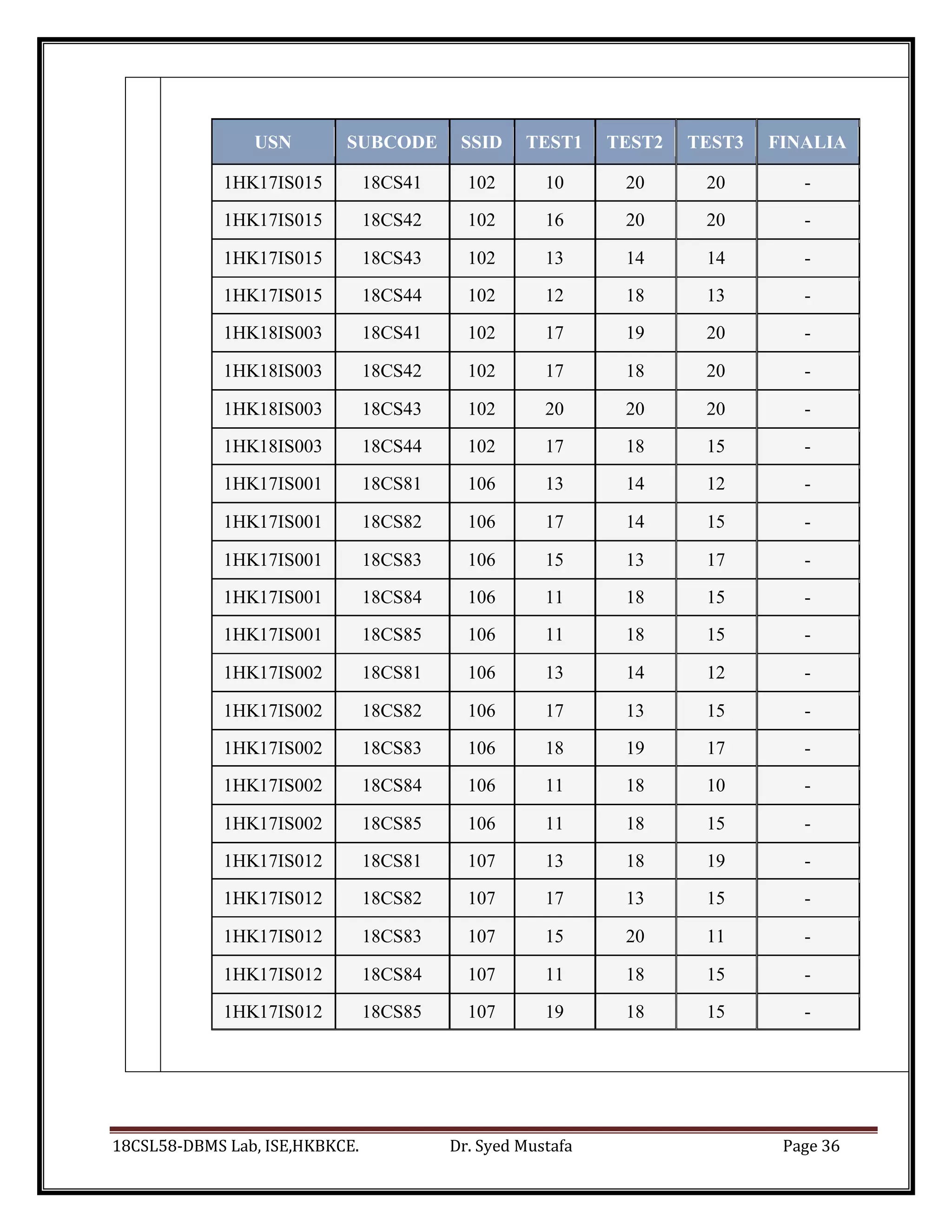
select * from IAMARKS;
18CSL58-DBMS Lab, ISE,HKBKCE. Dr. Syed Mustafa Page 36
USN SUBCODE SSID TEST1 TEST2 TEST3 FINALIA
1HK17IS015 18CS41 102 10 20 20 -
1HK17IS015 18CS42 102 16 20 20 -
1HK17IS015 18CS43 102 13 14 14 -
1HK17IS015 18CS44 102 12 18 13 -
1HK18IS003 18CS41 102 17 19 20 -
1HK18IS003 18CS42 102 17 18 20 -
1HK18IS003 18CS43 102 20 20 20 -
1HK18IS003 18CS44 102 17 18 15 -
1HK17IS001 18CS81 106 13 14 12 -
1HK17IS001 18CS82 106 17 14 15 -
1HK17IS001 18CS83 106 15 13 17 -
1HK17IS001 18CS84 106 11 18 15 -
1HK17IS001 18CS85 106 11 18 15 -
1HK17IS002 18CS81 106 13 14 12 -
1HK17IS002 18CS82 106 17 13 15 -
1HK17IS002 18CS83 106 18 19 17 -
1HK17IS002 18CS84 106 11 18 10 -
1HK17IS002 18CS85 106 11 18 15 -
1HK17IS012 18CS81 107 13 18 19 -
1HK17IS012 18CS82 107 17 13 15 -
1HK17IS012 18CS83 107 15 20 11 -
1HK17IS012 18CS84 107 11 18 15 -
1HK17IS012 18CS85 107 19 18 15 -
18CSL58-DBMS Lab, ISE,HKBKCE. Dr. Syed Mustafa Page 37
Queries as per Lab Exercise
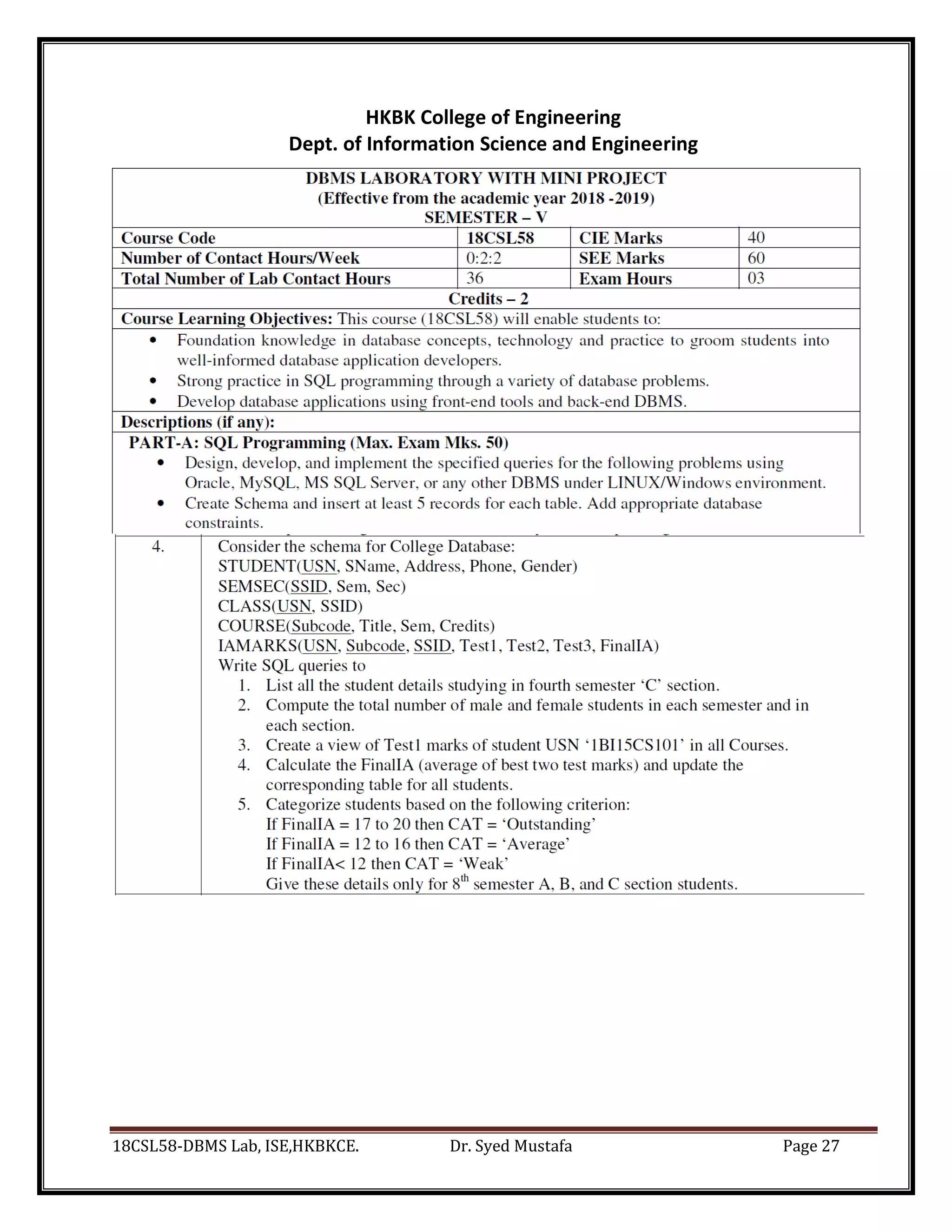
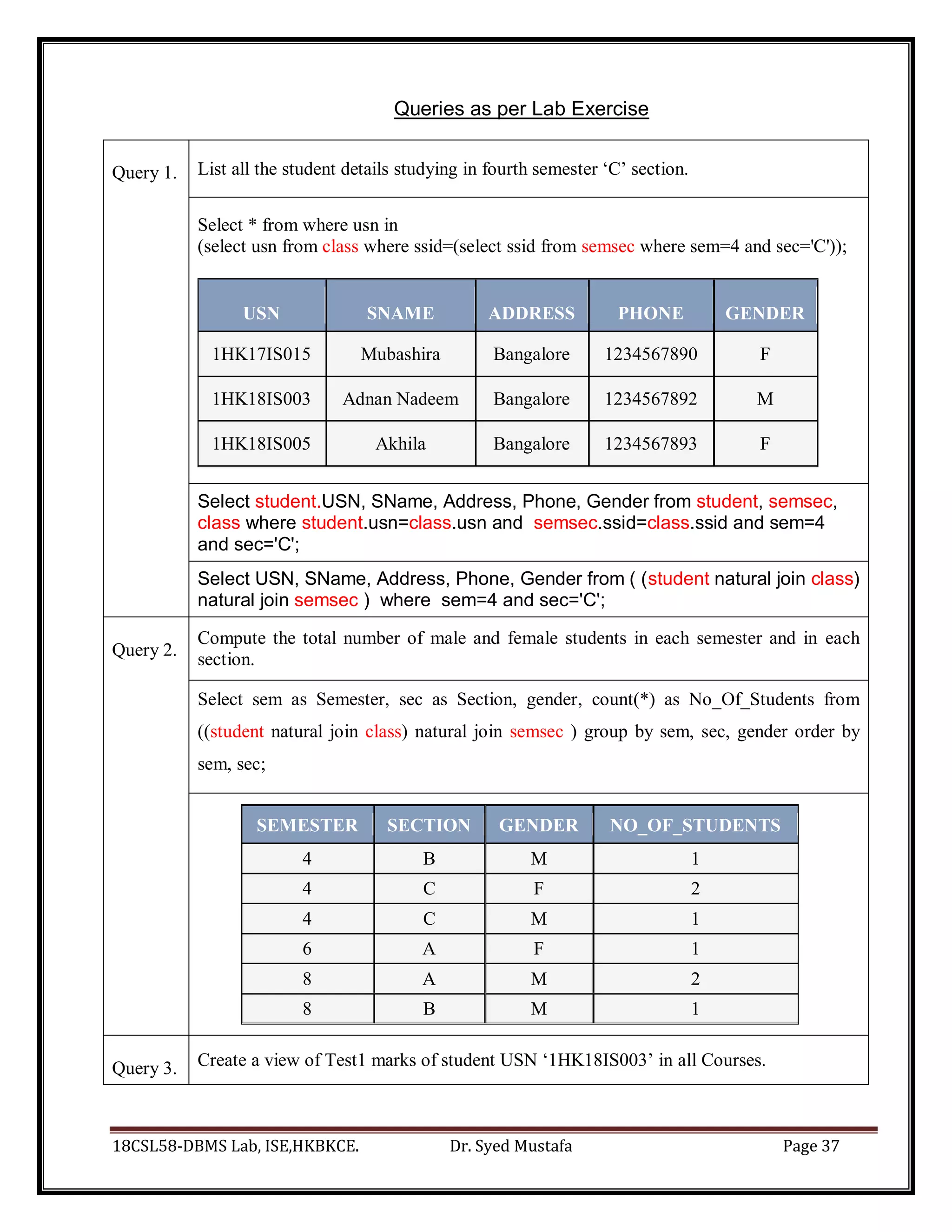
Query 1. List all the student details studying in fourth semester ‘C’ section.
Select * from where usn in
(select usn from class where ssid=(select ssid from semsec where sem=4 and sec='C'));
USN SNAME ADDRESS PHONE GENDER
1HK17IS015 Mubashira Bangalore 1234567890 F
1HK18IS003 Adnan Nadeem Bangalore 1234567892 M
1HK18IS005 Akhila Bangalore 1234567893 F
Select student.USN, SName, Address, Phone, Gender from student, semsec,
class where student.usn=class.usn and semsec.ssid=class.ssid and sem=4
and sec='C';
Select USN, SName, Address, Phone, Gender from ( (student natural join class)
natural join semsec ) where sem=4 and sec='C';
Query 2.
Compute the total number of male and female students in each semester and in each
section.
Select sem as Semester, sec as Section, gender, count(*) as No_Of_Students from
((student natural join class) natural join semsec ) group by sem, sec, gender order by
sem, sec;
SEMESTER SECTION GENDER NO_OF_STUDENTS
4 B M 1
4 C F 2
4 C M 1
6 A F 1
8 A M 2
8 B M 1
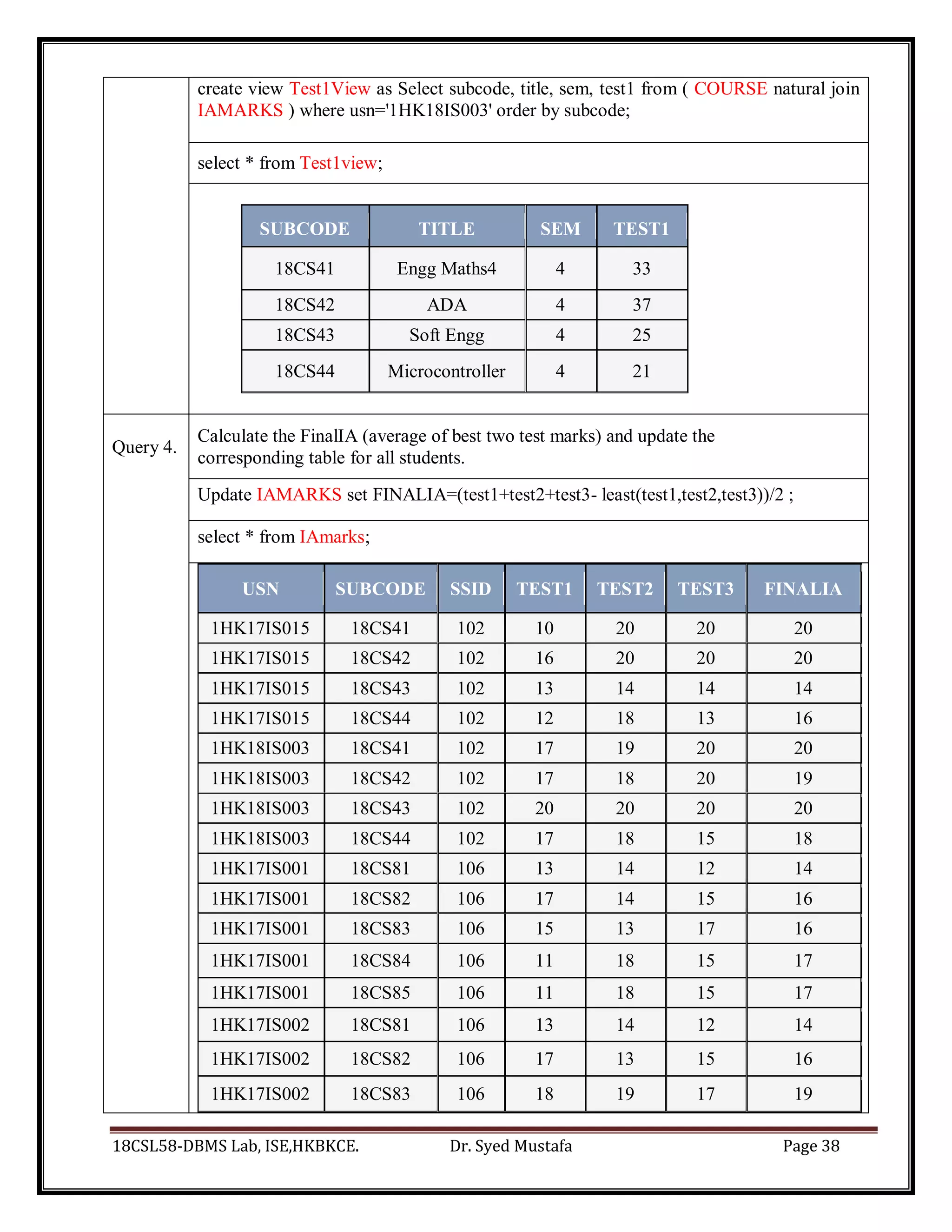
Query 3. Create a view of Test1 marks of student USN ‘1HK18IS003’ in all Courses.
18CSL58-DBMS Lab, ISE,HKBKCE. Dr. Syed Mustafa Page 38
create view Test1View as Select subcode, title, sem, test1 from ( COURSE natural join
IAMARKS ) where usn='1HK18IS003' order by subcode;
select * from Test1view;
SUBCODE TITLE SEM TEST1
18CS41 Engg Maths4 4 33
18CS42 ADA 4 37
18CS43 Soft Engg 4 25
18CS44 Microcontroller 4 21
Query 4.
Calculate the FinalIA (average of best two test marks) and update the
corresponding table for all students.
Update IAMARKS set FINALIA=(test1+test2+test3- least(test1,test2,test3))/2 ;
select * from IAmarks;
USN SUBCODE SSID TEST1 TEST2 TEST3 FINALIA
1HK17IS015 18CS41 102 10 20 20 20
1HK17IS015 18CS42 102 16 20 20 20
1HK17IS015 18CS43 102 13 14 14 14
1HK17IS015 18CS44 102 12 18 13 16
1HK18IS003 18CS41 102 17 19 20 20
1HK18IS003 18CS42 102 17 18 20 19
1HK18IS003 18CS43 102 20 20 20 20
1HK18IS003 18CS44 102 17 18 15 18
1HK17IS001 18CS81 106 13 14 12 14
1HK17IS001 18CS82 106 17 14 15 16
1HK17IS001 18CS83 106 15 13 17 16
1HK17IS001 18CS84 106 11 18 15 17
1HK17IS001 18CS85 106 11 18 15 17
1HK17IS002 18CS81 106 13 14 12 14
1HK17IS002 18CS82 106 17 13 15 16
1HK17IS002 18CS83 106 18 19 17 19
18CSL58-DBMS Lab, ISE,HKBKCE. Dr. Syed Mustafa Page 39
1HK17IS002 18CS84 106 11 18 10 15
1HK17IS002 18CS85 106 11 18 15 17
1HK17IS012 18CS81 107 13 18 19 19
1HK17IS012 18CS82 107 17 13 15 16
1HK17IS012 18CS83 107 15 20 11 18
1HK17IS012 18CS84 107 11 18 15 17
1HK17IS012 18CS85 107 19 18 15 19
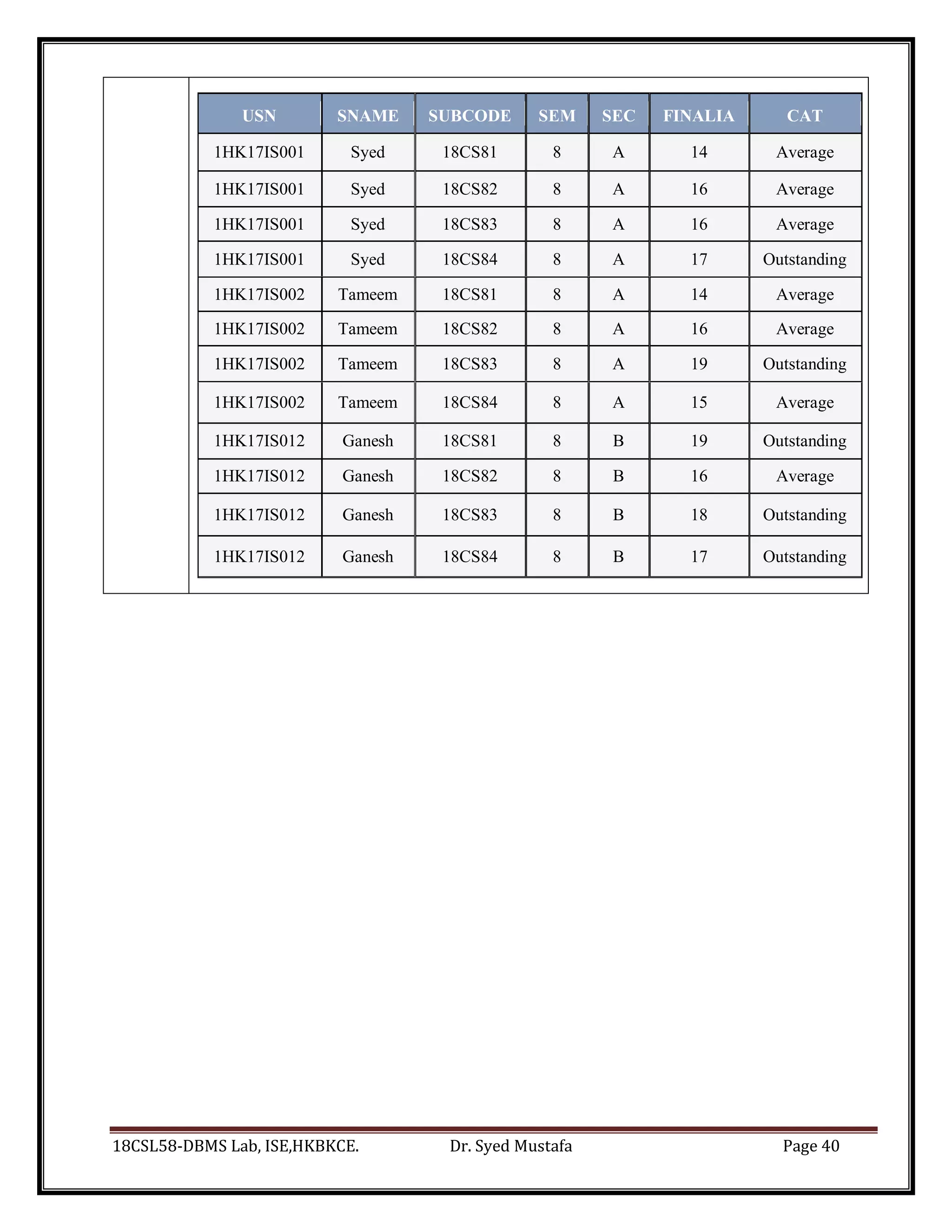
Query 5.
Categorize students based on the following criterion:
If FinalIA = 17 to 20 then CAT = ‘Outstanding’
If FinalIA = 12 to 16 then CAT = ‘Average’
If FinalIA< 12 then CAT = ‘Weak’
Give these details only for 8th semester A, B, and C section students
Select USN, Sname, subcode, sem, sec, FinalIA,
CASE WHEN FinalIA between 17 and 20 THEN 'Outstanding'
WHEN FinalIA between 12 and 16 THEN 'Average'
WHEN FinalIA < 12 THEN 'Weak' END CAT
FROM (STUDENT natural join IAMARKS natural join SEMSEC natural join
COURSE ) WHERE Sem=8 and sec in ('A','B','C') ORDER BY usn;
18CSL58-DBMS Lab, ISE,HKBKCE. Dr. Syed Mustafa Page 40
USN SNAME SUBCODE SEM SEC FINALIA CAT
1HK17IS001 Syed 18CS81 8 A 14 Average
1HK17IS001 Syed 18CS82 8 A 16 Average
1HK17IS001 Syed 18CS83 8 A 16 Average
1HK17IS001 Syed 18CS84 8 A 17 Outstanding
1HK17IS002 Tameem 18CS81 8 A 14 Average
1HK17IS002 Tameem 18CS82 8 A 16 Average
1HK17IS002 Tameem 18CS83 8 A 19 Outstanding
1HK17IS002 Tameem 18CS84 8 A 15 Average
1HK17IS012 Ganesh 18CS81 8 B 19 Outstanding
1HK17IS012 Ganesh 18CS82 8 B 16 Average
1HK17IS012 Ganesh 18CS83 8 B 18 Outstanding
1HK17IS012 Ganesh 18CS84 8 B 17 Outstanding
18CSL58-DBMS Lab, ISE,HKBKCE. Dr. Syed Mustafa Page 41
HKBK College of Engineering
Dept. of Information Science and Engineering
18CSL58-DBMS Lab, ISE,HKBKCE. Dr. Syed Mustafa Page 42
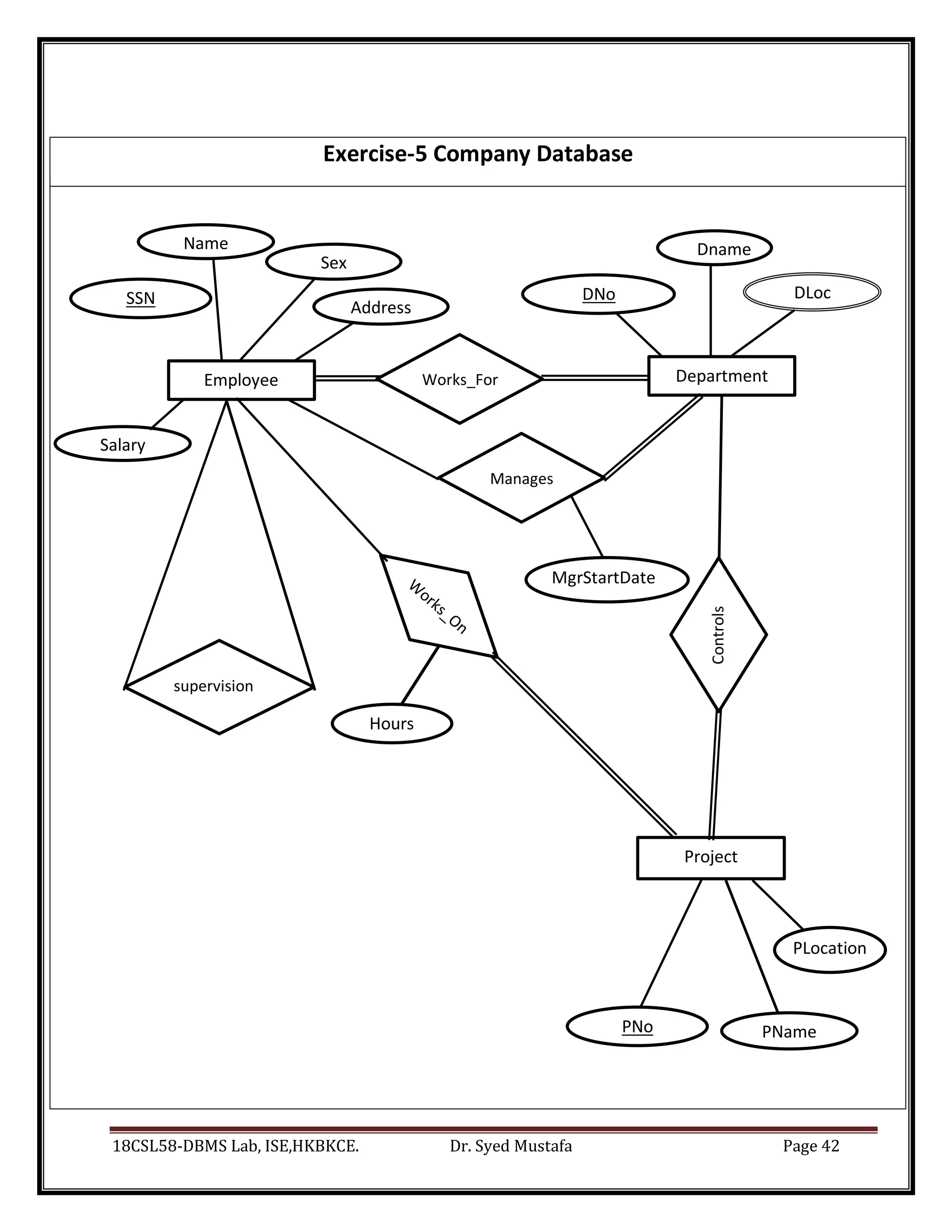
SSN DNo DLoc
MgrStartDate
re
PLocation
n
PName
PNo
Hours
re
Exercise-5 Company Database
Employee
Name
Sex
Department
Dname
supervision
Controls
Project
Salary
Address
Works_For
Manages
18CSL58-DBMS Lab, ISE,HKBKCE. Dr. Syed Mustafa Page 43
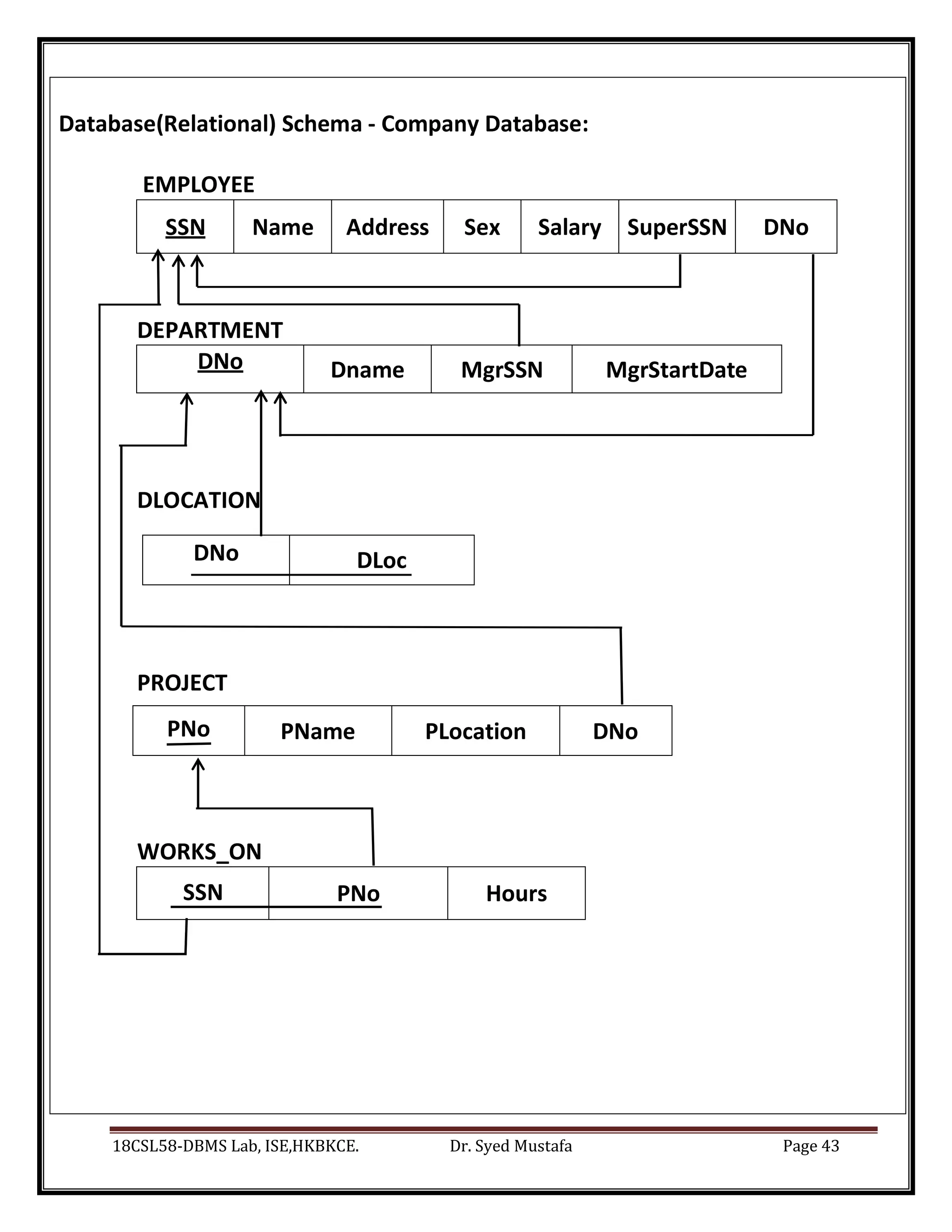
Database(Relational) Schema - Company Database:
EMPLOYEE
SSN Name Address Sex Salary SuperSSN DNo
DEPARTMENT
DNo Dname MgrSSN MgrStartDate
DLOCATION
DNo DLoc
PROJECT
PNo PName PLocation DNo
WORKS_ON
SSN PNo Hours
18CSL58-DBMS Lab, ISE,HKBKCE. Dr. Syed Mustafa Page 44
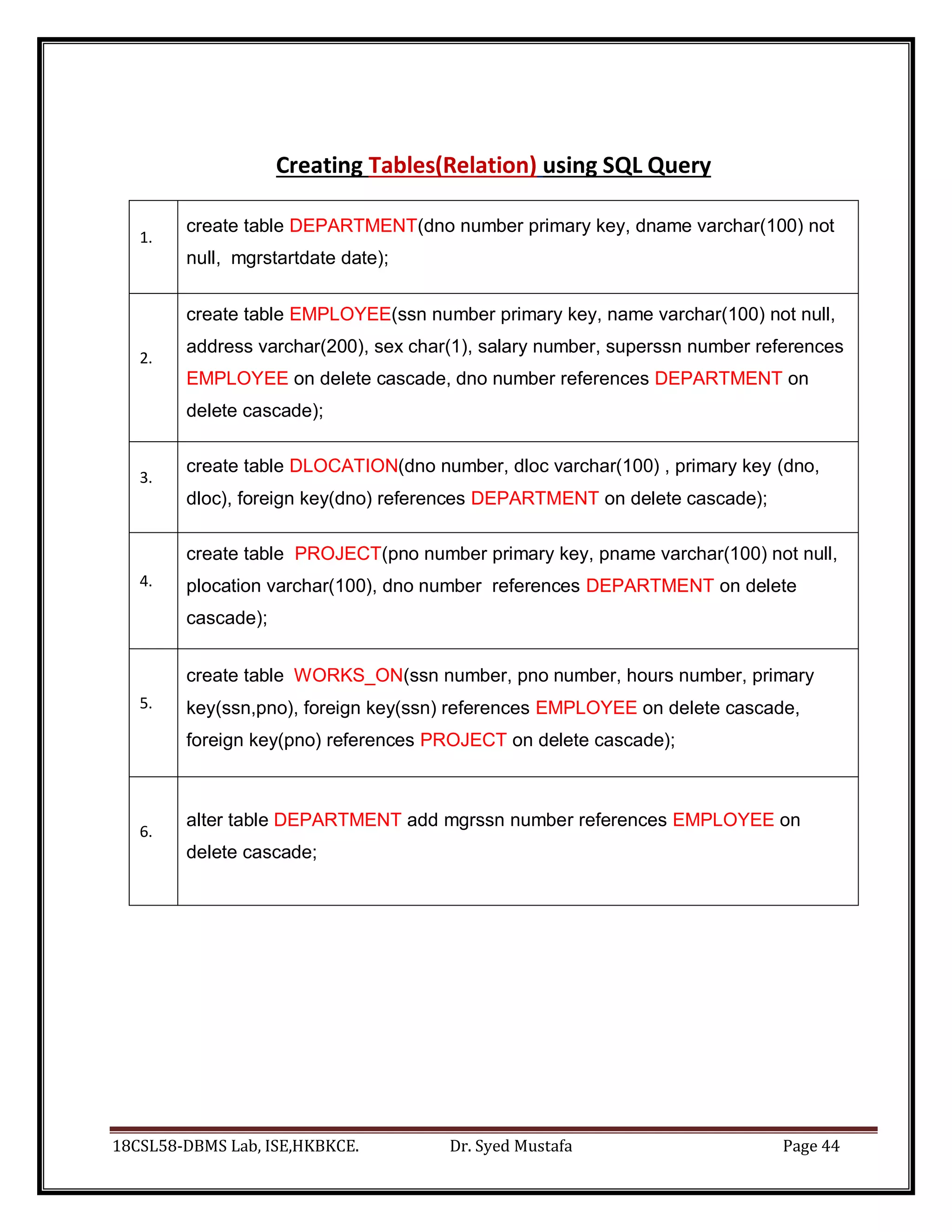
Creating Tables(Relation) using SQL Query
1.
create table DEPARTMENT(dno number primary key, dname varchar(100) not
null, mgrstartdate date);
2.
create table EMPLOYEE(ssn number primary key, name varchar(100) not null,
address varchar(200), sex char(1), salary number, superssn number references
EMPLOYEE on delete cascade, dno number references DEPARTMENT on
delete cascade);
3.
create table DLOCATION(dno number, dloc varchar(100) , primary key (dno,
dloc), foreign key(dno) references DEPARTMENT on delete cascade);
4.
create table PROJECT(pno number primary key, pname varchar(100) not null,
plocation varchar(100), dno number references DEPARTMENT on delete
cascade);
5.
create table WORKS_ON(ssn number, pno number, hours number, primary
key(ssn,pno), foreign key(ssn) references EMPLOYEE on delete cascade,
foreign key(pno) references PROJECT on delete cascade);
6.
alter table DEPARTMENT add mgrssn number references EMPLOYEE on
delete cascade;
18CSL58-DBMS Lab, ISE,HKBKCE. Dr. Syed Mustafa Page 45
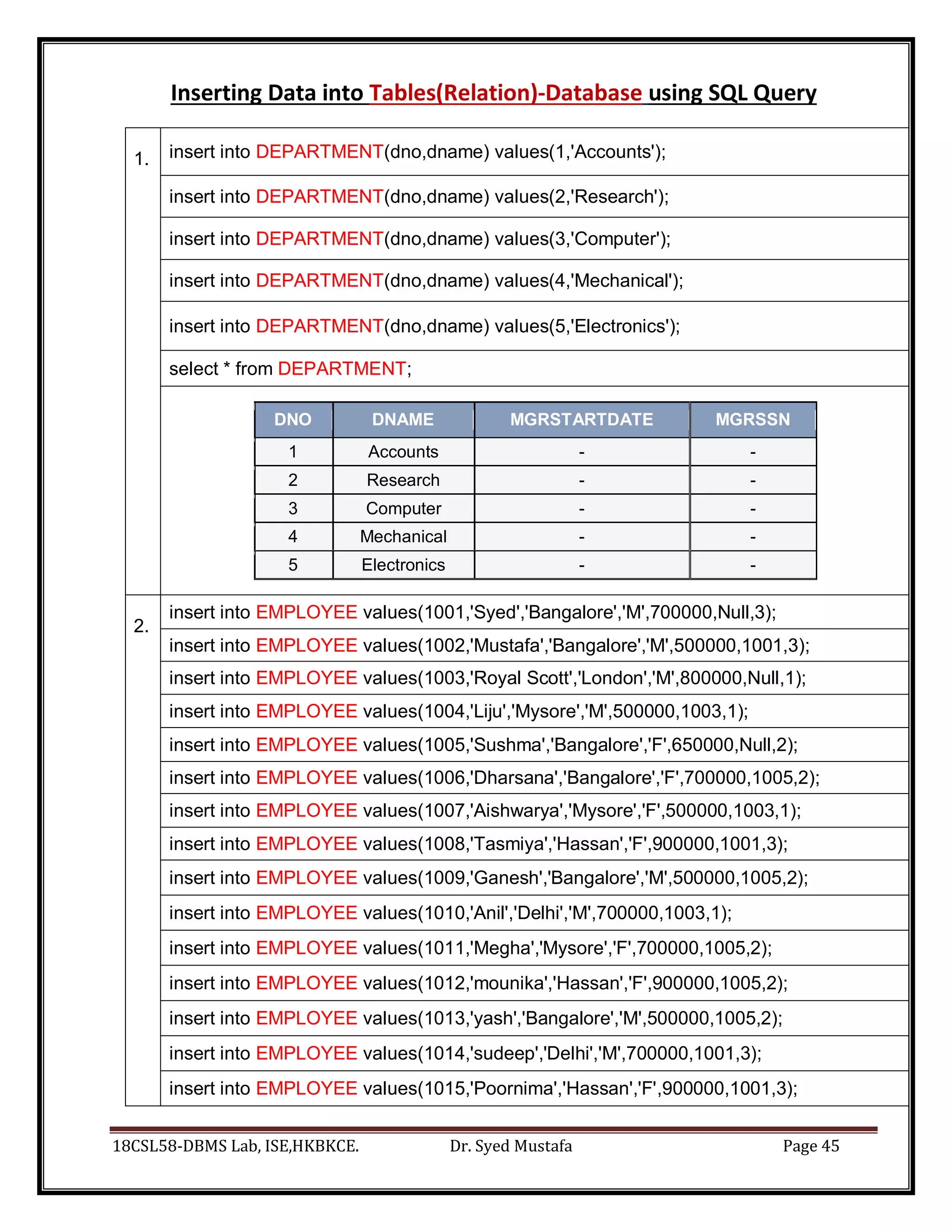
Inserting Data into Tables(Relation)-Database using SQL Query
1. insert into DEPARTMENT(dno,dname) values(1,'Accounts');
insert into DEPARTMENT(dno,dname) values(2,'Research');
insert into DEPARTMENT(dno,dname) values(3,'Computer');
insert into DEPARTMENT(dno,dname) values(4,'Mechanical');
insert into DEPARTMENT(dno,dname) values(5,'Electronics');
select * from DEPARTMENT;
DNO DNAME MGRSTARTDATE MGRSSN
1 Accounts - -
2 Research - -
3 Computer - -
4 Mechanical - -
5 Electronics - -
2.
insert into EMPLOYEE values(1001,'Syed','Bangalore','M',700000,Null,3);
insert into EMPLOYEE values(1002,'Mustafa','Bangalore','M',500000,1001,3);
insert into EMPLOYEE values(1003,'Royal Scott','London','M',800000,Null,1);
insert into EMPLOYEE values(1004,'Liju','Mysore','M',500000,1003,1);
insert into EMPLOYEE values(1005,'Sushma','Bangalore','F',650000,Null,2);
insert into EMPLOYEE values(1006,'Dharsana','Bangalore','F',700000,1005,2);
insert into EMPLOYEE values(1007,'Aishwarya','Mysore','F',500000,1003,1);
insert into EMPLOYEE values(1008,'Tasmiya','Hassan','F',900000,1001,3);
insert into EMPLOYEE values(1009,'Ganesh','Bangalore','M',500000,1005,2);
insert into EMPLOYEE values(1010,'Anil','Delhi','M',700000,1003,1);
insert into EMPLOYEE values(1011,'Megha','Mysore','F',700000,1005,2);
insert into EMPLOYEE values(1012,'mounika','Hassan','F',900000,1005,2);
insert into EMPLOYEE values(1013,'yash','Bangalore','M',500000,1005,2);
insert into EMPLOYEE values(1014,'sudeep','Delhi','M',700000,1001,3);
insert into EMPLOYEE values(1015,'Poornima','Hassan','F',900000,1001,3);
18CSL58-DBMS Lab, ISE,HKBKCE. Dr. Syed Mustafa Page 46
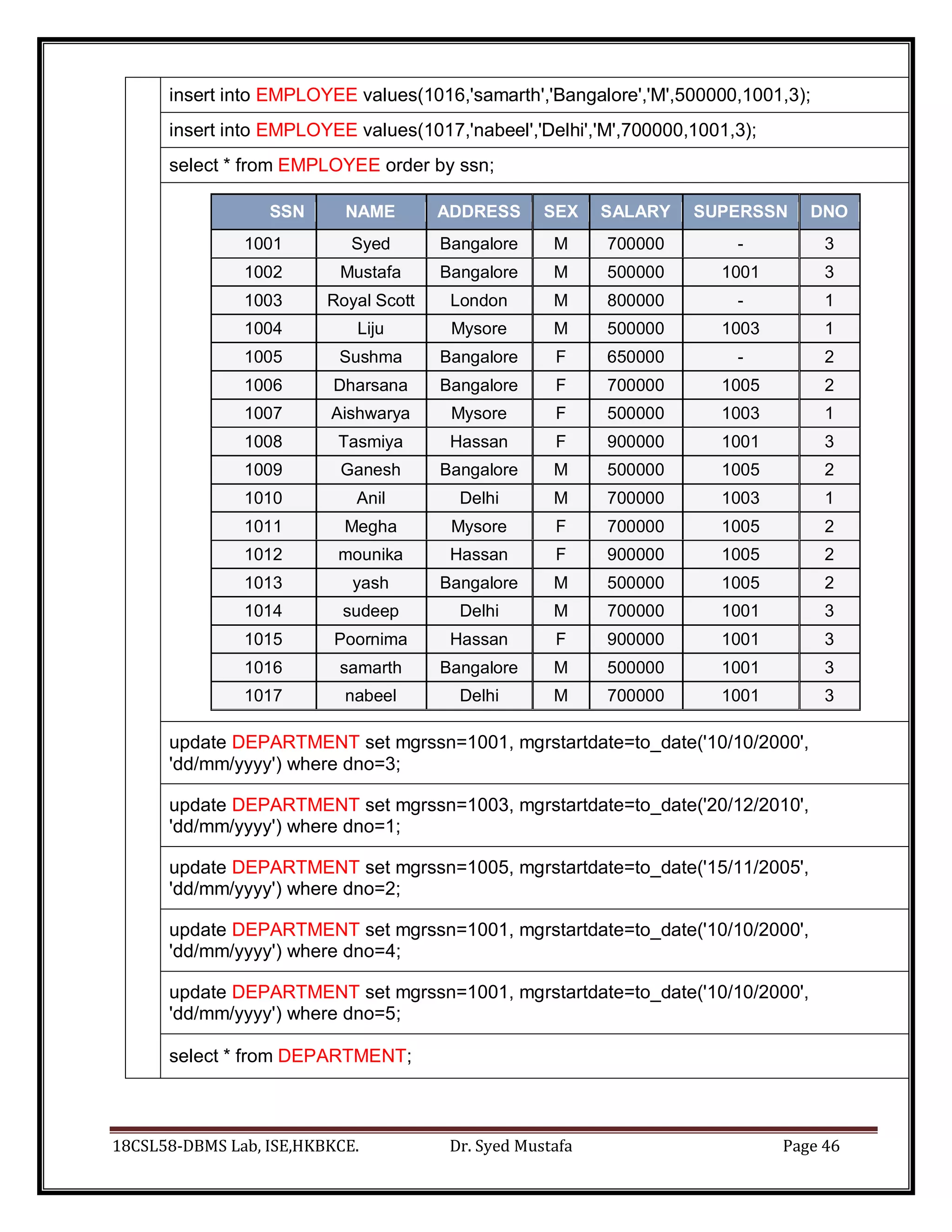
insert into EMPLOYEE values(1016,'samarth','Bangalore','M',500000,1001,3);
insert into EMPLOYEE values(1017,'nabeel','Delhi','M',700000,1001,3);
select * from EMPLOYEE order by ssn;
SSN NAME ADDRESS SEX SALARY SUPERSSN DNO
1001 Syed Bangalore M 700000 - 3
1002 Mustafa Bangalore M 500000 1001 3
1003 Royal Scott London M 800000 - 1
1004 Liju Mysore M 500000 1003 1
1005 Sushma Bangalore F 650000 - 2
1006 Dharsana Bangalore F 700000 1005 2
1007 Aishwarya Mysore F 500000 1003 1
1008 Tasmiya Hassan F 900000 1001 3
1009 Ganesh Bangalore M 500000 1005 2
1010 Anil Delhi M 700000 1003 1
1011 Megha Mysore F 700000 1005 2
1012 mounika Hassan F 900000 1005 2
1013 yash Bangalore M 500000 1005 2
1014 sudeep Delhi M 700000 1001 3
1015 Poornima Hassan F 900000 1001 3
1016 samarth Bangalore M 500000 1001 3
1017 nabeel Delhi M 700000 1001 3
update DEPARTMENT set mgrssn=1001, mgrstartdate=to_date('10/10/2000',
'dd/mm/yyyy') where dno=3;
update DEPARTMENT set mgrssn=1003, mgrstartdate=to_date('20/12/2010',
'dd/mm/yyyy') where dno=1;
update DEPARTMENT set mgrssn=1005, mgrstartdate=to_date('15/11/2005',
'dd/mm/yyyy') where dno=2;
update DEPARTMENT set mgrssn=1001, mgrstartdate=to_date('10/10/2000',
'dd/mm/yyyy') where dno=4;
update DEPARTMENT set mgrssn=1001, mgrstartdate=to_date('10/10/2000',
'dd/mm/yyyy') where dno=5;
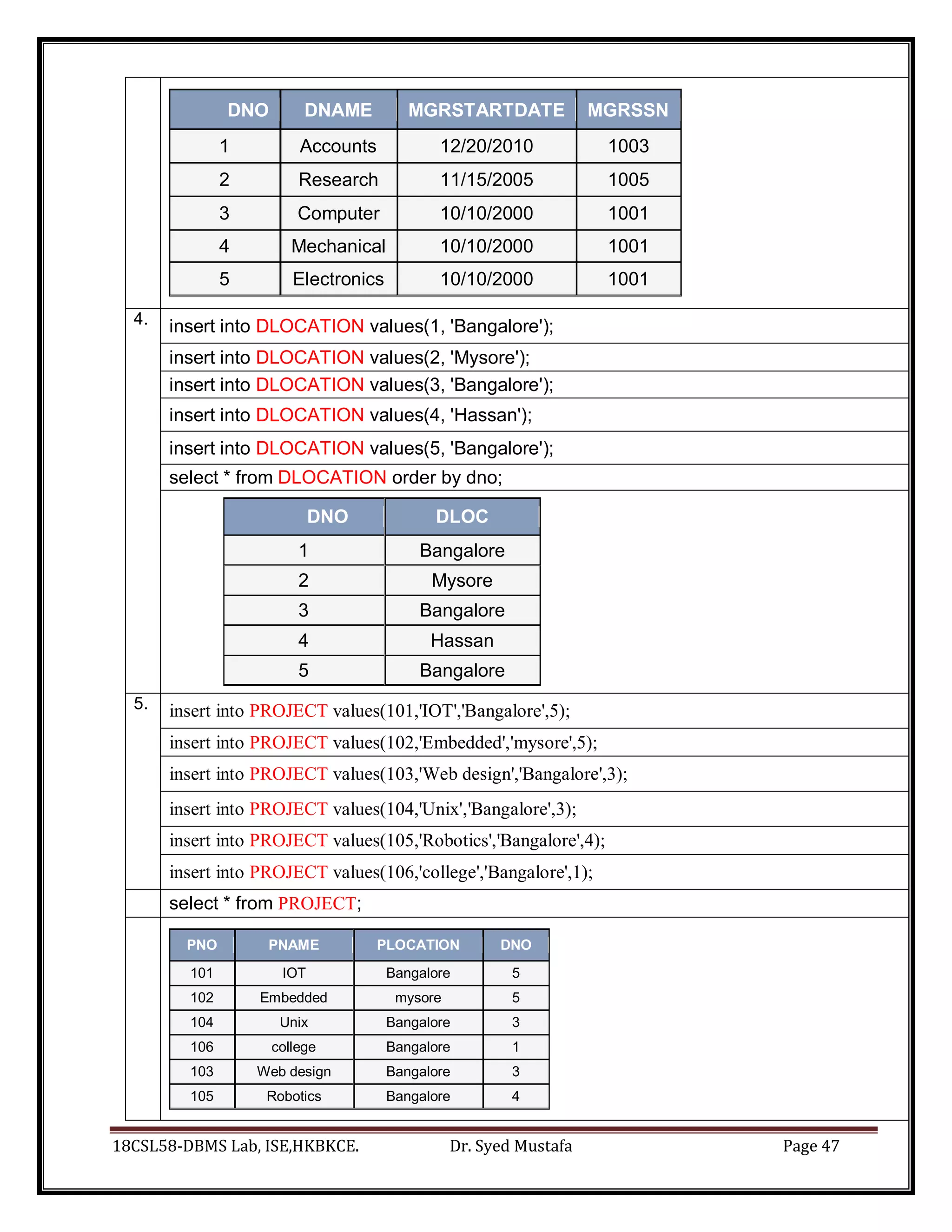
select * from DEPARTMENT;
18CSL58-DBMS Lab, ISE,HKBKCE. Dr. Syed Mustafa Page 47
DNO DNAME MGRSTARTDATE MGRSSN
1 Accounts 12/20/2010 1003
2 Research 11/15/2005 1005
3 Computer 10/10/2000 1001
4 Mechanical 10/10/2000 1001
5 Electronics 10/10/2000 1001
4. insert into DLOCATION values(1, 'Bangalore');
insert into DLOCATION values(2, 'Mysore');
insert into DLOCATION values(3, 'Bangalore');
insert into DLOCATION values(4, 'Hassan');
insert into DLOCATION values(5, 'Bangalore');
select * from DLOCATION order by dno;
DNO DLOC
1 Bangalore
2 Mysore
3 Bangalore
4 Hassan
5 Bangalore
5. insert into PROJECT values(101,'IOT','Bangalore',5);
insert into PROJECT values(102,'Embedded','mysore',5);
insert into PROJECT values(103,'Web design','Bangalore',3);
insert into PROJECT values(104,'Unix','Bangalore',3);
insert into PROJECT values(105,'Robotics','Bangalore',4);
insert into PROJECT values(106,'college','Bangalore',1);
select * from PROJECT;
PNO PNAME PLOCATION DNO
101 IOT Bangalore 5
102 Embedded mysore 5
104 Unix Bangalore 3
106 college Bangalore 1
103 Web design Bangalore 3
105 Robotics Bangalore 4
18CSL58-DBMS Lab, ISE,HKBKCE. Dr. Syed Mustafa Page 48
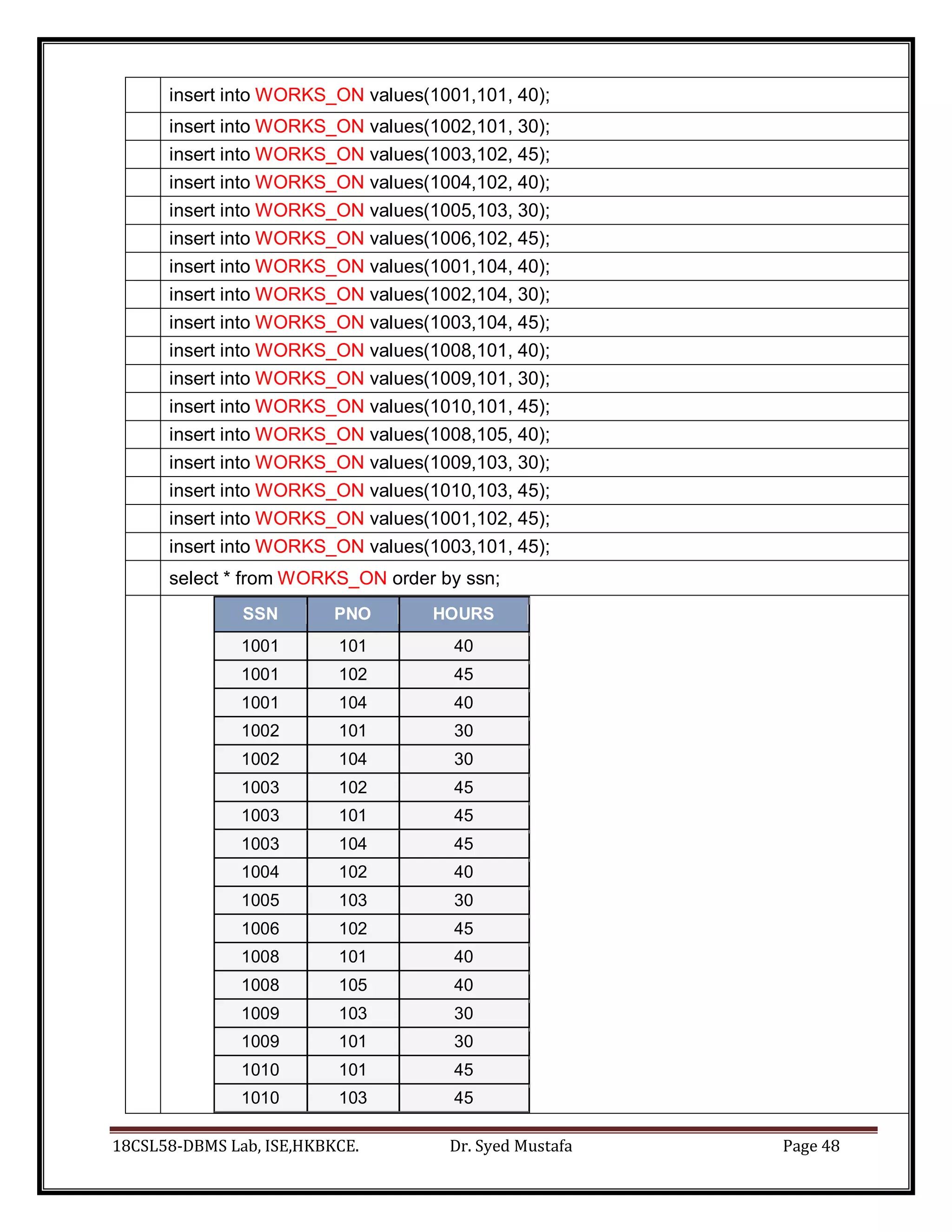
insert into WORKS_ON values(1001,101, 40);
insert into WORKS_ON values(1002,101, 30);
insert into WORKS_ON values(1003,102, 45);
insert into WORKS_ON values(1004,102, 40);
insert into WORKS_ON values(1005,103, 30);
insert into WORKS_ON values(1006,102, 45);
insert into WORKS_ON values(1001,104, 40);
insert into WORKS_ON values(1002,104, 30);
insert into WORKS_ON values(1003,104, 45);
insert into WORKS_ON values(1008,101, 40);
insert into WORKS_ON values(1009,101, 30);
insert into WORKS_ON values(1010,101, 45);
insert into WORKS_ON values(1008,105, 40);
insert into WORKS_ON values(1009,103, 30);
insert into WORKS_ON values(1010,103, 45);
insert into WORKS_ON values(1001,102, 45);
insert into WORKS_ON values(1003,101, 45);
select * from WORKS_ON order by ssn;
SSN PNO HOURS
1001 101 40
1001 102 45
1001 104 40
1002 101 30
1002 104 30
1003 102 45
1003 101 45
1003 104 45
1004 102 40
1005 103 30
1006 102 45
1008 101 40
1008 105 40
1009 103 30
1009 101 30
1010 101 45
1010 103 45
18CSL58-DBMS Lab, ISE,HKBKCE. Dr. Syed Mustafa Page 49
Queries as per Lab Exercise
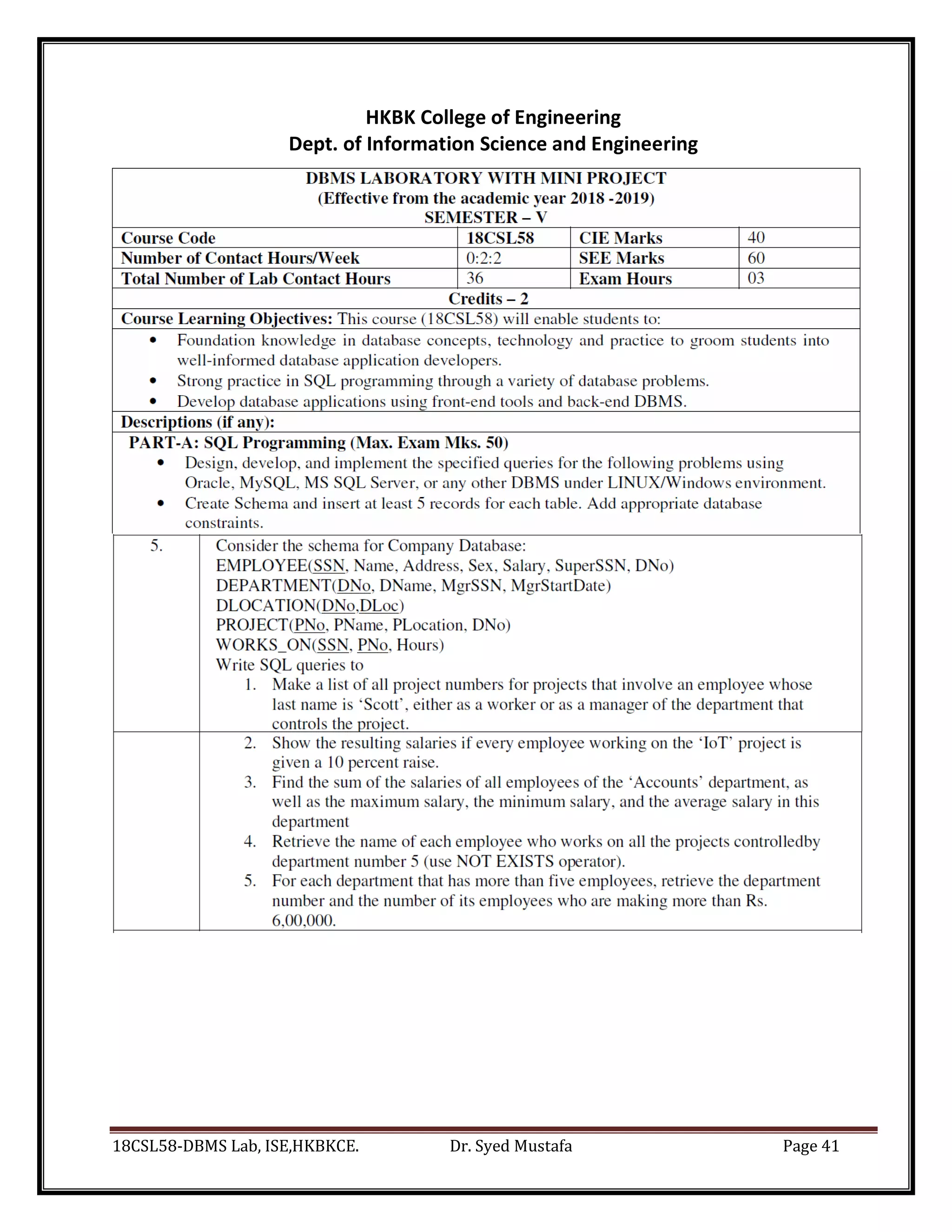
Query 1.
Make a list of all project numbers for projects that involve an employee whose last
name is ‘Scott’, either as a worker or as a manager of the department that controls the
project.
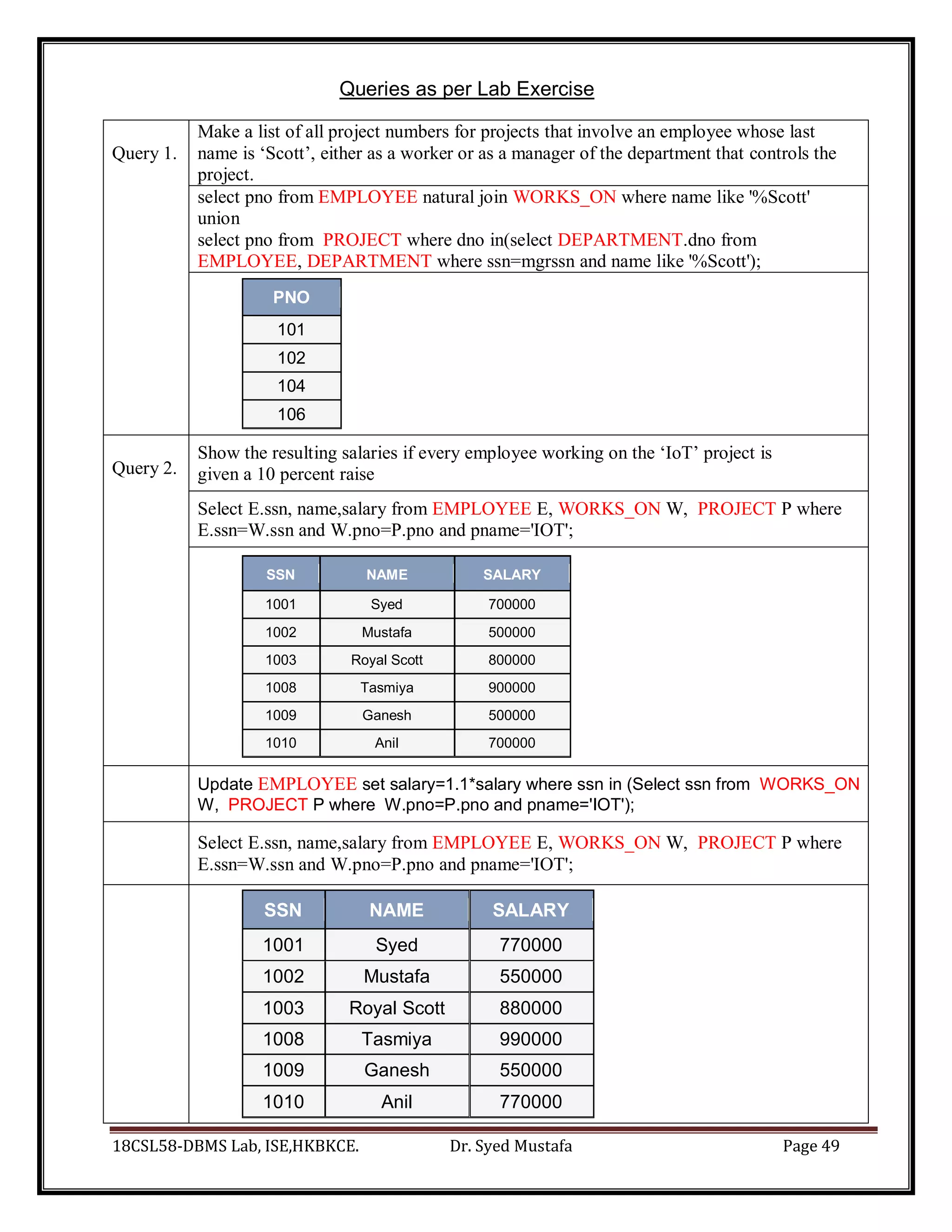
select pno from EMPLOYEE natural join WORKS_ON where name like '%Scott'
union
select pno from PROJECT where dno in(select DEPARTMENT.dno from
EMPLOYEE, DEPARTMENT where ssn=mgrssn and name like '%Scott');
PNO
101
102
104
106
Query 2.
Show the resulting salaries if every employee working on the ‘IoT’ project is
given a 10 percent raise
Select E.ssn, name,salary from EMPLOYEE E, WORKS_ON W, PROJECT P where
E.ssn=W.ssn and W.pno=P.pno and pname='IOT';
SSN NAME SALARY
1001 Syed 700000
1002 Mustafa 500000
1003 Royal Scott 800000
1008 Tasmiya 900000
1009 Ganesh 500000
1010 Anil 700000
Update EMPLOYEE set salary=1.1*salary where ssn in (Select ssn from WORKS_ON
W, PROJECT P where W.pno=P.pno and pname='IOT');
Select E.ssn, name,salary from EMPLOYEE E, WORKS_ON W, PROJECT P where
E.ssn=W.ssn and W.pno=P.pno and pname='IOT';
SSN NAME SALARY
1001 Syed 770000
1002 Mustafa 550000
1003 Royal Scott 880000
1008 Tasmiya 990000
1009 Ganesh 550000
1010 Anil 770000
18CSL58-DBMS Lab, ISE,HKBKCE. Dr. Syed Mustafa Page 50
Query 3.
Find the sum of the salaries of all employees of the ‘Accounts’ department, as
well as the maximum salary, the minimum salary, and the average salary in this
department
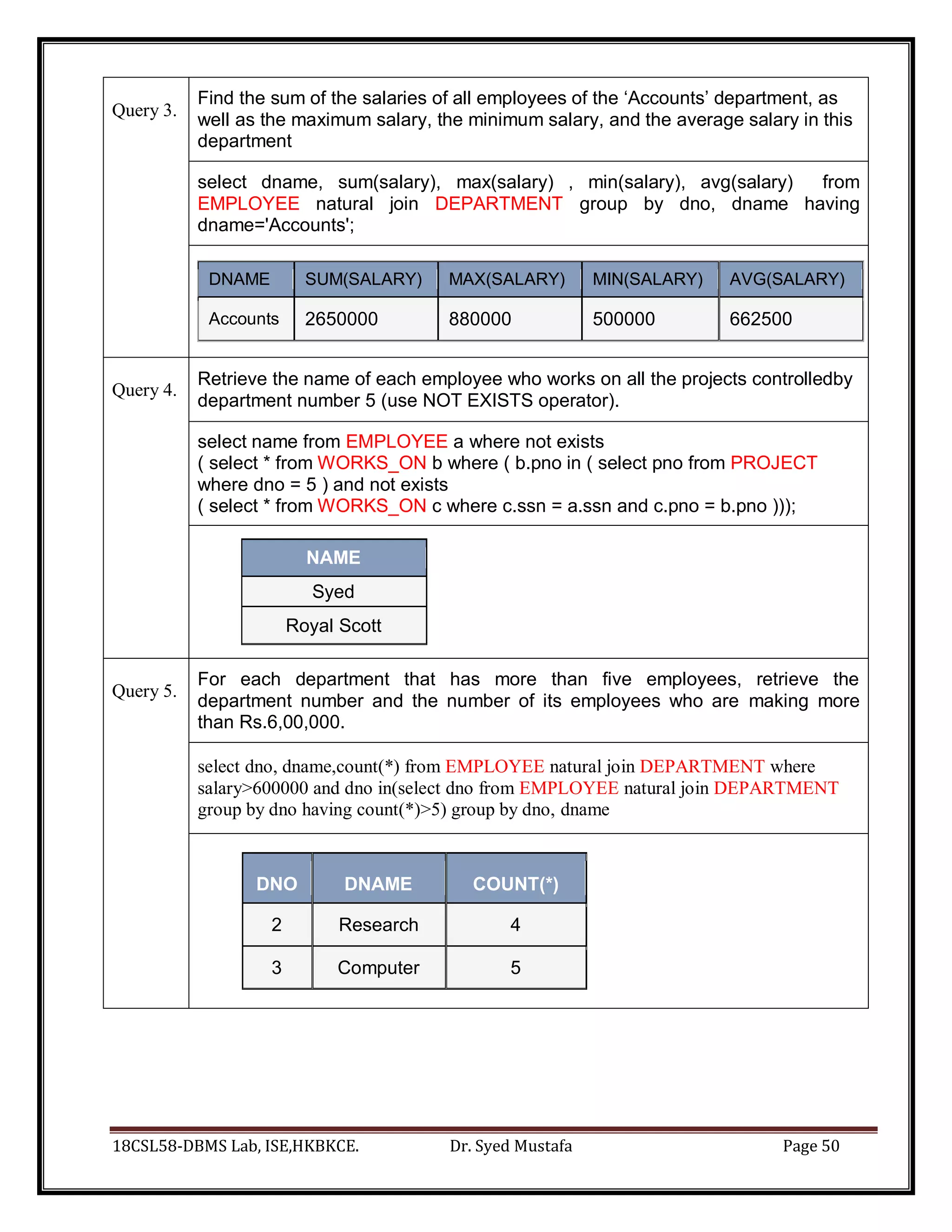
select dname, sum(salary), max(salary) , min(salary), avg(salary) from
EMPLOYEE natural join DEPARTMENT group by dno, dname having
dname='Accounts';
DNAME SUM(SALARY) MAX(SALARY) MIN(SALARY) AVG(SALARY)
Accounts 2650000 880000 500000 662500
Query 4.
Retrieve the name of each employee who works on all the projects controlledby
department number 5 (use NOT EXISTS operator).
select name from EMPLOYEE a where not exists
( select * from WORKS_ON b where ( b.pno in ( select pno from PROJECT
where dno = 5 ) and not exists
( select * from WORKS_ON c where c.ssn = a.ssn and c.pno = b.pno )));
NAME
Syed
Royal Scott
Query 5.
For each department that has more than five employees, retrieve the
department number and the number of its employees who are making more
than Rs.6,00,000.
select dno, dname,count(*) from EMPLOYEE natural join DEPARTMENT where
salary>600000 and dno in(select dno from EMPLOYEE natural join DEPARTMENT
group by dno having count(*)>5) group by dno, dname
DNO DNAME COUNT(*)
2 Research 4
3 Computer 5
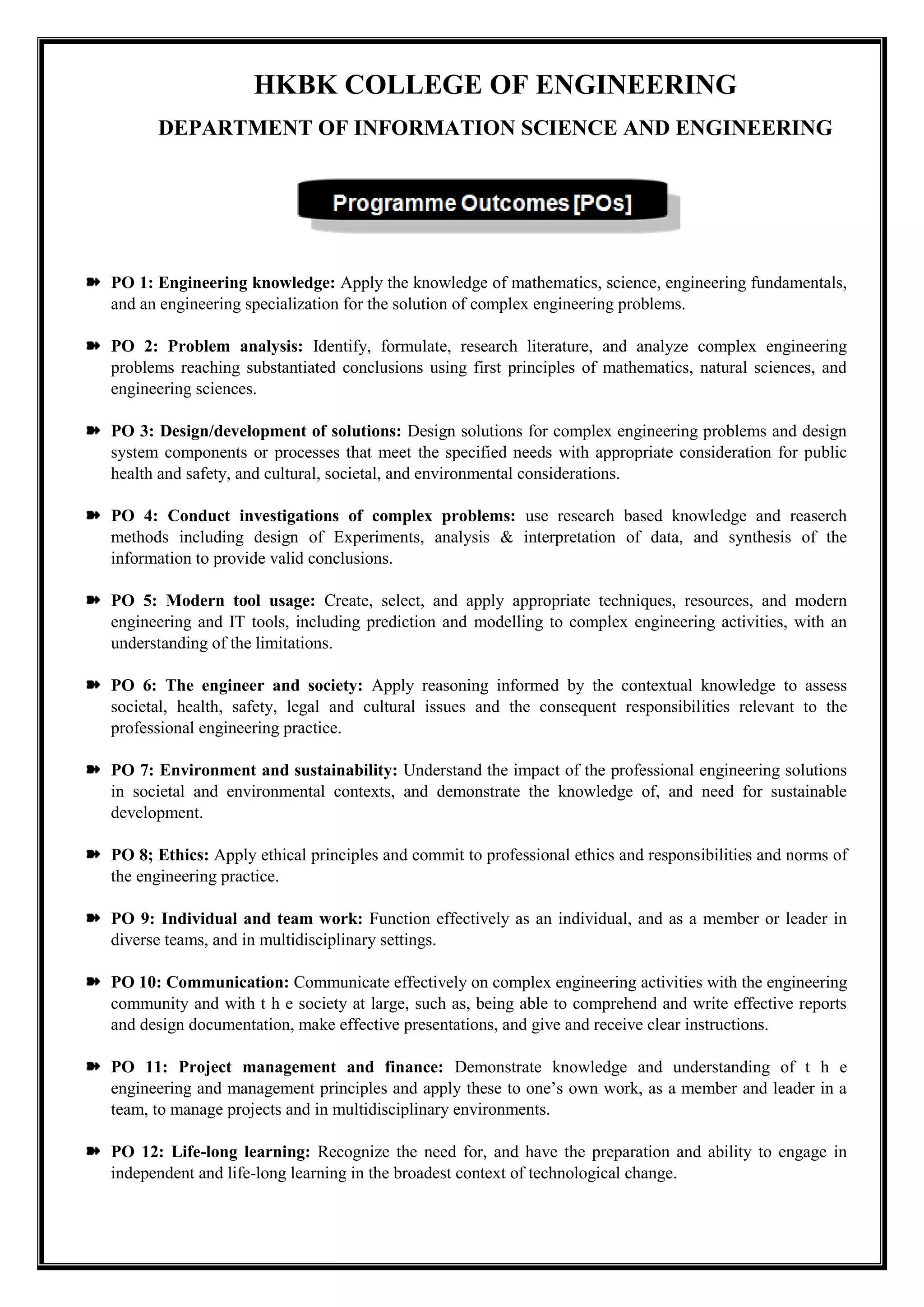
HKBK COLLEGE OF ENGINEERING
DEPARTMENT OF INFORMATION SCIENCE AND ENGINEERING
PO 1: Engineering knowledge: Apply the knowledge of mathematics, science, engineering fundamentals,
and an engineering specialization for the solution of complex engineering problems.
PO 2: Problem analysis: Identify, formulate, research literature, and analyze complex engineering
problems reaching substantiated conclusions using first principles of mathematics, natural sciences, and
engineering sciences.
PO 3: Design/development of solutions: Design solutions for complex engineering problems and design
system components or processes that meet the specified needs with appropriate consideration for public
health and safety, and cultural, societal, and environmental considerations.
PO 4: Conduct investigations of complex problems: use research based knowledge and reaserch
methods including design of Experiments, analysis & interpretation of data, and synthesis of the
information to provide valid conclusions.
PO 5: Modern tool usage: Create, select, and apply appropriate techniques, resources, and modern
engineering and IT tools, including prediction and modelling to complex engineering activities, with an
understanding of the limitations.
PO 6: The engineer and society: Apply reasoning informed by the contextual knowledge to assess
societal, health, safety, legal and cultural issues and the consequent responsibilities relevant to the
professional engineering practice.
PO 7: Environment and sustainability: Understand the impact of the professional engineering solutions
in societal and environmental contexts, and demonstrate the knowledge of, and need for sustainable
development.
PO 8; Ethics: Apply ethical principles and commit to professional ethics and responsibilities and norms of
the engineering practice.
PO 9: Individual and team work: Function effectively as an individual, and as a member or leader in
diverse teams, and in multidisciplinary settings.
PO 10: Communication: Communicate effectively on complex engineering activities with the engineering
community and with t h e society at large, such as, being able to comprehend and write effective reports
and design documentation, make effective presentations, and give and receive clear instructions.
PO 11: Project management and finance: Demonstrate knowledge and understanding of t h e
engineering and management principles and apply these to one’s own work, as a member and leader in a
team, to manage projects and in multidisciplinary environments.
PO 12: Life-long learning: Recognize the need for, and have the preparation and ability to engage in
independent and life-long learning in the broadest context of technological change.
HKBK COLLEGE OF ENGINEERING
DEPARTMENT OF INFORMATION SCIENCE AND ENGINEERING
PEO 1: To Empower Students through Wholesome Education to achieve academic
excellent education in the field of Information Science and Engineering.
PEO 2: To Provide Students with in-depth disciplinary knowledge in engineering
fundamentals that require to succeed in Information Science and Engineering.
PEO 3: To Create Highly Qualified Professionals in multi-disciplinary areas with
the knowledge of Information Technologies, Services Globally.
PEO 4: To Inculcate in Students Professional and Ethical attitude with a strong
character with effective communication skills, teamwork skills, multidisciplinary
approach, and an ability to relate Engineering issues to broader social context.
PEO 5: To Provide Students with an academic environment aware of advanced
technological growth leading to life-long learning through innovation and research
with professional ethics that uplifts mankind.
Professional Skills:
An ability to identify and analyze requirements, and in designing and implementing
well-tested technology solutions for rapidly changing computing problems and
information system environments.
Problem-Solving Skills:
An ability to Design, develop and optimize solutions for information systems
employing fundamentals of system hardware & software, graph theory, finite
automata, data storage and communication networks.
Collaborative Skills:
An ability to communicate and develop leadership skills, and work effectively in
team environments. They are capable of collaborating to design and implement well-
tested solutions for rapidly changing computing problems and information system
environments.
Successful Career and Entrepreneurship Skills:
An ability to adapt for innovation and changes and be successful in ethical
professional careers along with the impact of computing on society, and platforms in
creating innovative career paths to be an entrepreneur, and a zest for higher studies.
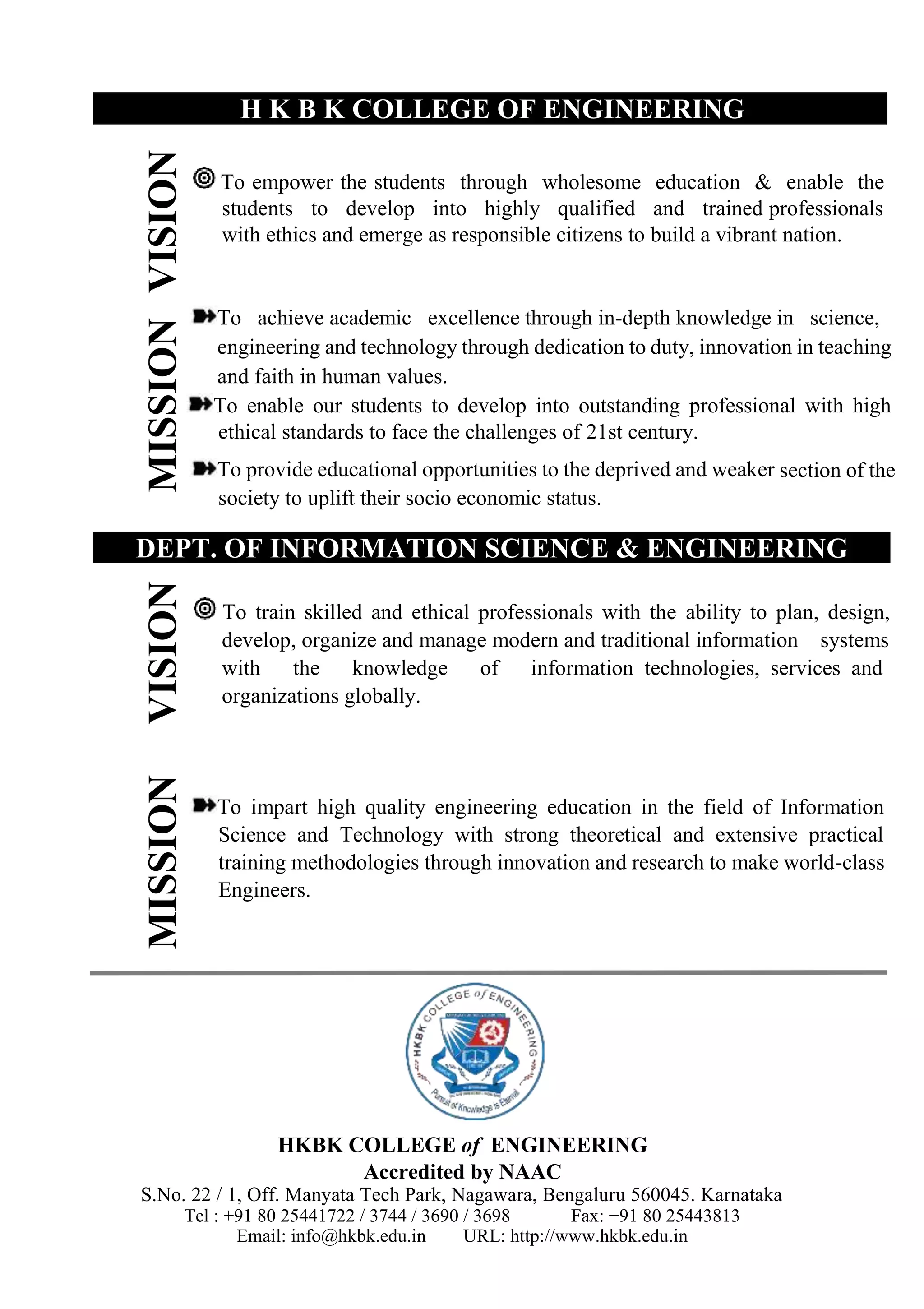
MISSION
VISION
MISSION
VISION
H K B K COLLEGE OF ENGINEERING
To empower the students through wholesome education & enable the
students to develop into highly qualified and trained professionals
with ethics and emerge as responsible citizens to build a vibrant nation.
To achieve academic excellence through in-depth knowledge in science,
engineering and technology through dedication to duty, innovation in teaching
and faith in human values.
To enable our students to develop into outstanding professional with high
ethical standards to face the challenges of 21st century.
To provide educational opportunities to the deprived and weaker section of the
society to uplift their socio economic status.
DEPT. OF INFORMATION SCIENCE & ENGINEERING
To train skilled and ethical professionals with the ability to plan, design,
develop, organize and manage modern and traditional information systems
with the knowledge of information technologies, services and
organizations globally.
To impart high quality engineering education in the field of Information
Science and Technology with strong theoretical and extensive practical
training methodologies through innovation and research to make world-class
Engineers.
HKBK COLLEGE of ENGINEERING
Accredited by NAAC
S.No. 22 / 1, Off. Manyata Tech Park, Nagawara, Bengaluru 560045. Karnataka
Tel : +91 80 25441722 / 3744 / 3690 / 3698 Fax: +91 80 25443813
Email: info@hkbk.edu.in URL: http://www.hkbk.edu.in

18CSL58 DBMS LAB Manual.pdf

  • 1.
    DBMS LABORATORY [18CSL58 ] Prof. A. Syed Mustafa, HKBKCE. Page 1 of 1 DS Lab Programs DBMS LABORATORY [ 18CSL58 ] DEPARTMENT OF INFORMATION SCIENCE AND ENGINEERING -------------------- HKBK COLLEGE OF ENGINEERING Bengaluru - 560045 by: Dr. Syed Mustafa A
  • 2.
    18CSL58-DBMS Lab, ISE,HKBKCE.Dr. Syed Mustafa Page 1 HKBK College of Engineering Dept. of Information Science and Engineering
  • 3.
    18CSL58-DBMS Lab, ISE,HKBKCE.Dr. Syed Mustafa Page 2 Book_id No_of_Copies Name Address Auther_Name me Programme_id Programme_Name e Address Exercise-1 Library Database Pub_Year BOOK_AUTHORS BOOK Title Publisher Phone LIBRARY_PROGRAMME Published by Authored by
  • 4.
    18CSL58-DBMS Lab, ISE,HKBKCE.Dr. Syed Mustafa Page 3 Database(Relational) Schema - Library Database: PUBLISHER Name Address Phone BOOK Book_id Title Publisher_Name Pub_Year BOOK_AUTHORS Book_id Author_Name LIBRARY_PROGRAMME Programme_id Programme_Name Address BOOK_COPIES Book_id Programme_id No_of_Copies BOOK_LENDING Book_id Programme_id Card_No Date_Out Due_Date
  • 5.
    18CSL58-DBMS Lab, ISE,HKBKCE.Dr. Syed Mustafa Page 4 Creating Tables(Relation) using SQL Query 1. Create table publisher (Name varchar(50) primary key, Address varchar(100), Phone number(10)); 2. Create table BOOK (Book_id number primary key, Title varchar(100), Publisher_Name varchar(100) references publisher on delete cascade, Pub_Year number(4)); 3. Create table BOOK_AUTHORS (Book_id number, Author_Name varchar(100), primary key(Book_id, Author_Name), foreign key(Book_id) references BOOK on delete cascade ); 4. Create table LIBRARY_PROGRAMME (Programme_id number primary key, Programme_Name varchar(100), Address varchar(100)); 5. Create table BOOK_COPIES (Book_id number, Programme_id number, No_of_Copies number, primary key(Book_id, Programme_id), foreign key(Book_id) references BOOK on delete cascade , foreign key(Programme_id) references LIBRARY_PROGRAMME on delete cascade ); (or) Create table BOOK_COPIES ( Book_id number, Programme_id number, No_of_Copies number, primary key(Book_id, Programme_id), foreign key(Book_id) references BOOK on delete cascade , foreign key(Programme_id) references LIBRARY_PROGRAMME on delete cascade ); 6. Create table BOOK_LENDING (Book_id number, Programme_id number, Card_No number, Date_Out date, Due_Date date, Primary key(Book_id, Programme_id, Card_No), foreign key(Book_id) references BOOK on delete cascade , foreign key(Programme_id) references LIBRARY_PROGRAMME on delete cascade );
  • 6.
    18CSL58-DBMS Lab, ISE,HKBKCE.Dr. Syed Mustafa Page 5 Inserting Data into Tables(Relation)-Database using SQL Query 1. insert into publisher values('TMH','Bangalore',8012345678); insert into publisher values('Addision Wesley','Mumbai',2212345678); insert into publisher values('Pearson','chennai',4412345678); insert into publisher values('Cengage','hyderabad',3312345678); insert into publisher values('Oxford','New Delhi',1112345678); select * from publisher; NAME ADDRESS PHONE TMH Bangalore 8012345678 Addision Wesley Mumbai 2212345678 Pearson chennai 4412345678 Oxford New Delhi 1112345678 Cengage hyderabad 3312345678 2. insert into BOOK values(100,'Unix Concepts and Applications','TMH',2005); insert into BOOK values(101, 'UNIX & Shell Programming','Pearson',2014); insert into BOOK values(102, 'Core Python Applications Programming','Pearson',2015); insert into BOOK values(103, 'Formal Languages and Automata Theory','Oxford',2012); insert into BOOK values(104, 'Fundamentals of Database Systems','Pearson',2017); select * from book; BOOK_ID TITLE PUBLISHER_NAME PUB_YEAR 103 Formal Languages and Automata Theory Oxford 2012 104 Fundamentals of Database Systems Pearson 2017 100 Unix Concepts and Applications TMH 2005 101 UNIX & Shell Programming Pearson 2014 102 Core Python Applications Programming Pearson 2015 3. insert into book_authors values(100, 'Sumitabha Das'); insert into book_authors values(101, 'Venkatesh Murthy'); insert into book_authors values(102, 'Wesley J Chun'); insert into book_authors values(103 , 'C K Nagpal'); insert into book_authors values(104 , 'Ramez Elmasri'); insert into book_authors values(104 , 'Shamkant B. Navathe');
  • 7.
    18CSL58-DBMS Lab, ISE,HKBKCE.Dr. Syed Mustafa Page 6 select * from book_authors; BOOK_ID AUTHOR_NAME 100 Sumitabha Das 101 Venkatesh Murthy 102 Wesley J Chun 103 C K Nagpal 104 Ramez Elmasri 104 Shamkant B. Navathe 4. insert into library_programme values(1,'CSE', 'Block A'); insert into library_programme values(2,'ISE', 'Block F'); insert into library_programme values(3,'ECE', 'Block B'); insert into library_programme values(4,'ME', 'Block D'); insert into library_programme values(5,'CIV', 'Block D'); select * from library_programme; PROGRAMME_ID PROGRAMME_NAME ADDRESS 1 CSE Block A 3 ECE Block B 4 ME Block D 5 CIV Block D 2 ISE Block F 5. insert into book_copies values(100,1,5); insert into book_copies values(100,2,40); insert into book_copies values(101,1,10); insert into book_copies values(101,2,60); insert into book_copies values(101,3,20); insert into book_copies values(102,1,60); insert into book_copies values(102,2,100); insert into book_copies values(102,3,50); insert into book_copies values(103,3,20); insert into book_copies values(104,1,50);
  • 8.
    18CSL58-DBMS Lab, ISE,HKBKCE.Dr. Syed Mustafa Page 7 select * from book_copies; BOOK_ID PROGRAMME_ID NO_OF_COPIES 103 3 20 101 2 60 101 3 20 104 1 50 100 1 5 100 2 40 101 1 10 102 1 60 102 2 100 102 3 50 6. ( ***Note: Use SQL Command Prompt DOS Shell Window to avoid date Error***) insert into book_lending values(100,1,200,'15-Oct-2019', '30-Oct-2019'); (or) insert into book_lending values(100,1,200,TO_DATE('15-Oct-2019','dd-mon-yyyy'), TO_DATE('30-Oct-2019','dd-mon-yyyy')); insert into book_lending values(101,1,200,'5-Sep-2020', '20-Sep-2020'); (or) insert into book_lending values(101,1,200,TO_DATE('5-Sep-2020','dd-mon-yyyy'), TO_DATE('20-Sep-2020','dd-mon-yyyy')); insert into book_lending values(102,1,300,'15-Jan-2017', '20-April-2017'); (or) insert into book_lending values(102,1,300,TO_DATE('15-Jan-2017','dd-mon-yyyy'), TO_DATE('20-April-2017','dd-mon-yyyy')); insert into book_lending values(101,1,300,'15-feb-2017', '20-may-2017'); (or) insert into book_lending values(101,1,300,TO_DATE('15-feb-2017','dd-mon-yyyy'), TO_DATE('20-may-2017','dd-mon-yyyy')); insert into book_lending values(103,1,300,'15-march-2017', '20-april-2017'); (or) insert into book_lending values(103,1,300,TO_DATE('15-march-2017','dd-mon-yyyy'), TO_DATE('20-april-2017','dd-mon-yyyy')); insert into book_lending values(104,1,300,'15-april-2017', '20-jun-2017'); (or) insert into book_lending values(104,1,300,TO_DATE('15-april-2017','dd-mon-yyyy'), TO_DATE('20-jun-2017','dd-mon-yyyy')); select * from book_lending; BOOK_ID PROGRAMME_ID CARD_NO DATE_OUT DUE_DATE 100 1 200 10/15/2019 10/30/2019 101 1 200 09/05/2020 09/20/2020 102 1 300 01/15/2017 04/20/2017 101 1 300 02/15/2017 05/20/2017 104 1 300 04/15/2017 06/20/2017 103 1 300 03/15/2017 04/20/2017
  • 9.
    18CSL58-DBMS Lab, ISE,HKBKCE.Dr. Syed Mustafa Page 8 Queries as per Lab Exercise Query 1. Retrieve details of all books in the library – id, title, name of publisher, authors, number of copies in each Programme, etc. select bk.book_id, title, publisher_name, author_name, no_of_copies, programme_name from book bk, book_authors ba, library_programme lp, book_copies bc where bk.book_id=ba.book_id and bk.book_id=bc.book_id and bc. Programme_id=lp. Programme_id order by programme_name, bk.book_id; BOOK_ID TITLE PUBLISHER_NAME AUTHOR_NAME NO_OF_COPIES PROGRAMME_NAME 100 Unix Concepts and Applications TMH Sumitabha Das 5 CSE 101 UNIX & Shell Programming Pearson Venkatesh Murthy 10 CSE 102 Core Python Applications Programming Pearson Wesley J Chun 60 CSE 104 Fundamentals of Database Systems Pearson Ramez Elmasri 50 CSE 104 Fundamentals of Database Systems Pearson Shamkant B. Navathe 50 CSE 101 UNIX & Shell Programming Pearson Venkatesh Murthy 20 ECE 102 Core Python Applications Programming Pearson Wesley J Chun 50 ECE 100 Unix Concepts and Applications TMH Sumitabha Das 40 ISE 101 UNIX & Shell Programming Pearson Venkatesh Murthy 60 ISE 102 Core Python Applications Programming Pearson Wesley J Chun 100 ISE Query 2. Get the particulars of borrowers who have borrowed more than 3 books, but from Jan 2017 to Jun 2017. select card_no as borrower,count(*) as noofbooksborrowed from book_lending where date_out between TO_DATE('01/01/2017', 'DD/MM/YYYY') and TO_DATE('30/06/2017', 'DD/MM/YYYY') group by card_no having count(*)>3; BORROWER NOOFBOOKSBORROWED 300 4 Query 3. delete from book where book_id=103; select * from book; BOOK_ID TITLE PUBLISHER_NAME PUB_YEAR 104 Fundamentals of Database Systems Pearson 2017 100 Unix Concepts and Applications TMH 2005 101 UNIX & Shell Programming Pearson 2014 102 Core Python Applications Programming Pearson 2015
  • 10.
    18CSL58-DBMS Lab, ISE,HKBKCE.Dr. Syed Mustafa Page 9 select * from book_authors; BOOK_ID AUTHOR_NAME 100 Sumitabha Das 101 Venkatesh Murthy 102 Wesley J Chun 104 Ramez Elmasri 104 Shamkant B. Navathe select * from book_lending; BOOK_ID PROGRAMME_ID CARD_NO DATE_OUT DUE_DATE 100 1 200 10/15/2019 10/30/2019 101 1 200 09/05/2020 09/20/2020 102 1 300 01/15/2017 04/20/2017 101 1 300 02/15/2017 05/20/2017 104 1 300 04/15/2017 06/20/2017 Query 4. Partition the BOOK table based on year of publication. Demonstrate its working with a simple query. create view book_part as select book_id,pub_year from book; select * from book_part; BOOK_ID PUB_YEAR 104 2017 100 2005 101 2014 102 2015 Query 5. Create a view of all books and its number of copies that are currently available in the Library. create view book_view (book_id,Title, No_of_copies) as Select book.book_id, Title, sum(No_of_Copies) from book, book_copies where book.book_id=book_copies.book_id group by book.book_id,title order by book.book_id; select * from book_view; BOOK_ID TITLE NO_OF_COPIES 100 Unix Concepts and Applications 45 101 UNIX & Shell Programming 90 102 Core Python Applications Programming 210 104 Fundamentals of Database Systems 50
  • 11.
    18CSL58-DBMS Lab, ISE,HKBKCE.Dr. Syed Mustafa Page 10 HKBK College of Engineering Dept. of Information Science and Engineering
  • 12.
    18CSL58-DBMS Lab, ISE,HKBKCE.Dr. Syed Mustafa Page 11 Ord_No Purchase_Amt Ord_Date Salesman_id Customer_id City Commission Exercise-2 Order Database Salesman Name City Customer Cust_Name Orders Sell To
  • 13.
    18CSL58-DBMS Lab, ISE,HKBKCE.Dr. Syed Mustafa Page 12 Database(Relational) Schema - Order Database: SALESMAN salesman_id Name City Commission CUSTOMER Customer_id Cust_Name City Grade Salesman_id ORDERS Order_id Purchase_Amt Ord_Date Customer_id Salesman_id
  • 14.
    18CSL58-DBMS Lab, ISE,HKBKCE.Dr. Syed Mustafa Page 13 Creating Tables(Relation) using SQL Query 1. Create table SALESMAN (Salesman_id number primary key, Name varchar(50), City varchar(50), Commission number(6,2)); 2. Create table CUSTOMER (Customer_id number primary key, Cust_Name varchar(50), City varchar(50), Grade number, Salesman_id number references salesman on delete cascade); 3. Create table ORDERS (Ord_No number primary key, Purchase_Amt number, Ord_Date date, Customer_id number references customer on delete cascade, Salesman_id number references salesman on delete cascade); 1a. desc SALESMAN; Table Column Data Type Length Precision Scale Primary Key SALESMAN SALESMAN_ID NUMBER 22 - - 1 NAME VARCHAR2 50 - - - CITY VARCHAR2 50 - - - COMMISSION NUMBER - 6 2 - 2a. desc Customer; Table Column Data Type Length Precision Scale Primary Key Nullable CUSTOMER CUSTOMER_ID NUMBER 22 - - 1 - CUST_NAME VARCHAR2 50 - - - CITY VARCHAR2 50 - - - GRADE NUMBER 22 - - - SALESMAN_ID NUMBER 22 - - - 3a. desc Orders; able Column Data Type Length Precision Scale Primary Key Nullable ORDERS ORD_NO NUMBER 22 - - 1 - PURCHASE_AMT NUMBER 22 - - - ORD_DATE DATE 7 - - - CUSTOMER_ID NUMBER 22 - - - SALESMAN_ID NUMBER 22 - - -
  • 15.
    18CSL58-DBMS Lab, ISE,HKBKCE.Dr. Syed Mustafa Page 14 Inserting Data into Tables(Relation)-Database using SQL Query 1. Insert into SALESMAN values (1, 'Rakshitha', 'Bangalore', 10); Insert into SALESMAN values (2, 'afreen', 'Mysore', 5); Insert into SALESMAN values (3, 'rizwan', 'surat', 20); Insert into SALESMAN values (4, 'dhana', 'Bangalore', 15); Insert into SALESMAN values (5, 'sudeep', 'Bangalore', 30); Insert into SALESMAN values (6, 'Akhila', 'Mandya', 10); select * from salesman; SALESMAN_ID NAME CITY COMMISSION 1 Rakshitha Bangalore 10 2 afreen Mysore 5 3 rizwan surat 20 4 dhana Bangalore 15 5 sudeep Bangalore 30 6 Akhila Mandya 10 2. Insert into CUSTOMER values (201, 'Rashmi', 'Bangalore',1,1); Insert into CUSTOMER values (202, 'Sana', 'Mysore',1,1); Insert into CUSTOMER values (203, 'Shaik', 'Hyderabad',3,2); Insert into CUSTOMER values (203, 'Rayees', 'Davangare',1,2); Insert into CUSTOMER values (204, 'Sakthivel', ' Mysore',3,1); Insert into CUSTOMER values (205, 'sharoz', 'Bangalore',5,1); Insert into CUSTOMER values (206, 'Poonam', 'Bangalore',1,2); Insert into CUSTOMER values (207, 'Rehan', 'Davangare',1,3); Insert into CUSTOMER values (208, 'Raqeeb', 'Mysore',3,2); Insert into CUSTOMER values (209, 'Achar', 'Mysore',2,1); Insert into CUSTOMER values (210, 'dhrsna', 'Bangalore',4,1); select * from Customer; CUSTOMER_ID CUST_NAME CITY GRADE SALESMAN_ID 201 Rashmi Bangalore 1 1 202 Sana Mysore 1 1 203 Shaik Hyderabad 3 2 204 Sakthivel Mysore 3 1 205 sharoz Bangalore 5 1 206 Poonam Bangalore 1 2 207 Rehan Davangare 1 3 208 Raqeeb Mysore 3 2 209 Achar Mysore 2 1 210 dharsna Bangalore 4 1
  • 16.
    18CSL58-DBMS Lab, ISE,HKBKCE.Dr. Syed Mustafa Page 15 3. Insert into ORDERS values(501, 2000, TO_DATE('31/10/2020', 'DD/MM/YYYY'), 201 , 1); Insert into ORDERS values(502, 35000, TO_DATE('03/09/2020', 'DD/MM/YYYY'), 205 , 1); Insert into ORDERS values(503, 5000, TO_DATE('11/08/2020', 'DD/MM/YYYY'), 206 , 2); Insert into ORDERS values(504, 10000, TO_DATE('05/10/2020', 'DD/MM/YYYY'), 201 , 1); Insert into ORDERS values(505, 6500, TO_DATE('21/07/2020', 'DD/MM/YYYY'), 207 , 3); select * from Orders; ORD_NO PURCHASE_AMT ORD_DATE CUSTOMER_ID SALESMAN_ID 501 2000 10/31/2020 201 1 502 35000 09/03/2020 205 1 503 5000 08/11/2020 206 2 504 10000 10/05/2020 201 1 505 6500 07/21/2020 207 3 Queries as per Lab Exercise Query 1. Count the customers with grades above Bangalore’s average. select * from customer where grade>=(select avg(grade) from customer where city='Bangalore'); CUSTOMER_ID CUST_NAME CITY GRADE SALESMAN_ID 204 Sakthivel Mysore 3 1 205 sharoz Bangalore 5 1 210 dharsna Bangalore 4 1 203 Shaik Hyderabad 3 2 208 Raqeeb Mysore 3 2 select avg(grade) from customer where city='Bangalore'; AVG(GRADE) 2.75 select count(*) from customer where grade>=(select avg(grade) from customer where city='Bangalore') COUNT(*) 5
  • 17.
    18CSL58-DBMS Lab, ISE,HKBKCE.Dr. Syed Mustafa Page 16 Query 2. Find the name and numbers of all salesman who had more than one customer. select name, count(*)as No_of_customers from customer, salesman where customer.SALESMAN_ID=salesman.SALESMAN_ID group by customer.SALESMAN_ID, name having count(*)>1 order by customer.SALESMAN_ID NAME NO_OF_CUSTOMERS Rakshitha 6 afreen 3 Query 3. List all the salesman and indicate those who have and don’t have customers in their cities (Use UNION operation.) select salesman.SALESMAN_ID, name, salesman.city, count(Customer_id) as No_of_customers from salesman, customer where salesman.SALESMAN_ID = customer.SALESMAN_ID and salesman.city = customer.city group by salesman.SALESMAN_ID, name, salesman.city union select SALESMAN_ID, name, city, 0 from salesman where SALESMAN_ID not in (select salesman.SALESMAN_ID from salesman, customer where salesman.SALESMAN_ID = customer.SALESMAN_ID and salesman.city = customer.city group by salesman.SALESMAN_ID) group by SALESMAN_ID, name, city SALESMAN_ID NAME CITY NO_OF_CUSTOMERS 1 Rakshitha Bangalore 3 2 afreen Mysore 1 3 rizwan surat 0 4 dhana Bangalore 0 5 sudeep Bangalore 0 6 Akhila Mandya 0 Query 4. Create a view that finds the salesman who has the customer with the highest order of a day. select salesman.SALESMAN_ID, name, customer.customer_id, cust_name, purchase_amt, ord_Date from salesman, customer, orders where salesman.SALESMAN_ID = customer.SALESMAN_ID and salesman.SALESMAN_ID= orders.SALESMAN_ID and customer.customer_id=orders.customer_id and purchase_amt=(select max(purchase_amt) from orders) SALESMAN_ID NAME CUSTOMER_ID CUST_NAME PURCHASE_AMT ORD_DATE 1 Rakshitha 205 sharoz 35000 09/03/2020
  • 18.
    18CSL58-DBMS Lab, ISE,HKBKCE.Dr. Syed Mustafa Page 17 Create view Highest_Order_View (Salesman_id, Salesman_name, Customer_id, Customer_name, Purchase_Amount, Order_date) as select salesman.salesman_id, name, customer.customer_id, cust_name, purchase_amt, ord_Date from salesman, customer, orders where salesman.SALESMAN_ID= customer.SALESMAN_ID and salesman.SALESMAN_ID= orders.SALESMAN_ID and customer.customer_id = orders.customer_id and purchase_amt= (select max(purchase_amt) from orders) select * from Highest_Order_View; SALESMAN_ID SALESMAN_NAME CUSTOMER_ID CUSTOMER_NAME PURCHASE_AMOUNT ORDER_DATE 1 Rakshitha 205 sharoz 35000 09/03/2020 Query 5. Demonstrate the DELETE operation by removing salesman with id 1. All his orders must also be deleted. delete from salesman where salesman_id=1; select * from salesman; SALESMAN_ID NAME CITY COMMISSION 2 afreen Mysore 5 3 rizwan surat 20 4 dhana Bangalore 15 5 sudeep Bangalore 30 6 Akhila Mandya 10 select * from orders; ORD_NO PURCHASE_AMT ORD_DATE CUSTOMER_ID SALESMAN_ID 503 5000 08/11/2020 206 2 505 6500 07/21/2020 207 3
  • 19.
    18CSL58-DBMS Lab, ISE,HKBKCE.Dr. Syed Mustafa Page 18 HKBK College of Engineering Dept. of Information Science and Engineering
  • 20.
    18CSL58-DBMS Lab, ISE,HKBKCE.Dr. Syed Mustafa Page 19 Act_id Dir_id Dir_Phone Rev_Stars re Mov_Year Role Mov_id Exercise-3 Movie Database Actor Act_Name Act_Gender Director Dir_Name Movie Rating Directed By Movies Rating
  • 21.
    18CSL58-DBMS Lab, ISE,HKBKCE.Dr. Syed Mustafa Page 20 Database(Relational) Schema - Movie Database: ACTOR Act_id Act_Name Act_Gender DIRECTOR Dir_id Dir_Name Dir_Phone MOVIES Mov_id Mov_Title Mov_Lang Mov_Year Dir_id RATING Mov_id Rev_Stars MOVIE_CAST Act_id Mov_id Role
  • 22.
    18CSL58-DBMS Lab, ISE,HKBKCE.Dr. Syed Mustafa Page 21 Creating Tables(Relation) using SQL Query 1. Create table actor (act_id number primary key, act_name varchar(60) not null, act_gender char(1)); 2. Create table director (dir_id number primary key, dir_name varchar(50) not null, dir_phone number(10) ); 3. Create table movies (mov_id number primary key, mov_title varchar(100) not null,mov_year number(4),mov_lang varchar(20), dir_id number references director on delete cascade); 4. create table movie_cast (act_id number, mov_id number, role varchar(50), primary key(act_id,mov_id), foreign key(act_id) references actor on delete cascade, foreign key(mov_id) references movies on delete cascade); 5. create table rating (mov_id number primary key, rev_stars number(1), foreign key (mov_id) references movies on delete cascade);
  • 23.
    18CSL58-DBMS Lab, ISE,HKBKCE.Dr. Syed Mustafa Page 22 Inserting Data into Tables(Relation)-Database using SQL Query 1. insert into actor values(101, 'Vin diesel', 'M'); insert into actor values(102, 'Will smith', 'M'); insert into actor values(103, 'Tom Cruish', 'M'); insert into actor values(104, 'Janet Leigh', 'F'); insert into actor values(105, 'Kim Novak', 'F'); insert into actor values(106, 'Jeff Goldblum', 'M'); insert into actor values(107, 'Sam Neil', 'M'); insert into actor values(108, 'Chris Prat', 'M'); insert into actor values(109, 'Bryce', 'F'); insert into actor values(110, 'Laura', 'F'); select * from actor; ACT_ID ACT_NAME ACT_GENDER 101 Vin diesel M 102 Will smith M 103 Tom Cruish M 104 Janet Leigh F 105 Kim Novak F 106 Jeff Goldblum M 107 Sam Neil M 108 Chris Prat M 109 Bryce F 110 Laura F 2. insert into director values(201, 'spielberg', 123456781); insert into director values(202, 'Hitchcock', 123456782); insert into director values(203, 'James Cameron', 123456783); insert into director values(204, 'Scott', 123456784); insert into director values(205, 'Bayona', 123456785); insert into director values(206, 'Colin Trevorrow', 123456786)
  • 24.
    18CSL58-DBMS Lab, ISE,HKBKCE.Dr. Syed Mustafa Page 23 select * from director; DIR_ID DIR_NAME DIR_PHONE 201 spielberg 123456781 202 Hitchcock 123456782 203 James Cameron 123456783 204 Scott 123456784 205 Bayona 123456785 206 Colin Trevorrow 123456786 3. insert into movies values(301, 'Jurassic Park', 1993, 'English',201); insert into movies values(302, 'Jurassic world', 2015, 'English',206); insert into movies values(303, 'Jaws', 2009, 'English',201); insert into movies values(304, 'Avatar', 2009, 'English',203); insert into movies values(305, 'A Monster Call', 2016, 'English',205); insert into movies values(306, 'Vertigo', 1958, 'English',202); insert into movies values(307, 'Pshyco', 1960, 'English',202); insert into movies values(308, ' Jurassic world 2', 2018, 'English',205); select * from Movies; MOV_ID MOV_TITLE MOV_YEAR MOV_LANG DIR_ID 301 Jurassic Park 1993 English 201 302 Jurassic world 2015 English 206 303 Jaws 2009 English 201 304 Avatar 2009 English 203 305 A Monster Call 2016 English 205 306 Vertigo 1958 English 202 307 Pshyco 1960 English 202 308 Jurassic world 2 2018 English 205
  • 25.
    18CSL58-DBMS Lab, ISE,HKBKCE.Dr. Syed Mustafa Page 24 4. Insert into movie_cast values(106,301,'Hero'); Insert into movie_cast values(108,302,'Hero'); Insert into movie_cast values(109,302,'Heroine'); Insert into movie_cast values(108,308,'Hero'); Insert into movie_cast values(103,301,'Hero'); Insert into movie_cast values(110,301,'Hero'); select * from movie_cast order by mov_id; ACT_ID MOV_ID ROLE 103 301 Hero 106 301 Hero 110 301 Hero 108 302 Hero 109 302 Heroine 108 308 Hero 5. Insert into rating values(301,5); Insert into rating values(302,4); Insert into rating values(303,3); Insert into rating values(304,4); Insert into rating values(305,5); Insert into rating values(306,4); Insert into rating values(307,3); Insert into rating values(308,2); select * from rating order by mov_id; MOV_ID REV_STARS 301 5 302 4 303 3 304 4 305 5 306 4 307 3 308 2
  • 26.
    18CSL58-DBMS Lab, ISE,HKBKCE.Dr. Syed Mustafa Page 25 Queries as per Lab Exercise Query 1. List the titles of all movies directed by ‘Hitchcock’. Select mov_title from movies ,director where movies.dir_id=director.dir_id and dir_name='Hitchcock' Select mov_title from movies where dir_id=(select dir_id from director where dir_name='Hitchcock') Select mov_title from movies where dir_id in (select dir_id from director where dir_name='Hitchcock') MOV_TITLE Vertigo Pshyco Query 2. Find the movie names where one or more actors acted in two or more movies select mov_title from (movies natural join movie_cast) where act_id in (select act_id from ((movies natural join movie_cast) natural join actor ) group by act_id having count(*)>1) MOV_TITLE Jurassic world Jurassic world 2 Query 3. List all actors who acted in a movie before 2000 and also in a movie after 2015 (use JOIN operation). select act_name from (( movies join movie_cast on movies.mov_id = movie_cast.mov_id ) join actor on movie_cast.act_id=actor.act_id ) where mov_year < 2000 or mov_year > 2015 select act_name from (( movies natural join movie_cast ) natural join actor ) where mov_year < 2000 or mov_year > 2015 ACT_NAME Tom Cruish Chris Prat Laura Jeff Goldblum
  • 27.
    18CSL58-DBMS Lab, ISE,HKBKCE.Dr. Syed Mustafa Page 26 Query 4. Find the title of movies and number of stars for each movie that has at least one rating and find the highest number of stars that movie received. Sort the result by movie title. select MOV_TITLE, REV_STARS from ( RATING natural join movies ) order by rev_stars desc, MOV_TITLE asc; MOV_TITLE REV_STARS A Monster Call 5 Jurassic Park 5 Avatar 4 Jurassic world 4 Vertigo 4 Jaws 3 Pshyco 3 Jurassic world 2 2 Query 5. Update rating of all movies directed by ‘Steven Spielberg’ to 5. Update RATING set REV_STARS=5 where MOV_ID in ( select mov_id from ( movies natural join director) where dir_name= 'spielberg') select MOV_TITLE, REV_STARS from ( RATING natural join movies ) order by rev_stars desc, MOV_TITLE asc; MOV_TITLE REV_STARS A Monster Call 5 Jurassic Park 5 Avatar 4 Jurassic world 4 Vertigo 4 Jaws 5 Pshyco 3 Jurassic world 2 2
  • 28.
    18CSL58-DBMS Lab, ISE,HKBKCE.Dr. Syed Mustafa Page 27 HKBK College of Engineering Dept. of Information Science and Engineering
  • 29.
    18CSL58-DBMS Lab, ISE,HKBKCE.Dr. Syed Mustafa Page 28 USN SSID Sec Sem re FinalIA Test3 Test1 Test2 Credits re Exercise-4 College Database Student SName Gender SemSec Sem Course-IA Sem-IA IAMarks Course Phone Address Subcode Title Class
  • 30.
    18CSL58-DBMS Lab, ISE,HKBKCE.Dr. Syed Mustafa Page 29 Database(Relational) Schema - College Database: STUDENT USN SName Address Phone Gender CLASS USN SSID SEMSEC SSID Sem Sec IAMARKS USN Subcode SSID Test1 Test2 Test3 FinalIA COURSE Subcode Title Sem Credits
  • 31.
    18CSL58-DBMS Lab, ISE,HKBKCE.Dr. Syed Mustafa Page 30 Creating Tables(Relation) using SQL Query 1. Create table STUDENT(USN char(10) primary key, SName varchar(100) not null, Address varchar(200), Phone number(10), Gender char(1)); 2. Create table SEMSEC(SSID number primary key, Sem number(1), Sec char(1)); 3. Create table CLASS(USN char(10) primary key, SSID number, foreign key (usn) references STUDENT on delete cascade, foreign key (ssid) references Semsec on delete cascade); 4. Create table COURSE(Subcode varchar(10) primary key, Title varchar(100) not null, Sem number(1), Credits number(1)); 5. Create table IAMARKS(USN char(10), Subcode varchar(10), SSID number, Test1 number(2), Test2 number(2), Test3 number(2), FinalIA number(4,2), Primary key(USN, Subcode, SSID), Foreign key(usn) references student on delete cascade, foreign key (subcode) references COURSE on delete cascade, foreign key (ssid) references Semsec on delete cascade);
  • 32.
    18CSL58-DBMS Lab, ISE,HKBKCE.Dr. Syed Mustafa Page 31 Inserting Data into Tables(Relation)-Database using SQL Query 1. Insert into STUDENT values('1HK15IS002', ' AFREEN AL SABA','Bangalore', 1234567891, 'F'); Insert into STUDENT values('1HK18IS003', 'Adnan Nadeem','Bangalore',123456790, 'M'); Insert into STUDENT values('1HK18IS005', 'Akhila','Bangalore',1234567893, 'F'); Insert into STUDENT values('1HK17IS001', 'Syed','Bangalore',1234567890, 'M'); Insert into STUDENT values('1HK17IS002', 'Tameem','Bangalore',1234567890, 'M'); Insert into STUDENT values('1HK17IS012', 'Ganesh','Bangalore',1234567890, 'M'); Insert into STUDENT values('1HK17IS015', 'Mubashira','Bangalore',1234567890, 'F'); Insert into STUDENT values('1HK18IS001', Abdul Mumeeth','Bangalore',1234567890, 'M'); select * from student; USN SNAME ADDRESS PHONE GENDER 1HK17IS015 Mubashira Bangalore 1234567890 F 1HK18IS001 Abdul Mumeeth Bangalore 1234567890 M 1HK15IS002 AFREEN AL SABA Bangalore 1234567891 F 1HK18IS003 Adnan Nadeem Bangalore 1234567892 M 1HK18IS005 Akhila Bangalore 1234567893 F 1HK17IS001 Syed Bangalore 1234567890 M 1HK17IS002 Tameem Bangalore 1234567890 M 1HK17IS012 Ganesh Bangalore 1234567890 M 2. Insert into SEMSEC values (100, 4, 'A'); Insert into SEMSEC values (101, 4, 'B'); Insert into SEMSEC values (102, 4, 'C'); Insert into SEMSEC values (103, 6, 'A'); Insert into SEMSEC values (104, 6, 'B'); Insert into SEMSEC values (105, 6, 'C');
  • 33.
    18CSL58-DBMS Lab, ISE,HKBKCE.Dr. Syed Mustafa Page 32 Insert into SEMSEC values (106, 8, 'A'); Insert into SEMSEC values (107, 8, 'B'); Insert into SEMSEC values (108, 8, 'C'); select * from semsec; SSID SEM SEC 101 4 B 100 4 A 102 4 C 103 6 A 104 6 B 105 6 C 106 8 A 107 8 B 108 8 C 3. Insert into class values('1HK17IS015', 102); Insert into class values('1HK18IS001', 101); Insert into class values('1HK15IS002', 103); Insert into class values('1HK18IS003', 102); Insert into class values('1HK18IS005', 102); Insert into class values('1HK17IS001', 106); Insert into class values('1HK17IS002', 106); Insert into class values('1HK17IS012', 107); select * from class;
  • 34.
    18CSL58-DBMS Lab, ISE,HKBKCE.Dr. Syed Mustafa Page 33 USN SSID 1HK17IS015 102 1HK18IS001 101 1HK15IS002 103 1HK18IS003 102 1HK18IS005 102 1HK17IS001 106 1HK17IS002 106 1HK17IS012 107 4. Insert into COURSE values('18CS41', 'Engg Maths4',4,5); Insert into COURSE values('18CS42', 'ADA',4,5); Insert into COURSE values('18CS43', 'Soft Engg',4,5); Insert into COURSE values('18CS44', 'Microcontroller',4,4); Insert into COURSE values('18CS81', 'Web Tech',8,5); Insert into COURSE values('18CS82', 'Machine Learning',8,5); Insert into COURSE values('18CS83', 'Soft Arch',8,5); Insert into COURSE values('18CS84', 'Python',8,5); Insert into COURSE values('18CS85', 'J2EE',4,5); select * from course order by subcode;
  • 35.
    18CSL58-DBMS Lab, ISE,HKBKCE.Dr. Syed Mustafa Page 34 SUBCODE TITLE SEM CREDITS 18CS41 Engg Maths4 4 5 18CS42 ADA 4 5 18CS43 Soft Engg 4 5 18CS44 Microcontroller 4 4 18CS81 Web Tech 8 5 18CS82 Machine Learning 8 5 18CS83 Soft Arch 8 5 18CS84 Python 8 5 18CS85 J2EE 4 5 5. Insert into IAMARKS(USN,Subcode,SSID,Test1,Test2,Test3) values('1HK17IS015', '18CS41',102,10,20,20); Insert into IAMARKS(USN,Subcode,SSID,Test1,Test2,Test3) values('1HK17IS015', '18CS42',102, 16,20,20); Insert into IAMARKS(USN,Subcode,SSID,Test1,Test2,Test3) values('1HK17IS015', '18CS43',102, 13,14,14); Insert into IAMARKS(USN,Subcode,SSID,Test1,Test2,Test3) values('1HK17IS015', '18CS44',102, 12,18,13); Insert into IAMARKS(USN,Subcode,SSID,Test1,Test2,Test3) values('1HK18IS003', '18CS41',102,17,19,20); Insert into IAMARKS(USN,Subcode,SSID,Test1,Test2,Test3) values('1HK18IS003', '18CS42',102,17,18,20); Insert into IAMARKS(USN,Subcode,SSID,Test1,Test2,Test3) values('1HK18IS003', '18CS43',102,20,20,20); Insert into IAMARKS(USN,Subcode,SSID,Test1,Test2,Test3) values('1HK18IS003', '18CS44',102,17,18,15); Insert into IAMARKS(USN,Subcode,SSID,Test1,Test2,Test3) values('1HK17IS001', '18CS81',106,13,14,12); Insert into IAMARKS(USN,Subcode,SSID,Test1,Test2,Test3) values('1HK17IS001', '18CS82',106,17,14,15); Insert into IAMARKS(USN,Subcode,SSID,Test1,Test2,Test3) values('1HK17IS001', '18CS83',106,15,13,17);
  • 36.
    18CSL58-DBMS Lab, ISE,HKBKCE.Dr. Syed Mustafa Page 35 Insert into IAMARKS(USN,Subcode,SSID,Test1,Test2,Test3) values('1HK17IS001', '18CS84',106,11,18,15); Insert into IAMARKS(USN,Subcode,SSID,Test1,Test2,Test3) values('1HK17IS001', '18CS85',106,11,18,15); Insert into IAMARKS(USN,Subcode,SSID,Test1,Test2,Test3) values('1HK17IS002', '18CS81',106,13,14,12); Insert into IAMARKS(USN,Subcode,SSID,Test1,Test2,Test3) values('1HK17IS002', '18CS82',106,17,13,15); Insert into IAMARKS(USN,Subcode,SSID,Test1,Test2,Test3) values('1HK17IS002', '18CS83',106,18,19,17); Insert into IAMARKS(USN,Subcode,SSID,Test1,Test2,Test3) values('1HK17IS002', '18CS84',106,11,18,10); Insert into IAMARKS(USN,Subcode,SSID,Test1,Test2,Test3) values('1HK17IS002', '18CS85',106,11,18,15); Insert into IAMARKS(USN,Subcode,SSID,Test1,Test2,Test3) values('1HK17IS012', '18CS81',107,13,18,19); Insert into IAMARKS(USN,Subcode,SSID,Test1,Test2,Test3) values('1HK17IS012', '18CS82',107,17,13,15); Insert into IAMARKS(USN,Subcode,SSID,Test1,Test2,Test3) values('1HK17IS012', '18CS83',107,15,20,11); Insert into IAMARKS(USN,Subcode,SSID,Test1,Test2,Test3) values('1HK17IS012', '18CS84',107,11,18,15); Insert into IAMARKS(USN,Subcode,SSID,Test1,Test2,Test3) values('1HK17IS012', '18CS85',107,19,18,15); select * from IAMARKS;
  • 37.
    18CSL58-DBMS Lab, ISE,HKBKCE.Dr. Syed Mustafa Page 36 USN SUBCODE SSID TEST1 TEST2 TEST3 FINALIA 1HK17IS015 18CS41 102 10 20 20 - 1HK17IS015 18CS42 102 16 20 20 - 1HK17IS015 18CS43 102 13 14 14 - 1HK17IS015 18CS44 102 12 18 13 - 1HK18IS003 18CS41 102 17 19 20 - 1HK18IS003 18CS42 102 17 18 20 - 1HK18IS003 18CS43 102 20 20 20 - 1HK18IS003 18CS44 102 17 18 15 - 1HK17IS001 18CS81 106 13 14 12 - 1HK17IS001 18CS82 106 17 14 15 - 1HK17IS001 18CS83 106 15 13 17 - 1HK17IS001 18CS84 106 11 18 15 - 1HK17IS001 18CS85 106 11 18 15 - 1HK17IS002 18CS81 106 13 14 12 - 1HK17IS002 18CS82 106 17 13 15 - 1HK17IS002 18CS83 106 18 19 17 - 1HK17IS002 18CS84 106 11 18 10 - 1HK17IS002 18CS85 106 11 18 15 - 1HK17IS012 18CS81 107 13 18 19 - 1HK17IS012 18CS82 107 17 13 15 - 1HK17IS012 18CS83 107 15 20 11 - 1HK17IS012 18CS84 107 11 18 15 - 1HK17IS012 18CS85 107 19 18 15 -
  • 38.
    18CSL58-DBMS Lab, ISE,HKBKCE.Dr. Syed Mustafa Page 37 Queries as per Lab Exercise Query 1. List all the student details studying in fourth semester ‘C’ section. Select * from where usn in (select usn from class where ssid=(select ssid from semsec where sem=4 and sec='C')); USN SNAME ADDRESS PHONE GENDER 1HK17IS015 Mubashira Bangalore 1234567890 F 1HK18IS003 Adnan Nadeem Bangalore 1234567892 M 1HK18IS005 Akhila Bangalore 1234567893 F Select student.USN, SName, Address, Phone, Gender from student, semsec, class where student.usn=class.usn and semsec.ssid=class.ssid and sem=4 and sec='C'; Select USN, SName, Address, Phone, Gender from ( (student natural join class) natural join semsec ) where sem=4 and sec='C'; Query 2. Compute the total number of male and female students in each semester and in each section. Select sem as Semester, sec as Section, gender, count(*) as No_Of_Students from ((student natural join class) natural join semsec ) group by sem, sec, gender order by sem, sec; SEMESTER SECTION GENDER NO_OF_STUDENTS 4 B M 1 4 C F 2 4 C M 1 6 A F 1 8 A M 2 8 B M 1 Query 3. Create a view of Test1 marks of student USN ‘1HK18IS003’ in all Courses.
  • 39.
    18CSL58-DBMS Lab, ISE,HKBKCE.Dr. Syed Mustafa Page 38 create view Test1View as Select subcode, title, sem, test1 from ( COURSE natural join IAMARKS ) where usn='1HK18IS003' order by subcode; select * from Test1view; SUBCODE TITLE SEM TEST1 18CS41 Engg Maths4 4 33 18CS42 ADA 4 37 18CS43 Soft Engg 4 25 18CS44 Microcontroller 4 21 Query 4. Calculate the FinalIA (average of best two test marks) and update the corresponding table for all students. Update IAMARKS set FINALIA=(test1+test2+test3- least(test1,test2,test3))/2 ; select * from IAmarks; USN SUBCODE SSID TEST1 TEST2 TEST3 FINALIA 1HK17IS015 18CS41 102 10 20 20 20 1HK17IS015 18CS42 102 16 20 20 20 1HK17IS015 18CS43 102 13 14 14 14 1HK17IS015 18CS44 102 12 18 13 16 1HK18IS003 18CS41 102 17 19 20 20 1HK18IS003 18CS42 102 17 18 20 19 1HK18IS003 18CS43 102 20 20 20 20 1HK18IS003 18CS44 102 17 18 15 18 1HK17IS001 18CS81 106 13 14 12 14 1HK17IS001 18CS82 106 17 14 15 16 1HK17IS001 18CS83 106 15 13 17 16 1HK17IS001 18CS84 106 11 18 15 17 1HK17IS001 18CS85 106 11 18 15 17 1HK17IS002 18CS81 106 13 14 12 14 1HK17IS002 18CS82 106 17 13 15 16 1HK17IS002 18CS83 106 18 19 17 19
  • 40.
    18CSL58-DBMS Lab, ISE,HKBKCE.Dr. Syed Mustafa Page 39 1HK17IS002 18CS84 106 11 18 10 15 1HK17IS002 18CS85 106 11 18 15 17 1HK17IS012 18CS81 107 13 18 19 19 1HK17IS012 18CS82 107 17 13 15 16 1HK17IS012 18CS83 107 15 20 11 18 1HK17IS012 18CS84 107 11 18 15 17 1HK17IS012 18CS85 107 19 18 15 19 Query 5. Categorize students based on the following criterion: If FinalIA = 17 to 20 then CAT = ‘Outstanding’ If FinalIA = 12 to 16 then CAT = ‘Average’ If FinalIA< 12 then CAT = ‘Weak’ Give these details only for 8th semester A, B, and C section students Select USN, Sname, subcode, sem, sec, FinalIA, CASE WHEN FinalIA between 17 and 20 THEN 'Outstanding' WHEN FinalIA between 12 and 16 THEN 'Average' WHEN FinalIA < 12 THEN 'Weak' END CAT FROM (STUDENT natural join IAMARKS natural join SEMSEC natural join COURSE ) WHERE Sem=8 and sec in ('A','B','C') ORDER BY usn;
  • 41.
    18CSL58-DBMS Lab, ISE,HKBKCE.Dr. Syed Mustafa Page 40 USN SNAME SUBCODE SEM SEC FINALIA CAT 1HK17IS001 Syed 18CS81 8 A 14 Average 1HK17IS001 Syed 18CS82 8 A 16 Average 1HK17IS001 Syed 18CS83 8 A 16 Average 1HK17IS001 Syed 18CS84 8 A 17 Outstanding 1HK17IS002 Tameem 18CS81 8 A 14 Average 1HK17IS002 Tameem 18CS82 8 A 16 Average 1HK17IS002 Tameem 18CS83 8 A 19 Outstanding 1HK17IS002 Tameem 18CS84 8 A 15 Average 1HK17IS012 Ganesh 18CS81 8 B 19 Outstanding 1HK17IS012 Ganesh 18CS82 8 B 16 Average 1HK17IS012 Ganesh 18CS83 8 B 18 Outstanding 1HK17IS012 Ganesh 18CS84 8 B 17 Outstanding
  • 42.
    18CSL58-DBMS Lab, ISE,HKBKCE.Dr. Syed Mustafa Page 41 HKBK College of Engineering Dept. of Information Science and Engineering
  • 43.
    18CSL58-DBMS Lab, ISE,HKBKCE.Dr. Syed Mustafa Page 42 SSN DNo DLoc MgrStartDate re PLocation n PName PNo Hours re Exercise-5 Company Database Employee Name Sex Department Dname supervision Controls Project Salary Address Works_For Manages
  • 44.
    18CSL58-DBMS Lab, ISE,HKBKCE.Dr. Syed Mustafa Page 43 Database(Relational) Schema - Company Database: EMPLOYEE SSN Name Address Sex Salary SuperSSN DNo DEPARTMENT DNo Dname MgrSSN MgrStartDate DLOCATION DNo DLoc PROJECT PNo PName PLocation DNo WORKS_ON SSN PNo Hours
  • 45.
    18CSL58-DBMS Lab, ISE,HKBKCE.Dr. Syed Mustafa Page 44 Creating Tables(Relation) using SQL Query 1. create table DEPARTMENT(dno number primary key, dname varchar(100) not null, mgrstartdate date); 2. create table EMPLOYEE(ssn number primary key, name varchar(100) not null, address varchar(200), sex char(1), salary number, superssn number references EMPLOYEE on delete cascade, dno number references DEPARTMENT on delete cascade); 3. create table DLOCATION(dno number, dloc varchar(100) , primary key (dno, dloc), foreign key(dno) references DEPARTMENT on delete cascade); 4. create table PROJECT(pno number primary key, pname varchar(100) not null, plocation varchar(100), dno number references DEPARTMENT on delete cascade); 5. create table WORKS_ON(ssn number, pno number, hours number, primary key(ssn,pno), foreign key(ssn) references EMPLOYEE on delete cascade, foreign key(pno) references PROJECT on delete cascade); 6. alter table DEPARTMENT add mgrssn number references EMPLOYEE on delete cascade;
  • 46.
    18CSL58-DBMS Lab, ISE,HKBKCE.Dr. Syed Mustafa Page 45 Inserting Data into Tables(Relation)-Database using SQL Query 1. insert into DEPARTMENT(dno,dname) values(1,'Accounts'); insert into DEPARTMENT(dno,dname) values(2,'Research'); insert into DEPARTMENT(dno,dname) values(3,'Computer'); insert into DEPARTMENT(dno,dname) values(4,'Mechanical'); insert into DEPARTMENT(dno,dname) values(5,'Electronics'); select * from DEPARTMENT; DNO DNAME MGRSTARTDATE MGRSSN 1 Accounts - - 2 Research - - 3 Computer - - 4 Mechanical - - 5 Electronics - - 2. insert into EMPLOYEE values(1001,'Syed','Bangalore','M',700000,Null,3); insert into EMPLOYEE values(1002,'Mustafa','Bangalore','M',500000,1001,3); insert into EMPLOYEE values(1003,'Royal Scott','London','M',800000,Null,1); insert into EMPLOYEE values(1004,'Liju','Mysore','M',500000,1003,1); insert into EMPLOYEE values(1005,'Sushma','Bangalore','F',650000,Null,2); insert into EMPLOYEE values(1006,'Dharsana','Bangalore','F',700000,1005,2); insert into EMPLOYEE values(1007,'Aishwarya','Mysore','F',500000,1003,1); insert into EMPLOYEE values(1008,'Tasmiya','Hassan','F',900000,1001,3); insert into EMPLOYEE values(1009,'Ganesh','Bangalore','M',500000,1005,2); insert into EMPLOYEE values(1010,'Anil','Delhi','M',700000,1003,1); insert into EMPLOYEE values(1011,'Megha','Mysore','F',700000,1005,2); insert into EMPLOYEE values(1012,'mounika','Hassan','F',900000,1005,2); insert into EMPLOYEE values(1013,'yash','Bangalore','M',500000,1005,2); insert into EMPLOYEE values(1014,'sudeep','Delhi','M',700000,1001,3); insert into EMPLOYEE values(1015,'Poornima','Hassan','F',900000,1001,3);
  • 47.
    18CSL58-DBMS Lab, ISE,HKBKCE.Dr. Syed Mustafa Page 46 insert into EMPLOYEE values(1016,'samarth','Bangalore','M',500000,1001,3); insert into EMPLOYEE values(1017,'nabeel','Delhi','M',700000,1001,3); select * from EMPLOYEE order by ssn; SSN NAME ADDRESS SEX SALARY SUPERSSN DNO 1001 Syed Bangalore M 700000 - 3 1002 Mustafa Bangalore M 500000 1001 3 1003 Royal Scott London M 800000 - 1 1004 Liju Mysore M 500000 1003 1 1005 Sushma Bangalore F 650000 - 2 1006 Dharsana Bangalore F 700000 1005 2 1007 Aishwarya Mysore F 500000 1003 1 1008 Tasmiya Hassan F 900000 1001 3 1009 Ganesh Bangalore M 500000 1005 2 1010 Anil Delhi M 700000 1003 1 1011 Megha Mysore F 700000 1005 2 1012 mounika Hassan F 900000 1005 2 1013 yash Bangalore M 500000 1005 2 1014 sudeep Delhi M 700000 1001 3 1015 Poornima Hassan F 900000 1001 3 1016 samarth Bangalore M 500000 1001 3 1017 nabeel Delhi M 700000 1001 3 update DEPARTMENT set mgrssn=1001, mgrstartdate=to_date('10/10/2000', 'dd/mm/yyyy') where dno=3; update DEPARTMENT set mgrssn=1003, mgrstartdate=to_date('20/12/2010', 'dd/mm/yyyy') where dno=1; update DEPARTMENT set mgrssn=1005, mgrstartdate=to_date('15/11/2005', 'dd/mm/yyyy') where dno=2; update DEPARTMENT set mgrssn=1001, mgrstartdate=to_date('10/10/2000', 'dd/mm/yyyy') where dno=4; update DEPARTMENT set mgrssn=1001, mgrstartdate=to_date('10/10/2000', 'dd/mm/yyyy') where dno=5; select * from DEPARTMENT;
  • 48.
    18CSL58-DBMS Lab, ISE,HKBKCE.Dr. Syed Mustafa Page 47 DNO DNAME MGRSTARTDATE MGRSSN 1 Accounts 12/20/2010 1003 2 Research 11/15/2005 1005 3 Computer 10/10/2000 1001 4 Mechanical 10/10/2000 1001 5 Electronics 10/10/2000 1001 4. insert into DLOCATION values(1, 'Bangalore'); insert into DLOCATION values(2, 'Mysore'); insert into DLOCATION values(3, 'Bangalore'); insert into DLOCATION values(4, 'Hassan'); insert into DLOCATION values(5, 'Bangalore'); select * from DLOCATION order by dno; DNO DLOC 1 Bangalore 2 Mysore 3 Bangalore 4 Hassan 5 Bangalore 5. insert into PROJECT values(101,'IOT','Bangalore',5); insert into PROJECT values(102,'Embedded','mysore',5); insert into PROJECT values(103,'Web design','Bangalore',3); insert into PROJECT values(104,'Unix','Bangalore',3); insert into PROJECT values(105,'Robotics','Bangalore',4); insert into PROJECT values(106,'college','Bangalore',1); select * from PROJECT; PNO PNAME PLOCATION DNO 101 IOT Bangalore 5 102 Embedded mysore 5 104 Unix Bangalore 3 106 college Bangalore 1 103 Web design Bangalore 3 105 Robotics Bangalore 4
  • 49.
    18CSL58-DBMS Lab, ISE,HKBKCE.Dr. Syed Mustafa Page 48 insert into WORKS_ON values(1001,101, 40); insert into WORKS_ON values(1002,101, 30); insert into WORKS_ON values(1003,102, 45); insert into WORKS_ON values(1004,102, 40); insert into WORKS_ON values(1005,103, 30); insert into WORKS_ON values(1006,102, 45); insert into WORKS_ON values(1001,104, 40); insert into WORKS_ON values(1002,104, 30); insert into WORKS_ON values(1003,104, 45); insert into WORKS_ON values(1008,101, 40); insert into WORKS_ON values(1009,101, 30); insert into WORKS_ON values(1010,101, 45); insert into WORKS_ON values(1008,105, 40); insert into WORKS_ON values(1009,103, 30); insert into WORKS_ON values(1010,103, 45); insert into WORKS_ON values(1001,102, 45); insert into WORKS_ON values(1003,101, 45); select * from WORKS_ON order by ssn; SSN PNO HOURS 1001 101 40 1001 102 45 1001 104 40 1002 101 30 1002 104 30 1003 102 45 1003 101 45 1003 104 45 1004 102 40 1005 103 30 1006 102 45 1008 101 40 1008 105 40 1009 103 30 1009 101 30 1010 101 45 1010 103 45
  • 50.
    18CSL58-DBMS Lab, ISE,HKBKCE.Dr. Syed Mustafa Page 49 Queries as per Lab Exercise Query 1. Make a list of all project numbers for projects that involve an employee whose last name is ‘Scott’, either as a worker or as a manager of the department that controls the project. select pno from EMPLOYEE natural join WORKS_ON where name like '%Scott' union select pno from PROJECT where dno in(select DEPARTMENT.dno from EMPLOYEE, DEPARTMENT where ssn=mgrssn and name like '%Scott'); PNO 101 102 104 106 Query 2. Show the resulting salaries if every employee working on the ‘IoT’ project is given a 10 percent raise Select E.ssn, name,salary from EMPLOYEE E, WORKS_ON W, PROJECT P where E.ssn=W.ssn and W.pno=P.pno and pname='IOT'; SSN NAME SALARY 1001 Syed 700000 1002 Mustafa 500000 1003 Royal Scott 800000 1008 Tasmiya 900000 1009 Ganesh 500000 1010 Anil 700000 Update EMPLOYEE set salary=1.1*salary where ssn in (Select ssn from WORKS_ON W, PROJECT P where W.pno=P.pno and pname='IOT'); Select E.ssn, name,salary from EMPLOYEE E, WORKS_ON W, PROJECT P where E.ssn=W.ssn and W.pno=P.pno and pname='IOT'; SSN NAME SALARY 1001 Syed 770000 1002 Mustafa 550000 1003 Royal Scott 880000 1008 Tasmiya 990000 1009 Ganesh 550000 1010 Anil 770000
  • 51.
    18CSL58-DBMS Lab, ISE,HKBKCE.Dr. Syed Mustafa Page 50 Query 3. Find the sum of the salaries of all employees of the ‘Accounts’ department, as well as the maximum salary, the minimum salary, and the average salary in this department select dname, sum(salary), max(salary) , min(salary), avg(salary) from EMPLOYEE natural join DEPARTMENT group by dno, dname having dname='Accounts'; DNAME SUM(SALARY) MAX(SALARY) MIN(SALARY) AVG(SALARY) Accounts 2650000 880000 500000 662500 Query 4. Retrieve the name of each employee who works on all the projects controlledby department number 5 (use NOT EXISTS operator). select name from EMPLOYEE a where not exists ( select * from WORKS_ON b where ( b.pno in ( select pno from PROJECT where dno = 5 ) and not exists ( select * from WORKS_ON c where c.ssn = a.ssn and c.pno = b.pno ))); NAME Syed Royal Scott Query 5. For each department that has more than five employees, retrieve the department number and the number of its employees who are making more than Rs.6,00,000. select dno, dname,count(*) from EMPLOYEE natural join DEPARTMENT where salary>600000 and dno in(select dno from EMPLOYEE natural join DEPARTMENT group by dno having count(*)>5) group by dno, dname DNO DNAME COUNT(*) 2 Research 4 3 Computer 5
  • 52.
    HKBK COLLEGE OFENGINEERING DEPARTMENT OF INFORMATION SCIENCE AND ENGINEERING PO 1: Engineering knowledge: Apply the knowledge of mathematics, science, engineering fundamentals, and an engineering specialization for the solution of complex engineering problems. PO 2: Problem analysis: Identify, formulate, research literature, and analyze complex engineering problems reaching substantiated conclusions using first principles of mathematics, natural sciences, and engineering sciences. PO 3: Design/development of solutions: Design solutions for complex engineering problems and design system components or processes that meet the specified needs with appropriate consideration for public health and safety, and cultural, societal, and environmental considerations. PO 4: Conduct investigations of complex problems: use research based knowledge and reaserch methods including design of Experiments, analysis & interpretation of data, and synthesis of the information to provide valid conclusions. PO 5: Modern tool usage: Create, select, and apply appropriate techniques, resources, and modern engineering and IT tools, including prediction and modelling to complex engineering activities, with an understanding of the limitations. PO 6: The engineer and society: Apply reasoning informed by the contextual knowledge to assess societal, health, safety, legal and cultural issues and the consequent responsibilities relevant to the professional engineering practice. PO 7: Environment and sustainability: Understand the impact of the professional engineering solutions in societal and environmental contexts, and demonstrate the knowledge of, and need for sustainable development. PO 8; Ethics: Apply ethical principles and commit to professional ethics and responsibilities and norms of the engineering practice. PO 9: Individual and team work: Function effectively as an individual, and as a member or leader in diverse teams, and in multidisciplinary settings. PO 10: Communication: Communicate effectively on complex engineering activities with the engineering community and with t h e society at large, such as, being able to comprehend and write effective reports and design documentation, make effective presentations, and give and receive clear instructions. PO 11: Project management and finance: Demonstrate knowledge and understanding of t h e engineering and management principles and apply these to one’s own work, as a member and leader in a team, to manage projects and in multidisciplinary environments. PO 12: Life-long learning: Recognize the need for, and have the preparation and ability to engage in independent and life-long learning in the broadest context of technological change.
  • 53.
    HKBK COLLEGE OFENGINEERING DEPARTMENT OF INFORMATION SCIENCE AND ENGINEERING PEO 1: To Empower Students through Wholesome Education to achieve academic excellent education in the field of Information Science and Engineering. PEO 2: To Provide Students with in-depth disciplinary knowledge in engineering fundamentals that require to succeed in Information Science and Engineering. PEO 3: To Create Highly Qualified Professionals in multi-disciplinary areas with the knowledge of Information Technologies, Services Globally. PEO 4: To Inculcate in Students Professional and Ethical attitude with a strong character with effective communication skills, teamwork skills, multidisciplinary approach, and an ability to relate Engineering issues to broader social context. PEO 5: To Provide Students with an academic environment aware of advanced technological growth leading to life-long learning through innovation and research with professional ethics that uplifts mankind. Professional Skills: An ability to identify and analyze requirements, and in designing and implementing well-tested technology solutions for rapidly changing computing problems and information system environments. Problem-Solving Skills: An ability to Design, develop and optimize solutions for information systems employing fundamentals of system hardware & software, graph theory, finite automata, data storage and communication networks. Collaborative Skills: An ability to communicate and develop leadership skills, and work effectively in team environments. They are capable of collaborating to design and implement well- tested solutions for rapidly changing computing problems and information system environments. Successful Career and Entrepreneurship Skills: An ability to adapt for innovation and changes and be successful in ethical professional careers along with the impact of computing on society, and platforms in creating innovative career paths to be an entrepreneur, and a zest for higher studies.
  • 54.
    MISSION VISION MISSION VISION H K BK COLLEGE OF ENGINEERING To empower the students through wholesome education & enable the students to develop into highly qualified and trained professionals with ethics and emerge as responsible citizens to build a vibrant nation. To achieve academic excellence through in-depth knowledge in science, engineering and technology through dedication to duty, innovation in teaching and faith in human values. To enable our students to develop into outstanding professional with high ethical standards to face the challenges of 21st century. To provide educational opportunities to the deprived and weaker section of the society to uplift their socio economic status. DEPT. OF INFORMATION SCIENCE & ENGINEERING To train skilled and ethical professionals with the ability to plan, design, develop, organize and manage modern and traditional information systems with the knowledge of information technologies, services and organizations globally. To impart high quality engineering education in the field of Information Science and Technology with strong theoretical and extensive practical training methodologies through innovation and research to make world-class Engineers. HKBK COLLEGE of ENGINEERING Accredited by NAAC S.No. 22 / 1, Off. Manyata Tech Park, Nagawara, Bengaluru 560045. Karnataka Tel : +91 80 25441722 / 3744 / 3690 / 3698 Fax: +91 80 25443813 Email: info@hkbk.edu.in URL: http://www.hkbk.edu.in