Cobain Schofield COMP518 Assignment 3
1
COMP518 – Assignment 3
Question 1
Part 1: Creating the database
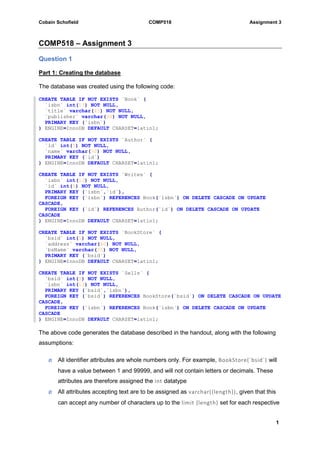
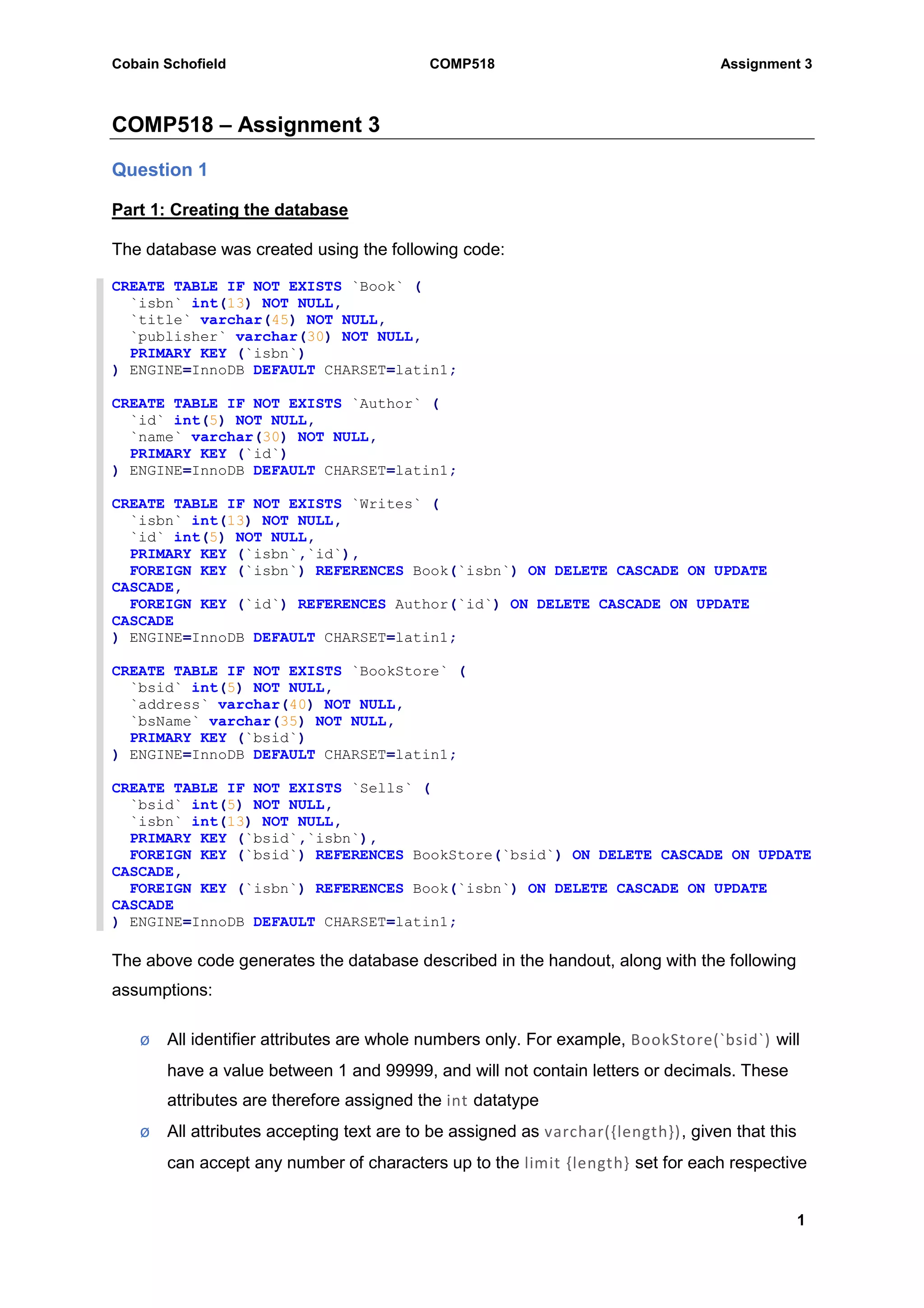
The database was created using the following code:
CREATE TABLE IF NOT EXISTS `Book` (
`isbn` int(13) NOT NULL,
`title` varchar(45) NOT NULL,
`publisher` varchar(30) NOT NULL,
PRIMARY KEY (`isbn`)
) ENGINE=InnoDB DEFAULT CHARSET=latin1;
CREATE TABLE IF NOT EXISTS `Author` (
`id` int(5) NOT NULL,
`name` varchar(30) NOT NULL,
PRIMARY KEY (`id`)
) ENGINE=InnoDB DEFAULT CHARSET=latin1;
CREATE TABLE IF NOT EXISTS `Writes` (
`isbn` int(13) NOT NULL,
`id` int(5) NOT NULL,
PRIMARY KEY (`isbn`,`id`),
FOREIGN KEY (`isbn`) REFERENCES Book(`isbn`) ON DELETE CASCADE ON UPDATE
CASCADE,
FOREIGN KEY (`id`) REFERENCES Author(`id`) ON DELETE CASCADE ON UPDATE
CASCADE
) ENGINE=InnoDB DEFAULT CHARSET=latin1;
CREATE TABLE IF NOT EXISTS `BookStore` (
`bsid` int(5) NOT NULL,
`address` varchar(40) NOT NULL,
`bsName` varchar(35) NOT NULL,
PRIMARY KEY (`bsid`)
) ENGINE=InnoDB DEFAULT CHARSET=latin1;
CREATE TABLE IF NOT EXISTS `Sells` (
`bsid` int(5) NOT NULL,
`isbn` int(13) NOT NULL,
PRIMARY KEY (`bsid`,`isbn`),
FOREIGN KEY (`bsid`) REFERENCES BookStore(`bsid`) ON DELETE CASCADE ON UPDATE
CASCADE,
FOREIGN KEY (`isbn`) REFERENCES Book(`isbn`) ON DELETE CASCADE ON UPDATE
CASCADE
) ENGINE=InnoDB DEFAULT CHARSET=latin1;
The above code generates the database described in the handout, along with the following
assumptions:
ø All identifier attributes are whole numbers only. For example, BookStore(`bsid`) will
have a value between 1 and 99999, and will not contain letters or decimals. These
attributes are therefore assigned the int datatype
ø All attributes accepting text are to be assigned as varchar({length}), given that this
can accept any number of characters up to the limit {length} set for each respective
Cobain Schofield COMP518 Assignment 3
2
attribute. It has been decided to use varchar rather than char because the exact
length of the input is not known. For instance, a book title may be just 8 characters
long, while another might be 30 characters long. Using char would require all book
titles to be the same length. An acceptable use of char would be when storing a
national insurance number which comes in a known length and format; eg: AB-12-34-
56-C in which case char(13) could be used.
ø No values of NULL should be accepted in any part of this database
ø When deleting or updating a record in a table constrained by a foreign key, the
change should be reflected by cascading either the update or delete command
throughout its dependencies
The raw code used to create the database has been attached to this submission in both
SQL and text format.
Part 2: Querying the database
2) a) Find the addresses of all the bookstores which sell the book with title “Database
Systems”
SELECT store.address FROM BookStore store WHERE store.bsid IN (
SELECT s.bsid FROM Sells s WHERE s.isbn IN (
SELECT book.isbn FROM Book book WHERE book.title = "Database
Systems"
)
);
2) b) Find the titles of all books written by “Agatha Christie”
SELECT b.title FROM Book b WHERE b.isbn IN (
SELECT w.isbn FROM Writes w WHERE w.id IN (
SELECT a.id FROM Author a WHERE a.name = "Agatha Christie"
)
);
2) c) Find the titles of the books which are written by “Agatha Christie” but not “Ian Rankin”
SELECT b.title FROM Book b WHERE b.isbn IN (
SELECT w.isbn FROM Writes w WHERE w.id IN (
SELECT a.id FROM Author a WHERE a.name = "Agatha Christie" AND
a.name != "Ian Rankin"
)
);
Cobain Schofield COMP518 Assignment 3
3
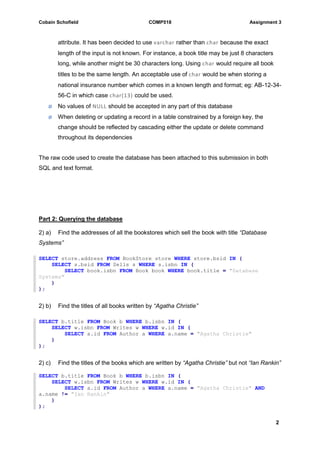
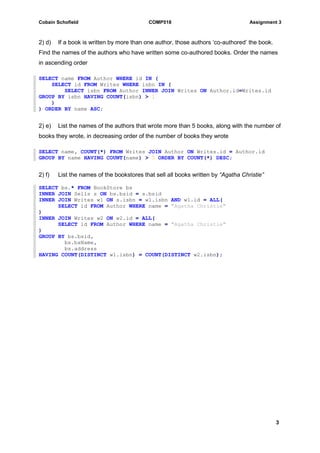
2) d) If a book is written by more than one author, those authors ‘co-authored’ the book.
Find the names of the authors who have written some co-authored books. Order the names
in ascending order
SELECT name FROM Author WHERE id IN (
SELECT id FROM Writes WHERE isbn IN (
SELECT isbn FROM Author INNER JOIN Writes ON Author.id=Writes.id
GROUP BY isbn HAVING COUNT(isbn) > 1
)
) ORDER BY name ASC;
2) e) List the names of the authors that wrote more than 5 books, along with the number of
books they wrote, in decreasing order of the number of books they wrote
SELECT name, COUNT(*) FROM Writes JOIN Author ON Writes.id = Author.id
GROUP BY name HAVING COUNT(name) > 5 ORDER BY COUNT(*) DESC;
2) f) List the names of the bookstores that sell all books written by “Agatha Christie”
SELECT bs.* FROM BookStore bs
INNER JOIN Sells s ON bs.bsid = s.bsid
INNER JOIN Writes w1 ON s.isbn = w1.isbn AND w1.id = ALL(
SELECT id FROM Author WHERE name = "Agatha Christie"
)
INNER JOIN Writes w2 ON w2.id = ALL(
SELECT id FROM Author WHERE name = "Agatha Christie"
)
GROUP BY bs.bsid,
bs.bsName,
bs.address
HAVING COUNT(DISTINCT w1.isbn) = COUNT(DISTINCT w2.isbn);
Cobain Schofield COMP518 Assignment 3
4
Question 2
Part 1: Creating the Database
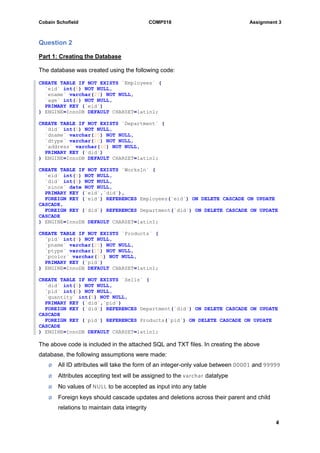
The database was created using the following code:
CREATE TABLE IF NOT EXISTS `Employees` (
`eid` int(5) NOT NULL,
`ename` varchar(25) NOT NULL,
`age` int(2) NOT NULL,
PRIMARY KEY (`eid`)
) ENGINE=InnoDB DEFAULT CHARSET=latin1;
CREATE TABLE IF NOT EXISTS `Department` (
`did` int(5) NOT NULL,
`dname` varchar(25) NOT NULL,
`dtype` varchar(10) NOT NULL,
`address` varchar(40) NOT NULL,
PRIMARY KEY (`did`)
) ENGINE=InnoDB DEFAULT CHARSET=latin1;
CREATE TABLE IF NOT EXISTS `WorksIn` (
`eid` int(5) NOT NULL,
`did` int(5) NOT NULL,
`since` date NOT NULL,
PRIMARY KEY (`eid`,`did`),
FOREIGN KEY (`eid`) REFERENCES Employees(`eid`) ON DELETE CASCADE ON UPDATE
CASCADE,
FOREIGN KEY (`did`) REFERENCES Department(`did`) ON DELETE CASCADE ON UPDATE
CASCADE
) ENGINE=InnoDB DEFAULT CHARSET=latin1;
CREATE TABLE IF NOT EXISTS `Products` (
`pid` int(5) NOT NULL,
`pname` varchar(25) NOT NULL,
`ptype` varchar(15) NOT NULL,
`pcolor` varchar(15) NOT NULL,
PRIMARY KEY (`pid`)
) ENGINE=InnoDB DEFAULT CHARSET=latin1;
CREATE TABLE IF NOT EXISTS `Sells` (
`did` int(5) NOT NULL,
`pid` int(5) NOT NULL,
`quantity` int(5) NOT NULL,
PRIMARY KEY (`did`,`pid`)
FOREIGN KEY (`did`) REFERENCES Department(`did`) ON DELETE CASCADE ON UPDATE
CASCADE
FOREIGN KEY (`pid`) REFERENCES Products(`pid`) ON DELETE CASCADE ON UPDATE
CASCADE
) ENGINE=InnoDB DEFAULT CHARSET=latin1;
The above code is included in the attached SQL and TXT files. In creating the above
database, the following assumptions were made:
ø All ID attributes will take the form of an integer-only value between 00001 and 99999
ø Attributes accepting text will be assigned to the varchar datatype
ø No values of NULL to be accepted as input into any table
ø Foreign keys should cascade updates and deletions across their parent and child
relations to maintain data integrity
Cobain Schofield COMP518 Assignment 3
5
ø The extent of the database is as described in the handout, ie: attributes such as
Products(`ptype`) would be listed as text within the database, rather than being a
foreign key linking to another table listing different product types by an identifier
which may be more practical. Under the current setup a spelling error in the input for
Products(`ptype`) could result in a product getting “lost” within the database
Part 2: Querying the database
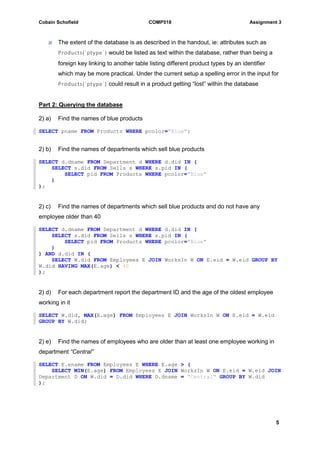
2) a) Find the names of blue products
SELECT pname FROM Products WHERE pcolor="Blue";
2) b) Find the names of departments which sell blue products
SELECT d.dname FROM Department d WHERE d.did IN (
SELECT s.did FROM Sells s WHERE s.pid IN (
SELECT pid FROM Products WHERE pcolor="Blue"
)
);
2) c) Find the names of departments which sell blue products and do not have any
employee older than 40
SELECT d.dname FROM Department d WHERE d.did IN (
SELECT s.did FROM Sells s WHERE s.pid IN (
SELECT pid FROM Products WHERE pcolor="Blue"
)
) AND d.did IN (
SELECT W.did FROM Employees E JOIN WorksIn W ON E.eid = W.eid GROUP BY
W.did HAVING MAX(E.age) < 40
);
2) d) For each department report the department ID and the age of the oldest employee
working in it
SELECT W.did, MAX(E.age) FROM Employees E JOIN WorksIn W ON E.eid = W.eid
GROUP BY W.did;
2) e) Find the names of employees who are older than at least one employee working in
department “Central”
SELECT E.ename FROM Employees E WHERE E.age > (
SELECT MIN(E.age) FROM Employees E JOIN WorksIn W ON E.eid = W.eid JOIN
Department D ON W.did = D.did WHERE D.dname = "Central" GROUP BY W.did
);
Cobain Schofield COMP518 Assignment 3
6
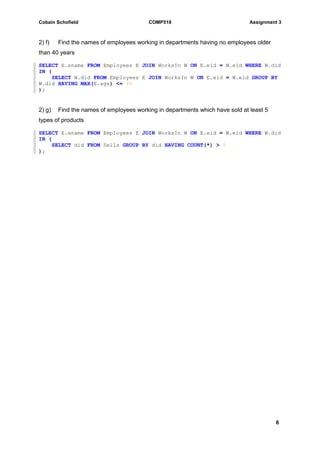
2) f) Find the names of employees working in departments having no employees older
than 40 years
SELECT E.ename FROM Employees E JOIN WorksIn W ON E.eid = W.eid WHERE W.did
IN (
SELECT W.did FROM Employees E JOIN WorksIn W ON E.eid = W.eid GROUP BY
W.did HAVING MAX(E.age) <= 40
);
2) g) Find the names of employees working in departments which have sold at least 5
types of products
SELECT E.ename FROM Employees E JOIN WorksIn W ON E.eid = W.eid WHERE W.did
IN (
SELECT did FROM Sells GROUP BY did HAVING COUNT(*) > 5
);
Cobain Schofield COMP518 Assignment 3
7
Question 3
a) S1 :: R1(A),R1(B),W1(A),R2(A),R1(C),W1(C),R3(C),W2(A),R3(B),W3(A)
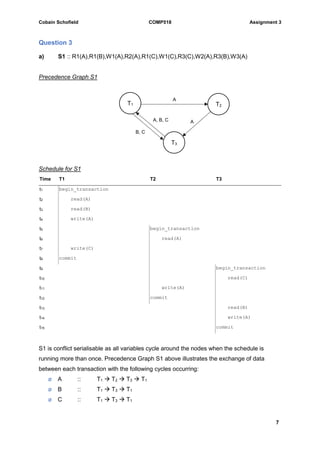
Precedence Graph S1
Schedule for S1
Time T1 T2 T3
t1 begin_transaction
t2 read(A)
t3 read(B)
t4 write(A)
t5 begin_transaction
t6 read(A)
t7 write(C)
t8 commit
t9 begin_transaction
t10 read(C)
t11 write(A)
t12 commit
t13 read(B)
t14 write(A)
t15 commit
S1 is conflict serialisable as all variables cycle around the nodes when the schedule is
running more than once. Precedence Graph S1 above illustrates the exchange of data
between each transaction with the following cycles occurring:
ø A :: T1  T2  T3  T1
ø B :: T1  T3  T1
ø C :: T1  T3  T1
A
T1 T2
T3
A, B, C A
B, C
Cobain Schofield COMP518 Assignment 3
8
However, S1 written in schedule form is not initially serialised. It must therefore be re-written
into serial form, as follows:
New serialised schedule for S1
Time T1 T2 T3
t1 begin_transaction
t2 read(A)
t3 read(B)
t4 write(A)
t5 write(C)
t6 commit
t7 begin_transaction
t8 read(A)
t9 write(A)
t10 commit
t11 begin_transaction
t12 read(C)
t13 read(B)
t14 write(A)
t15 commit
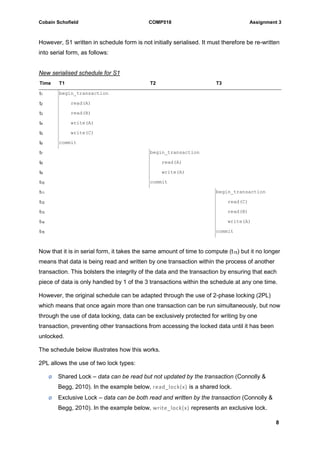
Now that it is in serial form, it takes the same amount of time to compute (t15) but it no longer
means that data is being read and written by one transaction within the process of another
transaction. This bolsters the integrity of the data and the transaction by ensuring that each
piece of data is only handled by 1 of the 3 transactions within the schedule at any one time.
However, the original schedule can be adapted through the use of 2-phase locking (2PL)
which means that once again more than one transaction can be run simultaneously, but now
through the use of data locking, data can be exclusively protected for writing by one
transaction, preventing other transactions from accessing the locked data until it has been
unlocked.
The schedule below illustrates how this works.
2PL allows the use of two lock types:
ø Shared Lock – data can be read but not updated by the transaction (Connolly &
Begg, 2010). In the example below, read_lock(x) is a shared lock.
ø Exclusive Lock – data can be both read and written by the transaction (Connolly &
Begg, 2010). In the example below, write_lock(x) represents an exclusive lock.
Cobain Schofield COMP518 Assignment 3
9
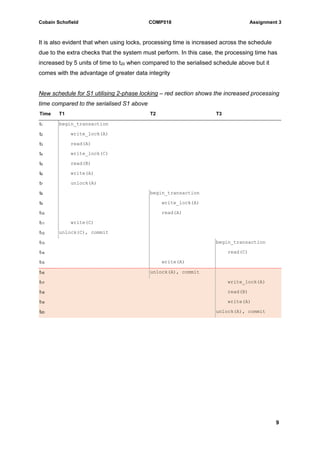
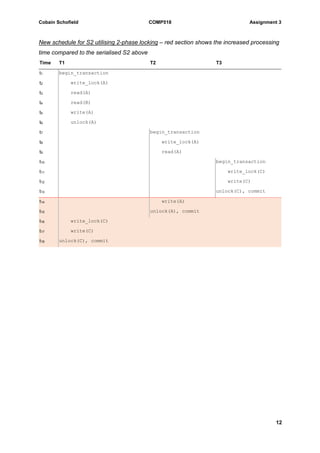
It is also evident that when using locks, processing time is increased across the schedule
due to the extra checks that the system must perform. In this case, the processing time has
increased by 5 units of time to t20 when compared to the serialised schedule above but it
comes with the advantage of greater data integrity
New schedule for S1 utilising 2-phase locking – red section shows the increased processing
time compared to the serialised S1 above
Time T1 T2 T3
t1 begin_transaction
t2 write_lock(A)
t3 read(A)
t4 write_lock(C)
t5 read(B)
t6 write(A)
t7 unlock(A)
t8 begin_transaction
t9 write_lock(A)
t10 read(A)
t11 write(C)
t12 unlock(C), commit
t13 begin_transaction
t14 read(C)
t15 write(A)
t16 unlock(A), commit
t17 write_lock(A)
t18 read(B)
t19 write(A)
t20 unlock(A), commit
Cobain Schofield COMP518 Assignment 3
10
b) S2 :: R1(A),R1(B),W1(A),R2(A),W3(C),W1(C),W2(A)
Precedence Graph S2
Schedule for S2
Time T1 T2 T3
t1 begin_transaction
t2 read(A)
t3 read(B)
t4 write(A)
t5 begin_transaction
t6 read(A)
t7 begin_transaction
t8 write(C)
t9 commit
t10 write(C)
t11 commit
t12 write(A)
t13 commit
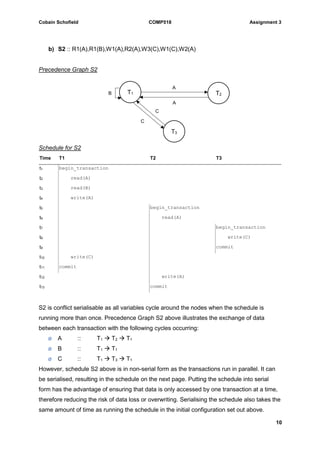
S2 is conflict serialisable as all variables cycle around the nodes when the schedule is
running more than once. Precedence Graph S2 above illustrates the exchange of data
between each transaction with the following cycles occurring:
ø A :: T1  T2  T1
ø B :: T1  T1
ø C :: T1  T3  T1
However, schedule S2 above is in non-serial form as the transactions run in parallel. It can
be serialised, resulting in the schedule on the next page. Putting the schedule into serial
form has the advantage of ensuring that data is only accessed by one transaction at a time,
therefore reducing the risk of data loss or overwriting. Serialising the schedule also takes the
same amount of time as running the schedule in the initial configuration set out above.
T1 T2
T3
A
C
A
C
B
Cobain Schofield COMP518 Assignment 3
11
New serialised schedule for S2
Time T1 T2 T3
t1 begin_transaction
t2 read(A)
t3 read(B)
t4 write(A)
t5 write(C)
t6 commit
t7 begin_transaction
t8 read(A)
t9 write(A)
t10 commit
t11 begin_transaction
t12 write(C)
t13 commit
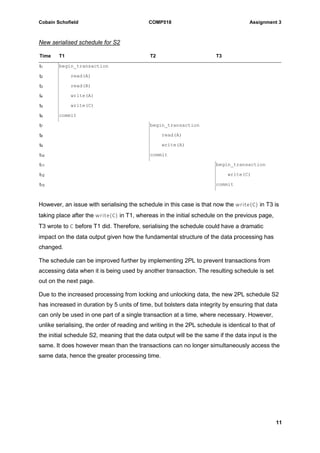
However, an issue with serialising the schedule in this case is that now the write(C) in T3 is
taking place after the write(C) in T1, whereas in the initial schedule on the previous page,
T3 wrote to C before T1 did. Therefore, serialising the schedule could have a dramatic
impact on the data output given how the fundamental structure of the data processing has
changed.
The schedule can be improved further by implementing 2PL to prevent transactions from
accessing data when it is being used by another transaction. The resulting schedule is set
out on the next page.
Due to the increased processing from locking and unlocking data, the new 2PL schedule S2
has increased in duration by 5 units of time, but bolsters data integrity by ensuring that data
can only be used in one part of a single transaction at a time, where necessary. However,
unlike serialising, the order of reading and writing in the 2PL schedule is identical to that of
the initial schedule S2, meaning that the data output will be the same if the data input is the
same. It does however mean than the transactions can no longer simultaneously access the
same data, hence the greater processing time.
Cobain Schofield COMP518 Assignment 3
12
New schedule for S2 utilising 2-phase locking – red section shows the increased processing
time compared to the serialised S2 above
Time T1 T2 T3
t1 begin_transaction
t2 write_lock(A)
t3 read(A)
t4 read(B)
t5 write(A)
t6 unlock(A)
t7 begin_transaction
t8 write_lock(A)
t9 read(A)
t10 begin_transaction
t11 write_lock(C)
t12 write(C)
t13 unlock(C), commit
t14 write(A)
t15 unlock(A), commit
t16 write_lock(C)
t17 write(C)
t18 unlock(C), commit
Cobain Schofield COMP518 Assignment 3
13
Question 4
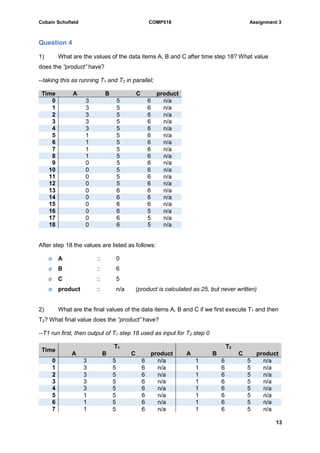
1) What are the values of the data items A, B and C after time step 18? What value
does the “product” have?
--taking this as running T1 and T2 in parallel;
Time A B C product
0 3 5 6 n/a
1 3 5 6 n/a
2 3 5 6 n/a
3 3 5 6 n/a
4 3 5 6 n/a
5 1 5 6 n/a
6 1 5 6 n/a
7 1 5 6 n/a
8 1 5 6 n/a
9 0 5 6 n/a
10 0 5 6 n/a
11 0 5 6 n/a
12 0 5 6 n/a
13 0 6 6 n/a
14 0 6 6 n/a
15 0 6 6 n/a
16 0 6 5 n/a
17 0 6 5 n/a
18 0 6 5 n/a
After step 18 the values are listed as follows:
ø A :: 0
ø B :: 6
ø C :: 5
ø product :: n/a (product is calculated as 25, but never written)
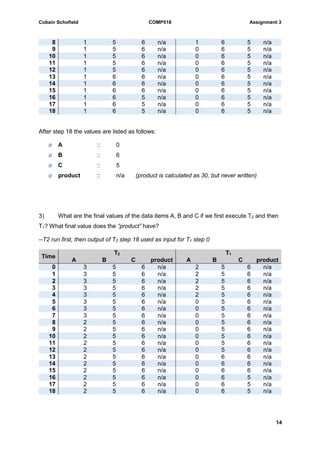
2) What are the final values of the data items A, B and C if we first execute T1 and then
T2? What final value does the “product” have?
--T1 run first, then output of T1 step 18 used as input for T2 step 0
Time
T1 T2
A B C product A B C product
0 3 5 6 n/a 1 6 5 n/a
1 3 5 6 n/a 1 6 5 n/a
2 3 5 6 n/a 1 6 5 n/a
3 3 5 6 n/a 1 6 5 n/a
4 3 5 6 n/a 1 6 5 n/a
5 1 5 6 n/a 1 6 5 n/a
6 1 5 6 n/a 1 6 5 n/a
7 1 5 6 n/a 1 6 5 n/a
Cobain Schofield COMP518 Assignment 3
14
8 1 5 6 n/a 1 6 5 n/a
9 1 5 6 n/a 0 6 5 n/a
10 1 5 6 n/a 0 6 5 n/a
11 1 5 6 n/a 0 6 5 n/a
12 1 5 6 n/a 0 6 5 n/a
13 1 6 6 n/a 0 6 5 n/a
14 1 6 6 n/a 0 6 5 n/a
15 1 6 6 n/a 0 6 5 n/a
16 1 6 5 n/a 0 6 5 n/a
17 1 6 5 n/a 0 6 5 n/a
18 1 6 5 n/a 0 6 5 n/a
After step 18 the values are listed as follows:
ø A :: 0
ø B :: 6
ø C :: 5
ø product :: n/a (product is calculated as 30, but never written)
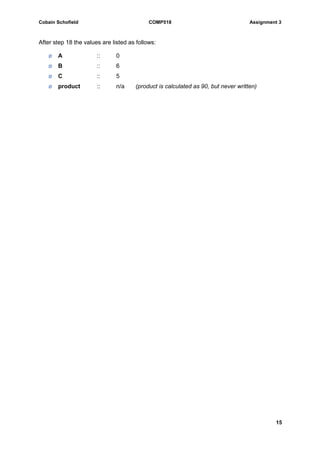
3) What are the final values of the data items A, B and C if we first execute T2 and then
T1? What final value does the “product” have?
--T2 run first, then output of T2 step 18 used as input for T1 step 0
Time
T2 T1
A B C product A B C product
0 3 5 6 n/a 2 5 6 n/a
1 3 5 6 n/a 2 5 6 n/a
2 3 5 6 n/a 2 5 6 n/a
3 3 5 6 n/a 2 5 6 n/a
4 3 5 6 n/a 2 5 6 n/a
5 3 5 6 n/a 0 5 6 n/a
6 3 5 6 n/a 0 5 6 n/a
7 3 5 6 n/a 0 5 6 n/a
8 2 5 6 n/a 0 5 6 n/a
9 2 5 6 n/a 0 5 6 n/a
10 2 5 6 n/a 0 5 6 n/a
11 2 5 6 n/a 0 5 6 n/a
12 2 5 6 n/a 0 5 6 n/a
13 2 5 6 n/a 0 6 6 n/a
14 2 5 6 n/a 0 6 6 n/a
15 2 5 6 n/a 0 6 6 n/a
16 2 5 6 n/a 0 6 5 n/a
17 2 5 6 n/a 0 6 5 n/a
18 2 5 6 n/a 0 6 5 n/a
Cobain Schofield COMP518 Assignment 3
15
After step 18 the values are listed as follows:
ø A :: 0
ø B :: 6
ø C :: 5
ø product :: n/a (product is calculated as 90, but never written)
Cobain Schofield COMP518 Assignment 3
16
References
Thomas M. Connolly, Carolyn E. Begg (2010) Database systems: A Practical Approach to
Design, Implementation and Management. Fifth Edition, Addison-Wesley

SQL Database Design & Querying

  • 1.
    Cobain Schofield COMP518Assignment 3 1 COMP518 – Assignment 3 Question 1 Part 1: Creating the database The database was created using the following code: CREATE TABLE IF NOT EXISTS `Book` ( `isbn` int(13) NOT NULL, `title` varchar(45) NOT NULL, `publisher` varchar(30) NOT NULL, PRIMARY KEY (`isbn`) ) ENGINE=InnoDB DEFAULT CHARSET=latin1; CREATE TABLE IF NOT EXISTS `Author` ( `id` int(5) NOT NULL, `name` varchar(30) NOT NULL, PRIMARY KEY (`id`) ) ENGINE=InnoDB DEFAULT CHARSET=latin1; CREATE TABLE IF NOT EXISTS `Writes` ( `isbn` int(13) NOT NULL, `id` int(5) NOT NULL, PRIMARY KEY (`isbn`,`id`), FOREIGN KEY (`isbn`) REFERENCES Book(`isbn`) ON DELETE CASCADE ON UPDATE CASCADE, FOREIGN KEY (`id`) REFERENCES Author(`id`) ON DELETE CASCADE ON UPDATE CASCADE ) ENGINE=InnoDB DEFAULT CHARSET=latin1; CREATE TABLE IF NOT EXISTS `BookStore` ( `bsid` int(5) NOT NULL, `address` varchar(40) NOT NULL, `bsName` varchar(35) NOT NULL, PRIMARY KEY (`bsid`) ) ENGINE=InnoDB DEFAULT CHARSET=latin1; CREATE TABLE IF NOT EXISTS `Sells` ( `bsid` int(5) NOT NULL, `isbn` int(13) NOT NULL, PRIMARY KEY (`bsid`,`isbn`), FOREIGN KEY (`bsid`) REFERENCES BookStore(`bsid`) ON DELETE CASCADE ON UPDATE CASCADE, FOREIGN KEY (`isbn`) REFERENCES Book(`isbn`) ON DELETE CASCADE ON UPDATE CASCADE ) ENGINE=InnoDB DEFAULT CHARSET=latin1; The above code generates the database described in the handout, along with the following assumptions: ø All identifier attributes are whole numbers only. For example, BookStore(`bsid`) will have a value between 1 and 99999, and will not contain letters or decimals. These attributes are therefore assigned the int datatype ø All attributes accepting text are to be assigned as varchar({length}), given that this can accept any number of characters up to the limit {length} set for each respective
  • 2.
    Cobain Schofield COMP518Assignment 3 2 attribute. It has been decided to use varchar rather than char because the exact length of the input is not known. For instance, a book title may be just 8 characters long, while another might be 30 characters long. Using char would require all book titles to be the same length. An acceptable use of char would be when storing a national insurance number which comes in a known length and format; eg: AB-12-34- 56-C in which case char(13) could be used. ø No values of NULL should be accepted in any part of this database ø When deleting or updating a record in a table constrained by a foreign key, the change should be reflected by cascading either the update or delete command throughout its dependencies The raw code used to create the database has been attached to this submission in both SQL and text format. Part 2: Querying the database 2) a) Find the addresses of all the bookstores which sell the book with title “Database Systems” SELECT store.address FROM BookStore store WHERE store.bsid IN ( SELECT s.bsid FROM Sells s WHERE s.isbn IN ( SELECT book.isbn FROM Book book WHERE book.title = "Database Systems" ) ); 2) b) Find the titles of all books written by “Agatha Christie” SELECT b.title FROM Book b WHERE b.isbn IN ( SELECT w.isbn FROM Writes w WHERE w.id IN ( SELECT a.id FROM Author a WHERE a.name = "Agatha Christie" ) ); 2) c) Find the titles of the books which are written by “Agatha Christie” but not “Ian Rankin” SELECT b.title FROM Book b WHERE b.isbn IN ( SELECT w.isbn FROM Writes w WHERE w.id IN ( SELECT a.id FROM Author a WHERE a.name = "Agatha Christie" AND a.name != "Ian Rankin" ) );
  • 3.
    Cobain Schofield COMP518Assignment 3 3 2) d) If a book is written by more than one author, those authors ‘co-authored’ the book. Find the names of the authors who have written some co-authored books. Order the names in ascending order SELECT name FROM Author WHERE id IN ( SELECT id FROM Writes WHERE isbn IN ( SELECT isbn FROM Author INNER JOIN Writes ON Author.id=Writes.id GROUP BY isbn HAVING COUNT(isbn) > 1 ) ) ORDER BY name ASC; 2) e) List the names of the authors that wrote more than 5 books, along with the number of books they wrote, in decreasing order of the number of books they wrote SELECT name, COUNT(*) FROM Writes JOIN Author ON Writes.id = Author.id GROUP BY name HAVING COUNT(name) > 5 ORDER BY COUNT(*) DESC; 2) f) List the names of the bookstores that sell all books written by “Agatha Christie” SELECT bs.* FROM BookStore bs INNER JOIN Sells s ON bs.bsid = s.bsid INNER JOIN Writes w1 ON s.isbn = w1.isbn AND w1.id = ALL( SELECT id FROM Author WHERE name = "Agatha Christie" ) INNER JOIN Writes w2 ON w2.id = ALL( SELECT id FROM Author WHERE name = "Agatha Christie" ) GROUP BY bs.bsid, bs.bsName, bs.address HAVING COUNT(DISTINCT w1.isbn) = COUNT(DISTINCT w2.isbn);
  • 4.
    Cobain Schofield COMP518Assignment 3 4 Question 2 Part 1: Creating the Database The database was created using the following code: CREATE TABLE IF NOT EXISTS `Employees` ( `eid` int(5) NOT NULL, `ename` varchar(25) NOT NULL, `age` int(2) NOT NULL, PRIMARY KEY (`eid`) ) ENGINE=InnoDB DEFAULT CHARSET=latin1; CREATE TABLE IF NOT EXISTS `Department` ( `did` int(5) NOT NULL, `dname` varchar(25) NOT NULL, `dtype` varchar(10) NOT NULL, `address` varchar(40) NOT NULL, PRIMARY KEY (`did`) ) ENGINE=InnoDB DEFAULT CHARSET=latin1; CREATE TABLE IF NOT EXISTS `WorksIn` ( `eid` int(5) NOT NULL, `did` int(5) NOT NULL, `since` date NOT NULL, PRIMARY KEY (`eid`,`did`), FOREIGN KEY (`eid`) REFERENCES Employees(`eid`) ON DELETE CASCADE ON UPDATE CASCADE, FOREIGN KEY (`did`) REFERENCES Department(`did`) ON DELETE CASCADE ON UPDATE CASCADE ) ENGINE=InnoDB DEFAULT CHARSET=latin1; CREATE TABLE IF NOT EXISTS `Products` ( `pid` int(5) NOT NULL, `pname` varchar(25) NOT NULL, `ptype` varchar(15) NOT NULL, `pcolor` varchar(15) NOT NULL, PRIMARY KEY (`pid`) ) ENGINE=InnoDB DEFAULT CHARSET=latin1; CREATE TABLE IF NOT EXISTS `Sells` ( `did` int(5) NOT NULL, `pid` int(5) NOT NULL, `quantity` int(5) NOT NULL, PRIMARY KEY (`did`,`pid`) FOREIGN KEY (`did`) REFERENCES Department(`did`) ON DELETE CASCADE ON UPDATE CASCADE FOREIGN KEY (`pid`) REFERENCES Products(`pid`) ON DELETE CASCADE ON UPDATE CASCADE ) ENGINE=InnoDB DEFAULT CHARSET=latin1; The above code is included in the attached SQL and TXT files. In creating the above database, the following assumptions were made: ø All ID attributes will take the form of an integer-only value between 00001 and 99999 ø Attributes accepting text will be assigned to the varchar datatype ø No values of NULL to be accepted as input into any table ø Foreign keys should cascade updates and deletions across their parent and child relations to maintain data integrity
  • 5.
    Cobain Schofield COMP518Assignment 3 5 ø The extent of the database is as described in the handout, ie: attributes such as Products(`ptype`) would be listed as text within the database, rather than being a foreign key linking to another table listing different product types by an identifier which may be more practical. Under the current setup a spelling error in the input for Products(`ptype`) could result in a product getting “lost” within the database Part 2: Querying the database 2) a) Find the names of blue products SELECT pname FROM Products WHERE pcolor="Blue"; 2) b) Find the names of departments which sell blue products SELECT d.dname FROM Department d WHERE d.did IN ( SELECT s.did FROM Sells s WHERE s.pid IN ( SELECT pid FROM Products WHERE pcolor="Blue" ) ); 2) c) Find the names of departments which sell blue products and do not have any employee older than 40 SELECT d.dname FROM Department d WHERE d.did IN ( SELECT s.did FROM Sells s WHERE s.pid IN ( SELECT pid FROM Products WHERE pcolor="Blue" ) ) AND d.did IN ( SELECT W.did FROM Employees E JOIN WorksIn W ON E.eid = W.eid GROUP BY W.did HAVING MAX(E.age) < 40 ); 2) d) For each department report the department ID and the age of the oldest employee working in it SELECT W.did, MAX(E.age) FROM Employees E JOIN WorksIn W ON E.eid = W.eid GROUP BY W.did; 2) e) Find the names of employees who are older than at least one employee working in department “Central” SELECT E.ename FROM Employees E WHERE E.age > ( SELECT MIN(E.age) FROM Employees E JOIN WorksIn W ON E.eid = W.eid JOIN Department D ON W.did = D.did WHERE D.dname = "Central" GROUP BY W.did );
  • 6.
    Cobain Schofield COMP518Assignment 3 6 2) f) Find the names of employees working in departments having no employees older than 40 years SELECT E.ename FROM Employees E JOIN WorksIn W ON E.eid = W.eid WHERE W.did IN ( SELECT W.did FROM Employees E JOIN WorksIn W ON E.eid = W.eid GROUP BY W.did HAVING MAX(E.age) <= 40 ); 2) g) Find the names of employees working in departments which have sold at least 5 types of products SELECT E.ename FROM Employees E JOIN WorksIn W ON E.eid = W.eid WHERE W.did IN ( SELECT did FROM Sells GROUP BY did HAVING COUNT(*) > 5 );
  • 7.
    Cobain Schofield COMP518Assignment 3 7 Question 3 a) S1 :: R1(A),R1(B),W1(A),R2(A),R1(C),W1(C),R3(C),W2(A),R3(B),W3(A) Precedence Graph S1 Schedule for S1 Time T1 T2 T3 t1 begin_transaction t2 read(A) t3 read(B) t4 write(A) t5 begin_transaction t6 read(A) t7 write(C) t8 commit t9 begin_transaction t10 read(C) t11 write(A) t12 commit t13 read(B) t14 write(A) t15 commit S1 is conflict serialisable as all variables cycle around the nodes when the schedule is running more than once. Precedence Graph S1 above illustrates the exchange of data between each transaction with the following cycles occurring: ø A :: T1  T2  T3  T1 ø B :: T1  T3  T1 ø C :: T1  T3  T1 A T1 T2 T3 A, B, C A B, C
  • 8.
    Cobain Schofield COMP518Assignment 3 8 However, S1 written in schedule form is not initially serialised. It must therefore be re-written into serial form, as follows: New serialised schedule for S1 Time T1 T2 T3 t1 begin_transaction t2 read(A) t3 read(B) t4 write(A) t5 write(C) t6 commit t7 begin_transaction t8 read(A) t9 write(A) t10 commit t11 begin_transaction t12 read(C) t13 read(B) t14 write(A) t15 commit Now that it is in serial form, it takes the same amount of time to compute (t15) but it no longer means that data is being read and written by one transaction within the process of another transaction. This bolsters the integrity of the data and the transaction by ensuring that each piece of data is only handled by 1 of the 3 transactions within the schedule at any one time. However, the original schedule can be adapted through the use of 2-phase locking (2PL) which means that once again more than one transaction can be run simultaneously, but now through the use of data locking, data can be exclusively protected for writing by one transaction, preventing other transactions from accessing the locked data until it has been unlocked. The schedule below illustrates how this works. 2PL allows the use of two lock types: ø Shared Lock – data can be read but not updated by the transaction (Connolly & Begg, 2010). In the example below, read_lock(x) is a shared lock. ø Exclusive Lock – data can be both read and written by the transaction (Connolly & Begg, 2010). In the example below, write_lock(x) represents an exclusive lock.
  • 9.
    Cobain Schofield COMP518Assignment 3 9 It is also evident that when using locks, processing time is increased across the schedule due to the extra checks that the system must perform. In this case, the processing time has increased by 5 units of time to t20 when compared to the serialised schedule above but it comes with the advantage of greater data integrity New schedule for S1 utilising 2-phase locking – red section shows the increased processing time compared to the serialised S1 above Time T1 T2 T3 t1 begin_transaction t2 write_lock(A) t3 read(A) t4 write_lock(C) t5 read(B) t6 write(A) t7 unlock(A) t8 begin_transaction t9 write_lock(A) t10 read(A) t11 write(C) t12 unlock(C), commit t13 begin_transaction t14 read(C) t15 write(A) t16 unlock(A), commit t17 write_lock(A) t18 read(B) t19 write(A) t20 unlock(A), commit
  • 10.
    Cobain Schofield COMP518Assignment 3 10 b) S2 :: R1(A),R1(B),W1(A),R2(A),W3(C),W1(C),W2(A) Precedence Graph S2 Schedule for S2 Time T1 T2 T3 t1 begin_transaction t2 read(A) t3 read(B) t4 write(A) t5 begin_transaction t6 read(A) t7 begin_transaction t8 write(C) t9 commit t10 write(C) t11 commit t12 write(A) t13 commit S2 is conflict serialisable as all variables cycle around the nodes when the schedule is running more than once. Precedence Graph S2 above illustrates the exchange of data between each transaction with the following cycles occurring: ø A :: T1  T2  T1 ø B :: T1  T1 ø C :: T1  T3  T1 However, schedule S2 above is in non-serial form as the transactions run in parallel. It can be serialised, resulting in the schedule on the next page. Putting the schedule into serial form has the advantage of ensuring that data is only accessed by one transaction at a time, therefore reducing the risk of data loss or overwriting. Serialising the schedule also takes the same amount of time as running the schedule in the initial configuration set out above. T1 T2 T3 A C A C B
  • 11.
    Cobain Schofield COMP518Assignment 3 11 New serialised schedule for S2 Time T1 T2 T3 t1 begin_transaction t2 read(A) t3 read(B) t4 write(A) t5 write(C) t6 commit t7 begin_transaction t8 read(A) t9 write(A) t10 commit t11 begin_transaction t12 write(C) t13 commit However, an issue with serialising the schedule in this case is that now the write(C) in T3 is taking place after the write(C) in T1, whereas in the initial schedule on the previous page, T3 wrote to C before T1 did. Therefore, serialising the schedule could have a dramatic impact on the data output given how the fundamental structure of the data processing has changed. The schedule can be improved further by implementing 2PL to prevent transactions from accessing data when it is being used by another transaction. The resulting schedule is set out on the next page. Due to the increased processing from locking and unlocking data, the new 2PL schedule S2 has increased in duration by 5 units of time, but bolsters data integrity by ensuring that data can only be used in one part of a single transaction at a time, where necessary. However, unlike serialising, the order of reading and writing in the 2PL schedule is identical to that of the initial schedule S2, meaning that the data output will be the same if the data input is the same. It does however mean than the transactions can no longer simultaneously access the same data, hence the greater processing time.
  • 12.
    Cobain Schofield COMP518Assignment 3 12 New schedule for S2 utilising 2-phase locking – red section shows the increased processing time compared to the serialised S2 above Time T1 T2 T3 t1 begin_transaction t2 write_lock(A) t3 read(A) t4 read(B) t5 write(A) t6 unlock(A) t7 begin_transaction t8 write_lock(A) t9 read(A) t10 begin_transaction t11 write_lock(C) t12 write(C) t13 unlock(C), commit t14 write(A) t15 unlock(A), commit t16 write_lock(C) t17 write(C) t18 unlock(C), commit
  • 13.
    Cobain Schofield COMP518Assignment 3 13 Question 4 1) What are the values of the data items A, B and C after time step 18? What value does the “product” have? --taking this as running T1 and T2 in parallel; Time A B C product 0 3 5 6 n/a 1 3 5 6 n/a 2 3 5 6 n/a 3 3 5 6 n/a 4 3 5 6 n/a 5 1 5 6 n/a 6 1 5 6 n/a 7 1 5 6 n/a 8 1 5 6 n/a 9 0 5 6 n/a 10 0 5 6 n/a 11 0 5 6 n/a 12 0 5 6 n/a 13 0 6 6 n/a 14 0 6 6 n/a 15 0 6 6 n/a 16 0 6 5 n/a 17 0 6 5 n/a 18 0 6 5 n/a After step 18 the values are listed as follows: ø A :: 0 ø B :: 6 ø C :: 5 ø product :: n/a (product is calculated as 25, but never written) 2) What are the final values of the data items A, B and C if we first execute T1 and then T2? What final value does the “product” have? --T1 run first, then output of T1 step 18 used as input for T2 step 0 Time T1 T2 A B C product A B C product 0 3 5 6 n/a 1 6 5 n/a 1 3 5 6 n/a 1 6 5 n/a 2 3 5 6 n/a 1 6 5 n/a 3 3 5 6 n/a 1 6 5 n/a 4 3 5 6 n/a 1 6 5 n/a 5 1 5 6 n/a 1 6 5 n/a 6 1 5 6 n/a 1 6 5 n/a 7 1 5 6 n/a 1 6 5 n/a
  • 14.
    Cobain Schofield COMP518Assignment 3 14 8 1 5 6 n/a 1 6 5 n/a 9 1 5 6 n/a 0 6 5 n/a 10 1 5 6 n/a 0 6 5 n/a 11 1 5 6 n/a 0 6 5 n/a 12 1 5 6 n/a 0 6 5 n/a 13 1 6 6 n/a 0 6 5 n/a 14 1 6 6 n/a 0 6 5 n/a 15 1 6 6 n/a 0 6 5 n/a 16 1 6 5 n/a 0 6 5 n/a 17 1 6 5 n/a 0 6 5 n/a 18 1 6 5 n/a 0 6 5 n/a After step 18 the values are listed as follows: ø A :: 0 ø B :: 6 ø C :: 5 ø product :: n/a (product is calculated as 30, but never written) 3) What are the final values of the data items A, B and C if we first execute T2 and then T1? What final value does the “product” have? --T2 run first, then output of T2 step 18 used as input for T1 step 0 Time T2 T1 A B C product A B C product 0 3 5 6 n/a 2 5 6 n/a 1 3 5 6 n/a 2 5 6 n/a 2 3 5 6 n/a 2 5 6 n/a 3 3 5 6 n/a 2 5 6 n/a 4 3 5 6 n/a 2 5 6 n/a 5 3 5 6 n/a 0 5 6 n/a 6 3 5 6 n/a 0 5 6 n/a 7 3 5 6 n/a 0 5 6 n/a 8 2 5 6 n/a 0 5 6 n/a 9 2 5 6 n/a 0 5 6 n/a 10 2 5 6 n/a 0 5 6 n/a 11 2 5 6 n/a 0 5 6 n/a 12 2 5 6 n/a 0 5 6 n/a 13 2 5 6 n/a 0 6 6 n/a 14 2 5 6 n/a 0 6 6 n/a 15 2 5 6 n/a 0 6 6 n/a 16 2 5 6 n/a 0 6 5 n/a 17 2 5 6 n/a 0 6 5 n/a 18 2 5 6 n/a 0 6 5 n/a
  • 15.
    Cobain Schofield COMP518Assignment 3 15 After step 18 the values are listed as follows: ø A :: 0 ø B :: 6 ø C :: 5 ø product :: n/a (product is calculated as 90, but never written)
  • 16.
    Cobain Schofield COMP518Assignment 3 16 References Thomas M. Connolly, Carolyn E. Begg (2010) Database systems: A Practical Approach to Design, Implementation and Management. Fifth Edition, Addison-Wesley