UNIX SYSTEM PROGRAMMING
BY
PROF. A. SYED MUSTAFA
HKBK COLLEGE OF ENGINEERING
UNIT 6 SIGNALS AND DAEMON PROCESSES
SIGNALS
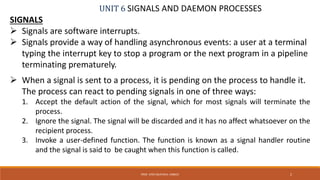
 Signals are software interrupts.
 Signals provide a way of handling asynchronous events: a user at a terminal
typing the interrupt key to stop a program or the next program in a pipeline
terminating prematurely.
 When a signal is sent to a process, it is pending on the process to handle it.
The process can react to pending signals in one of three ways:
1. Accept the default action of the signal, which for most signals will terminate the
process.
2. Ignore the signal. The signal will be discarded and it has no affect whatsoever on the
recipient process.
3. Invoke a user-defined function. The function is known as a signal handler routine
and the signal is said to be caught when this function is called.
2PROF. SYED MUSTAFA, HKBKCE
UNIT 6 SIGNALS AND DAEMON PROCESSES
SIGNALS
3PROF. SYED MUSTAFA, HKBKCE
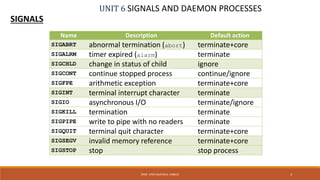
Name Description Default action
SIGABRT abnormal termination (abort) terminate+core
SIGALRM timer expired (alarm) terminate
SIGCHLD change in status of child ignore
SIGCONT continue stopped process continue/ignore
SIGFPE arithmetic exception terminate+core
SIGINT terminal interrupt character terminate
SIGIO asynchronous I/O terminate/ignore
SIGKILL termination terminate
SIGPIPE write to pipe with no readers terminate
SIGQUIT terminal quit character terminate+core
SIGSEGV invalid memory reference terminate+core
SIGSTOP stop stop process
UNIT 6 SIGNALS AND DAEMON PROCESSES
SIGNALS
4PROF. SYED MUSTAFA, HKBKCE
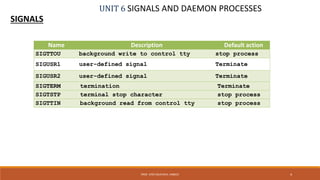
Name Description Default action
SIGTTOU background write to control tty stop process
SIGUSR1 user-defined signal Terminate
SIGUSR2 user-defined signal Terminate
SIGTERM termination Terminate
SIGTSTP terminal stop character stop process
SIGTTIN background read from control tty stop process
UNIT 6 SIGNALS AND DAEMON PROCESSES
SIGNALS
5PROF. SYED MUSTAFA, HKBKCE
THE UNIX KERNEL SUPPORT OF SIGNALS
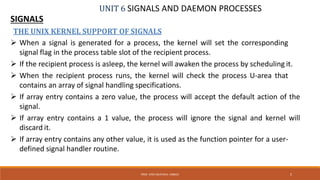
 When a signal is generated for a process, the kernel will set the corresponding
signal flag in the process table slot of the recipient process.
 If the recipient process is asleep, the kernel will awaken the process by scheduling it.
 When the recipient process runs, the kernel will check the process U-area that
contains an array of signal handling specifications.
 If array entry contains a zero value, the process will accept the default action of the
signal.
 If array entry contains a 1 value, the process will ignore the signal and kernel will
discard it.
 If array entry contains any other value, it is used as the function pointer for a user-
defined signal handler routine.
UNIT 6 SIGNALS AND DAEMON PROCESSES
SIGNALS
6PROF. SYED MUSTAFA, HKBKCE
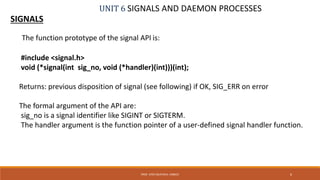
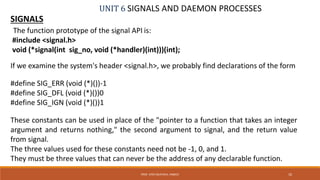
The function prototype of the signal API is:
#include <signal.h>
void (*signal(int sig_no, void (*handler)(int)))(int);
Returns: previous disposition of signal (see following) if OK, SIG_ERR on error
The formal argument of the API are:
sig_no is a signal identifier like SIGINT or SIGTERM.
The handler argument is the function pointer of a user-defined signal handler function.
UNIT 6 SIGNALS AND DAEMON PROCESSES
SIGNALS
7PROF. SYED MUSTAFA, HKBKCE
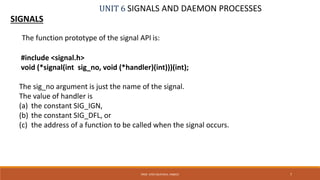
The function prototype of the signal API is:
#include <signal.h>
void (*signal(int sig_no, void (*handler)(int)))(int);
The sig_no argument is just the name of the signal.
The value of handler is
(a) the constant SIG_IGN,
(b) the constant SIG_DFL, or
(c) the address of a function to be called when the signal occurs.
UNIT 6 SIGNALS AND DAEMON PROCESSES
SIGNALS
8PROF. SYED MUSTAFA, HKBKCE
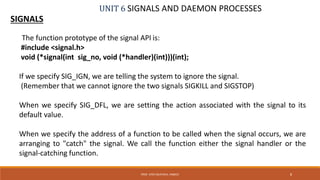
The function prototype of the signal API is:
#include <signal.h>
void (*signal(int sig_no, void (*handler)(int)))(int);
If we specify SIG_IGN, we are telling the system to ignore the signal.
(Remember that we cannot ignore the two signals SIGKILL and SIGSTOP)
When we specify SIG_DFL, we are setting the action associated with the signal to its
default value.
When we specify the address of a function to be called when the signal occurs, we are
arranging to "catch" the signal. We call the function either the signal handler or the
signal-catching function.
UNIT 6 SIGNALS AND DAEMON PROCESSES
SIGNALS
9PROF. SYED MUSTAFA, HKBKCE
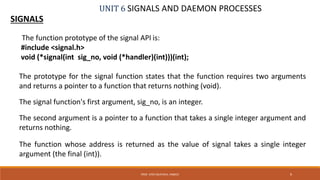
The function prototype of the signal API is:
#include <signal.h>
void (*signal(int sig_no, void (*handler)(int)))(int);
The prototype for the signal function states that the function requires two arguments
and returns a pointer to a function that returns nothing (void).
The signal function's first argument, sig_no, is an integer.
The second argument is a pointer to a function that takes a single integer argument and
returns nothing.
The function whose address is returned as the value of signal takes a single integer
argument (the final (int)).
UNIT 6 SIGNALS AND DAEMON PROCESSES
SIGNALS
10PROF. SYED MUSTAFA, HKBKCE
The function prototype of the signal API is:
#include <signal.h>
void (*signal(int sig_no, void (*handler)(int)))(int);
If we examine the system's header <signal.h>, we probably find declarations of the form
#define SIG_ERR (void (*)())-1
#define SIG_DFL (void (*)())0
#define SIG_IGN (void (*)())1
These constants can be used in place of the "pointer to a function that takes an integer
argument and returns nothing," the second argument to signal, and the return value
from signal.
The three values used for these constants need not be -1, 0, and 1.
They must be three values that can never be the address of any declarable function.
UNIT 6 SIGNALS AND DAEMON PROCESSES
SIGNALS
11PROF. SYED MUSTAFA, HKBKCE
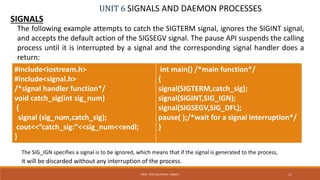
The following example attempts to catch the SIGTERM signal, ignores the SIGINT signal,
and accepts the default action of the SIGSEGV signal. The pause API suspends the calling
process until it is interrupted by a signal and the corresponding signal handler does a
return:
#include<iostream.h>
#include<signal.h>
/*signal handler function*/
void catch_sig(int sig_num)
{
signal (sig_num,catch_sig);
cout<<”catch_sig:”<<sig_num<<endl;
}
int main() /*main function*/
{
signal(SIGTERM,catch_sig);
signal(SIGINT,SIG_IGN);
signal(SIGSEGV,SIG_DFL);
pause( );/*wait for a signal interruption*/
}
The SIG_IGN specifies a signal is to be ignored, which means that if the signal is generated to the process,
it will be discarded without any interruption of the process.
UNIT 6 SIGNALS AND DAEMON PROCESSES
SIGNALS
12PROF. SYED MUSTAFA, HKBKCE
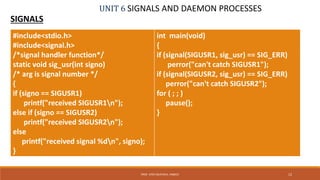
#include<stdio.h>
#include<signal.h>
/*signal handler function*/
static void sig_usr(int signo)
/* arg is signal number */
{
if (signo == SIGUSR1)
printf("received SIGUSR1n");
else if (signo == SIGUSR2)
printf("received SIGUSR2n");
else
printf("received signal %dn", signo);
}
int main(void)
{
if (signal(SIGUSR1, sig_usr) == SIG_ERR)
perror("can't catch SIGUSR1");
if (signal(SIGUSR2, sig_usr) == SIG_ERR)
perror("can't catch SIGUSR2");
for ( ; ; )
pause();
}
UNIT 6 SIGNALS AND DAEMON PROCESSES
SIGNALS
13PROF. SYED MUSTAFA, HKBKCE
$ ./a.out & start process in background
[1] 7216 job-control shell prints job number and process ID
$ kill -USR1 7216 send it SIGUSR1
received SIGUSR1
$ kill -USR2 7216 send it SIGUSR2
received SIGUSR2
$ kill 7216 now send it SIGTERM
[1]+ Terminated ./a.out
When we send the SIGTERM signal, the process is terminated, since it doesn't catch the
signal, and the default action for the signal is termination.
UNIT 6 SIGNALS AND DAEMON PROCESSES
SIGNALS
14PROF. SYED MUSTAFA, HKBKCE
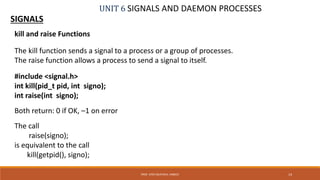
kill and raise Functions
The kill function sends a signal to a process or a group of processes.
The raise function allows a process to send a signal to itself.
#include <signal.h>
int kill(pid_t pid, int signo);
int raise(int signo);
Both return: 0 if OK, –1 on error
The call
raise(signo);
is equivalent to the call
kill(getpid(), signo);
UNIT 6 SIGNALS AND DAEMON PROCESSES
SIGNALS
15PROF. SYED MUSTAFA, HKBKCE
kill and raise Functions
#include <signal.h>
int kill(pid_t pid, int signo);
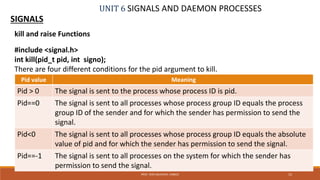
There are four different conditions for the pid argument to kill.
Pid value Meaning
Pid > 0 The signal is sent to the process whose process ID is pid.
Pid==0 The signal is sent to all processes whose process group ID equals the process
group ID of the sender and for which the sender has permission to send the
signal.
Pid<0 The signal is sent to all processes whose process group ID equals the absolute
value of pid and for which the sender has permission to send the signal.
Pid==-1 The signal is sent to all processes on the system for which the sender has
permission to send the signal.
UNIT 6 SIGNALS AND DAEMON PROCESSES
SIGNALS
16PROF. SYED MUSTAFA, HKBKCE
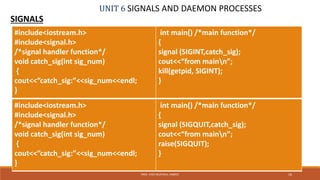
#include<iostream.h>
#include<signal.h>
/*signal handler function*/
void catch_sig(int sig_num)
{
cout<<”catch_sig:”<<sig_num<<endl;
}
int main() /*main function*/
{
signal (SIGINT,catch_sig);
cout<<“from mainn”;
kill(getpid, SIGINT);
}
#include<iostream.h>
#include<signal.h>
/*signal handler function*/
void catch_sig(int sig_num)
{
cout<<”catch_sig:”<<sig_num<<endl;
}
int main() /*main function*/
{
signal (SIGQUIT,catch_sig);
cout<<“from mainn”;
raise(SIGQUIT);
}
UNIT 6 SIGNALS AND DAEMON PROCESSES
SIGNALS
17PROF. SYED MUSTAFA, HKBKCE
alarm and pause Functions
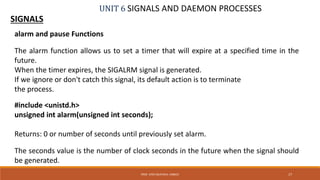
The alarm function allows us to set a timer that will expire at a specified time in the
future.
When the timer expires, the SIGALRM signal is generated.
If we ignore or don't catch this signal, its default action is to terminate
the process.
#include <unistd.h>
unsigned int alarm(unsigned int seconds);
Returns: 0 or number of seconds until previously set alarm.
The seconds value is the number of clock seconds in the future when the signal should
be generated.
UNIT 6 SIGNALS AND DAEMON PROCESSES
SIGNALS
18PROF. SYED MUSTAFA, HKBKCE
alarm and pause Functions
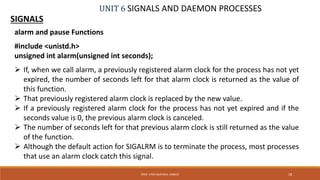
#include <unistd.h>
unsigned int alarm(unsigned int seconds);
 If, when we call alarm, a previously registered alarm clock for the process has not yet
expired, the number of seconds left for that alarm clock is returned as the value of
this function.
 That previously registered alarm clock is replaced by the new value.
 If a previously registered alarm clock for the process has not yet expired and if the
seconds value is 0, the previous alarm clock is canceled.
 The number of seconds left for that previous alarm clock is still returned as the value
of the function.
 Although the default action for SIGALRM is to terminate the process, most processes
that use an alarm clock catch this signal.
UNIT 6 SIGNALS AND DAEMON PROCESSES
SIGNALS
19PROF. SYED MUSTAFA, HKBKCE
alarm and pause Functions
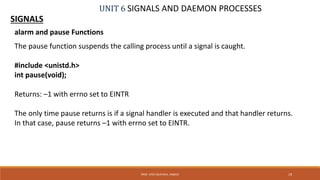
The pause function suspends the calling process until a signal is caught.
#include <unistd.h>
int pause(void);
Returns: –1 with errno set to EINTR
The only time pause returns is if a signal handler is executed and that handler returns.
In that case, pause returns –1 with errno set to EINTR.
UNIT 6 SIGNALS AND DAEMON PROCESSES
SIGNALS
20PROF. SYED MUSTAFA, HKBKCE
alarm and pause Functions
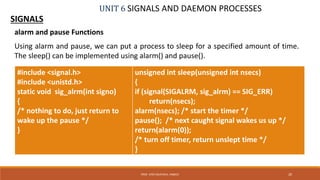
Using alarm and pause, we can put a process to sleep for a specified amount of time.
The sleep() can be implemented using alarm() and pause().
#include <signal.h>
#include <unistd.h>
static void sig_alrm(int signo)
{
/* nothing to do, just return to
wake up the pause */
}
unsigned int sleep(unsigned int nsecs)
{
if (signal(SIGALRM, sig_alrm) == SIG_ERR)
return(nsecs);
alarm(nsecs); /* start the timer */
pause(); /* next caught signal wakes us up */
return(alarm(0));
/* turn off timer, return unslept time */
}
UNIT 6 SIGNALS AND DAEMON PROCESSES
SIGNALS
21PROF. SYED MUSTAFA, HKBKCE
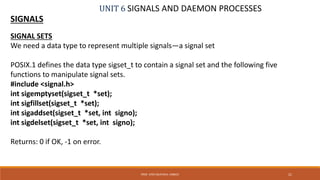
SIGNAL SETS
We need a data type to represent multiple signals—a signal set
POSIX.1 defines the data type sigset_t to contain a signal set and the following five
functions to manipulate signal sets.
#include <signal.h>
int sigemptyset(sigset_t *set);
int sigfillset(sigset_t *set);
int sigaddset(sigset_t *set, int signo);
int sigdelset(sigset_t *set, int signo);
Returns: 0 if OK, -1 on error.
UNIT 6 SIGNALS AND DAEMON PROCESSES
SIGNALS
22PROF. SYED MUSTAFA, HKBKCE
SIGNAL SETS
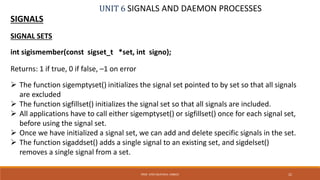
int sigismember(const sigset_t *set, int signo);
Returns: 1 if true, 0 if false, –1 on error
 The function sigemptyset() initializes the signal set pointed to by set so that all signals
are excluded
 The function sigfillset() initializes the signal set so that all signals are included.
 All applications have to call either sigemptyset() or sigfillset() once for each signal set,
before using the signal set.
 Once we have initialized a signal set, we can add and delete specific signals in the set.
 The function sigaddset() adds a single signal to an existing set, and sigdelset()
removes a single signal from a set.
UNIT 6 SIGNALS AND DAEMON PROCESSES
SIGNALS
23PROF. SYED MUSTAFA, HKBKCE
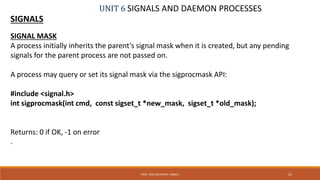
SIGNAL MASK
A process initially inherits the parent’s signal mask when it is created, but any pending
signals for the parent process are not passed on.
A process may query or set its signal mask via the sigprocmask API:
#include <signal.h>
int sigprocmask(int cmd, const sigset_t *new_mask, sigset_t *old_mask);
Returns: 0 if OK, -1 on error
.
UNIT 6 SIGNALS AND DAEMON PROCESSES
SIGNALS
24PROF. SYED MUSTAFA, HKBKCE
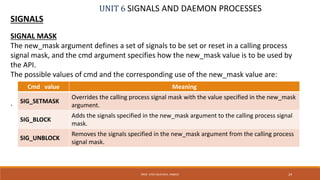
SIGNAL MASK
The new_mask argument defines a set of signals to be set or reset in a calling process
signal mask, and the cmd argument specifies how the new_mask value is to be used by
the API.
The possible values of cmd and the corresponding use of the new_mask value are:
.
Cmd value Meaning
SIG_SETMASK
Overrides the calling process signal mask with the value specified in the new_mask
argument.
SIG_BLOCK
Adds the signals specified in the new_mask argument to the calling process signal
mask.
SIG_UNBLOCK
Removes the signals specified in the new_mask argument from the calling process
signal mask.
UNIT 6 SIGNALS AND DAEMON PROCESSES
SIGNALS
25PROF. SYED MUSTAFA, HKBKCE
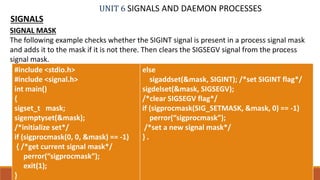
SIGNAL MASK
The following example checks whether the SIGINT signal is present in a process signal mask
and adds it to the mask if it is not there. Then clears the SIGSEGV signal from the process
signal mask.
#include <stdio.h>
#include <signal.h>
int main()
{
sigset_t mask;
sigemptyset(&mask);
/*initialize set*/
if (sigprocmask(0, 0, &mask) == -1)
{ /*get current signal mask*/
perror(“sigprocmask”);
exit(1);
}
else
sigaddset(&mask, SIGINT); /*set SIGINT flag*/
sigdelset(&mask, SIGSEGV);
/*clear SIGSEGV flag*/
if (sigprocmask(SIG_SETMASK, &mask, 0) == -1)
perror(“sigprocmask”);
/*set a new signal mask*/
} .
UNIT 6 SIGNALS AND DAEMON PROCESSES
SIGNALS
26PROF. SYED MUSTAFA, HKBKCE
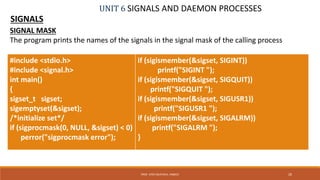
SIGNAL MASK
The program prints the names of the signals in the signal mask of the calling process
#include <stdio.h>
#include <signal.h>
int main()
{
sigset_t sigset;
sigemptyset(&sigset);
/*initialize set*/
if (sigprocmask(0, NULL, &sigset) < 0)
perror("sigprocmask error");
if (sigismember(&sigset, SIGINT))
printf("SIGINT ");
if (sigismember(&sigset, SIGQUIT))
printf("SIGQUIT ");
if (sigismember(&sigset, SIGUSR1))
printf("SIGUSR1 ");
if (sigismember(&sigset, SIGALRM))
printf("SIGALRM ");
}
UNIT 6 SIGNALS AND DAEMON PROCESSES
SIGNALS
27PROF. SYED MUSTAFA, HKBKCE
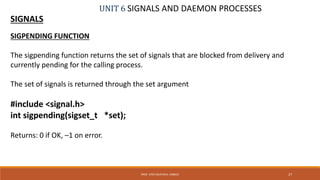
SIGPENDING FUNCTION
The sigpending function returns the set of signals that are blocked from delivery and
currently pending for the calling process.
The set of signals is returned through the set argument
#include <signal.h>
int sigpending(sigset_t *set);
Returns: 0 if OK, –1 on error.
UNIT 6 SIGNALS AND DAEMON PROCESSES
SIGNALS
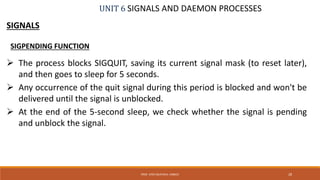
 The process blocks SIGQUIT, saving its current signal mask (to reset later),
and then goes to sleep for 5 seconds.
 Any occurrence of the quit signal during this period is blocked and won't be
delivered until the signal is unblocked.
 At the end of the 5-second sleep, we check whether the signal is pending
and unblock the signal.
28PROF. SYED MUSTAFA, HKBKCE
SIGPENDING FUNCTION
UNIT 6 SIGNALS AND DAEMON PROCESSES
SIGNALS - SIGPENDING FUNCTION
29PROF. SYED MUSTAFA, HKBKCE
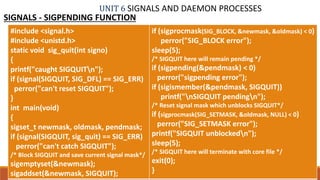
#include <signal.h>
#include <unistd.h>
static void sig_quit(int signo)
{
printf("caught SIGQUITn");
if (signal(SIGQUIT, SIG_DFL) == SIG_ERR)
perror("can't reset SIGQUIT");
}
int main(void)
{
sigset_t newmask, oldmask, pendmask;
if (signal(SIGQUIT, sig_quit) == SIG_ERR)
perror("can't catch SIGQUIT");
/* Block SIGQUIT and save current signal mask*/
sigemptyset(&newmask);
sigaddset(&newmask, SIGQUIT);
if (sigprocmask(SIG_BLOCK, &newmask, &oldmask) < 0)
perror("SIG_BLOCK error");
sleep(5);
/* SIGQUIT here will remain pending */
if (sigpending(&pendmask) < 0)
perror("sigpending error");
if (sigismember(&pendmask, SIGQUIT))
printf("nSIGQUIT pendingn");
/* Reset signal mask which unblocks SIGQUIT*/
if (sigprocmask(SIG_SETMASK, &oldmask, NULL) < 0)
perror("SIG_SETMASK error");
printf("SIGQUIT unblockedn");
sleep(5);
/* SIGQUIT here will terminate with core file */
exit(0);
}
UNIT 6 SIGNALS AND DAEMON PROCESSES
SIGNALS
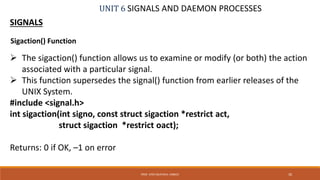
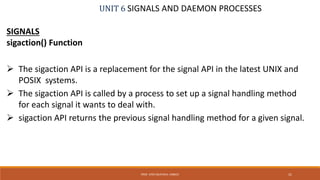
 The sigaction() function allows us to examine or modify (or both) the action
associated with a particular signal.
 This function supersedes the signal() function from earlier releases of the
UNIX System.
#include <signal.h>
int sigaction(int signo, const struct sigaction *restrict act,
struct sigaction *restrict oact);
Returns: 0 if OK, –1 on error
30PROF. SYED MUSTAFA, HKBKCE
Sigaction() Function
UNIT 6 SIGNALS AND DAEMON PROCESSES
SIGNALS
sigaction() Function
 The sigaction API is a replacement for the signal API in the latest UNIX and
POSIX systems.
 The sigaction API is called by a process to set up a signal handling method
for each signal it wants to deal with.
 sigaction API returns the previous signal handling method for a given signal.
31PROF. SYED MUSTAFA, HKBKCE
UNIT 6 SIGNALS AND DAEMON PROCESSES
SIGNALS
sigaction() Function
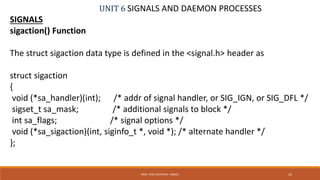
The struct sigaction data type is defined in the <signal.h> header as
struct sigaction
{
void (*sa_handler)(int); /* addr of signal handler, or SIG_IGN, or SIG_DFL */
sigset_t sa_mask; /* additional signals to block */
int sa_flags; /* signal options */
void (*sa_sigaction)(int, siginfo_t *, void *); /* alternate handler */
};
32PROF. SYED MUSTAFA, HKBKCE
UNIT 6 SIGNALS AND DAEMON PROCESSES
SIGNALS
sigaction() Function
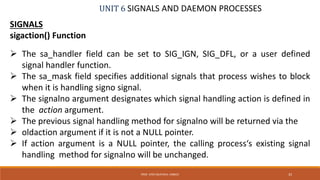
 The sa_handler field can be set to SIG_IGN, SIG_DFL, or a user defined
signal handler function.
 The sa_mask field specifies additional signals that process wishes to block
when it is handling signo signal.
 The signalno argument designates which signal handling action is defined in
the action argument.
 The previous signal handling method for signalno will be returned via the
 oldaction argument if it is not a NULL pointer.
 If action argument is a NULL pointer, the calling process‘s existing signal
handling method for signalno will be unchanged.
33PROF. SYED MUSTAFA, HKBKCE
UNIT 6 SIGNALS AND DAEMON PROCESSES
SIGNALS - sigaction FUNCTION
34PROF. SYED MUSTAFA, HKBKCE
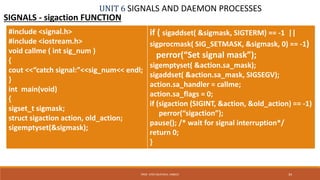
#include <signal.h>
#include <iostream.h>
void callme ( int sig_num )
{
cout <<“catch signal:”<<sig_num<< endl;
}
int main(void)
{
sigset_t sigmask;
struct sigaction action, old_action;
sigemptyset(&sigmask);
if ( sigaddset( &sigmask, SIGTERM) == -1 ||
sigprocmask( SIG_SETMASK, &sigmask, 0) == -1)
perror(“Set signal mask”);
sigemptyset( &action.sa_mask);
sigaddset( &action.sa_mask, SIGSEGV);
action.sa_handler = callme;
action.sa_flags = 0;
if (sigaction (SIGINT, &action, &old_action) == -1)
perror(“sigaction”);
pause(); /* wait for signal interruption*/
return 0;
}
UNIT 6 SIGNALS AND DAEMON PROCESSES
SIGNALS - sigaction FUNCTION
 In the program, the process signal mask is set with SIGTERM signal.
 The process then defines a signal handler for the SIGINT signal and also
specifies that the SIGSEGV signal is to be blocked when the process is
handling the SIGINT signal.
 The process then terminates its execution via the pause API.
The output of the program would be as:
% cc sigaction.c –o sigaction
% ./sigaction &
[1] 495
% kill –INT 495
catch signal: 2
sigaction exits
[1] Done sigaction
35PROF. SYED MUSTAFA, HKBKCE
UNIT 6 SIGNALS AND DAEMON PROCESSES
SIGNALS
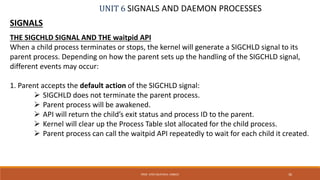
THE SIGCHLD SIGNAL AND THE waitpid API
When a child process terminates or stops, the kernel will generate a SIGCHLD signal to its
parent process. Depending on how the parent sets up the handling of the SIGCHLD signal,
different events may occur:
1. Parent accepts the default action of the SIGCHLD signal:
 SIGCHLD does not terminate the parent process.
 Parent process will be awakened.
 API will return the child’s exit status and process ID to the parent.
 Kernel will clear up the Process Table slot allocated for the child process.
 Parent process can call the waitpid API repeatedly to wait for each child it created.
36PROF. SYED MUSTAFA, HKBKCE
UNIT 6 SIGNALS AND DAEMON PROCESSES
SIGNALS
THE SIGCHLD SIGNAL AND THE waitpid API
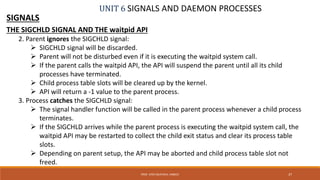
2. Parent ignores the SIGCHLD signal:
 SIGCHLD signal will be discarded.
 Parent will not be disturbed even if it is executing the waitpid system call.
 If the parent calls the waitpid API, the API will suspend the parent until all its child
processes have terminated.
 Child process table slots will be cleared up by the kernel.
 API will return a -1 value to the parent process.
3. Process catches the SIGCHLD signal:
 The signal handler function will be called in the parent process whenever a child process
terminates.
 If the SIGCHLD arrives while the parent process is executing the waitpid system call, the
waitpid API may be restarted to collect the child exit status and clear its process table
slots.
 Depending on parent setup, the API may be aborted and child process table slot not
freed.
37PROF. SYED MUSTAFA, HKBKCE
UNIT 6 SIGNALS AND DAEMON PROCESSES
SIGNALS
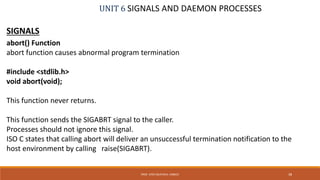
abort() Function
abort function causes abnormal program termination
#include <stdlib.h>
void abort(void);
This function never returns.
This function sends the SIGABRT signal to the caller.
Processes should not ignore this signal.
ISO C states that calling abort will deliver an unsuccessful termination notification to the
host environment by calling raise(SIGABRT).
38PROF. SYED MUSTAFA, HKBKCE
UNIT 6 SIGNALS AND DAEMON PROCESSES
SIGNALS
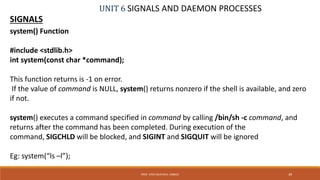
system() Function
#include <stdlib.h>
int system(const char *command);
This function returns is -1 on error.
If the value of command is NULL, system() returns nonzero if the shell is available, and zero
if not.
system() executes a command specified in command by calling /bin/sh -c command, and
returns after the command has been completed. During execution of the
command, SIGCHLD will be blocked, and SIGINT and SIGQUIT will be ignored
Eg: system(“ls –l”);
39PROF. SYED MUSTAFA, HKBKCE
UNIT 6 SIGNALS AND DAEMON PROCESSES
SIGNALS
sleep() Function
sleep - sleep for the specified number of seconds
#include <unistd.h>
unsigned int sleep(unsigned int seconds);
Returns: 0 or number of unslept seconds.
This function causes the calling process to be suspended until either
1. The amount of wall clock time specified by seconds has elapsed.
2. A signal is caught by the process and the signal handler returns.
Eg:
sleep(60); // suspend the process for one minute.
40PROF. SYED MUSTAFA, HKBKCE
UNIT 6 SIGNALS AND DAEMON PROCESSES
SIGNALS
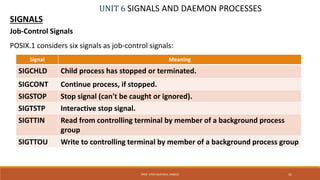
Job-Control Signals
POSIX.1 considers six signals as job-control signals:
41PROF. SYED MUSTAFA, HKBKCE
Signal Meaning
SIGCHLD Child process has stopped or terminated.
SIGCONT Continue process, if stopped.
SIGSTOP Stop signal (can't be caught or ignored).
SIGTSTP Interactive stop signal.
SIGTTIN Read from controlling terminal by member of a background process
group
SIGTTOU Write to controlling terminal by member of a background process group
UNIT 6 SIGNALS AND DAEMON PROCESSES
SIGNALS
Job-Control Signals
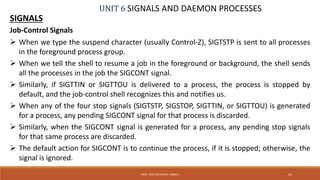
 When we type the suspend character (usually Control-Z), SIGTSTP is sent to all processes
in the foreground process group.
 When we tell the shell to resume a job in the foreground or background, the shell sends
all the processes in the job the SIGCONT signal.
 Similarly, if SIGTTIN or SIGTTOU is delivered to a process, the process is stopped by
default, and the job-control shell recognizes this and notifies us.
 When any of the four stop signals (SIGTSTP, SIGSTOP, SIGTTIN, or SIGTTOU) is generated
for a process, any pending SIGCONT signal for that process is discarded.
 Similarly, when the SIGCONT signal is generated for a process, any pending stop signals
for that same process are discarded.
 The default action for SIGCONT is to continue the process, if it is stopped; otherwise, the
signal is ignored.
42PROF. SYED MUSTAFA, HKBKCE
UNIT 6 SIGNALS AND DAEMON PROCESSES
DAEMON PROCESSES
 Daemons are processes that live for a long time.
 They are often started when the system is bootstrapped and terminate only when the
system is shut down.
 Because they don't have a controlling terminal, we say that they run in the background.
 UNIX systems have numerous daemons that perform day-to-day activities.
43PROF. SYED MUSTAFA, HKBKCE
UNIT 6 SIGNALS AND DAEMON PROCESSES
DAEMON PROCESSES
Deamon Characteristics
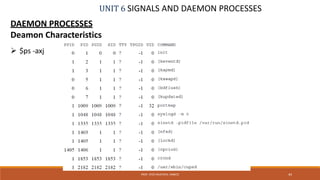
 $ps -axj
44PROF. SYED MUSTAFA, HKBKCE
UNIT 6 SIGNALS AND DAEMON PROCESSES
DAEMON PROCESSES
Deamon Characteristics
 Daemons run in background.
 Daemons have super-user privilege.
 Daemons don’t have controlling terminal.
 Daemons are session and group leaders.
45PROF. SYED MUSTAFA, HKBKCE
UNIT 6 SIGNALS AND DAEMON PROCESSES
DAEMON PROCESSES
Deamon Characteristics
 Anything with a parent process ID of 0 is usually a kernel process started as part of the
system bootstrap procedure.
 Kernel processes are special and generally exist for the entire lifetime of the system.
 They run with superuser privileges and have no controlling terminal and no command
line.
 Process ID of 1 is usually init.
 It is a system daemon responsible for, among other things, starting system services
specific to various run levels.
46PROF. SYED MUSTAFA, HKBKCE
UNIT 6 SIGNALS AND DAEMON PROCESSES
DAEMON PROCESSES
Deamon Characteristics
 keventd daemon provides process context for running scheduled functions in the kernel.
 The kapmd daemon provides support for the advanced power management features
available with various computer systems.
 The kswapd daemon is also known as the pageout daemon.
 It supports the virtual memory subsystem by writing dirty pages to disk slowly over time,
so the pages can be reclaimed.
 The inetd daemon (xinetd) listens on the system's network interfaces for incoming
requests for various network servers.
 The nfsd, lockd, and rpciod daemons provide support for the
 Network File System (NFS).
 The cron daemon (crond) executes commands at specified dates and times. Numerous
system administration tasks are handled by having programs executed regularly by cron.
 The cupsd daemon is a print spooler; it handles print requests on the system.
47PROF. SYED MUSTAFA, HKBKCE
UNIT 6 SIGNALS AND DAEMON PROCESSES
DAEMON PROCESSES
CODING RULES
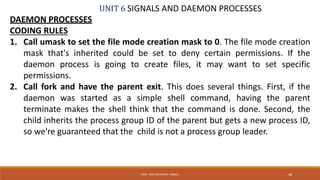
1. Call umask to set the file mode creation mask to 0. The file mode creation
mask that's inherited could be set to deny certain permissions. If the
daemon process is going to create files, it may want to set specific
permissions.
2. Call fork and have the parent exit. This does several things. First, if the
daemon was started as a simple shell command, having the parent
terminate makes the shell think that the command is done. Second, the
child inherits the process group ID of the parent but gets a new process ID,
so we're guaranteed that the child is not a process group leader.
48PROF. SYED MUSTAFA, HKBKCE
UNIT 6 SIGNALS AND DAEMON PROCESSESDAEMON PROCESSES
CODING RULES
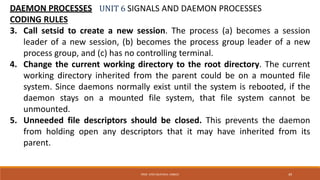
3. Call setsid to create a new session. The process (a) becomes a session
leader of a new session, (b) becomes the process group leader of a new
process group, and (c) has no controlling terminal.
4. Change the current working directory to the root directory. The current
working directory inherited from the parent could be on a mounted file
system. Since daemons normally exist until the system is rebooted, if the
daemon stays on a mounted file system, that file system cannot be
unmounted.
5. Unneeded file descriptors should be closed. This prevents the daemon
from holding open any descriptors that it may have inherited from its
parent.
49PROF. SYED MUSTAFA, HKBKCE
UNIT 6 SIGNALS AND DAEMON PROCESSES
DAEMON PROCESSES
CODING RULES
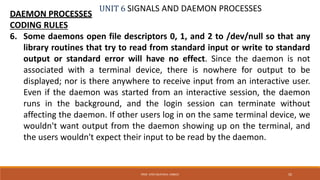
6. Some daemons open file descriptors 0, 1, and 2 to /dev/null so that any
library routines that try to read from standard input or write to standard
output or standard error will have no effect. Since the daemon is not
associated with a terminal device, there is nowhere for output to be
displayed; nor is there anywhere to receive input from an interactive user.
Even if the daemon was started from an interactive session, the daemon
runs in the background, and the login session can terminate without
affecting the daemon. If other users log in on the same terminal device, we
wouldn't want output from the daemon showing up on the terminal, and
the users wouldn't expect their input to be read by the daemon.
50PROF. SYED MUSTAFA, HKBKCE
UNIT 6 SIGNALS AND DAEMON PROCESSES
DAEMON PROCESSES
CODING RULES
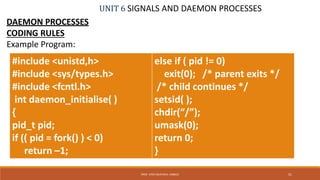
Example Program:
51PROF. SYED MUSTAFA, HKBKCE
#include <unistd,h>
#include <sys/types.h>
#include <fcntl.h>
int daemon_initialise( )
{
pid_t pid;
if (( pid = fork() ) < 0)
return –1;
else if ( pid != 0)
exit(0); /* parent exits */
/* child continues */
setsid( );
chdir(“/”);
umask(0);
return 0;
}
UNIT 6 SIGNALS AND DAEMON PROCESSES
DAEMON PROCESSES
Error Logging
 One problem a daemon has is how to handle error messages.
 It can't simply write to standard error, since it shouldn't have a controlling
terminal.
 We don't want all the daemons writing to the console device, since on
 many workstations, the console device runs a windowing system.
 We also don't want each daemon writing its own error messages into a
separate file.
 A central daemon errorlogging facility is required.
52PROF. SYED MUSTAFA, HKBKCE
UNIT 6 SIGNALS AND DAEMON PROCESSES
DAEMON PROCESSES
Error Logging
53PROF. SYED MUSTAFA, HKBKCE
UNIT 6 SIGNALS AND DAEMON PROCESSES
DAEMON PROCESSES
Error Logging
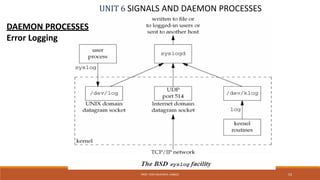
There are three ways to generate log messages:
1. Kernel routines can call the log function.
These messages can be read by any user process that opens and reads the
/dev/klog device.
2. Most user processes (daemons) call the syslog(3) function to generate log
messages. This causes the message to be sent to the UNIX domain datagram
socket /dev/log.
3. A user process on this host, or on some other host that is connected to this
host by a TCP/IP network, can send log messages to UDP port 514.
The syslogd daemon reads all three forms of log messages.
On start-up, this daemon reads a configuration file, usually /etc/syslog.conf,
which determines where different classes of messages are to be sent.
54PROF. SYED MUSTAFA, HKBKCE
UNIT 7 INTERPROCESSES COMMUNICATION
INTORDUCTION
55PROF. SYED MUSTAFA, HKBKCE
IPC ( InterProcess Communication)
 It is a mechanism whereby two or more processes communicate with
each other to perform tasks.
 These processes may interact in a client/server manner or in a peer-to-
peer fashion.
 IPC enables one application to control another application, and for
several applications to share the same data without interfering with one
another.
 IPC is required in all multiprocessing systems, but it is not generally
supported by single-process operating systems.
UNIT 7 INTERPROCESSES COMMUNICATION
INTORDUCTION
56PROF. SYED MUSTAFA, HKBKCE
IPC ( InterProcess Communication)
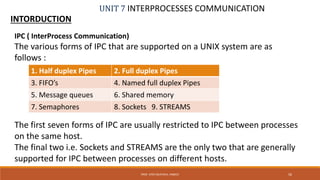
The various forms of IPC that are supported on a UNIX system are as
follows :
The first seven forms of IPC are usually restricted to IPC between processes
on the same host.
The final two i.e. Sockets and STREAMS are the only two that are generally
supported for IPC between processes on different hosts.
1. Half duplex Pipes 2. Full duplex Pipes
3. FIFO’s 4. Named full duplex Pipes
5. Message queues 6. Shared memory
7. Semaphores 8. Sockets 9. STREAMS
UNIT 7 INTERPROCESSES COMMUNICATION
PIPES
 Pipes are the oldest form of UNIX System IPC.
 Pipes have two limitations.
1. Historically, they have been half duplex
(i.e.data flows in only one direction)
2. Pipes can be used only between processes that have a common
ancestor.
Normally, a pipe is created by a process, that process calls fork,
and the pipe is used between the parent and the child.
57PROF. SYED MUSTAFA, HKBKCE
UNIT 7 INTERPROCESSES COMMUNICATION
PIPES
 A pipe is created by calling the pipe function.
#include <unistd.h>
int pipe(int fd[2]);
Returns: 0 if OK, –1 on error
 Despite these limitations, half-duplex pipes are still the most commonly
used form of IPC.
 Every time we type a sequence of commands in a pipeline for the shell to
execute, the shell creates a separate process for each command and links
the standard output of one to the standard input of the next using a pipe.
58PROF. SYED MUSTAFA, HKBKCE
UNIT 7 INTERPROCESSES COMMUNICATION
PIPES
Two file descriptors are returned through the fd argument:
fd[0] is open for reading, and
fd[1] is open for writing.
The output of fd[1] is the input for fd[0].
POSIX.1 allows for an implementation to support full-duplex pipes.
For these implementations,
fd[0] and fd[1] are open for both reading and writing.
59PROF. SYED MUSTAFA, HKBKCE
UNIT 7 INTERPROCESSES COMMUNICATION
PIPES
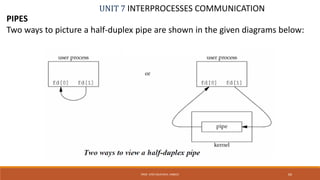
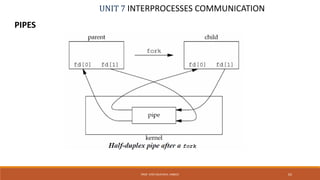
Two ways to picture a half-duplex pipe are shown in the given diagrams below:
60PROF. SYED MUSTAFA, HKBKCE
UNIT 7 INTERPROCESSES COMMUNICATION
PIPES
 The left half of the diagram shows the two ends of the pipe connected in a
single process.
 The right half of the diagram emphasizes that the data in the pipe flows
through the kernel.
 A pipe in a single process is next to useless.
 Normally, the process that calls pipe then calls fork, creating an IPC channel
from the parent to the child or vice versa.
61PROF. SYED MUSTAFA, HKBKCE
UNIT 7 INTERPROCESSES COMMUNICATION
PIPES
62PROF. SYED MUSTAFA, HKBKCE
UNIT 7 INTERPROCESSES COMMUNICATION
PIPES
63PROF. SYED MUSTAFA, HKBKCE
For a pipe from the parent to the child, the parent closes the read end of
the pipe (fd[0]), and the child closes the write end (fd[1]).
UNIT 7 INTERPROCESSES COMMUNICATION
PIPES
64PROF. SYED MUSTAFA, HKBKCE
For a pipe from the parent to the child, the parent closes the read end of
the pipe (fd[0]), and the child closes the write end (fd[1]).
For a pipe from the child to the parent, the parent closes fd[1], and the
child closes fd[0].
UNIT 7 INTERPROCESSES COMMUNICATION
PIPES
65PROF. SYED MUSTAFA, HKBKCE
For a pipe from the child to the parent, the parent closes fd[1], and the
child closes fd[0].
UNIT 7 INTERPROCESSES COMMUNICATION
PIPES
66PROF. SYED MUSTAFA, HKBKCE
When one end of a pipe is closed, the following two rules apply.
1. If we read from a pipe whose write end has been closed, read returns
0 to indicate an end of file after all the data has been read
2. If we write to a pipe whose read end has been closed, the signal
SIGPIPE is generated. If we either ignore the signal or catch it and
return from the signal handler, write returns –1 with errno set to
EPIPE.
UNIT 7 INTERPROCESSES COMMUNICATION
PIPES
67PROF. SYED MUSTAFA, HKBKCE
Program to show the code to create a pipe between a parent and its child
and to send data down the pipe.
int main(void)
{
int n, fd[2];
pid_t pid;
char line[1000];
if (pipe(fd) < 0)
perror("pipe error");
if ((pid = fork()) < 0)
perror("fork error");
else if (pid > 0)
{ /* parent */
close(fd[0]);
write(fd[1], "hello worldn", 12);
}
else
{ /* child */
close(fd[1]);
n = read(fd[0], line,1000);
write(1, line, n);
}
exit(0);
}
UNIT 7 INTERPROCESSES COMMUNICATION
PIPES
68PROF. SYED MUSTAFA, HKBKCE
Program to show the code for I/O redirection using dup2().
#include<fcntl.h>
main()
{
int fd,fd2;
char c[256],con[]="This is simple file
for demonstration";
fd=open("sample1",O_RDWR|O_CR
EAT,0777);
printf("original file desc is %dn",fd);
fd2=dup2(fd,7);
printf("new file desc is %dn", fd2);
if(fd==-1)
perror("Can't creat file");
else if(read(fd2,&c,10)==0)
write(fd2,con,sizeof(con));
else
printf("%sn",c);
close(fd);
}
UNIT 7 INTERPROCESSES COMMUNICATION
PIPES
69PROF. SYED MUSTAFA, HKBKCE
Program to show the code for I/O redirection using dup().
#include<fcntl.h>
main()
{
int fd,fd2;
char c[256],con[]="This is simple file
for demonstration";
fd=open("sample1",O_RDWR|O_CR
EAT,0777);
printf("original file desc is %dn",fd);
fd2=dup(fd);
printf("new file desc is %dn", fd2);
if(fd==-1)
perror("Can't creat file");
else if(read(fd2,&c,10)==0)
write(fd2,con,sizeof(con));
else
printf("%sn",c);
close(fd);
}
UNIT 7 INTERPROCESSES COMMUNICATION
PIPES
70PROF. SYED MUSTAFA, HKBKCE
Program to show the code child writes to the parent through pipe.
#include<unistd.h>
#include<sys/types.h>
main()
{
pid_t pid;
int fd[2],s;
char c[5];
pipe(fd);
pid=fork();
if (pid==0)
{
close(fd[0]);
write(fd[1],"hello",5);
}
else
{
wait(&s);
close(fd[1]);
read(fd[0],c,5);
c[5]='0';
printf("%sn",c);
}
}
UNIT 7 INTERPROCESSES COMMUNICATION
PIPES
71PROF. SYED MUSTAFA, HKBKCE
Program to show the code for broken pipe.
#include<unistd.h>
#include<sys/types.h>
main()
{
pid_t pid;
int fd[2];
char c[5];
pipe(fd);
pid=fork();
if (pid>0)
{
close(fd[0]);
write(fd[1],"hello",5);
}
else
{
close(fd[0]); /*read end closed*/
sleep(1);
read(fd[0],c,5);
printf("%sn",c);
exit(0);
}
}
UNIT 7 INTERPROCESSES COMMUNICATION
PIPES
72PROF. SYED MUSTAFA, HKBKCE
Program to show the code for UNIX command redirection for “ls|wc -l”.
#include<fcntl.h>
main()
{
int p[2],pid;
pipe(p);
pid=fork();
if(pid==0)
{
close(p[0]);
printf("p[1]=%dn",p[1]);
dup2(p[1],1);
execl("/bin/ls","ls",(char *)0);
perror("from ls:");
}
else
{
close(p[1]);
printf("p[0]=%dn",p[0]);
dup2(p[0],0);
execl("/usr/bin/wc","wc","-l",(char *)0);
perror("from wc");
}
}
UNIT 7 INTERPROCESSES COMMUNICATION
PIPES
73PROF. SYED MUSTAFA, HKBKCE
Program to implement unix command “who|sort|wc –l”
main()
{
int p[2], q[2], pid, pid1;
pipe(p);
pid = fork();
if(0 == pid)
{
close(1);
close(p[0]);
dup(p[1]);
execlp("who", "who",0);
perror("error at cat");
}
else
{
pipe(q);
pid1 = fork();
if(0 == pid1)
{
close(1);
close(0);
close(p[1]);
close(q[0]);
dup(p[0]);
dup(q[1]);
execlp("sort", "sort", (char*)0);
perror("error at grep");
}
else
{
close(0);
close(q[1]);
close(p[1]);
close(p[0]);
dup(q[0]);
execl("/usr/bin/wc", "wc", "-l", 0);
perror("error at wc");
}
}
} //end of main()
UNIT 7 INTERPROCESSES COMMUNICATION
Popen() and pclose() Functions
PROF. SYED MUSTAFA, HKBKCE 74
 Since a common operation is to create a pipe to another process, to
either read its output or send it input, the standard I/O library has
historically provided the popen and pclose functions.
 These two functions handle all the dirty work that we've been doing
ourselves: creating a pipe, forking a child, closing the unused ends of
the pipe, executing a shell to run the command, and waiting for the
command to terminate.
UNIT 7 INTERPROCESSES COMMUNICATION
Popen() and pclose() Functions
75PROF. SYED MUSTAFA, HKBKCE
UNIT 7 INTERPROCESSES COMMUNICATION
Popen() and pclose() Functions
PROF. SYED MUSTAFA, HKBKCE 76
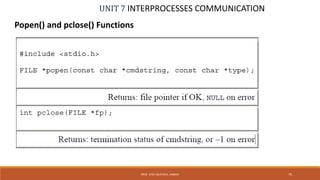
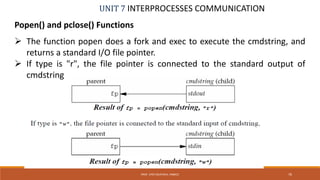
 The function popen does a fork and exec to execute the cmdstring, and
returns a standard I/O file pointer.
 If type is "r", the file pointer is connected to the standard output of
cmdstring
UNIT 7 INTERPROCESSES COMMUNICATION
Popen() and pclose() Functions
PROF. SYED MUSTAFA, HKBKCE 77
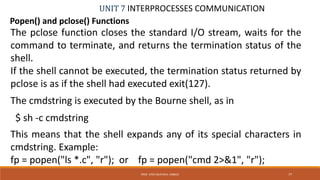
The pclose function closes the standard I/O stream, waits for the
command to terminate, and returns the termination status of the
shell.
If the shell cannot be executed, the termination status returned by
pclose is as if the shell had executed exit(127).
The cmdstring is executed by the Bourne shell, as in
$ sh -c cmdstring
This means that the shell expands any of its special characters in
cmdstring. Example:
fp = popen("ls *.c", "r"); or fp = popen("cmd 2>&1", "r");
UNIT 7 INTERPROCESSES COMMUNICATION
PIPES
78PROF. SYED MUSTAFA, HKBKCE
Program to sort the strings using popen().
#define MAXSTRS 4
int main(void)
{
int i;
FILE *pipe_fp;
char *strings[MAXSTRS] =
{ "echo", "bravo", "alpha", "charlie"};
/* Create 1 way pipe line with call to popen() */
pipe_fp = popen("sort", "w");
if (pipe_fp== NULL)
{
perror("popen");
exit(1);
}
/* Processing loop */
for(i=0; i<MAXSTRS; i++)
{
fputs(strings[i], pipe_fp);
fputc('n', pipe_fp);
}
/* Close the pipe */
pclose(pipe_fp);
return(0);
}
UNIT 7 INTERPROCESSES COMMUNICATION
PIPES
79PROF. SYED MUSTAFA, HKBKCE
Program to implement UNIX command redirection for “ls|sort” using popen().
int main(void)
{
FILE *pipein_fp, *pipeout_fp;
char readbuf[80];
/* Create one way pipe line with call to popen() */
pipein_fp = popen("ls", "r");
if (pipein_fp== NULL)
{
perror("popen");
exit(1);
}
/* Create one way pipe line with call to popen() */
pipeout_fp = popen("sort", "w“);
if (pipeout_fp == NULL)
{
perror("popen");
exit(1);
}
/* Processing loop */
while(fgets(readbuf, 80, pipein_fp))
fputs(readbuf, pipeout_fp);
/* Close the pipes */
pclose(pipein_fp);
pclose(pipeout_fp);
return(0); }
UNIT 7 INTERPROCESSES COMMUNICATION
Coprocesses
PROF. SYED MUSTAFA, HKBKCE 80
 A UNIX system filter is a program that reads from standard input and
writes to standard output.
 Filters are normally connected linearly in shell pipelines.
 A filter becomes a coprocess when the same program generates
 the filter's input and reads the filter's output.
 The Korn shell provides coprocesses.
 The Bourne shell, the Bourne-again shell, and the C shell don't provide a
way to connect processes together as coprocesses.
 A coprocess normally runs in the background from a shell, and its
standard input and standard output are connected to another program
using a pipe.
UNIT 7 INTERPROCESSES COMMUNICATION
Coprocesses
PROF. SYED MUSTAFA, HKBKCE 81
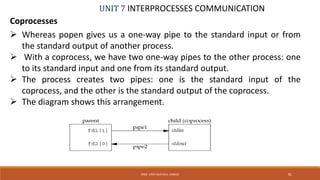
 Whereas popen gives us a one-way pipe to the standard input or from
the standard output of another process.
 With a coprocess, we have two one-way pipes to the other process: one
to its standard input and one from its standard output.
 The process creates two pipes: one is the standard input of the
coprocess, and the other is the standard output of the coprocess.
 The diagram shows this arrangement.
UNIT 7 INTERPROCESSES COMMUNICATION
FIFOs
PROF. SYED MUSTAFA, HKBKCE 82
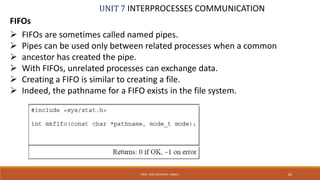
 FIFOs are sometimes called named pipes.
 Pipes can be used only between related processes when a common
 ancestor has created the pipe.
 With FIFOs, unrelated processes can exchange data.
 Creating a FIFO is similar to creating a file.
 Indeed, the pathname for a FIFO exists in the file system.
UNIT 7 INTERPROCESSES COMMUNICATION
FIFOs
PROF. SYED MUSTAFA, HKBKCE 83
 Once we have used mkfifo to create a FIFO, we open it using open().
 When we open a FIFO, the non blocking flag (O_NONBLOCK) affects what
happens:
1. In the normal case (O_NONBLOCK not specified), an open for read-only
blocks until some other process opens the FIFO for writing. Similarly,
an open for write-only blocks until some other process opens the FIFO
for reading
2. If O_NONBLOCK is specified, an open for read-only returns
immediately. But an open for write-only returns 1 with errno set to
ENXIO if no process has the FIFO open for reading.
UNIT 7 INTERPROCESSES COMMUNICATION
FIFOs
PROF. SYED MUSTAFA, HKBKCE 84
 There are two uses for FIFOs.
1. FIFOs are used by shell commands to pass data from one shell pipeline
to another without creating intermediate temporary files.
2. FIFOs are used as rendezvous points in client–server applications to
pass data between the clients and the servers.
UNIT 7 INTERPROCESSES COMMUNICATION
FIFOs
PROF. SYED MUSTAFA, HKBKCE 85
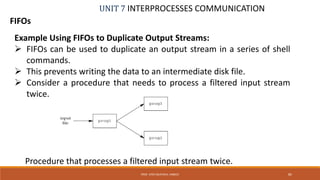
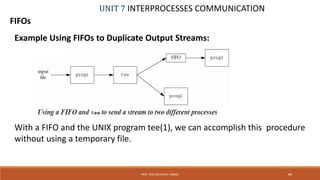
Example Using FIFOs to Duplicate Output Streams:
 FIFOs can be used to duplicate an output stream in a series of shell
commands.
 This prevents writing the data to an intermediate disk file.
 Consider a procedure that needs to process a filtered input stream
twice.
Procedure that processes a filtered input stream twice.
UNIT 7 INTERPROCESSES COMMUNICATION
FIFOs
PROF. SYED MUSTAFA, HKBKCE 86
Example Using FIFOs to Duplicate Output Streams:
With a FIFO and the UNIX program tee(1), we can accomplish this procedure
without using a temporary file.
UNIT 7 INTERPROCESSES COMMUNICATION
FIFOs
PROF. SYED MUSTAFA, HKBKCE 87
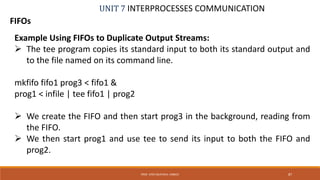
Example Using FIFOs to Duplicate Output Streams:
 The tee program copies its standard input to both its standard output and
to the file named on its command line.
mkfifo fifo1 prog3 < fifo1 &
prog1 < infile | tee fifo1 | prog2
 We create the FIFO and then start prog3 in the background, reading from
the FIFO.
 We then start prog1 and use tee to send its input to both the FIFO and
prog2.
UNIT 7 INTERPROCESSES COMMUNICATION
FIFOs
PROF. SYED MUSTAFA, HKBKCE 88
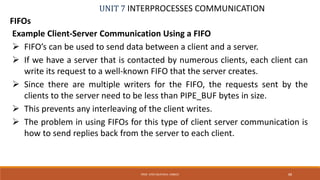
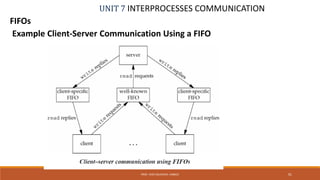
Example Client-Server Communication Using a FIFO
 FIFO’s can be used to send data between a client and a server.
 If we have a server that is contacted by numerous clients, each client can
write its request to a well-known FIFO that the server creates.
 Since there are multiple writers for the FIFO, the requests sent by the
clients to the server need to be less than PIPE_BUF bytes in size.
 This prevents any interleaving of the client writes.
 The problem in using FIFOs for this type of client server communication is
how to send replies back from the server to each client.
UNIT 7 INTERPROCESSES COMMUNICATION
FIFOs
PROF. SYED MUSTAFA, HKBKCE 89
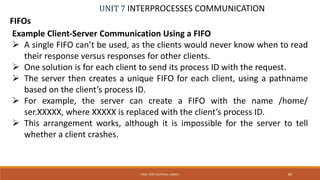
Example Client-Server Communication Using a FIFO
 A single FIFO can’t be used, as the clients would never know when to read
their response versus responses for other clients.
 One solution is for each client to send its process ID with the request.
 The server then creates a unique FIFO for each client, using a pathname
based on the client’s process ID.
 For example, the server can create a FIFO with the name /home/
ser.XXXXX, where XXXXX is replaced with the client’s process ID.
 This arrangement works, although it is impossible for the server to tell
whether a client crashes.
UNIT 7 INTERPROCESSES COMMUNICATION
FIFOs
PROF. SYED MUSTAFA, HKBKCE 90
Example Client-Server Communication Using a FIFO
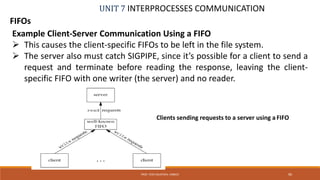
 This causes the client-specific FIFOs to be left in the file system.
 The server also must catch SIGPIPE, since it’s possible for a client to send a
request and terminate before reading the response, leaving the client-
specific FIFO with one writer (the server) and no reader.
Clients sending requests to a server using aFIFO
UNIT 7 INTERPROCESSES COMMUNICATION
FIFOs
PROF. SYED MUSTAFA, HKBKCE 91
Example Client-Server Communication Using a FIFO
UNIT 7 INTERPROCESSES COMMUNICATION
Message Queues
PROF. SYED MUSTAFA, HKBKCE 92
 A message queue is a linked list of messages stored within the kernel and
identified by a message queue identifier.
 A new queue is created or an existing queue opened by msgget().
 New messages are added to the end of a queue by msgsnd().
 Every message has a positive long integer type field, a non-negative
length, and the actual data bytes (corresponding to the length), all of
which are specified to msgsnd() when the message is added to a queue.
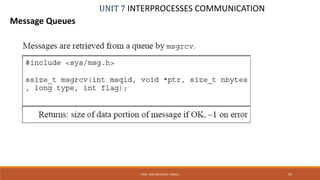
 Messages are fetched from a queue by msgrcv().
 We don't have to fetch the messages in a first-in, first-out order.
 Instead, we can fetch messages based on their type field.
UNIT 7 INTERPROCESSES COMMUNICATION
Message Queues
PROF. SYED MUSTAFA, HKBKCE 93
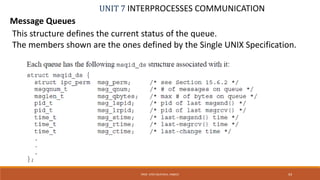
This structure defines the current status of the queue.
The members shown are the ones defined by the Single UNIX Specification.
UNIT 7 INTERPROCESSES COMMUNICATION
Message Queues
PROF. SYED MUSTAFA, HKBKCE 94
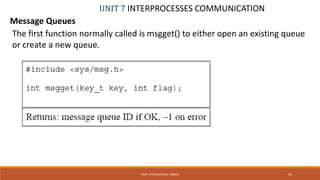
The first function normally called is msgget() to either open an existing queue
or create a new queue.
UNIT 7 INTERPROCESSES COMMUNICATION
Message Queues
PROF. SYED MUSTAFA, HKBKCE 95
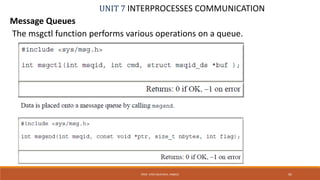
The msgctl function performs various operations on a queue.
UNIT 7 INTERPROCESSES COMMUNICATION
Message Queues
PROF. SYED MUSTAFA, HKBKCE 96
 Each message is composed of a positive long integer type field, a non-negative length
(nbytes), and the actual data bytes (corresponding to the length).
 Messages are always placed at the end of the queue.
 The ptr argument points to a long integer that contains the positive integer message
type, and it is immediately followed by the message data.
 There is no message data if nbytes is 0. If the largest message we send is 512 bytes, we
can define the following structure:
struct mymesg {
long mtype; /* positive message type */
char mtext[512]; /* message data, of length nbytes */
};
 The ptr argument is then a pointer to a mymesg structure.
 The message type can be used by the receiver to fetch messages in an order other than
first in, first out.
UNIT 7 INTERPROCESSES COMMUNICATION
Message Queues
PROF. SYED MUSTAFA, HKBKCE 97
UNIT 7 INTERPROCESSES COMMUNICATION
Message Queues
PROF. SYED MUSTAFA, HKBKCE 98
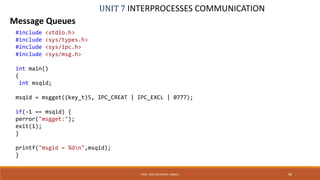
#include <stdio.h>
#include <sys/types.h>
#include <sys/ipc.h>
#include <sys/msg.h>
int main()
{
int msqid;
msqid = msgget((key_t)5, IPC_CREAT | IPC_EXCL | 0777);
if(-1 == msqid) {
perror("msgget:");
exit(1);
}
printf("msgid = %dn",msqid);
}
UNIT 7 INTERPROCESSES COMMUNICATION
Message Queues
PROF. SYED MUSTAFA, HKBKCE 99
#include <sys/types.h>
#include <sys/ipc.h>
#include <sys/msg.h>
struct msgbuf{
long mtype;
char mtext[40];
};
int main()
{
int msqid, len, ret;
struct msgbuf msgsend={0,"0"};
msqid = msgget((key_t)5, IPC_CREAT | 0666);
if(-1 == msqid){
perror("msgget:");
exit(1);
}
printf("Enter message type: n");
scanf("%d",&msgsend.mtype);
printf("Enter message textn");
//make use of fgets() if u want to send msg with spaces
scanf("%s", msgsend.mtext);
len = strlen(msgsend.mtext);
ret = msgsnd(msqid, &msgsend, len, 0);
if(-1 == ret)
{
perror("msgsnd:");
exit(1);
}
else
printf("message sentn");
}
UNIT 7 INTERPROCESSES COMMUNICATION
Message Queues
PROF. SYED MUSTAFA, HKBKCE 100
#include <sys/types.h>
#include <sys/ipc.h>
#include <sys/msg.h>
struct msgbuf{
long mtype;
char mtext[40];
};
main()
{
int msqid, len, ret, type;
struct msgbuf msgread={0, "0"};
fflush(stdin);
msqid = msgget((key_t)5,0);
if(-1 == msqid)
{
perror("msgget:");
exit(1);
}
printf("Enter the message no:n");
scanf("%d", &type);
len = sizeof(msgread.mtext);
ret = msgrcv(msqid, &msgread, len, type, IPC_NOWAIT );
printf("ret = %dn", ret);
if(-1 == ret){
perror("msgrcv:");
exit(1);
}
else
printf("message type = %d message text = %sn",
msgread.mtype, msgread.mtext);
}

Usp notes unit6-8

  • 1.
    UNIX SYSTEM PROGRAMMING BY PROF.A. SYED MUSTAFA HKBK COLLEGE OF ENGINEERING
  • 2.
    UNIT 6 SIGNALSAND DAEMON PROCESSES SIGNALS  Signals are software interrupts.  Signals provide a way of handling asynchronous events: a user at a terminal typing the interrupt key to stop a program or the next program in a pipeline terminating prematurely.  When a signal is sent to a process, it is pending on the process to handle it. The process can react to pending signals in one of three ways: 1. Accept the default action of the signal, which for most signals will terminate the process. 2. Ignore the signal. The signal will be discarded and it has no affect whatsoever on the recipient process. 3. Invoke a user-defined function. The function is known as a signal handler routine and the signal is said to be caught when this function is called. 2PROF. SYED MUSTAFA, HKBKCE
  • 3.
    UNIT 6 SIGNALSAND DAEMON PROCESSES SIGNALS 3PROF. SYED MUSTAFA, HKBKCE Name Description Default action SIGABRT abnormal termination (abort) terminate+core SIGALRM timer expired (alarm) terminate SIGCHLD change in status of child ignore SIGCONT continue stopped process continue/ignore SIGFPE arithmetic exception terminate+core SIGINT terminal interrupt character terminate SIGIO asynchronous I/O terminate/ignore SIGKILL termination terminate SIGPIPE write to pipe with no readers terminate SIGQUIT terminal quit character terminate+core SIGSEGV invalid memory reference terminate+core SIGSTOP stop stop process
  • 4.
    UNIT 6 SIGNALSAND DAEMON PROCESSES SIGNALS 4PROF. SYED MUSTAFA, HKBKCE Name Description Default action SIGTTOU background write to control tty stop process SIGUSR1 user-defined signal Terminate SIGUSR2 user-defined signal Terminate SIGTERM termination Terminate SIGTSTP terminal stop character stop process SIGTTIN background read from control tty stop process
  • 5.
    UNIT 6 SIGNALSAND DAEMON PROCESSES SIGNALS 5PROF. SYED MUSTAFA, HKBKCE THE UNIX KERNEL SUPPORT OF SIGNALS  When a signal is generated for a process, the kernel will set the corresponding signal flag in the process table slot of the recipient process.  If the recipient process is asleep, the kernel will awaken the process by scheduling it.  When the recipient process runs, the kernel will check the process U-area that contains an array of signal handling specifications.  If array entry contains a zero value, the process will accept the default action of the signal.  If array entry contains a 1 value, the process will ignore the signal and kernel will discard it.  If array entry contains any other value, it is used as the function pointer for a user- defined signal handler routine.
  • 6.
    UNIT 6 SIGNALSAND DAEMON PROCESSES SIGNALS 6PROF. SYED MUSTAFA, HKBKCE The function prototype of the signal API is: #include <signal.h> void (*signal(int sig_no, void (*handler)(int)))(int); Returns: previous disposition of signal (see following) if OK, SIG_ERR on error The formal argument of the API are: sig_no is a signal identifier like SIGINT or SIGTERM. The handler argument is the function pointer of a user-defined signal handler function.
  • 7.
    UNIT 6 SIGNALSAND DAEMON PROCESSES SIGNALS 7PROF. SYED MUSTAFA, HKBKCE The function prototype of the signal API is: #include <signal.h> void (*signal(int sig_no, void (*handler)(int)))(int); The sig_no argument is just the name of the signal. The value of handler is (a) the constant SIG_IGN, (b) the constant SIG_DFL, or (c) the address of a function to be called when the signal occurs.
  • 8.
    UNIT 6 SIGNALSAND DAEMON PROCESSES SIGNALS 8PROF. SYED MUSTAFA, HKBKCE The function prototype of the signal API is: #include <signal.h> void (*signal(int sig_no, void (*handler)(int)))(int); If we specify SIG_IGN, we are telling the system to ignore the signal. (Remember that we cannot ignore the two signals SIGKILL and SIGSTOP) When we specify SIG_DFL, we are setting the action associated with the signal to its default value. When we specify the address of a function to be called when the signal occurs, we are arranging to "catch" the signal. We call the function either the signal handler or the signal-catching function.
  • 9.
    UNIT 6 SIGNALSAND DAEMON PROCESSES SIGNALS 9PROF. SYED MUSTAFA, HKBKCE The function prototype of the signal API is: #include <signal.h> void (*signal(int sig_no, void (*handler)(int)))(int); The prototype for the signal function states that the function requires two arguments and returns a pointer to a function that returns nothing (void). The signal function's first argument, sig_no, is an integer. The second argument is a pointer to a function that takes a single integer argument and returns nothing. The function whose address is returned as the value of signal takes a single integer argument (the final (int)).
  • 10.
    UNIT 6 SIGNALSAND DAEMON PROCESSES SIGNALS 10PROF. SYED MUSTAFA, HKBKCE The function prototype of the signal API is: #include <signal.h> void (*signal(int sig_no, void (*handler)(int)))(int); If we examine the system's header <signal.h>, we probably find declarations of the form #define SIG_ERR (void (*)())-1 #define SIG_DFL (void (*)())0 #define SIG_IGN (void (*)())1 These constants can be used in place of the "pointer to a function that takes an integer argument and returns nothing," the second argument to signal, and the return value from signal. The three values used for these constants need not be -1, 0, and 1. They must be three values that can never be the address of any declarable function.
  • 11.
    UNIT 6 SIGNALSAND DAEMON PROCESSES SIGNALS 11PROF. SYED MUSTAFA, HKBKCE The following example attempts to catch the SIGTERM signal, ignores the SIGINT signal, and accepts the default action of the SIGSEGV signal. The pause API suspends the calling process until it is interrupted by a signal and the corresponding signal handler does a return: #include<iostream.h> #include<signal.h> /*signal handler function*/ void catch_sig(int sig_num) { signal (sig_num,catch_sig); cout<<”catch_sig:”<<sig_num<<endl; } int main() /*main function*/ { signal(SIGTERM,catch_sig); signal(SIGINT,SIG_IGN); signal(SIGSEGV,SIG_DFL); pause( );/*wait for a signal interruption*/ } The SIG_IGN specifies a signal is to be ignored, which means that if the signal is generated to the process, it will be discarded without any interruption of the process.
  • 12.
    UNIT 6 SIGNALSAND DAEMON PROCESSES SIGNALS 12PROF. SYED MUSTAFA, HKBKCE #include<stdio.h> #include<signal.h> /*signal handler function*/ static void sig_usr(int signo) /* arg is signal number */ { if (signo == SIGUSR1) printf("received SIGUSR1n"); else if (signo == SIGUSR2) printf("received SIGUSR2n"); else printf("received signal %dn", signo); } int main(void) { if (signal(SIGUSR1, sig_usr) == SIG_ERR) perror("can't catch SIGUSR1"); if (signal(SIGUSR2, sig_usr) == SIG_ERR) perror("can't catch SIGUSR2"); for ( ; ; ) pause(); }
  • 13.
    UNIT 6 SIGNALSAND DAEMON PROCESSES SIGNALS 13PROF. SYED MUSTAFA, HKBKCE $ ./a.out & start process in background [1] 7216 job-control shell prints job number and process ID $ kill -USR1 7216 send it SIGUSR1 received SIGUSR1 $ kill -USR2 7216 send it SIGUSR2 received SIGUSR2 $ kill 7216 now send it SIGTERM [1]+ Terminated ./a.out When we send the SIGTERM signal, the process is terminated, since it doesn't catch the signal, and the default action for the signal is termination.
  • 14.
    UNIT 6 SIGNALSAND DAEMON PROCESSES SIGNALS 14PROF. SYED MUSTAFA, HKBKCE kill and raise Functions The kill function sends a signal to a process or a group of processes. The raise function allows a process to send a signal to itself. #include <signal.h> int kill(pid_t pid, int signo); int raise(int signo); Both return: 0 if OK, –1 on error The call raise(signo); is equivalent to the call kill(getpid(), signo);
  • 15.
    UNIT 6 SIGNALSAND DAEMON PROCESSES SIGNALS 15PROF. SYED MUSTAFA, HKBKCE kill and raise Functions #include <signal.h> int kill(pid_t pid, int signo); There are four different conditions for the pid argument to kill. Pid value Meaning Pid > 0 The signal is sent to the process whose process ID is pid. Pid==0 The signal is sent to all processes whose process group ID equals the process group ID of the sender and for which the sender has permission to send the signal. Pid<0 The signal is sent to all processes whose process group ID equals the absolute value of pid and for which the sender has permission to send the signal. Pid==-1 The signal is sent to all processes on the system for which the sender has permission to send the signal.
  • 16.
    UNIT 6 SIGNALSAND DAEMON PROCESSES SIGNALS 16PROF. SYED MUSTAFA, HKBKCE #include<iostream.h> #include<signal.h> /*signal handler function*/ void catch_sig(int sig_num) { cout<<”catch_sig:”<<sig_num<<endl; } int main() /*main function*/ { signal (SIGINT,catch_sig); cout<<“from mainn”; kill(getpid, SIGINT); } #include<iostream.h> #include<signal.h> /*signal handler function*/ void catch_sig(int sig_num) { cout<<”catch_sig:”<<sig_num<<endl; } int main() /*main function*/ { signal (SIGQUIT,catch_sig); cout<<“from mainn”; raise(SIGQUIT); }
  • 17.
    UNIT 6 SIGNALSAND DAEMON PROCESSES SIGNALS 17PROF. SYED MUSTAFA, HKBKCE alarm and pause Functions The alarm function allows us to set a timer that will expire at a specified time in the future. When the timer expires, the SIGALRM signal is generated. If we ignore or don't catch this signal, its default action is to terminate the process. #include <unistd.h> unsigned int alarm(unsigned int seconds); Returns: 0 or number of seconds until previously set alarm. The seconds value is the number of clock seconds in the future when the signal should be generated.
  • 18.
    UNIT 6 SIGNALSAND DAEMON PROCESSES SIGNALS 18PROF. SYED MUSTAFA, HKBKCE alarm and pause Functions #include <unistd.h> unsigned int alarm(unsigned int seconds);  If, when we call alarm, a previously registered alarm clock for the process has not yet expired, the number of seconds left for that alarm clock is returned as the value of this function.  That previously registered alarm clock is replaced by the new value.  If a previously registered alarm clock for the process has not yet expired and if the seconds value is 0, the previous alarm clock is canceled.  The number of seconds left for that previous alarm clock is still returned as the value of the function.  Although the default action for SIGALRM is to terminate the process, most processes that use an alarm clock catch this signal.
  • 19.
    UNIT 6 SIGNALSAND DAEMON PROCESSES SIGNALS 19PROF. SYED MUSTAFA, HKBKCE alarm and pause Functions The pause function suspends the calling process until a signal is caught. #include <unistd.h> int pause(void); Returns: –1 with errno set to EINTR The only time pause returns is if a signal handler is executed and that handler returns. In that case, pause returns –1 with errno set to EINTR.
  • 20.
    UNIT 6 SIGNALSAND DAEMON PROCESSES SIGNALS 20PROF. SYED MUSTAFA, HKBKCE alarm and pause Functions Using alarm and pause, we can put a process to sleep for a specified amount of time. The sleep() can be implemented using alarm() and pause(). #include <signal.h> #include <unistd.h> static void sig_alrm(int signo) { /* nothing to do, just return to wake up the pause */ } unsigned int sleep(unsigned int nsecs) { if (signal(SIGALRM, sig_alrm) == SIG_ERR) return(nsecs); alarm(nsecs); /* start the timer */ pause(); /* next caught signal wakes us up */ return(alarm(0)); /* turn off timer, return unslept time */ }
  • 21.
    UNIT 6 SIGNALSAND DAEMON PROCESSES SIGNALS 21PROF. SYED MUSTAFA, HKBKCE SIGNAL SETS We need a data type to represent multiple signals—a signal set POSIX.1 defines the data type sigset_t to contain a signal set and the following five functions to manipulate signal sets. #include <signal.h> int sigemptyset(sigset_t *set); int sigfillset(sigset_t *set); int sigaddset(sigset_t *set, int signo); int sigdelset(sigset_t *set, int signo); Returns: 0 if OK, -1 on error.
  • 22.
    UNIT 6 SIGNALSAND DAEMON PROCESSES SIGNALS 22PROF. SYED MUSTAFA, HKBKCE SIGNAL SETS int sigismember(const sigset_t *set, int signo); Returns: 1 if true, 0 if false, –1 on error  The function sigemptyset() initializes the signal set pointed to by set so that all signals are excluded  The function sigfillset() initializes the signal set so that all signals are included.  All applications have to call either sigemptyset() or sigfillset() once for each signal set, before using the signal set.  Once we have initialized a signal set, we can add and delete specific signals in the set.  The function sigaddset() adds a single signal to an existing set, and sigdelset() removes a single signal from a set.
  • 23.
    UNIT 6 SIGNALSAND DAEMON PROCESSES SIGNALS 23PROF. SYED MUSTAFA, HKBKCE SIGNAL MASK A process initially inherits the parent’s signal mask when it is created, but any pending signals for the parent process are not passed on. A process may query or set its signal mask via the sigprocmask API: #include <signal.h> int sigprocmask(int cmd, const sigset_t *new_mask, sigset_t *old_mask); Returns: 0 if OK, -1 on error .
  • 24.
    UNIT 6 SIGNALSAND DAEMON PROCESSES SIGNALS 24PROF. SYED MUSTAFA, HKBKCE SIGNAL MASK The new_mask argument defines a set of signals to be set or reset in a calling process signal mask, and the cmd argument specifies how the new_mask value is to be used by the API. The possible values of cmd and the corresponding use of the new_mask value are: . Cmd value Meaning SIG_SETMASK Overrides the calling process signal mask with the value specified in the new_mask argument. SIG_BLOCK Adds the signals specified in the new_mask argument to the calling process signal mask. SIG_UNBLOCK Removes the signals specified in the new_mask argument from the calling process signal mask.
  • 25.
    UNIT 6 SIGNALSAND DAEMON PROCESSES SIGNALS 25PROF. SYED MUSTAFA, HKBKCE SIGNAL MASK The following example checks whether the SIGINT signal is present in a process signal mask and adds it to the mask if it is not there. Then clears the SIGSEGV signal from the process signal mask. #include <stdio.h> #include <signal.h> int main() { sigset_t mask; sigemptyset(&mask); /*initialize set*/ if (sigprocmask(0, 0, &mask) == -1) { /*get current signal mask*/ perror(“sigprocmask”); exit(1); } else sigaddset(&mask, SIGINT); /*set SIGINT flag*/ sigdelset(&mask, SIGSEGV); /*clear SIGSEGV flag*/ if (sigprocmask(SIG_SETMASK, &mask, 0) == -1) perror(“sigprocmask”); /*set a new signal mask*/ } .
  • 26.
    UNIT 6 SIGNALSAND DAEMON PROCESSES SIGNALS 26PROF. SYED MUSTAFA, HKBKCE SIGNAL MASK The program prints the names of the signals in the signal mask of the calling process #include <stdio.h> #include <signal.h> int main() { sigset_t sigset; sigemptyset(&sigset); /*initialize set*/ if (sigprocmask(0, NULL, &sigset) < 0) perror("sigprocmask error"); if (sigismember(&sigset, SIGINT)) printf("SIGINT "); if (sigismember(&sigset, SIGQUIT)) printf("SIGQUIT "); if (sigismember(&sigset, SIGUSR1)) printf("SIGUSR1 "); if (sigismember(&sigset, SIGALRM)) printf("SIGALRM "); }
  • 27.
    UNIT 6 SIGNALSAND DAEMON PROCESSES SIGNALS 27PROF. SYED MUSTAFA, HKBKCE SIGPENDING FUNCTION The sigpending function returns the set of signals that are blocked from delivery and currently pending for the calling process. The set of signals is returned through the set argument #include <signal.h> int sigpending(sigset_t *set); Returns: 0 if OK, –1 on error.
  • 28.
    UNIT 6 SIGNALSAND DAEMON PROCESSES SIGNALS  The process blocks SIGQUIT, saving its current signal mask (to reset later), and then goes to sleep for 5 seconds.  Any occurrence of the quit signal during this period is blocked and won't be delivered until the signal is unblocked.  At the end of the 5-second sleep, we check whether the signal is pending and unblock the signal. 28PROF. SYED MUSTAFA, HKBKCE SIGPENDING FUNCTION
  • 29.
    UNIT 6 SIGNALSAND DAEMON PROCESSES SIGNALS - SIGPENDING FUNCTION 29PROF. SYED MUSTAFA, HKBKCE #include <signal.h> #include <unistd.h> static void sig_quit(int signo) { printf("caught SIGQUITn"); if (signal(SIGQUIT, SIG_DFL) == SIG_ERR) perror("can't reset SIGQUIT"); } int main(void) { sigset_t newmask, oldmask, pendmask; if (signal(SIGQUIT, sig_quit) == SIG_ERR) perror("can't catch SIGQUIT"); /* Block SIGQUIT and save current signal mask*/ sigemptyset(&newmask); sigaddset(&newmask, SIGQUIT); if (sigprocmask(SIG_BLOCK, &newmask, &oldmask) < 0) perror("SIG_BLOCK error"); sleep(5); /* SIGQUIT here will remain pending */ if (sigpending(&pendmask) < 0) perror("sigpending error"); if (sigismember(&pendmask, SIGQUIT)) printf("nSIGQUIT pendingn"); /* Reset signal mask which unblocks SIGQUIT*/ if (sigprocmask(SIG_SETMASK, &oldmask, NULL) < 0) perror("SIG_SETMASK error"); printf("SIGQUIT unblockedn"); sleep(5); /* SIGQUIT here will terminate with core file */ exit(0); }
  • 30.
    UNIT 6 SIGNALSAND DAEMON PROCESSES SIGNALS  The sigaction() function allows us to examine or modify (or both) the action associated with a particular signal.  This function supersedes the signal() function from earlier releases of the UNIX System. #include <signal.h> int sigaction(int signo, const struct sigaction *restrict act, struct sigaction *restrict oact); Returns: 0 if OK, –1 on error 30PROF. SYED MUSTAFA, HKBKCE Sigaction() Function
  • 31.
    UNIT 6 SIGNALSAND DAEMON PROCESSES SIGNALS sigaction() Function  The sigaction API is a replacement for the signal API in the latest UNIX and POSIX systems.  The sigaction API is called by a process to set up a signal handling method for each signal it wants to deal with.  sigaction API returns the previous signal handling method for a given signal. 31PROF. SYED MUSTAFA, HKBKCE
  • 32.
    UNIT 6 SIGNALSAND DAEMON PROCESSES SIGNALS sigaction() Function The struct sigaction data type is defined in the <signal.h> header as struct sigaction { void (*sa_handler)(int); /* addr of signal handler, or SIG_IGN, or SIG_DFL */ sigset_t sa_mask; /* additional signals to block */ int sa_flags; /* signal options */ void (*sa_sigaction)(int, siginfo_t *, void *); /* alternate handler */ }; 32PROF. SYED MUSTAFA, HKBKCE
  • 33.
    UNIT 6 SIGNALSAND DAEMON PROCESSES SIGNALS sigaction() Function  The sa_handler field can be set to SIG_IGN, SIG_DFL, or a user defined signal handler function.  The sa_mask field specifies additional signals that process wishes to block when it is handling signo signal.  The signalno argument designates which signal handling action is defined in the action argument.  The previous signal handling method for signalno will be returned via the  oldaction argument if it is not a NULL pointer.  If action argument is a NULL pointer, the calling process‘s existing signal handling method for signalno will be unchanged. 33PROF. SYED MUSTAFA, HKBKCE
  • 34.
    UNIT 6 SIGNALSAND DAEMON PROCESSES SIGNALS - sigaction FUNCTION 34PROF. SYED MUSTAFA, HKBKCE #include <signal.h> #include <iostream.h> void callme ( int sig_num ) { cout <<“catch signal:”<<sig_num<< endl; } int main(void) { sigset_t sigmask; struct sigaction action, old_action; sigemptyset(&sigmask); if ( sigaddset( &sigmask, SIGTERM) == -1 || sigprocmask( SIG_SETMASK, &sigmask, 0) == -1) perror(“Set signal mask”); sigemptyset( &action.sa_mask); sigaddset( &action.sa_mask, SIGSEGV); action.sa_handler = callme; action.sa_flags = 0; if (sigaction (SIGINT, &action, &old_action) == -1) perror(“sigaction”); pause(); /* wait for signal interruption*/ return 0; }
  • 35.
    UNIT 6 SIGNALSAND DAEMON PROCESSES SIGNALS - sigaction FUNCTION  In the program, the process signal mask is set with SIGTERM signal.  The process then defines a signal handler for the SIGINT signal and also specifies that the SIGSEGV signal is to be blocked when the process is handling the SIGINT signal.  The process then terminates its execution via the pause API. The output of the program would be as: % cc sigaction.c –o sigaction % ./sigaction & [1] 495 % kill –INT 495 catch signal: 2 sigaction exits [1] Done sigaction 35PROF. SYED MUSTAFA, HKBKCE
  • 36.
    UNIT 6 SIGNALSAND DAEMON PROCESSES SIGNALS THE SIGCHLD SIGNAL AND THE waitpid API When a child process terminates or stops, the kernel will generate a SIGCHLD signal to its parent process. Depending on how the parent sets up the handling of the SIGCHLD signal, different events may occur: 1. Parent accepts the default action of the SIGCHLD signal:  SIGCHLD does not terminate the parent process.  Parent process will be awakened.  API will return the child’s exit status and process ID to the parent.  Kernel will clear up the Process Table slot allocated for the child process.  Parent process can call the waitpid API repeatedly to wait for each child it created. 36PROF. SYED MUSTAFA, HKBKCE
  • 37.
    UNIT 6 SIGNALSAND DAEMON PROCESSES SIGNALS THE SIGCHLD SIGNAL AND THE waitpid API 2. Parent ignores the SIGCHLD signal:  SIGCHLD signal will be discarded.  Parent will not be disturbed even if it is executing the waitpid system call.  If the parent calls the waitpid API, the API will suspend the parent until all its child processes have terminated.  Child process table slots will be cleared up by the kernel.  API will return a -1 value to the parent process. 3. Process catches the SIGCHLD signal:  The signal handler function will be called in the parent process whenever a child process terminates.  If the SIGCHLD arrives while the parent process is executing the waitpid system call, the waitpid API may be restarted to collect the child exit status and clear its process table slots.  Depending on parent setup, the API may be aborted and child process table slot not freed. 37PROF. SYED MUSTAFA, HKBKCE
  • 38.
    UNIT 6 SIGNALSAND DAEMON PROCESSES SIGNALS abort() Function abort function causes abnormal program termination #include <stdlib.h> void abort(void); This function never returns. This function sends the SIGABRT signal to the caller. Processes should not ignore this signal. ISO C states that calling abort will deliver an unsuccessful termination notification to the host environment by calling raise(SIGABRT). 38PROF. SYED MUSTAFA, HKBKCE
  • 39.
    UNIT 6 SIGNALSAND DAEMON PROCESSES SIGNALS system() Function #include <stdlib.h> int system(const char *command); This function returns is -1 on error. If the value of command is NULL, system() returns nonzero if the shell is available, and zero if not. system() executes a command specified in command by calling /bin/sh -c command, and returns after the command has been completed. During execution of the command, SIGCHLD will be blocked, and SIGINT and SIGQUIT will be ignored Eg: system(“ls –l”); 39PROF. SYED MUSTAFA, HKBKCE
  • 40.
    UNIT 6 SIGNALSAND DAEMON PROCESSES SIGNALS sleep() Function sleep - sleep for the specified number of seconds #include <unistd.h> unsigned int sleep(unsigned int seconds); Returns: 0 or number of unslept seconds. This function causes the calling process to be suspended until either 1. The amount of wall clock time specified by seconds has elapsed. 2. A signal is caught by the process and the signal handler returns. Eg: sleep(60); // suspend the process for one minute. 40PROF. SYED MUSTAFA, HKBKCE
  • 41.
    UNIT 6 SIGNALSAND DAEMON PROCESSES SIGNALS Job-Control Signals POSIX.1 considers six signals as job-control signals: 41PROF. SYED MUSTAFA, HKBKCE Signal Meaning SIGCHLD Child process has stopped or terminated. SIGCONT Continue process, if stopped. SIGSTOP Stop signal (can't be caught or ignored). SIGTSTP Interactive stop signal. SIGTTIN Read from controlling terminal by member of a background process group SIGTTOU Write to controlling terminal by member of a background process group
  • 42.
    UNIT 6 SIGNALSAND DAEMON PROCESSES SIGNALS Job-Control Signals  When we type the suspend character (usually Control-Z), SIGTSTP is sent to all processes in the foreground process group.  When we tell the shell to resume a job in the foreground or background, the shell sends all the processes in the job the SIGCONT signal.  Similarly, if SIGTTIN or SIGTTOU is delivered to a process, the process is stopped by default, and the job-control shell recognizes this and notifies us.  When any of the four stop signals (SIGTSTP, SIGSTOP, SIGTTIN, or SIGTTOU) is generated for a process, any pending SIGCONT signal for that process is discarded.  Similarly, when the SIGCONT signal is generated for a process, any pending stop signals for that same process are discarded.  The default action for SIGCONT is to continue the process, if it is stopped; otherwise, the signal is ignored. 42PROF. SYED MUSTAFA, HKBKCE
  • 43.
    UNIT 6 SIGNALSAND DAEMON PROCESSES DAEMON PROCESSES  Daemons are processes that live for a long time.  They are often started when the system is bootstrapped and terminate only when the system is shut down.  Because they don't have a controlling terminal, we say that they run in the background.  UNIX systems have numerous daemons that perform day-to-day activities. 43PROF. SYED MUSTAFA, HKBKCE
  • 44.
    UNIT 6 SIGNALSAND DAEMON PROCESSES DAEMON PROCESSES Deamon Characteristics  $ps -axj 44PROF. SYED MUSTAFA, HKBKCE
  • 45.
    UNIT 6 SIGNALSAND DAEMON PROCESSES DAEMON PROCESSES Deamon Characteristics  Daemons run in background.  Daemons have super-user privilege.  Daemons don’t have controlling terminal.  Daemons are session and group leaders. 45PROF. SYED MUSTAFA, HKBKCE
  • 46.
    UNIT 6 SIGNALSAND DAEMON PROCESSES DAEMON PROCESSES Deamon Characteristics  Anything with a parent process ID of 0 is usually a kernel process started as part of the system bootstrap procedure.  Kernel processes are special and generally exist for the entire lifetime of the system.  They run with superuser privileges and have no controlling terminal and no command line.  Process ID of 1 is usually init.  It is a system daemon responsible for, among other things, starting system services specific to various run levels. 46PROF. SYED MUSTAFA, HKBKCE
  • 47.
    UNIT 6 SIGNALSAND DAEMON PROCESSES DAEMON PROCESSES Deamon Characteristics  keventd daemon provides process context for running scheduled functions in the kernel.  The kapmd daemon provides support for the advanced power management features available with various computer systems.  The kswapd daemon is also known as the pageout daemon.  It supports the virtual memory subsystem by writing dirty pages to disk slowly over time, so the pages can be reclaimed.  The inetd daemon (xinetd) listens on the system's network interfaces for incoming requests for various network servers.  The nfsd, lockd, and rpciod daemons provide support for the  Network File System (NFS).  The cron daemon (crond) executes commands at specified dates and times. Numerous system administration tasks are handled by having programs executed regularly by cron.  The cupsd daemon is a print spooler; it handles print requests on the system. 47PROF. SYED MUSTAFA, HKBKCE
  • 48.
    UNIT 6 SIGNALSAND DAEMON PROCESSES DAEMON PROCESSES CODING RULES 1. Call umask to set the file mode creation mask to 0. The file mode creation mask that's inherited could be set to deny certain permissions. If the daemon process is going to create files, it may want to set specific permissions. 2. Call fork and have the parent exit. This does several things. First, if the daemon was started as a simple shell command, having the parent terminate makes the shell think that the command is done. Second, the child inherits the process group ID of the parent but gets a new process ID, so we're guaranteed that the child is not a process group leader. 48PROF. SYED MUSTAFA, HKBKCE
  • 49.
    UNIT 6 SIGNALSAND DAEMON PROCESSESDAEMON PROCESSES CODING RULES 3. Call setsid to create a new session. The process (a) becomes a session leader of a new session, (b) becomes the process group leader of a new process group, and (c) has no controlling terminal. 4. Change the current working directory to the root directory. The current working directory inherited from the parent could be on a mounted file system. Since daemons normally exist until the system is rebooted, if the daemon stays on a mounted file system, that file system cannot be unmounted. 5. Unneeded file descriptors should be closed. This prevents the daemon from holding open any descriptors that it may have inherited from its parent. 49PROF. SYED MUSTAFA, HKBKCE
  • 50.
    UNIT 6 SIGNALSAND DAEMON PROCESSES DAEMON PROCESSES CODING RULES 6. Some daemons open file descriptors 0, 1, and 2 to /dev/null so that any library routines that try to read from standard input or write to standard output or standard error will have no effect. Since the daemon is not associated with a terminal device, there is nowhere for output to be displayed; nor is there anywhere to receive input from an interactive user. Even if the daemon was started from an interactive session, the daemon runs in the background, and the login session can terminate without affecting the daemon. If other users log in on the same terminal device, we wouldn't want output from the daemon showing up on the terminal, and the users wouldn't expect their input to be read by the daemon. 50PROF. SYED MUSTAFA, HKBKCE
  • 51.
    UNIT 6 SIGNALSAND DAEMON PROCESSES DAEMON PROCESSES CODING RULES Example Program: 51PROF. SYED MUSTAFA, HKBKCE #include <unistd,h> #include <sys/types.h> #include <fcntl.h> int daemon_initialise( ) { pid_t pid; if (( pid = fork() ) < 0) return –1; else if ( pid != 0) exit(0); /* parent exits */ /* child continues */ setsid( ); chdir(“/”); umask(0); return 0; }
  • 52.
    UNIT 6 SIGNALSAND DAEMON PROCESSES DAEMON PROCESSES Error Logging  One problem a daemon has is how to handle error messages.  It can't simply write to standard error, since it shouldn't have a controlling terminal.  We don't want all the daemons writing to the console device, since on  many workstations, the console device runs a windowing system.  We also don't want each daemon writing its own error messages into a separate file.  A central daemon errorlogging facility is required. 52PROF. SYED MUSTAFA, HKBKCE
  • 53.
    UNIT 6 SIGNALSAND DAEMON PROCESSES DAEMON PROCESSES Error Logging 53PROF. SYED MUSTAFA, HKBKCE
  • 54.
    UNIT 6 SIGNALSAND DAEMON PROCESSES DAEMON PROCESSES Error Logging There are three ways to generate log messages: 1. Kernel routines can call the log function. These messages can be read by any user process that opens and reads the /dev/klog device. 2. Most user processes (daemons) call the syslog(3) function to generate log messages. This causes the message to be sent to the UNIX domain datagram socket /dev/log. 3. A user process on this host, or on some other host that is connected to this host by a TCP/IP network, can send log messages to UDP port 514. The syslogd daemon reads all three forms of log messages. On start-up, this daemon reads a configuration file, usually /etc/syslog.conf, which determines where different classes of messages are to be sent. 54PROF. SYED MUSTAFA, HKBKCE
  • 55.
    UNIT 7 INTERPROCESSESCOMMUNICATION INTORDUCTION 55PROF. SYED MUSTAFA, HKBKCE IPC ( InterProcess Communication)  It is a mechanism whereby two or more processes communicate with each other to perform tasks.  These processes may interact in a client/server manner or in a peer-to- peer fashion.  IPC enables one application to control another application, and for several applications to share the same data without interfering with one another.  IPC is required in all multiprocessing systems, but it is not generally supported by single-process operating systems.
  • 56.
    UNIT 7 INTERPROCESSESCOMMUNICATION INTORDUCTION 56PROF. SYED MUSTAFA, HKBKCE IPC ( InterProcess Communication) The various forms of IPC that are supported on a UNIX system are as follows : The first seven forms of IPC are usually restricted to IPC between processes on the same host. The final two i.e. Sockets and STREAMS are the only two that are generally supported for IPC between processes on different hosts. 1. Half duplex Pipes 2. Full duplex Pipes 3. FIFO’s 4. Named full duplex Pipes 5. Message queues 6. Shared memory 7. Semaphores 8. Sockets 9. STREAMS
  • 57.
    UNIT 7 INTERPROCESSESCOMMUNICATION PIPES  Pipes are the oldest form of UNIX System IPC.  Pipes have two limitations. 1. Historically, they have been half duplex (i.e.data flows in only one direction) 2. Pipes can be used only between processes that have a common ancestor. Normally, a pipe is created by a process, that process calls fork, and the pipe is used between the parent and the child. 57PROF. SYED MUSTAFA, HKBKCE
  • 58.
    UNIT 7 INTERPROCESSESCOMMUNICATION PIPES  A pipe is created by calling the pipe function. #include <unistd.h> int pipe(int fd[2]); Returns: 0 if OK, –1 on error  Despite these limitations, half-duplex pipes are still the most commonly used form of IPC.  Every time we type a sequence of commands in a pipeline for the shell to execute, the shell creates a separate process for each command and links the standard output of one to the standard input of the next using a pipe. 58PROF. SYED MUSTAFA, HKBKCE
  • 59.
    UNIT 7 INTERPROCESSESCOMMUNICATION PIPES Two file descriptors are returned through the fd argument: fd[0] is open for reading, and fd[1] is open for writing. The output of fd[1] is the input for fd[0]. POSIX.1 allows for an implementation to support full-duplex pipes. For these implementations, fd[0] and fd[1] are open for both reading and writing. 59PROF. SYED MUSTAFA, HKBKCE
  • 60.
    UNIT 7 INTERPROCESSESCOMMUNICATION PIPES Two ways to picture a half-duplex pipe are shown in the given diagrams below: 60PROF. SYED MUSTAFA, HKBKCE
  • 61.
    UNIT 7 INTERPROCESSESCOMMUNICATION PIPES  The left half of the diagram shows the two ends of the pipe connected in a single process.  The right half of the diagram emphasizes that the data in the pipe flows through the kernel.  A pipe in a single process is next to useless.  Normally, the process that calls pipe then calls fork, creating an IPC channel from the parent to the child or vice versa. 61PROF. SYED MUSTAFA, HKBKCE
  • 62.
    UNIT 7 INTERPROCESSESCOMMUNICATION PIPES 62PROF. SYED MUSTAFA, HKBKCE
  • 63.
    UNIT 7 INTERPROCESSESCOMMUNICATION PIPES 63PROF. SYED MUSTAFA, HKBKCE For a pipe from the parent to the child, the parent closes the read end of the pipe (fd[0]), and the child closes the write end (fd[1]).
  • 64.
    UNIT 7 INTERPROCESSESCOMMUNICATION PIPES 64PROF. SYED MUSTAFA, HKBKCE For a pipe from the parent to the child, the parent closes the read end of the pipe (fd[0]), and the child closes the write end (fd[1]). For a pipe from the child to the parent, the parent closes fd[1], and the child closes fd[0].
  • 65.
    UNIT 7 INTERPROCESSESCOMMUNICATION PIPES 65PROF. SYED MUSTAFA, HKBKCE For a pipe from the child to the parent, the parent closes fd[1], and the child closes fd[0].
  • 66.
    UNIT 7 INTERPROCESSESCOMMUNICATION PIPES 66PROF. SYED MUSTAFA, HKBKCE When one end of a pipe is closed, the following two rules apply. 1. If we read from a pipe whose write end has been closed, read returns 0 to indicate an end of file after all the data has been read 2. If we write to a pipe whose read end has been closed, the signal SIGPIPE is generated. If we either ignore the signal or catch it and return from the signal handler, write returns –1 with errno set to EPIPE.
  • 67.
    UNIT 7 INTERPROCESSESCOMMUNICATION PIPES 67PROF. SYED MUSTAFA, HKBKCE Program to show the code to create a pipe between a parent and its child and to send data down the pipe. int main(void) { int n, fd[2]; pid_t pid; char line[1000]; if (pipe(fd) < 0) perror("pipe error"); if ((pid = fork()) < 0) perror("fork error"); else if (pid > 0) { /* parent */ close(fd[0]); write(fd[1], "hello worldn", 12); } else { /* child */ close(fd[1]); n = read(fd[0], line,1000); write(1, line, n); } exit(0); }
  • 68.
    UNIT 7 INTERPROCESSESCOMMUNICATION PIPES 68PROF. SYED MUSTAFA, HKBKCE Program to show the code for I/O redirection using dup2(). #include<fcntl.h> main() { int fd,fd2; char c[256],con[]="This is simple file for demonstration"; fd=open("sample1",O_RDWR|O_CR EAT,0777); printf("original file desc is %dn",fd); fd2=dup2(fd,7); printf("new file desc is %dn", fd2); if(fd==-1) perror("Can't creat file"); else if(read(fd2,&c,10)==0) write(fd2,con,sizeof(con)); else printf("%sn",c); close(fd); }
  • 69.
    UNIT 7 INTERPROCESSESCOMMUNICATION PIPES 69PROF. SYED MUSTAFA, HKBKCE Program to show the code for I/O redirection using dup(). #include<fcntl.h> main() { int fd,fd2; char c[256],con[]="This is simple file for demonstration"; fd=open("sample1",O_RDWR|O_CR EAT,0777); printf("original file desc is %dn",fd); fd2=dup(fd); printf("new file desc is %dn", fd2); if(fd==-1) perror("Can't creat file"); else if(read(fd2,&c,10)==0) write(fd2,con,sizeof(con)); else printf("%sn",c); close(fd); }
  • 70.
    UNIT 7 INTERPROCESSESCOMMUNICATION PIPES 70PROF. SYED MUSTAFA, HKBKCE Program to show the code child writes to the parent through pipe. #include<unistd.h> #include<sys/types.h> main() { pid_t pid; int fd[2],s; char c[5]; pipe(fd); pid=fork(); if (pid==0) { close(fd[0]); write(fd[1],"hello",5); } else { wait(&s); close(fd[1]); read(fd[0],c,5); c[5]='0'; printf("%sn",c); } }
  • 71.
    UNIT 7 INTERPROCESSESCOMMUNICATION PIPES 71PROF. SYED MUSTAFA, HKBKCE Program to show the code for broken pipe. #include<unistd.h> #include<sys/types.h> main() { pid_t pid; int fd[2]; char c[5]; pipe(fd); pid=fork(); if (pid>0) { close(fd[0]); write(fd[1],"hello",5); } else { close(fd[0]); /*read end closed*/ sleep(1); read(fd[0],c,5); printf("%sn",c); exit(0); } }
  • 72.
    UNIT 7 INTERPROCESSESCOMMUNICATION PIPES 72PROF. SYED MUSTAFA, HKBKCE Program to show the code for UNIX command redirection for “ls|wc -l”. #include<fcntl.h> main() { int p[2],pid; pipe(p); pid=fork(); if(pid==0) { close(p[0]); printf("p[1]=%dn",p[1]); dup2(p[1],1); execl("/bin/ls","ls",(char *)0); perror("from ls:"); } else { close(p[1]); printf("p[0]=%dn",p[0]); dup2(p[0],0); execl("/usr/bin/wc","wc","-l",(char *)0); perror("from wc"); } }
  • 73.
    UNIT 7 INTERPROCESSESCOMMUNICATION PIPES 73PROF. SYED MUSTAFA, HKBKCE Program to implement unix command “who|sort|wc –l” main() { int p[2], q[2], pid, pid1; pipe(p); pid = fork(); if(0 == pid) { close(1); close(p[0]); dup(p[1]); execlp("who", "who",0); perror("error at cat"); } else { pipe(q); pid1 = fork(); if(0 == pid1) { close(1); close(0); close(p[1]); close(q[0]); dup(p[0]); dup(q[1]); execlp("sort", "sort", (char*)0); perror("error at grep"); } else { close(0); close(q[1]); close(p[1]); close(p[0]); dup(q[0]); execl("/usr/bin/wc", "wc", "-l", 0); perror("error at wc"); } } } //end of main()
  • 74.
    UNIT 7 INTERPROCESSESCOMMUNICATION Popen() and pclose() Functions PROF. SYED MUSTAFA, HKBKCE 74  Since a common operation is to create a pipe to another process, to either read its output or send it input, the standard I/O library has historically provided the popen and pclose functions.  These two functions handle all the dirty work that we've been doing ourselves: creating a pipe, forking a child, closing the unused ends of the pipe, executing a shell to run the command, and waiting for the command to terminate.
  • 75.
    UNIT 7 INTERPROCESSESCOMMUNICATION Popen() and pclose() Functions 75PROF. SYED MUSTAFA, HKBKCE
  • 76.
    UNIT 7 INTERPROCESSESCOMMUNICATION Popen() and pclose() Functions PROF. SYED MUSTAFA, HKBKCE 76  The function popen does a fork and exec to execute the cmdstring, and returns a standard I/O file pointer.  If type is "r", the file pointer is connected to the standard output of cmdstring
  • 77.
    UNIT 7 INTERPROCESSESCOMMUNICATION Popen() and pclose() Functions PROF. SYED MUSTAFA, HKBKCE 77 The pclose function closes the standard I/O stream, waits for the command to terminate, and returns the termination status of the shell. If the shell cannot be executed, the termination status returned by pclose is as if the shell had executed exit(127). The cmdstring is executed by the Bourne shell, as in $ sh -c cmdstring This means that the shell expands any of its special characters in cmdstring. Example: fp = popen("ls *.c", "r"); or fp = popen("cmd 2>&1", "r");
  • 78.
    UNIT 7 INTERPROCESSESCOMMUNICATION PIPES 78PROF. SYED MUSTAFA, HKBKCE Program to sort the strings using popen(). #define MAXSTRS 4 int main(void) { int i; FILE *pipe_fp; char *strings[MAXSTRS] = { "echo", "bravo", "alpha", "charlie"}; /* Create 1 way pipe line with call to popen() */ pipe_fp = popen("sort", "w"); if (pipe_fp== NULL) { perror("popen"); exit(1); } /* Processing loop */ for(i=0; i<MAXSTRS; i++) { fputs(strings[i], pipe_fp); fputc('n', pipe_fp); } /* Close the pipe */ pclose(pipe_fp); return(0); }
  • 79.
    UNIT 7 INTERPROCESSESCOMMUNICATION PIPES 79PROF. SYED MUSTAFA, HKBKCE Program to implement UNIX command redirection for “ls|sort” using popen(). int main(void) { FILE *pipein_fp, *pipeout_fp; char readbuf[80]; /* Create one way pipe line with call to popen() */ pipein_fp = popen("ls", "r"); if (pipein_fp== NULL) { perror("popen"); exit(1); } /* Create one way pipe line with call to popen() */ pipeout_fp = popen("sort", "w“); if (pipeout_fp == NULL) { perror("popen"); exit(1); } /* Processing loop */ while(fgets(readbuf, 80, pipein_fp)) fputs(readbuf, pipeout_fp); /* Close the pipes */ pclose(pipein_fp); pclose(pipeout_fp); return(0); }
  • 80.
    UNIT 7 INTERPROCESSESCOMMUNICATION Coprocesses PROF. SYED MUSTAFA, HKBKCE 80  A UNIX system filter is a program that reads from standard input and writes to standard output.  Filters are normally connected linearly in shell pipelines.  A filter becomes a coprocess when the same program generates  the filter's input and reads the filter's output.  The Korn shell provides coprocesses.  The Bourne shell, the Bourne-again shell, and the C shell don't provide a way to connect processes together as coprocesses.  A coprocess normally runs in the background from a shell, and its standard input and standard output are connected to another program using a pipe.
  • 81.
    UNIT 7 INTERPROCESSESCOMMUNICATION Coprocesses PROF. SYED MUSTAFA, HKBKCE 81  Whereas popen gives us a one-way pipe to the standard input or from the standard output of another process.  With a coprocess, we have two one-way pipes to the other process: one to its standard input and one from its standard output.  The process creates two pipes: one is the standard input of the coprocess, and the other is the standard output of the coprocess.  The diagram shows this arrangement.
  • 82.
    UNIT 7 INTERPROCESSESCOMMUNICATION FIFOs PROF. SYED MUSTAFA, HKBKCE 82  FIFOs are sometimes called named pipes.  Pipes can be used only between related processes when a common  ancestor has created the pipe.  With FIFOs, unrelated processes can exchange data.  Creating a FIFO is similar to creating a file.  Indeed, the pathname for a FIFO exists in the file system.
  • 83.
    UNIT 7 INTERPROCESSESCOMMUNICATION FIFOs PROF. SYED MUSTAFA, HKBKCE 83  Once we have used mkfifo to create a FIFO, we open it using open().  When we open a FIFO, the non blocking flag (O_NONBLOCK) affects what happens: 1. In the normal case (O_NONBLOCK not specified), an open for read-only blocks until some other process opens the FIFO for writing. Similarly, an open for write-only blocks until some other process opens the FIFO for reading 2. If O_NONBLOCK is specified, an open for read-only returns immediately. But an open for write-only returns 1 with errno set to ENXIO if no process has the FIFO open for reading.
  • 84.
    UNIT 7 INTERPROCESSESCOMMUNICATION FIFOs PROF. SYED MUSTAFA, HKBKCE 84  There are two uses for FIFOs. 1. FIFOs are used by shell commands to pass data from one shell pipeline to another without creating intermediate temporary files. 2. FIFOs are used as rendezvous points in client–server applications to pass data between the clients and the servers.
  • 85.
    UNIT 7 INTERPROCESSESCOMMUNICATION FIFOs PROF. SYED MUSTAFA, HKBKCE 85 Example Using FIFOs to Duplicate Output Streams:  FIFOs can be used to duplicate an output stream in a series of shell commands.  This prevents writing the data to an intermediate disk file.  Consider a procedure that needs to process a filtered input stream twice. Procedure that processes a filtered input stream twice.
  • 86.
    UNIT 7 INTERPROCESSESCOMMUNICATION FIFOs PROF. SYED MUSTAFA, HKBKCE 86 Example Using FIFOs to Duplicate Output Streams: With a FIFO and the UNIX program tee(1), we can accomplish this procedure without using a temporary file.
  • 87.
    UNIT 7 INTERPROCESSESCOMMUNICATION FIFOs PROF. SYED MUSTAFA, HKBKCE 87 Example Using FIFOs to Duplicate Output Streams:  The tee program copies its standard input to both its standard output and to the file named on its command line. mkfifo fifo1 prog3 < fifo1 & prog1 < infile | tee fifo1 | prog2  We create the FIFO and then start prog3 in the background, reading from the FIFO.  We then start prog1 and use tee to send its input to both the FIFO and prog2.
  • 88.
    UNIT 7 INTERPROCESSESCOMMUNICATION FIFOs PROF. SYED MUSTAFA, HKBKCE 88 Example Client-Server Communication Using a FIFO  FIFO’s can be used to send data between a client and a server.  If we have a server that is contacted by numerous clients, each client can write its request to a well-known FIFO that the server creates.  Since there are multiple writers for the FIFO, the requests sent by the clients to the server need to be less than PIPE_BUF bytes in size.  This prevents any interleaving of the client writes.  The problem in using FIFOs for this type of client server communication is how to send replies back from the server to each client.
  • 89.
    UNIT 7 INTERPROCESSESCOMMUNICATION FIFOs PROF. SYED MUSTAFA, HKBKCE 89 Example Client-Server Communication Using a FIFO  A single FIFO can’t be used, as the clients would never know when to read their response versus responses for other clients.  One solution is for each client to send its process ID with the request.  The server then creates a unique FIFO for each client, using a pathname based on the client’s process ID.  For example, the server can create a FIFO with the name /home/ ser.XXXXX, where XXXXX is replaced with the client’s process ID.  This arrangement works, although it is impossible for the server to tell whether a client crashes.
  • 90.
    UNIT 7 INTERPROCESSESCOMMUNICATION FIFOs PROF. SYED MUSTAFA, HKBKCE 90 Example Client-Server Communication Using a FIFO  This causes the client-specific FIFOs to be left in the file system.  The server also must catch SIGPIPE, since it’s possible for a client to send a request and terminate before reading the response, leaving the client- specific FIFO with one writer (the server) and no reader. Clients sending requests to a server using aFIFO
  • 91.
    UNIT 7 INTERPROCESSESCOMMUNICATION FIFOs PROF. SYED MUSTAFA, HKBKCE 91 Example Client-Server Communication Using a FIFO
  • 92.
    UNIT 7 INTERPROCESSESCOMMUNICATION Message Queues PROF. SYED MUSTAFA, HKBKCE 92  A message queue is a linked list of messages stored within the kernel and identified by a message queue identifier.  A new queue is created or an existing queue opened by msgget().  New messages are added to the end of a queue by msgsnd().  Every message has a positive long integer type field, a non-negative length, and the actual data bytes (corresponding to the length), all of which are specified to msgsnd() when the message is added to a queue.  Messages are fetched from a queue by msgrcv().  We don't have to fetch the messages in a first-in, first-out order.  Instead, we can fetch messages based on their type field.
  • 93.
    UNIT 7 INTERPROCESSESCOMMUNICATION Message Queues PROF. SYED MUSTAFA, HKBKCE 93 This structure defines the current status of the queue. The members shown are the ones defined by the Single UNIX Specification.
  • 94.
    UNIT 7 INTERPROCESSESCOMMUNICATION Message Queues PROF. SYED MUSTAFA, HKBKCE 94 The first function normally called is msgget() to either open an existing queue or create a new queue.
  • 95.
    UNIT 7 INTERPROCESSESCOMMUNICATION Message Queues PROF. SYED MUSTAFA, HKBKCE 95 The msgctl function performs various operations on a queue.
  • 96.
    UNIT 7 INTERPROCESSESCOMMUNICATION Message Queues PROF. SYED MUSTAFA, HKBKCE 96  Each message is composed of a positive long integer type field, a non-negative length (nbytes), and the actual data bytes (corresponding to the length).  Messages are always placed at the end of the queue.  The ptr argument points to a long integer that contains the positive integer message type, and it is immediately followed by the message data.  There is no message data if nbytes is 0. If the largest message we send is 512 bytes, we can define the following structure: struct mymesg { long mtype; /* positive message type */ char mtext[512]; /* message data, of length nbytes */ };  The ptr argument is then a pointer to a mymesg structure.  The message type can be used by the receiver to fetch messages in an order other than first in, first out.
  • 97.
    UNIT 7 INTERPROCESSESCOMMUNICATION Message Queues PROF. SYED MUSTAFA, HKBKCE 97
  • 98.
    UNIT 7 INTERPROCESSESCOMMUNICATION Message Queues PROF. SYED MUSTAFA, HKBKCE 98 #include <stdio.h> #include <sys/types.h> #include <sys/ipc.h> #include <sys/msg.h> int main() { int msqid; msqid = msgget((key_t)5, IPC_CREAT | IPC_EXCL | 0777); if(-1 == msqid) { perror("msgget:"); exit(1); } printf("msgid = %dn",msqid); }
  • 99.
    UNIT 7 INTERPROCESSESCOMMUNICATION Message Queues PROF. SYED MUSTAFA, HKBKCE 99 #include <sys/types.h> #include <sys/ipc.h> #include <sys/msg.h> struct msgbuf{ long mtype; char mtext[40]; }; int main() { int msqid, len, ret; struct msgbuf msgsend={0,"0"}; msqid = msgget((key_t)5, IPC_CREAT | 0666); if(-1 == msqid){ perror("msgget:"); exit(1); } printf("Enter message type: n"); scanf("%d",&msgsend.mtype); printf("Enter message textn"); //make use of fgets() if u want to send msg with spaces scanf("%s", msgsend.mtext); len = strlen(msgsend.mtext); ret = msgsnd(msqid, &msgsend, len, 0); if(-1 == ret) { perror("msgsnd:"); exit(1); } else printf("message sentn"); }
  • 100.
    UNIT 7 INTERPROCESSESCOMMUNICATION Message Queues PROF. SYED MUSTAFA, HKBKCE 100 #include <sys/types.h> #include <sys/ipc.h> #include <sys/msg.h> struct msgbuf{ long mtype; char mtext[40]; }; main() { int msqid, len, ret, type; struct msgbuf msgread={0, "0"}; fflush(stdin); msqid = msgget((key_t)5,0); if(-1 == msqid) { perror("msgget:"); exit(1); } printf("Enter the message no:n"); scanf("%d", &type); len = sizeof(msgread.mtext); ret = msgrcv(msqid, &msgread, len, type, IPC_NOWAIT ); printf("ret = %dn", ret); if(-1 == ret){ perror("msgrcv:"); exit(1); } else printf("message type = %d message text = %sn", msgread.mtype, msgread.mtext); }