
Getting Started with ZigBee using the
CC2530ZNP Mini Kit
Version 1.00
Morten Braathen & Suyash Jain
Agenda
Introduction to ZigBee
Understanding the CC2530ZNP
Lab 1 - Understanding ZNP Interface with
Application Processor
Lab 2 – Building a Small Zigbee Network
Lab 3 – Developing a large Zigbee Network
Questions
Abstract
This 3-hour workshop will introduce you to ZigBee and how to
build a ZigBee Application by understanding the design
process for a ZigBee Network Processor. You will come away
from this workshop understanding how to set up a ZigBee
Mesh Network using ZigBee coordinators, routers, and end
devices. You will run Packet Sniffers and then observe the
Personal Area Network (PAN) traffic over the network. Other
features to be learned are Mesh Routing, Network
Commissioning, PAN Formation.
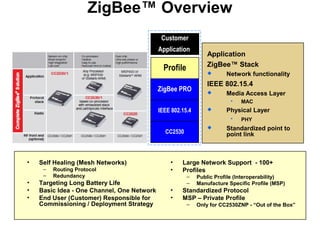
ZigBee™ Overview
Application
ZigBee™ Stack
 Network functionality
IEEE 802.15.4
 Media Access Layer
 MAC
 Physical Layer
 PHY
 Standardized point to
point link
• Self Healing (Mesh Networks)
– Routing Protocol
– Redundancy
• Targeting Long Battery Life
• Basic Idea - One Channel, One Network
• End User (Customer) Responsible for
Commissioning / Deployment Strategy
• Large Network Support - 100+
• Profiles
– Public Profile (Interoperability)
– Manufacture Specific Profile (MSP)
• Standardized Protocol
• MSP – Private Profile
– Only for CC2530ZNP - “Out of the Box”
CC2530
Profile
Customer
Application
IEEE 802.15.4
ZigBee PRO
ZigBee Network Processor - ZNP
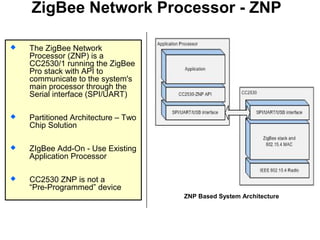
 The ZigBee Network
Processor (ZNP) is a
CC2530/1 running the ZigBee
Pro stack with API to
communicate to the system's
main processor through the
Serial interface (SPI/UART)
 Partitioned Architecture – Two
Chip Solution
 ZIgBee Add-On - Use Existing
Application Processor
 CC2530 ZNP is not a
“Pre-Programmed” device
ZNP Based System Architecture
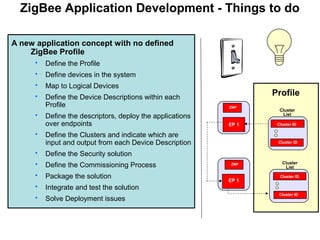
ZigBee Application Development - Things to do
A new application concept with no defined
ZigBee Profile
 Define the Profile
 Define devices in the system
 Map to Logical Devices
 Define the Device Descriptions within each
Profile
 Define the descriptors, deploy the applications
over endpoints
 Define the Clusters and indicate which are
input and output from each Device Description
 Define the Security solution
 Define the Commissioning Process
 Package the solution
 Integrate and test the solution
 Solve Deployment issues
EP 1
EP 1
Profile
Cluster ID
Cluster
List
Cluster ID
Cluster
List
Cluster ID
Cluster ID
ZNP
ZNP
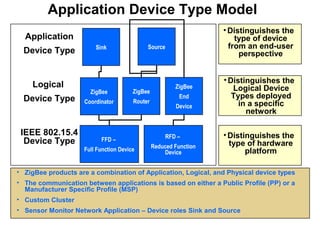
Application Device Type Model
•Distinguishes the
type of hardware
platform
•Distinguishes the
Logical Device
Types deployed
in a specific
network
•Distinguishes the
type of device
from an end-user
perspective
• ZigBee products are a combination of Application, Logical, and Physical device types
• The communication between applications is based on either a Public Profile (PP) or a
Manufacturer Specific Profile (MSP)
• Custom Cluster
• Sensor Monitor Network Application – Device roles Sink and Source
IEEE 802.15.4
Device Type FFD –
Full Function Device
RFD –
Reduced Function
Device
Logical
Device Type
ZigBee
Coordinator
ZigBee
Router
ZigBee
End
Device
Application
Device Type SourceSink
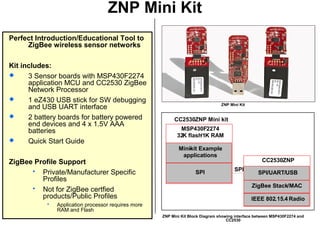
ZNP Mini Kit
Perfect Introduction/Educational Tool to
ZigBee wireless sensor networks
Kit includes:
 3 Sensor boards with MSP430F2274
application MCU and CC2530 ZigBee
Network Processor
 1 eZ430 USB stick for SW debugging
and USB UART interface
 2 battery boards for battery powered
end devices and 4 x 1.5V AAA
batteries
 Quick Start Guide
ZigBee Profile Support
 Private/Manufacturer Specific
Profiles
 Not for ZigBee certfied
products/Public Profiles
 Application processor requires more
RAM and Flash
CC2530ZNP Mini kit
MSP430F2274
32K flash/1K RAM
SPI
Mini-kit Example
applications
CC2530ZNP
IEEE 802.15.4 Radio
ZigBee Stack/MAC
SPI/UART/USB
SPI
ZNP Mini Kit
ZNP Mini Kit Block Diagram showing interface between MSP430F2274 and
CC2530
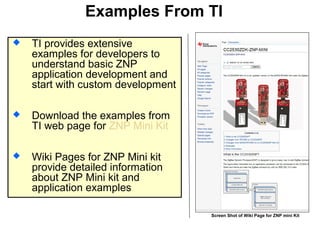
Examples From TI
 TI provides extensive
examples for developers to
understand basic ZNP
application development and
start with custom development
 Download the examples from
TI web page for ZNP Mini Kit
 Wiki Pages for ZNP Mini kit
provide detailed information
about ZNP Mini kit and
application examples
Screen Shot of Wiki Page for ZNP mini Kit
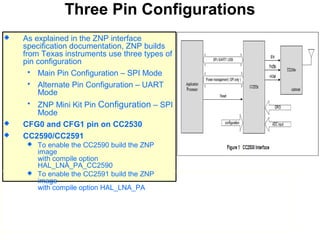
Three Pin Configurations
 As explained in the ZNP interface
specification documentation, ZNP builds
from Texas instruments use three types of
pin configuration
 Main Pin Configuration – SPI Mode
 Alternate Pin Configuration – UART
Mode
 ZNP Mini Kit Pin Configuration – SPI
Mode
 CFG0 and CFG1 pin on CC2530
 CC2590/CC2591
 To enable the CC2590 build the ZNP
image
with compile option
HAL_LNA_PA_CC2590
 To enable the CC2591 build the ZNP
image
with compile option HAL_LNA_PA
Application Processor ZNP Interface
 CC2530ZNP has two sets of interfaces
 Reduced Interface API (Simple Interface)
 Fewer Commands (and Features)
 Supports Single End-Point
 Full – ZigBee API (AF-ZDO Interface)
 More commands (and Features)
 Supports Multiple Endpoints
 Refer to ZNP Interface Specification Documentation
included with Z-Stack Install for complete details.
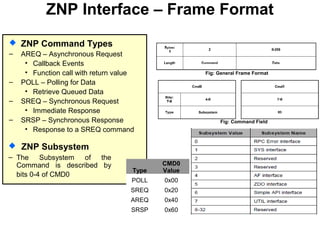
ZNP Interface – Frame Format
Type
CMD0
Value
POLL 0x00
SREQ 0x20
AREQ 0x40
SRSP 0x60
 ZNP Command Types
– AREQ – Asynchronous Request
• Callback Events
• Function call with return value
– POLL – Polling for Data
• Retrieve Queued Data
– SREQ – Synchronous Request
• Immediate Response
– SRSP – Synchronous Response
• Response to a SREQ command
Fig: General Frame Format
Fig: Command Field
 ZNP Subsystem
‒ The Subsystem of the
Command is described by
bits 0-4 of CMD0
ZigBee® Glossary
 A Application Profile is an agreement on a series of messages defining an application space
 Public Application Profile
 Interoperable application profile developed by the ZigBee Alliance
 Manufacturer Specific Profile
 Private application profile developed by a company to operate a ZigBee Device
 Limits application interoperability to devices that share this profile
 Profile ID a unique identifier assigned by the ZigBee Alliance
 A Cluster is a message identifier for exchange of information within an application profile
 Endpoint a communication entity within a device which permits support for a specific application through the exchange
of Clusters
 Binding/s is a way of connecting devices between two endpoints
 Each binding supporting a specific application profile
 Each message type is represented by a cluster within the profile
 Commissioning the task of configuring devices and networks to achieve the needs of a specific installation
 Application Object is software at an endpoint that controls the ZigBee Device
 A single ZigBee Device node supports up to 240 application objects
 Each application objects supports endpoints numbered between 1 and 240
 Endpoint 0 reserved for the ZigBee Device Object (ZDO)
 ZigBee Device Object (ZDO) defines the logical role of a device within the network
 Device type: Coordinator, Router, End device
 Initiates and/or responds to binding and discovery
 CC2530ZNP is running the ZDO endpoint
 PAN ID – a unique Personal Area Network Identifier; Controlled by User and Application development
 Device Description is a description of a specific device within a profile
 Device Discovery can find the identity of devices on active channels within the PAN
 In a Mesh network the routing of messages is performed as a decentralized, cooperative process involving many peer
devices routing on each others’ behalf
 Service Discovery is the ability to determine supported services on given devices within the PAN (e.q. USB
Enumeration)
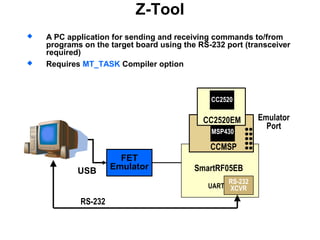
Z-Tool
 A PC application for sending and receiving commands to/from
programs on the target board using the RS-232 port (transceiver
required)
 Requires MT_TASK Compiler option
RS-232
FET
EmulatorUSB
Emulator
Port
RS-232
XCVR
SmartRF05EB
UART
MSP430
CCMSP
CC2520EM
CC2520
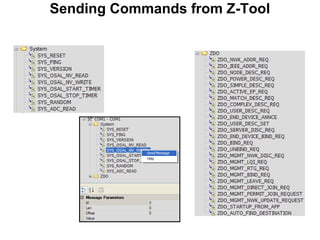
Sending Commands from Z-Tool
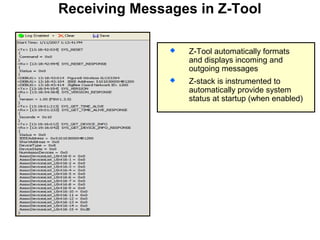
Receiving Messages in Z-Tool
 Z-Tool automatically formats
and displays incoming and
outgoing messages
 Z-stack is instrumented to
automatically provide system
status at startup (when enabled)
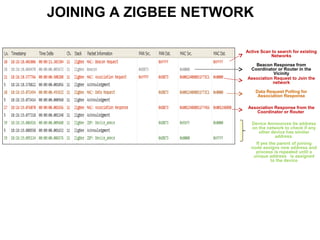
JOINING A ZIGBEE NETWORK
Active Scan to search for existing
Networks
Beacon Response from
Coordinator or Router in the
Vicinity
Association Request to Join the
network
Data Request Polling for
Association Response
Association Response from the
Coordinator or Router
Device Announces its address
on the network to check if any
other device has similar
address.
If yes the parent of joining
node assigns new address and
process is repeated until a
unique address is assigned
to the device
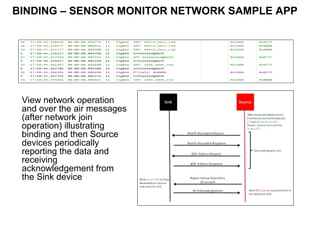
BINDING – SENSOR MONITOR NETWORK SAMPLE APP
View network operation
and over the air messages
(after network join
operation) illustrating
binding and then Source
devices periodically
reporting the data and
receiving
acknowledgement from
the Sink device
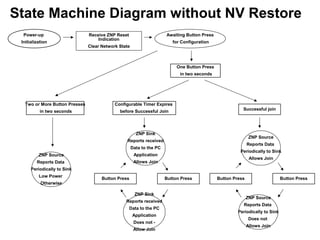
Power-up
Initialization
Receive ZNP Reset
Indication
Clear Network State
Awaiting Button Press
for Configuration
Successful join
ZNP Source
Reports Data
Periodically to Sink
Allows Join
Button Press
ZNP Source
Reports Data
Periodically to Sink
Does not
Allows Join
Button Press
Configurable Timer Expires
before Successful Join
ZNP Sink
Reports received
Data to the PC
Application
Allows Join
Button Press
ZNP Sink
Reports received
Data to the PC
Application
Does not -
Allow Join
Button Press
ZNP Source
Reports Data
Periodically to Sink
Low Power
Otherwise
One Button Press
in two seconds
Two or More Button Presses
in two seconds
State Machine Diagram without NV Restore
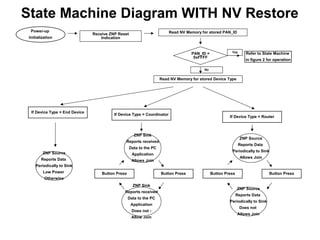
Power-up
Initialization
Receive ZNP Reset
Indication
ZNP Source
Reports Data
Periodically to Sink
Allows Join
Button Press
ZNP Source
Reports Data
Periodically to Sink
Does not
Allows Join
Button Press
If Device Type = Coordinator
ZNP Sink
Reports received
Data to the PC
Application
Allows Join
Button Press
ZNP Sink
Reports received
Data to the PC
Application
Does not -
Allow Join
Button Press
ZNP Source
Reports Data
Periodically to Sink
Low Power
Otherwise
Refer to State Machine
in figure 2 for operation
If Device Type = Router
If Device Type = End Device
Read NV Memory for stored PAN_ID
PAN_ID =
0xFFFF
Read NV Memory for stored Device Type
No
Yes
State Machine Diagram WITH NV Restore
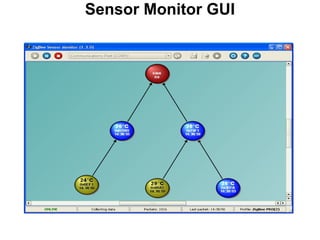
Sensor Monitor GUI
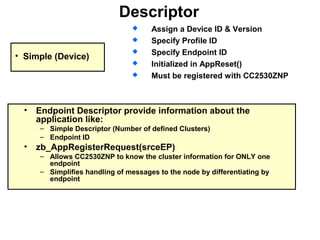
Descriptor
 Assign a Device ID & Version
 Specify Profile ID
 Specify Endpoint ID
 Initialized in AppReset()
 Must be registered with CC2530ZNP
• Simple (Device)
• Endpoint Descriptor provide information about the
application like:
– Simple Descriptor (Number of defined Clusters)
– Endpoint ID
• zb_AppRegisterRequest(srceEP)
– Allows CC2530ZNP to know the cluster information for ONLY one
endpoint
– Simplifies handling of messages to the node by differentiating by
endpoint
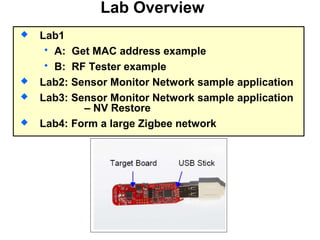
Lab Overview
 Lab1
 A: Get MAC address example
 B: RF Tester example
 Lab2: Sensor Monitor Network sample application
 Lab3: Sensor Monitor Network sample application
– NV Restore
 Lab4: Form a large Zigbee network
Zig bee (8)

Zig bee (8)

  • 1.
    Getting Started withZigBee using the CC2530ZNP Mini Kit Version 1.00 Morten Braathen & Suyash Jain
  • 2.
    Agenda Introduction to ZigBee Understandingthe CC2530ZNP Lab 1 - Understanding ZNP Interface with Application Processor Lab 2 – Building a Small Zigbee Network Lab 3 – Developing a large Zigbee Network Questions
  • 3.
    Abstract This 3-hour workshopwill introduce you to ZigBee and how to build a ZigBee Application by understanding the design process for a ZigBee Network Processor. You will come away from this workshop understanding how to set up a ZigBee Mesh Network using ZigBee coordinators, routers, and end devices. You will run Packet Sniffers and then observe the Personal Area Network (PAN) traffic over the network. Other features to be learned are Mesh Routing, Network Commissioning, PAN Formation.
  • 4.
    ZigBee™ Overview Application ZigBee™ Stack Network functionality IEEE 802.15.4  Media Access Layer  MAC  Physical Layer  PHY  Standardized point to point link • Self Healing (Mesh Networks) – Routing Protocol – Redundancy • Targeting Long Battery Life • Basic Idea - One Channel, One Network • End User (Customer) Responsible for Commissioning / Deployment Strategy • Large Network Support - 100+ • Profiles – Public Profile (Interoperability) – Manufacture Specific Profile (MSP) • Standardized Protocol • MSP – Private Profile – Only for CC2530ZNP - “Out of the Box” CC2530 Profile Customer Application IEEE 802.15.4 ZigBee PRO
  • 5.
    ZigBee Network Processor- ZNP  The ZigBee Network Processor (ZNP) is a CC2530/1 running the ZigBee Pro stack with API to communicate to the system's main processor through the Serial interface (SPI/UART)  Partitioned Architecture – Two Chip Solution  ZIgBee Add-On - Use Existing Application Processor  CC2530 ZNP is not a “Pre-Programmed” device ZNP Based System Architecture
  • 6.
    ZigBee Application Development- Things to do A new application concept with no defined ZigBee Profile  Define the Profile  Define devices in the system  Map to Logical Devices  Define the Device Descriptions within each Profile  Define the descriptors, deploy the applications over endpoints  Define the Clusters and indicate which are input and output from each Device Description  Define the Security solution  Define the Commissioning Process  Package the solution  Integrate and test the solution  Solve Deployment issues EP 1 EP 1 Profile Cluster ID Cluster List Cluster ID Cluster List Cluster ID Cluster ID ZNP ZNP
  • 7.
    Application Device TypeModel •Distinguishes the type of hardware platform •Distinguishes the Logical Device Types deployed in a specific network •Distinguishes the type of device from an end-user perspective • ZigBee products are a combination of Application, Logical, and Physical device types • The communication between applications is based on either a Public Profile (PP) or a Manufacturer Specific Profile (MSP) • Custom Cluster • Sensor Monitor Network Application – Device roles Sink and Source IEEE 802.15.4 Device Type FFD – Full Function Device RFD – Reduced Function Device Logical Device Type ZigBee Coordinator ZigBee Router ZigBee End Device Application Device Type SourceSink
  • 8.
    ZNP Mini Kit PerfectIntroduction/Educational Tool to ZigBee wireless sensor networks Kit includes:  3 Sensor boards with MSP430F2274 application MCU and CC2530 ZigBee Network Processor  1 eZ430 USB stick for SW debugging and USB UART interface  2 battery boards for battery powered end devices and 4 x 1.5V AAA batteries  Quick Start Guide ZigBee Profile Support  Private/Manufacturer Specific Profiles  Not for ZigBee certfied products/Public Profiles  Application processor requires more RAM and Flash CC2530ZNP Mini kit MSP430F2274 32K flash/1K RAM SPI Mini-kit Example applications CC2530ZNP IEEE 802.15.4 Radio ZigBee Stack/MAC SPI/UART/USB SPI ZNP Mini Kit ZNP Mini Kit Block Diagram showing interface between MSP430F2274 and CC2530
  • 9.
    Examples From TI TI provides extensive examples for developers to understand basic ZNP application development and start with custom development  Download the examples from TI web page for ZNP Mini Kit  Wiki Pages for ZNP Mini kit provide detailed information about ZNP Mini kit and application examples Screen Shot of Wiki Page for ZNP mini Kit
  • 10.
    Three Pin Configurations As explained in the ZNP interface specification documentation, ZNP builds from Texas instruments use three types of pin configuration  Main Pin Configuration – SPI Mode  Alternate Pin Configuration – UART Mode  ZNP Mini Kit Pin Configuration – SPI Mode  CFG0 and CFG1 pin on CC2530  CC2590/CC2591  To enable the CC2590 build the ZNP image with compile option HAL_LNA_PA_CC2590  To enable the CC2591 build the ZNP image with compile option HAL_LNA_PA
  • 11.
    Application Processor ZNPInterface  CC2530ZNP has two sets of interfaces  Reduced Interface API (Simple Interface)  Fewer Commands (and Features)  Supports Single End-Point  Full – ZigBee API (AF-ZDO Interface)  More commands (and Features)  Supports Multiple Endpoints  Refer to ZNP Interface Specification Documentation included with Z-Stack Install for complete details.
  • 12.
    ZNP Interface –Frame Format Type CMD0 Value POLL 0x00 SREQ 0x20 AREQ 0x40 SRSP 0x60  ZNP Command Types – AREQ – Asynchronous Request • Callback Events • Function call with return value – POLL – Polling for Data • Retrieve Queued Data – SREQ – Synchronous Request • Immediate Response – SRSP – Synchronous Response • Response to a SREQ command Fig: General Frame Format Fig: Command Field  ZNP Subsystem ‒ The Subsystem of the Command is described by bits 0-4 of CMD0
  • 13.
    ZigBee® Glossary  AApplication Profile is an agreement on a series of messages defining an application space  Public Application Profile  Interoperable application profile developed by the ZigBee Alliance  Manufacturer Specific Profile  Private application profile developed by a company to operate a ZigBee Device  Limits application interoperability to devices that share this profile  Profile ID a unique identifier assigned by the ZigBee Alliance  A Cluster is a message identifier for exchange of information within an application profile  Endpoint a communication entity within a device which permits support for a specific application through the exchange of Clusters  Binding/s is a way of connecting devices between two endpoints  Each binding supporting a specific application profile  Each message type is represented by a cluster within the profile  Commissioning the task of configuring devices and networks to achieve the needs of a specific installation  Application Object is software at an endpoint that controls the ZigBee Device  A single ZigBee Device node supports up to 240 application objects  Each application objects supports endpoints numbered between 1 and 240  Endpoint 0 reserved for the ZigBee Device Object (ZDO)  ZigBee Device Object (ZDO) defines the logical role of a device within the network  Device type: Coordinator, Router, End device  Initiates and/or responds to binding and discovery  CC2530ZNP is running the ZDO endpoint  PAN ID – a unique Personal Area Network Identifier; Controlled by User and Application development  Device Description is a description of a specific device within a profile  Device Discovery can find the identity of devices on active channels within the PAN  In a Mesh network the routing of messages is performed as a decentralized, cooperative process involving many peer devices routing on each others’ behalf  Service Discovery is the ability to determine supported services on given devices within the PAN (e.q. USB Enumeration)
  • 14.
    Z-Tool  A PCapplication for sending and receiving commands to/from programs on the target board using the RS-232 port (transceiver required)  Requires MT_TASK Compiler option RS-232 FET EmulatorUSB Emulator Port RS-232 XCVR SmartRF05EB UART MSP430 CCMSP CC2520EM CC2520
  • 15.
  • 16.
    Receiving Messages inZ-Tool  Z-Tool automatically formats and displays incoming and outgoing messages  Z-stack is instrumented to automatically provide system status at startup (when enabled)
  • 17.
    JOINING A ZIGBEENETWORK Active Scan to search for existing Networks Beacon Response from Coordinator or Router in the Vicinity Association Request to Join the network Data Request Polling for Association Response Association Response from the Coordinator or Router Device Announces its address on the network to check if any other device has similar address. If yes the parent of joining node assigns new address and process is repeated until a unique address is assigned to the device
  • 18.
    BINDING – SENSORMONITOR NETWORK SAMPLE APP View network operation and over the air messages (after network join operation) illustrating binding and then Source devices periodically reporting the data and receiving acknowledgement from the Sink device
  • 19.
    Power-up Initialization Receive ZNP Reset Indication ClearNetwork State Awaiting Button Press for Configuration Successful join ZNP Source Reports Data Periodically to Sink Allows Join Button Press ZNP Source Reports Data Periodically to Sink Does not Allows Join Button Press Configurable Timer Expires before Successful Join ZNP Sink Reports received Data to the PC Application Allows Join Button Press ZNP Sink Reports received Data to the PC Application Does not - Allow Join Button Press ZNP Source Reports Data Periodically to Sink Low Power Otherwise One Button Press in two seconds Two or More Button Presses in two seconds State Machine Diagram without NV Restore
  • 20.
    Power-up Initialization Receive ZNP Reset Indication ZNPSource Reports Data Periodically to Sink Allows Join Button Press ZNP Source Reports Data Periodically to Sink Does not Allows Join Button Press If Device Type = Coordinator ZNP Sink Reports received Data to the PC Application Allows Join Button Press ZNP Sink Reports received Data to the PC Application Does not - Allow Join Button Press ZNP Source Reports Data Periodically to Sink Low Power Otherwise Refer to State Machine in figure 2 for operation If Device Type = Router If Device Type = End Device Read NV Memory for stored PAN_ID PAN_ID = 0xFFFF Read NV Memory for stored Device Type No Yes State Machine Diagram WITH NV Restore
  • 21.
  • 22.
    Descriptor  Assign aDevice ID & Version  Specify Profile ID  Specify Endpoint ID  Initialized in AppReset()  Must be registered with CC2530ZNP • Simple (Device) • Endpoint Descriptor provide information about the application like: – Simple Descriptor (Number of defined Clusters) – Endpoint ID • zb_AppRegisterRequest(srceEP) – Allows CC2530ZNP to know the cluster information for ONLY one endpoint – Simplifies handling of messages to the node by differentiating by endpoint
  • 23.
    Lab Overview  Lab1 A: Get MAC address example  B: RF Tester example  Lab2: Sensor Monitor Network sample application  Lab3: Sensor Monitor Network sample application – NV Restore  Lab4: Form a large Zigbee network