XML For DummiesBook Author : Lucinda Dykes & Ed TittleSlides Prepared By: Son TNChapter 14 : Processing XML
ContentsFrankly, My Dear, I Don’t Give a DOMWhat Goes In Must Come Out: Processing XML
14.1 Frankly, My Dear, I Don’t Give a DOM
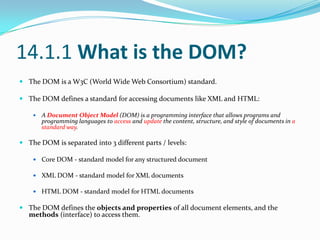
14.1.1 What is the DOM?The DOM is a W3C (World Wide Web Consortium) standard.The DOM defines a standard for accessing documents like XML and HTML:A Document Object Model (DOM) is a programming interface that allows programs and programming languages to access and update the content, structure, and style of documents in a standard way.The DOM is separated into 3 different parts / levels:Core DOM - standard model for any structured documentXML DOM - standard model for XML documentsHTML DOM - standard model for HTML documentsThe DOM defines the objects and properties of all document elements, and the methods (interface) to access them.
14.1.2 The XML DOMThe XML DOM is:A standard object model for XMLA standard programming interface for XML Platform- and language-independent A W3C standardThe XML DOM defines the objects and properties of all XML elements, and the methods (interface) to access them.In other words: The XML DOM is a standard for how to get, change, add, or delete XML elements.
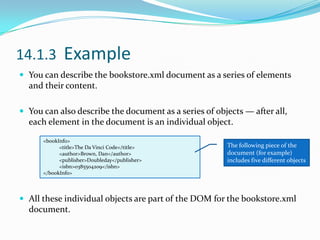
14.1.3  Example You can describe the bookstore.xml document as a series of elements and their content.You can also describe the document as a series of objects — after all, each element in the document is an individual object.All these individual objects are part of the DOM for the bookstore.xml document.<bookInfo><title>The Da Vinci Code</title><author>Brown, Dan</author><publisher>Doubleday</publisher><isbn>0385504209</isbn></bookInfo>The following piece of the document (for example) includes five different objects
14.1.4 Frankly, My Dear, I Don’t Give a DOM (Cont)A DOM shows how each element relates to the others hierarchically.The DOM identifies each unique object in a document according to its position in the document’s hierarchy.As in any hierarchy, the DOM consists of a fairly complex system of relationships that must be adhered to.siblings, parents, …
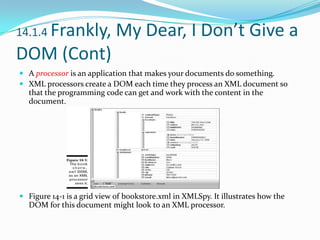
14.1.4 Frankly, My Dear, I Don’t Give a DOM (Cont)A processoris an application that makes your documents do something.XML processors create a DOM each time they process an XML document so that the programming code can get and work with the content in the document.Figure 14-1 is a grid view of bookstore.xml in XMLSpy. It illustrates how the DOM for this document might look to an XML processor.
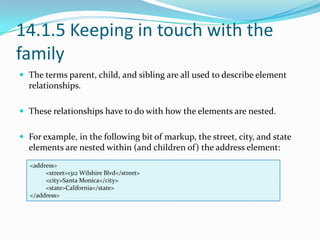
14.1.5 Keeping in touch with the familyThe terms parent, child, and sibling are all used to describe element relationships.These relationships have to do with how the elements are nested.For example, in the following bit of markup, the street, city, and state elements are nested within (and children of) the address element:<address><street>1312 Wilshire Blvd</street><city>Santa Monica</city><state>California</state></address>
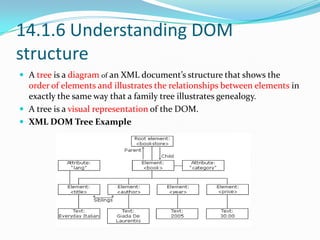
14.1.6 Understanding DOM structureA tree is a diagramof an XML document’s structure that shows the order of elements and illustrates the relationships between elements in exactly the same way that a family tree illustrates genealogy.A tree is a visual representation of the DOM.XML DOM Tree Example
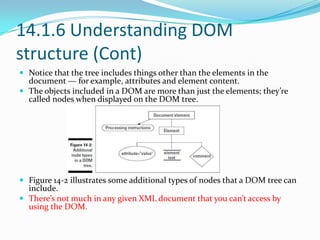
14.1.6 Understanding DOM structure (Cont)Notice that the tree includes things other than the elements in the document — for example, attributes and element content.The objects included in a DOM are more than just the elements; they’re called nodes when displayed on the DOM tree.Figure 14-2 illustrates some additional types of nodes that a DOM tree can include.There’s not much in any given XML document that you can’t access by using the DOM.
14.1.6.1 Using the DOM and XSLXSL-FO and XSLT stylesheets are XML documents.When an application uses a stylesheet, it processes the stylesheet like any other XML document.
The only difference is that the application applies the stylesheet to the XML document.The stylesheet has its own DOM, as does the XML document; the final transformation or display guided by the stylesheet takes information in both DOMs into account.
14.1.6.2 Web browsers and the DOMTo display XML documents in Web browsers You actually have to apply an XSLT stylesheet to the XML document — which converts XML to HTML or XHTML.Or you can use an XSL-FO stylesheet with the XML document for display in the browserFor example  when Internet Explorer 6 displays content using an XSL-FO stylesheet, two processes actually occurInternet Explorer accesses the DOM that’s created when its processor — Microsoft XML (MSXML) — reads and processes both the XML document and the related XSL-FO stylesheet.The browser uses the document and stylesheet together to determine a the final display of the content.
14.2 What Goes In Must Come Out: Processing XMLA processor takes the code and makes it do something. A processor may be part of :A simple Web browser (such as Internet Explorer or Mozilla).A whole other kind of program — such as a utility that takes in an XML document, grabs the info it’s carrying, and populates an Oracle database.XML processors and the DOM go hand in hand.All Web browsers have HTML processors built into them, and those that can work with XML also have XML processors built into them.If you create a stylesheet in either XSL or CSS, an XML-enabled browser can also open and process that stylesheet.All XML solutions have processors involved in themMany different processors are available for you to choose among.A program for manipulation — processors are written in a variety of languages.
14.2.1 So many processors, so little timeThere are many the XML Parsers / Processors , What makes all these processors different from one another?Each processor has four distinct characteristics:The programming language it was written in.Whether or not it validates documentsThe version of the different specifications (DTD, schema, and so on) that it supportsIf it was written to accompany a particular software or database application
14.2.1 Which processor is right for you?When you’re trying to pick a processor, you should ask yourself the following questions to help narrow your search:What programming language is the rest of your solution using?Do your documents need to be validated during processing?Which XML versions and standards are you using?Does the application framework or database you’re using have a processor?

Xml For Dummies Chapter 14 Processing Xml it-slideshares.blogspot.com

  • 1.
    XML For DummiesBookAuthor : Lucinda Dykes & Ed TittleSlides Prepared By: Son TNChapter 14 : Processing XML
  • 2.
    ContentsFrankly, My Dear,I Don’t Give a DOMWhat Goes In Must Come Out: Processing XML
  • 3.
    14.1 Frankly, MyDear, I Don’t Give a DOM
  • 4.
    14.1.1 What isthe DOM?The DOM is a W3C (World Wide Web Consortium) standard.The DOM defines a standard for accessing documents like XML and HTML:A Document Object Model (DOM) is a programming interface that allows programs and programming languages to access and update the content, structure, and style of documents in a standard way.The DOM is separated into 3 different parts / levels:Core DOM - standard model for any structured documentXML DOM - standard model for XML documentsHTML DOM - standard model for HTML documentsThe DOM defines the objects and properties of all document elements, and the methods (interface) to access them.
  • 5.
    14.1.2 The XMLDOMThe XML DOM is:A standard object model for XMLA standard programming interface for XML Platform- and language-independent A W3C standardThe XML DOM defines the objects and properties of all XML elements, and the methods (interface) to access them.In other words: The XML DOM is a standard for how to get, change, add, or delete XML elements.
  • 6.
    14.1.3 ExampleYou can describe the bookstore.xml document as a series of elements and their content.You can also describe the document as a series of objects — after all, each element in the document is an individual object.All these individual objects are part of the DOM for the bookstore.xml document.<bookInfo><title>The Da Vinci Code</title><author>Brown, Dan</author><publisher>Doubleday</publisher><isbn>0385504209</isbn></bookInfo>The following piece of the document (for example) includes five different objects
  • 7.
    14.1.4 Frankly, MyDear, I Don’t Give a DOM (Cont)A DOM shows how each element relates to the others hierarchically.The DOM identifies each unique object in a document according to its position in the document’s hierarchy.As in any hierarchy, the DOM consists of a fairly complex system of relationships that must be adhered to.siblings, parents, …
  • 8.
    14.1.4 Frankly, MyDear, I Don’t Give a DOM (Cont)A processoris an application that makes your documents do something.XML processors create a DOM each time they process an XML document so that the programming code can get and work with the content in the document.Figure 14-1 is a grid view of bookstore.xml in XMLSpy. It illustrates how the DOM for this document might look to an XML processor.
  • 9.
    14.1.5 Keeping intouch with the familyThe terms parent, child, and sibling are all used to describe element relationships.These relationships have to do with how the elements are nested.For example, in the following bit of markup, the street, city, and state elements are nested within (and children of) the address element:<address><street>1312 Wilshire Blvd</street><city>Santa Monica</city><state>California</state></address>
  • 10.
    14.1.6 Understanding DOMstructureA tree is a diagramof an XML document’s structure that shows the order of elements and illustrates the relationships between elements in exactly the same way that a family tree illustrates genealogy.A tree is a visual representation of the DOM.XML DOM Tree Example
  • 11.
    14.1.6 Understanding DOMstructure (Cont)Notice that the tree includes things other than the elements in the document — for example, attributes and element content.The objects included in a DOM are more than just the elements; they’re called nodes when displayed on the DOM tree.Figure 14-2 illustrates some additional types of nodes that a DOM tree can include.There’s not much in any given XML document that you can’t access by using the DOM.
  • 12.
    14.1.6.1 Using theDOM and XSLXSL-FO and XSLT stylesheets are XML documents.When an application uses a stylesheet, it processes the stylesheet like any other XML document.
  • 13.
    The only differenceis that the application applies the stylesheet to the XML document.The stylesheet has its own DOM, as does the XML document; the final transformation or display guided by the stylesheet takes information in both DOMs into account.
  • 14.
    14.1.6.2 Web browsersand the DOMTo display XML documents in Web browsers You actually have to apply an XSLT stylesheet to the XML document — which converts XML to HTML or XHTML.Or you can use an XSL-FO stylesheet with the XML document for display in the browserFor example when Internet Explorer 6 displays content using an XSL-FO stylesheet, two processes actually occurInternet Explorer accesses the DOM that’s created when its processor — Microsoft XML (MSXML) — reads and processes both the XML document and the related XSL-FO stylesheet.The browser uses the document and stylesheet together to determine a the final display of the content.
  • 15.
    14.2 What GoesIn Must Come Out: Processing XMLA processor takes the code and makes it do something. A processor may be part of :A simple Web browser (such as Internet Explorer or Mozilla).A whole other kind of program — such as a utility that takes in an XML document, grabs the info it’s carrying, and populates an Oracle database.XML processors and the DOM go hand in hand.All Web browsers have HTML processors built into them, and those that can work with XML also have XML processors built into them.If you create a stylesheet in either XSL or CSS, an XML-enabled browser can also open and process that stylesheet.All XML solutions have processors involved in themMany different processors are available for you to choose among.A program for manipulation — processors are written in a variety of languages.
  • 16.
    14.2.1 So manyprocessors, so little timeThere are many the XML Parsers / Processors , What makes all these processors different from one another?Each processor has four distinct characteristics:The programming language it was written in.Whether or not it validates documentsThe version of the different specifications (DTD, schema, and so on) that it supportsIf it was written to accompany a particular software or database application
  • 17.
    14.2.1 Which processoris right for you?When you’re trying to pick a processor, you should ask yourself the following questions to help narrow your search:What programming language is the rest of your solution using?Do your documents need to be validated during processing?Which XML versions and standards are you using?Does the application framework or database you’re using have a processor?