SGML and XML
2
Content
 SGML
 XML
 Difference Between XML and HTML
3
SGML
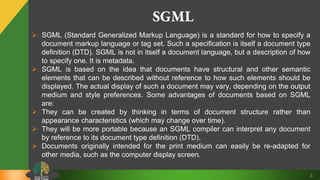
 SGML (Standard Generalized Markup Language) is a standard for how to specify a
document markup language or tag set. Such a specification is itself a document type
definition (DTD). SGML is not in itself a document language, but a description of how
to specify one. It is metadata.
 SGML is based on the idea that documents have structural and other semantic
elements that can be described without reference to how such elements should be
displayed. The actual display of such a document may vary, depending on the output
medium and style preferences. Some advantages of documents based on SGML
are:
 They can be created by thinking in terms of document structure rather than
appearance characteristics (which may change over time).
 They will be more portable because an SGML compiler can interpret any document
by reference to its document type definition (DTD).
 Documents originally intended for the print medium can easily be re-adapted for
other media, such as the computer display screen.
4
SGML Contd…
 SGML is based somewhat on earlier generalized markup languages developed at
IBM, including General Markup Language (GML) and ISIL.
 HTML is an example of SGML- based Language
 An SGML application consists of several parts:
1. The SGML declaration: The SGML declaration specifies which characters and
delimiters may appear in the application.
2. The document type definition (DTD): The DTD defines the syntax of markup
constructs. The DTD may include additional definitions such as numeric and named
character entities.
3. A specification that describes the semantics to be ascribed to the markup. This
specification also imposes syntax restrictions that cannot be expressed within the
DTD.
4. Document instances containing data (contents) and markup. Each instance contains
a reference to the DTD to be used to interpret it.
5
XML
 XML stands for Extensible Markup Language. It is a text-based markup language
derived from Standard Generalized Markup Language (SGML).
 XML tags identify the data and are used to store and organize the data, rather than
specifying how to display it like HTML tags, which are used to display the data.
 XML is not going to replace HTML in the near future, but it introduces new
possibilities by adopting many successful features of HTML.
 XML is a markup language that defines set of rules for encoding documents in a
format that is both human-readable and machine-readable
 It is a software- and hardware-independent tool for storing and transporting data.
 XML became a W3C Recommendation as early as in February 1998.
6
XML- Characteristics
 XML is extensible − XML allows to create self-descriptive tags, or language, that
suits the application.
 XML carries the data, does not present it − XML allows to store the data
irrespective of how it will be presented.
 XML is a public standard − XML was developed by an organization called the
World Wide Web Consortium (W3C) and is available as an open standard.
7
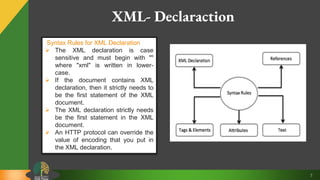
XML- Declaraction
Syntax Rules for XML Declaration
 The XML declaration is case
sensitive and must begin with ""
where "xml" is written in lower-
case.
 If the document contains XML
declaration, then it strictly needs to
be the first statement of the XML
document.
 The XML declaration strictly needs
be the first statement in the XML
document.
 An HTTP protocol can override the
value of encoding that you put in
the XML declaration.
8
XML- Tags & Elements
An XML file is structured by several XML-elements, also called XML-nodes or
XML-tags. The names of XML-elements are enclosed in triangular brackets < >
Syntax Rules for Tags and Elements
 Element Syntax: Each XML-element needs to be closed either with start or with
end elements as :
<element>….</element> or <element/>
 Nesting of Elements: An XML-element can contain multiple XML-elements as
its children, but the children elements must not overlap. i.e., an end tag of an
element must have the same name as that of the most recent unmatched start
tag.
 Root Element: An XML document can have only one root element. For
example, following is not a correct XML document, because both the x and y
elements occur at the top level without a root element
 Case Sensitivity: The names of XML-elements are case-sensitive. That means
the name of the start and the end elements need to be exactly in the same case
9
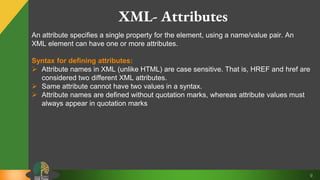
XML- Attributes
An attribute specifies a single property for the element, using a name/value pair. An
XML element can have one or more attributes.
Syntax for defining attributes:
 Attribute names in XML (unlike HTML) are case sensitive. That is, HREF and href are
considered two different XML attributes.
 Same attribute cannot have two values in a syntax.
 Attribute names are defined without quotation marks, whereas attribute values must
always appear in quotation marks
10
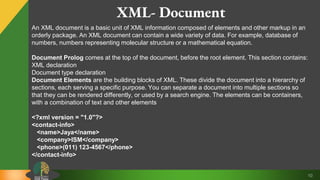
XML- Document
An XML document is a basic unit of XML information composed of elements and other markup in an
orderly package. An XML document can contain a wide variety of data. For example, database of
numbers, numbers representing molecular structure or a mathematical equation.
Document Prolog comes at the top of the document, before the root element. This section contains:
XML declaration
Document type declaration
Document Elements are the building blocks of XML. These divide the document into a hierarchy of
sections, each serving a specific purpose. You can separate a document into multiple sections so
that they can be rendered differently, or used by a search engine. The elements can be containers,
with a combination of text and other elements
<?xml version = "1.0"?>
<contact-info>
<name>Jaya</name>
<company>ISM</company>
<phone>(011) 123-4567</phone>
</contact-info>
11
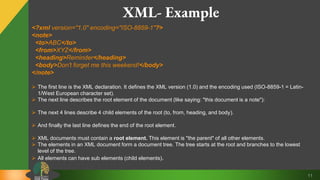
XML- Example
<?xml version="1.0" encoding="ISO-8859-1"?>
<note>
<to>ABC</to>
<from>XYZ</from>
<heading>Reminder</heading>
<body>Don't forget me this weekend!</body>
</note>
 The first line is the XML declaration. It defines the XML version (1.0) and the encoding used (ISO-8859-1 = Latin-
1/West European character set).
 The next line describes the root element of the document (like saying: "this document is a note"):
 The next 4 lines describe 4 child elements of the root (to, from, heading, and body).
 And finally the last line defines the end of the root element.
 XML documents must contain a root element. This element is "the parent" of all other elements.
 The elements in an XML document form a document tree. The tree starts at the root and branches to the lowest
level of the tree.
 All elements can have sub elements (child elements).
12
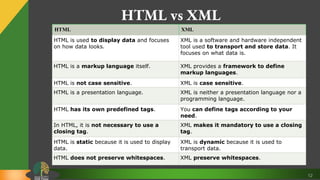
HTML vs XML
HTML XML
HTML is used to display data and focuses
on how data looks.
XML is a software and hardware independent
tool used to transport and store data. It
focuses on what data is.
HTML is a markup language itself. XML provides a framework to define
markup languages.
HTML is not case sensitive. XML is case sensitive.
HTML is a presentation language. XML is neither a presentation language nor a
programming language.
HTML has its own predefined tags. You can define tags according to your
need.
In HTML, it is not necessary to use a
closing tag.
XML makes it mandatory to use a closing
tag.
HTML is static because it is used to display
data.
XML is dynamic because it is used to
transport data.
HTML does not preserve whitespaces. XML preserve whitespaces.

Sgml and xml

  • 1.
  • 2.
    2 Content  SGML  XML Difference Between XML and HTML
  • 3.
    3 SGML  SGML (StandardGeneralized Markup Language) is a standard for how to specify a document markup language or tag set. Such a specification is itself a document type definition (DTD). SGML is not in itself a document language, but a description of how to specify one. It is metadata.  SGML is based on the idea that documents have structural and other semantic elements that can be described without reference to how such elements should be displayed. The actual display of such a document may vary, depending on the output medium and style preferences. Some advantages of documents based on SGML are:  They can be created by thinking in terms of document structure rather than appearance characteristics (which may change over time).  They will be more portable because an SGML compiler can interpret any document by reference to its document type definition (DTD).  Documents originally intended for the print medium can easily be re-adapted for other media, such as the computer display screen.
  • 4.
    4 SGML Contd…  SGMLis based somewhat on earlier generalized markup languages developed at IBM, including General Markup Language (GML) and ISIL.  HTML is an example of SGML- based Language  An SGML application consists of several parts: 1. The SGML declaration: The SGML declaration specifies which characters and delimiters may appear in the application. 2. The document type definition (DTD): The DTD defines the syntax of markup constructs. The DTD may include additional definitions such as numeric and named character entities. 3. A specification that describes the semantics to be ascribed to the markup. This specification also imposes syntax restrictions that cannot be expressed within the DTD. 4. Document instances containing data (contents) and markup. Each instance contains a reference to the DTD to be used to interpret it.
  • 5.
    5 XML  XML standsfor Extensible Markup Language. It is a text-based markup language derived from Standard Generalized Markup Language (SGML).  XML tags identify the data and are used to store and organize the data, rather than specifying how to display it like HTML tags, which are used to display the data.  XML is not going to replace HTML in the near future, but it introduces new possibilities by adopting many successful features of HTML.  XML is a markup language that defines set of rules for encoding documents in a format that is both human-readable and machine-readable  It is a software- and hardware-independent tool for storing and transporting data.  XML became a W3C Recommendation as early as in February 1998.
  • 6.
    6 XML- Characteristics  XMLis extensible − XML allows to create self-descriptive tags, or language, that suits the application.  XML carries the data, does not present it − XML allows to store the data irrespective of how it will be presented.  XML is a public standard − XML was developed by an organization called the World Wide Web Consortium (W3C) and is available as an open standard.
  • 7.
    7 XML- Declaraction Syntax Rulesfor XML Declaration  The XML declaration is case sensitive and must begin with "" where "xml" is written in lower- case.  If the document contains XML declaration, then it strictly needs to be the first statement of the XML document.  The XML declaration strictly needs be the first statement in the XML document.  An HTTP protocol can override the value of encoding that you put in the XML declaration.
  • 8.
    8 XML- Tags &Elements An XML file is structured by several XML-elements, also called XML-nodes or XML-tags. The names of XML-elements are enclosed in triangular brackets < > Syntax Rules for Tags and Elements  Element Syntax: Each XML-element needs to be closed either with start or with end elements as : <element>….</element> or <element/>  Nesting of Elements: An XML-element can contain multiple XML-elements as its children, but the children elements must not overlap. i.e., an end tag of an element must have the same name as that of the most recent unmatched start tag.  Root Element: An XML document can have only one root element. For example, following is not a correct XML document, because both the x and y elements occur at the top level without a root element  Case Sensitivity: The names of XML-elements are case-sensitive. That means the name of the start and the end elements need to be exactly in the same case
  • 9.
    9 XML- Attributes An attributespecifies a single property for the element, using a name/value pair. An XML element can have one or more attributes. Syntax for defining attributes:  Attribute names in XML (unlike HTML) are case sensitive. That is, HREF and href are considered two different XML attributes.  Same attribute cannot have two values in a syntax.  Attribute names are defined without quotation marks, whereas attribute values must always appear in quotation marks
  • 10.
    10 XML- Document An XMLdocument is a basic unit of XML information composed of elements and other markup in an orderly package. An XML document can contain a wide variety of data. For example, database of numbers, numbers representing molecular structure or a mathematical equation. Document Prolog comes at the top of the document, before the root element. This section contains: XML declaration Document type declaration Document Elements are the building blocks of XML. These divide the document into a hierarchy of sections, each serving a specific purpose. You can separate a document into multiple sections so that they can be rendered differently, or used by a search engine. The elements can be containers, with a combination of text and other elements <?xml version = "1.0"?> <contact-info> <name>Jaya</name> <company>ISM</company> <phone>(011) 123-4567</phone> </contact-info>
  • 11.
    11 XML- Example <?xml version="1.0"encoding="ISO-8859-1"?> <note> <to>ABC</to> <from>XYZ</from> <heading>Reminder</heading> <body>Don't forget me this weekend!</body> </note>  The first line is the XML declaration. It defines the XML version (1.0) and the encoding used (ISO-8859-1 = Latin- 1/West European character set).  The next line describes the root element of the document (like saying: "this document is a note"):  The next 4 lines describe 4 child elements of the root (to, from, heading, and body).  And finally the last line defines the end of the root element.  XML documents must contain a root element. This element is "the parent" of all other elements.  The elements in an XML document form a document tree. The tree starts at the root and branches to the lowest level of the tree.  All elements can have sub elements (child elements).
  • 12.
    12 HTML vs XML HTMLXML HTML is used to display data and focuses on how data looks. XML is a software and hardware independent tool used to transport and store data. It focuses on what data is. HTML is a markup language itself. XML provides a framework to define markup languages. HTML is not case sensitive. XML is case sensitive. HTML is a presentation language. XML is neither a presentation language nor a programming language. HTML has its own predefined tags. You can define tags according to your need. In HTML, it is not necessary to use a closing tag. XML makes it mandatory to use a closing tag. HTML is static because it is used to display data. XML is dynamic because it is used to transport data. HTML does not preserve whitespaces. XML preserve whitespaces.