
Disclaimer: This presentation is prepared by trainees of
baabtra as a part of mentoring program. This is not official
document of baabtra –Mentoring Partner
Baabtra-Mentoring Partner is the mentoring division of baabte System Technologies Pvt .
Ltd
XML


Sharan P
spsp89@gmail.com
www.facebook.com/pshara
  np89
twitter.com/sharan_kvk
in.linkedin.com/in/sharankv
  k
8129935578
contents
•   What is xml
•   XML Example
•   XML schema
•   XML Syntax Rules
•   XML Parsing
•   Glade XML Structure
What is xml
• XML stands for EXtensible Markup Language
• XML is a markup language much like HTML
• XML was designed to carry data, not to display
  data
• XML tags are not predefined. You must define
  your own tags
• XML is designed to be self-descriptive
XML Example
<?xml version="1.0"?>
<note>
  <to>Tove</to>
  <from>Jani</from>
  <heading>Reminder</heading>
  <body>Don't forget me this
  weekend!</body>
</note>
XML is Not a Replacement for HTML
• XML is a complement to HTML.
• It is important to understand that XML is not a
  replacement for HTML. In most web
  applications, XML is used to transport data,
  while HTML is used to format and display the
  data.
XML schema
• The purpose of an XML Schema is to define the legal building
  blocks of an XML document, just like a DTD.
• An XML Schema:
   –   defines elements that can appear in a document
   –   defines attributes that can appear in a document
   –   defines which elements are child elements
   –   defines the order of child elements
   –   defines the number of child elements
   –   defines whether an element is empty or can include text
   –   defines data types for elements and attributes
   –   defines default and fixed values for elements and attributes
XML Documents Form a Tree Structure
• XML documents must contain a root element.
  This element is "the parent" of all other
  elements.
• The elements in an XML document form a
  document tree. The tree starts at the root and
  branches to the lowest level of the tree.
XML Documents Form a Tree Structure
• All elements can have sub elements (child
  elements):
 <root>
   <child>
    <subchild>.....</subchild>
   </child>
  </root>
XML Documents Form a Tree Structure
XML Syntax Rules
•   All XML Elements Must Have a Closing Tag
•   XML Tags are Case Sensitive
•   XML Elements Must be Properly Nested
•   XML Documents Must Have a Root Element
•   XML Attribute Values Must be Quoted
•   White-space is Preserved in XML
XML Parsing
It is a software library (or a package) that
 provides methods (or interfaces) for client
 applications to work with XML documents
It checks the well-formattedness
It may validate the documents
It does a lot of other detailed things so that a
 client is shielded from that complexities
• We will consider two parsing methods


     SAX = Simple API for XML
     DOM = Document Object Model
SAX
• XML is read sequentially

• When a parsing event happens, the parser
  invokes the corresponding method of the
  corresponding handler
DOM
• Parser creates a tree object out of the
  document
• User accesses data by traversing the tree
  – The tree and its traversal conform to a W3C
    standard
• The API allows for constructing, accessing and
  manipulating the structure and content of
  XML documents
XML Parsing
Parse an XML Document
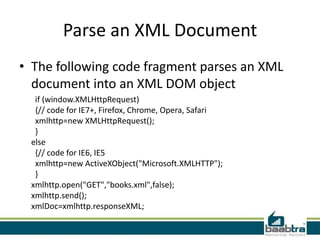
• The following code fragment parses an XML
  document into an XML DOM object
  if (window.XMLHttpRequest)
  {// code for IE7+, Firefox, Chrome, Opera, Safari
  xmlhttp=new XMLHttpRequest();
  }
 else
  {// code for IE6, IE5
  xmlhttp=new ActiveXObject("Microsoft.XMLHTTP");
  }
 xmlhttp.open("GET","books.xml",false);
 xmlhttp.send();
 xmlDoc=xmlhttp.responseXML;
Parse an XML String
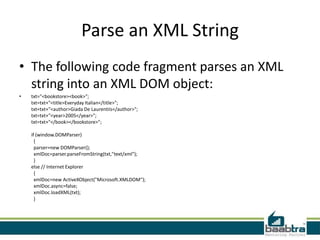
• The following code fragment parses an XML
  string into an XML DOM object:
•   txt="<bookstore><book>";
    txt=txt+"<title>Everyday Italian</title>";
    txt=txt+"<author>Giada De Laurentiis</author>";
    txt=txt+"<year>2005</year>";
    txt=txt+"</book></bookstore>";

    if (window.DOMParser)
      {
      parser=new DOMParser();
      xmlDoc=parser.parseFromString(txt,"text/xml");
      }
    else // Internet Explorer
      {
      xmlDoc=new ActiveXObject("Microsoft.XMLDOM");
      xmlDoc.async=false;
      xmlDoc.loadXML(txt);
      }
GladeXML
Object Hierarchy
This object represents an `instantiation' of an XML interface description.
   When one of these objects is created, the XML file is read, and the
   interface is created. The GladeXML object then provides an interface for
   accessing the widgets in the interface by the names assigned to them
   inside the XML description.


GObject +----
 GladeXML
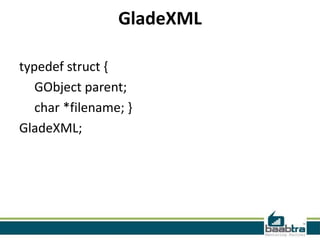
GladeXML

typedef struct {
   GObject parent;
   char *filename; }
GladeXML;
GladeXMLClass
typedef struct
{
    GObjectClass parent_class;
   /* Virtual function: gets the appropriate gtype for the typename.*/
   GType (* lookup_type) (GladeXML*self, const char *gtypename);
} GladeXMLClass;
If this presentation helped you, please visit our
           page facebook.com/baabtra and like it.
               Thanks in advance.
www.baabtra.com | www.massbaab.com |www.baabte.com
Contact Us

XML

  • 2.
    Disclaimer: This presentationis prepared by trainees of baabtra as a part of mentoring program. This is not official document of baabtra –Mentoring Partner Baabtra-Mentoring Partner is the mentoring division of baabte System Technologies Pvt . Ltd
  • 3.
    XML Sharan P spsp89@gmail.com www.facebook.com/pshara np89 twitter.com/sharan_kvk in.linkedin.com/in/sharankv k 8129935578
  • 4.
    contents • What is xml • XML Example • XML schema • XML Syntax Rules • XML Parsing • Glade XML Structure
  • 5.
    What is xml •XML stands for EXtensible Markup Language • XML is a markup language much like HTML • XML was designed to carry data, not to display data • XML tags are not predefined. You must define your own tags • XML is designed to be self-descriptive
  • 6.
    XML Example <?xml version="1.0"?> <note> <to>Tove</to> <from>Jani</from> <heading>Reminder</heading> <body>Don't forget me this weekend!</body> </note>
  • 7.
    XML is Nota Replacement for HTML • XML is a complement to HTML. • It is important to understand that XML is not a replacement for HTML. In most web applications, XML is used to transport data, while HTML is used to format and display the data.
  • 8.
    XML schema • Thepurpose of an XML Schema is to define the legal building blocks of an XML document, just like a DTD. • An XML Schema: – defines elements that can appear in a document – defines attributes that can appear in a document – defines which elements are child elements – defines the order of child elements – defines the number of child elements – defines whether an element is empty or can include text – defines data types for elements and attributes – defines default and fixed values for elements and attributes
  • 9.
    XML Documents Forma Tree Structure • XML documents must contain a root element. This element is "the parent" of all other elements. • The elements in an XML document form a document tree. The tree starts at the root and branches to the lowest level of the tree.
  • 10.
    XML Documents Forma Tree Structure • All elements can have sub elements (child elements): <root> <child> <subchild>.....</subchild> </child> </root>
  • 11.
    XML Documents Forma Tree Structure
  • 12.
    XML Syntax Rules • All XML Elements Must Have a Closing Tag • XML Tags are Case Sensitive • XML Elements Must be Properly Nested • XML Documents Must Have a Root Element • XML Attribute Values Must be Quoted • White-space is Preserved in XML
  • 13.
    XML Parsing It isa software library (or a package) that provides methods (or interfaces) for client applications to work with XML documents It checks the well-formattedness It may validate the documents It does a lot of other detailed things so that a client is shielded from that complexities
  • 14.
    • We willconsider two parsing methods SAX = Simple API for XML DOM = Document Object Model
  • 15.
    SAX • XML isread sequentially • When a parsing event happens, the parser invokes the corresponding method of the corresponding handler
  • 16.
    DOM • Parser createsa tree object out of the document • User accesses data by traversing the tree – The tree and its traversal conform to a W3C standard • The API allows for constructing, accessing and manipulating the structure and content of XML documents
  • 17.
  • 18.
    Parse an XMLDocument • The following code fragment parses an XML document into an XML DOM object if (window.XMLHttpRequest) {// code for IE7+, Firefox, Chrome, Opera, Safari xmlhttp=new XMLHttpRequest(); } else {// code for IE6, IE5 xmlhttp=new ActiveXObject("Microsoft.XMLHTTP"); } xmlhttp.open("GET","books.xml",false); xmlhttp.send(); xmlDoc=xmlhttp.responseXML;
  • 19.
    Parse an XMLString • The following code fragment parses an XML string into an XML DOM object: • txt="<bookstore><book>"; txt=txt+"<title>Everyday Italian</title>"; txt=txt+"<author>Giada De Laurentiis</author>"; txt=txt+"<year>2005</year>"; txt=txt+"</book></bookstore>"; if (window.DOMParser) { parser=new DOMParser(); xmlDoc=parser.parseFromString(txt,"text/xml"); } else // Internet Explorer { xmlDoc=new ActiveXObject("Microsoft.XMLDOM"); xmlDoc.async=false; xmlDoc.loadXML(txt); }
  • 20.
    GladeXML Object Hierarchy This objectrepresents an `instantiation' of an XML interface description. When one of these objects is created, the XML file is read, and the interface is created. The GladeXML object then provides an interface for accessing the widgets in the interface by the names assigned to them inside the XML description. GObject +---- GladeXML
  • 21.
    GladeXML typedef struct { GObject parent; char *filename; } GladeXML;
  • 22.
    GladeXMLClass typedef struct { GObjectClass parent_class; /* Virtual function: gets the appropriate gtype for the typename.*/ GType (* lookup_type) (GladeXML*self, const char *gtypename); } GladeXMLClass;
  • 23.
    If this presentationhelped you, please visit our page facebook.com/baabtra and like it. Thanks in advance. www.baabtra.com | www.massbaab.com |www.baabte.com
  • 24.