SQL
1
Fall 2001 Database Systems 1
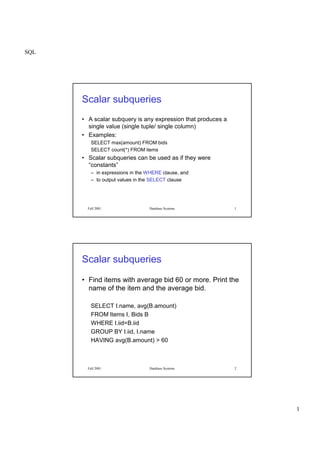
Scalar subqueries
• A scalar subquery is any expression that produces a
single value (single tuple/ single column)
• Examples:
SELECT max(amount) FROM bids
SELECT count(*) FROM items
• Scalar subqueries can be used as if they were
“constants”
– in expressions in the WHERE clause, and
– to output values in the SELECT clause
Fall 2001 Database Systems 2
Scalar subqueries
• Find items with average bid 60 or more. Print the
name of the item and the average bid.
SELECT I.name, avg(B.amount)
FROM Items I, Bids B
WHERE I.iid=B.iid
GROUP BY I.iid, I.name
HAVING avg(B.amount) > 60
SQL
2
Fall 2001 Database Systems 3
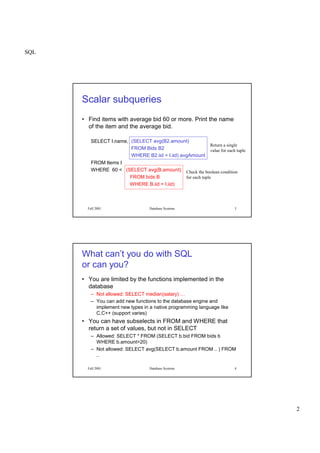
Scalar subqueries
• Find items with average bid 60 or more. Print the name
of the item and the average bid.
SELECT I.name,
FROM Items I
WHERE 60 < (SELECT avg(B.amount)
FROM bids B
WHERE B.iid = I.iid)
(SELECT avg(B2.amount)
FROM Bids B2
WHERE B2.iid = I.iid) avgAmount
Return a single
value for each tuple
Check the boolean condition
for each tuple
Fall 2001 Database Systems 4
What can’t you do with SQL
or can you?
• You are limited by the functions implemented in the
database
– Not allowed: SELECT median(salary) …
– You can add new functions to the database engine and
implement new types in a native programming language like
C,C++ (support varies)
• You can have subselects in FROM and WHERE that
return a set of values, but not in SELECT
– Allowed: SELECT * FROM (SELECT b.bid FROM bids b
WHERE b.amount>20)
– Not allowed: SELECT avg(SELECT b.amount FROM .. ) FROM
..
SQL
3
Fall 2001 Database Systems 5
What can’t you do with SQL
or can you?
• You cannot ask transitive queries
– Given a relation “emp(A,B)” for immediate managers B or A, you cannot
find all managers of a person A.
– SQL3 includes a recursive query definition construct –not implemented
in Oracle.
WITH RECURSIVE manages(emp, mgr) AS
(SELECT E1.emp, E1.mgr FROM employee E1)
UNION
(SELECT M.emp, E2.mgr FROM manages M, employee E2
WHERE M.mgr = E.id)
SELECT M2.emp
FROM manages M2
WHERE M2.emp = M2.mgr ;
Recursive queries may produce infinite loops and it is best left to programmers
with solid logic background.
Fall 2001 Database Systems 6
Embedded SQL
• You can embed SQL statements into many programming
languages
 
procedural power (loops, variables, etc.)
• The main components of embedded SQL programming:
– Regular program blocks
– SQL code
– Methods to connect to the database, invoke the SQL code and
retrieve results
– Methods to pass data from program variables to the SQL code
– Methods to retrieve data from the result of queries to program
variables
SQL
4
Fall 2001 Database Systems 7
#include <stdio.h>
exec sql include sqlca;
char user_prompt[] = "Please enter username and password: ";
char cid_prompt[] = "Please enter customer ID: ";
int main()
{
exec sql begin declare section; /* declare SQL host variables */
char cust_id[5];
char cust_name[14];
float cust_discnt; /* host var for discnt value */
char user_name[20], user_pwd[20];
exec sql end declare section;
exec sql whenever sqlerror goto report_error; /* error trap condition */
exec sql whenever not found goto notfound; /* not found condition */
exec sql connect :user_name
identified by :user_pwd; /* ORACLE format: connect */
while (prompt(cid_prompt, 1, cust_id, 4) >= 0) {
exec sql select cname,
discnt into :cust_name, :cust_discnt /* retrieve cname, discnt */
from customers where cid = :cust_id;
exec sql commit work; /* release read lock on row */
printf("CUSTOMER'S NAME IS %s AND DISCNT IS %5.1fn",
cust_name, cust_discnt); /* NOTE, (:) not used here */
continue;
Fall 2001 Database Systems 8
ProC
• Each ESQL statement starts with EXEC SQL keyword
and ends with a semicolon ;
• A pre-compiler will scan a program file and only read the
statements enclosed within EXEC SQL statements and
disregard everything else.
• SQLCA is a specific data structure for storing status
codes of all SQL operations
/* always have this for error handling*/
exec sql include sqlca ;
SQL
5
Fall 2001 Database Systems 9
Program.pc
Program.c
Fall 2001 Database Systems 10
Variables in ESQL
• All variables that will be used in an SQL statement must be declared
using an ESQL declaration and data type
exec sql begin declare section ;
VARCHAR e_name[30], username[30], passwd[30] ;
INTEGER e_ssn, e_dept_id ;
exec sql end declare section ;
• You can use almost any SQL command in ESQL as long as proper
input to these commands are provided in the form of program
variables.
• To execute any command, you must first connect to a database in
which all your tables reside.
exec sql connect :username identified by :passwd ;
SQL
6
Fall 2001 Database Systems 11
Executing SQL commands
• Suppose we want to find the name of an employee given his/her
SSN (input by the user of the program):
exec sql select name, dept_id into :e_name, :e_dept_id
from employee
where ssn = :e_ssn ;
Read the value of the variable “e_ssn” and execute the SQL
statement using this value, store the returned values of columns
“name” and “dept_id” in the program variables “e_name” and
“e_dept_id”.
Compare the above query with the expression below. What is the difference?
exec sql select name, dept_id
from employee where ssn = e_ssn ;
Program variables are
preceded by “:”
Fall 2001 Database Systems 12
Dealing with Strings
• There is a mismatch between the definition of a string in Oracle and
in C/C++.
– In C, the end of a string is identified by the null character ‘0’. Hence,
“Sibel” would be stored as characters ‘S’,’i’,’b’,’e’,’l’,’0’.
– In Oracle, the length of a string is stored together with the string and
there is no special end of string character.
– If you convert a data string from Oracle to C, you must pad it with ‘0’
manually!
• The data type VARCHAR e_name[30] is translated by the pre-
compiler to the following structure:
struct {
unsigned short len
unsigned char arr[30]
} e_name ;
SQL
7
Fall 2001 Database Systems 13
More on strings
Putting the pieces together:
strcpy(username.arr, “Sibel Adali”) ;
username.len = strlen(“Sibel Adali”) ;
strcpy(passwd.arr, “tweety-bird”) ;
passwd.len = strlen(“tweety-bird”) ;
exec sql connect :username identified by :passwd ;
scanf(“%d”, &e_ssn) ;
exec sql select name, dept_id into :e_name, :e_dept_id
from employee where ssn = :e_ssn ;
e_name.arr[e_name.len] = ‘0’ ; /* so can use string in C*/
printf(“%s”, e_name.arr) ;
exec sql commit work ; /* make any changes permanent */
exec sql disconnect ; /* disconnect from the database */
Fall 2001 Database Systems 14
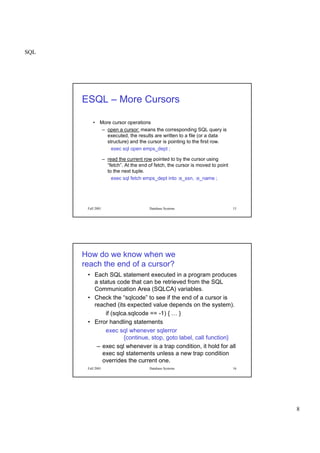
ESQL - Cursors
• When a select statement returns a set of tuples, then the
tuples (rows) can only be retrieved one by one.
– programming language variables can contain only one
value at a time
– this is sometimes called an impedance mismatch
• Cursor operations
– declare a cursor using a regular SQL query (no “into”).
exec sql declare emps_dept cursor for
select ssn, name from employee
where dept_id = :e_dept_id ;
SQL
8
Fall 2001 Database Systems 15
ESQL – More Cursors
• More cursor operations
– open a cursor: means the corresponding SQL query is
executed, the results are written to a file (or a data
structure) and the cursor is pointing to the first row.
exec sql open emps_dept ;
– read the current row pointed to by the cursor using
“fetch”. At the end of fetch, the cursor is moved to point
to the next tuple.
exec sql fetch emps_dept into :e_ssn, :e_name ;
Fall 2001 Database Systems 16
How do we know when we
reach the end of a cursor?
• Each SQL statement executed in a program produces
a status code that can be retrieved from the SQL
Communication Area (SQLCA) variables.
• Check the “sqlcode” to see if the end of a cursor is
reached (its expected value depends on the system).
if (sqlca.sqlcode == -1) { … }
• Error handling statements
exec sql whenever sqlerror
{continue, stop, goto label, call function}
– exec sql whenever is a trap condition, it hold for all
exec sql statements unless a new trap condition
overrides the current one.
SQL
9
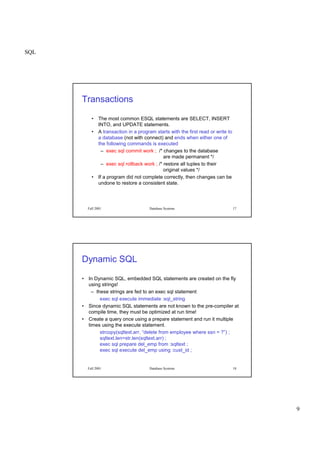
Fall 2001 Database Systems 17
Transactions
• The most common ESQL statements are SELECT, INSERT
INTO, and UPDATE statements.
• A transaction in a program starts with the first read or write to
a database (not with connect) and ends when either one of
the following commands is executed
– exec sql commit work ; /* changes to the database
are made permanent */
– exec sql rollback work ; /* restore all tuples to their
original values */
• If a program did not complete correctly, then changes can be
undone to restore a consistent state.
Fall 2001 Database Systems 18
Dynamic SQL
• In Dynamic SQL, embedded SQL statements are created on the fly
using strings!
– these strings are fed to an exec sql statement
exec sql execute immediate :sql_string
• Since dynamic SQL statements are not known to the pre-compiler at
compile time, they must be optimized at run time!
• Create a query once using a prepare statement and run it multiple
times using the execute statement.
strcopy(sqltext.arr, “delete from employee where ssn = ?”) ;
sqltext.len=str.len(sqltext.arr) ;
exec sql prepare del_emp from :sqltext ;
exec sql execute del_emp using :cust_id ;
SQL
10
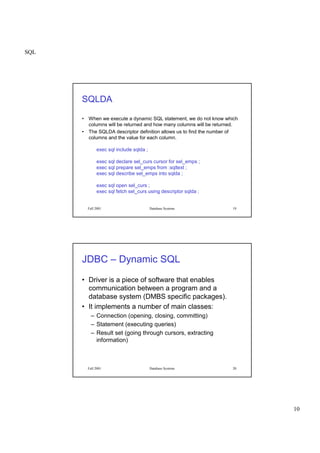
Fall 2001 Database Systems 19
SQLDA
• When we execute a dynamic SQL statement, we do not know which
columns will be returned and how many columns will be returned.
• The SQLDA descriptor definition allows us to find the number of
columns and the value for each column.
exec sql include sqlda ;
exec sql declare sel_curs cursor for sel_emps ;
exec sql prepare sel_emps from :sqltext ;
exec sql describe sel_emps into sqlda ;
exec sql open sel_curs ;
exec sql fetch sel_curs using descriptor sqlda ;
Fall 2001 Database Systems 20
JDBC – Dynamic SQL
• Driver is a piece of software that enables
communication between a program and a
database system (DMBS specific packages).
• It implements a number of main classes:
– Connection (opening, closing, committing)
– Statement (executing queries)
– Result set (going through cursors, extracting
information)
SQL
11
Fall 2001 Database Systems 21
import java.sql.*;
import oracle.sql.*;
import oracle.jdbc.driver.*;
class Employee
{
public static void main (String args []) throws SQLException
{//Set your user name and the password
String userName = "dummy" ;
String passWord = "dummy" ;
// Load the Oracle JDBC driver
DriverManager.registerDriver(new
oracle.jdbc.driver.OracleDriver());
Connection conn =
DriverManager.getConnection
("jdbc:oracle:thin:@vcmr-57.server.rpi.edu:1521:ora8",
userName,passWord);
Fall 2001 Database Systems 22
// Create a statement which will return a cursor that will allow
you to
// scroll the result set using both "next" and "previous"
methods
Statement stmt = conn.createStatement
(ResultSet.TYPE_SCROLL_INSENSITIVE,
ResultSet.CONCUR_READ_ONLY);
ResultSet rset = stmt.executeQuery
("SELECT name, oid FROM items ");
// Iterate through the result and print the item names
while (rset.next ()) {
//Get item name, which is the first column
System.out.println (rset.getString (1));
PreparedStatement pstmt = conn.prepareStatement
("SELECT name FROM owners WHERE oid = ?") ;
//Feed the owner id retrieved from rset into pstmt
pstmt.setInt(1, rset.getInt (2));
ResultSet dset = pstmt.executeQuery() ;
if (dset.next())
System.out.println(dset.getString (1));
} } }

[Www.pkbulk.blogspot.com]dbms07

  • 1.
    SQL 1 Fall 2001 DatabaseSystems 1 Scalar subqueries • A scalar subquery is any expression that produces a single value (single tuple/ single column) • Examples: SELECT max(amount) FROM bids SELECT count(*) FROM items • Scalar subqueries can be used as if they were “constants” – in expressions in the WHERE clause, and – to output values in the SELECT clause Fall 2001 Database Systems 2 Scalar subqueries • Find items with average bid 60 or more. Print the name of the item and the average bid. SELECT I.name, avg(B.amount) FROM Items I, Bids B WHERE I.iid=B.iid GROUP BY I.iid, I.name HAVING avg(B.amount) > 60
  • 2.
    SQL 2 Fall 2001 DatabaseSystems 3 Scalar subqueries • Find items with average bid 60 or more. Print the name of the item and the average bid. SELECT I.name, FROM Items I WHERE 60 < (SELECT avg(B.amount) FROM bids B WHERE B.iid = I.iid) (SELECT avg(B2.amount) FROM Bids B2 WHERE B2.iid = I.iid) avgAmount Return a single value for each tuple Check the boolean condition for each tuple Fall 2001 Database Systems 4 What can’t you do with SQL or can you? • You are limited by the functions implemented in the database – Not allowed: SELECT median(salary) … – You can add new functions to the database engine and implement new types in a native programming language like C,C++ (support varies) • You can have subselects in FROM and WHERE that return a set of values, but not in SELECT – Allowed: SELECT * FROM (SELECT b.bid FROM bids b WHERE b.amount>20) – Not allowed: SELECT avg(SELECT b.amount FROM .. ) FROM ..
  • 3.
    SQL 3 Fall 2001 DatabaseSystems 5 What can’t you do with SQL or can you? • You cannot ask transitive queries – Given a relation “emp(A,B)” for immediate managers B or A, you cannot find all managers of a person A. – SQL3 includes a recursive query definition construct –not implemented in Oracle. WITH RECURSIVE manages(emp, mgr) AS (SELECT E1.emp, E1.mgr FROM employee E1) UNION (SELECT M.emp, E2.mgr FROM manages M, employee E2 WHERE M.mgr = E.id) SELECT M2.emp FROM manages M2 WHERE M2.emp = M2.mgr ; Recursive queries may produce infinite loops and it is best left to programmers with solid logic background. Fall 2001 Database Systems 6 Embedded SQL • You can embed SQL statements into many programming languages   procedural power (loops, variables, etc.) • The main components of embedded SQL programming: – Regular program blocks – SQL code – Methods to connect to the database, invoke the SQL code and retrieve results – Methods to pass data from program variables to the SQL code – Methods to retrieve data from the result of queries to program variables
  • 4.
    SQL 4 Fall 2001 DatabaseSystems 7 #include <stdio.h> exec sql include sqlca; char user_prompt[] = "Please enter username and password: "; char cid_prompt[] = "Please enter customer ID: "; int main() { exec sql begin declare section; /* declare SQL host variables */ char cust_id[5]; char cust_name[14]; float cust_discnt; /* host var for discnt value */ char user_name[20], user_pwd[20]; exec sql end declare section; exec sql whenever sqlerror goto report_error; /* error trap condition */ exec sql whenever not found goto notfound; /* not found condition */ exec sql connect :user_name identified by :user_pwd; /* ORACLE format: connect */ while (prompt(cid_prompt, 1, cust_id, 4) >= 0) { exec sql select cname, discnt into :cust_name, :cust_discnt /* retrieve cname, discnt */ from customers where cid = :cust_id; exec sql commit work; /* release read lock on row */ printf("CUSTOMER'S NAME IS %s AND DISCNT IS %5.1fn", cust_name, cust_discnt); /* NOTE, (:) not used here */ continue; Fall 2001 Database Systems 8 ProC • Each ESQL statement starts with EXEC SQL keyword and ends with a semicolon ; • A pre-compiler will scan a program file and only read the statements enclosed within EXEC SQL statements and disregard everything else. • SQLCA is a specific data structure for storing status codes of all SQL operations /* always have this for error handling*/ exec sql include sqlca ;
  • 5.
    SQL 5 Fall 2001 DatabaseSystems 9 Program.pc Program.c Fall 2001 Database Systems 10 Variables in ESQL • All variables that will be used in an SQL statement must be declared using an ESQL declaration and data type exec sql begin declare section ; VARCHAR e_name[30], username[30], passwd[30] ; INTEGER e_ssn, e_dept_id ; exec sql end declare section ; • You can use almost any SQL command in ESQL as long as proper input to these commands are provided in the form of program variables. • To execute any command, you must first connect to a database in which all your tables reside. exec sql connect :username identified by :passwd ;
  • 6.
    SQL 6 Fall 2001 DatabaseSystems 11 Executing SQL commands • Suppose we want to find the name of an employee given his/her SSN (input by the user of the program): exec sql select name, dept_id into :e_name, :e_dept_id from employee where ssn = :e_ssn ; Read the value of the variable “e_ssn” and execute the SQL statement using this value, store the returned values of columns “name” and “dept_id” in the program variables “e_name” and “e_dept_id”. Compare the above query with the expression below. What is the difference? exec sql select name, dept_id from employee where ssn = e_ssn ; Program variables are preceded by “:” Fall 2001 Database Systems 12 Dealing with Strings • There is a mismatch between the definition of a string in Oracle and in C/C++. – In C, the end of a string is identified by the null character ‘0’. Hence, “Sibel” would be stored as characters ‘S’,’i’,’b’,’e’,’l’,’0’. – In Oracle, the length of a string is stored together with the string and there is no special end of string character. – If you convert a data string from Oracle to C, you must pad it with ‘0’ manually! • The data type VARCHAR e_name[30] is translated by the pre- compiler to the following structure: struct { unsigned short len unsigned char arr[30] } e_name ;
  • 7.
    SQL 7 Fall 2001 DatabaseSystems 13 More on strings Putting the pieces together: strcpy(username.arr, “Sibel Adali”) ; username.len = strlen(“Sibel Adali”) ; strcpy(passwd.arr, “tweety-bird”) ; passwd.len = strlen(“tweety-bird”) ; exec sql connect :username identified by :passwd ; scanf(“%d”, &e_ssn) ; exec sql select name, dept_id into :e_name, :e_dept_id from employee where ssn = :e_ssn ; e_name.arr[e_name.len] = ‘0’ ; /* so can use string in C*/ printf(“%s”, e_name.arr) ; exec sql commit work ; /* make any changes permanent */ exec sql disconnect ; /* disconnect from the database */ Fall 2001 Database Systems 14 ESQL - Cursors • When a select statement returns a set of tuples, then the tuples (rows) can only be retrieved one by one. – programming language variables can contain only one value at a time – this is sometimes called an impedance mismatch • Cursor operations – declare a cursor using a regular SQL query (no “into”). exec sql declare emps_dept cursor for select ssn, name from employee where dept_id = :e_dept_id ;
  • 8.
    SQL 8 Fall 2001 DatabaseSystems 15 ESQL – More Cursors • More cursor operations – open a cursor: means the corresponding SQL query is executed, the results are written to a file (or a data structure) and the cursor is pointing to the first row. exec sql open emps_dept ; – read the current row pointed to by the cursor using “fetch”. At the end of fetch, the cursor is moved to point to the next tuple. exec sql fetch emps_dept into :e_ssn, :e_name ; Fall 2001 Database Systems 16 How do we know when we reach the end of a cursor? • Each SQL statement executed in a program produces a status code that can be retrieved from the SQL Communication Area (SQLCA) variables. • Check the “sqlcode” to see if the end of a cursor is reached (its expected value depends on the system). if (sqlca.sqlcode == -1) { … } • Error handling statements exec sql whenever sqlerror {continue, stop, goto label, call function} – exec sql whenever is a trap condition, it hold for all exec sql statements unless a new trap condition overrides the current one.
  • 9.
    SQL 9 Fall 2001 DatabaseSystems 17 Transactions • The most common ESQL statements are SELECT, INSERT INTO, and UPDATE statements. • A transaction in a program starts with the first read or write to a database (not with connect) and ends when either one of the following commands is executed – exec sql commit work ; /* changes to the database are made permanent */ – exec sql rollback work ; /* restore all tuples to their original values */ • If a program did not complete correctly, then changes can be undone to restore a consistent state. Fall 2001 Database Systems 18 Dynamic SQL • In Dynamic SQL, embedded SQL statements are created on the fly using strings! – these strings are fed to an exec sql statement exec sql execute immediate :sql_string • Since dynamic SQL statements are not known to the pre-compiler at compile time, they must be optimized at run time! • Create a query once using a prepare statement and run it multiple times using the execute statement. strcopy(sqltext.arr, “delete from employee where ssn = ?”) ; sqltext.len=str.len(sqltext.arr) ; exec sql prepare del_emp from :sqltext ; exec sql execute del_emp using :cust_id ;
  • 10.
    SQL 10 Fall 2001 DatabaseSystems 19 SQLDA • When we execute a dynamic SQL statement, we do not know which columns will be returned and how many columns will be returned. • The SQLDA descriptor definition allows us to find the number of columns and the value for each column. exec sql include sqlda ; exec sql declare sel_curs cursor for sel_emps ; exec sql prepare sel_emps from :sqltext ; exec sql describe sel_emps into sqlda ; exec sql open sel_curs ; exec sql fetch sel_curs using descriptor sqlda ; Fall 2001 Database Systems 20 JDBC – Dynamic SQL • Driver is a piece of software that enables communication between a program and a database system (DMBS specific packages). • It implements a number of main classes: – Connection (opening, closing, committing) – Statement (executing queries) – Result set (going through cursors, extracting information)
  • 11.
    SQL 11 Fall 2001 DatabaseSystems 21 import java.sql.*; import oracle.sql.*; import oracle.jdbc.driver.*; class Employee { public static void main (String args []) throws SQLException {//Set your user name and the password String userName = "dummy" ; String passWord = "dummy" ; // Load the Oracle JDBC driver DriverManager.registerDriver(new oracle.jdbc.driver.OracleDriver()); Connection conn = DriverManager.getConnection ("jdbc:oracle:thin:@vcmr-57.server.rpi.edu:1521:ora8", userName,passWord); Fall 2001 Database Systems 22 // Create a statement which will return a cursor that will allow you to // scroll the result set using both "next" and "previous" methods Statement stmt = conn.createStatement (ResultSet.TYPE_SCROLL_INSENSITIVE, ResultSet.CONCUR_READ_ONLY); ResultSet rset = stmt.executeQuery ("SELECT name, oid FROM items "); // Iterate through the result and print the item names while (rset.next ()) { //Get item name, which is the first column System.out.println (rset.getString (1)); PreparedStatement pstmt = conn.prepareStatement ("SELECT name FROM owners WHERE oid = ?") ; //Feed the owner id retrieved from rset into pstmt pstmt.setInt(1, rset.getInt (2)); ResultSet dset = pstmt.executeQuery() ; if (dset.next()) System.out.println(dset.getString (1)); } } }