VISTA
Powered by
Institute of Computer Education
ORACLE PL / SQL
CHAPTER 1: PL / SQL PROGRAMMING
by Prabhat Kumar
Contents
 PL/SQL- An Introduction.
 PL/SQL Evolution.
 Advantages.
 PL/SQL Architecture.
 Language Fundamentals.
 Practitioners Guide.
 Error Codes.
 A bit of an Advice.
VIC 3
PL/SQL - An Introduction
 stands for “ Procedural Language extensions to
SQL“.
 introduced to overcome some limitations in SQL
and to provide a more complete programming
solutions.
 highly structured, readable and accessible
language.
 standard and portable language for Oracle
development.
 an embedded language - can run PL/SQL
programs from within the database or as client-
side PL/SQL. VIC 4
Evolution
 PL/SQL was developed based on Ada.It was first released in 1992 as an optional extension to Oracle 6.
Below figure describes version wise evolution of PL/SQL:
PL/SQL Version Database Version Features Introduced
1.0 1992 Oracle 6 implemented within SQL*Forms 3.0.
1.1–199x Oracle 6 client-side subprograms to execute stored code.
2.0- 199x Oracle 7 stored procedures, functions, packages, user-defined
record types, PL/SQL tables and many package extensions,
including DBMS_OUTPUT and DBMS_PIPE.
2.1–1991 Oracle 7.1 user-defined subtypes, use of stored functions inside
SQL statements and dynamic SQL with the DBMS_SQL
package.
2.2–199x Oracle 7.2 wrapper for PL/SQL programs to protect source code,
supported cursor variables and made database-
driven job scheduling available with DBMS_JOB
package.
2.3–199x Oracle 7.3 remote dependency management, file I/O within
PL/SQL.
8.0–1999 Oracle 8 LOBs, VARRAYs and Nested tables and Oracle
Advanced Queuing functionality.
8.1-2000 Oracle 8i Native Dynamic SQL, NOCOPY parameter option,
Profiler, Bulk Binds, Autonomous Transactions, and
new database triggers such as startup, shutdown, logon
and logoff.
VIC 5
PL/SQL Version Database Version Features Introduced
9.0-2001 Oracle 9i Native compilation of PL/SQL, common SQL parser,integration
of XML with SQL and PL/SQL with invocation of XMLType
from PL/SQL, HTTP cookie inheritance CASE expressions,
and globalized data types such as timestamp, interval,
unichar, univarchar2 and uniclob.
10.0-2004 Oracle 10g R1 compilation and runtime optimizations improving performance
without code changes, user-defined quote character,
indices of and values of syntax for forall, multiset operations on
nested table instances supporting operations like equals,
union, intersect, except, member, regexp_like,
regexp_instr, regexp_substr.
10.2-2005 Oracle 10g R2 Conditional compilation. (Selective, Inquiry, and Error
directives).
11.0-2007 Oracle 11g R1 native compilation, Fine-grained dependency tracking, and
function result cache, compound triggers,
CONTINUE statement.
11.2-2009 Oracle 11g R2 edition-based redefinition capability, “hot patch” applications.
12.1-2013 Oracle 12c R1 supports the definition of simple functions within SQL
statements; and adds the UTL_CALL_STACK package, for fine-
grained access to the execution call stack, error stack, and
error backtrace.
12.2-2016 Oracle 12c R2 ACCESSIBLE BY Clause, Data-Bound Collation, Controlling
Definer’s Rights Privileges for Remote Procedures, SQLVIC 6
Advantages
 Tight Integration with SQL: PL/SQL supports SQL data types, lets you use all
SQL data manipulation, cursor control, and transaction control statements, and all
SQL functions, operators, and pseudocolumns.
 High Performance: PL/SQL lets you send a block of statements to the
database, significantly reducing traffic between the application and the
database.PL/SQL compiler has an optimizer that can rearrange code for better
performance.
 High Productivity: PL/SQL has many features that save designing and
debugging time.
 Portability: PL/SQL is a portable and standard language for Oracle development.
 Scalability: PL/SQL stored subprograms increase scalability by centralizing
application processing on the database server. Shared memory facilities of the
shared server let Oracle Database support thousands of concurrent users on a
single node.
 Manageability: PL/SQL stored subprograms increase manageability because you
can maintain only one copy of a subprogram, on the database server, rather than
one copy on each client system.
 Support for Object-Oriented Programming: PL/SQL object types can be
used in object-oriented designs.
VIC 7
PL/SQL Architecture
PL/SQL architecture mainly consists of three main
components:
PL/SQLBlock
• contains actual PL/SQL code.
• can be divided into three logical sections:
• Declarative section for declaration purposes.
• Execution section for statements processing.
• Exception Handling section for handling erros.
• also contains SQL instructions making interaction with Database server.
PL/SQL
Engine
• a components where actual processing of the codes takes place.
• separates PL/SQL Units and SQL part of the code.
• PL/SQL Units handled by PL Engine itself.
• SQL part sent to Database server for interaction with database.
Database
Server
• contains SQL executor which parses the SQL statements and execute them.
VIC 8
Language Fundamentals
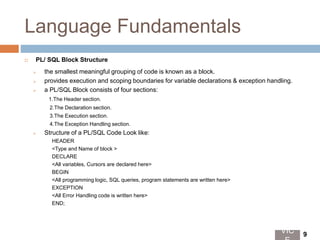
 PL/ SQL Block Structure
 the smallest meaningful grouping of code is known as a block.
 provides execution and scoping boundaries for variable declarations & exception handling.
 a PL/SQL Block consists of four sections:
1.The Header section.
2.The Declaration section.
3.The Execution section.
4.The Exception Handling section.
 Structure of a PL/SQL Code Look like:
HEADER
<Type and Name of block >
DECLARE
<All variables, Cursors are declared here>
BEGIN
<All programming logic, SQL queries, program statements are written here>
EXCEPTION
<All Error Handling code is written here>
END;
VIC 9
Overview :
Sections of a
Standard
PL/SQL
Block
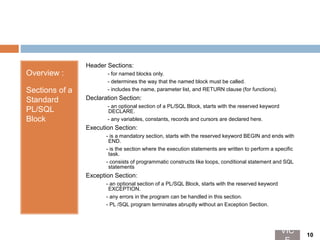
Header Sections:
- for named blocks only.
- determines the way that the named block must be called.
- includes the name, parameter list, and RETURN clause (for functions).
Declaration Section:
- an optional section of a PL/SQL Block, starts with the reserved keyword
DECLARE.
- any variables, constants, records and cursors are declared here.
Execution Section:
- is a mandatory section, starts with the reserved keyword BEGIN and ends with
END.
- is the section where the execution statements are written to perform a specific
task.
- consists of programmatic constructs like loops, conditional statement and SQL
statements
Exception Section:
- an optional section of a PL/SQL Block, starts with the reserved keyword
EXCEPTION.
- any errors in the program can be handled in this section.
- PL /SQL program terminates abruptly without an Exception Section.
VIC 10
PL/SQL
Block
Categorizatio
n
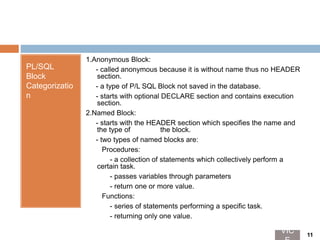
1.Anonymous Block:
- called anonymous because it is without name thus no HEADER
section.
- a type of P/L SQL Block not saved in the database.
- starts with optional DECLARE section and contains execution
section.
2.Named Block:
- starts with the HEADER section which specifies the name and
the type of the block.
- two types of named blocks are:
Procedures:
- a collection of statements which collectively perform a
certain task.
- passes variables through parameters
- return one or more value.
Functions:
- series of statements performing a specific task.
- returning only one value.
VIC 11
Creating First PL/SQL Code
 Now that we have become familiar about how to structure a PL/SQL
code, we begin our PL/ SQL programming with a small code for each Block
Structure type:
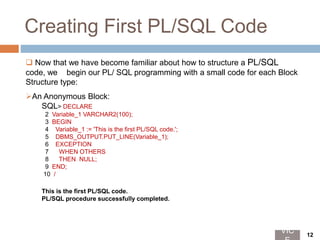
An Anonymous Block:
SQL> DECLARE
2 Variable_1 VARCHAR2(100);
3 BEGIN
4 Variable_1 := 'This is the first PL/SQL code.';
5 DBMS_OUTPUT.PUT_LINE(Variable_1);
6 EXCEPTION
7 WHEN OTHERS
8 THEN NULL;
9 END;
10 /
This is the first PL/SQL code.
PL/SQL procedure successfully completed.
VIC 12
A Named Block:
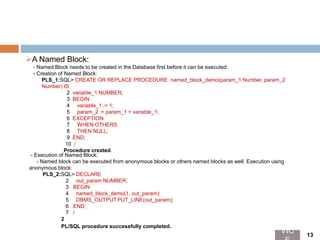
- Named Block needs to be created in the Database first before it can be executed.
- Creation of Named Block:
PLS_1:SQL> CREATE OR REPLACE PROCEDURE named_block_demo(param_1 Number, param_2
Number) IS
2 variable_1 NUMBER;
3 BEGIN
4 variable_1 := 1;
5 param_2 := param_1 + variable_1;
6 EXCEPTION
7 WHEN OTHERS
8 THEN NULL;
9 END;
10 /
Procedure created.
- Execution of Named Block:
- Named block can be executed from anonymous blocks or others named blocks as well. Execution using
anonymous block:
PLS_2:SQL> DECLARE
2 out_param NUMBER;
3 BEGIN
4 named_block_demo(1, out_param);
5 DBMS_OUTPUT.PUT_LINE(out_param);
6 END;
7 /
2
PL/SQL procedure successfully completed.
VIC 13
Description:
PLS_1
Line 1- 2 : Declaration Section- Used to declare variables, constants, etc.
Line 3- 5 : Execution Section- Contains executable statements.
Line 6- 8 : Exception Handling Section- used for error handling
purposes.(may contain more specific logic than NULL statement).
Line 9- 10 : Specifying end of a PL/SQL block.
Description:
Creating
PLS_2
Line 1 : Header Section - describes Name, Parameters list/ type, return type(
for stored functions).
Line 2 : Declaration Section- Used in declaring variables, cursors, user defined
types, etc.
Line 3 – 5 : Execution Section- Contains executable statements.
Line 6- 8 : Exception Handling Section- used for error handling purposes.
Line 9- 10 : Specifying end of a PL/SQL block.
Description:
Executing
PLS_2
Line 1- 2 : Declaration Section: Used to declare variables, in this case the in
and out parameters of the stored procedure to be called.
Line 3- 5 : Executable Section: Named block is called by name specifying
the parameters.
Line 6- 7 : Specifying end of a PL/SQL block.
Note : Exception Section can also be added to handle exceptions
occurred while executing the Named Block(Described later).
VIC 14
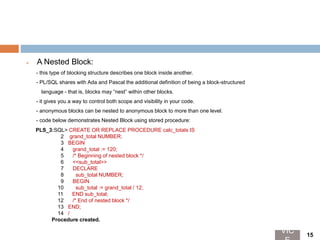
 A Nested Block:
- this type of blocking structure describes one block inside another.
- PL/SQL shares with Ada and Pascal the additional definition of being a block-structured
language - that is, blocks may “nest” within other blocks.
- it gives you a way to control both scope and visibility in your code.
- anonymous blocks can be nested to anonymous block to more than one level.
- code below demonstrates Nested Block using stored procedure:
PLS_3:SQL> CREATE OR REPLACE PROCEDURE calc_totals IS
2 grand_total NUMBER;
3 BEGIN
4 grand_total := 120;
5 /* Beginning of nested block */
6 <<sub_total>>
7 DECLARE
8 sub_total NUMBER;
9 BEGIN
10 sub_total := grand_total / 12;
11 END sub_total;
12 /* End of nested block */
13 END;
14 /
Procedure created.
VIC 15
Description:
PLS_3
Line 1- 5 : Standard code to create procedure and declare local variables.
Line 6 : Label for Nested Block.
Line 7- 8 : Declaration section for nested block.
Line 9- 11 : Executable section for nested block.
Line 13- 15 : Specifying end of a PL/SQL block./*..*/ shows multiline comment
described later. Scope and visibility rules for variables in Block
Structure are described later.
 scope refers to visibility or accessibility of a variable.
 In PL/SQL, variables, exceptions, modules, and a few other structures are local to the block that declares them.
 after completion of a block, any of these structures are no longer accessible.
 Lets explore this with code written in PLS_3:
- variable declared in main block named "grand_total" can be referenced in inner/ nested block
- variable declared in nested block named "sub_total" cannot be referenced in outer block being local variable
for any of the parent/outer block.
- value set in variable "sub_total" will be lost ones “sub_total" block is ended.
 variables defined in packages are global variables and can be referenced from any block in any schema that
has EXECUTE authority on the package. Explained in details in Package section.
 Scope:
VIC 16
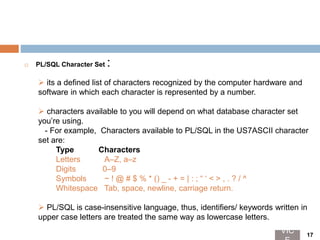
 PL/SQL Character Set :
 its a defined list of characters recognized by the computer hardware and
software in which each character is represented by a number.
 characters available to you will depend on what database character set
you’re using.
- For example, Characters available to PL/SQL in the US7ASCII character
set are:
Type Characters
Letters A–Z, a–z
Digits 0–9
Symbols ~ ! @ # $ % * () _ - + = | : ; “ ‘ < > , . ? / ^
Whitespace Tab, space, newline, carriage return.
 PL/SQL is case-insensitive language, thus, identifiers/ keywords written in
upper case letters are treated the same way as lowercase letters.
VIC 17
Table 1. Simple and compound
symbols in PL/SQL
Symbol Description
; Semicolon: terminates declarations and statements
% Percent: attribute indicator (cursor attributes like %ISOPEN and indirect declaration attributes like
%ROWTYPE); also used as a wildcard symbol with the LIKE condition
_ Single underscore: single-character wildcard symbol in LIKE condition
@ At sign: remote location indicator
: Colon: host variable indicator, such as : block.item in Oracle Forms
** Double asterisk: exponentiation operator
< > or != or ^= or ~= Ways to denote the “not equal” relational operator
|| Double vertical bar: concatenation operator
<< and >> Label delimiters
<= and >= Less than or equal to and greater than or equal to relational operators
:= Assignment operator
=> Association operator for positional notation
.. Double dot: range operator
-- Double dash: single-line comment indicator
/* and */ Beginning and ending multiline comment block delimiters
VIC 18
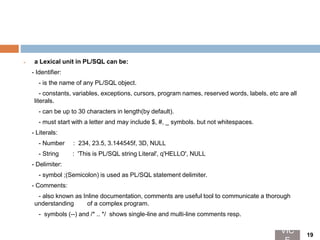
 a Lexical unit in PL/SQL can be:
- Identifier:
- is the name of any PL/SQL object.
- constants, variables, exceptions, cursors, program names, reserved words, labels, etc are all
literals.
- can be up to 30 characters in length(by default).
- must start with a letter and may include $, #, _ symbols. but not whitespaces.
- Literals:
- Number : 234, 23.5, 3.144545f, 3D, NULL
- String : 'This is PL/SQL string Literal', q'HELLO', NULL
- Delimiter:
- symbol ;(Semicolon) is used as PL/SQL statement delimiter.
- Comments:
- also known as Inline documentation, comments are useful tool to communicate a thorough
understanding of a complex program.
- symbols (--) and /* .. */ shows single-line and multi-line comments resp.
VIC 19
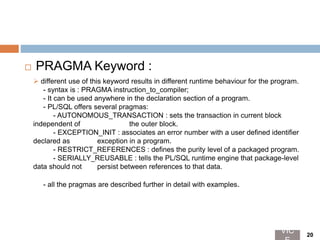
 PRAGMA Keyword :
 different use of this keyword results in different runtime behaviour for the program.
- syntax is : PRAGMA instruction_to_compiler;
- It can be used anywhere in the declaration section of a program.
- PL/SQL offers several pragmas:
- AUTONOMOUS_TRANSACTION : sets the transaction in current block
independent of the outer block.
- EXCEPTION_INIT : associates an error number with a user defined identifier
declared as exception in a program.
- RESTRICT_REFERENCES : defines the purity level of a packaged program.
- SERIALLY_REUSABLE : tells the PL/SQL runtime engine that package-level
data should not persist between references to that data.
- all the pragmas are described further in detail with examples.
VIC 20
 Labels:
 used to name any particular part of a PL/SQL program.
 a label has format <<identifier>>
where identifier is a valid PL/SQL identifier.
 label appears in front of any executable statement, which may be
a
NULL statement as well.
 anonymous block can be named using labels.
 purposes are :
- labels improves readability of codes.
- helpful in qualifying references to elements in nested block
structure.
 serves as target of GOTO statement.
VIC 21
Practitioners Guide
Slides ahead contains PL/SQL programs for
complete understanding of theories just
explained.Programs are designed in a way to
demonstrate the important and critical aspects of
PL/SQL programming in a unified manner.
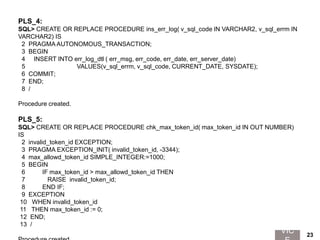
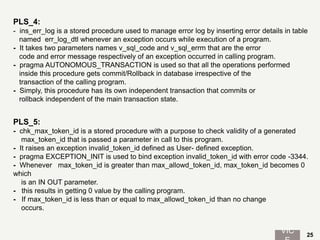
PLS_4:
SQL> CREATE OR REPLACE PROCEDURE ins_err_log( v_sql_code IN VARCHAR2, v_sql_errm IN
VARCHAR2) IS
2 PRAGMA AUTONOMOUS_TRANSACTION;
3 BEGIN
4 INSERT INTO err_log_dtl ( err_msg, err_code, err_date, err_server_date)
5 VALUES(v_sql_errm, v_sql_code, CURRENT_DATE, SYSDATE);
6 COMMIT;
7 END;
8 /
Procedure created.
PLS_5:
SQL> CREATE OR REPLACE PROCEDURE chk_max_token_id( max_token_id IN OUT NUMBER)
IS
2 invalid_token_id EXCEPTION;
3 PRAGMA EXCEPTION_INIT( invalid_token_id, -3344);
4 max_allowd_token_id SIMPLE_INTEGER:=1000;
5 BEGIN
6 IF max_token_id > max_allowd_token_id THEN
7 RAISE invalid_token_id;
8 END IF;
9 EXCEPTION
10 WHEN invalid_token_id
11 THEN max_token_id := 0;
12 END;
13 /
VIC 23
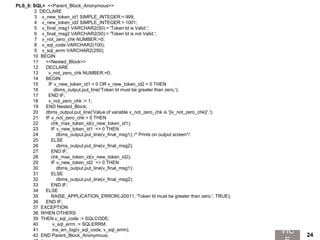
PLS_6: SQL> <<Parent_Block_Anonymous>>
2 DECLARE
3 v_new_token_id1 SIMPLE_INTEGER:= 999;
4 v_new_token_id2 SIMPLE_INTEGER:= 1001;
5 v_final_msg1 VARCHAR2(50):= 'Token Id is Valid.';
6 v_final_msg2 VARCHAR2(50):= 'Token Id is not Valid.';
7 v_not_zero_chk NUMBER:=0;
8 v_sql_code VARCHAR2(100);
9 v_sql_errm VARCHAR2(250);
10 BEGIN
11 <<Nested_Block>>
12 DECLARE
13 v_not_zero_chk NUMBER:=0;
14 BEGIN
15 IF v_new_token_id1 = 0 OR v_new_token_id2 = 0 THEN
16 dbms_output.put_line('Token Id must be greater than zero.');
17 END IF;
18 v_not_zero_chk := 1;
19 END Nested_Block;
20 dbms_output.put_line('Value of variable v_not_zero_chk is '||v_not_zero_chk||'.');
21 IF v_not_zero_chk = 0 THEN
22 chk_max_token_id(v_new_token_id1);
23 IF v_new_token_id1 <> 0 THEN
24 dbms_output.put_line(v_final_msg1); /* Prints on output screen*/
25 ELSE
26 dbms_output.put_line(v_final_msg2);
27 END IF;
28 chk_max_token_id(v_new_token_id2);
29 IF v_new_token_id2 <> 0 THEN
30 dbms_output.put_line(v_final_msg1);
31 ELSE
32 dbms_output.put_line(v_final_msg2);
33 END IF;
34 ELSE
35 RAISE_APPLICATION_ERROR(-20011, 'Token Id must be greater than zero.', TRUE);
36 END IF;
37 EXCEPTION
38 WHEN OTHERS
39 THEN v_sql_code := SQLCODE;
40 v_sql_errm := SQLERRM;
41 ins_err_log(v_sql_code, v_sql_errm);
42 END Parent_Block_Anonymous;
VIC 24
PLS_4:
- ins_err_log is a stored procedure used to manage error log by inserting error details in table
named err_log_dtl whenever an exception occurs while execution of a program.
- It takes two parameters names v_sql_code and v_sql_errm that are the error
code and error message respectively of an exception occurred in calling program.
- pragma AUTONOMOUS_TRANSACTION is used so that all the operations performed
inside this procedure gets commit/Rollback in database irrespective of the
transaction of the calling program.
- Simply, this procedure has its own independent transaction that commits or
rollback independent of the main transaction state.
PLS_5:
- chk_max_token_id is a stored procedure with a purpose to check validity of a generated
max_token_id that is passed a parameter in call to this program.
- It raises an exception invalid_token_id defined as User- defined exception.
- pragma EXCEPTION_INIT is used to bind exception invalid_token_id with error code -3344.
- Whenever max_token_id is greater than max_allowd_token_id, max_token_id becomes 0
which
is an IN OUT parameter.
- this results in getting 0 value by the calling program.
- If max_token_id is less than or equal to max_allowd_token_id than no change
occurs.
VIC 25
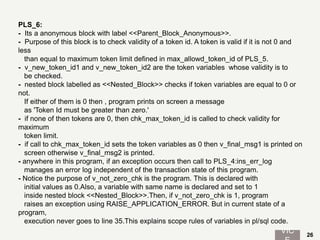
PLS_6:
- Its a anonymous block with label <<Parent_Block_Anonymous>>.
- Purpose of this block is to check validity of a token id. A token is valid if it is not 0 and
less
than equal to maximum token limit defined in max_allowd_token_id of PLS_5.
- v_new_token_id1 and v_new_token_id2 are the token variables whose validity is to
be checked.
- nested block labelled as <<Nested_Block>> checks if token variables are equal to 0 or
not.
If either of them is 0 then , program prints on screen a message
as 'Token Id must be greater than zero.'
- if none of then tokens are 0, then chk_max_token_id is called to check validity for
maximum
token limit.
- if call to chk_max_token_id sets the token variables as 0 then v_final_msg1 is printed on
screen otherwise v_final_msg2 is printed.
- anywhere in this program, if an exception occurs then call to PLS_4:ins_err_log
manages an error log independent of the transaction state of this program.
- Notice the purpose of v_not_zero_chk is the program. This is declared with
initial values as 0.Also, a variable with same name is declared and set to 1
inside nested block <<Nested_Block>>.Then, if v_not_zero_chk is 1, program
raises an exception using RAISE_APPLICATION_ERROR. But in current state of a
program,
execution never goes to line 35.This explains scope rules of variables in pl/sql code.
VIC 26
Error Codes
 This slide describes certain errors that you may encounter while creating programs related to the
topics covered in this chapter.
 Purpose of this slide is to provide assistance while practicing PL/SQL.
 Following are the error codes, error messages, Cause and Actions for some ORA/PLS errors:
 ORA-19233: XQ0013 - invalid pragma
Cause: A pragma was specified whose contents are invalid.
Action: Specify the pragma with the correct contents.
 PLS-00109: unknown exception name "string" in PRAGMA EXCEPTION_INIT
Cause: No declaration for the exception name referenced in an EXCEPTION_INIT
pragma was found within the scope of the pragma.
Action: Make sure the pragma follows the exception declaration and is within the same scope.
 PLS-00115: this PRAGMA must follow the declaration of "string"
Cause: The pragma refers to a PL/SQL object that was not declared or is not within the scope of the
reference. Identifiers must be declared before they are used In a pragma; forward
references are not allowed.
Action: Check the spelling and declaration of the identifier. Also confirm that the declaration is
placed correctly in the block structure.
 PLS-00367: a RAISE statement with no exception name must be inside an exception handler
Cause: A RAISE statement not followed by an exception name was found outside an exception
handler
Action: Delete the RAISE statement, relocate it to an exception handler, or supply the missing
exception name.
VIC 27
 PLS-00591: this feature is not supported in client-side programs
Cause: One of the following features was used in a wrong context: pragma
AUTONOMOUS_TRANSACTION, dynamic SQL statements, (e.g.
EXECUTE IMMEDIATE), & bulk binds. These features can only be used in server-
side programs but not client-side programs.
Action: Remove it or define a server-side subprogram to do the work and call the
subprogram from client.
 PLS-00711: PRAGMA AUTONOMOUS_TRANSACTION cannot be declared twice
Cause: The PRAGMA was declared twice in the same block.
Action: remove the duplicate declaration of the PRAGMA.
 PLS-00231: function "string" may not be used in SQL
Cause: A proscribed function was used in a SQL statement. Certain functions such as
SQLCODE and SQLERRM can be used only in procedural statements.
Action: Remove the function call from the SQL statement. Or, replace the function call with
a local variable. For example, the following statement is illegal: INSERT INTO errors VALUES
(SQLCODE, SQLERRM); However, you can assign the values of SQLCODE and
SQLERRM to local variables, then use the variables in the SQL statement, as
follows: err_num := SQLCODE; err_msg := SQLERRM; INSERT INTO errors
VALUES (err_num, err_msg);
Note: Programs illustrated here may contain tables, views etc that practitioners can try creating
themselves or may find complete code files on our website.
VIC 28
A bit of an Advice
 Create proper test cases based on how your code is going to be executed
in real time, what scenarios that code must cover.
 Coding standards must be raised for developing PL/SQL code capable of
self explaining the purpose of the code(including comments, proper
identifiers, etc), is highly maintained, optimized and bug free(resulted by
testing using test cases).
 Top down design of PL/SQL can be utilized to enhance readability and
reduce complexity of code helping in efficient PL/SQL code.
 PL/CODE must contain clear logic for handling cases where program
deviates from normal execution. Strong Exception handling Section is good
way to achieve this. Further, in exception section a predefined package
can be used throughout all the application code managing all the
exception in a predefined and efficient manner.
 Code must be developed in NO HURRY. Same logic can be implemented
in a number of ways, but, finding out the suitable and efficient one must be
a concern while programming. Creativity while programming may be of a
great use. VIC 29
Thanks for reading. We hope you have got what you were looking for in
PL/SQL programming fundamentals. Next chapters will be covering PL/SQL in
depth explaining further the PL/ SQL program structure , PL/SQL program
data and how PL/SQL can be used in application development with suitable
examples. So stay with us.
THAT’S ALL FOLKS!

Pl sql chapter 1

  • 1.
  • 2.
    ORACLE PL /SQL CHAPTER 1: PL / SQL PROGRAMMING by Prabhat Kumar
  • 3.
    Contents  PL/SQL- AnIntroduction.  PL/SQL Evolution.  Advantages.  PL/SQL Architecture.  Language Fundamentals.  Practitioners Guide.  Error Codes.  A bit of an Advice. VIC 3
  • 4.
    PL/SQL - AnIntroduction  stands for “ Procedural Language extensions to SQL“.  introduced to overcome some limitations in SQL and to provide a more complete programming solutions.  highly structured, readable and accessible language.  standard and portable language for Oracle development.  an embedded language - can run PL/SQL programs from within the database or as client- side PL/SQL. VIC 4
  • 5.
    Evolution  PL/SQL wasdeveloped based on Ada.It was first released in 1992 as an optional extension to Oracle 6. Below figure describes version wise evolution of PL/SQL: PL/SQL Version Database Version Features Introduced 1.0 1992 Oracle 6 implemented within SQL*Forms 3.0. 1.1–199x Oracle 6 client-side subprograms to execute stored code. 2.0- 199x Oracle 7 stored procedures, functions, packages, user-defined record types, PL/SQL tables and many package extensions, including DBMS_OUTPUT and DBMS_PIPE. 2.1–1991 Oracle 7.1 user-defined subtypes, use of stored functions inside SQL statements and dynamic SQL with the DBMS_SQL package. 2.2–199x Oracle 7.2 wrapper for PL/SQL programs to protect source code, supported cursor variables and made database- driven job scheduling available with DBMS_JOB package. 2.3–199x Oracle 7.3 remote dependency management, file I/O within PL/SQL. 8.0–1999 Oracle 8 LOBs, VARRAYs and Nested tables and Oracle Advanced Queuing functionality. 8.1-2000 Oracle 8i Native Dynamic SQL, NOCOPY parameter option, Profiler, Bulk Binds, Autonomous Transactions, and new database triggers such as startup, shutdown, logon and logoff. VIC 5
  • 6.
    PL/SQL Version DatabaseVersion Features Introduced 9.0-2001 Oracle 9i Native compilation of PL/SQL, common SQL parser,integration of XML with SQL and PL/SQL with invocation of XMLType from PL/SQL, HTTP cookie inheritance CASE expressions, and globalized data types such as timestamp, interval, unichar, univarchar2 and uniclob. 10.0-2004 Oracle 10g R1 compilation and runtime optimizations improving performance without code changes, user-defined quote character, indices of and values of syntax for forall, multiset operations on nested table instances supporting operations like equals, union, intersect, except, member, regexp_like, regexp_instr, regexp_substr. 10.2-2005 Oracle 10g R2 Conditional compilation. (Selective, Inquiry, and Error directives). 11.0-2007 Oracle 11g R1 native compilation, Fine-grained dependency tracking, and function result cache, compound triggers, CONTINUE statement. 11.2-2009 Oracle 11g R2 edition-based redefinition capability, “hot patch” applications. 12.1-2013 Oracle 12c R1 supports the definition of simple functions within SQL statements; and adds the UTL_CALL_STACK package, for fine- grained access to the execution call stack, error stack, and error backtrace. 12.2-2016 Oracle 12c R2 ACCESSIBLE BY Clause, Data-Bound Collation, Controlling Definer’s Rights Privileges for Remote Procedures, SQLVIC 6
  • 7.
    Advantages  Tight Integrationwith SQL: PL/SQL supports SQL data types, lets you use all SQL data manipulation, cursor control, and transaction control statements, and all SQL functions, operators, and pseudocolumns.  High Performance: PL/SQL lets you send a block of statements to the database, significantly reducing traffic between the application and the database.PL/SQL compiler has an optimizer that can rearrange code for better performance.  High Productivity: PL/SQL has many features that save designing and debugging time.  Portability: PL/SQL is a portable and standard language for Oracle development.  Scalability: PL/SQL stored subprograms increase scalability by centralizing application processing on the database server. Shared memory facilities of the shared server let Oracle Database support thousands of concurrent users on a single node.  Manageability: PL/SQL stored subprograms increase manageability because you can maintain only one copy of a subprogram, on the database server, rather than one copy on each client system.  Support for Object-Oriented Programming: PL/SQL object types can be used in object-oriented designs. VIC 7
  • 8.
    PL/SQL Architecture PL/SQL architecturemainly consists of three main components: PL/SQLBlock • contains actual PL/SQL code. • can be divided into three logical sections: • Declarative section for declaration purposes. • Execution section for statements processing. • Exception Handling section for handling erros. • also contains SQL instructions making interaction with Database server. PL/SQL Engine • a components where actual processing of the codes takes place. • separates PL/SQL Units and SQL part of the code. • PL/SQL Units handled by PL Engine itself. • SQL part sent to Database server for interaction with database. Database Server • contains SQL executor which parses the SQL statements and execute them. VIC 8
  • 9.
    Language Fundamentals  PL/SQL Block Structure  the smallest meaningful grouping of code is known as a block.  provides execution and scoping boundaries for variable declarations & exception handling.  a PL/SQL Block consists of four sections: 1.The Header section. 2.The Declaration section. 3.The Execution section. 4.The Exception Handling section.  Structure of a PL/SQL Code Look like: HEADER <Type and Name of block > DECLARE <All variables, Cursors are declared here> BEGIN <All programming logic, SQL queries, program statements are written here> EXCEPTION <All Error Handling code is written here> END; VIC 9
  • 10.
    Overview : Sections ofa Standard PL/SQL Block Header Sections: - for named blocks only. - determines the way that the named block must be called. - includes the name, parameter list, and RETURN clause (for functions). Declaration Section: - an optional section of a PL/SQL Block, starts with the reserved keyword DECLARE. - any variables, constants, records and cursors are declared here. Execution Section: - is a mandatory section, starts with the reserved keyword BEGIN and ends with END. - is the section where the execution statements are written to perform a specific task. - consists of programmatic constructs like loops, conditional statement and SQL statements Exception Section: - an optional section of a PL/SQL Block, starts with the reserved keyword EXCEPTION. - any errors in the program can be handled in this section. - PL /SQL program terminates abruptly without an Exception Section. VIC 10
  • 11.
    PL/SQL Block Categorizatio n 1.Anonymous Block: - calledanonymous because it is without name thus no HEADER section. - a type of P/L SQL Block not saved in the database. - starts with optional DECLARE section and contains execution section. 2.Named Block: - starts with the HEADER section which specifies the name and the type of the block. - two types of named blocks are: Procedures: - a collection of statements which collectively perform a certain task. - passes variables through parameters - return one or more value. Functions: - series of statements performing a specific task. - returning only one value. VIC 11
  • 12.
    Creating First PL/SQLCode  Now that we have become familiar about how to structure a PL/SQL code, we begin our PL/ SQL programming with a small code for each Block Structure type: An Anonymous Block: SQL> DECLARE 2 Variable_1 VARCHAR2(100); 3 BEGIN 4 Variable_1 := 'This is the first PL/SQL code.'; 5 DBMS_OUTPUT.PUT_LINE(Variable_1); 6 EXCEPTION 7 WHEN OTHERS 8 THEN NULL; 9 END; 10 / This is the first PL/SQL code. PL/SQL procedure successfully completed. VIC 12
  • 13.
    A Named Block: -Named Block needs to be created in the Database first before it can be executed. - Creation of Named Block: PLS_1:SQL> CREATE OR REPLACE PROCEDURE named_block_demo(param_1 Number, param_2 Number) IS 2 variable_1 NUMBER; 3 BEGIN 4 variable_1 := 1; 5 param_2 := param_1 + variable_1; 6 EXCEPTION 7 WHEN OTHERS 8 THEN NULL; 9 END; 10 / Procedure created. - Execution of Named Block: - Named block can be executed from anonymous blocks or others named blocks as well. Execution using anonymous block: PLS_2:SQL> DECLARE 2 out_param NUMBER; 3 BEGIN 4 named_block_demo(1, out_param); 5 DBMS_OUTPUT.PUT_LINE(out_param); 6 END; 7 / 2 PL/SQL procedure successfully completed. VIC 13
  • 14.
    Description: PLS_1 Line 1- 2: Declaration Section- Used to declare variables, constants, etc. Line 3- 5 : Execution Section- Contains executable statements. Line 6- 8 : Exception Handling Section- used for error handling purposes.(may contain more specific logic than NULL statement). Line 9- 10 : Specifying end of a PL/SQL block. Description: Creating PLS_2 Line 1 : Header Section - describes Name, Parameters list/ type, return type( for stored functions). Line 2 : Declaration Section- Used in declaring variables, cursors, user defined types, etc. Line 3 – 5 : Execution Section- Contains executable statements. Line 6- 8 : Exception Handling Section- used for error handling purposes. Line 9- 10 : Specifying end of a PL/SQL block. Description: Executing PLS_2 Line 1- 2 : Declaration Section: Used to declare variables, in this case the in and out parameters of the stored procedure to be called. Line 3- 5 : Executable Section: Named block is called by name specifying the parameters. Line 6- 7 : Specifying end of a PL/SQL block. Note : Exception Section can also be added to handle exceptions occurred while executing the Named Block(Described later). VIC 14
  • 15.
     A NestedBlock: - this type of blocking structure describes one block inside another. - PL/SQL shares with Ada and Pascal the additional definition of being a block-structured language - that is, blocks may “nest” within other blocks. - it gives you a way to control both scope and visibility in your code. - anonymous blocks can be nested to anonymous block to more than one level. - code below demonstrates Nested Block using stored procedure: PLS_3:SQL> CREATE OR REPLACE PROCEDURE calc_totals IS 2 grand_total NUMBER; 3 BEGIN 4 grand_total := 120; 5 /* Beginning of nested block */ 6 <<sub_total>> 7 DECLARE 8 sub_total NUMBER; 9 BEGIN 10 sub_total := grand_total / 12; 11 END sub_total; 12 /* End of nested block */ 13 END; 14 / Procedure created. VIC 15
  • 16.
    Description: PLS_3 Line 1- 5: Standard code to create procedure and declare local variables. Line 6 : Label for Nested Block. Line 7- 8 : Declaration section for nested block. Line 9- 11 : Executable section for nested block. Line 13- 15 : Specifying end of a PL/SQL block./*..*/ shows multiline comment described later. Scope and visibility rules for variables in Block Structure are described later.  scope refers to visibility or accessibility of a variable.  In PL/SQL, variables, exceptions, modules, and a few other structures are local to the block that declares them.  after completion of a block, any of these structures are no longer accessible.  Lets explore this with code written in PLS_3: - variable declared in main block named "grand_total" can be referenced in inner/ nested block - variable declared in nested block named "sub_total" cannot be referenced in outer block being local variable for any of the parent/outer block. - value set in variable "sub_total" will be lost ones “sub_total" block is ended.  variables defined in packages are global variables and can be referenced from any block in any schema that has EXECUTE authority on the package. Explained in details in Package section.  Scope: VIC 16
  • 17.
     PL/SQL CharacterSet :  its a defined list of characters recognized by the computer hardware and software in which each character is represented by a number.  characters available to you will depend on what database character set you’re using. - For example, Characters available to PL/SQL in the US7ASCII character set are: Type Characters Letters A–Z, a–z Digits 0–9 Symbols ~ ! @ # $ % * () _ - + = | : ; “ ‘ < > , . ? / ^ Whitespace Tab, space, newline, carriage return.  PL/SQL is case-insensitive language, thus, identifiers/ keywords written in upper case letters are treated the same way as lowercase letters. VIC 17
  • 18.
    Table 1. Simpleand compound symbols in PL/SQL Symbol Description ; Semicolon: terminates declarations and statements % Percent: attribute indicator (cursor attributes like %ISOPEN and indirect declaration attributes like %ROWTYPE); also used as a wildcard symbol with the LIKE condition _ Single underscore: single-character wildcard symbol in LIKE condition @ At sign: remote location indicator : Colon: host variable indicator, such as : block.item in Oracle Forms ** Double asterisk: exponentiation operator < > or != or ^= or ~= Ways to denote the “not equal” relational operator || Double vertical bar: concatenation operator << and >> Label delimiters <= and >= Less than or equal to and greater than or equal to relational operators := Assignment operator => Association operator for positional notation .. Double dot: range operator -- Double dash: single-line comment indicator /* and */ Beginning and ending multiline comment block delimiters VIC 18
  • 19.
     a Lexicalunit in PL/SQL can be: - Identifier: - is the name of any PL/SQL object. - constants, variables, exceptions, cursors, program names, reserved words, labels, etc are all literals. - can be up to 30 characters in length(by default). - must start with a letter and may include $, #, _ symbols. but not whitespaces. - Literals: - Number : 234, 23.5, 3.144545f, 3D, NULL - String : 'This is PL/SQL string Literal', q'HELLO', NULL - Delimiter: - symbol ;(Semicolon) is used as PL/SQL statement delimiter. - Comments: - also known as Inline documentation, comments are useful tool to communicate a thorough understanding of a complex program. - symbols (--) and /* .. */ shows single-line and multi-line comments resp. VIC 19
  • 20.
     PRAGMA Keyword:  different use of this keyword results in different runtime behaviour for the program. - syntax is : PRAGMA instruction_to_compiler; - It can be used anywhere in the declaration section of a program. - PL/SQL offers several pragmas: - AUTONOMOUS_TRANSACTION : sets the transaction in current block independent of the outer block. - EXCEPTION_INIT : associates an error number with a user defined identifier declared as exception in a program. - RESTRICT_REFERENCES : defines the purity level of a packaged program. - SERIALLY_REUSABLE : tells the PL/SQL runtime engine that package-level data should not persist between references to that data. - all the pragmas are described further in detail with examples. VIC 20
  • 21.
     Labels:  usedto name any particular part of a PL/SQL program.  a label has format <<identifier>> where identifier is a valid PL/SQL identifier.  label appears in front of any executable statement, which may be a NULL statement as well.  anonymous block can be named using labels.  purposes are : - labels improves readability of codes. - helpful in qualifying references to elements in nested block structure.  serves as target of GOTO statement. VIC 21
  • 22.
    Practitioners Guide Slides aheadcontains PL/SQL programs for complete understanding of theories just explained.Programs are designed in a way to demonstrate the important and critical aspects of PL/SQL programming in a unified manner.
  • 23.
    PLS_4: SQL> CREATE ORREPLACE PROCEDURE ins_err_log( v_sql_code IN VARCHAR2, v_sql_errm IN VARCHAR2) IS 2 PRAGMA AUTONOMOUS_TRANSACTION; 3 BEGIN 4 INSERT INTO err_log_dtl ( err_msg, err_code, err_date, err_server_date) 5 VALUES(v_sql_errm, v_sql_code, CURRENT_DATE, SYSDATE); 6 COMMIT; 7 END; 8 / Procedure created. PLS_5: SQL> CREATE OR REPLACE PROCEDURE chk_max_token_id( max_token_id IN OUT NUMBER) IS 2 invalid_token_id EXCEPTION; 3 PRAGMA EXCEPTION_INIT( invalid_token_id, -3344); 4 max_allowd_token_id SIMPLE_INTEGER:=1000; 5 BEGIN 6 IF max_token_id > max_allowd_token_id THEN 7 RAISE invalid_token_id; 8 END IF; 9 EXCEPTION 10 WHEN invalid_token_id 11 THEN max_token_id := 0; 12 END; 13 / VIC 23
  • 24.
    PLS_6: SQL> <<Parent_Block_Anonymous>> 2DECLARE 3 v_new_token_id1 SIMPLE_INTEGER:= 999; 4 v_new_token_id2 SIMPLE_INTEGER:= 1001; 5 v_final_msg1 VARCHAR2(50):= 'Token Id is Valid.'; 6 v_final_msg2 VARCHAR2(50):= 'Token Id is not Valid.'; 7 v_not_zero_chk NUMBER:=0; 8 v_sql_code VARCHAR2(100); 9 v_sql_errm VARCHAR2(250); 10 BEGIN 11 <<Nested_Block>> 12 DECLARE 13 v_not_zero_chk NUMBER:=0; 14 BEGIN 15 IF v_new_token_id1 = 0 OR v_new_token_id2 = 0 THEN 16 dbms_output.put_line('Token Id must be greater than zero.'); 17 END IF; 18 v_not_zero_chk := 1; 19 END Nested_Block; 20 dbms_output.put_line('Value of variable v_not_zero_chk is '||v_not_zero_chk||'.'); 21 IF v_not_zero_chk = 0 THEN 22 chk_max_token_id(v_new_token_id1); 23 IF v_new_token_id1 <> 0 THEN 24 dbms_output.put_line(v_final_msg1); /* Prints on output screen*/ 25 ELSE 26 dbms_output.put_line(v_final_msg2); 27 END IF; 28 chk_max_token_id(v_new_token_id2); 29 IF v_new_token_id2 <> 0 THEN 30 dbms_output.put_line(v_final_msg1); 31 ELSE 32 dbms_output.put_line(v_final_msg2); 33 END IF; 34 ELSE 35 RAISE_APPLICATION_ERROR(-20011, 'Token Id must be greater than zero.', TRUE); 36 END IF; 37 EXCEPTION 38 WHEN OTHERS 39 THEN v_sql_code := SQLCODE; 40 v_sql_errm := SQLERRM; 41 ins_err_log(v_sql_code, v_sql_errm); 42 END Parent_Block_Anonymous; VIC 24
  • 25.
    PLS_4: - ins_err_log isa stored procedure used to manage error log by inserting error details in table named err_log_dtl whenever an exception occurs while execution of a program. - It takes two parameters names v_sql_code and v_sql_errm that are the error code and error message respectively of an exception occurred in calling program. - pragma AUTONOMOUS_TRANSACTION is used so that all the operations performed inside this procedure gets commit/Rollback in database irrespective of the transaction of the calling program. - Simply, this procedure has its own independent transaction that commits or rollback independent of the main transaction state. PLS_5: - chk_max_token_id is a stored procedure with a purpose to check validity of a generated max_token_id that is passed a parameter in call to this program. - It raises an exception invalid_token_id defined as User- defined exception. - pragma EXCEPTION_INIT is used to bind exception invalid_token_id with error code -3344. - Whenever max_token_id is greater than max_allowd_token_id, max_token_id becomes 0 which is an IN OUT parameter. - this results in getting 0 value by the calling program. - If max_token_id is less than or equal to max_allowd_token_id than no change occurs. VIC 25
  • 26.
    PLS_6: - Its aanonymous block with label <<Parent_Block_Anonymous>>. - Purpose of this block is to check validity of a token id. A token is valid if it is not 0 and less than equal to maximum token limit defined in max_allowd_token_id of PLS_5. - v_new_token_id1 and v_new_token_id2 are the token variables whose validity is to be checked. - nested block labelled as <<Nested_Block>> checks if token variables are equal to 0 or not. If either of them is 0 then , program prints on screen a message as 'Token Id must be greater than zero.' - if none of then tokens are 0, then chk_max_token_id is called to check validity for maximum token limit. - if call to chk_max_token_id sets the token variables as 0 then v_final_msg1 is printed on screen otherwise v_final_msg2 is printed. - anywhere in this program, if an exception occurs then call to PLS_4:ins_err_log manages an error log independent of the transaction state of this program. - Notice the purpose of v_not_zero_chk is the program. This is declared with initial values as 0.Also, a variable with same name is declared and set to 1 inside nested block <<Nested_Block>>.Then, if v_not_zero_chk is 1, program raises an exception using RAISE_APPLICATION_ERROR. But in current state of a program, execution never goes to line 35.This explains scope rules of variables in pl/sql code. VIC 26
  • 27.
    Error Codes  Thisslide describes certain errors that you may encounter while creating programs related to the topics covered in this chapter.  Purpose of this slide is to provide assistance while practicing PL/SQL.  Following are the error codes, error messages, Cause and Actions for some ORA/PLS errors:  ORA-19233: XQ0013 - invalid pragma Cause: A pragma was specified whose contents are invalid. Action: Specify the pragma with the correct contents.  PLS-00109: unknown exception name "string" in PRAGMA EXCEPTION_INIT Cause: No declaration for the exception name referenced in an EXCEPTION_INIT pragma was found within the scope of the pragma. Action: Make sure the pragma follows the exception declaration and is within the same scope.  PLS-00115: this PRAGMA must follow the declaration of "string" Cause: The pragma refers to a PL/SQL object that was not declared or is not within the scope of the reference. Identifiers must be declared before they are used In a pragma; forward references are not allowed. Action: Check the spelling and declaration of the identifier. Also confirm that the declaration is placed correctly in the block structure.  PLS-00367: a RAISE statement with no exception name must be inside an exception handler Cause: A RAISE statement not followed by an exception name was found outside an exception handler Action: Delete the RAISE statement, relocate it to an exception handler, or supply the missing exception name. VIC 27
  • 28.
     PLS-00591: thisfeature is not supported in client-side programs Cause: One of the following features was used in a wrong context: pragma AUTONOMOUS_TRANSACTION, dynamic SQL statements, (e.g. EXECUTE IMMEDIATE), & bulk binds. These features can only be used in server- side programs but not client-side programs. Action: Remove it or define a server-side subprogram to do the work and call the subprogram from client.  PLS-00711: PRAGMA AUTONOMOUS_TRANSACTION cannot be declared twice Cause: The PRAGMA was declared twice in the same block. Action: remove the duplicate declaration of the PRAGMA.  PLS-00231: function "string" may not be used in SQL Cause: A proscribed function was used in a SQL statement. Certain functions such as SQLCODE and SQLERRM can be used only in procedural statements. Action: Remove the function call from the SQL statement. Or, replace the function call with a local variable. For example, the following statement is illegal: INSERT INTO errors VALUES (SQLCODE, SQLERRM); However, you can assign the values of SQLCODE and SQLERRM to local variables, then use the variables in the SQL statement, as follows: err_num := SQLCODE; err_msg := SQLERRM; INSERT INTO errors VALUES (err_num, err_msg); Note: Programs illustrated here may contain tables, views etc that practitioners can try creating themselves or may find complete code files on our website. VIC 28
  • 29.
    A bit ofan Advice  Create proper test cases based on how your code is going to be executed in real time, what scenarios that code must cover.  Coding standards must be raised for developing PL/SQL code capable of self explaining the purpose of the code(including comments, proper identifiers, etc), is highly maintained, optimized and bug free(resulted by testing using test cases).  Top down design of PL/SQL can be utilized to enhance readability and reduce complexity of code helping in efficient PL/SQL code.  PL/CODE must contain clear logic for handling cases where program deviates from normal execution. Strong Exception handling Section is good way to achieve this. Further, in exception section a predefined package can be used throughout all the application code managing all the exception in a predefined and efficient manner.  Code must be developed in NO HURRY. Same logic can be implemented in a number of ways, but, finding out the suitable and efficient one must be a concern while programming. Creativity while programming may be of a great use. VIC 29
  • 30.
    Thanks for reading.We hope you have got what you were looking for in PL/SQL programming fundamentals. Next chapters will be covering PL/SQL in depth explaining further the PL/ SQL program structure , PL/SQL program data and how PL/SQL can be used in application development with suitable examples. So stay with us. THAT’S ALL FOLKS!

Editor's Notes

  • #5 ABDC
  • #13 Red colored text is all code written in sqlplus.