Cloud Computing & OpenStack 
Edgar Magana, PhD 
@emaganap 
Cloud Operations Architect 
Workday, Inc. USA
Acknowledgments 
Big Thanks to Great Developers in OpenStack Community & 
OpenStack Foundation. 
Information presented here are sourced from my own 
experience as OpenStack developer/user and from 
OpenStack Foundation Documents & Community 
Views and Technical points expressed here are solely 
presenter’s and doesn’t reflect his employer views positions or 
OpenStack Foundation in anyway.
Cloud Computing 
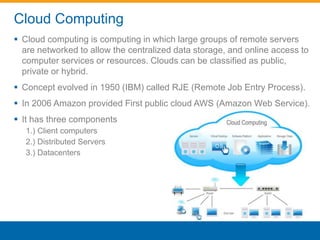
 Cloud computing is computing in which large groups of remote servers 
are networked to allow the centralized data storage, and online access to 
computer services or resources. Clouds can be classified as public, 
private or hybrid. 
 Concept evolved in 1950 (IBM) called RJE (Remote Job Entry Process). 
 In 2006 Amazon provided First public cloud AWS (Amazon Web Service). 
 It has three components 
1.) Client computers 
2.) Distributed Servers 
3.) Datacenters
Cloud Computing – Service Models 
 SaaS(Software as a service): Required software, Operating system & 
network is provided. 
 PaaS(Platform as service): Operating system and network is provided. 
 IaaS(Infrastructure as a service): Just Compute & Network is provided
Why cloud services are popular? 
 Reduce the complexity of networks. 
 Do not have to buy software licenses. 
 Customization. 
 Cloud providers that have specialized in a particular area (such as e-mail) 
can bring advanced services that a single company might not be 
able to afford or develop. 
 Scalability, reliability, and efficiency. 
 Information at cloud are not easily lost.
Why do I need to build a Cloud? 
 Hardware - Compute & Storage (even commodity) 
 Networking (Physical and Virtual) 
 Space and Maintenance (Data Center) 
 Cloud Management System (Physical and Virtual)
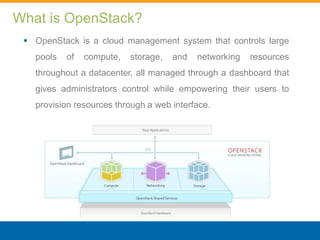
What is OpenStack? 
 OpenStack is a cloud management system that controls large 
pools of compute, storage, and networking resources 
throughout a datacenter, all managed through a dashboard that 
gives administrators control while empowering their users to 
provision resources through a web interface.
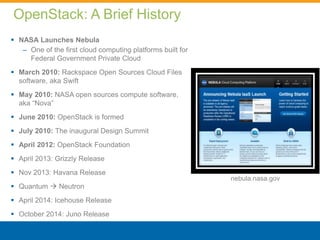
OpenStack: A Brief History 
 NASA Launches Nebula 
– One of the first cloud computing platforms built for 
Federal Government Private Cloud 
 March 2010: Rackspace Open Sources Cloud Files 
software, aka Swift 
 May 2010: NASA open sources compute software, 
aka “Nova” 
 June 2010: OpenStack is formed 
 July 2010: The inaugural Design Summit 
 April 2012: OpenStack Foundation 
 April 2013: Grizzly Release 
 Nov 2013: Havana Release 
 Quantum  Neutron 
 April 2014: Icehouse Release 
 October 2014: Juno Release 
nebula.nasa.gov
OpenStack Community
OpenStack Core Services 
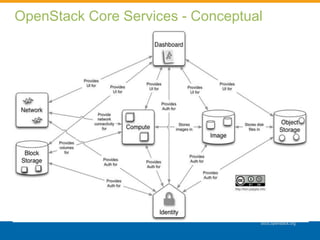
 Compute ("Nova") provides virtual servers upon demand. Compute 
resources are accessible via APIs for developers building cloud 
applications and via web interfaces for administrators and users. The 
compute architecture is designed to scale horizontally on standard 
hardware, enabling the cloud economics companies have come to 
expect. 
 Network (”Neutron") is a pluggable, scalable and API-driven system for 
managing networks and IP addresses. Like other aspects of the cloud 
operating system, it can be used by administrators and users to increase 
the value of existing datacenter assets. 
 Block Storage ("Cinder") provides persistent block storage to guest VMs. 
This project was born from code originally in Nova (the nova-volume 
service described below). 
 Dashboard ("Horizon") provides a modular web-based user interface for 
all the OpenStack services.
OpenStack Core Services 
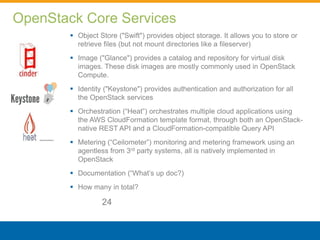
 Object Store ("Swift") provides object storage. It allows you to store or 
retrieve files (but not mount directories like a fileserver) 
 Image ("Glance") provides a catalog and repository for virtual disk 
images. These disk images are mostly commonly used in OpenStack 
Compute. 
 Identity ("Keystone") provides authentication and authorization for all 
the OpenStack services 
 Orchestration (“Heat”) orchestrates multiple cloud applications using 
the AWS CloudFormation template format, through both an OpenStack-native 
REST API and a CloudFormation-compatible Query API 
 Metering (“Ceilometer”) monitoring and metering framework using an 
agentless from 3rd party systems, all is natively implemented in 
OpenStack 
 Documentation (“What’s up doc?) 
 How many in total? 
24
OpenStack Core Services - Conceptual 
docs.openstack.org
OpenStack Core Services - Conceptual 
docs.openstack.org
OpenStack Core Services - Logical
Identity Service (Keystone) Overview
Keystone Overview 
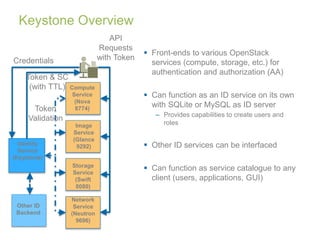
 Front-ends to various OpenStack 
services (compute, storage, etc.) for 
authentication and authorization (AA) 
 Can function as an ID service on its own 
with SQLite or MySQL as ID server 
– Provides capabilities to create users and 
roles 
 Other ID services can be interfaced 
 Can function as service catalogue to any 
client (users, applications, GUI) 
Token 
Validation 
Identity 
Service 
(Keystone) 
Compute 
Service 
(Nova 
8774) 
Image 
Service 
(Glance 
9292) 
Storage 
Service 
(Swift 
8080) 
Network 
Service 
(Neutron 
9696) 
Credentials 
Token & SC 
(with TTL) 
API 
Requests 
with Token 
Other ID 
Backend
Introduction – Service Catalogue 
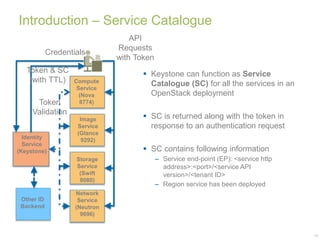
 Keystone can function as Service 
Catalogue (SC) for all the services in an 
OpenStack deployment 
 SC is returned along with the token in 
response to an authentication request 
 SC contains following information 
– Service end-point (EP): <service http 
address>:<port>/<service API 
version>/<tenant ID> 
– Region service has been deployed 
19 
Credentials 
Token 
Validation 
Identity 
Service 
(Keystone) 
Compute 
Service 
(Nova 
8774) 
Image 
Service 
(Glance 
9292) 
Storage 
Service 
(Swift 
8080) 
Network 
Service 
(Neutron 
9696) 
Token & SC 
(with TTL) 
API 
Requests 
with Token 
Other ID 
Backend
Image Service (Glance) Overview
Functionalities 
 Meta-data about a [VM] image can be stored 
or updated in Glance Registry while storing or 
about stored data 
 Glance registry service can interface with 
Swift, file, S3 for image storage backend 
– Can also interface with any web server for read-only 
data 
 Meta-data stored in SQLlite or MySQL 
 OpenStack packaged Registry server is a 
reference implementation (conforming to 
Glance API) 
21 
Storage 
Service 
(File/Swift) 
Glance 
API 
Controller 
Glance 
Registry 
Metadata 
Repository 
Image 
Repository
Major Meta-data 
 Major meta-data that can be specified ( meta key in [] indicates optional) 
– Name – does not not have to unique 
– [id] 
– If not specified an UUID is generated 
– Duplicate error returned, if duplicate ID found 
– [store] 
– File | Swift | S3 | HTTP | CEPH … 
– If not specified configured (in .conf file) default is selected 
– [type] 
– ‘kernel` | `machine` | `raw` | `ramdisk` 
– [is_public] 
– By default non-public 
 Glance does not scan the image to identify image parameters 
22
Compute Service (Nova) Overview
Nova Functionalities 
• Nova is the Compute Service 
• On-demand CRUD of Virtual Servers or VMs 
• On-demand attachment/detachment of VM to network via Nova- 
Network 
• Replaced by Neutron Service 
• On-demand attachment/detachment of block storage (“volume”) to/from 
VM 
 Hypervisors supported: 
• KVM: Linux Kernel-based VM 
• VMWare ESX/ESXi 4.1 update 1 
• Xen - XenServer 5.5, Xen Cloud Platform (XCP) 
• Hyper-V 
• LXC: Linux Containers 
• UML: User Mode Linux
Nova Concepts - Projects/Tenants 
 Project/Tenant is unit of isolation 
between users 
 An organization can have multiple 
projects 
 Each project is associated with 
proper resources and attributes 
 Project associated quota 
– Number of volumes which may be 
created 
– Total size of all volumes within a project 
as measured in GB 
– Number of instances which may be 
launched 
– Number of processor cores which may 
be allocated 
– Publicly accessible IP addresses 
25
Compute Instances 
 Servers 
– An abstraction of 
running VM 
instances or virtual 
servers 
 While creating 
servers following 
information 
specified 
– Flavor 
– Image 
– IPv4/6 addresses 
– Metadata: user 
specified, such as 
server name 
 Flavors 
– Default 
– Admin created 
– Example: 
–m1.medium: 
Memory: 4096MB, 
VCPUS: 2, Storage: 
40GB, FlavorID: 3, 
Swap: 0GB, RXTX 
Quota: 0GB, RXTX 
Cap: 0MB 
– Admin can create 
flavor: 
–nova-manage 
instance_type create 
m1.mega 32768 16 
320 0 0 0 
 Image 
– OS image 
– VM disk 
– Other files 
26
Network Service (Nova-Network) Overview
Introduction 
 Network service / controller provides network related services to 
connect compute instances (VM) to network 
 Nova has an embedded network component called Nova-Network that 
provides network related services 
– Target network domain: L2 network connecting VMs to local (access) 
network 
 A separate network service / controller called Neutron is a separate 
(from Nova) service on its own 
– Target network domain: L2, L3 
28
Nova-Network 
 Flat Mode 
All Instances are attached to a single Linux bridge 
IP addresses are injected into image on launch (from configuration file) 
 FlatDHCP Mode 
Similar to Flat Mode with DHCP for IP addresses 
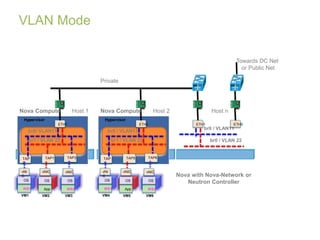
 VLAN Network Mode: Default Mode 
A VLAN, Fixed IP Subnet, and Linux bridge per tenant 
Switch must support 802.1Q VLAN tagging 
 Neutron Network Manager (code is being renaming in Havana release) 
A client (resident in Nova) for communication with Neutron Service 
2
Flat Mode 
30 
TAP 
1 
vNIC 
OS 
WS1 
VM1 
ETH0 
Hypervisor 
TAP2 
vNIC 
OS 
App 
VM2 
TAP3 
vNIC 
OS 
WS2 
VM3 
br100 
ETH0 
br100 
SW 11 
SW 11 
ETH1 
Private 
Towards Cloud DC Net 
or Public Net 
Nova Controller with 
Nova-Network or 
Neutron Controller 
Nova Compute Host 1 
Controller Host 
Nova Compute Host 2 
TAP 
4 
vNIC 
OS 
WS1 
VM4 
ETH0 
Hypervisor 
TAP5 
vNIC 
OS 
App 
VM5 
TAP6 
vNIC 
OS 
WS2 
VM6 
br100 
Bridging, NAT, DHCP 
 Outside communication via the controller node (where Nova-network is 
resident) 
 Nova network component (or controller) can run in each compute node
VLAN Mode 
Nova Compute Host 1 Nova Compute Host 2 Host n 
br0/ VLAN11 
TAP 
0 
vNI 
C 
OS 
WS1 
VM1 
ETH1 
Hypervisor 
TAP1 
vNIC 
OS 
App 
VM2 
TAP3 
vNIC 
OS 
WS2 
VM3 
br1 / VLAN 22 
br0 / VLAN11 
TAP 
4 
vNI 
C 
OS 
WS1 
VM4 
ETH1 
Hypervisor 
TAP5 
vNIC 
OS 
App 
VM5 
TAP6 
vNIC 
OS 
WS2 
VM6 
br1 / VLAN 22 
ETH1 
SW 11 
br0 / VLAN11 
br0 / VLAN 22 
SW 11 
ETH0 
Private 
Towards DC Net 
or Public Net 
Nova with Nova-Network or 
Neutron Controller
Networking Service (Neutron) Overview
Neutron Overview 
 Incubation project in April 2011 
 Promoted to Core Project at Folsom Summit (April 2012) 
 Neutron Solves two main issues in Nova: 
1. Limited networking technology 
• Implements simple linux-based bridges (no advanced QoS, ACL 
or monitoring) 
• Limited back-end network technologies supported 
• VLANs are the only option for multi-tenancy isolation 
2. No tenant control over networking 
 Tenant can not create their own network topologies 
 Tenant can not leverage different network virtualization technologies
OpenStack Networking - Neutron 
 Network as a Service (NaaS) 
 Provides REST APIs to manage network connections for the 
resources managed by other OpenStack Services (e.g. Nova) 
 Technology Agnostic (framework based on “plug-ins”) 
 Multi-tenancy: Isolation, Abstraction, full control over virtual 
networks 
 Modular Design: API specifies service, vendor provides its 
implementation. Extensions for vendor-specific features. 
 Standalone Service : It is not exclusive to OpenStack. Neutron 
is an autonomous service 
 Exposes vendor-specific network virtualization and SDN 
technologies
Neutron Architecture 
Neutron API 
Neutron Service 
Neutron Plug-in API 
API Extensions 
Service API 
(VPN, FW & LBaaS) 
Plug-In 
Implementation 
VNI & PNI 
Plug-In 
Extensions 
Virtual & Physical Networking Infrastructure
Neutron Services - Havana 
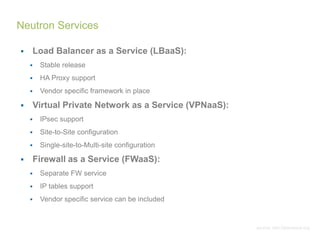
 Load Balancer as a Service (LBaaS): 
 Stable release 
 HA Proxy support 
 Vendor specific framework in place 
 Virtual Private Network as a Service (VPNaaS): 
 IPsec support 
 Site-to-Site configuration 
 Single-site-to-Multi-site configuration 
 Firewall as a Service (FWaaS): 
 Separate FW service 
 IP tables support 
 Vendor specific service can be included 
source: wiki.Openstack.org 
Neutron Services
OpenStack Contribution 
• Join the foundation 
 https://wiki.openstack.org/wiki/HowToContribute 
 Corporate Contributor License Agreement 
 Individual Contributor License Agreement 
• Blueprints and Bugs in Launchpad 
 https://blueprints.launchpad.net/neutron 
 https://bugs.launchpad.net/neutron/+bugs 
• Code review in Gerrit 
 https://wiki.openstack.org/wiki/GerritWorkflow 
 https://review.openstack.org/#/q/status:open+project:openstack/neutron,n,z 
 pep8 enforcement 
 Python hacking rules: 
 https://github.com/openstack/neutron/blob/master/HACKING.rst
Devstack 
1. Install Ubuntu 14.04 or Fedora 
2. Download DevStack 
git clone git://github.com/openstack-dev/devstack.git 
3. Start the install 
cd devstack; ./stack.sh 
It takes a few minutes, and you are done!
Questions!

Cloud computing and OpenStack

  • 1.
    Cloud Computing &OpenStack Edgar Magana, PhD @emaganap Cloud Operations Architect Workday, Inc. USA
  • 2.
    Acknowledgments Big Thanksto Great Developers in OpenStack Community & OpenStack Foundation. Information presented here are sourced from my own experience as OpenStack developer/user and from OpenStack Foundation Documents & Community Views and Technical points expressed here are solely presenter’s and doesn’t reflect his employer views positions or OpenStack Foundation in anyway.
  • 5.
    Cloud Computing Cloud computing is computing in which large groups of remote servers are networked to allow the centralized data storage, and online access to computer services or resources. Clouds can be classified as public, private or hybrid.  Concept evolved in 1950 (IBM) called RJE (Remote Job Entry Process).  In 2006 Amazon provided First public cloud AWS (Amazon Web Service).  It has three components 1.) Client computers 2.) Distributed Servers 3.) Datacenters
  • 6.
    Cloud Computing –Service Models  SaaS(Software as a service): Required software, Operating system & network is provided.  PaaS(Platform as service): Operating system and network is provided.  IaaS(Infrastructure as a service): Just Compute & Network is provided
  • 7.
    Why cloud servicesare popular?  Reduce the complexity of networks.  Do not have to buy software licenses.  Customization.  Cloud providers that have specialized in a particular area (such as e-mail) can bring advanced services that a single company might not be able to afford or develop.  Scalability, reliability, and efficiency.  Information at cloud are not easily lost.
  • 8.
    Why do Ineed to build a Cloud?  Hardware - Compute & Storage (even commodity)  Networking (Physical and Virtual)  Space and Maintenance (Data Center)  Cloud Management System (Physical and Virtual)
  • 9.
    What is OpenStack?  OpenStack is a cloud management system that controls large pools of compute, storage, and networking resources throughout a datacenter, all managed through a dashboard that gives administrators control while empowering their users to provision resources through a web interface.
  • 10.
    OpenStack: A BriefHistory  NASA Launches Nebula – One of the first cloud computing platforms built for Federal Government Private Cloud  March 2010: Rackspace Open Sources Cloud Files software, aka Swift  May 2010: NASA open sources compute software, aka “Nova”  June 2010: OpenStack is formed  July 2010: The inaugural Design Summit  April 2012: OpenStack Foundation  April 2013: Grizzly Release  Nov 2013: Havana Release  Quantum  Neutron  April 2014: Icehouse Release  October 2014: Juno Release nebula.nasa.gov
  • 11.
  • 12.
    OpenStack Core Services  Compute ("Nova") provides virtual servers upon demand. Compute resources are accessible via APIs for developers building cloud applications and via web interfaces for administrators and users. The compute architecture is designed to scale horizontally on standard hardware, enabling the cloud economics companies have come to expect.  Network (”Neutron") is a pluggable, scalable and API-driven system for managing networks and IP addresses. Like other aspects of the cloud operating system, it can be used by administrators and users to increase the value of existing datacenter assets.  Block Storage ("Cinder") provides persistent block storage to guest VMs. This project was born from code originally in Nova (the nova-volume service described below).  Dashboard ("Horizon") provides a modular web-based user interface for all the OpenStack services.
  • 13.
    OpenStack Core Services  Object Store ("Swift") provides object storage. It allows you to store or retrieve files (but not mount directories like a fileserver)  Image ("Glance") provides a catalog and repository for virtual disk images. These disk images are mostly commonly used in OpenStack Compute.  Identity ("Keystone") provides authentication and authorization for all the OpenStack services  Orchestration (“Heat”) orchestrates multiple cloud applications using the AWS CloudFormation template format, through both an OpenStack-native REST API and a CloudFormation-compatible Query API  Metering (“Ceilometer”) monitoring and metering framework using an agentless from 3rd party systems, all is natively implemented in OpenStack  Documentation (“What’s up doc?)  How many in total? 24
  • 14.
    OpenStack Core Services- Conceptual docs.openstack.org
  • 15.
    OpenStack Core Services- Conceptual docs.openstack.org
  • 16.
  • 17.
  • 18.
    Keystone Overview Front-ends to various OpenStack services (compute, storage, etc.) for authentication and authorization (AA)  Can function as an ID service on its own with SQLite or MySQL as ID server – Provides capabilities to create users and roles  Other ID services can be interfaced  Can function as service catalogue to any client (users, applications, GUI) Token Validation Identity Service (Keystone) Compute Service (Nova 8774) Image Service (Glance 9292) Storage Service (Swift 8080) Network Service (Neutron 9696) Credentials Token & SC (with TTL) API Requests with Token Other ID Backend
  • 19.
    Introduction – ServiceCatalogue  Keystone can function as Service Catalogue (SC) for all the services in an OpenStack deployment  SC is returned along with the token in response to an authentication request  SC contains following information – Service end-point (EP): <service http address>:<port>/<service API version>/<tenant ID> – Region service has been deployed 19 Credentials Token Validation Identity Service (Keystone) Compute Service (Nova 8774) Image Service (Glance 9292) Storage Service (Swift 8080) Network Service (Neutron 9696) Token & SC (with TTL) API Requests with Token Other ID Backend
  • 20.
  • 21.
    Functionalities  Meta-dataabout a [VM] image can be stored or updated in Glance Registry while storing or about stored data  Glance registry service can interface with Swift, file, S3 for image storage backend – Can also interface with any web server for read-only data  Meta-data stored in SQLlite or MySQL  OpenStack packaged Registry server is a reference implementation (conforming to Glance API) 21 Storage Service (File/Swift) Glance API Controller Glance Registry Metadata Repository Image Repository
  • 22.
    Major Meta-data Major meta-data that can be specified ( meta key in [] indicates optional) – Name – does not not have to unique – [id] – If not specified an UUID is generated – Duplicate error returned, if duplicate ID found – [store] – File | Swift | S3 | HTTP | CEPH … – If not specified configured (in .conf file) default is selected – [type] – ‘kernel` | `machine` | `raw` | `ramdisk` – [is_public] – By default non-public  Glance does not scan the image to identify image parameters 22
  • 23.
  • 24.
    Nova Functionalities •Nova is the Compute Service • On-demand CRUD of Virtual Servers or VMs • On-demand attachment/detachment of VM to network via Nova- Network • Replaced by Neutron Service • On-demand attachment/detachment of block storage (“volume”) to/from VM  Hypervisors supported: • KVM: Linux Kernel-based VM • VMWare ESX/ESXi 4.1 update 1 • Xen - XenServer 5.5, Xen Cloud Platform (XCP) • Hyper-V • LXC: Linux Containers • UML: User Mode Linux
  • 25.
    Nova Concepts -Projects/Tenants  Project/Tenant is unit of isolation between users  An organization can have multiple projects  Each project is associated with proper resources and attributes  Project associated quota – Number of volumes which may be created – Total size of all volumes within a project as measured in GB – Number of instances which may be launched – Number of processor cores which may be allocated – Publicly accessible IP addresses 25
  • 26.
    Compute Instances Servers – An abstraction of running VM instances or virtual servers  While creating servers following information specified – Flavor – Image – IPv4/6 addresses – Metadata: user specified, such as server name  Flavors – Default – Admin created – Example: –m1.medium: Memory: 4096MB, VCPUS: 2, Storage: 40GB, FlavorID: 3, Swap: 0GB, RXTX Quota: 0GB, RXTX Cap: 0MB – Admin can create flavor: –nova-manage instance_type create m1.mega 32768 16 320 0 0 0  Image – OS image – VM disk – Other files 26
  • 27.
  • 28.
    Introduction  Networkservice / controller provides network related services to connect compute instances (VM) to network  Nova has an embedded network component called Nova-Network that provides network related services – Target network domain: L2 network connecting VMs to local (access) network  A separate network service / controller called Neutron is a separate (from Nova) service on its own – Target network domain: L2, L3 28
  • 29.
    Nova-Network  FlatMode All Instances are attached to a single Linux bridge IP addresses are injected into image on launch (from configuration file)  FlatDHCP Mode Similar to Flat Mode with DHCP for IP addresses  VLAN Network Mode: Default Mode A VLAN, Fixed IP Subnet, and Linux bridge per tenant Switch must support 802.1Q VLAN tagging  Neutron Network Manager (code is being renaming in Havana release) A client (resident in Nova) for communication with Neutron Service 2
  • 30.
    Flat Mode 30 TAP 1 vNIC OS WS1 VM1 ETH0 Hypervisor TAP2 vNIC OS App VM2 TAP3 vNIC OS WS2 VM3 br100 ETH0 br100 SW 11 SW 11 ETH1 Private Towards Cloud DC Net or Public Net Nova Controller with Nova-Network or Neutron Controller Nova Compute Host 1 Controller Host Nova Compute Host 2 TAP 4 vNIC OS WS1 VM4 ETH0 Hypervisor TAP5 vNIC OS App VM5 TAP6 vNIC OS WS2 VM6 br100 Bridging, NAT, DHCP  Outside communication via the controller node (where Nova-network is resident)  Nova network component (or controller) can run in each compute node
  • 31.
    VLAN Mode NovaCompute Host 1 Nova Compute Host 2 Host n br0/ VLAN11 TAP 0 vNI C OS WS1 VM1 ETH1 Hypervisor TAP1 vNIC OS App VM2 TAP3 vNIC OS WS2 VM3 br1 / VLAN 22 br0 / VLAN11 TAP 4 vNI C OS WS1 VM4 ETH1 Hypervisor TAP5 vNIC OS App VM5 TAP6 vNIC OS WS2 VM6 br1 / VLAN 22 ETH1 SW 11 br0 / VLAN11 br0 / VLAN 22 SW 11 ETH0 Private Towards DC Net or Public Net Nova with Nova-Network or Neutron Controller
  • 32.
  • 33.
    Neutron Overview Incubation project in April 2011  Promoted to Core Project at Folsom Summit (April 2012)  Neutron Solves two main issues in Nova: 1. Limited networking technology • Implements simple linux-based bridges (no advanced QoS, ACL or monitoring) • Limited back-end network technologies supported • VLANs are the only option for multi-tenancy isolation 2. No tenant control over networking  Tenant can not create their own network topologies  Tenant can not leverage different network virtualization technologies
  • 34.
    OpenStack Networking -Neutron  Network as a Service (NaaS)  Provides REST APIs to manage network connections for the resources managed by other OpenStack Services (e.g. Nova)  Technology Agnostic (framework based on “plug-ins”)  Multi-tenancy: Isolation, Abstraction, full control over virtual networks  Modular Design: API specifies service, vendor provides its implementation. Extensions for vendor-specific features.  Standalone Service : It is not exclusive to OpenStack. Neutron is an autonomous service  Exposes vendor-specific network virtualization and SDN technologies
  • 35.
    Neutron Architecture NeutronAPI Neutron Service Neutron Plug-in API API Extensions Service API (VPN, FW & LBaaS) Plug-In Implementation VNI & PNI Plug-In Extensions Virtual & Physical Networking Infrastructure
  • 36.
    Neutron Services -Havana  Load Balancer as a Service (LBaaS):  Stable release  HA Proxy support  Vendor specific framework in place  Virtual Private Network as a Service (VPNaaS):  IPsec support  Site-to-Site configuration  Single-site-to-Multi-site configuration  Firewall as a Service (FWaaS):  Separate FW service  IP tables support  Vendor specific service can be included source: wiki.Openstack.org Neutron Services
  • 37.
    OpenStack Contribution •Join the foundation  https://wiki.openstack.org/wiki/HowToContribute  Corporate Contributor License Agreement  Individual Contributor License Agreement • Blueprints and Bugs in Launchpad  https://blueprints.launchpad.net/neutron  https://bugs.launchpad.net/neutron/+bugs • Code review in Gerrit  https://wiki.openstack.org/wiki/GerritWorkflow  https://review.openstack.org/#/q/status:open+project:openstack/neutron,n,z  pep8 enforcement  Python hacking rules:  https://github.com/openstack/neutron/blob/master/HACKING.rst
  • 38.
    Devstack 1. InstallUbuntu 14.04 or Fedora 2. Download DevStack git clone git://github.com/openstack-dev/devstack.git 3. Start the install cd devstack; ./stack.sh It takes a few minutes, and you are done!
  • 39.

Editor's Notes

  • #10 OpenStack is a global collaboration of developers and cloud computing technologists producing an open source cloud computing platform for public and private clouds
  • #11 There are over 300 users across nine NASA Centers + JPL + HQ
  • #30 In Flat Mode, a network administrator specifies a subnet. The IP addresses for VM instances are grabbed from the subnet, and then injected into the image on launch. Each instance receives a fixed IP address from the pool of available addresses. A network administrator must configure the Linux networking bridge (named br100) both on the network controller hosting the network and on the cloud controllers hosting the instances. All instances of the system are attached to the same bridge, configured manually by the network administrator.   In Flat DHCP Mode, you start a DHCP server to pass out IP addresses to VM instances from the specified subnet in addition to manually configuring the networking bridge. IP addresses for VM instances are grabbed from a subnet specified by the network administrator. In both flat modes, the network nodes do not act as a default gateway. Instances are given public IP addresses. Compute nodes have iptables/ebtables entries created per project and instance to protect against IP/MAC address spoofing and ARP poisoning.   VLAN Network Mode is the default mode for OpenStack Compute. In this mode, Compute creates a VLAN and bridge for each project. For multiple machine installation, the VLAN Network Mode requires a switch that supports VLAN tagging (IEEE 802.1Q). The project gets a range of private IPs that are only accessible from inside the VLAN. In order for a user to access the instances in their project, a special VPN instance (code named cloudpipe) needs to be created. Compute generates a certificate and key for the user to access the VPN and starts the VPN automatically. It provides a private network segment for each project's instances that can be accessed via a dedicated VPN connection from the Internet. In this mode, each project gets its own VLAN, Linux networking bridge, and subnet.
  • #32 VLANs: 171, 172, 173, 174 $ nova-manage --flagfile=/etc/nova/nova.conf network create private 10.1.171.0/24 1 256 $ nova-manage --flagfile=/etc/nova/nova.conf network create private 10.1.172.0/24 1 256 $ nova-manage --flagfile=/etc/nova/nova.conf network create private 10.1.173.0/24 1 256 $ nova-manage --flagfile=/etc/nova/nova.conf network create private 10.1.174.0/24 1 256 $ select id,cidr from networks; cat > vlan.sql << __EOF_ update networks set vlan = '$VLAN' where id = $ID; update networks set bridge = 'br_$VLAN' where id = $ID; update networks set gateway = '10.1.$VLAN.7' where id = $ID; update networks set dhcp_start = '10.1.$VLAN.8' where id = $ID; update fixed_ips set reserved = 1 where address in ('10.1.$VLAN.1','10.1.$VLAN.2','10.1.$VLAN.3','10.1.$VLAN.4','10.1.$VLAN.5','10.1.$VLAN.6','10.1.$VLAN.7'); __EOF_ How to assign network to project? Starting a VM in a project will put in right network/bridge/VLAN [this is performed by a tenant, so shouldn’t be here]