Working with Web 2.0 ToolsJoseph Martinelli, Ed.D.Chair, Educational Studiesjoseph.martinelli@shu.edu973.275.2733
What is a Web 2.0 Tool?Internet based software tool“Two-way mediumEnables the end user to become a publisher of InformationDataMultimedia Productions – Images, Video, AudioBecomes a visual, audio and tactile experienceEngaging, Engaging, Engaging!
Why Should I use Web 2.0?CollaborationEnrich the learning experienceEncourage Creativeness – Risk Taking without the fear of repercussion Passive to active LearningA Virtual CommunityInteraction through reflective and constructive conversationDiscovery, Exploration and knowledge acquisitionProactive LearningSandbox for Millennial Generation
Types of Web 2.0 ToolsSocial Networking ToolsFacebook, Myspace, Bebo, Yelp, Twitter, TumblrBlogsPodcastingCreative toolsGraphics, Video Editing, Audio EditingPhoto Sharing, Multimedia SharingInformational
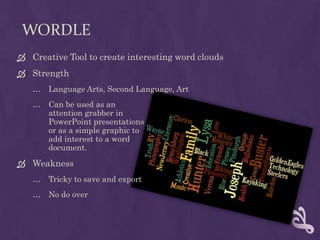
WordleCreative Tool to create interesting word cloudsStrengthLanguage Arts, Second Language, Art Can be used as an attention grabber in PowerPoint presentationsor as a simple graphic toadd interest to a word document.WeaknessTricky to save and exportNo do over
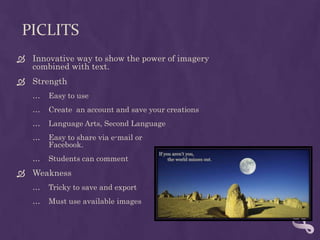
PicLitsInnovative way to show the power of imagery combined with text.StrengthEasy to useCreate  an account and save your creationsLanguage Arts, Second LanguageEasy to share via e-mail orFacebook.Students can commentWeaknessTricky to save and exportMust use available images
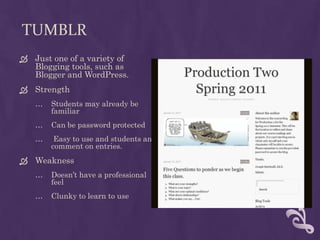
TumblrJust one of a variety of Blogging tools, such as Blogger and WordPress.StrengthStudents may already be familiarCan be password protected Easy to use and students and comment on entries.WeaknessDoesn’t have a professionalfeelClunky to learn to use
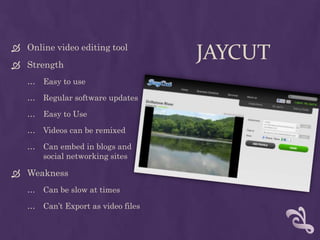
JayCutOnline video editing toolStrengthEasy to useRegular software updatesEasy to UseVideos can be remixedCan embed in blogs andsocial networking sitesWeaknessCan be slow at timesCan’t Export as video files
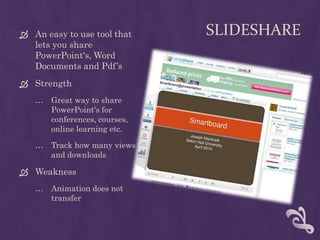
SlideShareAn easy to use tool that lets you share PowerPoint's, Word Documents and Pdf’sStrengthGreat way to share PowerPoint's for conferences, courses, online learning etc.Track how many views and downloadsWeaknessAnimation does not transfer
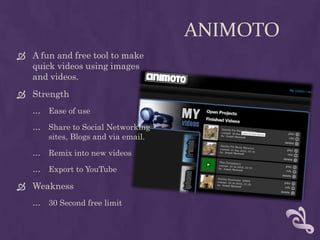
AnimotoA fun and free tool to make quick videos using images and videos.StrengthEase of useShare to Social Networkingsites, Blogs and via email.Remix into new videosExport to YouTubeWeakness30 Second free limit
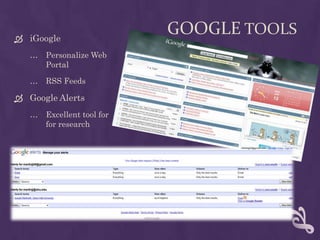
Google ToolsiGooglePersonalize Web PortalRSS FeedsGoogle AlertsExcellent tool forfor research
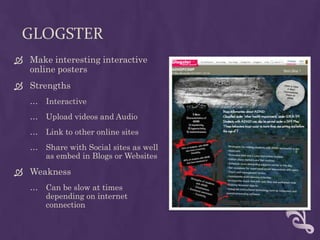
GlogsterMake interesting interactive online postersStrengthsInteractiveUpload videos and AudioLink to other online sitesShare with Social sites as well as embed in Blogs or WebsitesWeaknessCan be slow at times depending on internet connection
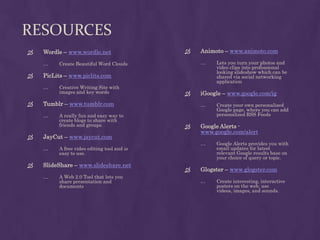
ResourcesAnimoto– www.animoto.comLets you turn your photos and video clips into professional looking slideshow which can be shared via social networking applicationiGoogle – www.google.com/igCreate your own personalized Google page, where you can add personalized RSS FeedsGoogle Alerts -www.google.com/alertGoogle Alerts provides you with email updates for latest relevant Google results base on your choice of query or topic.Glogster –www.glogster.comCreate interesting, interactive posters on the web, use videos, images, and sounds. Wordle –www.wordle.netCreate Beautiful Word CloudsPicLits –www.piclits.comCreative Writing Site with images and key wordsTumblr – www.tumblr.comA really fun and easy way to create blogs to share with friends and groupsJayCut – www.jaycut.comA free video editing tool and is easy to use.SlideShare –www.slideshare.netA Web 2.0 Tool that lets you share presentation and documents

Web 2.0 Tools

  • 1.
    Working with Web2.0 ToolsJoseph Martinelli, Ed.D.Chair, Educational Studiesjoseph.martinelli@shu.edu973.275.2733
  • 2.
    What is aWeb 2.0 Tool?Internet based software tool“Two-way mediumEnables the end user to become a publisher of InformationDataMultimedia Productions – Images, Video, AudioBecomes a visual, audio and tactile experienceEngaging, Engaging, Engaging!
  • 3.
    Why Should Iuse Web 2.0?CollaborationEnrich the learning experienceEncourage Creativeness – Risk Taking without the fear of repercussion Passive to active LearningA Virtual CommunityInteraction through reflective and constructive conversationDiscovery, Exploration and knowledge acquisitionProactive LearningSandbox for Millennial Generation
  • 4.
    Types of Web2.0 ToolsSocial Networking ToolsFacebook, Myspace, Bebo, Yelp, Twitter, TumblrBlogsPodcastingCreative toolsGraphics, Video Editing, Audio EditingPhoto Sharing, Multimedia SharingInformational
  • 5.
    WordleCreative Tool tocreate interesting word cloudsStrengthLanguage Arts, Second Language, Art Can be used as an attention grabber in PowerPoint presentationsor as a simple graphic toadd interest to a word document.WeaknessTricky to save and exportNo do over
  • 6.
    PicLitsInnovative way toshow the power of imagery combined with text.StrengthEasy to useCreate an account and save your creationsLanguage Arts, Second LanguageEasy to share via e-mail orFacebook.Students can commentWeaknessTricky to save and exportMust use available images
  • 7.
    TumblrJust one ofa variety of Blogging tools, such as Blogger and WordPress.StrengthStudents may already be familiarCan be password protected Easy to use and students and comment on entries.WeaknessDoesn’t have a professionalfeelClunky to learn to use
  • 8.
    JayCutOnline video editingtoolStrengthEasy to useRegular software updatesEasy to UseVideos can be remixedCan embed in blogs andsocial networking sitesWeaknessCan be slow at timesCan’t Export as video files
  • 9.
    SlideShareAn easy touse tool that lets you share PowerPoint's, Word Documents and Pdf’sStrengthGreat way to share PowerPoint's for conferences, courses, online learning etc.Track how many views and downloadsWeaknessAnimation does not transfer
  • 10.
    AnimotoA fun andfree tool to make quick videos using images and videos.StrengthEase of useShare to Social Networkingsites, Blogs and via email.Remix into new videosExport to YouTubeWeakness30 Second free limit
  • 11.
    Google ToolsiGooglePersonalize WebPortalRSS FeedsGoogle AlertsExcellent tool forfor research
  • 12.
    GlogsterMake interesting interactiveonline postersStrengthsInteractiveUpload videos and AudioLink to other online sitesShare with Social sites as well as embed in Blogs or WebsitesWeaknessCan be slow at times depending on internet connection
  • 13.
    ResourcesAnimoto– www.animoto.comLets youturn your photos and video clips into professional looking slideshow which can be shared via social networking applicationiGoogle – www.google.com/igCreate your own personalized Google page, where you can add personalized RSS FeedsGoogle Alerts -www.google.com/alertGoogle Alerts provides you with email updates for latest relevant Google results base on your choice of query or topic.Glogster –www.glogster.comCreate interesting, interactive posters on the web, use videos, images, and sounds. Wordle –www.wordle.netCreate Beautiful Word CloudsPicLits –www.piclits.comCreative Writing Site with images and key wordsTumblr – www.tumblr.comA really fun and easy way to create blogs to share with friends and groupsJayCut – www.jaycut.comA free video editing tool and is easy to use.SlideShare –www.slideshare.netA Web 2.0 Tool that lets you share presentation and documents