11/09/24
SALSA - Maintenance
Work Order
2
Welcome to the Course
• Trainer and Key users presentation
 IBM trainer :
 Key users :
• Practical details
 Timetable, breaks
 Others
• Introduce yourselves
 Name
 Role at Total ...
 SAP experience and/or other softwares
 Expectation for the courses ...
3
Training documents
• This PowerPoint presentation (majors concepts, business flows, roles)
• Document to support the training sessions
 Work instructions
 Exercises
4
Module Agenda
• Welcome & Introduction
• Work Order Preparation
 Create, planning & change orders
• Questions & Answers
5
• Presentations
 Concepts & business background
• Work Instructions
 Step by step guide on how to complete an SAP transaction
• Demonstrations
 Demonstration of the SAP transaction
• Exercise
 Your chance to complete the SAP transaction using the exercise
data provided
• Please ask questions throughout the course!!!
Format of the Training
6
Module Agenda
• Work Order Preparation
 Key information in work order processing
 Create work order from Notification (IW22/IW28)
 Plan work order (IW32/IW38)
 Release work order (IW32/IW38)
 Print work order (IW3D/IW38)
 Evaluate and Level capacity (CM01/CM33)
• Questions & Answers
7
How will SAP affect
me?
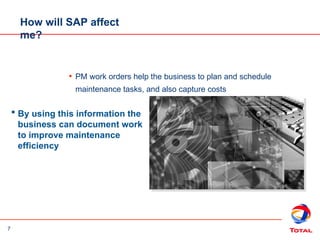
• PM work orders help the business to plan and schedule
maintenance tasks, and also capture costs
 By using this information the
business can document work
to improve maintenance
efficiency
8
PM Process
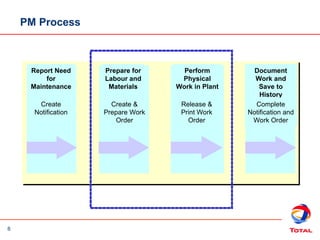
Report Need
for
Maintenance
Create
Notification
Prepare for
Labour and
Materials
Create &
Prepare Work
Order
Perform
Physical
Work in Plant
Release &
Print Work
Order
Document
Work and
Save to
History
Complete
Notification and
Work Order
9
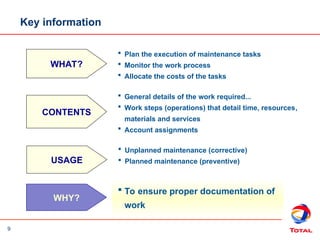
Key information
WHAT?
 Plan the execution of maintenance tasks
 Monitor the work process
 Allocate the costs of the tasks
CONTENTS
 General details of the work required...
 Work steps (operations) that detail time, resources,
materials and services
 Account assignments
 Unplanned maintenance (corrective)
 Planned maintenance (preventive)
USAGE
 To ensure proper documentation of
work
WHY?
10
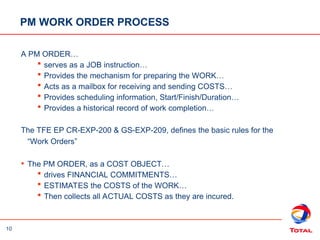
PM WORK ORDER PROCESS
A PM ORDER…
 serves as a JOB instruction…
 Provides the mechanism for preparing the WORK…
 Acts as a mailbox for receiving and sending COSTS…
 Provides scheduling information, Start/Finish/Duration…
 Provides a historical record of work completion…
The TFE EP CR-EXP-200 & GS-EXP-209, defines the basic rules for the
“Work Orders”
• The PM ORDER, as a COST OBJECT…
 drives FINANCIAL COMMITMENTS…
 ESTIMATES the COSTS of the WORK…
 Then collects all ACTUAL COSTS as they are incured.
11
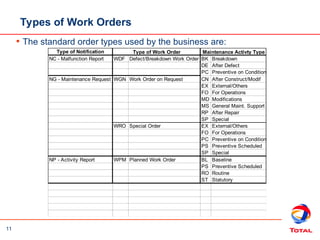
Types of Work Orders
• The standard order types used by the business are:
Type of Notification
NC - Malfunction Report WDF Defect/Breakdown Work Order BK Breakdown
DE After Defect
PC Preventive on Condition
NG - Maintenance Request WGN Work Order on Request CN After Construct/Modif
EX External/Others
FO For Operations
MD Modifications
MS General Maint. Support
RP After Repair
SP Special
WRO Special Order EX External/Others
FO For Operations
PC Preventive on Condition
PS Preventive Scheduled
SP Special
NP - Activity Report WPM Planned Work Order BL Baseline
PS Preventive Scheduled
RO Routine
ST Statutory
Type of Work Order Maintenance Activty Type
12
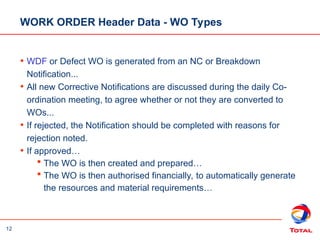
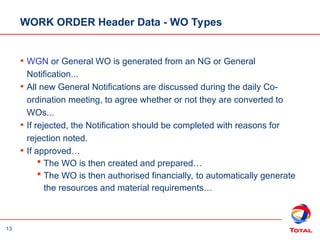
WORK ORDER Header Data - WO Types
• WDF or Defect WO is generated from an NC or Breakdown
Notification...
• All new Corrective Notifications are discussed during the daily Co-
ordination meeting, to agree whether or not they are converted to
WOs...
• If rejected, the Notification should be completed with reasons for
rejection noted.
• If approved…
 The WO is then created and prepared…
 The WO is then authorised financially, to automatically generate
the resources and material requirements…
13
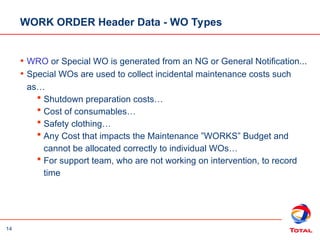
WORK ORDER Header Data - WO Types
• WGN or General WO is generated from an NG or General
Notification...
• All new General Notifications are discussed during the daily Co-
ordination meeting, to agree whether or not they are converted to
WOs...
• If rejected, the Notification should be completed with reasons for
rejection noted.
• If approved…
 The WO is then created and prepared…
 The WO is then authorised financially, to automatically generate
the resources and material requirements…
14
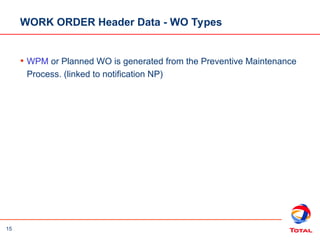
WORK ORDER Header Data - WO Types
• WRO or Special WO is generated from an NG or General Notification...
• Special WOs are used to collect incidental maintenance costs such
as…
 Shutdown preparation costs…
 Cost of consumables…
 Safety clothing…
 Any Cost that impacts the Maintenance ”WORKS” Budget and
cannot be allocated correctly to individual WOs…
 For support team, who are not working on intervention, to record
time
15
WORK ORDER Header Data - WO Types
• WPM or Planned WO is generated from the Preventive Maintenance
Process. (linked to notification NP)
16
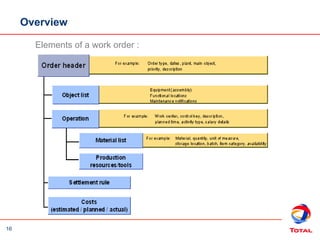
Elements of a work order :
Overview
17
Creating Work Orders
• You create work orders from notifications
• You may attach more than one notification to a work order
• It is not possible to assign several work orders to a notification
• The operations in the work order can be performed as a continuous
process or individually over time
• If you want to create a multi-trade work order, use different operations
- at least one for each work center
18
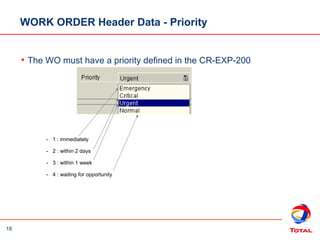
- 1 : immediately
- 2 : within 2 days
- 3 : within 1 week
- 4 : waiting for opportunity
WORK ORDER Header Data - Priority
• The WO must have a priority defined in the CR-EXP-200
19
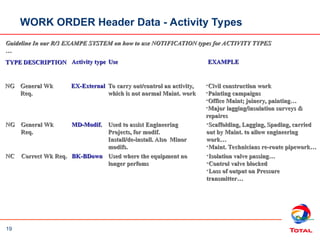
Guideline In our R/3 EXAMPE SYSTEM on how to use NOTIFICATION types for ACTIVITY TYPES
…
…
Activity type
Activity type
TYPE
TYPE EXAMPLE
EXAMPLE
DESCRIPTION
DESCRIPTION
Correct Wk Req.
Correct Wk Req.
NC
NC
General Wk
General Wk
Req.
Req.
NG
NG
Use
Use
EX-External
EX-External To carry out/control an activity,
To carry out/control an activity,
which is not normal Maint. work
•Civil construction work
Civil construction work
•Painting campaigns
Painting campaigns
•Office Maint; joinery, painting…
Office Maint; joinery, painting…
•Major lagging/insulation surveys &
Major lagging/insulation surveys &
repaires
repaires
General Wk
General Wk
Req.
Req.
NG
NG MD-Modif.
MD-Modif. Used to assist Engineering
Used to assist Engineering
Projects, for modif.
Install/de-install. Also Minor
modifs.
modifs.
•Scaffolding, Lagging, Spading, carried
Scaffolding, Lagging, Spading, carried
out by Maint. to allow engineering
work…
work…
•Maint. Technicians re-route pipework…
Maint. Technicians re-route pipework…
BK-BDown
BK-BDown Used where the equipment no
Used where the equipment no
longer perfoms
longer perfoms
•Isolation valve passing…
Isolation valve passing…
•Control valve blocked
Control valve blocked
•Loss of output on Pressure
Loss of output on Pressure
transmitter…
transmitter…
Cont…
Cont…
WORK ORDER Header Data - Activity Types
20
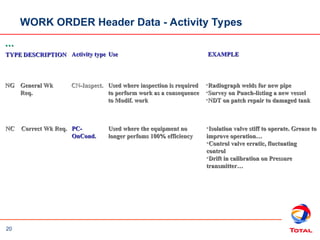
Activity type
Activity type
TYPE
TYPE EXAMPLE
EXAMPLE
DESCRIPTION
DESCRIPTION
Correct Wk Req.
Correct Wk Req.
NC
NC
General Wk
General Wk
Req.
Req.
NG
NG
Use
Use
CN-Inspect.
CN-Inspect. Used where inspection is required
Used where inspection is required
to perform work as a consequence
to Modif. work
to Modif. work
•Radiograph welds for new pipe
Radiograph welds for new pipe
•Survey on Punch-listing a new vessel
Survey on Punch-listing a new vessel
•NDT on patch repair to damaged tank
NDT on patch repair to damaged tank
PC-
PC-
OnCond.
OnCond.
Used where the equipment no
longer perfoms 100% efficiency
•Isolation valve stiff to operate. Grease to
Isolation valve stiff to operate. Grease to
improve operation…
improve operation…
•Control valve erratic, fluctuating
Control valve erratic, fluctuating
control
control
•Drift in calibration on Pressure
Drift in calibration on Pressure
transmitter…
transmitter…
…
…
WORK ORDER Header Data - Activity Types
21
WORK ORDER Header Data - Other data
 Main Work Center
– This Work center will come from the equipment or functional
location reference object. It indicate the main trade responsible for
the work.
 Plant
– You indicate the plant in which the work has to be done
 Dates
– You indicate estimated start & end dates for the global work order
 Revision
– This Revision is used to group work orders in order to follow a
shutdown (for example).
 Reference Object
– You indicate here the object concerned with the maintenance task
: Functional location (required) & equipment (optional)
22
WORK ORDER Components & Services
• Component requirements
– When a component is needed to perform an intervention, you have to
assign the component to the corresponding Work Order internal
operation. For this component, when the order will be released, a stock
reservation (stock material) or a purchase requisition (non stock material)
will be created.
• Services requirements
– When a service needs to be purchased to perform an intervention, the
corresponding material number should be identified and planned in the
Work Order Component tab. Consequently, a Purchase Requisition will
be created during the Work Order release process.
23
Planning PM Work Orders
• Operations
 The initial planning process involves defining and scheduling the
tasks to be performed
– Each task is assigned to an operation
 Each operation can be assigned to a different work centre
– For example, certain tasks can be assigned to internal (INT)
maintenance work centers while other tasks can be assigned
to internal (INT) construction work centers
 The Control Key defines the type of Operation
– INT Internal labour
 Each operation needs to have description (short text), number of
hours (work) and number of people (number)
24
• Components
 All components must have a material master number, required
quantity, recipient, unloading point and is carried out against the
relevant operation
 Reservations for stock items are generated automatically in MM
 Purchase Requisitions for non-stock items and services are generated
automatically in MM
• Enhancement
 For Inspection and Corrosion: Inspection scope must have “Route”, a
group of Measuring Point
Planning PM Work
Orders
25
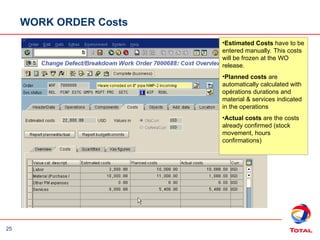
WORK ORDER Costs
•Estimated Costs have to be
entered manually. This costs
will be frozen at the WO
release.
•Planned costs are
automatically calculated with
opérations durations and
material & services indicated
in the operations
•Actual costs are the costs
already confirmed (stock
movement, hours
confirmations)
26
Demonstration / Exercise 1
• Create/Prepare Work Order
 Transaction IW22/IW32
• Tips
 Remember to set the system status to WREL before you save the
work order
27
Capacity Planning
• There are two main tools for Capacity Planning:
 Capacity evaluation : allows you to evaluate the Work Center
capacity versus the requirements in the PM work orders. This
evaluation can be made up to the individual´s capacity
 Capacity levelling : lets you level overloads and underloads at work
center or for individuals
• Capacity Levelling is the ultimate scheduling tool as it helps planner to
distribute work based on real finite scheduling
28
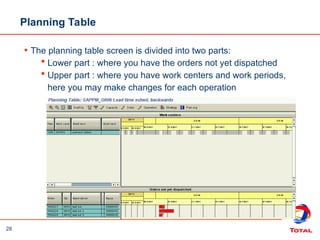
Planning Table
• The planning table screen is divided into two parts:
 Lower part : where you have the orders not yet dispatched
 Upper part : where you have work centers and work periods,
here you may make changes for each operation
29
Profiles
• Capacity requirements are read on a specific period
determined by a time profile
• Every profile used by the capacity levelling tool is contained
in the overall profile
• One of the most important profiles is the strategy profile
• The strategy profile determines how dispatching is done and
what rules will be applied
30
Dispatching
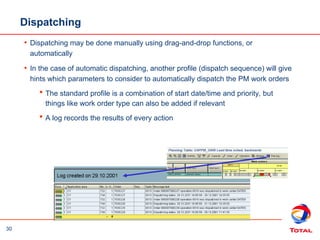
• Dispatching may be done manually using drag-and-drop functions, or
automatically
• In the case of automatic dispatching, another profile (dispatch sequence) will give
hints which parameters to consider to automatically dispatch the PM work orders
 The standard profile is a combination of start date/time and priority, but
things like work order type can also be added if relevant
 A log records the results of every action
31
Release & Print Work
Order
• When the labour and purchasing needs have been entered, the Work
Order can be released
• Individuals will be assigned directly to each work order operation
• The release process initiates the following:
 The work order can be printed, work can be started and time can
be posted against the work order
 Purchase Requisitions can be processed and Purchase Orders
created. Reservations are also made for material
32
• Work Order print
 Many documents can be printed :
– Material issue slip
– Work order operations
– …..
 In case of multiple-trades Work Order, the Work Order will have to
be printed several times by the Supervisor (several copies can be
printed at once by specifying the required quantity of copies in the
“Select Shop paper” screen).
Release & Print Work
Order
33
Perform Physical Work
• Prior to performing the work:
 The Work Order should be printed and available
 The materials should be available
• Depending on the work to be performed additional reference documents
may be needed
• Note that:
 The Permit-To-Work system is still external to SAP R/3
34
Summary
• Work Orders form the documentation basis for the preparation and
performance of work
• Once completed, Work Orders capture the cost information for the
work
• Notifications hold the maintenance history
• The steps in the Work Order process can be performed as a
continuous process or individually
35
Key Learning Review
• Why are Work Orders used?
To provide the documentation basis for the planning, scheduling, and
accomplishing of work
• What are the major steps in processing a Work Order?
Create, Prepare operations, materials and services, Release, Print, Confirm
and report, Complete
36
Questions?
• Ready to go?

03 - SAP PM WorkOrder Presentation_EN.ppt

  • 1.
  • 2.
    2 Welcome to theCourse • Trainer and Key users presentation  IBM trainer :  Key users : • Practical details  Timetable, breaks  Others • Introduce yourselves  Name  Role at Total ...  SAP experience and/or other softwares  Expectation for the courses ...
  • 3.
    3 Training documents • ThisPowerPoint presentation (majors concepts, business flows, roles) • Document to support the training sessions  Work instructions  Exercises
  • 4.
    4 Module Agenda • Welcome& Introduction • Work Order Preparation  Create, planning & change orders • Questions & Answers
  • 5.
    5 • Presentations  Concepts& business background • Work Instructions  Step by step guide on how to complete an SAP transaction • Demonstrations  Demonstration of the SAP transaction • Exercise  Your chance to complete the SAP transaction using the exercise data provided • Please ask questions throughout the course!!! Format of the Training
  • 6.
    6 Module Agenda • WorkOrder Preparation  Key information in work order processing  Create work order from Notification (IW22/IW28)  Plan work order (IW32/IW38)  Release work order (IW32/IW38)  Print work order (IW3D/IW38)  Evaluate and Level capacity (CM01/CM33) • Questions & Answers
  • 7.
    7 How will SAPaffect me? • PM work orders help the business to plan and schedule maintenance tasks, and also capture costs  By using this information the business can document work to improve maintenance efficiency
  • 8.
    8 PM Process Report Need for Maintenance Create Notification Preparefor Labour and Materials Create & Prepare Work Order Perform Physical Work in Plant Release & Print Work Order Document Work and Save to History Complete Notification and Work Order
  • 9.
    9 Key information WHAT?  Planthe execution of maintenance tasks  Monitor the work process  Allocate the costs of the tasks CONTENTS  General details of the work required...  Work steps (operations) that detail time, resources, materials and services  Account assignments  Unplanned maintenance (corrective)  Planned maintenance (preventive) USAGE  To ensure proper documentation of work WHY?
  • 10.
    10 PM WORK ORDERPROCESS A PM ORDER…  serves as a JOB instruction…  Provides the mechanism for preparing the WORK…  Acts as a mailbox for receiving and sending COSTS…  Provides scheduling information, Start/Finish/Duration…  Provides a historical record of work completion… The TFE EP CR-EXP-200 & GS-EXP-209, defines the basic rules for the “Work Orders” • The PM ORDER, as a COST OBJECT…  drives FINANCIAL COMMITMENTS…  ESTIMATES the COSTS of the WORK…  Then collects all ACTUAL COSTS as they are incured.
  • 11.
    11 Types of WorkOrders • The standard order types used by the business are: Type of Notification NC - Malfunction Report WDF Defect/Breakdown Work Order BK Breakdown DE After Defect PC Preventive on Condition NG - Maintenance Request WGN Work Order on Request CN After Construct/Modif EX External/Others FO For Operations MD Modifications MS General Maint. Support RP After Repair SP Special WRO Special Order EX External/Others FO For Operations PC Preventive on Condition PS Preventive Scheduled SP Special NP - Activity Report WPM Planned Work Order BL Baseline PS Preventive Scheduled RO Routine ST Statutory Type of Work Order Maintenance Activty Type
  • 12.
    12 WORK ORDER HeaderData - WO Types • WDF or Defect WO is generated from an NC or Breakdown Notification... • All new Corrective Notifications are discussed during the daily Co- ordination meeting, to agree whether or not they are converted to WOs... • If rejected, the Notification should be completed with reasons for rejection noted. • If approved…  The WO is then created and prepared…  The WO is then authorised financially, to automatically generate the resources and material requirements…
  • 13.
    13 WORK ORDER HeaderData - WO Types • WGN or General WO is generated from an NG or General Notification... • All new General Notifications are discussed during the daily Co- ordination meeting, to agree whether or not they are converted to WOs... • If rejected, the Notification should be completed with reasons for rejection noted. • If approved…  The WO is then created and prepared…  The WO is then authorised financially, to automatically generate the resources and material requirements…
  • 14.
    14 WORK ORDER HeaderData - WO Types • WRO or Special WO is generated from an NG or General Notification... • Special WOs are used to collect incidental maintenance costs such as…  Shutdown preparation costs…  Cost of consumables…  Safety clothing…  Any Cost that impacts the Maintenance ”WORKS” Budget and cannot be allocated correctly to individual WOs…  For support team, who are not working on intervention, to record time
  • 15.
    15 WORK ORDER HeaderData - WO Types • WPM or Planned WO is generated from the Preventive Maintenance Process. (linked to notification NP)
  • 16.
    16 Elements of awork order : Overview
  • 17.
    17 Creating Work Orders •You create work orders from notifications • You may attach more than one notification to a work order • It is not possible to assign several work orders to a notification • The operations in the work order can be performed as a continuous process or individually over time • If you want to create a multi-trade work order, use different operations - at least one for each work center
  • 18.
    18 - 1 :immediately - 2 : within 2 days - 3 : within 1 week - 4 : waiting for opportunity WORK ORDER Header Data - Priority • The WO must have a priority defined in the CR-EXP-200
  • 19.
    19 Guideline In ourR/3 EXAMPE SYSTEM on how to use NOTIFICATION types for ACTIVITY TYPES Guideline In our R/3 EXAMPE SYSTEM on how to use NOTIFICATION types for ACTIVITY TYPES … … Activity type Activity type TYPE TYPE EXAMPLE EXAMPLE DESCRIPTION DESCRIPTION Correct Wk Req. Correct Wk Req. NC NC General Wk General Wk Req. Req. NG NG Use Use EX-External EX-External To carry out/control an activity, To carry out/control an activity, which is not normal Maint. work which is not normal Maint. work •Civil construction work Civil construction work •Painting campaigns Painting campaigns •Office Maint; joinery, painting… Office Maint; joinery, painting… •Major lagging/insulation surveys & Major lagging/insulation surveys & repaires repaires General Wk General Wk Req. Req. NG NG MD-Modif. MD-Modif. Used to assist Engineering Used to assist Engineering Projects, for modif. Projects, for modif. Install/de-install. Also Minor Install/de-install. Also Minor modifs. modifs. •Scaffolding, Lagging, Spading, carried Scaffolding, Lagging, Spading, carried out by Maint. to allow engineering out by Maint. to allow engineering work… work… •Maint. Technicians re-route pipework… Maint. Technicians re-route pipework… BK-BDown BK-BDown Used where the equipment no Used where the equipment no longer perfoms longer perfoms •Isolation valve passing… Isolation valve passing… •Control valve blocked Control valve blocked •Loss of output on Pressure Loss of output on Pressure transmitter… transmitter… Cont… Cont… WORK ORDER Header Data - Activity Types
  • 20.
    20 Activity type Activity type TYPE TYPEEXAMPLE EXAMPLE DESCRIPTION DESCRIPTION Correct Wk Req. Correct Wk Req. NC NC General Wk General Wk Req. Req. NG NG Use Use CN-Inspect. CN-Inspect. Used where inspection is required Used where inspection is required to perform work as a consequence to perform work as a consequence to Modif. work to Modif. work •Radiograph welds for new pipe Radiograph welds for new pipe •Survey on Punch-listing a new vessel Survey on Punch-listing a new vessel •NDT on patch repair to damaged tank NDT on patch repair to damaged tank PC- PC- OnCond. OnCond. Used where the equipment no Used where the equipment no longer perfoms 100% efficiency longer perfoms 100% efficiency •Isolation valve stiff to operate. Grease to Isolation valve stiff to operate. Grease to improve operation… improve operation… •Control valve erratic, fluctuating Control valve erratic, fluctuating control control •Drift in calibration on Pressure Drift in calibration on Pressure transmitter… transmitter… … … WORK ORDER Header Data - Activity Types
  • 21.
    21 WORK ORDER HeaderData - Other data  Main Work Center – This Work center will come from the equipment or functional location reference object. It indicate the main trade responsible for the work.  Plant – You indicate the plant in which the work has to be done  Dates – You indicate estimated start & end dates for the global work order  Revision – This Revision is used to group work orders in order to follow a shutdown (for example).  Reference Object – You indicate here the object concerned with the maintenance task : Functional location (required) & equipment (optional)
  • 22.
    22 WORK ORDER Components& Services • Component requirements – When a component is needed to perform an intervention, you have to assign the component to the corresponding Work Order internal operation. For this component, when the order will be released, a stock reservation (stock material) or a purchase requisition (non stock material) will be created. • Services requirements – When a service needs to be purchased to perform an intervention, the corresponding material number should be identified and planned in the Work Order Component tab. Consequently, a Purchase Requisition will be created during the Work Order release process.
  • 23.
    23 Planning PM WorkOrders • Operations  The initial planning process involves defining and scheduling the tasks to be performed – Each task is assigned to an operation  Each operation can be assigned to a different work centre – For example, certain tasks can be assigned to internal (INT) maintenance work centers while other tasks can be assigned to internal (INT) construction work centers  The Control Key defines the type of Operation – INT Internal labour  Each operation needs to have description (short text), number of hours (work) and number of people (number)
  • 24.
    24 • Components  Allcomponents must have a material master number, required quantity, recipient, unloading point and is carried out against the relevant operation  Reservations for stock items are generated automatically in MM  Purchase Requisitions for non-stock items and services are generated automatically in MM • Enhancement  For Inspection and Corrosion: Inspection scope must have “Route”, a group of Measuring Point Planning PM Work Orders
  • 25.
    25 WORK ORDER Costs •EstimatedCosts have to be entered manually. This costs will be frozen at the WO release. •Planned costs are automatically calculated with opérations durations and material & services indicated in the operations •Actual costs are the costs already confirmed (stock movement, hours confirmations)
  • 26.
    26 Demonstration / Exercise1 • Create/Prepare Work Order  Transaction IW22/IW32 • Tips  Remember to set the system status to WREL before you save the work order
  • 27.
    27 Capacity Planning • Thereare two main tools for Capacity Planning:  Capacity evaluation : allows you to evaluate the Work Center capacity versus the requirements in the PM work orders. This evaluation can be made up to the individual´s capacity  Capacity levelling : lets you level overloads and underloads at work center or for individuals • Capacity Levelling is the ultimate scheduling tool as it helps planner to distribute work based on real finite scheduling
  • 28.
    28 Planning Table • Theplanning table screen is divided into two parts:  Lower part : where you have the orders not yet dispatched  Upper part : where you have work centers and work periods, here you may make changes for each operation
  • 29.
    29 Profiles • Capacity requirementsare read on a specific period determined by a time profile • Every profile used by the capacity levelling tool is contained in the overall profile • One of the most important profiles is the strategy profile • The strategy profile determines how dispatching is done and what rules will be applied
  • 30.
    30 Dispatching • Dispatching maybe done manually using drag-and-drop functions, or automatically • In the case of automatic dispatching, another profile (dispatch sequence) will give hints which parameters to consider to automatically dispatch the PM work orders  The standard profile is a combination of start date/time and priority, but things like work order type can also be added if relevant  A log records the results of every action
  • 31.
    31 Release & PrintWork Order • When the labour and purchasing needs have been entered, the Work Order can be released • Individuals will be assigned directly to each work order operation • The release process initiates the following:  The work order can be printed, work can be started and time can be posted against the work order  Purchase Requisitions can be processed and Purchase Orders created. Reservations are also made for material
  • 32.
    32 • Work Orderprint  Many documents can be printed : – Material issue slip – Work order operations – …..  In case of multiple-trades Work Order, the Work Order will have to be printed several times by the Supervisor (several copies can be printed at once by specifying the required quantity of copies in the “Select Shop paper” screen). Release & Print Work Order
  • 33.
    33 Perform Physical Work •Prior to performing the work:  The Work Order should be printed and available  The materials should be available • Depending on the work to be performed additional reference documents may be needed • Note that:  The Permit-To-Work system is still external to SAP R/3
  • 34.
    34 Summary • Work Ordersform the documentation basis for the preparation and performance of work • Once completed, Work Orders capture the cost information for the work • Notifications hold the maintenance history • The steps in the Work Order process can be performed as a continuous process or individually
  • 35.
    35 Key Learning Review •Why are Work Orders used? To provide the documentation basis for the planning, scheduling, and accomplishing of work • What are the major steps in processing a Work Order? Create, Prepare operations, materials and services, Release, Print, Confirm and report, Complete
  • 36.

Editor's Notes

  • #8 Here you can see the Plant Maintenance (PM) process. The first step is to report the need for maintenance by creating a PM Notification in SAP. This serves as the initial documentation of a problem or request for maintenance work, forms the basis for further processing and subsequently provides information for maintenance history reporting. The next steps are tp: Plan for labour, materials and services in SAP using a PM work order Release and print the order Physically do the work Further steps in the Order Completion cycle are: Confirming the PM work order Completing the PM notification Completing the PM Work Order
  • #26 Use work instruction IW32 Plan Work Order to demonstrate this transaction, then ask the students to do the transaction on their own. When they have done the transaction, ask them to complete Exercise 4.
  • #30 Using Menu: Edit>multiple commitment>show, you are able to see more clearly the commitments dispatched. A Green line applies when several operations are dispatched at the same time, but without being over the overload limit described in the Work Center data. Some adjustments can be done directly from here. For example: adjust Work Center capacity adjust PM work order operation figures, number of people, and so on.
  • #31 Use work instruction IW38 Release PM Work Order to demonstrate this transaction, then ask the students to do the transaction on their own. When they have done the transaction, ask them to complete Exercise 6.