








WORDPRESS
SECURITY 101
what is important
– and what is not
WordPress Jyväskylä Meetup
21.3.2017
Otto Kekäläinen
@ottokekalainen
DEFINITION OF
INFORMATION SECURITY
1. Confidentiality
2. Integrity
3. Availability
You must keep your
WordPress site secure.
POTENTIAL CONSEQUENCES
● Corrupted orders database: webshop unable to ship anything or
resolve payments
● Leaked customer database: angry customers, lawsuit for neglect of
privacy laws
● Visitors get redirected to shady sites: lost reputation, marketing
budget goes in vain
● Site spreads malware: Google might detect and ban from showing up
in search results
● Site sends spam: could become blacklisted and legit email stops
working
“BUT MY SITE IS NOT IMPORTANT!”
Your site can be used to mount further attacks!
If you have clearly neglected the maintenance
of your own site, you could be held partly liable
for attacks on other sites.
What is REALLY important
in keeping your WordPress
site secure?
AVENUES OF
UNAUTHORISED ACCESS:
1. Leaked passwords
2. Software vulnerabilities
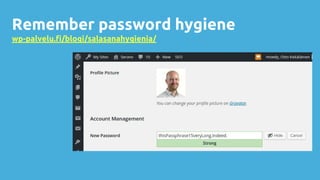
LEAKED PASSWORDS
Remember password hygiene
wp-palvelu.fi/blogi/salasanahygienia/
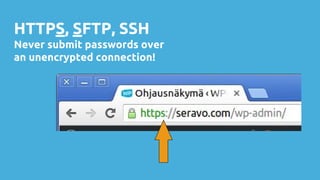
HTTPS, SFTP, SSH
Never submit passwords over
an unencrypted connection!
Enforce HTTPS in WordPress
1. Your server needs to support HTTPS
2. Enforce in wp-config.php with:
define('FORCE_SSL_ADMIN', true);
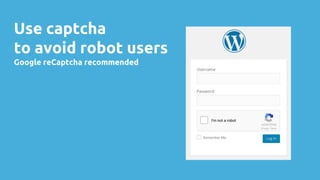
Use captcha
to avoid robot users
Google reCaptcha recommended
SOFTWARE VULNERABILITIES
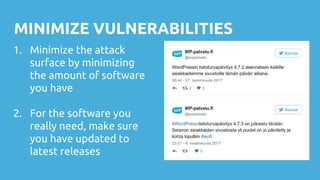
MINIMIZE VULNERABILITIES
1. Minimize the attack
surface by minimizing
the amount of software
you have
2. For the software you
really need, make sure
you have updated to
latest releases
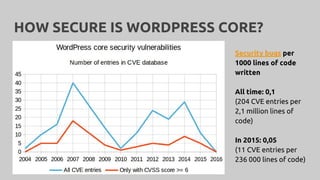
HOW SECURE IS WORDPRESS CORE?
Security bugs per
1000 lines of code
written
All time: 0,1
(204 CVE entries per
2,1 million lines of
code)
In 2015: 0,05
(11 CVE entries per
236 000 lines of code)
WORDPRESS CORE
IS SECURE.
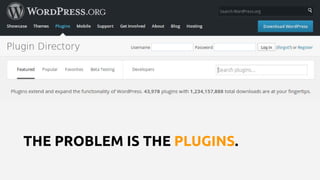
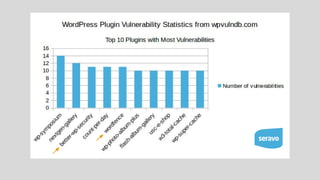
THE PROBLEM IS THE PLUGINS.
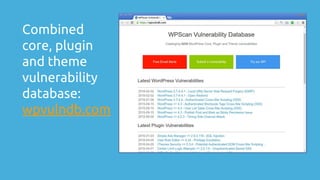
Combined
core, plugin
and theme
vulnerability
database:
wpvulndb.com
Example case: Mossack Fonseca aka Panama papers
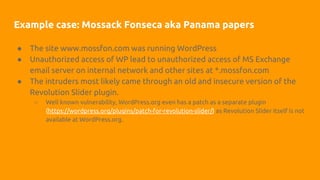
● The site www.mossfon.com was running WordPress
● Unauthorized access of WP lead to unauthorized access of MS Exchange
email server on internal network and other sites at *.mossfon.com
● The intruders most likely came through an old and insecure version of the
Revolution Slider plugin.
○ Well known vulnerability, WordPress.org even has a patch as a separate plugin
(https://wordpress.org/plugins/patch-for-revolution-slider/) as Revolution Slider itself is not
available at WordPress.org.
Example case: Mossack Fonseca aka Panama papers
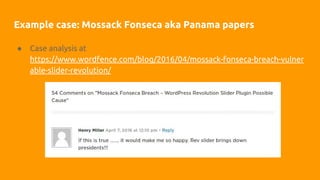
● Case analysis at
https://www.wordfence.com/blog/2016/04/mossack-fonseca-breach-vulner
able-slider-revolution/
WP PLUGIN REVIEW GUIDELINES FOR
CAPITALISTS*
If the logo is red and
name contains revolution,
don’t install it on your system!
* a small dose of parody can’t hurt?
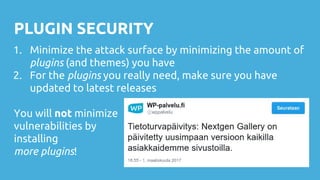
PLUGIN SECURITY
1. Minimize the attack surface by minimizing the amount of
plugins (and themes) you have
2. For the plugins you really need, make sure you have
updated to latest releases
You will not minimize
vulnerabilities by
installing
more plugins!
WordPress is
insecure!
Quickly, install a
security plugin!
NO
DON’T WASTE TIME ON
● removing generator meta or hiding version numbers
● hiding login errors
● changing wp-admin location
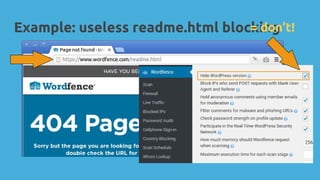
● removing readme.html or other files
Only for WP geeks who love to research the pros and cons.
For normal users WordPress default settings are secure.
FALSE SENSE
OF SECURITY
Feels like a lot has been done
when really very little has.
Example: useless readme.html blocking= don’t!
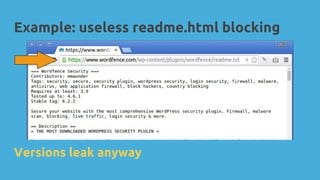
Example: useless readme.html blocking
Versions leak anyway
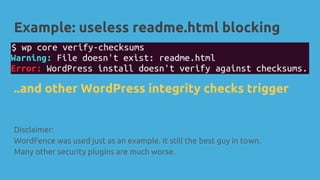
Example: useless readme.html blocking
Disclaimer:
WordFence was used just as an example. It still the best guy in town.
Many other security plugins are much worse.
..and other WordPress integrity checks trigger
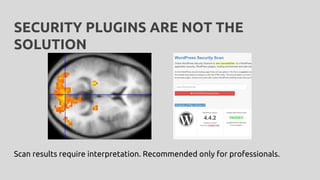
SECURITY PLUGINS ARE NOT THE
SOLUTION
Scan results require interpretation. Recommended only for professionals.
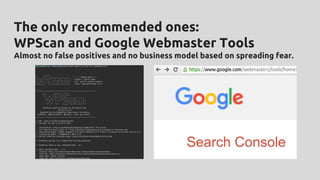
The only recommended ones:
WPScan and Google Webmaster Tools
Almost no false positives and no business model based on spreading fear.
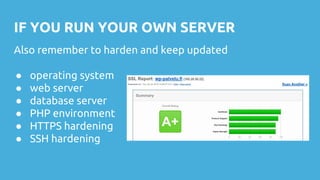
IF YOU RUN YOUR OWN SERVER
Also remember to harden and keep updated
● operating system
● web server
● database server
● PHP environment
● HTTPS hardening
● SSH hardening
INSTALL ONLY FROM TRUSTED SOURCES
Avoid random 3rd party repositories that don’t have any maintenance policy.
PROTECTION AGAINST DDOS
What if the problem is not unauthorized access but the
lack of authorized access?
DENIAL OF SERVICE ATTACKS
Detect, withstand and block
● high performance servers and good caching
● detect repeated offenders and block at network level
○ e.g. failtoban + iptables
● detect and block at http level
○ e.g. Nginx rate limiting
● If you are trying to block at PHP/WordPress level, you’ve already lost
DDOS is a constant race of new techniques of attack and defence. Try to find a
good hosting provider that takes care of DDOS at least on the network level.
BACKUP AND RECOVERY
Because some day,
sooner or later,
everything else fails.
BACKUP GUIDELINES 1/2
Make sure your backup system meets these requirements
● automatic: not dependant on human action
● complete: both files and database
● incremental with a history: at least 30 days
● frequent: daily is good
BACKUP GUIDELINES 2/2
● offsite: in case access to the original site is lost
● pull, not push: original site should not have access to the
backups, otherwise an attacker can delete both the
original site and all backups
Personal favourite: mysqldump + rdiff-backup over SSH
ONCE MORE WITH A FEELING
WORDPRESS SECURITY 101
1. Always follow password hygiene.
2. Use captchas to stall robot users.
3. Use HTTPS (and SFTP and SSH) – never submit passwords in plain
text on any network connection.
4. Remove unnecessary software to reduce attack surface.
5. Keep WordPress plugins and all other software too updated to have
all known vulnerability fixes installed.
6. Install software and update only from trusted sources.
7. Have a good backups system in place.
8. Choose a good service provider and trust them to take care of the
rest.
Extra
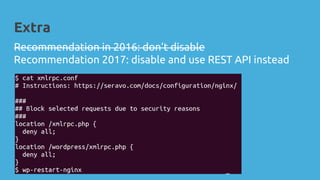
Recommendation in 2016: don’t disable
Recommendation 2017: disable and use REST API instead
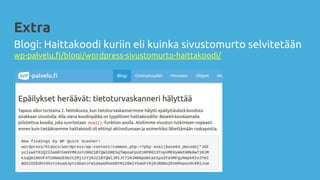
Blogi: Haittakoodi kuriin eli kuinka sivustomurto selvitetään
wp-palvelu.fi/blogi/wordpress-sivustomurto-haittakoodi/
Extra
THANK YOU!
WP-palvelu.fi
@SeravoFi
@ottokekalainen

WordPress security 101 - WP Jyväskylä Meetup 21.3.2017

  • 1.
    WORDPRESS SECURITY 101 what isimportant – and what is not WordPress Jyväskylä Meetup 21.3.2017 Otto Kekäläinen @ottokekalainen
  • 2.
    DEFINITION OF INFORMATION SECURITY 1.Confidentiality 2. Integrity 3. Availability
  • 3.
    You must keepyour WordPress site secure.
  • 4.
    POTENTIAL CONSEQUENCES ● Corruptedorders database: webshop unable to ship anything or resolve payments ● Leaked customer database: angry customers, lawsuit for neglect of privacy laws ● Visitors get redirected to shady sites: lost reputation, marketing budget goes in vain ● Site spreads malware: Google might detect and ban from showing up in search results ● Site sends spam: could become blacklisted and legit email stops working
  • 5.
    “BUT MY SITEIS NOT IMPORTANT!” Your site can be used to mount further attacks! If you have clearly neglected the maintenance of your own site, you could be held partly liable for attacks on other sites.
  • 6.
    What is REALLYimportant in keeping your WordPress site secure?
  • 7.
    AVENUES OF UNAUTHORISED ACCESS: 1.Leaked passwords 2. Software vulnerabilities
  • 8.
  • 9.
  • 10.
    HTTPS, SFTP, SSH Neversubmit passwords over an unencrypted connection!
  • 11.
    Enforce HTTPS inWordPress 1. Your server needs to support HTTPS 2. Enforce in wp-config.php with: define('FORCE_SSL_ADMIN', true);
  • 12.
    Use captcha to avoidrobot users Google reCaptcha recommended
  • 13.
  • 14.
    MINIMIZE VULNERABILITIES 1. Minimizethe attack surface by minimizing the amount of software you have 2. For the software you really need, make sure you have updated to latest releases
  • 15.
    HOW SECURE ISWORDPRESS CORE? Security bugs per 1000 lines of code written All time: 0,1 (204 CVE entries per 2,1 million lines of code) In 2015: 0,05 (11 CVE entries per 236 000 lines of code)
  • 16.
  • 17.
    THE PROBLEM ISTHE PLUGINS.
  • 18.
  • 19.
    Example case: MossackFonseca aka Panama papers ● The site www.mossfon.com was running WordPress ● Unauthorized access of WP lead to unauthorized access of MS Exchange email server on internal network and other sites at *.mossfon.com ● The intruders most likely came through an old and insecure version of the Revolution Slider plugin. ○ Well known vulnerability, WordPress.org even has a patch as a separate plugin (https://wordpress.org/plugins/patch-for-revolution-slider/) as Revolution Slider itself is not available at WordPress.org.
  • 20.
    Example case: MossackFonseca aka Panama papers ● Case analysis at https://www.wordfence.com/blog/2016/04/mossack-fonseca-breach-vulner able-slider-revolution/
  • 21.
    WP PLUGIN REVIEWGUIDELINES FOR CAPITALISTS* If the logo is red and name contains revolution, don’t install it on your system! * a small dose of parody can’t hurt?
  • 22.
    PLUGIN SECURITY 1. Minimizethe attack surface by minimizing the amount of plugins (and themes) you have 2. For the plugins you really need, make sure you have updated to latest releases You will not minimize vulnerabilities by installing more plugins!
  • 23.
  • 24.
  • 26.
    DON’T WASTE TIMEON ● removing generator meta or hiding version numbers ● hiding login errors ● changing wp-admin location ● removing readme.html or other files Only for WP geeks who love to research the pros and cons. For normal users WordPress default settings are secure.
  • 27.
    FALSE SENSE OF SECURITY Feelslike a lot has been done when really very little has.
  • 28.
    Example: useless readme.htmlblocking= don’t!
  • 29.
    Example: useless readme.htmlblocking Versions leak anyway
  • 30.
    Example: useless readme.htmlblocking Disclaimer: WordFence was used just as an example. It still the best guy in town. Many other security plugins are much worse. ..and other WordPress integrity checks trigger
  • 31.
    SECURITY PLUGINS ARENOT THE SOLUTION Scan results require interpretation. Recommended only for professionals.
  • 32.
    The only recommendedones: WPScan and Google Webmaster Tools Almost no false positives and no business model based on spreading fear.
  • 33.
    IF YOU RUNYOUR OWN SERVER Also remember to harden and keep updated ● operating system ● web server ● database server ● PHP environment ● HTTPS hardening ● SSH hardening
  • 34.
    INSTALL ONLY FROMTRUSTED SOURCES Avoid random 3rd party repositories that don’t have any maintenance policy.
  • 35.
    PROTECTION AGAINST DDOS Whatif the problem is not unauthorized access but the lack of authorized access?
  • 36.
    DENIAL OF SERVICEATTACKS Detect, withstand and block ● high performance servers and good caching ● detect repeated offenders and block at network level ○ e.g. failtoban + iptables ● detect and block at http level ○ e.g. Nginx rate limiting ● If you are trying to block at PHP/WordPress level, you’ve already lost DDOS is a constant race of new techniques of attack and defence. Try to find a good hosting provider that takes care of DDOS at least on the network level.
  • 37.
    BACKUP AND RECOVERY Becausesome day, sooner or later, everything else fails.
  • 38.
    BACKUP GUIDELINES 1/2 Makesure your backup system meets these requirements ● automatic: not dependant on human action ● complete: both files and database ● incremental with a history: at least 30 days ● frequent: daily is good
  • 39.
    BACKUP GUIDELINES 2/2 ●offsite: in case access to the original site is lost ● pull, not push: original site should not have access to the backups, otherwise an attacker can delete both the original site and all backups Personal favourite: mysqldump + rdiff-backup over SSH
  • 40.
    ONCE MORE WITHA FEELING
  • 41.
    WORDPRESS SECURITY 101 1.Always follow password hygiene. 2. Use captchas to stall robot users. 3. Use HTTPS (and SFTP and SSH) – never submit passwords in plain text on any network connection. 4. Remove unnecessary software to reduce attack surface. 5. Keep WordPress plugins and all other software too updated to have all known vulnerability fixes installed. 6. Install software and update only from trusted sources. 7. Have a good backups system in place. 8. Choose a good service provider and trust them to take care of the rest.
  • 42.
    Extra Recommendation in 2016:don’t disable Recommendation 2017: disable and use REST API instead
  • 43.
    Blogi: Haittakoodi kuriineli kuinka sivustomurto selvitetään wp-palvelu.fi/blogi/wordpress-sivustomurto-haittakoodi/ Extra
  • 44.