Git best practices
AKA
Let's write history
Git / t/ɡɪ
”A silly,incompetent,stupid,
annoying or childish person.”
http://en.wiktionary.org/wiki/git
"I'm an egotistical bastard,so I
name all my projects after myself.
First Linux,now Git”
Linus Torvalds,PC World.2012-07-14
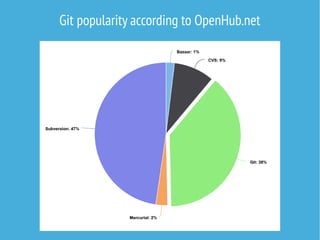
Git popularity according to OpenHub.net
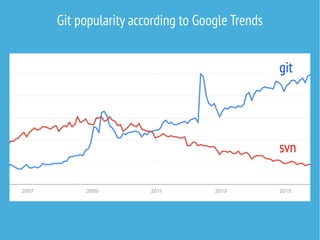
Git popularity according to Google Trends
git
svn
Why do we use git and version control at all?
Because history matters.In societies,and in software
projects too.History teaches where we came from and
where we are going.
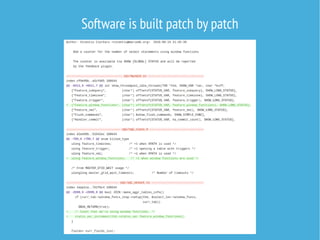
Software is built patch by patch
When a patch is committed to version control,it becomes
a permanent part of history.
Understanding the nature of a patch is required to make
good git commits.
A patch
-attributes the author
-has a title
-may have a message
-describes the lines added,removed and modified
-the change is complete and self standing
-e.g.fixes a defect or extends functionality
You must master reading history before you can master
writing it.If you think you can master writing history
directly,you did not understand the nature of history at
all.
Browsing GitHub,Gitlab,git-web et cetera is good,but
inspecting your local copy directly is best.
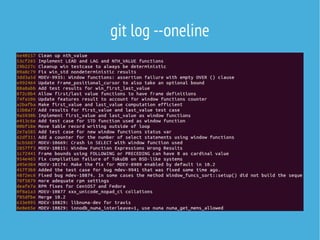
git log --oneline
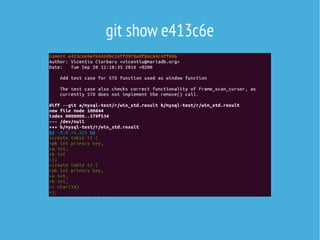
git show e413c6e
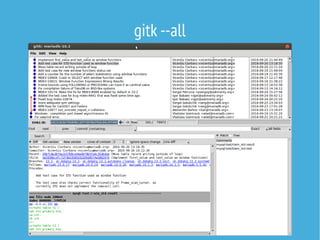
gitk --all
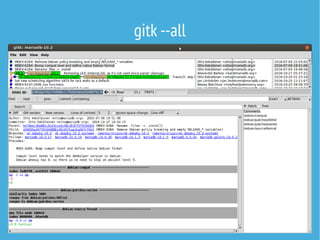
gitk --all
Note the existing style.You need to write in the same
language to be understood.
Some universal rules apply,though.
Universal git commit rules:
-Start the title line with a capital letter just like in email
-Don't end with a dot
-Keep title under 72 characters (the Github limit)
-Title is followed by one empty line,and then comes the
description
-The message part contains full sentences with ending
dots etc
-Use imperative format (Not 'Cleaned'but 'Clean up')
Commit titles must look good in'git log --oneline'
and
complete the sentence'This change will..'
Focus on describing WHY the change was made.
The revision history diff will always show WHAT was
changed.If your code is reviewed,the reviewer will focus
on judging the rationale of the WHY and compare it to
the WHAT to verify that they match.
If it is later discovered that your code had a bug,the
contents will be updated (WHAT) but the purpose of what
it does will remain (WHY).
The best and permanent place for code documentation is
in inline comments.Don't repeat inline comments in the
commit message.
The commit message should focus on why the change
was needed,while the inline comment documents the
current version of the code.
Is the change related to an issue or discussion available
somewhere else?
Include issue numbers and URLs in the commit message.
Use trigger words like "Closes #123"to enable Github to
make automatic links and update issues statuses.
Work-in-progress commits
Few people write the correct code in one go.Thus writing
the correct git commit right away might not be possible.
While developing,title the commits WIP,WIP2,WIP3 etc.
When you are done,rebase and squash the changes into
the final commits that constitute logical steps.
git rebase -i master
Other important tools to write history:
git cherry-pick e413c6e
git citool
git citool --amend
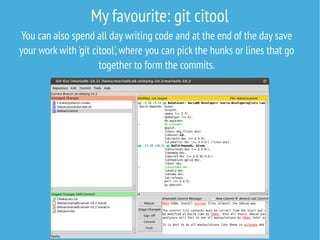
My favourite: git citool
You can also spend all day writing code and at the end of the day save
your work with 'git citool',where you can pick the hunks or lines that go
together to form the commits.
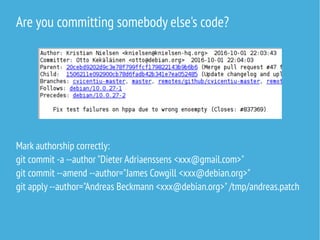
Are you committing somebody else's code?
Mark authorship correctly:
git commit -a --author "Dieter Adriaenssens <xxx@gmail.com>"
git commit --amend --author="James Cowgill <xxx@debian.org>"
git apply --author="Andreas Beckmann <xxx@debian.org>"/tmp/andreas.patch
Branches
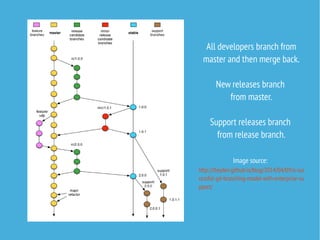
A series of commits.The purpose of branches is to allow
different versions of the software to exists in parallel.
Typically there is a development master branch and a
relase branch v1,which can evolve in separate
directions.
The master branch may become release v2 while the v1
branch may become release v1.1.
All developers branch from
master and then merge back.
New releases branch
from master.
Support releases branch
from release branch.
Image source:
http://tleyden.github.io/blog/2014/04/09/a-suc
cessful-git-branching-model-with-enterprise-su
pport/
The holy master principle:
Never break the master branch!
All developers working to create new features or fix bugs
use the current master branch as the base of their work.
If the master is already broken,it will be difficult to fix
the bug the developer intended to spend time fixing,or a
new feature cannot be made to be functional if the
starting point wasn't functional either.
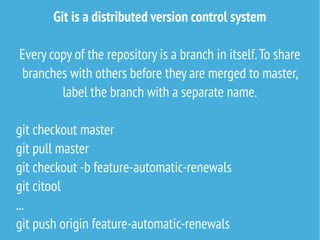
Git is a distributed version control system
Every copy of the repository is a branch in itself.To share
branches with others before they are merged to master,
label the branch with a separate name.
git checkout master
git pull master
git checkout -b feature-automatic-renewals
git citool
...
git push origin feature-automatic-renewals
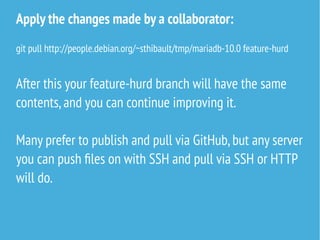
Apply the changes made by a collaborator:
git pull http://people.debian.org/~sthibault/tmp/mariadb-10.0 feature-hurd
After this your feature-hurd branch will have the same
contents,and you can continue improving it.
Many prefer to publish and pull via GitHub,but any server
you can push files on with SSH and pull via SSH or HTTP
will do.
The holy QualityAssurance principle:
all commits on master should go via review
GitHub "Pull Requests"facilitate this.
Gerrit and Gerrithub for more formal teams.
Review principles:
-Give feedback,even nitty gritty,to perfection the code
(and documentation!).
-Let the submitter fix it themselves,thus keeping
authorship and commitment to maintaining the code.
-Reviewing as an opportunity to learn.Both for the
reviewee and reviewer!
Review stalls (often,unfortunately):
-Reviewer does not agree on the motivation to the
change
-Reviewer does not understand the contents of the
changes
-Poor documentation,unlogical commits
-Lack of QA,no testcases,no external verification
-Unfit change for the upcoming release,lack of time,
wrong reviewer
The holy history principle: never force push on master
Except if you are really quick and sure that nobody made
a git pull in between.
If the rule is broken,developers and systems will have
diverged versions of master,and everybody will need to
do manual merges or dangerous force pulls.
Remember: good outcomes require a lot of work
Don't feel frustrated.The devil is often in the details and
the nature of high quality code and reliable systems
require diligent review. All big stable systems grew our
of very small stable systems.
Do not sacrifice stability for development velocity,
otherwise it will just collect debt and require twice as
much work later and grind development velocity to a full
stop.
The hotfix principle
If you have blinking lights and sirens yelling,
you can and should do whatever you need to.
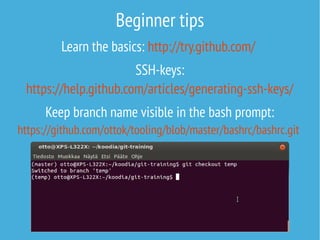
Beginner tips
Learn the basics: http://try.github.com/
SSH-keys:
https://help.github.com/articles/generating-ssh-keys/
Keep branch name visible in the bash prompt:
https://github.com/ottok/tooling/blob/master/bashrc/bashrc.git
Contact Seravo if you need experts in
Linux,Git or other
open source software
Open seravo.fi
See our blog for in-depth tips

Git best practices 2016

  • 1.
  • 2.
    Git / t/ɡɪ ”Asilly,incompetent,stupid, annoying or childish person.” http://en.wiktionary.org/wiki/git
  • 3.
    "I'm an egotisticalbastard,so I name all my projects after myself. First Linux,now Git” Linus Torvalds,PC World.2012-07-14
  • 4.
  • 5.
    Git popularity accordingto Google Trends git svn
  • 6.
    Why do weuse git and version control at all? Because history matters.In societies,and in software projects too.History teaches where we came from and where we are going.
  • 7.
    Software is builtpatch by patch
  • 8.
    When a patchis committed to version control,it becomes a permanent part of history. Understanding the nature of a patch is required to make good git commits.
  • 9.
    A patch -attributes theauthor -has a title -may have a message -describes the lines added,removed and modified -the change is complete and self standing -e.g.fixes a defect or extends functionality
  • 10.
    You must masterreading history before you can master writing it.If you think you can master writing history directly,you did not understand the nature of history at all.
  • 11.
    Browsing GitHub,Gitlab,git-web etcetera is good,but inspecting your local copy directly is best.
  • 12.
  • 13.
  • 14.
  • 15.
  • 16.
    Note the existingstyle.You need to write in the same language to be understood. Some universal rules apply,though.
  • 17.
    Universal git commitrules: -Start the title line with a capital letter just like in email -Don't end with a dot -Keep title under 72 characters (the Github limit) -Title is followed by one empty line,and then comes the description -The message part contains full sentences with ending dots etc -Use imperative format (Not 'Cleaned'but 'Clean up')
  • 18.
    Commit titles mustlook good in'git log --oneline' and complete the sentence'This change will..'
  • 19.
    Focus on describingWHY the change was made. The revision history diff will always show WHAT was changed.If your code is reviewed,the reviewer will focus on judging the rationale of the WHY and compare it to the WHAT to verify that they match. If it is later discovered that your code had a bug,the contents will be updated (WHAT) but the purpose of what it does will remain (WHY).
  • 20.
    The best andpermanent place for code documentation is in inline comments.Don't repeat inline comments in the commit message. The commit message should focus on why the change was needed,while the inline comment documents the current version of the code.
  • 21.
    Is the changerelated to an issue or discussion available somewhere else? Include issue numbers and URLs in the commit message. Use trigger words like "Closes #123"to enable Github to make automatic links and update issues statuses.
  • 22.
    Work-in-progress commits Few peoplewrite the correct code in one go.Thus writing the correct git commit right away might not be possible. While developing,title the commits WIP,WIP2,WIP3 etc. When you are done,rebase and squash the changes into the final commits that constitute logical steps. git rebase -i master
  • 23.
    Other important toolsto write history: git cherry-pick e413c6e git citool git citool --amend
  • 24.
    My favourite: gitcitool You can also spend all day writing code and at the end of the day save your work with 'git citool',where you can pick the hunks or lines that go together to form the commits.
  • 25.
    Are you committingsomebody else's code? Mark authorship correctly: git commit -a --author "Dieter Adriaenssens <xxx@gmail.com>" git commit --amend --author="James Cowgill <xxx@debian.org>" git apply --author="Andreas Beckmann <xxx@debian.org>"/tmp/andreas.patch
  • 26.
    Branches A series ofcommits.The purpose of branches is to allow different versions of the software to exists in parallel. Typically there is a development master branch and a relase branch v1,which can evolve in separate directions. The master branch may become release v2 while the v1 branch may become release v1.1.
  • 27.
    All developers branchfrom master and then merge back. New releases branch from master. Support releases branch from release branch. Image source: http://tleyden.github.io/blog/2014/04/09/a-suc cessful-git-branching-model-with-enterprise-su pport/
  • 28.
    The holy masterprinciple: Never break the master branch! All developers working to create new features or fix bugs use the current master branch as the base of their work. If the master is already broken,it will be difficult to fix the bug the developer intended to spend time fixing,or a new feature cannot be made to be functional if the starting point wasn't functional either.
  • 29.
    Git is adistributed version control system Every copy of the repository is a branch in itself.To share branches with others before they are merged to master, label the branch with a separate name. git checkout master git pull master git checkout -b feature-automatic-renewals git citool ... git push origin feature-automatic-renewals
  • 30.
    Apply the changesmade by a collaborator: git pull http://people.debian.org/~sthibault/tmp/mariadb-10.0 feature-hurd After this your feature-hurd branch will have the same contents,and you can continue improving it. Many prefer to publish and pull via GitHub,but any server you can push files on with SSH and pull via SSH or HTTP will do.
  • 31.
    The holy QualityAssuranceprinciple: all commits on master should go via review GitHub "Pull Requests"facilitate this. Gerrit and Gerrithub for more formal teams.
  • 32.
    Review principles: -Give feedback,evennitty gritty,to perfection the code (and documentation!). -Let the submitter fix it themselves,thus keeping authorship and commitment to maintaining the code. -Reviewing as an opportunity to learn.Both for the reviewee and reviewer!
  • 33.
    Review stalls (often,unfortunately): -Reviewerdoes not agree on the motivation to the change -Reviewer does not understand the contents of the changes -Poor documentation,unlogical commits -Lack of QA,no testcases,no external verification -Unfit change for the upcoming release,lack of time, wrong reviewer
  • 34.
    The holy historyprinciple: never force push on master Except if you are really quick and sure that nobody made a git pull in between. If the rule is broken,developers and systems will have diverged versions of master,and everybody will need to do manual merges or dangerous force pulls.
  • 35.
    Remember: good outcomesrequire a lot of work Don't feel frustrated.The devil is often in the details and the nature of high quality code and reliable systems require diligent review. All big stable systems grew our of very small stable systems. Do not sacrifice stability for development velocity, otherwise it will just collect debt and require twice as much work later and grind development velocity to a full stop.
  • 36.
    The hotfix principle Ifyou have blinking lights and sirens yelling, you can and should do whatever you need to.
  • 37.
    Beginner tips Learn thebasics: http://try.github.com/ SSH-keys: https://help.github.com/articles/generating-ssh-keys/ Keep branch name visible in the bash prompt: https://github.com/ottok/tooling/blob/master/bashrc/bashrc.git
  • 38.
    Contact Seravo ifyou need experts in Linux,Git or other open source software Open seravo.fi See our blog for in-depth tips