EXTENDED EDITION
1013 THINGS
EVERY DEVELOPER
SHOULD KNOW ABOUT
THEIR DATABASE TO
RUN WORDPRESS
OPTIMALLY
WordCamp Barcelona 2018
Otto Kekäläinen
Seravo.com
@ottokekalainen
#wcbcn
● Linux and open source
advocate
● Written WP themes and
plugins, contributed to
WordPress Core, MySQL,
MariaDB…
● CEO, sysadmin and developer
at Seravo.com – WordPress
hosting and upkeep
Otto Kekäläinen
Enterprise grade
hosting and upkeep
for WordPress
The database is involved in
both!
○ contains all your valuable data
○ often the bottleneck of
performance
Common Issues in WordPress:
Security & Speed
DATABASE
THE SINGLE MOST
IMPORTANT PART
OF YOUR
WORDPRESS
INFRASTRUCTURE
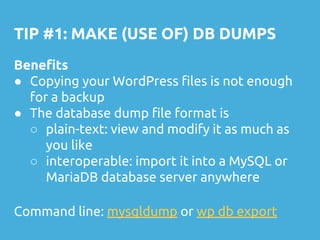
TIP #1: MAKE (USE OF) DB DUMPS
Benefits
● Copying your WordPress files is not enough
for a backup
● The database dump file format is
○ plain-text: view and modify it as much as
you like
○ interoperable: import it into a MySQL or
MariaDB database server anywhere
Command line: mysqldump or wp db export
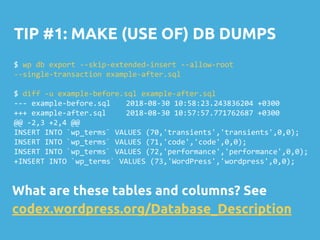
TIP #1: MAKE (USE OF) DB DUMPS
$ wp db export --skip-extended-insert --allow-root
--single-transaction example-after.sql
$ diff -u example-before.sql example-after.sql
--- example-before.sql 2018-08-30 10:58:23.243836204 +0300
+++ example-after.sql 2018-08-30 10:57:57.771762687 +0300
@@ -2,3 +2,4 @@
INSERT INTO `wp_terms` VALUES (70,'transients','transients',0,0);
INSERT INTO `wp_terms` VALUES (71,'code','code',0,0);
INSERT INTO `wp_terms` VALUES (72,'performance','performance',0,0);
+INSERT INTO `wp_terms` VALUES (73,'WordPress','wordpress',0,0);
What are these tables and columns? See
codex.wordpress.org/Database_Description
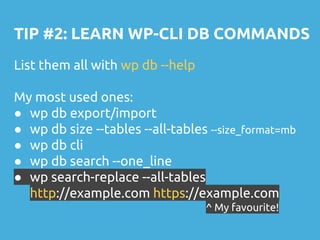
TIP #2: LEARN WP-CLI DB COMMANDS
List them all with wp db --help
My most used ones:
● wp db export/import
● wp db size --tables --all-tables --size_format=mb
● wp db cli
● wp db search --one_line
● wp search-replace --all-tables
http://example.com https://example.com
^ My favourite!
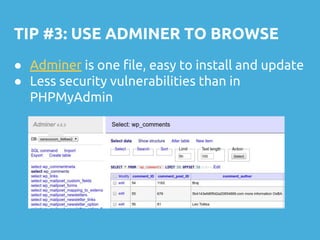
TIP #3: USE ADMINER TO BROWSE
● Adminer is one file, easy to install and update
● Less security vulnerabilities than in
PHPMyAdmin
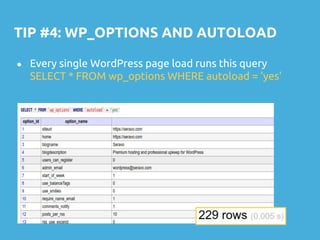
TIP #4: WP_OPTIONS AND AUTOLOAD
● Every single WordPress page load runs this query
SELECT * FROM wp_options WHERE autoload = 'yes'
TIP #4: WP_OPTIONS AND AUTOLOAD
● If wp_options table is larger than 1 MB, try to clean it up
● Find rows with the largest amount of data in the
option_value field:
○ SELECT option_name, length(option_value) FROM
wp_options WHERE autoload='yes' ORDER BY
length(option_value) DESC LIMIT 30
● File bugs against stupid plugins polluting your options
table
● If cannot be cleaned, add an index on autoload
○ CREATE INDEX autoloadindex ON
wp_options(autoload, option_name)
TIP #5: WP_POSTMETA BLOAT
● Any site using custom post types or WooCommerce is likely to
have a big wp_postmeta table. While every post adds just one
new row (and many fields) to the database and keeping the
number of column names constant, the use of
add_post_meta() calls will bloat the database with tens or
hundreds of rows per post where each row only contains two
fields: name and value.
● Find the meta_key naming patterns with most amount of
rows:
○ SELECT substring(meta_key, 1, 20) AS key_start,
count(*) AS count FROM wp_postmeta
GROUP BY key_start ORDER BY count
DESC LIMIT 30
Unfortunately database bloat
and stupid use of database is
common in plugins.
We need to do more to raise
awareness about database
best practices!
TIP #6: LEARN SQL
● It is not enough that you know PHP, learn SQL as
well.
● The database has 20 years of engineering on how to
fetch a small set of data from a huge set of data as
quickly as possible. Don’t try to reinvent that in PHP.
● Don’t put everything in wp_postmeta. Don’t be
afraid of creating your own custom tables that have
the correct columns, relations and indexes already
defined.
● Learn what ‘index’ means and why you don’t want to
be causing ‘full table scans’ in the database.
TIP #7: BUT DON’T USE SQL DIRECTLY
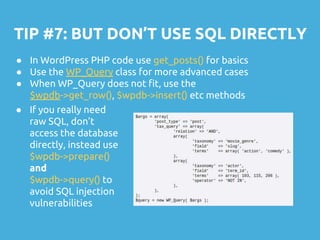
● In WordPress PHP code use get_posts() for basics
● Use the WP_Query class for more advanced cases
● When WP_Query does not fit, use the
$wpdb->get_row(), $wpdb->insert() etc methods
● If you really need
raw SQL, don’t
access the database
directly, instead use
$wpdb->prepare()
and
$wpdb->query() to
avoid SQL injection
vulnerabilities
TIP #8: CONFIGURE DATABASE SERVER
1. MariaDB preferred over Oracle MySQL
2. Use a recent version (MariaDB 10.1+)
3. Storage engine: InnoDB (not MyISAM)
4. Character set: UTFMB4 (for emojis )
5. Collation: your local sorting order A-Ö
6. ..and optimize all the other settings
Or hire a database administrator, or use a
WordPress hosting company that does this for you.
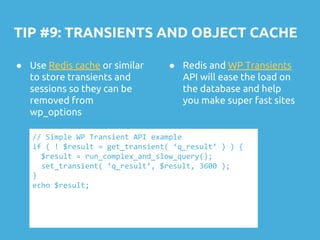
TIP #9: TRANSIENTS AND OBJECT CACHE
● Use Redis cache or similar
to store transients and
sessions so they can be
removed from
wp_options
// Simple WP Transient API example
if ( ! $result = get_transient( ‘q_result’ ) ) {
$result = run_complex_and_slow_query();
set_transient( ‘q_result’, $result, 3600 );
}
echo $result;
● Redis and WP Transients
API will ease the load on
the database and help
you make super fast sites
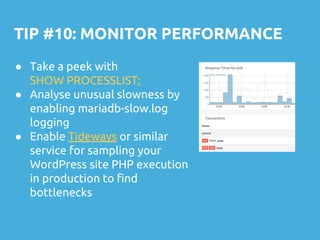
TIP #10: MONITOR PERFORMANCE
● Take a peek with
SHOW PROCESSLIST;
● Analyse unusual slowness by
enabling mariadb-slow.log
logging
● Enable Tideways or similar
service for sampling your
WordPress site PHP execution
in production to find
bottlenecks
AND ONE EXTRA TIP:
NEVER PUSH YOUR DEV
DATABASE INTO PRODUCTION
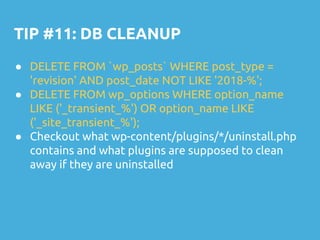
TIP #11: DB CLEANUP
● DELETE FROM `wp_posts` WHERE post_type =
'revision' AND post_date NOT LIKE '2018-%';
● DELETE FROM wp_options WHERE option_name
LIKE ('_transient_%') OR option_name LIKE
('_site_transient_%');
● Checkout what wp-content/plugins/*/uninstall.php
contains and what plugins are supposed to clean
away if they are uninstalled
TIP #12: EXPLAIN, PLEASE
● You can append ‘EXPLAIN’ to any query and the
optimizer will tell how it is running the query
● EXPLAIN SELECT * FROM wp_options WHERE
autoload = 'yes';
MariaDB [wp_palvelu_06a4ad]> explain SELECT * FROM wp_options WHERE autoload = 'yes';
+------+-------------+------------+------+---------------+------+---------+------+------+-------------+
| id | select_type | table | type | possible_keys | key | key_len | ref | rows | Extra |
+------+-------------+------------+------+---------------+------+---------+------+------+-------------+
| 1 | SIMPLE | wp_options | ALL | NULL | NULL | NULL | NULL | 415 | Using where |
+------+-------------+------------+------+---------------+------+---------+------+------+-------------+
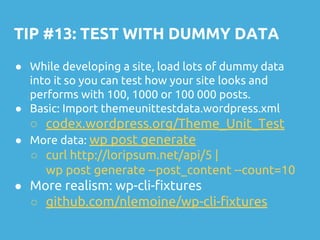
TIP #13: TEST WITH DUMMY DATA
● While developing a site, load lots of dummy data
into it so you can test how your site looks and
performs with 100, 1000 or 100 000 posts.
● Basic: Import themeunittestdata.wordpress.xml
○ codex.wordpress.org/Theme_Unit_Test
● More data: wp post generate
○ curl http://loripsum.net/api/5 |
wp post generate --post_content --count=10
● More realism: wp-cli-fixtures
○ github.com/nlemoine/wp-cli-fixtures
MUCHAS
GRACIAS!
SERAVO.COM
facebook.com/Seravo
Twitter: @Seravo
@ottokekalainen

10 things every developer should know about their database to run word press optimally

  • 1.
    EXTENDED EDITION 1013 THINGS EVERYDEVELOPER SHOULD KNOW ABOUT THEIR DATABASE TO RUN WORDPRESS OPTIMALLY WordCamp Barcelona 2018 Otto Kekäläinen Seravo.com @ottokekalainen #wcbcn
  • 2.
    ● Linux andopen source advocate ● Written WP themes and plugins, contributed to WordPress Core, MySQL, MariaDB… ● CEO, sysadmin and developer at Seravo.com – WordPress hosting and upkeep Otto Kekäläinen
  • 3.
    Enterprise grade hosting andupkeep for WordPress
  • 4.
    The database isinvolved in both! ○ contains all your valuable data ○ often the bottleneck of performance Common Issues in WordPress: Security & Speed
  • 5.
    DATABASE THE SINGLE MOST IMPORTANTPART OF YOUR WORDPRESS INFRASTRUCTURE
  • 6.
    TIP #1: MAKE(USE OF) DB DUMPS Benefits ● Copying your WordPress files is not enough for a backup ● The database dump file format is ○ plain-text: view and modify it as much as you like ○ interoperable: import it into a MySQL or MariaDB database server anywhere Command line: mysqldump or wp db export
  • 7.
    TIP #1: MAKE(USE OF) DB DUMPS $ wp db export --skip-extended-insert --allow-root --single-transaction example-after.sql $ diff -u example-before.sql example-after.sql --- example-before.sql 2018-08-30 10:58:23.243836204 +0300 +++ example-after.sql 2018-08-30 10:57:57.771762687 +0300 @@ -2,3 +2,4 @@ INSERT INTO `wp_terms` VALUES (70,'transients','transients',0,0); INSERT INTO `wp_terms` VALUES (71,'code','code',0,0); INSERT INTO `wp_terms` VALUES (72,'performance','performance',0,0); +INSERT INTO `wp_terms` VALUES (73,'WordPress','wordpress',0,0); What are these tables and columns? See codex.wordpress.org/Database_Description
  • 8.
    TIP #2: LEARNWP-CLI DB COMMANDS List them all with wp db --help My most used ones: ● wp db export/import ● wp db size --tables --all-tables --size_format=mb ● wp db cli ● wp db search --one_line ● wp search-replace --all-tables http://example.com https://example.com ^ My favourite!
  • 9.
    TIP #3: USEADMINER TO BROWSE ● Adminer is one file, easy to install and update ● Less security vulnerabilities than in PHPMyAdmin
  • 10.
    TIP #4: WP_OPTIONSAND AUTOLOAD ● Every single WordPress page load runs this query SELECT * FROM wp_options WHERE autoload = 'yes'
  • 11.
    TIP #4: WP_OPTIONSAND AUTOLOAD ● If wp_options table is larger than 1 MB, try to clean it up ● Find rows with the largest amount of data in the option_value field: ○ SELECT option_name, length(option_value) FROM wp_options WHERE autoload='yes' ORDER BY length(option_value) DESC LIMIT 30 ● File bugs against stupid plugins polluting your options table ● If cannot be cleaned, add an index on autoload ○ CREATE INDEX autoloadindex ON wp_options(autoload, option_name)
  • 12.
    TIP #5: WP_POSTMETABLOAT ● Any site using custom post types or WooCommerce is likely to have a big wp_postmeta table. While every post adds just one new row (and many fields) to the database and keeping the number of column names constant, the use of add_post_meta() calls will bloat the database with tens or hundreds of rows per post where each row only contains two fields: name and value. ● Find the meta_key naming patterns with most amount of rows: ○ SELECT substring(meta_key, 1, 20) AS key_start, count(*) AS count FROM wp_postmeta GROUP BY key_start ORDER BY count DESC LIMIT 30
  • 13.
    Unfortunately database bloat andstupid use of database is common in plugins. We need to do more to raise awareness about database best practices!
  • 14.
    TIP #6: LEARNSQL ● It is not enough that you know PHP, learn SQL as well. ● The database has 20 years of engineering on how to fetch a small set of data from a huge set of data as quickly as possible. Don’t try to reinvent that in PHP. ● Don’t put everything in wp_postmeta. Don’t be afraid of creating your own custom tables that have the correct columns, relations and indexes already defined. ● Learn what ‘index’ means and why you don’t want to be causing ‘full table scans’ in the database.
  • 15.
    TIP #7: BUTDON’T USE SQL DIRECTLY ● In WordPress PHP code use get_posts() for basics ● Use the WP_Query class for more advanced cases ● When WP_Query does not fit, use the $wpdb->get_row(), $wpdb->insert() etc methods ● If you really need raw SQL, don’t access the database directly, instead use $wpdb->prepare() and $wpdb->query() to avoid SQL injection vulnerabilities
  • 16.
    TIP #8: CONFIGUREDATABASE SERVER 1. MariaDB preferred over Oracle MySQL 2. Use a recent version (MariaDB 10.1+) 3. Storage engine: InnoDB (not MyISAM) 4. Character set: UTFMB4 (for emojis ) 5. Collation: your local sorting order A-Ö 6. ..and optimize all the other settings Or hire a database administrator, or use a WordPress hosting company that does this for you.
  • 17.
    TIP #9: TRANSIENTSAND OBJECT CACHE ● Use Redis cache or similar to store transients and sessions so they can be removed from wp_options // Simple WP Transient API example if ( ! $result = get_transient( ‘q_result’ ) ) { $result = run_complex_and_slow_query(); set_transient( ‘q_result’, $result, 3600 ); } echo $result; ● Redis and WP Transients API will ease the load on the database and help you make super fast sites
  • 18.
    TIP #10: MONITORPERFORMANCE ● Take a peek with SHOW PROCESSLIST; ● Analyse unusual slowness by enabling mariadb-slow.log logging ● Enable Tideways or similar service for sampling your WordPress site PHP execution in production to find bottlenecks
  • 19.
    AND ONE EXTRATIP: NEVER PUSH YOUR DEV DATABASE INTO PRODUCTION
  • 20.
    TIP #11: DBCLEANUP ● DELETE FROM `wp_posts` WHERE post_type = 'revision' AND post_date NOT LIKE '2018-%'; ● DELETE FROM wp_options WHERE option_name LIKE ('_transient_%') OR option_name LIKE ('_site_transient_%'); ● Checkout what wp-content/plugins/*/uninstall.php contains and what plugins are supposed to clean away if they are uninstalled
  • 21.
    TIP #12: EXPLAIN,PLEASE ● You can append ‘EXPLAIN’ to any query and the optimizer will tell how it is running the query ● EXPLAIN SELECT * FROM wp_options WHERE autoload = 'yes'; MariaDB [wp_palvelu_06a4ad]> explain SELECT * FROM wp_options WHERE autoload = 'yes'; +------+-------------+------------+------+---------------+------+---------+------+------+-------------+ | id | select_type | table | type | possible_keys | key | key_len | ref | rows | Extra | +------+-------------+------------+------+---------------+------+---------+------+------+-------------+ | 1 | SIMPLE | wp_options | ALL | NULL | NULL | NULL | NULL | 415 | Using where | +------+-------------+------------+------+---------------+------+---------+------+------+-------------+
  • 22.
    TIP #13: TESTWITH DUMMY DATA ● While developing a site, load lots of dummy data into it so you can test how your site looks and performs with 100, 1000 or 100 000 posts. ● Basic: Import themeunittestdata.wordpress.xml ○ codex.wordpress.org/Theme_Unit_Test ● More data: wp post generate ○ curl http://loripsum.net/api/5 | wp post generate --post_content --count=10 ● More realism: wp-cli-fixtures ○ github.com/nlemoine/wp-cli-fixtures
  • 23.