


Introduction to PHP
2
PHP Introduction
 PHP is a server-side scripting language
 PHP scripts are executed on the server
 PHP supports many databases (MySQL, Informix, Oracle, Sybase, Solid,
PostgreSQL, Generic ODBC, etc.)
 PHP is open source software
 PHP is free to download and use
 PHP runs on different platforms (Windows, Linux, Unix, etc.)
 PHP is compatible with almost all servers used today (Apache, IIS, etc.)
3
PHP Scripts
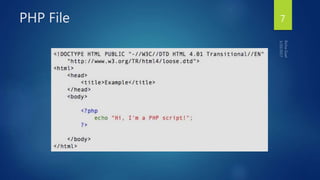
 Separated in files with the <?php ... ?> tag
 PHP commands can make up an entire file, or can be contained in html --
this is a choice
 Program lines end in ";" or you get an error
 Server recognizes embedded script and executes
 Result is passed to browser, source isn't visible
 PHP can be part of HTML file or HTML code can be part of PHP file. Both
works.
4
<P>
<?php $myvar = "Hello World!";
echo $myvar;
?>
</P>
PHP Scripts
 Basic application
 Scripting delimiters
 <? php ?>
 Must enclose all script code
 Variables preceded by $ symbol
 Case-sensitive
 End statements with semicolon
 Comments
 // for single line
 /* */ for multiline
 Filenames end with .php by convention
5
Parsing
 We've talk about how the browser can read a text file and
process it, that's a basic parsing method
 Parsing involves acting on relevant portions of a file and
ignoring others
 Browsers parse web pages as they load
 Web servers with server side technologies like php parse
web pages as they are being passed out to the browser
 Parsing does represent work, so there is a cost
6
PHP File 7
PHP Introduction
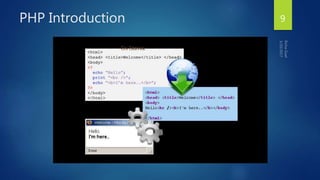
PHP code is executed on the server, generating HTML which is then sent to
the client. The client would receive the results of running that script, but would
not know what the underlying code was.
A visual, if you please...
8
PHP Introduction 9
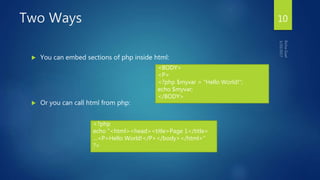
Two Ways
 You can embed sections of php inside html:
 Or you can call html from php:
<BODY>
<P>
<?php $myvar = "Hello World!";
echo $myvar;
</BODY>
<?php
echo "<html><head><title>Page 1</title>
…<P>Hello World!</P></body></html>”
?>
10
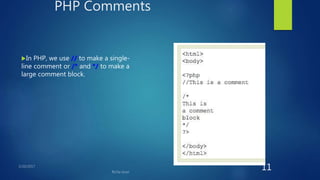
PHP Comments
In PHP, we use // to make a single-
line comment or /* and */ to make a
large comment block.
11
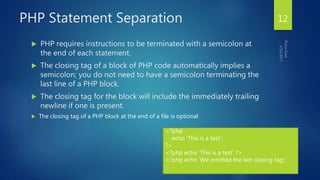
PHP Statement Separation
 PHP requires instructions to be terminated with a semicolon at
the end of each statement.
 The closing tag of a block of PHP code automatically implies a
semicolon; you do not need to have a semicolon terminating the
last line of a PHP block.
 The closing tag for the block will include the immediately trailing
newline if one is present.
 The closing tag of a PHP block at the end of a file is optional
12
<?php
echo 'This is a test';
?>
<?php echo 'This is a test' ?>
<?php echo 'We omitted the last closing tag';
PHP Statement Separation
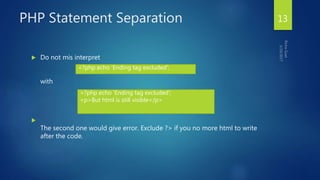
 Do not mis interpret
with

The second one would give error. Exclude ?> if you no more html to write
after the code.
13
<?php echo 'Ending tag excluded';
<p>But html is still visible</p>
<?php echo 'Ending tag excluded';
PHP Variables
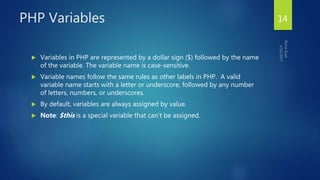
 Variables in PHP are represented by a dollar sign ($) followed by the name
of the variable. The variable name is case-sensitive.
 Variable names follow the same rules as other labels in PHP. A valid
variable name starts with a letter or underscore, followed by any number
of letters, numbers, or underscores.
 By default, variables are always assigned by value.
 Note: $this is a special variable that can't be assigned.
14
PHP Variables
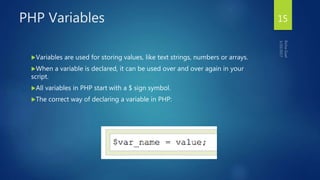
Variables are used for storing values, like text strings, numbers or arrays.
When a variable is declared, it can be used over and over again in your
script.
All variables in PHP start with a $ sign symbol.
The correct way of declaring a variable in PHP:
15
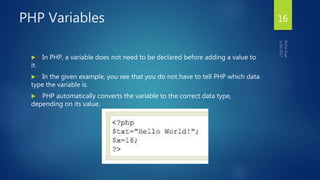
PHP Variables
> In PHP, a variable does not need to be declared before adding a value to
it.
> In the given example, you see that you do not have to tell PHP which data
type the variable is.
> PHP automatically converts the variable to the correct data type,
depending on its value.
16
PHP Variables
> A variable name must start with a letter or an underscore "_" -- not a
number
> A variable name can only contain alpha-numeric characters, underscores
(a-z, A-Z, 0-9, and _ )
> A variable name should not contain spaces. If a variable name is more
than one word, it should be separated with an underscore ($my_string) or
with capitalization ($myString)
17
PHP Concatenation
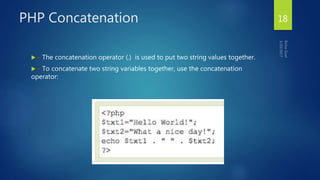
> The concatenation operator (.) is used to put two string values together.
> To concatenate two string variables together, use the concatenation
operator:
18
PHP Variables
 Variables
 Can have different types at different times
 Variable names inside strings replaced by their value
 Type conversions
 settype function
 Type casting
 Concatenation operator
 . (period)
 Combine strings
PHP Strings
 A string is series of characters.
 In PHP, a character is the same as a byte, which is
exactly 256 different characters possible.
<?php
$s=“I am a string”;
$s2=‘I am also a string”;
print $s.”---”.$s2;
?>
20
PHP Strings
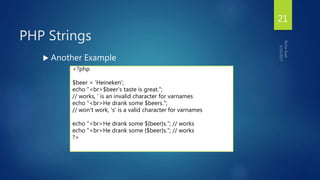
 Another Example
<?php
$beer = 'Heineken';
echo "<br>$beer's taste is great.";
// works, ‘ is an invalid character for varnames
echo "<br>He drank some $beers.";
// won't work, 's' is a valid character for varnames
echo "<br>He drank some ${beer}s."; // works
echo "<br>He drank some {$beer}s."; // works
?>
21
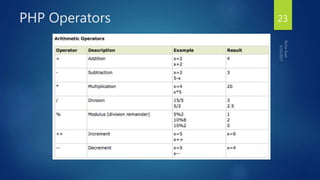
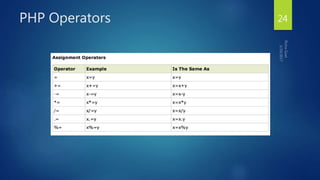
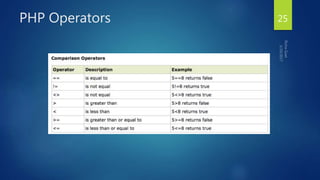
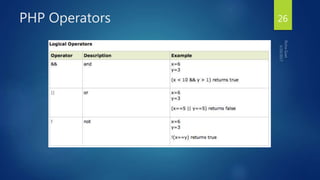
PHP Operators
Operators are used to operate on values. There are four classifications of
operators:
 Arithmetic
 Assignment
 Comparison
 Logical
22
PHP Operators 23
PHP Operators 24
PHP Operators 25
PHP Operators 26
Exercise 27
 Create a sample calculator with the help of arithmetic operators using PHP
and HTML.
PHP Conditional Statements
 Very often when you write code, you want to perform different actions for
different decisions.
 You can use conditional statements in your code to do this.
In PHP we have the following conditional statements...
28
PHP Conditional Statements
 if statement - use this statement to execute some code only if a specified
condition is true
 if...else statement - use this statement to execute some code if a condition
is true and another code if the condition is false
 if...elseif....else statement - use this statement to select one of several
blocks of code to be executed
 switch statement - use this statement to select one of many blocks of code
to be executed
29
PHP Conditional Statements
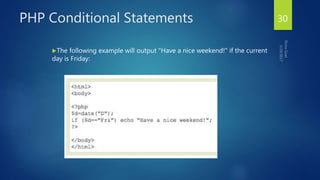
The following example will output "Have a nice weekend!" if the current
day is Friday:
30
PHP Conditional Statements
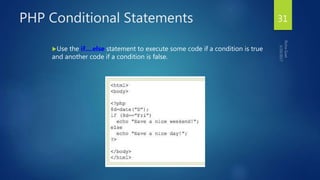
Use the if....else statement to execute some code if a condition is true
and another code if a condition is false.
31
PHP Conditional Statements
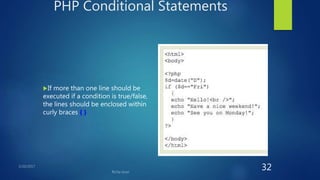
If more than one line should be
executed if a condition is true/false,
the lines should be enclosed within
curly braces { }
32
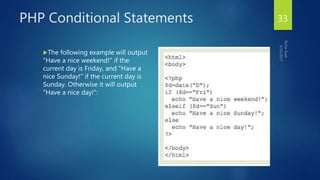
PHP Conditional Statements
The following example will output
"Have a nice weekend!" if the
current day is Friday, and "Have a
nice Sunday!" if the current day is
Sunday. Otherwise it will output
"Have a nice day!":
33
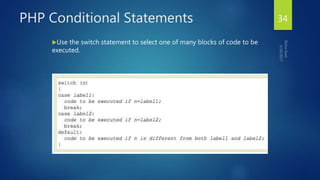
PHP Conditional Statements
Use the switch statement to select one of many blocks of code to be
executed.
34
PHP Conditional Statements
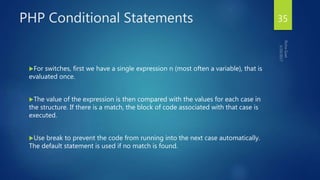
For switches, first we have a single expression n (most often a variable), that is
evaluated once.
The value of the expression is then compared with the values for each case in
the structure. If there is a match, the block of code associated with that case is
executed.
Use break to prevent the code from running into the next case automatically.
The default statement is used if no match is found.
35
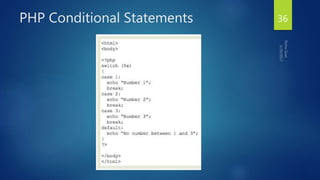
PHP Conditional Statements 36
PHP Arrays
 An array variable is a storage area holding a number or text. The problem is,
a variable will hold only one value.
> An array is a special variable, which can store multiple values in one single
variable.
37
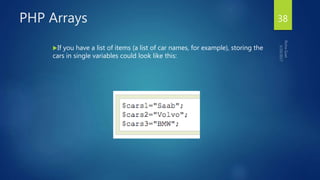
PHP Arrays
If you have a list of items (a list of car names, for example), storing the
cars in single variables could look like this:
38
PHP Arrays
However, what if you want to loop through the cars and find a specific one?
And what if you had not 3 cars, but 300?
The best solution here is to use an array.
An array can hold all your variable values under a single name. And you can
access the values by referring to the array name.
Each element in the array has its own index so that it can be easily accessed.
39
PHP Arrays
 In PHP, there are three kind of arrays:
 Numeric array - An array with a numeric index
 Associative array - An array where each ID key is associated with a value
 Multidimensional array - An array containing one or more arrays
40
PHP Numeric Arrays
 A numeric array stores each array element with a numeric index.
 There are two methods to create a numeric array.
41
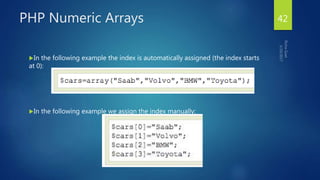
PHP Numeric Arrays
In the following example the index is automatically assigned (the index starts
at 0):
In the following example we assign the index manually:
42
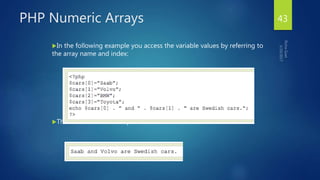
PHP Numeric Arrays
In the following example you access the variable values by referring to
the array name and index:
The code above will output:
43
PHP Associative Arrays
 With an associative array, each ID key is associated with a value.
 When storing data about specific named values, a numerical array is not
always the best way to do it.
 With associative arrays we can use the values as keys and assign values to
them.
44
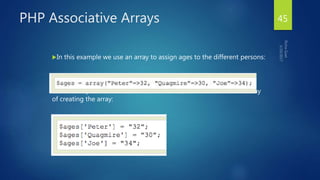
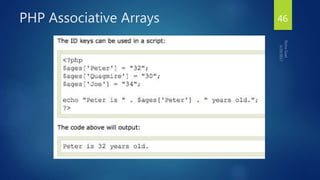
PHP Associative Arrays
In this example we use an array to assign ages to the different persons:
This example is the same as the one above, but shows a different way
of creating the array:
45
PHP Associative Arrays 46
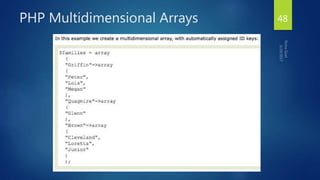
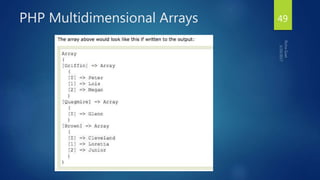
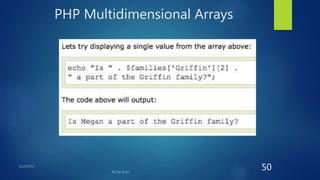
PHP Multidimensional Arrays
In a multidimensional array, each element in the main array can also be an
array.
And each element in the sub-array can be an array, and so on.
47
PHP Multidimensional Arrays 48
PHP Multidimensional Arrays 49
PHP Multidimensional Arrays
50
PHP Loops
 Often when you write code, you want the same block of code to run over
and over again in a row. Instead of adding several almost equal lines in a
script we can use loops to perform a task like this.
 In PHP, we have the following looping statements:
51
PHP Loops
> while - loops through a block of code while a specified condition is true
> do...while - loops through a block of code once, and then repeats the
loop as long as a specified condition is true
> for - loops through a block of code a specified number of times
> foreach - loops through a block of code for each element in an array
52
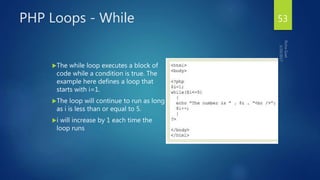
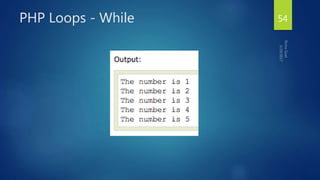
PHP Loops - While
The while loop executes a block of
code while a condition is true. The
example here defines a loop that
starts with i=1.
The loop will continue to run as long
as i is less than or equal to 5.
i will increase by 1 each time the
loop runs
53
PHP Loops - While 54
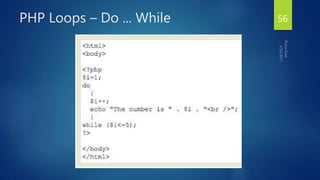
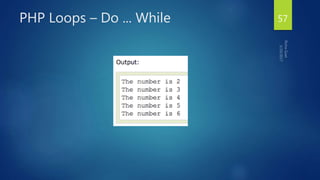
PHP Loops – Do ... While
The do...while statement will always execute the block of code once, it will
then check the condition, and repeat the loop while the condition is true.
The next example defines a loop that starts with i=1. It will then increment i
with 1, and write some output. Then the condition is checked, and the loop will
continue to run as long as i is less than, or equal to 5:
55
PHP Loops – Do ... While 56
PHP Loops – Do ... While 57
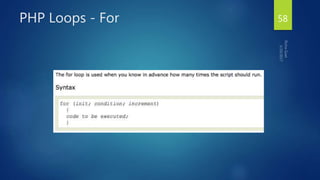
PHP Loops - For 58
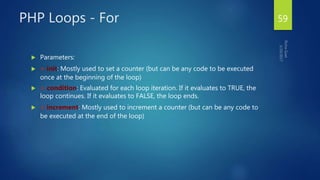
PHP Loops - For
 Parameters:
 > init: Mostly used to set a counter (but can be any code to be executed
once at the beginning of the loop)
 > condition: Evaluated for each loop iteration. If it evaluates to TRUE, the
loop continues. If it evaluates to FALSE, the loop ends.
 > increment: Mostly used to increment a counter (but can be any code to
be executed at the end of the loop)
59
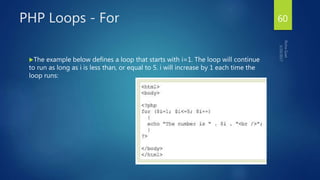
PHP Loops - For
The example below defines a loop that starts with i=1. The loop will continue
to run as long as i is less than, or equal to 5. i will increase by 1 each time the
loop runs:
60
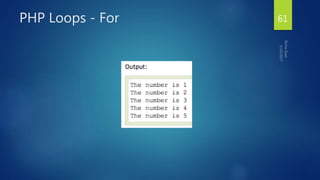
PHP Loops - For 61
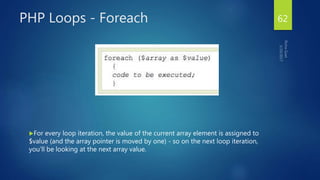
PHP Loops - Foreach
For every loop iteration, the value of the current array element is assigned to
$value (and the array pointer is moved by one) - so on the next loop iteration,
you'll be looking at the next array value.
62
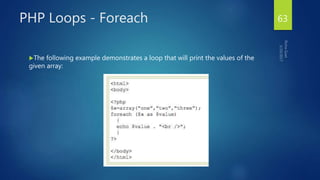
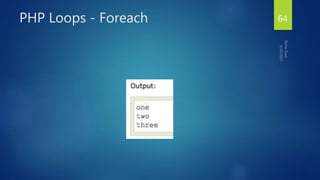
PHP Loops - Foreach
The following example demonstrates a loop that will print the values of the
given array:
63
PHP Loops - Foreach 64
PHP Functions
> We will now explore how to create your own functions.
> To keep the script from being executed when the page loads, you can put
it into a function.
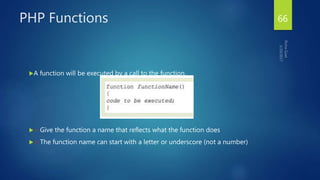
> A function will be executed by a call to the function.
> You may call a function from anywhere within a page.
65
PHP Functions
A function will be executed by a call to the function.
> Give the function a name that reflects what the function does
> The function name can start with a letter or underscore (not a number)
66
PHP Functions
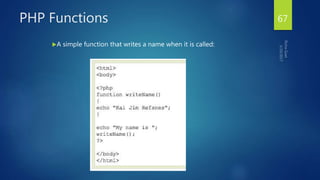
A simple function that writes a name when it is called:
67
PHP Functions - Parameters
 Adding parameters...
 > To add more functionality to a function, we can add parameters. A
parameter is just like a variable.
 > Parameters are specified after the function name, inside the parentheses.
68
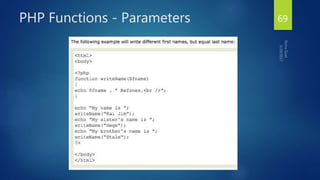
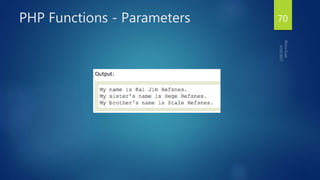
PHP Functions - Parameters 69
PHP Functions - Parameters 70
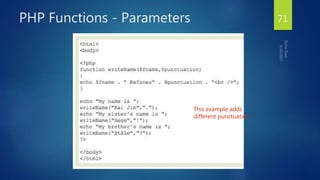
PHP Functions - Parameters
This example adds
different punctuation.
71
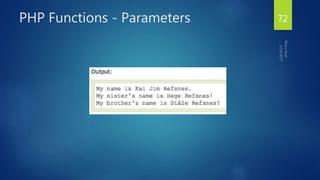
PHP Functions - Parameters 72
PHP Forms
ONE OF THE MOST POWERFUL FEATURES OF PHP IS THE WAY IT HANDLES
HTML FORMS.
73
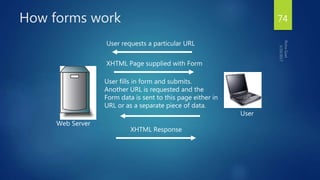
How forms work
Web Server
User
User requests a particular URL
XHTML Page supplied with Form
User fills in form and submits.
Another URL is requested and the
Form data is sent to this page either in
URL or as a separate piece of data.
XHTML Response
74
How Forms work? 75
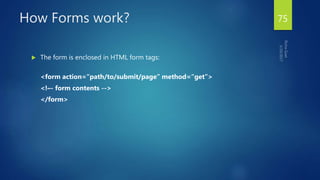
 The form is enclosed in HTML form tags:
<form action=“path/to/submit/page” method=“get”>
<!–- form contents -->
</form>
Form Variables
 The form variables are available to PHP in the page to which they have
been submitted.
 The variables are available in two superglobal arrays created by PHP called
$_POST and $_GET.
76
PHP Forms - $_GET Function
 The built-in $_GET function is used to collect values from a form sent with
method="get".
 Information sent from a form with the GET method is visible to everyone (it
will be displayed in the browser's address bar) and has limits on the amount
of information to send (max. 100 characters).
77
Access data
 Access submitted data in the relevant array for the
submission type, using the input name as a key.
<form action=“path/to/submit/page”
method=“get”>
<input type=“text” name=“email”>
</form>
$email = $_GET[‘email’];
78
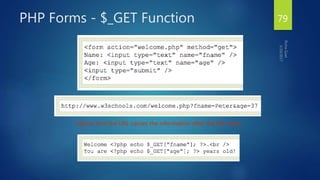
PHP Forms - $_GET Function
Notice how the URL carries the information after the file name.
79
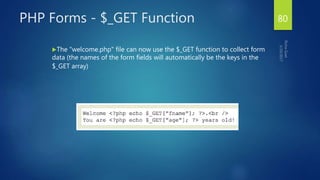
PHP Forms - $_GET Function
The "welcome.php" file can now use the $_GET function to collect form
data (the names of the form fields will automatically be the keys in the
$_GET array)
80
PHP Forms - $_GET Function
When using method="get" in HTML forms, all variable
names and values are displayed in the URL.
This method should not be used when sending passwords
or other sensitive information!
However, because the variables are displayed in the URL, it
is possible to bookmark the page. This can be useful in
some cases.
The get method is not suitable for large variable values;
the value cannot exceed 100 chars.
81
PHP Forms - $_POST Function
> The built-in $_POST function is used to collect values from a form sent
with method="post".
> Information sent from a form with the POST method is invisible to others
and has no limits on the amount of information to send.
> Note: However, there is an 8 Mb max size for the POST method, by default
(can be changed by setting the post_max_size in the php.ini file).
82
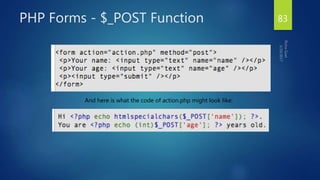
PHP Forms - $_POST Function
And here is what the code of action.php might look like:
83
PHP Forms - $_POST Function
Apart from htmlspecialchars() and (int), it should be obvious what this does.
htmlspecialchars() makes sure any characters that are special in html are
properly encoded so people can't inject HTML tags or Javascript into your page.
For the age field, since we know it is a number, we can just convert it to an
integer which will automatically get rid of any stray characters. The
$_POST['name'] and $_POST['age'] variables are automatically set for you by
PHP.
84
PHP Forms - $_POST Function
 When to use method="post"?
 > Information sent from a form with the POST method is invisible to
others and has no limits on the amount of information to send.
 > However, because the variables are not displayed in the URL, it is not
possible to bookmark the page.
85
GeshanManandhar.com
Important Debugging Functions
 print_r
 Prints human-readable information about a variable
 var_dump
 Dumps information about a variable
 die() or exit()
 Dumps information about a variable
86
File Handling with PHP
87
Files and PHP
 File Handling
 Data Storage
 Though slower than a database
 Manipulating uploaded files
 From forms
 Creating Files for download
88
Open/Close a File
 A file is opened with fopen() as a “stream”, and PHP returns a ‘handle’ to
the file that can be used to reference the open file in other functions.
 Each file is opened in a particular mode.
 A file is closed with fclose() or when your script ends.
89
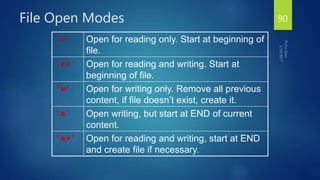
File Open Modes
‘r’ Open for reading only. Start at beginning of
file.
‘r+’ Open for reading and writing. Start at
beginning of file.
‘w’ Open for writing only. Remove all previous
content, if file doesn’t exist, create it.
‘a’ Open writing, but start at END of current
content.
‘a+’ Open for reading and writing, start at END
and create file if necessary.
90
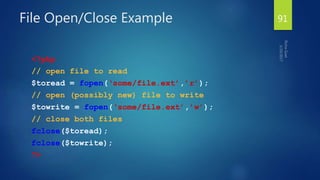
File Open/Close Example
<?php
// open file to read
$toread = fopen(‘some/file.ext’,’r’);
// open (possibly new) file to write
$towrite = fopen(‘some/file.ext’,’w’);
// close both files
fclose($toread);
fclose($towrite);
?>
91
Now what..?
 If you open a file to read, you can use more in-built PHP functions to read
data..
 If you open the file to write, you can use more in-built PHP functions to
write..
92
Reading Data
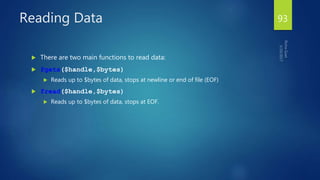
 There are two main functions to read data:
 fgets($handle,$bytes)
 Reads up to $bytes of data, stops at newline or end of file (EOF)
 fread($handle,$bytes)
 Reads up to $bytes of data, stops at EOF.
93
Reading Data
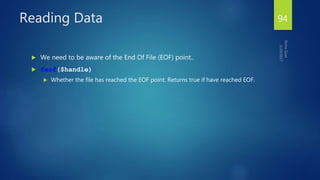
 We need to be aware of the End Of File (EOF) point..
 feof($handle)
 Whether the file has reached the EOF point. Returns true if have reached EOF.
94
Data Reading Example
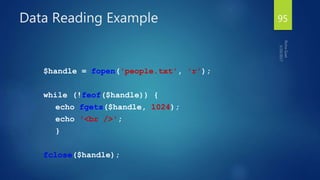
$handle = fopen('people.txt', 'r');
while (!feof($handle)) {
echo fgets($handle, 1024);
echo '<br />';
}
fclose($handle);
95
Data Reading Example
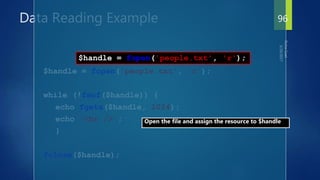
$handle = fopen('people.txt', 'r');
while (!feof($handle)) {
echo fgets($handle, 1024);
echo '<br />';
}
fclose($handle);
Open the file and assign the resource to $handle
$handle = fopen('people.txt', 'r');
96
Data Reading Example
$handle = fopen('people.txt', 'r');
while (!feof($handle)) {
echo fgets($handle, 1024);
echo '<br />';
}
fclose($handle);
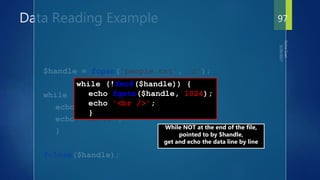
While NOT at the end of the file,
pointed to by $handle,
get and echo the data line by line
while (!feof($handle)) {
echo fgets($handle, 1024);
echo '<br />';
}
97
Data Reading Example
$handle = fopen('people.txt', 'r');
while (!feof($handle)) {
echo fgets($handle, 1024);
echo '<br />';
}
fclose($handle);
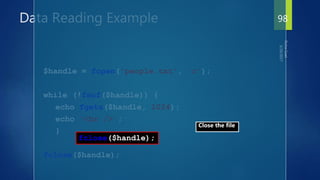
Close the file
fclose($handle);
98
File Open shortcuts..
 There are two ‘shortcut’ functions that don’t require a
file to be opened:
 $lines = file($filename)
 Reads entire file into an array with each line a separate entry in the array.
 $str = file_get_contents($filename)
 Reads entire file into a single string.
99
Writing Data
 To write data to a file use:
 fwrite($handle,$data)
 Write $data to the file.
100
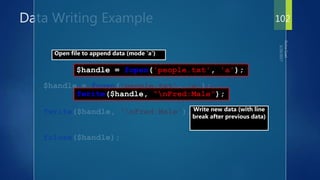
Data Writing Example
$handle = fopen('people.txt', 'a');
fwrite($handle, “nFred:Male”);
fclose($handle);
101
Data Writing Example
$handle = fopen('people.txt', 'a');
fwrite($handle, 'nFred:Male');
fclose($handle);
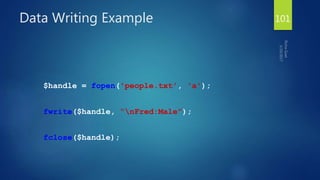
$handle = fopen('people.txt', 'a');
Open file to append data (mode 'a')
fwrite($handle, “nFred:Male”);
Write new data (with line
break after previous data)
102
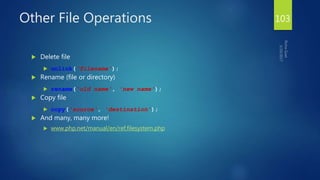
Other File Operations
 Delete file
 unlink('filename');
 Rename (file or directory)
 rename('old name', 'new name');
 Copy file
 copy('source', 'destination');
 And many, many more!
 www.php.net/manual/en/ref.filesystem.php
103
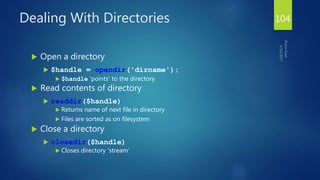
Dealing With Directories
 Open a directory
 $handle = opendir('dirname');
 $handle 'points' to the directory
 Read contents of directory
 readdir($handle)
 Returns name of next file in directory
 Files are sorted as on filesystem
 Close a directory
 closedir($handle)
 Closes directory 'stream'
104
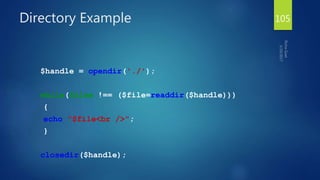
Directory Example
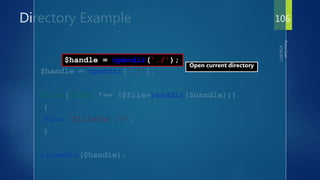
$handle = opendir('./');
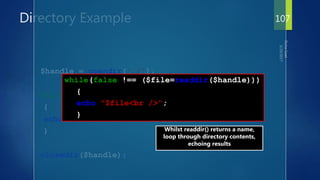
while(false !== ($file=readdir($handle)))
{
echo "$file<br />";
}
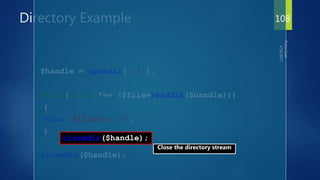
closedir($handle);
105
Directory Example
$handle = opendir('./');
while(false !== ($file=readdir($handle)))
{
echo "$file<br />";
}
closedir($handle);
Open current directory
$handle = opendir('./');
106
Directory Example
$handle = opendir('./');
while(false !== ($file=readdir($handle)))
{
echo "$file<br />";
}
closedir($handle);
Whilst readdir() returns a name,
loop through directory contents,
echoing results
while(false !== ($file=readdir($handle)))
{
echo "$file<br />";
}
107
Directory Example
$handle = opendir('./');
while(false !== ($file=readdir($handle)))
{
echo "$file<br />";
}
closedir($handle);
Close the directory stream
closedir($handle);
108
Other Directory Operations
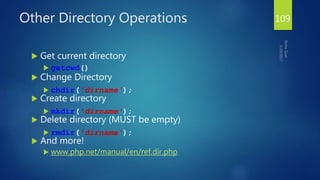
 Get current directory
 getcwd()
 Change Directory
 chdir('dirname');
 Create directory
 mkdir('dirname');
 Delete directory (MUST be empty)
 rmdir('dirname');
 And more!
 www.php.net/manual/en/ref.dir.php
109
Review
 Can open and close files.
 Can read a file line by line or all at one go.
 Can write to files.
 Can open and cycle through the files in a directory.
110
File Upload
111
 Create an Upload-File Form
 Create The Upload Script
 Restrictions on Upload
 Saving the Uploaded File
PHP File Upload 112
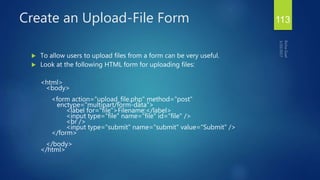
 To allow users to upload files from a form can be very useful.
 Look at the following HTML form for uploading files:
<html>
<body>
<form action="upload_file.php" method="post"
enctype="multipart/form-data">
<label for="file">Filename:</label>
<input type="file" name="file" id="file" />
<br />
<input type="submit" name="submit" value="Submit" />
</form>
</body>
</html>
Create an Upload-File Form 113
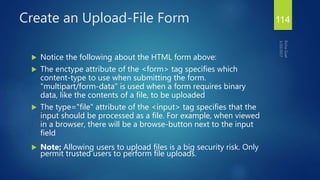
 Notice the following about the HTML form above:
 The enctype attribute of the <form> tag specifies which
content-type to use when submitting the form.
"multipart/form-data" is used when a form requires binary
data, like the contents of a file, to be uploaded
 The type="file" attribute of the <input> tag specifies that the
input should be processed as a file. For example, when viewed
in a browser, there will be a browse-button next to the input
field
 Note: Allowing users to upload files is a big security risk. Only
permit trusted users to perform file uploads.
Create an Upload-File Form 114
 The "upload_file.php" file contains the code for uploading a file:
<?php
if ($_FILES["file"]["error"] > 0)
{
echo "Error: " . $_FILES["file"]["error"] . "<br />";
}
else
{
echo "Upload: " . $_FILES["file"]["name"] . "<br />";
echo "Type: " . $_FILES["file"]["type"] . "<br />";
echo "Size: " . ($_FILES["file"]["size"] / 1024) . " Kb<br />";
echo "Stored in: " . $_FILES["file"]["tmp_name"];
}
?>
Create The Upload Script 115
 By using the global PHP $_FILES array you can upload
files from a client computer to the remote server.
 The first parameter is the form's input name and the
second index can be either "name", "type", "size",
"tmp_name" or "error". Like this:
 $_FILES["file"]["name"] - the name of the uploaded
file
 $_FILES["file"]["type"] - the type of the uploaded file
Create The Upload Script 116
 $_FILES["file"]["size"] - the size in bytes of the
uploaded file
 $_FILES["file"]["tmp_name"] - the name of the
temporary copy of the file stored on the server
 $_FILES["file"]["error"] - the error code resulting from
the file upload
 This is a very simple way of uploading files. For
security reasons, you should add restrictions on what
the user is allowed to upload.
Create The Upload Script 117
 In this script we add some restrictions to the file upload. The user may only
upload .gif or .jpeg files and the file size must be under 20 kb:
Restrictions on Upload 118
<?php
if ((($_FILES["file"]["type"] == "image/gif") || ($_FILES["file"]["type"] == "image/jpeg")
|| ($_FILES["file"]["type"] == "image/pjpeg")) && ($_FILES["file"]["size"] < 20000))
{
if ($_FILES["file"]["error"] > 0)
{
echo "Error: " . $_FILES["file"]["error"] . "<br />";
}
else
{
echo "Upload: " . $_FILES["file"]["name"] . "<br />";
echo "Type: " . $_FILES["file"]["type"] . "<br />";
echo "Size: " . ($_FILES["file"]["size"] / 1024) . " Kb<br />";
echo "Stored in: " . $_FILES["file"]["tmp_name"];
}
}
else
{
echo "Invalid file";
}
?>
Restrictions on Upload 119
 The examples above create a temporary copy of the uploaded files in the
PHP temp folder on the server.
 The temporary copied files disappears when the script ends. To store the
uploaded file we need to copy it to a different location:
Saving the Uploaded File 120
<?php
if ((($_FILES["file"]["type"] == "image/gif") || ($_FILES["file"]["type"] ==
"image/jpeg") || ($_FILES["file"]["type"] == "image/pjpeg"))
&& ($_FILES["file"]["size"] < 20000))
{
if ($_FILES["file"]["error"] > 0)
{
echo "Return Code: " . $_FILES["file"]["error"] . "<br />";
}
else
{
echo "Upload: " . $_FILES["file"]["name"] . "<br />";
echo "Type: " . $_FILES["file"]["type"] . "<br />";
echo "Size: " . ($_FILES["file"]["size"] / 1024) . " Kb<br />";
echo "Temp file: " . $_FILES["file"]["tmp_name"] . "<br />";
Saving the Uploaded File 121
if (file_exists("upload/" . $_FILES["file"]["name"]))
{
echo $_FILES["file"]["name"] . " already exists. ";
}
else
{
move_uploaded_file($_FILES["file"]["tmp_name"],
"upload/" . $_FILES["file"]["name"]);
echo "Stored in: " . "upload/" . $_FILES["file"]["name"];
}
}
}
else
{
echo "Invalid file";
}
?>
Saving the Uploaded File 122
 The script above checks if the file already exists, if it does not, it copies the
file to the specified folder.
 Note: This example saves the file to a new folder called "upload"
Saving the Uploaded File 123

Php

  • 2.
  • 3.
    PHP Introduction  PHPis a server-side scripting language  PHP scripts are executed on the server  PHP supports many databases (MySQL, Informix, Oracle, Sybase, Solid, PostgreSQL, Generic ODBC, etc.)  PHP is open source software  PHP is free to download and use  PHP runs on different platforms (Windows, Linux, Unix, etc.)  PHP is compatible with almost all servers used today (Apache, IIS, etc.) 3
  • 4.
    PHP Scripts  Separatedin files with the <?php ... ?> tag  PHP commands can make up an entire file, or can be contained in html -- this is a choice  Program lines end in ";" or you get an error  Server recognizes embedded script and executes  Result is passed to browser, source isn't visible  PHP can be part of HTML file or HTML code can be part of PHP file. Both works. 4 <P> <?php $myvar = "Hello World!"; echo $myvar; ?> </P>
  • 5.
    PHP Scripts  Basicapplication  Scripting delimiters  <? php ?>  Must enclose all script code  Variables preceded by $ symbol  Case-sensitive  End statements with semicolon  Comments  // for single line  /* */ for multiline  Filenames end with .php by convention 5
  • 6.
    Parsing  We've talkabout how the browser can read a text file and process it, that's a basic parsing method  Parsing involves acting on relevant portions of a file and ignoring others  Browsers parse web pages as they load  Web servers with server side technologies like php parse web pages as they are being passed out to the browser  Parsing does represent work, so there is a cost 6
  • 7.
  • 8.
    PHP Introduction PHP codeis executed on the server, generating HTML which is then sent to the client. The client would receive the results of running that script, but would not know what the underlying code was. A visual, if you please... 8
  • 9.
  • 10.
    Two Ways  Youcan embed sections of php inside html:  Or you can call html from php: <BODY> <P> <?php $myvar = "Hello World!"; echo $myvar; </BODY> <?php echo "<html><head><title>Page 1</title> …<P>Hello World!</P></body></html>” ?> 10
  • 11.
    PHP Comments In PHP,we use // to make a single- line comment or /* and */ to make a large comment block. 11
  • 12.
    PHP Statement Separation PHP requires instructions to be terminated with a semicolon at the end of each statement.  The closing tag of a block of PHP code automatically implies a semicolon; you do not need to have a semicolon terminating the last line of a PHP block.  The closing tag for the block will include the immediately trailing newline if one is present.  The closing tag of a PHP block at the end of a file is optional 12 <?php echo 'This is a test'; ?> <?php echo 'This is a test' ?> <?php echo 'We omitted the last closing tag';
  • 13.
    PHP Statement Separation Do not mis interpret with  The second one would give error. Exclude ?> if you no more html to write after the code. 13 <?php echo 'Ending tag excluded'; <p>But html is still visible</p> <?php echo 'Ending tag excluded';
  • 14.
    PHP Variables  Variablesin PHP are represented by a dollar sign ($) followed by the name of the variable. The variable name is case-sensitive.  Variable names follow the same rules as other labels in PHP. A valid variable name starts with a letter or underscore, followed by any number of letters, numbers, or underscores.  By default, variables are always assigned by value.  Note: $this is a special variable that can't be assigned. 14
  • 15.
    PHP Variables Variables areused for storing values, like text strings, numbers or arrays. When a variable is declared, it can be used over and over again in your script. All variables in PHP start with a $ sign symbol. The correct way of declaring a variable in PHP: 15
  • 16.
    PHP Variables > InPHP, a variable does not need to be declared before adding a value to it. > In the given example, you see that you do not have to tell PHP which data type the variable is. > PHP automatically converts the variable to the correct data type, depending on its value. 16
  • 17.
    PHP Variables > Avariable name must start with a letter or an underscore "_" -- not a number > A variable name can only contain alpha-numeric characters, underscores (a-z, A-Z, 0-9, and _ ) > A variable name should not contain spaces. If a variable name is more than one word, it should be separated with an underscore ($my_string) or with capitalization ($myString) 17
  • 18.
    PHP Concatenation > Theconcatenation operator (.) is used to put two string values together. > To concatenate two string variables together, use the concatenation operator: 18
  • 19.
    PHP Variables  Variables Can have different types at different times  Variable names inside strings replaced by their value  Type conversions  settype function  Type casting  Concatenation operator  . (period)  Combine strings
  • 20.
    PHP Strings  Astring is series of characters.  In PHP, a character is the same as a byte, which is exactly 256 different characters possible. <?php $s=“I am a string”; $s2=‘I am also a string”; print $s.”---”.$s2; ?> 20
  • 21.
    PHP Strings  AnotherExample <?php $beer = 'Heineken'; echo "<br>$beer's taste is great."; // works, ‘ is an invalid character for varnames echo "<br>He drank some $beers."; // won't work, 's' is a valid character for varnames echo "<br>He drank some ${beer}s."; // works echo "<br>He drank some {$beer}s."; // works ?> 21
  • 22.
    PHP Operators Operators areused to operate on values. There are four classifications of operators:  Arithmetic  Assignment  Comparison  Logical 22
  • 23.
  • 24.
  • 25.
  • 26.
  • 27.
    Exercise 27  Createa sample calculator with the help of arithmetic operators using PHP and HTML.
  • 28.
    PHP Conditional Statements Very often when you write code, you want to perform different actions for different decisions.  You can use conditional statements in your code to do this. In PHP we have the following conditional statements... 28
  • 29.
    PHP Conditional Statements if statement - use this statement to execute some code only if a specified condition is true  if...else statement - use this statement to execute some code if a condition is true and another code if the condition is false  if...elseif....else statement - use this statement to select one of several blocks of code to be executed  switch statement - use this statement to select one of many blocks of code to be executed 29
  • 30.
    PHP Conditional Statements Thefollowing example will output "Have a nice weekend!" if the current day is Friday: 30
  • 31.
    PHP Conditional Statements Usethe if....else statement to execute some code if a condition is true and another code if a condition is false. 31
  • 32.
    PHP Conditional Statements Ifmore than one line should be executed if a condition is true/false, the lines should be enclosed within curly braces { } 32
  • 33.
    PHP Conditional Statements Thefollowing example will output "Have a nice weekend!" if the current day is Friday, and "Have a nice Sunday!" if the current day is Sunday. Otherwise it will output "Have a nice day!": 33
  • 34.
    PHP Conditional Statements Usethe switch statement to select one of many blocks of code to be executed. 34
  • 35.
    PHP Conditional Statements Forswitches, first we have a single expression n (most often a variable), that is evaluated once. The value of the expression is then compared with the values for each case in the structure. If there is a match, the block of code associated with that case is executed. Use break to prevent the code from running into the next case automatically. The default statement is used if no match is found. 35
  • 36.
  • 37.
    PHP Arrays  Anarray variable is a storage area holding a number or text. The problem is, a variable will hold only one value. > An array is a special variable, which can store multiple values in one single variable. 37
  • 38.
    PHP Arrays If youhave a list of items (a list of car names, for example), storing the cars in single variables could look like this: 38
  • 39.
    PHP Arrays However, whatif you want to loop through the cars and find a specific one? And what if you had not 3 cars, but 300? The best solution here is to use an array. An array can hold all your variable values under a single name. And you can access the values by referring to the array name. Each element in the array has its own index so that it can be easily accessed. 39
  • 40.
    PHP Arrays  InPHP, there are three kind of arrays:  Numeric array - An array with a numeric index  Associative array - An array where each ID key is associated with a value  Multidimensional array - An array containing one or more arrays 40
  • 41.
    PHP Numeric Arrays A numeric array stores each array element with a numeric index.  There are two methods to create a numeric array. 41
  • 42.
    PHP Numeric Arrays Inthe following example the index is automatically assigned (the index starts at 0): In the following example we assign the index manually: 42
  • 43.
    PHP Numeric Arrays Inthe following example you access the variable values by referring to the array name and index: The code above will output: 43
  • 44.
    PHP Associative Arrays With an associative array, each ID key is associated with a value.  When storing data about specific named values, a numerical array is not always the best way to do it.  With associative arrays we can use the values as keys and assign values to them. 44
  • 45.
    PHP Associative Arrays Inthis example we use an array to assign ages to the different persons: This example is the same as the one above, but shows a different way of creating the array: 45
  • 46.
  • 47.
    PHP Multidimensional Arrays Ina multidimensional array, each element in the main array can also be an array. And each element in the sub-array can be an array, and so on. 47
  • 48.
  • 49.
  • 50.
  • 51.
    PHP Loops  Oftenwhen you write code, you want the same block of code to run over and over again in a row. Instead of adding several almost equal lines in a script we can use loops to perform a task like this.  In PHP, we have the following looping statements: 51
  • 52.
    PHP Loops > while- loops through a block of code while a specified condition is true > do...while - loops through a block of code once, and then repeats the loop as long as a specified condition is true > for - loops through a block of code a specified number of times > foreach - loops through a block of code for each element in an array 52
  • 53.
    PHP Loops -While The while loop executes a block of code while a condition is true. The example here defines a loop that starts with i=1. The loop will continue to run as long as i is less than or equal to 5. i will increase by 1 each time the loop runs 53
  • 54.
    PHP Loops -While 54
  • 55.
    PHP Loops –Do ... While The do...while statement will always execute the block of code once, it will then check the condition, and repeat the loop while the condition is true. The next example defines a loop that starts with i=1. It will then increment i with 1, and write some output. Then the condition is checked, and the loop will continue to run as long as i is less than, or equal to 5: 55
  • 56.
    PHP Loops –Do ... While 56
  • 57.
    PHP Loops –Do ... While 57
  • 58.
  • 59.
    PHP Loops -For  Parameters:  > init: Mostly used to set a counter (but can be any code to be executed once at the beginning of the loop)  > condition: Evaluated for each loop iteration. If it evaluates to TRUE, the loop continues. If it evaluates to FALSE, the loop ends.  > increment: Mostly used to increment a counter (but can be any code to be executed at the end of the loop) 59
  • 60.
    PHP Loops -For The example below defines a loop that starts with i=1. The loop will continue to run as long as i is less than, or equal to 5. i will increase by 1 each time the loop runs: 60
  • 61.
  • 62.
    PHP Loops -Foreach For every loop iteration, the value of the current array element is assigned to $value (and the array pointer is moved by one) - so on the next loop iteration, you'll be looking at the next array value. 62
  • 63.
    PHP Loops -Foreach The following example demonstrates a loop that will print the values of the given array: 63
  • 64.
    PHP Loops -Foreach 64
  • 65.
    PHP Functions > Wewill now explore how to create your own functions. > To keep the script from being executed when the page loads, you can put it into a function. > A function will be executed by a call to the function. > You may call a function from anywhere within a page. 65
  • 66.
    PHP Functions A functionwill be executed by a call to the function. > Give the function a name that reflects what the function does > The function name can start with a letter or underscore (not a number) 66
  • 67.
    PHP Functions A simplefunction that writes a name when it is called: 67
  • 68.
    PHP Functions -Parameters  Adding parameters...  > To add more functionality to a function, we can add parameters. A parameter is just like a variable.  > Parameters are specified after the function name, inside the parentheses. 68
  • 69.
    PHP Functions -Parameters 69
  • 70.
    PHP Functions -Parameters 70
  • 71.
    PHP Functions -Parameters This example adds different punctuation. 71
  • 72.
    PHP Functions -Parameters 72
  • 73.
    PHP Forms ONE OFTHE MOST POWERFUL FEATURES OF PHP IS THE WAY IT HANDLES HTML FORMS. 73
  • 74.
    How forms work WebServer User User requests a particular URL XHTML Page supplied with Form User fills in form and submits. Another URL is requested and the Form data is sent to this page either in URL or as a separate piece of data. XHTML Response 74
  • 75.
    How Forms work?75  The form is enclosed in HTML form tags: <form action=“path/to/submit/page” method=“get”> <!–- form contents --> </form>
  • 76.
    Form Variables  Theform variables are available to PHP in the page to which they have been submitted.  The variables are available in two superglobal arrays created by PHP called $_POST and $_GET. 76
  • 77.
    PHP Forms -$_GET Function  The built-in $_GET function is used to collect values from a form sent with method="get".  Information sent from a form with the GET method is visible to everyone (it will be displayed in the browser's address bar) and has limits on the amount of information to send (max. 100 characters). 77
  • 78.
    Access data  Accesssubmitted data in the relevant array for the submission type, using the input name as a key. <form action=“path/to/submit/page” method=“get”> <input type=“text” name=“email”> </form> $email = $_GET[‘email’]; 78
  • 79.
    PHP Forms -$_GET Function Notice how the URL carries the information after the file name. 79
  • 80.
    PHP Forms -$_GET Function The "welcome.php" file can now use the $_GET function to collect form data (the names of the form fields will automatically be the keys in the $_GET array) 80
  • 81.
    PHP Forms -$_GET Function When using method="get" in HTML forms, all variable names and values are displayed in the URL. This method should not be used when sending passwords or other sensitive information! However, because the variables are displayed in the URL, it is possible to bookmark the page. This can be useful in some cases. The get method is not suitable for large variable values; the value cannot exceed 100 chars. 81
  • 82.
    PHP Forms -$_POST Function > The built-in $_POST function is used to collect values from a form sent with method="post". > Information sent from a form with the POST method is invisible to others and has no limits on the amount of information to send. > Note: However, there is an 8 Mb max size for the POST method, by default (can be changed by setting the post_max_size in the php.ini file). 82
  • 83.
    PHP Forms -$_POST Function And here is what the code of action.php might look like: 83
  • 84.
    PHP Forms -$_POST Function Apart from htmlspecialchars() and (int), it should be obvious what this does. htmlspecialchars() makes sure any characters that are special in html are properly encoded so people can't inject HTML tags or Javascript into your page. For the age field, since we know it is a number, we can just convert it to an integer which will automatically get rid of any stray characters. The $_POST['name'] and $_POST['age'] variables are automatically set for you by PHP. 84
  • 85.
    PHP Forms -$_POST Function  When to use method="post"?  > Information sent from a form with the POST method is invisible to others and has no limits on the amount of information to send.  > However, because the variables are not displayed in the URL, it is not possible to bookmark the page. 85
  • 86.
    GeshanManandhar.com Important Debugging Functions print_r  Prints human-readable information about a variable  var_dump  Dumps information about a variable  die() or exit()  Dumps information about a variable 86
  • 87.
  • 88.
    Files and PHP File Handling  Data Storage  Though slower than a database  Manipulating uploaded files  From forms  Creating Files for download 88
  • 89.
    Open/Close a File A file is opened with fopen() as a “stream”, and PHP returns a ‘handle’ to the file that can be used to reference the open file in other functions.  Each file is opened in a particular mode.  A file is closed with fclose() or when your script ends. 89
  • 90.
    File Open Modes ‘r’Open for reading only. Start at beginning of file. ‘r+’ Open for reading and writing. Start at beginning of file. ‘w’ Open for writing only. Remove all previous content, if file doesn’t exist, create it. ‘a’ Open writing, but start at END of current content. ‘a+’ Open for reading and writing, start at END and create file if necessary. 90
  • 91.
    File Open/Close Example <?php //open file to read $toread = fopen(‘some/file.ext’,’r’); // open (possibly new) file to write $towrite = fopen(‘some/file.ext’,’w’); // close both files fclose($toread); fclose($towrite); ?> 91
  • 92.
    Now what..?  Ifyou open a file to read, you can use more in-built PHP functions to read data..  If you open the file to write, you can use more in-built PHP functions to write.. 92
  • 93.
    Reading Data  Thereare two main functions to read data:  fgets($handle,$bytes)  Reads up to $bytes of data, stops at newline or end of file (EOF)  fread($handle,$bytes)  Reads up to $bytes of data, stops at EOF. 93
  • 94.
    Reading Data  Weneed to be aware of the End Of File (EOF) point..  feof($handle)  Whether the file has reached the EOF point. Returns true if have reached EOF. 94
  • 95.
    Data Reading Example $handle= fopen('people.txt', 'r'); while (!feof($handle)) { echo fgets($handle, 1024); echo '<br />'; } fclose($handle); 95
  • 96.
    Data Reading Example $handle= fopen('people.txt', 'r'); while (!feof($handle)) { echo fgets($handle, 1024); echo '<br />'; } fclose($handle); Open the file and assign the resource to $handle $handle = fopen('people.txt', 'r'); 96
  • 97.
    Data Reading Example $handle= fopen('people.txt', 'r'); while (!feof($handle)) { echo fgets($handle, 1024); echo '<br />'; } fclose($handle); While NOT at the end of the file, pointed to by $handle, get and echo the data line by line while (!feof($handle)) { echo fgets($handle, 1024); echo '<br />'; } 97
  • 98.
    Data Reading Example $handle= fopen('people.txt', 'r'); while (!feof($handle)) { echo fgets($handle, 1024); echo '<br />'; } fclose($handle); Close the file fclose($handle); 98
  • 99.
    File Open shortcuts.. There are two ‘shortcut’ functions that don’t require a file to be opened:  $lines = file($filename)  Reads entire file into an array with each line a separate entry in the array.  $str = file_get_contents($filename)  Reads entire file into a single string. 99
  • 100.
    Writing Data  Towrite data to a file use:  fwrite($handle,$data)  Write $data to the file. 100
  • 101.
    Data Writing Example $handle= fopen('people.txt', 'a'); fwrite($handle, “nFred:Male”); fclose($handle); 101
  • 102.
    Data Writing Example $handle= fopen('people.txt', 'a'); fwrite($handle, 'nFred:Male'); fclose($handle); $handle = fopen('people.txt', 'a'); Open file to append data (mode 'a') fwrite($handle, “nFred:Male”); Write new data (with line break after previous data) 102
  • 103.
    Other File Operations Delete file  unlink('filename');  Rename (file or directory)  rename('old name', 'new name');  Copy file  copy('source', 'destination');  And many, many more!  www.php.net/manual/en/ref.filesystem.php 103
  • 104.
    Dealing With Directories Open a directory  $handle = opendir('dirname');  $handle 'points' to the directory  Read contents of directory  readdir($handle)  Returns name of next file in directory  Files are sorted as on filesystem  Close a directory  closedir($handle)  Closes directory 'stream' 104
  • 105.
    Directory Example $handle =opendir('./'); while(false !== ($file=readdir($handle))) { echo "$file<br />"; } closedir($handle); 105
  • 106.
    Directory Example $handle =opendir('./'); while(false !== ($file=readdir($handle))) { echo "$file<br />"; } closedir($handle); Open current directory $handle = opendir('./'); 106
  • 107.
    Directory Example $handle =opendir('./'); while(false !== ($file=readdir($handle))) { echo "$file<br />"; } closedir($handle); Whilst readdir() returns a name, loop through directory contents, echoing results while(false !== ($file=readdir($handle))) { echo "$file<br />"; } 107
  • 108.
    Directory Example $handle =opendir('./'); while(false !== ($file=readdir($handle))) { echo "$file<br />"; } closedir($handle); Close the directory stream closedir($handle); 108
  • 109.
    Other Directory Operations Get current directory  getcwd()  Change Directory  chdir('dirname');  Create directory  mkdir('dirname');  Delete directory (MUST be empty)  rmdir('dirname');  And more!  www.php.net/manual/en/ref.dir.php 109
  • 110.
    Review  Can openand close files.  Can read a file line by line or all at one go.  Can write to files.  Can open and cycle through the files in a directory. 110
  • 111.
  • 112.
     Create anUpload-File Form  Create The Upload Script  Restrictions on Upload  Saving the Uploaded File PHP File Upload 112
  • 113.
     To allowusers to upload files from a form can be very useful.  Look at the following HTML form for uploading files: <html> <body> <form action="upload_file.php" method="post" enctype="multipart/form-data"> <label for="file">Filename:</label> <input type="file" name="file" id="file" /> <br /> <input type="submit" name="submit" value="Submit" /> </form> </body> </html> Create an Upload-File Form 113
  • 114.
     Notice thefollowing about the HTML form above:  The enctype attribute of the <form> tag specifies which content-type to use when submitting the form. "multipart/form-data" is used when a form requires binary data, like the contents of a file, to be uploaded  The type="file" attribute of the <input> tag specifies that the input should be processed as a file. For example, when viewed in a browser, there will be a browse-button next to the input field  Note: Allowing users to upload files is a big security risk. Only permit trusted users to perform file uploads. Create an Upload-File Form 114
  • 115.
     The "upload_file.php"file contains the code for uploading a file: <?php if ($_FILES["file"]["error"] > 0) { echo "Error: " . $_FILES["file"]["error"] . "<br />"; } else { echo "Upload: " . $_FILES["file"]["name"] . "<br />"; echo "Type: " . $_FILES["file"]["type"] . "<br />"; echo "Size: " . ($_FILES["file"]["size"] / 1024) . " Kb<br />"; echo "Stored in: " . $_FILES["file"]["tmp_name"]; } ?> Create The Upload Script 115
  • 116.
     By usingthe global PHP $_FILES array you can upload files from a client computer to the remote server.  The first parameter is the form's input name and the second index can be either "name", "type", "size", "tmp_name" or "error". Like this:  $_FILES["file"]["name"] - the name of the uploaded file  $_FILES["file"]["type"] - the type of the uploaded file Create The Upload Script 116
  • 117.
     $_FILES["file"]["size"] -the size in bytes of the uploaded file  $_FILES["file"]["tmp_name"] - the name of the temporary copy of the file stored on the server  $_FILES["file"]["error"] - the error code resulting from the file upload  This is a very simple way of uploading files. For security reasons, you should add restrictions on what the user is allowed to upload. Create The Upload Script 117
  • 118.
     In thisscript we add some restrictions to the file upload. The user may only upload .gif or .jpeg files and the file size must be under 20 kb: Restrictions on Upload 118
  • 119.
    <?php if ((($_FILES["file"]["type"] =="image/gif") || ($_FILES["file"]["type"] == "image/jpeg") || ($_FILES["file"]["type"] == "image/pjpeg")) && ($_FILES["file"]["size"] < 20000)) { if ($_FILES["file"]["error"] > 0) { echo "Error: " . $_FILES["file"]["error"] . "<br />"; } else { echo "Upload: " . $_FILES["file"]["name"] . "<br />"; echo "Type: " . $_FILES["file"]["type"] . "<br />"; echo "Size: " . ($_FILES["file"]["size"] / 1024) . " Kb<br />"; echo "Stored in: " . $_FILES["file"]["tmp_name"]; } } else { echo "Invalid file"; } ?> Restrictions on Upload 119
  • 120.
     The examplesabove create a temporary copy of the uploaded files in the PHP temp folder on the server.  The temporary copied files disappears when the script ends. To store the uploaded file we need to copy it to a different location: Saving the Uploaded File 120
  • 121.
    <?php if ((($_FILES["file"]["type"] =="image/gif") || ($_FILES["file"]["type"] == "image/jpeg") || ($_FILES["file"]["type"] == "image/pjpeg")) && ($_FILES["file"]["size"] < 20000)) { if ($_FILES["file"]["error"] > 0) { echo "Return Code: " . $_FILES["file"]["error"] . "<br />"; } else { echo "Upload: " . $_FILES["file"]["name"] . "<br />"; echo "Type: " . $_FILES["file"]["type"] . "<br />"; echo "Size: " . ($_FILES["file"]["size"] / 1024) . " Kb<br />"; echo "Temp file: " . $_FILES["file"]["tmp_name"] . "<br />"; Saving the Uploaded File 121
  • 122.
    if (file_exists("upload/" .$_FILES["file"]["name"])) { echo $_FILES["file"]["name"] . " already exists. "; } else { move_uploaded_file($_FILES["file"]["tmp_name"], "upload/" . $_FILES["file"]["name"]); echo "Stored in: " . "upload/" . $_FILES["file"]["name"]; } } } else { echo "Invalid file"; } ?> Saving the Uploaded File 122
  • 123.
     The scriptabove checks if the file already exists, if it does not, it copies the file to the specified folder.  Note: This example saves the file to a new folder called "upload" Saving the Uploaded File 123