AngularJS
Pasi Manninen
JAMK University of Applied Sciences
Slide version Mar 6th, 2014
AngularJS
• Google's open-source framework for developing Web
applications
• Target is creating single-page web applications with
MVC capability
• 100% JavaScript and 100% client side
• Updates very often (about 4 times a month, 1st version
June 2012)
• Supports modern desktop and mobile browsers
• Very good documentation and tutorials
– http://angularjs.org
– http://www.youtube.com/user/angularjs
AngularJS, Pasi Manninen. 2
Remember read: http://docs.angularjs.org/guide/introduction
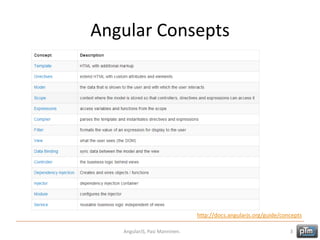
Angular Consepts
AngularJS, Pasi Manninen. 3
http://docs.angularjs.org/guide/concepts
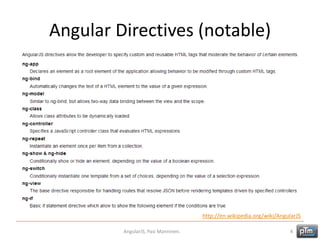
Angular Directives (notable)
AngularJS, Pasi Manninen. 4
http://en.wikipedia.org/wiki/AngularJS
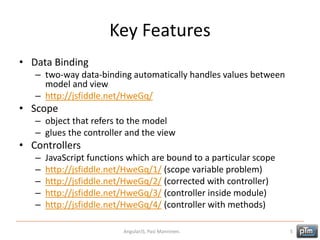
Key Features
• Data Binding
– two-way data-binding automatically handles values between
model and view
– http://jsfiddle.net/HweGq/
• Scope
– object that refers to the model
– glues the controller and the view
• Controllers
– JavaScript functions which are bound to a particular scope
– http://jsfiddle.net/HweGq/1/ (scope variable problem)
– http://jsfiddle.net/HweGq/2/ (corrected with controller)
– http://jsfiddle.net/HweGq/3/ (controller inside module)
– http://jsfiddle.net/HweGq/4/ (controller with methods)
AngularJS, Pasi Manninen. 5
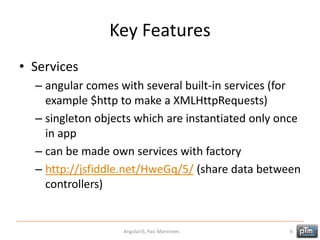
Key Features
• Services
– angular comes with several built-in services (for
example $http to make a XMLHttpRequests)
– singleton objects which are instantiated only once
in app
– can be made own services with factory
– http://jsfiddle.net/HweGq/5/ (share data between
controllers)
AngularJS, Pasi Manninen. 6
Example: Services
• Use service to load JSON from the server
• http://ptm.fi/angular/MovieExample/
AngularJS, Pasi Manninen. 7
<html lang="en" ng-app="myApp">
<head>
<meta charset="UTF-8">
<title>AngularJS - movie service</title>
<script src="angular.min.js"></script>
<script src="app.js"></script>
</head>
<body>
<div ng-controller="MovieController">
<h2>{{movieName}}</h2>
<video controls ng-src="{{movieUrl}}"></video>
</div>
</body>
</html>
// app.js
var myApp = angular.module('myApp', []);
myApp.factory('MovieService', function ($http) {
var data = {};
data.url = "http://ptm.fi/angular/MovieExample/movie.php";
data.getMovie = function() {
return $http.get(data.url);
}
return data;
});
myApp.controller('MovieController', function($scope,$sce,MovieService) {
MovieService.getMovie().success(function (response) {
$scope.movieName = response.name;
var movieUrl = response.url;
$scope.movieUrl = $sce.trustAsResourceUrl(movieUrl);
});
});
<?php // movie.php
echo '{"url":"http://fin.clip-1.filmtrailer.com/11195_41463_a_6.mp4","name":"21 tapaa pilata avioliitto"}';
?>
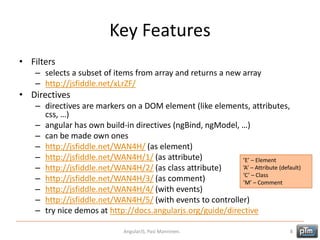
Key Features
• Filters
– selects a subset of items from array and returns a new array
– http://jsfiddle.net/xLrZF/
• Directives
– directives are markers on a DOM element (like elements, attributes,
css, …)
– angular has own build-in directives (ngBind, ngModel, …)
– can be made own ones
– http://jsfiddle.net/WAN4H/ (as element)
– http://jsfiddle.net/WAN4H/1/ (as attribute)
– http://jsfiddle.net/WAN4H/2/ (as class attribute)
– http://jsfiddle.net/WAN4H/3/ (as comment)
– http://jsfiddle.net/WAN4H/4/ (with events)
– http://jsfiddle.net/WAN4H/5/ (with events to controller)
– try nice demos at http://docs.angularjs.org/guide/directive
AngularJS, Pasi Manninen. 8
’E’ – Element
’A’ – Attribute (default)
’C’ – Class
’M’ – Comment
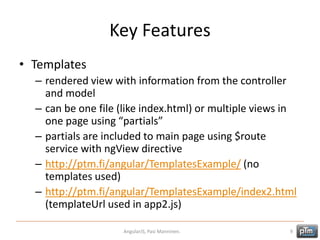
Key Features
• Templates
– rendered view with information from the controller
and model
– can be one file (like index.html) or multiple views in
one page using “partials”
– partials are included to main page using $route
service with ngView directive
– http://ptm.fi/angular/TemplatesExample/ (no
templates used)
– http://ptm.fi/angular/TemplatesExample/index2.html
(templateUrl used in app2.js)
AngularJS, Pasi Manninen. 9
Key Features
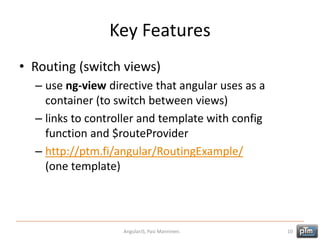
• Routing (switch views)
– use ng-view directive that angular uses as a
container (to switch between views)
– links to controller and template with config
function and $routeProvider
– http://ptm.fi/angular/RoutingExample/
(one template)
AngularJS, Pasi Manninen. 10
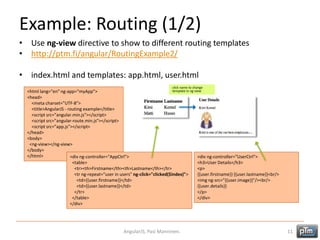
Example: Routing (1/2)
• Use ng-view directive to show to different routing templates
• http://ptm.fi/angular/RoutingExample2/
• index.html and templates: app.html, user.html
AngularJS, Pasi Manninen. 11
<html lang="en" ng-app="myApp">
<head>
<meta charset="UTF-8">
<title>AngularJS - routing example</title>
<script src="angular.min.js"></script>
<script src="angular-route.min.js"></script>
<script src="app.js"></script>
</head>
<body>
<ng-view></ng-view>
</body>
</html> <div ng-controller="AppCtrl">
<table>
<tr><th>Firstname</th><th>Lastname</th></tr>
<tr ng-repeat="user in users" ng-click="clicked($index)">
<td>{{user.firstname}}</td>
<td>{{user.lastname}}</td>
</tr>
</table>
</div>
<div ng-controller="UserCtrl">
<h3>User Details</h3>
<p>
{{user.firstname}} {{user.lastname}}<br/>
<img ng-src="{{user.image}}"/><br/>
{{user.details}}
</p>
</div>
click name to change
template in ng-view
Example: Routing (2/2)
• Use ng-view directive to show to different routing templates
• http://ptm.fi/angular/RoutingExample2/
• app.js (routes, controllers and one service)
AngularJS, Pasi Manninen. 12
var myApp = angular.module('myApp', ['ngRoute']);
myApp.config(function($routeProvider){
$routeProvider
.when("/", { templateUrl: 'app.html', controller: 'AppCtrl‘ })
.when('/users/:userId', { templateUrl: 'user.html', controller: 'UserCtrl‘ })
.otherwise({redirectTo: '/'});
});
myApp.controller("UserCtrl", function($scope,$routeParams,UsersService) {
$scope.user = UsersService.users[$routeParams.userId];
});
myApp.controller("AppCtrl", function($scope,$location,UsersService){
$scope.users = UsersService.users;
$scope.clicked = function(index) {
$location.path("/users/"+index);
}
});
myApp.factory('UsersService', function () {
var users =
[
{firstname:"Kirsi",lastname:"Kernel",details:"Kirsi is..",image:"employee01.png"},
{firstname:"Matti",lastname:"Husso",details:"Matti is..",image:"employee02.png"}
];
return {users:users};
});
click name to change
template in ng-view
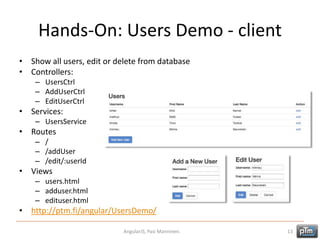
Hands-On: Users Demo - client
• Show all users, edit or delete from database
• Controllers:
– UsersCtrl
– AddUserCtrl
– EditUserCtrl
• Services:
– UsersService
• Routes
– /
– /addUser
– /edit/:userId
• Views
– users.html
– adduser.html
– edituser.html
• http://ptm.fi/angular/UsersDemo/
AngularJS, Pasi Manninen. 13
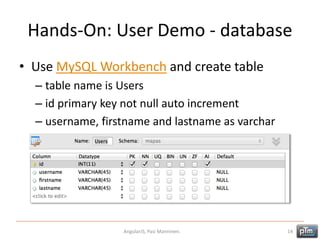
Hands-On: User Demo - database
• Use MySQL Workbench and create table
– table name is Users
– id primary key not null auto increment
– username, firstname and lastname as varchar
AngularJS, Pasi Manninen. 14
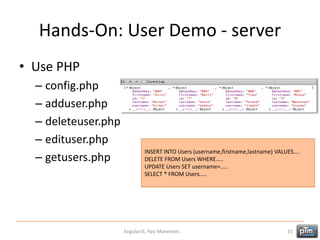
Hands-On: User Demo - server
• Use PHP
– config.php
– adduser.php
– deleteuser.php
– edituser.php
– getusers.php
AngularJS, Pasi Manninen. 15
INSERT INTO Users (username,firstname,lastname) VALUES….
DELETE FROM Users WHERE…..
UPDATE Users SET username=…..
SELECT * FROM Users…..
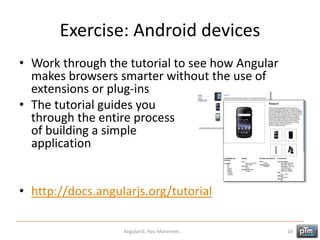
Exercise: Android devices
• Work through the tutorial to see how Angular
makes browsers smarter without the use of
extensions or plug-ins
• The tutorial guides you
through the entire process
of building a simple
application
• http://docs.angularjs.org/tutorial
AngularJS, Pasi Manninen. 16
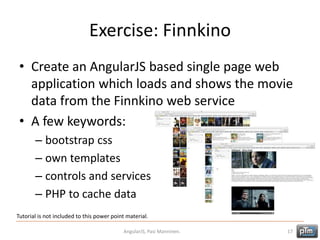
Exercise: Finnkino
• Create an AngularJS based single page web
application which loads and shows the movie
data from the Finnkino web service
• A few keywords:
– bootstrap css
– own templates
– controls and services
– PHP to cache data
AngularJS, Pasi Manninen. 17
Tutorial is not included to this power point material.

AngularJS

  • 1.
    AngularJS Pasi Manninen JAMK Universityof Applied Sciences Slide version Mar 6th, 2014
  • 2.
    AngularJS • Google's open-sourceframework for developing Web applications • Target is creating single-page web applications with MVC capability • 100% JavaScript and 100% client side • Updates very often (about 4 times a month, 1st version June 2012) • Supports modern desktop and mobile browsers • Very good documentation and tutorials – http://angularjs.org – http://www.youtube.com/user/angularjs AngularJS, Pasi Manninen. 2 Remember read: http://docs.angularjs.org/guide/introduction
  • 3.
    Angular Consepts AngularJS, PasiManninen. 3 http://docs.angularjs.org/guide/concepts
  • 4.
    Angular Directives (notable) AngularJS,Pasi Manninen. 4 http://en.wikipedia.org/wiki/AngularJS
  • 5.
    Key Features • DataBinding – two-way data-binding automatically handles values between model and view – http://jsfiddle.net/HweGq/ • Scope – object that refers to the model – glues the controller and the view • Controllers – JavaScript functions which are bound to a particular scope – http://jsfiddle.net/HweGq/1/ (scope variable problem) – http://jsfiddle.net/HweGq/2/ (corrected with controller) – http://jsfiddle.net/HweGq/3/ (controller inside module) – http://jsfiddle.net/HweGq/4/ (controller with methods) AngularJS, Pasi Manninen. 5
  • 6.
    Key Features • Services –angular comes with several built-in services (for example $http to make a XMLHttpRequests) – singleton objects which are instantiated only once in app – can be made own services with factory – http://jsfiddle.net/HweGq/5/ (share data between controllers) AngularJS, Pasi Manninen. 6
  • 7.
    Example: Services • Useservice to load JSON from the server • http://ptm.fi/angular/MovieExample/ AngularJS, Pasi Manninen. 7 <html lang="en" ng-app="myApp"> <head> <meta charset="UTF-8"> <title>AngularJS - movie service</title> <script src="angular.min.js"></script> <script src="app.js"></script> </head> <body> <div ng-controller="MovieController"> <h2>{{movieName}}</h2> <video controls ng-src="{{movieUrl}}"></video> </div> </body> </html> // app.js var myApp = angular.module('myApp', []); myApp.factory('MovieService', function ($http) { var data = {}; data.url = "http://ptm.fi/angular/MovieExample/movie.php"; data.getMovie = function() { return $http.get(data.url); } return data; }); myApp.controller('MovieController', function($scope,$sce,MovieService) { MovieService.getMovie().success(function (response) { $scope.movieName = response.name; var movieUrl = response.url; $scope.movieUrl = $sce.trustAsResourceUrl(movieUrl); }); }); <?php // movie.php echo '{"url":"http://fin.clip-1.filmtrailer.com/11195_41463_a_6.mp4","name":"21 tapaa pilata avioliitto"}'; ?>
  • 8.
    Key Features • Filters –selects a subset of items from array and returns a new array – http://jsfiddle.net/xLrZF/ • Directives – directives are markers on a DOM element (like elements, attributes, css, …) – angular has own build-in directives (ngBind, ngModel, …) – can be made own ones – http://jsfiddle.net/WAN4H/ (as element) – http://jsfiddle.net/WAN4H/1/ (as attribute) – http://jsfiddle.net/WAN4H/2/ (as class attribute) – http://jsfiddle.net/WAN4H/3/ (as comment) – http://jsfiddle.net/WAN4H/4/ (with events) – http://jsfiddle.net/WAN4H/5/ (with events to controller) – try nice demos at http://docs.angularjs.org/guide/directive AngularJS, Pasi Manninen. 8 ’E’ – Element ’A’ – Attribute (default) ’C’ – Class ’M’ – Comment
  • 9.
    Key Features • Templates –rendered view with information from the controller and model – can be one file (like index.html) or multiple views in one page using “partials” – partials are included to main page using $route service with ngView directive – http://ptm.fi/angular/TemplatesExample/ (no templates used) – http://ptm.fi/angular/TemplatesExample/index2.html (templateUrl used in app2.js) AngularJS, Pasi Manninen. 9
  • 10.
    Key Features • Routing(switch views) – use ng-view directive that angular uses as a container (to switch between views) – links to controller and template with config function and $routeProvider – http://ptm.fi/angular/RoutingExample/ (one template) AngularJS, Pasi Manninen. 10
  • 11.
    Example: Routing (1/2) •Use ng-view directive to show to different routing templates • http://ptm.fi/angular/RoutingExample2/ • index.html and templates: app.html, user.html AngularJS, Pasi Manninen. 11 <html lang="en" ng-app="myApp"> <head> <meta charset="UTF-8"> <title>AngularJS - routing example</title> <script src="angular.min.js"></script> <script src="angular-route.min.js"></script> <script src="app.js"></script> </head> <body> <ng-view></ng-view> </body> </html> <div ng-controller="AppCtrl"> <table> <tr><th>Firstname</th><th>Lastname</th></tr> <tr ng-repeat="user in users" ng-click="clicked($index)"> <td>{{user.firstname}}</td> <td>{{user.lastname}}</td> </tr> </table> </div> <div ng-controller="UserCtrl"> <h3>User Details</h3> <p> {{user.firstname}} {{user.lastname}}<br/> <img ng-src="{{user.image}}"/><br/> {{user.details}} </p> </div> click name to change template in ng-view
  • 12.
    Example: Routing (2/2) •Use ng-view directive to show to different routing templates • http://ptm.fi/angular/RoutingExample2/ • app.js (routes, controllers and one service) AngularJS, Pasi Manninen. 12 var myApp = angular.module('myApp', ['ngRoute']); myApp.config(function($routeProvider){ $routeProvider .when("/", { templateUrl: 'app.html', controller: 'AppCtrl‘ }) .when('/users/:userId', { templateUrl: 'user.html', controller: 'UserCtrl‘ }) .otherwise({redirectTo: '/'}); }); myApp.controller("UserCtrl", function($scope,$routeParams,UsersService) { $scope.user = UsersService.users[$routeParams.userId]; }); myApp.controller("AppCtrl", function($scope,$location,UsersService){ $scope.users = UsersService.users; $scope.clicked = function(index) { $location.path("/users/"+index); } }); myApp.factory('UsersService', function () { var users = [ {firstname:"Kirsi",lastname:"Kernel",details:"Kirsi is..",image:"employee01.png"}, {firstname:"Matti",lastname:"Husso",details:"Matti is..",image:"employee02.png"} ]; return {users:users}; }); click name to change template in ng-view
  • 13.
    Hands-On: Users Demo- client • Show all users, edit or delete from database • Controllers: – UsersCtrl – AddUserCtrl – EditUserCtrl • Services: – UsersService • Routes – / – /addUser – /edit/:userId • Views – users.html – adduser.html – edituser.html • http://ptm.fi/angular/UsersDemo/ AngularJS, Pasi Manninen. 13
  • 14.
    Hands-On: User Demo- database • Use MySQL Workbench and create table – table name is Users – id primary key not null auto increment – username, firstname and lastname as varchar AngularJS, Pasi Manninen. 14
  • 15.
    Hands-On: User Demo- server • Use PHP – config.php – adduser.php – deleteuser.php – edituser.php – getusers.php AngularJS, Pasi Manninen. 15 INSERT INTO Users (username,firstname,lastname) VALUES…. DELETE FROM Users WHERE….. UPDATE Users SET username=….. SELECT * FROM Users…..
  • 16.
    Exercise: Android devices •Work through the tutorial to see how Angular makes browsers smarter without the use of extensions or plug-ins • The tutorial guides you through the entire process of building a simple application • http://docs.angularjs.org/tutorial AngularJS, Pasi Manninen. 16
  • 17.
    Exercise: Finnkino • Createan AngularJS based single page web application which loads and shows the movie data from the Finnkino web service • A few keywords: – bootstrap css – own templates – controls and services – PHP to cache data AngularJS, Pasi Manninen. 17 Tutorial is not included to this power point material.