MIT 628: Multimedia Technology

            Dr. Kritsada Sriphaew

  Master of Science in Information Technology
               Rangsit University
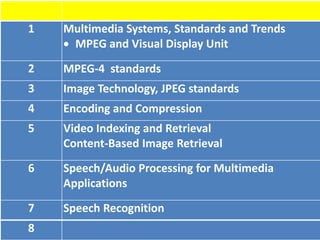
1   Multimedia Systems, Standards and Trends
     MPEG and Visual Display Unit
2   MPEG-4 standards
3   Image Technology, JPEG standards
4   Encoding and Compression
5   Video Indexing and Retrieval
    Content-Based Image Retrieval
6   Speech/Audio Processing for Multimedia
    Applications
7   Speech Recognition
8
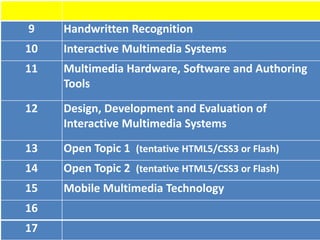
9    Handwritten Recognition
10   Interactive Multimedia Systems
11   Multimedia Hardware, Software and Authoring
     Tools
12   Design, Development and Evaluation of
     Interactive Multimedia Systems
13   Open Topic 1 (tentative HTML5/CSS3 or Flash)
14   Open Topic 2 (tentative HTML5/CSS3 or Flash)
15   Mobile Multimedia Technology
16
17
What is Multimedia?
• Multimedia: a working definition
  – A combination of two or more categories of
    information having different transport signal
    characteristics
  – Typically, one medium is a continuous medium
    while another is discrete
  – Image, audio, video and graphics are examples of
    media
Videos
• Some issues
  – How are the temporal relations between the
    media represented?
  – What do I need to stream video across the
    network?
  – Are the different media synchronized?
  – How can I describe a video retrieval request
    like a query?
Background
• MPEG : Moving Picture Experts Group
    “Compactly representing digital video and audio
    signal for consumer distribution”
     ISO/IEC Standard

• ITU-T : International Telecom Union
  The ITU Telecommunication Standardization Sector


  Some standards for MPEG and ITU-T are duplicate
MPEG Standards
• MPEG-1: (1993) Standard for VCD
  “Coding of moving pictures and associated audio for
  digital storage media at up to about 1.5 Mbit/s”

• MPEG-2: (1995) Standard for SVCD, DVD, digital
  TV
    “Generic coding of moving pictures and associated
                   audio information”

• MPEG-3: intention for Standard of HDTV
  – Found Redundant and merge with MPEG-2, there is no MPEG-3 standard
  – It is not MP3, which is MPEG-1 Audio Layer III.
MPEG Standards
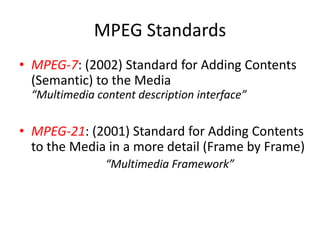
• MPEG-4: (1998)
   “Coding of audio-visual objects for 3D or more efficient video”
            “closer to computer graphics applications”
• MPEG-4 Part 2: visual objects      format vdo
   – DivX
   – XviD
• MPEG-4 Part 3: audio
   – AAC (Advance Audio Coding) Implemented by Apple Inc. AAC is referred to have
     low bitrate at   kbps with the quality equal to MP3 at      kbps and applying
     in iTunes Music Store with the file format as aac, .mp4 and m4a

• MPEG-4 Part 10: Advanced Video Coding (AVC)
   – H.264 (ITU-T) or AVC (MPEG) Higher standard for vdo codec than MPEG-4 part
     2. Applying in QuickTime 7     MacOSX 10.4 Tiger, and broadcasting digital TV
     in Japan and Europe and next generation of disk for Blu-ray and HD-DVD
MPEG Standards
• MPEG-7: (2002) Standard for Adding Contents
  (Semantic) to the Media
  “Multimedia content description interface”

• MPEG-21: (2001) Standard for Adding Contents
  to the Media in a more detail (Frame by Frame)
                “Multimedia Framework”
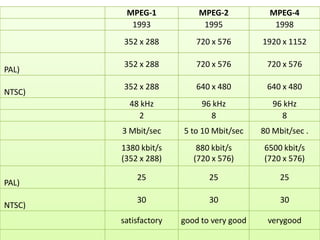
MPEG-1            MPEG-2            MPEG-4
          1993              1995              1998
        352 x 288         720 x 576        1920 x 1152

        352 x 288         720 x 576         720 x 576
PAL)
        352 x 288         640 x 480         640 x 480
NTSC)
          48 kHz            96 kHz            96 kHz
            2                 8                 8
        3 Mbit/sec     5 to 10 Mbit/sec    80 Mbit/sec .
        1380 kbit/s        880 kbit/s      6500 kbit/s
        (352 x 288)       (720 x 576)      (720 x 576)

            25                25                25
PAL)
            30                30                30
NTSC)
        satisfactory   good to very good    verygood
Visual Display Unit
HDTV


• HDTV ( High Definition Television )
                                              HDTV
                                                             p
       Progressive Scan      non-interlaced          i
  interlaced                 i           p
                    p                         HDTV
                                              Widescreen )
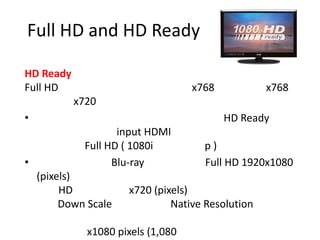
Full HD and HD Ready

HD Ready
Full HD                             x768           x768
           x720
•                                          HD Ready
                    input HDMI
             Full HD ( 1080i          p)
•                  Blu-ray            Full HD 1920x1080
    (pixels)
         HD           x720 (pixels)
         Down Scale            Native Resolution

              x1080 pixels (1,080
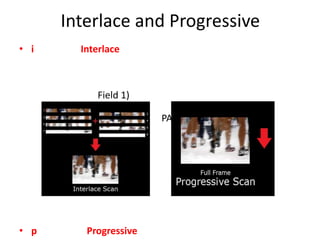
Interlace and Progressive
• i     Interlace


           Field 1)
                                       Filed 2)
                       PAL-576i, NTSC-480i)


• p      Progressive
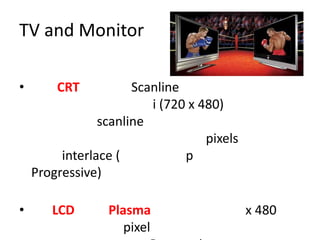
TV and Monitor

•       CRT           Scanline
                         i (720 x 480)
                scanline
                                   pixels
         interlace (           p
    Progressive)

•      LCD       Plasma                     x 480
                    pixel
Resolution of TV
• SDTV : Standard Definition Television
                                       (
                )
           i, 576i
  – NTSC              525x858
    480x720 (2:3) (
  – PAL/SECAM                         576x720 (3:4)
    (                  )

• EDTV : Enhanced Definition Television
      p, 576p, 720i

• HDTV : High Definition Television
Current Technology for TV
•                                                          field A,B
    50Hz                                          Hz        Sony-
    DRC100, Philips 100Hz, 100Hz Digital Scan


• Progressive Scan                         interlace       field A,B
                         deinterlace                         progressive
        Sony DRC Progressive                             interlace


•
                                            Sony-DRC1250


• Hybrid
                                                       Philips-Pixel Plus

• Progressive Scan (                                   Progressive scan

Lecture01

  • 1.
    MIT 628: MultimediaTechnology Dr. Kritsada Sriphaew Master of Science in Information Technology Rangsit University
  • 2.
    1 Multimedia Systems, Standards and Trends MPEG and Visual Display Unit 2 MPEG-4 standards 3 Image Technology, JPEG standards 4 Encoding and Compression 5 Video Indexing and Retrieval Content-Based Image Retrieval 6 Speech/Audio Processing for Multimedia Applications 7 Speech Recognition 8
  • 3.
    9 Handwritten Recognition 10 Interactive Multimedia Systems 11 Multimedia Hardware, Software and Authoring Tools 12 Design, Development and Evaluation of Interactive Multimedia Systems 13 Open Topic 1 (tentative HTML5/CSS3 or Flash) 14 Open Topic 2 (tentative HTML5/CSS3 or Flash) 15 Mobile Multimedia Technology 16 17
  • 4.
    What is Multimedia? •Multimedia: a working definition – A combination of two or more categories of information having different transport signal characteristics – Typically, one medium is a continuous medium while another is discrete – Image, audio, video and graphics are examples of media
  • 5.
    Videos • Some issues – How are the temporal relations between the media represented? – What do I need to stream video across the network? – Are the different media synchronized? – How can I describe a video retrieval request like a query?
  • 6.
    Background • MPEG :Moving Picture Experts Group “Compactly representing digital video and audio signal for consumer distribution” ISO/IEC Standard • ITU-T : International Telecom Union The ITU Telecommunication Standardization Sector Some standards for MPEG and ITU-T are duplicate
  • 7.
    MPEG Standards • MPEG-1:(1993) Standard for VCD “Coding of moving pictures and associated audio for digital storage media at up to about 1.5 Mbit/s” • MPEG-2: (1995) Standard for SVCD, DVD, digital TV “Generic coding of moving pictures and associated audio information” • MPEG-3: intention for Standard of HDTV – Found Redundant and merge with MPEG-2, there is no MPEG-3 standard – It is not MP3, which is MPEG-1 Audio Layer III.
  • 8.
    MPEG Standards • MPEG-4:(1998) “Coding of audio-visual objects for 3D or more efficient video” “closer to computer graphics applications” • MPEG-4 Part 2: visual objects format vdo – DivX – XviD • MPEG-4 Part 3: audio – AAC (Advance Audio Coding) Implemented by Apple Inc. AAC is referred to have low bitrate at kbps with the quality equal to MP3 at kbps and applying in iTunes Music Store with the file format as aac, .mp4 and m4a • MPEG-4 Part 10: Advanced Video Coding (AVC) – H.264 (ITU-T) or AVC (MPEG) Higher standard for vdo codec than MPEG-4 part 2. Applying in QuickTime 7 MacOSX 10.4 Tiger, and broadcasting digital TV in Japan and Europe and next generation of disk for Blu-ray and HD-DVD
  • 9.
    MPEG Standards • MPEG-7:(2002) Standard for Adding Contents (Semantic) to the Media “Multimedia content description interface” • MPEG-21: (2001) Standard for Adding Contents to the Media in a more detail (Frame by Frame) “Multimedia Framework”
  • 10.
    MPEG-1 MPEG-2 MPEG-4 1993 1995 1998 352 x 288 720 x 576 1920 x 1152 352 x 288 720 x 576 720 x 576 PAL) 352 x 288 640 x 480 640 x 480 NTSC) 48 kHz 96 kHz 96 kHz 2 8 8 3 Mbit/sec 5 to 10 Mbit/sec 80 Mbit/sec . 1380 kbit/s 880 kbit/s 6500 kbit/s (352 x 288) (720 x 576) (720 x 576) 25 25 25 PAL) 30 30 30 NTSC) satisfactory good to very good verygood
  • 11.
  • 12.
    HDTV • HDTV (High Definition Television ) HDTV p Progressive Scan non-interlaced i interlaced i p p HDTV Widescreen )
  • 13.
    Full HD andHD Ready HD Ready Full HD x768 x768 x720 • HD Ready input HDMI Full HD ( 1080i p) • Blu-ray Full HD 1920x1080 (pixels) HD x720 (pixels) Down Scale Native Resolution x1080 pixels (1,080
  • 14.
    Interlace and Progressive •i Interlace Field 1) Filed 2) PAL-576i, NTSC-480i) • p Progressive
  • 15.
    TV and Monitor • CRT Scanline i (720 x 480) scanline pixels interlace ( p Progressive) • LCD Plasma x 480 pixel
  • 16.
    Resolution of TV •SDTV : Standard Definition Television ( ) i, 576i – NTSC 525x858 480x720 (2:3) ( – PAL/SECAM 576x720 (3:4) ( ) • EDTV : Enhanced Definition Television p, 576p, 720i • HDTV : High Definition Television
  • 17.
    Current Technology forTV • field A,B 50Hz Hz Sony- DRC100, Philips 100Hz, 100Hz Digital Scan • Progressive Scan interlace field A,B deinterlace progressive Sony DRC Progressive interlace • Sony-DRC1250 • Hybrid Philips-Pixel Plus • Progressive Scan ( Progressive scan

Editor's Notes

  • #7 MPEG (นิยมอ่าน เอ็มเพก) เป็นชื่อกลุ่มนักพัฒนา ระบบมาตรฐานการเข้ารหัสวิดีโอและออดิโอ ของ ISO/IEC โดยมีการเริ่มพัฒนาร่วมกันครั้งแรกเมื่อ พฤษภาคม พ.ศ. 2531 ที่ประเทศแคนาดา โดยสมาชิกของเอ็มเพก ประกอบด้วยบุคคลจากบริษัทพัฒนา นักวิจัยจากศูนย์วิจัยและมหาวิทยาลัยThe first MPEG meeting was in May 1988 in Ottawa, Canada
  • #9 ปล่อยให้ผู้ผลิตซอพท์แวร์เป็นผู้พัฒนาโปรแกรมที่ใช้จริงๆ เอง ไม่จำเป็นต้องตาม MPEG-4 เต็มชุดก็ได้ พัฒนาได้เป็นบางส่วนก็พอ (แบบเดียวกับ MP3 ที่หยิบแต่ส่วนออดิโอไปทำ)DivX is a brand name of products created by DivX, Inc. (formerly DivXNetworks, Inc., later purchased by Sonic Solutions and currently part of the Rovi Corporation Xvid is free software distributed under the terms of the GNU General Public License.นอกจากนั้นยังมีการนำมาตราฐานH.264 ไปใช้กับงานด้านกล้องวงจรปิด CCTV โดยเครื่องบันทึกภาพ DVR ใช้คุณสมบัติที่ดีกว่าของมาตราฐานนี้ซึ่งสามารถบีบอัดข้อมูลทั้งภาพและเสียงได้สูงกว่า Mpeg-4 เกือบเท่าตัว ทำให้ประหยัดเนื้อที่ในการบันทึกซึ่งก็เท่ากับว่าสามารถบันทึกข้อมูลภาพและเสียงได้ยาวนานขึ้นกว่าเดิมในขณะที่ใช้เนื้อที่เท่ากันนั่นเอง และยังทำให้อัตราการส่งข้อมูลผ่านระบบเครือข่ายทำได้รวดเร็วยิ่งขึ้นอีกด้วยเปรียบเทียบระหว่าง MPEG-2 และ MPEG-4จากการทดสอบด้านเทคโนโลยีของ MPEG เจ้า MPEG-4 สามารถที่จะ Encode ได้มากกว่า แต่ก็ใช้เวลาในการ Ecodingนานกว่าเช่นกันครับ ซึ่งเหตุผลหลักที่ ACE (Advanced Coding Efficiency) ได้ใช้อัลกอริทึ่ม MPEG-4 และสามารถทำมันให้มีค่าเฉลี่ยในการถ่านโอนข้อมูลที่เล็กลง ทำให้มันสามารถที่จะจุวิดีโอแบบความละเอียดสูงในรูปแบบของ PAL และ NTSC รวมถึงเสียงในระดับคุณภาพสูง (16 บิตม 48 kHz) ไว้ในแผ่น CD-ROM แผ่นเดียวได้เป็นอันสำเร็จ ซึ่งหนังที่อัดเข้ามานั้นจะมีความยาวตั้งแต่ 110นาทีขึ้นไป ซึ่งถ้าเกิดเปรียบเทียบกันแล้วหนังแบบเดียวกัน ความละเอียดเหมือนกันแต่เก็บในรูปแบบ MPEG-2 นั้นจะมีขนาดมากกว่าอย่างน้อย 11 เท่าเลยทีเดียวครับซึ่งเราต้องเก็บไว้ในสื่อบันทึกที่กแบบ DVD (ขนาด 8 GB.) เท่านั้นซึ่งอัตราการถ่ายโอนข้อมูลของ MPEG-2 นั้นค่อนข้างจะใกล้เคียงกับไฟล์ต้นฉบับมากทีเดียว ซึ่งใน MPEG-4 นั้นตัวออดิโอจะสามารถทำขนาดได้เหมือนกับวิดีโอเลยทีเดียว ตัวเสียงนั้นสามารถที่จะถูกประมวลผลได้ในระดับ 2Kbit/s ถึง 24 Kbit/s ในขณะที่วิดีโอสามารถทำการโปรเซสได้ในระดับ 5 Kbit/s และ 10 Mbit/s. ด้วยเหตุผลนี้ เราจึงสามารถที่จะย่อขนาดข้อมูลใหญ่ๆอย่างหนังในรูปแบบ DVD ลงมาสู่ CD-ROM ได้อย่างไม่ยากเย็นนัก และยังได้คุณภาพสูงอีกด้วยครับ
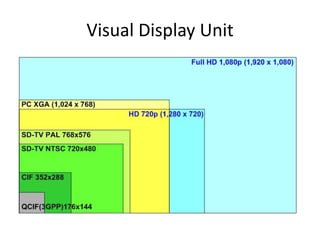
  • #12 - Full HD (High Definition) 1920 x 1080- HD (High Definition) 1280x720- PC XGA (Extended Graphics Array) 1024x768- SD (Standard Definition) PAL TV 768x576- SD (Standard Definition) NTSC TV 720x480- CIF (Common Intermediate Format) 352x288- QCIF (Quarter Common Intermediate Format) 176x144       ซึ่งแต่ละระบบ มีความแตกต่างกันของขนาดภาพ มันเกี่ยวข้องกับการบันทึกภาพวิดีโอ หรือการนำไปตัดต่อภาพวิดีโอด้วย เช่น การส่งภาพข่าวของผู้สื่อข่าว บมจ.อสมท ในขณะนี้ใช้ขนาด 720x576 และกล้องวิดีโอที่ส่งมาให้ใช้งานตามภูมิภาค ปรับมาตรฐานของภาพที่บันทึกเป็น 720x576 นั่นเอง ซึ่งอยู่ในระบบ SD ที่จะกล่าวในลำดับต่อไป
  • #13   ตามมาตรฐานของญี่ปุ่น ยอมรับว่าการแสดงผลแบบ 1080p ถือว่าเป็น Full HD แต่สำหรับการแสดงผลแบบ 1080i แค่ยอมรับได้ว่าเป็น HD  แต่ทางอเมริกากำหนดว่าการแสดงผลแบบ 1080i และ 1080p เป็นแบบ Full HD ส่วนการแสดงผลแบบ 720p ที่มีจำนวนเส้นในแนวนอน 720 เส้น แบบ Progressive Scan นั้นเป็นเพียง HD ธรรมดา  ( แต่ญี่ปุ่นไม่ยอมรับว่า 720p เป็น HD เพราะประเทศญี่ปุ่นมีมาตรฐานสูงและเป็นผู้พัฒนาระบบ HD เป็นประเทศแรก เขายังกล่าวว่าสามารถผลิตภาพที่มีความคมชัดสูงมากกว่านี้ ที่เรียกว่า Super Vision Television ซึ่งผมเคยไปเห็นด้วยตามาแล้ว... ) - ขนาดภาพแบบ Full HD เท่ากับ 1,920 x 1,080 pixels = 2,073,600 พิกเซล- ขนาดภาพแบบ HD เท่ากับ 1,280 x 720 pixels = 921,600 พิกเซล ( ไม่ใช่ Full HD )
  • #17 ความละเอียดของภาพหรือเรียกให้ดูมีภูมิหน่อย ก็คือ Image Resolution หน่วยที่ใช้เรียกคือ พิกเซลต่อนิ้ว (Pixel Per Inch : PPI) จอคอมพิวเตอร์ส่วนใหญ่จะมีความละเอียดที่ 72 PPI คือความกว้าง 1 นิ้วบนจอคอมพิวเตอร์จะแสดงจุดได้ 72 จุดนั่นเอง ดังนั้นไฟล์ภาพที่เรานำมาไม่ว่าจากกล้องหรือเครื่องสแกนก็ตาม หากคิดว่าจะใช้แสดงผลแค่บนจอคอมพิวเตอร์เท่านั้น ก็ให้กำหนดความละเอียดเป็น 72 PPI ก็พอ (ซึ่งจอบางตัวแสดงผลได้ 96 PPI ก็ให้ดูเครื่องของเพื่อนๆ เป็นหลักละกัน แต่ในบทความนี้จะพูดถึงจอที่มีความละเอียด 72 PPI เป็นหลัก)หน่วยที่ใช้วัด ผมจะใช้ Pixel : Inch ก็แล้วกัน เนื่องจากต่อไปจะพูดถึงการนำภาพที่ได้ไปอัดที่แล็บ ซึ่งขนาดภาพเค้าเรียกเป็น นิ้ว จะได้ไม่สับสนภายหลัง