802.11ac Wi-Fi Fundamentals
Eric Johnson
March 2014
CONFIDENTIAL
© Copyright 2014. Aruba Networks, Inc.
All rights reserved
2 #AirheadsConf
Agenda
11ac Standards Physical Layer Overview
11ac Data Rates
Radio Realities
Transmitters
Receivers
Antennas
11ac Beamforming
11ac Products
3
CONFIDENTIAL
© Copyright 2014. Aruba Networks, Inc.
All rights reserved
#AirheadsConf
802.11ac Technology
Overview
Think of 11ac as an
extension of 11n
•  11n specification
introduced/leveraged:
•  2.4 and 5 GHz supported
•  Wider channels (40 MHz)
•  Better modulation (64-
QAM)
•  Additional streams (up to 4
streams)
•  Beam forming (explicit and
implicit)
•  Backwards compatibility
with 11a/b/g
11ac	
  introduces	
  
•  5	
  GHz	
  supported	
  
•  Even	
  wider	
  channels	
  (80	
  MHz	
  
and	
  160	
  MHz)	
  
•  Be?er	
  modulaAon	
  (256-­‐QAM)	
  
•  AddiAonal	
  streams	
  (up	
  to	
  8)	
  
•  Beam	
  forming	
  (explicit)	
  
•  Backwards	
  compaAbility	
  with	
  
11a/b/g/n	
  
•  Refer	
  to	
  h?p://www.
802-­‐11.ac.net	
  for	
  in-­‐depth	
  
informaAon	
  
4
CONFIDENTIAL
© Copyright 2014. Aruba Networks, Inc.
All rights reserved
#AirheadsConf
Wider Channels
•  80 MHz channel widths supported in first
generation
– 80 MHz is 4.5x faster than 20 MHz
– 80 MHz is contiguous
– Per packet dynamic channel width decisions
•  Future releases will allow for 160 MHz
channel widths
– 160 MHz can be either contiguous or in two non-
contiguous 80 MHz slices
5
CONFIDENTIAL
© Copyright 2014. Aruba Networks, Inc.
All rights reserved
#AirheadsConf
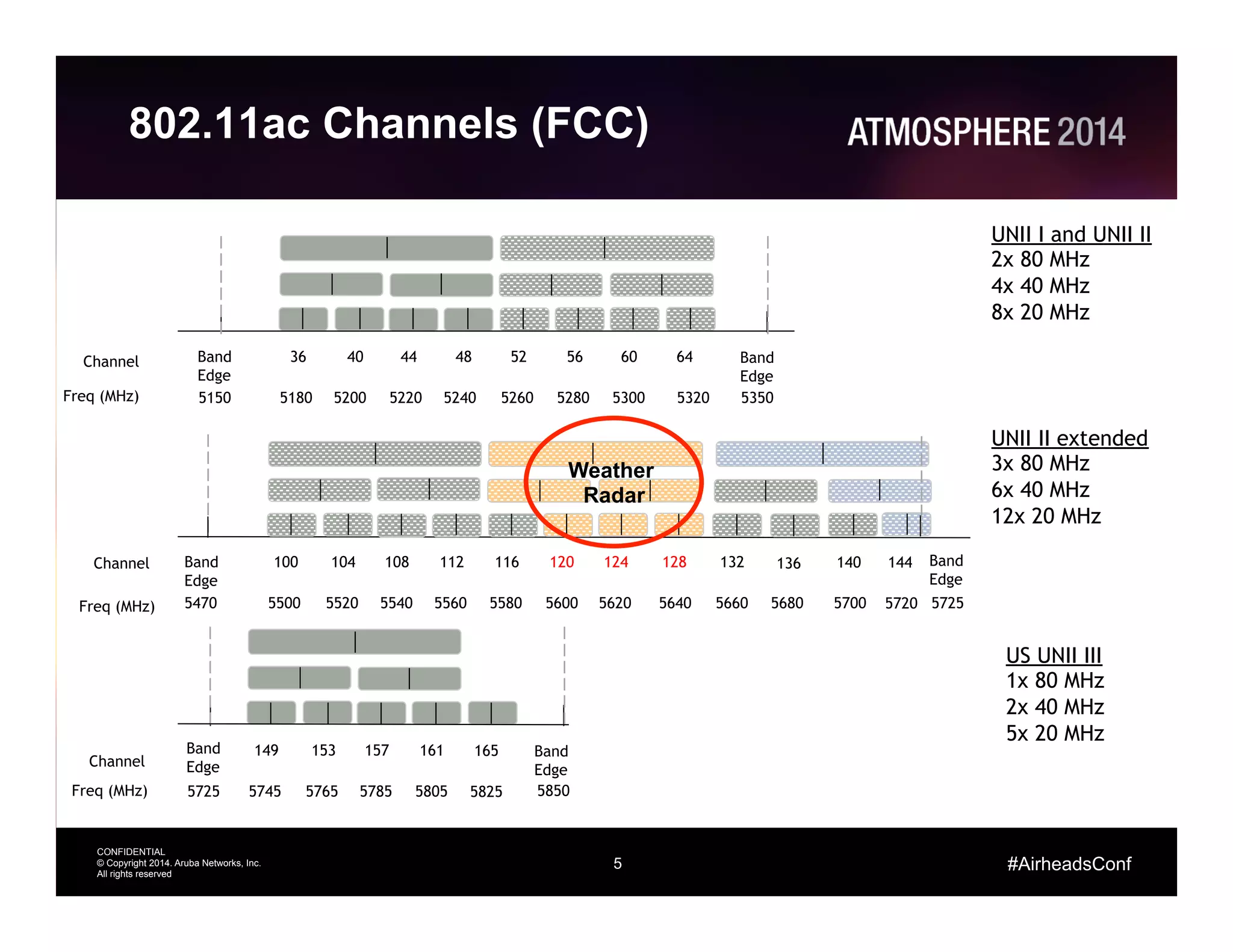
802.11ac Channels (FCC)
Channel
Freq (MHz)
UNII I and UNII II
2x 80 MHz
4x 40 MHz
8x 20 MHz
Band
Edge
Channel
Freq (MHz) 5850
US UNII III
1x 80 MHz
2x 40 MHz
5x 20 MHz
Channel
Freq (MHz)
UNII II extended
3x 80 MHz
6x 40 MHz
12x 20 MHz
36 4844 5240 56 6460 Band
Edge
5180 5200 5220 5240 5260 5280 5300 5320 5350
Band
Edge
5150
149 161157153
5745 5765 5785 5805
Band
Edge
5725
165
5825
100 112108 116104 120 128124
5500 5520 5540 5560 5580 5600 5620 5640
Band
Edge
5470
136 140 Band
Edge
5680 5700 5725
132
5660
144
5720
Weather
Radar
6
CONFIDENTIAL
© Copyright 2014. Aruba Networks, Inc.
All rights reserved
#AirheadsConf
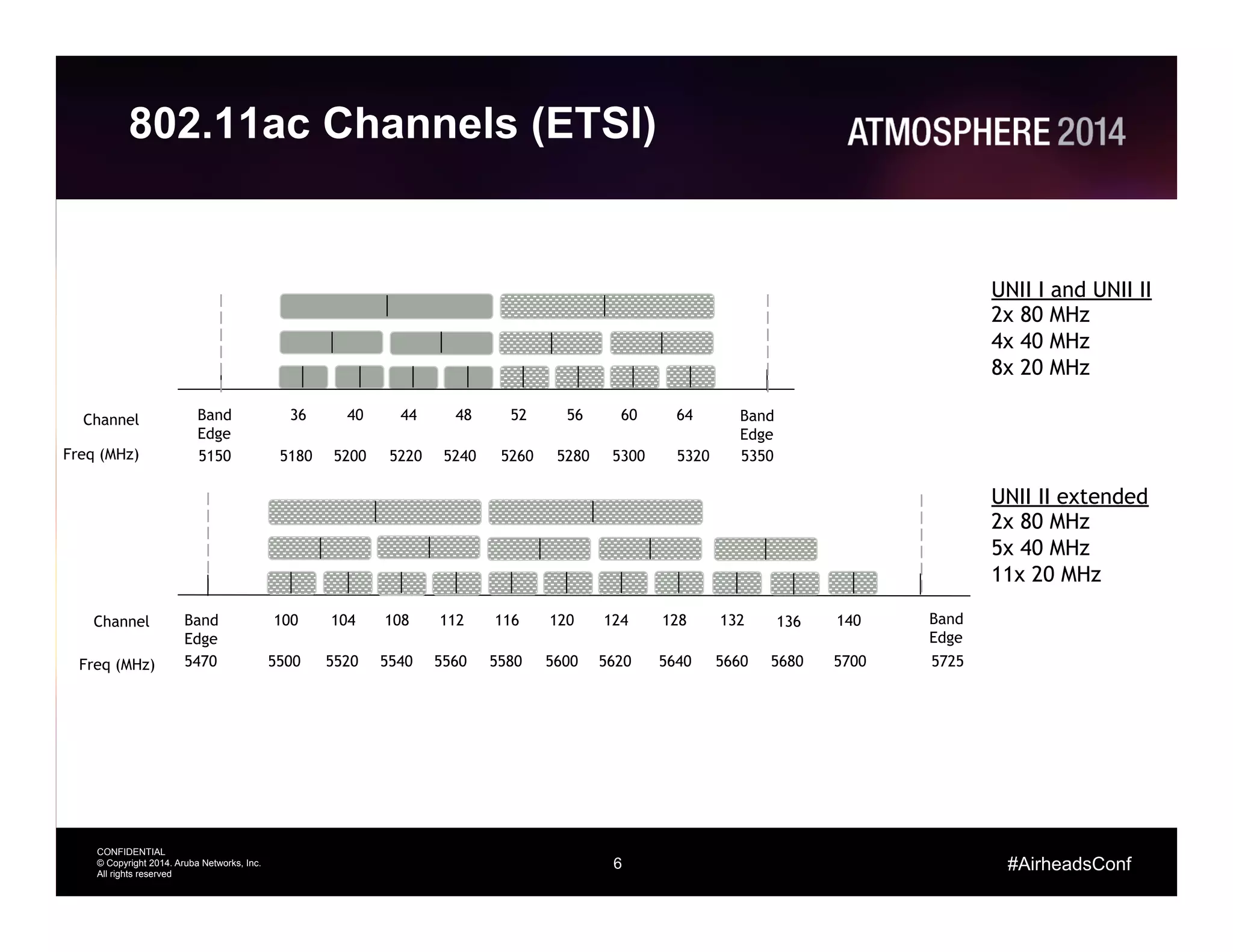
802.11ac Channels (ETSI)
Channel
Freq (MHz)
UNII I and UNII II
2x 80 MHz
4x 40 MHz
8x 20 MHz
Channel
Freq (MHz)
UNII II extended
2x 80 MHz
5x 40 MHz
11x 20 MHz
36 4844 5240 56 6460 Band
Edge
5180 5200 5220 5240 5260 5280 5300 5320 5350
Band
Edge
5150
100 112108 116104 120 128124
5500 5520 5540 5560 5580 5600 5620 5640
Band
Edge
5470
136 140 Band
Edge
5680 5700 5725
132
5660
7
CONFIDENTIAL
© Copyright 2014. Aruba Networks, Inc.
All rights reserved
#AirheadsConf
Understanding 11ac Data Rates
8
CONFIDENTIAL
© Copyright 2014. Aruba Networks, Inc.
All rights reserved
#AirheadsConf
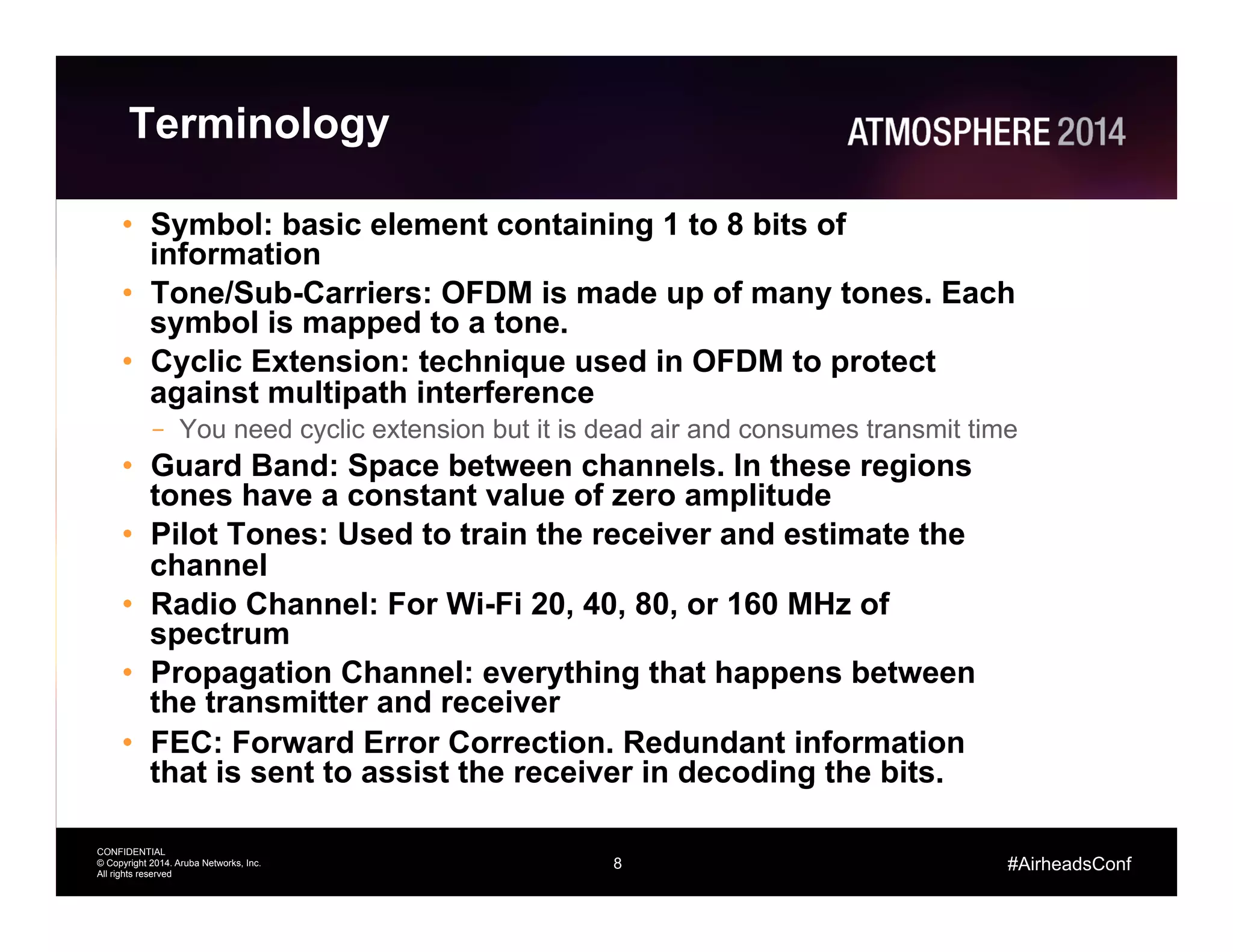
Terminology
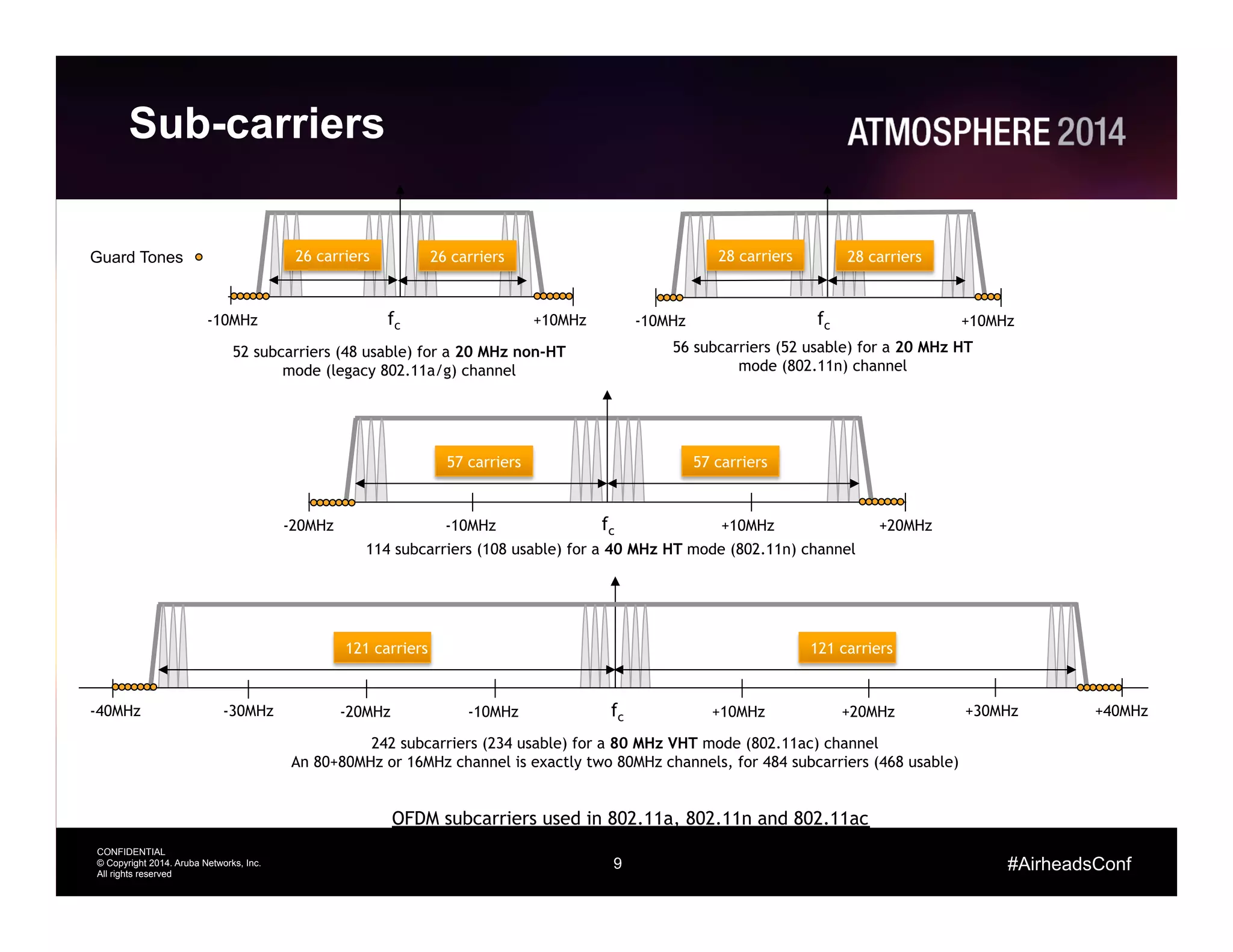
•  Symbol: basic element containing 1 to 8 bits of
information
•  Tone/Sub-Carriers: OFDM is made up of many tones. Each
symbol is mapped to a tone.
•  Cyclic Extension: technique used in OFDM to protect
against multipath interference
–  You need cyclic extension but it is dead air and consumes transmit time
•  Guard Band: Space between channels. In these regions
tones have a constant value of zero amplitude
•  Pilot Tones: Used to train the receiver and estimate the
channel
•  Radio Channel: For Wi-Fi 20, 40, 80, or 160 MHz of
spectrum
•  Propagation Channel: everything that happens between
the transmitter and receiver
•  FEC: Forward Error Correction. Redundant information
that is sent to assist the receiver in decoding the bits.
9
CONFIDENTIAL
© Copyright 2014. Aruba Networks, Inc.
All rights reserved
#AirheadsConf
Sub-carriers
52 subcarriers (48 usable) for a 20 MHz non-HT
mode (legacy 802.11a/g) channel
fc +10MHz-10MHz
26 carriers 26 carriers
56 subcarriers (52 usable) for a 20 MHz HT
mode (802.11n) channel
fc
28 carriers 28 carriers
114 subcarriers (108 usable) for a 40 MHz HT mode (802.11n) channel
fc +10MHz-20MHz
57 carriers 57 carriers
+20MHz-10MHz
242 subcarriers (234 usable) for a 80 MHz VHT mode (802.11ac) channel
An 80+80MHz or 16MHz channel is exactly two 80MHz channels, for 484 subcarriers (468 usable)
121 carriers 121 carriers
fc +10MHz-20MHz +20MHz-10MHz-40MHz -30MHz +30MHz +40MHz
OFDM subcarriers used in 802.11a, 802.11n and 802.11ac
+10MHz-10MHz
Guard Tones
10
CONFIDENTIAL
© Copyright 2014. Aruba Networks, Inc.
All rights reserved
#AirheadsConf
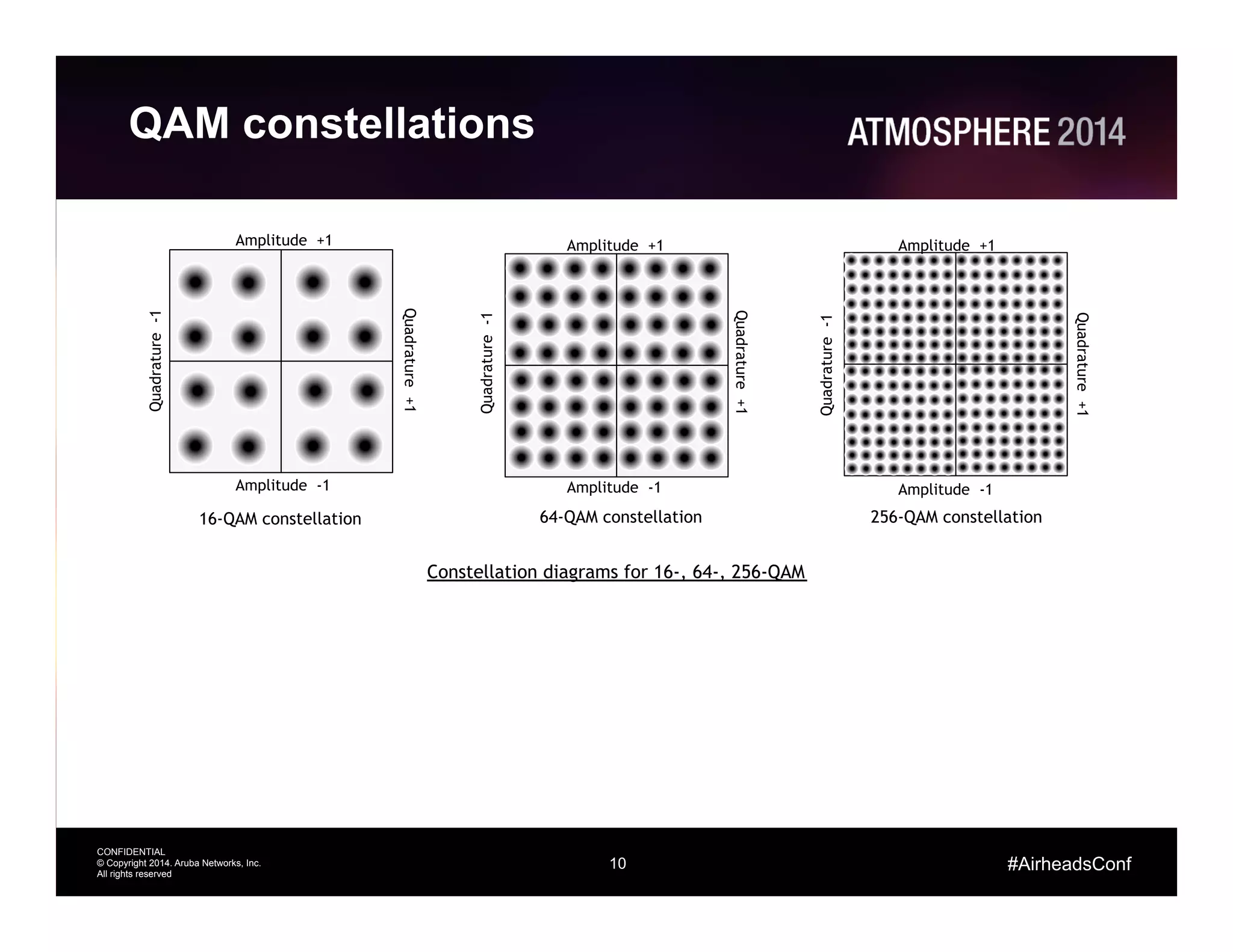
QAM constellations
Amplitude +1
Amplitude -1
Quadrature-1
Quadrature+1
Amplitude +1
Amplitude -1Quadrature-1
Quadrature+1
Amplitude +1
Amplitude -1
Quadrature-1
Quadrature+1
16-QAM constellation 64-QAM constellation 256-QAM constellation
Constellation diagrams for 16-, 64-, 256-QAM
11
CONFIDENTIAL
© Copyright 2014. Aruba Networks, Inc.
All rights reserved
#AirheadsConf
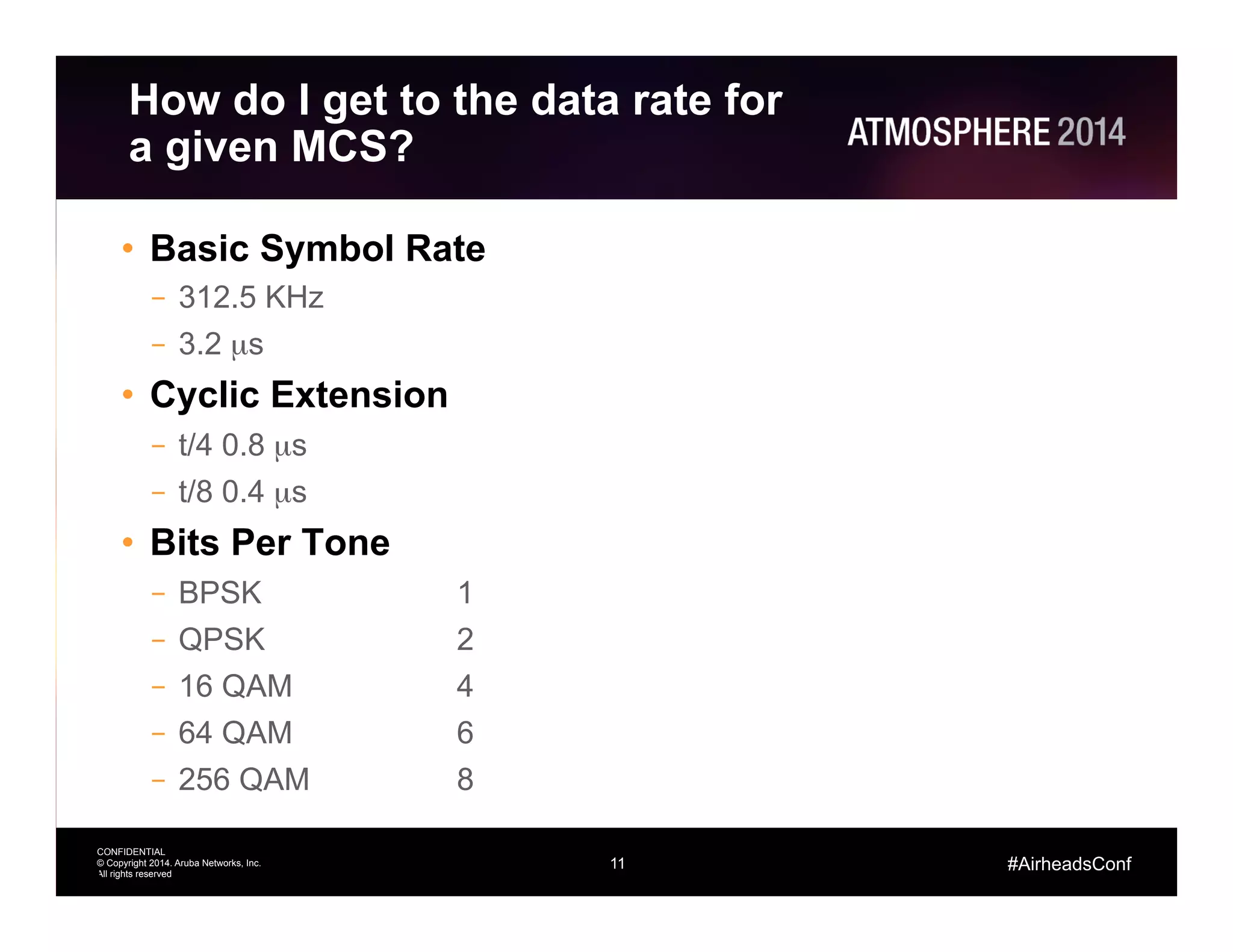
How do I get to the data rate for
a given MCS?
•  Basic Symbol Rate
–  312.5 KHz
–  3.2 µs
•  Cyclic Extension
–  t/4 0.8 µs
–  t/8 0.4 µs
•  Bits Per Tone
–  BPSK 1
–  QPSK 2
–  16 QAM 4
–  64 QAM 6
–  256 QAM 8
11
12
CONFIDENTIAL
© Copyright 2014. Aruba Networks, Inc.
All rights reserved
#AirheadsConf
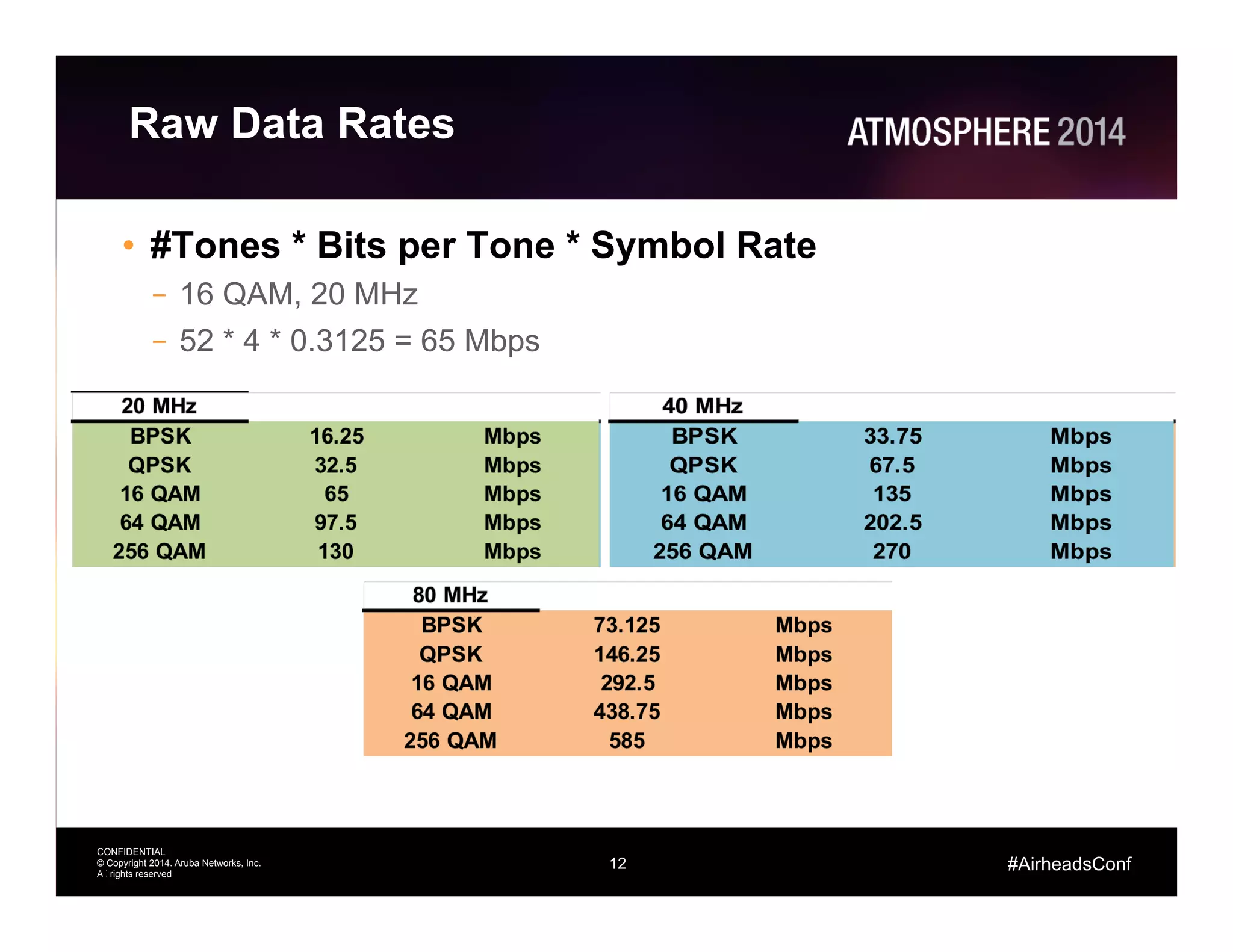
Raw Data Rates
•  #Tones * Bits per Tone * Symbol Rate
–  16 QAM, 20 MHz
–  52 * 4 * 0.3125 = 65 Mbps
12
13
CONFIDENTIAL
© Copyright 2014. Aruba Networks, Inc.
All rights reserved
#AirheadsConf
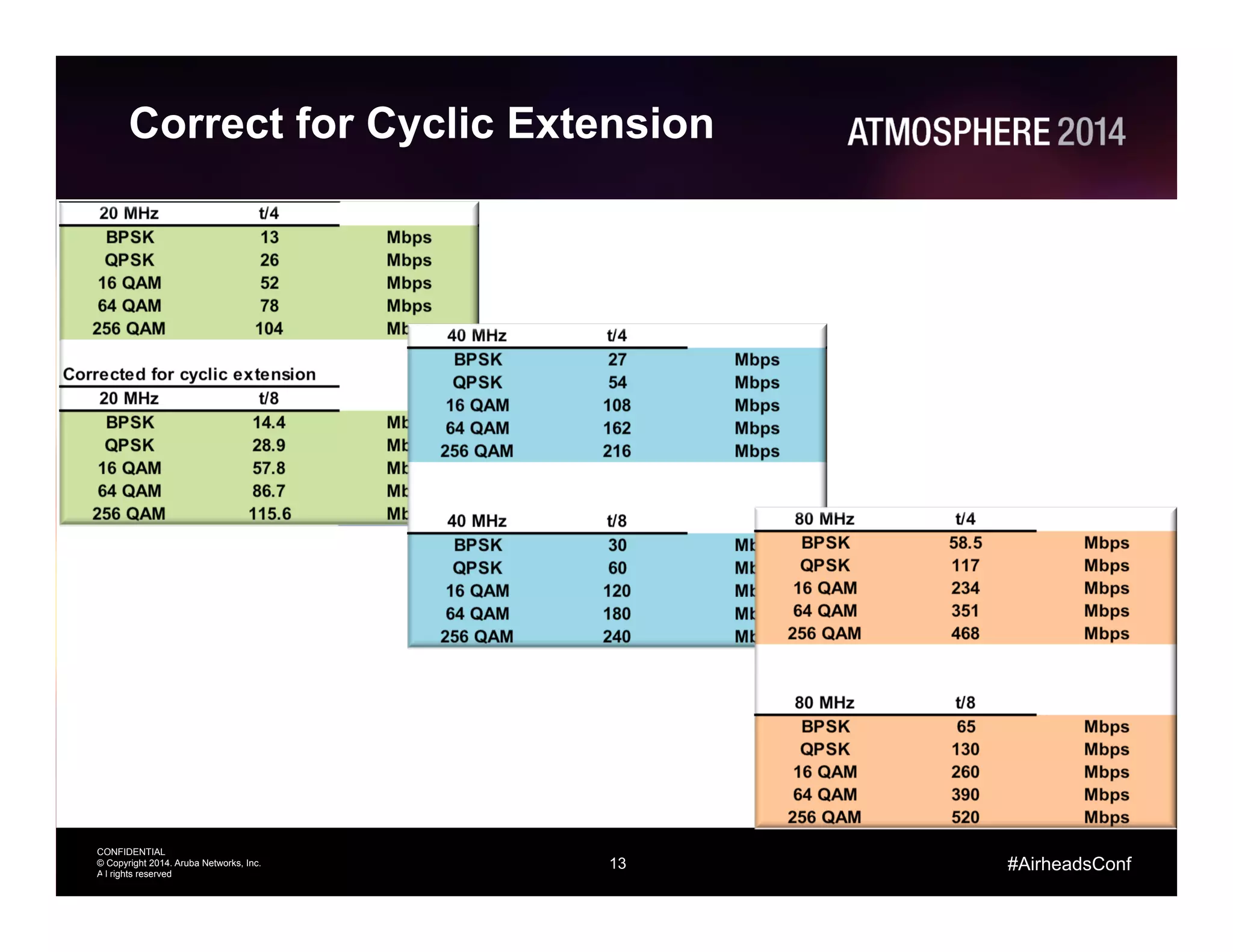
Correct for Cyclic Extension
13
14
CONFIDENTIAL
© Copyright 2014. Aruba Networks, Inc.
All rights reserved
#AirheadsConf
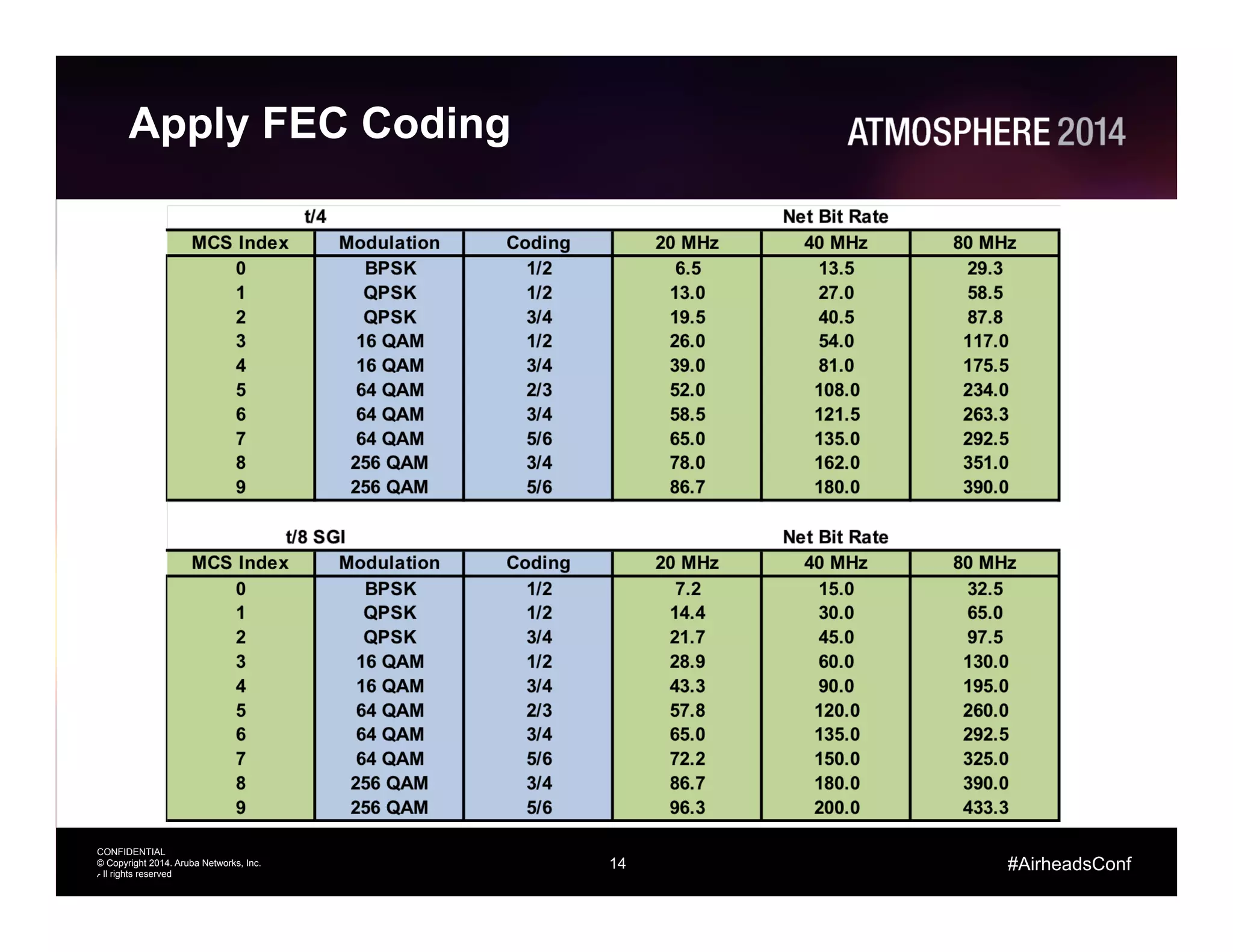
Apply FEC Coding
14
15
CONFIDENTIAL
© Copyright 2014. Aruba Networks, Inc.
All rights reserved
#AirheadsConf
Transmitters
16
CONFIDENTIAL
© Copyright 2014. Aruba Networks, Inc.
All rights reserved
#AirheadsConf
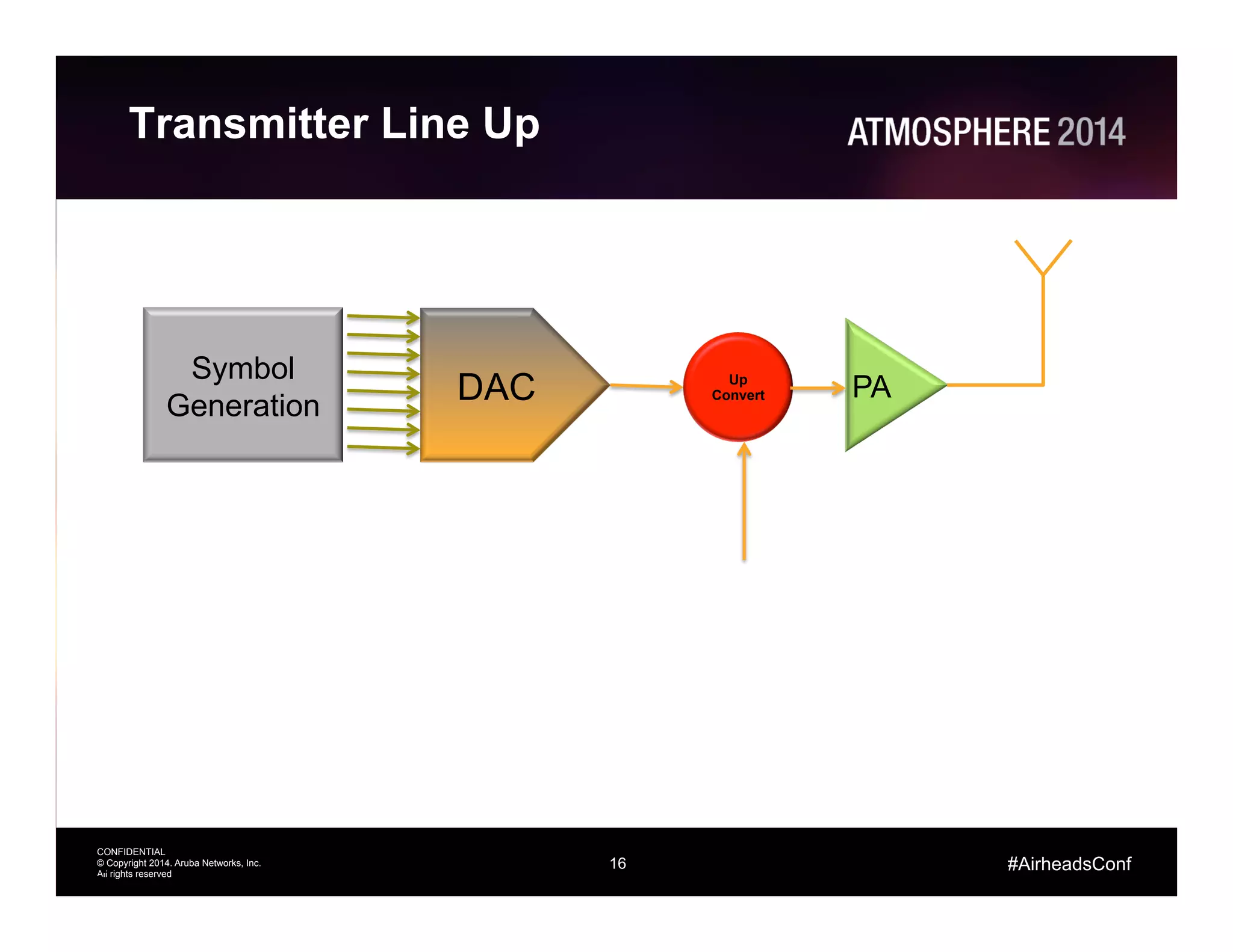
Transmitter Line Up
16
DAC
Symbol
Generation
Up
Convert PA
17
CONFIDENTIAL
© Copyright 2014. Aruba Networks, Inc.
All rights reserved
#AirheadsConf
Transmitter Terms
•  Conducted Power
–  This is the power that leaves the connectors
•  EIRP: Effective Isotropic Radiated Power
–  This is the conducted power (dBm) + antenna gain (dBi) in
the direction of interest – cable losses (dB)
•  Peak EIRP
–  This is what is regulated
–  It is the conducted power + peak gain – cable losses
•  dBm: log power ratio to milliwatt
•  dBi: antenna gain relative to isotropic
•  dBr: relative power eg:used with describing
transmit mask
17
18
CONFIDENTIAL
© Copyright 2014. Aruba Networks, Inc.
All rights reserved
#AirheadsConf
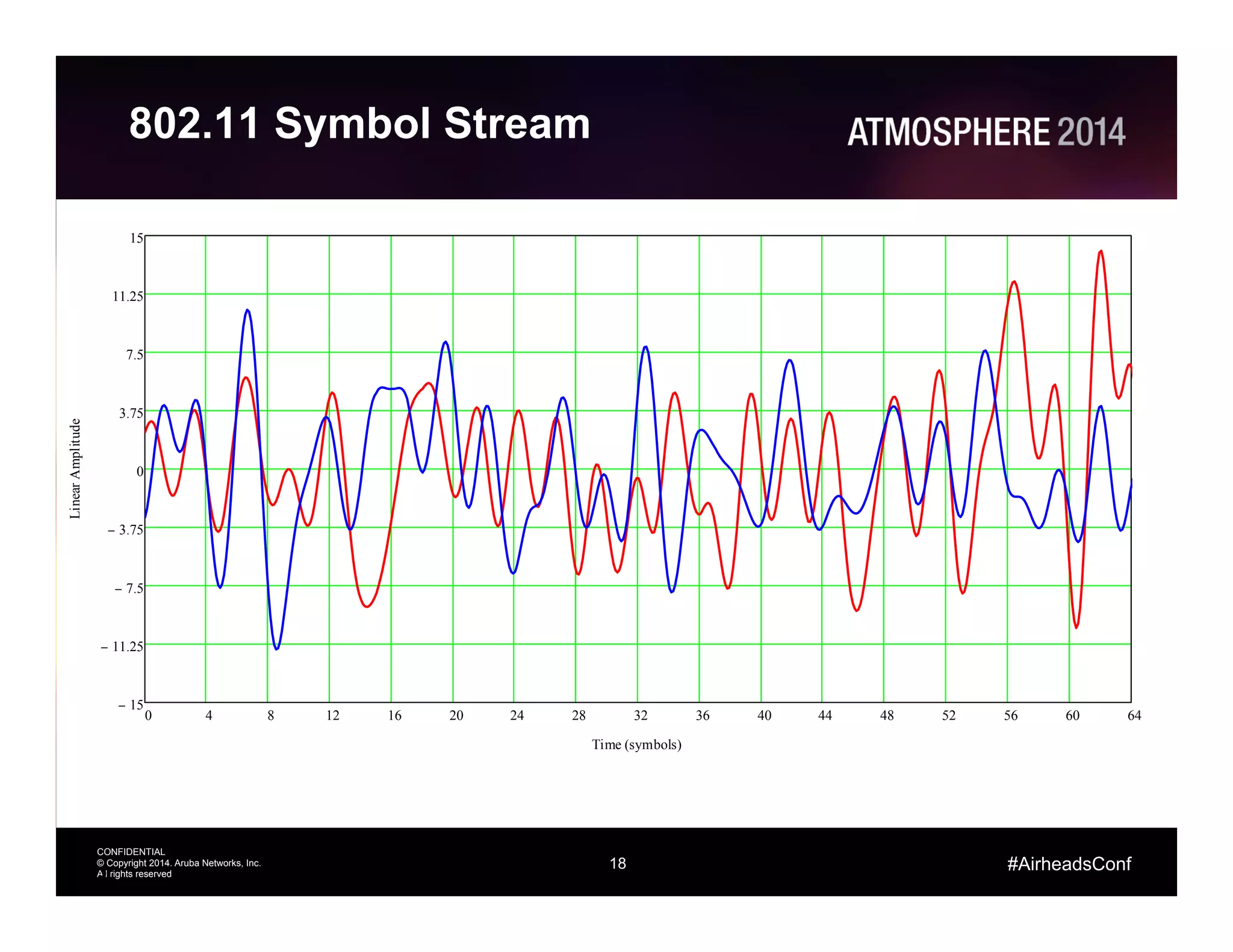
802.11 Symbol Stream
18
0 4 8 12 16 20 24 28 32 36 40 44 48 52 56 60 64
15−
11.25−
7.5−
3.75−
0
3.75
7.5
11.25
15
Time (symbols)
LinearAmplitude
19
CONFIDENTIAL
© Copyright 2014. Aruba Networks, Inc.
All rights reserved
#AirheadsConf
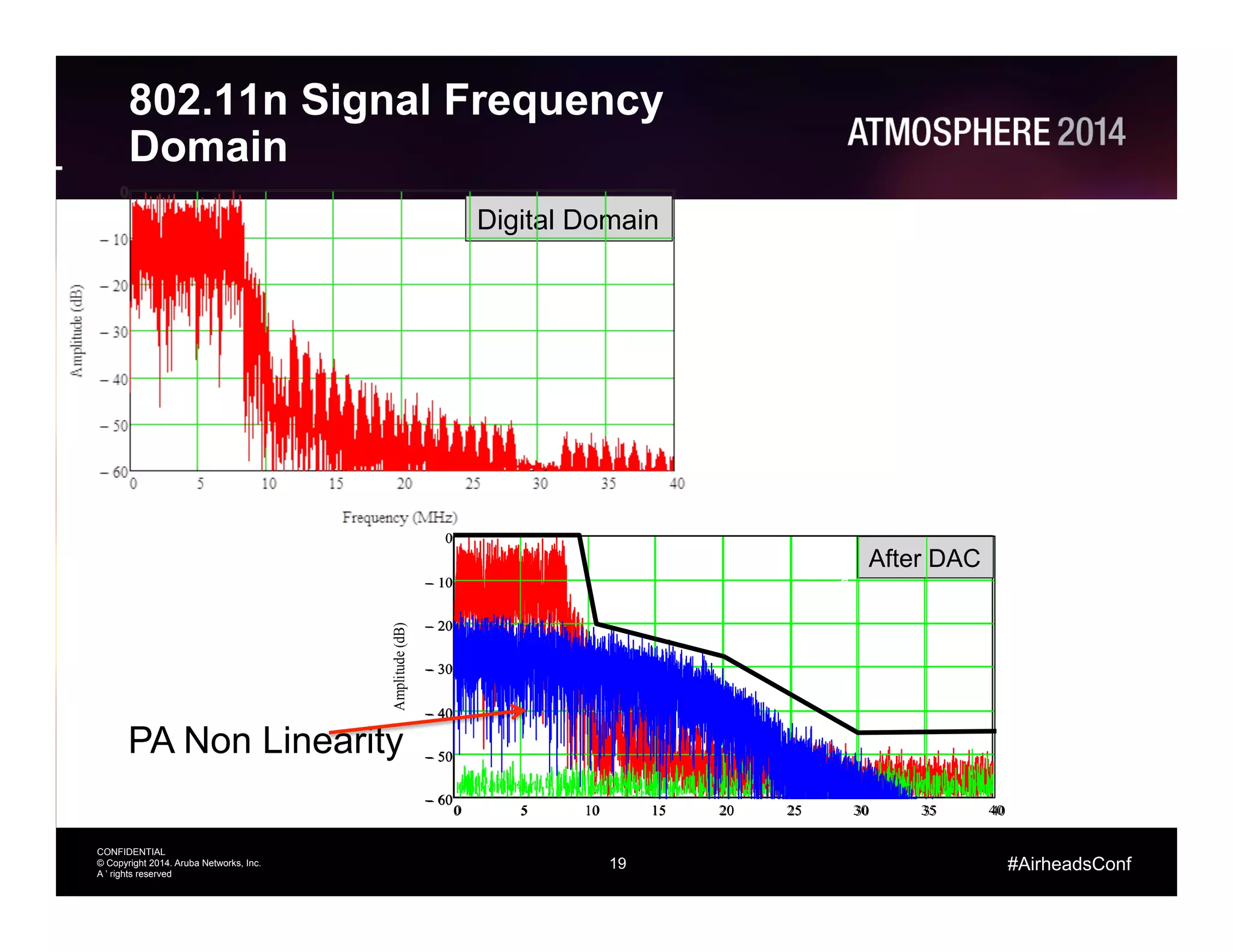
802.11n Signal Frequency
Domain
19
0 5 10 15 20 25 30 35 40
60−
50−
40−
30−
20−
10−
0
Frequency (MHz)
Amplitude(dB)
Digital Domain
After DAC
PA Non Linearity
0 5 10 15 20 25 30 35 40
60−
50−
40−
30−
20−
10−
0
a
20
CONFIDENTIAL
© Copyright 2014. Aruba Networks, Inc.
All rights reserved
#AirheadsConf
Transmitter Non-Idealities
•  DAC Quantization: this is due to the limited number of bits
in a practical Digital to Analog Converter
–  This noise source is not affected when the power is reduced
•  PA Non Linearity: OFDM has a high Peak to Average Ratio.
The peaks in the OFDM signal cause distortions which
manifest as noise like shoulders
–  Known as spectral regrowth
–  For every one 1 dB drop in tx power the regrowth drops by 3 dB
•  2 dB net
•  The in channel noise is referred to as EVM
–  Error Vector Magnitude
•  The out of channel noise interferes with other Wi-Fi
channels and determines how close we can space
antennas
20
21
CONFIDENTIAL
© Copyright 2014. Aruba Networks, Inc.
All rights reserved
#AirheadsConf
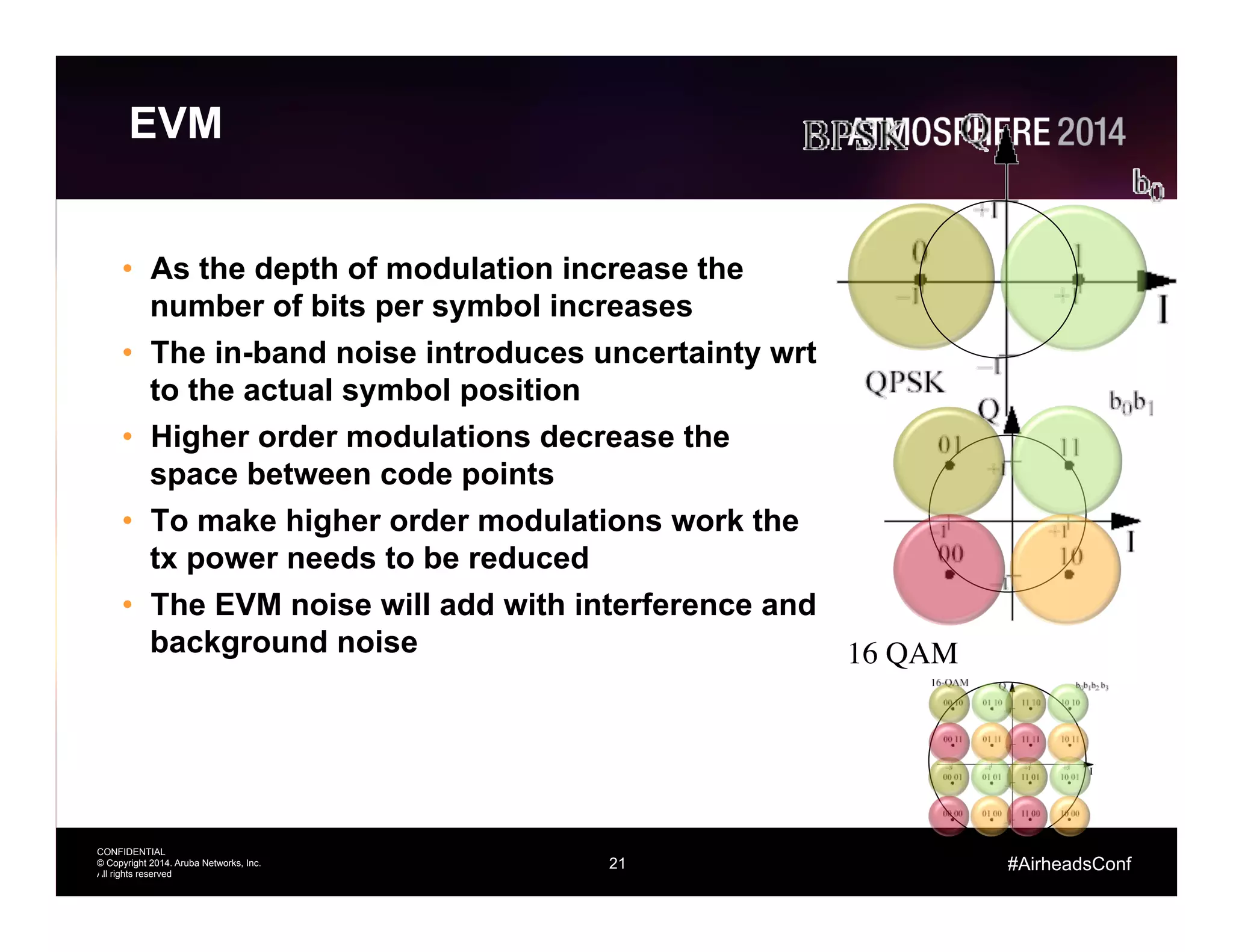
EVM
•  As the depth of modulation increase the
number of bits per symbol increases
•  The in-band noise introduces uncertainty wrt
to the actual symbol position
•  Higher order modulations decrease the
space between code points
•  To make higher order modulations work the
tx power needs to be reduced
•  The EVM noise will add with interference and
background noise
21
16 QAM
22
CONFIDENTIAL
© Copyright 2014. Aruba Networks, Inc.
All rights reserved
#AirheadsConf
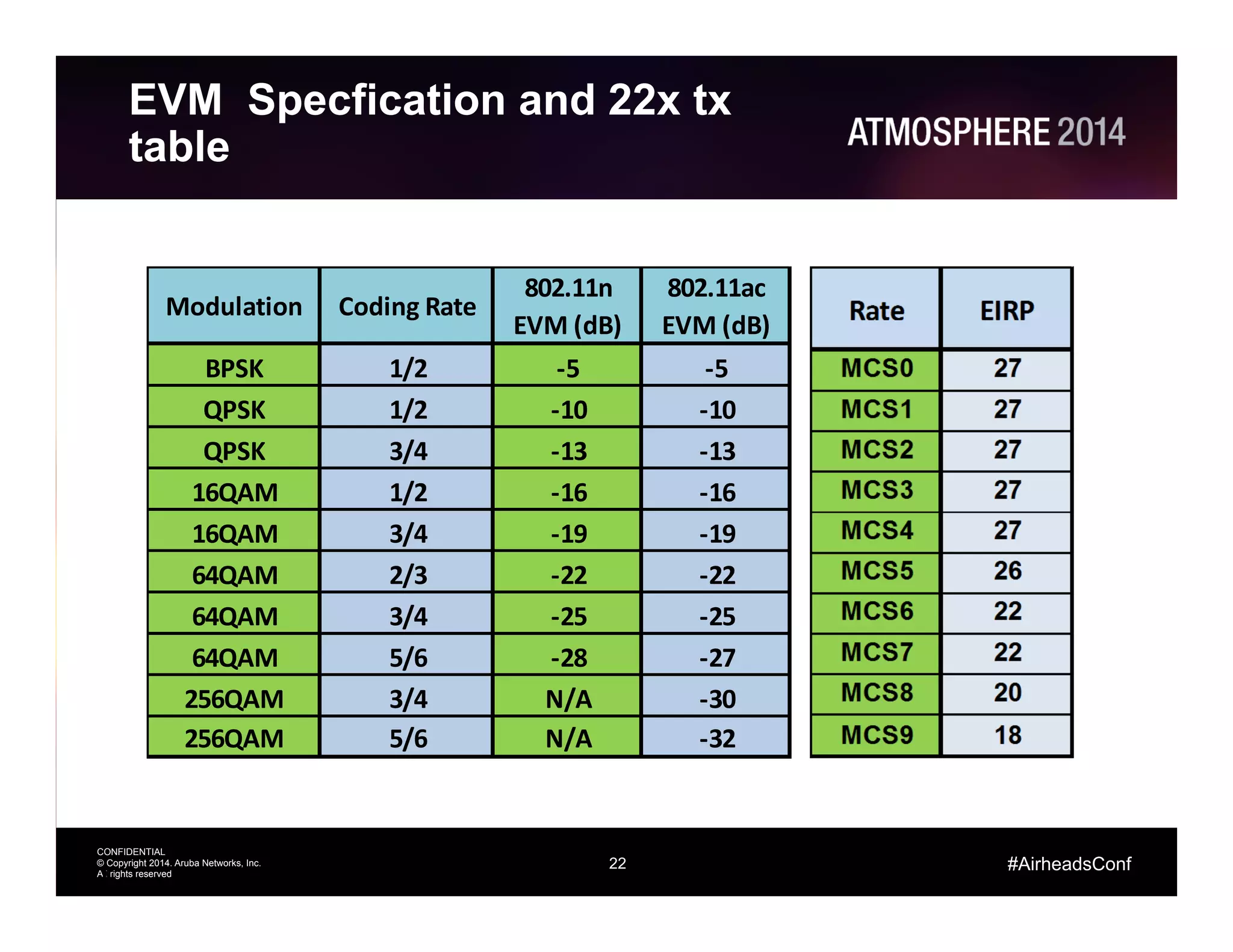
BPSK 1/2 -­‐5 -­‐5
QPSK 1/2 -­‐10 -­‐10
QPSK 3/4 -­‐13 -­‐13
16QAM 1/2 -­‐16 -­‐16
16QAM 3/4 -­‐19 -­‐19
64QAM 2/3 -­‐22 -­‐22
64QAM 3/4 -­‐25 -­‐25
64QAM 5/6 -­‐28 -­‐27
256QAM 3/4 N/A -­‐30
256QAM 5/6 N/A -­‐32
802.11n	
  
EVM	
  (dB)
802.11ac	
  
EVM	
  (dB)
Modulation Coding	
  Rate
EVM Specfication and 22x tx
table
22
23
CONFIDENTIAL
© Copyright 2014. Aruba Networks, Inc.
All rights reserved
#AirheadsConf
Receivers
24
CONFIDENTIAL
© Copyright 2014. Aruba Networks, Inc.
All rights reserved
#AirheadsConf
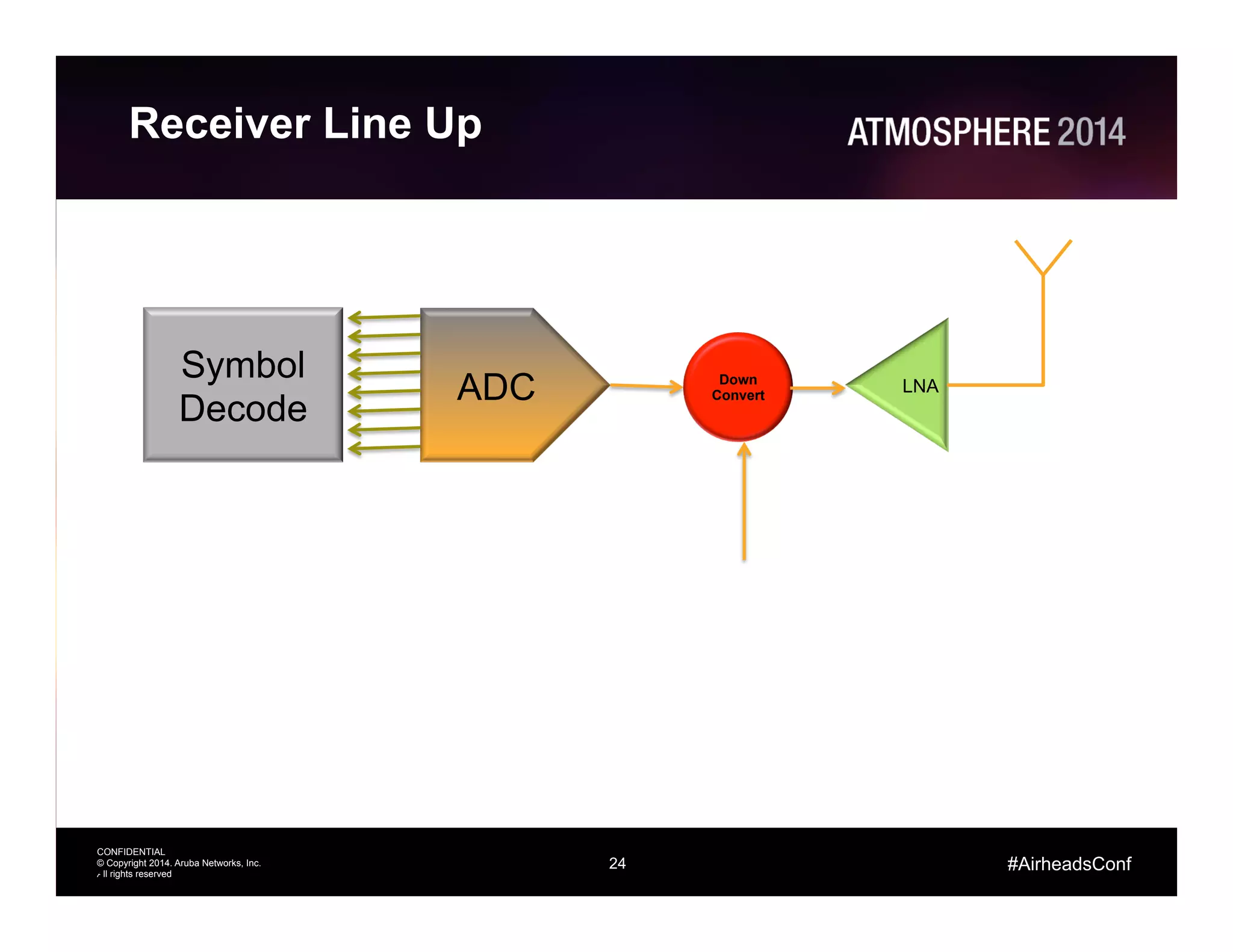
Receiver Line Up
24
ADC
Symbol
Decode
Down
Convert
LNA
25
CONFIDENTIAL
© Copyright 2014. Aruba Networks, Inc.
All rights reserved
#AirheadsConf
Receiver Impairments
•  Analog Compression
–  Modern LNAs have very effective input power tolerance
•  Digital Compression
–  This is where a high power signal hits the Automatic Gain
Control (AGC) Circuit. Gain drops and receiver sensitivity
degrades
–  The radio can be totally blocked if the power hits the Analog
to Digital Converter (ADC) and consumes all the bits
•  Intermodulation
–  Again, the effective linearity of modern LNAs reduces the
impact of this
25
26
CONFIDENTIAL
© Copyright 2014. Aruba Networks, Inc.
All rights reserved
#AirheadsConf
DAS Interference: Example
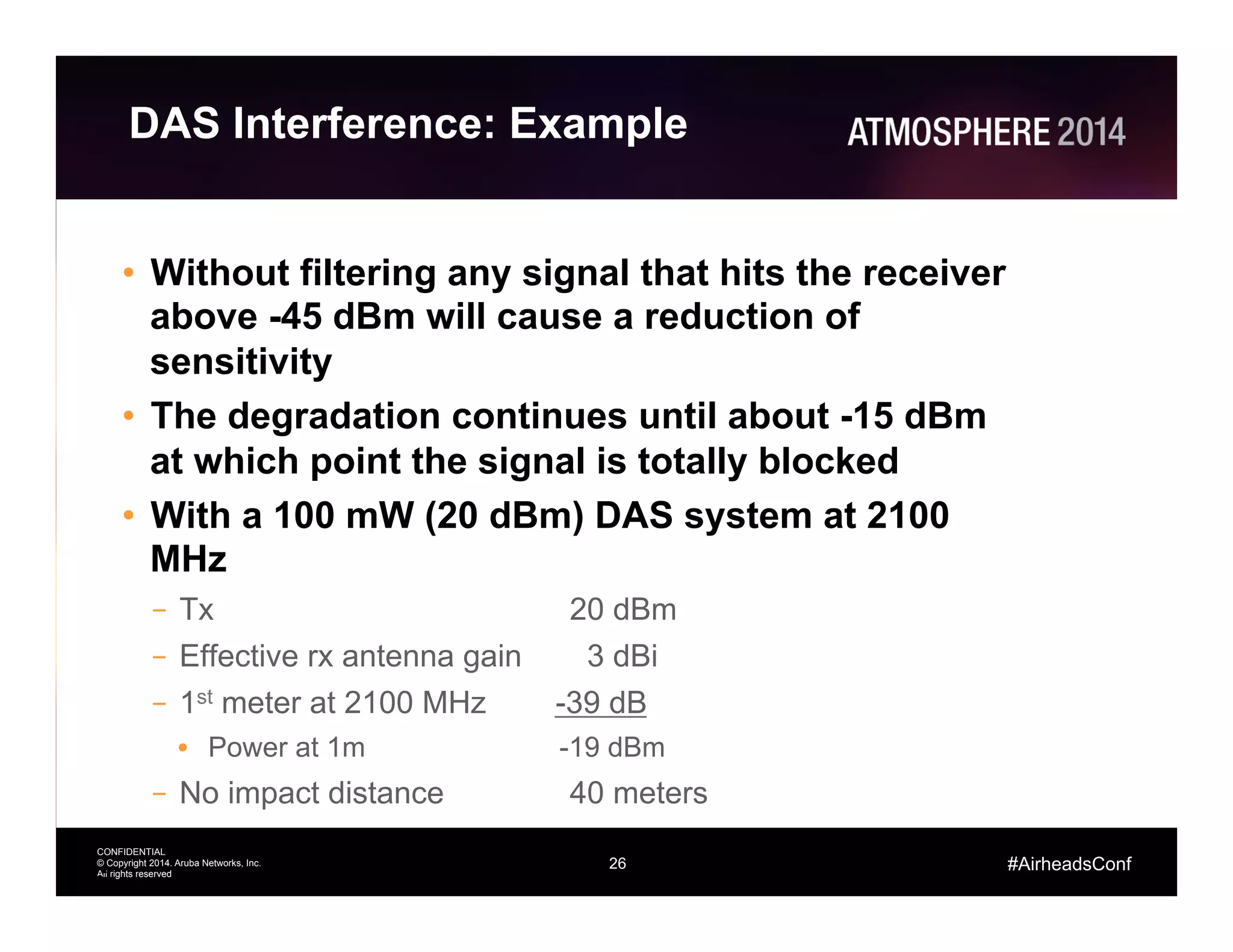
•  Without filtering any signal that hits the receiver
above -45 dBm will cause a reduction of
sensitivity
•  The degradation continues until about -15 dBm
at which point the signal is totally blocked
•  With a 100 mW (20 dBm) DAS system at 2100
MHz
–  Tx 20 dBm
–  Effective rx antenna gain 3 dBi
–  1st meter at 2100 MHz -39 dB
•  Power at 1m -19 dBm
–  No impact distance 40 meters
26
27
CONFIDENTIAL
© Copyright 2014. Aruba Networks, Inc.
All rights reserved
#AirheadsConf
Advanced Cellular Coexistence
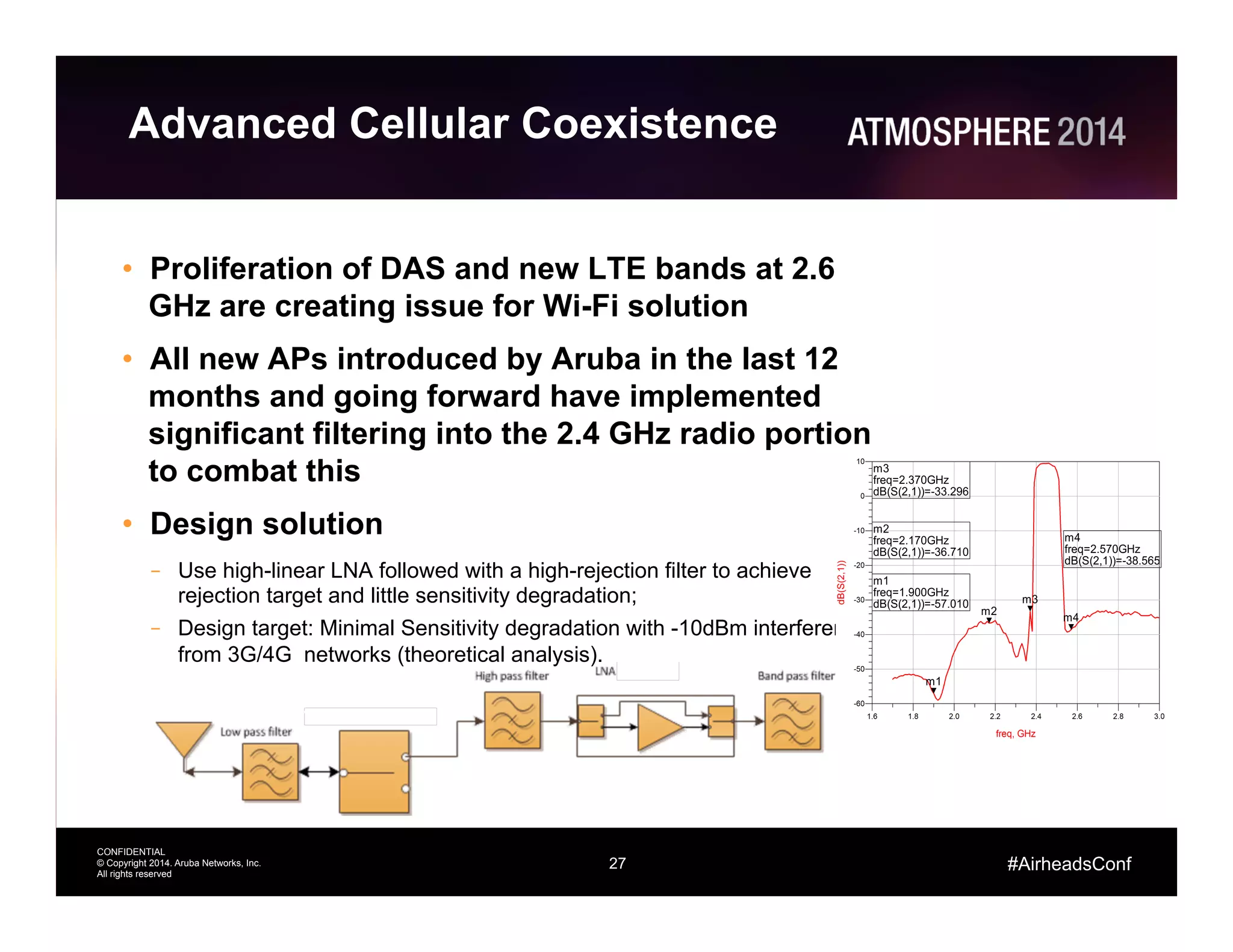
•  Proliferation of DAS and new LTE bands at 2.6
GHz are creating issue for Wi-Fi solution
•  All new APs introduced by Aruba in the last 12
months and going forward have implemented
significant filtering into the 2.4 GHz radio portion
to combat this
•  Design solution
–  Use high-linear LNA followed with a high-rejection filter to achieve
rejection target and little sensitivity degradation;
–  Design target: Minimal Sensitivity degradation with -10dBm interference
from 3G/4G networks (theoretical analysis).
28
CONFIDENTIAL
© Copyright 2014. Aruba Networks, Inc.
All rights reserved
#AirheadsConf
Coverage Example
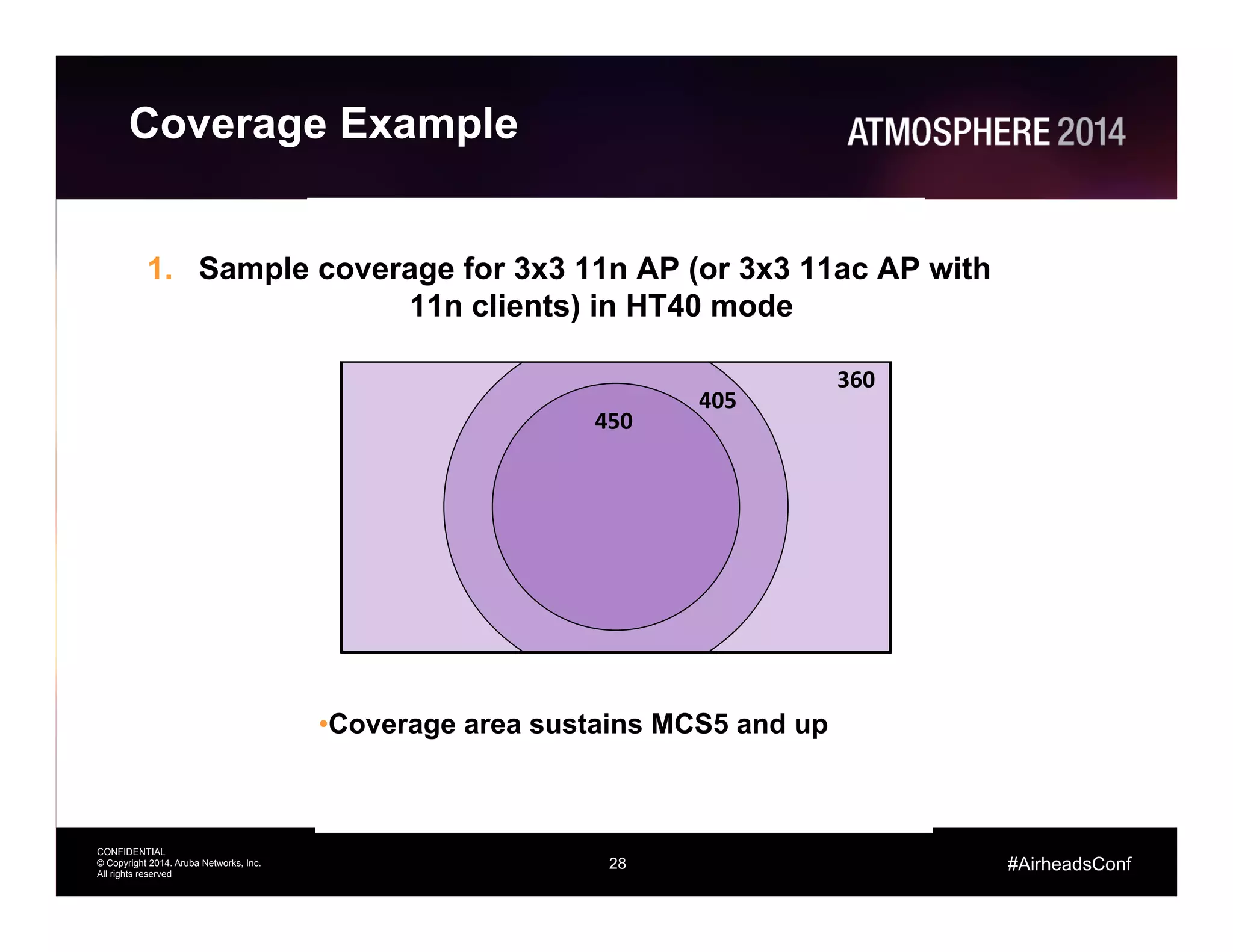
1.  Sample coverage for 3x3 11n AP (or 3x3 11ac AP with
11n clients) in HT40 mode
• Coverage area sustains MCS5 and up
360	
  
405	
  
450	
  
29
CONFIDENTIAL
© Copyright 2014. Aruba Networks, Inc.
All rights reserved
#AirheadsConf
Coverage Example
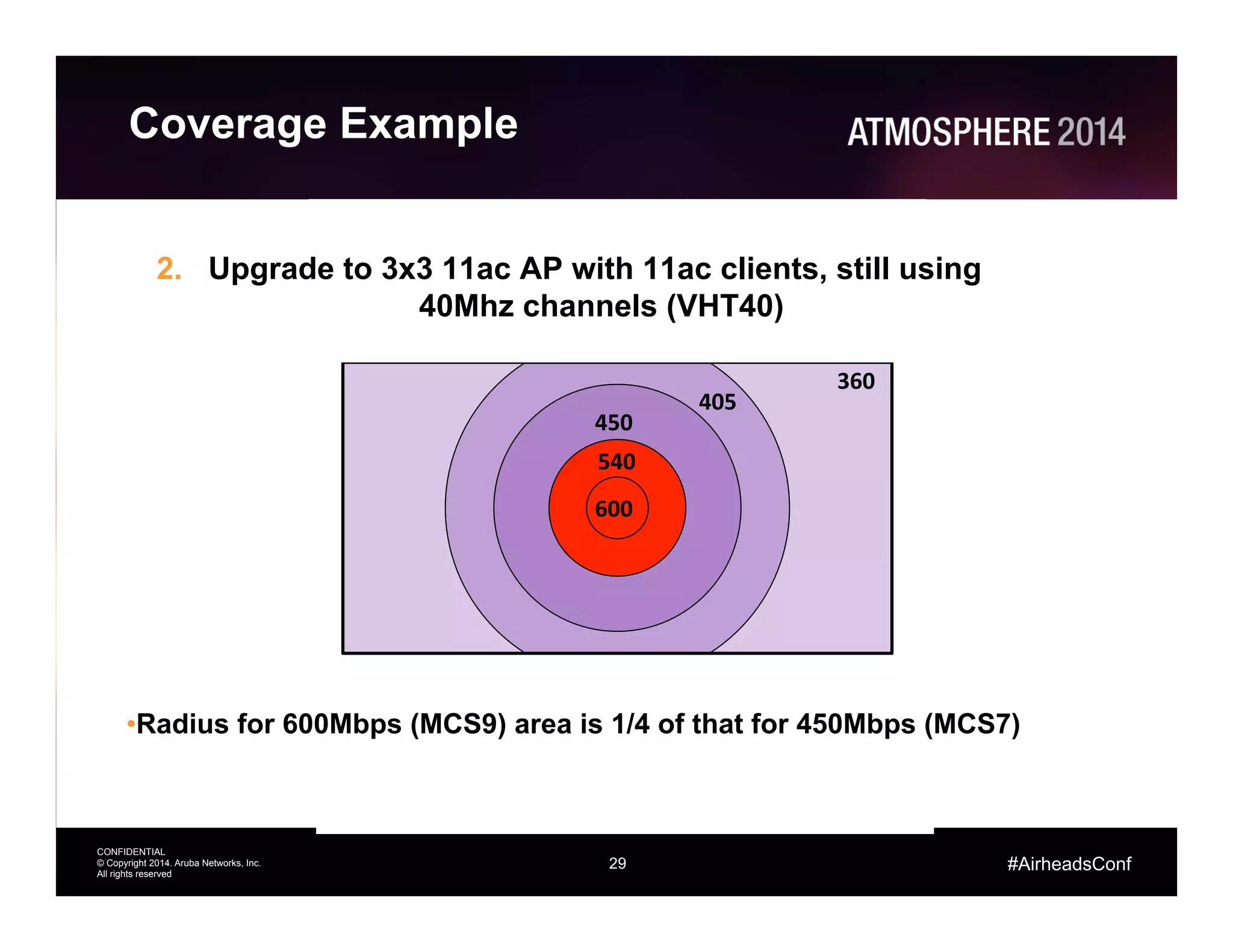
2.  Upgrade to 3x3 11ac AP with 11ac clients, still using
40Mhz channels (VHT40)
• Radius for 600Mbps (MCS9) area is 1/4 of that for 450Mbps (MCS7)
360	
  
405	
  
450	
  
540	
  
600	
  
30
CONFIDENTIAL
© Copyright 2014. Aruba Networks, Inc.
All rights reserved
#AirheadsConf
Coverage Example
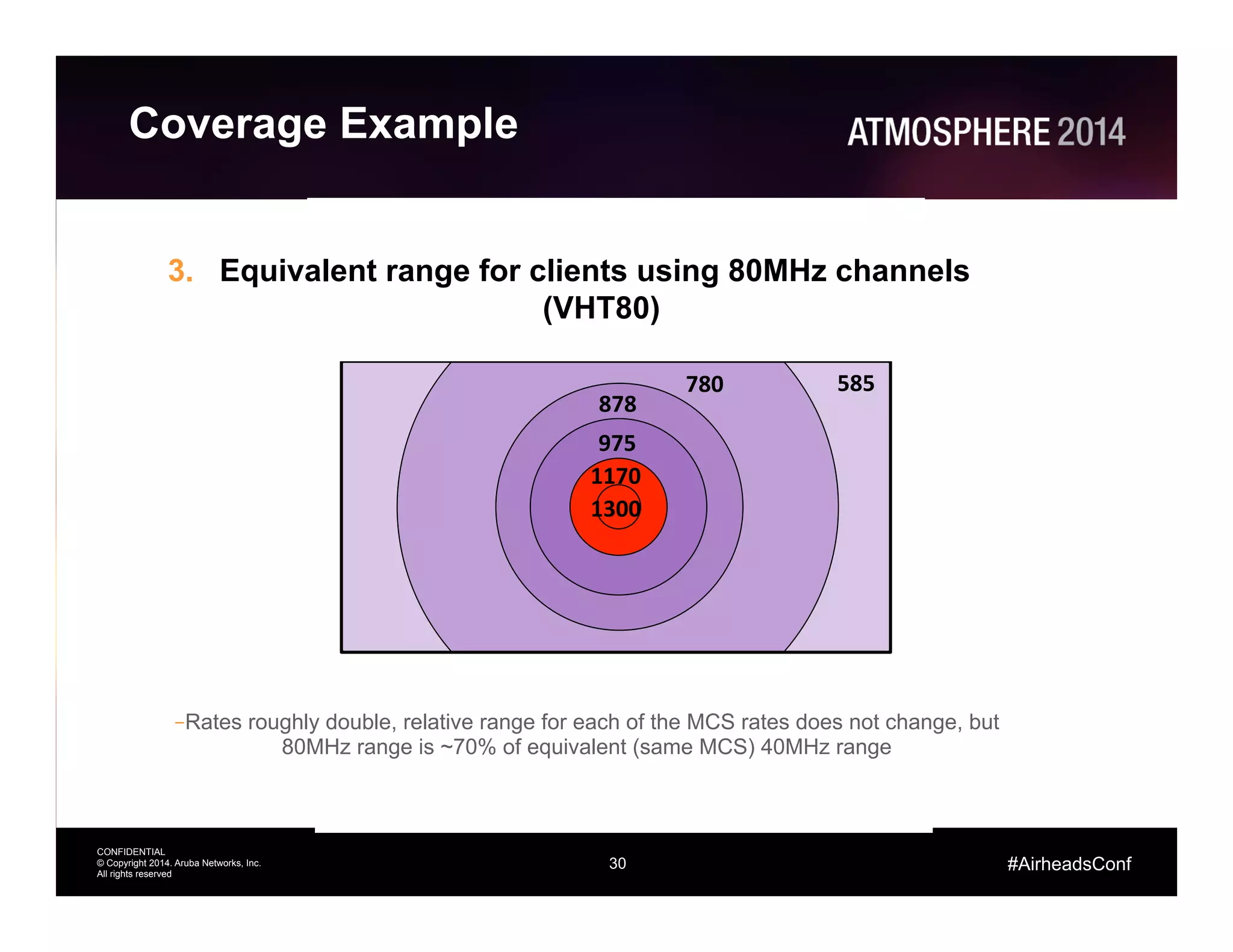
3.  Equivalent range for clients using 80MHz channels
(VHT80)
– Rates roughly double, relative range for each of the MCS rates does not change, but
80MHz range is ~70% of equivalent (same MCS) 40MHz range
780	
  
878	
  
975	
  
1170	
  
1300	
  
585	
  
31
CONFIDENTIAL
© Copyright 2014. Aruba Networks, Inc.
All rights reserved
#AirheadsConf
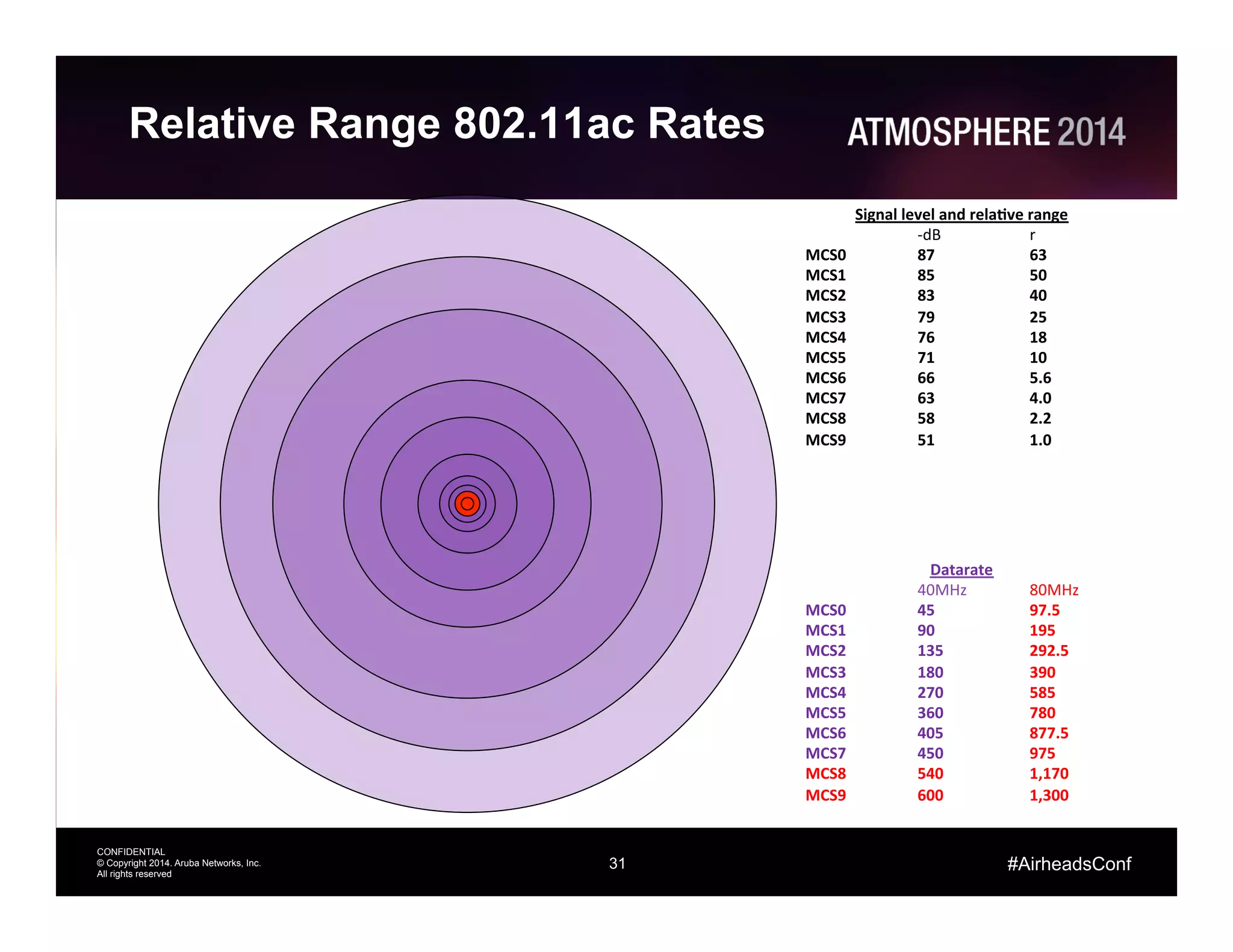
Relative Range 802.11ac Rates
Datarate	
  
	
  40MHz 	
  80MHz	
  
MCS0 	
  45 	
  97.5	
  
MCS1 	
  90 	
  195	
  
MCS2 	
  135 	
  292.5	
  
MCS3 	
  180 	
  390	
  
MCS4 	
  270 	
  585	
  
MCS5 	
  360 	
  780	
  
MCS6 	
  405 	
  877.5	
  
MCS7 	
  450 	
  975	
  
MCS8 	
  540 	
  1,170	
  
MCS9 	
  600 	
  1,300	
  
Signal	
  level	
  and	
  rela@ve	
  range	
  
	
  -­‐dB 	
  r	
  
MCS0 	
  87 	
  63	
  
MCS1 	
  85 	
  50	
  
MCS2 	
  83 	
  40	
  
MCS3 	
  79 	
  25	
  
MCS4 	
  76 	
  18	
  
MCS5 	
  71 	
  10	
  
MCS6 	
  66 	
  5.6	
  
MCS7 	
  63 	
  4.0	
  
MCS8 	
  58 	
  2.2	
  
MCS9 	
  51 	
  1.0	
  
32
CONFIDENTIAL
© Copyright 2014. Aruba Networks, Inc.
All rights reserved
#AirheadsConf
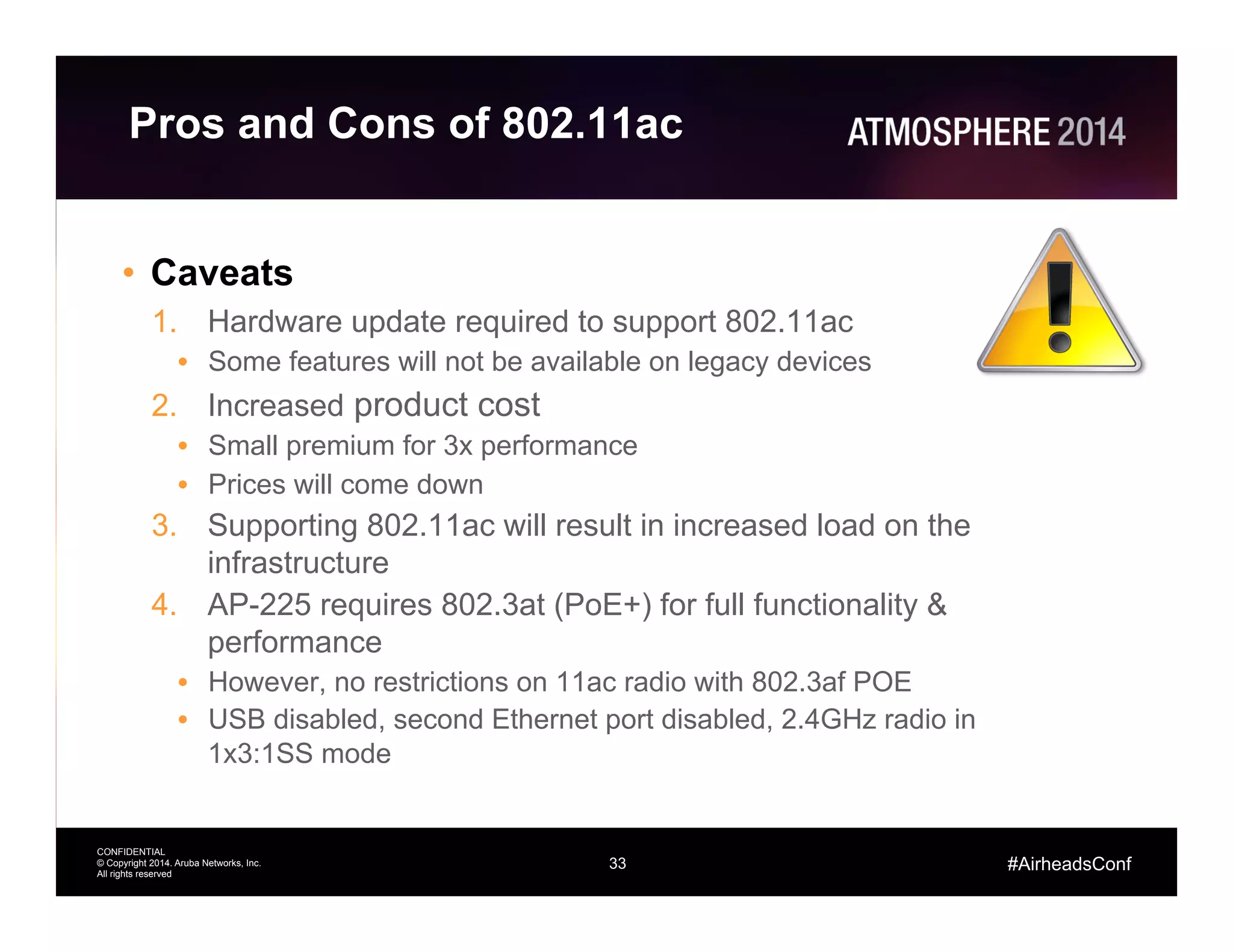
Pros and Cons of 802.11ac
•  Pros
1.  APs can accommodate more users/devices
•  Increased capacity
2.  Standards based Explicit Beam-forming increases SNR
•  Higher data rates over longer distances
3.  256-QAM
•  Increased throughput at high SNRs
•  Improved modulation and coding techniques
4.  Multi-User MIMO (future generations)
•  Improved utilization of RF capacity
5.  Use of 5 GHz spectrum
•  More non-overlapping channels
•  Quieter RF environment
33
CONFIDENTIAL
© Copyright 2014. Aruba Networks, Inc.
All rights reserved
#AirheadsConf
Pros and Cons of 802.11ac
•  Caveats
1.  Hardware update required to support 802.11ac
•  Some features will not be available on legacy devices
2.  Increased product cost
•  Small premium for 3x performance
•  Prices will come down
3.  Supporting 802.11ac will result in increased load on the
infrastructure
4.  AP-225 requires 802.3at (PoE+) for full functionality &
performance
•  However, no restrictions on 11ac radio with 802.3af POE
•  USB disabled, second Ethernet port disabled, 2.4GHz radio in
1x3:1SS mode
34
CONFIDENTIAL
© Copyright 2014. Aruba Networks, Inc.
All rights reserved
#AirheadsConf
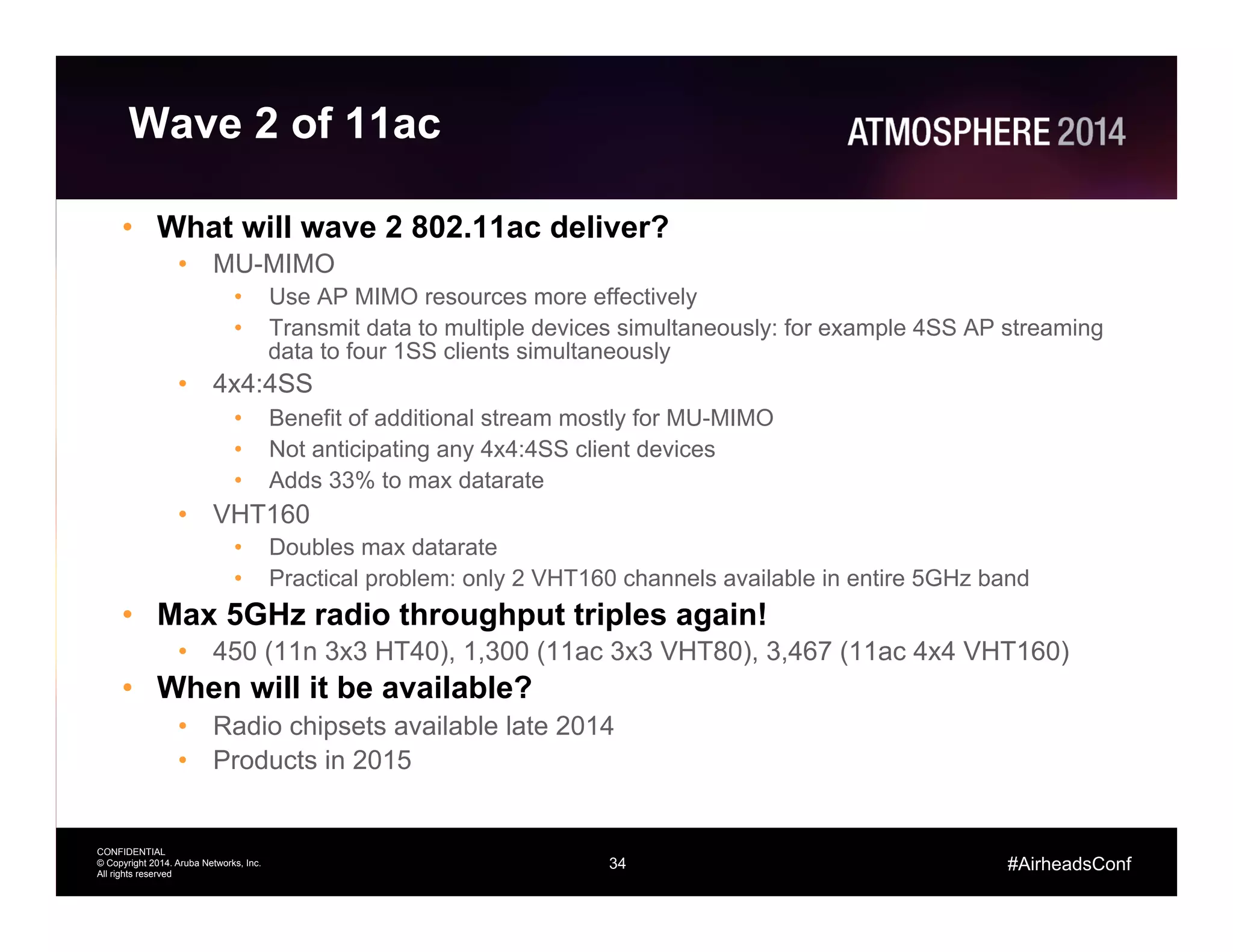
Wave 2 of 11ac
•  What will wave 2 802.11ac deliver?
•  MU-MIMO
•  Use AP MIMO resources more effectively
•  Transmit data to multiple devices simultaneously: for example 4SS AP streaming
data to four 1SS clients simultaneously
•  4x4:4SS
•  Benefit of additional stream mostly for MU-MIMO
•  Not anticipating any 4x4:4SS client devices
•  Adds 33% to max datarate
•  VHT160
•  Doubles max datarate
•  Practical problem: only 2 VHT160 channels available in entire 5GHz band
•  Max 5GHz radio throughput triples again!
•  450 (11n 3x3 HT40), 1,300 (11ac 3x3 VHT80), 3,467 (11ac 4x4 VHT160)
•  When will it be available?
•  Radio chipsets available late 2014
•  Products in 2015
35
CONFIDENTIAL
© Copyright 2014. Aruba Networks, Inc.
All rights reserved
#AirheadsConf
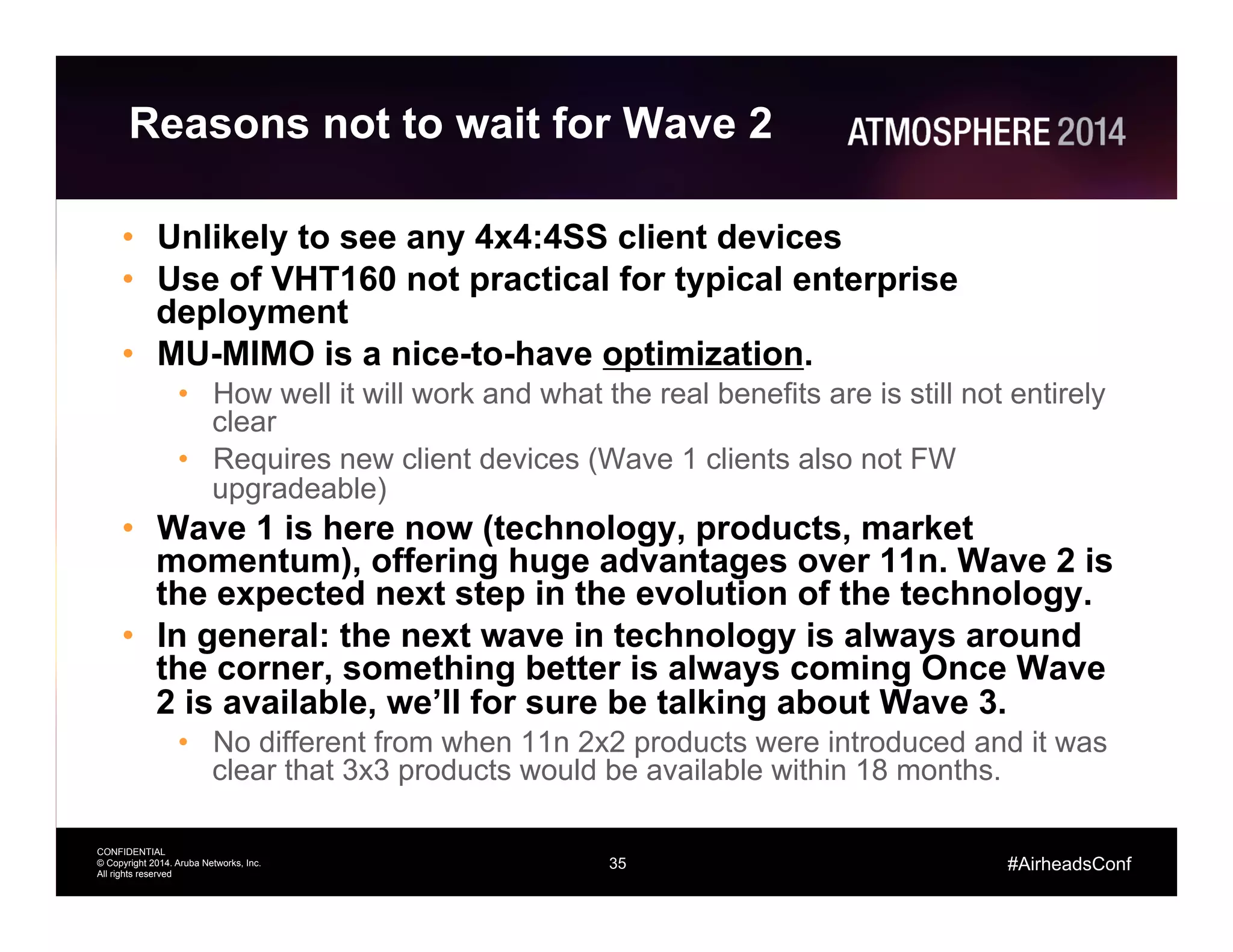
Reasons not to wait for Wave 2
•  Unlikely to see any 4x4:4SS client devices
•  Use of VHT160 not practical for typical enterprise
deployment
•  MU-MIMO is a nice-to-have optimization.
•  How well it will work and what the real benefits are is still not entirely
clear
•  Requires new client devices (Wave 1 clients also not FW
upgradeable)
•  Wave 1 is here now (technology, products, market
momentum), offering huge advantages over 11n. Wave 2 is
the expected next step in the evolution of the technology.
•  In general: the next wave in technology is always around
the corner, something better is always coming Once Wave
2 is available, we’ll for sure be talking about Wave 3.
•  No different from when 11n 2x2 products were introduced and it was
clear that 3x3 products would be available within 18 months.
36
CONFIDENTIAL
© Copyright 2014. Aruba Networks, Inc.
All rights reserved
#AirheadsConf
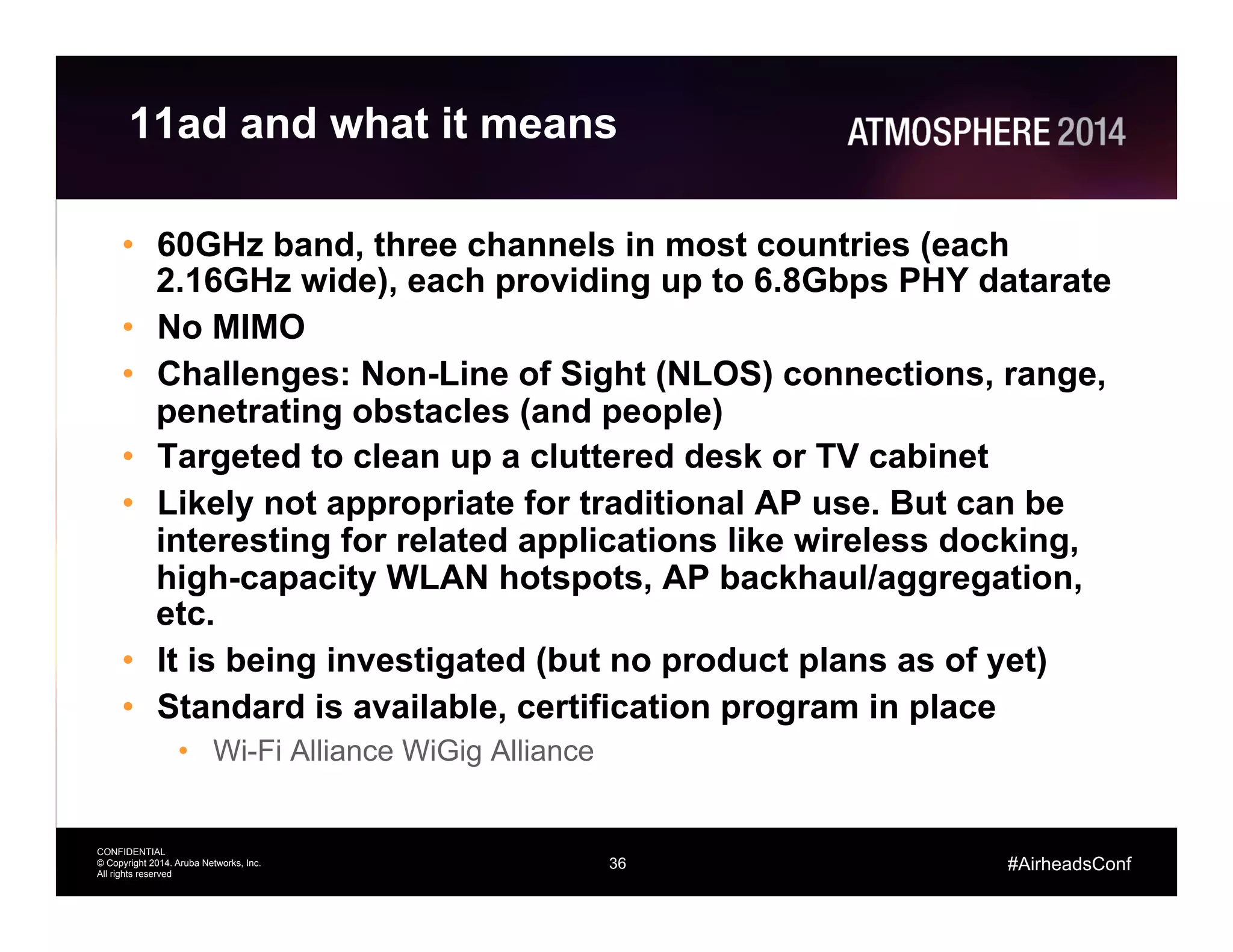
11ad and what it means
•  60GHz band, three channels in most countries (each
2.16GHz wide), each providing up to 6.8Gbps PHY datarate
•  No MIMO
•  Challenges: Non-Line of Sight (NLOS) connections, range,
penetrating obstacles (and people)
•  Targeted to clean up a cluttered desk or TV cabinet
•  Likely not appropriate for traditional AP use. But can be
interesting for related applications like wireless docking,
high-capacity WLAN hotspots, AP backhaul/aggregation,
etc.
•  It is being investigated (but no product plans as of yet)
•  Standard is available, certification program in place
•  Wi-Fi Alliance WiGig Alliance
37
CONFIDENTIAL
© Copyright 2014. Aruba Networks, Inc.
All rights reserved
#AirheadsConf
Antennas
38
CONFIDENTIAL
© Copyright 2014. Aruba Networks, Inc.
All rights reserved
#AirheadsConf
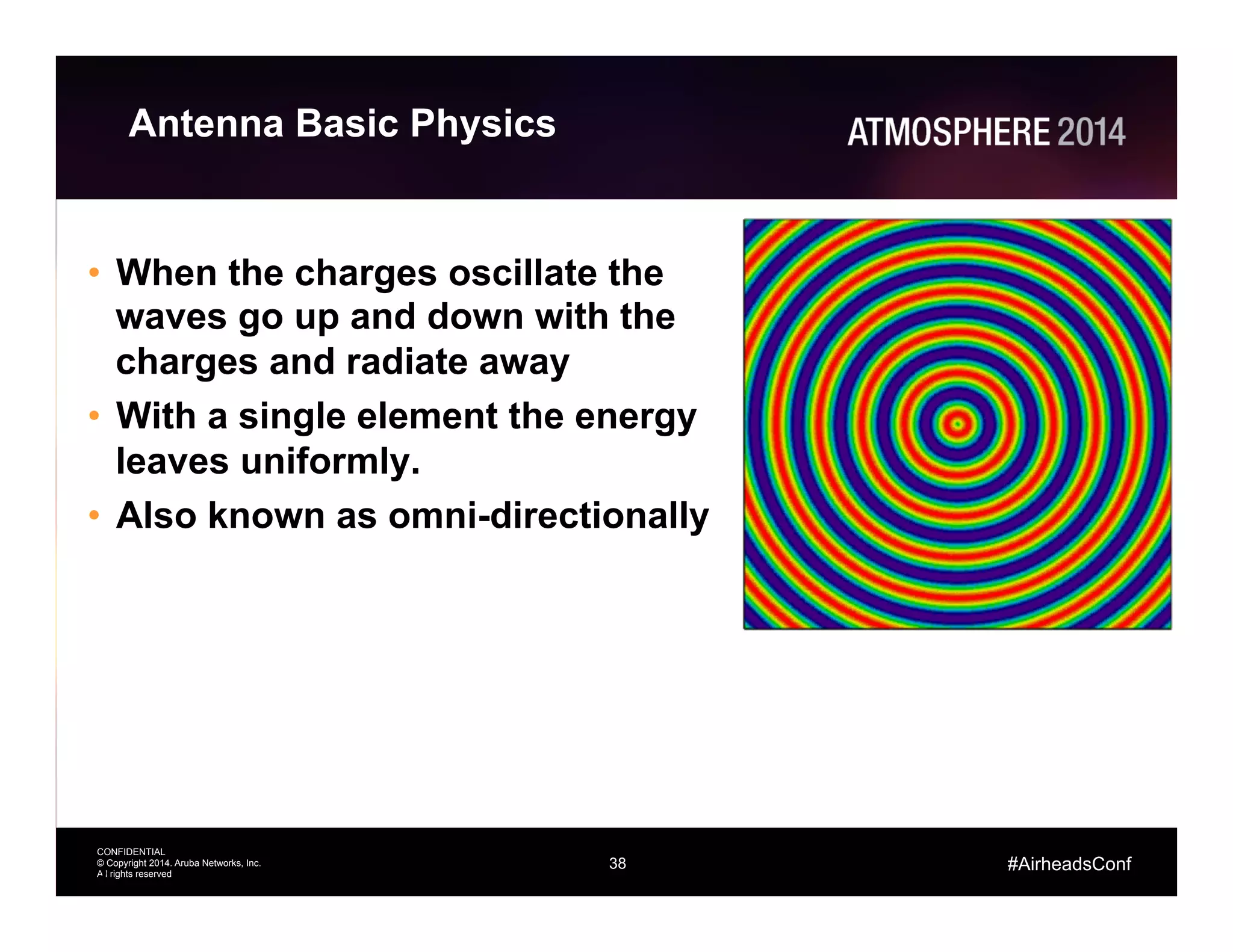
Antenna Basic Physics
•  When the charges oscillate the
waves go up and down with the
charges and radiate away
•  With a single element the energy
leaves uniformly.
•  Also known as omni-directionally
38
39
CONFIDENTIAL
© Copyright 2014. Aruba Networks, Inc.
All rights reserved
#AirheadsConf
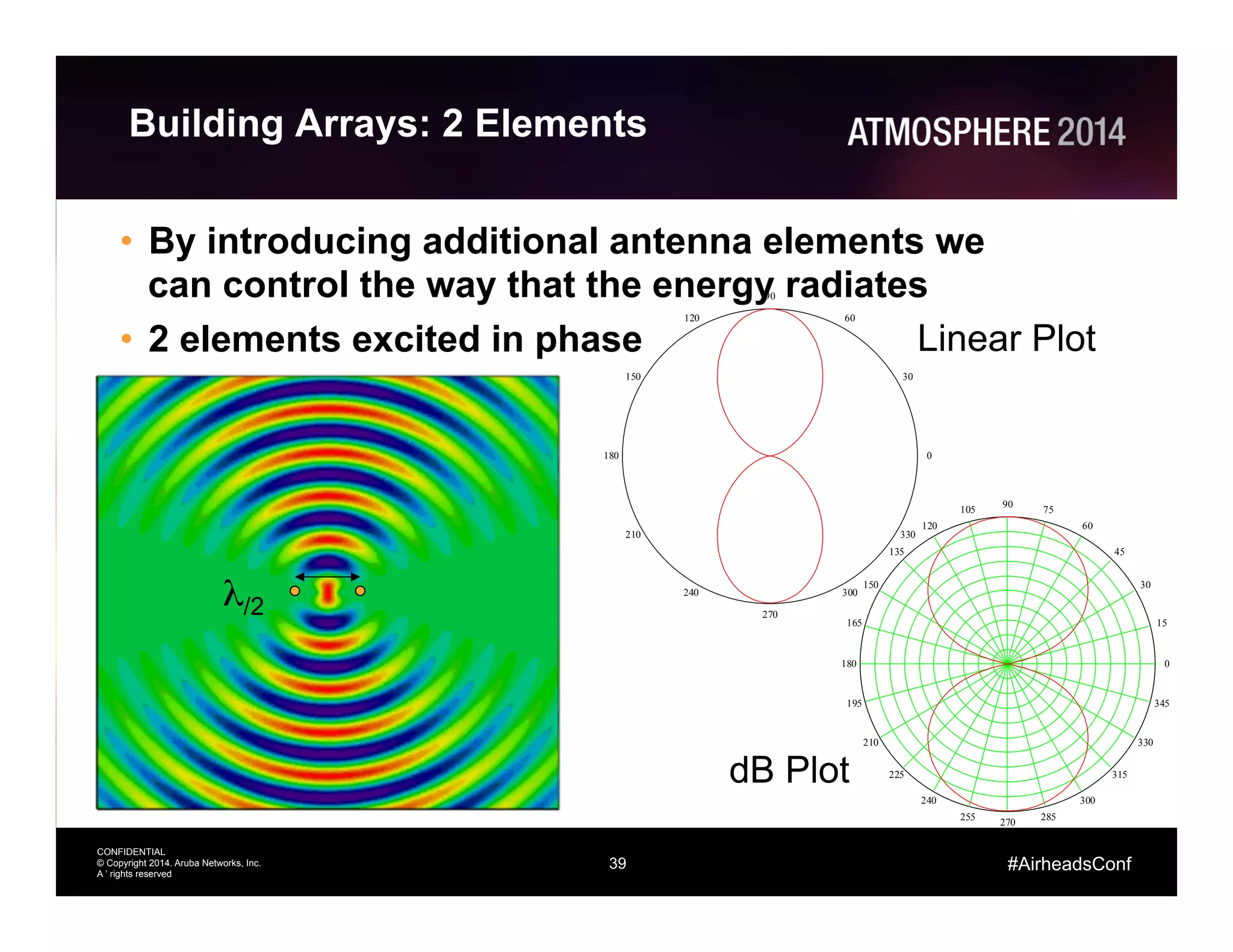
Building Arrays: 2 Elements
•  By introducing additional antenna elements we
can control the way that the energy radiates
•  2 elements excited in phase
39
λ/2
0
30
60
90
120
150
180
210
240
270
300
330
Linear Plot
0
15
30
45
60
75
90
105
120
135
150
165
180
195
210
225
240
255
270
285
300
315
330
345
dB Plot
40
CONFIDENTIAL
© Copyright 2014. Aruba Networks, Inc.
All rights reserved
#AirheadsConf
0
15
30
45
60
75
90
105
120
135
150
165
180
195
210
225
240
255
270
285
300
315
330
345
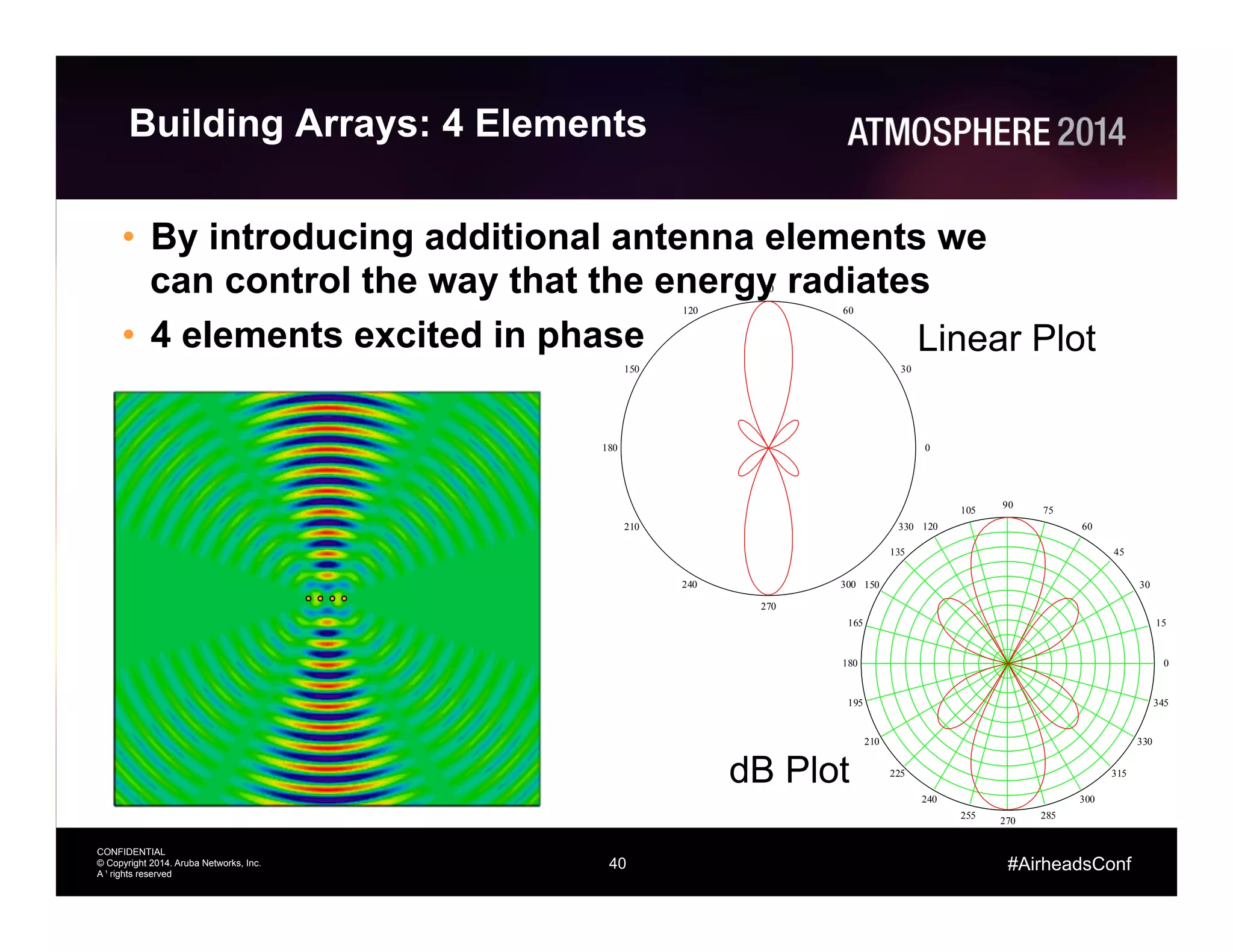
Building Arrays: 4 Elements
•  By introducing additional antenna elements we
can control the way that the energy radiates
•  4 elements excited in phase
–  Equal amplitude
40
Linear Plot
dB Plot
0
30
60
90
120
150
180
210
240
270
300
330
41
CONFIDENTIAL
© Copyright 2014. Aruba Networks, Inc.
All rights reserved
#AirheadsConf
0
15
30
45
60
75
90
105
120
135
150
165
180
195
210
225
240
255
270
285
300
315
330
345
0
30
60
90
120
150
180
210
240
270
300
330
Building Arrays: 4 Elements
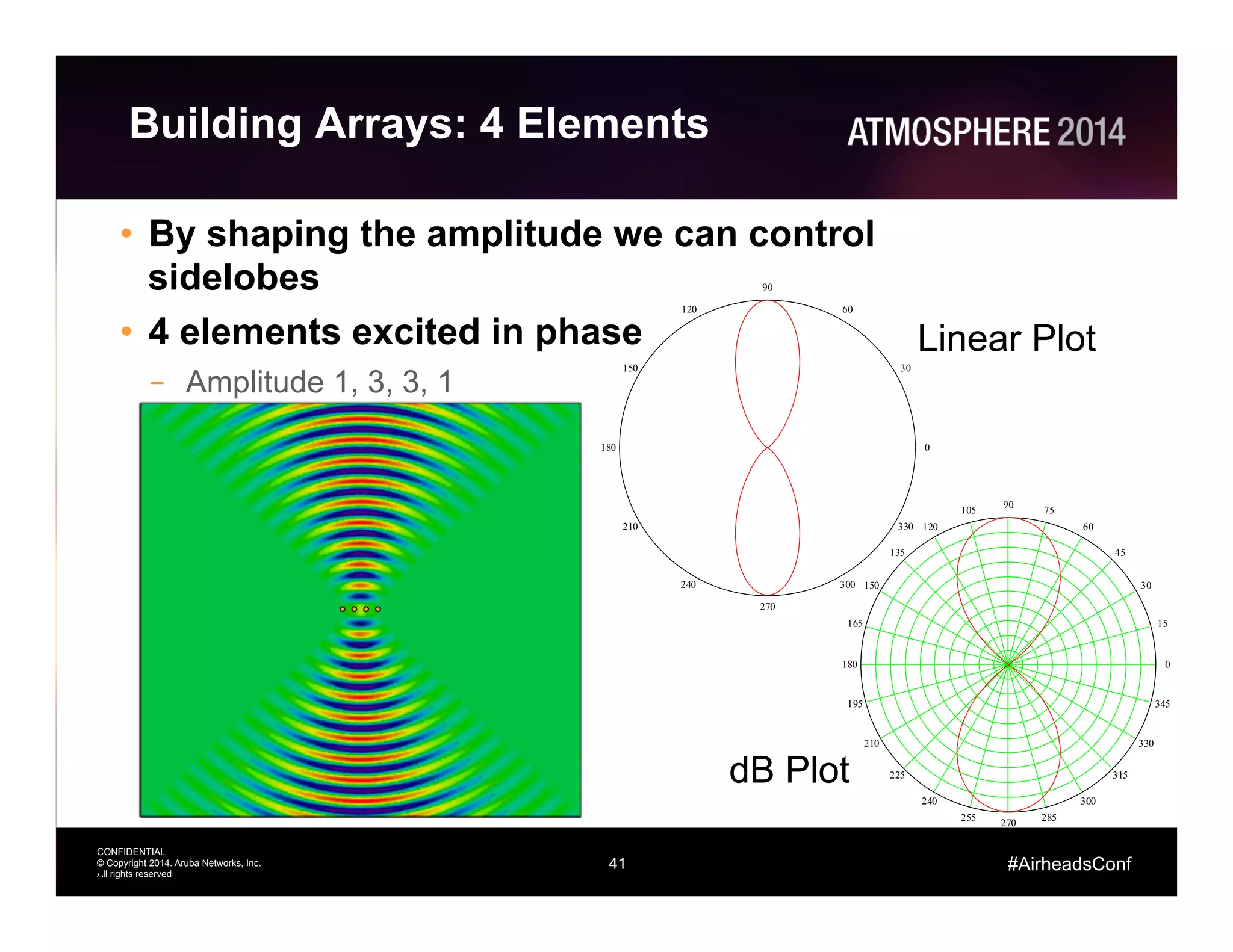
•  By shaping the amplitude we can control
sidelobes
•  4 elements excited in phase
–  Amplitude 1, 3, 3, 1
41
Linear Plot
dB Plot
42
CONFIDENTIAL
© Copyright 2014. Aruba Networks, Inc.
All rights reserved
#AirheadsConf
0
15
30
45
60
75
90
105
120
135
150
165
180
195
210
225
240
255
270
285
300
315
330
345
0
30
60
90
120
150
180
210
240
270
300
330
Building Arrays: 4 Elements
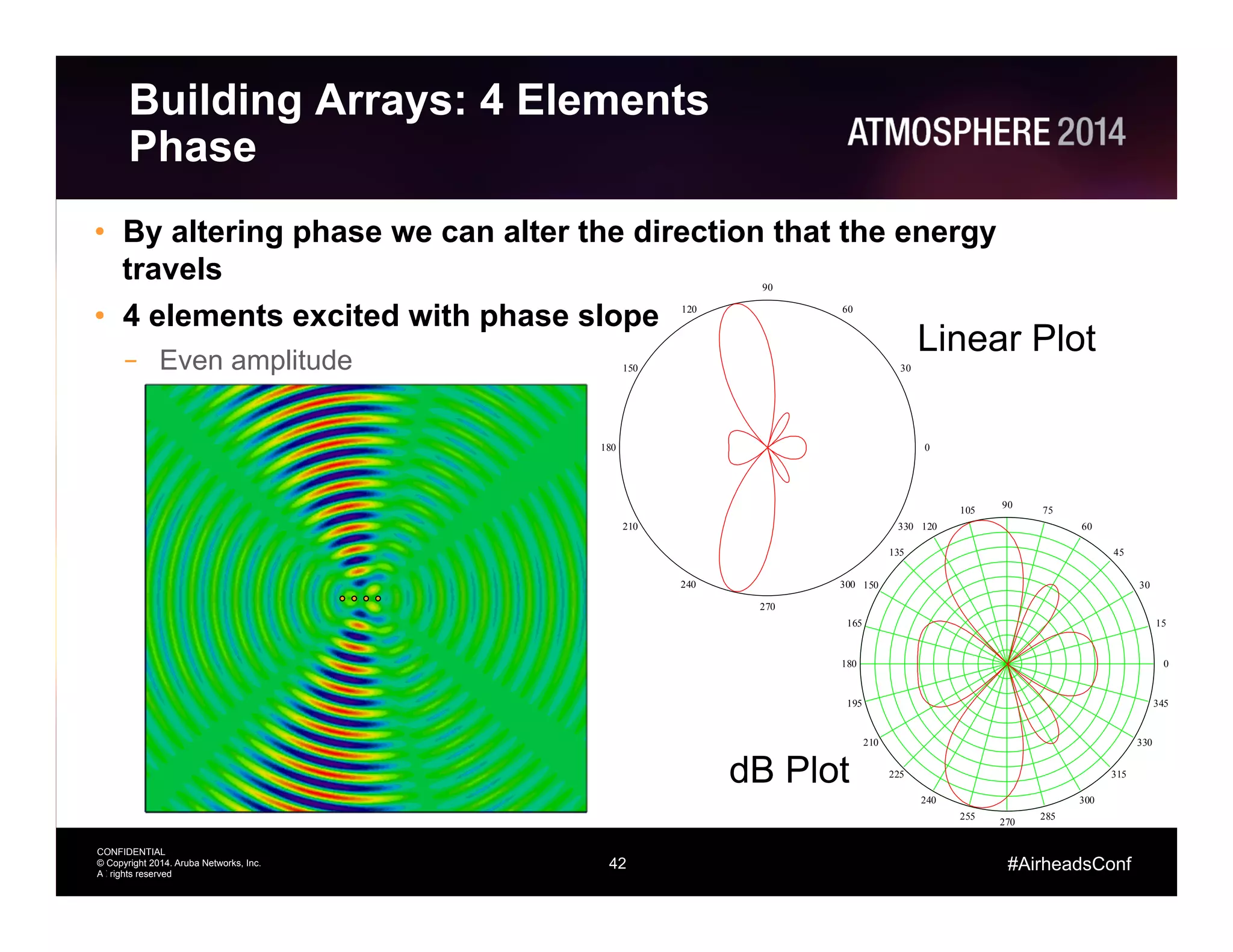
Phase
•  By altering phase we can alter the direction that the energy
travels
•  4 elements excited with phase slope
–  Even amplitude
42
Linear Plot
dB Plot
43
CONFIDENTIAL
© Copyright 2014. Aruba Networks, Inc.
All rights reserved
#AirheadsConf
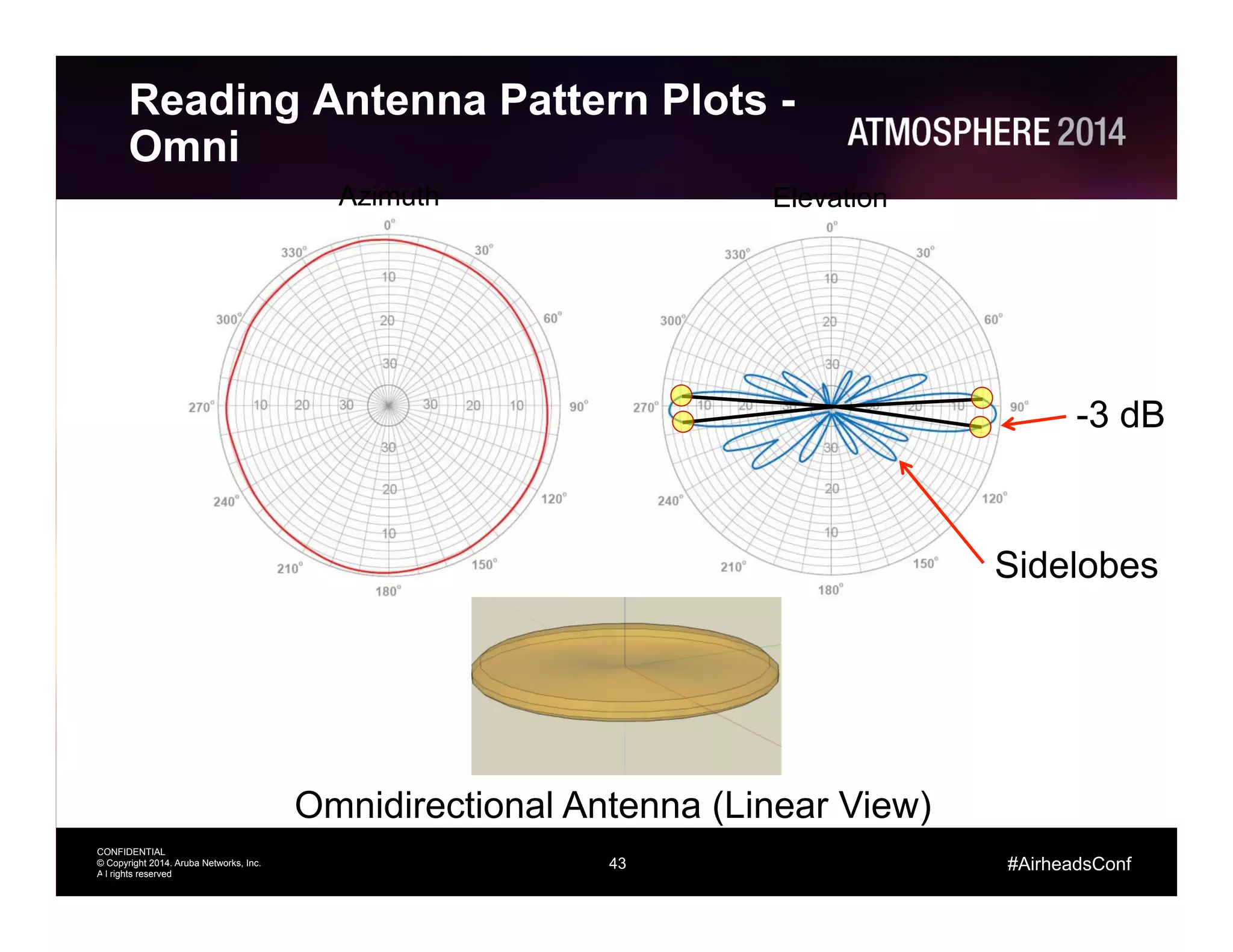
Reading Antenna Pattern Plots -
Omni
43
Azimuth Elevation
Omnidirectional Antenna (Linear View)
-3 dB
Sidelobes
44
CONFIDENTIAL
© Copyright 2014. Aruba Networks, Inc.
All rights reserved
#AirheadsConf
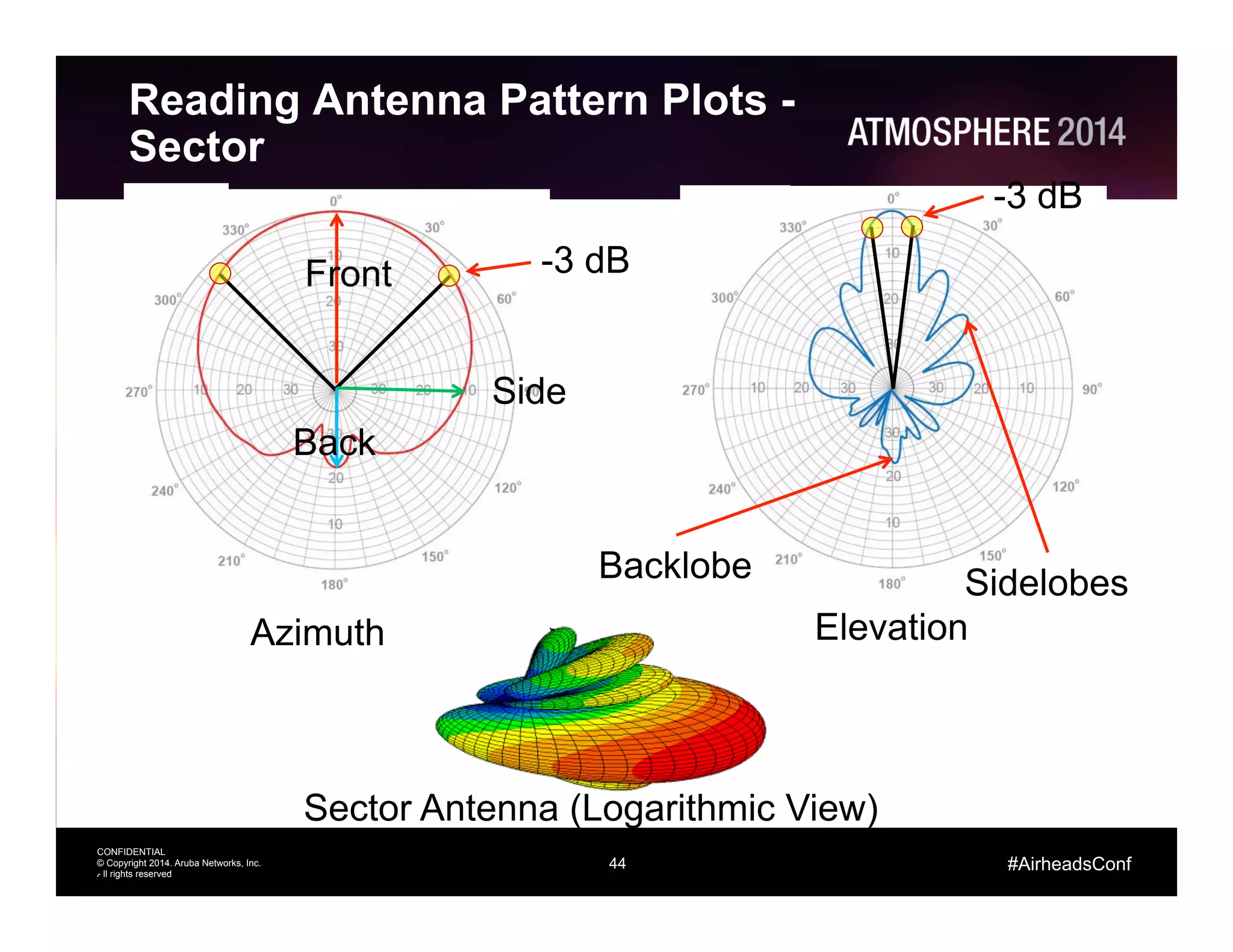
Reading Antenna Pattern Plots -
Sector
44
Azimuth Elevation
Sector Antenna (Logarithmic View)
-3 dB
-3 dB
SidelobesBacklobe
Front
Back
Side
45
CONFIDENTIAL
© Copyright 2014. Aruba Networks, Inc.
All rights reserved
#AirheadsConf
802.11ac Beamforming
46
CONFIDENTIAL
© Copyright 2014. Aruba Networks, Inc.
All rights reserved
#AirheadsConf
Beamforming: Notes
•  AP 22x series has 11ac beamforming support in 2.4 and 5 GHz
bands
•  Works with clients that support 11ac beamforming function
–  This is at a minimum all 11ac client devices using Broadcom chipsets
–  Support will have to come to all devices to compete with Broadcom offering
•  11ac beamforming is standards based
–  first standard that is doing this the “right” way
–  11ac beamforming represents the consensus view of the 1000’s of contributors
to the standards process
•  11ac beamforming is implemented in baseband.
–  It works with all antenna subsystems
–  The total number of beamforming combinations is effectively infinite
•  11ac actively tracks users so has a recent channel estimate
between the AP and client that is updated frequently
46
47
CONFIDENTIAL
© Copyright 2014. Aruba Networks, Inc.
All rights reserved
#AirheadsConf
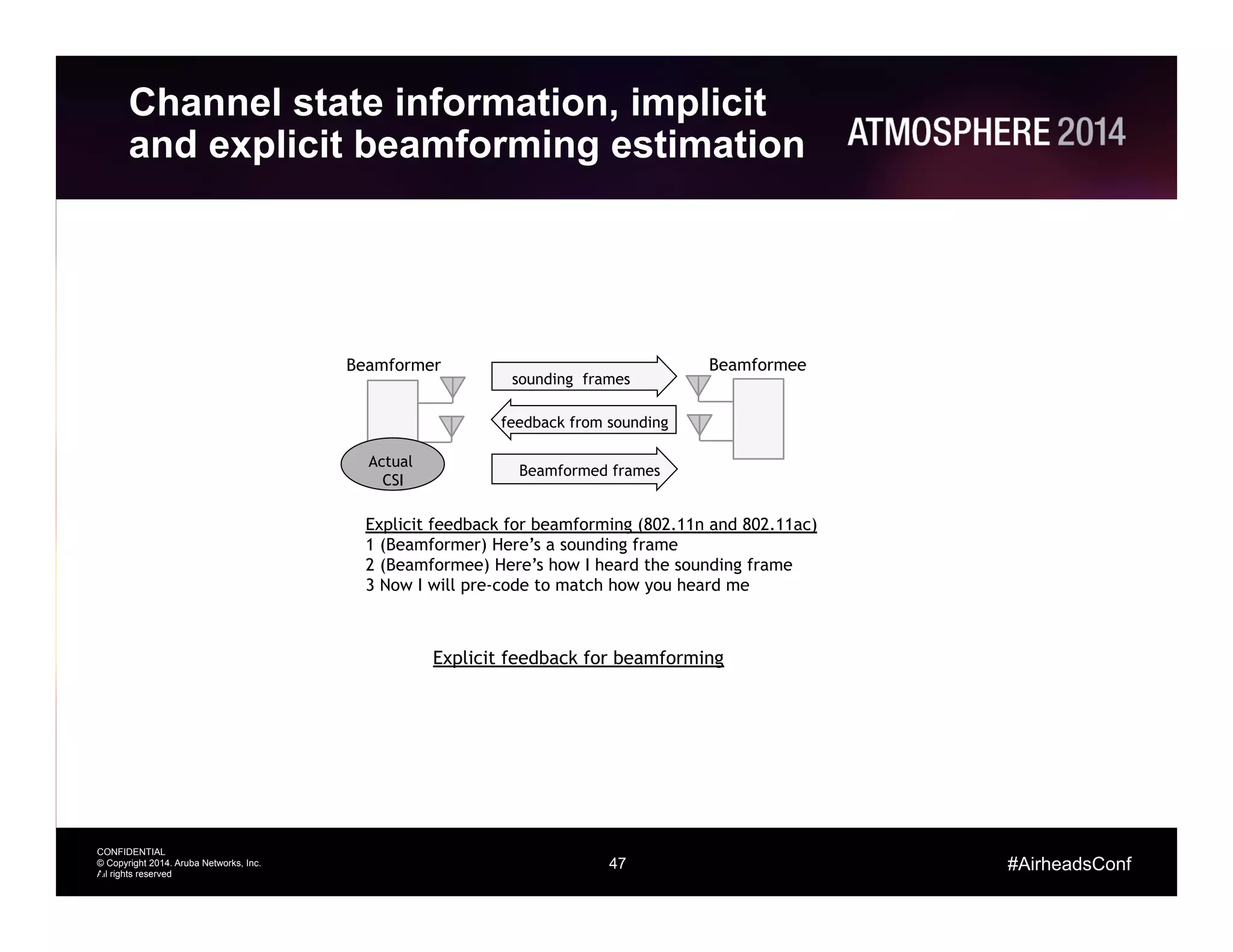
Channel state information, implicit
and explicit beamforming estimation
47
Explicit feedback for beamforming (802.11n and 802.11ac)
1 (Beamformer) Here’s a sounding frame
2 (Beamformee) Here’s how I heard the sounding frame
3 Now I will pre-code to match how you heard me
sounding frames
Beamformed frames
feedback from sounding
Explicit feedback for beamforming
Beamformer Beamformee
Actual
CSI
48
CONFIDENTIAL
© Copyright 2014. Aruba Networks, Inc.
All rights reserved
#AirheadsConf
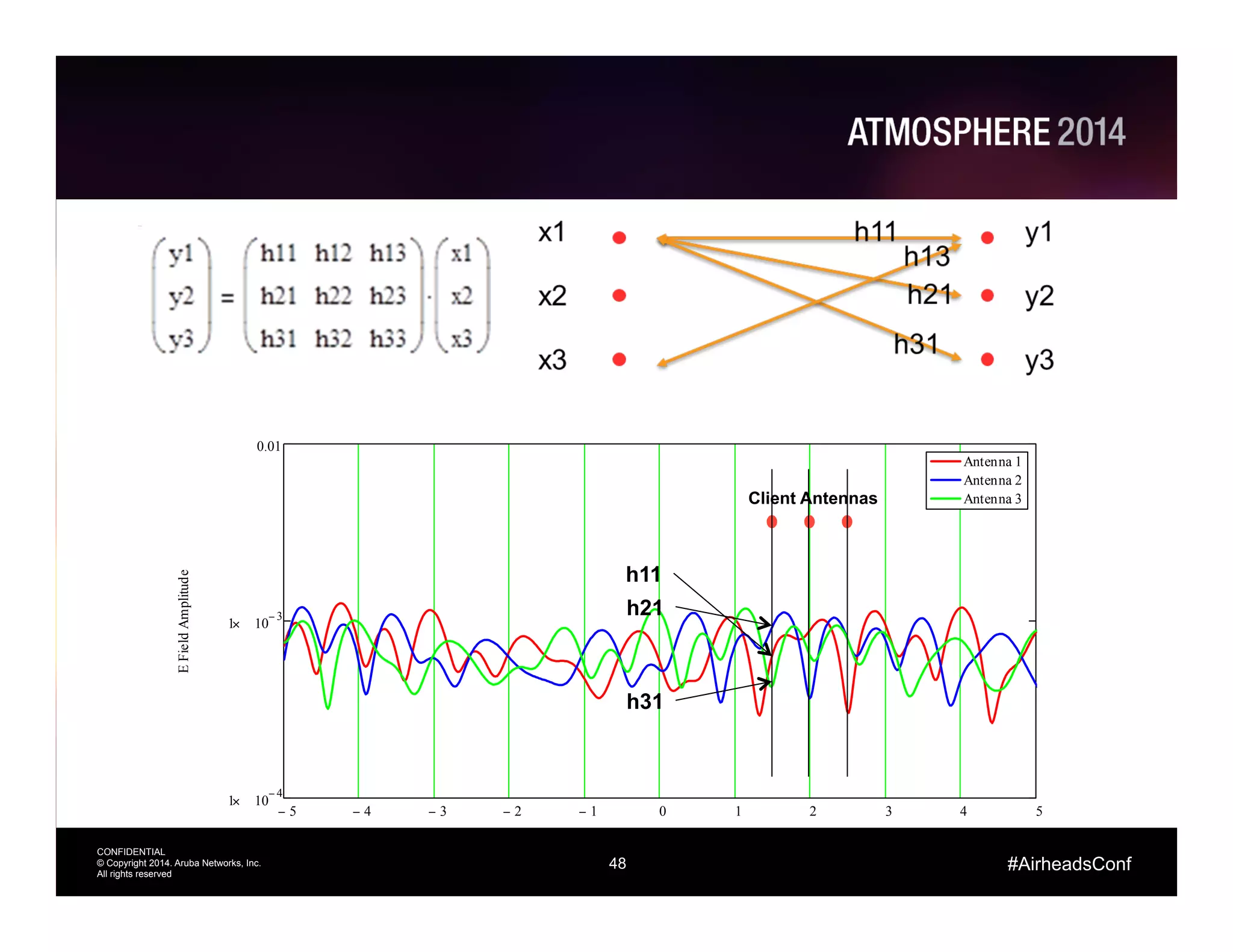
5− 4− 3− 2− 1− 0 1 2 3 4 5
1 10
4−
×
1 10
3−
×
0.01
Antenna 1
Antenna 2
Antenna 3
Wavelengths
EFieldAmplitude
Client Antennas
h11
h21
h31
49
CONFIDENTIAL
© Copyright 2014. Aruba Networks, Inc.
All rights reserved
#AirheadsConf
Line of Sight
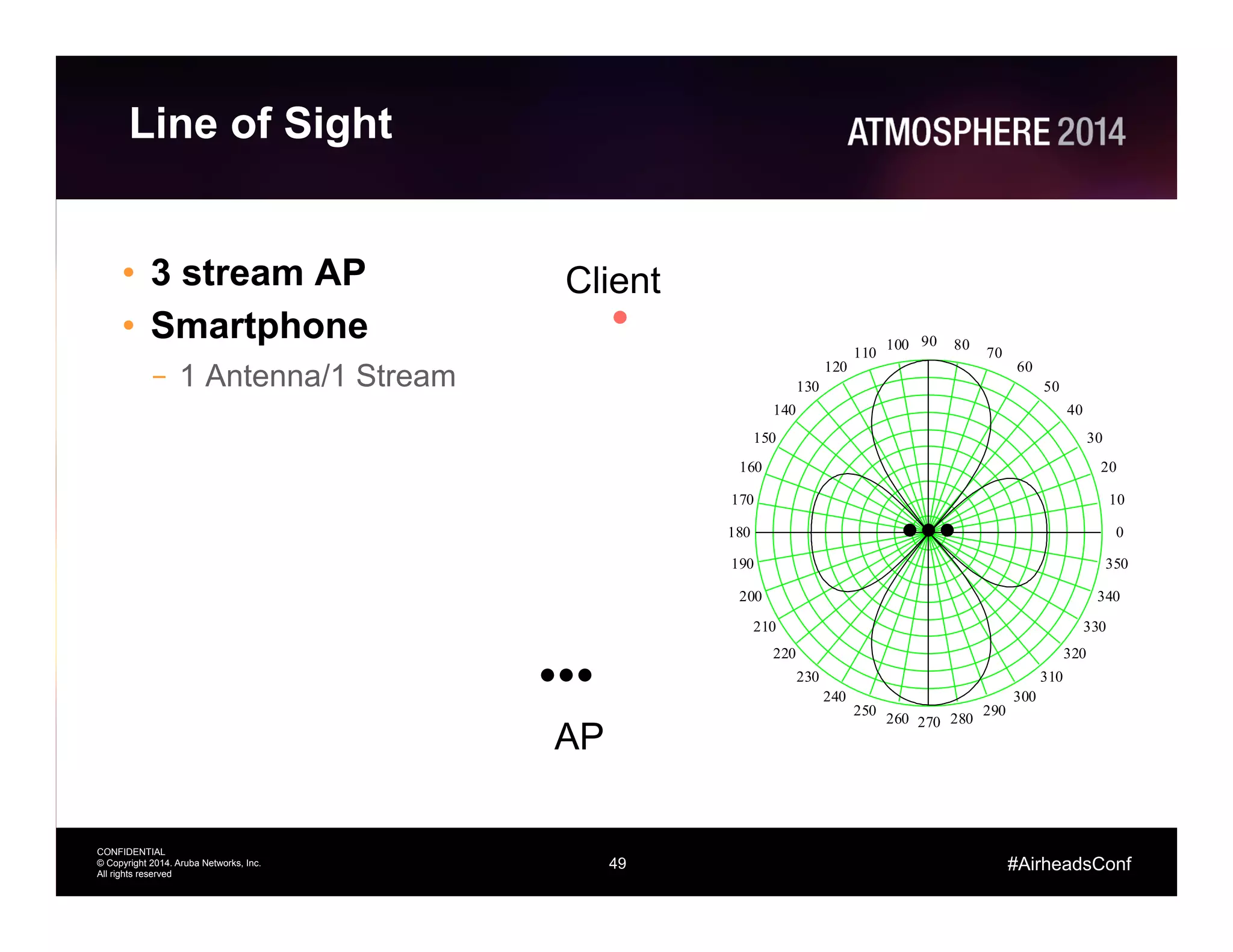
•  3 stream AP
•  Smartphone
–  1 Antenna/1 Stream
Client
AP
0
10
20
30
40
50
60
70
8090100
110
120
130
140
150
160
170
180
190
200
210
220
230
240
250
260 270 280
290
300
310
320
330
340
350
50
CONFIDENTIAL
© Copyright 2014. Aruba Networks, Inc.
All rights reserved
#AirheadsConf
Simple Reflection
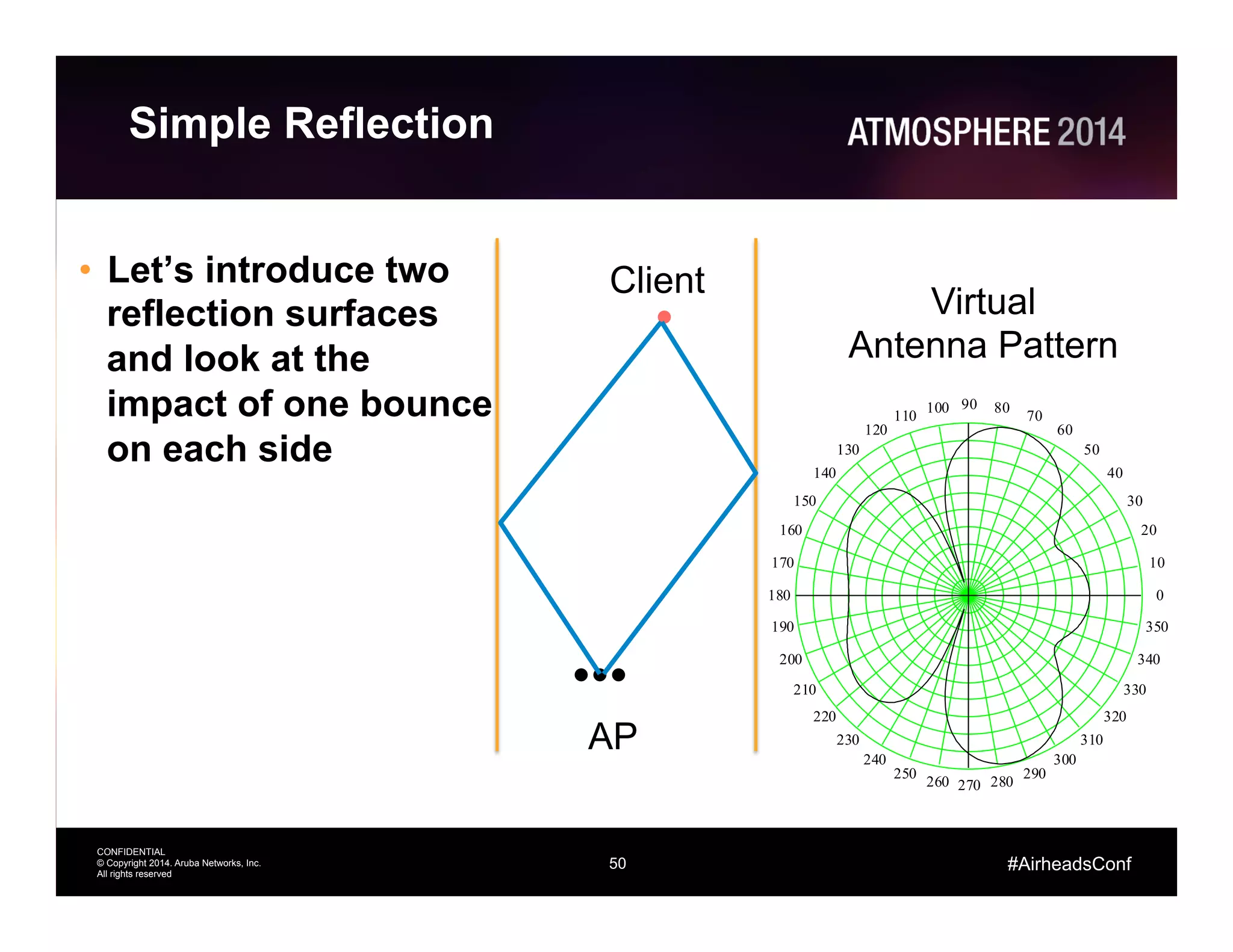
•  Let’s introduce two
reflection surfaces
and look at the
impact of one bounce
on each side
Client
AP
0
10
20
30
40
50
60
70
8090100
110
120
130
140
150
160
170
180
190
200
210
220
230
240
250
260 270 280
290
300
310
320
330
340
350
Virtual
Antenna Pattern
51
CONFIDENTIAL
© Copyright 2014. Aruba Networks, Inc.
All rights reserved
#AirheadsConf
Multi Stream Client
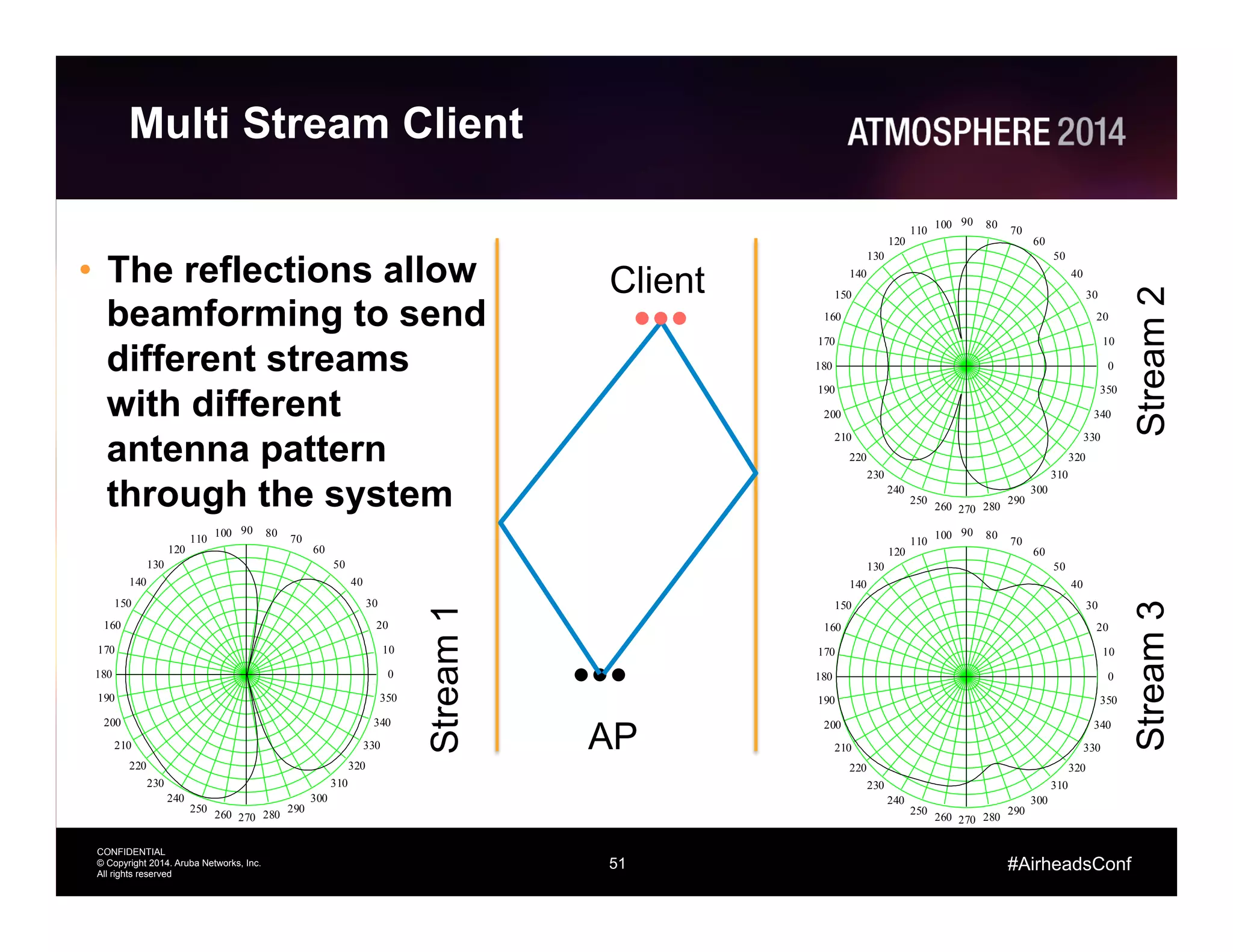
•  The reflections allow
beamforming to send
different streams
with different
antenna pattern
through the system
Client
AP
0
10
20
30
40
50
60
70
8090100
110
120
130
140
150
160
170
180
190
200
210
220
230
240
250
260 270 280
290
300
310
320
330
340
350
0
10
20
30
40
50
60
70
8090100
110
120
130
140
150
160
170
180
190
200
210
220
230
240
250
260 270 280
290
300
310
320
330
340
350
0
10
20
30
40
50
60
70
8090100
110
120
130
140
150
160
170
180
190
200
210
220
230
240
250
260 270 280
290
300
310
320
330
340
350
Stream1
Stream2Stream3
52
CONFIDENTIAL
© Copyright 2014. Aruba Networks, Inc.
All rights reserved
#AirheadsConf
0
10
20
30
40
50
60
70
8090100
110
120
130
140
150
160
170
180
190
200
210
220
230
240
250
260 270 280
290
300
310
320
330
340
350
0
10
20
30
40
50
60
70
8090100
110
120
130
140
150
160
170
180
190
200
210
220
230
240
250
260 270 280
290
300
310
320
330
340
350
0
10
20
30
40
50
60
70
8090100
110
120
130
140
150
160
170
180
190
200
210
220
230
240
250
260 270 280
290
300
310
320
330
340
350
11ac Beamforming across an
80 MHz channel
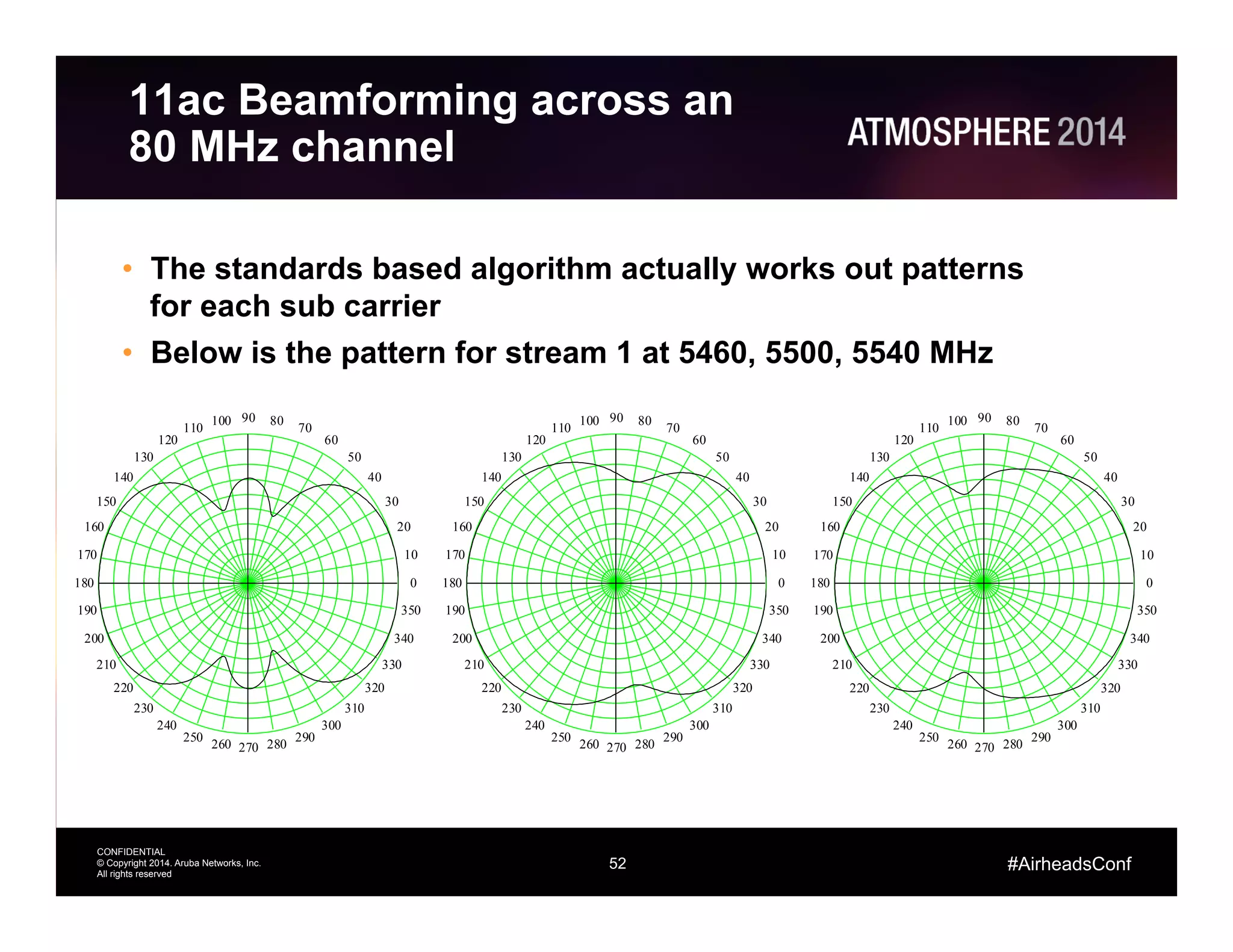
•  The standards based algorithm actually works out patterns
for each sub carrier
•  Below is the pattern for stream 1 at 5460, 5500, 5540 MHz
53
CONFIDENTIAL
© Copyright 2014. Aruba Networks, Inc.
All rights reserved
#AirheadsConf
Aruba 11ac Solutions
54
CONFIDENTIAL
© Copyright 2014. Aruba Networks, Inc.
All rights reserved
#AirheadsConf
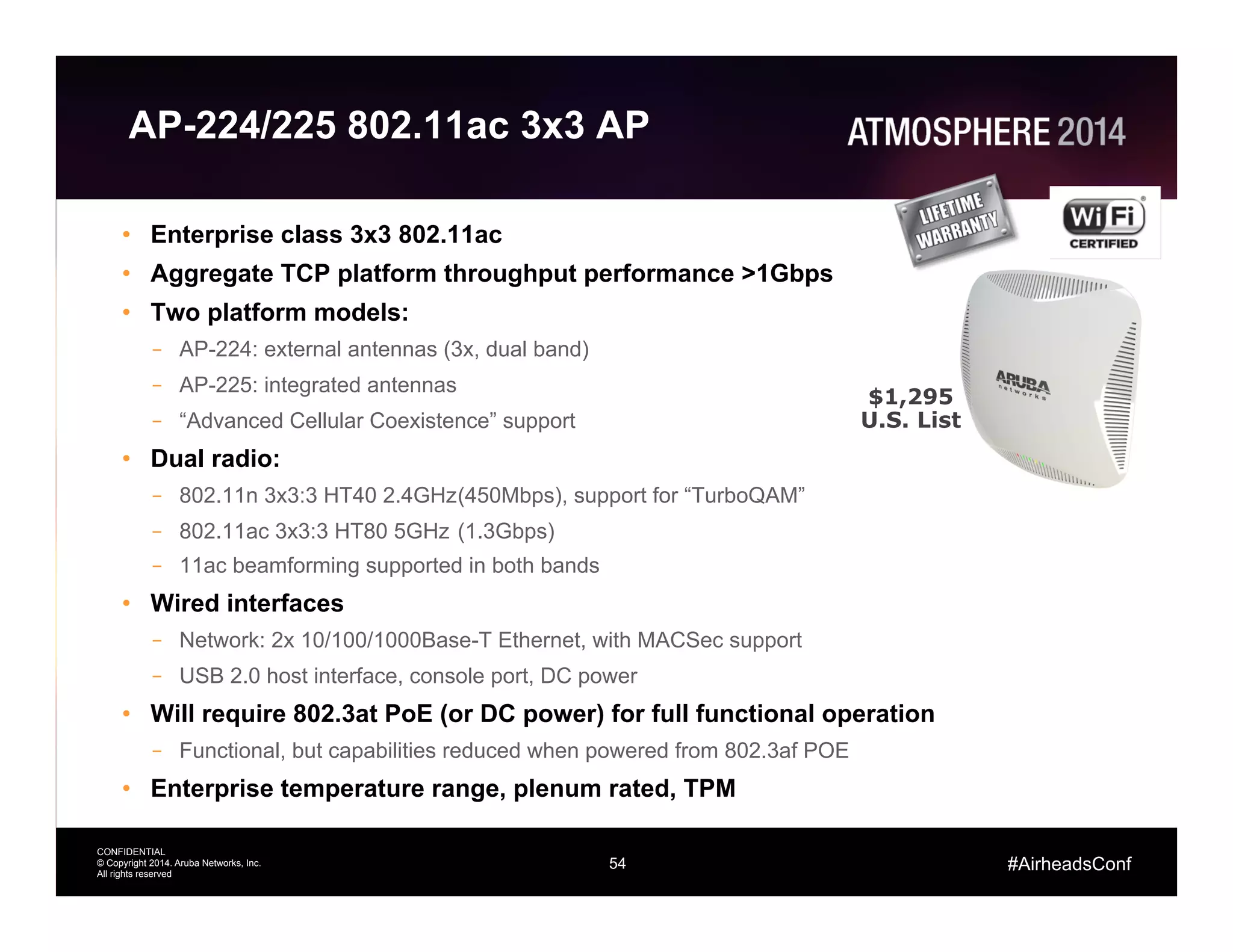
AP-224/225 802.11ac 3x3 AP
•  Enterprise class 3x3 802.11ac
•  Aggregate TCP platform throughput performance >1Gbps
•  Two platform models:
–  AP-224: external antennas (3x, dual band)
–  AP-225: integrated antennas
–  “Advanced Cellular Coexistence” support
•  Dual radio:
–  802.11n 3x3:3 HT40 2.4GHz(450Mbps), support for “TurboQAM”
–  802.11ac 3x3:3 HT80 5GHz (1.3Gbps)
–  11ac beamforming supported in both bands
•  Wired interfaces
–  Network: 2x 10/100/1000Base-T Ethernet, with MACSec support
–  USB 2.0 host interface, console port, DC power
•  Will require 802.3at PoE (or DC power) for full functional operation
–  Functional, but capabilities reduced when powered from 802.3af POE
•  Enterprise temperature range, plenum rated, TPM
$1,295
U.S. List
55
CONFIDENTIAL
© Copyright 2014. Aruba Networks, Inc.
All rights reserved
Thank You
#AirheadsConf

Wireless LAN & 802.11ac Wi-Fi Fundamentals

  • 1.
  • 2.
    CONFIDENTIAL © Copyright 2014.Aruba Networks, Inc. All rights reserved 2 #AirheadsConf Agenda 11ac Standards Physical Layer Overview 11ac Data Rates Radio Realities Transmitters Receivers Antennas 11ac Beamforming 11ac Products
  • 3.
    3 CONFIDENTIAL © Copyright 2014.Aruba Networks, Inc. All rights reserved #AirheadsConf 802.11ac Technology Overview Think of 11ac as an extension of 11n •  11n specification introduced/leveraged: •  2.4 and 5 GHz supported •  Wider channels (40 MHz) •  Better modulation (64- QAM) •  Additional streams (up to 4 streams) •  Beam forming (explicit and implicit) •  Backwards compatibility with 11a/b/g 11ac  introduces   •  5  GHz  supported   •  Even  wider  channels  (80  MHz   and  160  MHz)   •  Be?er  modulaAon  (256-­‐QAM)   •  AddiAonal  streams  (up  to  8)   •  Beam  forming  (explicit)   •  Backwards  compaAbility  with   11a/b/g/n   •  Refer  to  h?p://www. 802-­‐11.ac.net  for  in-­‐depth   informaAon  
  • 4.
    4 CONFIDENTIAL © Copyright 2014.Aruba Networks, Inc. All rights reserved #AirheadsConf Wider Channels •  80 MHz channel widths supported in first generation – 80 MHz is 4.5x faster than 20 MHz – 80 MHz is contiguous – Per packet dynamic channel width decisions •  Future releases will allow for 160 MHz channel widths – 160 MHz can be either contiguous or in two non- contiguous 80 MHz slices
  • 5.
    5 CONFIDENTIAL © Copyright 2014.Aruba Networks, Inc. All rights reserved #AirheadsConf 802.11ac Channels (FCC) Channel Freq (MHz) UNII I and UNII II 2x 80 MHz 4x 40 MHz 8x 20 MHz Band Edge Channel Freq (MHz) 5850 US UNII III 1x 80 MHz 2x 40 MHz 5x 20 MHz Channel Freq (MHz) UNII II extended 3x 80 MHz 6x 40 MHz 12x 20 MHz 36 4844 5240 56 6460 Band Edge 5180 5200 5220 5240 5260 5280 5300 5320 5350 Band Edge 5150 149 161157153 5745 5765 5785 5805 Band Edge 5725 165 5825 100 112108 116104 120 128124 5500 5520 5540 5560 5580 5600 5620 5640 Band Edge 5470 136 140 Band Edge 5680 5700 5725 132 5660 144 5720 Weather Radar
  • 6.
    6 CONFIDENTIAL © Copyright 2014.Aruba Networks, Inc. All rights reserved #AirheadsConf 802.11ac Channels (ETSI) Channel Freq (MHz) UNII I and UNII II 2x 80 MHz 4x 40 MHz 8x 20 MHz Channel Freq (MHz) UNII II extended 2x 80 MHz 5x 40 MHz 11x 20 MHz 36 4844 5240 56 6460 Band Edge 5180 5200 5220 5240 5260 5280 5300 5320 5350 Band Edge 5150 100 112108 116104 120 128124 5500 5520 5540 5560 5580 5600 5620 5640 Band Edge 5470 136 140 Band Edge 5680 5700 5725 132 5660
  • 7.
    7 CONFIDENTIAL © Copyright 2014.Aruba Networks, Inc. All rights reserved #AirheadsConf Understanding 11ac Data Rates
  • 8.
    8 CONFIDENTIAL © Copyright 2014.Aruba Networks, Inc. All rights reserved #AirheadsConf Terminology •  Symbol: basic element containing 1 to 8 bits of information •  Tone/Sub-Carriers: OFDM is made up of many tones. Each symbol is mapped to a tone. •  Cyclic Extension: technique used in OFDM to protect against multipath interference –  You need cyclic extension but it is dead air and consumes transmit time •  Guard Band: Space between channels. In these regions tones have a constant value of zero amplitude •  Pilot Tones: Used to train the receiver and estimate the channel •  Radio Channel: For Wi-Fi 20, 40, 80, or 160 MHz of spectrum •  Propagation Channel: everything that happens between the transmitter and receiver •  FEC: Forward Error Correction. Redundant information that is sent to assist the receiver in decoding the bits.
  • 9.
    9 CONFIDENTIAL © Copyright 2014.Aruba Networks, Inc. All rights reserved #AirheadsConf Sub-carriers 52 subcarriers (48 usable) for a 20 MHz non-HT mode (legacy 802.11a/g) channel fc +10MHz-10MHz 26 carriers 26 carriers 56 subcarriers (52 usable) for a 20 MHz HT mode (802.11n) channel fc 28 carriers 28 carriers 114 subcarriers (108 usable) for a 40 MHz HT mode (802.11n) channel fc +10MHz-20MHz 57 carriers 57 carriers +20MHz-10MHz 242 subcarriers (234 usable) for a 80 MHz VHT mode (802.11ac) channel An 80+80MHz or 16MHz channel is exactly two 80MHz channels, for 484 subcarriers (468 usable) 121 carriers 121 carriers fc +10MHz-20MHz +20MHz-10MHz-40MHz -30MHz +30MHz +40MHz OFDM subcarriers used in 802.11a, 802.11n and 802.11ac +10MHz-10MHz Guard Tones
  • 10.
    10 CONFIDENTIAL © Copyright 2014.Aruba Networks, Inc. All rights reserved #AirheadsConf QAM constellations Amplitude +1 Amplitude -1 Quadrature-1 Quadrature+1 Amplitude +1 Amplitude -1Quadrature-1 Quadrature+1 Amplitude +1 Amplitude -1 Quadrature-1 Quadrature+1 16-QAM constellation 64-QAM constellation 256-QAM constellation Constellation diagrams for 16-, 64-, 256-QAM
  • 11.
    11 CONFIDENTIAL © Copyright 2014.Aruba Networks, Inc. All rights reserved #AirheadsConf How do I get to the data rate for a given MCS? •  Basic Symbol Rate –  312.5 KHz –  3.2 µs •  Cyclic Extension –  t/4 0.8 µs –  t/8 0.4 µs •  Bits Per Tone –  BPSK 1 –  QPSK 2 –  16 QAM 4 –  64 QAM 6 –  256 QAM 8 11
  • 12.
    12 CONFIDENTIAL © Copyright 2014.Aruba Networks, Inc. All rights reserved #AirheadsConf Raw Data Rates •  #Tones * Bits per Tone * Symbol Rate –  16 QAM, 20 MHz –  52 * 4 * 0.3125 = 65 Mbps 12
  • 13.
    13 CONFIDENTIAL © Copyright 2014.Aruba Networks, Inc. All rights reserved #AirheadsConf Correct for Cyclic Extension 13
  • 14.
    14 CONFIDENTIAL © Copyright 2014.Aruba Networks, Inc. All rights reserved #AirheadsConf Apply FEC Coding 14
  • 15.
    15 CONFIDENTIAL © Copyright 2014.Aruba Networks, Inc. All rights reserved #AirheadsConf Transmitters
  • 16.
    16 CONFIDENTIAL © Copyright 2014.Aruba Networks, Inc. All rights reserved #AirheadsConf Transmitter Line Up 16 DAC Symbol Generation Up Convert PA
  • 17.
    17 CONFIDENTIAL © Copyright 2014.Aruba Networks, Inc. All rights reserved #AirheadsConf Transmitter Terms •  Conducted Power –  This is the power that leaves the connectors •  EIRP: Effective Isotropic Radiated Power –  This is the conducted power (dBm) + antenna gain (dBi) in the direction of interest – cable losses (dB) •  Peak EIRP –  This is what is regulated –  It is the conducted power + peak gain – cable losses •  dBm: log power ratio to milliwatt •  dBi: antenna gain relative to isotropic •  dBr: relative power eg:used with describing transmit mask 17
  • 18.
    18 CONFIDENTIAL © Copyright 2014.Aruba Networks, Inc. All rights reserved #AirheadsConf 802.11 Symbol Stream 18 0 4 8 12 16 20 24 28 32 36 40 44 48 52 56 60 64 15− 11.25− 7.5− 3.75− 0 3.75 7.5 11.25 15 Time (symbols) LinearAmplitude
  • 19.
    19 CONFIDENTIAL © Copyright 2014.Aruba Networks, Inc. All rights reserved #AirheadsConf 802.11n Signal Frequency Domain 19 0 5 10 15 20 25 30 35 40 60− 50− 40− 30− 20− 10− 0 Frequency (MHz) Amplitude(dB) Digital Domain After DAC PA Non Linearity 0 5 10 15 20 25 30 35 40 60− 50− 40− 30− 20− 10− 0 a
  • 20.
    20 CONFIDENTIAL © Copyright 2014.Aruba Networks, Inc. All rights reserved #AirheadsConf Transmitter Non-Idealities •  DAC Quantization: this is due to the limited number of bits in a practical Digital to Analog Converter –  This noise source is not affected when the power is reduced •  PA Non Linearity: OFDM has a high Peak to Average Ratio. The peaks in the OFDM signal cause distortions which manifest as noise like shoulders –  Known as spectral regrowth –  For every one 1 dB drop in tx power the regrowth drops by 3 dB •  2 dB net •  The in channel noise is referred to as EVM –  Error Vector Magnitude •  The out of channel noise interferes with other Wi-Fi channels and determines how close we can space antennas 20
  • 21.
    21 CONFIDENTIAL © Copyright 2014.Aruba Networks, Inc. All rights reserved #AirheadsConf EVM •  As the depth of modulation increase the number of bits per symbol increases •  The in-band noise introduces uncertainty wrt to the actual symbol position •  Higher order modulations decrease the space between code points •  To make higher order modulations work the tx power needs to be reduced •  The EVM noise will add with interference and background noise 21 16 QAM
  • 22.
    22 CONFIDENTIAL © Copyright 2014.Aruba Networks, Inc. All rights reserved #AirheadsConf BPSK 1/2 -­‐5 -­‐5 QPSK 1/2 -­‐10 -­‐10 QPSK 3/4 -­‐13 -­‐13 16QAM 1/2 -­‐16 -­‐16 16QAM 3/4 -­‐19 -­‐19 64QAM 2/3 -­‐22 -­‐22 64QAM 3/4 -­‐25 -­‐25 64QAM 5/6 -­‐28 -­‐27 256QAM 3/4 N/A -­‐30 256QAM 5/6 N/A -­‐32 802.11n   EVM  (dB) 802.11ac   EVM  (dB) Modulation Coding  Rate EVM Specfication and 22x tx table 22
  • 23.
    23 CONFIDENTIAL © Copyright 2014.Aruba Networks, Inc. All rights reserved #AirheadsConf Receivers
  • 24.
    24 CONFIDENTIAL © Copyright 2014.Aruba Networks, Inc. All rights reserved #AirheadsConf Receiver Line Up 24 ADC Symbol Decode Down Convert LNA
  • 25.
    25 CONFIDENTIAL © Copyright 2014.Aruba Networks, Inc. All rights reserved #AirheadsConf Receiver Impairments •  Analog Compression –  Modern LNAs have very effective input power tolerance •  Digital Compression –  This is where a high power signal hits the Automatic Gain Control (AGC) Circuit. Gain drops and receiver sensitivity degrades –  The radio can be totally blocked if the power hits the Analog to Digital Converter (ADC) and consumes all the bits •  Intermodulation –  Again, the effective linearity of modern LNAs reduces the impact of this 25
  • 26.
    26 CONFIDENTIAL © Copyright 2014.Aruba Networks, Inc. All rights reserved #AirheadsConf DAS Interference: Example •  Without filtering any signal that hits the receiver above -45 dBm will cause a reduction of sensitivity •  The degradation continues until about -15 dBm at which point the signal is totally blocked •  With a 100 mW (20 dBm) DAS system at 2100 MHz –  Tx 20 dBm –  Effective rx antenna gain 3 dBi –  1st meter at 2100 MHz -39 dB •  Power at 1m -19 dBm –  No impact distance 40 meters 26
  • 27.
    27 CONFIDENTIAL © Copyright 2014.Aruba Networks, Inc. All rights reserved #AirheadsConf Advanced Cellular Coexistence •  Proliferation of DAS and new LTE bands at 2.6 GHz are creating issue for Wi-Fi solution •  All new APs introduced by Aruba in the last 12 months and going forward have implemented significant filtering into the 2.4 GHz radio portion to combat this •  Design solution –  Use high-linear LNA followed with a high-rejection filter to achieve rejection target and little sensitivity degradation; –  Design target: Minimal Sensitivity degradation with -10dBm interference from 3G/4G networks (theoretical analysis).
  • 28.
    28 CONFIDENTIAL © Copyright 2014.Aruba Networks, Inc. All rights reserved #AirheadsConf Coverage Example 1.  Sample coverage for 3x3 11n AP (or 3x3 11ac AP with 11n clients) in HT40 mode • Coverage area sustains MCS5 and up 360   405   450  
  • 29.
    29 CONFIDENTIAL © Copyright 2014.Aruba Networks, Inc. All rights reserved #AirheadsConf Coverage Example 2.  Upgrade to 3x3 11ac AP with 11ac clients, still using 40Mhz channels (VHT40) • Radius for 600Mbps (MCS9) area is 1/4 of that for 450Mbps (MCS7) 360   405   450   540   600  
  • 30.
    30 CONFIDENTIAL © Copyright 2014.Aruba Networks, Inc. All rights reserved #AirheadsConf Coverage Example 3.  Equivalent range for clients using 80MHz channels (VHT80) – Rates roughly double, relative range for each of the MCS rates does not change, but 80MHz range is ~70% of equivalent (same MCS) 40MHz range 780   878   975   1170   1300   585  
  • 31.
    31 CONFIDENTIAL © Copyright 2014.Aruba Networks, Inc. All rights reserved #AirheadsConf Relative Range 802.11ac Rates Datarate    40MHz  80MHz   MCS0  45  97.5   MCS1  90  195   MCS2  135  292.5   MCS3  180  390   MCS4  270  585   MCS5  360  780   MCS6  405  877.5   MCS7  450  975   MCS8  540  1,170   MCS9  600  1,300   Signal  level  and  rela@ve  range    -­‐dB  r   MCS0  87  63   MCS1  85  50   MCS2  83  40   MCS3  79  25   MCS4  76  18   MCS5  71  10   MCS6  66  5.6   MCS7  63  4.0   MCS8  58  2.2   MCS9  51  1.0  
  • 32.
    32 CONFIDENTIAL © Copyright 2014.Aruba Networks, Inc. All rights reserved #AirheadsConf Pros and Cons of 802.11ac •  Pros 1.  APs can accommodate more users/devices •  Increased capacity 2.  Standards based Explicit Beam-forming increases SNR •  Higher data rates over longer distances 3.  256-QAM •  Increased throughput at high SNRs •  Improved modulation and coding techniques 4.  Multi-User MIMO (future generations) •  Improved utilization of RF capacity 5.  Use of 5 GHz spectrum •  More non-overlapping channels •  Quieter RF environment
  • 33.
    33 CONFIDENTIAL © Copyright 2014.Aruba Networks, Inc. All rights reserved #AirheadsConf Pros and Cons of 802.11ac •  Caveats 1.  Hardware update required to support 802.11ac •  Some features will not be available on legacy devices 2.  Increased product cost •  Small premium for 3x performance •  Prices will come down 3.  Supporting 802.11ac will result in increased load on the infrastructure 4.  AP-225 requires 802.3at (PoE+) for full functionality & performance •  However, no restrictions on 11ac radio with 802.3af POE •  USB disabled, second Ethernet port disabled, 2.4GHz radio in 1x3:1SS mode
  • 34.
    34 CONFIDENTIAL © Copyright 2014.Aruba Networks, Inc. All rights reserved #AirheadsConf Wave 2 of 11ac •  What will wave 2 802.11ac deliver? •  MU-MIMO •  Use AP MIMO resources more effectively •  Transmit data to multiple devices simultaneously: for example 4SS AP streaming data to four 1SS clients simultaneously •  4x4:4SS •  Benefit of additional stream mostly for MU-MIMO •  Not anticipating any 4x4:4SS client devices •  Adds 33% to max datarate •  VHT160 •  Doubles max datarate •  Practical problem: only 2 VHT160 channels available in entire 5GHz band •  Max 5GHz radio throughput triples again! •  450 (11n 3x3 HT40), 1,300 (11ac 3x3 VHT80), 3,467 (11ac 4x4 VHT160) •  When will it be available? •  Radio chipsets available late 2014 •  Products in 2015
  • 35.
    35 CONFIDENTIAL © Copyright 2014.Aruba Networks, Inc. All rights reserved #AirheadsConf Reasons not to wait for Wave 2 •  Unlikely to see any 4x4:4SS client devices •  Use of VHT160 not practical for typical enterprise deployment •  MU-MIMO is a nice-to-have optimization. •  How well it will work and what the real benefits are is still not entirely clear •  Requires new client devices (Wave 1 clients also not FW upgradeable) •  Wave 1 is here now (technology, products, market momentum), offering huge advantages over 11n. Wave 2 is the expected next step in the evolution of the technology. •  In general: the next wave in technology is always around the corner, something better is always coming Once Wave 2 is available, we’ll for sure be talking about Wave 3. •  No different from when 11n 2x2 products were introduced and it was clear that 3x3 products would be available within 18 months.
  • 36.
    36 CONFIDENTIAL © Copyright 2014.Aruba Networks, Inc. All rights reserved #AirheadsConf 11ad and what it means •  60GHz band, three channels in most countries (each 2.16GHz wide), each providing up to 6.8Gbps PHY datarate •  No MIMO •  Challenges: Non-Line of Sight (NLOS) connections, range, penetrating obstacles (and people) •  Targeted to clean up a cluttered desk or TV cabinet •  Likely not appropriate for traditional AP use. But can be interesting for related applications like wireless docking, high-capacity WLAN hotspots, AP backhaul/aggregation, etc. •  It is being investigated (but no product plans as of yet) •  Standard is available, certification program in place •  Wi-Fi Alliance WiGig Alliance
  • 37.
    37 CONFIDENTIAL © Copyright 2014.Aruba Networks, Inc. All rights reserved #AirheadsConf Antennas
  • 38.
    38 CONFIDENTIAL © Copyright 2014.Aruba Networks, Inc. All rights reserved #AirheadsConf Antenna Basic Physics •  When the charges oscillate the waves go up and down with the charges and radiate away •  With a single element the energy leaves uniformly. •  Also known as omni-directionally 38
  • 39.
    39 CONFIDENTIAL © Copyright 2014.Aruba Networks, Inc. All rights reserved #AirheadsConf Building Arrays: 2 Elements •  By introducing additional antenna elements we can control the way that the energy radiates •  2 elements excited in phase 39 λ/2 0 30 60 90 120 150 180 210 240 270 300 330 Linear Plot 0 15 30 45 60 75 90 105 120 135 150 165 180 195 210 225 240 255 270 285 300 315 330 345 dB Plot
  • 40.
    40 CONFIDENTIAL © Copyright 2014.Aruba Networks, Inc. All rights reserved #AirheadsConf 0 15 30 45 60 75 90 105 120 135 150 165 180 195 210 225 240 255 270 285 300 315 330 345 Building Arrays: 4 Elements •  By introducing additional antenna elements we can control the way that the energy radiates •  4 elements excited in phase –  Equal amplitude 40 Linear Plot dB Plot 0 30 60 90 120 150 180 210 240 270 300 330
  • 41.
    41 CONFIDENTIAL © Copyright 2014.Aruba Networks, Inc. All rights reserved #AirheadsConf 0 15 30 45 60 75 90 105 120 135 150 165 180 195 210 225 240 255 270 285 300 315 330 345 0 30 60 90 120 150 180 210 240 270 300 330 Building Arrays: 4 Elements •  By shaping the amplitude we can control sidelobes •  4 elements excited in phase –  Amplitude 1, 3, 3, 1 41 Linear Plot dB Plot
  • 42.
    42 CONFIDENTIAL © Copyright 2014.Aruba Networks, Inc. All rights reserved #AirheadsConf 0 15 30 45 60 75 90 105 120 135 150 165 180 195 210 225 240 255 270 285 300 315 330 345 0 30 60 90 120 150 180 210 240 270 300 330 Building Arrays: 4 Elements Phase •  By altering phase we can alter the direction that the energy travels •  4 elements excited with phase slope –  Even amplitude 42 Linear Plot dB Plot
  • 43.
    43 CONFIDENTIAL © Copyright 2014.Aruba Networks, Inc. All rights reserved #AirheadsConf Reading Antenna Pattern Plots - Omni 43 Azimuth Elevation Omnidirectional Antenna (Linear View) -3 dB Sidelobes
  • 44.
    44 CONFIDENTIAL © Copyright 2014.Aruba Networks, Inc. All rights reserved #AirheadsConf Reading Antenna Pattern Plots - Sector 44 Azimuth Elevation Sector Antenna (Logarithmic View) -3 dB -3 dB SidelobesBacklobe Front Back Side
  • 45.
    45 CONFIDENTIAL © Copyright 2014.Aruba Networks, Inc. All rights reserved #AirheadsConf 802.11ac Beamforming
  • 46.
    46 CONFIDENTIAL © Copyright 2014.Aruba Networks, Inc. All rights reserved #AirheadsConf Beamforming: Notes •  AP 22x series has 11ac beamforming support in 2.4 and 5 GHz bands •  Works with clients that support 11ac beamforming function –  This is at a minimum all 11ac client devices using Broadcom chipsets –  Support will have to come to all devices to compete with Broadcom offering •  11ac beamforming is standards based –  first standard that is doing this the “right” way –  11ac beamforming represents the consensus view of the 1000’s of contributors to the standards process •  11ac beamforming is implemented in baseband. –  It works with all antenna subsystems –  The total number of beamforming combinations is effectively infinite •  11ac actively tracks users so has a recent channel estimate between the AP and client that is updated frequently 46
  • 47.
    47 CONFIDENTIAL © Copyright 2014.Aruba Networks, Inc. All rights reserved #AirheadsConf Channel state information, implicit and explicit beamforming estimation 47 Explicit feedback for beamforming (802.11n and 802.11ac) 1 (Beamformer) Here’s a sounding frame 2 (Beamformee) Here’s how I heard the sounding frame 3 Now I will pre-code to match how you heard me sounding frames Beamformed frames feedback from sounding Explicit feedback for beamforming Beamformer Beamformee Actual CSI
  • 48.
    48 CONFIDENTIAL © Copyright 2014.Aruba Networks, Inc. All rights reserved #AirheadsConf 5− 4− 3− 2− 1− 0 1 2 3 4 5 1 10 4− × 1 10 3− × 0.01 Antenna 1 Antenna 2 Antenna 3 Wavelengths EFieldAmplitude Client Antennas h11 h21 h31
  • 49.
    49 CONFIDENTIAL © Copyright 2014.Aruba Networks, Inc. All rights reserved #AirheadsConf Line of Sight •  3 stream AP •  Smartphone –  1 Antenna/1 Stream Client AP 0 10 20 30 40 50 60 70 8090100 110 120 130 140 150 160 170 180 190 200 210 220 230 240 250 260 270 280 290 300 310 320 330 340 350
  • 50.
    50 CONFIDENTIAL © Copyright 2014.Aruba Networks, Inc. All rights reserved #AirheadsConf Simple Reflection •  Let’s introduce two reflection surfaces and look at the impact of one bounce on each side Client AP 0 10 20 30 40 50 60 70 8090100 110 120 130 140 150 160 170 180 190 200 210 220 230 240 250 260 270 280 290 300 310 320 330 340 350 Virtual Antenna Pattern
  • 51.
    51 CONFIDENTIAL © Copyright 2014.Aruba Networks, Inc. All rights reserved #AirheadsConf Multi Stream Client •  The reflections allow beamforming to send different streams with different antenna pattern through the system Client AP 0 10 20 30 40 50 60 70 8090100 110 120 130 140 150 160 170 180 190 200 210 220 230 240 250 260 270 280 290 300 310 320 330 340 350 0 10 20 30 40 50 60 70 8090100 110 120 130 140 150 160 170 180 190 200 210 220 230 240 250 260 270 280 290 300 310 320 330 340 350 0 10 20 30 40 50 60 70 8090100 110 120 130 140 150 160 170 180 190 200 210 220 230 240 250 260 270 280 290 300 310 320 330 340 350 Stream1 Stream2Stream3
  • 52.
    52 CONFIDENTIAL © Copyright 2014.Aruba Networks, Inc. All rights reserved #AirheadsConf 0 10 20 30 40 50 60 70 8090100 110 120 130 140 150 160 170 180 190 200 210 220 230 240 250 260 270 280 290 300 310 320 330 340 350 0 10 20 30 40 50 60 70 8090100 110 120 130 140 150 160 170 180 190 200 210 220 230 240 250 260 270 280 290 300 310 320 330 340 350 0 10 20 30 40 50 60 70 8090100 110 120 130 140 150 160 170 180 190 200 210 220 230 240 250 260 270 280 290 300 310 320 330 340 350 11ac Beamforming across an 80 MHz channel •  The standards based algorithm actually works out patterns for each sub carrier •  Below is the pattern for stream 1 at 5460, 5500, 5540 MHz
  • 53.
    53 CONFIDENTIAL © Copyright 2014.Aruba Networks, Inc. All rights reserved #AirheadsConf Aruba 11ac Solutions
  • 54.
    54 CONFIDENTIAL © Copyright 2014.Aruba Networks, Inc. All rights reserved #AirheadsConf AP-224/225 802.11ac 3x3 AP •  Enterprise class 3x3 802.11ac •  Aggregate TCP platform throughput performance >1Gbps •  Two platform models: –  AP-224: external antennas (3x, dual band) –  AP-225: integrated antennas –  “Advanced Cellular Coexistence” support •  Dual radio: –  802.11n 3x3:3 HT40 2.4GHz(450Mbps), support for “TurboQAM” –  802.11ac 3x3:3 HT80 5GHz (1.3Gbps) –  11ac beamforming supported in both bands •  Wired interfaces –  Network: 2x 10/100/1000Base-T Ethernet, with MACSec support –  USB 2.0 host interface, console port, DC power •  Will require 802.3at PoE (or DC power) for full functional operation –  Functional, but capabilities reduced when powered from 802.3af POE •  Enterprise temperature range, plenum rated, TPM $1,295 U.S. List
  • 55.
    55 CONFIDENTIAL © Copyright 2014.Aruba Networks, Inc. All rights reserved Thank You #AirheadsConf