CONFIDENTIAL
© Copyright 2014. Aruba Networks, Inc. All rights reserved
Welcome to
TAC Training Session on,
RF Fundamentals, Aruba WLAN deployment
& Troubleshooting
CONFIDENTIAL © Copyright 2014. Aruba Networks, Inc. All rights reserved
Agenda
• Session 1 :
• 05 PM to 06 PM (IST) - Wireless fundamentals
• 06 PM to 07 PM (IST) - Aruba architecture and AP boot process
CONFIDENTIAL
© Copyright 2014. Aruba Networks, Inc. All rights reserved
Radio Frequency Fundamentals
CONFIDENTIAL © Copyright 2014. Aruba Networks, Inc. All rights reserved
Loss (Attenuation)
• Decrease of amplitude or signal strength
– On a wire due to impedance
– Over the air-Free Space Path Loss
• Loss depends on Wavelength of a Signals
• Short WL Signals will have more effect that long
WL Signals
• Loss is more in 5 Ghz compared to 2.4 Ghz
CONFIDENTIAL © Copyright 2014. Aruba Networks, Inc. All rights reserved
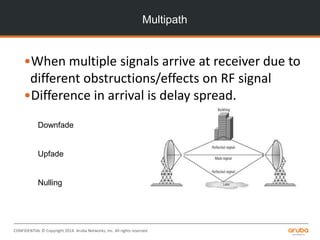
Multipath
•When multiple signals arrive at receiver due to
different obstructions/effects on RF signal
•Difference in arrival is delay spread.
Downfade
Upfade
Nulling
CONFIDENTIAL © Copyright 2014. Aruba Networks, Inc. All rights reserved
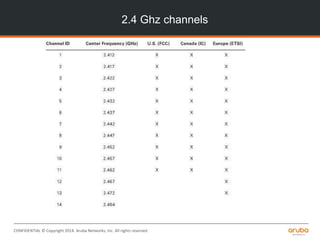
2.4 Ghz channels
CONFIDENTIAL © Copyright 2014. Aruba Networks, Inc. All rights reserved
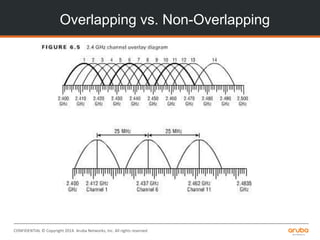
Overlapping vs. Non-Overlapping
CONFIDENTIAL © Copyright 2014. Aruba Networks, Inc. All rights reserved
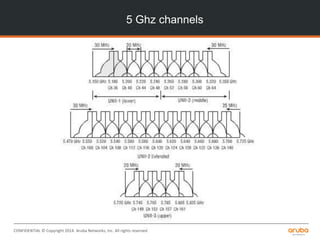
5 Ghz channels
CONFIDENTIAL © Copyright 2014. Aruba Networks, Inc. All rights reserved
Throughput vs. Bandwidth
• Don’t confuse frequency Bandwidht (size of
channels) and data bandwidht (speeds for
transmission)
– Also different from throughput, which is actual data
performance
• Since wireless is half duplex, most of the time you
get less than 100% of the “bandwidth”
• Since it is shared, if 5 stations are sharing 20
Mbps, each will get about 4Mbps of performance
CONFIDENTIAL © Copyright 2014. Aruba Networks, Inc. All rights reserved
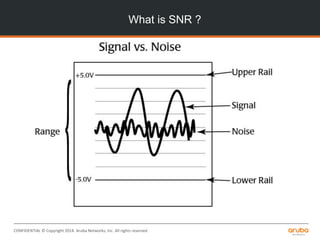
What is SNR ?
CONFIDENTIAL © Copyright 2014. Aruba Networks, Inc. All rights reserved
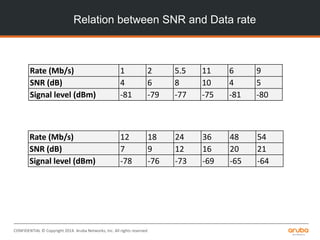
Relation between SNR and Data rate
Rate (Mb/s) 1 2 5.5 11 6 9
SNR (dB) 4 6 8 10 4 5
Signal level (dBm) -81 -79 -77 -75 -81 -80
Rate (Mb/s) 12 18 24 36 48 54
SNR (dB) 7 9 12 16 20 21
Signal level (dBm) -78 -76 -73 -69 -65 -64
CONFIDENTIAL © Copyright 2014. Aruba Networks, Inc. All rights reserved
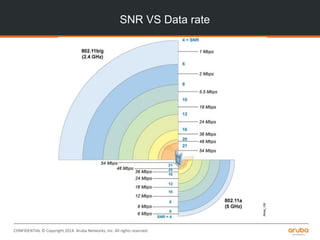
SNR VS Data rate
CONFIDENTIAL © Copyright 2014. Aruba Networks, Inc. All rights reserved
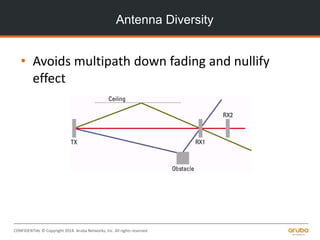
Antenna Diversity
• Avoids multipath down fading and nullify
effect
CONFIDENTIAL © Copyright 2014. Aruba Networks, Inc. All rights reserved
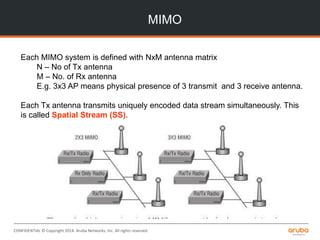
MIMO
Each MIMO system is defined with NxM antenna matrix
N – No of Tx antenna
M – No. of Rx antenna
E.g. 3x3 AP means physical presence of 3 transmit and 3 receive antenna.
Each Tx antenna transmits uniquely encoded data stream simultaneously. This
is called Spatial Stream (SS).
CONFIDENTIAL © Copyright 2014. Aruba Networks, Inc. All rights reserved
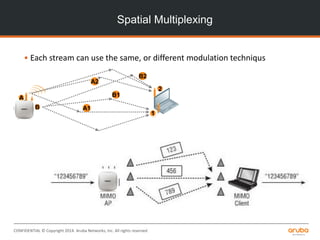
Spatial Multiplexing
• Each stream can use the same, or different modulation techniqus
A2
B2
B1
A1
A
B
1
2
CONFIDENTIAL © Copyright 2014. Aruba Networks, Inc. All rights reserved
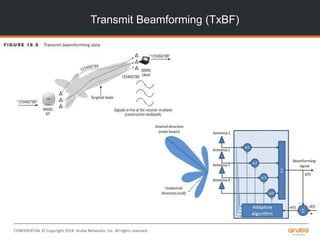
Transmit Beamforming (TxBF)
CONFIDENTIAL © Copyright 2014. Aruba Networks, Inc. All rights reserved
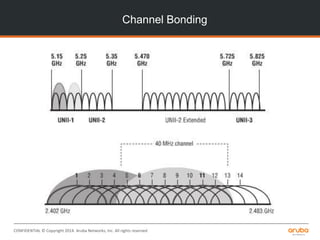
Channel Bonding
CONFIDENTIAL © Copyright 2014. Aruba Networks, Inc. All rights reserved
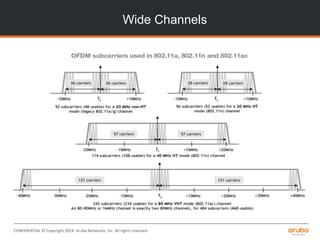
Wide Channels
CONFIDENTIAL © Copyright 2014. Aruba Networks, Inc. All rights reserved
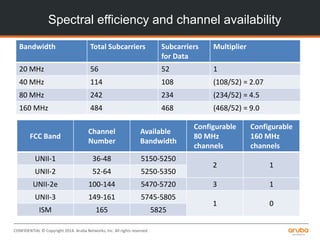
Bandwidth Total Subcarriers Subcarriers
for Data
Multiplier
20 MHz 56 52 1
40 MHz 114 108 (108/52) = 2.07
80 MHz 242 234 (234/52) = 4.5
160 MHz 484 468 (468/52) = 9.0
FCC Band
Channel
Number
Available
Bandwidth
Configurable
80 MHz
channels
Configurable
160 MHz
channels
UNII-1 36-48 5150-5250
2 1
UNII-2 52-64 5250-5350
UNII-2e 100-144 5470-5720 3 1
UNII-3 149-161 5745-5805
1 0
ISM 165 5825
Spectral efficiency and channel availability
CONFIDENTIAL © Copyright 2014. Aruba Networks, Inc. All rights reserved
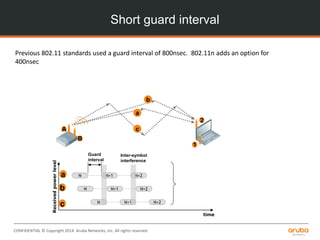
Short guard interval
a
b
c
a
b
c
Receivedpowerlevel
time
A
B
1
2
N N+1 N+2
N N+1 N+2
N N+1 N+2
Guard
interval
Inter-symbol
interference
Previous 802.11 standards used a guard interval of 800nsec. 802.11n adds an option for
400nsec
CONFIDENTIAL © Copyright 2014. Aruba Networks, Inc. All rights reserved
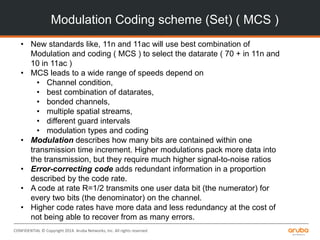
Modulation Coding scheme (Set) ( MCS )
• New standards like, 11n and 11ac will use best combination of
Modulation and coding ( MCS ) to select the datarate ( 70 + in 11n and
10 in 11ac )
• MCS leads to a wide range of speeds depend on
• Channel condition,
• best combination of datarates,
• bonded channels,
• multiple spatial streams,
• different guard intervals
• modulation types and coding
• Modulation describes how many bits are contained within one
transmission time increment. Higher modulations pack more data into
the transmission, but they require much higher signal-to-noise ratios
• Error-correcting code adds redundant information in a proportion
described by the code rate.
• A code at rate R=1/2 transmits one user data bit (the numerator) for
every two bits (the denominator) on the channel.
• Higher code rates have more data and less redundancy at the cost of
not being able to recover from as many errors.
CONFIDENTIAL © Copyright 2014. Aruba Networks, Inc. All rights reserved
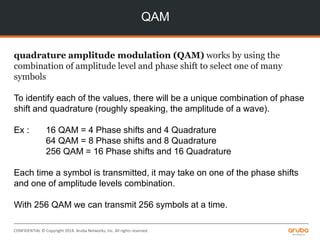
QAM
quadrature amplitude modulation (QAM) works by using the
combination of amplitude level and phase shift to select one of many
symbols
To identify each of the values, there will be a unique combination of phase
shift and quadrature (roughly speaking, the amplitude of a wave).
Ex : 16 QAM = 4 Phase shifts and 4 Quadrature
64 QAM = 8 Phase shifts and 8 Quadrature
256 QAM = 16 Phase shifts and 16 Quadrature
Each time a symbol is transmitted, it may take on one of the phase shifts
and one of amplitude levels combination.
With 256 QAM we can transmit 256 symbols at a time.
CONFIDENTIAL © Copyright 2014. Aruba Networks, Inc. All rights reserved
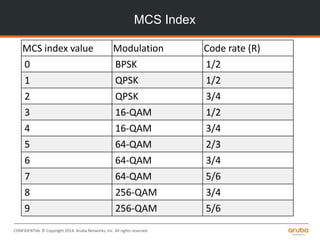
MCS Index
MCS index value Modulation Code rate (R)
0 BPSK 1/2
1 QPSK 1/2
2 QPSK 3/4
3 16-QAM 1/2
4 16-QAM 3/4
5 64-QAM 2/3
6 64-QAM 3/4
7 64-QAM 5/6
8 256-QAM 3/4
9 256-QAM 5/6
CONFIDENTIAL © Copyright 2014. Aruba Networks, Inc. All rights reserved
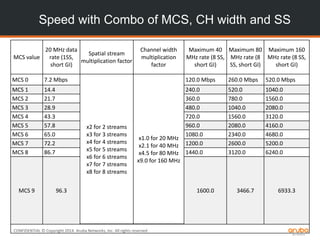
Speed with Combo of MCS, CH width and SS
MCS value
20 MHz data
rate (1SS,
short GI)
Spatial stream
multiplication factor
Channel width
multiplication
factor
Maximum 40
MHz rate (8 SS,
short GI)
Maximum 80
MHz rate (8
SS, short GI)
Maximum 160
MHz rate (8 SS,
short GI)
MCS 0 7.2 Mbps
x2 for 2 streams
x3 for 3 streams
x4 for 4 streams
x5 for 5 streams
x6 for 6 streams
x7 for 7 streams
x8 for 8 streams
x1.0 for 20 MHz
x2.1 for 40 MHz
x4.5 for 80 MHz
x9.0 for 160 MHz
120.0 Mbps 260.0 Mbps 520.0 Mbps
MCS 1 14.4 240.0 520.0 1040.0
MCS 2 21.7 360.0 780.0 1560.0
MCS 3 28.9 480.0 1040.0 2080.0
MCS 4 43.3 720.0 1560.0 3120.0
MCS 5 57.8 960.0 2080.0 4160.0
MCS 6 65.0 1080.0 2340.0 4680.0
MCS 7 72.2 1200.0 2600.0 5200.0
MCS 8 86.7 1440.0 3120.0 6240.0
MCS 9 96.3 1600.0 3466.7 6933.3
CONFIDENTIAL © Copyright 2014. Aruba Networks, Inc. All rights reserved
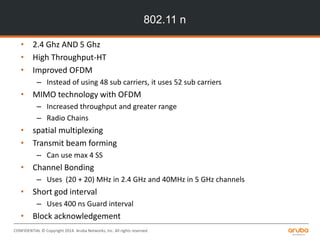
802.11 n
• 2.4 Ghz AND 5 Ghz
• High Throughput-HT
• Improved OFDM
– Instead of using 48 sub carriers, it uses 52 sub carriers
• MIMO technology with OFDM
– Increased throughput and greater range
– Radio Chains
• spatial multiplexing
• Transmit beam forming
– Can use max 4 SS
• Channel Bonding
– Uses (20 + 20) MHz in 2.4 GHz and 40MHz in 5 GHz channels
• Short god interval
– Uses 400 ns Guard interval
• Block acknowledgement
CONFIDENTIAL © Copyright 2014. Aruba Networks, Inc. All rights reserved
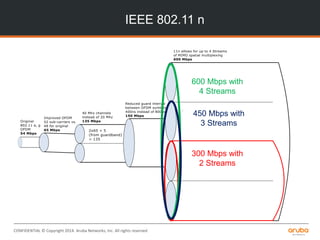
IEEE 802.11 n
300 Mbps with
2 Streams
600 Mbps with
4 Streams
450 Mbps with
3 Streams
CONFIDENTIAL © Copyright 2014. Aruba Networks, Inc. All rights reserved
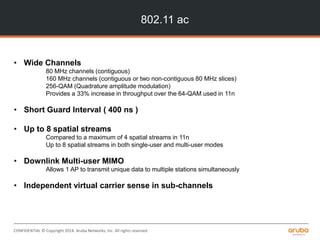
802.11 ac
• Wide Channels
80 MHz channels (contiguous)
160 MHz channels (contiguous or two non-contiguous 80 MHz slices)
256-QAM (Quadrature amplitude modulation)
Provides a 33% increase in throughput over the 64-QAM used in 11n
• Short Guard Interval ( 400 ns )
• Up to 8 spatial streams
Compared to a maximum of 4 spatial streams in 11n
Up to 8 spatial streams in both single-user and multi-user modes
• Downlink Multi-user MIMO
Allows 1 AP to transmit unique data to multiple stations simultaneously
• Independent virtual carrier sense in sub-channels
CONFIDENTIAL © Copyright 2014. Aruba Networks, Inc. All rights reserved
Speed comparison
Technology 20 MHz[a] 40 MHz 80 MHz 160 MHz
802.11b 11 Mbps
802.11a/g 54 Mbps
802.11n (1 SS) 72 Mbps 150 Mbps
802.11ac (1 SS) 87 Mbps 200 Mbps 433 Mbps 867 Mbps
802.11n (2 SS) 144 Mbps 300 Mbps
802.11ac (2 SS) 173 Mbps 400 Mbps 867 Mbps 1.7 Gbps
802.11n (3 SS) 216 Mbps 450 Mbps
802.11ac (3 SS) 289 Mbps 600 Mbps 1.3 Gbps 2.3 Gbps[b]
802.11n (4 SS)[c] 289 Mbps 600 Mbps
802.11ac (4 SS) 347 Mbps 800 Mbps 1.7 Gbps 3.5 Gbps
802.11ac (8 SS) 693 Mbps 1.6 Gbps 3.4 Gbps 6.9 Gbps
CONFIDENTIAL © Copyright 2014. Aruba Networks, Inc. All rights reserved
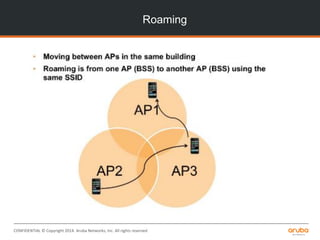
Roaming
CONFIDENTIAL © Copyright 2014. Aruba Networks, Inc. All rights reserved
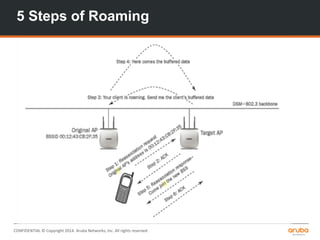
5 Steps of Roaming
CONFIDENTIAL © Copyright 2014. Aruba Networks, Inc. All rights reserved
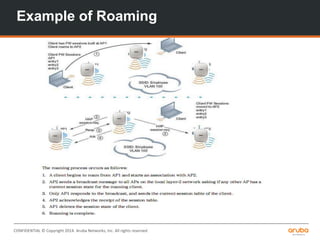
Example of Roaming
CONFIDENTIAL © Copyright 2014. Aruba Networks, Inc. All rights reserved
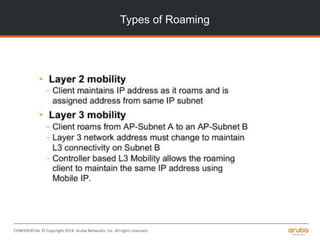
Types of Roaming
CONFIDENTIAL © Copyright 2014. Aruba Networks, Inc. All rights reserved
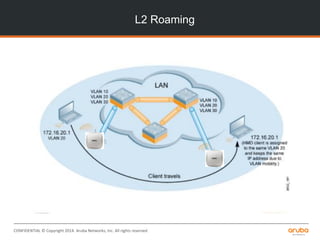
L2 Roaming
CONFIDENTIAL © Copyright 2014. Aruba Networks, Inc. All rights reserved
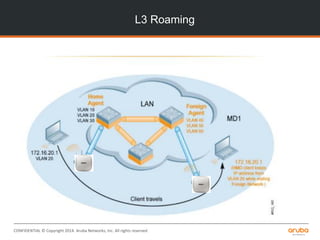
L3 Roaming
CONFIDENTIAL © Copyright 2014. Aruba Networks, Inc. All rights reserved
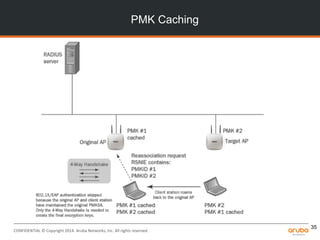
PMK Caching
35
CONFIDENTIAL © Copyright 2014. Aruba Networks, Inc. All rights reserved
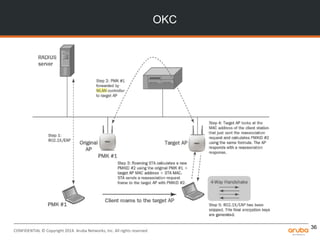
OKC
36
CONFIDENTIAL © Copyright 2014. Aruba Networks, Inc. All rights reserved
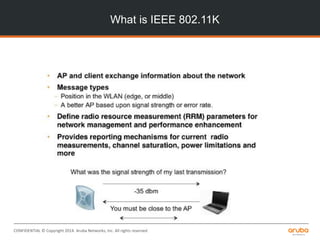
What is IEEE 802.11K

1 wireless fundamentals

  • 1.
    CONFIDENTIAL © Copyright 2014.Aruba Networks, Inc. All rights reserved Welcome to TAC Training Session on, RF Fundamentals, Aruba WLAN deployment & Troubleshooting
  • 2.
    CONFIDENTIAL © Copyright2014. Aruba Networks, Inc. All rights reserved Agenda • Session 1 : • 05 PM to 06 PM (IST) - Wireless fundamentals • 06 PM to 07 PM (IST) - Aruba architecture and AP boot process
  • 3.
    CONFIDENTIAL © Copyright 2014.Aruba Networks, Inc. All rights reserved Radio Frequency Fundamentals
  • 4.
    CONFIDENTIAL © Copyright2014. Aruba Networks, Inc. All rights reserved Loss (Attenuation) • Decrease of amplitude or signal strength – On a wire due to impedance – Over the air-Free Space Path Loss • Loss depends on Wavelength of a Signals • Short WL Signals will have more effect that long WL Signals • Loss is more in 5 Ghz compared to 2.4 Ghz
  • 5.
    CONFIDENTIAL © Copyright2014. Aruba Networks, Inc. All rights reserved Multipath •When multiple signals arrive at receiver due to different obstructions/effects on RF signal •Difference in arrival is delay spread. Downfade Upfade Nulling
  • 6.
    CONFIDENTIAL © Copyright2014. Aruba Networks, Inc. All rights reserved 2.4 Ghz channels
  • 7.
    CONFIDENTIAL © Copyright2014. Aruba Networks, Inc. All rights reserved Overlapping vs. Non-Overlapping
  • 8.
    CONFIDENTIAL © Copyright2014. Aruba Networks, Inc. All rights reserved 5 Ghz channels
  • 9.
    CONFIDENTIAL © Copyright2014. Aruba Networks, Inc. All rights reserved Throughput vs. Bandwidth • Don’t confuse frequency Bandwidht (size of channels) and data bandwidht (speeds for transmission) – Also different from throughput, which is actual data performance • Since wireless is half duplex, most of the time you get less than 100% of the “bandwidth” • Since it is shared, if 5 stations are sharing 20 Mbps, each will get about 4Mbps of performance
  • 10.
    CONFIDENTIAL © Copyright2014. Aruba Networks, Inc. All rights reserved What is SNR ?
  • 11.
    CONFIDENTIAL © Copyright2014. Aruba Networks, Inc. All rights reserved Relation between SNR and Data rate Rate (Mb/s) 1 2 5.5 11 6 9 SNR (dB) 4 6 8 10 4 5 Signal level (dBm) -81 -79 -77 -75 -81 -80 Rate (Mb/s) 12 18 24 36 48 54 SNR (dB) 7 9 12 16 20 21 Signal level (dBm) -78 -76 -73 -69 -65 -64
  • 12.
    CONFIDENTIAL © Copyright2014. Aruba Networks, Inc. All rights reserved SNR VS Data rate
  • 13.
    CONFIDENTIAL © Copyright2014. Aruba Networks, Inc. All rights reserved Antenna Diversity • Avoids multipath down fading and nullify effect
  • 14.
    CONFIDENTIAL © Copyright2014. Aruba Networks, Inc. All rights reserved MIMO Each MIMO system is defined with NxM antenna matrix N – No of Tx antenna M – No. of Rx antenna E.g. 3x3 AP means physical presence of 3 transmit and 3 receive antenna. Each Tx antenna transmits uniquely encoded data stream simultaneously. This is called Spatial Stream (SS).
  • 15.
    CONFIDENTIAL © Copyright2014. Aruba Networks, Inc. All rights reserved Spatial Multiplexing • Each stream can use the same, or different modulation techniqus A2 B2 B1 A1 A B 1 2
  • 16.
    CONFIDENTIAL © Copyright2014. Aruba Networks, Inc. All rights reserved Transmit Beamforming (TxBF)
  • 17.
    CONFIDENTIAL © Copyright2014. Aruba Networks, Inc. All rights reserved Channel Bonding
  • 18.
    CONFIDENTIAL © Copyright2014. Aruba Networks, Inc. All rights reserved Wide Channels
  • 19.
    CONFIDENTIAL © Copyright2014. Aruba Networks, Inc. All rights reserved Bandwidth Total Subcarriers Subcarriers for Data Multiplier 20 MHz 56 52 1 40 MHz 114 108 (108/52) = 2.07 80 MHz 242 234 (234/52) = 4.5 160 MHz 484 468 (468/52) = 9.0 FCC Band Channel Number Available Bandwidth Configurable 80 MHz channels Configurable 160 MHz channels UNII-1 36-48 5150-5250 2 1 UNII-2 52-64 5250-5350 UNII-2e 100-144 5470-5720 3 1 UNII-3 149-161 5745-5805 1 0 ISM 165 5825 Spectral efficiency and channel availability
  • 20.
    CONFIDENTIAL © Copyright2014. Aruba Networks, Inc. All rights reserved Short guard interval a b c a b c Receivedpowerlevel time A B 1 2 N N+1 N+2 N N+1 N+2 N N+1 N+2 Guard interval Inter-symbol interference Previous 802.11 standards used a guard interval of 800nsec. 802.11n adds an option for 400nsec
  • 21.
    CONFIDENTIAL © Copyright2014. Aruba Networks, Inc. All rights reserved Modulation Coding scheme (Set) ( MCS ) • New standards like, 11n and 11ac will use best combination of Modulation and coding ( MCS ) to select the datarate ( 70 + in 11n and 10 in 11ac ) • MCS leads to a wide range of speeds depend on • Channel condition, • best combination of datarates, • bonded channels, • multiple spatial streams, • different guard intervals • modulation types and coding • Modulation describes how many bits are contained within one transmission time increment. Higher modulations pack more data into the transmission, but they require much higher signal-to-noise ratios • Error-correcting code adds redundant information in a proportion described by the code rate. • A code at rate R=1/2 transmits one user data bit (the numerator) for every two bits (the denominator) on the channel. • Higher code rates have more data and less redundancy at the cost of not being able to recover from as many errors.
  • 22.
    CONFIDENTIAL © Copyright2014. Aruba Networks, Inc. All rights reserved QAM quadrature amplitude modulation (QAM) works by using the combination of amplitude level and phase shift to select one of many symbols To identify each of the values, there will be a unique combination of phase shift and quadrature (roughly speaking, the amplitude of a wave). Ex : 16 QAM = 4 Phase shifts and 4 Quadrature 64 QAM = 8 Phase shifts and 8 Quadrature 256 QAM = 16 Phase shifts and 16 Quadrature Each time a symbol is transmitted, it may take on one of the phase shifts and one of amplitude levels combination. With 256 QAM we can transmit 256 symbols at a time.
  • 23.
    CONFIDENTIAL © Copyright2014. Aruba Networks, Inc. All rights reserved MCS Index MCS index value Modulation Code rate (R) 0 BPSK 1/2 1 QPSK 1/2 2 QPSK 3/4 3 16-QAM 1/2 4 16-QAM 3/4 5 64-QAM 2/3 6 64-QAM 3/4 7 64-QAM 5/6 8 256-QAM 3/4 9 256-QAM 5/6
  • 24.
    CONFIDENTIAL © Copyright2014. Aruba Networks, Inc. All rights reserved Speed with Combo of MCS, CH width and SS MCS value 20 MHz data rate (1SS, short GI) Spatial stream multiplication factor Channel width multiplication factor Maximum 40 MHz rate (8 SS, short GI) Maximum 80 MHz rate (8 SS, short GI) Maximum 160 MHz rate (8 SS, short GI) MCS 0 7.2 Mbps x2 for 2 streams x3 for 3 streams x4 for 4 streams x5 for 5 streams x6 for 6 streams x7 for 7 streams x8 for 8 streams x1.0 for 20 MHz x2.1 for 40 MHz x4.5 for 80 MHz x9.0 for 160 MHz 120.0 Mbps 260.0 Mbps 520.0 Mbps MCS 1 14.4 240.0 520.0 1040.0 MCS 2 21.7 360.0 780.0 1560.0 MCS 3 28.9 480.0 1040.0 2080.0 MCS 4 43.3 720.0 1560.0 3120.0 MCS 5 57.8 960.0 2080.0 4160.0 MCS 6 65.0 1080.0 2340.0 4680.0 MCS 7 72.2 1200.0 2600.0 5200.0 MCS 8 86.7 1440.0 3120.0 6240.0 MCS 9 96.3 1600.0 3466.7 6933.3
  • 25.
    CONFIDENTIAL © Copyright2014. Aruba Networks, Inc. All rights reserved 802.11 n • 2.4 Ghz AND 5 Ghz • High Throughput-HT • Improved OFDM – Instead of using 48 sub carriers, it uses 52 sub carriers • MIMO technology with OFDM – Increased throughput and greater range – Radio Chains • spatial multiplexing • Transmit beam forming – Can use max 4 SS • Channel Bonding – Uses (20 + 20) MHz in 2.4 GHz and 40MHz in 5 GHz channels • Short god interval – Uses 400 ns Guard interval • Block acknowledgement
  • 26.
    CONFIDENTIAL © Copyright2014. Aruba Networks, Inc. All rights reserved IEEE 802.11 n 300 Mbps with 2 Streams 600 Mbps with 4 Streams 450 Mbps with 3 Streams
  • 27.
    CONFIDENTIAL © Copyright2014. Aruba Networks, Inc. All rights reserved 802.11 ac • Wide Channels 80 MHz channels (contiguous) 160 MHz channels (contiguous or two non-contiguous 80 MHz slices) 256-QAM (Quadrature amplitude modulation) Provides a 33% increase in throughput over the 64-QAM used in 11n • Short Guard Interval ( 400 ns ) • Up to 8 spatial streams Compared to a maximum of 4 spatial streams in 11n Up to 8 spatial streams in both single-user and multi-user modes • Downlink Multi-user MIMO Allows 1 AP to transmit unique data to multiple stations simultaneously • Independent virtual carrier sense in sub-channels
  • 28.
    CONFIDENTIAL © Copyright2014. Aruba Networks, Inc. All rights reserved Speed comparison Technology 20 MHz[a] 40 MHz 80 MHz 160 MHz 802.11b 11 Mbps 802.11a/g 54 Mbps 802.11n (1 SS) 72 Mbps 150 Mbps 802.11ac (1 SS) 87 Mbps 200 Mbps 433 Mbps 867 Mbps 802.11n (2 SS) 144 Mbps 300 Mbps 802.11ac (2 SS) 173 Mbps 400 Mbps 867 Mbps 1.7 Gbps 802.11n (3 SS) 216 Mbps 450 Mbps 802.11ac (3 SS) 289 Mbps 600 Mbps 1.3 Gbps 2.3 Gbps[b] 802.11n (4 SS)[c] 289 Mbps 600 Mbps 802.11ac (4 SS) 347 Mbps 800 Mbps 1.7 Gbps 3.5 Gbps 802.11ac (8 SS) 693 Mbps 1.6 Gbps 3.4 Gbps 6.9 Gbps
  • 29.
    CONFIDENTIAL © Copyright2014. Aruba Networks, Inc. All rights reserved Roaming
  • 30.
    CONFIDENTIAL © Copyright2014. Aruba Networks, Inc. All rights reserved 5 Steps of Roaming
  • 31.
    CONFIDENTIAL © Copyright2014. Aruba Networks, Inc. All rights reserved Example of Roaming
  • 32.
    CONFIDENTIAL © Copyright2014. Aruba Networks, Inc. All rights reserved Types of Roaming
  • 33.
    CONFIDENTIAL © Copyright2014. Aruba Networks, Inc. All rights reserved L2 Roaming
  • 34.
    CONFIDENTIAL © Copyright2014. Aruba Networks, Inc. All rights reserved L3 Roaming
  • 35.
    CONFIDENTIAL © Copyright2014. Aruba Networks, Inc. All rights reserved PMK Caching 35
  • 36.
    CONFIDENTIAL © Copyright2014. Aruba Networks, Inc. All rights reserved OKC 36
  • 37.
    CONFIDENTIAL © Copyright2014. Aruba Networks, Inc. All rights reserved What is IEEE 802.11K