Windows Movie MakerWeb 2.0 TechnologyPresented byMadelon Reed GruichIT780 Seminar in Instructional TechnologyThe University of Southern MississippiApril 26, 2010
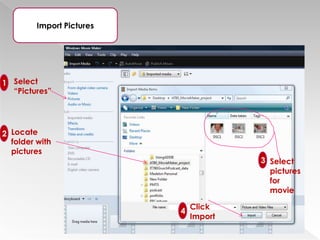
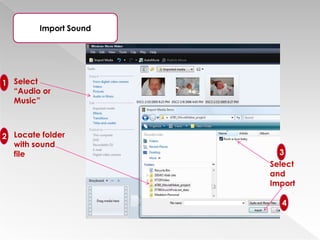
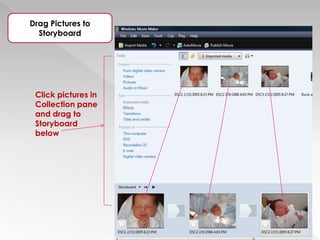
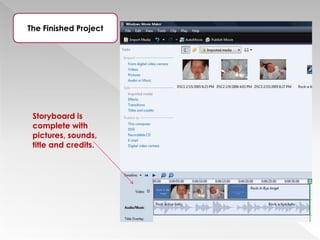
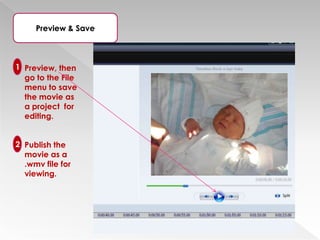
Creating a Movie in Movie Maker is as Easy as 1-2-3Design and Develop Content,  saving files in the designated “Movie” folder Import pictures, background music, etc. into Movie MakerCreate and arrange your “story” on the Storyboad; play the movie.
Windows Movie Maker Brief HistoryVideo creating/editing software
Included in Microsoft Windows
First version débuted in 2000
Packaged with some Windows versions
Free downloads with othersWindows Movie Maker LayoutConsists of storyboard view and a timeline view
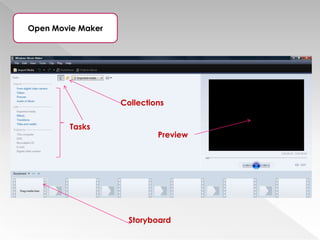
Imported content is organized in Collections
Storyboard view – project appears as film strip showing scene in clips
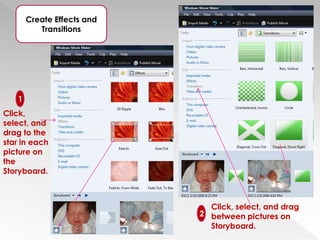
Storyboard/timeline – includes Video      bar, Music/Audio bar, Titles/Credits     barVideo effects and transitionsHow pictures are displayed
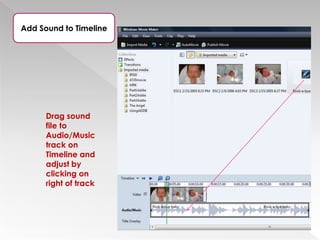
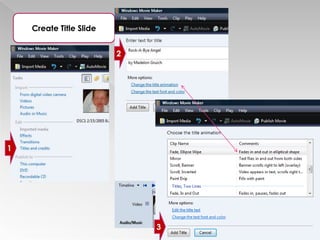
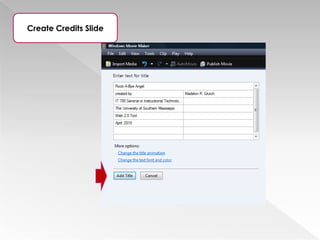
How one picture evolves into the next  (ex. fade in; fade out)Titles and creditsAt beginning and end of movieTitle animationOptions available to create animation for special effectsFormatting optionsText font, size, color, & background Background musicImport  & drop to Storyboard
Audio/Music trackNarration of movieMay be addedFeatures of Movie Maker
Windows Movie Maker ApplicationsPersonal use – share movies with family and friends
Business/Industry use – create presentations for many career-related topics
Educational use – by instructors and students to deliver content or create assignmentsWindows Movie Maker Things to RememberSimple to use
Yields professional results
Supports  a number of file formats
Creates movies by importing existing audio, video, or still pictures
Share by attaching to emails
Upload to the Web through SlideShareCreate a Movie!

Windows Movie Maker